

As 10 melhores ferramentas alternativas ao ProWorkflow para projetos em 2026

Lista das melhores alternativas ao ProWorkflow


O ProWorkflow é uma ferramenta de gestão de projetos que ajuda as equipas a gerir tarefas, monitorizar o tempo e colaborar de forma eficaz. No entanto, embora o software seja popular, pode não ser a escolha certa para a sua equipa por vários motivos.
Nesta análise, vamos explorar as principais alternativas ao ProWorkflow, comparando funcionalidades, preços e facilidade de utilização para o ajudar a tomar uma decisão informada. Quer esteja à procura de personalização avançada, de melhores ferramentas de colaboração ou de uma solução mais económica, estas alternativas oferecem opções diversificadas para diferentes fluxos de trabalho.
O que é o ProWorkflow?
ProWorkflow é um software de gestão de projetos e colaboração em tarefas concebido para ajudar as empresas a simplificar o planeamento de projetos, o controlo do tempo e a colaboração entre equipas. Oferece ferramentas para gerir tarefas, cronogramas e recursos, sendo ideal para agências, profissionais independentes e empresas que precisam de se manter organizadas e eficientes.
Why Trust Our Software Recommendations
Our team has been testing and reviewing software since 2012. As project managers ourselves, we know how difficult—and important—it is to choose the right software.
For this guide, we evaluated tools using hands-on testing and independent research, scoring tools using our selection criteria. We also draw on insights from industry thought leaders and practicing project management experts.
Our reviews reflect our human editorial judgment, not a sales pitch.
Expert reviewers:
Tabela de comparação das alternativas ao ProWorkflow
| Tool | Best For | Trial Info | Price | ||
|---|---|---|---|---|---|
| 1 | Best for project and resource management | 14-day free trial | From $17/user/month | Website | |
| 2 | Best for project collaboration | Free plan + 14-day trial + demo available | From $10/user/month (billed annually) | Website | |
| 3 | Best for free project and task management | Free plan available | From $3.99/user/month (billed annually) | Website | |
| 4 | Best for no-code workflow automation | Free plan + free demo available | Pricing upon request | Website | |
| 5 | Best for all-in-one productivity | Free plan available | From $12/user/month | Website | |
| 6 | Best for checklist and SOP management | 14-day free trial; free demo available | Pricing upon request | Website | |
| 7 | Best for integration and automation | 30-day free trial | From $99/month | Website | |
| 8 | Best for traditional and agile workflows | Free plan + free trial + free demo available | From $39/user/month | Website | |
| 9 | Best for open-source ERP and CRM | Free plan + free trial available | From $31.10/user/month (billed annually) | Website | |
| 10 | Best for connecting work to goals | Free plan available | From $10.99/user/month (billed annually) | Website |


Análises das melhores alternativas ao ProWorkflow
Nesta análise, vou explicar as vantagens e desvantagens de cada alternativa ao ProWorkflow. Abordarei as suas funcionalidades e os melhores casos de utilização para o ajudar a encontrar a ferramenta certa para as suas necessidades.

Scoro
Best for project and resource management
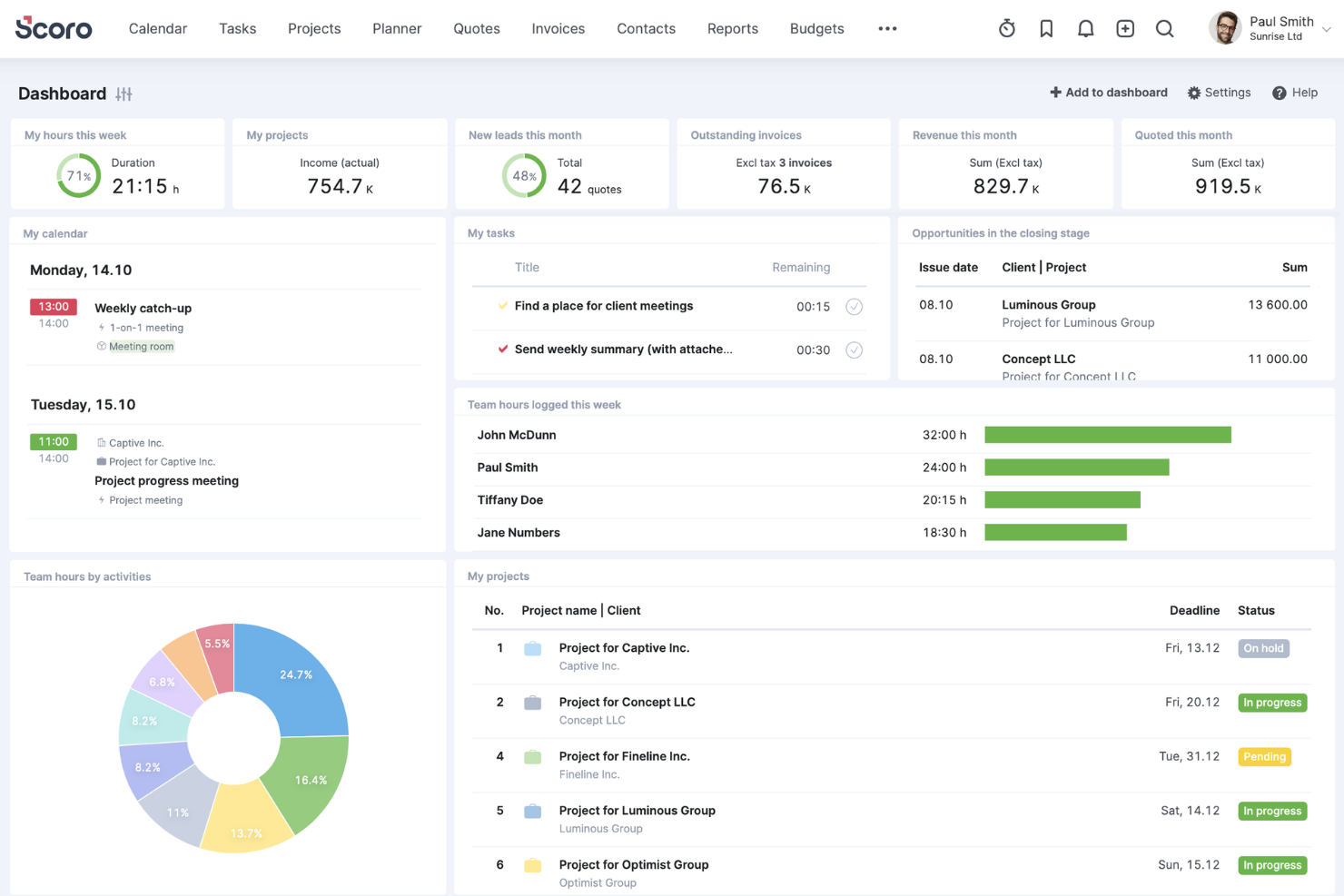
Scoro is a work management platform for professional services teams that connects project planning, time tracking, and business operations to help you coordinate delivery and keep work and finances visible.
Who Is Scoro Best For?
Scoro suits professional services teams that need to coordinate project delivery, staff capacity, time tracking, and financial operations in one workspace.
Why I Picked Scoro
Scoro earns my pick as a ProWorkflow alternative under “Best for project and resource management.” Its capacity view flags overloaded roles, while drag-and-drop scheduling helps rebalance assignments before deadlines slip. I also like that plan changes update task dependencies, and tracked time and costs connect delivery work to project budgets and margins.
Scoro Key Features
- Sales pipeline: Track opportunities as they move through your sales process.
- Client records: Store client details alongside related sales and project information.
- Estimates and quotes: Prepare estimates and quotes for proposed work.
- Client invoicing: Create and manage invoices for client work.
Scoro Integrations
Scoro’s integration marketplace lists connections with Jira, Slack, Google Calendar, Google Drive, Dropbox, Xero, QuickBooks, Sage Intacct, and HubSpot. Scoro also supports Zapier and provides an API for custom integrations.
Pros and Cons
Pros:
- Quotes, projects, and invoices share records
- Tracked time links delivery to project margins
- Real-time capacity planning prevents engineer overbooking
Cons:
- Custom management reports can take extra effort
- Mobile app handles timesheets better than tasks
New Product Updates from Scoro

Scoro Adds Time Mobile App and ELI Improvements
Scoro adds the Scoro Time mobile app for iOS/Android to track time anywhere and expands ELI with attachments, smarter filtering, and trigger-based actions. For more information, visit Scoro's official site.

Wrike
Best for project collaboration
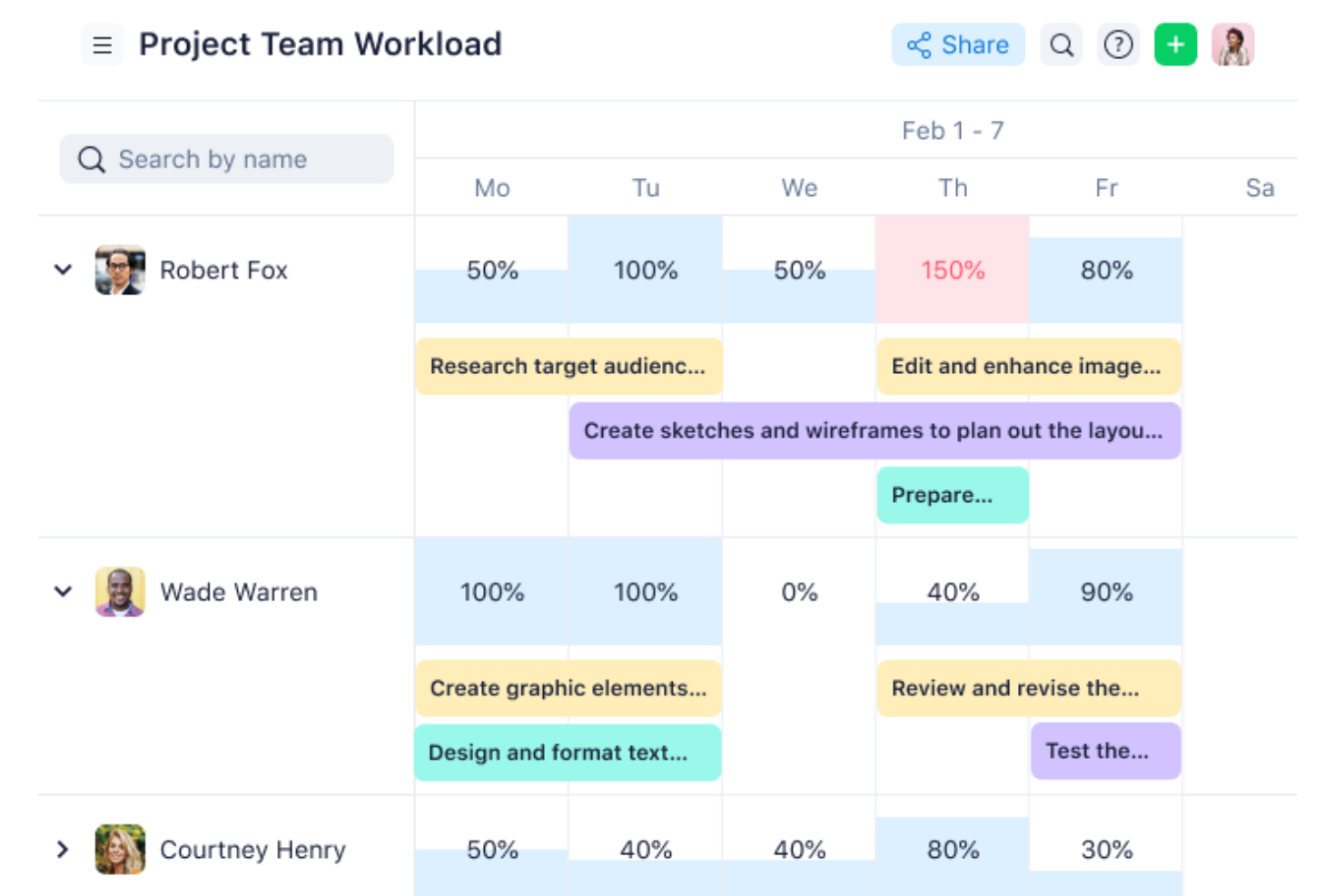
Wrike is a work management platform for cross-functional digital teams, bringing tasks, timelines, dependencies, and project discussions together to coordinate work as priorities change.
Who Is Wrike Best For?
Wrike suits project managers in tech and digital organizations who need to coordinate cross-functional contributors and keep project discussions connected to delivery work.
Why I Picked Wrike
I picked Wrike as a ProWorkflow alternative because its project collaboration keeps delivery details connected. I use tasks, timelines, and dependencies to coordinate cross-functional work, while project discussions stay linked to the work they concern. When priorities shift, that context helps my team adjust plans without losing track of handoffs.
Wrike Key Features
- Workflow automation: Set rules to trigger actions when work meets specified conditions.
- Time tracking: Log time against work items; available from the Business plan.
- Project budgeting: Track project budgets with Pinnacle.
- Integrations: Connect through 400+ pre-built native integrations, an open REST API, or Wrike Integrate.
Wrike Integrations
Wrike offers 400+ pre-built native integrations, including Salesforce, HubSpot, Bynder, Zoom, and Slack. It also provides an open REST API and Wrike Integrate.
Pros and Cons
Pros:
- Dashboards surface progress across workstreams
- Task discussions stay connected to delivery
- Dependencies clarify ownership across project handoffs
Cons:
- No native invoicing or billing
- Initial setup can feel complex
New Product Updates from Wrike
Wrike Expands Gantt Planning, Approvals, and AI Work Intake
Wrike adds cross-project Gantt dependencies, flexible approval routing, and AI work intake through Wrike MCP. These updates give teams more control over planning, decision-making, and incoming work. For more information, visit Wrike’s official site.

Plaky
Best for free project and task management
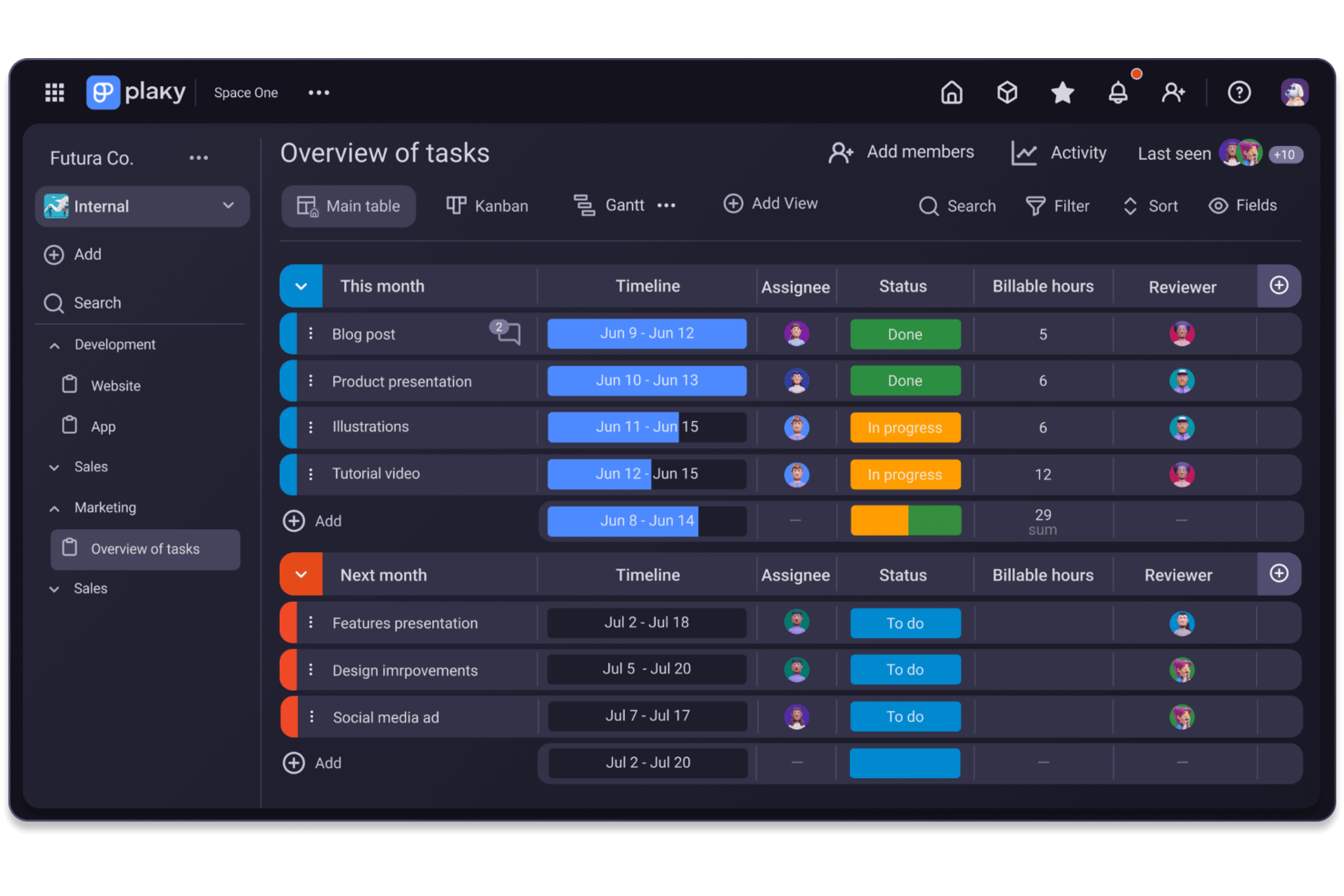
Plaky gives product and digital teams a board-based workspace to organize projects, assign tasks, and track progress, replacing scattered updates with a shared view of who’s doing what.
Who Is Plaky Best For?
Plaky suits small product and digital teams that need a free, shared workspace to assign tasks and track project progress.
Why I Picked Plaky
I picked Plaky as Best for free project and task management because its boards let me organize a product launch by task, owner, and status. I can add due dates and comments to tasks, keeping handoffs and progress visible without a more elaborate workflow setup.
Plaky Key Features
- Board automations: Trigger actions when board changes occur, add conditions, or schedule recurring tasks.
- Gantt view: Map tasks on a timeline and adjust them with drag-and-drop. Available on Pro and Enterprise.
- Dashboards: Combine data from multiple boards in one dashboard.
- Clockify integration: Track time on Plaky items and record billable project hours.
Plaky Integrations
Plaky has native integrations with Clockify for time tracking and Pumble for creating tasks and receiving project notifications. It also offers an API for custom integrations.
Pros and Cons
Pros:
- Unlimited collaborators support broad project participation
- Custom fields organize tasks around team workflows
- Boards make task status easy to scan
Cons:
- Reporting offers limited detail for project oversight
- No built-in time tracking for logged hours

Pipefy
Best for no-code workflow automation
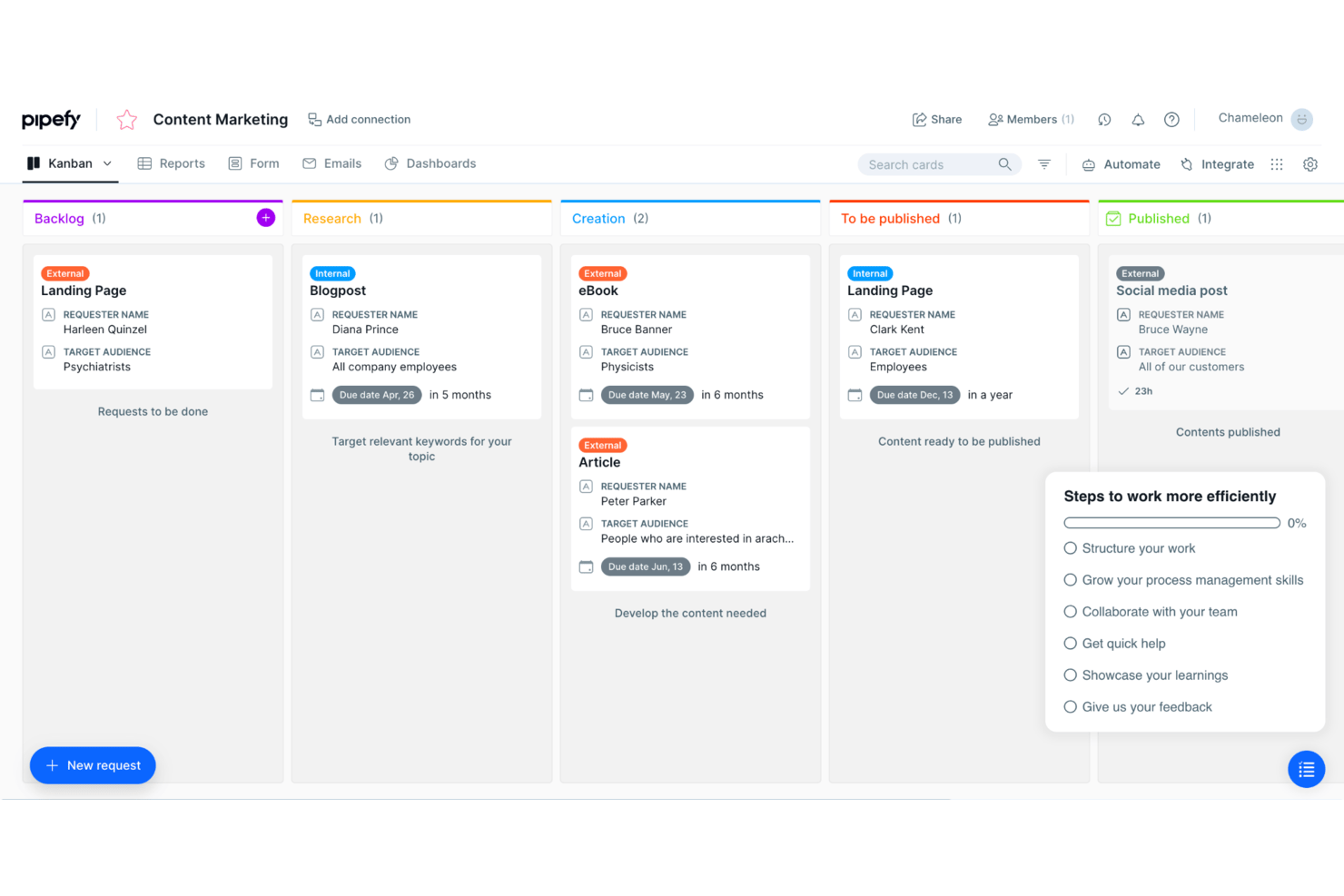
Pipefy gives operations, IT, and project teams a process management platform to organize requests, handoffs, and approvals in one place, improving visibility when work spans departments.
Who Is Pipefy Best For?
Pipefy suits business operations teams that need to build and adjust automated workflows without relying on developers.
Why I Picked Pipefy
I pick Pipefy as a ProWorkflow alternative because it’s Best for no-code workflow automation. I use its forms to capture requests, then organize work into configurable pipe phases with rules that assign tasks or route approvals. That fits processes like triaging IT requests without building a custom system.
Pipefy Key Features
- Self-service portals: Let employees or customers submit and track service requests.
- SLA tracking: Set deadlines and monitor process response times.
- Dashboards and reports: View process data and performance metrics.
- Integrations: Connect Pipefy with business systems through its Integration Hub.
Pipefy Integrations
Pipefy lists four native integrations: Slack, GitHub, Bitbucket, and Google Hangouts. It also supports Zapier, HTTP requests, API access, and custom integrations.
Pros and Cons
Pros:
- SLA tracking clarifies process response deadlines
- Automated handoffs reduce manual request tracking
- No-code forms route requests and approvals
Cons:
- Custom reporting requires extra configuration
- Fixed stages constrain shifting project workflows

ClickUp
Best for all-in-one productivity
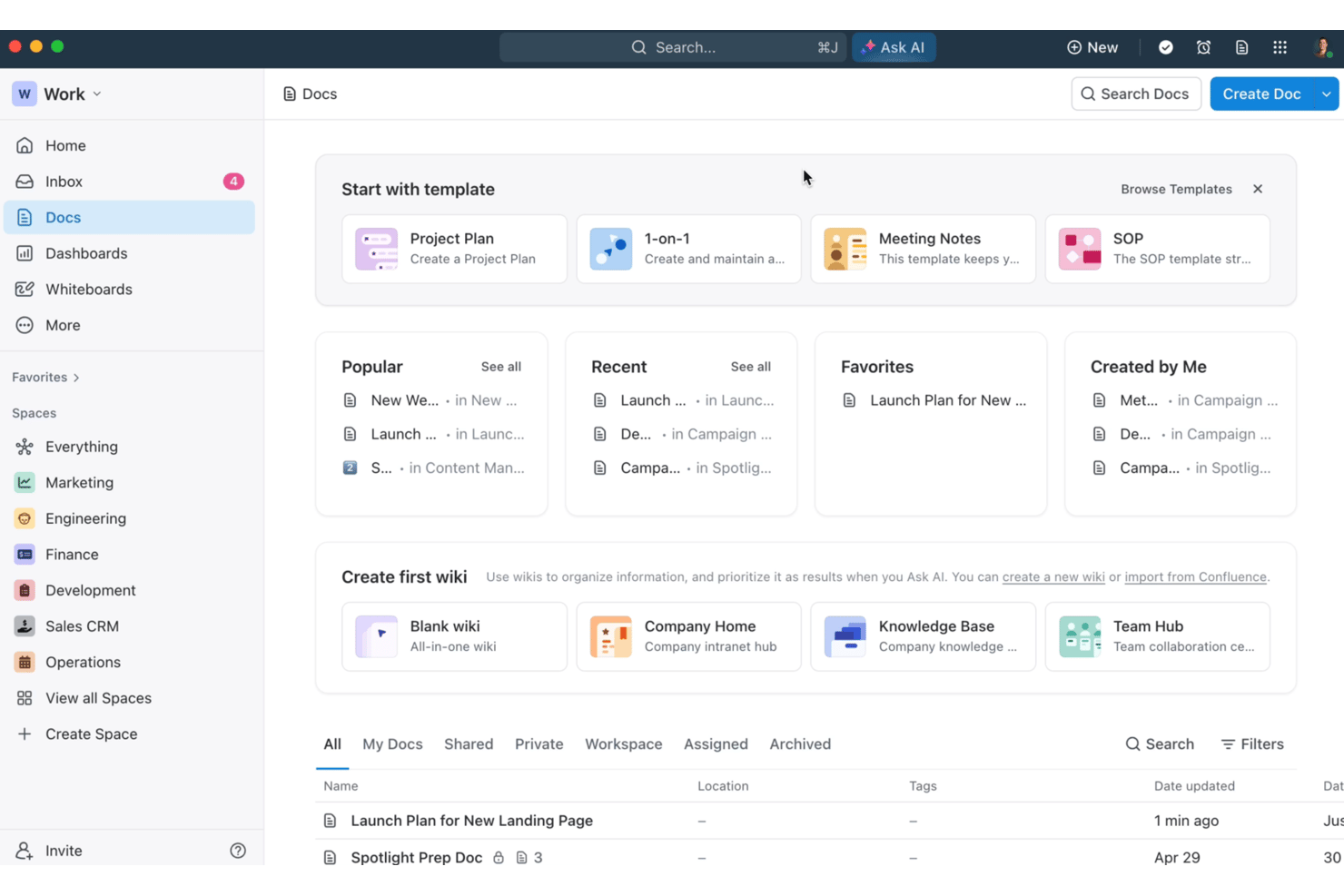
ClickUp is a work management platform for product, engineering, and operations teams that connects tasks, documents, goals, and communication to reduce tool switching and keep cross-functional projects visible.
Who Is ClickUp Best For?
Project managers coordinating product, engineering, and operations work can plan and track cross-functional delivery in ClickUp’s shared workspace.
Why I Picked ClickUp
I picked ClickUp as a ProWorkflow alternative because it fits “Best for all-in-one productivity.” I like how its task automations can update statuses or assign work when a task changes, while Docs keep decisions beside delivery tasks. My team can use both to coordinate a product launch without splitting action items and project notes across tools.
ClickUp Key Features
- Multiple views: Switch between List, Board, Calendar, and Gantt views.
- Custom fields: Add project-specific data to tasks, such as priority or effort.
- Dashboards: Build reports from cards that track project metrics and workload.
- Time tracking: Record time on tasks and review timesheets.
ClickUp Integrations
ClickUp offers native integrations with Slack, GitHub, GitLab, Bitbucket, Google Drive, Google Calendar, Microsoft Teams, Figma, and Zoom, and connects with Zapier. It also provides a public API for custom integrations.
Pros and Cons
Pros:
- Automations update statuses after task changes
- Dashboards show workload across project views
- Tasks, Docs, and goals share one workspace
Cons:
- Large lists can lag during updates
- Space and folder setup takes planning

Best for checklist and SOP management
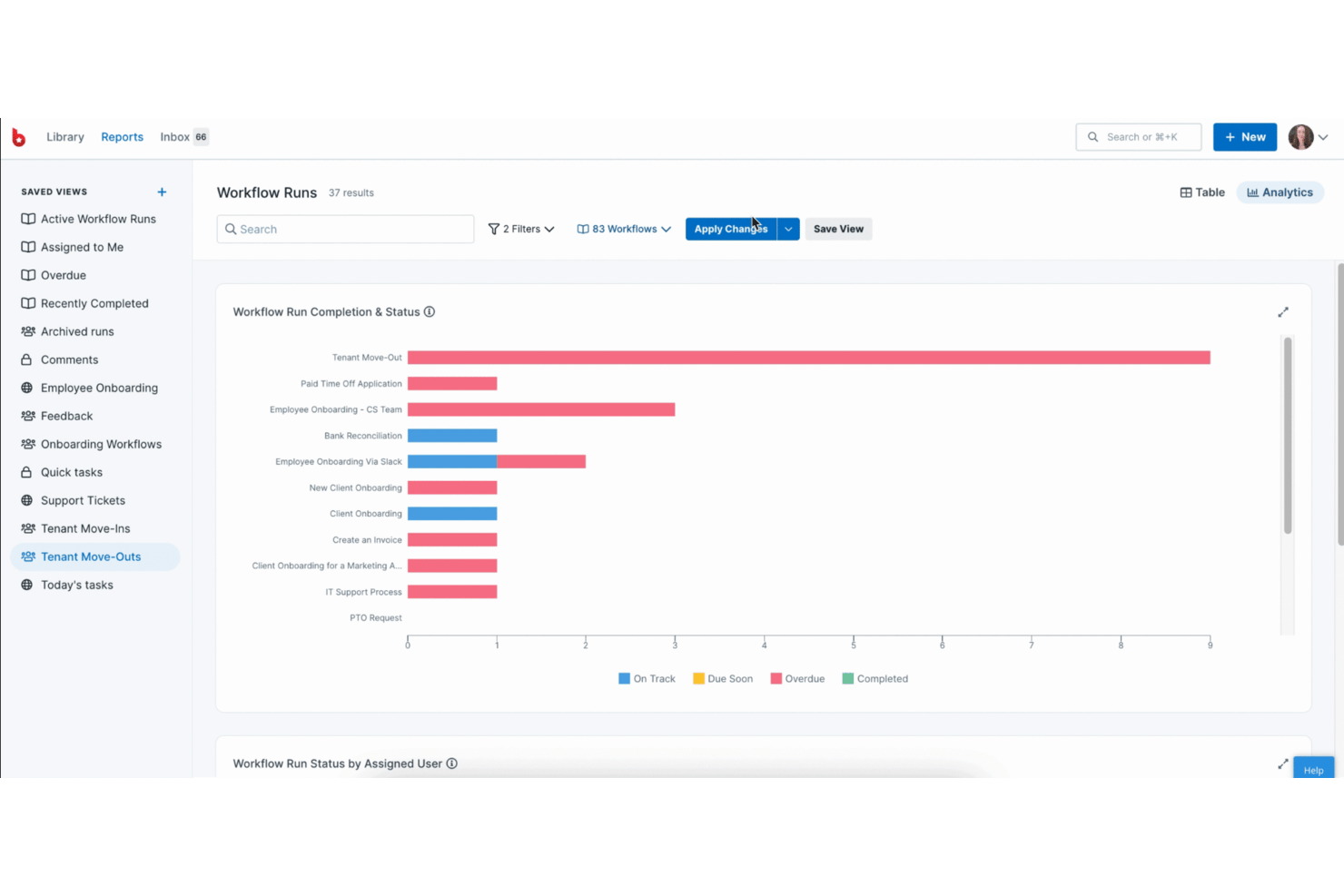
Process Street helps operations and project teams turn recurring work into trackable workflows, coordinate handoffs, and keep execution consistent across teams; it is Best for checklist and SOP management.
Who Is Process Street Best For?
Process Street suits operations managers who need to document standard procedures and assign recurring checklists across teams.
Why I Picked Process Street
I picked Process Street as a ProWorkflow alternative because it is Best for checklist and SOP management. I like its recurring workflow checklists, task assignments, and approval steps for turning a release SOP into trackable handoffs, with conditional logic to show only the steps that apply.
Process Street Key Features
- Custom forms: Build branded forms, surveys, and quizzes to collect structured information.
- Data Sets: Store reusable records and use saved views, linked dropdowns, and auto-fill.
- App integrations: Connect tools such as Slack, Jira, Salesforce, and Google Sheets.
- SOP pages: Create and share documentation with permissions and change tracking.
Process Street Integrations
Process Street offers native automations with Google Sheets, Slack, DocuSign, Salesforce, and Jira. It also provides an API and webhooks for custom integrations, plus Zapier.
Pros and Cons
Pros:
- Recurring SOPs reduce missed handoffs
- Approvals document ownership and audit trails
- Conditional checklists adapt to changing requirements
Cons:
- Task reassignment and deadline controls feel rigid
- Reporting offers limited sorting and grouping

Boomi
Best for integration and automation
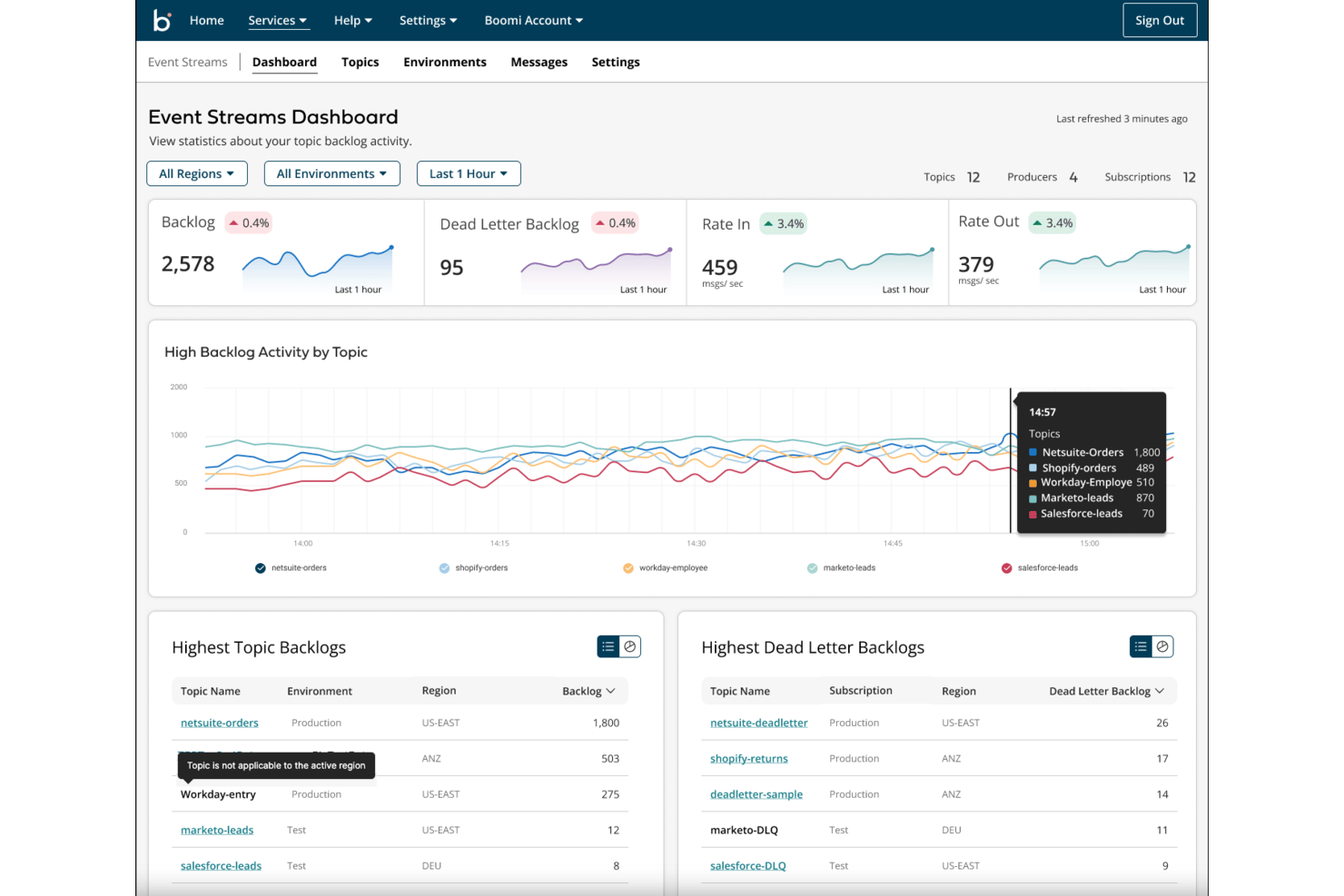
Boomi is a cloud-based integration platform that helps IT and operations teams connect applications, data, and processes to reduce manual handoffs and coordinate work across systems.
Who Is Boomi Best For?
Boomi fits integration architects and IT teams coordinating data flows and automating processes across complex application ecosystems.
Why I Picked Boomi
I picked Boomi as a ProWorkflow alternative for its focus on integration and automation across business systems, rather than project tracking alone. I like its visual, low-code integration design and 1,500+ prebuilt connectors; for example, a team can sync Shopify orders with NetSuite finance records and trigger downstream processes. AI-guided mapping helps translate fields between those systems.
Boomi Key Features
- Master data hub: Creates verified golden records with matching and validation rules.
- Event delivery modes: Supports FIFO, publish-subscribe, REST API, and queuing.
- API lifecycle controls: Lets teams catalog, secure, govern, and monitor APIs.
- B2B/EDI management: Manages electronic data interchange with trading partners.
Boomi Integrations
Boomi offers 1,000+ prebuilt connectors for systems including NetSuite, Salesforce, SAP, Amazon, and Google Sheets. You can build custom connectors with the Connector SDK or OpenAPI support.
Pros and Cons
Pros:
- Hybrid deployment supports cloud and on-premises execution
- Reusable components reduce duplicated workflow logic
- Visual low-code flows automate repeatable processes
Cons:
- Complex flows complicate debugging and log review
- No native project plans or task tracking

Ravetree
Best for traditional and agile workflows
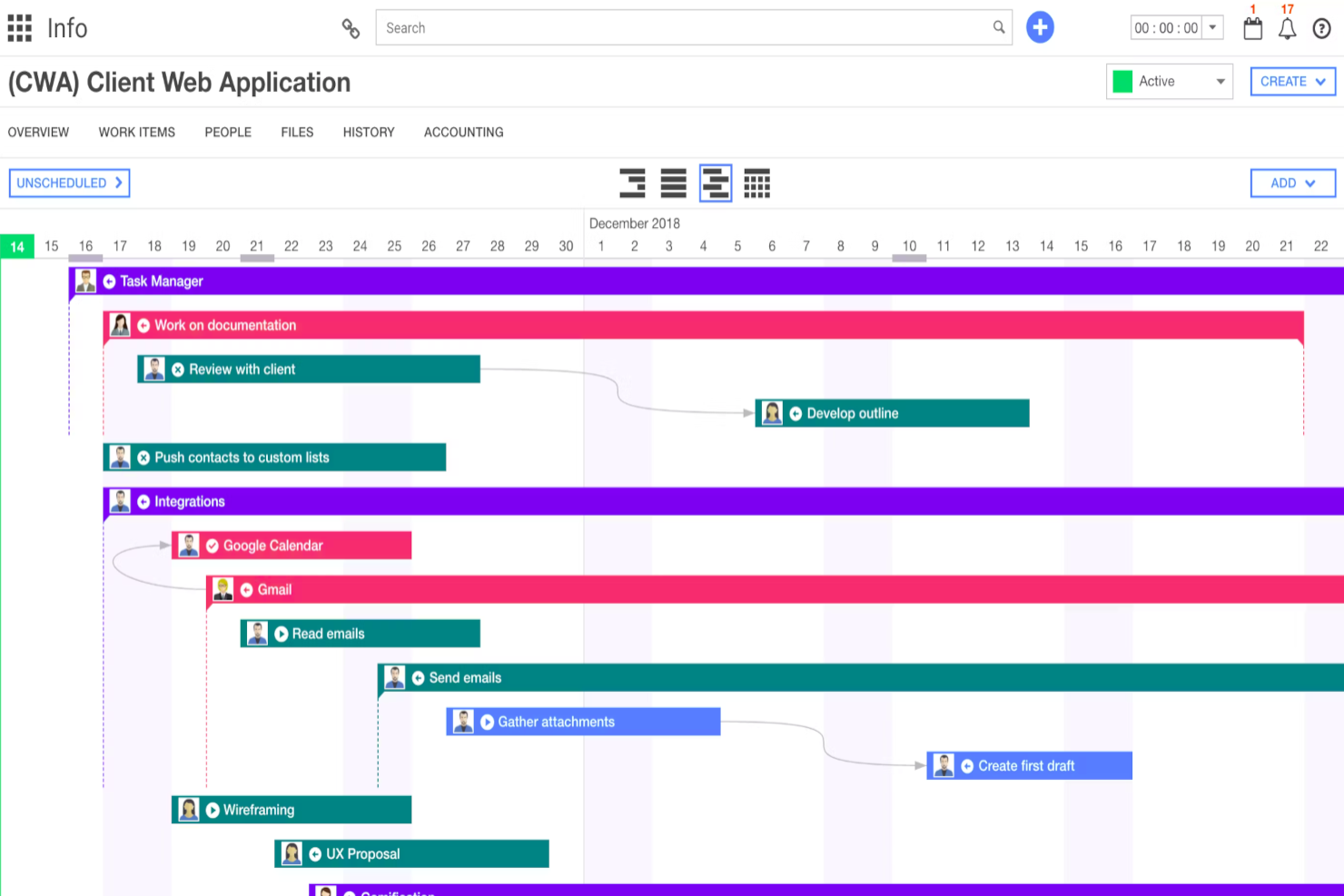
Ravetree is a work management platform for project-based teams that brings project plans, tasks, and collaboration together, helping you coordinate delivery and keep work visible across teams.
Who Is Ravetree Best For?
Ravetree suits project managers who need to coordinate teams across traditional project plans and agile workflows.
Why I Picked Ravetree
I picked Ravetree as a ProWorkflow alternative because it supports traditional plans and agile delivery. Gantt charts map dependencies and timelines, while Kanban boards and customizable sprints organize epics and user stories. That combination fits its “Best for traditional and agile workflows” distinction.
Ravetree Key Features
- Time tracking: Log and edit hours against projects, tasks, clients, and retainers.
- Resource planning: View team capacity and assign unscheduled tasks by person or work role.
- Request forms and approvals: Create custom request forms and route submissions through approval steps.
- Client portals: Let clients view project updates, submit requests, and approve files.
Ravetree Integrations
Ravetree lists 15 integrations, including Google Drive, Google Calendar, Outlook Calendar, Gmail, Exchange, QuickBooks, Xero, HubSpot, Dropbox, Box, Stripe, and GitHub. It also offers an Open API for custom integrations.
Pros and Cons
Pros:
- Shares progress and files through client portals
- Links time tracking with project budgets
- Combines agile boards with Gantt dependencies
Cons:
- Project-to-work-item transitions can confuse organization
- Dated interface can feel behind competitors

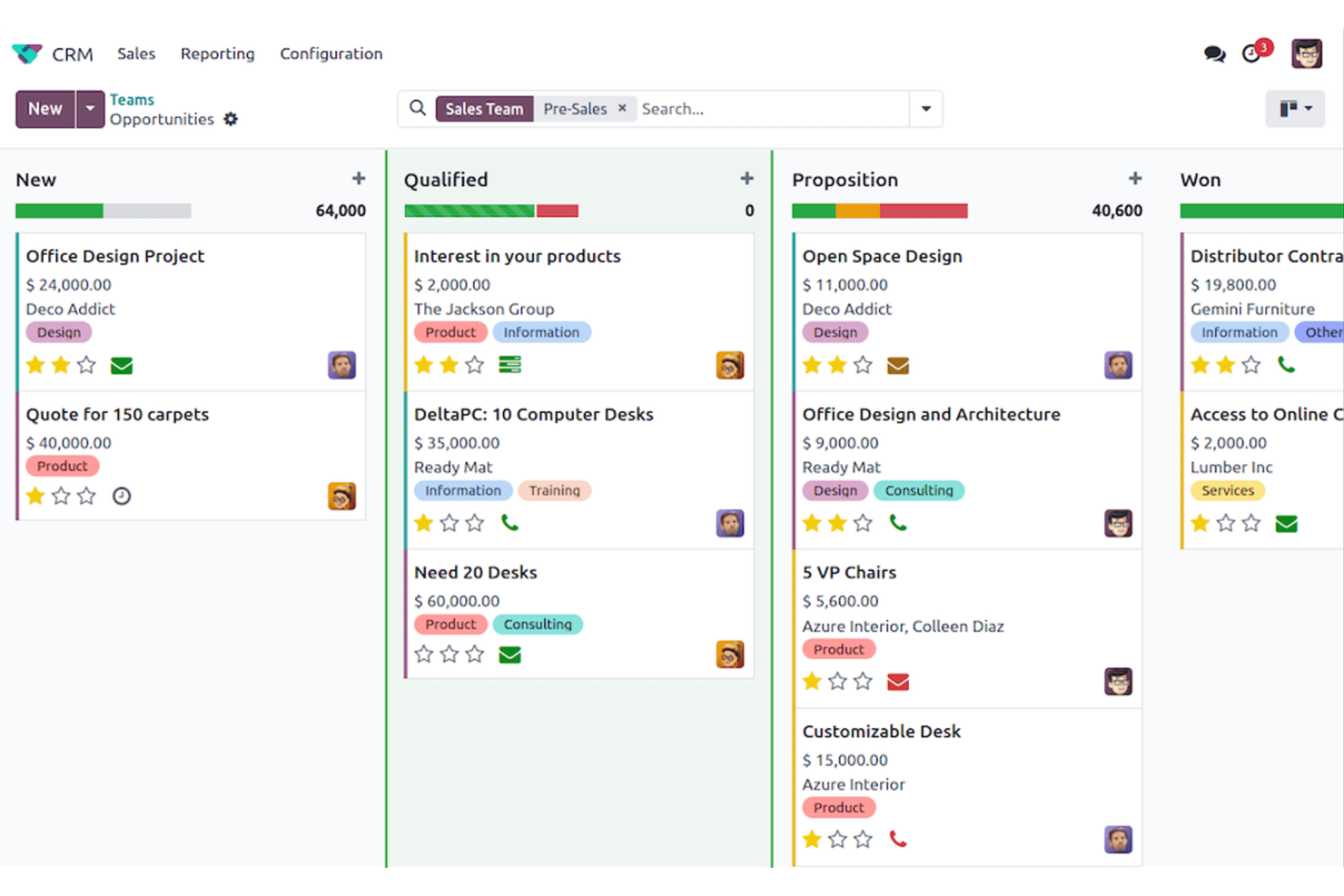
Odoo brings sales, inventory, accounting, and project apps into one platform, helping growing teams connect workflows and reduce handoffs across departments.
Who Is Odoo Best For?
Odoo suits operations and finance teams at growing businesses that want an open-source ERP and CRM to manage core business processes.
Why I Picked Odoo
I picked Odoo as a ProWorkflow alternative because its open-source ERP and CRM connect sales work with operations. CRM opportunities can move into sales orders, while inventory and accounting apps support fulfillment and invoicing. I like this setup when project teams need sales commitments and operational records to stay aligned.
Odoo Key Features
- Automation rules: Trigger actions when records change or meet specified conditions.
- Studio customization: Add fields and adjust app views without writing code.
- Approval requests: Set required approvers, track request stages, and attach supporting documents.
- Timesheets: Log and validate working time across projects and employees.
Odoo Integrations
Odoo supports two-way calendar sync with Google Calendar and Microsoft Outlook Calendar, plus a Gmail plugin. It also offers an external API for custom integrations on the Custom plan.
Pros and Cons
Pros:
- Modular open-source apps cover broader business operations
- Carries sales commitments into operational workflows
- Tracks project hours against costs and profitability
Cons:
- Workflow setup can require technical expertise
- Project planning trails dedicated project management tools
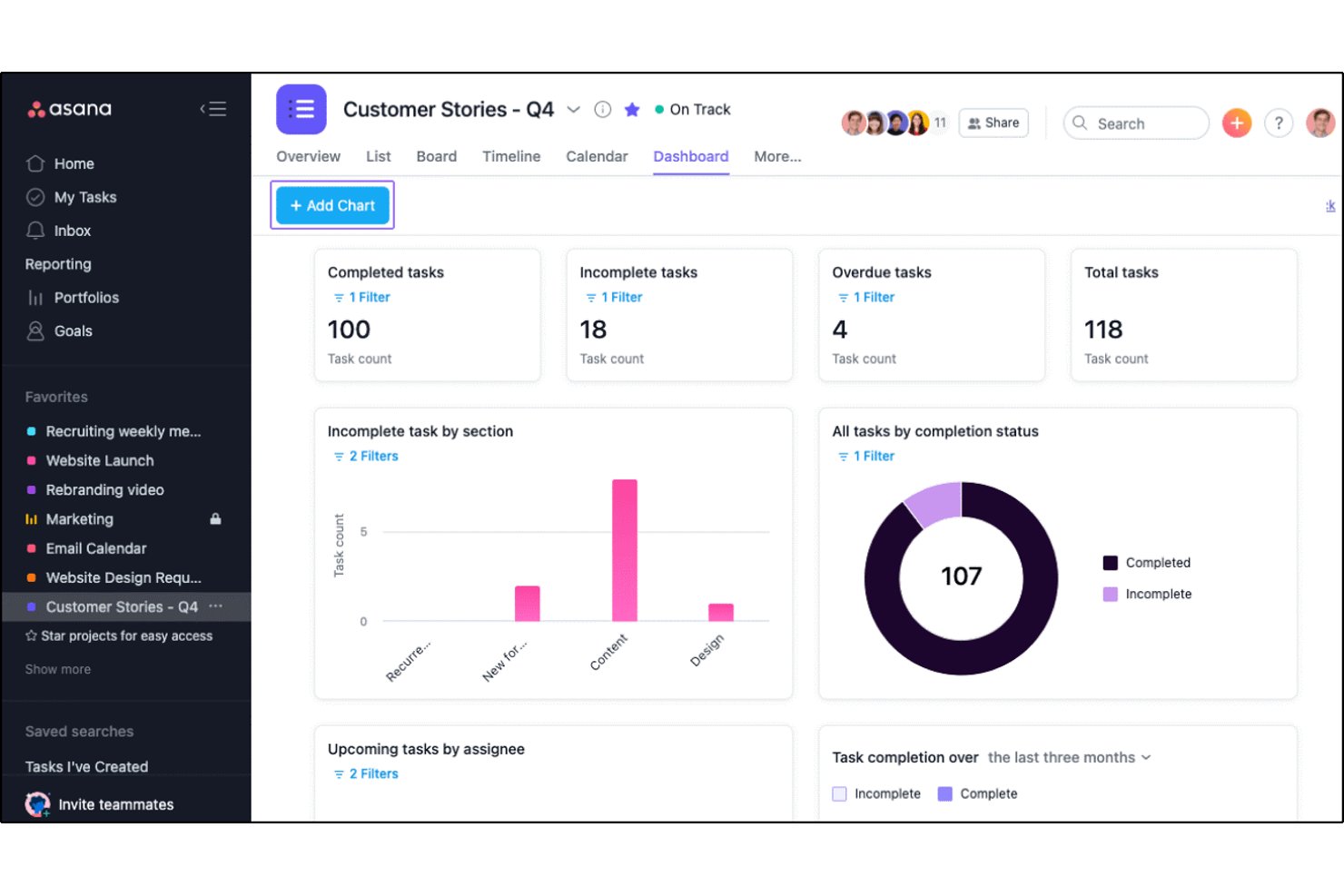
For product, engineering, and marketing teams replacing spreadsheet-led coordination, Asana is a work management platform for organizing projects, assigning tasks, and automating routine handoffs.
Who Is Asana Best For?
Asana suits project and operations leaders who need to connect cross-functional workstreams with company objectives.
Why I Picked Asana
As a ProWorkflow alternative, I picked Asana for how its goals connect company objectives to the projects and tasks meant to advance them, so I can trace a product launch from execution to outcome. Portfolios roll up project status, while rules can automate routine task handoffs when work changes state.
Asana Key Features
- Project views: Switch between list, board, timeline, and calendar layouts.
- Forms: Collect project requests with forms that create tasks in a project.
- Custom fields: Add structured details such as priority, status, or effort to tasks.
- Workload view: Review task assignments across a team to see who has capacity.
Asana Integrations
Asana lists integrations with Slack, Microsoft Teams, Google Drive, Jira Cloud, GitHub, GitLab, Azure DevOps, and Google Sheets. It connects with Zapier and provides an API for custom integrations.
Pros and Cons
Pros:
- Forms and rules organize repeatable project intake
- Portfolios surface status across multiple projects
- Links project work directly to company goals
Cons:
- Complex workspaces demand ongoing admin setup
- Advanced reporting needs consistent task data
Outras alternativas ao ProWorkflow
Segue-se uma lista de alternativas adicionais ao ProWorkflow que selecionei. Embora não tenham entrado nas 10 principais, continuam a ser opções valiosas que merecem uma pesquisa mais aprofundada.


How I Evaluate ProWorkflow Alternatives
I look at two layers: baseline criteria—does the tool handle client projects, time tracking, and invoicing?—and differentiators that separate good options from the right fit for your team.
Core Functionality (Table Stakes For This List)
When I'm selecting tools for my list, I rank each one on a scale from 0 (does not offer the functionality) to 5 (excels in this area) for each core functionality listed below. Then, I calculate the tool's total score into a percentage. Each tool needs to achieve a minimum total score of 65% to be considered for inclusion.
- Project & Task Management: I evaluate how each tool structures projects, tasks, subtasks, and dependencies—like mapping a multi-phase website redesign with handoffs between design and dev.
- Time Tracking: Each tool's ability to log billable and non-billable hours at the task level matters, whether through built-in timers or manual entry tied to specific client work.
- Client & Contact Management: I check whether client records are linked directly to their projects and contacts, so your team can pull up a full account history without switching tools.
- Team Collaboration: Tools earn higher marks when comments, file sharing, and @mentions live inside the project context rather than requiring a jump to email or a separate chat app.
- Reporting & Dashboards: I look at whether you can build reports across project status, team workload, and logged hours—the kind of views an operations manager needs for a weekly leadership update.
- Invoicing & Quoting: Converting tracked hours into a client invoice inside the same platform is a key ProWorkflow workflow, so I evaluate whether alternatives offer native quoting and billing or strong accounting integrations.
Once I have a list of tools that meet this criteria, I consider what sets each platform apart.
Differentiating Factors (What Sets Vendors Apart)
Here's how I compare and contrast different vendors:
Standout Features
A client portal can change how your agency shares progress with stakeholders—giving clients direct visibility into timelines and deliverables without endless status update emails. Budget tracking is another differentiator I look at closely, especially when it ties estimated hours to actuals so you can spot margin erosion mid-project. I also evaluate automation capabilities, like auto-assigning tasks when a project phase shifts or triggering notifications when time entries exceed a budget threshold.
Beyond Features
Integrations matter a lot when you're switching from ProWorkflow—your team likely relies on QuickBooks or Xero for billing, and Slack or Microsoft Teams for communication. I check whether each tool connects natively or requires a Zapier workaround. Pricing transparency is another factor I evaluate, particularly whether per-seat costs stay predictable as your team scales from five to fifty. I also consider onboarding support, since migrating active client projects, contacts, and time data mid-engagement is one of the riskiest parts of switching platforms.
Por que motivo procurar uma alternativa ao ProWorkflow?
Embora o ProWorkflow seja uma ferramenta valiosa, existem muitos motivos pelos quais poderá começar a procurar uma solução alternativa, incluindo:
- Custo: Se os preços do ProWorkflow não estiverem de acordo com o seu orçamento, poderá precisar de uma alternativa mais económica sem comprometer as funcionalidades essenciais. Escolher uma solução económica pode ajudá-lo a gerir as despesas e, simultaneamente, a satisfazer as suas necessidades de gestão de projetos.
- Interface do utilizador: Por vezes, a interface do utilizador de um software pode parecer complexa ou pouco prática. Se for esse o caso do ProWorkflow, uma plataforma mais fácil de utilizar poderá aumentar a produtividade e reduzir a curva de aprendizagem da sua equipa.
- Personalização: O ProWorkflow poderá não oferecer o nível de personalização exigido pelo seu fluxo de trabalho específico. Consequentemente, poderá precisar de uma ferramenta que permita uma maior flexibilidade para adaptar as funcionalidades aos seus processos específicos.
- Integração: Se depender de outras ferramentas que não se integrem facilmente com o ProWorkflow, poderá precisar de uma alternativa com melhores capacidades de integração. Uma compatibilidade eficiente entre softwares pode poupar tempo e melhorar a eficiência geral da equipa.
- Assistência ao cliente: Se a assistência ao cliente do ProWorkflow não corresponder às suas expectativas, poderá estar à procura de uma alternativa com um apoio mais rápido e especializado. Uma melhor assistência ao cliente pode garantir que quaisquer problemas sejam resolvidos de forma rápida e eficaz.
As alternativas ao ProWorkflow podem oferecer preços mais acessíveis, uma experiência de utilização mais intuitiva, maior personalização, melhores capacidades de integração e um apoio ao cliente superior. Estas alternativas podem alinhar-se melhor com as suas necessidades e preferências específicas, garantindo uma experiência de gestão de projetos mais eficiente e satisfatória.
Principais funcionalidades das alternativas ao ProWorkflow
Eis algumas das principais funcionalidades do ProWorkflow que o seu software alternativo deve conseguir replicar ou melhorar para ser uma boa escolha.
- Gestão de projetos: Mantenha a sua equipa e toda a empresa no caminho certo e dentro do orçamento, com todos os detalhes dos seus projetos, comunicações, ficheiros e faturação no mesmo local.
- Gestão de tarefas: Simplifique a sua lista de afazeres e melhore a funcionalidade das tarefas com permissões de utilizador e gestão visual de tarefas.
- Trabalho remoto: Obtenha resultados poderosos ao trabalhar a partir de casa, mantendo-se no caminho certo, comunicando e colaborando de forma eficaz.
- Registo de tempo: Registe o tempo gasto em tarefas e projetos para garantir uma faturação precisa e uma análise da produtividade.
- Gestor de faturas: Gira a faturação dos clientes de forma eficiente com ferramentas integradas para criar e enviar faturas.
- Gestor de orçamentos: Crie e gira orçamentos para clientes diretamente na plataforma.
- Relatórios: Aceda a informações avançadas sobre carga de trabalho, desempenho e métricas essenciais abrangendo projetos, tarefas, tempo, equipa e clientes.
- Gestão de recursos: Distribua e gira os recursos de forma eficaz para garantir o sucesso dos projetos.
- Segurança dos dados: Garanta a segurança dos seus dados através de medidas robustas de proteção de dados.
- Integrações: Ligue-se às ferramentas que já utiliza, desde software de contabilidade (também pode utilizar software de gestão de projetos para contabilistas) até à gestão e ao armazenamento de documentos, ou ligue qualquer fluxo de trabalho ao Zapier.