10 Melhores Concorrentes e Alternativas ao ClickUp: Analisados em 2026

10 Melhores alternativas ao ClickUp — lista restrita


As melhores alternativas ao ClickUp oferecem interfaces mais simples, um desempenho mais previsível e uma configuração mais fácil — além de preços que muitas vezes se adaptam melhor a equipas que não precisam de todas as funcionalidades do ClickUp. Quer esteja à procura de tempos de carregamento mais rápidos, de um melhor controlo do tempo ou de painéis mais intuitivos, é provável que exista uma solução mais adequada para a sua equipa.
O ClickUp oferece uma vasta gama de funcionalidades, mas, para alguns utilizadores, a complexidade torna-se mais um obstáculo do que uma ajuda. Se está a lidar com um desempenho lento, uma curva de aprendizagem acentuada ou ferramentas que a sua equipa não utiliza, mudar para uma plataforma mais focada pode melhorar a produtividade e reduzir os obstáculos.
Tenho passado os últimos anos a testar e analisar ferramentas de gestão de projetos, incluindo o ClickUp e dezenas dos seus concorrentes. Neste guia, analiso as melhores alternativas ao ClickUp disponíveis atualmente — destacando os pontos fortes de cada plataforma, as diferenças entre elas e os tipos de equipas para os quais são mais adequadas.
Why Trust Our Software Recommendations
Our team has been testing and reviewing software since 2012. As project managers ourselves, we know how difficult—and important—it is to choose the right software.
For this guide, we evaluated tools using hands-on testing and independent research, scoring tools using our selection criteria. We also draw on insights from industry thought leaders and practicing project management experts.
Our reviews reflect our human editorial judgment, not a sales pitch.
Expert reviewers:
O que são alternativas ao ClickUp?
As alternativas ao ClickUp são ferramentas de gestão de projetos que oferecem funcionalidades semelhantes para acompanhar tarefas, colaborar em equipa e gerir fluxos de trabalho.
Estas ferramentas são utilizadas por equipas que procuram modelos de preços diferentes, interfaces mais simples ou funcionalidades específicas que correspondam melhor às suas necessidades. Muitas alternativas oferecem vistas personalizáveis, integrações e automatização — ajudando as empresas a gerir projetos de forma mais eficiente e a crescer com facilidade.
Tabela de comparação das alternativas ao ClickUp
Eis uma tabela onde pode comparar as ferramentas que acabámos de abordar nas sínteses.
| Tool | Best For | Trial Info | Price | ||
|---|---|---|---|---|---|
| 1 | Best for agile design and marketing teams | Free plan + 14-day trial + demo available | From $10/user/month (billed annually) | Website | |
| 2 | Best for quick setup and easy onboarding | Free plan + 14-day free trial + free demo available | From $9/user/month (billed annually) | Website | |
| 3 | Best for enterprise marketing & creative ops | Free demo available | Pricing upon request | Website | |
| 4 | Best for drag-and-drop automation | Free plan + 15-day trial + demo available | From $4/user/month (billed annually) | Website | |
| 5 | Best for deeply nested task hierarchies | Free plan + 30-day free trial available | From $7.65/user/month (billed annually) | Website | |
| 6 | Best for client management tools | 14-day free trial | From $10/user/month (billed annually) | Website | |
| 7 | Best for agile and large-scale team delivery | Free plan + 7-day free trial available | From $8.48/user/month | Website | |
| 8 | Best for extensive customization options | Free plan available | From $4/user/month (billed annually) | Website | |
| 9 | Best for full project lifecycle delivery | Not available | Pricing upon request | Website | |
| 10 | Best for flexibility and customization | Free plan + 14-day free trial + free demo available | From $8/user/month (billed annually) | Website |


As 10 melhores alternativas ao ClickUp comparadas
Nesta síntese, analisamos as vantagens e desvantagens, os preços, as informações sobre testes e a opinião de especialistas para cada uma das ferramentas. Também comparamos cada solução com o ClickUp, para que possa perceber se é uma escolha melhor para os membros da sua equipa e para as necessidades específicas dos seus projetos.

Wrike
Best for agile design and marketing teams
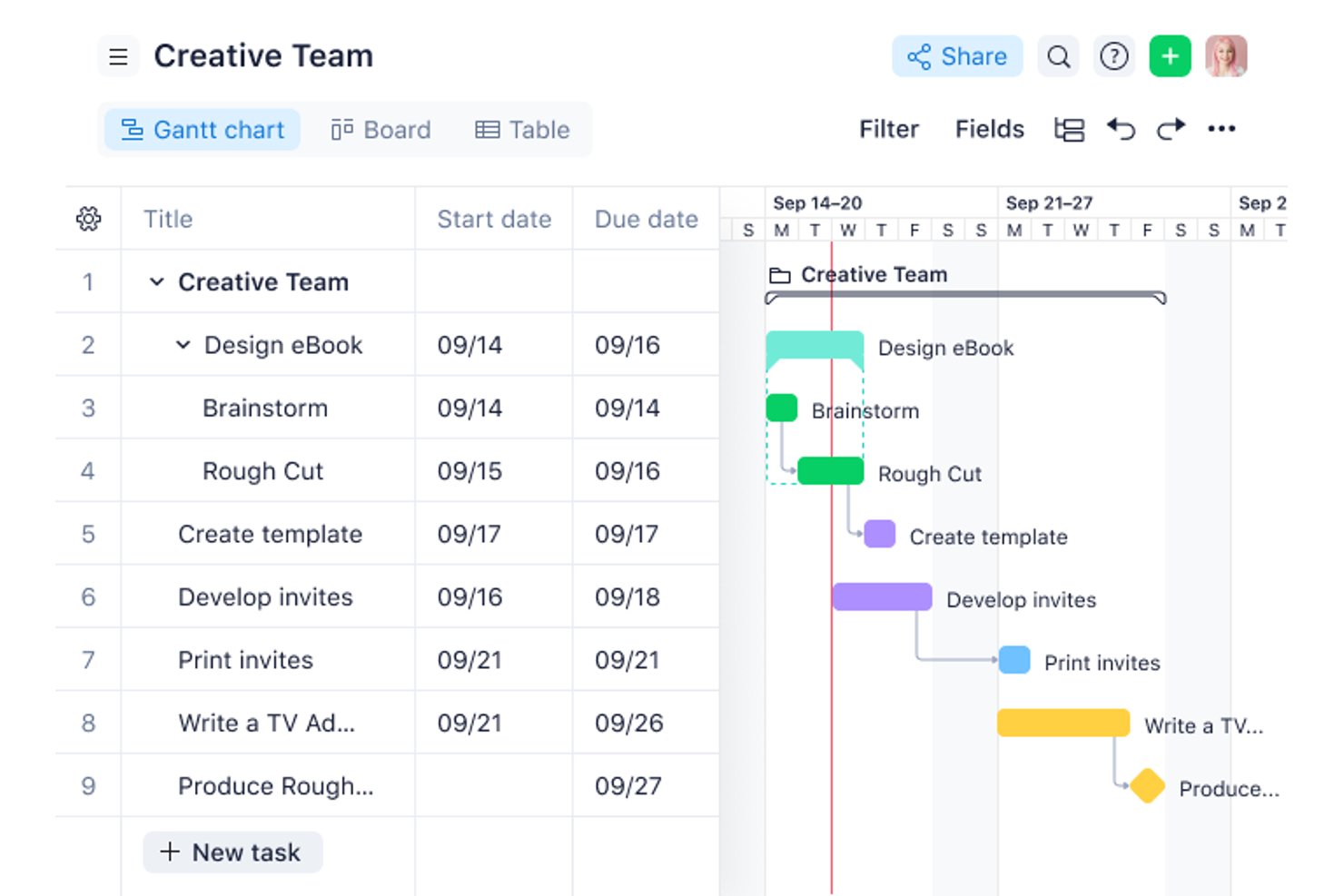
Wrike is project management software that helps product, design, and marketing teams coordinate tasks, manage timelines, and keep cross-functional work visible as priorities shift.
Who Is Wrike Best For?
Wrike is a good fit for design and marketing teams managing iterative campaigns, creative reviews, and frequent changes to delivery plans.
Why I Picked Wrike
I picked Wrike as Best for agile design and marketing teams because proofing lets reviewers annotate creative files and keep feedback tied to the work. Request forms turn campaign briefs into trackable tasks, giving teams a clear path from intake through review.
Wrike Key Features
- Gantt charts: Map project timelines, task dependencies, and milestones on a visual schedule.
- Dashboards: Create views of project tasks, status, and metrics using customizable widgets.
- Workload charts: View team members’ assigned work to assess capacity across projects.
- Time tracking: Log time against tasks and review recorded hours in timesheets.
Wrike Integrations
Wrike’s integrations directory lists 60 options, including Slack, Salesforce, Microsoft Teams, Office 365, Google Sheets, Google Drive, and Miro. It also supports Zapier and offers a REST API for custom integrations.
Pros and Cons
Pros:
- Forms turn briefs into trackable tasks
- Linked task dependencies recalculate downstream dates
- Proofing keeps creative feedback tied to files
Cons:
- Mobile performance can lag on large projects
- Complex permissions make access harder to manage
New Product Updates from Wrike
Wrike Expands Gantt Planning, Approvals, and AI Work Intake
Wrike adds cross-project Gantt dependencies, flexible approval routing, and AI work intake through Wrike MCP. These updates give teams more control over planning, decision-making, and incoming work. For more information, visit Wrike’s official site.

Best for quick setup and easy onboarding
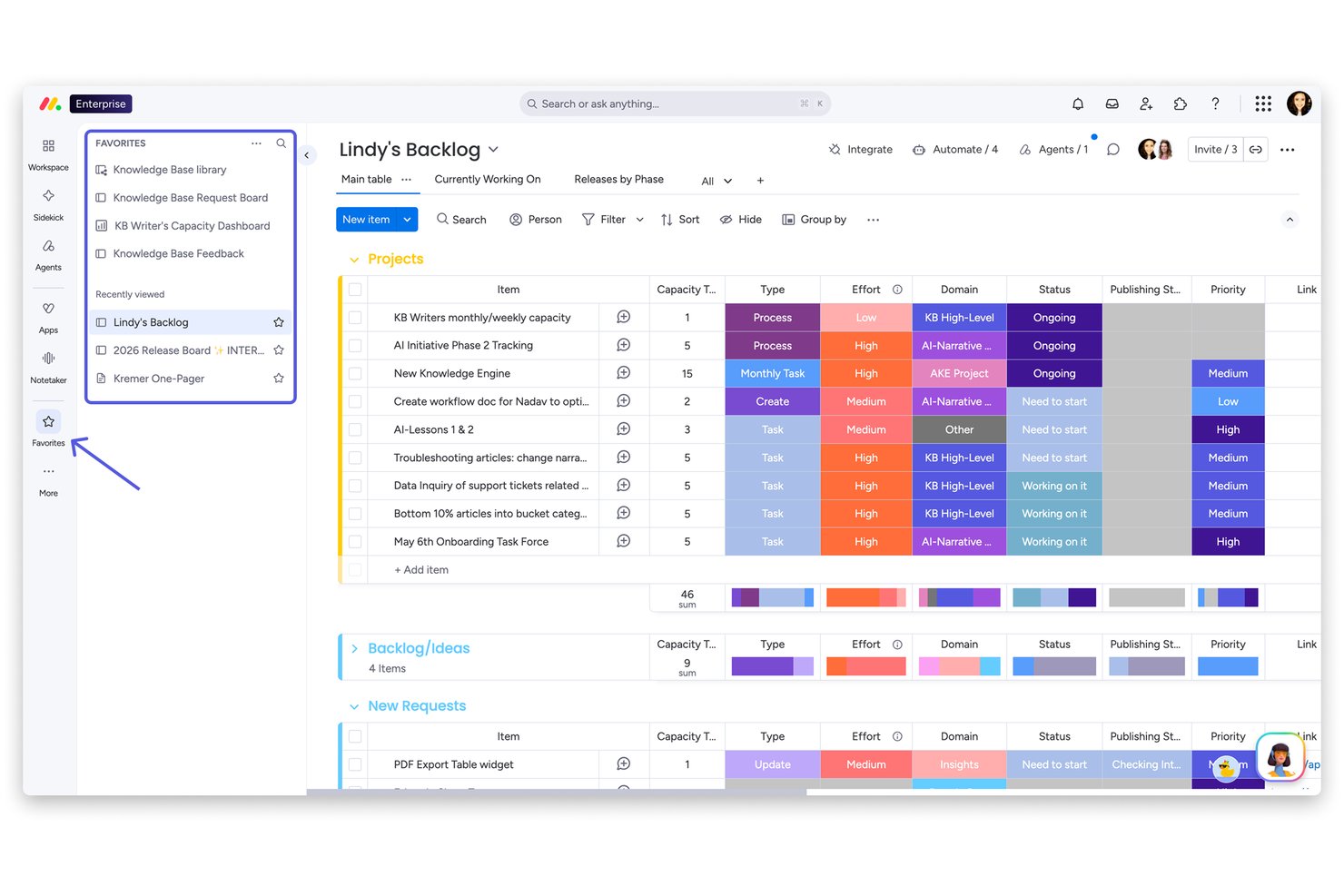
monday AI Workspace is a visual work management platform built for cross-functional teams in marketing, operations, and product who need a structured way to plan projects, automate repetitive work, and keep stakeholders aligned without the complexity of heavier tools.
Who Is monday AI Workspace Best For?
It's a strong fit for mid-sized teams in marketing, operations, or project management who need a polished, low-friction platform they can roll out quickly across departments.
Why monday AI Workspace Is the Best ClickUp Alternative
monday AI Workspace earns its spot on my shortlist because its onboarding experience is one of the fastest I've seen in this category. I love how the 200+ pre-built templates let my team deploy a working project board in minutes, covering everything from sprint planning to campaign tracking, without building anything from scratch. The AI Sidekick compounds that by surfacing contextual suggestions directly inside boards, so new users aren't left guessing what to do next.
monday AI Workspace Key Features
- AI Sidekick: Provides contextual task suggestions, draft updates, and automates repetitive work directly in your workspace.
- Integrated docs and whiteboards: Allows your team to create documents and brainstorm visually without leaving the platform.
- Advanced resource management: Displays real-time workload capacity to help balance tasks and avoid team overload.
- Custom automation builder: Lets you automate multi-step workflows dynamically using conditional logic and triggers, all with a no-code interface.
monday AI Workspace Integrations
monday AI Workspace offers hundreds of native integrations through its built-in integrations and marketplace, including Slack, Google Workspace, Microsoft 365, Jira, Dropbox, Zoom, HubSpot, Salesforce, GitHub, and Outlook. It also supports Zapier and provides an API for custom integrations.
Pros and Cons
Pros:
- AI Sidekick automates repetitive task management
- Clean visual boards suit non-technical project managers
- Fast setup with 200+ ready-made templates
Cons:
- Gantt views locked behind higher pricing tiers
- Automation limits apply on lower-tier plans
New Product Updates from monday AI Workspace
monday AI Workspace Adds Human Approval Routing
monday AI Workspace adds a human-in-the-loop approval block to AI Workflows, sending approval requests and routing workflow paths based on responses. For more information, visit monday AI Workspace's official site.

Best for enterprise marketing & creative ops
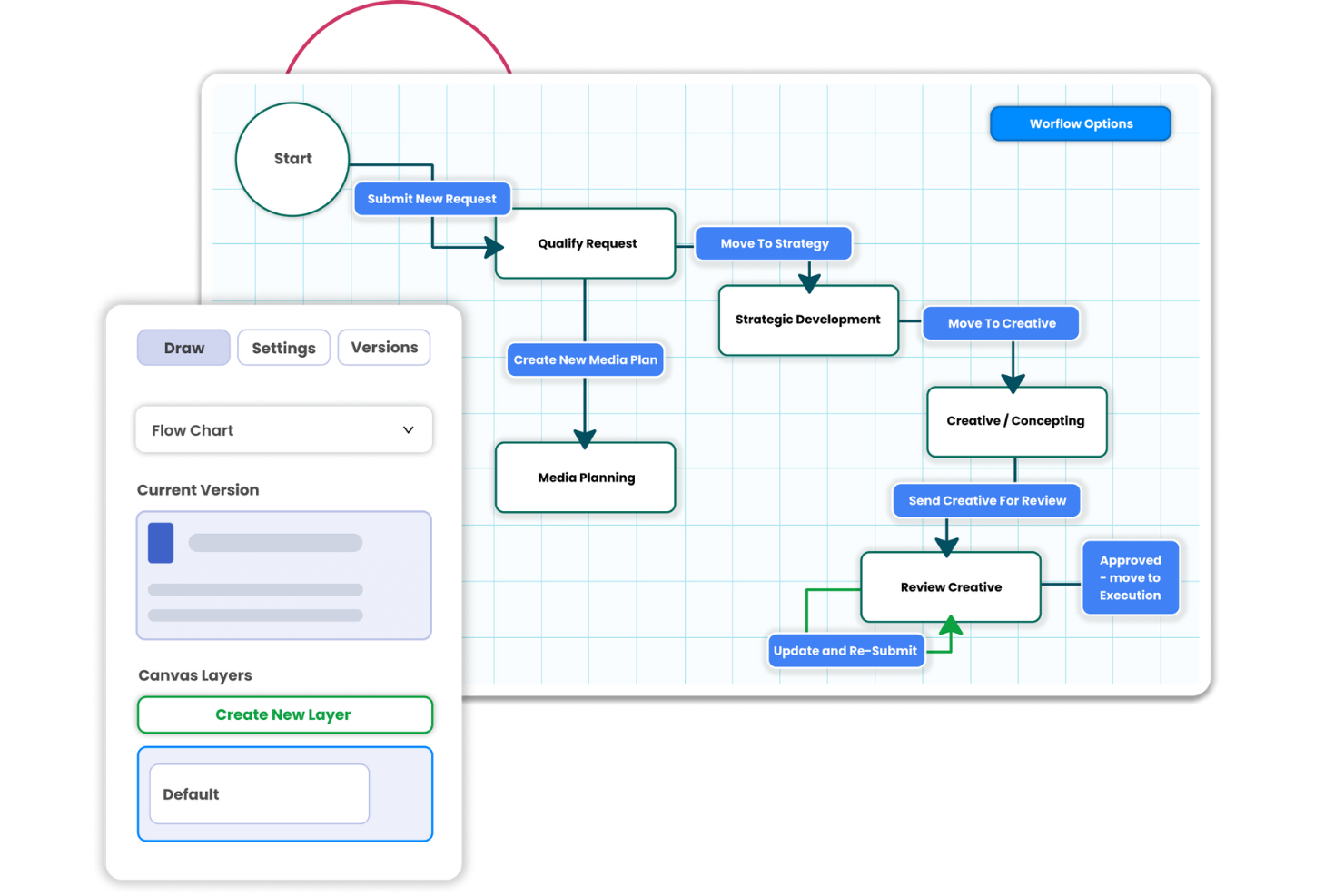
Screendragon is a work management platform that helps marketing and creative teams coordinate campaign projects, manage approvals, and track work across departments.
Who Is Screendragon Best For?
Screendragon fits enterprise marketing and creative operations leaders managing complex campaign production across large, cross-functional teams.
Why I Picked Screendragon
I picked Screendragon as a ClickUp alternative for enterprise marketing & creative ops because its no-code workflow builder routes campaign briefs through conditional stages and sequential or parallel approvals. I like that reviewers can mark up artwork and video, compare versions side by side, and keep decisions attached to each asset, which suits cross-market campaigns with brand or compliance checks.
Screendragon Key Features
- Project views: Track work in Gantt charts, Kanban boards, or list views.
- Resource planning: Assign work by skills and availability, with team capacity snapshots.
- Budget tracking: Link campaign budgets and spend to project plans.
- Analytics dashboards: View timelines, budgets, resource use, and campaign KPIs.
Screendragon Integrations
Screendragon lists pre-built integrations with Aprimo, Google Cloud Storage, Slack, HubSpot, Microsoft Teams, Microsoft Power BI, Amazon S3, Sitecore, Ziflow, and Brandfolder. Its Connection Manager and REST API support custom connections to other systems.
Pros and Cons
Pros:
- Resource and budget views connect plans to delivery
- Asset proofing keeps feedback tied to versions
- Conditional routing handles complex campaign approvals
Cons:
- Large projects can feel slow to navigate
- Workflow setup and configuration take time
New Product Updates from Screendragon
Screendragon Unveils New AI Hub
Screendragon introduced AI Hub, a new capability that lets teams build and manage AI agents directly within workflows. The update helps marketing teams automate tasks, maintain governance controls, and scale AI-driven operations more efficiently. For more information, visit Screendragon's official site.

Best for drag-and-drop automation

Zoho Projects is a solid ClickUp alternative for teams that want strong project tracking without an overloaded setup. It’s a good fit for enterprises, educational institutions, and teams in industries like construction and software development, especially when you need reliable task management, time tracking, and collaboration features in one platform. Zoho Projects also supports integration with other tools, so it can slot into an existing workflow without requiring a full reset.
Why I Picked Zoho Projects
I picked Zoho Projects as a ClickUp alternative because it gives teams more control over how projects are structured. You can automate repeatable steps using drag-and-drop workflows, which helps reduce manual follow-ups as work moves through different stages. It also includes strong customization options, letting you adjust fields, layouts, and workflows to match your team’s process instead of forcing everyone into the same setup.
Zoho Projects Key Features
Along with automation and customization, Zoho Projects offers:
- Gantt Charts: Visualize project timelines and dependencies to better plan and manage tasks.
- Issue Tracking: Log, track, and resolve project issues quickly, ensuring nothing falls through the cracks.
- Document Management: Organize and share project-related documents within the platform for easy access and collaboration.
- Team Collaboration Tools: Use features like in-app chat, forums, and feeds to facilitate communication and teamwork.
Zoho Projects Integrations
Integrations include Google Drive, Slack, GitHub, Dropbox, Zapier, Microsoft Teams, Zoho CRM, Zoho Books, Zoho Desk, and Zoho Analytics. An API is available for custom integrations.
Pros and Cons
Pros:
- Affordable pricing for growing teams
- Built-in time tracking and billing
- Strong automation and workflow customization
Cons:
- Mobile experience less fully featured
- Interface has steeper learning curve
New Product Updates from Zoho Projects
Zoho Projects Adds CodeX Scripts for Custom Modules
Zoho Projects now supports CodeX Scripts for custom modules, enabling conditional logic and rules for creating, updating, and deleting records. For more information, visit Zoho Projects' official site.
 .

Quire
Best for deeply nested task hierarchies
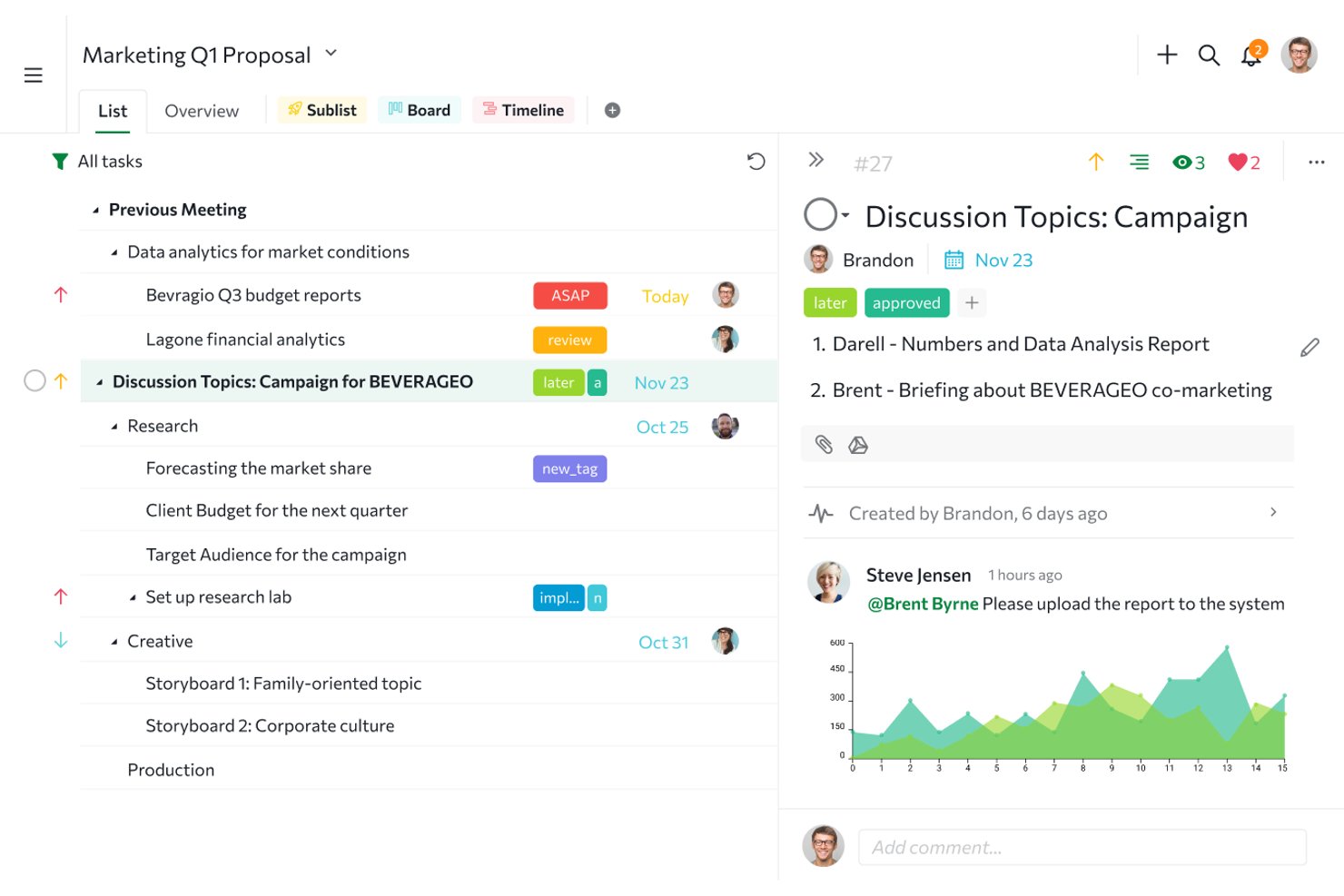
Quire is project management software for cross-functional teams that pairs task planning with Kanban boards, helping you coordinate day-to-day work and track progress across projects.
Who Is Quire Best For?
Quire suits project managers coordinating cross-functional work across product, engineering, and design teams.
Why I Picked Quire
I include Quire as a ClickUp alternative because it’s Best for deeply nested task hierarchies. Tasks can contain subtasks across multiple levels, while Task Bundle keeps child tasks attached to parent cards on the Kanban board. I like this for breaking a product launch into design, engineering, and QA work without losing the parent-child structure.
Quire Key Features
- Timeline view: Visualize task schedules and adjust dates on a Gantt-style timeline.
- Calendar view: See dated tasks and reschedule them by dragging on the calendar.
- Time tracking: Record task time with a stopwatch, Pomodoro timer, or manual entries.
- Smart Folders: Group projects from multiple organizations in one folder.
Quire Integrations
Quire lists integrations with Google Drive, OneDrive, Microsoft Teams, Slack, n8n, GitHub, Google Calendar, Dropbox, and Box; Dropbox and Box are available on paid plans, and it connects with Zapier. Quire also provides an API for custom integrations.
Pros and Cons
Pros:
- Task comments keep project discussions attached
- Switch between outline, Kanban, and timeline
- Deep subtasks preserve parent-child structure
Cons:
- Mobile apps need internet for many actions
- Advanced reporting remains limited for larger teams
New Product Updates from Quire
Quire Adds Custom Field Locking and Comment Reaction API Support
Quire adds custom field locking and API support for reading and setting emoji reactions on comments. These updates give teams more control over field data and expand comment interaction options for developers. For more information, visit Quire’s official site.
 .

Celoxis
Best for client management tools
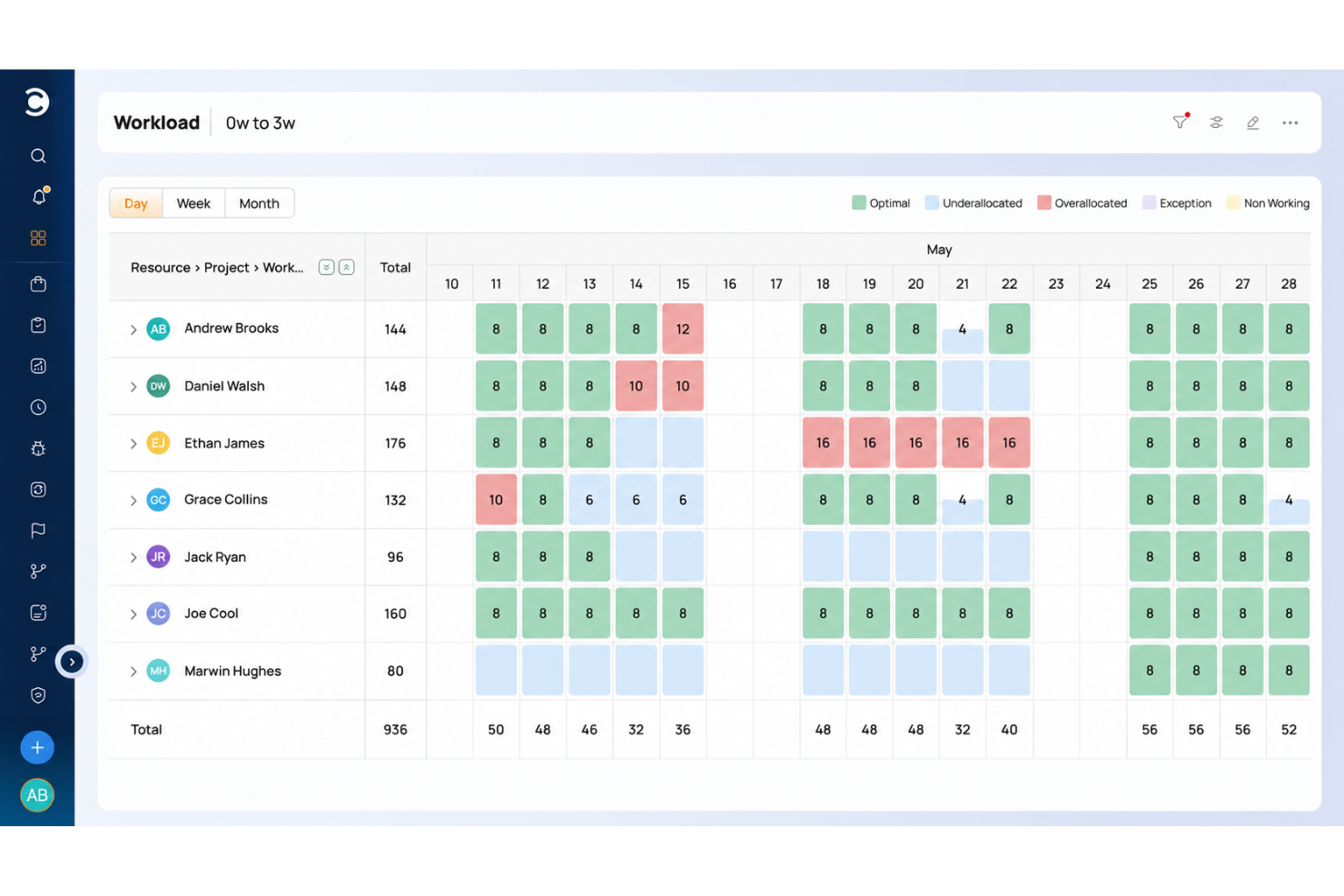
Celoxis is a project management platform for service businesses that need to plan work, allocate resources, track budgets, and coordinate client projects across teams.
Who Is Celoxis Best For?
Celoxis suits project managers at client-facing service businesses who coordinate deliverables, budgets, and resources across client projects.
Why I Picked Celoxis
I picked Celoxis as a ClickUp alternative for client-facing project work. Its customizable, branded client portal lets customers view and collaborate on permitted projects and tasks, with permissions controlling what they can access. I also like that teams can share project progress and turn approved time and expenses into invoices.
Celoxis Key Features
- Gantt scheduling: Plan tasks with dependencies, critical paths, and automatic scheduling.
- Resource capacity planning: Allocate work by availability, demand, and skills across projects.
- Custom workflows: Configure fields, states, routing, and escalation policies for work items.
- Portfolio dashboards: Build report widgets with charts, filters, and drill-downs to records.
Celoxis Integrations
Celoxis offers 21 native integrations, including Jira, GitHub, Azure DevOps, Slack, Salesforce, Microsoft 365 and Outlook, Google Drive, QuickBooks Online, Trello, and Zendesk. It also supports Zapier and a REST API for custom integrations.
Pros and Cons
Pros:
- Cross-project capacity and budget visibility
- Approved time and expenses support billing
- Client portal shares live project updates
Cons:
- Mobile app trails the desktop experience
- Advanced reports require setup and configuration

Jira
Best for agile and large-scale team delivery
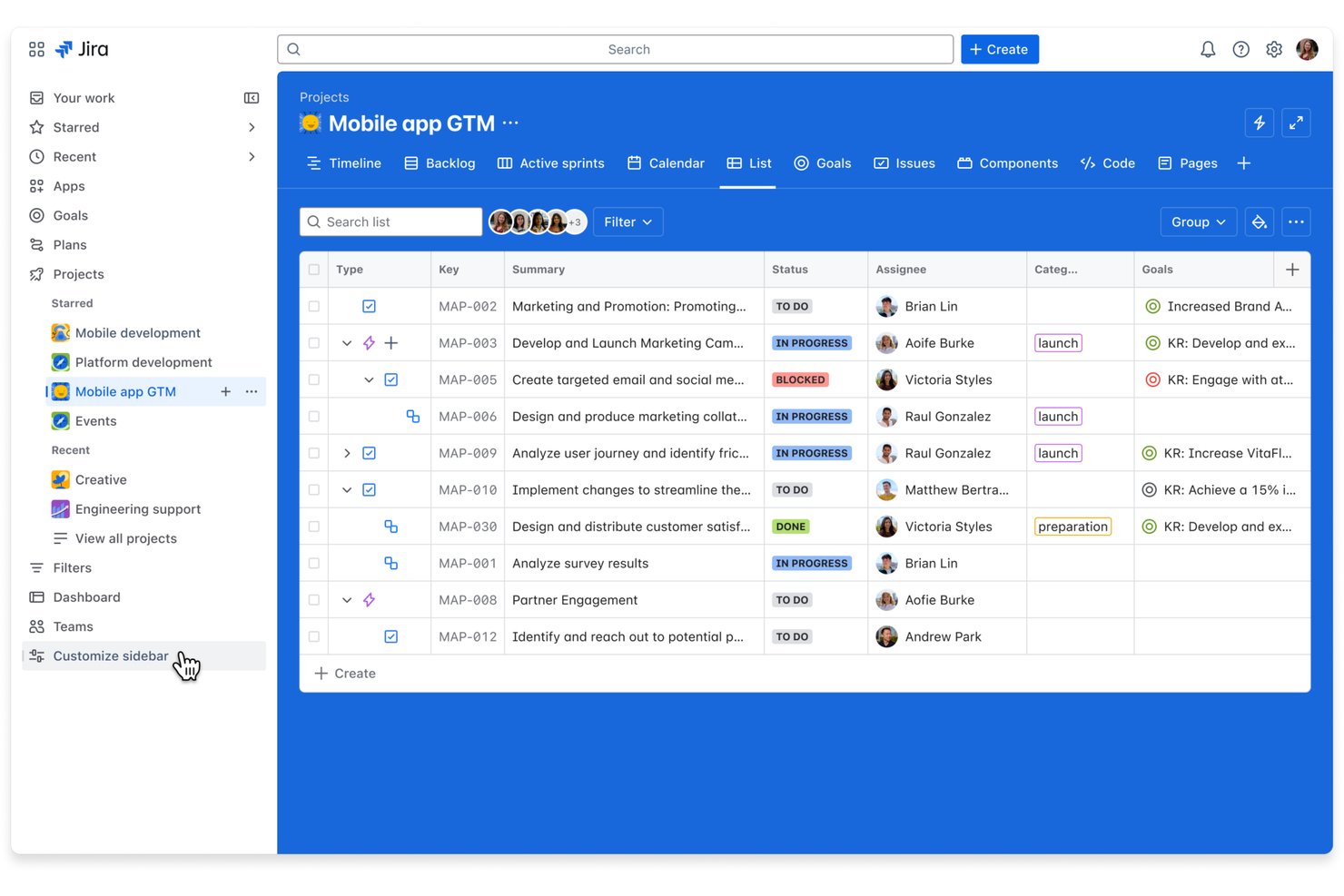
Jira is a project management platform for product and engineering teams that need to plan releases, track work, and manage shifting dependencies, making it best for agile and developer team workflows.
Who Is Jira Best For?
Product owners and engineering leads who run Scrum or Kanban can use Jira to connect team backlogs with day-to-day issue tracking.
Why I Picked Jira
I picked Jira for this ClickUp alternatives list because it’s Best for agile and developer team workflows. Scrum and Kanban boards connect sprint backlogs to issue tracking, while release planning and issue links help engineering leads track dependencies and spot blocked work before a launch.
Jira Key Features
- Custom workflows: Configure statuses and transitions to match your team’s process.
- Automation rules: Trigger actions when issues meet specified conditions.
- Custom fields: Add fields to capture project-specific information on issues.
- Dashboards: Build views with gadgets for tracking project metrics and activity.
Jira Integrations
Jira offers 3,000+ installable Atlassian Marketplace apps and integrations with Slack, Microsoft Teams, GitHub, Bitbucket, and Confluence. It also provides APIs for custom integrations.
Pros and Cons
Pros:
- Dashboards track ownership, priorities, and progress
- Issue links expose blocked release dependencies
- Sprint boards connect backlogs to issues
Cons:
- Dense ticket views clutter large projects
- Workflow setup demands significant admin time

GoodDay
Best for extensive customization options
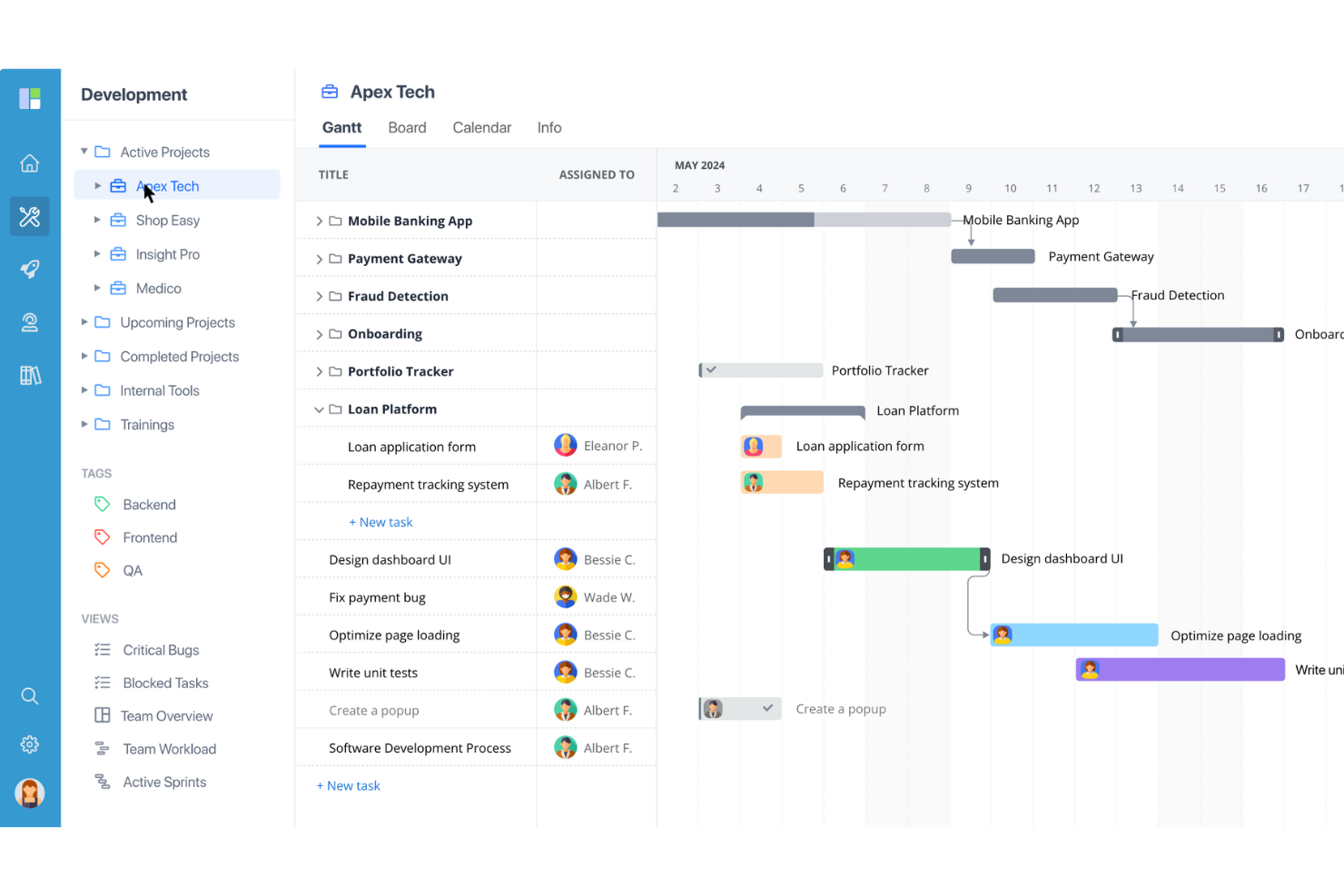
GoodDay is a project management platform for tech and digital teams that brings task planning, project tracking, and collaboration into one workspace, helping teams coordinate dependencies and keep changing work visible.
Who Is GoodDay Best For?
GoodDay suits project managers on tech and digital teams who need to tailor workflows, views, and project structures to different workstreams.
Why I Picked GoodDay
GoodDay is my pick for Best for extensive customization options because I can set task types with distinct workflows and custom fields. I can then track engineering bugs on a board and map launch tasks on a Gantt chart, tailoring project views to each workstream.
GoodDay Key Features
- Time tracking: Log time against tasks and projects.
- Workflow automation: Set rules to trigger actions when work changes.
- Goals and OKRs: Create objectives and track key results.
- Reports and analytics: Generate reports on project and team activity.
GoodDay Integrations
GoodDay offers native integrations with Google Workspace, Slack, Dropbox, Box, GitHub, and GitLab. It also connects with Zapier and provides an API for custom integrations.
Pros and Cons
Pros:
- Built-in time tracking ties effort to tasks
- Gantt, board, and workload views share plans
- Custom task types fit distinct engineering workflows
Cons:
- Reports can’t be emailed from the platform
- Mobile app trails desktop task management

Kantata
Best for full project lifecycle delivery
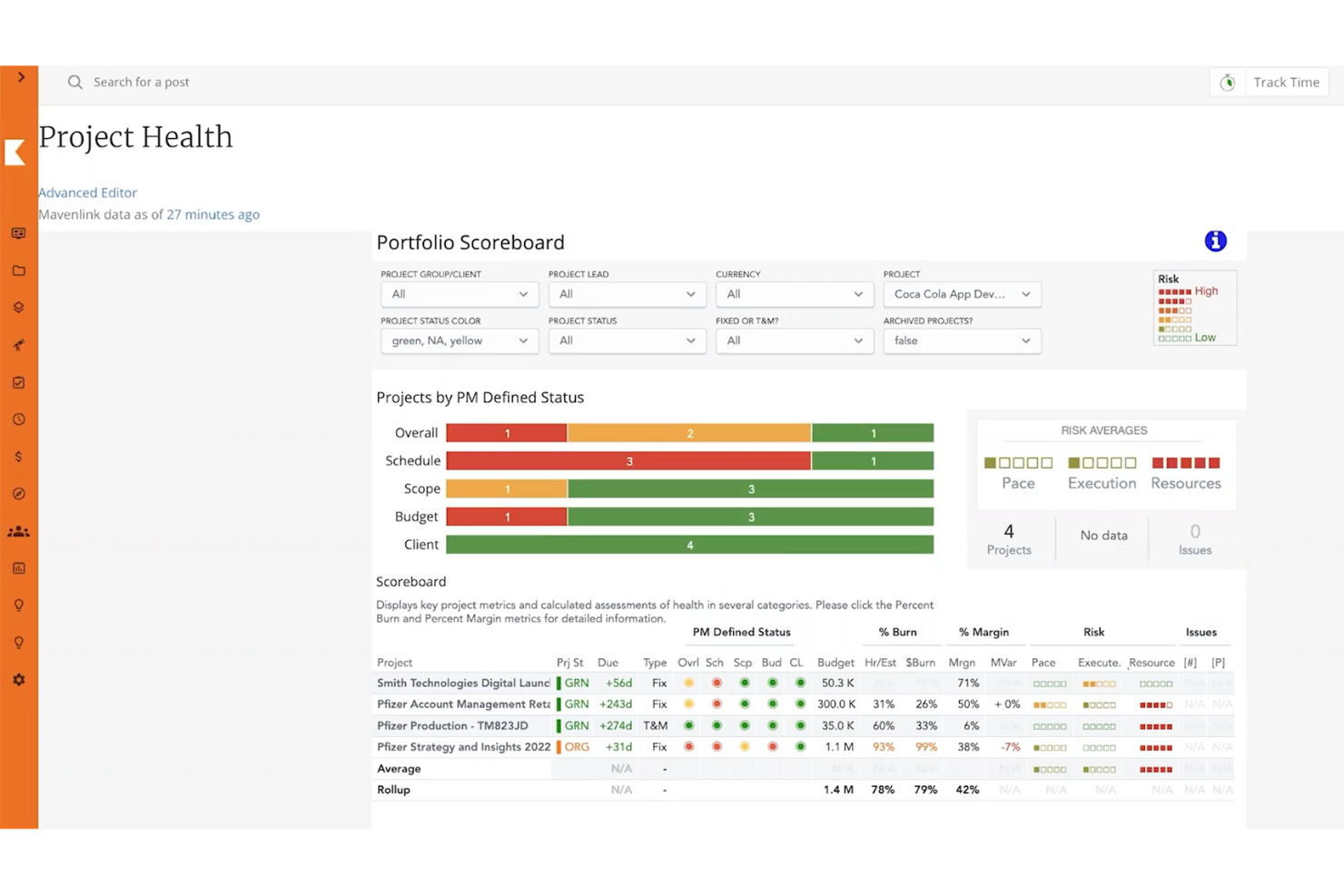
Kantata is a professional services automation platform for consulting and other service teams, connecting project work with resourcing and financial visibility to help managers coordinate delivery and control margins.
Who Is Kantata Best For?
Kantata suits professional services project managers who need to coordinate client delivery, staffing, and financial performance across engagements.
Why I Picked Kantata
I picked Kantata as a ClickUp alternative because it fits “Best for full project lifecycle delivery,” connecting project work with resourcing and financial visibility. I like that managers can coordinate client engagements and monitor margins as staffing or delivery needs shift.
Kantata Key Features
- Project estimation: Use performance data to estimate work and adjust project plans.
- Time tracking: Log hours against clients and projects.
- Expense tracking: Track expenses across client projects.
- Kantata Pulse: Collect client and employee feedback during delivery.
Kantata Integrations
Kantata documents integrations with Salesforce, QuickBooks Online and Desktop, Google Workspace, Jira, Slack, Microsoft Teams, HubSpot, NetSuite, and Sage Intacct, and lists Kantata OX on Zapier. It also offers secure APIs and more than 1,200 prebuilt connectors for connecting systems and building workflows.
Pros and Cons
Pros:
- Centralizes client collaboration and project updates
- Tracks utilization and capacity across engagements
- Connects delivery, staffing, and project margins
Cons:
- Custom reporting takes admin expertise
- Complex setup can overwhelm smaller teams
New Product Updates from Kantata

Kantata Adds Access Group Change History
Kantata adds Access Groups History, letting account administrators track changes to group details, membership, and permissions in Recent History. The update also makes these events available through the Subscribed Events API for broader monitoring. For more information, visit Kantata’s official site.
 .
Miro
Best for flexibility and customization
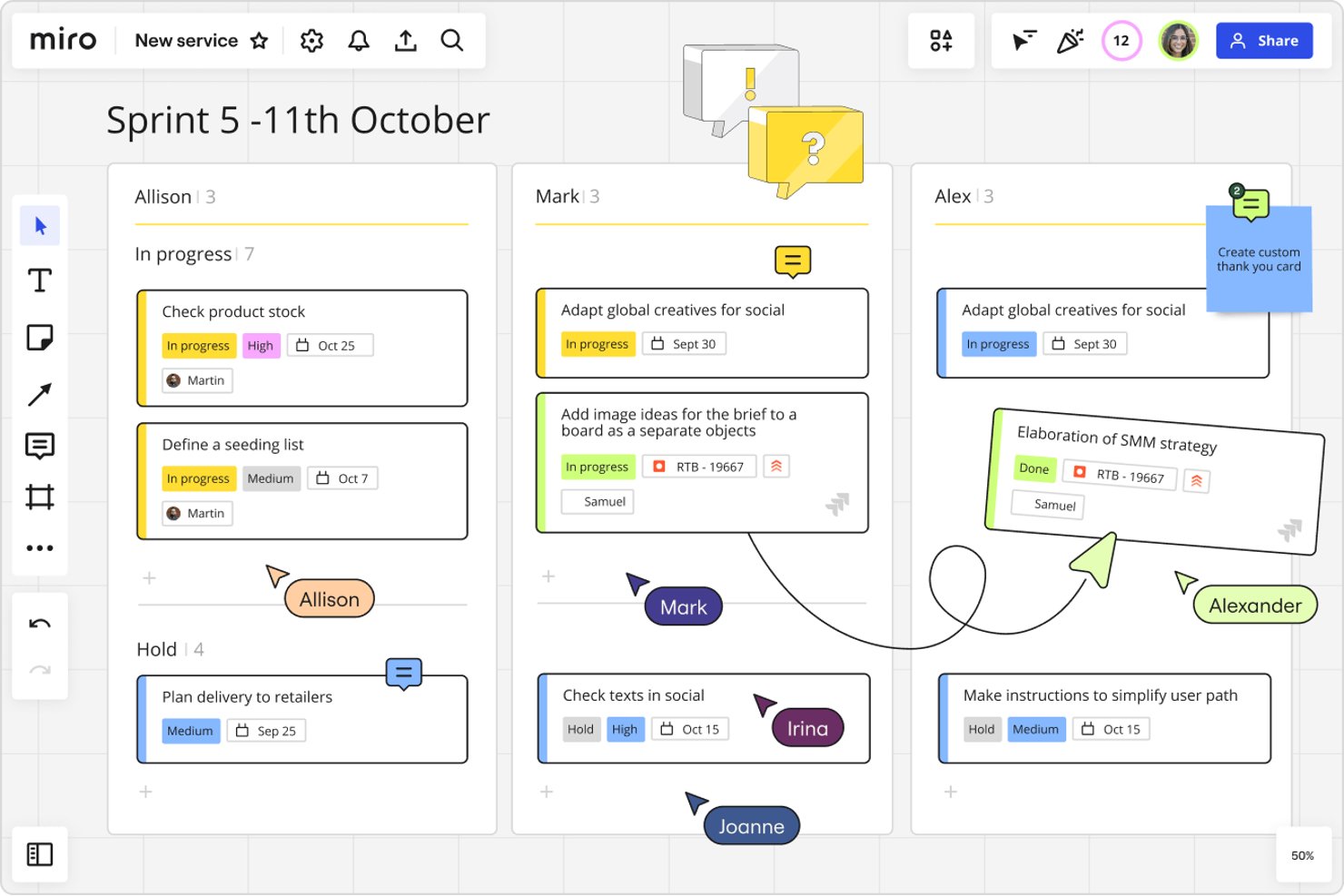
Miro gives product, engineering, and design teams a visual workspace to plan projects, map workflows, and keep cross-functional work aligned as requirements change.
Who Is Miro Best For?
Miro suits project managers at tech organizations that need to tailor workflows and templates to different teams and delivery methods.
Why I Picked Miro
I picked Miro for “Best for flexibility and customization” because its visual canvas lets me shape project workflows around how teams deliver. I use customizable boards and templates to map sprint plans, dependencies, and handoffs, then adjust them as requirements change.
Miro Key Features
- Jira integration: Add Jira cards to boards and view issue details.
- Voting: Let participants vote on ideas or options directly on a board.
- Comments: Attach comments to board content for project discussions and feedback.
- Timer: Set a countdown for workshops, planning sessions, or team exercises.
Miro Integrations
Miro’s Marketplace offers 160+ app integrations, including Jira, Confluence, Slack, Microsoft Teams, Trello, Asana, Google Drive, and Zoom. Miro also supports Zapier and provides an API for custom integrations.
Pros and Cons
Pros:
- Templates speed repeatable planning sessions
- Live cursors and comments aid workshops
- Infinite canvas supports flexible project mapping
Cons:
- Large boards can lag and become cluttered
- Task ownership and reporting remain comparatively limited
New Product Updates from Miro
Miro Adds Japan Data Residency for Enterprise Customers
Miro has introduced Japan data residency for enterprise customers, offering in-region storage for production data, backups, and metadata, plus in-region compute infrastructure. For more information, visit Miro's official site.
Outras alternativas ao ClickUp
Eis algumas alternativas adicionais ao ClickUp que não entraram na minha lista restrita, mas que ainda vale a pena conhecer:
- Asana
For a simple, collaborative to-do list
- Ravetree
For resource management
- Smartsheet
For spreadsheet-style project tracking
- MeisterTask
For Kanban teams moving away from complexity
- Scoro
For KPI dashboards across client work
- Accelo
For client work invoicing and billing
- Productive
For agency time tracking and billing
- Process Street
For recurring process and compliance ops
- Hive
For bringing email and chat into tasks
- Workzone
For non-technical teams needing intake forms


Sobre o ClickUp
ClickUp é um software de gestão de projetos com funcionalidades avançadas para gerir e concluir todos os projetos da sua equipa numa única plataforma. Os utilizadores podem planear projetos, utilizar campos personalizados, agendar tarefas, definir dependências entre tarefas, criar automatizações e gerir recursos num espaço de trabalho centralizado, além de comunicar e colaborar com membros da equipa e convidados.
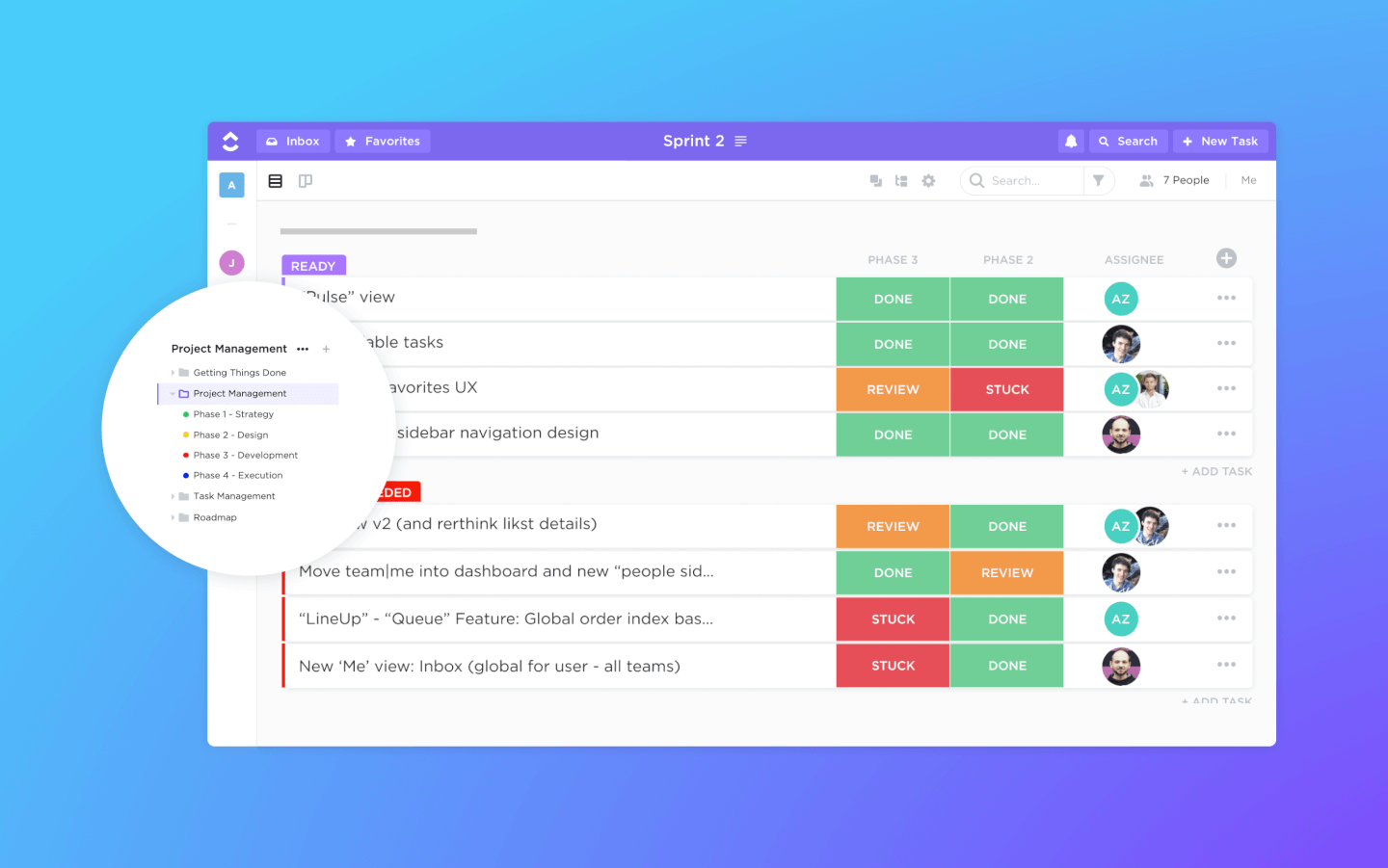
As funcionalidades de gestão de tarefas incluem listas de verificação de tarefas, subtarefas e modelos de tarefas. Além disso, pode filtrar, ordenar, pesquisar, reordenar facilmente e visualizar as tarefas da forma mais conveniente para a equipa. Os utilizadores também podem criar gráficos de Gantt e aceder a vistas de calendário, vistas de quadro e mais de 10 formas adicionais de visualizar informações.
O ClickUp também inclui excelentes funcionalidades para partilha de ficheiros e edição colaborativa em wikis e documentos online. Os utilizadores podem comentar documentos e tarefas, mencionar colegas de equipa e conversar com outros membros da equipa para melhorar a comunicação e a colaboração. As funcionalidades de relatórios incluem a possibilidade de criar painéis personalizados, bem como seis tipos de relatórios integrados para relatórios de equipa.
O ClickUp oferece integrações nativas com o Slack, o G Suite, o Airtable, o Basecamp, o Dropbox, o Jira e muitas outras ferramentas, bem como mais de 1.000 integrações através do Zapier.
O plano gratuito para sempre do ClickUp é robusto e inclui todas as funcionalidades principais. No entanto, esta versão gratuita tem limites de utilização e solicita-lhe que faça uma atualização assim que os atingir. O plano ilimitado começa nos $5/utilizador/mês e oferece funcionalidades adicionais.
How I Evaluate ClickUp Alternatives
I split my evaluation into three parts. Core functionality carries the most weight: a tool must let you create, assign, and track tasks across projects and offer multiple views like boards, lists, and timelines. I also look for standout features like workload visibility and built-in docs, then consider onboarding ease and pricing value.
Core Functionality (Table Stakes For This List)
When I'm selecting tools for my list, I score each one on a scale from 0 (does not offer the functionality) to 5 (excels in this area) for each core functionality listed below. I then convert the total into a percentage to help assess each tool's overall fit, with extra weight on any functionalities I’ve deemed essential.
- Task & Project Tracking (Essential): I look for task assignment, subtasks, status tracking, dependencies, and recurring work across projects with shifting timelines.
- Multiple Views (Essential): I assess how easily you can switch between lists, boards, calendars, and timelines while keeping project details and updates in context.
- Team Collaboration: I check whether comments, mentions, and file sharing stay attached to tasks, so decisions and feedback are easy to follow.
- Workflow Automation: I evaluate triggers for routine work, such as assigning an owner after a status change or notifying reviewers when an approval is due.
- Third-Party Integrations: I look for connections to tools teams use for chat, file storage, and calendars, helping keep project information accessible across systems.
- Reporting & Dashboards: I assess whether dashboards show project progress, task status, and workload across teams, giving leads visibility into delivery risks.
Once I have a list of tools that meet the criteria, I consider what sets each platform apart.
Differentiating Factors (What Sets Vendors Apart)
Here's how I compare and contrast different vendors:
Standout Features
I look for built-in docs and wikis so teams can keep briefs, specs, and decisions next to the tasks they belong to—tools like Notion and ClickUp handle this differently, and the gap matters when you're tired of linking out to a separate doc tool. I also evaluate workload and capacity views, because knowing who's overloaded before a sprint starts beats finding out after a deadline slips. Goal and OKR tracking is another differentiator: I check whether a platform can link daily tasks back to quarterly objectives without a workaround.
Beyond Features
I evaluate how quickly a team can get started without heavy admin setup. Some platforms, like monday.com, offer guided onboarding flows for marketing or agile teams, while others assume you'll build everything from scratch. I also check performance under load—if a board with 500+ tasks lags or crashes, that's a dealbreaker for delivery leads tracking real projects. Pricing transparency matters too: I look for clear per-seat costs and whether essentials like automations or guest access require paid add-ons.
Por que procurar uma alternativa ao ClickUp?
O vasto conjunto de funcionalidades do ClickUp pode demorar bastante tempo a aprender, algumas equipas referem atrasos em painéis muito utilizados e a faturação de clientes é feita fora da ferramenta, o que é relevante para agências e equipas em crescimento. Eis quando outra ferramenta poderá ser mais adequada:
- Quer que a sua equipa comece a trabalhar rapidamente. Alguns utilizadores consideram que o ClickUp tem funcionalidades em excesso, com uma curva de aprendizagem acentuada e muita configuração antes de se adequar ao seu trabalho. Plataformas como o monday AI Workspace concentram-se numa integração rápida, com painéis visuais simples e uma grande biblioteca de modelos prontos a utilizar.
- A sua equipa precisa de painéis que carreguem rapidamente. Alguns utilizadores referem atrasos ao criar tarefas e painéis que carregam lentamente em projetos de grandes dimensões. Várias ferramentas desta lista também ficam mais lentas em projetos grandes, por isso, durante um período de avaliação, recrie um dos seus projetos mais movimentados e teste-o com toda a sua equipa.
- Fatura aos clientes o tempo da sua equipa. O ClickUp prepara relatórios de tempo prontos para faturação, mas o envio da fatura depende de uma ferramenta de contabilidade ligada ou de uma exportação. Opções como o Zoho Projects incluem controlo de tempo e faturação, e o Celoxis envia o tempo e as despesas aprovados diretamente para a faturação.
O ClickUp continua a ser a escolha certa se pretende um espaço de trabalho profundamente personalizável para tarefas, objetivos, diagramas de Gantt, painéis e controlo de tempo, com IA incluída em todos os planos. Para equipas dispostas a investir na configuração, isso pode compensar uma curva de aprendizagem acentuada, atrasos em painéis muito utilizados e a faturação numa ferramenta separada.
Principais funcionalidades do ClickUp
Eis algumas das principais funcionalidades do ClickUp, para ajudar a fazer um contraste e uma comparação com o que as soluções alternativas oferecem:
- Integrações: Ligue-se a outras ferramentas e plataformas para melhorar a funcionalidade e simplificar os fluxos de trabalho entre diferentes aplicações. Parece que a sua mensagem estava vazia. Ao procurar uma alternativa, certifique-se de que a funcionalidade de gestão de tarefas é intuitiva, suporta descrições em texto formatado e inclui dependências de tarefas robustas para lidar eficazmente com fluxos de trabalho complexos.
- Gestão de tarefas: Crie, atribua e acompanhe tarefas facilmente, com informações detalhadas como datas de conclusão e descrições, ajudando a manter os seus projetos organizados. Uma alternativa deverá disponibilizar vistas flexíveis que possam ser facilmente alternadas, permitindo que equipas com preferências diferentes trabalhem em conjunto de forma eficaz. Certifique-se também de que suporta gráficos de Gantt ou vistas de linha cronológica para um planeamento avançado.
- Várias vistas de tarefas: Escolha entre várias vistas, como lista, quadro ou calendário, para gerir tarefas da forma que melhor se adapta ao fluxo de trabalho da sua equipa.
- Automatizações: Configure automatizações para tratar de tarefas repetitivas, poupando tempo e garantindo uma execução consistente dos projetos. Procure alternativas com automatização personalizável e sem código, que se integrem facilmente nos seus fluxos de trabalho, minimizando a necessidade de intervenção manual.
- Campos personalizados: Utilize campos personalizados para adicionar informações específicas às tarefas, permitindo adaptar a ferramenta às necessidades únicas da sua equipa. Certifique-se de que a alternativa permite utilizar uma vasta gama de tipos de campos (por exemplo, listas pendentes, datas e números) e que possibilita filtrá-los, ordená-los e criar relatórios sobre os mesmos sem dificuldades.
- Painéis: Crie painéis para visualizar os dados dos projetos e monitorizar o progresso, obtendo informações que ajudam a manter todos alinhados. Os painéis das ferramentas alternativas devem suportar atualizações em tempo real, widgets personalizáveis e a capacidade de obter dados de vários projetos para uma visão geral de alto nível.
- Modelos: Utilize modelos para tarefas e projetos, começando rapidamente e mantendo a consistência no trabalho da sua equipa. Uma boa alternativa deverá disponibilizar uma biblioteca de modelos predefinidos e permitir-lhe criar e guardar os seus próprios modelos, garantindo adaptabilidade a vários tipos de projetos.
- Quadros brancos: Colabore visualmente com os membros da equipa utilizando quadros brancos para debater ideias e planear projetos de forma interativa. Verifique se a funcionalidade de quadro branco das alternativas permite colaboração em tempo real, elementos de arrastar e largar e uma conversão simples das ideias em tarefas acionáveis.
- Gestão de recursos: Gira eficazmente a carga de trabalho e os recursos da sua equipa, garantindo uma utilização ideal da capacidade disponível. Procure gráficos detalhados de carga de trabalho e ferramentas de alocação de recursos nas alternativas, garantindo que fornecem informações sobre a capacidade atual e o planeamento futuro.
- Documentos partilhados: Crie e partilhe documentos na plataforma para manter todas as informações relacionadas com os projetos num único local acessível.
- Uma alternativa deverá disponibilizar um editor de texto formatado com controlo de versões e edição colaborativa, para que os documentos possam servir como uma fonte de informação fiável.
- Integrações: Ligue-se a outras ferramentas e plataformas para melhorar a funcionalidade e simplificar os fluxos de trabalho entre diferentes aplicações. Certifique-se de que a alternativa suporta integrações com as ferramentas que mais utiliza ou disponibiliza uma API aberta para ligações personalizadas, de modo a adaptar-se à sua pilha tecnológica específica.
Ao procurar uma alternativa ao ClickUp, dê prioridade a uma ferramenta que ofereça flexibilidade, personalização e funcionalidades alinhadas com as necessidades únicas da sua equipa. Quer se trate de uma gestão de tarefas robusta, de uma automatização intuitiva ou de integrações simples, a alternativa certa deverá melhorar os seus fluxos de trabalho, promover a colaboração e acompanhar o crescimento dos seus projetos.
Como escolher uma alternativa ao ClickUp
É fácil ficar preso a longas listas de funcionalidades e estruturas de preços complexas. Para o ajudar a manter o foco enquanto realiza o seu processo específico de seleção de software, apresentamos uma lista de verificação com os fatores a ter em conta:
| Fator | O que considerar |
|---|---|
| Escalabilidade | Certifique-se de que a ferramenta pode crescer com a sua equipa, acomodando um aumento do número de projetos e utilizadores. |
| Integrações | Procure compatibilidade com as ferramentas que a sua equipa já utiliza, para garantir um fluxo de trabalho simples. |
| Personalização | Escolha uma plataforma que permita adaptar funcionalidades e fluxos de trabalho às suas necessidades. |
| Facilidade de utilização | Opte por um software intuitivo para minimizar a curva de aprendizagem da sua equipa. |
| Orçamento | Encontre uma solução que ofereça as melhores funcionalidades dentro das suas limitações financeiras. |
| Medidas de segurança | Dê prioridade a plataformas com medidas de segurança robustas para proteger os seus dados. |
| Funcionalidades de colaboração | Certifique-se de que as ferramentas suportam uma comunicação eficaz da equipa e a colaboração em projetos. |
| Suporte e formação | Verifique se existem recursos de suporte ao cliente e formação disponíveis para ajudar a sua equipa. |
Sinceramente, é muita informação para assimilar — e há muita pressão para acertar, por isso sugerimos que utilize o nosso serviço de consultoria em software de gestão de projetos para o ajudar a selecionar uma lista restrita de ferramentas de gestão de projetos adequadas às necessidades específicas da sua organização e às suas necessidades.