Projectworks AI Features: From Embedded Workflows to Agentic Resourcing


End-to-end: Projectworks AI connects proposals, delivery, resourcing, financials, and invoicing, reducing duplicate work across consulting operations.
Human control: Kea recommends staffing changes and surfaces conflicts, while managers approve actions before operational data changes.
Faster planning: Resource planning becomes more responsive by using prompts to identify overbooking, absences, and schedule changes.
Built-in safeguards: Existing permissions carry into connected AI tools, limiting sensitive data access and requiring approval for most updates.
Measurable growth: Historical data and consulting expertise give AI useful context immediately, while better staffing can improve utilization and growth.
See how Projectworks uses AI across proposals, resourcing, and timesheets to cut non-billable admin for consulting firms while keeping humans in control of every decision.
—----------------------------
Consulting firms are built to serve clients, not to run themselves. Projectworks' AI is designed to close that gap by handling the back-office work that senior people either don't have time for or quietly neglect.

Projectworks positions itself as a consulting growth platform: a single system covering proposals, contracts, projects, financials, resource planning, timesheets, expenses, and invoicing. That end-to-end structure is what makes its AI useful. Rather than bolting a chatbot onto disconnected tools, Projectworks applies AI across a platform that already holds the commercial, operational, and financial picture of the firm.
I think most services firms are really bad at running their own firm. They spend all their time on billable work, and nobody has time to work on the back office. And yet you need to.

Mark Orttung, who has spent three decades building technology platforms and leading consulting firms, walked through the platform's AI capabilities during The Future of AI in Project Management showcase. He framed Projectworks' approach around three modes: AI embedded in a workflow, an agentic interface you can prompt, and a connector into whatever AI platform your team already uses. Here's an overview of what Projectworks' AI can do.
Deep Dive Into Projectworks' AI Features
1. Proposals: AI Embedded in the Workflow

The first mode is AI you barely notice. Projectworks' proposal tool, shaped by a private beta involving a couple hundred companies, sits inside a consulting-focused CRM with a deal pipeline, stage tracking, and a dashboard summarizing where every deal stands.
At the center of each deal is the proposal itself. AI pulls key variables out of the document so they can be changed once and flow through the whole proposal. Smart blocks, such as pricing tables and digital signatures, add structured information that carries forward into later stages. Teams can also upload proposals they've previously won, and the system uses AI to break them apart into reusable content blocks.
Once a proposal is signed, a project can be created directly from the deal. The project arrives with its budget pre-filled from the proposal, so the data flows from sale to delivery without re-entry.
Human oversight is a core design principle here. Content blocks can be edited and permission-locked (terms and conditions, for example), firms can start from standard templates, and every proposal is reviewed by a person before it's shared.
Proposals are probably going to be one of the last things you’re ever going to do without a human in the loop. It’s got to look perfect, it’s got to be correct. You’re making a financial commitment to this client.
How to get the most value from AI-assisted proposals:
- Seed the content library with past wins: Uploading proposals that already closed gives the system proven material to reuse.
- Lock what shouldn't change: Put permissions on legal terms and other standard content so the team doesn't get creative without approval.
- Build a firm template: If three of your ten sections are almost always the same, make them part of the template.
- Convert wins straight to projects: Creating the project from the signed proposal keeps budgets consistent between sales and delivery.

2. Kea: An Agentic Interface for Resource Planning
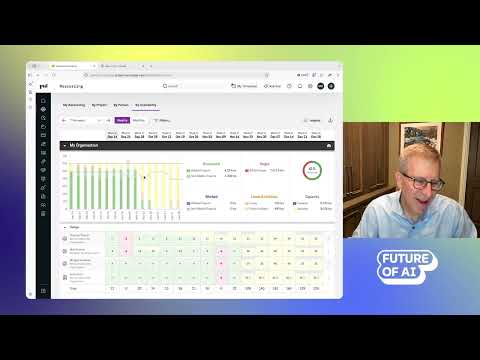
The second mode is Kea, Projectworks' AI agent, which currently shows up most prominently in resource planning.
The resourcing screen gives a visual read on the firm: a summary chart comparing billable engagement against the firm's billable goal, and a heat map showing who is at capacity, who is under-assigned, and who is overbooked. Kea puts a prompt interface on top of that same data.
During the demo, a simple question about who was overbooked for a given week returned not just capacity overages but edge cases, like a consultant with hours booked during scheduled vacation. A more complex prompt asked Kea to handle a team member becoming unavailable for two weeks; Kea proposed redistributing his hours across three colleagues and waited for approval before making changes. In another example, a client asking to start two weeks later was handled by prompting Kea to shift the entire project, rather than moving each person line by line.
"We're trying to meet you where you are. If you want to work in the visual interface, we'll do that. If you want to work in the prompting interface, we'll do that."
— Mark Orttung, CEO, Projectworks
Beyond the numbers, Orttung noted that language models are also well suited to qualitative signals, such as the tone of communications between people, which resource managers often rely on alongside capacity data.
How to get started with Kea:
- Ask the questions you'd normally dig for: Overbookings, gaps, and conflicts can be surfaced with a single prompt instead of scanning the heat map.
- Use it for replanning: Absences and client date changes are exactly the kind of multi-person adjustments Kea can propose in one pass.
- Keep approvals on while you build trust: Kea can be configured to act without approval, but asking first lets you check each change.
3. MCP Connector: Working With Projectworks From Claude
The third mode brings Projectworks into the AI tools teams already use. Through its MCP connector, users can read and act on Projectworks data from Claude.
In the demo, Claude read a summary of a team checkpoint meeting (the kind of output most AI notetakers already generate) and used it to draft timesheet entries for two consultants based on what they'd said about their week. When two time codes shared the same name, Claude asked which one was meant to be used. As Orttung pointed out, people don't refer to project codes in meetings; they describe the work, so the AI occasionally needs help matching the two.
Refreshing Projectworks showed the timesheets filled in, ready for each consultant to review.
Getting the most out of the MCP connector:
- Pull in tools you already use: Rather than building its own notetaker, Projectworks lets you bring in whichever one your team prefers.
- Set permissions deliberately: Decide separately how much freedom the LLM gets to read data versus write it.
- Expect clarifying questions: Ambiguity between spoken descriptions and system records is normal, and resolving it quickly keeps entries accurate.
4. Governance and Access Control

As AI takes on more operational work, control becomes the obvious concern. Projectworks' answer is that AI never sees more than the user does.
When someone connects through MCP, they log in as themselves, and every existing permission applies. A project manager who can see their team's timesheets can have Claude update them; an individual consultant working the same way would mostly see only their own data. Sensitive information like cost rates, often among the most restricted data in a firm, stays hidden from anyone without access.
Admins manage this through a granular access-control system, from broad on/off settings to detailed advanced controls, and those settings apply to AI in the same way they apply to the web interface. Writes almost always require explicit approval, and a declined suggestion can be revisited later by re-running the prompt.
Maintaining control as AI takes on more:
- Rely on existing permissions: Access rules configured in Projectworks carry through to Kea and connected LLMs automatically.
- Protect cost data: Keep margin-sensitive information restricted to the people who need it.
- Pause when unsure: Cancel a proposed change, check the underlying data, and come back to approve it when you're confident.
5. The Projectworks Method: Consulting Know-How on Demand
What separates Kea from a generic assistant pointed at a pile of spreadsheets is the Projectworks Method, a knowledge base built from more than 150 years of combined consulting experience across the team. Orttung, whose first job was working on Accenture's methodology, described it as a playbook that Kea has digested and can bring to bear at the moment it's needed.
6. Historical Data Migration: Useful From Day One
A common question with AI tools is how much data they need before their recommendations are worth trusting. Projectworks addresses this at onboarding by importing a firm's history: past projects, clients, timesheets, and invoices, often from spreadsheets rather than an existing platform. That means Kea has meaningful context from the start instead of learning from scratch.
Why It Matters: Operations That Drive Growth
Orttung sees operational friction arriving in predictable stages. Around $5 to $8 million in revenue, founders become the bottleneck and need to share information with a broader team. Somewhere between $25 and $35 million, leadership itself has to be decentralized. Project financials usually break first, followed by resource management once the one person who knows everyone's skills can no longer keep up.
Projectworks' own data shows what better operations are worth. Customers who plan resources two months ahead see about 8% higher utilization, just under 25% higher revenue per employee, and roughly 20 to 25% faster growth than those who don't. Much of that comes from aligning start dates with staffing: a team of eight sitting idle for three weeks on a 33% margin means nine billable weeks just to break even.
For firms measuring the ROI of AI, Orttung suggests starting with time saved, particularly on proposals where senior people spend hours hunting for past content, then tracking win rate as the second-order benefit.
Projectworks AI Features vs. Other Tools
Projectworks' approach centers on connecting the full client lifecycle rather than optimizing one part of it.
- Firms often run a CRM and a separate resourcing system that aren't well integrated, so pipeline assumptions and delivery plans drift apart.
- General-purpose LLMs can analyze exported spreadsheets, but they lack embedded consulting methodology and the firm's live access controls.
- Projectworks connects proposals, contracts, project financials, resourcing, and invoicing in one system, and layers AI across that combined context.
The result is AI that can take a signed proposal and turn it into a budgeted project, then help staff it, track it, and bill for it, without reconciling data across tools.
What's Next for Projectworks' AI
Kea began with resource planning and timesheets and is now expanding across the entire product, faster than the team had planned, in part because Projectworks is using AI to build it.
Orttung describes the direction as combining a system of record with a system of action: Projectworks remains the source of truth for what work was done and whether it was profitable, while Kea increasingly does the work itself, from completing timesheets to prepping invoices to supporting proposals.
We are the place where we can be the source of truth. And now we have what we talk about as a system of action, where we’re going to try to do the work for you.
Looking further out, Orttung expects timesheets to be among the first tasks people stop doing manually, with AI drafting entries from tickets, calendars, and status meetings for consultants to review. Proposal grunt work, like tracking down who built what two weeks ago, should follow, leaving teams to focus on crafting a compelling story.
He compares the current moment to the arrival of electricity in factories. The first step was light bulbs; the next was shared motors; only later did the assembly line rethink the whole process. Most firms, he argues, are still at the light-bulb stage with AI, and Projectworks aims to help them redesign how they win, deliver, and get paid for work end to end.
To learn more about how Projectworks is using AI to power consulting firms, check it out here.