

Critical Path Method: Calculations, Examples, & Steps


The critical path method (CPM) helps you find the longest chain of dependent tasks in a project so you can pinpoint the shortest time needed to finish. To use CPM, you’ll need a clear picture of each task, deadline, and dependency.
In this guide, I’ll break down every step to help you confidently identify your project’s critical path (a process that project management software makes much easier).
What Is The Critical Path Method?
The critical path method (CPM) is a project scheduling technique that identifies the longest sequence of dependent tasks to determine a project's minimum completion time. It helps you prioritize activities, identify scheduling constraints, and understand which task delays will directly impact your project's deadline.

Critical Path Example
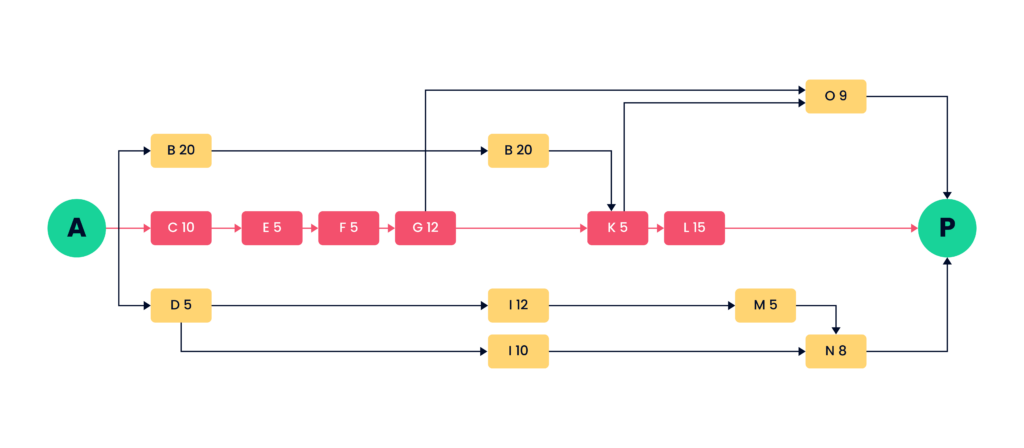
In the diagram, each letter represents a task, with A and P representing the project start and end. The number beside each letter represents that activity’s duration in days. There are multiple paths from A to P.
To find the critical path, compute the total duration of every path by adding the individual task durations. The path that takes the most days to complete is the critical path. In this example, the critical path is A-C-E-F-G-K-L-P, with a duration of 52 days.
Why Use the Critical Path Method?
Here are six reasons to use the critical path method:
- Improve Schedule Accuracy: Identify the longest sequence of dependent tasks to establish the minimum time needed to complete your project.
- Prioritize Important Tasks: Focus your team's attention on activities that directly affect the project deadline, rather than treating every task as equally urgent.
- Identify and Manage Dependencies: Understand which tasks must finish before others can begin, so you can coordinate work and prevent scheduling conflicts.
- Allocate Resources Strategically: Identify where delays would have the greatest impact and assign resources accordingly. Use available float to adjust non-path activities when needed.
- Spot Potential Delays Early: Monitor tasks with zero float to identify schedule risks and take corrective action before project delays affect the overall timeline.
- Make Better Scheduling Decisions: Evaluate how changes to task durations, dependencies, or resource availability affect your completion date before committing to a revised plan.
When to Use the Critical Path Method
The critical path method works best for projects with predictable tasks, defined dependencies, and strict deadlines. I'd recommend using it when your project has one or more of these characteristics:
- Complex Task Dependencies: Your project involves multiple interconnected activities that must happen in a specific order (e.g. software development, construction, system implementations).
- Fixed or Non-Negotiable Deadlines: You're working toward a product launch, regulatory deadline, or contractual delivery date where delays have significant consequences.
- Multiple Teams or Workstreams: Different departments, vendors, or contractors need to coordinate their work, and delays in one area could hold up others.
- Predictable Task Durations: You can estimate how long project activities will take with reasonable confidence and calculate a meaningful project timeline.
- Limited Resources: Your team shares people, equipment, or other resources across activities, and you need to understand which tasks have scheduling flexibility before reallocating them.
- High-Cost Delays: Missing deadlines could result in financial penalties, increased labor costs, lost revenue, or disruptions to other projects.
CPM is less useful for projects with changing requirements or uncertain task durations. In those cases, I'd combine it with rolling-wave planning or more adaptive scheduling techniques.

How To Find The Critical Path For Your Project
To find the critical path for your project, you'll need to identify activities, map dependencies, estimate durations, and calculate which sequence determines your project timeline.
Here's how to find and calculate the critical path in seven steps.
1. Identify Project Activities
Start by listing all the activities required to complete your project. If you've already created a work breakdown structure (WBS), use it to identify the work packages and break them into schedulable activities.
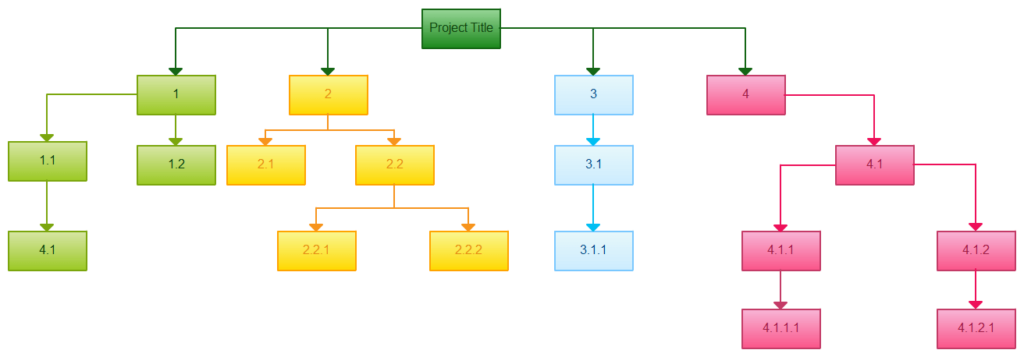
Include approvals, handoffs, and other activities that could affect when subsequent work begins. It's easy to overlook these when you're focused on deliverables.
For example, if you're launching an online magazine, your activities might include:
| Project Phase | Activities |
|---|---|
| Theme | Theme selection, theme approval |
| Content | Content ideation, writing, approval |
| Graphics | Graphics ideation, creation, approval |
| Sponsorship | Sponsorship pitches, advertising content, closing deals |
| Layout | Magazine layout design, final approval |
| Launch | Platform procurement, magazine upload, launch |
2. Sequence Activities and Identify Dependencies
Next, determine which activities depend on others and which can happen simultaneously. This helps you establish the order of work and identify potential scheduling bottlenecks.
For each activity, ask yourself:
- What must happen first? Identify predecessor activities that need to finish before work can begin.
- What happens next? Identify successor activities that depend on the activity's completion.
- What can happen in parallel? Look for activities that don't depend on one another and can proceed simultaneously.
- Are there scheduling constraints? Account for fixed approval dates, contractual deadlines, or other restrictions that affect activity timing.
For example, you can't approve magazine content before it's written. However, you might be able to develop advertising content while the editorial team works on articles.
Document these relationships in a dependency table before creating your network diagram. Missing or incorrect dependencies can throw off your entire schedule.
3. Estimate Activity Durations
Estimate how long each activity will take. Focus on the expected elapsed duration of each activity, rather than just the effort required. A task that takes eight hours of work might span several days because of reviews, handoffs, or waiting periods.
You can use several estimation techniques:
- Expert Judgment: Ask experienced team members or subject matter experts to estimate durations.
- Analogous Estimation: Use durations from similar activities or previous projects as a reference.
- Parametric Estimation: Apply historical rates to measurable quantities, such as the number of pages requiring design.
- Three-Point Estimation: Consider optimistic, most likely, and pessimistic durations to account for uncertainty.
- Bottom-Up Estimation: Break complex activities into smaller tasks and combine their duration estimates.
4. Create a Network Diagram
Create a network diagram to visualize your activities, their durations, and the dependencies between them.
Each activity should connect to its predecessors and successors. Activities that can happen simultaneously should appear on separate branches rather than in a single sequence.
For example, a simplified magazine launch network might look like this:
| Activity | Duration (Days) | Predecessor |
|---|---|---|
| A. Theme selection | 1 | None |
| B. Theme approval | 1 | A |
| C. Content writing | 15 | B |
| D. Content approval | 3 | C |
| E. Graphics creation | 10 | D |
| F. Advertising content | 10 | B |
| G. Magazine layout | 3 | E, F |
| H. Final approval | 3 | G |
| I. Platform procurement | 3 | B |
| J. Magazine upload | 1 | H, I |
| K. Launch | 1 | J |
This network diagram uses finish-to-start dependencies, meaning each successor begins after its predecessor finishes.
Before moving on, review the diagram for missing activities, circular dependencies, and incorrect relationships. Your calculations will only be as reliable as the network you've built.
5. Calculate Activity Dates and Float
Calculate the earliest and latest dates each activity can start and finish without changing the project's calculated completion date.
There are three parts to this process: the forward pass, the backward pass, and float calculations. For the following formulas, I'll use whole-day durations and assume consecutive calendar days, with no gaps between dependent activities.
The Forward Pass
The forward pass calculates the earliest possible start and finish dates for each activity. Start with the first activity and work forward through your network diagram.
You'll calculate two values:
- Early Start (ES): The earliest date an activity can begin, based on predecessors and start constraints. Use: ES = Latest predecessor EF + 1 day. If an activity has multiple predecessors, use the latest of their early finish dates so you can make sure required predecessor activities finish before the next activity starts. For activities without predecessors, use the project start date.
- Early Finish (EF): The earliest date an activity can finish. Use this formula: EF = ES + Duration - 1 day. For example, if an activity starts on June 10 and takes five days, its early finish date is June 14.
Repeat these calculations for every activity until you reach the end of the network.
The Backward Pass
The backward pass calculates the latest dates activities can start and finish without delaying the calculated project completion date.
Start at the end of your network diagram and work backward.
- Late Finish (LF): The latest date an activity can finish without delaying its successors or the project completion date. Use: LF = Earliest successor LS - 1 day. If an activity has multiple successors, use the earliest of their late start dates, so you can make sure the activity finishes before any dependent work needs to begin. For terminal activities, start with the calculated project finish date. Finish constraints must also be considered.
- Late Start (LS): The latest date an activity can begin without delaying the calculated schedule. Use this formula: LS = LF - Duration + 1 day. For example, if an activity must finish by June 20 and takes five days, its late start date is June 16.
Continue working backward until you've calculated the late start and late finish dates for every activity.
Calculate Total and Free Float
Once you've completed both passes, calculate how much scheduling flexibility each activity has.
There are two types of float:
- Total Float: The amount of time an activity can be delayed without delaying the calculated project completion date.
- Free Float: The amount of time an activity can be delayed without delaying the early start of any immediate successor.
Use these formulas:
Total Float = LF - EF
Or:
Total Float = LS - ES
Free Float = Earliest successor ES - EF - 1 day
For activities with multiple successors, use the earliest successor start date.
For example, if an activity finishes on June 10 and its earliest successor starts on June 15, it has four days of free float.
In a standard unconstrained CPM schedule, activities with zero total float form the longest path. Activities with positive float have some scheduling flexibility, although delays can consume that float.

6. Identify and Validate the Critical Path
Identify the longest sequence of dependent activities from the beginning to the end of your project. This sequence determines the minimum project duration based on your activity estimates and dependencies.
Using the simplified magazine launch example, the longest path is:
A → B → C → D → E → G → H → J → K
| Activity | Duration (Days) |
|---|---|
| Theme selection | 1 |
| Theme approval | 1 |
| Content writing | 15 |
| Content approval | 3 |
| Graphics creation | 10 |
| Magazine layout | 3 |
| Final approval | 3 |
| Magazine upload | 1 |
| Launch | 1 |
| Total | 38 |
The minimum project duration is therefore 38 days, assuming the estimated durations and dependencies are accurate.
Before accepting the result, validate it with your team:
- Check the Longest Path: Confirm that the identified activities and dependencies reflect how the work will actually happen.
- Review Duration Estimates: Double-check activities with uncertain estimates or dependencies on external teams.
- Look for Multiple Longest Paths: More than one sequence can have the same duration, and delays on any of them can affect completion.
- Review Near-Critical Paths: Identify sequences with very little float that could become schedule drivers if work slips.
7. Create, Monitor, and Adjust Your Project Schedule
Use your CPM calculations to build a realistic project schedule with start dates, finish dates, milestones, and assigned resources.
The calculated minimum duration is a starting point, not necessarily a feasible delivery commitment. You still need to confirm that your team has the capacity to complete the work as scheduled.
Here's what I'd recommend:
- Check Resource Availability: Identify activities that compete for the same people, equipment, or budget. Use resource leveling or resource smoothing to resolve conflicts where appropriate.
- Establish a Schedule Baseline: Once you've approved a feasible schedule, save it as your reference for measuring progress and identifying deviations.
- Monitor Activities on and Near the Longest Path: Pay particular attention to activities with zero or limited float, since delays can affect your completion date.
- Recalculate as Work Progresses: Update actual start dates, finish dates, remaining durations, and dependencies. The longest path can change as the project evolves.
- Adjust the Schedule When Necessary: Consider fast-tracking overlapping activities or crashing tasks by adding resources to shorten the timeline.
I'd suggest using a Gantt chart maker to track progress against your baseline. It gives you a visual view of activities, dependencies, and schedule changes as work progresses.
Critical Path Method Challenges and Limitations
Here are five common critical path method challenges and how to overcome them:
- Inaccurate Duration Estimates: Overly optimistic estimates can produce unrealistic project timelines. Use historical project data, consult the people doing the work, and apply three-point estimation when durations are uncertain.
- Complex or Missing Dependencies: Large projects can have hundreds of interconnected activities, which can make it easy to overlook dependencies or scheduling conflicts. Use a network diagram or project management software to map relationships and validate them with your team.
- Limited Consideration of Resource Constraints: CPM doesn't account for resource availability, so your calculated schedule might assign the same person to overlapping tasks. Check capacity and use resource leveling to resolve conflicts.
- Changing Project Requirements: Scope changes, unexpected delays, and shifting priorities can make calculations outdated. Update durations and dependencies regularly, then recalculate the path to reflect current project conditions.
- Overlooking Near-Critical Activities: Focusing exclusively on the longest path can cause you to miss other activities with very little float. Monitor near-critical paths alongside the longest path and take action before delays consume available float.
Critical Path Method vs Gantt Charts vs PERT Charts
CPM identifies tasks that determine your project's minimum duration, Gantt charts visualize schedules and progress, and PERT charts help plan dependencies and account for uncertain task durations.
Here's how they compare:
| Aspect | Critical Path Method (CPM) | Gantt Charts | PERT Charts |
|---|---|---|---|
| Primary purpose | Identify the longest sequence of dependent tasks and minimum project duration | Visualize project schedules, timelines, and progress | Map task dependencies and estimate project duration under uncertainty |
| Format | Network diagram with activity durations and scheduling calculations | Horizontal bar chart showing tasks against a timeline | Network diagram showing activity sequences and dependencies |
| Task durations | Typically uses a single estimated duration per activity | Displays planned task durations and dates | Often uses optimistic, most likely, and pessimistic estimates |
| Dependencies | Essential for calculating the longest path | Can display dependencies using connecting lines | Central to mapping task sequences and relationships |
| Scheduling flexibility | Float determines how much activities can be delayed | Shows available flexibility when supported by the underlying software | Can calculate float and identify the longest path |
| Progress tracking | Helps assess how delays affect project completion date | Tracks actual progress against planned dates | Primarily supports planning and schedule analysis |
| Best suited for | Defined activities, dependencies, and reasonably predictable durations | Projects requiring ongoing schedule visibility and team coordination | Projects with uncertain durations, such as research or product development |
| Main limitation | Relies on accurate estimates and doesn't account for resource constraints | Doesn't calculate the longest path or scheduling flexibility | Duration estimates can be subjective and require additional analysis |
What's Next?
Need more help with the critical path? Join the conversation in Slack with 100's of other digital project managers with DPM Membership!


