

How to Build a Digital Asset Management Strategy That Works


A digital asset management (DAM) strategy helps teams organize, store, and access files more efficiently—eliminating version control issues, brand inconsistencies, and bottlenecks in collaboration. With the right approach, you can streamline how assets are shared, retrieved, and reused across departments and teams.
In this article, you’ll learn how to build a digital asset management strategy that supports better file organization, improves workflow efficiency, and sets clear rules around access, usage, and storage.
What Is a Digital Asset Management Strategy?
A Digital Asset Management (DAM) strategy is a comprehensive plan to organize, store, retrieve, distribute, and archive your company’s digital assets to maximize their value and useability.

When digital assets are easily accessible, properly managed, and effectively utilized, your company can:
- Improve productivity
- Maintain brand consistency
- Streamline content creation and distribution processes
- Improve collaboration among team members
- Increase brand consistency
- Improve insights
- Increase return on investment (ROI)
Why Do You Need a DAM Strategy?
Managing your company’s digital assets without a strategic approach leads to these challenges:
Wasted time searching for assets: When files are scattered across different locations, team members across your company spend too many valuable hours searching for them, reducing overall productivity.
Version control issues: Maintaining numerous versions of digital assets leads to confusion and the potential use of outdated or incorrect assets.
Legal or compliance risks: Without a centralized system, tracking asset usage and ensuring compliance with licensing agreements and regulatory requirements becomes a significant challenge, exposing your company to legal liabilities and financial penalties.
Lack of brand consistency: Inconsistent use of logos, fonts, and imagery across various channels can dilute your company’s brand identity and confuse customers.
Having a DAM strategy and a centralized repository helps your employees quickly locate the right assets, reducing the time spent on search and retrieval. When version control is managed effectively, it ensures that only the latest, approved assets are used. This maintains brand consistency and mitigates legal and compliance risks, resulting in significant cost and time savings.
It is also worth noting that if a DMS is part of your DAM strategy, you may unlock the additional benefits of using a digital asset management system.
Key Elements of a DAM Strategy

Here are the essential elements of the digital asset management lifecycle that are necessary for success.
1. DAM Goals and Success Metrics
Build your DAM strategy by clearly defining goals and success metrics. Set specific, measurable objectives that align with your organization's broader business goals by asking these questions:
- What do you want to achieve?
- Who are the primary users of the system?
For example, if one of your goals is to maintain brand consistency, you might set a success metric that reduces the use of outdated assets. If improving collaboration is a priority, you could focus on decreasing the time spent searching for assets.
Tie your goals to business outcomes, such as faster time to market for new campaigns or improved customer experience, to ensure your DAM strategy delivers value.

2. Asset Inventory and Audits
Conduct an asset inventory and audit to identify all your current digital assets and their storage locations. Examining all storage locations, including local drives, network servers, cloud storage, and external hard drives. Categorize assets by type (e.g., images, videos, documents), file type or format (e.g., JPEG, MP4, PDF), and importance (e.g., high-priority, archival), and clean up duplicates and outdated content.
Conduct an asset audit to assess the quality of your assets. Determine if assets are high-resolution and suitable for their intended use. Identify gaps in your asset library that need to be filled to ensure your DAM system is populated with high-quality, relevant content that meets your organization's needs.
3. Taxonomy and Metadata Structure
Create a well-defined taxonomy and metadata structure to improve the discoverability of digital content. Taxonomy is the hierarchical classification of assets, and metadata is the information that describes each asset, such as title, description, creator, date created, and keywords. The goal is to create a logical, intuitive structure that aligns with how your team works.
- Naming conventions for assets ensure consistency and clarity. For example, product images could be "ProductCategory_ProductName_Version_Date."
- Metadata ensures that assets are easily searchable and retrievable, saving time and improving efficiency. For instance, a product image might be tagged with keywords like "summer collection," "organic cotton," and "women's dress."
4. Roles and Permissions
Define and assign user roles and permissions when developing a DAM strategy, taking into account levels of access and corresponding responsibilities. For example, administrators may have full access to all assets and the ability to manage user roles and permissions. In contrast, creators may only have access to the specific assets they need for their work. External users, such as freelancers or partners, might have more limited access to specific assets.
Assigning roles and permissions safeguards your company’s assets, reducing the risk of accidental deletions or unauthorized use.
5. DAM Platform
Select the right DAM platform to centralize and significantly improve the success of your strategy. Consider these factors when evaluating DAM tools:
- DAM ecosystem integrations
- Scalability
- AI tagging capabilities
- Usability
- Cloud based or on premise requirements
Some DAM tools to consider include Bynder, Brandfolder, Adobe Experience Manager, and OpenAsset. Each platform has its strengths, features, and functionality. Evaluate them based on your specific needs and requirements.
6. Governance and Processes
Factor governance and processes into your DAM strategy to maintain consistency and efficiency. Document usage rules and digital asset management workflows to keep all team members following the same procedures to prevent misunderstandings and consistently manage your company’s assets. Think about these:
- Usage rules define how assets can be used and how digital assets can be shared and modified.
- Asset workflows outline the steps involved in creating digital assets, reviewing, approving, and distributing them.
7. Automated Workflows
Where possible, automate workflows to improve efficiency. Many digital asset management features can save time and improve accuracy. For example, AI-powered tagging can automatically generate metadata based on the content of assets, making them easier to find and retrieve (this is one of many use cases for AI in digital asset management). This ensures that all assets undergo the necessary review and approval stages before being used to maintain quality and consistency
Maintaining and Optimizing Your DAM Strategy
Digital asset management isn’t a one-and-done project—it’s a living, evolving cycle. To keep your DAM system valuable over time, you need to regularly revisit, refine, and optimize how it works.
Think of it as an ongoing loop with six key phases: Audit → Organize → Tag → Share → Govern → Optimize — then repeat.
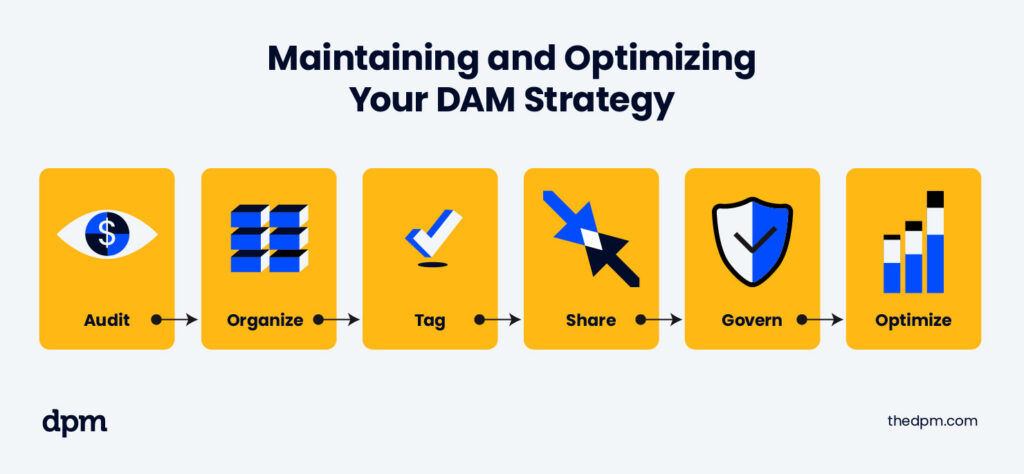
Below is how each phase contributes to long-term DAM success:
1. Audit
Keep your asset library healthy and secure. Regular audits ensure your DAM system stays lean and useful.
- Conduct quarterly reviews to assess asset relevance and quality
- Remove outdated or redundant content that no longer serves business goals
- Review user roles and permissions, especially when team members change
Pro Tip: Set a recurring calendar reminder for DAM audits—just like you would for performance reviews or budget check-ins.
2. Organize
A messy system is a slow system. Organization isn’t a one-time setup—it’s ongoing.
- Refine your taxonomy to reflect evolving team structures, products, or campaigns
- Consolidate storage locations to reduce fragmentation and confusion
- Eliminate duplicates that slow down searches and waste space
This is a great time to identify content gaps and flag missing assets for creation.
3. Tag
Make your assets easier to find and use. Improving tagging directly impacts discoverability and workflow speed.
- Optimize metadata based on user feedback and search analytics
- Enhance AI tagging rules as your asset categories evolve
- Update keywords and search terms to match how your team actually searches
Use search logs or most-viewed asset reports to guide your tagging updates.
4. Share
DAM is only valuable if people actually use it. Keep access aligned with real-world workflows.
- Review usage rules to ensure assets are being used correctly
- Reevaluate access levels, especially for contractors or external partners
- Train new team members on DAM best practices and workflows
Consider creating quick internal videos or playbooks to reduce onboarding friction.
5. Govern
Protect your brand—and your company. Governance helps you scale safely.
- Update workflows for asset approval and review
- Document new brand guidelines, templates, and usage policies
- Ensure compliance with licensing, privacy, and security standards
Make sure everyone understands the rules, not just admins.
6. Optimize
Keep measuring—and improving. Data-backed adjustments keep your DAM strategy aligned with business value.
- Track KPIs like time saved, asset reuse rate, search efficiency, and adoption metrics
- Adjust workflows or permissions based on bottlenecks or user friction
- Report ROI to stakeholders to demonstrate the value of continued investment
Don’t let your DAM system become shelf-ware. Show your metrics.
Keep the Loop Going
Every quarter (or whatever cadence makes sense for your team), revisit the loop. Ask:
- What’s working?
- What’s missing?
- What needs updating?
This repeatable process ensures your DAM strategy evolves with your business—and never falls behind.
Digital Asset Management Strategy Example
What does a digital asset management strategy look like in action? Let’s take a look at a fictional brand, EcoWear, a sustainable clothing company, on a mission to transform the fashion industry with its eco-friendly products.
The problem: As EcoWear grew, so did their library of digital assets—product images, promotional videos, social media graphics, and more. Initially, their assets were scattered across various storage solutions, leading to inefficiencies and inconsistencies in their marketing efforts. Recognizing the need for a streamlined approach, EcoWear implemented a Digital Asset Management (DAM) strategy.
Goals: EcoWear's three primary goals were to:
- Ensure brand consistency
- Improve collaboration among their marketing team
- Speed up the time-to-market for new campaigns
The DAM strategy: They conducted an asset inventory and audit, identified all their digital assets, and where they were stored. They cleaned up duplicate and outdated content and created a taxonomy and metadata structure to support the simplified search and retrieval of assets.
They then assigned clear roles and permissions and selected a DAM solution that provided robust integrations with their existing tools, scalability for future growth, and AI-powered tagging for enhanced discoverability. They established governance and processes to ensure consistent asset usage and provide comprehensive training to their team.
The result: A well-organized, efficient system that allowed EcoWear to maintain brand integrity, collaborate seamlessly, and launch marketing campaigns faster than ever before.
FAQs for Building a DAM Strategy
What’s the difference between a DAM strategy and a DAM system?
A DAM strategy is the comprehensive plan and set of brand guidelines and processes that determine how digital assets are organized, managed, and utilized. A DAM system is the software or platform that facilitates the execution of a DAM strategy and manages digital assets.
Do small businesses need a DAM strategy, or is it just for enterprise companies?
Digital asset management isn’t just for large enterprises. Today, software as a service (SaaS) enables small businesses to significantly benefit from a well-structured digital asset management (DAM) strategy.
How long does it take to implement a digital asset management strategy?
The time required to implement a digital asset management strategy can vary significantly depending on several factors, including the organization’s size, the volume of digital assets, the complexity of existing workflows, the sophistication of the DAM platform, and the specific goals of the DAM strategy.
It can be completed in a few weeks to several months from initial planning to choosing a digital asset management system, migrating existing assets, and training staff on the new business processes.
Can I use Google Drive or Dropbox instead of a DAM platform?
Google Drive, Dropbox, and similar cloud storage solutions are popular tools for digital file storage and sharing, but they aren’t necessarily substitutes for a dedicated digital asset management platform.
DAM software typically offers robust metadata management capabilities, enabling users to tag assets with detailed information, including keywords, descriptions, usage rights, version control, and protection of digital assets, as well as integration with other tools. This level of control helps you maintain consistency and security.
What departments should be involved in creating a DAM strategy?
DAM strategy requires collaboration across multiple departments and involves many stakeholders to be a more comprehensive and effective DAM solution. Key departments that should be involved in the process include creative, IT, operations, and marketing, who often play a crucial role in the DAM strategy, as primary users of digital assets.
Join For More Digital Asset Management Insights
Want to connect with other digital project managers to share resources and best practices? Join our membership community and get access to 100+ templates, samples, and examples, and connect with 100s of other digital project managers in Slack.


