

DAM ROI Calculator & How To Build A Business Case


The qualitative benefits of digital asset management software (DAM) don't always translate to executive buy-in regarding DAM ROI (impact on the bottom line). Execs want hard numbers to help justify the spending.
Use the DAM ROI calculator below to get a sense of how much centralizing your digital content, making it easier to organize and access, and maintaining consistent use of assets might save you to help your case for implementing DAM software.
Digital Asset Management ROI Calculator
Use the calculator below to get an idea of how much money you could save by implementing DAM software. Keep in mind this is just an estimate; to get a sense of real savings, talk to potential vendors.

How Can DAM Impact ROI?
DAM reduces time wasted searching for files, which significantly boosts operational efficiency. This, in turn, improves productivity and delivers a substantial return on investment (ROI) through reduced overhead costs and improved resource management.
It also plays a pivotal role in consistent branding and compliance by providing easy access to up-to-date, approved assets and reducing the risk of high-cost errors. It offers a streamlined way to create digital assets that align with your brand guidelines, so you can further solidify brand identity across all marketing channels.
Analytics features within DAM systems provide valuable insights into asset usage and performance, help you make more informed decisions, and help you optimize your business strategies.
Improving ROI is also currently a major trend in digital asset management.

ROI Calculation Method
Here's how to calculate the ROI of DAM software.
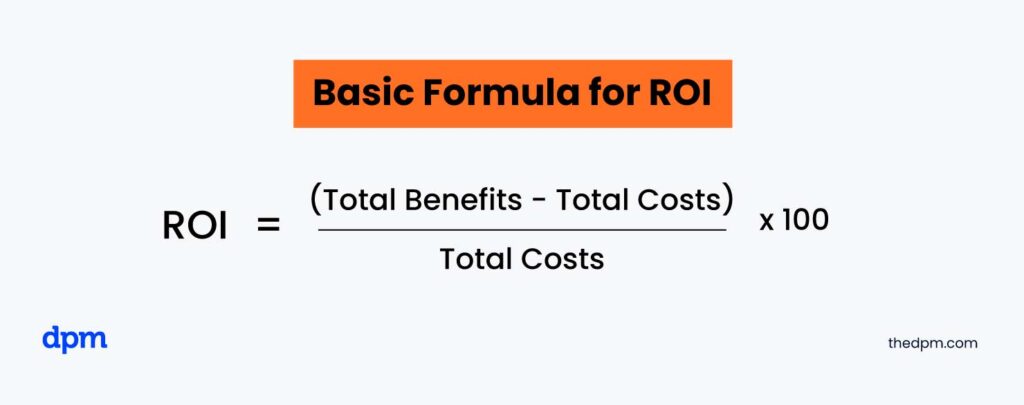
Let's say you determine that DAM software could save you $200,000, but it's going to cost $50,000. That's an ROI of 300%. Here are a few examples that illustrate the potential cost of not having a DAM system vs having one in place.
Annual Cost Calculation Without DAM
- Storage costs:
- On-premise: $12,000 for the first year, $2,000 each subsequent year
- Cloud: $240/year
- Labor costs:
- Searching: $18,000/year
- Managing: $7,200/year
- Productivity losses: $60,000/year
Total annual cost:
- First year (on-premise): $97,200
- Subsequent years (on-premise): $87,200
OR
- First year (cloud): $85,440
- Subsequent years (cloud): $85,440
Annual Cost Calculation With DAM
- DAM system costs:
- Initial setup and training: $18,000
- Annual subscription: $6,000
- Storage costs: $120/year
- Labor costs:
- Searching: $3,600/year
- Managing: $1,800/year
- Productivity gains: $48,000/year
Total annual cost:
- First year: -$18,480 (net savings)
- Subsequent years: -$36,480 (net savings)
How Does Company Size Impact The Focus of a DAM system?
| Impact | Small Businesses | Large Businesses |
|---|---|---|
| Problems faced by the org | Time and cost efficiency, maintaining brand consistency with limited resources | Managing large volumes of assets across multiple departments, maintaining consistent branding on a larger scale |
| Solution provided by DAM | Basic centralization, ease of access to assets | The system's ability to handle complex organizational structures and multiple departments |
| Benefits to the org | Time and cost savings, increased efficiency with limited staff, basic brand management | Significant time savings across departments, substantial cost reductions, better inter-departmental collaboration, maintaining brand management on a global scale |
How To Make A Business Case For DAM
Here's a simple way to make a business case for DAM:
- Identify the problem: Explain issues like wasting time looking for files, inconsistent branding, or spending too much on duplicate assets.
- Showcase the solution: Show how a DAM system can fix these problems by keeping all assets in one place, making them easy to find, and ensuring consistent branding.
- Highlight the benefits: This includes quick access to assets which saves time, cost reduction by avoiding duplicates in content creation, improved DAM workflows and productivity, and consistent use of approved assets which maintains brand integrity.
- Show the ROI: Use the ROI formula to calculate potential returns. List initial and ongoing costs, highlighting benefits like time and cost savings and revenue gains.
- Provide examples: Share success stories from other companies implementing DAM systems. You can often find these online or from customers of the DAM provider.
- Be ready for questions: Prepare clear answers to potential questions or concerns.
Steps To Choose The Right DAM Solution
When it comes time for your software selection process, consider creating a digital asset management RFP to help compare your options. Here's how to choose the right digital asset management solution:
- Assess your needs:
- What is the problem you want to solve? (this should already be in your business case)
- What assets need to be managed?
- How many departments and users will use the DAM system?
- Define metrics for measuring success based on your goals with a DAM system.
- Create a requirements list: List essential features like metadata management, search capabilities, and user permissions. Include specific needs such as multi-language support or security features.
- Research DAM system options: Research the DAM solutions that fit your requirements and objectives. Check reviews, case studies, and industry reports to gauge the reputation of vendors.
- Evaluate usability, UX, and integration capabilities: Contact DAM vendors for demonstrations and trial versions to gather as much feedback as possible: Is the system intuitive and easy to use? Does the system provide adequate training and support? Can the DAM system integrate with your existing tools and software via an API or other automation?
- Consider customization, scalability, and security features:
- Can the DAM system be customized to fit your content management needs?
- Can the solution scale with your organization as it grows?
- Are security measures in place to protect your assets, and are they compliant with relevant regulations and standards? (e.g. GDPR, HIPAA, etc.)
- Calculate costs: Compare the pricing models of different DAM solutions (subscription-based, one-time payment, etc.). Include initial setup, training, and ongoing maintenance fees in your calculation.
- Make a decision: Weigh pros and cons based on criteria and feedback. Select the solution that best fits your needs and budget.
What's Next?
Want to connect with other digital project managers to share resources and best practices? Join our membership community, get access to 100+ templates, samples, and examples, and connect with 100s of other digital project managers in Slack.


