De 10 beste programmene for tidsregistrering og fakturering, vurdert i 2026

10 Kortliste over den beste programvaren for tidsregistrering og fakturering


Å lede prosjekter innebærer å balansere tidsfrister, budsjetter og teamsamarbeid – samtidig som arbeidet holdes på rett spor. Med riktig programvare for tidsregistrering og fakturering kan denne prosessen forenkles, og teamet ditt får bedre kontroll.
Etter min erfaring gjør verktøy for tidsregistrering det enklere å se hva teamet bruker timene sine på, og å sikre at kundene faktureres korrekt. Da kan du fokusere mer på arbeidet som betyr noe, og mindre på administrative oppgaver. Etter å ha testet og vurdert flere alternativer har jeg satt sammen en objektiv liste over den beste programvaren for tidsregistrering og fakturering som er tilgjengelig i dag.
I denne artikkelen finner du mine beste anbefalinger, der hver enkelt er valgt ut fra fremragende funksjoner og evnen til å løse utfordringer fra den virkelige verden. La oss se nærmere på hva som gjør disse verktøyene verdt å vurdere for teamet ditt.
Why Trust Our Software Recommendations
Our team has been testing and reviewing software since 2012. As project managers ourselves, we know how difficult—and important—it is to choose the right software.
For this guide, we evaluated tools using hands-on testing and independent research, scoring tools using our selection criteria. We also draw on insights from industry thought leaders and practicing project management experts.
Our reviews reflect our human editorial judgment, not a sales pitch.
Expert reviewers:
Sammenligningstabell for programvare for tidsregistrering og fakturering
Denne sammenligningstabellen oppsummerer prisopplysningene for mine beste utvalgte programmer for tidsregistrering og fakturering:
| Tool | Best For | Trial Info | Price | ||
|---|---|---|---|---|---|
| 1 | Best for custom, actionable time reports | Free plan + 30-day free trial + free demo available | From $9/user/month (billed annually) | Website | |
| 2 | Best for structured time tracking | Free plan + 30-day free trial + free demo available | From $6/user/month (billed annually) | Website | |
| 3 | Best for payroll and tax automation | 30-day free trial | From $50/month (billed annually) | Website | |
| 4 | Best for scalable workspace controls | Free plan + 7-day free trial available | From $4.99/user/month | Website | |
| 5 | Best for QuickBooks integration | 30-day free trial | From $20/month + $10/user/month | Website | |
| 6 | Best for automatic, AI-powered time tracking | Free 14-day trial + free demo available | From $9/user/month (billed annually) | Website | |
| 7 | Best for unlimited project tracking | Free plan + 14-day free trial + free demo available | From $4/user/month (billed annually) | Website | |
| 8 | Best for freelancers and consultants | 14-day free trial + free plan + free demo available | From $3.99/user/month (billed annually) | Website | |
| 9 | Best for Asana integration | Free plan available; 14-day free trial | From $8.50/user/month (billed annually) | Website | |
| 10 | Best for real-time cost and time-burn insights | Free plan available + 14-day free trial | From $5.83/user/month (billed annually) | Website |


Anmeldelse av den beste programvaren for tidsregistrering og fakturering
Nedenfor finner du mine detaljerte sammendrag av den beste programvaren for tidsregistrering og fakturering som kom med på kortlisten min. Anmeldelsene mine gir en detaljert gjennomgang av de viktigste funksjonene, fordeler og ulemper, integrasjoner og ideelle bruksområder for hvert verktøy, slik at du kan finne det beste alternativet for deg.
Toggl
Best for custom, actionable time reports
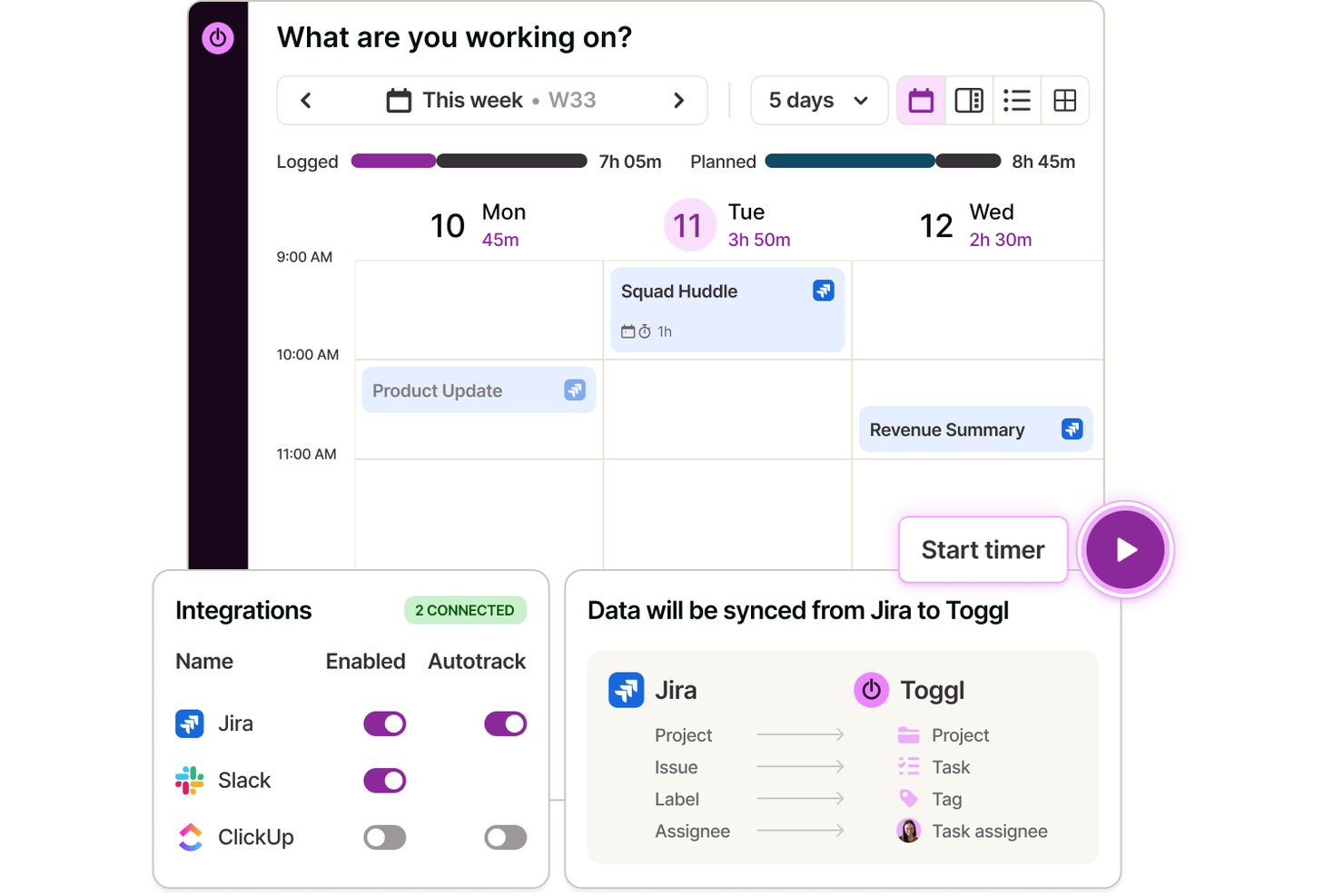
Toggl is a dedicated time tracking and billing software for managing detailed project hours, tracking billable work across clients, managing tasks, customizing team roles, and generating time, profitability, and team workload reports.
Who Is Toggl Best For?
Project-based teams, agencies, and freelancers who need flexible, granular time tracking and capacity planning across multiple clients and projects.
Why I Picked Toggl
I picked Toggl as one of the best because I rely on its custom, actionable time reports when I need to track billable time by project, client, or task. I can segment data quickly and export detailed reports for invoicing and budget reviews.
Toggl Key Features
- Automated idle detection: Identifies periods of inactivity to help maintain accurate time entries.
- Multi-device tracking: Lets you track time from desktop, mobile apps, browser extensions, and calendar integrations.
- Project, task, and client hierarchy: Organizes entries by client, project, and task for clear assignment and review across Kanban, List, Calendar, and Timeline views
- Toggl AI assistant: Gives you plain-language answers to questions around hours logged, billable vs. non-billable, projects over estimate, and more.
Toggl Integrations
Toggl offers native integrations with Asana, Jira, Google Calendar, Outlook, GitHub, Todoist, and more. It also connects with Zapier, provides an API for custom integrations, and has an MCP for connecting to Claude, Cursor, and Codex
Pros and Cons
Pros:
- Flexible billable rates by project or user
- Granular time entry with detailed reporting
- Customizable multi-project and client tracking
Cons:
- Lacks built-in payroll processing
- No recurring invoices or payment collection

actiTIME
Best for structured time tracking
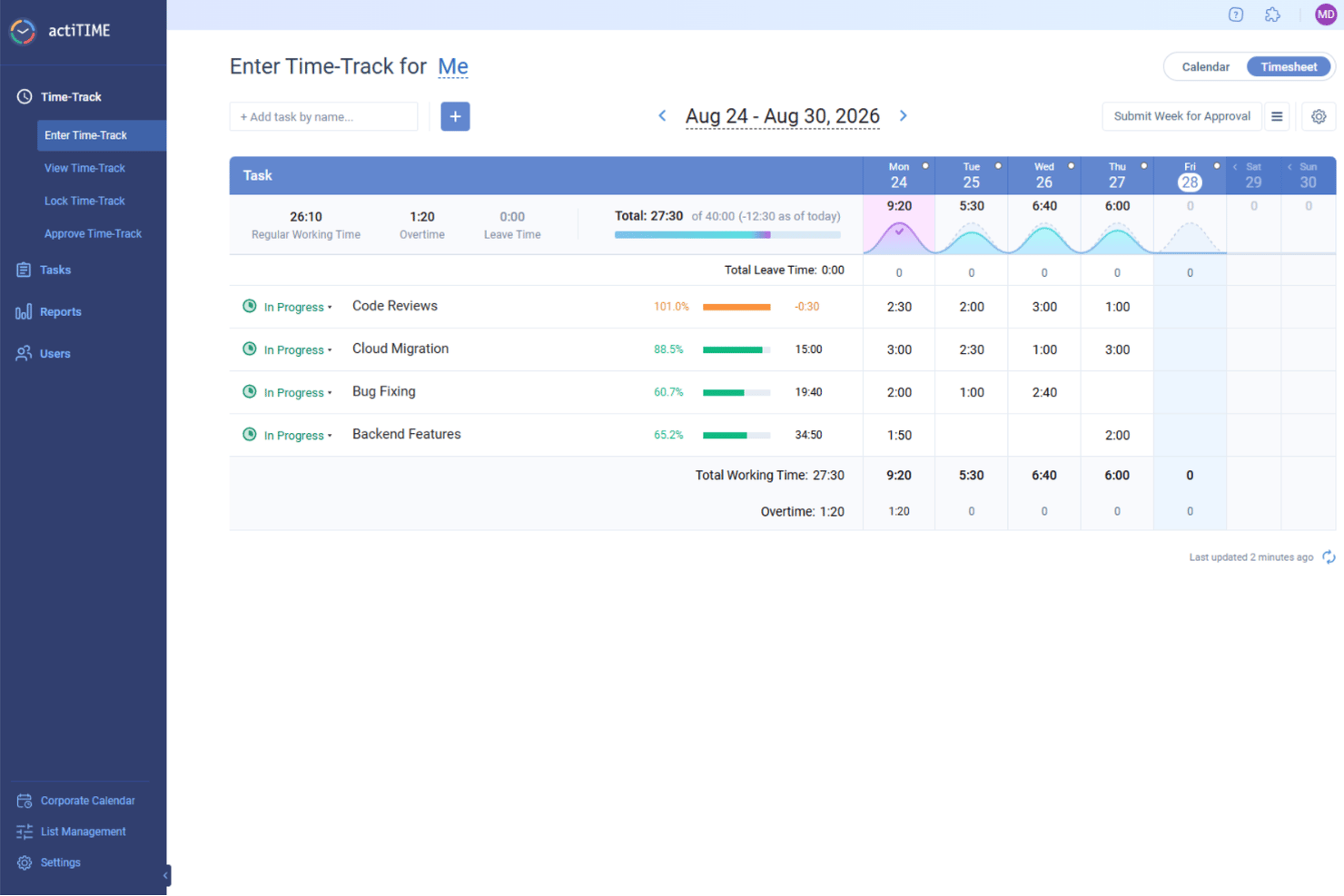
actiTIME is a versatile web-based time tracking and management tool, helping you oversee team capacity and project costs. Whether you're managing architectural projects, consulting services, or e-commerce operations, this tool helps you log hours against specific tasks, manage leave requests, and generate detailed billing reports for clients. With actiTIME, your team can focus on delivering quality work while ensuring that billing is precise and hassle-free.
Why I Picked actiTIME
I picked actiTIME because it excels in providing a structured approach to time tracking and billing, important for businesses aiming to optimize their financial management. The software's time tracking feature allows your team to log hours directly against projects, ensuring transparency and accountability. Additionally, its invoicing capabilities automatically generate invoices based on tracked time and predefined rates, reducing manual errors and saving time. These features are particularly beneficial if you're looking to maintain accurate billing records without the need for complex manual calculations.
actiTIME Key Features
In addition to its core strengths, I also found actiTIME offers several other valuable features for your team:
- Project Tracking: Monitor project progress in real-time to adhere to deadlines and budgets.
- Leave Management: Manage employee leave requests and approvals within the platform.
- Custom Workflows: Tailor workflows to match your specific business processes, improving productivity.
- Budget Tracking: Keep track of project budgets to avoid overspending and ensure financial efficiency.
actiTIME Integrations
Integrations include QuickBooks and Zapier. An API is available for custom integrations.
Pros and Cons
Pros:
- Offline mobile time tracking
- Automates billing workflow
- Highly customizable reporting widgets
Cons:
- Limited native integration options
- Lacks advanced project templates
New Product Updates from actiTIME

actiTIME Visual Hour Indicator and Time-Track Report Redesign
actiTIME adds a wave-style hour indicator to the Timesheet and Calendar views and refreshes the Time-Track report for smoother navigation and clearer visuals. For more information, visit actiTIME's official site.

TimeTrex
Best for payroll and tax automation

TimeTrex is a workforce management platform that combines time tracking, payroll processing, scheduling, and attendance management in one system. It supports web, mobile, and biometric clock-ins, helping businesses track employee hours accurately and connect that data directly to payroll and labor costs.
Who Is TimeTrex Best For?
TimeTrex is a strong fit for mid-sized to large businesses that manage hourly employees, especially those with multiple locations or more complex payroll and compliance needs.
Why I Picked TimeTrex
TimeTrex stands out for how tightly it connects time tracking with payroll processing. Hours worked flow directly into payroll calculations, including wages, deductions, and tax withholdings. It also supports tax reporting, which helps reduce the need for separate systems or manual data handling. For teams managing large hourly workforces, this setup makes payroll more efficient and keeps labor data consistent across the board.
TimeTrex Key Features
- Time tracking: Record employee hours through web, mobile, or physical time clock devices.
- Payroll processing: Automate wage calculations, deductions, and tax withholdings based on tracked time.
- Shift scheduling: Create and manage employee schedules, assign shifts, and handle availability.
- Attendance management: Monitor attendance, track absences, and manage leave accruals.
- Reporting and analytics: Generate reports on hours worked, overtime, and labor costs for better decision-making.
TimeTrex Integrations
TimeTrex natively integrates with QuickBooks, Sage, ADP, and Paychex. It also offers an API for custom integrations.
Pros and Cons
Pros:
- Built-in employee self-service and HR tools
- In-depth labor cost and compliance reporting
- Automatic syncing between attendance and payroll
Cons:
- Payroll tax automation is limited to specific countries
- Interface and reports can feel dated
New Product Updates from TimeTrex
TimeTrex Adds Quick Punch App With Offline and QR Support
TimeTrex adds a new Quick Punch app, offline punching, QR code scanning, punch images, configurable messages, and punch warnings or lockouts to improve employee clock-ins across browsers and local computers. For more information, visit TimeTrex’s official site.
 .
.
Clockify
Best for scalable workspace controls
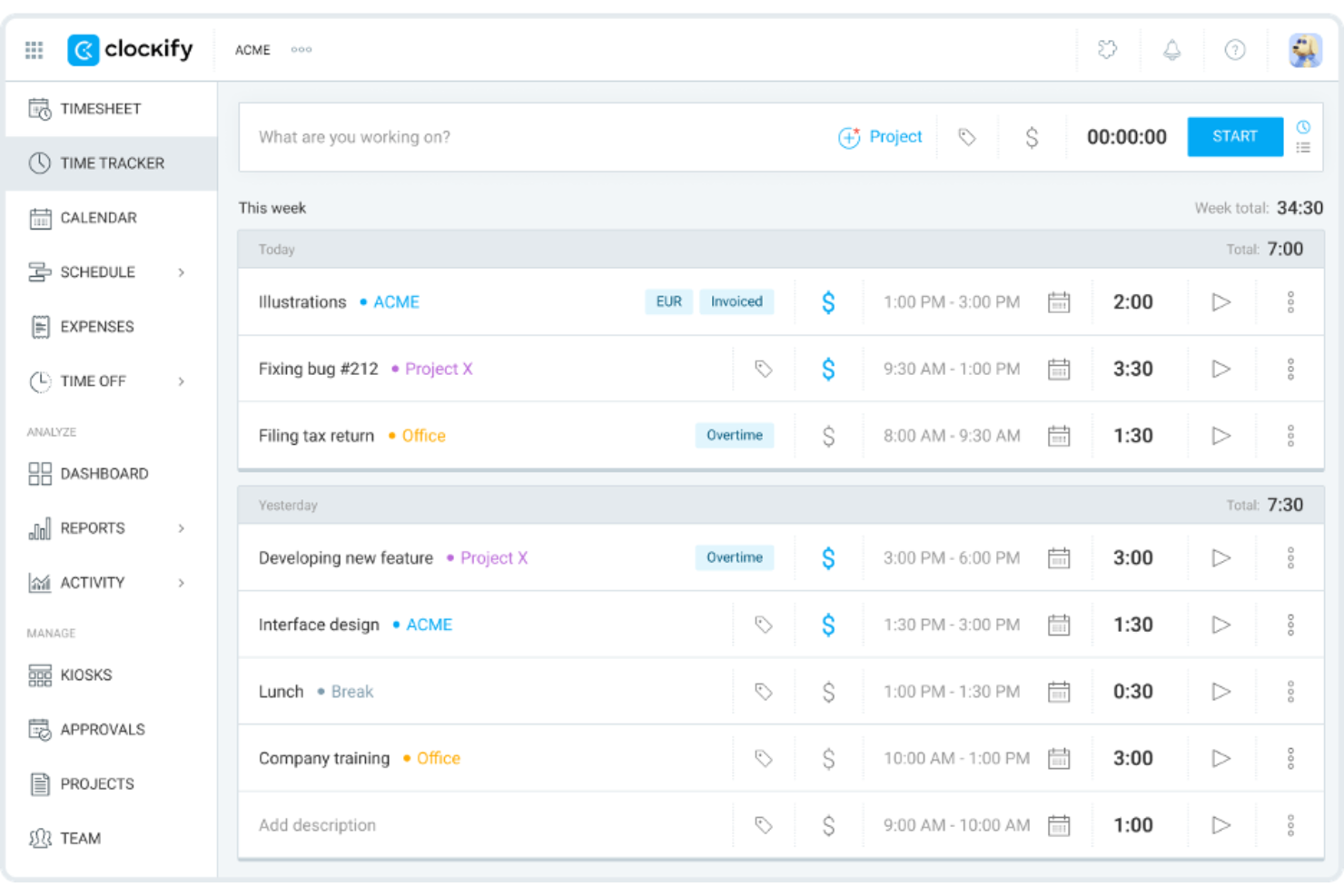
Clockify is a time tracking and billing software that caters to businesses of all sizes. It helps teams track work hours, manage projects, and generate reports for client billing.
Why I picked Clockify: This tool is a good fit for teams of any size because it offers unlimited user access, making it scalable for growing businesses. You can track hours across projects without worrying about user limits. Clockify provides detailed reporting features that help you analyze productivity and project costs. It also has an intuitive interface, so your team can start tracking time on it immediately without needing additional training.
Standout Features and Integrations:
Features include customizable time entries, allowing you to adjust and categorize time as needed. The dashboard provides a visual overview of team time, team activities, and project progress. You can also set hourly rates for different team members.
Integrations include Asana, Trello, Jira, QuickBooks, Zapier, Google Calendar, Microsoft Outlook, monday.com, and more.
Pros and Cons
Pros:
- Scalable and flexible controls for growing teams
- Bulk time-entry editing for fast cleanup
- Extensive free plan with generous features
Cons:
- Limited time-entry support for large volumes of data
- Limited invoice customization

Best for QuickBooks integration

QuickBooks Time is a time tracking and billing software designed for businesses that already use QuickBooks for accounting. It helps teams track time, manage payroll, and coordinate scheduling efficiently.
Why I picked QuickBooks Time: It integrates with QuickBooks, making it an excellent choice for businesses already using QuickBooks for their accounting needs. You can transfer time tracking data to QuickBooks for accurate payroll processing. With the scheduling features, you can assign shifts and notify team members to keep everyone on the same page. GPS tracking supports employee monitoring, as it allows you to verify employee locations, which is useful for businesses with mobile workforces.
Standout Features and Integrations:
Features include customizable alerts that remind your team to clock in and out, which can help reduce the number of missed punches. The platform offers detailed timesheet reports that provide insights into team productivity. Its mobile app allows employees to track time while on the go.
Integrations include Sage Intacct, Namely, Xero, and more.
Pros and Cons
Pros:
- Offers strong crew-management features
- Includes field-service-friendly tools
- Built for QuickBooks integration
Cons:
- Overtime calculations can be inconsistent for complex teams
- Limited to QuickBooks users

Timely
Best for automatic, AI-powered time tracking

Timely is a time tracking and billing software that caters to professionals who need accurate tracking without manual input. It automates time tracking, making it a strong fit for freelancers and teams who want to focus on work rather than logging hours.
Why I picked Timely: Timely's automatic tracking feature captures time spent on various tasks without requiring manual entries, which helps reduce the chance of error. You can review and approve tracked hours before billing. The visual timeline allows you to see how your time is distributed across projects, helping you manage your workload. Timely also offers project budgeting tools, so you can keep track of project costs and stay within budget.
Standout Features and Integrations:
Features include memory tracking, which logs all your work activities and creates a detailed timeline. The project dashboard gives you a quick overview of project progress and time allocation. You can also set notifications to remind you of tasks and deadlines.
Integrations include Slack, Google Calendar, Asana, Trello, Jira, Zapier, Xero, and more.
Pros and Cons
Pros:
- Memory-based timeline feature
- Strong privacy controls
- Automatic time tracking
Cons:
- Limited control over data organization
- Task-planning features not included

My Hours
Best for unlimited project tracking

My Hours is a time tracking and billing software suitable for teams that need to manage multiple projects. It allows users to track time, manage tasks, and handle client billing.
Why I picked My Hours: My Hours is a good fit for teams balancing multiple projects, offering features such as project time tracking and task tracking that cater to extensive workloads. You can create detailed reports to analyze project profitability. The software's task management capabilities can help you keep organized and stay on top of deadlines. It also offers customizable billing options, allowing you to tailor invoices to each client.
Standout Features and Integrations:
Features include project profitability analysis, which helps you prioritize projects based on labor rates and expenses. Expense tracking allows you to attach files and generate reports for invoicing. The payroll management system can be used to track attendance and time off, supporting accurate payroll processing.
Integrations include QuickBooks, Zapier, Google Calendar, Microsoft Teams, Asana, Jira, Xero, and more.
Pros and Cons
Pros:
- Flexible rate structure
- Actionable profitability and efficiency insights
- Task-grouping organization system
Cons:
- Mobile performance is inconsistent
- Limited support for compliance-oriented tracking

TimeCamp
Best for freelancers and consultants

TimeCamp is a time tracking and billing software designed for freelancers and small businesses. It helps track billable hours, manage projects, and generate invoices.
Why I picked TimeCamp: Freelancers may benefit from its ability to automatically track time spent on tasks, which supports accurate billing for every minute worked. You can categorize time entries by project and client to organize your workload. The invoicing feature allows you to create professional invoices directly from tracked hours. TimeCamp also offers productivity tracking, giving insights into how well you manage your time.
Standout Features and Integrations:
Features include idle time detection, which pauses tracking when no activity is detected. You can set goals for projects to help you stay focused and productive. The reporting feature provides detailed insights into time usage, aiding in better time management and planning.
Integrations include Trello, Asana, Slack, monday.com, Jira, QuickBooks, Xero, GitHub, Google Calendar, and more.
Pros and Cons
Pros:
- Built-in productivity scoring
- Idle time detection
- Color-coded timesheets
Cons:
- Access controls are limited for complex team hierarchies
- Automatic tracking rules require frequent tuning

Everhour
Best for Asana integration
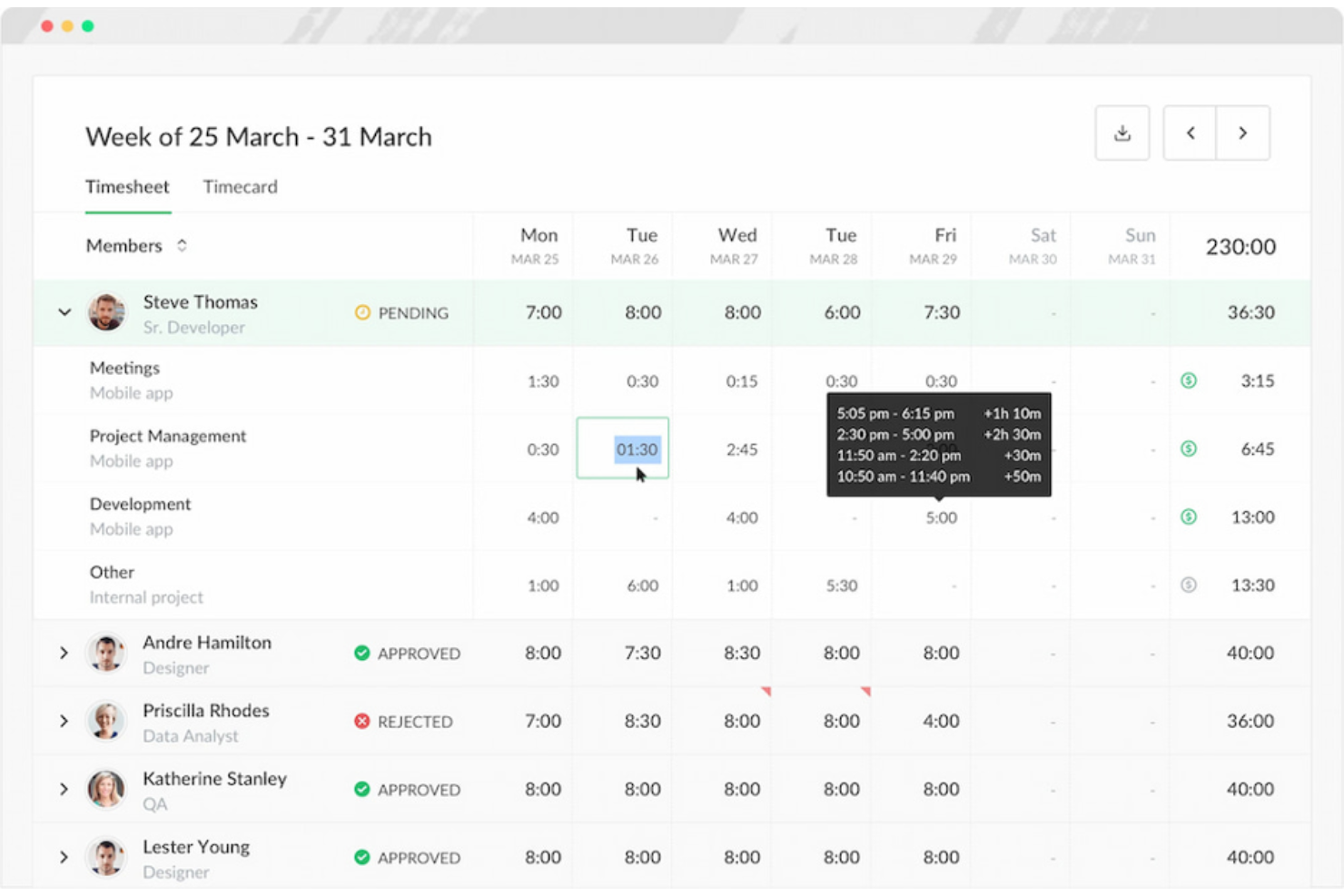
Everhour is a time tracking and billing software tailored for teams that use project management tools, such as Asana. It allows for precise time tracking, budgeting, and invoicing, helping teams manage their projects.
Why I picked Everhour: It integrates directly with Asana, allowing you to track time without leaving your project management environment. This can help you maintain focus and improve your workflows. You can set project budgets and monitor progress in real time to keep projects on track. Everhour also offers detailed reporting, which can help you analyze project performance and make informed decisions.
Standout Features and Integrations:
Features include the ability to create custom reports that provide insights into team productivity and project costs. You can also manage team availability and workload to optimize resource allocation. The invoicing feature allows you to generate invoices directly from tracked time.
Integrations include Asana, Trello, Basecamp, Jira, ClickUp, GitHub, GitLab, Xero, QuickBooks, and more.
Pros and Cons
Pros:
- Budget-tracking tools that update in real time
- Embedded inline timers inside project tasks
- Deep native integration with Asana
Cons:
- Limited advanced reporting for teams that need customized layouts
- Limited functionality without a connected project management platform
TMetric
Best for real-time cost and time-burn insights

TMetric is a time tracking and billing software tailored for businesses that need to keep a close eye on budgets. It helps track time, monitor project costs, and manage billing.
Why I picked TMetric: It offers detailed budget tracking features that allow you to monitor project expenses in real time. You can set budget limits for projects and receive alerts when you approach them, helping you stay within financial constraints. The software also provides detailed time tracking. TMetric's reporting capabilities give insights into project profitability, which can help you manage financial performance.
Standout Features and Integrations:
Features include task management tools that help you organize and prioritize work. The software offers a team dashboard where you can view and manage team activities. You can also track time across different devices, giving you flexibility in how you log hours.
Integrations include Asana, Trello, Jira, GitHub, GitLab, QuickBooks, Salesforce, Google Calendar, and more.
Pros and Cons
Pros:
- Straightforward API for custom integrations
- Strong team-capacity indicators
- Fast start/stop controls for switching tasks
Cons:
- Limited notification system
- Basic time-off management
Annen programvare for tidsregistrering og fakturering
Her er noen flere alternativer for programvare for tidsregistrering og fakturering som ikke kom med på kortlisten min, men som likevel er verdt å ta en titt på:
- TimeSolv
For matter-based billing and trust accounting
- Harvest
For small team collaboration
- Bill4time
For custom rate models
- TimeTracker by eBillity
For court-compliant timekeeping
- Insightful
For real-time activity analysis
- Paymo
For a unified workspace for distributed teams
- Avaza
For client-facing team collaboration
- FunctionFox
For creative teams
- Scoro
For end-to-end agency billing workflows
- ClickTime
For custom dashboards
- Hubstaff
For GPS tracking and activity metrics
- Zoho Invoice
For multi-currency support
- Xero
For project accounting


How I Evaluate Time Tracking and Billing Software
I evaluate every tool across two layers: the baseline features a project manager needs to move from time log to client invoice, and the differentiators that separate good tools from great ones.
Core Functionality (Table Stakes For This List)
When I'm selecting tools for my list, I rank each one on a scale from 0 (does not offer the functionality) to 5 (excels in this area) for each core functionality listed below. Then, I calculate the tool's total score into a percentage. Each tool needs to achieve a minimum total score of 65% to be considered for inclusion.
- Time Tracking Methods: I look for flexible input options—timers, manual entry, timesheets—and check whether entries can be tagged to specific projects, tasks, and clients.
- Invoicing & Billing: The tool should convert tracked hours into client-ready invoices, with support for branded templates, tax line items, and multi-currency billing.
- Project & Client Organization: I evaluate how each platform structures work, looking for a clear hierarchy where time entries roll up from tasks to projects to clients.
- Billable Rate Configuration: Rate flexibility matters—tools should handle hourly, fixed-fee, and retainer models with the ability to set rates per user, project, or task.
- Reporting & Budget Tracking: I check for reports that surface billable utilization, project budget burn, and profitability so you can catch overruns before they hit margins.
- Payment & Accounting Integration: Native connections to platforms like QuickBooks, Xero, or Stripe close the loop from logged hours to collected revenue.
Once I have a list of tools that meet this criteria, I consider what sets each platform apart.
Differentiating Factors (What Sets Vendors Apart)
Here's how I compare and contrast different vendors:
Standout Features
Approval workflows matter a lot when a team of ten is logging hours across multiple clients—you need multi-tier timesheet reviews before anything lands on an invoice. I also check for expense and mileage tracking, since reimbursable costs often get billed alongside hours and shouldn't require a separate tool. Retainer management is another differentiator, especially for agencies juggling prepaid hour blocks that need automated drawdown visibility.
Beyond Features
Ecosystem fit is high on my list—I look at whether a tool syncs with the PM and accounting platforms your team already uses, like Jira, Asana, QuickBooks, or Xero. Pricing structure also shapes my evaluation, particularly whether plans scale by user count or feature tier as your team grows. Finally, mobile access matters for consultants who log time on-site or between meetings, so I check for full-featured apps with offline entry that syncs when connectivity returns.
Slik velger du programvare for tidsregistrering og fakturering
Det er lett å gå seg vill i lange funksjonslister og kompliserte prisstrukturer. For å hjelpe deg med å holde fokus mens du går gjennom din unike prosess for valg av programvare, har jeg satt sammen en sjekkliste over faktorer du bør ha i tankene:
| Faktor | Hva du bør vurdere |
| Skalerbarhet | Vil programvaren vokse med virksomheten din? Vurder hvor mange brukere den støtter, og om den kan håndtere økte datamengder etter hvert som teamet ditt vokser. Se etter verktøy som tilbyr fleksible prismodeller for skalering. |
| Integrasjoner | Kan verktøyet integreres med de eksisterende systemene dine? Kontroller kompatibilitet med verktøy for prosjektstyring, regnskap og kommunikasjon for å sikre smidig integrasjon i arbeidsflyten. |
| Tilpasningsmuligheter | Kan du tilpasse programvaren til dine spesifikke behov? Se etter muligheter for å tilpasse rapporter, oversikter og fakturamaler slik at de samsvarer med forretningsprosessene dine. |
| Brukervennlighet | Er grensesnittet intuitivt? Test programvaren for å se om det er enkelt for teamet ditt å navigere og bruke den uten omfattende opplæring. Kompliserte systemer kan forsinke innføringen og redusere produktiviteten. |
| Implementering og opplæring | Hvor raskt kan du komme i gang? Vurder ressursene som tilbys for oppstart, for eksempel veiledninger og brukerstøtte, slik at overgangen blir smidig uten å forstyrre driften. |
| Kostnad | Passer prisen inn i budsjettet ditt? Sammenlign prisplaner og se etter skjulte gebyrer. Vurder langsiktige kostnader og om funksjonene som tilbys, rettferdiggjør prisen. |
| Sikkerhetstiltak | Hvor sikre er dataene dine? Se etter krypteringsstandarder, alternativer for sikkerhetskopiering av data og samsvar med personvernregler for å beskytte sensitiv informasjon. |
| Tilgjengelig brukerstøtte | Er hjelp tilgjengelig når du trenger det? Bekreft hvilke alternativer for kundestøtte som finnes, for eksempel nettprat, telefon- og e-poststøtte, spesielt i arbeidstiden din. |
Hva er programvare for tidsregistrering og fakturering?
Programvare for tidsregistrering og fakturering er et verktøy som hjelper virksomheter med å overvåke arbeidstimer og opprette fakturaer. Fagpersoner som frilansere, konsulenter og eiere av små virksomheter bruker disse verktøyene for å forbedre fakturanøyaktigheten og håndtere prosjekter effektivt. Funksjoner for tidsregistrering, fakturering og rapportering støtter nøyaktig fakturering og prosjektstyring. Disse verktøyene sparer til syvende og sist tid og reduserer den administrative arbeidsmengden.
Funksjoner
Når du velger programvare for tidsregistrering og fakturering, bør du se etter følgende viktige funksjoner:
- Tidsregistrering: Registrerer automatisk tiden som brukes på oppgaver, noe som bidrar til nøyaktig fakturering og tidsstyring.
- Fakturering: Oppretter fakturaer direkte fra registrert tid, forenkler faktureringsprosessen og reduserer manuelle feil.
- Budsjettoppfølging: Overvåker prosjektutgifter og varsler deg når du nærmer deg budsjettgrensene, slik at du får bedre kontroll over økonomien.
- Rapportering: Gir innsikt i tidsbruk og prosjektkostnader, og støtter beslutningstaking og produktivitetsanalyse.
- Utgiftshåndtering: Registrerer prosjektrelaterte utgifter for å støtte nøyaktig fakturering og økonomisk oversikt.
- Tilpassbare maler: Tilpasser fakturaer og tidsrapporter etter virksomhetens behov, noe som gir et mer profesjonelt og oversiktlig uttrykk.
- Mobiltilgang: Gjør det mulig å registrere tid og opprette fakturaer mens du er på farten, og støtter fleksibelt og praktisk fjernarbeid.
- Integrasjoner: Kobler sammen andre verktøy, for eksempel programvare for prosjektstyring og regnskap, og forbedrer arbeidsflyter og datadeling.
- Varsler og meldinger: Påminner brukere om oppgaver og tidsfrister, bidrar til å holde prosjekter på rett spor og reduserer tapte faktureringsmuligheter.
- Sikkerhetstiltak: Beskytter sensitive data med kryptering og samsvar med personvernregler, slik at du kan føle deg trygg.
Fordeler
Implementering av programvare for tidsregistrering og fakturering gir flere fordeler for teamet og virksomheten din. Her er noen av fordelene du kan se frem til:
- Bedre nøyaktighet: Automatisk registrering av timer reduserer manuelle feil og bekrefter nøyaktigheten av fakturerbar tid.
- Tidsbesparelser: Når fakturaer opprettes direkte fra registrert tid, reduseres de administrative oppgavene, slik at mer tid frigjøres til produktivt arbeid.
- Bedre økonomisk oversikt: Budsjettoppfølging og utgiftshåndtering hjelper deg med å følge nøye med på prosjektkostnadene og forhindre overskridelser.
- Økt produktivitet: Rapporteringsfunksjoner gir innsikt i hvordan tiden brukes, slik at du kan identifisere områder som kan forbedres.
- Større fleksibilitet: Mobiltilgang gjør det mulig å registrere tid og utgifter hvor som helst, og støtter fjernarbeid og arbeid på farten.
- Profesjonalitet: Tilpassbare maler for fakturaer og rapporter bidrar til å opprettholde et profesjonelt inntrykk overfor kundene.
- Datasikkerhet: Sikkerhetstiltak beskytter sensitiv informasjon og gir deg trygghet når det gjelder personvern.
Kostnader og priser
Valg av programvare for tidsregistrering og fakturering krever en forståelse av de ulike prismodellene og abonnementene som er tilgjengelige. Kostnadene varierer basert på funksjoner, teamstørrelse, tillegg og mer. Tabellen nedenfor oppsummerer vanlige abonnementer, gjennomsnittsprisene deres og typiske funksjoner som er inkludert i programvareløsninger for tidsregistrering og fakturering:
Sammenligningstabell for programvare for tidsregistrering og fakturering
| Abonnementstype | Gjennomsnittlig pris | Vanlige funksjoner |
| Gratisabonnement | $0 | Grunnleggende tidsregistrering, begrenset antall prosjekter og enkel rapportering. |
| Personlig abonnement | $4-$15/bruker/måned | Tidsregistrering, fakturering, prosjektstyring og grunnleggende rapportering. |
| Forretningsabonnement | $7-$30/bruker/måned | Avansert rapportering, integrasjoner, budsjettsporing og utgiftshåndtering. |
| Virksomhetsabonnement | $12-$70/bruker/måned | Tilpassbare funksjoner, dedikert kundestøtte, sikkerhetstiltak og verktøy for overholdelse av regelverk. |
Vanlige spørsmål om programvare for tidsregistrering og fakturering
Her er noen svar på vanlige spørsmål om programvare for tidsregistrering og fakturering:
Hvordan bidrar programvare for tidsregistrering til nøyaktige data?
Programvare for tidsregistrering bidrar til nøyaktige data ved å registrere timer automatisk mens du arbeider, noe som reduserer feil ved manuell registrering. Noen verktøy tilbyr funksjoner som registrering av inaktivitet og påminnelser om å stemple inn og ut, noe som bidrar til å opprettholde nøyaktige registreringer. I tillegg kan du gjennomgå og redigere oppføringer for å korrigere eventuelle avvik før du ferdigstiller rapporter eller fakturaer
Kan programvare for tidsregistrering integreres med verktøyene jeg allerede bruker?
Ja, mange programvareløsninger for tidsregistrering kan integreres med populære verktøy for prosjektstyring, regnskap og kommunikasjon. Kontroller programvarens integrasjonsmuligheter for å sikre kompatibilitet med de eksisterende systemene dine. Integrasjoner kan forbedre arbeidsflyten ved å synkronisere data på tvers av plattformer, redusere doble registreringer og forbedre den generelle effektiviteten.
Er dataene mine sikre med programvare for tidsregistrering?
Ja, de fleste anerkjente leverandører av programvare for tidsregistrering iverksetter sikkerhetstiltak for å beskytte dataene dine. Se etter programvare som tilbyr kryptering, regelmessig sikkerhetskopiering av data og overholdelse av personvernregler. Det er viktig å velge en leverandør med et godt rykte for sikkerhet og bekrefte at opplysningene dine forblir trygge.
Hvordan velger jeg riktig programvare for tidsregistrering for virksomheten min?
For å velge riktig programvare bør du begynne med å identifisere teamets spesifikke behov og arbeidsflyter. Vurder faktorer som integrasjoner, brukervennlighet og skalerbarhet. Test noen alternativer med gratis prøveperioder for å se hvilket som passer best. Legg merke til brukeranmeldelser og tilgjengeligheten av kundestøtte for å sikre en smidig opplevelse.