

10 beste prosjektstyringsprogrammer for soloprenører 2026

Beste prosjektstyringsprogramvare for soloprenører – kortliste


Den beste prosjektstyringsprogramvaren for soloprenører hjelper deg med å holde orden, prioritere arbeidsmengden og overholde tidsfrister – uten at du trenger et team for å håndtere detaljene. Enten du balanserer kundeoppdrag, interne mål eller skiftende prioriteringer, gir disse verktøyene selvstendige fagpersoner den strukturen de trenger for å holde fokus og ha kontroll.
Jeg har testet og vurdert ledende prosjektstyringsplattformer spesielt for soloprenører, frilansere og selvstendige skapere. Fra strømlinjeformet oppgavehåndtering og tidsregistrering til innebygde kundeportaler og automatisering er hvert verktøy i denne veiledningen utviklet for å hjelpe deg med å få mer gjort med mindre.
Why Trust Our Software Recommendations
Our team has been testing and reviewing software since 2012. As project managers ourselves, we know how difficult—and important—it is to choose the right software.
For this guide, we evaluated tools using hands-on testing and independent research, scoring tools using our selection criteria. We also draw on insights from industry thought leaders and practicing project management experts.
Our reviews reflect our human editorial judgment, not a sales pitch.
Expert reviewers:
Sammenligningstabell: Prosjektstyringsprogramvare for soloprenører
Denne sammenligningstabellen oppsummerer prisdetaljene for mine utvalgte prosjektstyringsprogrammer for soloprenører:
| Tool | Best For | Trial Info | Price | ||
|---|---|---|---|---|---|
| 1 | Best for task management with time tracking | Free plan + 15-day free trial + free demo available | From $4/user/month (billed annually) | Website | |
| 2 | Best for integrated CRM features | Free plan + 7-day free trial + free demo available | From $9/user/month (billed annually) | Website | |
| 3 | Best for customizable views | Free plan available | From $9/user/month (billed annually) | Website | |
| 4 | Best for project timelines | Free plan + 14-day free trial + free demo available | From $79/user/month (billed annually) | Website | |
| 5 | Best for solo work tracked across five views | Free plan available | From $10.99/user/month (billed annually) | Website | |
| 6 | Best for team communication tools | 14-day free trial + free demo available | From $45/month (billed annually) | Website | |
| 7 | Best for client work billing and project proofing | Free plan + 14-day free trial available | From $9.99/user/month (billed annually) | Website | |
| 8 | Best for solopreneurs billing clients by the hour | 7-day free trial | From $19/month | Website | |
| 9 | Best for freelance client billing and projects | Free demo + 14-day free trial available | From $10/month (billed annually) | Website | |
| 10 | Best for solo time tracking and project planning | Free plan + 30-day free trial + free demo available | From $9/user/month (billed annually) | Website |

Vurdering av den beste prosjektstyringsprogramvaren for soloprenører
Nedenfor finner du mine detaljerte sammendrag av den beste prosjektstyringsprogramvaren for soloprenører som kom med på kortlisten min. Vurderingene mine gir et detaljert innblikk i de viktigste funksjonene, fordelene & ulempene, integrasjonene og ideelle bruksområdene for hvert verktøy, slik at du kan finne det som passer best for deg.

Best for task management with time tracking

For solopreneurs navigating the complexities of project management, Zoho Projects offers a tailored solution that simplifies task organization and enhances productivity. With its comprehensive suite of tools, Zoho Projects appeals to solopreneurs and small business owners who seek an intuitive platform to manage tasks, track time, and collaborate efficiently. It addresses challenges like time management and project tracking by providing features that streamline operations, making it an ideal choice for those juggling multiple responsibilities.
Why I Picked Zoho Projects
I picked Zoho Projects for its unique ability to cater to the specific needs of solopreneurs with its robust task management and time tracking features. The platform's task automation allows you to set up workflows that reduce manual effort, freeing up time to focus on core business activities. Additionally, the team collaboration tools are perfect for solopreneurs who work with freelancers or clients, ensuring seamless communication and project updates. By integrating these features, Zoho Projects helps you overcome the common hurdle of managing multiple tasks single-handedly.
Zoho Projects Key Features
In addition to its standout task management and collaboration tools, Zoho Projects offers:
- Time Sheets: Allows you to log time spent on tasks and generate detailed reports for better time management.
- Gantt Charts: Provides a visual timeline of your project, helping you track progress and deadlines effectively.
- Customizable Dashboards: Enables you to personalize your project view with widgets, offering quick insights into key metrics.
- Issue Tracking: Helps you identify and resolve project-related issues promptly, ensuring smooth project execution.
Zoho Projects Integrations
Integrations include Slack, Google Drive, Microsoft Teams, Dropbox, GitHub, Bitbucket, Zoho CRM, Zoho Books, Zoho People, and Zoho Invoice.
Pros and Cons
Pros:
- Useful client collaboration tools
- Affordable for solopreneurs
- Strong task and time tracking
Cons:
- Mobile features more limited
- Interface can feel cluttered
New Product Updates from Zoho Projects
Zoho Projects Adds CodeX Scripts for Custom Modules
Zoho Projects now supports CodeX Scripts for custom modules, enabling conditional logic and rules for creating, updating, and deleting records. For more information, visit Zoho Projects' official site.
 .
.
Flowlu
Best for integrated CRM features

Flowlu is an all-in-one project management platform for solopreneurs and freelancers that combines task tracking, project planning, CRM, time tracking, and invoicing in a single workspace.
Who Is Flowlu Best For?
Flowlu is a strong fit for freelance consultants and solo agency owners who need to manage client relationships, project work, and invoicing from a single platform.
Why I Picked Flowlu
I've included Flowlu in my top picks because its CRM lives inside the same workspace as your projects, tasks, and invoices, so you're never copying client details between tools. I particularly like that you can spin up a new project directly from a won CRM deal and carry all the contact context with you. From there, you can log billable hours against tasks and generate a client invoice from those time records without leaving the platform.
Flowlu Key Features
- Recurring task scheduling: Set tasks to repeat daily, weekly, monthly, or annually, with a custom interval and a defined end condition.
- Agile project tools: Run sprints with backlogs, Kanban boards, and work-in-progress limits inside dedicated agile projects.
- Mind maps: Build and customize visual mind maps for brainstorming and organizing ideas directly within the platform.
- Estimate-to-invoice conversion: Convert an approved client estimate into an invoice, with all estimate details carried over automatically.
Flowlu Integrations
Flowlu integrations include Google Calendar, Gmail, Google Drive, Stripe, PayPal, Slack, and more. It also supports REST API access, webhooks, and OAuth 2.0 for custom integrations.
Pros and Cons
Pros:
- Client portal shares tasks and documents
- Kanban, calendar, and Gantt views organize work
- CRM, projects, and billing stay connected
Cons:
- Project totals may omit tracked hours
- Many modules take time to navigate

ClickUp
Best for customizable views
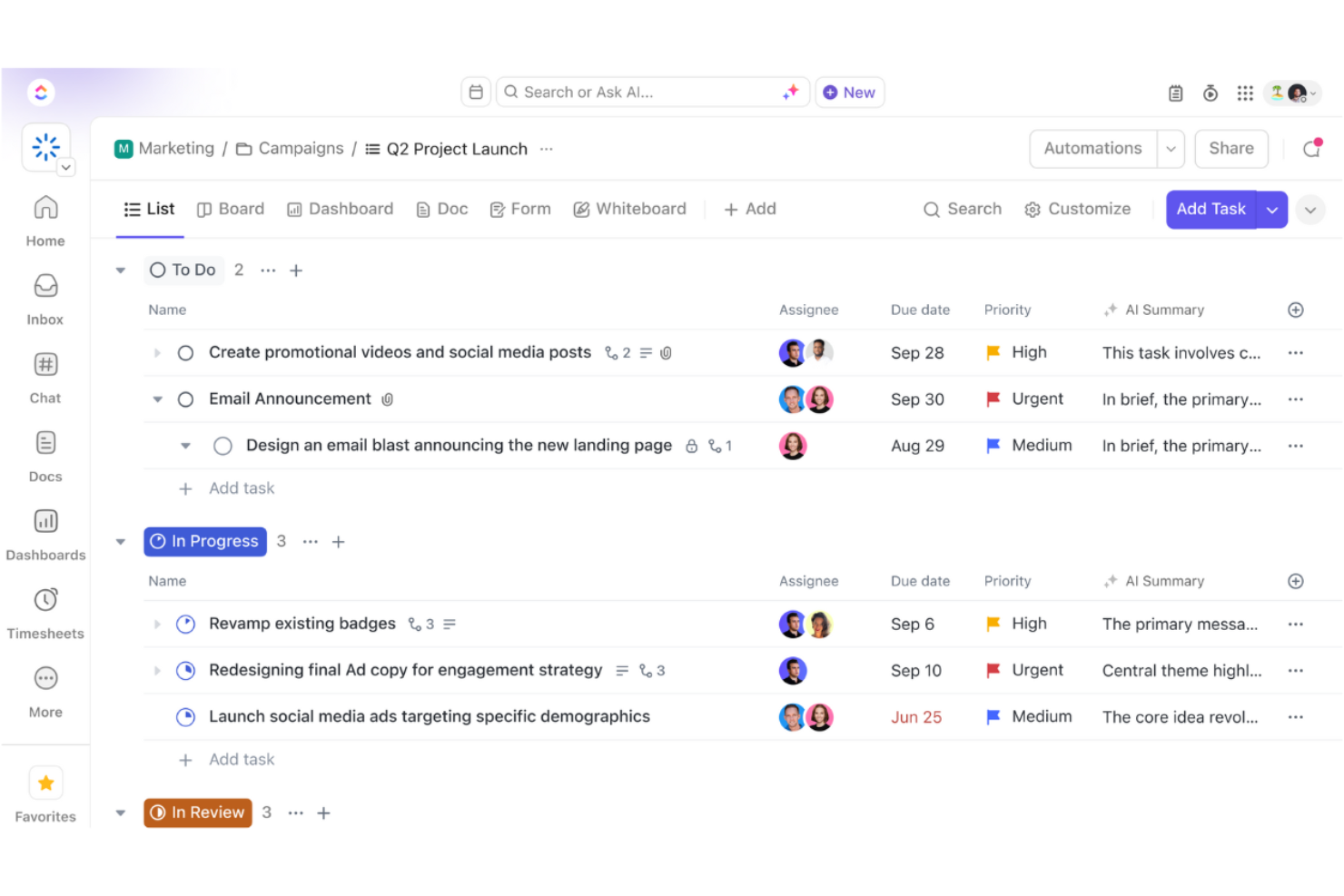
ClickUp is a versatile project management tool designed for teams and solopreneurs who need a flexible workspace to manage tasks, projects, and workflows. It offers a wide range of features that cater to various business needs, including task management and collaboration.
Why I picked ClickUp: It provides customizable views, allowing you to tailor your workspace to fit your specific preferences. You can switch between list, board, and calendar views, making it easy to visualize your work. The tool also offers custom fields, enabling you to track exactly what matters to you. With ClickUp, you have the flexibility to create a workflow that aligns with how you and your team work best.
Standout Features & Integrations:
Features include goal tracking, which helps you set and achieve your objectives by breaking them down into manageable steps. The time tracking feature allows you to monitor how much time you're spending on tasks, helping you optimize your productivity. ClickUp also offers a built-in document editor, so you can create and collaborate on documents directly within the platform.
Integrations include Slack, Google Drive, Dropbox, Microsoft Teams, Zoom, Outlook, Evernote, GitHub, Trello, and Zapier.
Pros and Cons
Pros:
- Supports various project styles
- Goal setting features
- Built-in time tracking
- Flexible task management
- Highly customizable views
Cons:
- Frequent updates may disrupt workflow
- Limited offline functionality
- Some features need manual setup
- Requires time to learn features
- Can be overwhelming for new users
New Product Updates from ClickUp
ClickUp Adds Meetings Hub, Super Agent Templates, and ZoomInfo Integration
ClickUp adds a searchable Meetings Hub, new ways to clone and template Super Agents, and a ZoomInfo integration through the App Center. These updates improve meeting retrieval, agent reuse, and access to sales intelligence. For more information, visit ClickUp’s official site.
Nifty
Best for project timelines

Nifty is a project management tool designed to help teams and solopreneurs manage tasks and timelines efficiently. It offers features that support collaboration, task management, and milestone tracking.
Why I picked Nifty: It excels in managing project timelines, making it ideal for users who need to keep track of deadlines and progress. Nifty's milestone feature lets you set clear goals and visualize your project's path to completion. You can easily create tasks and assign them to team members, ensuring everyone knows their responsibilities. The tool also offers a timeline view, which helps you see how different tasks and milestones align over time.
Standout Features & Integrations:
Features include a comprehensive timeline view that allows you to track project progress and deadlines visually. The task management feature helps you organize and prioritize tasks efficiently. Nifty also offers a collaborative document editor, enabling your team to work together on documents without leaving the platform.
Integrations include Slack, Google Drive, Zoom, Microsoft Teams, Dropbox, Google Calendar, Trello, Asana, GitHub, and Zapier.
Pros and Cons
Pros:
- Easy to track project progress
- Customizable task lists
- Collaborative document editing
- Visual timeline management
- Clear milestone tracking
Cons:
- Some features need manual updates
- May require training to use effectively
- Limited offline access
- Initial setup can be complex
- Can become cluttered with large projects

Asana
Best for solo work tracked across five views
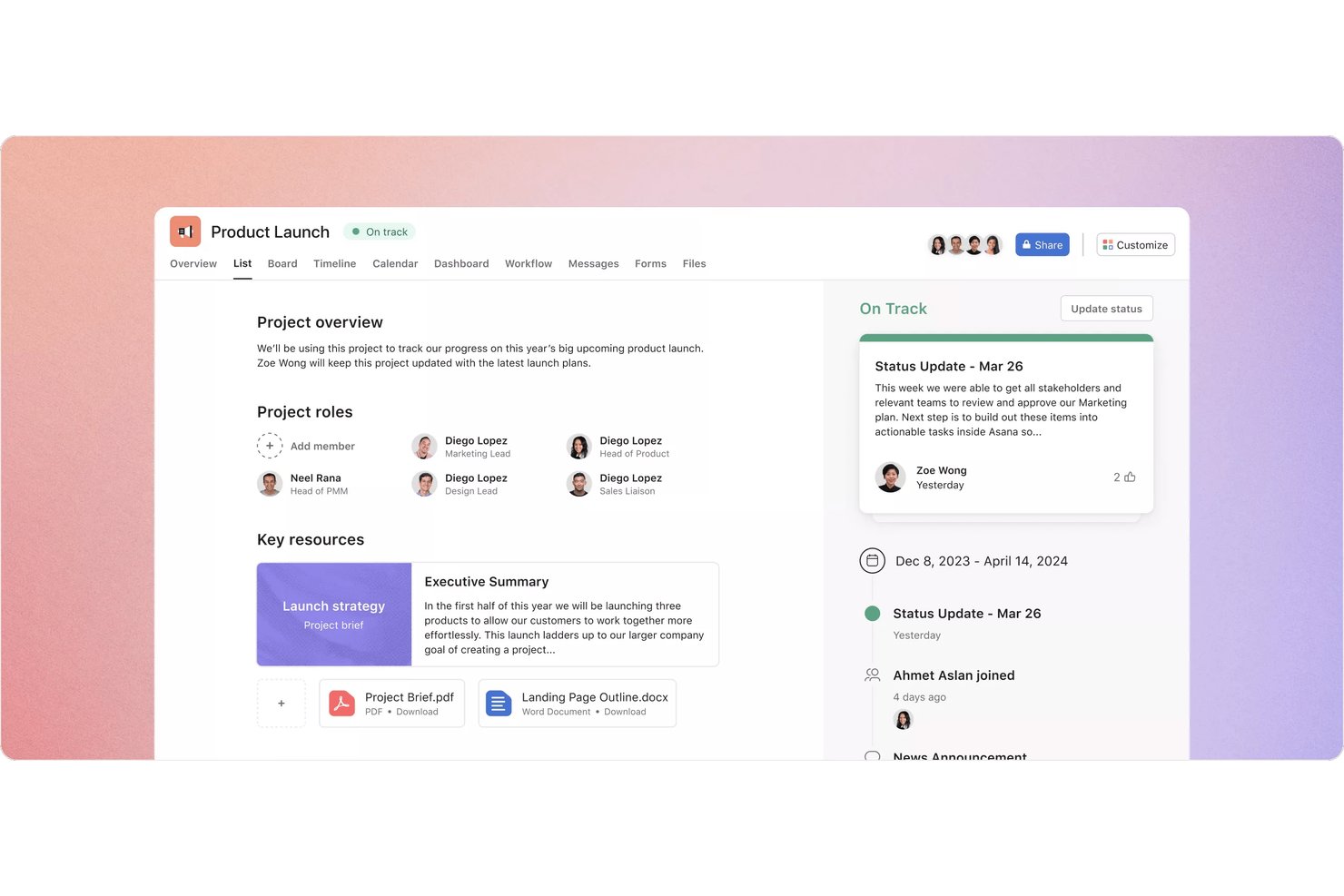
Asana is a project management platform for solopreneurs and small teams that combines task tracking, multiple project views, scheduling, and client collaboration in one workspace.
Who Is Asana Best For?
Asana suits solopreneurs who need to manage multiple client projects across different views without outgrowing a single workspace.
Why I Picked Asana
I picked Asana as one of the best because no other tool on this list gives you five distinct ways to view your work in a single workspace. I love that you can flip between a list, board, calendar, timeline, and Gantt chart depending on what a project demands, and save up to 50 filtered or sorted tabs per project. When I'm juggling multiple client deadlines, the timeline view makes it easy to spot scheduling conflicts before they become real problems.
Asana Key Features
- My Tasks: A personalized view that pulls all your assigned work into one list across every project you're part of.
- Mobile task capture: Create tasks, set due dates, and attach files from your phone, with offline actions that sync when you're back online.
- Reusable project templates: Build templates from existing projects with relative dates, custom fields, and intake forms to standardize repeat work.
- Guest access: Invite clients or contractors to specific tasks or projects so they can comment and complete work without seeing anything else.
Asana Integrations
Asana supports 270+ marketplace integrations, including Slack, Google Drive, Google Calendar, Microsoft Teams, Jira Cloud, Figma, Dropbox, and Zapier. It also offers a REST API, webhooks, SDKs, and an MCP server for custom integrations.
Pros and Cons
Pros:
- Reusable templates simplify repeat client work
- Client feedback stays attached to tasks
- Five views help spot scheduling conflicts
Cons:
- Clients may avoid shared project spaces
- No single-seat paid plan for soloists

ProofHub
Best for team communication tools
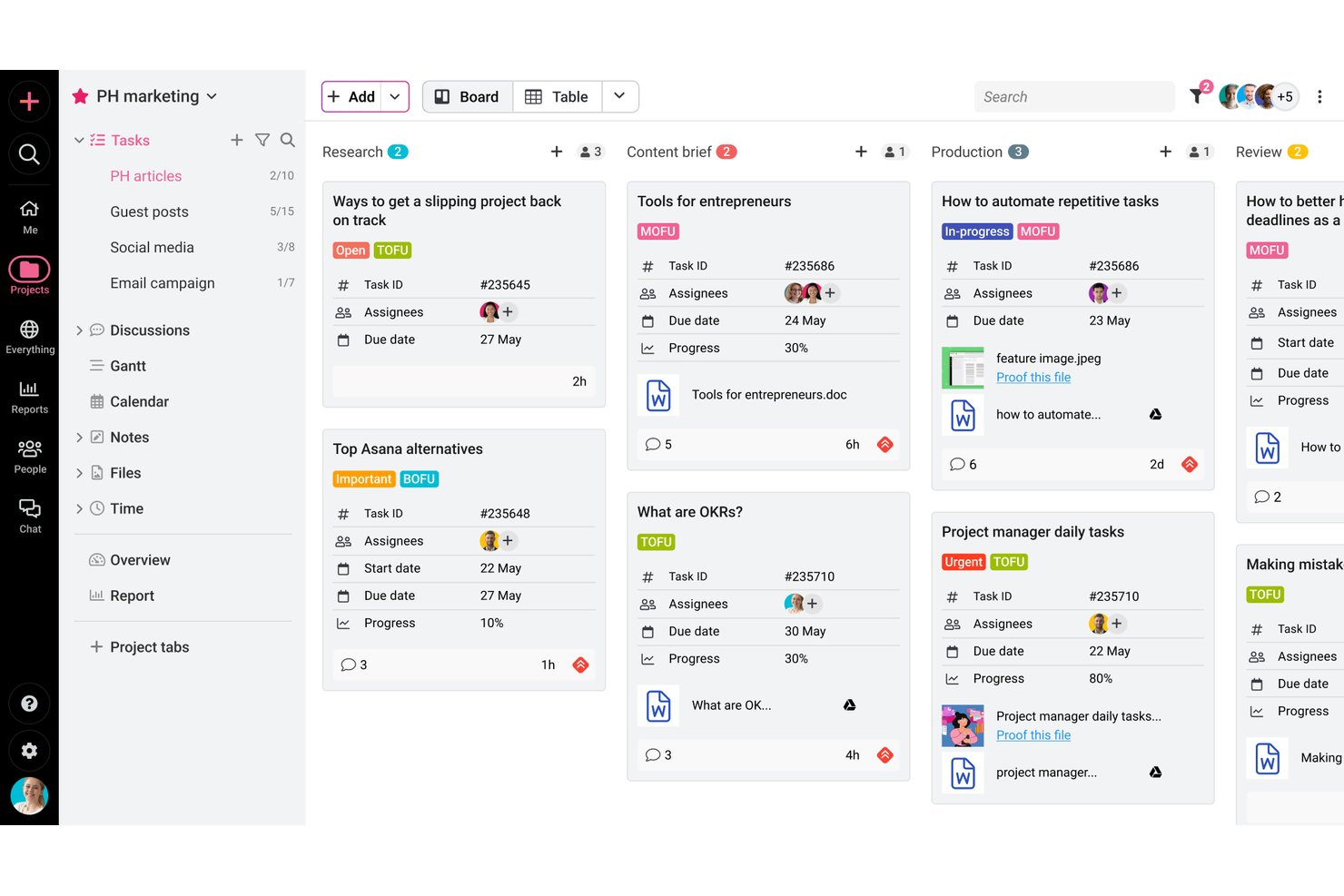
ProofHub is a project management and team collaboration platform that combines task tracking, visual workflow views, built-in proofing and approvals, time tracking, and client-facing communication tools in one place.
Who Is ProofHub Best For?
ProofHub suits independent creative professionals and freelancers who need to manage client reviews, feedback, and approvals alongside their project work.
Why I Picked ProofHub
I picked ProofHub as one of the best because its built-in communication tools genuinely replace the scattered email threads and chat messages that slow down client work. I especially like how clients can leave feedback directly on files using markup tools, and how discussion threads keep conversations tied to specific projects rather than buried in inboxes. Proofing, approvals, and group chat all live alongside your tasks, so nothing falls through the cracks between review cycles.
ProofHub Key Features
- Task dependencies: Link tasks so work can only progress in the right order, keeping project sequencing clear across client deliverables.
- White labeling: Apply your own domain, logo, and brand colors to your ProofHub account for a more professional client-facing experience.
- Time tracking with billable hour filters: Log time manually or with timers, then filter entries by billable or non-billable status before exporting to FreshBooks or QuickBooks.
- Project templates: Save a project as a reusable template—including assignees, dates, and milestones—to spin up similar client projects faster.
ProofHub Integrations
ProofHub offers native integrations with Google Calendar, Dropbox, OneDrive, FreshBooks, FreshBooks Classic, QuickBooks, Slack, Box, and iCal. Its API supports custom integrations.
Pros and Cons
Pros:
- Gantt views clarify dependencies and deadlines
- Separate client projects keep tasks organized
- Client feedback stays tied to project files
Cons:
- Finding specific actions can take time
- Frequent updates can bury important notifications

Best for client work billing and project proofing
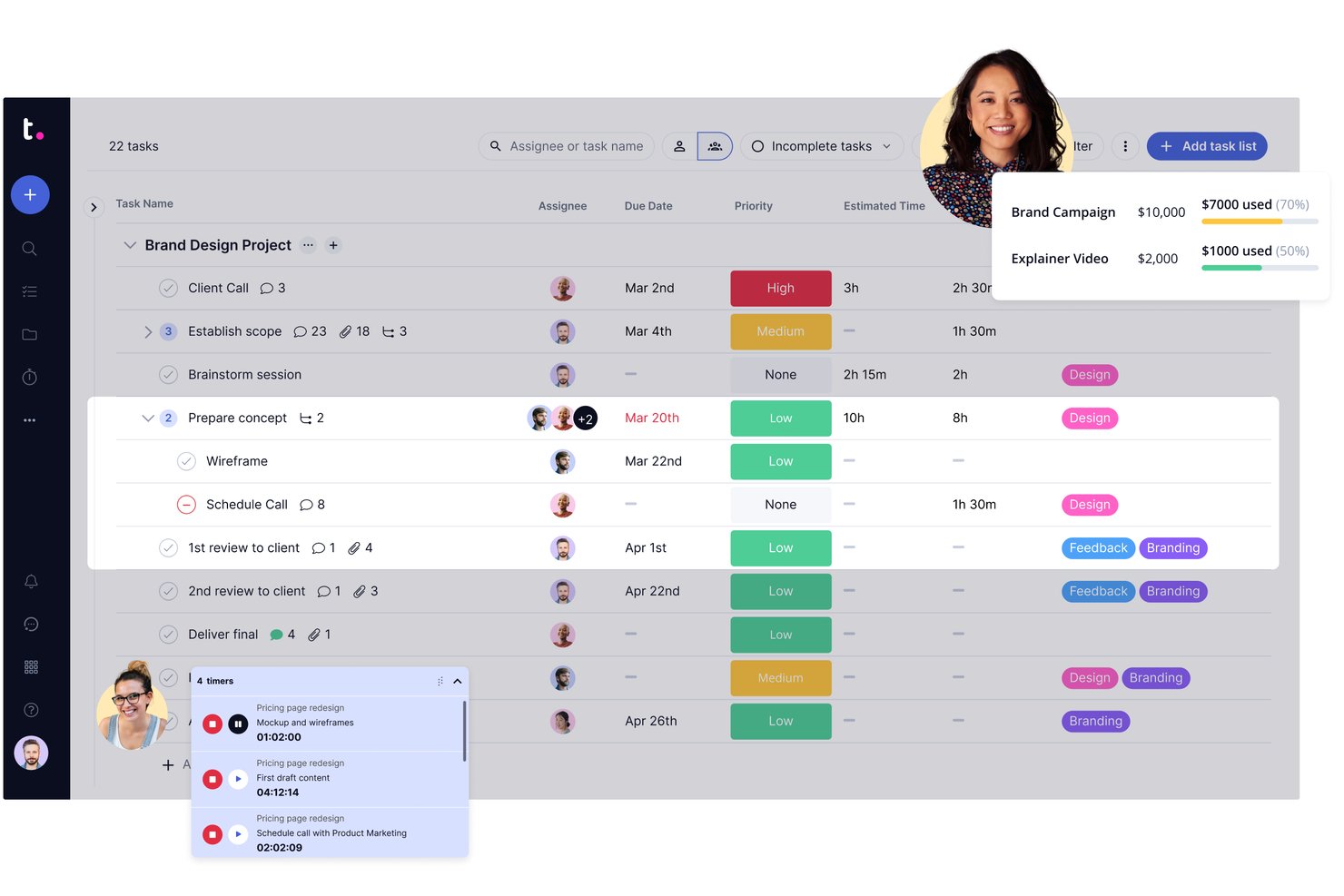
Teamwork.com is a client work project management platform built around billable time tracking, invoicing, proofing workflows, and client collaboration.
Who Is Teamwork.com Best For?
Teamwork.com is a strong fit for freelance consultants, independent creatives, and solo agency owners who manage multiple client projects and need billable time tracking, invoicing, and client proofing in one place.
Why I Picked Teamwork.com
I've included Teamwork.com in my top picks because it's the only tool on this list that combines client proofing workflows with invoicing built directly from logged time. When I'm wrapping up a deliverable, I can send a proof for client review, collect annotated feedback, get sign-off, and generate an invoice from the billable hours logged against that project, all without switching apps. The proofing and billing features together are what make it genuinely suited to freelance consultants and solo creative professionals managing real client work.
Teamwork.com Key Features
- Project templates: Pre-built and custom templates for marketing, project management, and creative work let you spin up new client projects without rebuilding from scratch.
- AI Project Wizard: Turns a written project brief into a structured project with tasks and timelines automatically.
- Workload and capacity planning: Visualizes how work is distributed so you can spot overallocation before it affects a deadline.
- Custom fields: Add formula and custom fields to tasks and projects to capture the specific data points your client work requires.
Teamwork.com Integrations
Teamwork.com lists 150+ integrations, including native connections to QuickBooks Online, Xero Online, HubSpot, Google Calendar, Slack, Harvest, and Google Sheets, plus Zapier. Its API and webhooks support custom integrations.
Pros and Cons
Pros:
- Templates organize repeat client engagements
- Billable hours connect directly to project work
- Client proofing keeps revisions and approvals together
Cons:
- Navigation can make project updates cumbersome
- Paid plans impose minimum user counts

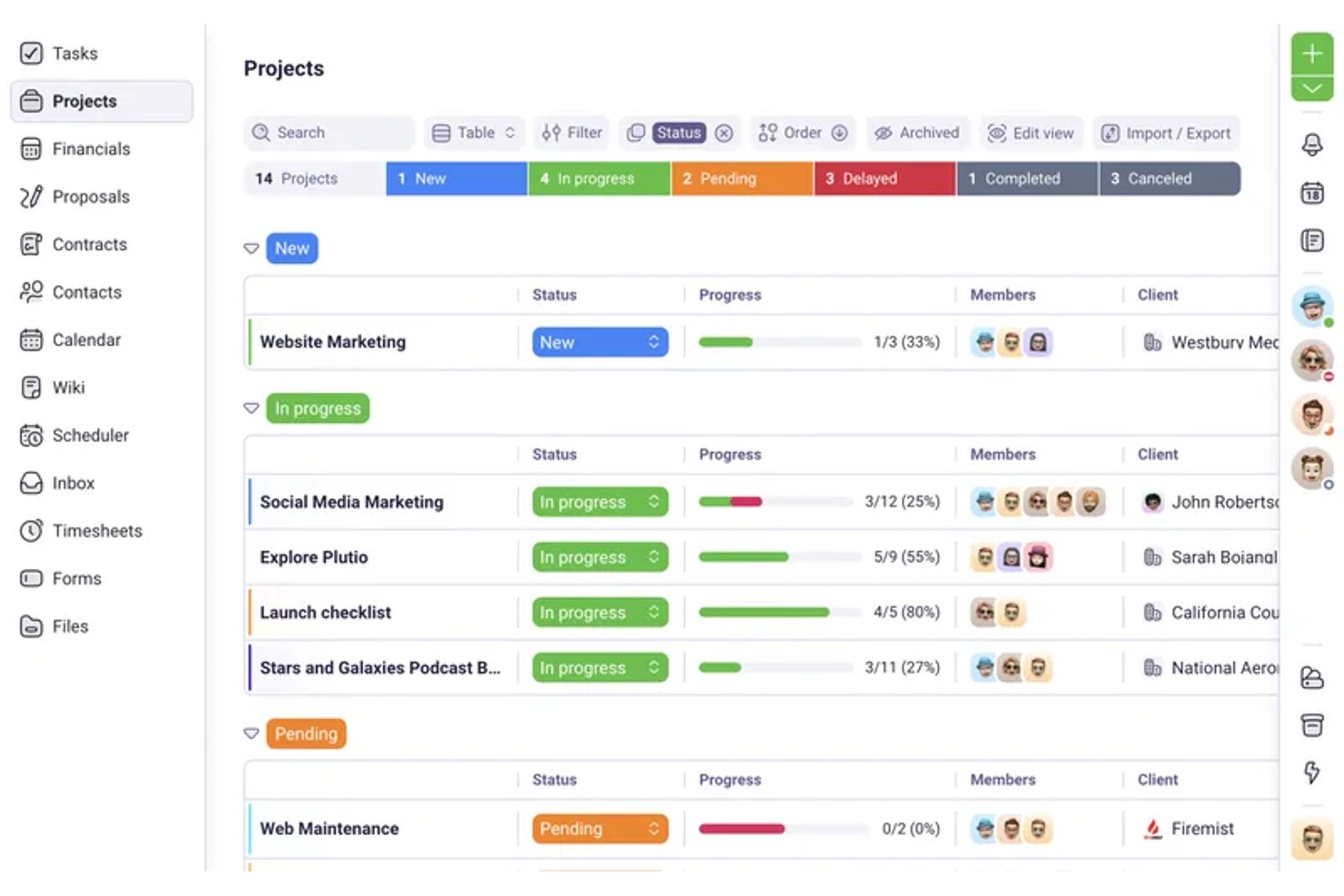
Plutio is an all-in-one business management platform for freelancers and solopreneurs that combines project tracking, client portals, proposals, contracts, time tracking, and invoicing in a single workspace.
Who Is Plutio Best For?
Plutio is a strong fit for freelance consultants, designers, and coaches who bill clients by the hour and need proposals, contracts, and invoicing in one place.
Why I Picked Plutio
I picked Plutio as one of the best because it nails the billing workflow that solopreneurs who charge by the hour live inside daily. You can start a timer directly from a task, mark that time as billable, and convert it into an invoice line item with the hours, rate, and amount already filled in—no spreadsheet in between. That proposal-to-project automation also means a signed proposal can instantly spin up a new project, keeping you moving without the admin lag.
Plutio Key Features
- Client portal access: Give clients a login to view shared projects, invoices, proposals, and files without needing a Plutio subscription.
- Proposal builder: Create proposals with a drag-and-drop editor, optional or required line items, and client e-signature approval.
- Recurring invoices and subscriptions: Set up invoices to send automatically on a schedule, with support for split payments, discounts, and taxes.
- Workflow automation: Trigger actions across projects, invoices, and tasks automatically—such as sending invoice reminders or updating task statuses.
Plutio Integrations
Plutio offers native integrations with Google Calendar, Google Meet, Outlook, Stripe, PayPal, and Square, plus REST API and webhook access for custom integrations. It also connects with 5,000+ apps through Zapier.
Pros and Cons
Pros:
- Reusable boards and templates support repeat work
- Keeps client projects and business records together
- Connects billable hours directly to invoices
Cons:
- Automation may fall short for complex processes
- Reviewers report glitches in client workflows

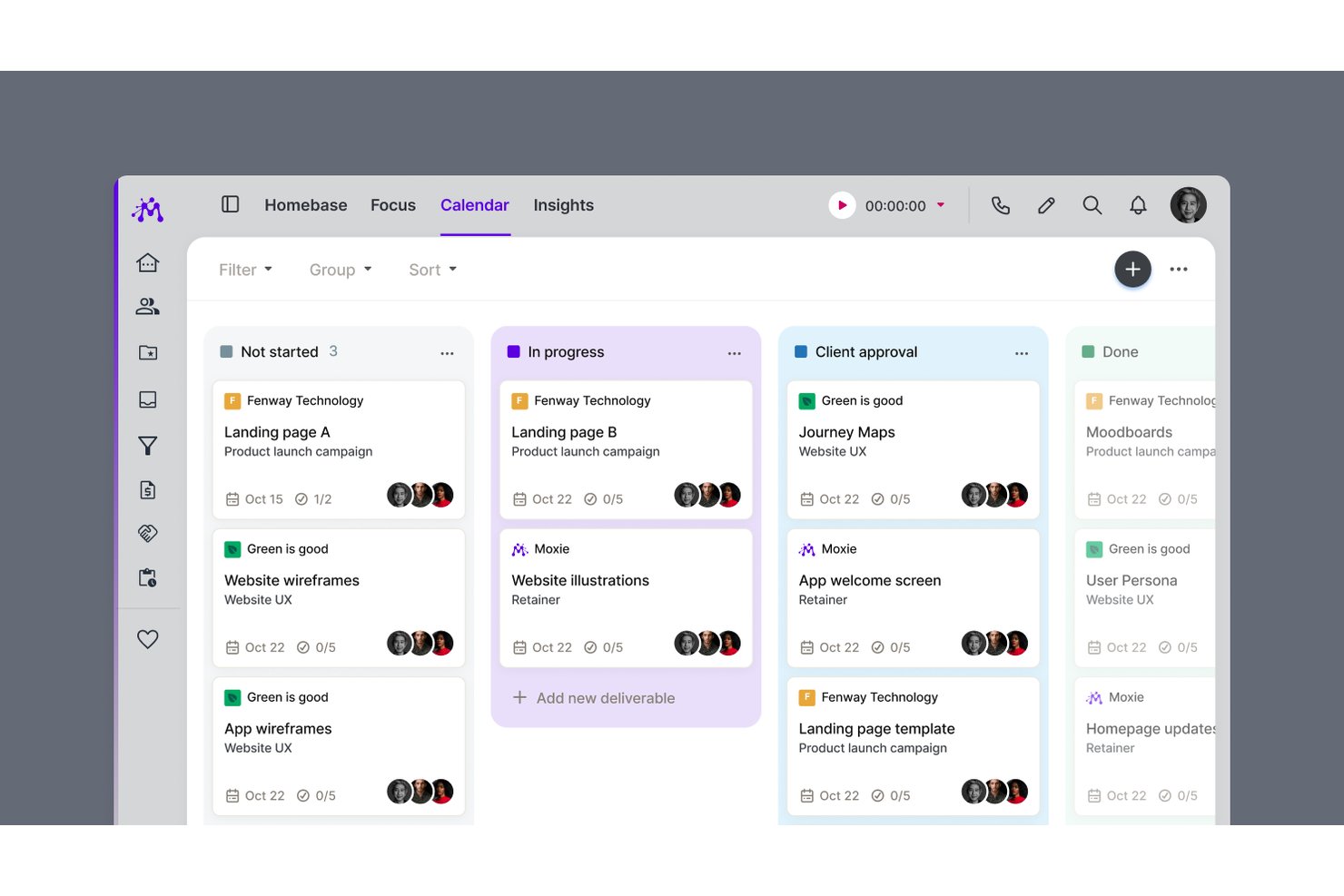
Moxie is an all-in-one freelance business management platform that combines project and task management, time tracking, invoicing, client portals, proposals, contracts, and scheduling in a single workspace.
Who Is Moxie Best For?
Moxie is a strong fit for freelancers and independent service providers—designers, writers, consultants, and coaches—who need client billing and project work managed in one place.
Why I Picked Moxie
I picked Moxie as one of the best because it's the only tool on this list built specifically around the freelance billing cycle, not just project work. I love how tracked time flows directly into invoices from inside the project workspace, so I'm not jumping between apps to reconcile hours. The white-label client portal lets clients sign contracts, approve deliverables, and pay invoices in one place, which cuts down on the back-and-forth that eats into solo working hours.
Moxie Key Features
- Proposal-to-project automation: When a client accepts an agreement, Moxie automatically creates a project, including dates and estimates, based on your configured package.
- Daily Focus digest: Each morning, Moxie surfaces your assigned tasks and upcoming project deadlines in a daily summary you can configure by notification type.
- Sales pipeline: Track leads through customizable stages, set estimated values, and trigger follow-up workflows automatically when a prospect takes action.
- Project templates: Save reusable project structures—including tasks, subtasks, due dates, and pricing defaults—to apply whenever a new project starts.
Moxie Integrations
Moxie offers native integrations with QuickBooks, Stripe, PayPal, Google Calendar, Microsoft Outlook, Zoom, Google Meet, and Gmail. It also supports Make, webhooks, a public API, and Zapier for custom integrations.
Pros and Cons
Pros:
- Project templates reuse tasks and deadlines
- Tracked work feeds directly into invoices
- Client portal cuts invoice follow-ups
Cons:
- Limited task durations and dependencies
- Project planning can feel clunky
Toggl
Best for solo time tracking and project planning
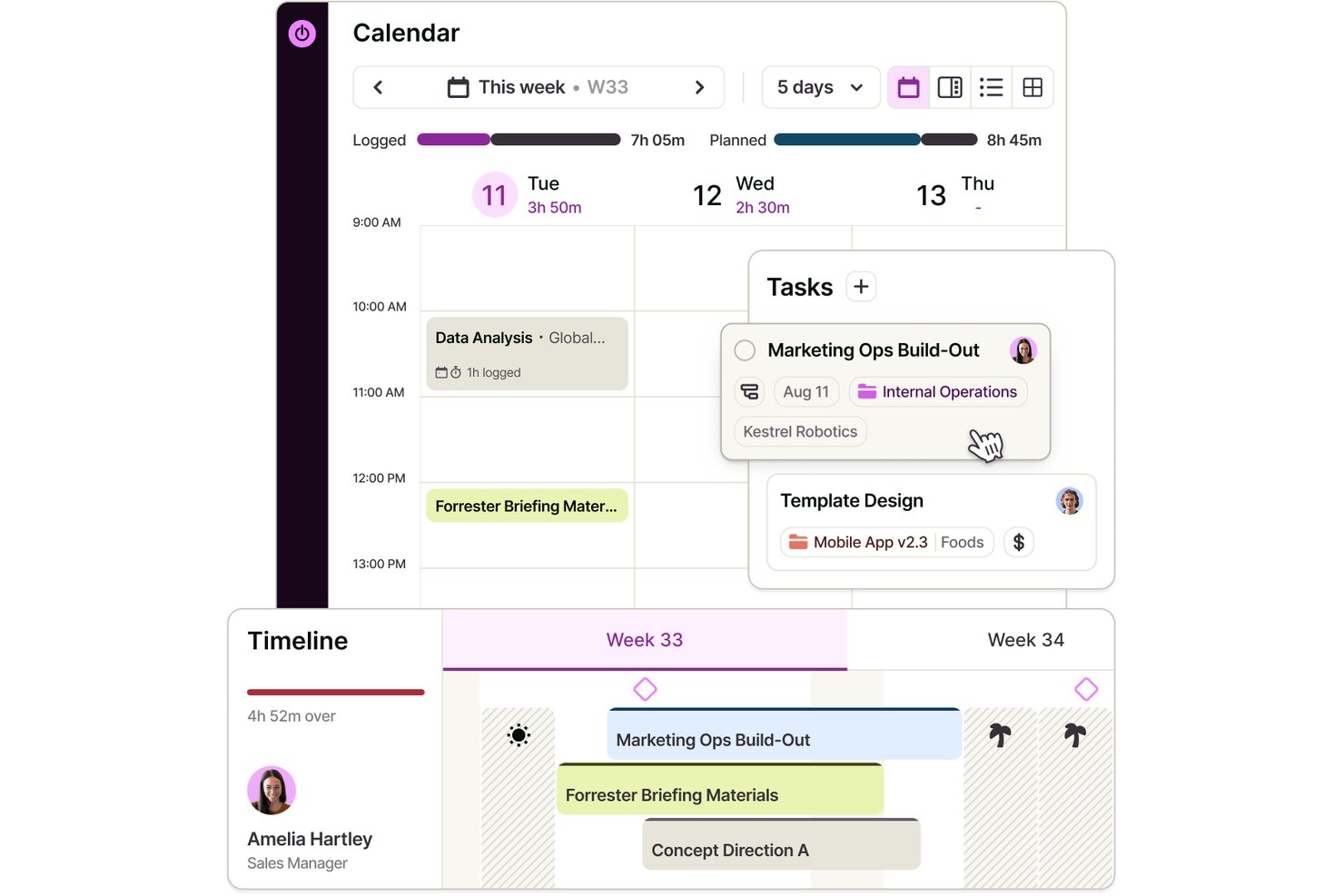
Toggl is a project management and time tracking tool that combines task planning, visual scheduling, and built-in time tracking across board, list, calendar, and timeline views.
Who Is Toggl Best For?
Toggl is a strong fit for solo professionals who need to track time and manage projects in one place without paying for features built around teams.
Why I Picked Toggl
I've included Toggl in my top picks because it's the only tool here that combines project planning and time tracking in one place without requiring you to stitch together separate apps. I particularly like how you can build out a project timeline, drag tasks to reschedule them as priorities shift, and immediately see how your tracked hours compare against your original estimates. That feedback loop between planning and actual time spent is what makes Toggl genuinely useful for solo work, especially when you're billing clients by the hour.
Toggl Key Features
- Recurring tasks and projects: Schedule tasks or entire projects to repeat on a set cadence, from daily to annually, with period-specific milestones and budgets.
- Billable rate tracking: Set billable rates at the workspace, member, or project level to monitor revenue alongside tracked time.
- AI Task Creator: Turn raw notes or briefs into structured tasks using Toggl's built-in AI, without manual setup.
- View-only report sharing: Generate shareable links that let clients or stakeholders view reports without needing a Toggl account.
Toggl Integrations
Toggl offers native integrations with Google Calendar, Outlook Email & Calendar, Asana, Jira, and Slack, plus browser extensions for GitHub, Trello, and Visual Studio. Its REST API and webhooks, support custom integrations.
Pros and Cons
Pros:
- Solo plan covers core planning needs
- Tracked hours expose estimate overruns
- Drag-and-drop timelines make deadline shifts visible
Cons:
- Client collaboration relies on paid access
- No dependencies auto-adjust downstream task dates
Annen prosjektstyringsprogramvare for soloprenører
Her er noen andre alternativer innen prosjektstyringsprogramvare for soloprenører som ikke kom med på kortlisten min, men som likevel er verdt å undersøke:
- Paymo
For billing clients from your timesheet
- GoodDay
For customizable workflows
- Wrike
For project tracking
- Freedcamp
For solo work with free guest access
- Scoro
For quote-to-project billing in one place
- 17hats
For solopreneurs managing clients end-to-end
- ActiveCollab
For client billing tied to project tasks
- Airtable
For database-style solo project tracking
- Hive
For AI-assisted solo client projects
- Bonsai
For freelancers managing projects and billing


How I Evaluate Project Management Software for Solopreneurs
When evaluating tools for solopreneurs juggling client projects solo, I split my analysis into must-have baseline criteria and the differentiators that set the best options apart.
Core Functionality (Table Stakes For This List)
When I'm selecting tools for my list, I rank each one on a scale from 0 (does not offer the functionality) to 5 (excels in this area) for each core functionality listed below. Then, I calculate the tool's total score into a percentage. Each tool needs to achieve a minimum total score of 55% to be considered for inclusion.
- Task & Project Management: I look for the ability to create tasks with due dates, statuses, subtasks, and dependencies across separate client projects—like managing a web redesign and a brand strategy engagement side by side.
- Multiple Project Views: Whether it's a Kanban board for a content calendar or a timeline for a product launch, I check that each tool offers at least three ways to visualize work.
- Client & Collaboration Access: Solopreneurs need to share progress with clients without paying for extra seats, so I evaluate how each tool handles guest permissions, view-only links, and project-level sharing.
- Solo-Friendly Pricing Tier: I consider whether the vendor offers a genuinely usable free plan or a low-cost single-user tier that doesn't gate core project management features behind team-sized plans.
- Time Tracking & Billing Support: Tools like Toggl Track and Harvest have set a high bar here, so I look for native time tracking or tight integrations with invoicing platforms that let you tie logged hours back to specific client projects.
- Integrations & Automations: A solopreneur's stack often spans Google Workspace, Slack, Stripe, and an accounting tool, so I evaluate how many relevant integrations each platform supports and whether it offers native automation to cut down on repetitive manual work.
Once I have a list of tools that meet the criteria, I consider what sets each platform apart.
Differentiating Factors (What Sets Vendors Apart)
Here's how I compare and contrast different vendors:
Standout Features
A branded client portal can set a solopreneur apart—sharing a polished project dashboard instead of a messy email thread builds client confidence. I also evaluate whether a tool includes lightweight CRM or pipeline tracking, which lets you manage leads and active engagements in one workspace. AI task assistance is worth noting too, especially when it can auto-prioritize your backlog or draft project summaries to cut down on admin time you'd otherwise spend context-switching.
Beyond Features
Total cost of ownership matters—I look at whether a tool gates essential features behind team-priced tiers that don't make sense for a solo user. Time-to-value is equally important; a solopreneur should be able to set up a client project using templates within an hour, not a week. I also evaluate scalability: if you bring on a subcontractor for a large engagement, the platform should let you add a collaborator without forcing a full plan upgrade or requiring you to migrate your data to a new workspace.
Slik velger du prosjektstyringsprogramvare for soloprenører
Det er lett å gå seg vill i lange funksjonslister og komplekse prismodeller. For å hjelpe deg med å holde fokus mens du går gjennom den unike prosessen med å velge programvare, får du her en sjekkliste over faktorer du bør ha i bakhodet:
| Faktor | Hva du bør vurdere |
|---|---|
| Skalerbarhet | Vil programvaren vokse med virksomheten din? Vurder om verktøyet kan håndtere flere oppgaver og brukere uten problemer. Se etter abonnementer som tilbyr fleksibilitet, slik at de kan tilpasses veksten din uten en fullstendig omlegging. |
| Integrasjoner | Fungerer det med verktøyene du allerede bruker? Sørg for at det støtter integrasjoner med den eksisterende programvaren din, for eksempel e-post, kalendere og fillagring, slik at arbeidsflyten forblir smidig. |
| Tilpasningsmuligheter | Kan du tilpasse det til arbeidsprosessene dine? Vurder om du kan justere dashbord, arbeidsflyter og felt slik at de passer til dine spesifikke behov, i stedet for å måtte følge en rigid mal. |
| Brukervennlighet | Er det enkelt for deg og teamet ditt å bruke? Se etter et intuitivt grensesnitt som reduserer opplæringstiden og hjelper deg med å ta verktøyet i bruk raskt. |
| Implementering og oppstart | Hvor raskt kan du begynne å bruke det? Vurder tiden og ressursene som kreves for å komme i gang. Sjekk hvilke opplæringsressurser som er tilgjengelige, for eksempel videoer og veiledninger. |
| Kostnad | Passer det innenfor budsjettet ditt? Sammenlign prisplanene og se opp for skjulte gebyrer. Vurder om funksjonene forsvarer kostnaden, og om det finnes rabatter ved årlig fakturering. |
| Sikkerhetstiltak | Hvor sikre er dataene dine? Sørg for at programvaren har sterke sikkerhetstiltak, som kryptering, sikkerhetskopiering av data og brukertillatelser, for å holde informasjonen din trygg. |
Hva er prosjektstyringsprogramvare for soloprenører?
Prosjektstyringsprogramvare for soloprenører er verktøy som hjelper enkeltpersoner med å administrere oppgaver, tidsfrister og prosjekter selvstendig og effektivt.
Disse verktøyene brukes av frilansere, konsulenter og småbedriftseiere og kombinerer oppgavesporing, planlegging og tidsstyring på ett sted. De bidrar til å effektivisere arbeidsflyter, forbedre fokuset og holde soloprenører organiserte – uten kompleksiteten til plattformer på virksomhetsnivå.
Funksjoner i prosjektstyringsprogramvare for soloprenører
Når du velger prosjektstyringsprogramvare for soloprenører, bør du se etter følgende viktige funksjoner:
- Oppgavehåndtering: Hjelper deg med å organisere og prioritere oppgaver for å sikre at ingenting blir glemt, slik at prosjektene dine holder tidsplanen.
- Samarbeidsverktøy: Legger til rette for kommunikasjon og samarbeid, selv om du jobber alene, ved å gjøre det enkelt å dele filer og meldinger.
- Tidsfristsporing: Holder deg oppdatert på kommende tidsfrister, slik at du kan administrere tiden effektivt og oppfylle kundenes forventninger.
- Tilpassbare oversiktspaneler: Lar deg tilpasse arbeidsområdet etter dine spesifikke behov, slik at det blir enklere å fokusere på det som er viktigst.
- Tidsregistrering: Lar deg følge med på tiden du bruker på oppgaver, slik at du kan optimalisere produktiviteten og håndtere faktureringen nøyaktig.
- Integrasjonsmuligheter: Sikrer kompatibilitet med verktøyene du allerede bruker, slik at arbeidsflytene fortsetter å fungere smidig uten avbrudd.
- Automatiseringsmuligheter: Reduserer manuelt arbeid ved å automatisere gjentakende oppgaver, slik at du sparer tid til viktigere arbeid.
- Fildeling: Gir deg en sikker måte å lagre og dele dokumenter på, slik at det blir enkelt å få tilgang til viktige filer uansett hvor du er.
- Rapportering og analyse: Gir innsikt i prosjektets fremdrift og resultater, slik at du kan ta velinformerte beslutninger.
- Tilgjengelig mobilapp: Sikrer at du kan administrere prosjektene dine mens du er på farten, slik at alt er tilgjengelig fra smarttelefonen eller nettbrettet ditt.
Fordeler med prosjektstyringsprogramvare for soloprenører
Implementering av prosjektstyringsprogramvare for soloprenører gir flere fordeler for teamet og virksomheten din. Her er noen av fordelene du kan se frem til:
- Bedre organisering: Holder alle oppgavene, filene og tidsfristene dine samlet på ett sted, noe som gjør det enklere å håndtere arbeidsmengden og holde fokus.
- Økt produktivitet: Funksjoner for automatisering og tidsregistrering hjelper deg med å utnytte tiden best mulig, slik at du kan fullføre prosjekter mer effektivt.
- Bedre kommunikasjon: Samarbeidsverktøy og fildeling sikrer at du enkelt kan utveksle informasjon og oppdateringer, selv om du jobber alene eller med kunder på avstand.
- Større ansvarlighet: Funksjoner for tidsfristsporing og rapportering hjelper deg med å holde oversikt over forpliktelsene dine, slik at du når målene dine og oppfyller kundenes forventninger.
- Tilpassbare arbeidsflyter: Lar deg sette opp arbeidsområdet etter dine spesifikke behov, slik at du kan jobbe på en måte som passer arbeidsstilen din.
- Velinformerte beslutninger: Rapportering og analyse gir innsikt i prosjektets fremdrift, slik at du kan ta datadrevne beslutninger.
- Fleksibilitet: Tilgjengeligheten av en mobilapp sikrer at du kan administrere prosjektene dine uansett hvor du er, slik at du får friheten til å jobbe mens du er på farten.
Kostnader og priser for prosjektstyringsprogramvare for soloprenører
Når du velger prosjektstyringsprogramvare for soloprenører, må du ha en forståelse av de ulike prismodellene og abonnementene som er tilgjengelige. Kostnadene varierer basert på funksjoner, teamstørrelse, tillegg og mer. Tabellen nedenfor oppsummerer vanlige abonnementer, gjennomsnittsprisene deres og typiske funksjoner som er inkludert i løsninger for prosjektstyringsprogramvare for soloprenører:
Sammenligningstabell for abonnementer for prosjektstyringsprogramvare for soloprenører
| Abonnementstype | Gjennomsnittspris | Vanlige funksjoner |
|---|---|---|
| Gratisabonnement | $0 | Grunnleggende oppgavehåndtering, fildeling og begrensede integrasjoner. |
| Personlig abonnement | $5-$15/bruker/måned | Oppgavehåndtering, kalendervisning, begrenset automatisering og grunnleggende rapportering. |
| Forretningsabonnement | $15-$25/bruker/måned | Avansert oppgavehåndtering, tidsregistrering, utvidede integrasjoner og samarbeidsverktøy for team. |
| Virksomhetsabonnement | $25-$50/bruker/måned | Tilpassbare arbeidsflyter, dedikert brukerstøtte, avanserte sikkerhetsfunksjoner og omfattende analyse. |
Programvare for prosjektstyring for soloprenører – vanlige spørsmål
Her er noen svar på vanlige spørsmål om programvare for prosjektstyring for soloprenører:
Er Asana bra for soloprenører?
Asana er et godt alternativ for soloprenører som trenger å administrere oppgaver og prosjekter effektivt. Det har et brukervennlig grensesnitt med funksjoner som oppgavelister, forfallsdatoer og påminnelser. Du kan organisere arbeidsmengden din og sørge for at ingenting blir glemt. Det er spesielt nyttig for å holde oversikt over prioriteringer og tidsfrister.
Er ClickUp bra for soloprenører?
ClickUp egner seg godt for soloprenører som ser etter et allsidig verktøy for prosjektstyring. Det tilbyr tilpassbare visninger og maler, slik at du kan tilpasse arbeidsområdet etter behovene dine. Med funksjoner som oppgavesporing, dokumenthåndtering og integrasjonsmuligheter kan du håndtere ulike deler av arbeidet ditt på ett sted.
Hvordan velger jeg den beste programvaren for prosjektstyring for soloprenører?
For å velge den beste programvaren bør du vurdere dine spesifikke behov, budsjettet ditt og funksjonene som vil hjelpe deg mest. Se etter verktøy som tilbyr skalerbarhet, integrasjoner og brukervennlighet. Det er også viktig å vurdere introduksjonsprosessen og alternativene for kundestøtte for å sikre en smidig overgang.
Hvilke funksjoner bør jeg se etter i programvare for prosjektstyring for soloprenører?
Viktige funksjoner du bør se etter, omfatter oppgavehåndtering, samarbeidsverktøy, sporing av tidsfrister og tilpassbare oversikter. Vurder også automatiseringsmuligheter og integrasjoner for å forbedre arbeidsflyten din. Disse funksjonene hjelper deg med å administrere prosjektene dine effektivt og holde alt organisert.
Kan programvare for prosjektstyring for soloprenører hjelpe med tidsstyring?
Ja, mange verktøy for prosjektstyring tilbyr funksjoner for tidsregistrering som hjelper deg med å følge med på hvor mye tid du bruker på oppgaver. Dette kan forbedre produktiviteten din og sikre at du bruker tiden effektivt. Ved å identifisere tidkrevende oppgaver kan du justere timeplanen din og fokusere på det som betyr mest.
Er det verdt å investere i en betalt plan for programvare for prosjektstyring?
Det kan være verdt å investere i en betalt plan hvis du trenger avanserte funksjoner, bedre kundestøtte eller flere tilpasningsmuligheter. Gratisplaner har ofte begrensninger, så vurder behovene dine og om de ekstra fordelene forsvarer kostnaden. Vurder hvilken verdi planen tilfører produktiviteten din og prosjektstyringen din.