

10 beste programvarer for risikostyring av KI-prosjekter, gjennomgått i 2026

Beste programvare for risikostyring i AI-prosjekter – kortliste


Å holde prosjekter på rett spor innebærer ofte å forutse potensielle problemer før de oppstår. Mellom skiftende tidsfrister, begrensede ressurser og endrede prioriteringer kan risikoer raskt hope seg opp.
Det er her programvare for risikostyring i AI-prosjekter kommer inn. Disse verktøyene bruker AI til å forutsi risikoer, slik at du kan ta informerte beslutninger og holde prosjekter på rett spor. Etter min erfaring kan AI-funksjoner som prediktiv analyse og automatiserte varsler spare deg for tid og redusere stresset ved risikostyring.
Gjennom denne artikkelen vil jeg dele mine objektive vurderinger av de beste tilgjengelige løsningene for risikostyring i AI-prosjekter. Jeg vil fremheve deres unike AI-funksjoner og hvordan de kan være til nytte for teamet ditt. La oss sette i gang og finne det rette verktøyet for deg.
Why Trust Our Software Recommendations
Our team has been testing and reviewing software since 2012. As project managers ourselves, we know how difficult—and important—it is to choose the right software.
For this guide, we evaluated tools using hands-on testing and independent research, scoring tools using our selection criteria. We also draw on insights from industry thought leaders and practicing project management experts.
Our reviews reflect our human editorial judgment, not a sales pitch.
Expert reviewers:
Sammenligningstabell for programvare for risikostyring i AI-prosjekter
Denne sammenligningstabellen oppsummerer prisopplysningene for mine beste utvalgte programmer for risikostyring i AI-prosjekter.
| Tool | Best For | Trial Info | Price | ||
|---|---|---|---|---|---|
| 1 | Best for portfolio-level risk insights | Free plan available | From $9/user/month (billed annually) | Website | |
| 2 | Best for AI features at no extra cost | 14-day free trial | Pricing upon request | Website | |
| 3 | Best for task and timeline visibility | 30-day free trial | From $10/user/month (billed annually) | Website | |
| 4 | Best for team collaboration | 14-day free trial + free demo available | From $45/month (billed annually) | Website | |
| 5 | Best for enterprise scalability | Free trial available | Pricing upon request | Website | |
| 6 | Best for healthcare risk management | Free demo available | From $25/user/month (billed annually, min 5 seats) | Website | |
| 7 | Best for AI-driven resource planning | 14-day free trial | Pricing upon request | Website | |
| 8 | Best for construction projects | Free demo available | Pricing upon request | Website | |
| 9 | Best for risk identification tools | 30-day free trial | From $8.25/month | Website | |
| 10 | Best for compliance tracking | Not available | Pricing upon request | Website |


Vurdering av den beste programvaren for risikostyring i AI-prosjekter
Nedenfor finner du mine detaljerte sammendrag av den beste programvaren for risikostyring i AI-prosjekter som kom med på kortlisten. Vurderingene mine gir et detaljert innblikk i de viktigste funksjonene, fordelene & ulempene, integrasjonene og de ideelle bruksområdene for hvert verktøy, slik at du kan finne det beste for deg.

Best for portfolio-level risk insights
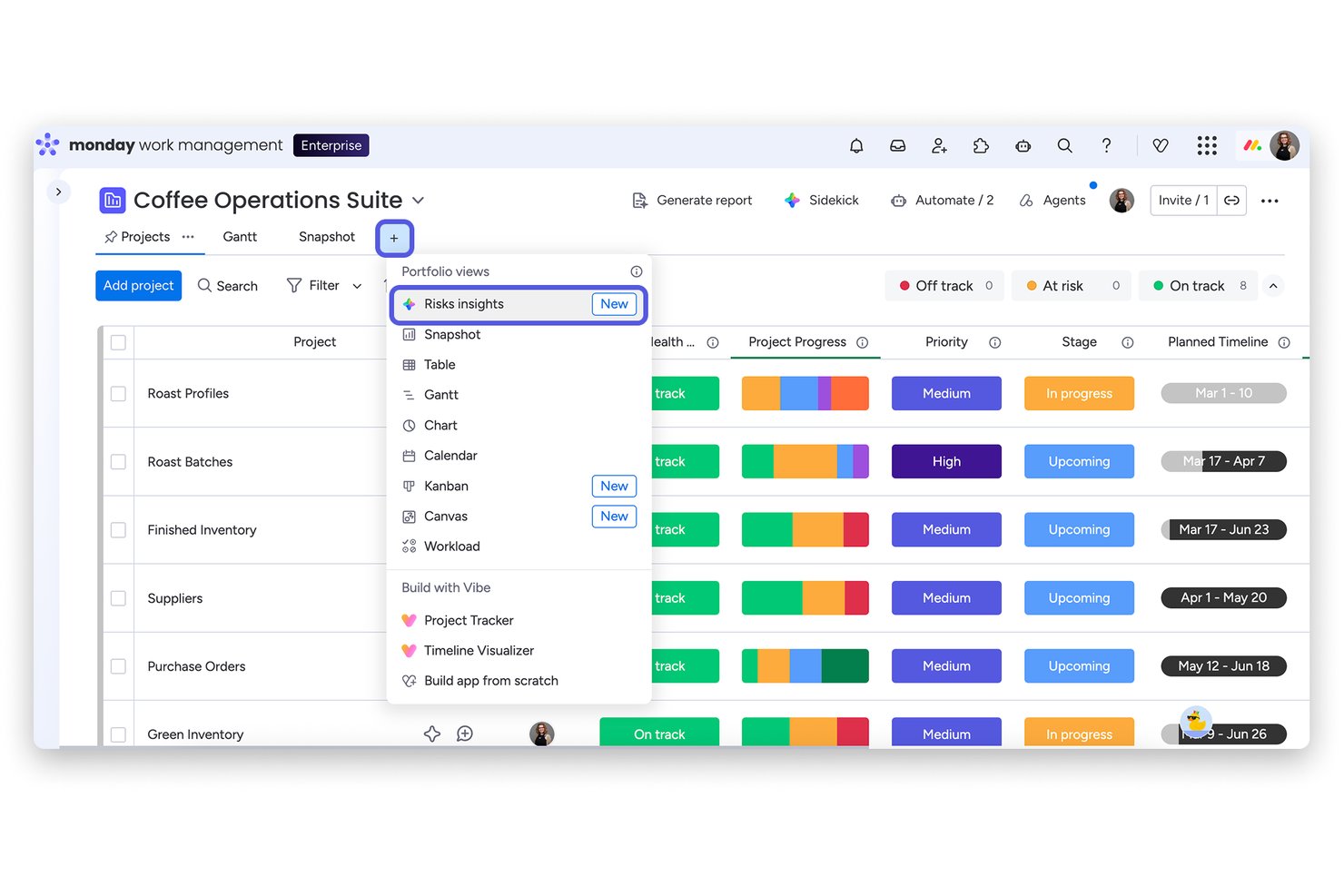
monday AI Workspace is an AI-powered work management platform that scans project boards, flags risks by severity, and monitors portfolio health across all active initiatives in a single view.
Who Is monday AI Workspace Best For?
It's a strong fit for PMO directors and portfolio managers at mid-to-large organizations running multiple concurrent projects who need centralized, AI-driven risk visibility.
Why I Picked monday AI Workspace
monday AI Workspace earns its spot on my shortlist because of how it handles risk at the portfolio level. I love that the Portfolio Risk Insights view scans every linked project board daily, reviewing item names, column values, updates, and activity logs to generate a severity-ranked risk list. In practice, that means I can see at a glance which projects need immediate attention, then notify the project owner with one click using an AI-generated summary that already links the relevant tasks.
monday AI Workspace Key Features
- AI-powered workflow automation: Lets you create smart automations to handle recurring project risk tasks and notifications.
- Customizable risk dashboards: Build tailored dashboards that visualize risk data, AI insights, and project metrics side by side.
- Multi-source project integration: Connects with Jira, Salesforce, Slack, and more to ingest project signals for centralized risk tracking.
- AI sidekick productivity assistant: Use the AI sidekick to draft project briefs, rewrite status updates, and convert meeting notes into task lists.
monday AI Workspace Integrations
monday AI Workspace offers over 200 native integrations, including Jira, Salesforce, Slack, HubSpot, Google Workspace, Microsoft Teams, GitHub, Zoom, Dropbox, Trello, and connects with Zapier. An API is available for custom integrations.
Pros and Cons
Pros:
- Customizable risk dashboards for reporting
- AI auto-summarizes and classifies risks daily
- Portfolio-level risk visualization for all projects
Cons:
- Lacks contract and document risk extraction
- No Monte Carlo or advanced scenario simulation
New Product Updates from monday AI Workspace
monday AI Workspace Adds Human Approval Routing
monday AI Workspace adds a human-in-the-loop approval block to AI Workflows, sending approval requests and routing workflow paths based on responses. For more information, visit monday AI Workspace's official site.

Wrike
Best for AI features at no extra cost

Wrike is an AI-driven work management software designed for teams of all sizes, focusing on enhancing productivity and collaboration. It offers key functionalities such as task management, visual tools, and analytics, all powered by AI to aid in efficient project handling.
Why I picked Wrike: Wrike includes AI features like Wrike Copilot and AI Agents, which automate workflows and provide personalized support. These AI capabilities come at no extra cost, differentiating Wrike from others. The platform allows you to customize AI agents, which can be integrated into your processes to improve outcomes. With its focus on providing AI-driven productivity enhancements, Wrike offers value without additional expenses.
Standout Features & Integrations:
Features include customizable dashboards that let you organize your workspace, time tracking to monitor your team’s productivity, and resource management tools to allocate tasks efficiently. The request forms simplify task initiation and ensure that all necessary details are captured. Real-time editing and notifications keep your team informed and engaged.
Integrations include Salesforce, Microsoft Teams, Slack, Google Workspace, Dropbox, Microsoft OneDrive, Box, GitHub, Adobe Creative Cloud, and Jira.
Pros and Cons
Pros:
- Advanced analytics for decision-making
- Customizable workflows for different teams
- AI tools are included at no extra cost
Cons:
- Limited offline access functionality
- Complexity may require a learning curve
New Product Updates from Wrike
Wrike Adds Klaxoon MCP Integration
Wrike’s Klaxoon MCP integration is now generally available, enabling AI agents to navigate between Wrike tasks and attached whiteboards, read task context, and manage whiteboard attachments via API. For more information, visit Wrike's official site.
Best for task and timeline visibility

Microsoft Project is a planning and collaboration tool designed to help teams break down work, assign responsibilities, and monitor progress across tasks. It supports structured task schedules, dependencies, and visualization of timelines to clarify how pieces of a project fit together.
Why I picked Microsoft Project: You’ll find that it gives your team a clear line of sight into what tasks are due when and how they relate to each other. It supports features like task dependencies, milestone markers, and workload balancing to help you keep projects on track. The timeline (Gantt) view gives you a visual map of all tasks across time so you can see where overlaps or gaps might occur. Because you can spot sequencing issues and overallocations early, you can prevent conflicts before they materialize.
Standout Features & Integrations:
Features include baseline setting so you can compare planned versus actual, resource leveling to balance how your team is assigned, and critical path highlighting to show which tasks drive your schedule. Its AI features include predictive scheduling and resource management, which adapt to changes in project timelines. These help you keep your timeline visible and manageable.
Integrations include Microsoft Teams, SharePoint, Power BI, OneDrive, Outlook, Azure DevOps, Planner, Project Server, and Excel.
Pros and Cons
Pros:
- Resource leveling avoids overloads
- Baseline comparisons across project phases
- Clear task dependency visualizations
Cons:
- May feel rigid for iterative projects
- Limited flexibility outside the timeline view

ProofHub
Best for team collaboration

ProofHub is a project management and collaboration tool designed for teams across various industries. It serves project managers and team members by providing tools for task management, communication, and file sharing.
Why I picked ProofHub: It performs exceptionally well in team collaboration with features like discussions and chat that keep your team connected. The tool offers task management and Kanban boards, allowing you to organize and prioritize work efficiently. With its file-sharing capabilities, your team can easily store and access documents. This makes it ideal for teams looking to enhance their collaboration and communication.
Standout Features & Integrations:
Features include a built-in chat tool that facilitates instant communication among team members. The online proofing feature lets you review and approve designs quickly. You can also use the time tracking feature to monitor the time spent on tasks, helping manage workloads effectively.
Integrations include Google Drive, Dropbox, Box, OneDrive, FreshBooks, QuickBooks, iCal, Outlook, and Slack.
Pros and Cons
Pros:
- Centralized file storage
- Flexible Kanban boards
- Strong focus on team collaboration
Cons:
- Limited customization options
- Basic reporting capabilities


Digital.ai is an enterprise-focused project management and risk management platform tailored for large organizations needing to manage complex projects and risks. It serves IT departments, project managers, and business leaders by providing AI-powered analytics and extensive tools for planning, execution, and risk mitigation.
Why I picked Digital.ai: It stands out in enterprise scalability, allowing your team to handle large-scale projects with ease. The platform’s AI-driven analytics help you anticipate delivery challenges. You can customize workflows to fit your organization's processes, ensuring flexibility and adaptability. This makes it ideal for enterprises needing a scalable and adaptable solution.
Standout Features & Integrations:
Features include advanced analytics that provide deep insights into project data. Customizable workflows let you tailor the platform to your specific needs. The software also offers reporting tools that help you track project progress and risks effectively.
Integrations include Jira, ServiceNow, SAP, Salesforce, Microsoft Azure, AWS, GitHub, Bitbucket, Jenkins, and Docker.
Pros and Cons
Pros:
- Detailed reporting for project tracking
- Automation features enhance workflow efficiency
- AI-driven analytics for software delivery
Cons:
- Requires technical expertise for customization
- Complicated integration with legacy systems


Riskonnect is a risk management software tailored for healthcare organizations looking to manage risks and ensure patient safety. It serves healthcare administrators and risk managers by providing tools to track and mitigate risks associated with patient care and compliance.
Why I picked Riskonnect: It offers specialized features for healthcare risk management, enabling your team to track patient safety incidents and compliance issues effectively. The software includes incident reporting and analytics that help you identify trends and prevent future occurrences. Risk assessments and mitigation plans are easily managed, ensuring your organization meets industry standards. This focus on healthcare makes it an ideal choice for teams in the medical field.
Standout Features & Integrations:
Features include a centralized incident management system that captures and analyzes safety incidents. The software provides proactive analytics tools to identify risk trends and drive improvements. Customizable dashboards allow you to view key risk metrics and track your organization’s performance in real-time.
Integrations include Salesforce, Microsoft Dynamics, Oracle, SAP, Workday, IBM Watson, Tableau, Power BI, NetSuite, and Zendesk.
Pros and Cons
Pros:
- Focus on patient safety
- Predictive analytics for proactive risk management
- Specialized for the healthcare industry
Cons:
- Limited non-healthcare functionality
- High implementation effort


Forecast.app is a project management platform aimed at businesses seeking efficient resource planning and task management. Its AI capabilities help teams optimize resource allocation and predict project timelines.
Why I picked Forecast.app: Forecast.app is particularly effective in AI-driven resource planning, making it ideal for teams that need precise resource management. Its AI engine predicts project delivery dates and suggests optimal resource allocation. These features enhance your team's efficiency by minimizing resource waste and improving project timelines. The platform's AI capabilities help automate much of the planning process, aligning with its USP.
Standout features & integrations:
Features include project timeline visualization, data-driven decisions, task prioritization, and budget tracking. These tools help you keep projects on schedule and within budget. Forecast.app also offers real-time analytics to give you insights into project performance.
Integrations include Jira, Salesforce, Slack, Google Workspace, Microsoft Teams, QuickBooks, HubSpot, Xero, GitHub, and Trello.
Pros and Cons
Pros:
- Efficient task prioritization features
- Real-time analytics for project insights
- AI-driven resource allocation suggestions
Cons:
- Limited customization options for reports
- Steeper learning curve for new users


ALICE is a construction risk management tool designed for construction companies and project managers who need to optimize project schedules and manage risks. It helps in planning, scheduling, and simulating construction projects to improve efficiency and reduce delays.
Why I picked ALICE: It specializes in construction projects with its ability to simulate different project scenarios and optimize schedules. Your team can use its simulation features to test various project plans and identify potential risks before they occur. ALICE provides AI-driven tools like ALICE Plan, ALICE Optimize, and ALICE Model to enhance project visualization and scheduling. Its detailed scheduling tools allow you to adjust timelines and resources dynamically. This makes it particularly useful for construction projects where time and resource management are key.
Standout Features & Integrations:
Features include advanced simulation capabilities that let you explore different project scenarios. The tool's dynamic scheduling helps you adapt to changes quickly and efficiently. It also offers resource optimization features to ensure that your project stays on track and within budget.
Integrations include Procore, Autodesk BIM 360, Oracle Primavera, Microsoft Project, PlanGrid, Bluebeam, Aconex, P6, Revit, and Navisworks.
Pros and Cons
Pros:
- Dynamic scheduling tools
- Advanced project simulation
- Specialized for the construction industry
Cons:
- Limited functionality outside construction
- It may be overwhelming for small teams

Best for risk identification tools

RAIDLOG is an AI-driven project management tool focused on improving project risk management for project managers. It offers key functionalities such as an AI-powered risk register and decision-making support to enhance project outcomes.
Why I picked RAIDLOG: RAIDLOG shows impressive results with its AI-driven risk identification tools, making it perfect for teams needing detailed risk assessments. Its AI-powered risk register helps categorize and respond to risks effectively. The platform provides risk heat maps and action item tracking for more informed decision-making. RAIDLOG's focus on collaboration and communication aids in keeping projects on track.
Standout features & integrations:
Features include action item tracking, real-world issue resolution, and risk heat maps. These tools help you manage risks effectively and improve project outcomes. RAIDLOG also offers training and certification opportunities to enhance your team's skills.
Integrations include Jira, Trello, Asana, Microsoft Teams, Slack, Google Workspace, monday.com, Basecamp, ClickUp, and Smartsheet.
Pros and Cons
Pros:
- Access to educational resources
- Customizable dashboards for industry needs
- Compliance-focused AI for risk management
Cons:
- Limited offline functionality
- May require time to fully implement


Protecht is a risk management software designed for organizations needing to ensure compliance and manage risks effectively. Its primary users include compliance officers and risk managers who require extensive oversight of risk factors impacting their organizations.
Why I picked Protecht: It offers specialized compliance tracking features that help your team stay aligned with industry regulations. The software provides detailed risk assessments and reporting capabilities to give you a clear view of your compliance status. You can customize risk categories to suit your organization’s specific needs. This focus on compliance tracking sets it apart for teams prioritizing regulatory adherence.
Standout Features & Integrations:
Features include a centralized risk register that consolidates all risk data in one place. Automated risk assessments help you identify and evaluate potential threats. The software also offers detailed reporting tools, making it easier to generate compliance reports and share them with stakeholders.
Integrations include Microsoft Excel, Power BI, SAP, Salesforce, Oracle, Workday, IBM Cognos, Tableau, QuickBooks, and NetSuite.
Pros and Cons
Pros:
- Automated risk assessments
- Customizable risk categories
- Detailed compliance tracking
Cons:
- Minimal customization for dashboards
- Limited mobile functionality
Annen programvare for risikostyring i AI-prosjekter
Her er noen andre alternativer for programvare for risikostyring i AI-prosjekter som ikke kom med på kortlisten min, men som likevel er verdt å undersøke:
- Requs AI Predict Risk Identification
For early risk detection
- Asana
For task management and tracking
- OneTrust
For programmatic enforcement


How I Evaluate AI Project Risk Management Software
I look for tools that go beyond slapping an "AI" label on basic risk registers—they need to surface risks you'd actually miss and predict impacts that change how you plan. My evaluation splits into two layers: the core functionality a tool must have to qualify and the differentiating factors that separate a good option from the best fit for your team.
Core Functionality (Table Stakes For This List)
When I'm selecting tools for my list, I rank each one on a scale from 0 (does not offer the functionality) to 5 (excels in this area) for each core functionality listed below. Then, I calculate the tool's total score into a percentage. Each tool needs to achieve a minimum total score of 65% to be considered for inclusion.
- AI-Driven Risk Identification: I check whether the tool can automatically surface risks from project data rather than relying on manual entry—like flagging resource conflicts buried in a sprint backlog.
- Predictive Risk Analytics: I look for AI models that forecast how a flagged risk will affect cost, schedule, or scope, not just confirm that a risk exists.
- Risk Register & Scoring: The tool should maintain a centralized register where AI assists with scoring and prioritization, so teams aren't manually ranking dozens of risks each week.
- AI Mitigation Recommendations: I evaluate whether the platform suggests actionable response plans based on the specific risk context, like recommending schedule buffers for weather-prone construction phases.
- Real-Time Monitoring & Alerts: Continuous tracking of live project signals matters here—I look for anomaly detection that warns you before a deadline slips, not after.
- Project Management Integration: Tools need to connect with the PM platforms teams already use (Jira, MS Project, Primavera, Smartsheet) to pull in the data that powers risk analysis.
Once I have a list of tools that meet this criteria, I consider what sets each platform apart.
Differentiating Factors (What Sets Vendors Apart)
Here's how I compare and contrast different vendors:
Standout Features
Portfolio-level risk aggregation is a big differentiator for me. Program managers overseeing dozens of projects need to spot systemic risks that don't surface at the individual project level. I also evaluate explainable AI—the tool should show why it flagged a risk and what data drove the score, which matters during steering committee reviews. Natural language querying is another separator, letting you ask "which projects have the highest schedule risk this sprint?" instead of clicking through dashboards.
Beyond Features
Data security and AI governance top my list here. I check whether the vendor clearly states how customer project data is handled in model training and whether tenant isolation is in place. Implementation speed matters too—some tools take months to onboard because the AI needs historical data to calibrate, while others ship with pre-built risk libraries that deliver insights within weeks. I also evaluate scalability, especially for PMOs running hundreds of concurrent projects where per-seat pricing can quietly balloon total cost of ownership.
Slik velger du programvare for risikostyring i AI-prosjekter
Det er lett å gå seg vill i lange funksjonslister og kompliserte prismodeller. For å hjelpe deg med å holde fokus mens du arbeider deg gjennom den unike prosessen med å velge programvare, har jeg satt sammen en sjekkliste over faktorer du bør ha i bakhodet:
| Faktor | Hva du bør vurdere |
|---|---|
| Skalerbarhet | Kan programvaren vokse sammen med teamet ditt? Vurder om den støtter økende prosjektstørrelse og kompleksitet uten at ytelsen svekkes. |
| Integrasjoner | Kan den kobles til de eksisterende verktøyene dine? Kontroller at den er kompatibel med din nåværende programvarestakk for å sikre smidige arbeidsflyter. |
| Tilpasningsmuligheter | Hvor fleksibelt er verktøyet? Se etter alternativer for å tilpasse arbeidsflyter, dashbord og rapporter til dine spesifikke behov. |
| Brukervennlighet | Er grensesnittet intuitivt? Sørg for at teammedlemmene raskt kan lære seg og navigere i programvaren uten omfattende opplæring. |
| Implementering og opplæring | Hvor lang tid tar det å komme i gang? Vurder ressursene og tiden som kreves for å sette opp løsningen og lære opp teamet. |
| Kostnad | Passer prisen inn i budsjettet ditt? Sammenlign kostnaden for verktøyet med funksjonene og fordelene. Vær oppmerksom på skjulte gebyrer eller nødvendige tillegg. |
| Sikkerhetstiltak | Er dataene dine sikre? Se etter kryptering, samsvar med standarder for databeskyttelse og regelmessige sikkerhetsoppdateringer. |
| Tilgjengelig kundestøtte | Er det enkelt å få hjelp? Vurder kvaliteten på og åpningstidene til kundestøtten, samt om det finnes flere måter å kontakte leverandøren på. |
Hva er programvare for risikostyring i AI-prosjekter?
Programvare for AI-basert risikostyring av prosjekter er et verktøy utviklet for å identifisere, vurdere og redusere risikoer i prosjekter ved hjelp av kunstig intelligens. Prosjektledere, risikoanalytikere og teamledere bruker vanligvis disse verktøyene for å forbedre beslutningstakingen og sikre at prosjektene lykkes.
Automatisert risikorapportering, sanntidsovervåking og prediktiv analyse bidrar til tidlig oppdagelse av risiko og ressursallokering. Samlet sett gir disse verktøyene brukerne mulighet til å håndtere usikkerheter i prosjekter mer effektivt, noe som sikrer en smidigere prosjektgjennomføring.
Funksjoner
Når du velger programvare for AI-basert risikostyring av prosjekter, bør du se etter følgende nøkkelfunksjoner:
- Risikoidentifisering: Oppdag automatisk potensielle risikoer i prosjekter, slik at de kan håndteres tidlig.
- Prediktiv analyse: Bruk AI til å forutsi fremtidige risikoer og prosjektresultater for bedre planlegging.
- Sanntidsovervåking: Følg kontinuerlig med på prosjektrisikoer og fremdrift for å kunne gjøre justeringer i tide.
- Automatisert rapportering: Generer risikorapporter raskt for å dele innsikt med interessenter og ta informerte beslutninger.
- Ressursallokering: Tildel ressurser effektivt basert på risikovurderinger for å optimalisere prosjektgjennomføringen.
- Tilpassbare dashbord: Tilpass visningen slik at du kan fokusere på de mest relevante dataene og måleverdiene for teamet ditt.
- Scenarioplanlegging: Simuler ulike prosjektscenarioer for å forberede deg på forskjellige risikoresultater.
- Integrasjonsmuligheter: Koble til eksisterende verktøy og programvare for å samle innsatsen innen prosjektstyring.
- Brukervennlig grensesnitt: Sørg for at teammedlemmene enkelt kan bruke løsningen, slik at innføringen og produktiviteten forbedres.
- Sikkerhetstiltak: Beskytt sensitive prosjektdata med kryptering og overholdelse av standarder for databeskyttelse.
Fordeler
Implementering av programvare for AI-basert risikostyring av prosjekter gir flere fordeler for teamet og virksomheten din. Her er noen av fordelene du kan se frem til:
- Tidlig risikooppdagelse: Identifiser potensielle prosjektrisikoer før de blir problemer, slik at de kan håndteres proaktivt.
- Bedre beslutningstaking: Bruk prediktiv analyse til å ta informerte beslutninger basert på datadrevet innsikt.
- Effektiv ressursbruk: Tildel ressurser effektivt ved å forstå risikoens påvirkning og optimalisere prosjektgjennomføringen.
- Forbedret samarbeid: Del sanntidsrapporter og dashbord med interessenter, slik at alle har samme oversikt.
- Tidsbesparelser: Automatiser rutineoppgaver som rapportering, slik at teamet får mer tid til strategiske aktiviteter.
- Økt prosjektsuksess: Reduser risikoer effektivt for å øke sannsynligheten for å fullføre prosjekter i tide og innenfor budsjettet.
Kostnader og priser
Valg av programvare for AI-basert risikostyring av prosjekter krever en forståelse av de ulike prismodellene og abonnementene som er tilgjengelige. Kostnadene varierer basert på funksjoner, teamstørrelse, tillegg og mer. Tabellen nedenfor oppsummerer vanlige abonnementer, gjennomsnittsprisene deres og typiske funksjoner som inngår i løsninger for AI-basert risikostyring av prosjekter:
Sammenligningstabell for abonnementer for programvare for AI-basert risikostyring av prosjekter
| Abonnementstype | Gjennomsnittspris | Vanlige funksjoner |
|---|---|---|
| Gratisabonnement | $0 | Grunnleggende risikosporing, begrenset antall brukere og grunnleggende rapportering |
| Personlig abonnement | $5-$25/bruker/måned | Verktøy for risikovurdering, én bruker og grunnleggende analyse |
| Bedriftsabonnement | $30-$75/bruker/måned | Avansert risikostyring, flere brukere og integrasjonsmuligheter |
| Abonnement for storbedrifter | $80-$150/bruker/måned | Tilpassbare dashbord, dedikert brukerstøtte samt detaljert analyse og rapportering |
Vanlige spørsmål om AI-programvare for prosjektrisikostyring
Her er noen svar på vanlige spørsmål om AI-programvare for prosjektrisikostyring:
Hva er de vanligste fallgruvene ved bruk av AI-programvare for prosjektrisikostyring?
Vanlige fallgruver omfatter overdreven avhengighet av automatiserte prognoser og generativ AI, samtidig som man ignorerer menneskelig innsikt. Sørg for at teamet ditt forstår hvordan AI-genererte data skal tolkes. Oppdater programvaren regelmessig for å holde tritt med nye risikoer, opprettholde datanøyaktigheten og forhindre avbrudd.
Hvordan kan AI-programvare for prosjektrisikostyring forbedre prosjektresultatene?
Denne programvaren kan forbedre prosjektresultatene ved å oppdage risikoer tidlig, slik at det blir mulig å iverksette proaktive risikostyringsprosesser. Den bidrar til effektiv ressursallokering og støtter bedre beslutningstaking med datadrevet innsikt, noe som til syvende og sist bidrar til at prosjektet lykkes.
Kan AI-programvare for prosjektrisikostyring integreres med andre verktøy?
Ja, det meste av AI-programvare for prosjektrisikostyring kan integreres med andre verktøy, for eksempel prosjektstyringsplattformer, kommunikasjonsapper og dataanalyseprogramvare. Denne integrasjonen bidrar til å forbedre arbeidsflytene og sikrer en helhetlig tilnærming til håndtering av risikoreduserende strategier.
Hvordan håndterer AI-programvare for prosjektrisikostyring datasikkerhet?
Datasikkerhet er en prioritet for disse verktøyene. De tilbyr vanligvis kryptering av datasett og sensitiv informasjon, overholdelse av regelverk og standarder for databeskyttelse samt regelmessige sikkerhetsoppdateringer. Sørg alltid for at programvaren du velger, oppfyller organisasjonens sikkerhetskrav.
Er opplæring nødvendig for å bruke AI-programvare for prosjektrisikostyring effektivt?
Opplæring er ofte nødvendig for å bruke AI-drevne risikostyringsverktøy effektivt. Mange leverandører tilbyr opplæringsressurser som videoer, webinarer og produktomvisninger for å hjelpe teamet ditt med å forstå hvordan programvarens funksjoner kan utnyttes fullt ut.
Hva skjer videre:
Hvis du undersøker AI-programvare for prosjektrisikostyring, kan du kontakte en SoftwareSelect-rådgiver for gratis anbefalinger.
Du fyller ut et skjema og tar en kort samtale der de går gjennom de konkrete behovene dine. Deretter får du en kortliste over programvare du kan vurdere. De støtter deg til og med gjennom hele kjøpsprosessen, inkludert prisforhandlinger.