

10 beste programvarer for prosjektstyring i bilindustrien i 2026

10 Beste programvare for prosjektstyring i bilindustrien – kortliste


Den beste programvaren for prosjektstyring i bilindustrien hjelper deg med å håndtere tidsplaner, budsjetter, krav til samsvar og kommunikasjon på én plattform. Uten slik programvare risikerer du forsinkelser på grunn av tidsfrister som ikke overholdes, kostnadsoverskridelser på grunn av dårlig budsjettering og feil forårsaket av spredte oppdateringer i e-post og regneark. Dette gjør det vanskeligere å levere arbeid i tide og innenfor avtalte rammer.
Den riktige løsningen lar deg samle oppgaver på ett sted, automatisere rutinemessig oppfølging og få bedre oversikt på tvers av team. Jeg har brukt erfaringen min med dusinvis av verktøy og praktisk arbeid med prosjektteam til å finne de beste plattformene som kan hjelpe deg med å forbedre leveransene og opprettholde jevne resultater av høy kvalitet.
Hvorfor du kan stole på våre programvareanbefalinger
Teamet vårt har testet og anmeldt programvare siden 2012. Vi er selv prosjektledere, så vi vet hvor vanskelig og hvor viktig det er å velge riktig programvare.
I denne guiden har vi vurdert verktøyene gjennom praktisk testing og uavhengig research og gitt dem poeng ut fra våre utvelgelseskriterier. Vi bygger også på innsikt fra ledende eksperter i bransjen og erfarne prosjektledere.
Anmeldelsene våre bygger på vår egen redaksjonelle vurdering. De er ikke et salgsargument.
Ekspertanmeldere:
Sammenligningstabell for programvare for prosjektstyring i bilindustrien
Denne sammenligningstabellen oppsummerer prisdetaljene for mine beste utvalgte løsninger for prosjektstyring i bilindustrien:
| Tool | Best For | Trial Info | Price | ||
|---|---|---|---|---|---|
| 1 | Best for multi-project program dashboards | 14-day free trial | From $10/user/month (billed annually) | Website | |
| 2 | Best for organized file sharing | 2-week free trial + free demo available | From $8/user/month (billed annually) | Website | |
| 3 | Best for enterprise cross-team program tracking | Free plan available | From $8.48/user/month (billed annually) | Website | |
| 4 | Best for AIAG-based quality gate planning | Free plan available; free demo available | Pricing upon request | Website | |
| 5 | Best for flexible automotive team coordination | Free plan + demo available | From $7/user/month (billed annually) | Website | |
| 6 | Best for visual project tracking | Free plan + 14-day free trial + free demo available | From $9/user/month (billed annually) | Website | |
| 7 | Best for adaptable multi-team program tracking | 30-day free trial + demo available | From $9/user/month (billed annually) | Website | |
| 8 | Best for enterprise-scale program scheduling | Free demo available | From $125/user/month | Website | |
| 9 | Best for PLM-connected program planning | 30-day free trial | Pricing upon request | Website | |
| 10 | Best for cross-department vehicle program tracking | Free plan + 14-day trial + demo available | From $10/user/month (billed annually) | Website |


Gjennomgang av den beste programvaren for prosjektstyring i bilindustrien
Les et detaljert sammendrag av hvert av mine utvalgte alternativer blant den beste programvaren for prosjektstyring i bilindustrien. Jeg tar for meg viktige funksjoner, fordeler & ulemper, integrasjoner og ideelle bruksområder, slik at du kan finne det som passer best.

Celoxis
Best for multi-project program dashboards
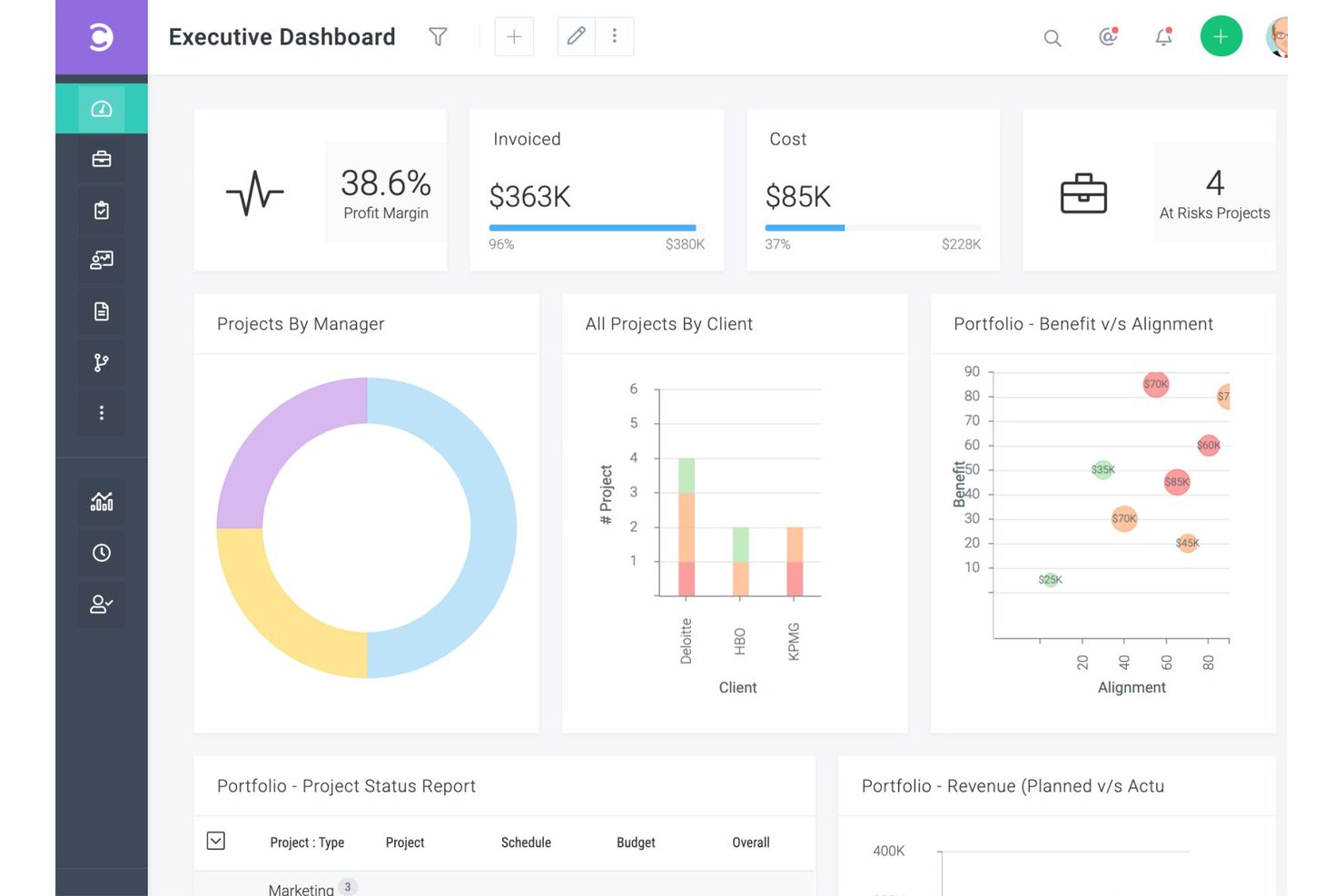
Celoxis is a project and portfolio management platform that covers scheduling, resource planning, financial tracking, cross-project dashboards, and configurable workflow apps for managing complex, multi-team programs.
Who Is Celoxis Best For?
Celoxis suits mid-to-large teams managing multiple concurrent programs who need configurable portfolio dashboards, dependency-based scheduling, and cross-project visibility in one place.
Why I Picked Celoxis
Celoxis earns its spot on my shortlist because of how well it handles multi-project program dashboards across complex, cross-functional programs. I like that you can build customizable portfolio dashboards that drill down from high-level status charts into individual task records, giving you real visibility across concurrent programs without toggling between tools. Celoxis also lets you model supplier milestones like tooling lead times and PPAP dates as inter-project dependencies, so schedule impacts surface automatically in the portfolio view.
Celoxis Key Features
- Inter-project dependency scheduling: Link tasks across concurrent programs so that when one milestone shifts—like a tooling lead time—dependent tasks in other projects recalculate automatically.
- Role-based access controls: Assign around 60 configurable privileges by security role, letting you expose project and task data to engineering, procurement, or supplier contacts without revealing financial information.
- Built-in risk, issue, and change request tracking: Log and route risks, issues, and change requests through configurable workflow apps with escalation rules and multi-level approvals.
- Resource workload and capacity planning: View cross-project resource utilization by role or skill and identify overloaded team members before conflicts affect your program schedule.
Celoxis Integrations
Celoxis has 21 integrations configured within the platform, including Microsoft Project, Excel, Google Drive, Jira, and Azure DevOps. It also supports custom connections through its REST API and integrations via Zapier.
Pros and Cons
Pros:
- Resource views reveal competing team workloads
- Portfolio dashboards show cross-program status
- Gantt dependencies map automotive milestones
Cons:
- Supplier milestones lack dedicated status escalation
- No native APQP or PPAP checklists

Workzone
Best for organized file sharing

Workzone is a project management platform that combines task tracking, Gantt and Kanban views, document approvals, file versioning, and cross-functional collaboration tools built around structured file sharing and review workflows.
Who Is Workzone Best For?
Workzone fits cross-functional teams that need structured file sharing, document approvals, and version control to keep project reviews organized and traceable.
Why I Picked Workzone
I picked Workzone as one of the best because its structured file sharing keeps automotive review workflows from falling apart across distributed teams. When you're routing spec sheets, tooling drawings, or supplier qualification documents for approval, Workzone's version control automatically tracks every revision and its document approval workflows create a clear, traceable chain of sign-offs. I also like that Partners get their own restricted folders, so suppliers only see what they need to see.
Workzone Key Features
- Manufacturing project templates: Pre-built templates for new product development, engineering change orders, tooling design, and supplier qualification map common manufacturing workflows.
- Role-based permissions: Assign Administrator, Manager, Contributor, Reviewer, or Partner roles to control exactly who can view, edit, or approve files and tasks.
- Portfolio view: See status across all active projects in a single dashboard, including milestones, deadlines, and project health indicators.
- Workload and capacity planning: Track team capacity across projects to spot over-allocation before it delays a program.
Workzone Integrations
Workzone offers native integrations with Microsoft Teams, Slack, Google Drive, OneDrive, and Microsoft SharePoint. It also supports a REST API for custom integrations and integrations via Zapier.
Pros and Cons
Pros:
- Partner folders support controlled supplier collaboration
- Manufacturing templates cover NPD and tooling
- Versioned files support traceable document reviews
Cons:
- Supplier tracking relies on generic templates
- No documented APQP or PPAP workflows
New Product Updates from Workzone

Workzone Enterprise Adds Multi-Stage Approval Workflows
Workzone Enterprise now includes Approval Workflows, enabling multi-stage document approvals to standardize complex processes and reduce manual effort. For more information, visit Workzone's official site.
 .

Jira
Best for enterprise cross-team program tracking
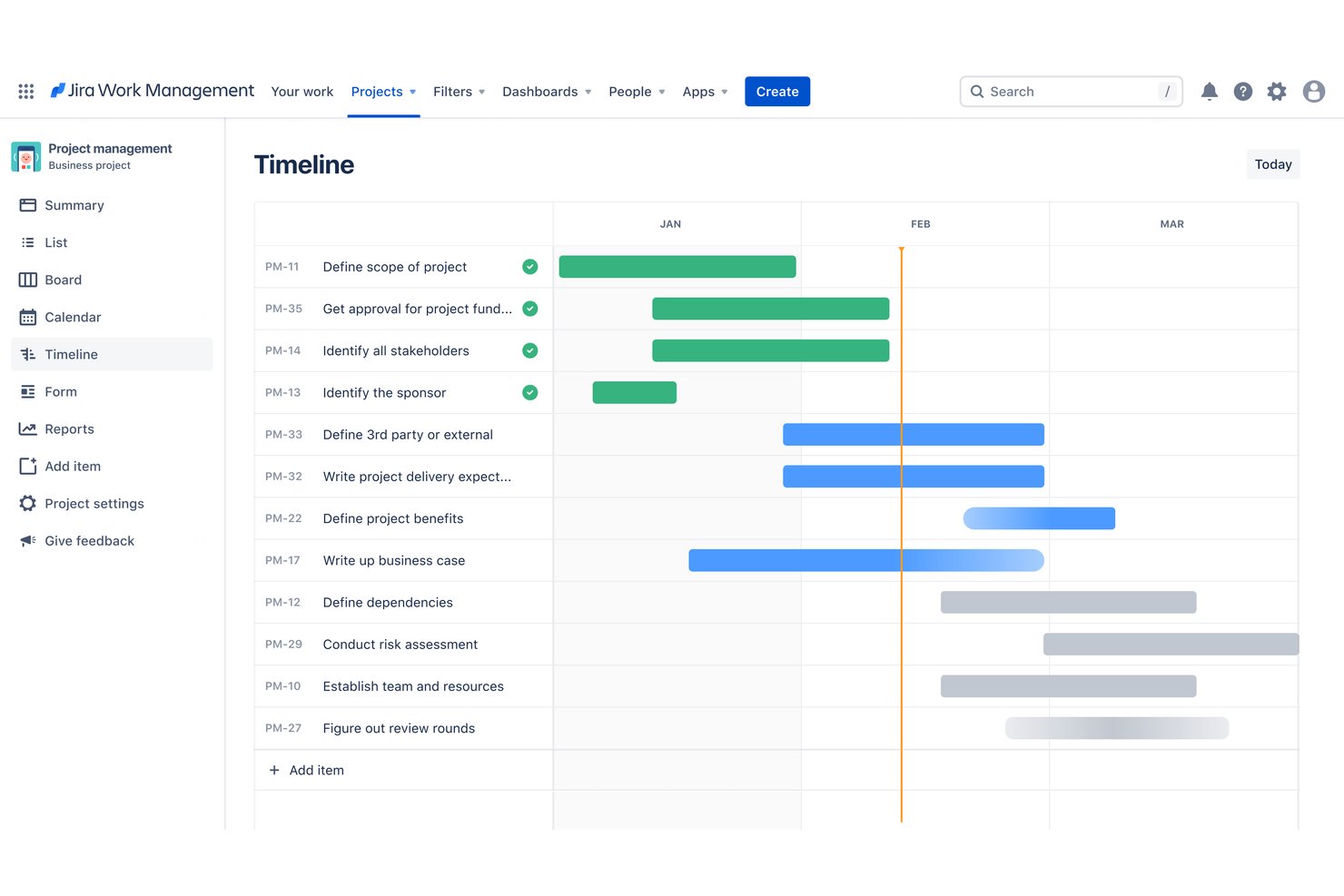
Jira is an Atlassian project management platform that combines task tracking, cross-team planning, dependency mapping, workflow automation, and AI-driven reporting across large, multi-team programs.
Who Is Jira Best For?
Jira fits large, multi-team organizations that need to coordinate complex programs across engineering, product, and operations under one tracking system.
Why I Picked Jira
I've included Jira in my top picks because it's the strongest option on this list for coordinating large, multi-team programs where work spans engineering, product, and operations. Cross-team dependency mapping and Advanced Roadmaps let you visualize what's blocking what across dozens of teams simultaneously. Mercedes-Benz uses Jira across software, hardware, and business teams in vehicle development, which gives it real automotive credibility.
Jira Key Features
- Scenario modeling: Compare alternative planning scenarios side by side to assess downstream impact before committing to a plan.
- Capacity management: Allocate team members' time across sprints and identify over-allocation before it affects delivery.
- No-code automation: Build rules to automate repetitive tasks and handoffs across spaces without writing code.
- Configurable approval workflows: Add approval steps to any workflow, specifying who must approve and what status transitions follow each decision.
Jira Integrations
Jira has native integrations with Confluence, Trello, and Bitbucket, plus 3,000+ Marketplace apps. It offers a REST API v3 for custom integrations and connects with tools including Slack, Figma, Gmail, GitHub, and Microsoft products.
Pros and Cons
Pros:
- Dashboards help track status and bottlenecks
- Mercedes-Benz case validates automotive team use
- Cross-team dependency maps clarify program blockers
Cons:
- Supplier guests lack dedicated milestone portals
- No built-in APQP, PPAP, or gate checklists
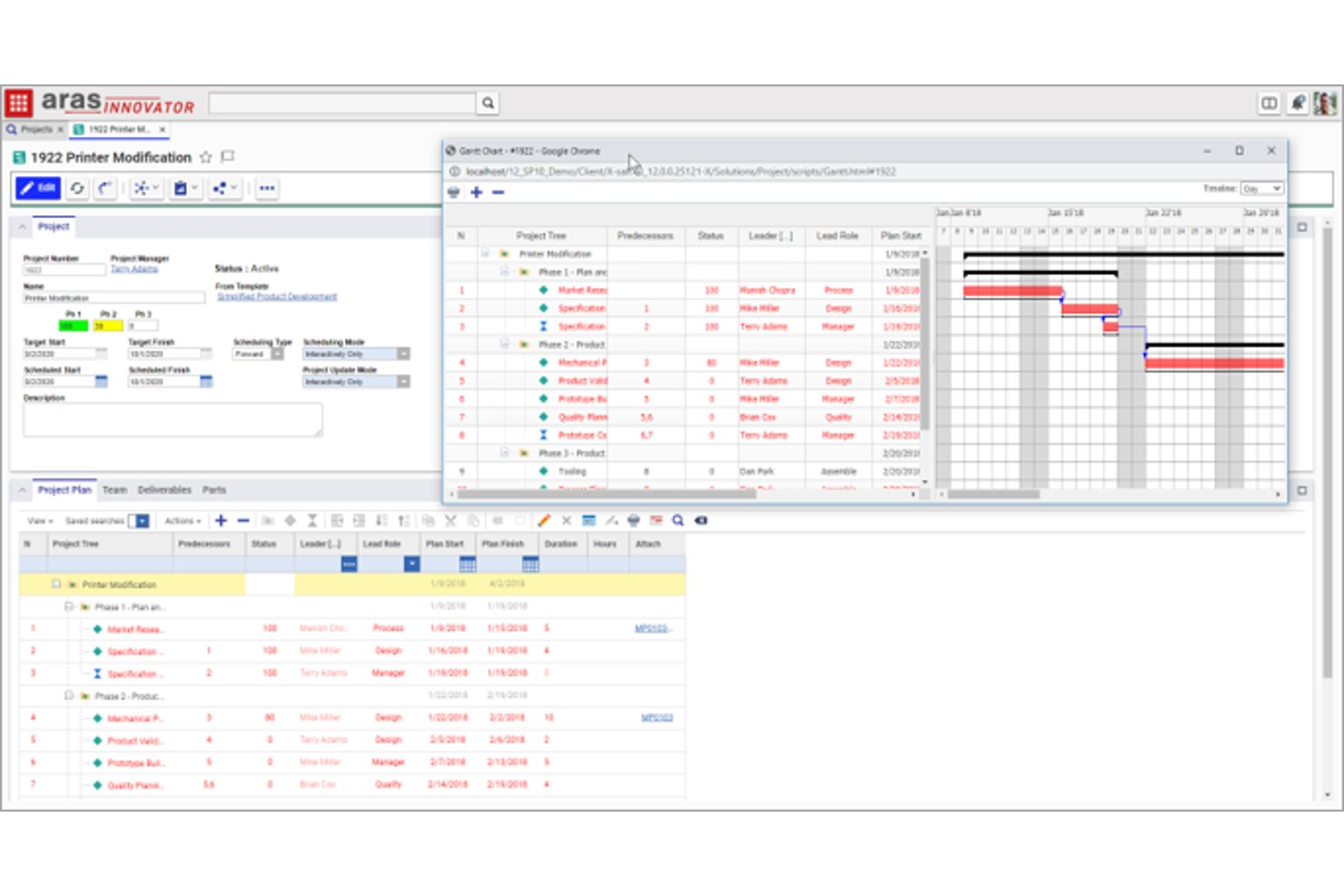
Aras Innovator is a product lifecycle management platform that combines requirements engineering, quality management, program tracking, and supplier coordination across the full product development lifecycle.
Who Is Aras Best For?
Aras Innovator is a strong fit for quality engineers and program teams at automotive OEMs or Tier 1 suppliers who need AIAG-aligned planning tools built into their PLM environment.
Why I Picked Aras
I've included Aras Innovator in my top picks because its Quality Management System is built directly on AIAG standards, giving quality engineers a native framework for APQP planning, DFMEA, PFMEA, and control plans without relying on workarounds. I particularly like that these quality gate tools connect directly to requirements, design, and engineering change data in the same platform, so a gate review reflects actual program status rather than manually compiled reports. The stage-gate program management module adds Gantt charts, milestone tracking, and status roll-ups that keep gate planning grounded in live project data.
Aras Key Features
- Variant management: Defines and resolves product variability using features, options, and configuration rules across engineering BOMs and lifecycle structures.
- Supplier portal: Provides a secure web-based portal where suppliers can complete workflows, questionnaires, and corrective action requests.
- EBOM-to-MBOM transformation: Supports drag-and-drop conversion from engineering BOMs to manufacturing BOMs with reconciliation indicators.
- Engineering change tracking: Monitors how changes to PLM-managed parts and documents affect downstream content, with alerts to impacted authors.
Aras Innovator Integrations
Marketplace integrations include SAP, Jira, Jama, 3DEXPERIENCE CATIA V6, Altium Designer, and Microsoft Office. Aras Innovator also offers an Open API and supports copying, synchronizing, or federating data with external systems.
Pros and Cons
Pros:
- Stage-gate dashboards track costs and schedules
- AIAG-based APQP planning links quality records
- Reviewers value shared production-data visibility
Cons:
- Reviewers report extra clicks finding records
- Setup and customization can take time
ClickUp
Best for flexible automotive team coordination
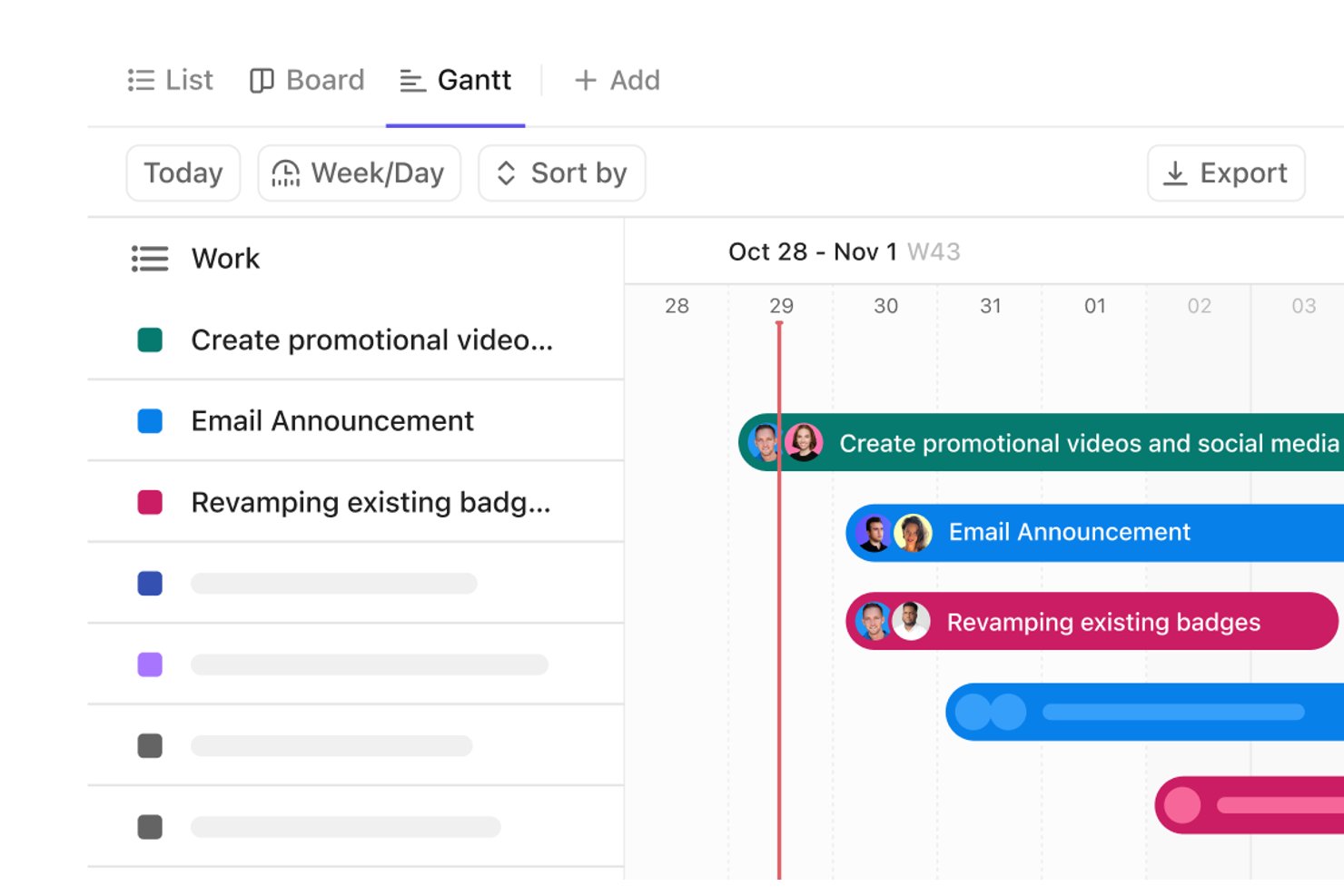
ClickUp is a work management platform that combines task tracking, Gantt-based timeline planning, cross-functional collaboration, and customizable dashboards to help automotive teams coordinate projects from concept through production.
Who Is ClickUp Best for?
ClickUp suits cross-functional automotive teams that need a flexible, configurable workspace to coordinate tasks, timelines, and documentation across engineering, supply chain, and production.
Why I Picked ClickUp
I've included ClickUp in my top picks because its flexibility makes it genuinely useful for automotive teams that span engineering, supply chain, and production. I like that Gantt charts automatically reschedule downstream dependent tasks when timelines shift, which is exactly what you need when a supplier delay ripples across an assembly stage. Milestones displayed as fixed diamonds on the Gantt let my team mark critical review points and launch gates without building a separate tracker.
ClickUp Key Features
- Custom task statuses and fields: Define your own statuses, field types, and task types to match the stages and data points your automotive workflows actually use.
- Forms for request intake: Collect engineering change requests, quality findings, or supplier submissions through a Form and route them automatically into the right workflow.
- Workload and resource management: View team capacity across tasks and timelines to balance assignments before scheduling conflicts affect a production stage.
- Automations: Set rules to trigger status updates, reassign tasks, or send notifications when conditions change across your project workflow.
ClickUp Integrations
ClickUp lists 1,000+ integrations, including native connections with Google Drive, Microsoft Teams, Slack, GitHub, GitLab, Google Calendar, and Tableau Web Connector. It also supports custom integrations through its API, webhooks, OAuth, and Zapier.
Pros and Cons
Pros:
- Custom statuses and forms adapt workflows
- Shared tasks, docs, and chat support coordination
- Dependency-aware Gantt rescheduling
Cons:
- Supplier guests cannot join Spaces
- No native APQP or PPAP gates
New Product Updates from ClickUp
ClickUp Adds Meetings Hub, Super Agent Templates, and ZoomInfo Integration
ClickUp adds a searchable Meetings Hub, new ways to clone and template Super Agents, and a ZoomInfo integration through the App Center. These updates improve meeting retrieval, agent reuse, and access to sales intelligence. For more information, visit ClickUp’s official site.

Best for visual project tracking
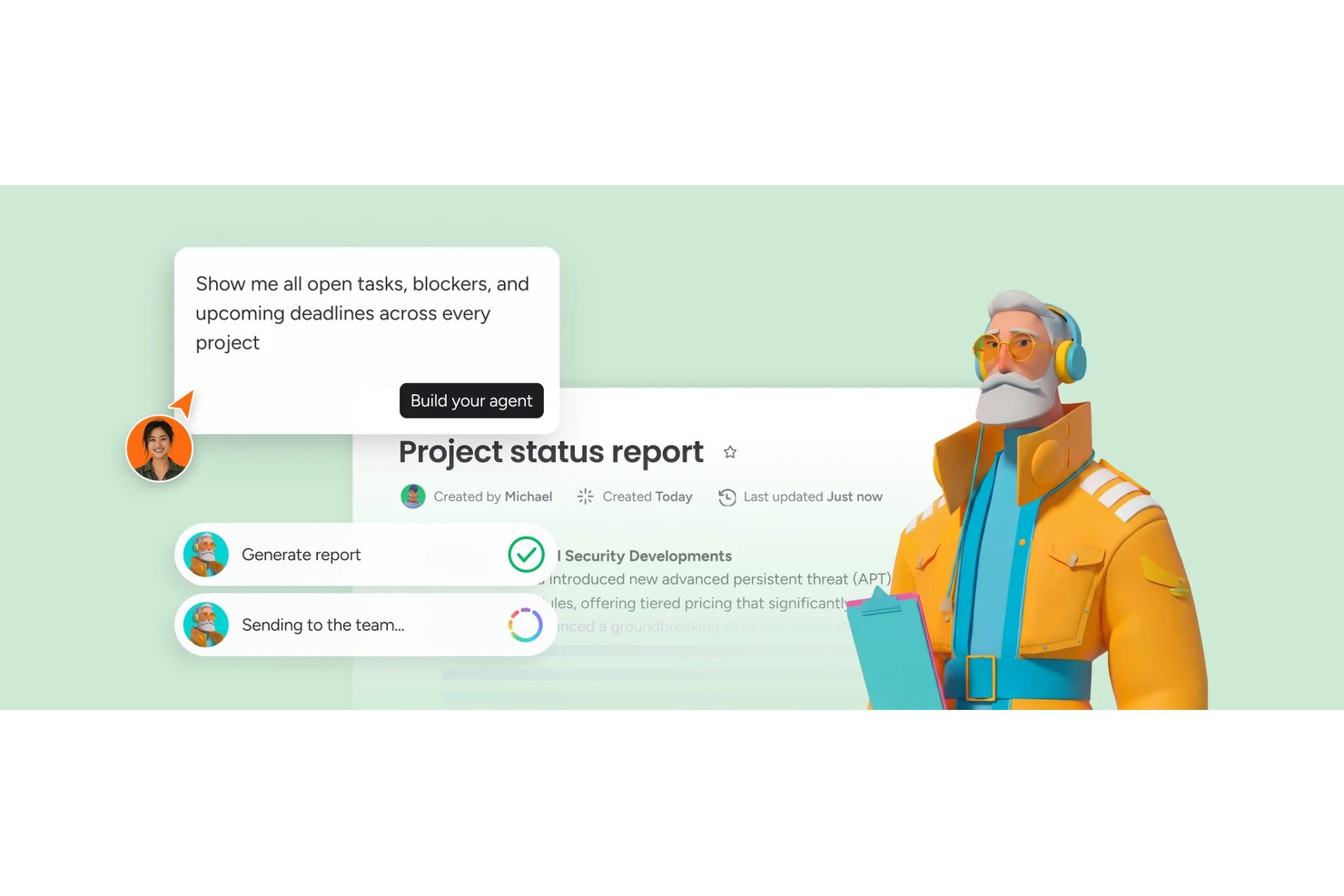
monday AI Workspace is a flexible, AI-powered project management platform that combines visual boards, Gantt charts, automated workflows, and cross-team dashboards to plan, track, and coordinate work across projects.
Who Is monday AI Workspace Best For?
monday AI Workspace is a good fit for cross-functional teams that need visual project tracking but don't require automotive-specific workflows like APQP or PPAP.
Why I Picked monday AI Workspace
I've included monday AI Workspace in my top picks because its Gantt charts with dependency tracking and milestone views make it easy to see exactly where a project stands across multiple workstreams at once. I particularly like how the cross-project dependency linking lets me connect tasks across separate boards, so when one workstream slips, the downstream impact is visible immediately. It's not built for APQP or PPAP, but for teams that need strong visual project tracking without automotive-specific constraints, it delivers.
monday AI Workspace Key Features
- AI workflow builder: Build automated workflows from natural-language descriptions, a visual canvas, or templates, combining rules, approvals, and AI steps.
- WorkForms with conditional logic: Create structured forms that adapt questions based on responses and feed submissions directly into boards as trackable items.
- File versioning: Store, preview, and restore multiple versions of uploaded documents through the Files Column.
- Activity log: Track item- and board-level changes—including status updates, date changes, and permission edits—with a timestamped record of who made each change.
monday AI Workspace Integrations
monday AI Workspace lists 850+ integrations and apps, including GitHub, GitLab, Slack, Microsoft Teams, Google Calendar, Salesforce, and HubSpot. It also supports GraphQL APIs, webhooks, SDKs, and Zapier.
Pros and Cons
Pros:
- Configurable boards adapt to engineering workflows
- Dashboards reduce manual status chasing
- Visual timelines clarify cross-team program status
Cons:
- Supplier tracking lacks dedicated portals
- No native APQP or PPAP gates
New Product Updates from monday AI Workspace
monday AI Workspace Adds Human Approval Routing
monday AI Workspace adds a human-in-the-loop approval block to AI Workflows, sending approval requests and routing workflow paths based on responses. For more information, visit monday AI Workspace's official site.
Best for adaptable multi-team program tracking
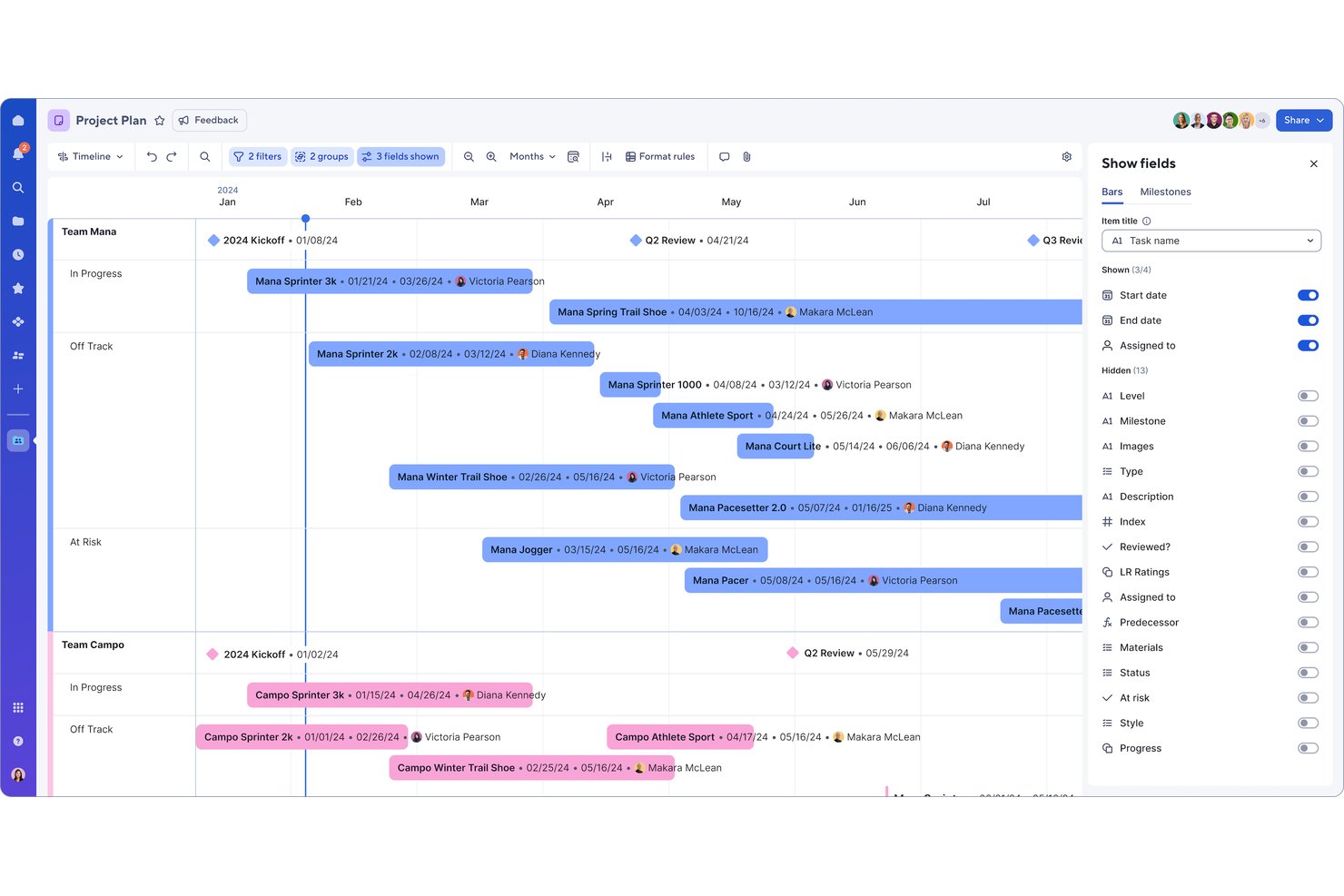
Smartsheet is a flexible work management platform that combines multi-view task tracking, Gantt-based timeline planning, cross-team collaboration, portfolio dashboards, and workflow automation to help teams plan, manage, and report on programs across multiple workstreams.
Who Is Smartsheet Best For?
Smartsheet fits cross-functional teams that need to track multiple programs across departments and already rely on spreadsheet-style workflows to manage complex, multi-workstream projects.
Why I Picked Smartsheet
I've included Smartsheet in my top picks because it's one of the most adaptable platforms I've seen for keeping multi-team programs organized without forcing everyone into a rigid structure. I particularly like how Sheet Summary Reports pull milestone and status data from across multiple sheets into a single portfolio-level view, so program leads can spot bottlenecks without chasing individual teams. Scenario Planning (Enterprise) lets you model timeline and capacity changes before committing, which matters when program scope shifts mid-cycle.
Smartsheet Key Features
- Automated workflow builder: Set up no-code workflows with conditional logic to trigger reminders, approvals, and row updates across program workstreams.
- Sheet Summary Reports: Aggregate milestone and status fields from multiple project sheets into a single filterable, sortable portfolio-level view.
- Dependency tracking: Define Finish-to-Start, Finish-to-Finish, Start-to-Start, and Start-to-Finish task relationships with lag or lead time to maintain accurate program schedules.
- Role-based access controls: Set permission levels down to individual assets and restrict external collaboration to trusted domains or specific users.
Smartsheet Integrations
Smartsheet reports over 175 integrations, including Jira Software, SAP ERP, ServiceNow, Salesforce, Power BI, Microsoft Teams, and Slack. It also supports API, webhooks, SDKs, OAuth 2.0, and Zapier for custom connectivity.
Pros and Cons
Pros:
- Shared sheets support collaborative project visibility
- Portfolio dashboards consolidate cross-team status updates
- Task dependencies clarify shifting program schedules
Cons:
- Supplier deliverables and tooling milestones need workarounds
- No native APQP or PPAP gate workflows
New Product Updates from Smartsheet

Smartsheet Adds Non-Plan User Management in Admin Center
Smartsheet adds a Non plan users tab to the Seat types and true-up page in Admin Center. This lets system admins review non-plan users and add them to the plan or remove them from the organization in one place. For more information, visit Smartsheet’s official site.

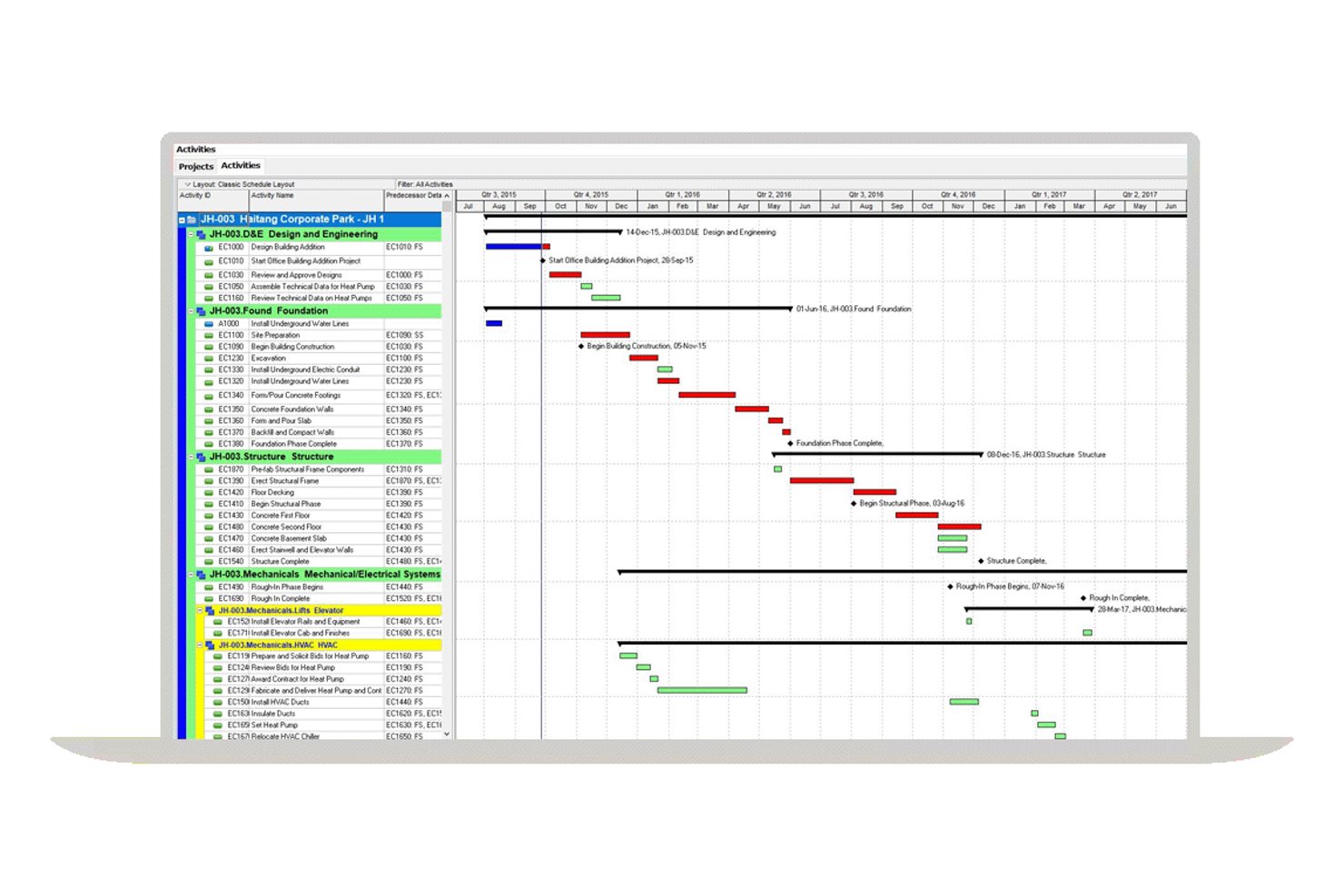
Oracle Primavera P6 is an enterprise project portfolio management platform that supports large-scale program planning, CPM scheduling, resource optimization, cost management, and cross-project portfolio reporting.
Who Is Oracle Primavera P6 Best For?
Oracle Primavera P6 is a strong fit for enterprise organizations managing large, complex programs where CPM scheduling, multi-project visibility, and portfolio-level reporting are non-negotiable.
Why I Picked Oracle Primavera P6
I picked Oracle Primavera P6 as one of the best because it's built for exactly the kind of multi-project complexity that automotive programs generate at scale. When you're managing overlapping vehicle programs with hundreds of interdependent activities, P6's CPM scheduling engine calculates critical paths, float, and early/late dates across all of them simultaneously. I also rely on its portfolio dashboards to compare schedule and cost performance across programs in one view, which is essential when leadership needs cross-program status at a glance.
Oracle Primavera P6 Key Features
- Resource demand and capacity planning: View and plan resource and role demand across multiple projects to identify conflicts before they delay your program.
- What-if scenario analysis: Model alternative resource and schedule scenarios to evaluate tradeoffs before committing to a plan.
- Integrated cost and schedule tracking: Connect cost codes to work breakdown structures for real-time visibility into budget and schedule impacts together.
- Graphical workflow modeling: Configure workflow forms to route approvals and communication across project teams without relying on manual follow-up.
Oracle Primavera P6 Integrations
Oracle Primavera P6 integrates with Oracle Primavera Unifier and interoperates with Oracle E-Business Suite and SAP ERP. Primavera Gateway, Primavera Web Services, and its Java-based Integration API support custom connectivity.
Pros and Cons
Pros:
- Resource scenarios flag cross-program capacity conflicts
- Portfolio views compare vehicle-program status
- CPM scheduling exposes dependencies and float
Cons:
- No dedicated supplier or tooling milestone tracking
- No native APQP or PPAP gate workflows

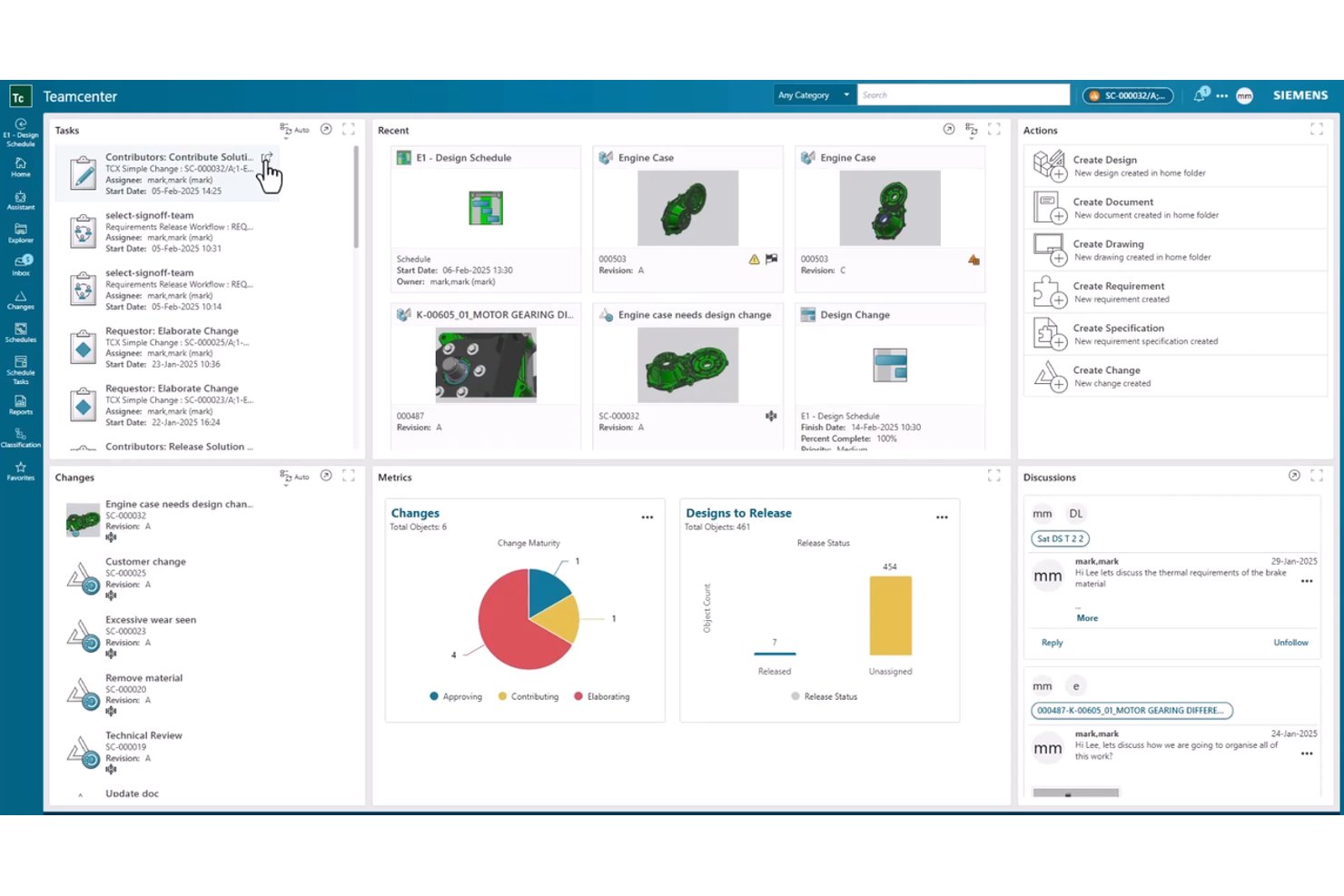
Siemens Teamcenter is a product lifecycle management platform that connects program planning, change management, document control, supplier collaboration, and APQP quality tracking across the full vehicle development lifecycle.
Who Is Siemens Teamcenter Best For?
Teamcenter is a strong fit for enterprise OEMs and Tier 1 suppliers that need program planning tightly connected to product data, change control, and supplier collaboration across the full vehicle lifecycle.
Why I Picked Siemens Teamcenter
Teamcenter earns its spot on my shortlist because it connects program planning directly to live product data, which is something most standalone project tools simply can't do. I like that project plans can be tied to specific requirements, deliverables, and BOMs, so when something changes in the product structure, the program context changes with it. Configurable change workflows with full audit trails also mean cross-functional teams across engineering, supply chain, and manufacturing are working from the same traceable record.
Siemens Teamcenter Key Features
- APQP quality project management: Structured quality planning from design through production, connected to FMEA, control plans, and ISO 9001/IATF 16949 practices.
- Supplier Connect portal: Suppliers can view shared product data, request write access, and submit updates, with OEM gatekeeper review at each step.
- Workflow automation with audit trails: Configurable workflows use business logic and standard process templates, capturing full status history for every change.
- ERP and CAD integrations: Bidirectional data sync with SAP and Oracle ERP, plus native integrations for SolidWorks, Creo, Inventor, and AutoCAD.
Siemens Teamcenter Integrations
Siemens Teamcenter integrates with SAP Business Suite, Oracle E-Business Suite, SolidWorks, Creo, Inventor, and AutoCAD. Teamcenter Gateway synchronizes ERP, MES, and CRM data, while APIs and web services/SOAP support custom integrations.
Pros and Cons
Pros:
- Reviewers praise revision control across CAD teams
- Supplier submissions retain review and audit trails
- Product-linked plans connect tasks with BOM changes
Cons:
- Critical-path sequencing isn't documented for schedules
- Built-in PPAP levels and gate scoring undocumented

Wrike
Best for cross-department vehicle program tracking
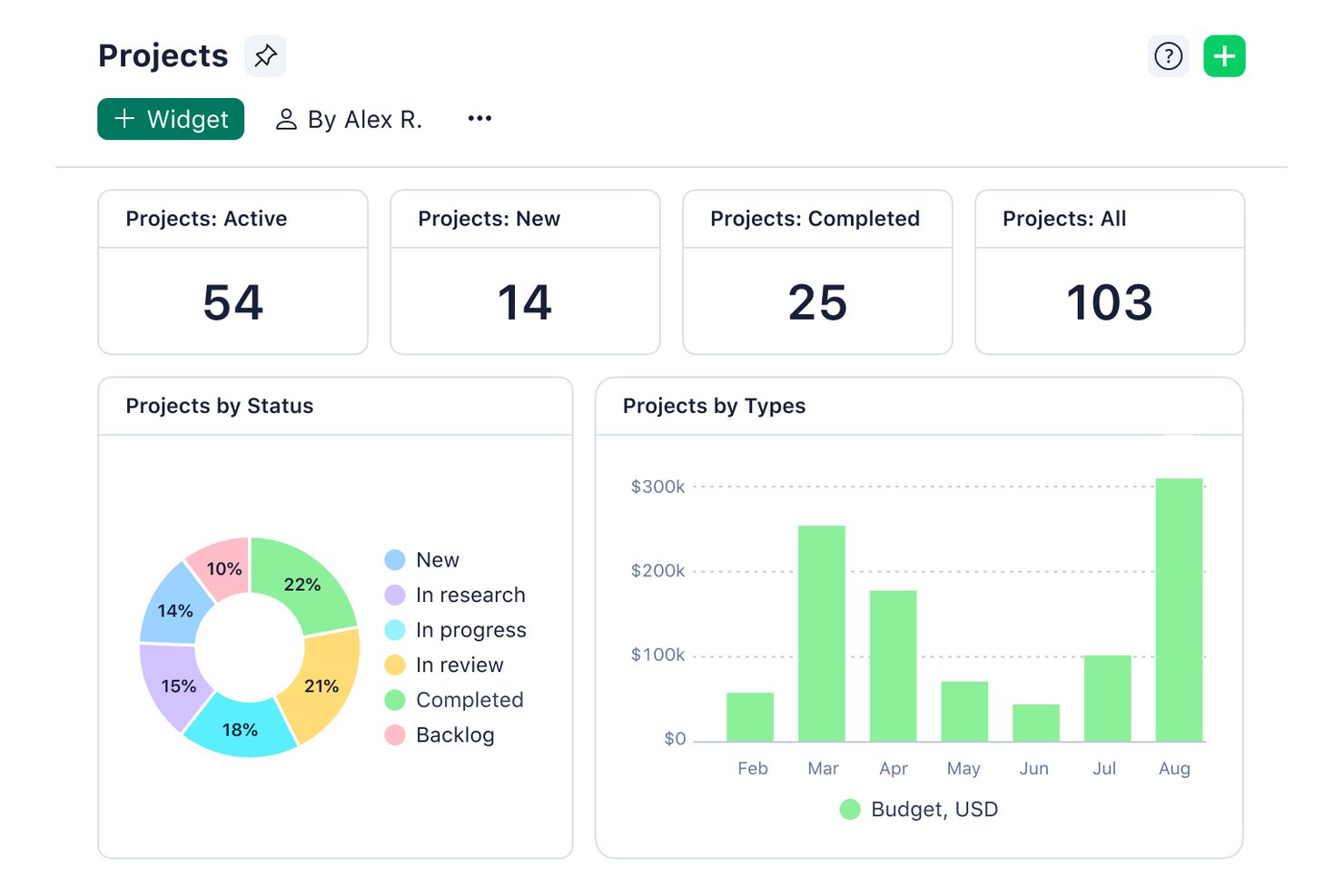
Wrike is a work management platform that supports automotive program planning through configurable stage-gate workflows, Gantt-based timelines, cross-department visibility, and supplier coordination across vehicle development programs.
Who Is Wrike Best For?
Wrike is a strong fit for cross-functional automotive teams—spanning engineering, supply chain, and quality—that need to coordinate vehicle programs across departments without adopting a purpose-built PLM tool.
Why I Picked Wrike
I've included Wrike in my top picks because it handles cross-department vehicle program tracking better than most horizontal tools I've used. I particularly like how shared work items can appear across multiple vehicle programs simultaneously, so engineering, supply chain, and quality teams each see their own view while updating the same record. Configurable stage-gate workflows for APQP and engineering change orders, with required fields that block gate advancement until sign-offs are recorded, give real structure to what can otherwise be a chaotic process.
Wrike Key Features
- Gantt chart dependencies: View task relationships across finish-to-start, start-to-start, finish-to-finish, and start-to-finish links, with dependent tasks rescheduled automatically when dates shift.
- Cross-tagging: Make a single work item visible across multiple vehicle programs and team spaces without duplicating the record.
- Dynamic supplier request forms: Send scheduled status requests to Tier 2 or Tier 3 suppliers and pull their responses directly into the program schedule.
- Portfolio visibility: Connect vehicle roadmaps, capital allocation, and capacity planning in a single view across programs.
Wrike Integrations
Wrike supports 400+ integrations, including Jira, GitHub, Power BI, Google Sheets, Salesforce, and Slack, plus Wrike Sync for two-way connections. Its REST API, webhooks, Datahub API, and BI Export API support custom connectivity with PLM, ERP, and MES systems.
Pros and Cons
Pros:
- Dashboards reduce manual status chasing
- Configurable APQP gates capture approvals
- Shared records span vehicle programs
Cons:
- Advanced cross-program reporting can fall short
- Supplier workflows lack dedicated portals
New Product Updates from Wrike
Wrike Expands Gantt Planning, Approvals, and AI Work Intake
Wrike adds cross-project Gantt dependencies, flexible approval routing, and AI work intake through Wrike MCP. These updates give teams more control over planning, decision-making, and incoming work. For more information, visit Wrike’s official site.
Annen programvare for prosjektstyring i bilindustrien
Her er noen andre alternativer for prosjektstyring i bilindustrien som ikke kom med på kortlisten min, men som likevel er verdt å undersøke hvis du ikke fant det du lette etter ovenfor:
- Quickbase
For custom app creation
- GoodDay
For viewing tasks across multiple layouts
- Planisware
For automotive cross-functional program sync
- PTC Windchill
For PLM-driven vehicle program coordination
- Polarion ALM
For ALM-driven requirements traceability
- Arena PLM
For ECO-linked program traceability
- Propel PLM
For change control across supplier teams


How I Evaluate Automotive Project Management Software
I split my evaluation into three parts, with core functionality carrying the most weight: assign tasks, track dependencies and milestones, and coordinate engineering, procurement, and manufacturing. Then I look for standout features such as launch-readiness scoring. Finally, I consider onboarding, support, deployment, and value beyond features.
Core Functionality (Table Stakes For This List)
When I'm selecting tools for my list, I score each one on a scale from 0 (does not offer the functionality) to 5 (excels in this area) for each core functionality listed below. I then convert the total into a percentage to help assess each tool's overall fit, with extra weight on any functionalities I’ve deemed essential.
- Task & Timeline Management (Essential): I look for sequenced tasks, dependencies, and milestones that help teams track engineering work through tooling and production dates.
- Cross-Functional Collaboration (Essential): I assess how engineering, procurement, and manufacturing teams share plans, update work, and see ownership across a vehicle program.
- Program Gate Tracking: I check how easily teams can map APQP-style phases, readiness checks, and approvals to a program’s development milestones.
- Supplier Coordination: I look for ways to assign supplier deliverables, track tooling dates, and flag late inputs against program milestones.
- Document Control: I assess document versions and change tracking, including how teams record revisions to requirements or engineering plans.
- Program Reporting: I look for dashboards that summarize milestone progress, schedule risks, and status across vehicle programs.
Once I have a list of tools that meet the criteria, I consider what sets each platform apart.
Differentiating Factors (What Sets Vendors Apart)
Here's how I compare and contrast different vendors:
Standout Features
I look for engineering change impact analysis that visually maps how an ECO ripples into downstream tasks, supplier timelines, and tooling schedules. Without that linkage, a single design change can silently push back SOP. I also evaluate multi-platform variant tracking—when teams share parts across derivatives, I want one program view showing common tooling and divergent timelines side by side. Launch readiness scoring matters too: automated red/yellow/green indicators at each gate review surface at-risk deliverables before they become surprises.
Beyond Features
I check whether a vendor's templates and terminology map to automotive gate reviews like design freeze and PPAP levels without heavy reconfiguration. Industry standards alignment with IATF 16949 or AIAG saves weeks of setup. I also evaluate API maturity and pre-built PLM/ERP connectors, since duplicate data entry across systems is a real risk on multi-year vehicle programs. Security certifications like ISO 27001 matter when sensitive tooling data crosses organizational boundaries with tiered suppliers.
Slik velger du programvare for prosjektstyring i bilindustrien
Det er lett å gå seg vill i lange funksjonslister og komplekse prismodeller. For å hjelpe deg med å holde fokus når du lager en kortliste over programvarealternativer, får du her en sjekkliste over faktorer du bør ha i bakhodet:
| Faktor | Hva du bør vurdere |
|---|---|
| Skalerbarhet | Vil verktøyet vokse med virksomheten din? Vurder om det kan håndtere en økt arbeidsmengde og støtte flere brukere etter hvert som verkstedet ditt utvides. Se etter fleksible prisnivåer som legger til rette for vekst. |
| Integrasjoner | Fungerer programvaren med verktøyene du allerede bruker? Sørg for at den kobles sømløst til regnskaps-, lagerstyrings- og CRM-systemene dine. Kontroller kompatibilitet med verktøy som QuickBooks eller CARFAX. |
| Tilpasningsmuligheter | Kan du tilpasse programvaren til arbeidsflytene dine? Se etter alternativer for å endre dashbord, rapporter og brukertillatelser. Vurder hvor mye kontroll du har over grensesnittet og funksjonaliteten. |
| Brukervennlighet | Er verktøyet intuitivt for teamet ditt? Et brukervennlig grensesnitt reduserer opplæringstiden og antallet feil. Test demoversjonen for å vurdere hvor raskt teamet ditt kan tilpasse seg daglig bruk. |
| Implementering og introduksjon | Hvor lang tid tar det å komme i gang? Vurder støtten du får under oppsettet, inkludert opplæringsvideoer, webinarer og dedikerte spesialister for introduksjon. Unngå verktøy med langvarige oppsett. |
| Kostnad | Passer prisen budsjettet ditt? Sammenlign kostnaden med funksjonene som tilbys. Ikke glem å ta hensyn til skjulte kostnader, som oppsettsgebyrer eller kostnader for ekstra brukere. |
| Sikkerhetstiltak | Hvordan beskytter programvaren dataene dine? Se etter krypteringsstandarder, protokoller for sikkerhetskopiering av data og samsvar med regelverk som GDPR. |
| Tilgjengelig kundestøtte | Får du hjelpen du trenger, når du trenger den? Kontroller om kundestøtte er tilgjengelig døgnet rundt og via flere kanaler, inkludert chat, telefon og e-post. Rask og pålitelig kundestøtte sparer tid og frustrasjon. |
Hva er programvare for prosjektstyring i bilbransjen?
Programvare for prosjektstyring i bilbransjen er et verktøy som er utviklet for å hjelpe bilverksteder med å administrere driften mer effektivt. Serviceledere, verkstedeiere og teknikere bruker disse verktøyene til å planlegge avtaler, holde oversikt over lagerbeholdningen og kommunisere med kunder.
Funksjoner for planlegging, lagerstyring og kundekommunikasjon hjelper deg med å forbedre arbeidsflytene og kundeservicen. Disse verktøyene forenkler de daglige oppgavene, slik at verkstedet kan drives smidig og effektivt.
Funksjoner i programvare for prosjektstyring i bilbransjen
Når du velger programvare for prosjektstyring i bilbransjen, bør du se etter følgende nøkkelfunksjoner:
- Timeplanlegging: Hjelper med å administrere avtaler, redusere nedetid og holde verkstedet organisert.
- Lagerstyring: Holder oversikt over deler og rekvisita, slik at du har de nødvendige varene tilgjengelig for å fullføre reparasjoner.
- Fakturering: Automatiserer faktureringsprosesser, sparer tid og reduserer feil i økonomiske transaksjoner.
- Kundekommunikasjon: Gir deg verktøy for å sende oppdateringer og påminnelser, noe som forbedrer kundetilfredshet og engasjement.
- Digitale kjøretøykontroller: Lar deg tilby detaljerte rapporter til kunder for å bygge tillit og åpenhet i forbindelse med service.
- Rapporteringsverktøy: Genererer innsikt i resultatene, slik at du kan ta informerte beslutninger og forbedre driften.
- Delsstyring: Holder lagerbeholdningen organisert for å forhindre utsolgte varer og forsinkelser i reparasjoner.
- Tidsregistrering: Overvåker hvordan tiden brukes på prosjekter for å øke produktiviteten og effektiviteten.
- Tilpassede servicepakker: Lar deg tilpasse tilbudene for å møte spesifikke kundebehov, noe som forbedrer fleksibiliteten i tjenestene.
Fordeler med programvare for prosjektstyring i bilbransjen
Implementering av programvare for prosjektstyring i bilbransjen gir flere fordeler for teamet og virksomheten din. Her er noen av fordelene du kan se frem til:
- Bedre organisering: Funksjoner for timeplanlegging og lagerstyring sørger for at verkstedet drives smidig og reduserer nedetid.
- Økt kundetilfredshet: Verktøy for kundekommunikasjon hjelper deg med å holde kundene informert og engasjert, samtidig som de får bedre serviceopplevelser.
- Tidsbesparelser: Automatisert fakturering og timeplanlegging frigjør tid for teamet, slik at det kan fokusere på reparasjoner og kundeinteraksjoner.
- Økt åpenhet: Digitale kjøretøykontroller gir detaljerte rapporter, slik at du kan bygge tillit hos kundene gjennom tydelig og ærlig kommunikasjon.
- Bedre beslutningstaking: Rapporteringsverktøy gir innsikt i resultatene, slik at du kan ta informerte valg for å forbedre driften.
- Effektiv ressursstyring: Funksjoner for delsstyring forhindrer utsolgte varer, slik at du alltid har de nødvendige delene til reparasjoner.
Kostnader og priser for programvare for prosjektstyring i bilbransjen
Valg av programvare for prosjektstyring i bilbransjen krever en forståelse av de ulike prismodellene og abonnementene som er tilgjengelige. Kostnadene varierer basert på funksjoner, teamstørrelse, tillegg og mer. Tabellen nedenfor oppsummerer vanlige abonnementer, gjennomsnittsprisene deres og typiske funksjoner som er inkludert i løsninger for prosjektstyring i bilbransjen:
Sammenligningstabell for abonnementer for programvare for prosjektstyring i bilbransjen
| Abonnementstype | Gjennomsnittspris | Vanlige funksjoner |
|---|---|---|
| Gratisabonnement | $0 | Grunnleggende timeplanlegging, begrenset lagerstyring og enkel fakturering. |
| Personlig abonnement | $10-$30/per bruker/måned | Avansert timeplanlegging, detaljert lagerstyring, verktøy for kundekommunikasjon og digitale kjøretøykontroller. |
| Bedriftsabonnement | $30-$60/per bruker/måned | Omfattende rapporteringsverktøy, delsstyring, tidsregistrering og tilpassede servicepakker. |
| Abonnement for store virksomheter | $60-$100/per bruker/måned | Komplett funksjonspakke, inkludert alle integrasjoner, avansert analyse, prioritert brukerstøtte og omfattende tilpasningsmuligheter. |
Vanlige spørsmål om programvare for prosjektstyring i bilindustrien
Her er noen svar på vanlige spørsmål om programvare for prosjektstyring i bilindustrien:
Hvordan håndterer programvare for prosjektstyring i bilindustrien kompleks planlegging?
Programvare for prosjektstyring i bilindustrien har avanserte planleggingsverktøy som lar deg administrere flere prosjekter og oppgaver. Du kan enkelt prioritere, tildele ressurser og justere tidsplaner. Denne fleksibiliteten gjør at teamet ditt kan tilpasse seg endringer og overholde frister uten stress.
Kan programvare for prosjektstyring i bilindustrien integreres med eksisterende systemer?
Ja, det meste av programvaren for prosjektstyring i bilindustrien kan integreres med eksisterende systemer som regnskaps-, lagerstyrings- og CRM-verktøy. Dette bidrar til å redusere manuell dataregistrering og feil. Kontroller at programvaren er kompatibel med de nåværende systemene dine før du velger en løsning.
Hvilke sikkerhetstiltak er på plass for å beskytte data?
Programvare for prosjektstyring i bilindustrien omfatter vanligvis sikkerhetsfunksjoner som datakryptering, brukerautentisering og regelmessige sikkerhetskopier. Disse tiltakene beskytter sensitiv informasjon mot uautorisert tilgang og datainnbrudd.
Hvordan støtter disse verktøyene samarbeid med eksterne partnere?
Disse verktøyene legger til rette for samarbeid ved å gi delt tilgang til prosjektdata og kommunikasjonsplattformer. Du kan enkelt samordne arbeidet med leverandører, underleverandører og andre partnere, slik at alle holder seg informert og samkjørt med prosjektmålene.
Hva slags kundestøtte kan jeg forvente?
Leverandører av programvare for prosjektstyring i bilindustrien tilbyr vanligvis ulike støttealternativer, inkludert støtte via telefon, e-post og chat. Noen tilbyr også opplæringsressurser, brukerveiledninger og webinarer for å hjelpe deg og teamet ditt med å utnytte programvarens fulle potensial. Kontroller hvor tilgjengelig og responsiv kundestøtten er før du forplikter deg.
Er det mulig å tilpasse programvaren til spesifikke behov?
Mange programvareløsninger for prosjektstyring i bilindustrien tilbyr tilpasningsmuligheter, slik at du kan skreddersy verktøyet til virksomhetens spesifikke arbeidsprosesser og krav. Du kan justere dashbord, rapporter og brukertillatelser slik at de passer til virksomhetens behov.