

10 beste programvarer for medieforvaltning, vurdert i 2026

Beste programvare for medieressursstyring


Med så mange tilgjengelige programvareløsninger for medieressursstyring kan det være en reell utfordring å velge den rette. Du ønsker å håndtere medieinnholdet effektivt, men det kan være overveldende å avgjøre hvilken programvare du skal velge.
Jeg hjelper deg! Med mange års erfaring innen digital prosjektledelse og inngående kjennskap til ulike digitale produktivitetsverktøy kan jeg veilede deg til de riktige valgene. Her er mine anbefalinger av den beste programvaren for medieressursstyring.
Why Trust Our Software Recommendations
Our team has been testing and reviewing software since 2012. As project managers ourselves, we know how difficult—and important—it is to choose the right software.
For this guide, we evaluated tools using hands-on testing and independent research, scoring tools using our selection criteria. We also draw on insights from industry thought leaders and practicing project management experts.
Our reviews reflect our human editorial judgment, not a sales pitch.
Expert reviewers:
Sammenligningstabell for programvare for medieressursstyring
Denne sammenligningstabellen oppsummerer prisdetaljene for mine beste utvalgte programmer for medieressursstyring:
| Tool | Best For | Trial Info | Price | ||
|---|---|---|---|---|---|
| 1 | Best for brand empowerment | Free demo available | Pricing upon request | Website | |
| 2 | Best for AI-driven image and video asset search | 30-day free trial + free demo available | Pricing upon request | Website | |
| 3 | Best for approval workflows | 14-day free trial | Pricing upon request | Website | |
| 4 | Best for media AI-powered workflows and resourcing | Free demo available | Pricing upon request | Website | |
| 5 | Best for team collaboration | 30-day free trial | From $29/month | Website | |
| 6 | Best for streamlined social media | Free plan available | From $5/month per channel (billed annually) | Website | |
| 7 | Best for marketing automation | Free demo available | Pricing upon request | Website | |
| 8 | Best for asset organization | Free demo available | Pricing upon request | Website | |
| 9 | Best for integration with Drupal | Free demo available | Pricing upon request | Website | |
| 10 | Best for asset accessibility | Free demo available | Pricing upon request | Website |


Anmeldelser av den beste programvaren for medieressursstyring
I mine grundige anmeldelser får du vite mer om styrkene og svakhetene til ledende programvare for medieressursstyring.

Papirfly
Best for brand empowerment

Papirfly is an all-in-one brand management platform. It's best for maintaining brand consistency and empowering global teams to create on-brand marketing materials.
Why I Picked Papirfly:
I chose Papirfly for its complete approach to brand management, which includes templates and analytics. Papirfly empowers brands by providing the tools and features necessary for teams to produce on-brand content efficiently, whether with asset creation or campaign execution.
Standout features & integrations:
Features include campaign execution tools, digital asset management (DAM), enterprise-grade analytics, and on-brand design templates. These features help businesses with the creative process and promote cost efficiency.
Integrations include Adobe Creative Cloud, Microsoft Office, WordPress, SharePoint, and Optimizely.
Pros and Cons
Pros:
- Highly configurable interface
- Cloud-based template tool
- High customer retention rate (95%)
Cons:
- Takes time to learn some of the advanced features
- Planning functionalities need improvement
New Product Updates from Papirfly

Papirfly Point Adds Brand Assistant Admin Controls
Papirfly now lets admins configure Brand Assistant directly in Point, including enabling the assistant, accepting AI terms, tuning conversation style, and managing knowledge sources and documents. For more information, visit Papirfly's official site.
 .
.
Best for AI-driven image and video asset search
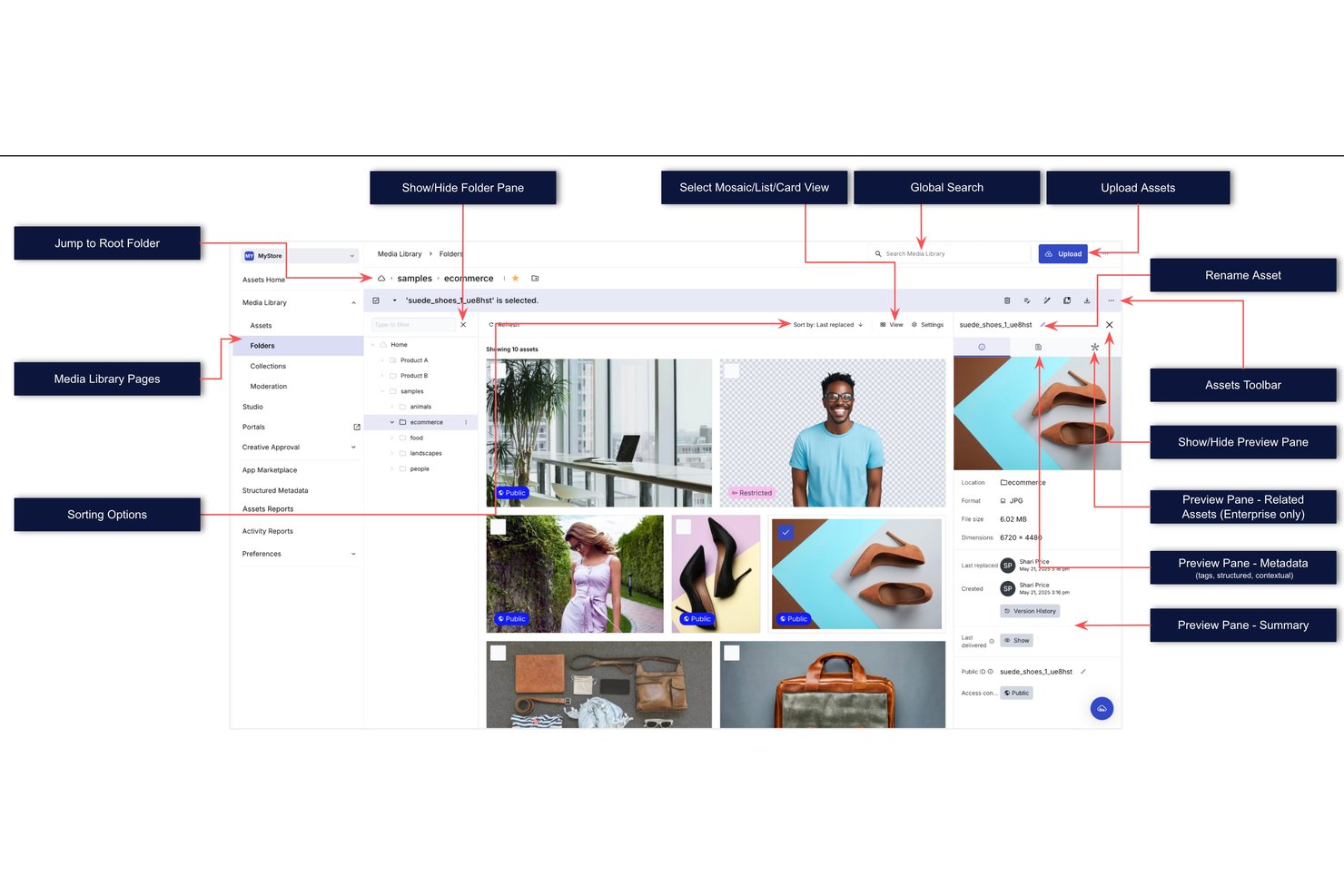
Cloudinary Assets is a cloud-based digital asset management platform that centralizes image and video storage, automates metadata tagging, and supports AI-powered search, rights management, approval workflows, and branded asset distribution.
Who Is Cloudinary Best For?
Cloudinary Assets is a strong fit for enterprise marketing and creative teams that manage high volumes of images and video and need AI-powered search to find the right asset fast.
Why I Picked Cloudinary
I picked Cloudinary as one of the best because its AI-powered search genuinely changes how fast teams can surface the right asset. Instead of relying on manually tagged filenames, you can describe an image in plain language or search with a reference photo, and Cloudinary's Search Agent finds matching assets across the entire library. I also like the AI auto-tagging, which kicks in at upload and automatically enriches images and videos with metadata, so your library stays organized without manual cleanup work.
Cloudinary Key Features
- Branded media portals: Create customizable, permission-controlled portals to share approved assets with internal teams, agencies, and external partners.
- Creative approval flows: Build multi-stage proof workflows with assigned reviewers and configurable approval conditions that trigger automated actions on completion.
- Rights and expiration management: Schedule asset access windows and configure automated EasyFlows to restrict, move, or relabel assets as expiration dates approach.
- Asset reporting dashboards: Access monthly reports on uploads, downloads, searches, active users, and top assets to track library usage across your team.
Cloudinary Integrations
Cloudinary lists integrations with Adobe Creative Cloud, Figma, Contentful, Shopify, HubSpot, Salesforce, and WordPress. It also provides REST APIs, SDKs, and upload, Admin, Creative Approval, Analyze, and Provisioning APIs for custom integrations.
Pros and Cons
Pros:
- Automated resizing and cropping aid delivery
- Bulk tag edits help organize libraries
- AI tagging speeds asset discovery
Cons:
- Usage-based costs can be hard to forecast
- Older asset searches can miss results
New Product Updates from Cloudinary

Cloudinary Integrates with Klaviyo for Personalized Email Visuals
Cloudinary integrates with Klaviyo to generate personalized images and GIFs from customer and event data. This reduces manual design work for email campaigns. For more information, visit Cloudinary’s official site.
 .
.
Wrike
Best for approval workflows
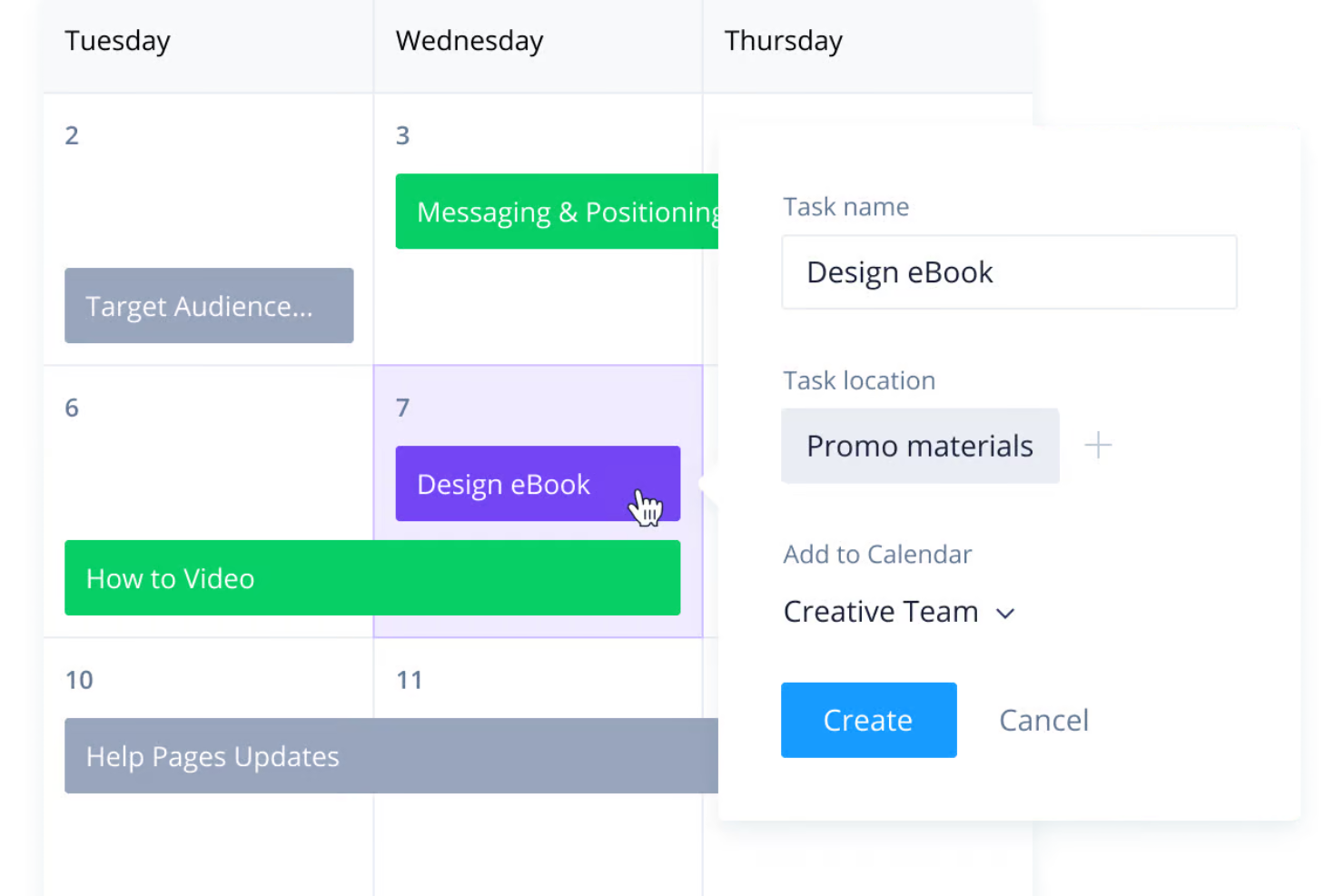
Wrike is a versatile project management platform designed for a range of industries to enhance their workflows. It offers tools for managing content creation, tracking project progress, and facilitating communication among team members.
Why I Picked Wrike:
Wrike’s approval workflows simplify processes for reviewing and approving creative assets, reducing delays and miscommunications. Feedback can be shared directly within Wrike, keeping it contextually tied to the task or asset in question. Additionally, Wrike’s intake process, powered by custom request forms, ensures that project submissions are structured and clear from the start, automatically creating tasks and assigning them to the right team members.
Standout features & integrations:
Features include progress tracking, customizable dashboards, time tracking, workload management, project templates, task prioritization, real-time reporting, document editing, file versioning, budget tracking, and milestone setting.
Integrations include QuickBooks, Skyvia, Power BI, Google Sheets, Miro, Salesforce, Tableau, Microsoft Teams, MediaValet, Zoom, Adobe Creative Cloud, and Google Drive.
Pros and Cons
Pros:
- Scalable for growing teams
- Good approval workflows and file versioning
- Comprehensive project management features
Cons:
- More extensive digital asset management may require integrations
- Learning curve due to extensive features
New Product Updates from Wrike
Wrike Adds Klaxoon MCP Integration
Wrike’s Klaxoon MCP integration is now generally available, enabling AI agents to navigate between Wrike tasks and attached whiteboards, read task context, and manage whiteboard attachments via API. For more information, visit Wrike's official site.

Best for media AI-powered workflows and resourcing
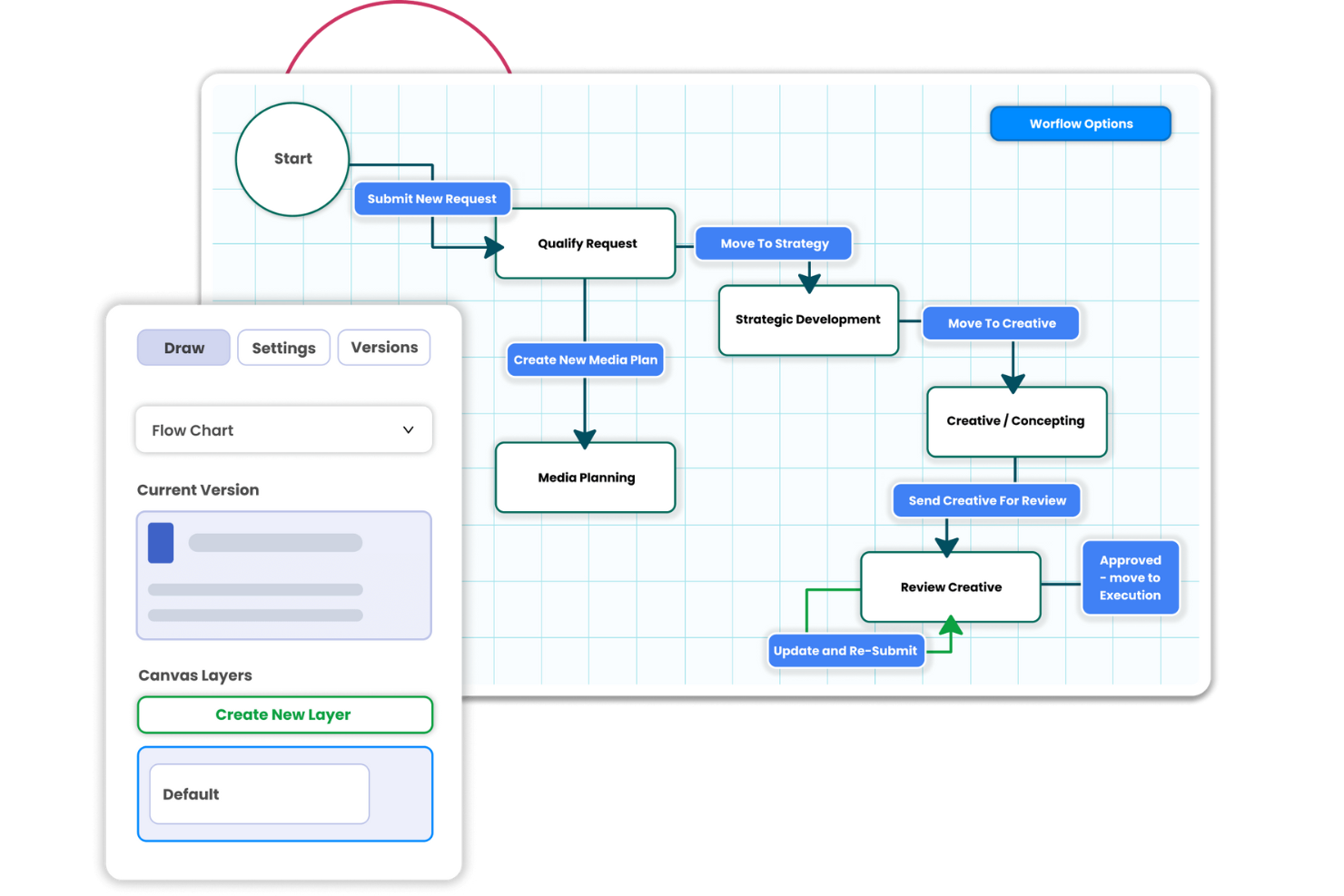
For those seeking a media resource management solution tailored to the intricate needs of marketing teams and creative agencies, Screendragon presents a compelling option. With its no-code workflow management capabilities, it is designed to streamline operations and enhance productivity, particularly for enterprise-level organizations. Screendragon addresses the challenge of managing complex workflows with ease, providing advanced automation and real-time insights that allow your team to focus on creative tasks rather than administrative burdens.
Why I Picked Screendragon
I picked Screendragon for its standout capability in automating complex workflows, a crucial need for media resource management. The platform's AI-driven orchestration allows you to automate repetitive tasks, freeing up your team to concentrate on more strategic initiatives. Additionally, the dynamic custom forms feature offers flexibility in capturing and managing data specific to your organization's needs. These features directly address the challenge of efficiency and productivity in managing media resources.
Screendragon Key Features
In addition to its automation capabilities, I also found several other features that make Screendragon a valuable tool for media resource management:
- Visual Workflow Builder: This feature allows your team to design and implement workflows visually, ensuring processes are tailored to your specific operations.
- Role-Based Access: Provides customized access controls to ensure that team members have the appropriate permissions, enhancing security and collaboration.
- Advanced Permission Controls: Enables detailed management of who can view or edit resources, ensuring that sensitive information is handled appropriately.
- Automated Reporting: Generates reports automatically, allowing for timely insights and data-driven decision-making.
Screendragon Integrations
Integrations include Salesforce, Microsoft Dynamics, SAP, Google Drive, Slack, Jira, Trello, Dropbox, Box, and Adobe Creative Cloud.
Pros and Cons
Pros:
- Advanced reporting for complex operations
- Strong enterprise security controls
- Flexible no-code workflow automation
Cons:
- Pricing not publicly transparent
- Initial setup can feel complex
New Product Updates from Screendragon
Screendragon Unveils New AI Hub
Screendragon introduced AI Hub, a new capability that lets teams build and manage AI agents directly within workflows. The update helps marketing teams automate tasks, maintain governance controls, and scale AI-driven operations more efficiently. For more information, visit Screendragon's official site.

Filecamp
Best for team collaboration
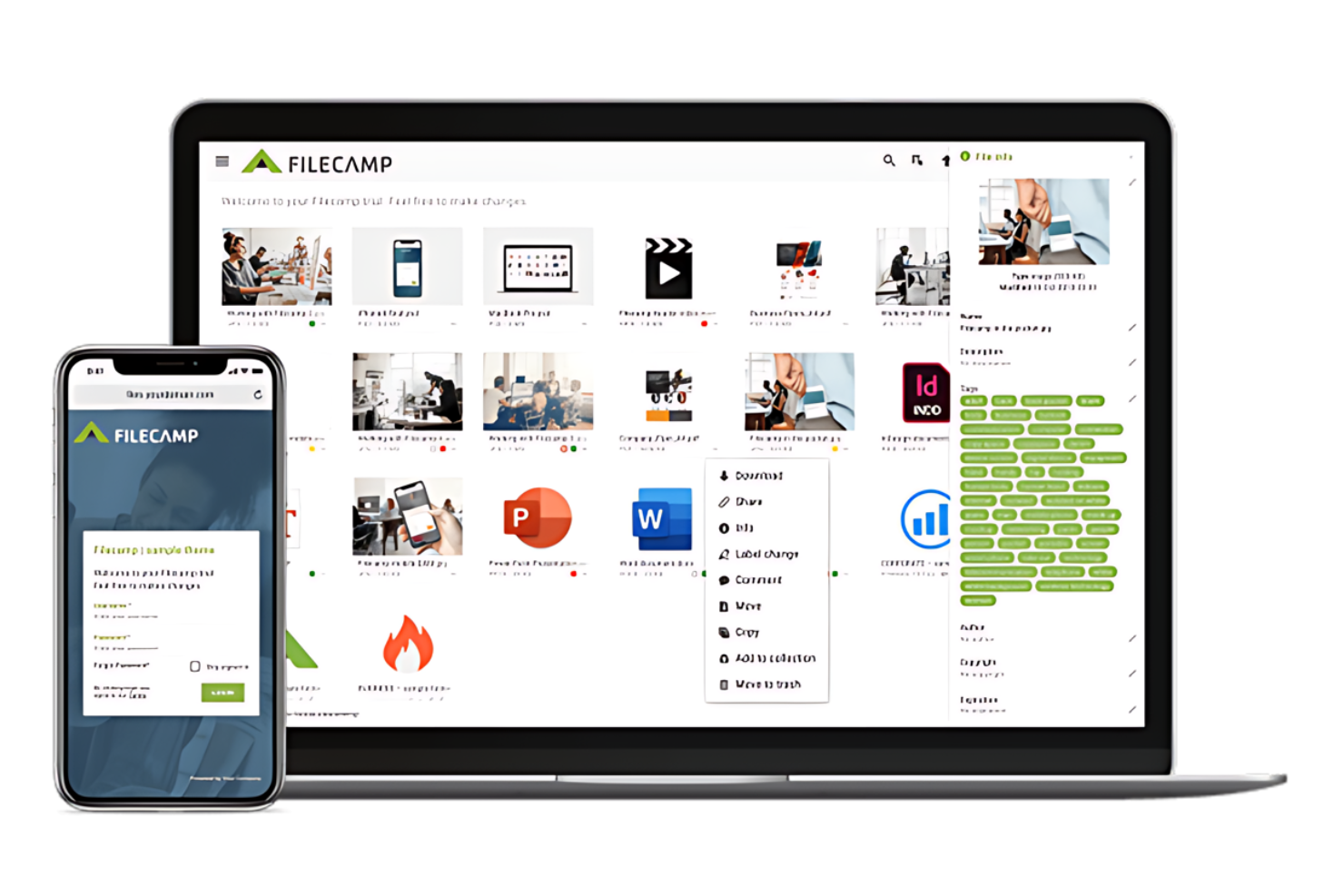
Filecamp is a cloud-based digital asset management platform for marketing and creative teams.
Why I Picked Filecamp:
I chose Filecamp for its complete set of tools that facilitate efficient digital asset management and team collaboration. Its unique features cater specifically to the needs of marketing and creative teams, making it stand out from other media resource management software.
Standout features & integrations:
Features include granular access control, precise permission settings for clients and partners, and custom branding capabilities that enable a seamless transition between a company's website and its Filecamp portal. Additionally, the platform supports unlimited users, making it scalable for teams of any size.
Integrations include Canto, Brandfolder, Dropbox, Box, Bynder, AEM, Google Drive, Wiredrive, Extensis Portfolio, OneDrive, and Sharefile.
Pros and Cons
Pros:
- Advanced search and tagging features for easy asset discovery
- White-label options are available
- Unlimited users in all plans
Cons:
- Custom branding is limited to higher-tier plans
- May have a learning curve for new users unfamiliar with DAM systems
New Product Updates from Filecamp
Filecamp Adds Analytics, AI Thumbnails, and CDN Embed Links
Filecamp adds Analytics, AI-powered thumbnails, and CDN-backed Embed links. These updates give teams more visibility into asset usage, improve thumbnail presentation, and make embedded images easier to manage. For more information, visit Filecamp’s official site.
 .
.
Buffer
Best for streamlined social media

Buffer is a social media management toolkit for small businesses. It simplifies scheduling posts, analyzing performance, and engaging with audiences across multiple platforms.
Buffer is best for small businesses that need to manage their social media presence efficiently. Its suite of tools enables users to schedule content, track performance, and collaborate with team members, making it an ideal solution for streamlined social media management.
Why I Picked Buffer:
I chose Buffer for this list because of its focus on simplicity for small businesses. Its intuitive interface and feature set differentiate it from other social media management tools. Buffer is best for streamlined social media management because it consolidates multiple tasks into a single platform, saving time.
Standout features & integrations:
Features include content scheduling, analytics, and team collaboration tools. Its AI Assistant helps generate content ideas and repurpose posts, which is particularly useful for maintaining a consistent online presence.
Integrations include Box, Dropbox, Drupal, Adobe After Effects, Figma, Google Drive, Hootsuite, Mailchimp, Microsoft Outlook, Adobe Photoshop, Slack, Wrike, and WordPress.
Pros and Cons
Pros:
- Comprehensive analytics and reporting tools
- AI Assistant for content generation and repurposing
- Intuitive interface suitable for small businesses
Cons:
- No social media listening and sentiment analysis
- Pricing can add up with multiple channel connections
Best for marketing automation

Amplifi.io is a tool that simplifies digital asset and product information management. It is designed to keep content on-brand and readily available on demand.
Why I Picked Amplifi.io:
I chose Amplifi.io for its approach to marketing automation, which stands out due to its integration of digital asset management (DAM) and product information management (PIM) into a single solution. This tool is best for marketing automation because it streamlines digital assets, product information management, and distribution. This makes it easier for businesses to maintain brand consistency and accelerate content delivery across multiple channels.
Standout features & integrations:
Features include AI-powered tagging and indexing for efficient content organization, customizable exports, APIs, and marketing kits for distribution. It also provides tools for brand consistency, such as publishing controls.
Integrations include Shopify, Google Analytics, Adobe Commerce, and Magento.
Pros and Cons
Pros:
- Customizable content distribution options to meet diverse marketing needs
- AI-assisted organization and tagging for efficient content management
- Combines DAM and PIM for a unified solution
Cons:
- No free plan available
- High starting price point may be a barrier for smaller businesses
Canto
Best for asset organization

Canto streamlines the management of digital assets for businesses. It is particularly effective for companies needing advanced asset organization tools.
Why I Picked Canto:
I selected Canto because it can manage and organize various digital assets. Its AI-powered search and cloud services for media delivery distinguish it from other media resource management software. Canto is best for asset organization due to its centralized system for organizing, locating, and disseminating digital content.
Standout features & integrations:
Features include its AI-powered search with smart tagging, facial recognition, and text recognition. It automatically categorizes digital assets for easy retrieval. It also provides unlimited portals for distributing assets, unlimited style guides for brand consistency, and an API for integration with other systems.
Integrations include Box, Dropbox, Drupal, Adobe After Effects, Figma, Mailchimp, Microsoft Outlook, Adobe Photoshop, Slack, and WordPress.
Pros and Cons
Pros:
- API for integration with various platforms enhances workflow efficiency
- Unlimited portals and style guides support asset distribution and brand uniformity
- Advanced AI-powered search for streamlined asset organization
Cons:
- Interface can seem a bit clunky or outdated
- Some issue with large batch file uploads
Best for integration with Drupal

Acquia DAM (Widen) is a digital asset management platform tailored for Drupal users. It is best for businesses using Drupal and seeking a DAM solution that integrates well and offers a platform to manage and publish digital assets.
Why I Picked Acquia DAM (Widen):
I selected Acquia DAM (Widen) for its specialized focus on integrating with Drupal. This integration is important for businesses that want to leverage their existing Drupal infrastructure. Acquia DAM (Widen) is best for integration with Drupal because it is specifically designed to complement and extend its capabilities, ensuring a cohesive digital asset management experience.
Standout features & integrations:
Features include capabilities for streamlining workflows, ensuring brand consistency, and delivering content across multiple channels. The platform's AI-powered features facilitate efficient asset organization and retrieval.
Integrations include Drupal, Acquia Cloud Platform, Acquia Site Factory, Monsido, and Acquia CDP.
Pros and Cons
Pros:
- Comprehensive toolset for managing digital assets
- AI-powered features for asset management
- Dedicated integration with Drupal
Cons:
- File naming feature can be improved upon
- Could be overly-complex for smaller teams without dedicated IT support
Brandfolder
Best for asset accessibility

Brandfolder simplifies the management and access of digital assets. It gives marketers and creatives straightforward access to digital assets, leveraging AI-driven tagging and an intuitive interface.
Why I Picked Brandfolder:
I selected Brandfolder for its standout approach to digital asset management, emphasizing user accessibility and intelligent organization. I believe Brandfolder to be best for asset accessibility due to its powerful search capabilities, smart tagging, and clean interface, which allow users to locate and use their digital assets quickly.
Standout features & integrations:
Features include managing, storing, organizing, and securing digital assets. It supports all file types and ensures security with layered protection. Key features include AI-powered tagging, search within documents, mass asset editing, and sophisticated video editing tools.
Integrations include Salesforce, Adobe Creative Cloud, Microsoft Office, Smartsheet, Wrike, Workfront, and Jira. It also provides an open API for tailored integrations.
Pros and Cons
Pros:
- AI-driven tagging and analytics for streamlined asset management
- Customizable interface and vanity URLs to maintain brand consistency
- Comprehensive search and editing tools for a variety of file types
Cons:
- Lack of transparent pricing information on the website
- Potentially more appropriate for larger organizations with its broad feature set
Annen programvare for medieressursstyring
Nedenfor finner du en liste over ytterligere programmer for medieressursstyring som jeg vurderte, men som ikke kom med på topplisten. Det er verdt å sjekke dem ut!
- MediaValet
For asset ROI tracking
- Bynder
For DAM scalability
- GoodDay
For resource management optimization
- Kantata
For services automation
- 4ALLPORTAL
For modular DAM/PIM
- Scaleflex
For content optimization
- Sprout Social
Good for social listening tools
- Miro
Good for collaborative whiteboarding
- MarcomCentral
Good for marketing asset management
- Bitrix24
Good for CRM and project management


How I Evaluate Media Resource Management Software
I split my evaluation into baseline criteria—like asset versioning, approval workflows, and resource scheduling—and the differentiators that separate the best tools from the rest.
Core Functionality (Table Stakes For This List)
When I'm selecting tools for my list, I rank each one on a scale from 0 (does not offer the functionality) to 5 (excels in this area) for each core functionality listed below. Then, I calculate the tool's total score into a percentage. Each tool needs to achieve a minimum total score of 65% to be considered for inclusion.
- Media Asset Library: I check whether the platform offers a central hub where teams can store, tag, and search media files—not just attach files to tasks like a basic project tool.
- Resource Allocation & Scheduling: I evaluate how the tool handles assigning creative talent and production gear to projects, especially capacity views for managing overlapping campaigns.
- Version Control & Approvals: Each tool should let reviewers trace revision history and route assets through approval stages, like a design team cycling through logo variations.
- Project Workflow Integration: I look for a direct link between media assets and project timelines, so moving an asset to "approved" can advance the task it's tied to.
- Permissions & Rights Management: Role-based access and usage rights tracking matter here—think restricting a freelancer's view to one campaign folder or flagging an expiring stock license.
- Collaboration & Proofing Tools: Annotation and markup directly on media files is what I'm evaluating, including time-coded comments on video and multi-format proofing beyond static images.
Once I have a list of tools that meet this criteria, I consider what sets each platform apart.
Differentiating Factors (What Sets Vendors Apart)
Here's how I compare and contrast different vendors:
Standout Features
AI-powered auto-tagging is a major differentiator—when your team uploads hundreds of campaign images at once, automatic metadata and categorization saves hours of manual organizing. I also evaluate automated workflow triggers, where an approved asset can kick off the next project stage or notify a stakeholder without anyone stepping in. Utilization analytics round things out by showing which assets get reused and how creative resources are allocated across projects, giving project leads real data to plan future capacity.
Beyond Features
Integration depth matters a lot here. I check whether a platform connects with tools like Adobe Creative Cloud, Figma, and project management apps your team already relies on daily. Industry and team fit is another key factor—an agency managing multiple client libraries has very different needs than an in-house brand team working from a single asset pool. I also evaluate how each vendor handles storage scaling and external collaborator access, since creative projects can balloon in file size and reviewer headcount fast.
Slik velger du programvare for medieressursstyring
Det er lett å gå seg vill i lange funksjonslister og komplekse prisstrukturer. For å hjelpe deg med å holde fokus mens du går gjennom din unike prosess for valg av programvare, får du her en sjekkliste over faktorer du bør ha i tankene:
| Faktor | Hva du bør vurdere |
|---|---|
| Skalerbarhet | Kan programvaren vokse med virksomheten din? Vurder om den kan håndtere flere brukere, ressurser eller mer data etter hvert som teamet ditt utvides. Se etter fleksible abonnementer som tilrettelegger for vekst. |
| Integrasjoner | Kan den kobles til de eksisterende verktøyene dine? Sørg for at den integreres med den nåværende teknologistakken din for å unngå avbrudd. Kontroller at den er kompatibel med de viktigste appene du bruker. |
| Tilpasningsmuligheter | Kan du tilpasse den til arbeidsflytene dine? Vurder om du kan justere innstillinger, oversikter og prosesser slik at de samsvarer med teamets behov, uten omfattende bistand fra IT-avdelingen. |
| Brukervennlighet | Er grensesnittet intuitivt? Test hvordan programvaren navigeres og er utformet. Teamet ditt bør synes den er enkel å bruke uten en bratt læringskurve. |
| Implementering og introduksjon | Hvor raskt kan du komme i gang? Vurder tiden og ressursene som kreves for oppsettet. Se etter støtte ved oppstart, for eksempel opplæringsmateriell eller veiledede omvisninger. |
| Kostnad | Passer prisen inn i budsjettet ditt? Sammenlign kostnaden med budsjettet ditt og verdien programvaren gir. Vær oppmerksom på skjulte gebyrer eller kostnader som kan oppstå når du skalerer. |
| Sikkerhetstiltak | Er ressursene dine beskyttet? Sørg for at programvaren tilbyr sterke sikkerhetstiltak som kryptering og tilgangskontroller. Kontroller at den overholder eventuelle bransjespesifikke regler. |
Trender innen programvare for medieressursstyring
Programvare for medieforvaltning er i stadig endring. Her er de viktigste trendene som former fremtiden.
- Integrasjon med kunstig intelligens og maskinlæring: Kunstig intelligens og maskinlæring integreres i stadig større grad i programvare for medieforvaltning. Disse teknologiene muliggjør prediktiv analyse og smartere ressursallokering. Betydningen deres ligger i potensialet til å redusere manuelt arbeid og forbedre beslutningstakingen betydelig.
- Økt vekt på skybaserte løsninger: Overgangen til skybaserte løsninger for medieforvaltning er tydelig. Denne trenden gir organisasjoner fleksibilitet og skalerbarhet. Den er viktig fordi den støtter fjernarbeidsmiljøer og samarbeid på tvers av geografiske områder.
- Avansert analyse for bedre innsikt: Det er en økende trend å inkludere avansert analyse i verktøy for medieforvaltning. Disse analysene gir dypere innsikt i ressursutnyttelse og effektivitet. Denne trenden er interessant på grunn av evnen til å fremme datadrevne strategier for medieproduksjon og -distribusjon.
- Forbedrede sikkerhetstiltak: Sikkerhet blir stadig viktigere for programvare for medieforvaltning. Forbedrede sikkerhetsprotokoller implementeres for å beskytte sensitive medieressurser. Betydningen av denne trenden kan ikke overvurderes i en tid med økende cybertrusler.
- Brukervennlige grensesnitt og tilpasning: Denne trenden imøtekommer et bredere spekter av brukere med varierende tekniske ferdigheter. Den er viktig fordi den sørger for at programvaren blir mer tilgjengelig og tilpasningsdyktig til ulike forretningsbehov.
Disse trendene viser en dynamisk utvikling innen programvare for medieforvaltning, med sterk vekt på teknologi og brukeropplevelse.
Hva er programvare for medieforvaltning?
Programvare for medieforvaltning er et verktøy som hjelper med å organisere, lagre og distribuere digitale ressurser på en effektiv måte. Markedsføringsteam, kreative fagfolk og merkevareansvarlige bruker vanligvis disse verktøyene for å opprettholde en konsekvent merkevareprofil og forbedre effektiviteten i arbeidsflyten. Organisering av ressurser, sikker lagring og enkel deling bidrar til å håndtere store mengder digitale medier. Samlet sett skaper disse verktøyene verdi ved å forenkle medieforvaltningen og forbedre samarbeidet i teamet.
Funksjoner
Når du velger programvare for medieforvaltning, bør du se etter følgende viktige funksjoner:
- Organisering av ressurser: Hjelper med å kategorisere og merke digitale ressurser, slik at de enkelt kan hentes frem og administreres.
- Sikker lagring: Tilbyr kryptert lagring for å beskytte de digitale ressursene dine mot uautorisert tilgang.
- Enkel deling: Lar teammedlemmer dele ressurser raskt og samarbeide effektivt om prosjekter.
- Versjonskontroll: Sporer endringer i ressurser, slik at du alltid har tilgang til de nyeste versjonene.
- Tilpassbare arbeidsflyter: Lar deg tilpasse prosesser etter teamets spesifikke behov, noe som forbedrer effektiviteten.
- Integrasjonsmuligheter: Kobler seg til andre verktøy i teknologistakken din for å utvide funksjonaliteten og redusere manuelt arbeid.
- Metadata-merking: Tilbyr detaljerte merkealternativer for å forbedre søkbarheten og organiseringen av ressurser.
- Analyse og rapportering: Gir innsikt i bruken av og ytelsen til ressurser, slik at du kan ta informerte beslutninger.
- Brukertillatelser: Styrer tilgangen til ressurser basert på brukerroller, slik at sensitiv informasjon beskyttes.
Fordeler
Implementering av programvare for medieforvaltning gir flere fordeler for teamet og virksomheten din. Her er noen av fordelene du kan se frem til:
Konsekvent merkevareprofil: Oppretthold en konsekvent merkevareprofil på tvers av alle kanaler med versjonskontroll og tilpassbare arbeidsflyter som sørger for at alle er på samme side.
Bedre organisering: Hold digitale ressurser ryddig kategorisert og merket, slik at det blir enkelt å finne det du trenger raskt.
Forbedret sikkerhet: Beskytt verdifulle ressurser med sikker lagring og brukertillatelser som begrenser tilgangen til sensitive filer.
Effektivt samarbeid: Del ressurser enkelt mellom teammedlemmer, slik at smidig samarbeid og fremdrift i prosjekter blir enklere.
Tidsbesparelser: Reduser tiden du bruker på å lete etter filer, med avanserte søke- og metadatafunksjoner.
Informert beslutningstaking: Bruk analyse og rapportering til å få innsikt i ressursenes ytelse og bruk, slik at strategien din kan styres på et bedre grunnlag.
Kostnader og priser
Ved valg av programvare for medieforvaltning er det nødvendig å forstå de ulike prismodellene og abonnementene som er tilgjengelige. Kostnadene varierer basert på funksjoner, teamstørrelse, tillegg og mer. Tabellen nedenfor oppsummerer vanlige abonnementer, gjennomsnittsprisene deres og typiske funksjoner som er inkludert i løsninger for programvare for medieforvaltning:
Sammenligningstabell for programvare for medie-ressursstyring
| Plantype | Gjennomsnittspris | Vanlige funksjoner |
|---|---|---|
| Gratisplan | $0 | Begrenset lagringsplass, grunnleggende delingsalternativer og begrenset tilgang til funksjoner. |
| Personlig plan | $5-$25/bruker/måned | Moderat lagringsplass, grunnleggende organisering av ressurser og tilgang til standard brukerstøtte. |
| Forretningsplan | $30-$75/bruker/måned | Utvidet lagringsplass, avanserte samarbeidsverktøy, versjonskontroll og prioritert brukerstøtte. |
| Virksomhetsplan | $100-$250/bruker/måned | Omfattende lagringsplass, fullstendige tilpasningsmuligheter, omfattende sikkerhetstiltak, dedikert kontoansvarlig og alternativer for førsteklasses brukerstøtte. |
Vanlige spørsmål om programvare for medie-ressursstyring
Her er noen vanlige spørsmål om programvare for medie-ressursstyring.
Hvor brukervennlig er programvare for medie-ressursstyring?
utvalgskriterierHvor enkel programvaren for medie-ressursstyring er å bruke, er avgjørende. Det er viktig å vurdere hvor mange trinn som kreves for å fullføre viktige oppgaver, og om programvaren har interaktive funksjoner. Opplæring fra leverandøren er også en viktig faktor for å sikre at brukerne får mest mulig ut av verktøyet.
Er programvare for medie-ressursstyring intuitiv og egnet for samarbeid?
Intuitiv programvare reduserer læringskurven for nye brukere, mens samarbeidsfunksjoner gjør det mulig for teammedlemmer på ulike steder å arbeide effektivt sammen. Se etter et brukervennlig grensesnitt og muligheten til å administrere flere kalendere på én nettbasert plattform.
Tillater programvare for medie-ressursstyring ulike tilgangsnivåer?
Programvare som tilbyr ulike tilgangsnivåer, gjør det mulig for teammedlemmer å administrere timeplaner og timelister, og for kunder å se prosjektplaner eller oversikter. Dette sikrer at brukerne har riktig tilgangsnivå basert på rollen sin.
Er det mulig å lage rapporter med programvare for medie-ressursstyring?
Rapportering er en viktig funksjon for å overvåke fremdrift og ta datadrevne beslutninger. Kontroller om standardrapporter er tilgjengelige, og om de kan tilpasses. Enkelte programvarealternativer, som eResource Scheduler, tilbyr grafisk rapportering og omfattende oversikter.
Kan programvare for medie-ressursstyring håndtere hele prosjektets livssyklus?
For en helhetlig løsning er det viktig å administrere hele prosjektets livssyklus. Sørg for at programvaren omfatter funksjoner for risikostyring, ressursstyring, tidsregistrering og mer, slik at alle prosjektaspekter kan håndteres effektivt.
Vil programvare for medie-ressursstyring støtte måten virksomheten din drives på?
Programvaren bør støtte virksomhetens eksisterende prosesser og strukturer. Det er viktig å velge en leverandør som er fleksibel og villig til å tilby oppdateringer og forbedringer etter hvert som virksomheten utvikler seg.
Hvor vanskelig er det å integrere programvare for medie-ressursstyring med andre systemer?
Integrasjon med andre systemer er avgjørende for å opprettholde smidige arbeidsprosesser. Kontroller om programvaren har et API, og sett deg inn i integrasjonsmulighetene. Be om eksempler på vellykkede integrasjoner med andre systemer.
Tilbyr programvare for medie-ressursstyring prosjektbasert tidsregistrering?
Prosjektbasert tidsregistrering bidrar til å administrere ressurser og arbeidsbelastning. Se etter programvare med tidsregistreringsfunksjoner som gir innsikt i ressursallokering og -utnyttelse i sanntid.
Tilbyr programvare for medie-ressursstyring brukerstøtte etter implementering?
utvalgskriterierEtter implementering av ny programvare er brukerstøtte fra leverandøren avgjørende. Sørg for at leverandøren tilbyr tilstrekkelig opplæring og hjelp med feilsøking, og avklar om disse tjenestene medfører ekstra kostnader.