

10 beste programvareløsninger for ressursstyring med åpen kildekode i 2026



Programvare for ressursstyring med åpen kildekode gjør det mulig å administrere ressurser i prosjektene dine på en fullstendig tilpassbar måte. Det finnes en rekke verktøy der ute, men det er vanskelig å finne det som passer best for dine behov.
Her er mine utvalgte verktøy for den beste programvaren for ressursstyring med åpen kildekode. Jeg har valgt dem basert på uavhengig testing og evaluering, samt mine egne erfaringer med å bruke dusinvis av ulike verktøy for ressursstyring i en rekke forskjellige virksomheter.
Hvorfor du kan stole på våre programvareanbefalinger
Teamet vårt har testet og anmeldt programvare siden 2012. Vi er selv prosjektledere, så vi vet hvor vanskelig og hvor viktig det er å velge riktig programvare.
I denne guiden har vi vurdert verktøyene gjennom praktisk testing og uavhengig research og gitt dem poeng ut fra våre utvelgelseskriterier. Vi bygger også på innsikt fra ledende eksperter i bransjen og erfarne prosjektledere.
Anmeldelsene våre bygger på vår egen redaksjonelle vurdering. De er ikke et salgsargument.
Ekspertanmeldere:
Sammenligningstabell for programvare for ressursstyring med åpen kildekode
Sammenlign detaljene om hvert av mine utvalgte verktøy for ressursstyring med åpen kildekode i tabellen nedenfor.
| Tool | Best For | Trial Info | Price | ||
|---|---|---|---|---|---|
| 1 | Best for customization using its open GraphQL API | Free plan + 14-day trial available | From $9/user/month (billed annually) | Website | |
| 2 | Best for tying project work to ERP operations | Free plan available; 14-day free trial | From $5/month | Website | |
| 3 | Best for agile teams avoiding per-user fees | Free plan available | From 5€/month | Website | |
| 4 | Best for Microsoft Project file compatibility | Free plan available | From $9.99/user/month (billed annually) | Website | |
| 5 | Best for project work linked to ERP records | 30-day free trial + free demo available | Free | Website | |
| 6 | Best for skill-based staffing in PMOs | Free plan available; 14-day free trial available for Enterprise Cloud and on-premises | From €5.95/user/month (billed annually) | Website | |
| 7 | Best for Git-linked issue tracking | Free plan + demo available | Pricing upon request | Website | |
| 8 | Best for project and field-service scheduling | Free plan available | From $38.90/user/month | Website | |
| 9 | Best for resource planning as code | Free plan available | Pricing upon request | Website | |
| 10 | Best for planning teams and equipment together | Free plan available | Pricing upon request | Website |

Programvare for ressursstyring med åpen kildekode
Her er en kort beskrivelse av hvert verktøy for ressursstyring med åpen kildekode på listen min, med informasjon om hva det egner seg best til, skjermbilder, funksjoner og mer.

Best for customization using its open GraphQL API
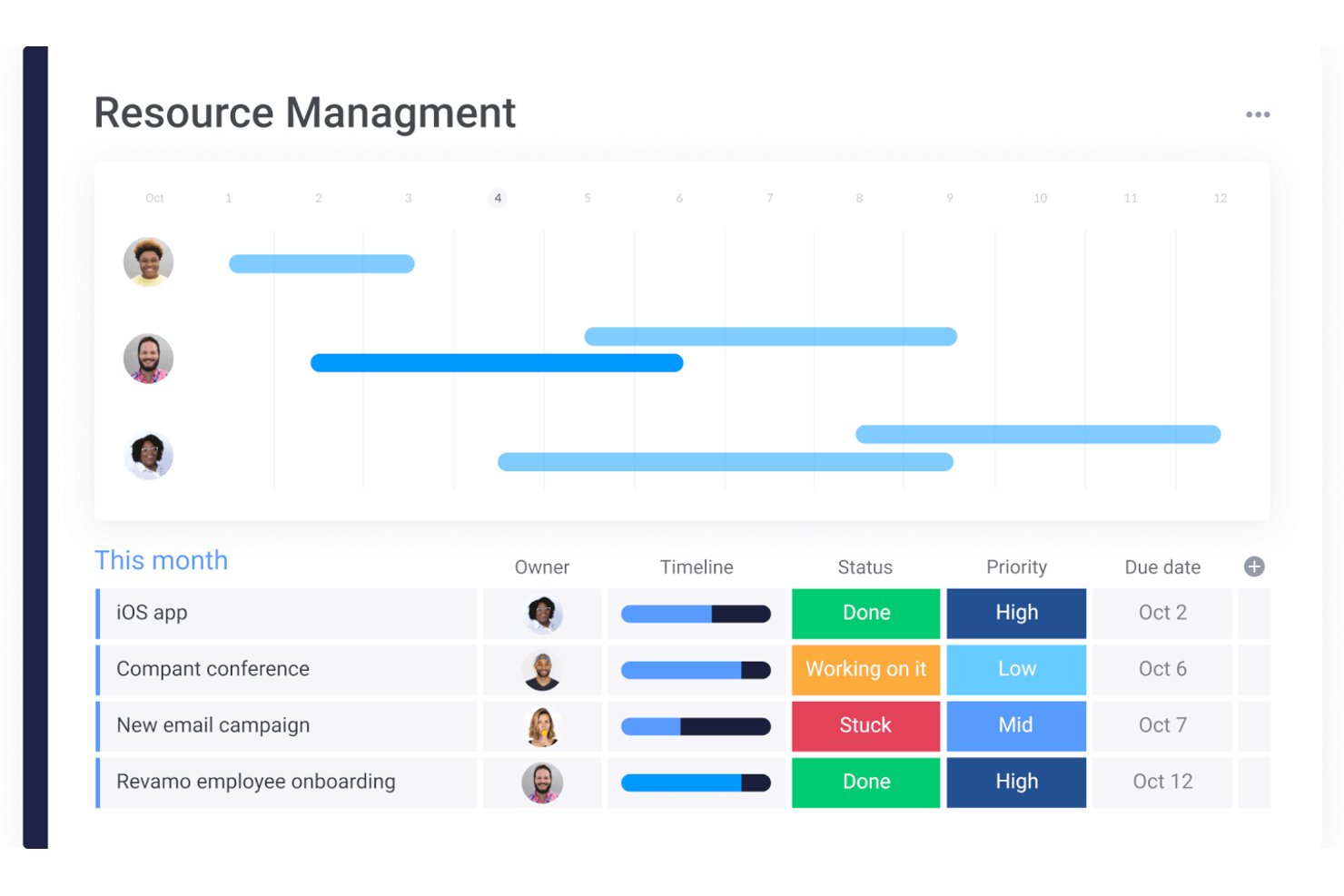
monday AI Workspace is a proprietary work management platform that combines resource allocation, project scheduling, capacity planning, and AI-powered workflow automation across multi-project environments.
Who Is monday AI Workspace Best For?
It's a strong fit for enterprise teams and PMO directors managing large, cross-functional portfolios who need advanced resource oversight built into a centralized platform.
Why I Picked monday AI Workspace
I picked monday AI Workspace because its open GraphQL API lets my team build genuinely custom resource management workflows on top of the platform. I can query live board data, trigger automations, and surface utilization metrics in tools we already use, without being confined to monday.com's native views. The API's two-way sync with GitHub and the ability to wire custom AI agents directly into resource data pipelines are the capabilities I find most useful when adapting the platform to non-standard project structures.
monday AI Workspace Key Features
- Resource workload management: Monitor allocation, time off, and total hours for each team member across projects.
- Portfolio dashboards: Visualize resource allocation, progress, and utilization across multiple workstreams in real time.
- Automated workflow actions: Set rules that trigger status updates, notifications, or assignments based on resource or project data.
- Multi-view scheduling: Access Gantt, Kanban, calendar, and workload visualization modes to plan and balance staffing needs.
monday AI Workspace Integrations
monday AI Workspace offers hundreds of native integrations through its built-in integrations and marketplace, including Slack, Salesforce, HubSpot, Google Workspace, Jira, GitHub, Trello, Zendesk, Microsoft Teams, and Dropbox. It also supports Zapier and provides an API for custom integrations.
Pros and Cons
Pros:
- AI-powered automation reduces manual resource updates
- Multi-view scheduling with Gantt and workload views
- Highly customizable via open GraphQL API
Cons:
- Self-hosting is not supported
- Fully proprietary, not open source licensed
New Product Updates from monday AI Workspace
monday AI Workspace Adds Human Approval Routing
monday AI Workspace adds a human-in-the-loop approval block to AI Workflows, sending approval requests and routing workflow paths based on responses. For more information, visit monday AI Workspace's official site.

ERPNext
Best for tying project work to ERP operations
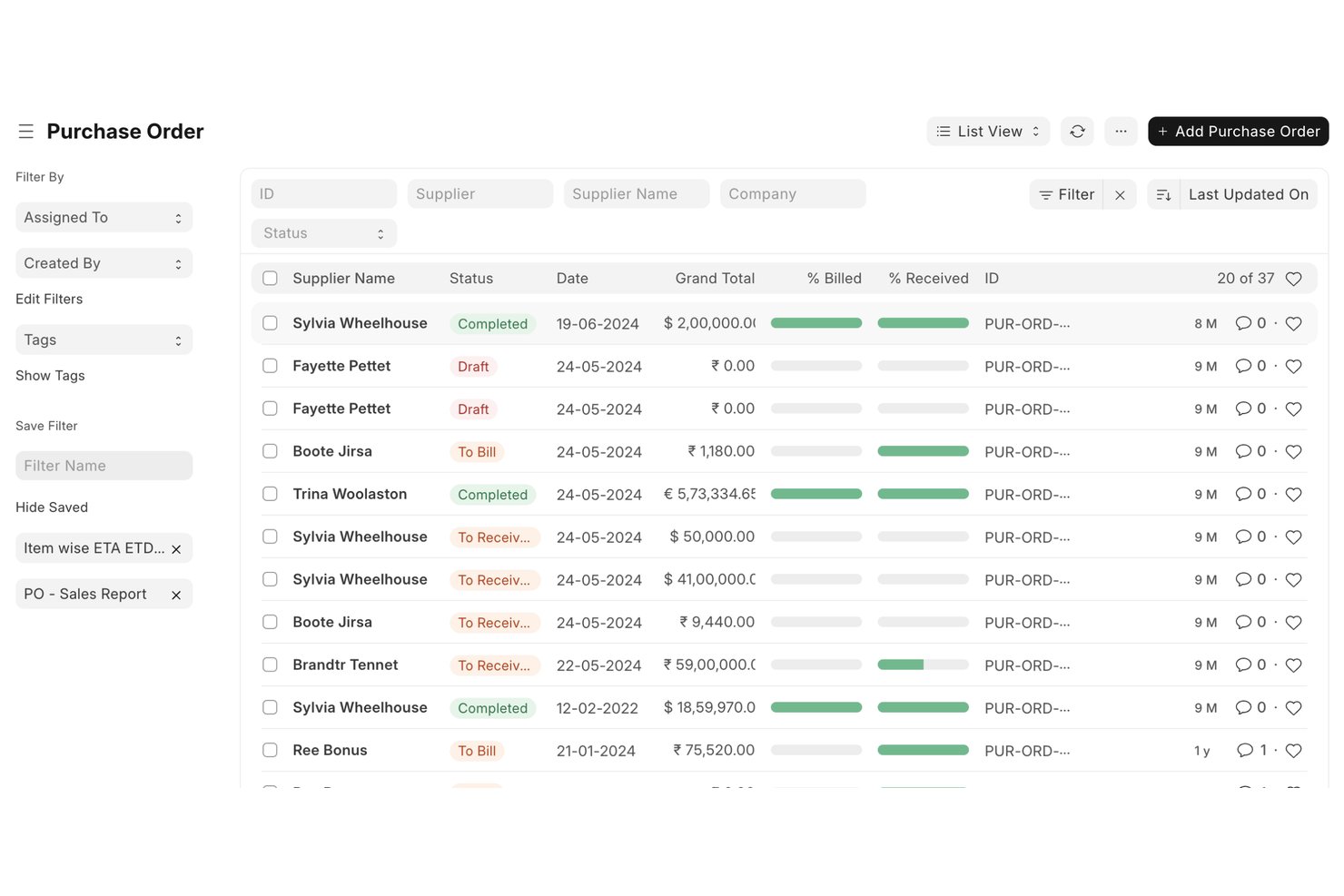
ERPNext is an open-source ERP platform that covers project and task management, timesheets, resource allocation, manufacturing capacity planning, and financial tracking across a fully self-hostable, GPL-licensed codebase.
Who Is ERPNext Best For?
ERPNext is a strong fit for technical teams and IT-led organizations that want to manage projects within a fully integrated ERP system they can self-host and customize.
Why I Picked ERPNext
ERPNext earns its spot on my shortlist because it's the only tool here that connects project work directly to the full ERP layer—think timesheets that feed into project costing, purchase invoices that roll up against a project budget, and task assignments that live alongside your accounting and inventory in one codebase. I like that project managers can track actual versus expected hours per task and watch those figures aggregate into real profitability numbers at the project level. Because it's GPL-licensed and self-hostable, my team can extend or modify that logic without negotiating with a vendor.
ERPNext Key Features
- Gantt chart with drag-and-drop scheduling: View task start and end dates, dependencies, and timeline ranges from quarter-day to month, and reschedule by dragging tasks directly on the chart.
- REST API and webhooks: Access DocType endpoints for full CRUD operations and trigger HTTP requests to external systems on selected events, with configurable payloads and HMAC-SHA256 signatures.
- Role-based permissions: Configure granular access controls at the DocType field level, including login-attempt lockouts, password-strength checks, and third-party authentication providers.
- Marketplace app ecosystem: Extend ERPNext through a library of 378 apps covering payment gateways, ecommerce sync, communication tools, and accounting integrations.
ERPNext Integrations
ERPNext lists 378 marketplace apps, including Google Sheets, WooCommerce, and GoCardless Bank. Its REST API and webhooks support custom integrations with configurable DocType events, payloads, and HMAC-SHA256 signatures.
Pros and Cons
Pros:
- Task dependencies and drag scheduling clarify workload
- Timesheets connect assigned work to project costing
- Source access enables tailored resource workflows
Cons:
- Self-hosting shifts upkeep onto technical teams
- No consolidated view for cross-project overbooking

Taiga
Best for agile teams avoiding per-user fees
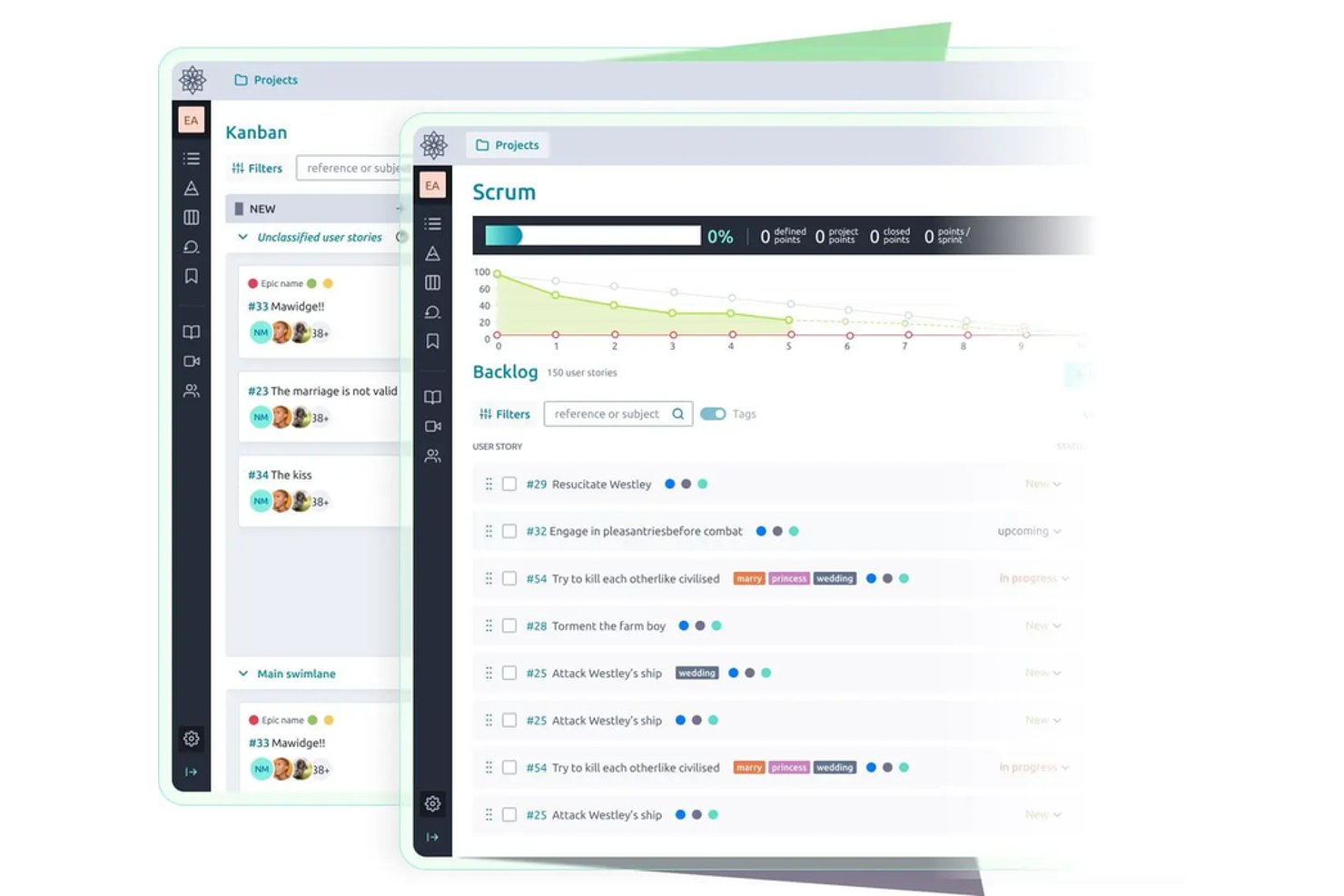
Taiga is an open-source agile project management tool that supports Scrum and Kanban workflows, sprint planning, backlog management, issue tracking, and resource and time allocation visibility across projects.
Who Is Taiga Best For?
Taiga is a strong fit for agile development teams that want to self-host their project management tools without paying per-seat licensing fees.
Why I Picked Taiga
I picked Taiga as one of the best because it's the rare open-source tool that drops per-seat licensing entirely, letting unlimited users join any plan, which is a real advantage when your team scales. I love that it combines Scrum backlog and sprint planning with Kanban boards in one place, so you can track work and time allocation across projects without paying more as headcount grows. Its MPL-2 license means you can self-host and extend it through plugins or the REST API to fit your internal workflows.
Taiga Key Features
- Issue and bug tracking: Log, categorize, and manage issues with custom types, priorities, and severities, and promote any issue directly to a user story.
- Custom roles and permissions: Define team roles with specific access levels to control who can view or edit projects and work items.
- REST API and webhooks: Connect Taiga to external tools by triggering signed JSON payloads on changes to milestones, tasks, issues, and user stories.
- CSV-based custom reports: Build real-time reports in the data editor and access them via a shareable CSV URL for export and analysis.
Taiga Integrations
Taiga offers native project imports from GitHub, Jira, and Trello, plus Zapier integrations. Its REST API and webhooks support custom connections for syncing project and work-item data.
Pros and Cons
Pros:
- Self-hosting gives teams deployment control
- Scrum and Kanban plans expose sprint effort
- Cross-project task assignment supports shared workloads
Cons:
- Utilization reports lack per-person totals
- No workload forecasts flag impending overallocation

Best for Microsoft Project file compatibility
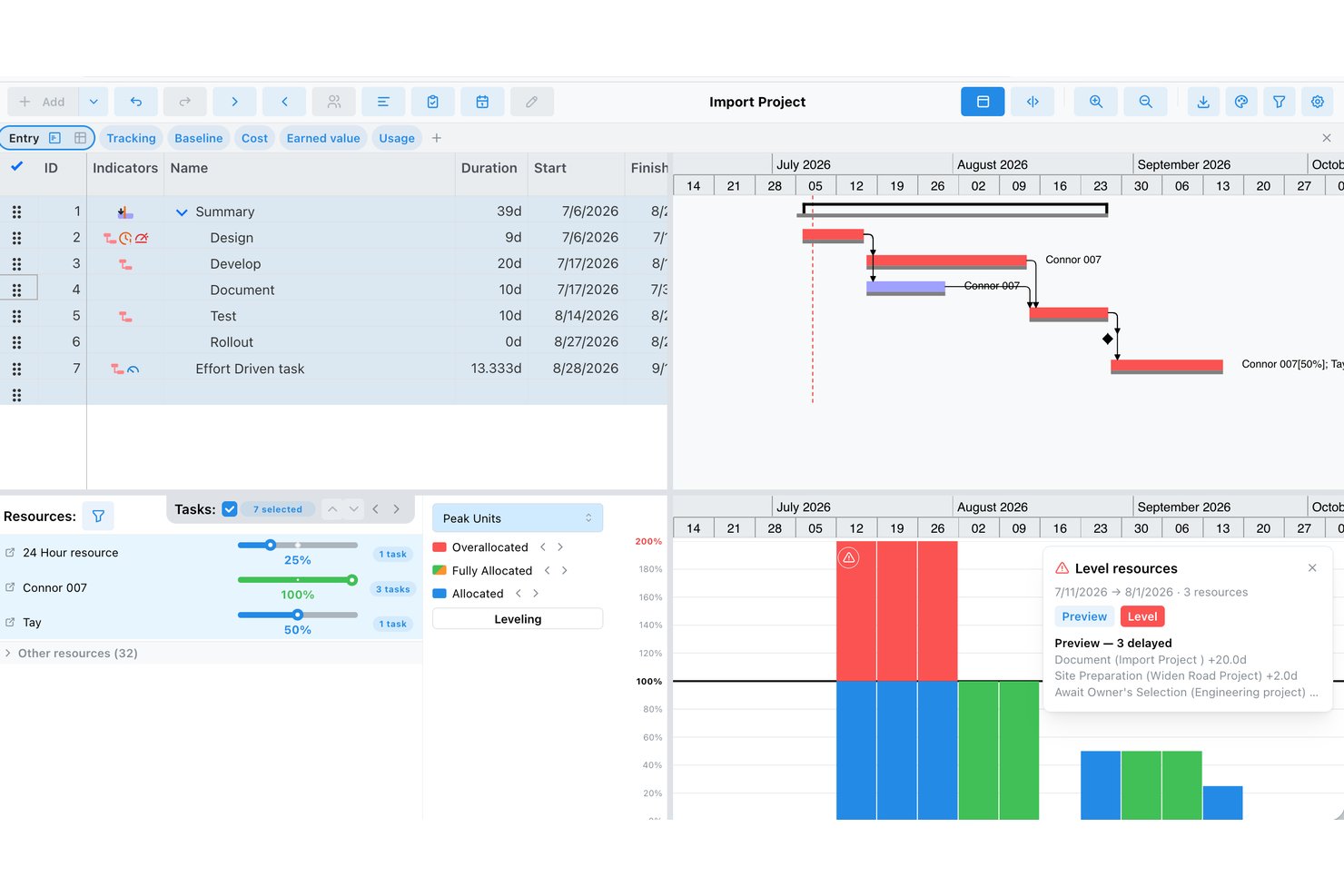
ProjectLibre Desktop is a free, open-source project management tool that covers Gantt scheduling, WBS, network diagrams, critical path analysis, and single-project resource and cost management across Windows, macOS, and Linux.
Who Is ProjectLibre Best For?
ProjectLibre Desktop is a solid pick for individual project managers who need to open, edit, or migrate Microsoft Project files without paying for a license.
Why I Picked ProjectLibre
I picked ProjectLibre as one of the best because its Microsoft Project file compatibility is genuinely hard to replicate in a free, open-source tool. I can open an existing .mpp file, keep all the task dependencies, resource assignments, and baselines intact, and continue working without paying for a Project license. The Gantt and critical path views carry over cleanly, and the Resource Breakdown Structure lets me manage personnel, equipment, and materials within that same project file.
ProjectLibre Key Features
- Resource Usage view: Displays hours worked per resource across all project tasks, with adjustable time scales ranging from hours to quarterly views.
- Resource histogram: Visualizes individual resource availability against assigned workload using a built-in availability indicator line.
- Primavera P6 file import: Lets you bring existing Primavera P6 project files directly into ProjectLibre Desktop without manual re-entry.
- Multi-format report export: Saves project-level reports in PDF, XML, HTML, CSV, XLS, and RTF formats for sharing outside the tool.
ProjectLibre Integrations
ProjectLibre Desktop doesn't have any native integrations. It opens Microsoft Project files and imports Primavera P6 files, but no API or webhook is documented for custom integrations.
Pros and Cons
Pros:
- Assigns people, equipment, and materials per task
- Resource histograms show availability against workload
- Opens Microsoft Project schedules with resource assignments
Cons:
- No cross-project capacity forecasting or rebalancing
- Resource visibility stops at single projects

Dolibarr
Best for project work linked to ERP records

Dolibarr is an open-source ERP and CRM platform that combines project and task management with business functions like invoicing, stock, purchasing, and HR in a self-hostable web suite.
Who Is Dolibarr Best For?
Dolibarr suits small businesses and operations teams that want to manage project work alongside invoicing, purchasing, and stock—without paying per-seat licensing fees.
Why I Picked Dolibarr
I picked Dolibarr as one of the best because it's the only tool on this list that connects project tasks directly to ERP records like invoices, purchase orders, and stock. When I'm tracking time against a client project, that data flows into billing without any manual handoff. The Projects module lets me assign multiple users to tasks with defined roles, and I can view workload across the Gantt timeline alongside the financial picture of the project.
Dolibarr Key Features
- REST API access: Query, create, update, and delete records across enabled modules using authenticated REST endpoints with GET, POST, PUT, and DELETE methods.
- GPL v3+ source code distribution: The full source code ships with the software, letting your team modify and redistribute it under the same open license.
- Module Builder: A low-code assistant lets developers create or extend modules without editing core application files, keeping customizations upgrade-safe.
- Hooks system: Custom code can be injected at defined application entry points without touching core files, so your changes survive version updates.
Dolibarr Integrations
Dolibarr offers native integrations with LDAP, PayPal, Stripe, Paybox, and PayZen, plus marketplace integrations for Google Calendar, Google Contacts, PrestaShop, Magento, and WooCommerce. Its REST API supports custom integrations.
Pros and Cons
Pros:
- Users praise modular business process coverage
- Source access supports tailored resource workflows
- Project time connects to client billing
Cons:
- Reviewers report basic analytics and clunky project management
- No automated capacity forecasts or conflict alerts

Best for skill-based staffing in PMOs
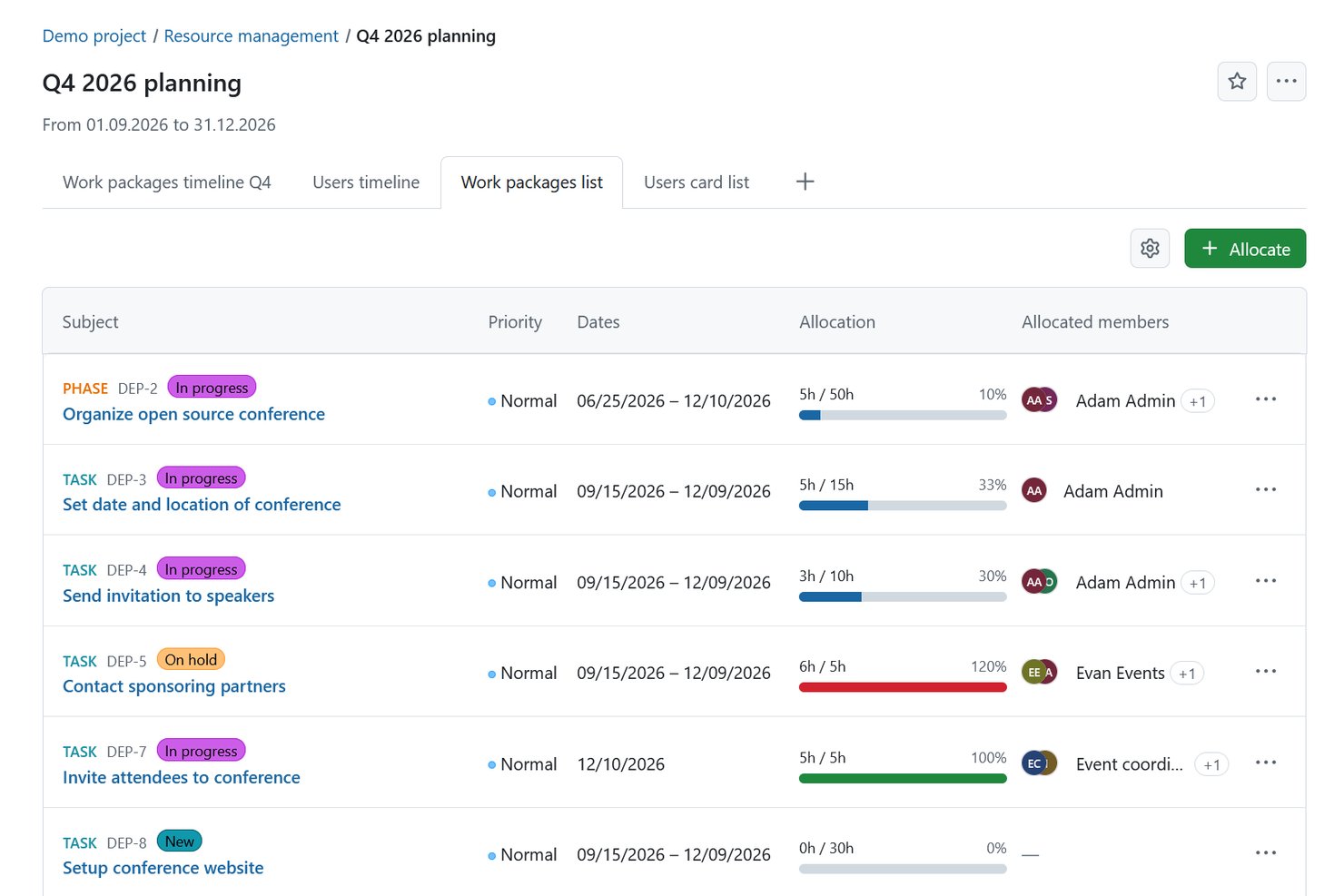
OpenProject is a GPLv3-licensed, self-hostable project management platform that combines task tracking, Gantt scheduling, Kanban boards, resource planning, time tracking, and portfolio management across classic, agile, and hybrid workflows.
Who Is OpenProject Best For?
OpenProject is a strong fit for PMO leaders and technical teams that need self-hosted, skill-based resource planning with full control over their data.
Why I Picked OpenProject
I picked OpenProject as one of the best because its skill-based resource matching is genuinely purpose-built for PMOs juggling multiple projects and teams. When a work package needs staffing, you can open a resource request filtered by attributes like skills, job title, or qualifications, and OpenProject surfaces available users who match those criteria along with their capacity for that period. I also like that user cards display current utilization and skills side by side, so staffing decisions are grounded in real availability rather than guesswork.
OpenProject Key Features
- GPLv3 open-source licensing: OpenProject's source code is publicly available under GPLv3, allowing your team to modify, copy, and redistribute it freely.
- Gantt chart scheduling: Plan and visualize work packages, milestones, and dependencies with drag-and-drop Gantt charts that span multiple projects and subprojects.
- Time and cost reporting: Log hours against work packages and generate custom time reports filtered by project, assignee, or date range, exportable as Excel or PDF.
- GitHub and GitLab integrations: Link branches, pull requests, commits, and merge requests directly to work packages to keep development activity connected to project context.
OpenProject Integrations
OpenProject offers native integrations with GitHub, GitLab, Nextcloud, OneDrive, and SharePoint. Its REST API v3 supports custom integrations and automation.
Pros and Cons
Pros:
- Self-hosting supports PMO data control
- Reviewers praise task assignment visibility
- Skill-based requests surface available staff
Cons:
- Project-scoped planners limit cross-project visibility
- Resource load reporting can require spreadsheets
Redmine
Best for Git-linked issue tracking
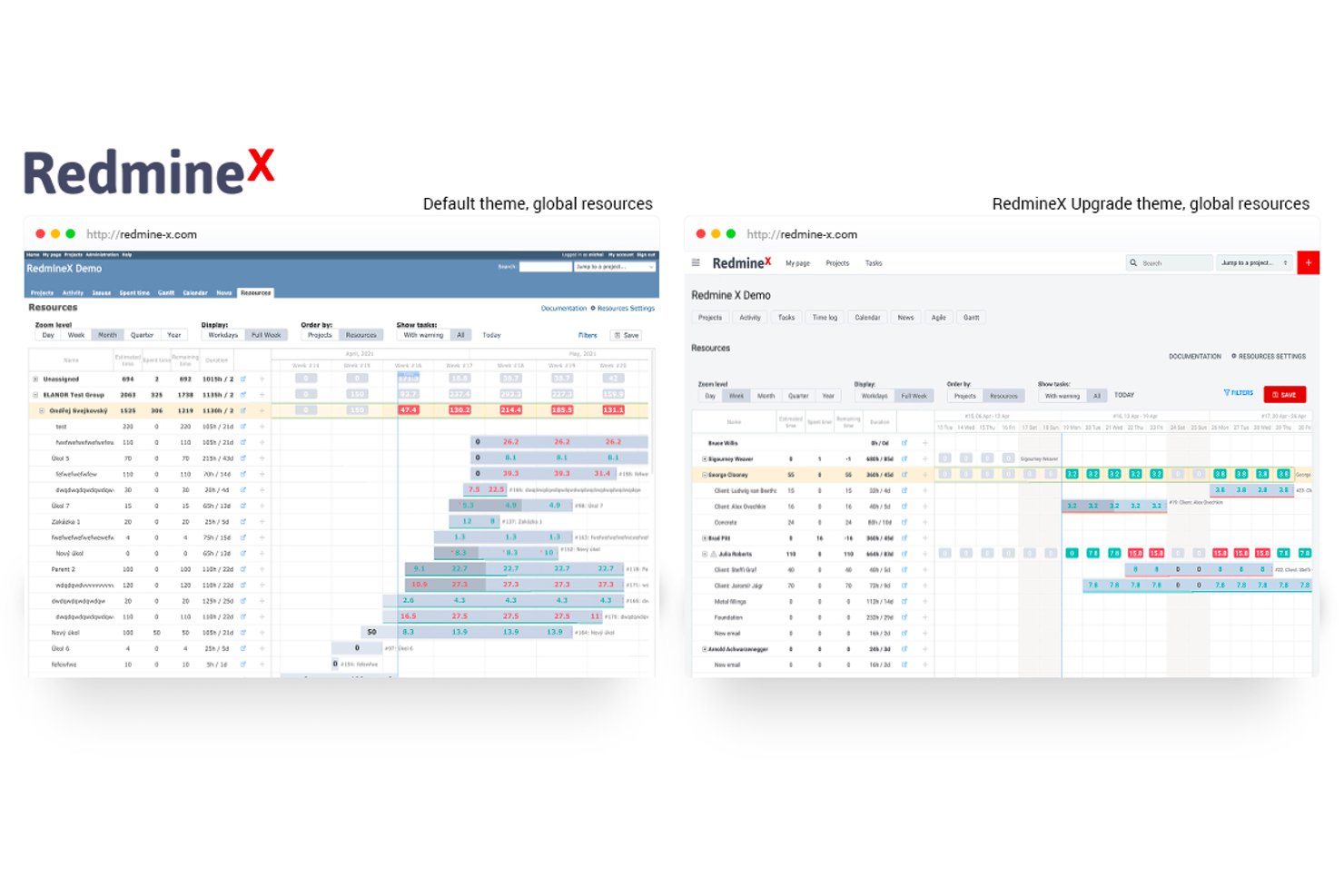
Redmine is a self-hosted, open-source project management tool built on Ruby on Rails that combines issue tracking, Gantt-based scheduling, time logging, and repository browsing across multiple projects.
Who Is Redmine Best For?
Redmine suits technical teams that want a self-hosted, open-source issue tracker they can extend with plugins and connect to Git repositories.
Why I Picked Redmine
I picked Redmine as one of the best because it connects issue tracking directly to your Git repositories, letting you browse changesets, view diffs, and annotate code all within the same project context as your tickets. When a developer commits a fix, you can trace that commit straight back to the issue it resolves, which keeps your technical teams aligned without switching tools. Redmine also lets you configure custom issue types, statuses, and workflow transitions per project, so you can shape the system around how your team actually works.
Redmine Key Features
- Time tracking and reporting: Log time at the project or ticket level and generate reports broken down by user, issue type, category, or activity.
- Custom fields and workflows: Define your own issue types, statuses, and workflow transitions per project, including custom text, date, dropdown, and checkbox fields.
- Plugin architecture: Extend Redmine by installing community-built plugins from a dedicated directory, with support for database migrations and custom theme development.
- REST API: Access and manipulate project data in XML or JSON format using an API key or HTTP Basic authentication.
Redmine Integrations
Redmine offers five documented native repository integrations: Git, Subversion, CVS, Mercurial, and Bazaar. Its REST API supports XML and JSON for custom integrations, although some API resources remain alpha or beta.
Pros and Cons
Pros:
- Self-hosted deployment keeps data under team control
- Issue-level time reports show recorded effort
- GPL-licensed source supports internal tailoring
Cons:
- Issue-date schedules don’t reveal resource conflicts
- No documented staff allocation or capacity planning


Odoo is an open-source ERP suite that combines project management, shift-based resource scheduling, field service coordination, and timesheet tracking across a modular, self-hostable platform.
Who Is Odoo Best For?
Odoo suits operations managers and PMO leaders who need to coordinate field service teams, shift-based staff, and project resources within a single modular platform.
Why I Picked Odoo
I picked Odoo as one of the best because its Planning module does something I genuinely appreciate: it handles field service and project scheduling in the same place, letting you assign shifts to employees or shared equipment and view everything by resource, role, or project in a Gantt layout. The Auto Plan feature factors in working hours, time off, and active contracts when filling shifts, which saves real manual effort when you're coordinating multiple field teams. Drag-and-drop rescheduling and shift-splitting make last-minute adjustments fast.
Odoo Key Features
- Open-source Community edition: Odoo's Community edition is licensed under LGPLv3, giving your team full access to the main server source code via ZIP or Git.
- Employee self-service portal: Employees can view their schedules, manage availability, and claim open shifts directly through their portal or mobile app.
- Timesheet tracking with billable-time reporting: The Timesheet module logs time against projects and tasks, then reports billable hours by team member, project, and billing type.
- Webhook-based automation rules: Automation rules can be triggered by events in external systems via webhooks and can push selected field values to an external webhook URL.
Odoo Integrations
Odoo offers native integrations with Microsoft Outlook and Google Calendar for appointment availability, plus WhatsApp for templated reminders. Its JSON-2 API and webhook automation support custom resource-data integrations, with the external API available on the Custom plan.
Pros and Cons
Pros:
- Employees can claim open shifts themselves
- Gantt scheduling covers employees and equipment
- Project, timesheet, and planning workflows connect
Cons:
- No capacity forecasting or scenario planning
- Community edition omits core planning features

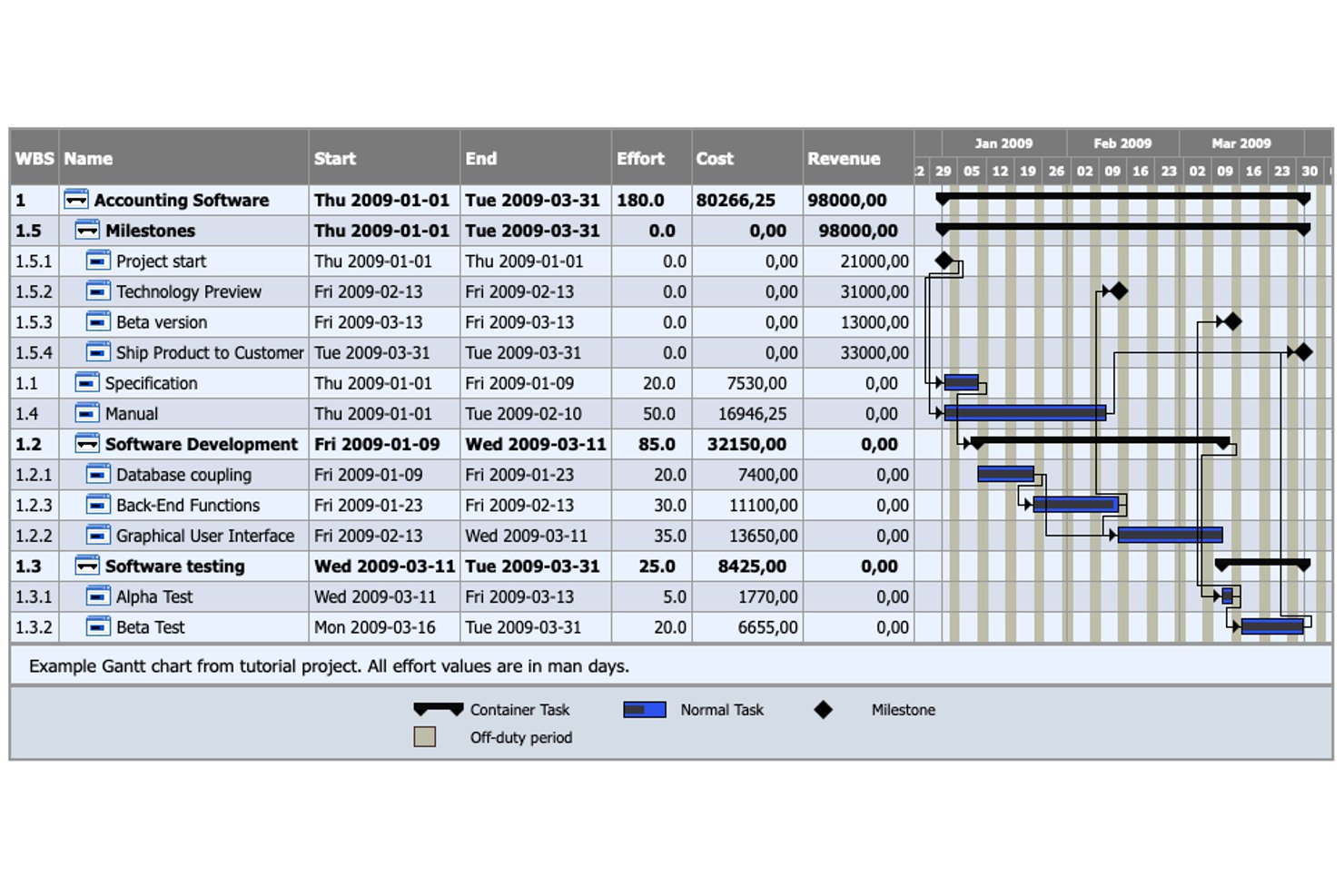
TaskJuggler is an open-source, command-line project management tool that handles resource allocation, scheduling, capacity planning, cost tracking, and scenario modeling through plain-text project definitions.
Who Is TaskJuggler Best For?
TaskJuggler is a strong fit for technically skilled project managers and developers who prefer defining schedules, resources, and scenarios in plain text rather than clicking through a GUI.
Why I Picked TaskJuggler
I picked TaskJuggler as one of the best because it treats your entire project plan as code, letting you define tasks, resources, and constraints in plain text files that work naturally with version control systems like Git. I love how its optimizing scheduler automatically levels resources across combined projects using a central allocation database, so you can catch overallocation before it becomes a real problem. You can also run unlimited what-if scenarios to stress-test your plan against different staffing assumptions without touching your baseline.
TaskJuggler Key Features
- Cost and revenue tracking: Define initial and finishing costs per task and usage-based costs per resource to monitor project financials alongside your schedule.
- CSV and iCalendar export: Export resource and project data to CSV for spreadsheet analysis or iCalendar format for use in calendar and productivity tools.
- Time-sheet and status-sheet infrastructure: Collect actual work and progress data from contributors through a server-based time-sheet system tied to your project plan.
- Multi-project combination: Merge separate project files into a single larger project using a shared resource allocation database to schedule across teams and workstreams.
TaskJuggler Integrations
TaskJuggler has documented integrations with Vim, Microsoft Project, and Computer Associates Clarity, plus CSV and iCalendar exports for data exchange. An API or webhook connection isn’t documented.
Pros and Cons
Pros:
- Resource reports show assigned tasks by resource
- Unlimited scenarios test changing capacity assumptions
- Automatic leveling balances resources across projects
Cons:
- Reports lack documented utilization totals and trends
- Command-line planning lacks interactive allocation editing
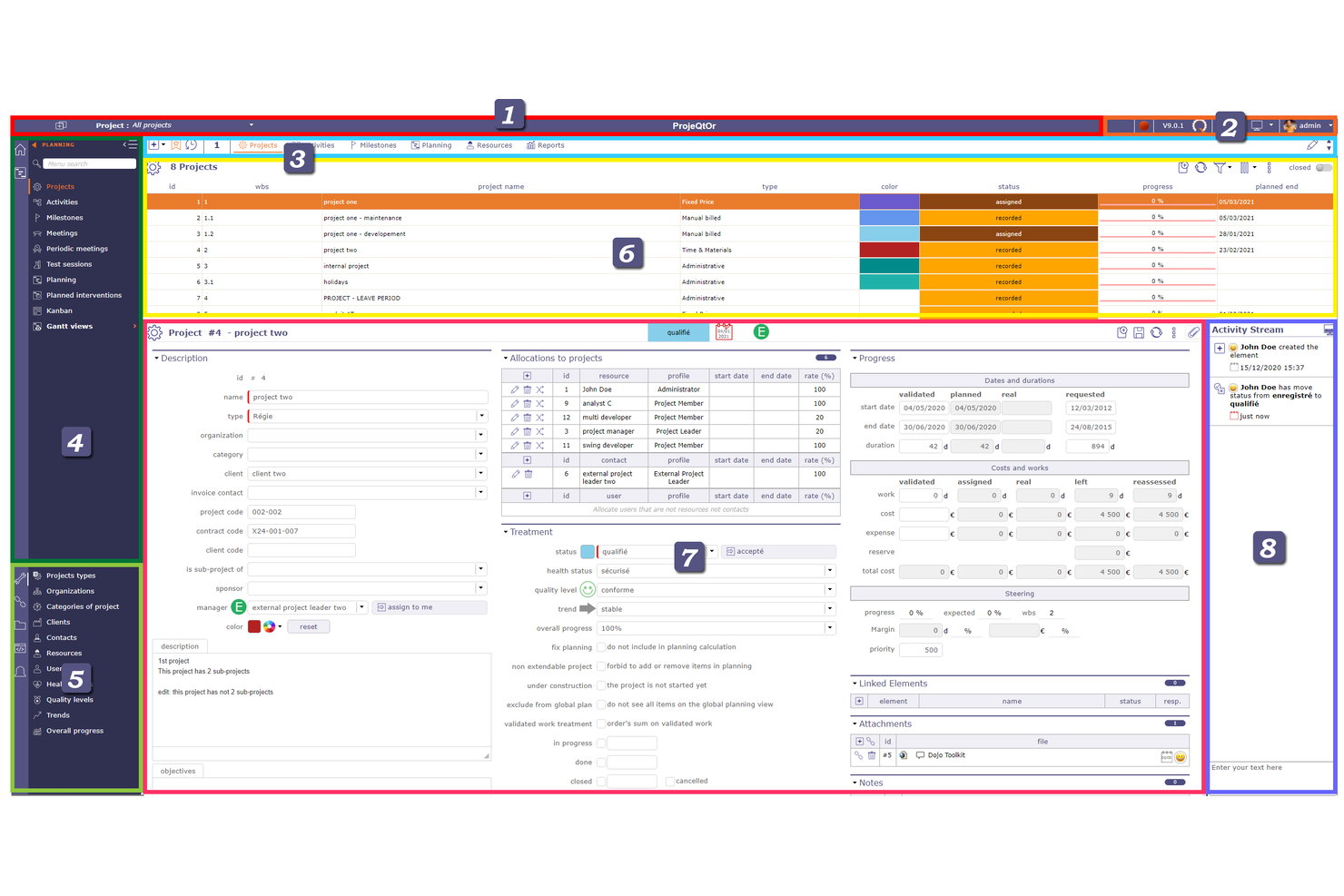
ProjeQtOr is an open-source project management tool that covers resource allocation, capacity planning, Gantt scheduling, ticketing, and financial tracking across human, material, and group resources.
Who Is ProjeQtOr Best For?
ProjeQtOr is a strong fit for PMO leaders and operations managers who need to plan both people and equipment across multiple projects without paying per seat.
Why I Picked ProjeQtOr
I picked ProjeQtOr as one of the best because it's the only tool on this list that treats equipment and people as equally plannable resources. You can allocate material resources, like hardware or test rigs, to projects using the same rate-and-period model you'd use for a developer, which makes it genuinely useful when your delivery plan depends on both. I also like the dynamic workload view, which flags critical resources and shows exactly where overbooking is happening across concurrent projects.
ProjeQtOr Key Features
- Multi-project portfolio structure: Organizes projects into multi-level hierarchies with sub-projects and real-time consolidated views across the portfolio.
- Skill-based resource search: Ranks resources by skill level and availability, with filters for weekly or monthly availability to support assignment decisions.
- Gantt chart with dependency tracking: Displays task dates, durations, dependencies, and assigned-resource workload details across daily, weekly, monthly, and quarterly scales.
- Timesheet tracking: Records actual work by resource and task with weekly entry, monthly consolidation, and export options in PDF or CSV.
ProjeQtOr Integrations
ProjeQtOr offers a marketplace integration with GitHub through a plugin. Its REST API supports custom integrations with internal systems.
Pros and Cons
Pros:
- Reviewers praise multi-project scheduling
- Flags workload bottlenecks across projects
- Plans people and equipment together
Cons:
- Dense screens can obscure planning details
- Core open-source license remains unspecified
Andre alternativer for programvare for ressursstyring med åpen kildekode
Her er noen andre verktøy for ressursstyring med åpen kildekode du kan se nærmere på hvis du ikke fant det du lette etter ovenfor.
- Leantime
For strategy-linked portfolio planning
- Kimai
For self-hosted project time costing
- Tuleap
For linking requirements, code and tests
- WeKan
For teams needing self-hosted Kanban
- Kanboard
For managing projects on your own server
- Huly
For GitHub-connected project scheduling
- Plane
For air-gapped work management
- GanttProject
For offline, local-file resource planning
- Focalboard
For self-hosted project tracking


Relaterte anmeldelser
Hvis du fortsatt ikke har funnet det du ser etter her, kan du ta en nærmere titt på disse verktøyene som er nært knyttet til programvare for prosjektstyring, og som vi har testet og evaluert:
- Programvare for ressursstyring
- Programvare for arbeidsflytstyring
- Programvare for tidsregistrering
- Programvare for oppgavestyring
- Samarbeidsverktøy
- Produktivitetsverktøy
- Alternativer til Redmine
How I Evaluate Open Source Resource Management Software
I split my evaluation into three parts, giving the most weight to core functionality: assign people or equipment across projects, track availability, and self-host open-source code. Next, I look for differentiators such as skill-based matching. Finally, I consider factors beyond features, including support, onboarding, and hosting costs versus per-seat fees.
Core Functionality (Table Stakes For This List)
When I'm selecting tools for my list, I score each one on a scale from 0 (does not offer the functionality) to 5 (excels in this area) for each core functionality listed below. I then convert the total into a percentage to help assess each tool's overall fit, with extra weight on any functionalities I’ve deemed essential.
- Resource Allocation (Essential): I look for structured assignment of people or equipment across projects, such as matching specialists to tasks while avoiding conflicting commitments.
- Open-Source Licensing (Essential): I check that the source code is publicly available under a license allowing free use and modification, with self-hosting options.
- Capacity Planning: I assess whether teams can see workloads and availability across projects, making it easier to spot over-allocation before schedules are set.
- Scheduling Views: I look for calendars, Gantt charts, or timelines that show resource commitments and help teams adjust plans as dependencies shift.
- Utilization Reporting: I check whether reports show how people or other resources are used over time, with useful filters for projects, teams, or periods.
- Self-Hosting Options: I consider whether deployment on your own infrastructure is documented and practical for teams with specific hosting or customization needs.
Once I have a list of tools that meet the criteria, I consider what sets each platform apart.
Differentiating Factors (What Sets Vendors Apart)
Here's how I compare and contrast different vendors:
Standout Features
I check whether a tool supports skill-based matching, which lets you assign work by role or certification rather than just open calendar slots. That matters when you're staffing a project that needs a specific frontend framework or compliance background. I also evaluate what-if scenario planning, since modeling a new project's impact on existing workloads before committing prevents downstream conflicts. Finally, I look at source-level customizability, because teams with unique approval chains or reporting needs can reshape workflows directly in the codebase.
Beyond Features
I check community and contributor activity first. A project with steady commits and fast issue responses means security patches land quickly, while a dormant repo puts your deployment at risk. I also evaluate total cost of ownership, since dropping per-seat fees means little if hosting, maintenance, and internal support labor exceed what you'd pay for a SaaS plan. Finally, I look at available support pathways—teams without dedicated DevOps staff need solid documentation or paid support contracts to keep a self-hosted tool running after day one.
Slik velger du programvare for ressursstyring med åpen kildekode
Det er lett å gå seg vill i lange funksjonslister og kompliserte prisstrukturer. For å hjelpe deg med å holde fokus mens du går gjennom den unike prosessen din for valg av programvare, får du her en sjekkliste over faktorer du bør ha i tankene:
| Faktor | Hva du bør vurdere |
|---|---|
| Skalerbarhet | Pass på at programvaren kan vokse sammen med teamet ditt. Se etter løsninger som støtter flere brukere, prosjekter og større datamengder uten store ytelsesproblemer. |
| Integrasjoner | Kontroller om programvaren kobles til de eksisterende verktøyene dine, for eksempel plattformer for prosjektstyring, CRM eller regnskap, for å unngå forstyrrelser i arbeidsflyten. |
| Tilpasningsmuligheter | Teamet ditt har unike behov. Pass på at verktøyet lar deg tilpasse arbeidsflyter, felt og dashbord slik at det tilpasses måten dere jobber på. |
| Brukervennlighet | Et komplisert system vil gjøre teamet ditt mindre effektivt. Se etter intuitive grensesnitt, enkel navigasjon og kort opplæringstid. |
| Budsjett | Åpen kildekode betyr ikke alltid gratis. Ta med kostnader for drift, kundestøtte og tillegg når du vurderer de totale eierkostnadene. |
| Sikkerhetstiltak | Dataene dine må beskyttes. Prioriter verktøy med kryptering, rollebasert tilgangskontroll og regelmessige sikkerhetsoppdateringer. |
| Samarbeidsfunksjoner | Pass på at programvaren tilbyr kommunikasjon i teamet, oppgavetildeling og oversikt over tilgjengelige ressurser. |
| Kundestøtte & fellesskap | Verktøy med åpen kildekode er ofte avhengige av støtte fra fellesskapet. Kontroller om det finnes aktive fora, dokumentasjon og utviklere som svarer raskt. |
Hva er programvare for ressursstyring med åpen kildekode?
Programvare for ressursstyring med åpen kildekode er et verktøy med kildekode som alle kan undersøke, endre og forbedre. Den hjelper deg med å administrere ressurser som ansatte, utstyr og tid ved å tilby verktøy for planlegging, sporing og rapportering. Denne typen programvare er fritt tilgjengelig og kan tilpasses ulike organisatoriske behov.
De viktigste fordelene ved å bruke programvare for ressursstyring med åpen kildekode er tilpasningsmulighetene og kostnadseffektiviteten. Du kan tilpasse programvaren til de spesifikke kravene dine, og den er vanligvis gratis eller rimelig, noe som gjør den budsjettvennlig, særlig for mindre organisasjoner. Programvare med åpen kildekode har også ofte god støtte fra fellesskapet og tilbyr en mengde delt kunnskap og regelmessige oppdateringer.
Funksjoner i programvare for ressursstyring med åpen kildekode
Når du velger programvare for ressursstyring med åpen kildekode, bør du se etter følgende nøkkelfunksjoner:
- Ressursplanlegging: Gjør det mulig å fordele oppgaver og administrere arbeidsmengder effektivt for å forhindre overbelastning eller underutnyttelse.
- Tidsregistrering: Hjelper med å overvåke arbeidstid og produktivitet slik at prosjektene holder tidsplanen og budsjettet.
- Rollebasert tilgang: Gir kontrollert tilgang til data og funksjoner basert på brukerroller, noe som forbedrer sikkerheten og effektiviteten i arbeidsflyten.
- Rapportering og analyse: Gir innsikt i ressursbruk, ytelsestrender og prosjektfremdrift for å støtte datadrevne beslutninger.
- Samarbeidsverktøy: Legger til rette for kommunikasjon og koordinering mellom teammedlemmer gjennom delte dashbord, kommentarer og varsler.
- Tilpasningsmuligheter: Lar deg tilpasse arbeidsflyter, datafelt og dashbord for å møte organisasjonens unike behov.
- API og integrasjoner: Støtter tilkoblinger til andre programvareløsninger, for eksempel prosjektstyringsverktøy, for å effektivisere driften.
- Budsjettering og kostnadssporing: Hjelper med å administrere utgifter, forutsi kostnader og opprettholde økonomisk kontroll gjennom hele prosjektets livssyklus.
- Mobil tilgjengelighet: Gjør det mulig å administrere ressurser eksternt gjennom mobilvennlige grensesnitt eller egne apper.
- Datasikkerhetstiltak: Beskytter sensitiv informasjon med kryptering, regelmessige oppdateringer og samsvar med beste praksis for sikkerhet.
Vanlige spørsmål om programvare for ressursstyring med åpen kildekode
Finn svar på vanlige spørsmål om dette emnet.
Hva er fordelene ved å bruke programvare for ressursstyring med åpen kildekode?
- Programvare kan bidra til å effektivisere ressursstyringen og bruke automatisering for å hjelpe deg med å arbeide mer effektivt, samtidig som du sparer tid og penger.
- Programvare med åpen kildekode er fleksibel og tilpasningsdyktig, slik at du kan gjøre tilpassede endringer som dekker dine unike behov.
- Den gir en omfattende oversikt over gjeldende ressurser og kapasitet for å bidra til bedre beslutninger.
Hva er den beste måten å sammenligne programvare for ressursstyring med åpen kildekode på?
- Funksjoner: De beste programvareapplikasjonene har en lang liste med funksjoner som er utviklet for å dekke mange av behovene dine eller ditt bruksområde, inkludert noen du kanskje ikke har vurdert, for eksempel fakturering, timelister, Gantt-diagrammer, Kanban-tavler, dra-og-slipp-funksjonalitet, prosjektveikart og sporing av livssyklus, prosjektporteføljestyring og oppgavelister for teamet.
- Enkel å bruke: Selv om du kan tilpasse programvare med åpen kildekode for å møte behovene og metodikkene dine, ønsker du fortsatt at applikasjonen skal være enkel å bruke «rett ut av boksen».
- Teknisk støtte: Det vil være tilfeller der du har spørsmål og/eller bekymringer. Finn programvare som tilbyr mange former for støtte, fra ansatte i kundestøtten til opplæringsvideoer og detaljert dokumentasjon. Dette gjør at du kan bruke mer tid på ressursplanlegging og mindre tid på oppgaver som ikke gir fremdrift.
- Kompatibilitet: Velg programvare for ressursstyring med åpen kildekode som er kompatibel med operativsystemet du foretrekker. Kjører mobilenheten din på Android eller iOS? Bruker du en Mac- eller Linux-maskin? Uten kompatibilitet har du ingenting.