

10 beste programvareløsninger for AI-drevet automatisering av profesjonelle tjenester i 2026

AI-programvare for automatisering av profesjonelle tjenester – kortliste


AI-programvare for automatisering av profesjonelle tjenester bruker kunstig intelligens til å hjelpe team med å administrere komplekse prosjekter, ressurser og klientarbeid mer effektivt. Disse verktøyene støtter konsulentfirmaer og tjenestebaserte virksomheter ved å forbedre den operative effektiviteten og automatisere oppgaver gjennom hele prosjektets livssyklus. De gir forretningsinnsikt og sanntidsinnsikt i prosjektøkonomien, slik at team kan ta datadrevne beslutninger og i større grad tilpasse arbeidet til virksomhetens behov. Ved å gi bedre oversikt over klientrelasjoner og resultater forbedrer disse plattformene den overordnede beslutningstakingen og prosjektresultatene. I denne veiledningen finner du de beste AI-drevne PSA-verktøyene for 2026, slik at du kan sammenligne funksjoner og velge det som passer best til teamets behov.
Hvorfor du kan stole på våre programvareanbefalinger
Teamet vårt har testet og anmeldt programvare siden 2012. Vi er selv prosjektledere, så vi vet hvor vanskelig og hvor viktig det er å velge riktig programvare.
I denne guiden har vi vurdert verktøyene gjennom praktisk testing og uavhengig research og gitt dem poeng ut fra våre utvelgelseskriterier. Vi bygger også på innsikt fra ledende eksperter i bransjen og erfarne prosjektledere.
Anmeldelsene våre bygger på vår egen redaksjonelle vurdering. De er ikke et salgsargument.
Ekspertanmeldere:
Sammenligningstabell for AI-programvare for automatisering av profesjonelle tjenester
Denne sammenligningstabellen oppsummerer prisopplysningene for mine beste utvalgte AI-programvareløsninger for automatisering av profesjonelle tjenester:
| Tool | Best For | Trial Info | Price | ||
|---|---|---|---|---|---|
| 1 | Best for automated contract management | Free demo available | Pricing upon request | Website | |
| 2 | Best for AI-powered no-code app development | Free demo available | $40/user/month | Website | |
| 3 | Best with configurable resource forecasting tools | Not available | Pricing upon request | Website | |
| 4 | Best for client onboarding workflows | 14-day free trial | From $49/user/month (billed annually) | Website | |
| 5 | Best for PSA on Salesforce | Free demo available | Pricing upon request | Website | |
| 6 | Best for MSP service automation | 14-day free trial | From $159/user/month | Website | |
| 7 | Best for projects and financial management | 14-day free trial + free demo available | From $19.90/user/month (billed annually) | Website | |
| 8 | Best for AI project resource planning | Free demo available | Pricing upon request | Website | |
| 9 | Best for enterprise services automation | Free demo available | Pricing upon request | Website | |
| 10 | Best for agency management and analytics | 14-day free trial | From $10/user/month (billed annually) | Website |


Anmeldelser av AI-programvare for automatisering av profesjonelle tjenester
Nedenfor finner du mine detaljerte sammendrag av AI-programvaren for automatisering av profesjonelle tjenester som kom med på kortlisten min. Anmeldelsene mine gir en detaljert gjennomgang av funksjonene, de beste bruksområdene og integrasjonene til hver plattform, slik at du kan finne den som passer best for deg.

Accelo
Best for automated contract management

Accelo is an AI-powered professional services automation platform that unifies project management, resource scheduling, time tracking, retainer management, and invoicing in one connected system.
Who Is Accelo Best For?
Accelo is a strong fit for mid-size professional services firms in consulting, IT services, accounting, or agencies that need one platform to manage client work from sales through invoicing.
Why I Picked Accelo
Accelo is one of my top picks because I love how contract management is woven directly into project delivery and billing. Retainer tracking connects to live time logs, so I can see exactly how much of a contract's hours have been consumed at any point. What really sets it apart is scope creep management: when delivery drifts beyond contracted scope, Accelo surfaces it in context, before it hits margins. Automated invoicing then generates bills from those same time logs, removing the manual reconciliation step entirely.
Accelo Key Features
- AI-assisted resource scheduling: Matches team members to projects based on skill, availability, and current workload using AI recommendations.
- Predictive risk flagging: Monitors projects, resourcing, and financials to surface early warning signs before issues escalate.
- Revenue forecasting: Projects future revenue and profitability at the engagement level using live delivery data.
- Client request management: Centralizes incoming client requests and routes them into tracked, billable workflows.
Accelo Integrations
Accelo offers 30+ native integrations, including Salesforce, HubSpot, Jira, QuickBooks, Xero, Sage Intacct, Slack, GitHub, GitLab, and Azure DevOps, with broader connectivity across the Microsoft ecosystem through Microsoft 365, Microsoft Teams, and Microsoft Entra. It also connects with Zapier and provides a RESTful API for custom integrations.
Pros and Cons
Pros:
- AI flags scope drift before it escalates
- Sales-to-project handoff requires no rework
- Automatic time capture reduces missed billable hours
Cons:
- Missing native trigger testing sandbox
- Mobile app lacks full desktop functionality
New Product Updates from Accelo

Accelo Rebuilds Mobile App for Project and Time Management
Accelo rebuilds its mobile app with task management, new work creation, and mobile timesheets for Forecast customers. This helps teams keep project and time data current while working away from a desktop. For more information, visit Accelo’s official site.

Best for AI-powered no-code app development
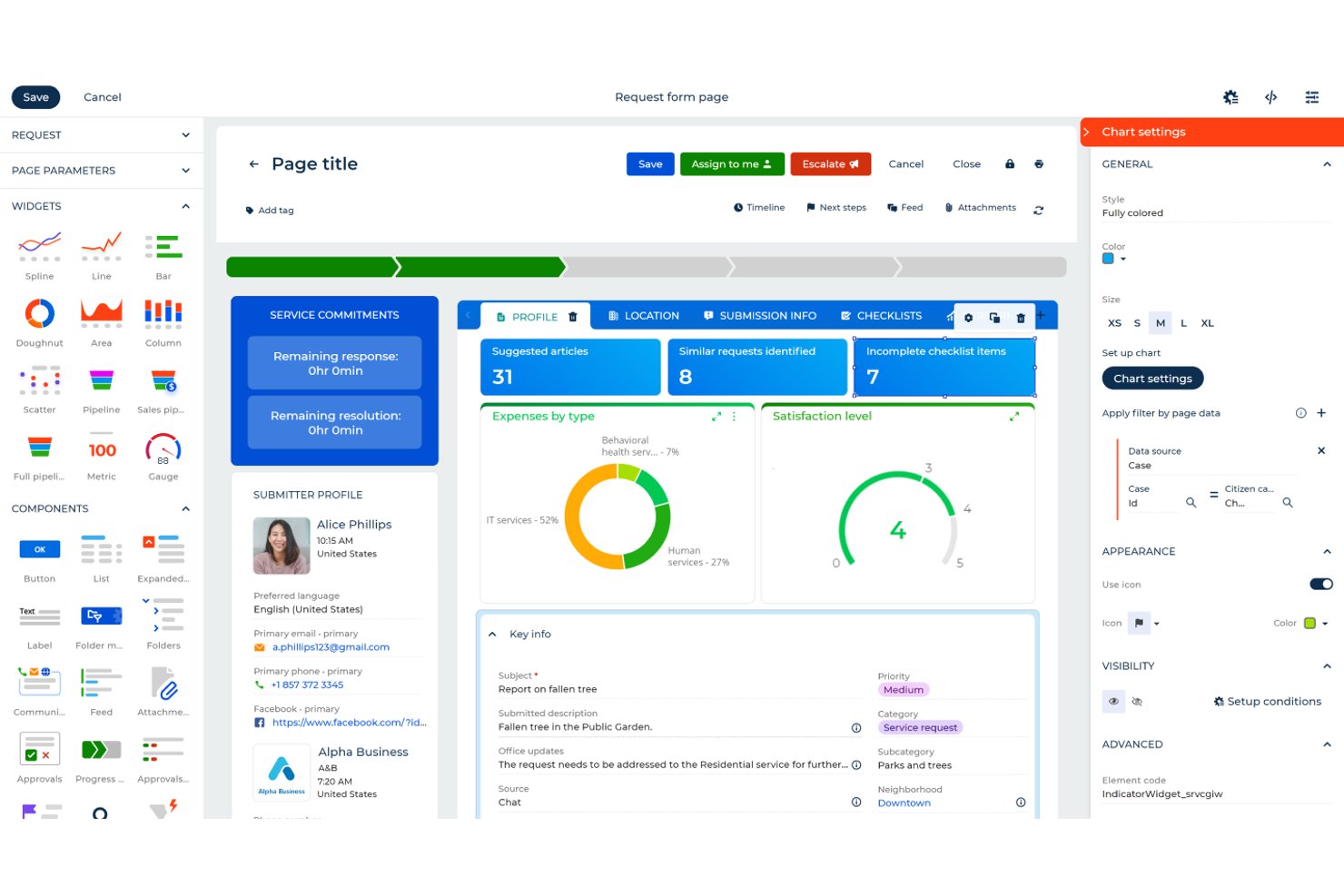
Creatio Studio is an AI-native no-code platform that lets teams build custom applications, automate workflows, and configure CRM processes using visual designers and natural language prompts.
Who Is Creatio Studio Best For?
Creatio Studio suits mid-market and enterprise professional services firms that need to build and automate custom workflows without relying on IT or development resources.
Why I Picked Creatio Studio
I picked Creatio Studio as one of the best because its AI-driven app generation is genuinely impressive. I can describe a process in plain language, and the platform builds the data model, views, and objects automatically. My team is also able to use the composable no-code architecture to reuse pre-built components, spinning up client onboarding workflows or milestone-based billing automations without touching code.
Creatio Studio Key Features
- Visual workflow designer: Build and modify automated business processes using a drag-and-drop interface.
- Marketplace of pre-built apps: Access a library of ready-made solutions and integrations for quick deployment.
- Granular access controls: Configure detailed user permissions and roles for secure collaboration on projects.
- Real-time analytics dashboards: Monitor project, process, or app metrics with customizable, live dashboards.
Creatio Studio Integrations
Creatio Studio offers native integrations with Power BI, Microsoft 365, Twilio, WhatsApp, Zoom, Formstack, Avaya, and more. An API is available for custom integrations.
Pros and Cons
Pros:
- Fast app prototyping with natural language
- Wide library of industry workflow templates
- AI tools for automating process design
Cons:
- Learning curve can be steep initially
- Requires developer training for complex customization
New Product Updates from Creatio AI Studio
Creatio Studio Expands AI App-Building Capabilities
Creatio Studio adds expanded AI coding agents, AI-generated pivot tables, and built-in analytics for generated apps. These updates let users build more UI, logic, and reporting components from natural-language prompts. For more information, visit Creatio Studio’s official site.

Kantata
Best with configurable resource forecasting tools
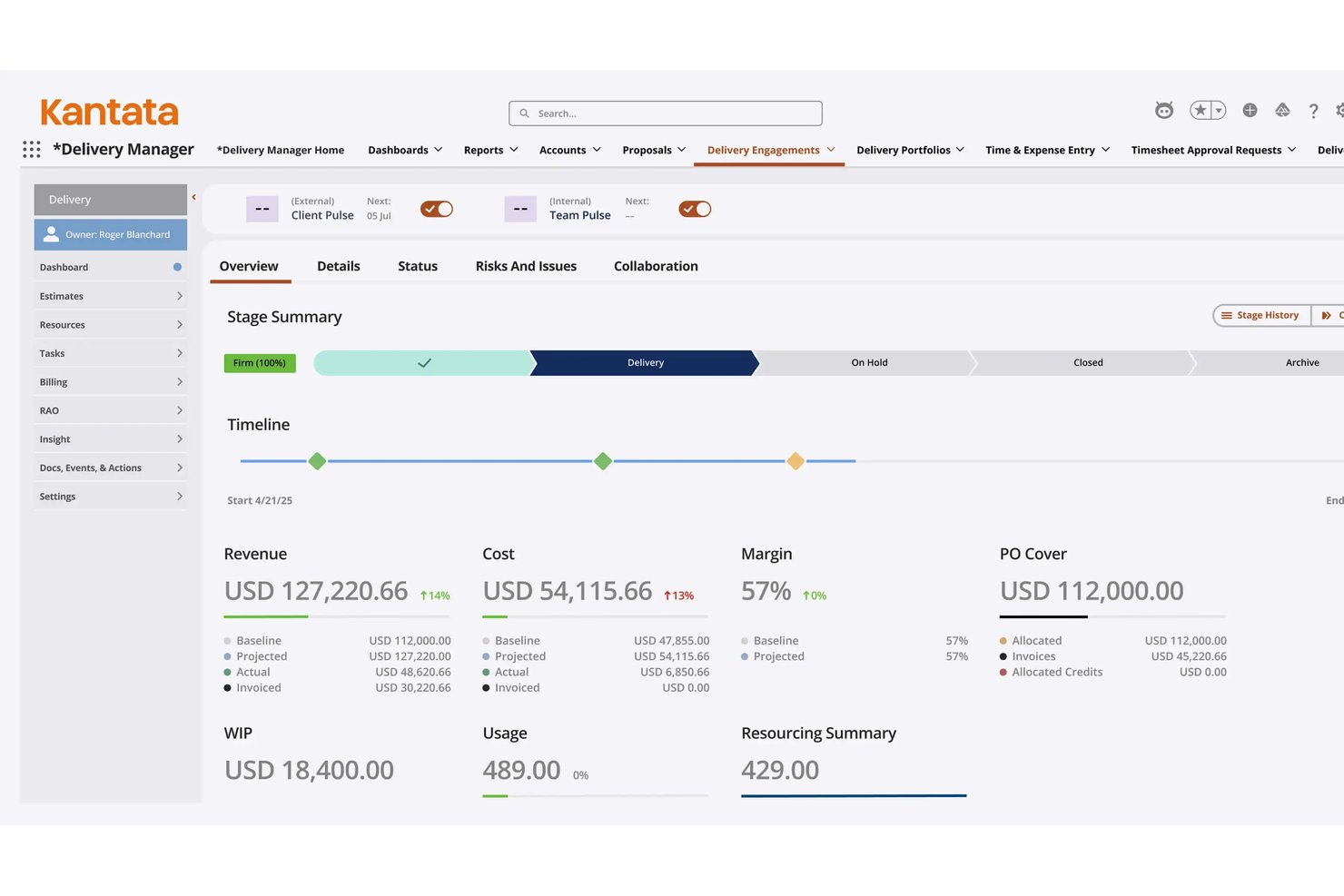
Kantata is a purpose-built AI PSA platform that unifies resource management, project execution, financial tracking, and business intelligence for professional services organizations.
Who Is Kantata Best For?
Kantata suits mid-market to enterprise professional services firms — including IT consulting, management consulting, and software services — that need to manage complex, multi-project resource demands at scale.
Why I Picked Kantata
Kantata earns its spot on my shortlist because of how the Expertise Engine approaches resource forecasting. It's built on a proprietary Services Language Model that learns from every project, proposal, and engagement, so forecasting gets smarter with each delivery cycle. I also like the Staffing Optimizer, which evaluates resource permutations across concurrent projects at a scale that manual scheduling simply can't match.
Kantata Key Features
- Salesforce-native deployment option: Choose a PSA instance deeply embedded within your Salesforce ecosystem for native data flow and security.
- Real-time financial dashboards: Access up-to-date insights into project budgets, profitability, and margin performance.
- Collaboration and feedback module: Centralize team communications and client feedback directly inside the platform.
- Integrated time and expense tracking: Log time and expenses in context with project work for accurate, audit-ready records.
Kantata Integrations
Kantata offers over 1,200 native integrations, including Salesforce, Slack, QuickBooks, NetSuite, Sage Intacct, Xero, Microsoft Teams, MuleSoft, and Workato. An API is available for custom integrations.
Pros and Cons
Pros:
- Deep Salesforce-native deployment option
- Configurable project portfolio forecasting dashboards
- Advanced AI-driven resource optimization workflow
Cons:
- Usability can be challenging for new users
- Setup and configuration require significant time investment
New Product Updates from Kantata

Kantata Adds Access Group Change History
Kantata adds Access Groups History, letting account administrators track changes to group details, membership, and permissions in Recent History. The update also makes these events available through the Subscribed Events API for broader monitoring. For more information, visit Kantata’s official site.
 .

Best for client onboarding workflows
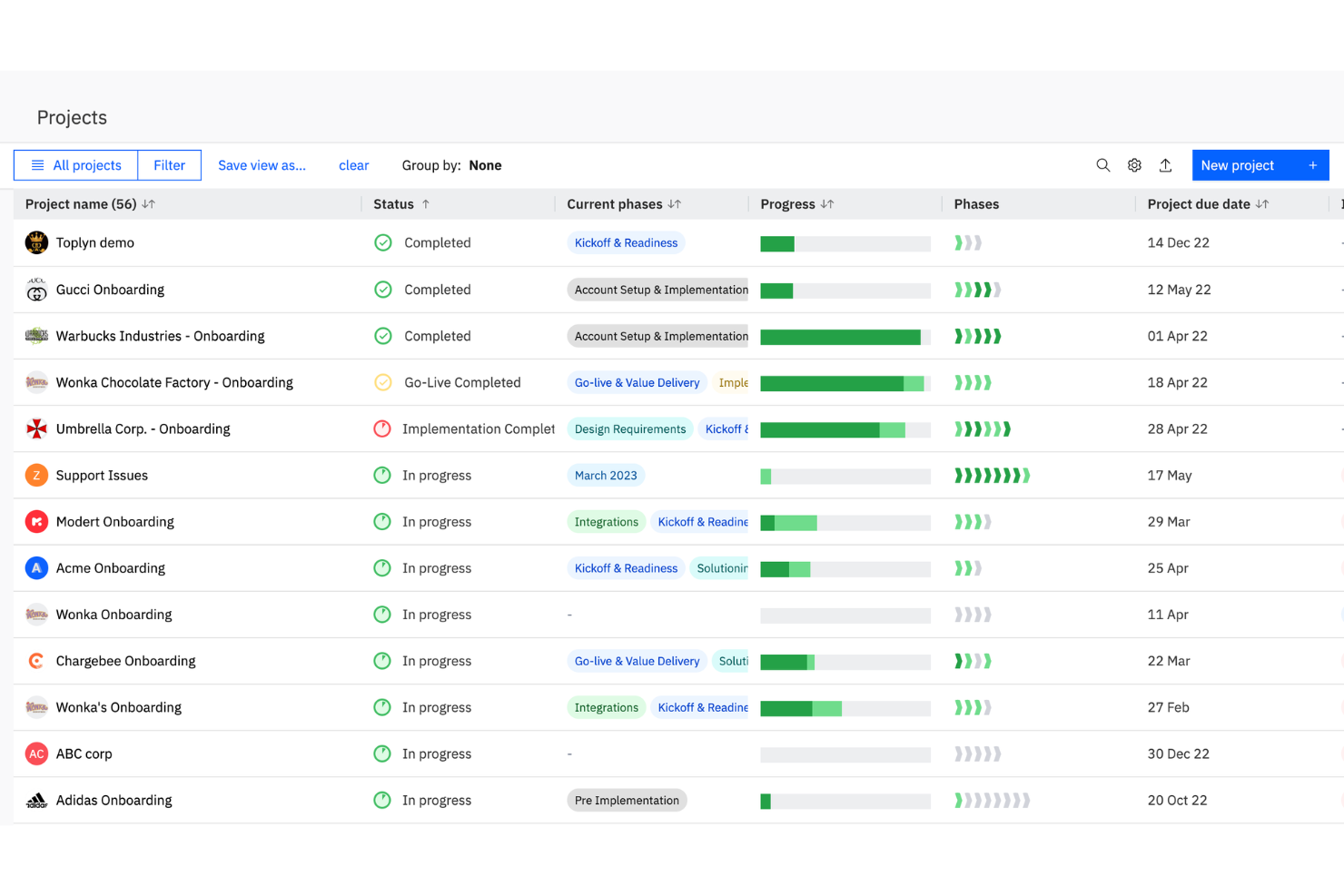
Rocketlane is a professional services automation platform designed for client-facing teams, combining project management, resource planning, onboarding workflows, and time tracking in one system.
Who Is Rocketlane Best For?
Client onboarding and implementation teams at SaaS companies and service providers who need unified project and resource management.
Why I Picked Rocketlane
I picked Rocketlane as one of the best because I use its purpose-built onboarding and PSA platform to manage every services business project from kickoff through delivery. I rely on its unified workspace instead of juggling spreadsheets, keeping project plans, documents, and communication in one place. The built-in resource management and timesheets improve visibility into billable work, while the clean interface improves the overall user experience for both my team and clients.
Rocketlane Key Features
- Custom project templates: Create and reuse templates for repeatable onboarding or service projects.
- Client portal: Give clients access to project status, documents, and tasks in a branded portal.
- Automated task reminders: Set up automated notifications for upcoming or overdue tasks.
- Document collaboration: Collaborate on project documents directly within the platform.
Rocketlane Integrations
Rocketlane offers native integrations with Salesforce, HubSpot, Jira, Slack, Google Calendar, Microsoft Teams, and Zapier. An API is available for custom integrations.
Pros and Cons
Pros:
- Detailed resource utilization and workload insights
- Automated client onboarding and project templates
- AI-powered project health and risk alerts
Cons:
- No built-in CRM for sales management
- Limited billing and invoicing capabilities

Certinia
Best for PSA on Salesforce
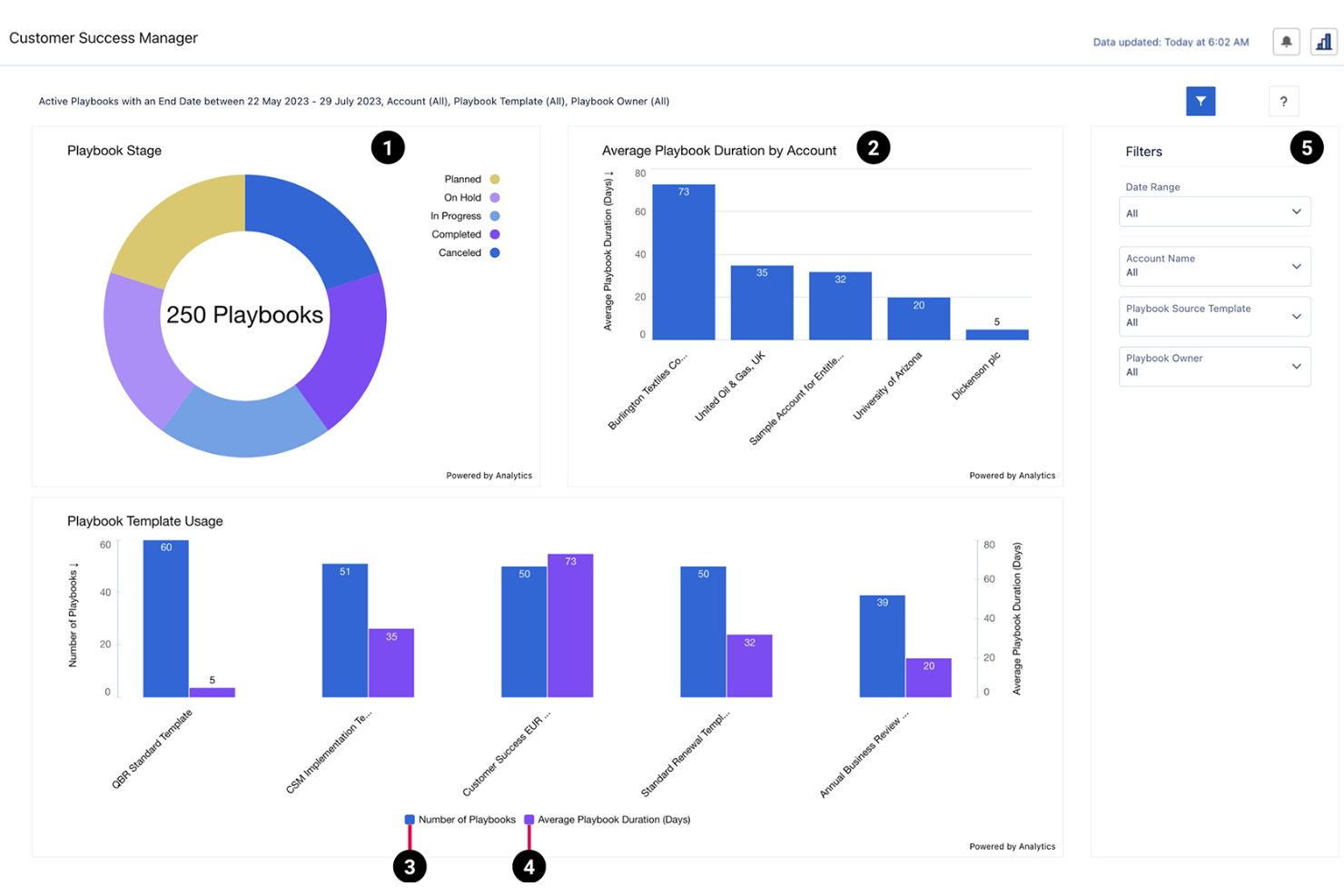
Certinia is a professional services automation platform built on Salesforce that combines resource management, project accounting, time tracking, and AI-powered forecasting for service organizations.
Who Is Certinia Best For?
Certinia is a strong fit for large professional services organizations that already use Salesforce as their core business platform.
Why I Picked Certinia
I picked Certinia as one of the best because I like how it brings AI-powered forecasting and resource management directly into the Salesforce ecosystem. My team uses Certinia to connect project accounting, time tracking, and resource planning with our CRM data. I rely on its AI-driven insights to optimize project staffing and predict revenue trends.
Certinia Key Features
- Resource request workflows: Route and approve resource requests within project teams.
- Milestone billing: Automate invoicing based on project milestones and deliverables.
- Skills management: Track and match team skills to project requirements.
- Expense management: Submit, approve, and track project-related expenses in one place.
Certinia Integrations
Certinia offers native integrations with Salesforce, Slack, DocuSign, Conga, and FinancialForce Accounting. An API is available for custom integrations.
Pros and Cons
Pros:
- Built-in time and expense approval processes
- Real-time project margin and profitability tracking
- Automated revenue recognition and billing workflows
Cons:
- No built-in client portal functionality
- Fewer billing models for complex contracts
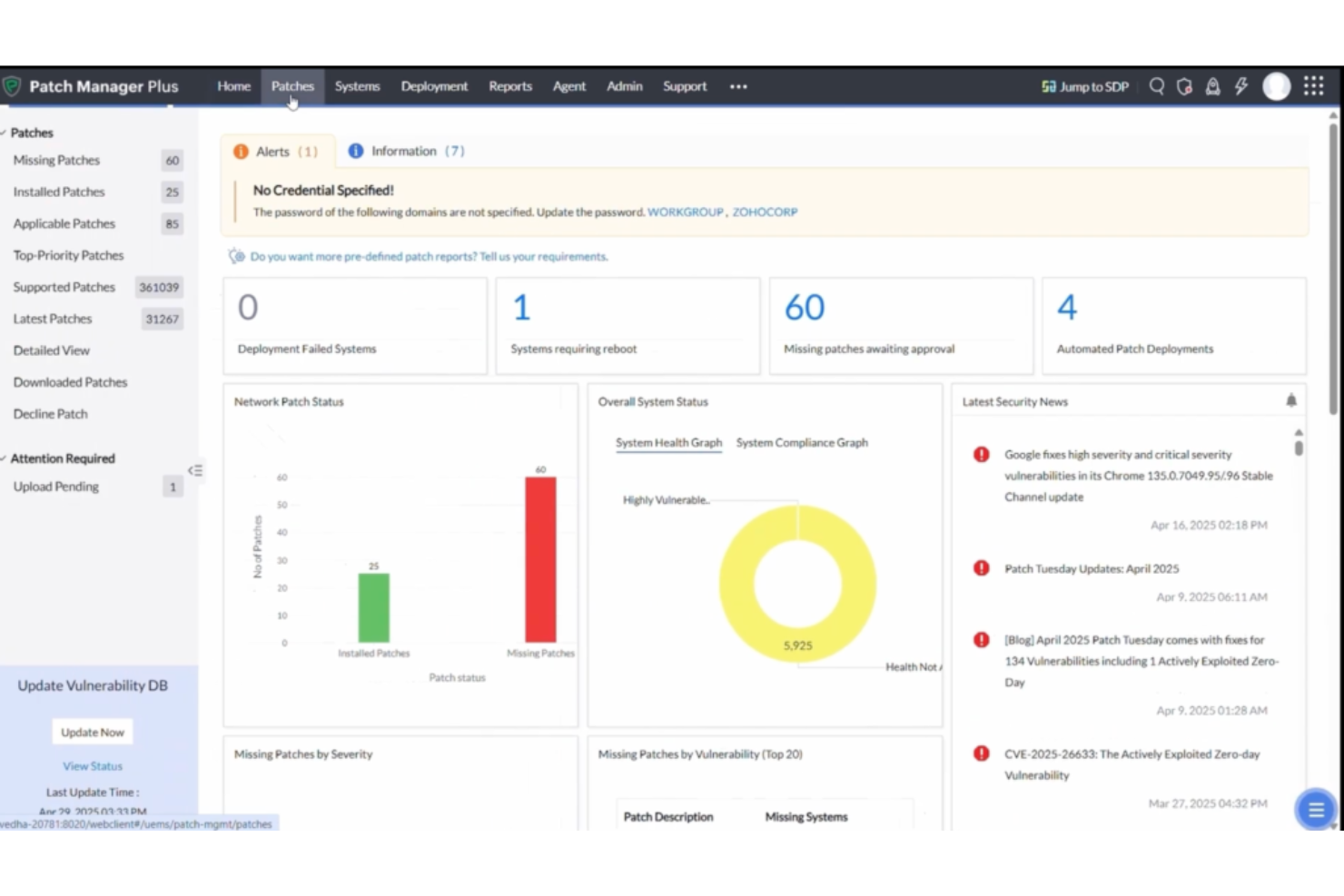
Syncro is a professional services automation platform for MSPs that combines ticketing, billing, remote monitoring and management, asset tracking, and workflow automation in one system.
Who Is Syncro Best For?
Syncro is a strong fit for managed service providers and IT businesses that want unified PSA and RMM capabilities in one platform.
Why I Picked Syncro
I picked Syncro as one of the best because I rely on its unified PSA and RMM platform to manage tickets, automate billing, and monitor client endpoints from a single dashboard. I like that my team can trigger automated workflows based on device alerts and link service tickets directly to assets. In practice, that means we handle client support, invoicing, and device management without switching between multiple systems.
Syncro Key Features
- Custom ticket forms: Build and deploy ticket forms tailored to your workflows.
- SLA management: Set and track service level agreements for client requests.
- Inventory tracking: Monitor hardware and software assets across client sites.
- Integrated quoting: Generate and send quotes directly from the platform.
Syncro Integrations
Syncro offers 50+ native integrations, including QuickBooks, Xero, CloudRadial, ConnectWise, Domotz, Emsisoft, and Worldpay, and provides an API for custom integrations.
Pros and Cons
Pros:
- Integrated billing with recurring invoice support
- Automated ticket routing and escalation rules
- Built-in RMM and PSA in one platform
Cons:
- Few integrations with niche MSP tools
- Limited project management capabilities

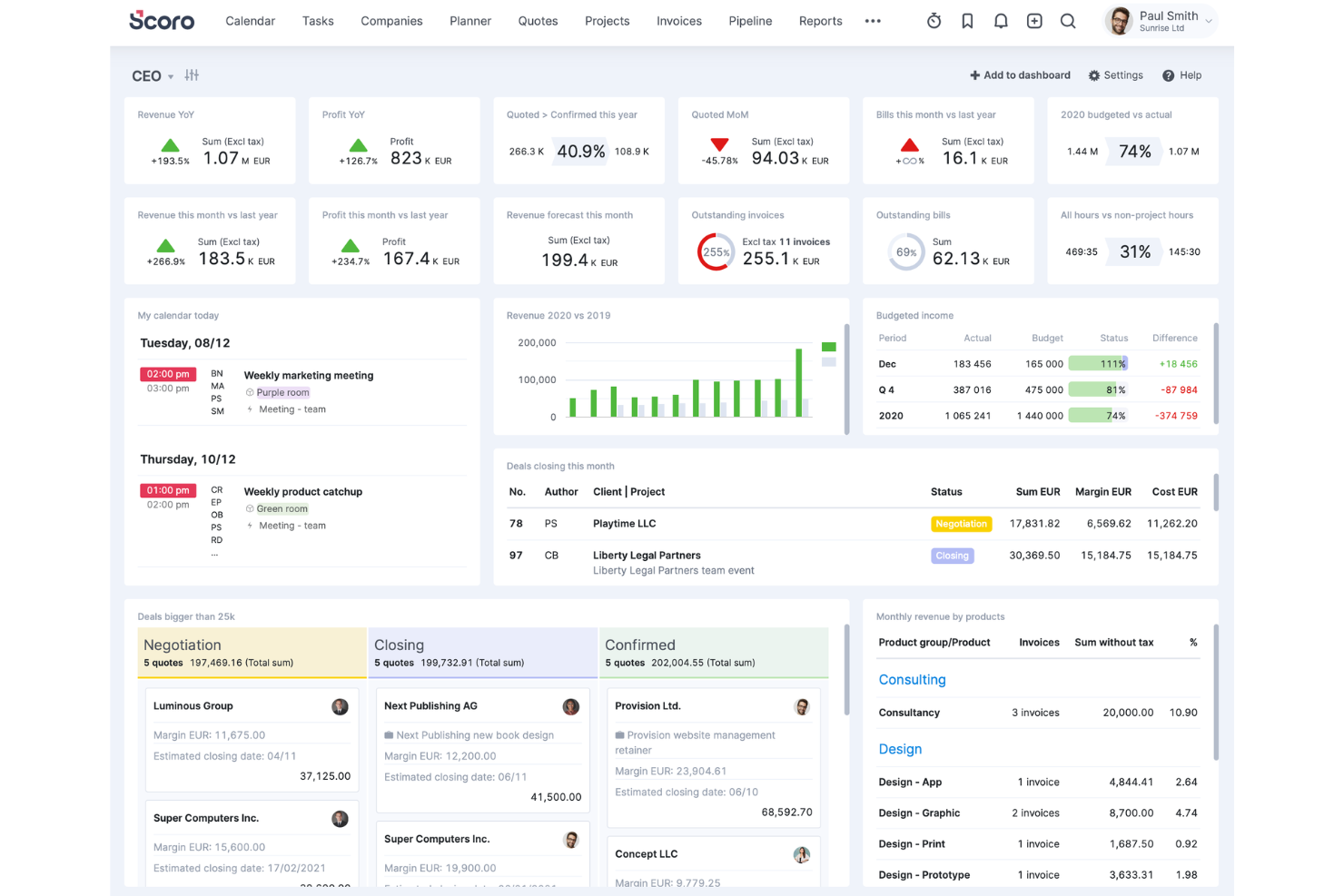
Scoro is a professional services automation platform for agencies and consultancies that brings together project management, quoting, billing, resource scheduling, and real-time reporting in one system.
Who Is Scoro Best For?
Agencies and consultancies that need unified project, billing, and resource management in one platform.
Why I Picked Scoro
I picked Scoro as one of the best because I use its all-in-one work management to keep projects, billing, and resource planning tightly connected for my agency clients. I rely on its quoting and invoicing tools to handle client contracts and revenue tracking in the same system as project delivery. The real-time dashboards let me monitor project health and team utilization without switching platforms.
Scoro Key Features
- Task automation: Automate recurring tasks and reminders across projects.
- Calendar integration: Sync project schedules with Google and Outlook calendars.
- Custom workflow templates: Build and reuse templates for repeatable project types.
- Permission controls: Set granular access rights for users and teams.
Scoro Integrations
Scoro offers native integrations with Xero, QuickBooks Online, Zapier, Google Calendar, Outlook, Slack, HubSpot, Mailchimp, and Dropbox. An API is available for custom integrations.
Pros and Cons
Pros:
- Built-in quoting and sales pipeline management
- Native integrations with major CRM and accounting tools
- Project profitability tracking with real-time dashboards
Cons:
- Gantt chart functionality is less flexible
- No advanced AI for resource allocation
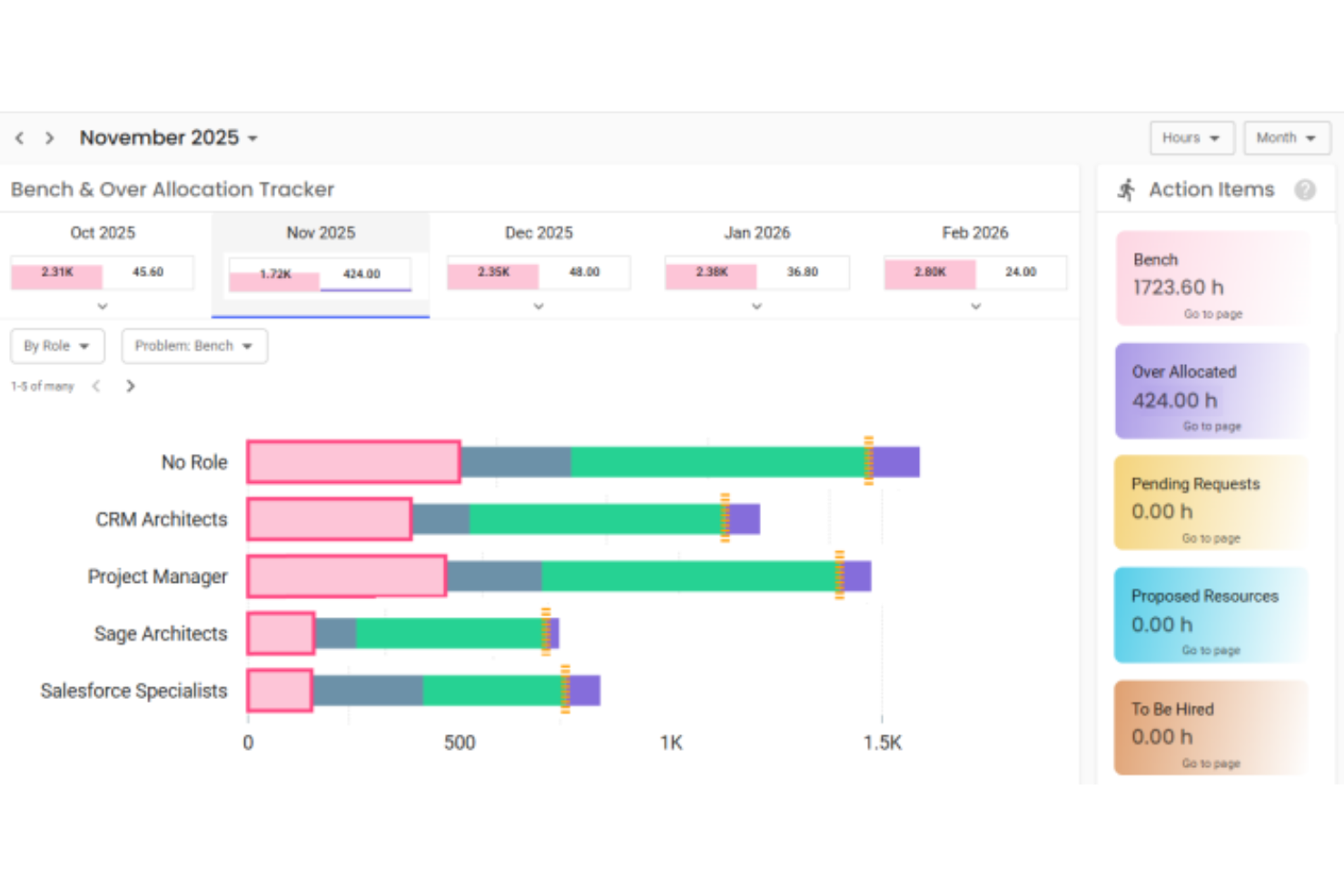
Polaris is an AI-powered professional services automation platform for IT consulting and services firms, offering project management, resource planning, time tracking, and billing in a unified system.
Who Is Polaris Best For?
IT consulting and services firms that need AI-driven project and resource management.
Why I Picked Polaris
I picked Polaris as one of the best because I use its AI-powered SmartMatch engine to automate resource allocation and project staffing for IT consulting work. I rely on its real-time project health dashboards and predictive analytics to keep projects on track. The platform’s unified billing and time tracking help my team manage complex client engagements without switching tools.
Polaris Key Features
- Project budgeting tools: Set, track, and manage project budgets in real time.
- Custom workflow automation: Automate approval processes and task assignments with configurable workflows.
- Mobile time and expense entry: Log time and expenses from any device using the mobile app.
- Role-based access controls: Manage user permissions and data visibility by role or department.
Polaris Integrations
Polaris integrates with Slack, Salesforce, and more, and supports connections with ERP, CRM, HCM, and payroll systems through APIs and built-in connectors.
Pros and Cons
Pros:
- Automated compliance tracking for IT consulting
- Advanced project budgeting with predictive analytics
- AI-driven resource management and allocation
Cons:
- Custom workflow automation options are limited
- Limited support for non-IT service workflows
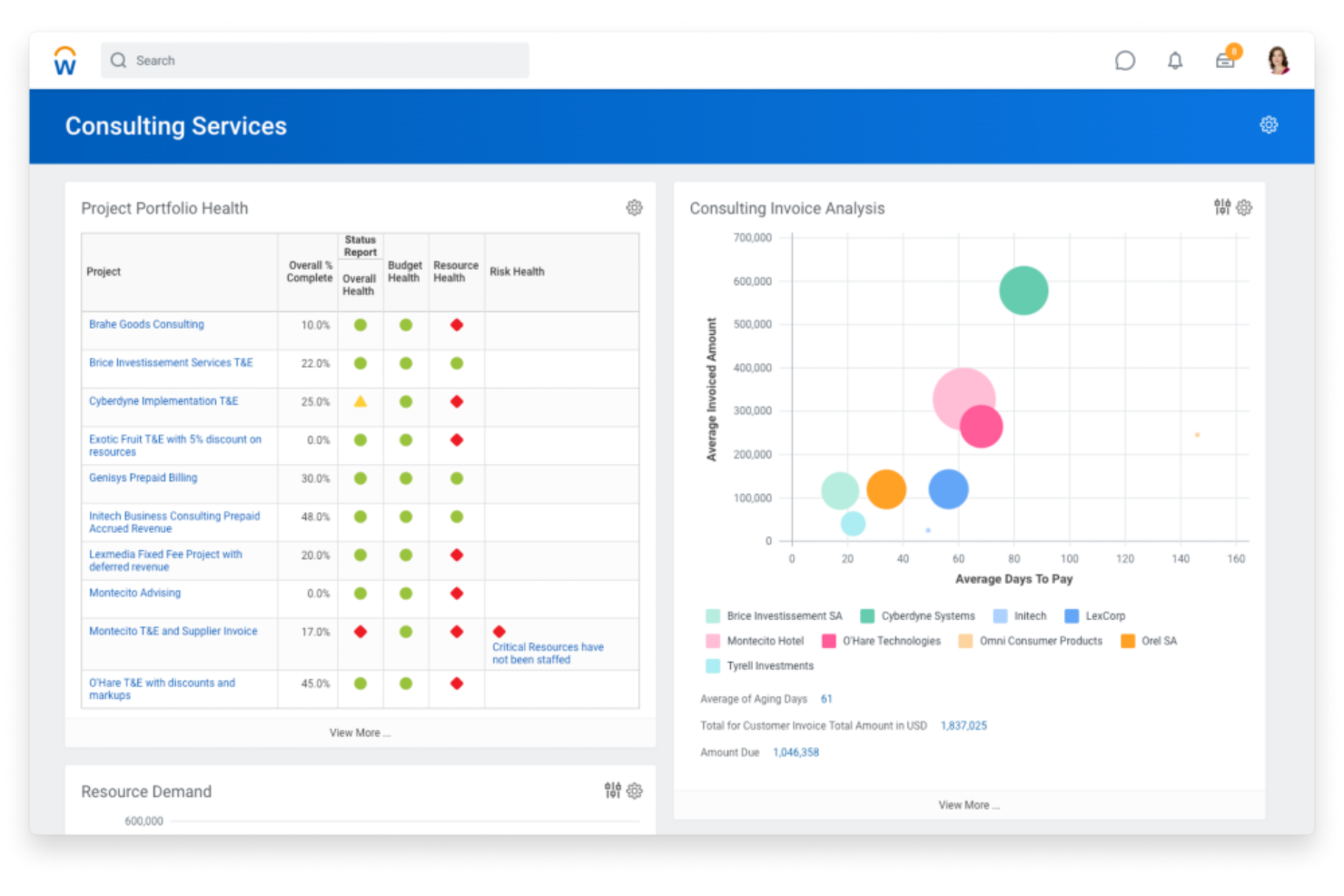
Workday PSA is an AI-powered professional services automation platform that combines project management, resource planning, time tracking, financials, and HR in a unified system.
Who Is Workday PSA Best For?
Workday PSA is a strong fit for large enterprises and global professional services organizations that need unified project, financial, and HR management.
Why I Picked Workday PSA
I picked Workday PSA as one of the best because I like how it brings AI-powered forecasting and unified project, financial, and HR data into a single platform. My team uses Workday PSA to automate resource allocation and track project profitability in real time. I rely on its built-in analytics to optimize staffing and manage utilization across global teams.
Workday PSA Key Features
- Project budgeting tools: Set, manage, and monitor project budgets in detail.
- Time and expense tracking: Capture billable hours and expenses directly within the platform.
- Role-based dashboards: Give users personalized views of project and resource data.
- Automated invoice generation: Create and send invoices based on project milestones or time entries.
Workday PSA Integrations
Workday PSA offers native integrations across the Workday ecosystem, including financial management, HR, and planning modules. Additional integrations are available through the Workday Marketplace, and an API is available for custom integrations.
Pros and Cons
Pros:
- Deep native integration with Workday Financial Management
- Automated time, expense, and billing workflows
- Unified project, financial, and HR data platform
Cons:
- Fewer options for niche industry requirements
- Limited integrations with non-Workday platforms

Productive
Best for agency management and analytics
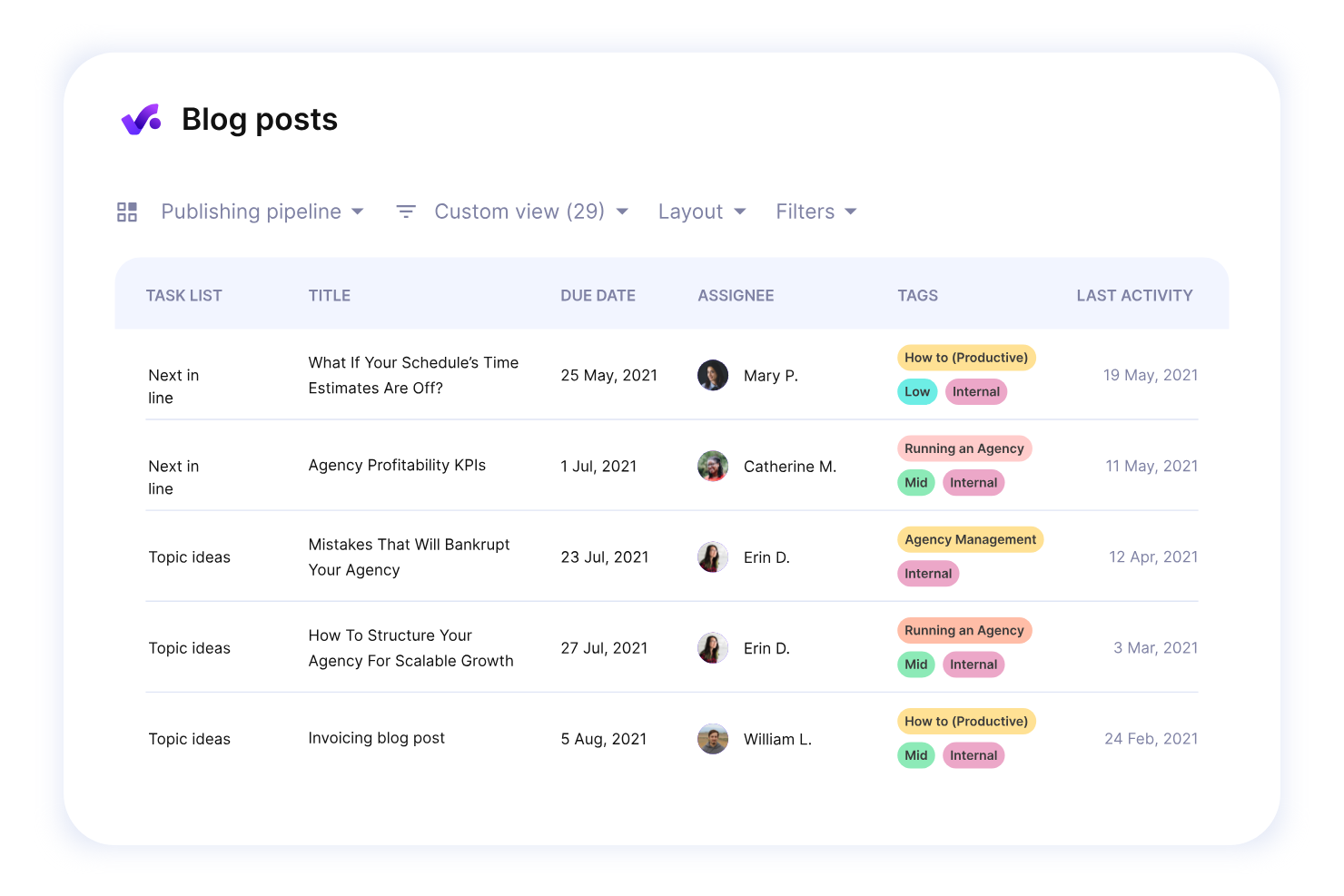
Productive is an agency management platform for professional services teams that combines project management, resource planning, budgeting, time tracking, and advanced analytics in one system.
Who Is Productive Best For?
Agencies and consultancies that need unified project, resource, and financial management in one platform.
Why I Picked Productive
I picked Productive as one of the best because I use its advanced reporting to drill into project profitability and resource utilization across my agency. I rely on its all-in-one approach to manage budgets, track billable hours, and handle invoicing without switching tools. The platform’s customizable dashboards let me surface the exact metrics my team needs for client and project reviews.
Productive Key Features
- Task management: Organize, assign, and track tasks for every project.
- Resource scheduling: Allocate team members to projects using a visual calendar.
- Document storage: Store and share project files within the platform.
- Client portal: Give clients access to project updates and deliverables.
Productive Integrations
Productive offers native integrations with Slack, Xero, QuickBooks, Google Calendar, and HubSpot, and provides an API for custom integrations.
Pros and Cons
Pros:
- Integrated document management and file sharing
- Automated time tracking with approval workflows
- Built-in sales pipeline and deal tracking
Cons:
- No built-in client-facing portal
- Limited advanced resource scheduling features
New Product Updates from Productive
Productive Adds Voice Dictation, Slack Connector, Proposals, and Overtime
Productive adds voice dictation, a Slack Connector, proposal controls, and overtime tracking. These updates support faster AI interactions, client proposals, and time management. For more information, visit Productive’s official site.
Annen AI-programvare for automatisering av profesjonelle tjenester
Her er noen andre alternativer for AI-programvare for automatisering av profesjonelle tjenester som ikke kom med på kortlisten min, men som likevel er verdt å se nærmere på:
- BigTime
For time tracking and billing
- SuperOps
For AI-driven MSP workflows
- Atera
For PSA with RMM tools
- BQE Core
For project accounting and billing
- HaloPSA
For all-in-one MSP management
- ConnectWise PSA
For IT service management workflows
- Autotask PSA
For cloud-based service desk management
- Planview PSA
For resource and financial planning
- Ruddr
For lightweight PSA for small teams
- NetSuite SuiteProjects
For PSA within NetSuite ERP


How I Evaluate AI Professional Services Automation Software
Every tool here has to prove its AI delivers real value—like smarter staffing, sharper margin forecasts, or faster project delivery. I evaluate in two layers: the core functionality a tool needs to qualify, and the differentiators that separate good picks from great ones.
Core Functionality (Table Stakes For This List)
When I'm selecting tools for my list, I rank each one on a scale from 0 (does not offer the functionality) to 5 (excels in this area) for each core functionality listed below. Then, I calculate the tool's total score into a percentage. Each tool needs to achieve a minimum total score of 65% to be considered for inclusion.
- AI-Driven Resource Optimization: I check whether the platform uses AI to recommend staffing based on skills, availability, and workload—like matching a senior cloud architect to a client engagement automatically.
- Project Automation & Forecasting: Each tool should automate project planning and use predictive models to forecast timelines and effort, not just offer static Gantt charts or manual task templates.
- Time & Billing Automation: I look for automated time capture tied to billing rules and client contracts, so consultants aren't manually logging hours and finance isn't chasing timesheets at month-end.
- Financial & Margin Intelligence: The platform should surface real-time profitability data per project or client, with AI-powered margin forecasting that flags at-risk engagements before they erode revenue.
- Predictive Risk & Analytics: I evaluate whether analytics go beyond static dashboards to proactively flag risks like utilization dips, scope creep, or delivery delays using AI models.
- Unified PSA Workflow Integration: Projects, resources, financials, and CRM data should live in one connected system—with integrations into tools like Salesforce, NetSuite, or QuickBooks to close data gaps.
Once I have a list of tools that meet the criteria, I consider what sets each platform apart.
Differentiating Factors (What Sets Vendors Apart)
Here's how I compare and contrast different vendors:
Standout Features
Scenario planning is a big differentiator—I look for tools that let you model what happens if a key consultant leaves mid-engagement or a new deal closes early. A strong skills intelligence graph also matters, since it keeps resource profiles current as people gain certifications or shift roles. I also evaluate whether a platform can auto-generate SOWs from historical project data, which saves delivery leads hours of drafting time on repeat engagements.
Beyond Features
AI transparency matters a lot in this space. When a platform recommends pulling a consultant off one project to staff another, I want to understand why—and so does leadership. I also evaluate how well a tool fits into an existing tech stack, especially connections to CRM and accounting systems like Salesforce or NetSuite. Implementation timelines are worth checking too, since PSA rollouts at mid-market and enterprise firms can stall without guided onboarding and prebuilt services templates.
Slik velger du AI-programvare for automatisering av profesjonelle tjenester
Det er lett å gå seg vill i lange funksjonslister og komplekse prismodeller. For å hjelpe deg med å holde fokus mens du går gjennom den unike prosessen med å velge programvare, får du her en sjekkliste over faktorer du bør ha i tankene:
| Faktor | Hva du bør vurdere |
|---|---|
| Skalerbarhet | Vil programvaren håndtere teamets vekst, nye tjenesteområder eller global ekspansjon uten store forstyrrelser eller kostnadsøkninger? |
| Integrasjoner | Kan den kobles direkte til kjernesystemene dine, for eksempel ERP, CRM, HR eller regnskap? Finnes det API-er eller koblinger for tilpassede arbeidsflyter? |
| Tilpasningsmuligheter | Kan du tilpasse arbeidsflyter, felt og instrumentpaneler slik at de passer til prosessene dine, eller er du begrenset til faste maler og strukturer? |
| Brukervennlighet | Vil teamet ditt ta i bruk verktøyet raskt, eller vil kompleks navigering og uklare arbeidsflyter forsinke den daglige driften og prosjektleveransen? |
| Implementering og opplæring | Hvor lang tid tar oppsettet, og hvilke ressurser kreves? Er verktøy for migrering, opplæring og leverandørstøtte inkludert i prosessen? |
| Kostnad | Er prisnivåene transparente og forutsigbare? Vær oppmerksom på skjulte gebyrer, minsteantall brukere eller ekstra kostnader for integrasjoner og brukerstøtte. |
| Sikkerhetstiltak | Oppfyller plattformen kravene dine til personvern, tilgangskontroll og revisjon? Se etter sertifiseringer og tydelig sikkerhetsdokumentasjon. |
| Tilgjengelig brukerstøtte | Er hjelp tilgjengelig når du trenger det – særlig i kritiske prosjektfaser? Se etter brukerstøtte døgnet rundt, dedikerte kontaktpersoner og responstider. |
Hva er AI-programvare for automatisering av profesjonelle tjenester?
AI-programvare for automatisering av profesjonelle tjenester er en digital plattform som bruker kunstig intelligens til å administrere prosjekter, ressurser, tidsregistrering, fakturering og rapportering for tjenestebaserte organisasjoner. Disse verktøyene hjelper team med å automatisere rutineoppgaver, optimalisere ressursfordelingen og få sanntidsinnsikt i prosjektresultater, lønnsomhet og utnyttelsesgrad.
Funksjoner i AI-programvare for automatisering av profesjonelle tjenester
Når du velger AI-programvare for automatisering av profesjonelle tjenester, bør du se etter følgende viktige funksjoner:
- AI-drevet ressursfordeling: Bruker maskinlæring til å sette de riktige personene på de riktige prosjektene basert på ferdigheter, tilgjengelighet og arbeidsbelastning.
- Automatisk tidsregistrering: Registrerer og logger arbeidstimer automatisk, noe som reduserer manuell registrering og forbedrer faktureringsnøyaktigheten.
- Prosjektbudsjettering og prognoser: Gir sanntidsoversikt over budsjettet og prediktiv analyse som hjelper team med å forutse overskridelser og styre kostnadene.
- Integrert fakturering og fakturautstedelse: Automatiserer oppretting og utsendelse av fakturaer basert på prosjektmilepæler, tidsregistreringer eller utgifter.
- Analyse av utnyttelsesgrad og lønnsomhet: Leverer oversikter og rapporter som viser hvordan ressursene brukes, og hvilke prosjekter som gir størst fortjeneste.
- Arbeidsflytautomatisering: Forenkler repetitive oppgaver som godkjenninger, varsler og dokumentdistribusjon for å spare tid og redusere feil.
- Tilpassbare oversikter: Lar brukerne tilpasse visninger og rapporter for å overvåke KPI-er, prosjektstatus og teamets resultater med et raskt blikk.
- Innebygde integrasjoner: Kobler seg direkte til sentrale forretningssystemer som ERP-, CRM- og HR-plattformer for enhetlig datahåndtering.
- Mobil tilgang: Gjør det mulig for teammedlemmer å administrere oppgaver, registrere tid og godkjenne utgifter fra hvilken som helst enhet, noe som støtter fjernarbeid og arbeid på farten.
- Rollebaserte tillatelser: Styrer tilgangen til sensitive data og funksjoner, slik at de riktige personene bare ser og gjør det de har tillatelse til.
Fordeler med AI-programvare for automatisering av profesjonelle tjenester
Implementering av AI-programvare for automatisering av profesjonelle tjenester gir flere fordeler for teamet og virksomheten din. Her er noen av fordelene du kan se frem til:
- Bedre prosjektoversikt: Sanntidsoversikter og analyser gir deg et tydelig bilde av prosjektstatus, ressursutnyttelse og økonomiske resultater.
- Raskere og mer nøyaktig fakturering: Automatisk tidsregistrering og fakturering reduserer manuelle feil og fremskynder faktureringssyklusen.
- Optimalisert ressursfordeling: AI-drevet planlegging sikrer at de riktige personene tildeles de riktige prosjektene basert på ferdigheter og tilgjengelighet.
- Redusert administrativ arbeidsbelastning: Arbeidsflytautomatisering håndterer repetitive oppgaver som godkjenninger og varsler, slik at teamet får mer tid til arbeid med høyere verdi.
- Bedre prognoser og planlegging: Prediktiv analyse hjelper deg med å forutse prosjektrisiko, budsjettoverskridelser og ressursmangel før de blir problemer.
- Bedre dataintegrasjon: Innebygde integrasjoner med ERP-, CRM- og HR-systemer sentraliserer dataene dine og fjerner datasiloer på tvers av team.
- Bedre samsvar og sikkerhet: Rollebaserte tillatelser og revisjonsspor bidrar til å beskytte sensitiv informasjon og oppfylle regulatoriske krav.
Kostnader og priser for AI-programvare for automatisering av profesjonelle tjenester
Valg av AI-programvare for automatisering av profesjonelle tjenester krever en forståelse av de ulike prismodellene og abonnementene som er tilgjengelige. Kostnadene varierer basert på funksjoner, teamstørrelse, tillegg og mer. Tabellen nedenfor oppsummerer vanlige abonnementer, gjennomsnittsprisene deres og typiske funksjoner som er inkludert i løsninger for AI-programvare for automatisering av profesjonelle tjenester:
Sammenligningstabell for abonnementer for AI-programvare for automatisering av profesjonelle tjenester
| Abonnementstype | Gjennomsnittspris | Vanlige funksjoner |
|---|---|---|
| Gratisabonnement | $0 | Grunnleggende prosjektoppfølging, begrenset antall brukere, enkel tidsregistrering og e-poststøtte. |
| Personlig abonnement | $10-$25/bruker/måned | Tilgang for én bruker, grunnleggende prosjektstyring, tids- og utgiftsregistrering samt grunnleggende rapportering. |
| Bedriftsabonnement | $30-$60/bruker/måned | Støtte for flere brukere, ressursplanlegging, automatisk fakturering, integrasjoner, avansert analyse og mobil tilgang. |
| Virksomhetsabonnement | $70-$150/bruker/måned | Tilpassede arbeidsflyter, AI-drevne prognoser, avansert sikkerhet, dedikert kundestøtte, API-tilgang og verktøy for samsvar. |
Vanlige spørsmål om programvare for AI-automatisering av profesjonelle tjenester
Her er noen svar på vanlige spørsmål om programvare for AI-automatisering av profesjonelle tjenester:
Hvordan forbedrer AI programvare for automatisering av profesjonelle tjenester?
AI forbedrer programvare for automatisering av profesjonelle tjenester ved å automatisere repetitive oppgaver, forutsi ressursbehov og gi sanntidsinnsikt i prosjektresultater. Dette hjelper team med å ta bedre beslutninger, redusere manuelt arbeid og øke den samlede effektiviteten.
Kan programvare for AI-automatisering av profesjonelle tjenester integreres med de eksisterende verktøyene mine?
Ja, de fleste løsninger for AI-automatisering av profesjonelle tjenester tilbyr integrasjoner med populære ERP-, CRM-, HR- og regnskapssystemer. Sjekk alltid om det finnes integrasjoner eller tilgjengelige API-er for å sikre kompatibilitet med den nåværende teknologiske plattformen din.
Passer programvare for AI-automatisering av profesjonelle tjenester for små team?
Ja, mange løsninger tilbyr fleksible abonnementer og funksjoner som fungerer godt for små team. Se etter plattformer med enkel oppstart, skalerbare priser og viktige automatiseringsfunksjoner som ikke krever et eget IT-team for administrasjon.
Hvilke sikkerhetstiltak bør jeg forvente fra disse plattformene?
Du bør forvente funksjoner som rollebaserte tillatelser, datakryptering, revisjonsspor og samsvar med bransjestandarder som SOC 2 eller GDPR. Gå alltid gjennom leverandørens sikkerhetsdokumentasjon før du tar en beslutning.
Hvor lang tid tar det å implementere programvare for AI-automatisering av profesjonelle tjenester?
Implementeringstiden varierer etter plattform og organisasjonens størrelse. Små team kan ofte komme i gang i løpet av noen dager, mens større organisasjoner kan trenge flere uker til datamigrering, integrasjoner og opplæring av brukere.