

10 beste programmer for regnskapsprosjektstyring i 2026

10 Kortliste over den beste programvaren for prosjektstyring innen regnskap


Programvare for prosjektstyring innen regnskap lar deg følge prosjektøkonomi, budsjetter og fremdrift i sanntid, slik at du kan holde budsjetter og tidsplaner under kontroll og ta veloverveide beslutninger fra start til slutt. Uten riktig verktøy får du ikke en tydelig oversikt over prosjektkostnader, fakturaer og lønnsomhet, og prosjektet vil sannsynligvis overskride budsjettet.
Jeg har brukt mer enn 15 års erfaring med prosjektledelse til å teste og evaluere dusinvis av verktøy for prosjektstyring innen regnskap i praksis. Med så mange tilgjengelige alternativer kan det raskt bli overveldende å finne det som passer best.
Les analysen min av hvert verktøy, de viktigste funksjonene og bruksområdene nedenfor for å finne det riktige verktøyet som kan hjelpe deg med å holde øye med budsjettbruken, prosjektutgifter og fakturering, slik at du kan holde prosjektene (og organisasjonen din) lønnsomme.
Why Trust Our Software Recommendations
Our team has been testing and reviewing software since 2012. As project managers ourselves, we know how difficult—and important—it is to choose the right software.
For this guide, we evaluated tools using hands-on testing and independent research, scoring tools using our selection criteria. We also draw on insights from industry thought leaders and practicing project management experts.
Our reviews reflect our human editorial judgment, not a sales pitch.
Expert reviewers:
Sammenligningstabell for programvare for prosjektstyring innen regnskap
Denne sammenligningstabellen oppsummerer prisopplysningene for mine beste utvalgte verktøy for prosjektstyring innen regnskap:
| Tool | Best For | Trial Info | Price | ||
|---|---|---|---|---|---|
| 1 | Best for invoicing and billing | 14-day free trial | From $17/user/month | Website | |
| 2 | Best with AI-powered profitability insights | 14-day free trial | From $10/user/month (billed annually) | Website | |
| 3 | Best for managing accounting firm client work | Free demo available | From $79/user/month | Website | |
| 4 | Best for tracking expenses vs total budget | Free plan + 14-day free trial available | From $9.99/user/month (billed annually) | Website | |
| 5 | Best for tracking multiple accounts | Free demo available | From £1,200/month | Website | |
| 6 | Best for enterprises | Free demo available | Pricing upon request | Website | |
| 7 | Best for client and resource management features | Free trial + free demo available | From $29/user/month (billed annually) | Website | |
| 8 | Best for construction job costing and GL sync | Not available | Pricing upon request | Website | |
| 9 | Best for WIP visibility at accounting firms | Free demo available | From $20/user/month | Website | |
| 10 | Best for professional services automation | Free demo available | Pricing upon request | Website |


Anmeldelser av den beste programvaren for prosjektstyring innen regnskap
Nedenfor finner du detaljerte sammendrag av mine anbefalinger for den beste programvaren for prosjektstyring innen regnskap. Jeg gjennomgår de viktigste funksjonene, fordeler & ulemper, integrasjoner og ideelle bruksområder for hvert verktøy for å hjelpe deg med å finne det som passer best.

Scoro
Best for invoicing and billing

Scoro is a versatile work management software designed to enhance business operations by integrating project management, CRM, billing, and reporting into one platform.
Why I picked Scoro: The software offers real-time financial insights, allowing users to track project profitability and manage budgets effectively. Its automated invoicing and expense tracking capabilities simplify the financial aspects of project management, ensuring accuracy and reducing manual work.
Furthermore, Scoro’s integrated billing and cost management features are specifically beneficial for project management. The software allows for tracking of billable and non-billable hours, ensuring accurate client billing. Its cost management tools also help monitor and control project expenses, preventing budget overruns.
Scoro Standout Features & Integrations
Features include reporting and analytics for your agency's operations as a whole (rather than just per-project), which provides insights into progress, results, and future outlook in financials and agency performance. The tool also includes automatic retainer invoicing so you get paid faster and stay profitable.
Integrations include Google Calendar, Xero, QuickBooks, Sage Intacct, Exact Online, Expensify, Stripe, Jira, HubSpot, Salesforce, Google Drive, Dropbox, Okta, Azure AD, and Zapier.
Pros and Cons
Pros:
- Comprehensive features for end-to-end business management
- Good resource management capabilities
- Real-time tracking of projects and team progress
Cons:
- Mobile app could be more robust
- Customization options may present an initial learning curve
New Product Updates from Scoro

Scoro Adds Time Mobile App and ELI Improvements
Scoro adds the Scoro Time mobile app for iOS/Android to track time anywhere and expands ELI with attachments, smarter filtering, and trigger-based actions. For more information, visit Scoro's official site.

Best with AI-powered profitability insights
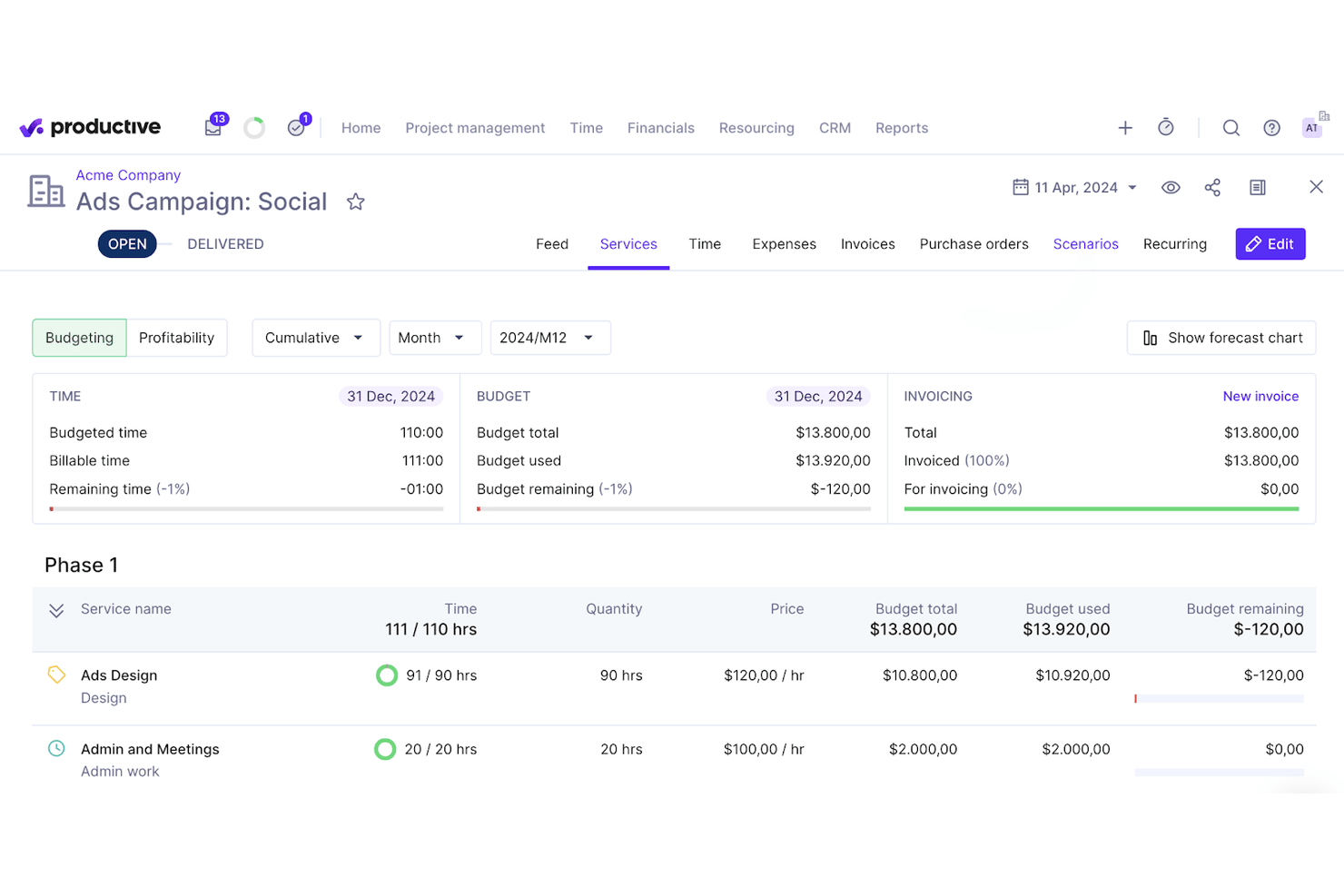
Productive is a professional services automation platform that combines project management, resource planning, time tracking, budgeting, invoicing, and AI-powered financial reporting in a single system built for service-based firms.
Who Is Productive Best For?
Productive is a strong fit for mid-market accounting firms and client accounting services practices managing multiple client engagements, billable staff, and project budgets simultaneously.
Why I Picked Productive
Productive earns its spot on my shortlist because of how tightly it connects time, budget, and profitability data at the project level. I love that its AI Reporting surfaces margin insights by client, service, or resource without me having to build custom reports from scratch. The Scenario Builder lets me model revenue forecasts before committing to staffing decisions, so I can see the financial impact of adding or removing headcount on a client account before it happens.
Productive Key Features
- Resource planning: Assign staff, track availability, and adjust workloads across multiple client projects.
- Time off management: Monitor team leave and automate approvals to ensure accurate capacity planning.
- Billing and invoicing: Generate client-ready invoices from tracked billable hours and expenses.
- Advanced reporting: Build and export custom project, financial, and utilization reports for firm-wide insights.
Productive Integrations
Productive offers over 15 native integrations, including QuickBooks Online, Xero, Sage, Slack, Jira, Google Calendar, HubSpot CRM, Personio, BambooHR, Gusto, Rippling, and Microsoft Outlook. An API is available for custom integrations.
Pros and Cons
Pros:
- Built-in client portal for document sharing
- AI-powered profitability and revenue analytics
- Resource planning with real-time utilization charts
Cons:
- Limited tax preparation functionality
- No prebuilt accounting workflow templates
New Product Updates from Productive
Productive Adds Voice Dictation, Slack Connector, Proposals, and Overtime
Productive adds voice dictation, a Slack Connector, proposal controls, and overtime tracking. These updates support faster AI interactions, client proposals, and time management. For more information, visit Productive’s official site.

Karbon
Best for managing accounting firm client work
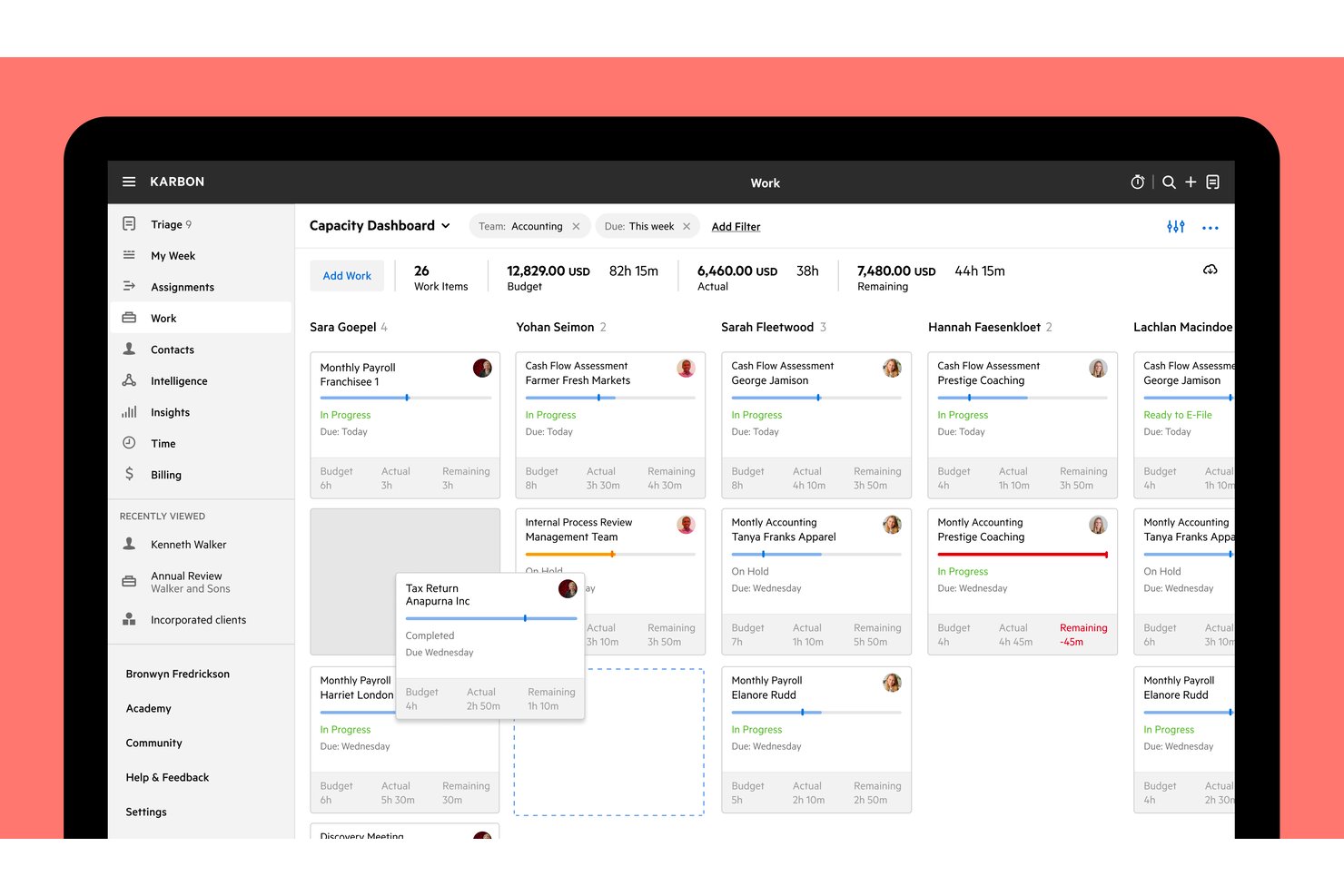
Karbon is accounting practice management software built specifically for accounting firms, combining client work tracking, integrated email management, time and billing, workflow automation, and WIP reporting in one platform.
Who Is Karbon Best For?
Karbon is built for accounting firms that need to manage client work, billing, and team workflows in one place.
Why I Picked Karbon
Karbon earns its spot on my shortlist because it's purpose-built around how accounting firms actually run client work. I love that WIP and realization reporting live inside the same workspace as project tracking, so I can see which engagements are over budget and what's still unbilled without switching tools. Recurring work templates with filing deadlines let my team automate the entire scheduling cycle for tax season deliverables, linking each new work item to the right client folder automatically.
Karbon Key Features
- Client portal: Gives clients a dedicated space to complete requests, upload documents, and view outstanding tasks linked directly to active work items.
- Engagement letter builder: Creates proposals with services, pricing, terms, and digital signatures, then converts signed engagements into work plans automatically.
- Kai AI daily briefing: Surfaces a start-of-day summary of unread emails, blocked work, overdue items, and open client requests in one view.
- Granular user permissions: Controls access to billing, dollar amounts, timesheets, contact data, and reporting separately for each team member.
Karbon Integrations
Karbon offers 80+ native integrations, including QuickBooks Online Accountant, Xero, ProConnect, Dext, Dropbox, Microsoft SharePoint, and Google Drive. Its API and webhooks support custom connections, and Zapier is also available.
Pros and Cons
Pros:
- Recurring templates organize deadlines and requests
- WIP and budget reporting support oversight
- Client work and email stay contextualized
Cons:
- Some clients find portal tasks unintuitive
- Workflow setup takes time and precision

Best for tracking expenses vs total budget
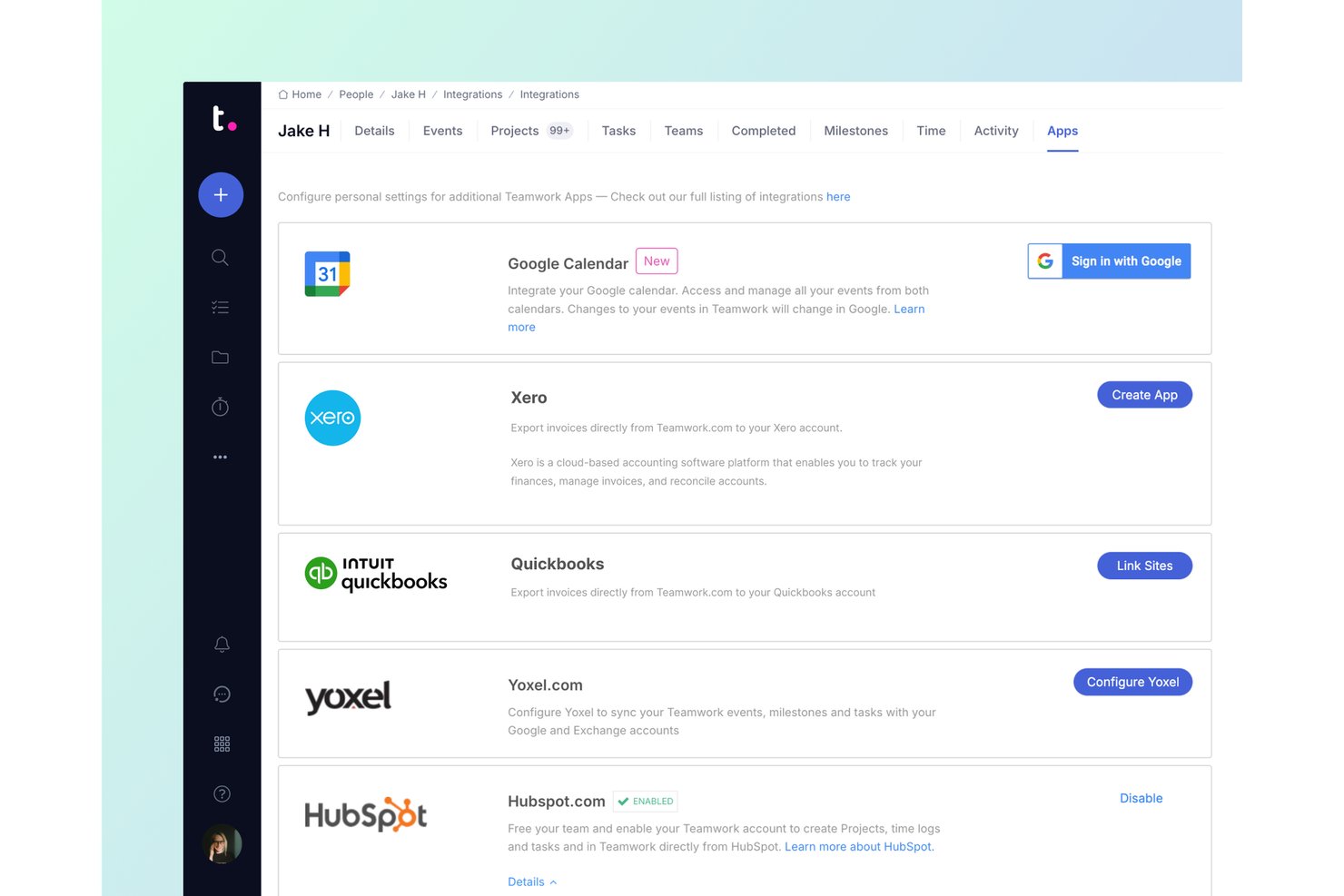
Teamwork.com is a project management platform built for client work that combines project tracking, time tracking, budget management, invoicing, and profitability reporting.
Who Is Teamwork.com Best For?
Teamwork.com is a strong fit for professional services teams that need to track project expenses against total budgets while managing client billing and time in one place.
Why I Picked Teamwork.com
I picked Teamwork.com as one of the best because it's the only tool on my list that lets you track expenses directly against a total project budget, giving you a live view of cost versus budget in the project header as spending accumulates. I especially like its Profitability report, which calculates margin as billable hours multiplied by rates, minus logged costs and eligible expenses, so you can see exactly where a project is bleeding money before it's too late. The budget-threshold notifications also mean you don't have to check in manually to know when a project is approaching its limit.
Teamwork.com Key Features
- Native time tracking: Log billable and non-billable time using timers, timesheets, and reminders directly within projects.
- Client invoicing: Build invoices from logged time and expenses, or create fixed-price invoices with optional purchase-order numbers.
- Custom billable rates: Set cost and billable rates per team member, role, project, or client to support varied pricing structures.
- QuickBooks Online integration: Export project invoices to QuickBooks Online and stream billable-time details in real time with the Advanced integration.
Teamwork.com Integrations
Teamwork.com offers 150+ integrations, including native QuickBooks Online, Xero Online, Xero File, NetSuite, Harvest, FreshBooks Classic, and Blinksale connections. Its API and webhooks support custom integrations.
Pros and Cons
Pros:
- Reviewers praise unified client project workflows
- Connects billable hours directly to invoices
- Tracks expenses against project budgets
Cons:
- Client file exchange gaps frustrate accounting firms
- Financial reports are plan-gated and delayed

Best for tracking multiple accounts
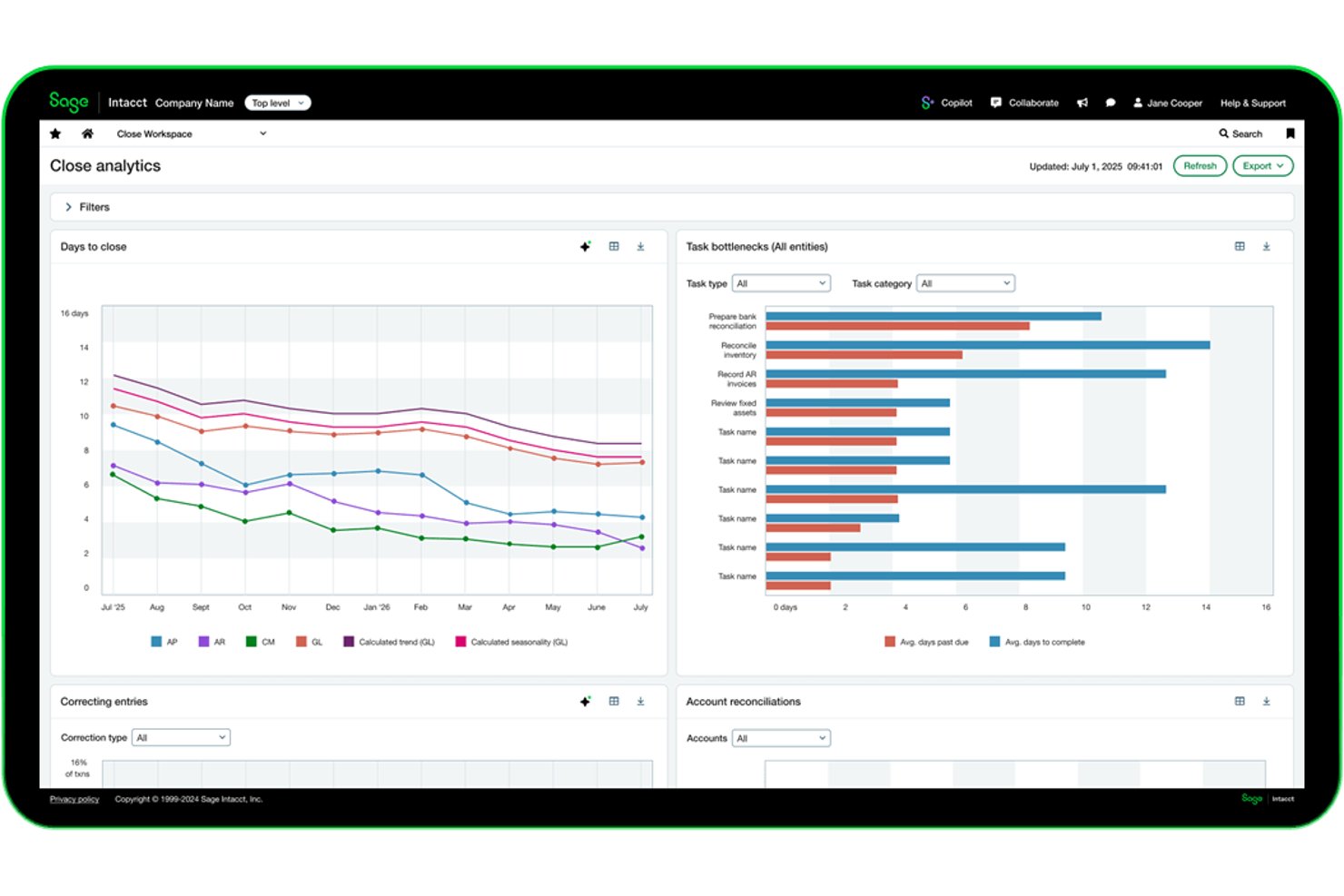
Sage Intacct is a cloud-based financial management and accounting platform that covers project budgeting, multi-entity reporting, project costing and billing, time tracking, and revenue recognition across multiple client engagements.
Who Is Sage Intacct Best For?
Sage Intacct suits finance managers at mid-sized, project-based businesses who need to track budgets, costs, and billing across multiple concurrent client engagements.
Why I Picked Sage Intacct
I picked Sage Intacct as one of the best because it genuinely shines when you're juggling finances across multiple concurrent client accounts. Its multi-entity reporting gives you a consolidated view across all your projects while still letting you drill into individual entity-level data in real time. I also love how project billing lets you combine different billing terms, like time and materials on one engagement and fixed fees on another, into a single consolidated invoice.
Sage Intacct Key Features
- AI-assisted timesheet suggestions: Sage Intelligent Time pulls from your calendar, emails, and work activity to propose timesheet entries for review before submission.
- Dimension-based reporting: Tag transactions with multiple dimensions to slice financial and project data across clients, departments, or business entities.
- Revenue recognition scheduling: Separate revenue recognition schedules from billing schedules, using milestones, percentage completion, or project completion methods.
- Automated allocations: Automatically split costs across projects, departments, or entities using predefined rules to support organisational performance analysis.
Sage Intacct Integrations
Sage Intacct offers marketplace integrations with Salesforce, HubSpot, Tipalti, Expensify, Stripe, GoCardless, and Shopify, with over 100 connected apps and business tools. REST, Web Services, and Zapier integrations support custom connectivity.
Pros and Cons
Pros:
- Project dashboards show real-time budget variances
- Supports mixed billing across client projects
- Consolidates multi-entity financial reporting
Cons:
- Migration and setup can require outside help
- Timesheet suggestions still require manual review

Best for enterprises

NetSuite's project management platform is part of a larger suite of enterprise management tools, making it a good solution for mid-size and larger teams.
Why I picked Oracle NetSuite: In some cases, NetSuite's large suite of tools may be overkill for accounting projects and teams. However, I picked this platform because it offers some functions that aren't available in other tools and may be ideal for enterprises or even fast-growing accounting start-ups that are looking at an enterprise future. When it comes to projects, NetSuite supports both agile and traditional methodologies for high levels of flexibility.
Some of the features that make NetSuite unique on this list include idea management, prioritization, templates, and workflows designed around popular agile methods. Accounting teams that are part of larger organizations can use this platform to work well with other departments and external stakeholders. NetSuite can be more expensive than other tools on the list and may require more in-house tech support, which is another reason it tends to work better for larger organizations.
Tool Standout Features and Integrations
Features include analytics and reporting features that provide comprehensive insights into resource utilization, so you can identify inefficiencies and make informed decisions. The tool’s integrated financial and operational dashboards also give you a unified view of costs, timelines, and resources.
Integrations include all compatible NetSuite software products. You may also be able to use third-party tools to connect other apps.
Pros and Cons
Pros:
- Customizable processes
- Works for larger enterprises
- Robust project management
Cons:
- Limited customer and tech support
- Steep learning curve
- Relatively expensive

Ravetree
Best for client and resource management features

Ravetree is an all-in-one work management platform that covers not just project management, but client management and resource planning, too.
Why I picked Ravetree: This software made my list because of its capacity to centralize various aspects of your work management. In addition to project planning and task management tools, it also offers a built-in CRM, customer portals, and resource allocation features. For accounting firms and accountants working with multiple clients, this makes it a good choice.
Project management features specifically include breaking projects into tasks that can then be assigned to specific team members, and outlined with action items and checklists. You can also save your project plans as templates for reuse. Team members receive notifications regarding their upcoming tasks, and you can keep an eye on resource utilization with a timeline view. Time tracking is also included, allowing you to break down your estimates vs. time spent on specific projects and tasks. This data can then be used to inform your future planning.
Ravetree Standout Features & Integrations
Features include a suite of capabilities to help teams better collaborate, like board views and workflows that you can customize to better support the way your team works and hands off tasks to each other. The tool also includes a forecasting feature that you can use to determine project budgets based on required resources and time.
Integrations include Box, Dropbox, Facebook, HubSpot, Instagram, Github, Google Drive, Gmail, OneDrive, Outlook, QuickBooks, and Stripe.
Pros and Cons
Pros:
- Video and chat support
- Project, resource, and finance management in one
- Personalized onboarding
Cons:
- Limited internal communication tools
- Large feature set comes with a learning curve

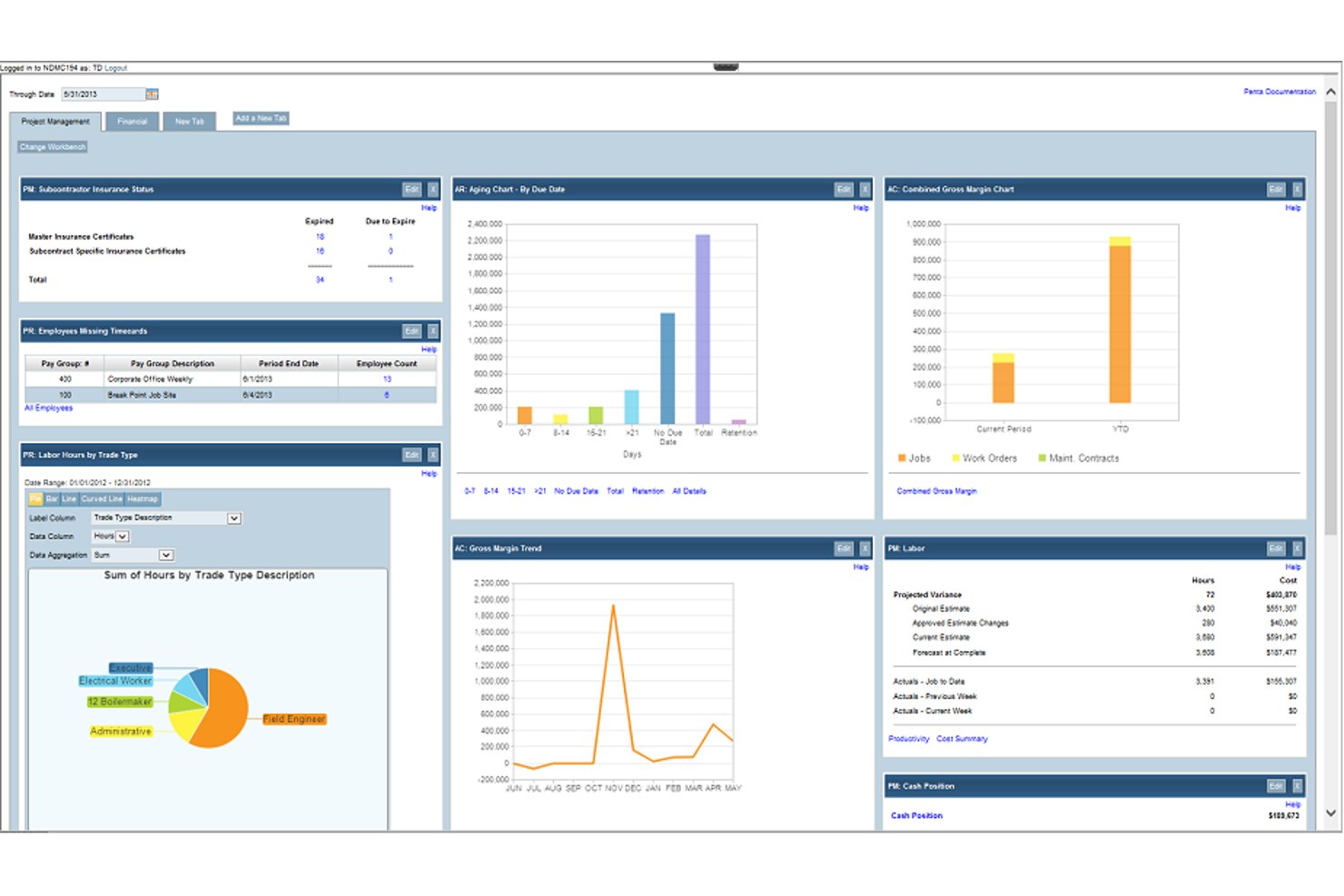
PENTA Project Accounting is a construction ERP that brings together job costing, financial management, payroll, field service, and GL integration in a single platform for contractors.
Who Is PENTA Project Accounting Best For?
PENTA Project Accounting is built for mid-sized to large contractors who need job costing, payroll, and GL management in one connected system.
Why I Picked PENTA Project Accounting
I picked PENTA Project Accounting as one of the best because its job costing and GL sync work together in a way that's hard to replicate without a construction-specific ERP. Job costs from payroll, AP, AR, and purchasing hit the general ledger in real time the moment timecards are approved, so there's no manual reconciliation step. I also like that you can compare actuals against estimates at the job, phase, or cost-code level, with automated forecast-at-complete updating continuously as costs come in.
PENTA Project Accounting Key Features
- Multi-level financial reporting: Drill down across parent/child job hierarchies to view financial performance at any level of your project structure.
- Prevailing wage and multi-union payroll: Automatically applies configured wage rules, fringe-by-fringe calculations, and union reciprocity rules to payroll runs.
- Intelligent field service dispatching: Schedules and assigns technicians based on skills, location, and real-time availability directly within the platform.
- PentaConnect APIs: Open APIs let you connect Penta to external systems, with named integrations including Procore, SAP Concur, and Avalara AvaTax.
PENTA Project Accounting Integrations
PENTA Project Accounting offers documented integrations with Procore, SAP Concur, Avalara AvaTax, Hyland OnBase, REQUORDIT, DTI, Rhumbix, and XOi Vision. PentaConnect APIs support custom integrations.
Pros and Cons
Pros:
- Profitability reporting spans jobs and contracts
- Real-time forecasting flags cost overruns early
- Job-cost visibility links spending to project status
Cons:
- Clean financial exports can require multiple reports
- Slow loading delays time and cost review

BigTime
Best for WIP visibility at accounting firms
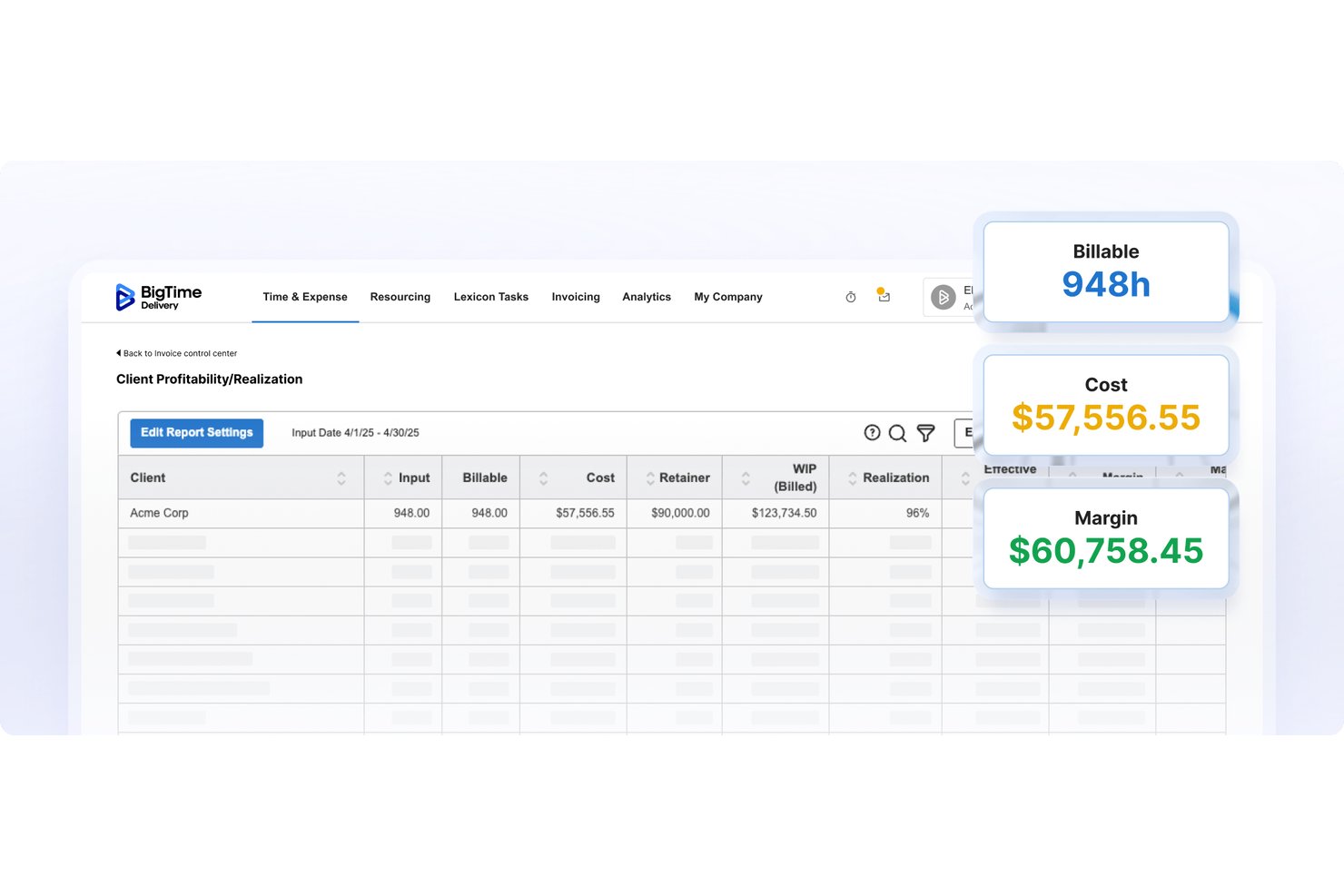
BigTime is a professional services automation platform built for accounting firms that combines time tracking, project budgeting, WIP reporting, invoicing, and accounting system integration in one place.
Who Is BigTime Best For?
BigTime is a strong fit for accounting firms that need to track billable time, manage engagement budgets, and keep WIP visible across multiple client projects.
Why I Picked BigTime
BigTime earns its spot on my shortlist because of how it surfaces WIP across every engagement in one place. I particularly like the real-time dashboards for realization, utilization, and unbilled work, which let accounting firm partners see exactly where time has been logged but not yet invoiced. The budget-versus-actuals tracking ties each engagement fee to actual submitted time and expenses, so nothing slips through before billing. That level of WIP visibility is genuinely rare in tools built for accounting firm workflows.
BigTime Key Features
- Multi-level approvals: Lets you configure approval workflows for time, expenses, and invoices across staff, project leads, and partners before billing.
- QuickBooks and Sage Intacct integration: Syncs time entries and invoices bidirectionally with your accounting system to keep project and financial data aligned.
- Resource demand and capacity planning: Maps staff availability, skills, and cost rates against project demand so you can allocate the right people before conflicts arise.
- Client portal payments: Gives clients a secure landing page to schedule and process invoice payments directly, with card data handled by a Level 1 PCI-compliant processor.
BigTime Integrations
BigTime offers native integrations with QuickBooks Online and QuickBooks Desktop, plus integrations with Sage Intacct, Xero, NetSuite, Lacerte, and Microsoft Business Central. Its REST API supports custom integrations.
Pros and Cons
Pros:
- Project time entries feed billing
- Budget-to-actual reporting helps flag overruns
- Engagement-level WIP surfaces unbilled work
Cons:
- Invoice calculations and payment balances sometimes misreport
- Custom reports can take extra work

Accelo
Best for professional services automation

Accelo is a cloud-based client work management platform designed for professional service businesses, including accounting firms. It integrates various business processes—such as project management, time tracking, and billing—into a single system.
Why I picked Accelo: Accelo offers built-in time tracking that automatically records time spent on emails, meetings, and tasks, ensuring accurate billing without manual entry. This feature helps your team focus on client work while maintaining precise records for invoicing. It also automates various other tasks, like converting quotes to projects and billing.
Additionally, Accelo provides a secure client portal where clients can access quotes, retainer usage, and billing history. This transparency enhances client trust and reduces the need for back-and-forth communications, allowing your team to concentrate on delivering quality services.
Accelo Standout Features & Integrations
Features include robust reporting tools that capture data across the entire client journey, offering a comprehensive view of your firm's financial health. Custom triggers allow you to automate workflows tailored to your team's specific processes, increasing efficiency. The platform also supports recurring work management.
Integrations include Google Workspace, Microsoft 365, Microsoft Exchange & Microsoft Outlook, Xero, QuickBooks Online, HubSpot, Mailchimp, Salesforce, Zapier, Microsoft Power BI, Expensify, Gusto, and Google Analytics.
Pros and Cons
Pros:
- Customizable to fit various project workflows
- Real-time insights into business and project performance
- Automated time tracking features
Cons:
- Could offer more integrations
- No free trial to test out the platform
New Product Updates from Accelo

Accelo Rebuilds Mobile App for Project and Time Management
Accelo rebuilds its mobile app with task management, new work creation, and mobile timesheets for Forecast customers. This helps teams keep project and time data current while working away from a desktop. For more information, visit Accelo’s official site.
Annen programvare for prosjektstyring innen regnskap
Her er noen flere alternativer som ikke kom med på topplisten min, men som likevel er verdt å vurdere.
- ProWorkflow
For cost tracking and invoicing
- Kantata
For stakeholder collaboration
- FreshBooks
For billing clients by project time and costs
- TaxDome
For automating tax firm workflows
- Financial Cents
For time-to-invoice billing at accounting firms
- Firm360
For accounting firm WIP and realization tracking
- Canopy
For accounting firm WIP and billing
- Slash
For spend management and analytics
- Accounting Seed
For Salesforce-native project billing


Relaterte anmeldelser av programvare for prosjektstyring
Hvis du fortsatt ikke har funnet det du leter etter her, kan du se nærmere på disse verktøyene som er nært beslektet med programvare for prosjektstyring innen regnskap, og som vi har testet og evaluert.
- Programvare for prosjektstyring
- Programvare for ressursstyring
- Programvare for tidsregistrering
- Programvare for oppgavestyring
- Produktivitetsverktøy
- Programvare for prosjektsporing
- Verktøy for forretningsinnsikt (BI)
- Faktureringsverktøy for digitale byråer
- Den beste programvaren for prosjektstyring med fakturering
- Programvare for prosjektstyring for regnskapsførere
How I Evaluate Accounting Project Management Software
I evaluate tools on two layers: the baseline must-haves like client-level project tracking and recurring tax workflows, and the differentiators that set the best options apart for CPA firms.
Core Functionality (Table Stakes For This List)
When I'm selecting tools for my list, I rank each one on a scale from 0 (does not offer the functionality) to 5 (excels in this area) for each core functionality listed below. Then, I calculate the tool's total score into a percentage. Each tool needs to achieve a minimum total score of 65% to be considered for inclusion.
- Client Engagement Tracking: I check whether each tool lets you organize projects by client, so you can pull up a full history of engagements—past returns, audits, and advisory work—in one place.
- Accounting Workflow Templates: Prebuilt templates for recurring processes like month-end close, tax prep, or audit fieldwork matter here. I look for templates you can customize and reuse each cycle.
- Time & Billing Integration: I evaluate how tightly time tracking connects to billable rates, budgets, and invoicing so staff can log hours on a client engagement and flow that data into a bill.
- Task & Deadline Management: Each tool should let you assign tasks, set due dates, and flag compliance deadlines. I look for features like dependency tracking and automated reminders for filing dates.
- Accounting Software Integrations: Connections to platforms like QuickBooks, Xero, and major tax prep tools are key. I evaluate the depth of each integration—whether it syncs data or just exports.
- Capacity & Resource Planning: I look at how well a tool shows staff availability and workload so managers can balance assignments across engagements during peak periods like tax season.
Once I have a list of tools that meet this criteria, I consider what sets each platform apart.
Differentiating Factors (What Sets Vendors Apart)
Here's how I compare and contrast different vendors:
Standout Features
A compliance calendar that maps filing deadlines across jurisdictions keeps firms from juggling separate spreadsheet trackers. I also evaluate whether a tool includes automated PBC request lists—during tax season, sending structured document requests with built-in client reminders saves hours of follow-up. Realization and WIP dashboards are another factor I weigh, since partners want real-time visibility into engagement profitability rather than waiting for month-end reports.
Beyond Features
Firm size and fit matters a lot here. A solo practitioner managing a handful of clients has very different needs than a multi-office firm with dozens of staff—I look at whether pricing scales reasonably and whether the tool handles growing client volumes. Security is another area I evaluate closely, since these platforms store sensitive financial data. I check for SOC 2 certification and role-based permissions. Implementation support also makes a difference, especially for firms moving off spreadsheets for the first time and needing guided onboarding.
Slik velger du programvare for prosjektstyring innen regnskap
Det er lett å gå seg vill i lange funksjonslister og komplekse prismodeller. For å hjelpe deg med å holde fokus mens du arbeider deg gjennom din unike prosess for valg av programvare, får du her en sjekkliste over faktorer du bør ha i mente:
| Faktor | Hva du bør vurdere |
|---|---|
| Skalerbarhet | Pass på at programvaren kan vokse med virksomheten din og håndtere flere brukere, prosjekter og data uten at det går ut over ytelsen. |
| Integrasjoner | Se etter verktøy som kan integreres med regnskapsverktøyene dine, ERP-systemet og andre kritiske forretningssystemer for å unngå manuell dataregistrering. |
| Tilpasningsmuligheter | Velg programvare som lar deg tilpasse arbeidsflyter, oversikter og rapporter etter teamets unike behov og preferanser. |
| Brukervennlighet | Velg et brukervennlig grensesnitt med enkel navigering, slik at teamet raskt kan ta det i bruk uten omfattende opplæring. |
| Budsjett | Finn en løsning som passer budsjettet ditt og gir en god balanse mellom nødvendige funksjoner og langsiktig verdi. Vær oppmerksom på skjulte kostnader. |
| Sikkerhetstiltak | Kontroller at programvaren har robuste sikkerhetsfunksjoner, som datakryptering og brukertillatelser, for å beskytte økonomisk informasjon. |
| Rapporteringsverktøy | Pass på at programvaren tilbyr tilpassbare rapporter for å følge prosjektfremdrift og økonomiske resultater. |
| Støttealternativer | Bekreft at leverandøren tilbyr pålitelig kundestøtte gjennom flere kanaler, for eksempel direktechat, e-post eller telefon, slik at du kan løse problemer raskt. |
Hva er programvare for regnskaps- og prosjektstyring?
Programvare for regnskaps- og prosjektstyring er et verktøy som lar deg følge økonomien og administrere prosjekter samlet. Regnskapsførere, prosjektledere og bedriftseiere bruker det til å håndtere budsjetter, utgifter og fakturering, samtidig som de holder oversikt over prosjektfrister.
Med funksjoner for å følge økonomi og prosjektoppgaver på ett sted kan du se nøyaktig hvor pengene dine går, og ta bedre prosjekt- og økonomiske beslutninger underveis. Denne typen programvare bidrar til å forbedre økonomiprosessene dine, redusere risikoen for feil og sørge for at økonomiske data er synkronisert med prosjektfremdriften.
Funksjoner i programvare for regnskaps- og prosjektstyring
Når du velger programvare for regnskaps- og prosjektstyring, bør du se etter følgende viktige funksjoner:
- Oppgavehåndtering: Dette hjelper deg med å forbedre prosjektarbeidsflytene og tildele, følge opp og prioritere oppgaver for teammedlemmer. Det omfatter også automatisering av arbeidsflyter, som kan redusere enkelte manuelle og repetitive oppgaver ved å utføre dem for deg.
- Tidsregistrering: Denne funksjonen lar deg overvåke fakturerbare og ikke-fakturerbare timer for nøyaktig fakturering og styring av prosjektkostnader.
- Budsjetteringsverktøy: Verktøyet bør hjelpe deg med å sette økonomiske grenser, følge utgifter og sammenligne faktiske kostnader med budsjettene.
- Ressursfordeling: Dette lar deg sørge for at teammedlemmer, materialer og utstyr brukes effektivt på tvers av flere prosjekter.
- Automatisert fakturering: Dette lar deg forenkle faktureringen med forhåndskonfigurerte maler, regelmessige fakturaer og integrasjon med regnskapssystemer.
- Dokumentdeling: Programvaren bør gi sikker og sentralisert tilgang til prosjektrelaterte filer for bedre samarbeid.
- Rapportering: Verktøyet bør la deg hente ut innsikt i prosjektresultater, kostnader og lønnsomhet for datadrevne beslutninger.
- Tilpassbare oversikter: Du bør kunne tilpasse visninger, rapporter og oversikter for rask tilgang til relevante nøkkeltall og prosjektdetaljer.
- Integrasjoner med tredjeparter: Mange prosjektbaserte team har nytte av å bruke prosjektstyringsprogramvare som integreres med QuickBooks og andre verktøy, som ERP-systemer og kommunikasjonsplattformer, for helhetlige arbeidsflyter.
- Overholdelsessporing: Denne funksjonen hjelper deg med å sørge for at du følger økonomiske regler og bransjestandarder ved å automatisere kontroller av regelverksetterlevelse.
Vanlige spørsmål om programvare for prosjektstyring av regnskap
Her er noen svar på vanlige spørsmål om programvare for prosjektstyring av regnskap.
Er prosjektstyring nyttig for regnskapsførere?
Ja. \u003ca href=\u0022https://thedigitalprojectmanager.com/tools/best-financial-project-management-software/\u0022\u003eØkonomisk prosjektstyring\u003c/a\u003e er nyttig for regnskapsførere på mange måter, blant annet:
\u003cul\u003e
\t\u003cli\u003eÅ kunne håndtere og planlegge for alle de ulike regnskapene de håndterer til enhver tid.\u003c/li\u003e
\t\u003cli\u003eÅ kunne overholde strenge tidsfrister, spesielt rundt skatteoppgjøret.\u003c/li\u003e
\t\u003cli\u003eSamarbeide med andre på kontoret for å fullføre prosjekter i tide og ha all relevant dokumentasjon på ett sted.\u003c/li\u003e
\t\u003cli\u003eOvervåke flere prosjekter samtidig ved hjelp av oversikter.\u003c/li\u003e
\u003c/ul\u003e
Hva er de viktigste funksjonene i programvare for prosjektstyring for regnskapsførere?
Alle firmaer eller regnskapsteam har ulike behov, men noen vanlige nøkkelfunksjoner er viktige i de fleste tilfeller.
\u003col\u003e
\t\u003cli\u003e\u003cstrong\u003eTilpassede malalternativer:\u003c/strong\u003e Maler hjelper deg med å unngå å starte fra grunnen av med prosjektarbeid, noe som øker produktiviteten gjennom hele prosjektets levetid.\u003c/li\u003e
\t\u003cli\u003e\u003cstrong\u003eRapporteringsverktøy:\u003c/strong\u003e \u003ca href=\u0022https://thedigitalprojectmanager.com/tools/best-project-accounting-software/\u0022\u003eProgramvare for prosjektregnskap\u003c/a\u003e bør ha mange alternativer for å hente ut data om prosjekter – og eksportere dem til andre programmer – slik at prosjektledere og interessenter kan holde seg informert.\u003c/li\u003e
\t\u003cli\u003e\u003cstrong\u003eTidsregistrering:\u003c/strong\u003e Regnskapsførere vet at tid er penger, og muligheten til å registrere prosjekttid nøyaktig er avgjørende ved fakturering av kunder.\u003c/li\u003e
\t\u003cli\u003e\u003cstrong\u003eOversiktsalternativer:\u003c/strong\u003e Visuelle oversikter med diagrammer, grafer og annen informasjon gjør det mulig for team og ledelse å forstå prosjektets resultater på et øyeblikk.\u003c/li\u003e
\t\u003cli\u003e\u003cstrong\u003eSamarbeidsverktøy:\u003c/strong\u003e Team fungerer best sammen når de raskt kan kommunisere på ulike måter, dele og delegere oppgaver og holde hverandre informert om fremdrift, utfordringer eller neste steg.\u003c/li\u003e
\u003c/ol\u003e