

10 beste FigJam-alternativer for samarbeid i 2026

Beste alternativer til FigJam – kortliste


FigJam fungerer som en nettbasert tavle utviklet for å fremme teamsamarbeid, med funksjoner som tegning, diagrammer og lapper. Selv om det er et verdifullt verktøy for visuell kommunikasjon, passer det kanskje ikke for teamet ditt. For å hjelpe deg med å finne de beste alternativene til FigJam har jeg undersøkt, prøvd og evaluert de beste løsningene.
I tillegg til detaljerte anmeldelser nedenfor gir jeg også innsikt i prosessen for valgkriteriene mine, gratis alternativprogramvare og trender i bransjen, slik at du kan ta en fullstendig og informert beslutning.
Hva er FigJam?
FigJam er en nettbasert tavle utviklet for teamsamarbeid. Den brukes hovedsakelig av designere, produktteam og undervisere til idémyldring, idéutvikling og samskaping i et delt arbeidsområde. Med ekstra verktøy og funksjoner som støtter samhandling, tilbakemeldinger og samskaping i sanntid, er FigJam en verdifull ressurs for eksterne og distribuerte team som ønsker å samarbeide visuelt.
Why Trust Our Software Recommendations
Our team has been testing and reviewing software since 2012. As project managers ourselves, we know how difficult—and important—it is to choose the right software.
For this guide, we evaluated tools using hands-on testing and independent research, scoring tools using our selection criteria. We also draw on insights from industry thought leaders and practicing project management experts.
Our reviews reflect our human editorial judgment, not a sales pitch.
Expert reviewers:
Sammenligningstabell for alternativer til FigJam
Denne sammenligningstabellen oppsummerer prisdetaljene for mine beste utvalgte alternativer til FigJam:
| Tool | Best For | Trial Info | Price | ||
|---|---|---|---|---|---|
| 1 | Best for visual creative project organization | Free plan available | From $9.99/user/month (billed annually) | Website | |
| 2 | Best for brainstorming and planning | 30-day free trial | From $8.33/user/month (billed annually) | Website | |
| 3 | Best for online tutoring and conferencing | 30-day free trial + free plan available | From $19.99/user/month (billed annually) | Website | |
| 4 | Best for team digital collaboration | 30-day free trial + free plan available | From €5/user/month | Website | |
| 5 | Best for secure collaboration | Free demo available | Pricing upon request | Website | |
| 6 | Best for structural diagramming online | 14-day free trial + free plan available | From $4.90/user/month (billed annually) | Website | |
| 7 | Best for collaborative diagram creation | 14-day free trial + free plan available | From $5/user/month (billed annually) | Website | |
| 8 | Best for online whiteboard collaboration | Free plan available | From $9/user/month | Website | |
| 9 | Best for simplistic whiteboarding | Free plan available | From $5/month | Website | |
| 10 | Best for data visualization | Free plan + 7-day free trial available | From $9/month (billed annually) | Website |
Anmeldelser av de beste alternativene til FigJam
Nedenfor tar jeg deg gjennom en detaljert analyse og oversikt over hvert alternativ til FigJam. Vi undersøker fordeler og ulemper, ser på funksjonene og diskuterer situasjonene der de fungerer best.
Milanote
Best for visual creative project organization

Milanote is a tool for organizing creative projects into visual boards. It’s best for visual creative project organization due to its flexible interface that allows users to arrange ideas visually.
Why it's a good FigJam alternative:
Milanote offers a unique approach to project organization that emphasizes visual elements. Its ability to handle a variety of content types and its visual board layout make it a strong alternative to FigJam, especially for creative professionals who rely on visual organization.
Standout features & integrations:
Features include unlimited notes, images, and links, as well as unlimited doc and file uploads and shared boards. The platform's drag and drop interface caters to the creative process, allowing for moodboarding, brainstorming, storyboarding, and more.
Integrations include Google, Apple, Slack, GIPHY, Dropbox, Trello, Evernote, Zoom, and more. It also supports common file types including JPGs, PDFs, Word, Excel, and common design files.
Pros and Cons
Pros:
- Free plan with no time limit
- Flexible drag and drop interface
- Unlimited notes, images, and links for paid plans
Cons:
- Limited offline functionality
- Less advanced project management tools compared to other software

Best for brainstorming and planning

Stormboard is a digital workspace for efficient meetings and collaborative brainstorming. It excels in turning ideas into structured, actionable plans.
Why it's a good FigJam alternative:
Stormboard combines brainstorming tools with advanced collaboration features, including real-time sticky notes, drawing tools, and templates. Its powerful integration capabilities and detailed reporting options make it ideal for teams looking to enhance their project planning and execution processes.
Standout features & integrations:
Features include digital sticky notes for brainstorming, templates for various business processes, real-time collaboration tools, voting and commenting options to facilitate decision-making, customizable reports to track meeting outcomes, secure data encryption for privacy, mobile accessibility to engage participants on any device, and a large, scalable workspace that supports multiple simultaneous users.
Integrations include Microsoft Office 365, Slack, Trello, Jira, Google Drive, Zoom, Azure Active Directory, and Dropbox.
Pros and Cons
Pros:
- Comprehensive reporting and export options
- Smart templates for collaboration
- Data-driven brainstorming
Cons:
- Requires a structured approach to brainstorming
- Complexity in real-time data processing

Best for online tutoring and conferencing

Groupboard is a web-based tool designed for interactive online tutoring and conferencing. It offers a range of features such as whiteboard collaboration, video conferencing, and screen sharing, making it ideal for educational and professional settings.
Why it's a good FigJam alternative:
Groupboard succeeds in providing a seamless online tutoring and conferencing experience. Its interactive whiteboard and video conferencing capabilities make it ideal for educational and business settings. Additionally, its cross-platform compatibility, ease of use, and interactive drawing tools enhance collaborative efforts and visual communication.
Standout features & integrations:
Features include real-time collaboration, interactive drawing tools, cross-platform compatibility, customizable interface, user management, session recording, chat functionality, file sharing, integration with learning management systems, mobile access, and secure data encryption.
Integrations include Google Drive, Microsoft OneDrive, Zoom, Slack, Dropbox, Moodle, Canvas, Blackboard, Skype, and Webex.
Pros and Cons
Pros:
- Multi-user support
- Integrated video conferencing
- Interactive whiteboard
Cons:
- Limited customization options
- Interface can be outdated


Conceptboard is a secure online collaboration tool that facilitates digital teamwork. It’s best for team digital collaboration due to its detailed set of features designed to support remote teams in various collaborative tasks.
Why it's a good FigJam alternative:
Conceptboard provides a GDPR compliant and ISO 27001 certified environment, which is crucial for teams that prioritize data security in their digital collaboration. Its advanced feature set and compliance standards make it a standout alternative to FigJam, especially for teams that require a secure platform for their collaborative efforts.
Standout features & integrations:
Features include real-time collaboration, infinite canvas, task management, video conferencing, sticky notes, drawing tools, file sharing, customizable templates, version history, comment and feedback system, and secure data encryption.
Integrations include Microsoft Teams, Dropbox, Google Drive, Box, OneDrive, Trello, Slack, Jira, Asana, and Salesforce.
Pros and Cons
Pros:
- Access to over 100 templates for various use cases
- Unlimited powerful whiteboards for extensive collaboration
- GDPR compliant and ISO 27001 certified for enhanced security
Cons:
- Limited offline capabilities
- The platform may have a learning curve for new users


Bluescape is a collaboration tool designed to enhance team productivity and security. It provides a visual workspace for teams to share and interact with content, ensuring that all data remains secure.
Why it's a good FigJam alternative:
Bluescape is a good FigJam alternative because it offers a highly interactive digital workspace with advanced tools, including real-time editing, video conferencing, and extensive visual organization features. Its unique integration capabilities and secure environment make it ideal for teams needing a collaborative platform for creative and strategic projects.
Standout features & integrations:
Features include a real-time collaboration, infinite canvas, video conferencing, advanced drawing and annotation tools, customizable templates, file and media sharing, secure data encryption, version control, task management, presentation mode, and detailed analytics and reporting.
Integrations include Slack, Microsoft Teams, Adobe Creative Cloud, Zoom, Box, Google Drive, OneDrive, Trello, Jira, and Salesforce.
Pros and Cons
Pros:
- Integrates with popular tools
- Visual collaboration workspace
- Strong security features
Cons:
- Limited customization options
- Can be complex to set up


Sketchboard is a digital whiteboard designed to help teams collaborate on creating and sharing structural diagrams online. This tool is particularly effective for structural diagramming because it combines ease of use with powerful diagramming capabilities, enabling teams to visualize complex structures efficiently.
Why it's a good FigJam alternative:
Sketchboard offers specialized features for structural diagramming that FigJam doesn't focus on as intensely. It stands out due to its emphasis on diagrammatic structures and its ability to handle a wide array of diagram types with ease. Additionally, the tool's straightforward approach to creating and linking ideas helps teams to visualize structures and processes more clearly and quickly.
Standout features & integrations:
Features include an infinite canvas and a variety of shapes and connectors that are specifically designed for creating structural diagrams, including support for UML, flowcharts, and network diagrams. Additionally, Sketchboard's real-time collaboration capabilities enable team members to work together synchronously, regardless of their location.
Integrations include Slack, GitHub, Google Drive, Trello, Confluence, Jira, Microsoft Teams, Dropbox, Box, and Miro.
Pros and Cons
Pros:
- User-friendly interface that is easy for beginners and efficient for experienced users
- Real-time collaboration enhances teamwork and idea sharing
- Specialized tools and shapes for various structural diagrams
Cons:
- Primarily online use, with limited offline capabilities
- Limited customization options for shapes and diagrams


Cacoo is a diagramming tool designed to help teams create, edit, and share diagrams in real time. It supports a variety of diagram types, making it a versatile solution for collaborative visual work.
Why it's a good FigJam alternative:
Cacoo offers advanced diagramming and collaboration tools, allowing teams to create, edit, and share diagrams in real time. Its extensive template library, integration with popular apps, and intuitive user interface make it an excellent choice for enhancing visual communication and project planning.
Standout features & integrations:
Features include real-time collaboration, extensive template library, drag-and-drop interface, diagramming tools, version history, secure sharing, commenting and feedback options, customizable charts and graphs, multiple export formats, and user management tools.
Integrations include Slack, Google Drive, Dropbox, Adobe Creative Cloud, Confluence, Jira, Microsoft Teams, Typetalk, Redmine, and Zapier.
Pros and Cons
Pros:
- Integrated commenting and chat functionalities
- Wide variety of templates and shapes
- Real-time collaborative editing
Cons:
- Limited offline access
- Can be complex for beginners


Ziteboard is an online whiteboard designed for real-time collaboration. It's best for online whiteboard collaboration due to its intuitive interface and cross-platform compatibility.
Why it's a good FigJam alternative:
Ziteboard offers a simple, intuitive online whiteboard experience with real-time collaboration, making it ideal for brainstorming and visual planning. It also supports infinite canvas, easy image and PDF import, and integration with various tools, providing flexibility and versatility for different project needs.
Standout features & integrations:
Features include unlimited boards, shared whiteboards, and real-time collaborators. It supports high-quality image imports, PDF imports, and exports in PNG, SVG, and PDF formats. The platform also includes text chat and audio & video chat capabilities, enhancing the collaborative experience.
Integrations include Google Drive, Slack, Dropbox, Trello, Microsoft Teams, Zoom, Microsoft OneDrive, Asana, Box, and Jira.
Pros and Cons
Pros:
- Cross-platform compatibility ensures access on various devices
- Real-time collaboration across unlimited boards
- Free plan available with basic features
Cons:
- Occasional performance issues with larger boards or multiple collaborators
- Limited customization options for board elements and templates


Limnu is an online whiteboard software designed for collaborative sketching and brainstorming. It’s considered best for intuitive online whiteboarding due to its ease of use and smooth drawing experience.
Why it's a good FigJam alternative:
Limnu provides users with a straightforward and natural whiteboarding experience. Its intuitive interface and expansive canvas make it a strong alternative to FigJam, especially for teams that require a simple yet effective tool for real-time collaboration.
Standout features & integrations:
Features include an infinite canvas, real-time collaboration capabilities, board organization tools, and security controls for team plans.
Integrations include Slack, Google Drive, Zoom, Microsoft Teams, Trello, Dropbox, GitHub, Jira, Asana, and OneDrive.
Pros and Cons
Pros:
- Slack integration for enhanced communication
- Real-time collaboration for effective team work
- Infinite canvas for unlimited brainstorming space
Cons:
- Slower performance with complex and large boards
- Limited advanced features

Lucidchart
Best for data visualization
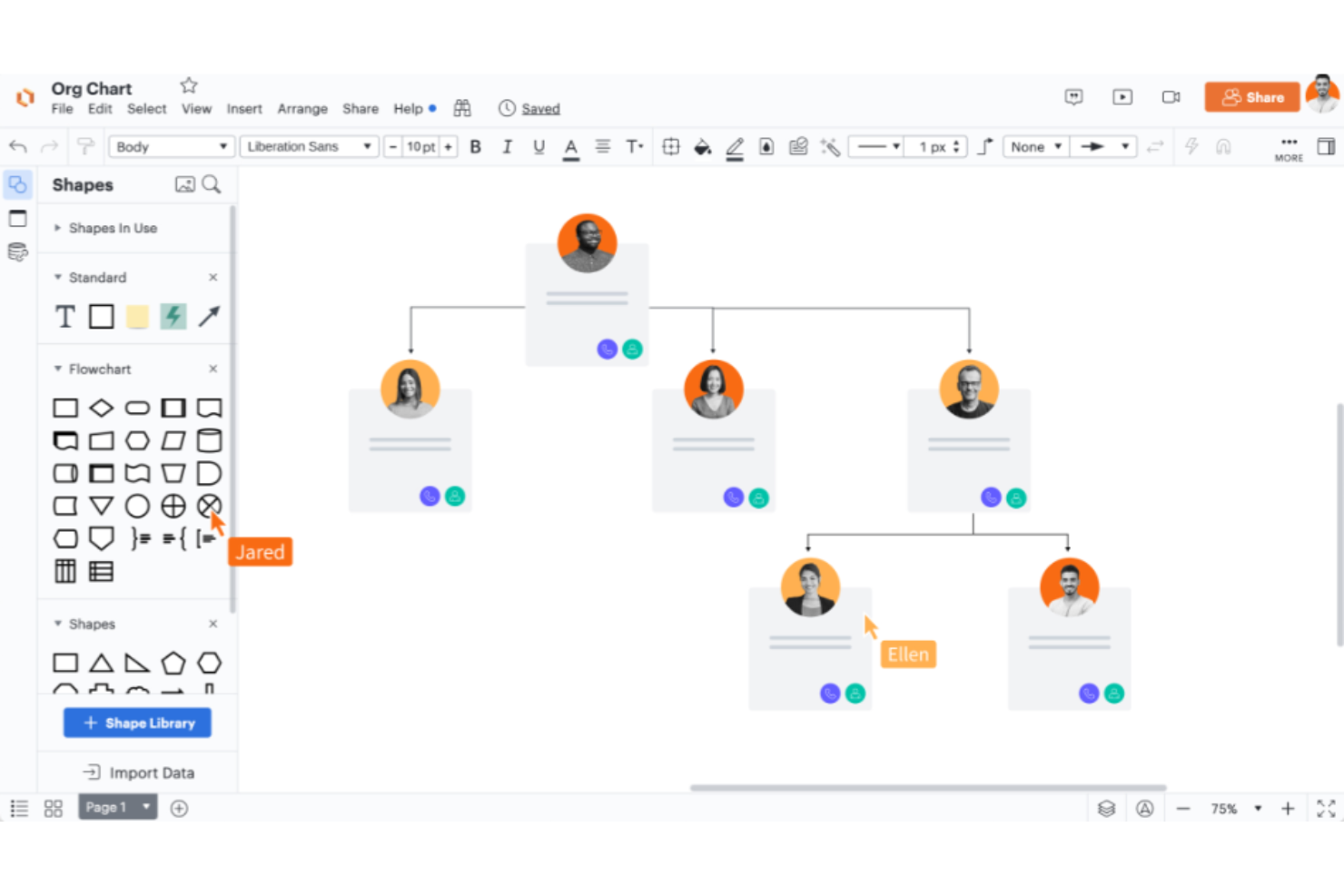
Lucidchart is a web-based diagramming tool with powerful features that support a wide range of data visualization needs. Its effectiveness in transforming raw data into clear, understandable visual formats makes it the best tool for data visualization.
Why it's a good FigJam alternative:
Lucidchart excels in creating diverse and complex data visualizations that FigJam does not inherently focus on. It stands out with its ability to handle a wide array of diagram types (including technical diagrams like UML and ERD) which are essential for detailed data analysis and presentation. The tool's focus on precision and versatility in data representation makes it a superior choice for professionals needing to visualize intricate data structures.
Standout features & integrations:
Features include intuitive drag-and-drop interface, real-time collaboration, a vast library of templates and shapes, data linking, advanced diagramming tools, version history, custom styling options, presentation mode, secure sharing, and detailed export options.
Integrations include Google Workspace, Microsoft Office 365, Slack, Confluence and Jira, Salesforce, GitHub, AWS, Trello, Dropbox and Box, Zapier, and more.
Pros and Cons
Pros:
- Powerful data linking and conditional formatting features
- Real-time collaboration across teams and platforms
- Supports a wide variety of diagram types and templates
Cons:
- Pricing can get expensive for larger teams or advanced features
- Can be complex for beginners to utilize all features
Andre alternativer til FigJam
Nedenfor finner du en liste over flere alternativer til FigJam som jeg valgte ut. Selv om de ikke kom med blant de ti beste, er de fortsatt verdifulle og verdt å undersøke nærmere.
- Collaboard
For interactive workshops
- InVision Freehand
For real-time design collaboration
- Padlet
For content curation and sharing
- Draft.io
For simple, visual task management
- Notebookcast
For templated projects
- Vectera
For client meeting organization


Finn flere alternative verktøy på denne listen over alternativer til Coda.
Relaterte anmeldelser av prosjektstyringsprogramvare
- Prosjektstyringsprogramvare
- Ressursstyringsprogramvare
- Programvare for arbeidsflytautomatisering
- Programvare for tidsregistrering
- Programvare for oppgavehåndtering
- Samarbeidsverktøy
- Verktøy for å lage Gantt-diagrammer
- Produktivitetsverktøy
- Programvare for prosjektsporing
- Programvare for prosjektplanlegging
How I Evaluate FigJam Alternatives
I split my evaluation into two layers: the baseline a tool must clear to run a sprint retro or stakeholder workshop, and the differentiators that separate one canvas from the next.
Core Functionality (Table Stakes For This List)
When I'm selecting tools for my list, I rank each one on a scale from 0 (does not offer the functionality) to 5 (excels in this area) for each core functionality listed below. Then, I calculate the tool's total score into a percentage. Each tool needs to achieve a minimum total score of 65% to be considered for inclusion.
- Infinite Collaborative Canvas: I check whether the canvas supports unbounded space with smooth panning and zoom, plus structuring features like frames or sections to organize a large planning board.
- Real-Time Multiplayer Editing: Live cursors, presence indicators, and follow-mode matter when you're running a retro with a dozen people and need everyone working on the same board at once.
- PM-Focused Templates: I look for ready-made templates covering sprint retrospectives, Kanban boards, roadmaps, and user story maps so teams can start a session without building from scratch.
- Sticky Notes & Visual Elements: A solid toolkit of sticky notes, shapes, connectors, freehand drawing, and text is what separates a whiteboard from a blank page—tools like Miro and Lucidspark each handle this differently.
- PM Tool Integrations: I evaluate native connections with platforms like Jira, Asana, and Trello, paying attention to whether cards sync bidirectionally or just display as static links on the canvas.
- Facilitation & Voting Tools: Features like timers, dot-voting, and private mode let a Scrum master guide a structured workshop instead of an open free-for-all where the loudest voice wins.
Once I have a list of tools that meet this criteria, I consider what sets each platform apart.
Differentiating Factors (What Sets Vendors Apart)
Here's how I compare and contrast different vendors:
Standout Features
AI features are a growing differentiator. I look for tools that can auto-cluster sticky notes or summarize a board after a brainstorming session, which saves real time when you're synthesizing input from a 15-person workshop. Presentation mode also matters because project managers often need to walk stakeholders through a roadmap without exporting to slides. Async video and threaded comments round things out for distributed teams working across time zones who can't always join a live session.
Beyond Features
Pricing structure is worth close attention. Some tools charge per editor while others count every participant, which adds up fast when you're inviting an entire sprint team to a retro. I also evaluate integration depth—specifically how well a board connects with your existing PM stack, from Jira to Confluence to Slack. Scalability matters too. A canvas that stutters when 30 people join a PI planning session creates more friction than the whiteboard it replaced.
Hvorfor se etter et alternativ til FigJam?
FigJam er en verdsatt programvareløsning, men den fungerer kanskje ikke for alle team. Her er noen av de vanligste grunnene til at du kanskje ser etter et alternativ til FigJam:
- Kostnadsbekymringer: Prisen på FigJam er relativt lav, men hvis du er en nystartet organisasjon, en liten bedrift eller ganske enkelt ikke trenger mange plasser, kan du finne et rimeligere alternativ som er mer aktuelt.
- Begrensninger i funksjoner: FigJam har flere samarbeidsfunksjoner, blant annet lydchat, klistrelapper, presentasjoner og fildeling. Det kan imidlertid hende at du ser etter flere funksjoner, for eksempel nettklipping, stemningstavler og tilbakemeldingsverktøy.
- Integrasjonsproblemer: Brukere ser ofte etter verktøy som integreres sømløst med den eksisterende programvarestakken. Hvis FigJam ikke integreres godt med andre verktøy du bruker, kan du velge alternativer som tilbyr bedre kompatibilitet.
- Brukeropplevelse: Basert på den tekniske erfaringen din kan teamet ditt ha behov for et enklere eller mer avansert grensesnitt.
- Samarbeidsbehov: Noen brukere kan ha behov for flere tilpasningsmuligheter eller mer fleksible arbeidsflyter enn FigJam tilbyr. Alternativer kan tilby mer skreddersydde løsninger.
Alternativer til FigJam kan tilby funksjonalitet og fordeler som FigJam ikke har, og dekke spesifikke behov og preferanser. De kan passe bedre for enkelte prosjekter eller team som samsvarer med gjeldende mål og prioriteringer, samtidig som de gir bedre skalerbarhet.
Viktige funksjoner du bør se etter i alternativer til FigJam
Her er noen viktige funksjoner i FigJam som den alternative programvaren bør kunne gjenskape eller forbedre for å passe godt:
- Samarbeid på nett: Gjør det mulig for team å idémyldre, utvikle og organisere ideer på en delt digital tavle.
- Tilgjengelighet: Brukervennlig for personer med ulik erfaring med designverktøy.
- Tegning og fremheving: Tilbyr verktøy for å tegne fritt, fremheve og bruke washi-teip for å understreke poenger.
- Legge til tekst: Gir mulighet til å legge til punkttekst og områ detekst for å formidle ideer.
- Maler: Tilbyr maler for strukturering av aktiviteter og møter.
- Importere objekter: Gjør det mulig å importere bilder, design fra Figma og klikkbare tekstlenker.
- Samarbeidsverktøy: Inneholder verktøy for avstemninger, møtetavler og øvelser med kortsortering.
- Tilbakemeldinger og kommunikasjon: Inkluderer stempler, emojier, lydsamtaler og fremheving for interaktive møter.
- Tilpasning: Gir mulighet til å opprette og publisere egendefinerte maler for unike arbeidsflyter.
- Moduler og biblioteker: Integreres med moduler og Figma-biblioteker for forbedrede tavlekomponenter.