

10 beste alternativer til Jamboard for produktivitet i 2026

Kortliste over de beste alternativene til Jamboard


Jamboard, en digital tavle utviklet av Google, tilbyr en samarbeidsplattform der team kan visualisere ideer og prosjekter i sanntid. Ettersom programvaren tas offline og stenges for godt, er det imidlertid viktig å planlegge fremover og finne en alternativ løsning.
Med min omfattende kunnskap om programvare for prosjektstyring undersøkte og testet jeg flere alternativer til Jamboard for å hjelpe deg med å finne din neste favorittprogramvare for digitale tavler. Med denne innsikten kan du trygt gå over til en ny digital tavleløsning som best oppfyller teamets behov for samarbeid.
Hva er Jamboard?
Jamboard er en digital, interaktiv tavle utviklet av Google. Den fungerer som en samarbeidsplattform der team kan idémyldre, opprette og diskutere ideer visuelt i sanntid. Vanlige brukere er blant annet fagfolk i næringslivet og eksterne team som trenger et dynamisk lerret for verksteder, undervisning eller prosjektsamarbeid. Verktøyet er utviklet for å legge til rette for gruppearbeid, slik at deltakerne kan samhandle med innholdet og hverandre, uavhengig av hvor de befinner seg.
Why Trust Our Software Recommendations
Our team has been testing and reviewing software since 2012. As project managers ourselves, we know how difficult—and important—it is to choose the right software.
For this guide, we evaluated tools using hands-on testing and independent research, scoring tools using our selection criteria. We also draw on insights from industry thought leaders and practicing project management experts.
Our reviews reflect our human editorial judgment, not a sales pitch.
Expert reviewers:
Sammenligningstabell over alternativer til Jamboard
Denne sammenligningstabellen oppsummerer prisdetaljene for mine beste utvalgte alternativer til Jamboard:
| Tool | Best For | Trial Info | Price | ||
|---|---|---|---|---|---|
| 1 | Best for UI/UX team collaboration | Free plan available | From $16/user/month | Website | |
| 2 | Best for integrating with existing workflows | 30-day free trial | From $8.33/user/month (billed annually) | Website | |
| 3 | Best for design team collaboration | Not available | From $7.95/user/month (min 5 seats, billed annually) | Website | |
| 4 | Best for construction and engineering markups | 30-day free trial | From $260/user/month (billed annually) | Website | |
| 5 | Best for large-scale visual project management | 30-day free trial + free plan available | From €5/user/month | Website | |
| 6 | Best for software developers' visual brainstorming | 14-day free trial + free plan available | From $4.90/user/month (billed annually) | Website | |
| 7 | Best for hardware-software integrated solutions | Free demo available | From $50/user/month (billed annually, requires purchase of Vibe hardware) | Website | |
| 8 | Best for simple real-time collaboration | Free plan available | From $9/user/month | Website | |
| 9 | Best for realistic whiteboard drawing feel | Free plan available | From $5/month | Website | |
| 10 | Best for brainstorming in Agile environments | Free plan available | From $9/month (billed annually) | Website |
Anmeldelser av de beste alternativene til Jamboard
Nedenfor finner du grundige analyser og oversikter over de beste alternativene til Jamboard. Disse anmeldelsene dekker fordeler og ulemper ved hvert verktøy, undersøker de viktigste funksjonene og fremhever de beste bruksområdene.

FigJam
Best for UI/UX team collaboration

FigJam is an online whiteboarding tool designed to facilitate interactive and collaborative brainstorming sessions, ideation, and diagramming within teams. It provides an intuitive interface with tools for drawing, annotating, and creating flowcharts, making it ideal for designers, developers, and project managers alike.
Why it's a good Jamboard alternative: FigJam offers specialized features for UI/UX design that are not typically available in general whiteboard tools like Jamboard. Its integration with Figma and focus on design workflows make it a standout alternative for design teams.
Standout features & integrations:
Features include intuitive whiteboarding tools, real-time collaboration capabilities, built-in templates for user flow, wireframing, and brainstorming, sticky notes, drawing and shape tools, voting and timer functionalities to streamline meetings, cursor chat for live feedback, audio conversations, and extensive library of widgets and community-created plugins.
Integrations include Figma, Slack, Microsoft Teams, Google Drive, Dropbox, Jira, Trello, Asana, Zoom, and Miro.
Pros and Cons
Pros:
- Real-time brainstorming capabilities
- Intuitive design and collaboration tools
- Seamless integration with Figma
Cons:
- Can be overwhelming for non-design users
- Limited functionality outside of design use cases

Best for integrating with existing workflows

Stormboard is a digital workspace designed to facilitate more effective team collaboration, brainstorming, and project planning. It supports continuous connectivity with popular tools like Microsoft Office 365, Google Workspace, and Slack, allowing teams to maintain their established processes while leveraging Stormboard's collaborative and visual planning features.
Why it's a good Jamboard alternative: Stormboard’s extensive suite of integration options and more comprehensive project management features make it stand out among other whiteboard software. It offers a broad range of tools for task management, such as assigning tasks, tracking progress, and generating reports, making it ideal for more complex projects. Additionally, its compatibility with numerous third-party applications enhances its functionality in diverse professional environments.
Standout features & integrations:
Features include real-time collaboration, digital sticky notes, interactive whiteboards, templates for various business processes, extensive reporting and analytics tools, task assignment and progress tracking, customizable workspaces, secure data encryption, and mobile accessibility.
Integrations include Microsoft Teams, Microsoft Office, Google Drive, Slack, Trello, Dropbox, OneDrive, Zapier, Jira, and Zoom.
Pros and Cons
Pros:
- Extensive integration options
- Customizable templates
- Real-time collaboration
Cons:
- Initial learning curve for new users
- Limited offline functionality


InVision Freehand is a collaborative online whiteboard platform designed to help teams visualize ideas, map out processes, and iterate rapidly on projects in real-time. It provides an interactive canvas where team members can draw, write, and place digital assets.
Why it's a good Jamboard alternative: InVision Freehand stands out for design team collaboration due to its intuitive and inclusive interface that caters specifically to the needs of designers. It supports a range of visual tools like wireframing, prototyping, and real-time drawing, which are essential for creating and refining design concepts collaboratively.
Standout features & integrations:
Features include real-time collaboration on a shared canvas, extensive drawing and annotation tools, templates for various design and planning processes, infinite canvas for unrestricted space, voting and polling features, screen sharing, and secure sharing options to control access and visibility.
Integrations include Slack, Microsoft Teams, Jira, Trello, Google Drive, Dropbox, Zoom, Adobe XD, Sketch, and Figma.
Pros and Cons
Pros:
- Strong focus on design workflows
- Real-time feedback
- Intuitive design tools
Cons:
- Potential learning curve for new users
- Limited functionality for non-design projects


Bluebeam Revu is a software application designed specifically for professionals in architecture, engineering, and construction to streamline complex processes and drive project efficiency and collaboration.
Why it's a good Jamboard alternative: Bluebeam Revu offers advanced markup capabilities tailored for construction and engineering projects, which are not typically available in standard whiteboard tools like Jamboard. Its focus on industry-specific needs makes it a superior choice for professionals in these sectors.
Standout features & integrations:
Features include advanced PDF markup and editing tools, customizable tool sets, document and drawing comparison, batch processing, 2D and 3D PDF creation, measurement tools for accurate estimations, and markups list for tracking annotations and edits.
Integrations include Microsoft SharePoint, Dropbox, Box, OneDrive, AutoCAD, Revit, Navisworks, Google Drive, Outlook, and Salesforce.
Pros and Cons
Pros:
- Robust document management
- Real-time collaboration
- Advanced markup tools
Cons:
- Resource-intensive for large files
- Higher cost compared to basic PDF tools


Conceptboard is a cloud-based collaboration tool that focuses on providing a virtual whiteboard where teams can work together visually and in real time. It’s designed to facilitate remote collaboration, making it ideal for teams spread across different locations.
Why it's a good Jamboard alternative: Conceptboard succeeds managing large-scale visual projects, which is vital for teams handling extensive and detailed workflows. It facilitates effortless collaboration across large teams with features like real-time updates, extensive commenting options, and task management tools, ensuring everyone stays aligned and informed.
Standout features & integrations:
Features include unlimited canvas size, real-time collaboration tools, extensive commenting and feedback capabilities, task management with assignments and deadlines, secure access controls, video conferencing support, high-quality import and export options, template library for various use cases, and mobile device compatibility.
Integrations include Microsoft Teams, Slack, Google Drive, Dropbox, Trello, Asana, Jira, OneDrive, Zapier, and Box.
Pros and Cons
Pros:
- Advanced project management tools
- Real-time collaboration
- Infinite canvas for large projects
Cons:
- Requires stable internet connection for best performance
- Can be resource-intensive


Sketchboard is a digital whiteboard software designed primarily for developers and teams who need a visual way to brainstorm, plan, and collaborate on software design and development projects. It provides a virtual canvas where users can sketch diagrams, flowcharts, and mind maps, using a variety of shapes and tools tailored for software architecture and engineering.
Why it's a good Jamboard alternative: Sketchboard provides features specifically designed for software developers, such as UML diagrams and flowcharts, which are not typically found in general whiteboard tools like Jamboard. Its focus on the unique needs of developers makes it an excellent alternative.
Standout features & integrations:
Features include a digital whiteboard, real-time collaboration, a variety of sketching tools and shapes specific to software engineering, such as UML and flowchart symbols, version control, asynchronous collaboration support, scalable boards, export options in multiple formats, and a user-friendly interface designed to facilitate easy mapping of complex systems and processes.
Integrations include GitHub, Slack, Google Drive, Trello, Jira, Dropbox, Microsoft Teams, GitLab, Asana, and Bitbucket.
Pros and Cons
Pros:
- Supports various diagram types
- Real-time collaboration
- Specialized tools for software development
Cons:
- Can be complex for non-developers
- Limited to diagramming and sketching


Vibe software is a collaborative tool that combines an interactive digital whiteboard with extensive integration capabilities to facilitate team collaboration and communication. It's designed to support a wide range of functions, from brainstorming and project planning to education and remote presentations.
Why it's a good Jamboard alternative: Vibe provides a tightly integrated hardware and software solution that offers a more cohesive experience compared to Jamboard. Its advanced features and dedicated hardware make it a standout option for organizations seeking an all-in-one collaboration tool.
Standout features & integrations:
Features include an interactive digital whiteboard, real-time multi-user editing, cloud-based storage, high-resolution touchscreen display, built-in web browser, easy sharing and exporting of board content, remote access via mobile apps, extensive annotation tools, and support for multiple file formats for comprehensive multimedia presentations.
Integrations include Zoom, Microsoft Teams, Slack, Google Drive, OneDrive, Dropbox, Trello, Miro, Asana, and Jira.
Pros and Cons
Pros:
- Real-time collaboration tools
- Seamless hardware-software integration
- High-quality 4K touchscreen
Cons:
- Mainly for on-site workspaces
- Requires investment in dedicated hardware


Ziteboard is an online whiteboard tool designed to facilitate smooth and straightforward collaboration in real time. It offers a user-friendly interface that allows teams to work together seamlessly, sharing ideas, sketches, and notes instantly.
Why it's a good Jamboard alternative: Ziteboard excels in providing an intuitive platform for immediate team collaboration. Its simplicity and focus on the essentials make it a standout choice for those needing efficient, real-time interactive sessions without complex features.
Standout features & integrations:
Features include a zoomable user interface, vector graphics, real-time synchronization, reliable disconnection-handling, permanent and sharable board URLs, white label service, voice and video chat, graph plotter add-on, PDF import and export, sticky notes, customizable boards, navigation boxes, and smart shapes and tools.
Integrations include WordPress, Google Suite, and Adobe Illustrator.
Pros and Cons
Pros:
- Easy integration with major platforms
- Real-time collaboration capabilities
- An unlimited canvas for extensive brainstorming
Cons:
- Requires stable internet for optimal performance
- Limited advanced features for complex projects


Limnu is an online collaboration tool that offers a digital whiteboard designed to simulate the feel and simplicity of using an actual whiteboard. It's geared towards enhancing teamwork by providing a highly intuitive interface where users can sketch, draw, and write as if they were using real markers and erasers.
Why it's a good Jamboard alternative Limnu offers a drawing experience that closely resembles a physical whiteboard, which is beneficial for users looking for a familiar and comfortable tool. Its simplicity and realism make it a strong alternative to more digital-centric tools like Jamboard.
Standout features & integrations:
Features include real-time collaboration on a digital whiteboard, smooth drawing with tools that mimic real markers, infinite canvas for extensive brainstorming, straightforward user interface, ability to create multiple boards, user management for inviting and controlling access, mobile compatibility to allow participation from various devices, and simple sharing options for quick dissemination of board content.
Integration includes Slack, Trello, Google Drive, Dropbox, Microsoft Teams, Zoom, Evernote, GitHub, Asana, and Confluence.
Pros and Cons
Pros:
- Unlimited boards
- Real-time collaboration
- Realistic drawing experience
Cons:
- Limited exporting options
- Can be less effective for detailed diagramming

Lucidspark
Best for brainstorming in Agile environments
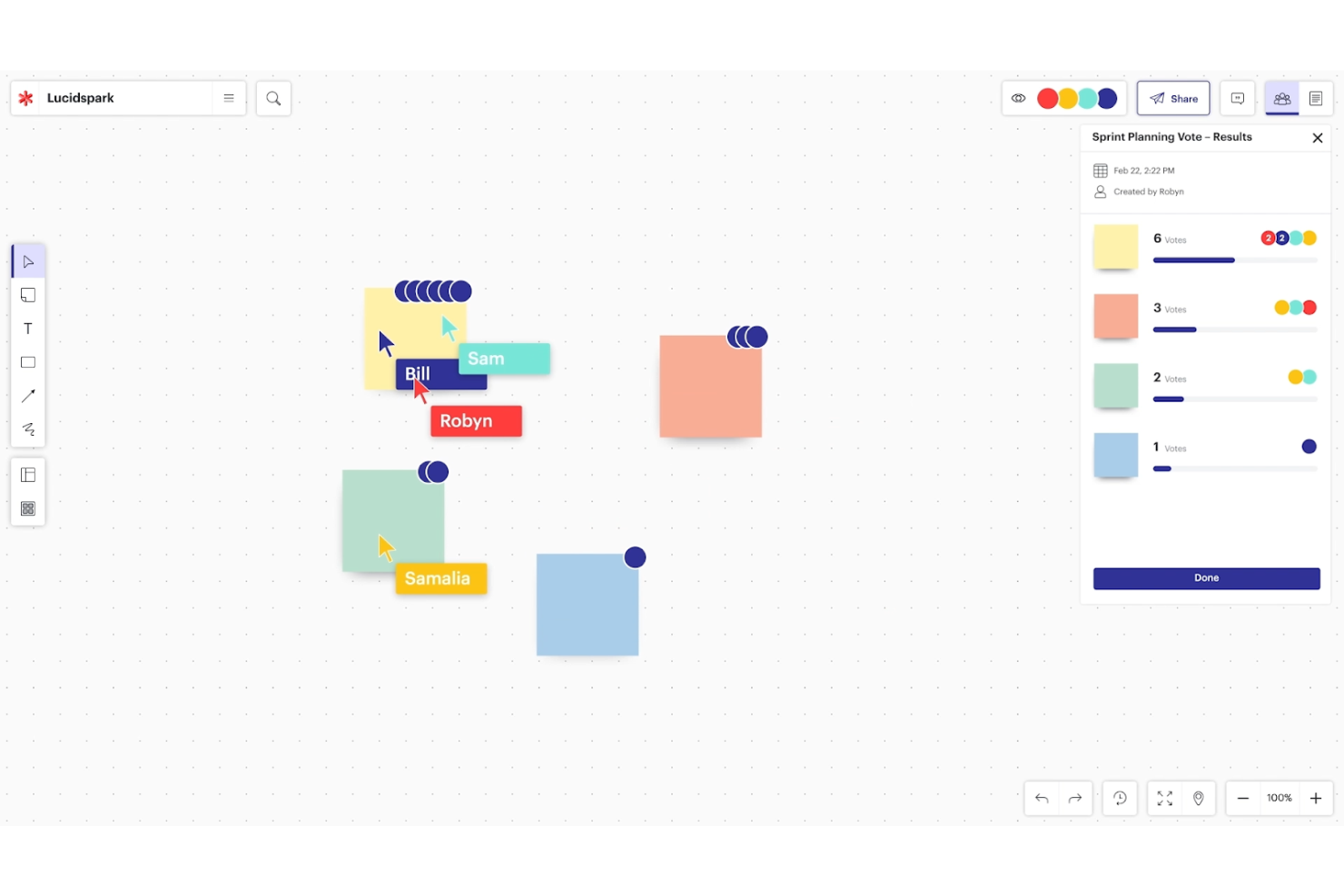
Lucidspark is a virtual whiteboard platform designed to facilitate collaboration and brainstorming among teams, particularly in a remote or hybrid work environment. It also supports real-time collaboration, allowing participants to contribute simultaneously.
Why it's a good Jamboard alternative: Lucidspark excels in supporting Agile methodologies, which require rapid iteration and real-time collaboration. It offers dynamic collaboration features and flexible templates that cater to the iterative nature of Agile workflows.
Standout features & integrations:
Features include real-time collaboration on a shared virtual whiteboard, sticky notes for capturing and organizing ideas, freeform drawing tools, pre-built templates for various workflows, voting and timer features to streamline decision-making, live cursor tracking to see participants' actions, and facilitated sessions for guided brainstorming.
Integrations include Jira, Confluence, Trello, Slack, Microsoft Teams, Zoom, Google Drive, Dropbox, Lucidchart, and Asana.
Pros and Cons
Pros:
- Flexible templates for Agile workflows
- Intuitive brainstorming tools
- Dynamic collaboration features
Cons:
- Limited offline capabilities
- Can be overwhelming for non-Agile teams
Andre alternativer til Jamboard
Nedenfor finner du en liste over flere alternativer til Jamboard som jeg valgte ut. Selv om de ikke kom med blant de 10 beste, er de fortsatt verdifulle og verdt å undersøke nærmere.
- GoodDay
For customizable workspaces
- Canva
For integrating design and presentation features
- Wooclap
For interactive learning and audience engagement
- Miro
For extensive collaborative mapping and brainstorming
- Whimsical
For combining diagrams, docs, and boards in one
- Mural
For creative teams needing structured workshops
- Microsoft Whiteboard
For seamless Office 365 integration
- ClickUp
For task management within visual spaces


Relaterte anmeldelser av programvare for prosjektstyring
Hvis du fortsatt ikke har funnet det du ser etter her, kan du se nærmere på disse andre relaterte verktøyene som vi har testet og evaluert:
- Programvare for prosjektstyring
- Programvare for ressursstyring
- Programvare for arbeidsflytautomatisering
- Programvare for tidsregistrering
- Programvare for oppgavehåndtering
- Samarbeidsverktøy
- Verktøy for å lage Gantt-diagrammer
- Produktivitetsverktøy
- Programvare for prosjektsporing
- Programvare for prosjektplanlegging
How I Evaluate Jamboard Alternatives
I look at Jamboard alternatives in two layers: the baseline every tool must clear—infinite canvas, real-time co-editing, PM templates—and the factors that actually separate the good options.
Core Functionality (Table Stakes For This List)
When I'm selecting tools for my list, I rank each one on a scale from 0 (does not offer the functionality) to 5 (excels in this area) for each core functionality listed below. Then, I calculate the tool's total score into a percentage. Each tool needs to achieve a minimum total score of 65% to be considered for inclusion.
- Infinite Digital Canvas: I check whether the board lets you zoom, pan, and expand freely—important when you're mapping a full release roadmap or multi-sprint timeline.
- Real-Time Collaboration: Live cursors, presence indicators, and simultaneous editing matter when your distributed team is running a brainstorm or retro together.
- Project Management Templates: I look for ready-made layouts like Kanban boards, sprint retrospectives, and roadmap frameworks that save setup time before a workshop.
- Sticky Notes & Visual Tools: The basics—digital sticky notes, pens, shapes, connectors—need to be flexible enough for everything from affinity mapping to dependency diagrams.
- PM Tool Integrations: I evaluate whether the platform connects with tools like Jira, Asana, or Trello so ideas captured on the board flow into your actual backlog.
- Sharing & Export Options: Teams need to share boards via links with permission controls and export to formats like PDF or PNG for stakeholder updates and documentation.
Once I have a list of tools that meet this criteria, I consider what sets each platform apart.
Differentiating Factors (What Sets Vendors Apart)
Here's how I compare and contrast different vendors:
Standout Features
Voting and facilitation tools—dot voting, timers, polls—make a real difference when you're running a retro and need fast consensus on action items. I also look for task conversion, where a sticky note becomes an assignable task with a due date that syncs back to your PM tool. Presentation mode matters too; it lets you walk stakeholders through a sprint review board as a guided sequence rather than a cluttered canvas.
Beyond Features
Since most teams considering Jamboard alternatives already live in Google Workspace, I evaluate how well each tool integrates with Drive, Docs, and Meet. A smooth migration path—including the ability to import existing Jamboard files—saves real onboarding headaches. Pricing structure matters too; I check whether viewer access is free, since project boards often reach stakeholders who only need to observe. Cross-platform accessibility rounds out my evaluation, especially stylus and touchscreen support for hybrid meeting rooms.
Hvorfor se etter et alternativ til Jamboard?
Brukere ser ofte etter et alternativ til Jamboard fordi de trenger mer avanserte funksjoner, bedre tilgang via mobile enheter, bestemte integrasjoner eller flere samarbeidsmuligheter.
Og Google er godt kjent med dette, og viser til disse hendelsene som hovedårsaken til beslutningen om å legge ned Jamboard. Ifølge Googles kunngjøring førte den økende populariteten og funksjonaliteten til andre tavleprogrammer til at de valgte å endre retning og integrere Google Workspace med disse tredjepartsapplikasjonene, i stedet for å fokusere på å skalere Jamboard.
Selv om nåværende Jamboard-brukere vil kunne bytte sømløst til Workspace og migrere eksisterende Jams til tredjepartsapplikasjoner, kan det være enklere for deg og teamet ditt å finne en alternativ løsning. Det er her vurderingene mine kommer inn.
Viktige funksjoner i alternativer til Jamboard
Å velge de riktige alternativene til Jamboard innebærer å forstå de viktigste funksjonene som forbedrer samarbeid og produktivitet ved bruk av digitale tavler. Her er noen av de viktigste funksjonene alternativet til Jamboard bør ha:
- Samarbeid i sanntid: Gjør det mulig for flere brukere å arbeide samtidig på samme lerret, noe som gjør det perfekt for idémyldring og teammøter.
- Uendelig lerret: Gir rikelig med plass til å utvide ideer uten begrensningene til fysiske tavler, og er ideelt for å administrere prosjekter og utarbeide komplekse planer.
- Merknads- og tegneverktøy: Viktig for brukere som skal markere dokumenter, lage diagrammer og uttrykke ideer visuelt, og som trenger støtte for å administrere designarbeidsflyter.
- Integrasjonsmuligheter: Kobler seg til annen programvare som Slack, Trello eller Google Workspace, slik at team kan administrere arbeidsflytene sine sømløst innenfor de eksisterende økosystemene.
- Maler og ferdiglagde ressurser: Tilbyr ferdige rammeverk og utforminger som gjør det raskere å sette opp nye tavler, og hjelper team med å administrere idémyldringen effektivt.
- Tilgangskontroll og tillatelser: Sikrer at sensitiv informasjon forblir beskyttet, og at brukere kan administrere tilgangsrettigheter, noe som er avgjørende for å opprettholde teamhierarkier og personvern for data.
- Alternativer for eksport og import: Gjør det mulig for brukere å hente inn eksterne filer og lagre arbeid i ulike formater, og støtter dermed administrasjon av innhold på tvers av forskjellige plattformer.
- Støtte for mobil og nettbrett: Gir brukerne fleksibilitet til å bidra fra hvilken som helst enhet, noe som er avgjørende for team som administrerer oppgaver på farten.
- Tilpasningsmuligheter: Gjør det mulig for team å tilpasse arbeidsområdet etter sine spesifikke behov, fra bakgrunnsfarger til forhåndsinnstillinger for verktøy, slik at de kan administrere sitt kreative miljø.
- Sporing av brukeraktivitet og analyse: Bidrar til å overvåke engasjement og bidrag, noe som er avgjørende for team som må administrere deltakelse og måle effekten av samarbeidet.
Å velge det riktige alternativet til Jamboard innebærer å finne en løsning som ikke bare dekker teamets spesifikke behov, men som også forbedrer måten dere samarbeider på og visualiserer komplekse ideer. Se etter et verktøy som balanserer disse funksjonene med et brukervennlig grensesnitt, slik at teamets produktivitet og kreativitet maksimeres.