

10 beste AI-verktøy for prosjektporteføljestyring vurdert i 2026

Kortliste over de beste KI-verktøyene for PPM


Det kan være utfordrende å håndtere flere prosjekter samtidig, særlig når du skal balansere tidsplaner, ressurser og organisatoriske prioriteringer. PPM, eller prosjektporteføljestyring, fokuserer på å føre tilsyn med og prioritere prosjekter på tvers av en virksomhet for å sikre at de samsvarer med strategiske mål.
KI-verktøy for PPM forbedrer denne prosessen ved å bruke kunstig intelligens til å styrke beslutningstakingen, forutsi prosjektresultater og optimalisere hvordan ressurser fordeles. Etter å ha testet og vurdert de ledende KI-verktøyene for PPM har jeg identifisert dem som gir reell verdi gjennom funksjoner som prediktiv analyse, automatisert rapportering og sanntidsoversikt over porteføljen.
I denne artikkelen finner du en objektiv og grundig undersøkt gjennomgang av de beste alternativene, slik at du kan forbedre effektiviteten, styrke samarbeidet og velge verktøyet som passer best til teamets behov.
Why Trust Our Software Recommendations
Our team has been testing and reviewing software since 2012. As project managers ourselves, we know how difficult—and important—it is to choose the right software.
For this guide, we evaluated tools using hands-on testing and independent research, scoring tools using our selection criteria. We also draw on insights from industry thought leaders and practicing project management experts.
Our reviews reflect our human editorial judgment, not a sales pitch.
Expert reviewers:
Sammenligningstabell for KI-verktøy for PPM
Denne sammenligningstabellen oppsummerer prisopplysningene for mine beste utvalgte KI-verktøy for PPM.
| Tool | Best For | Trial Info | Price | ||
|---|---|---|---|---|---|
| 1 | Best for project scheduling | 14-day free trial + free demo available | From $10/user/month (billed annually) | Website | |
| 2 | Best for AI-driven project planning | Free plan available | From $9/user/month (billed annually) | Website | |
| 3 | Best for Microsoft 365 users | 30-day free trial | From $10/user/month (billed annually) | Website | |
| 4 | Best for document management | Free demo available | Pricing upon request | Website | |
| 5 | Best for small businesses | Free demo + 14-day free trial available | From $8/user/month (billed annually) | Website | |
| 6 | Best for professional services | 14-day free trial + free demo available | From $19.90/user/month (billed annually) | Website | |
| 7 | Best for strategic planning | 14-day free trial | Pricing upon request | Website | |
| 8 | Best for spreadsheet users | 30-day free trial | From $9/user/month (billed annually) | Website | |
| 9 | Best for time tracking | Free demo available | From $20/user/month | Website | |
| 10 | Best for AI chat assistance | Free plan + 15-day free trial + free demo available | From $4/user/month (billed annually) | Website |


Anmeldelser av de beste KI-verktøyene for PPM
Nedenfor finner du mine detaljerte sammendrag av de beste KI-verktøyene for PPM som kom med på kortlisten. Anmeldelsene mine gir en grundig gjennomgang av de viktigste funksjonene, fordeler og ulemper, integrasjonene og ideelle bruksområdene for hvert verktøy, slik at du kan finne det beste alternativet for deg.

Celoxis
Best for project scheduling

Celoxis is a project management software tailored for enterprises seeking detailed scheduling and resource management. It offers AI-powered project management tools that enable real-time insights, trend exploration, and predictive analytics.
Why I picked Celoxis: Celoxis is its AI-supported dynamic scheduling, which adjusts timelines based on real-time data, including status reports on delays, resource constraints, or shifting priorities. Its workload tools help distribute work effectively, and teams can use predictive insights to anticipate risks. In my experience, Celoxis provides strong clarity across complex schedules.
Standout features & integrations:
Features include customizable dashboards for monitoring project metrics, AI-driven what-if analysis, financial forecasting for budget planning, and built-in time tracking that improves accountability.
Integrations include Jira, Azure DevOps, Salesforce, QuickBooks, Slack, Google Drive, Microsoft Project, Outlook, Excel, Trello, and Zapier.
Pros and Cons
Pros:
- Customizable dashboards for project metrics
- AI-enhanced workload distribution
- Intelligent scheduling adapts to project changes
Cons:
- Limited mobile app functionality
- Requires training for full utilization

Best for AI-driven project planning
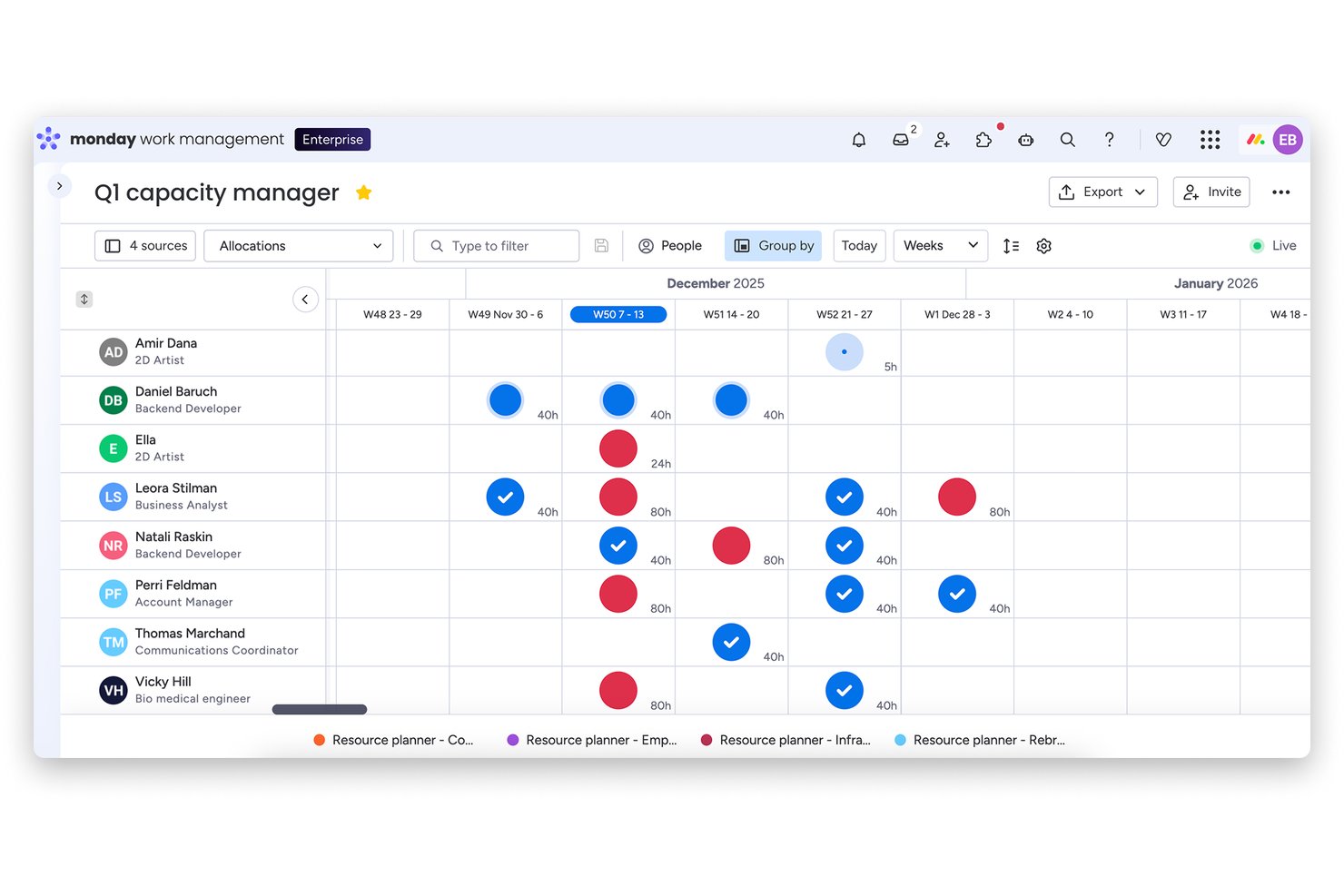
monday AI Workspace is an AI-powered work management platform that combines project planning, portfolio oversight, resource capacity management, automated risk detection, and generative AI reporting across multi-project environments.
Who Is monday AI Workspace Best For?
It's a strong fit for program managers and cross-functional teams at mid-size to enterprise companies running multiple concurrent projects across product, engineering, and marketing.
Why I Picked monday AI Workspace
I've included monday AI Workspace in my top picks because its AI-driven project planning goes beyond surface-level task management. I particularly like the Smart Project Planning feature, which generates timeline and milestone recommendations based on project context, and AI Smart Assignment, which suggests specific team members in the Capacity Manager rather than leaving placeholders. monday's AI also continuously scans live task statuses and dependencies to surface risk signals before they escalate.
monday AI Workspace Key Features
- AI-powered dashboards: Generate live dashboards that visualize project and portfolio metrics in real time.
- Bi-directional integrations: Sync tasks and data with 200+ connected tools, including CRMs and developer platforms.
- Portfolio snapshot views: Monitor hundreds of projects at once using centralized portfolio boards.
- Open API access: Build custom automations and integrations tailored to your organization’s needs.
monday AI Workspace Integrations
monday AI Workspace offers hundreds of native integrations, including Slack, Google Workspace, Microsoft 365, Salesforce, Jira, GitHub, Zoom, Dropbox, HubSpot, and Zendesk. It also supports Zapier and provides an API for custom integrations.
Pros and Cons
Pros:
- Smart risk detection flags issues proactively
- Portfolio-level dashboards update in real time
- AI automatically generates project timelines and milestones
Cons:
- Portfolio analytics lag behind dedicated PPM platforms
- AI features require significant setup and onboarding
New Product Updates from monday AI Workspace
monday AI Workspace Adds Human Approval Routing
monday AI Workspace adds a human-in-the-loop approval block to AI Workflows, sending approval requests and routing workflow paths based on responses. For more information, visit monday AI Workspace's official site.

Best for Microsoft 365 users

Microsoft Planner is a unified work management tool for teams using Microsoft 365. It brings together Planner, Project for the web, To Do, and Copilot, with AI capabilities that help generate plans, track goals, and adapt workloads.
Why I picked Microsoft Planner: Microsoft Planner is ideal for Microsoft 365 users who need integrated task management. The tool’s AI, through Copilot in Planner, helps teams generate project plans, monitor progress, and track project lifecycles all the way up to the project execution. It adjusts schedules as the workload changes and as the project status changes. This supports organizations that want task, schedule, and resource management inside the Microsoft ecosystem.
Standout features & integrations:
Features include task assignment with workload visibility, Gantt-style timeline views, people views for resource understanding, sprints, and AI-generated planning through Copilot. Teams also get goal tracking, baselines, and dependencies in the premium tiers.
Integrations include Microsoft Teams, Outlook, SharePoint, OneDrive, Power BI, Excel, Word, PowerPoint, Azure DevOps, and Microsoft To Do.
Pros and Cons
Pros:
- Visual dashboards improve project visibility
- Easy task assignment and tracking
- Integrated with the Microsoft 365 ecosystem
Cons:
- No built-in time tracking (requires integration)
- Requires a Microsoft 365 subscription

OpenText
Best for document management

OpenText is an enterprise information management software tailored for organizations needing advanced document management and data integration. It offers AI capabilities through OpenText Aviator, which supports search, summarization, and intelligent information handling.
Why I picked OpenText: OpenText excels in document management with AI-driven capabilities that improve data organization and retrieval. It supports organizations that need strong document and information governance. Its AI tools help analyze content, assist with retrieval, and automate processes, making large-scale document environments easier to manage. These capabilities improve compliance and operational consistency.
Standout features & integrations:
Features include content archiving that ensures data preservation, compliance management tools that help meet regulatory requirements, and workflow automation that reduces manual tasks. Your team can also utilize information governance to maintain data integrity.
Integrations include SAP, Microsoft Office 365, Salesforce, Oracle, IBM, Google Workspace, SharePoint, Box, Slack, and ServiceNow.
Pros and Cons
Pros:
- Strong compliance management features
- Workflow automation boosts operational efficiency
- AI analytics improves document retrieval
Cons:
- Outdated features hinder usability
- The Annotation tool lacks file compatibility

Best for small businesses

Businessmap is a business execution software designed for small businesses that are aiming to improve project visibility and strategic alignment. It supports planning, execution, and performance tracking with AI tools, including analysis, summaries, and an AI work assistant.
Why I picked Businessmap: Businessmap is best for small businesses due to its user-friendly interface and strong analytics capabilities. It’s a great option if you need structured planning tools without heavy complexity. Its AI features help analyze trends, summarize work, and support OKR tracking, which benefits teams needing guidance around prioritization. In my experience, Businessmap offers useful transparency and alignment across small teams.
Standout features & integrations:
Features include real-time performance monitoring that keeps you informed, customizable dashboards that allow for tailored views, and collaborative planning tools that improve teamwork. Your team can also visualize project dependencies to better understand workflow impacts.
Integrations include SAP, Salesforce, Microsoft Teams, Slack, Jira, Trello, Asana, Google Workspace, Dropbox, and GitHub.
Pros and Cons
Pros:
- Strong analytics capabilities for insights
- User-friendly interface for easy adoption
- Improves project management efficiency
Cons:
- Sparse layout reduces efficiency
- Lacks strong prioritization tools


Scoro is a business management software aimed at professional service firms looking to optimize their project and financial management. It centralizes quoting, delivery, invoicing, and reporting, with AI-powered actions and insights that support real-time decision-making.
Why I picked Scoro: Scoro aligns well with professional services teams that need visibility into project profitability and resource capacity. Its AI features provide instant insights and automate routine actions, helping teams track performance, allocate resources effectively, and make data-driven decisions. These capabilities support firms that manage fixed-fee, time-and-materials, and retainer-based projects in one system.
Standout features & integrations:
Features include AI-powered actions and insights, project templates for standard workflows, detailed resource planning tools, and profitability tracking that compares estimated vs. actual performance. Teams can also use the Gantt view, which uses generative AI to visualize timelines and track delivery.
Integrations include Xero, QuickBooks, Sage Intacct, Stripe, HubSpot, Salesforce, Jira, Google Calendar, Outlook, Google Drive, Dropbox, Expensify, and Zapier.
Pros and Cons
Pros:
- Customizable dashboards for performance tracking
- Automated invoicing simplifies billing
- AI-driven insights into project profitability
Cons:
- Interface lacks collapsible sections
- Document layouts lack customization


Triskell Software is a project and portfolio management tool aimed at organizations focusing on strategic planning and execution. It focuses on strategic portfolio management but does not list explicit AI features in the documentation, so AI references below are revised to ensure factual accuracy.
Why I picked Triskell Software: Triskell Software is tailored for strategic planning, offering AI-driven insights that align projects with business goals. It provides scenario analysis, portfolio alignment tools, and performance tracking, helping teams evaluate strategic options and maintain visibility across initiatives. These capabilities support long-term planning and organizational alignment.
Standout features & integrations:
Features include customizable dashboards for tracking initiatives, performance management tools, and resource management capabilities that help teams allocate work effectively. Teams can also use risk management features to anticipate potential issues.
Integrations include Microsoft Project, Jira, SAP, Salesforce, Slack, Microsoft Teams, Trello, Smartsheet, ServiceNow, and Asana.
Pros and Cons
Pros:
- Customizable dashboards for project overview
- Scenario analysis for strategic decision-making
- AI-driven insights for strategic alignment
Cons:
- Complex setup process
- Requires training for effective use

Best for spreadsheet users

Smartsheet is a versatile project management tool that caters to teams familiar with spreadsheet-based project planning. It supports task management, resource allocation, and collaborative workflows, with AI capabilities that generate formulas, summarize content, and analyze data.
Why I picked Smartsheet: Smartsheet is best for spreadsheet users who need advanced project management capabilities with AI-driven automation. The tool’s advanced AI features assist with formula building, content summarization, and data analysis, helping teams manage large projects more efficiently. Its predictive capabilities also support forecasting project outcomes.
Standout features & integrations:
Features include customizable dashboards for real-time visibility, automated workflows that reduce manual updates, and AI-powered project setup for new users. Teams can also use reporting tools to consolidate project data across sheets.
Integrations include Microsoft Teams, Slack, Google Workspace, Salesforce, Jira, Box, Dropbox, ServiceNow, Docusign, Tableau, and AI connectors such as Amazon Q Business, Glean, Atlassian Rovo, and Microsoft Copilot.
Pros and Cons
Pros:
- Predictive analytics aid in project forecasting
- AI automation reduces repetitive tasks
- Customizable dashboards for data visualization
Cons:
- Basic tasks dependent on Excel-style formulas
- Manual syncing needed for Interactive sheets
New Product Updates from Smartsheet

Smartsheet Adds Non-Plan User Management in Admin Center
Smartsheet adds a Non plan users tab to the Seat types and true-up page in Admin Center. This lets system admins review non-plan users and add them to the plan or remove them from the organization in one place. For more information, visit Smartsheet’s official site.

BigTime
Best for time tracking

BigTime is a time and billing software designed for professional service firms needing accurate time tracking and expense management. It provides AI-powered features through BigTime AI, supporting smarter time capture, billing suggestions, and operational insights.
Why I picked BigTime: Businessmap is best for small businesses due to its user-friendly interface and strong analytics capabilities. Its AI features support automated time capture, intelligent billing recommendations, and resource insights, helping firms manage utilization and improve billing accuracy. BigTime’s focus on precise time tracking is especially valuable for service-based teams.
Standout features & integrations:
Features include customizable invoicing that allows you to tailor billing to client needs, project budgeting tools that keep finances on track, and expense tracking that simplifies reimbursement processes. Your team can also use reporting tools to gain insights into project performance.
Integrations include QuickBooks, Salesforce, Slack, Zapier, Lacerte, Jira, Microsoft Outlook, Google Calendar, HubSpot, and PayPal.
Pros and Cons
Pros:
- Automated time capture
- Customizable invoicing
- AI-powered time tracking
Cons:
- Invoicing is limited to tracked time
- Time-tracking and reporting require manual adjustments

Best for AI chat assistance

Zoho Projects is a project management platform designed for teams that need structured planning, collaboration, and workflow automation. It supports task management, time tracking, and Gantt charts, with AI features that assist through Zia, Zoho’s AI, providing chat-based help, predictions, and insights.
Why I picked Zoho Projects: Zoho Projects is ideal for teams that benefit from AI chat assistance. Zia helps answer project questions, surfaces insights from project data, and supports task and deadline management, which improves clarity during daily work. These capabilities help teams communicate and organize tasks more effectively.
Standout features & integrations:
Features include task automation that reduces manual work, time tracking for accurate billing, and Gantt charts that provide a visual timeline of your projects. Your team can also use resource allocation tools to optimize workload distribution.
Integrations include Zoho CRM, Zoho Desk, Slack, Microsoft Teams, Google Workspace, Zapier, Dropbox, GitHub, Zendesk, and Bitbucket.
Pros and Cons
Pros:
- No minimum users on paid plan
- Built-in team chat included
- Unassigned tasks auto-assign on status change
Cons:
- Dashboard lacks contact organization features
- Templates locked behind paid plans
New Product Updates from Zoho Projects
Zoho Projects Adds CodeX Scripts for Custom Modules
Zoho Projects now supports CodeX Scripts for custom modules, enabling conditional logic and rules for creating, updating, and deleting records. For more information, visit Zoho Projects' official site.
 .
.Andre KI-verktøy for PPM
Her er noen flere alternativer for KI-verktøy for PPM som ikke kom med på kortlisten, men som likevel kan være verdt å se nærmere på:
- Planview
For portfolio management
- Meisterplan
For portfolio scenario planning
- AirSaaS
For Agile project teams


How I Evaluate PPM AI Tools
To earn a spot, a PPM tool's AI needs to deliver tangible value—like predicting resource bottlenecks or auto-ranking competing initiatives. I split my evaluation into two layers: core functionality a tool must have to qualify and the differentiating factors that set vendors apart.
Core Functionality (Table Stakes For This List)
When I'm selecting tools for my list, I rank each one on a scale from 0 (does not offer the functionality) to 5 (excels in this area) for each core functionality listed below. Then, I calculate the tool's total score into a percentage. Each tool needs to achieve a minimum total score of 65% to be considered for inclusion.
- AI-Driven Portfolio Prioritization: I evaluate whether the tool can score and rank competing projects against strategic goals, not just list them in a backlog.
- Predictive Resource Management: The tool should forecast capacity gaps and recommend allocation shifts before teams hit bottlenecks mid-sprint.
- AI Risk & Health Detection: I look for tools that flag at-risk projects using real signals like scope creep or velocity drops, not just manual RAG statuses.
- Intelligent Forecasting & Analytics: Budget and timeline predictions should adapt as project data changes, similar to how Planview and Sciforma handle what-if modeling.
- Automated Reporting & Insights: I check whether the tool generates portfolio summaries and status narratives on demand rather than requiring manual slide decks.
- Multi-Project Data Integration: Tools should pull data across the broader stack—Jira, ERP, finance systems—to give AI models full portfolio context.
Once I have a list of tools that meet this criteria, I consider what sets each platform apart.
Differentiating Factors (What Sets Vendors Apart)
Here's how I compare and contrast different vendors:
Standout Features
A conversational AI assistant adds real value when PMO directors can query portfolio health in plain language instead of building custom reports. I also look for scenario planning capabilities—modeling "what if we delay Project X and shift resources to Project Y" side by side. Financial intelligence matters here too, especially tools that combine EVM with AI forecasts to predict budget outcomes across the portfolio before variance becomes a leadership conversation.
Beyond Features
Integration depth matters a lot in this space. I check whether a tool connects bidirectionally with Jira, ERP, and finance systems, since AI models are only as good as the data feeding them. Data security and AI governance are equally important—I evaluate whether vendors provide model explainability and meet standards like SOC 2 and ISO 27001. Implementation support also shapes my assessment, because PPM tools with AI components typically require structured onboarding and change management to drive real adoption across the PMO.
Slik velger du et KI-verktøy for PPM
Det er lett å gå seg vill i lange funksjonslister og kompliserte prismodeller. For å hjelpe deg med å holde fokus mens du arbeider deg gjennom den unike programvarevalgsprosessen din, får du her en sjekkliste over faktorer du bør ha i bakhodet:
| Faktor | Hva du bør vurdere |
|---|---|
| Skalerbarhet | Kan verktøyet vokse sammen med teamet ditt? Vurder om det støtter et økende antall brukere og økt prosjektkompleksitet uten redusert ytelse. |
| Integrasjoner | Kan det kobles til de eksisterende verktøyene dine? Se etter kompatibilitet med programvarestakken i teamet ditt for å sikre smidige arbeidsflyter og datadeling. |
| Tilpasningsmuligheter | Hvor fleksibelt er verktøyet? Sjekk om du kan tilpasse dashbord, rapporter og arbeidsflyter til dine unike prosesser uten omfattende programmering. |
| Brukervennlighet | Er det intuitivt for alle teammedlemmer? Vurder læringskurven og brukergrensesnittet for å sikre at alle kan bruke det effektivt uten omfattende opplæring. |
| Implementering og introduksjon | Hvor raskt kan du komme i gang? Vurder tiden det tar å sette opp verktøyet, tilgjengelige opplæringsressurser og støtten under introduksjonsprosessen. |
| Kostnad | Passer det inn i budsjettet ditt? Sammenlign prisplaner, inkludert skjulte gebyrer, og vei kostnaden opp mot verdien og fordelene verktøyet tilbyr. |
| Sikkerhetstiltak | Hvor sikre er dataene dine? Se etter kryptering, samsvar med personvernregelverk og tilgangskontroller for å beskytte sensitiv informasjon. |
| Tilgjengelig kundestøtte | Når kan du få kontakt med kundestøtten? Sørg for at flere støttekanaler er tilgjengelige, og at hjelpen er rask og nyttig når du trenger den. |
Hva er KI-verktøy for PPM?
PPM, som står for prosjektporteføljestyring, fokuserer på å føre tilsyn med og prioritere flere prosjekter for å sikre at de er i tråd med strategiske mål og bruker ressursene effektivt. AI-verktøy for PPM støtter dette arbeidet ved å utnytte kunstig intelligens til å optimalisere oppgaver, ressurser og beslutningsprosesser. Disse verktøyene brukes av prosjektledere, teamledere og ledere, og forbedrer effektiviteten og oversikten på tvers av en hel portefølje gjennom AI-drevet innsikt, prediktiv analyse og automatisert rapportering. De hjelper organisasjoner med å fordele ressurser på en fornuftig måte, vurdere risikoer, planlegge strategisk og til syvende og sist ta bedre informerte beslutninger for å nå prosjektmålene.
Funksjoner
Når du velger AI-verktøy for PPM, bør du se etter følgende nøkkelfunksjoner:
- AI-drevet innsikt: Gir verdifull dataanalyse som forbedrer beslutningstakingen ved å identifisere trender og mønstre i prosjektets ytelse.
- Prediktiv analyse: Forutsier prosjektrisikoer og resultater, slik at team kan håndtere potensielle utfordringer proaktivt.
- Automatisert rapportering: Genererer rapporter automatisk, sparer tid og sikrer nøyaktighet ved sporing av prosjektets fremdrift og ytelse.
- Ressurs optimalisering: Bruker AI til å fordele ressurser effektivt og sikrer at de riktige teammedlemmene tildeles oppgaver for optimal produktivitet.
- Scenarioplanlegging: Lar brukere evaluere ulike prosjektstrategier og resultater, noe som bidrar til strategisk beslutningstaking.
- Tilpassbare dashbord: Tilbyr tilpassede visninger av prosjektdata, slik at team kan fokusere på de viktigste nøkkeltallene for målene deres.
- Oppgaveautomatisering: Reduserer manuelt arbeid ved å automatisere repetitive oppgaver, slik at det frigjøres tid til mer strategiske aktiviteter.
- Verktøy for risikostyring: Identifiserer potensielle prosjektrisikoer ved hjelp av AI og hjelper team med å begrense problemer før de eskalerer.
- Ytelsessporing: Overvåker prosjektets nøkkeltall i sanntid og gir et tydelig bilde av fremdriften og områder som trenger oppmerksomhet.
- Arbeidsflyt automatisering: Forbedrer effektiviteten ved å automatisere arbeidsflyter og sikrer at oppgaver fullføres på en rettidig og organisert måte.
Fordeler
Implementering av et AI-verktøy for PPM gir flere fordeler for teamet og virksomheten din. Her er noen av fordelene du kan se frem til:
- Bedre beslutningstaking: AI-drevet innsikt gir deg databasert informasjon som hjelper deg med å ta bedre strategiske valg.
- Forbedret effektivitet: Automatisert rapportering og automatisering av oppgaver reduserer manuelt arbeid og frigjør tid til mer verdifulle aktiviteter.
- Prediktiv planlegging: Prediktiv analyse gjør det mulig å forutse prosjektrisikoer og justere planene proaktivt.
- Optimalisert ressursbruk: AI hjelper med ressursfordelingen og sikrer at teammedlemmene arbeider med oppgaver som samsvarer med ferdighetene deres.
- Bedre risikostyring: AI-verktøy identifiserer potensielle risikoer tidlig, slik at du kan begrense problemer før de påvirker prosjektene dine.
- Bedre oversikt over prosjekter: Tilpassbare dashbord gir deg et tydelig bilde av prosjektets nøkkeltall, slik at du kan holde oversikt over fremdriften.
- Forenklede arbeidsflyter: Automatisering av arbeidsflyter sikrer at oppgaver fullføres effektivt og at tidsfrister overholdes.
Kostnader og priser
Ved valg av AI-verktøy for PPM er det nødvendig å forstå de ulike prismodellene og abonnementene som er tilgjengelige. Kostnadene varierer basert på funksjoner, teamstørrelse, tillegg og mer. Tabellen nedenfor oppsummerer vanlige abonnementer, gjennomsnittsprisene deres og typiske funksjoner som er inkludert i løsninger for AI-verktøy for PPM:
Sammenligningstabell for abonnementer for AI-verktøy for PPM
| Abonnementstype | Gjennomsnittspris | Vanlige funksjoner |
|---|---|---|
| Gratisabonnement | $0 | Begrenset tilgang til grunnleggende funksjoner, oppgavehåndtering og prosjektsporing. |
| Personlig abonnement | $4-$25/bruker/måned | Oppgavehåndtering, grunnleggende rapportering, AI-drevet innsikt og begrensede integrasjoner. |
| Forretningsabonnement | $30-$75/bruker/måned | Avansert rapportering, ressursfordeling, AI-analyse og tilpassbare dashbord. |
| Virksomhetsabonnement | $80-$150/bruker/måned | Komplett funksjonssett, ubegrensede integrasjoner, prediktiv analyse og forbedrede sikkerhetsfunksjoner. |
Vanlige spørsmål om PPM-verktøy med kunstig intelligens
Her er noen svar på vanlige spørsmål om PPM-verktøy med kunstig intelligens:
Hvordan kan PPM-verktøy med kunstig intelligens bidra til å identifisere prosjektrisiko tidligere?
PPM-verktøy med kunstig intelligens oppdager risiko tidlig ved å analysere prosjektdata for mønstre og varselsignaler. De kan flagge overskredne frister, ressurskonflikter eller budsjettproblemer før de eskalerer. Du får varsler og prediktiv innsikt, slik at du kan håndtere hindringer proaktivt og holde prosjektene på rett spor.
Hvor ofte bør jeg oppdatere prosjektdata i et PPM-verktøy med kunstig intelligens?
Du bør oppdatere prosjektdata regelmessig – helst daglig eller ukentlig – slik at den kunstige intelligensen har den nyeste informasjonen å analysere. Rettidige oppdateringer hjelper verktøyet med å levere relevant innsikt, nøyaktige prognoser og raske varsler for prosjektene dine.
Hvordan måler jeg avkastningen på investeringen ved å bruke kunstig intelligens i PPM-programvare?
Du kan måle avkastningen på investeringen ved å følge med på forbedringer i prosjektleveranser, ressursutnyttelse og beslutningshastighet. Bruk nøkkeltall som fullføringsgrad for prosjekter, spart tid og reduksjon i budsjettoverskridelser. Mange PPM-plattformer med kunstig intelligens inkluderer rapporteringsverktøy som hjelper deg med å tallfeste verdien og dokumentere gevinster for interessentene.
Kan PPM-verktøy med kunstig intelligens tilpasse seg endringer i prioriteringene i prosjektporteføljen min?
Ja, de fleste PPM-plattformer med kunstig intelligens kan raskt tilpasse seg endrede prioriteringer ved å beregne tidsplaner, ressursbehov og risikoprofiler på nytt når du gjør endringer. Dette hjelper deg med å være fleksibel og holde prosjektene i tråd med de gjeldende forretningsmålene.
Hva skjer videre:
Hvis du undersøker PPM-verktøy med kunstig intelligens, kan du ta kontakt med en SoftwareSelect-rådgiver for gratis anbefalinger.
Du fyller ut et skjema og tar en kort samtale der de går gjennom behovene dine i detalj. Deretter får du en kortliste over programvare du kan vurdere. De støtter deg også gjennom hele kjøpsprosessen, inkludert prisforhandlinger.