

10 alternative verktøy til Resource Guru for planlegging i 2026

10 De beste alternativene til Resource Guru – kortliste


Hvis du opplever at Resource Guru ikke er det riktige verktøyet for prosjektstyring for teamet ditt, finnes det mange alternativer til Resource Guru som kan hjelpe deg med å administrere ressurser og prosjekter og få en tydelig oversikt over hva alle jobber med.
Resource Guru mangler kanskje bestemte funksjoner eller er for dyrt for budsjettet ditt, så jeg har testet og vurdert dusinvis av alternativer til Resource Guru for å hjelpe deg med å finne en erstatning. Her er mine anbefalinger til de beste alternativene til Resource Guru.
Hva er Resource Guru?
Resource Guru er et planleggingsverktøy som er utviklet for å hjelpe deg med å planlegge prosjekter og administrere personer, utstyr, budsjett og andre ressurser. Det kan hjelpe deg med å unngå utfordringer som overbooking, ubalansert arbeidsbelastning eller manglende samordning i prosjektporteføljen. Det gir en tydelig oversikt over tilgjengelige ressurser, slik at du kan planlegge og gjennomføre prosjekter.
Hvorfor du kan stole på våre programvareanbefalinger
Teamet vårt har testet og anmeldt programvare siden 2012. Vi er selv prosjektledere, så vi vet hvor vanskelig og hvor viktig det er å velge riktig programvare.
I denne guiden har vi vurdert verktøyene gjennom praktisk testing og uavhengig research og gitt dem poeng ut fra våre utvelgelseskriterier. Vi bygger også på innsikt fra ledende eksperter i bransjen og erfarne prosjektledere.
Anmeldelsene våre bygger på vår egen redaksjonelle vurdering. De er ikke et salgsargument.
Ekspertanmeldere:
Sammenligningstabell for alternativer til Resource Guru
Denne sammenligningstabellen oppsummerer prisdetaljene for mine beste anbefalinger av alternativer til Resource Guru:
| Tool | Best For | Trial Info | Price | ||
|---|---|---|---|---|---|
| 1 | Best for integrated time tracking | 14-day free trial + free demo available | From $10/user/month | Website | |
| 2 | Best for marketing and agency operations | Free demo available | Pricing upon request | Website | |
| 3 | Best for robust project management | Not available | From $679.99 one-time | Website | |
| 4 | Best for client work management | Free plan + 14-day trial + demo available | From $9.99/user/month (billed annually) | Website | |
| 5 | Best for agency forecasting | Free 7-day trial available | From $9/user/month (billed annually) | Website | |
| 6 | Best for project management with CRM integration | Free trial available | From $40/month (billed annually) | Website | |
| 7 | Best for visual project planning | Free plan + free trial + free demo available | From $6/user/month | Website | |
| 8 | Best for agile teams | Free plan available | From $8.48/user/month | Website | |
| 9 | Best for professional services automation | 14-day free trial + free demo available | From $19.90/user/month (billed annually) | Website | |
| 10 | Best for workload visibility | 14-day free trial | Pricing upon request | Website |


Vurderinger av de beste alternativene til Resource Guru
Her er min detaljerte analyse og oversikt over hvert alternativ til Resource Guru. Jeg dekker fordeler og ulemper, funksjoner og bruksområder der de utmerker seg mest.

Best for integrated time tracking
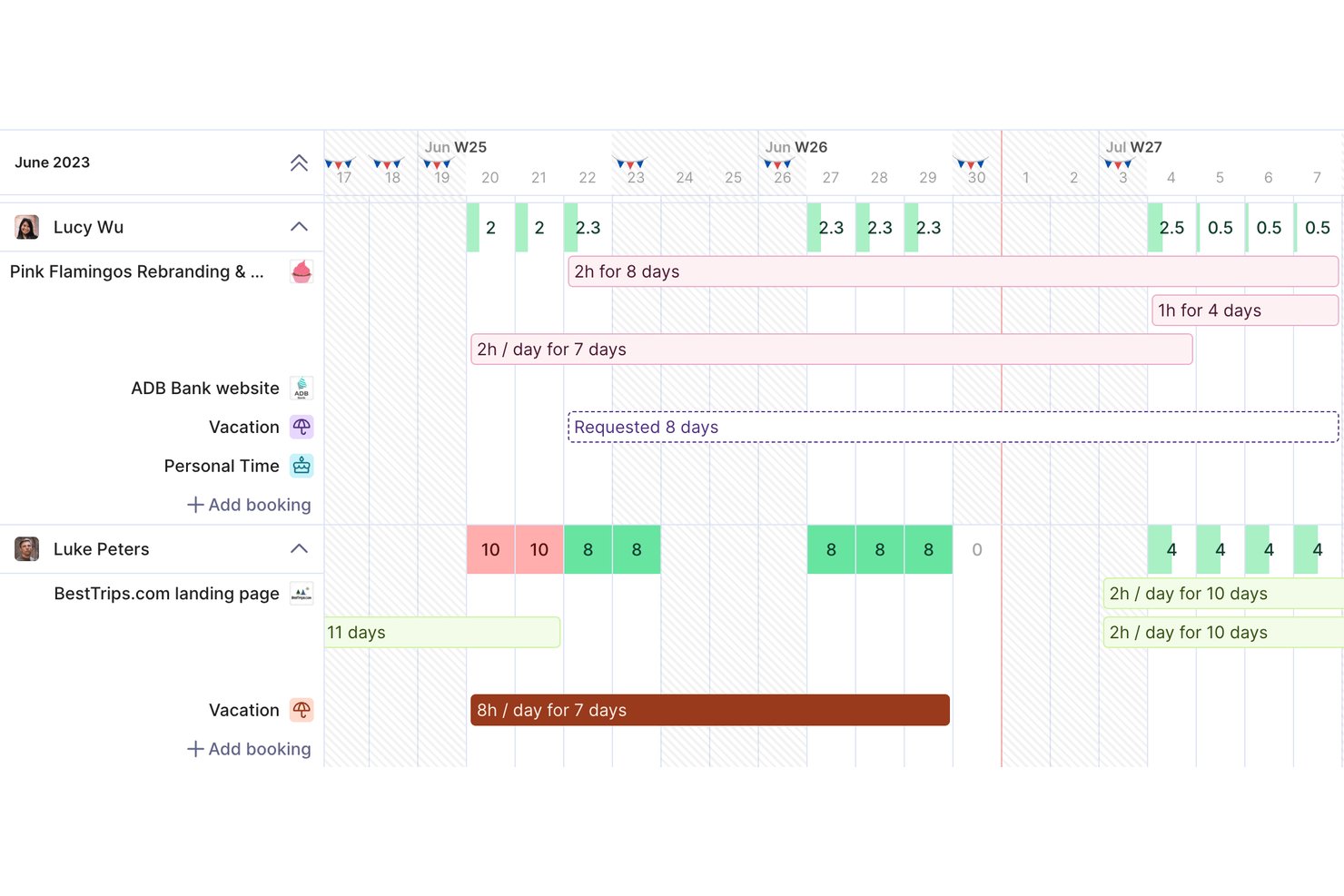
Productive is a professional services automation platform built for agencies and consultancies that need resource planning, project management, and financial oversight without stitching together multiple tools.
Who Is Productive Best For?
Productive fits mid-sized agencies and consultancies whose operations teams need resource scheduling, project delivery, and profitability tracking in one place.
Why Productive Is a Good Alternative to Resource Guru
I picked Productive as one of the best because its time tracking is woven directly into every other part of the platform. You can log hours manually, start a timer from any task, or let the Resource Planner auto-convert scheduled bookings into time entries. I especially like that those logged hours feed straight into project budgets, so you always have a live read on where a project stands financially.
Productive Key Features
- Resource planner: Visual drag-and-drop tool for assigning people to projects with real-time workload insights.
- Financial Scenario Prototyping: Build dynamic budget and deal scenarios to prototype upcoming project services, allocate temporary resource placeholders, and calculate projected profit margins before going live.
- Advanced reporting: Create custom dashboards for client, team, and utilization metrics.
- Time off management: Track staff leave, holidays, and absences alongside availability in one scheduling view.
Productive Integrations
Productive offers native integrations with GitHub, Slack, HubSpot, Notion, Amplitude, Stripe, Linear, Xero, Sage, Jira, and more. It also connects with Zapier, and has an API for custom integrations.
Pros and Cons
Pros:
- Native time off and leave management
- Scenario builder for capacity forecasting
- Combines scheduling and project financials
Cons:
- No mobile app for scheduling features
- Requires a minimum team size to start
New Product Updates from Productive
Productive Adds Voice Dictation, Slack Connector, Proposals, and Overtime
Productive adds voice dictation, a Slack Connector, proposal controls, and overtime tracking. These updates support faster AI interactions, client proposals, and time management. For more information, visit Productive’s official site.

Best for marketing and agency operations

For teams seeking an alternative to Resource Guru, Screendragon provides a tailored solution that enhances resource management through its advanced workflow capabilities. Designed with marketing and agency operations in mind, it appeals to businesses looking to improve team productivity. With features such as customizable automated workflows and AI integration, Screendragon addresses the challenges of managing complex projects and resources.
Why I Picked Screendragon
I picked Screendragon because it uniquely caters to marketing and agency operations with its sophisticated workflow management tools. The platform's no-code orchestration allows you to customize complex workflows without technical expertise, which is crucial for efficient resource allocation and project execution. Additionally, Screendragon's AI integration assists in automating routine tasks, freeing up your team to focus on strategic initiatives. These features make it an appealing choice for businesses looking to enhance their resource management capabilities.
Screendragon Key Features
In addition to its standout workflow management tools, Screendragon offers several other features that enhance resource management:
- Dynamic Custom Forms: Create tailored forms to capture the specific data your team needs for each project or task.
- Visual Workflow Builder: Design and modify workflows visually, making it easy for your team to understand and interact with processes.
- Digital Approval Management: Streamline approval processes with digital tools that ensure timely and organized decision-making.
- Enterprise-grade Security: Protect your organization's data with robust security features designed for enterprise use.
Screendragon Integrations
Integrations include DAM, CMS, collaboration software, and an API is available for custom integrations.
Pros and Cons
Pros:
- Enterprise-grade security and permissions
- Advanced approval and governance controls
- Customizable no-code workflow automation
Cons:
- Pricing not transparent publicly
- No native capacity scheduling focus
New Product Updates from Screendragon
Screendragon Unveils New AI Hub
Screendragon introduced AI Hub, a new capability that lets teams build and manage AI agents directly within workflows. The update helps marketing teams automate tasks, maintain governance controls, and scale AI-driven operations more efficiently. For more information, visit Screendragon's official site.
Best for robust project management

Microsoft Project is designed to assist in planning, executing, and tracking projects of any size.
Why Microsoft Project is a good Resource Guru alternative: I picked Microsoft Project because it is renowned for its ability to handle intricate project details with precision. When comparing it to other project management tools, its extensive cloud-based feature set and integration capabilities make it stand out. I chose this tool for its superior scheduling and resource allocation functions, which are essential for large, complex projects.
Standout Features & Integrations
Features include project planning and scheduling, task management, resource allocation, timeline tracking, Gantt charts, budget management, risk management, collaboration tools, reporting, and analytics.
Integrations include Microsoft Teams, Microsoft Excel, Microsoft SharePoint, Microsoft Power BI, OneDrive, Outlook, Microsoft Planner, Azure DevOps, Skype for Business, and Microsoft Dynamics 365.
Pros and Cons
Pros:
- Extensive integration with other Microsoft products
- Strong resource management tools
- Highly detailed and customizable project planning features
Cons:
- Requires Microsoft ecosystem for full functionality
- Steeper learning curve compared to simpler project management tools

Best for client work management

Teamwork is designed to help teams manage their work and collaborate effectively. It offers features tailored for managing client projects, including time tracking, billing, and client collaboration tools.
Why Teamwork is a good Resource Guru alternative: I picked Teamwork because it excels at managing client work, making it easier to track billable hours, collaborate with clients, and ensure projects stay on schedule. After evaluating multiple project management tools, I found Teamwork's client-focused features and ease of use set it apart.
Standout Features & Integrations
Features include advanced time tracking, billing, and invoicing features that are essential for client work. It also includes task management, project templates, and Gantt charts to help teams plan and execute projects efficiently.
Integrations include Slack, Google Drive, Microsoft Office, and QuickBooks.
Pros and Cons
Pros:
- Flexible project templates
- Strong client collaboration tools
- Comprehensive-time tracking and billing features
Cons:
- Limited storage on lower-tier plans
- Higher pricing for advanced features
Best for agency forecasting

Bonsai Agency Software is a business management platform designed for agencies to manage projects, clients, and teams in one place.
Why Bonsai Agency Software is a good Resource Guru alternative: Bonsai's resource planning and forecasting tools allow you to allocate work based on team capacity and track utilization. You can monitor workloads in real time and predict staff shortages ahead of new projects. This helps ensure your team has the bandwidth to deliver on projects before they start. The time-tracking and timesheet features also let your team easily log hours, giving you a clear view of projects, capacity, and budgets.
Standout Features & Integrations
Features include client management, team collaboration, financial reporting, custom billable rates, workload monitoring, task prioritization, profitability reports, project timelines, capacity tracking, staff shortage prediction, budget forecasting, and real-time progress tracking.
Integrations include Stripe, QuickBooks Online, Zapier, Calendly, Xero, Google Sheets, HubSpot, FreshBooks, Slack, Google Drive, Trello, and Microsoft Outlook.
Pros and Cons
Pros:
- Ability to manage projects, clients, and finances in one place
- Customizable templates for proposals, contracts, and invoices
- Effective time tracking and invoicing features
Cons:
- Some key integrations are limited to higher tier plans
- Mobile app is limited compared to desktop version

Best for project management with CRM integration

Teamleader is a business management tool designed to help small and medium-sized businesses handle their projects, CRM, and invoicing all in one place. With Teamleader, you can manage customer relationships, track sales opportunities, create and send invoices, and keep projects on schedule from a single platform.
Why Teamleader is a good Resource Guru alternative: Teamleader is a solid alternative to Resource Guru if you're looking for more than just resource scheduling. It offers project tracking features, including time tracking and task delegation. Plus, its CRM tools let you manage customer interactions, something Resource Guru doesn't cover.
Standout Features & Integrations
Features include deal tracking, quote generation, time billing, online payments, recurring invoices, and expense management.
Integrations include Gmail, Outlook, Google Calendar, PayPal, Stripe, LinkedIn, Mailchimp, Campaign Monitor, Google Sheets, and Power BI.
Pros and Cons
Pros:
- Integrates with popular tools
- Combines project management, CRM, and invoicing in one tool
- Real-time project tracking
Cons:
- Interface could be more intuitive
- Limited customization options


Trello is a web-based project management application that helps teams manage projects and tasks visually. It employs boards, cards, and lists that allow for intuitive and visual organization of tasks.
Why Trello is a good Resource Guru alternative: I chose Trello for the list because its visual project planning capabilities are exceptional. The use of boards, cards, and lists makes it easy to organize tasks and projects, which is why I believe it stands out as a good alternative to Resource Guru for those who prefer a more visual approach to project management.
Standout Features & Integrations
Features include customizable boards, lists, and cards, drag-and-drop interface, collaboration tools with comments and attachments, due dates and reminders, integration with various apps and services, automation with Butler, and mobile and desktop apps for on-the-go access.
Integrations include Google Sheets, Gmail, Google Calendar, Slack, Zapier, Webhooks by Zapier, Google Forms, and Paths by Zapier.
Pros and Cons
Pros:
- Wide range of power and integrations
- Built-in automation with Butler
- Visual project management with boards, cards, and lists
Cons:
- Challenges with user permissions management
- Can become cumbersome as projects grow


Jira is a powerful tool designed for every member of your software team to plan, track, and release great software.
Why Jira is a good Resource Guru alternative: I chose Jira for the list because it offers a robust set of features tailored for agile development, including scrum and kanban boards, backlogs, and agile reporting. Its ability to integrate with a multitude of developer tools also makes it a standout choice for teams looking to streamline their agile workflows.
Standout Features & Integrations
Features include customizable scrum and Kanban boards, backlogs for sprint planning, and detailed reporting for insights into team performance. It also offers advanced roadmaps for long-term planning and tracking work across multiple teams.
Integrations include Confluence, Bitbucket, GitHub, GitLab, Jenkins, Slack, Trello, Microsoft Teams, Google Sheets, and Zendesk.
Pros and Cons
Pros:
- Scalable for teams of any size
- Extensive reporting and insights for agile teams
- Customizable workflows to match team needs
Cons:
- The interface can be overwhelming due to the number of features
- May require additional training for new users


Scoro is a comprehensive business management software that streamlines project management, resource planning, sales and CRM, and finances. Its integrated platform includes handy features like detailed reporting, dashboards, and invoicing, designed to enhance productivity and oversight.
Why Scoro is a good Resource Guru alternative: I picked Scoro because it excels in providing an all-in-one solution that integrates project management, time tracking, CRM, and financial management. Scoro really focuses on setting and tracking key performance indicators (KPIs) and then linking them to relevant items within each project outline. This way, every action item is tied to the bigger picture of the goals of your company. Scoro stands out for its detailed planning features that enable detailed visualizations of project timelines, dependencies, and milestones. Its interactive Gantt charts allow users to map out the entire project lifecycle, adjust timelines easily, and see the impact of changes in real time.
Standout Features & Integrations
Features include time tracking, in-depth reporting capabilities, real-time dashboards, goal-setting and project planning, and advanced reporting tools.
Integrations include Xero, QuickBooks, Zapier, and Microsoft 365.
Pros and Cons
Pros:
- Robust integration options
- Strong reporting and analytics
- Comprehensive project management features
Cons:
- Minimum seat requirement for the lowest pricing tier
- Complexity may require a learning curve

Wrike
Best for workload visibility

Wrike is a project management tool that helps teams organize tasks, manage projects, and collaborate effectively. It offers various features to assist in planning, tracking, and completing work efficiently.
Why Wrike is a good Resource Guru alternative: Wrike's resource management capabilities make it a strong alternative to Resource Guru. You can allocate tasks based on team members' availability and skill sets, ensuring balanced workloads and preventing burnout. The workload view provides a clear picture of each team member's assignments, helping you adjust resources as needed to meet deadlines. Additionally, Wrike's time-tracking feature allows your team to log hours directly within tasks.
Standout Features & Integrations
Features include dashboards, Gantt charts, Kanban boards, proofing, approvals, cross-tagging, project resource planning, automation, custom item types, mobile and desktop apps, and AI.
Integrations include Salesforce, Microsoft Teams, Zoom, Adobe Creative Cloud, Google Drive, Microsoft SharePoint, OneDrive, Wrike for Gmail, Google Sheets, Power BI, Miro, and Trello.
Pros and Cons
Pros:
- Various project views
- Good resource management features
- Workflow automation capabilities
Cons:
- Can be complicated to learn the platform
- Limited storage on lower-tier plans
New Product Updates from Wrike

Wrike Redesigns AI Agent Builder
Wrike redesigns its AI Agent Builder with a side-by-side setup, Scopes, sentence-style triggers and actions, and clearer filters. These changes make it easier to configure, test, and manage agent behavior. For more information, visit Wrike’s official site.
Se hvordan Resource Guru sammenlignes med konkurrenten Float her.
Andre alternativer til Resource Guru
Nedenfor finner du en liste over flere alternativer til Resource Guru som jeg vurderte, men som ikke kom med på topplisten. Det kan være verdt å se nærmere på dem hvis du ikke fant det du lette etter ovenfor.
- Zoho Projects
For advanced task management
- Float.com
For resource scheduling
- GoodDay
For customizable workspaces
- Saviom
For enterprise resource planning
- Hub Planner by Milient
For detailed capacity planning
- Retain
For multi-location resource tracking
- Smartsheet
For spreadsheet-like project management
- Asana
For goal alignment
- Basecamp
For team communication
- Paymo
For small business management


Relaterte vurderinger av prosjektstyringsverktøy
Hvis du fortsatt ikke har funnet det du leter etter her, kan du se på disse andre vurderingene av prosjektstyringsverktøy som vi har samlet for deg:
- Verktøy for å lage Gantt-diagrammer
- Produktivitetsverktøy
- Programvare for prosjektsporing
- Programvare for prosjektplanlegging
- Programvare for prosjektstyring
- Programvare for ressursstyring
How I Evaluate Resource Guru Alternatives
I split my evaluation into two layers: core scheduling and capacity features that keep agencies out of double-booking chaos, and the differentiators that make one tool the right fit.
Core Functionality (Table Stakes For This List)
When I'm selecting tools for my list, I rank each one on a scale from 0 (does not offer the functionality) to 5 (excels in this area) for each core functionality listed below. Then, I calculate the tool's total score into a percentage. Each tool needs to achieve a minimum total score of 65% to be considered for inclusion.
- Resource Scheduling: I look for a visual, drag-and-drop timeline where you can assign people to projects—similar to how Float and Teamdeck handle booking blocks across weekly or monthly views.
- Capacity & Utilization Planning: Each tool should show me individual and team-level workload so a resource manager can spot who's overloaded before the sprint starts.
- Time-Off Management: Leave, holidays, and personal days need to appear directly on the scheduling view so bookings reflect real availability, not just theoretical hours.
- Booking Conflict Detection: Real-time overbooking alerts matter here—I check whether the tool warns you at the point of scheduling rather than forcing a manual audit afterward.
- Forecasting & Reporting: Utilization reports that break down billable vs. non-billable hours help agency ops leaders plan hiring or rebalance workloads weeks ahead of crunch periods.
- Multi-Project Resource Views: I evaluate whether the tool lets you filter and group resources across clients, departments, or project types in a single view rather than toggling between separate boards.
Once I have a list of tools that meet this criteria, I consider what sets each platform apart.
Differentiating Factors (What Sets Vendors Apart)
Here's how I compare and contrast different vendors:
Standout Features
Scenario planning is a big one—I look for tools that support tentative or soft bookings so you can model a potential project win without displacing confirmed assignments. Project financials also matter when your team bills by the hour, since pairing resource costs with booking data gives ops leaders margin visibility at the project level. I also check whether a tool offers timesheets alongside scheduling, which lets you compare planned hours against actuals and catch scope creep early.
Beyond Features
Pricing structure matters a lot here. Some tools charge per scheduled resource while others charge per user with separate viewer seats, which makes a real difference when you have 10 schedulers but 80 people on the board. I also evaluate integrations—specifically, whether the tool connects with PM platforms like Jira or Asana and calendars like Google or Outlook, since resource data that lives in isolation creates more problems than it solves. Migration support is worth checking too, especially how easily you can import existing bookings and team data during the switch.
Hvorfor se etter et alternativ til Resource Guru?
Selv om Resource Guru er et godt valg for programvare for ressursstyring, finnes det flere grunner til at enkelte brukere ser etter alternative løsninger. Det kan være lurt å se etter et alternativ til Resource Guru fordi:
- Teamet ditt har vokst ut av skaleringsmulighetene
- Du trenger funksjoner for utgiftssporing
- Teamet ditt trenger flere integrasjonsmuligheter
- Du trenger funksjoner for budsjettstyring
- Teamet ditt krever mer geografisk kontroll
- Du trenger avanserte innstillinger for tillatelser
Viktige funksjoner i Resource Guru
Her er noen av de viktigste funksjonene i Resource Guru som kan hjelpe deg med å sammenligne hva alternative løsninger tilbyr:
- Ressursplanlegging: Opprett og tildel ressurser med et intuitivt dra-og-slipp-grensesnitt. Du bør kunne planlegge flere ressurser samtidig for å forenkle planleggingsprosessen for teamet ditt.
- System for håndtering av konflikter: Unngå overbooking og sørg for at ressursene fordeles effektivt uten konflikter. Dette hjelper deg med å håndtere arbeidsbelastningen til teamet ditt på en effektiv måte.
- Permisjonshåndtering: Administrer permisjoner og fravær i teamet, og få en tydelig oversikt over hvem som er tilgjengelig til enhver tid. Dette gjør planlegging og tidsplanlegging enklere.
- Detaljerte tillatelser: Angi spesifikke tillatelser for hver bruker for å kontrollere tilgangen til ulike deler av verktøyet. Dette sørger for at teammedlemmene bare ser og arbeider med det de skal.
- Egendefinerte felt: Bruk egendefinerte felt til å bygge en kompetansedatabase eller merke geografiske områder, noe som hjelper deg med å administrere teamets ferdigheter og organisere fjernteam effektivt.
- Tidsregistrering: Forhåndsutfylte timelister basert på tidsplaner gjør tidsregistreringen rask og enkel, og lar teamet fokusere på oppgavene sine i stedet for administrative oppgaver.
- Integrasjoner med kalenderapper: Synkroniser hendelser med eksterne kalendere som Outlook og Google Kalender for å samle alle avtaler og tidsplaner på ett sted.
- Ressursprognoser og kapasitetsplanlegging: Visuelle tilgjengelighetslinjer og rapporteringsverktøy hjelper deg med å forutsi arbeidsbelastningen, planlegge kapasiteten og sørge for at teamet ditt verken er over- eller underutnyttet.