


Wrike vs. Trello: Confronto e Recensioni degli Esperti per il 2026



Wrike offre una soluzione solida per i team che cercano di gestire progetti complessi in modo efficiente, mentre Trello fornisce una piattaforma intuitiva ideale per l'organizzazione visiva delle attività. Mentre Wrike è adatto a un monitoraggio dettagliato dei progetti, Trello eccelle per semplicità e facilità d'uso. In questo articolo troverai un confronto dettagliato di questi strumenti, esplorando le loro funzionalità, vantaggi e svantaggi, prezzi e molto altro su come scegliere un software di project management.
Wrike vs. Trello: An Overview
Wrike


Trello




Perché fidarsi dei nostri consigli sui software
Il nostro team testa e recensisce software dal 2012. In quanto project manager noi stessi, sappiamo quanto sia difficile — e importante — scegliere il software giusto.
Per questa guida, abbiamo valutato gli strumenti attraverso test pratici e ricerche indipendenti, assegnando un punteggio agli strumenti in base ai nostri criteri di selezione. Ci basiamo inoltre sulle competenze di leader di pensiero del settore e di professionisti attivi nella gestione dei progetti.
Le nostre recensioni riflettono il nostro giudizio editoriale umano, non un discorso di vendita.
Revisori esperti:
Wrike vs. Trello Pricing Comparison
| Wrike | Trello | |
|---|---|---|
| Free Trial | 14-day free trial | 14-day free trial |
| Pricing | From $10/user/month (billed annually) | From $5/user/month (billed annually) |
Wrike vs. Trello: prezzi e costi nascosti
I prezzi di Wrike sono strutturati su piani a livelli che si rivolgono a diversi tipi di team e necessità, con potenziali costi aggiuntivi per funzionalità avanzate e integrazioni. D'altra parte, il prezzo di Trello offre un modello freemium con piani a pagamento opzionali per funzioni avanzate e power-up che possono comportare costi extra. Per scegliere il prezzo giusto, i project manager dovrebbero valutare le funzionalità specifiche di cui ha bisogno il loro team, considerare la scala dei progetti e valutare qualsiasi potenziale crescita futura per assicurarsi di selezionare un fornitore che sia in linea con le esigenze attuali e future.
Wrike vs. Trello Feature Comparison
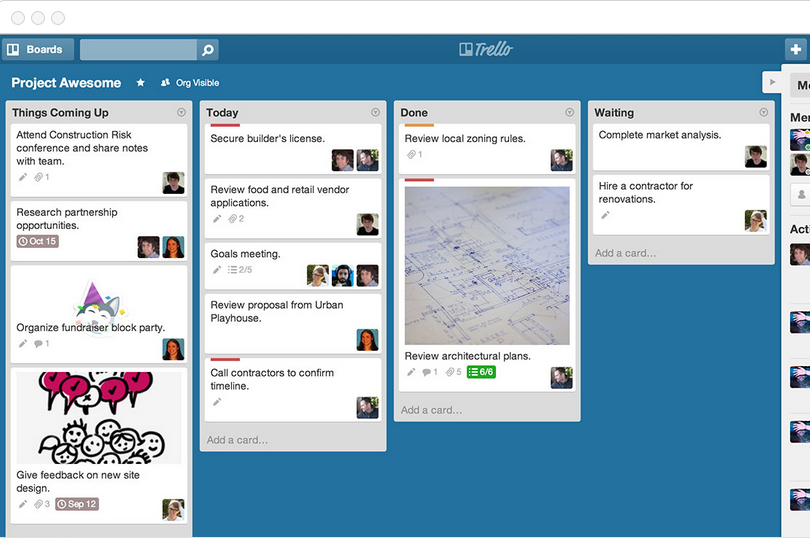
Con la solida gestione delle risorse di Wrike puoi allocare e monitorare efficacemente il carico di lavoro del tuo team, rendendolo perfetto per grandi progetti che richiedono un controllo dettagliato. Le bacheche Kanban di Trello sono ottime per la gestione visiva delle attività, offrendo flessibilità e chiarezza in ambienti rapidi come i progetti creativi. Entrambi gli strumenti forniscono punti di forza unici, permettendoti di scegliere in base al bisogno di una gestione approfondita delle risorse oppure di un’organizzazione semplice e visiva.
| Wrike | Trello | |
|---|---|---|
| API | ||
| Batch Permissions & Access | ||
| Budgeting | ||
| Calendar Management | ||
| Collaboration Support | ||
| Contact Management | ||
| Contact Sharing | ||
| Customer Management | ||
| Dashboard | ||
| Dashboards | ||
| Data Export | ||
| Data Import | ||
| Data Visualization | ||
| Dependency Tracking | ||
| Document Sharing | ||
| Expense Tracking | ||
| External Integrations | ||
| File Sharing | ||
| Gantt Charts | ||
| Kanban Boards | ||
| Multi-User | ||
| Notifications | ||
| Project Management | ||
| Resource Management | ||
| Scheduling | ||
| Task Scheduling/Tracking | ||
| Third-Party Plugins/Add-Ons | ||
| Time Management | ||
| Travel Management | ||
| Workflow Management |
Wrike vs. Trello: integrazioni
| Integrazione | Wrike | Trello |
|---|---|---|
| Slack | ✅ | ✅ |
| Google Drive | ✅ | ✅ |
| Microsoft Teams | ✅ | ✅ |
| Salesforce | ✅ | ✅ |
| HubSpot | ✅ | ❌ |
| Dropbox | ✅ | ✅ |
| Zendesk | ✅ | ❌ |
| Evernote | ❌ | ✅ |
| GitHub | ✅ | ✅ |
| Asana | ❌ | ✅ |
| API | ✅ | ✅ |
| Zapier | ✅ | ✅ |
L'integrazione di Wrike con Salesforce consente di sincronizzare facilmente i dati dei clienti, rendendolo prezioso per i team commerciali che devono monitorare le interazioni con i clienti. L'integrazione di Trello con Evernote è ideale per trasformare note in attività pratiche, perfetta per team che fanno del brainstorming e della raccolta di idee le loro attività principali. Entrambi gli strumenti offrono integrazioni fondamentali, permettendoti di aumentare la produttività in base ai flussi di lavoro specifici del tuo team.
Wrike vs. Trello: sicurezza, conformità & affidabilità
| Fattore | Wrike | Trello |
|---|---|---|
| Crittografia dei dati | Wrike utilizza la crittografia AES-256 per proteggere i dati sia in transito che a riposo. | Trello cripta i dati in transito utilizzando il protocollo TLS per una comunicazione sicura. |
| Conformità normativa | Wrike è conforme al GDPR, garantendo protezione e privacy dei dati per gli utenti. | Trello aderisce a GDPR e CCPA, offrendo solide funzionalità di controllo della privacy. |
| Autenticazione | Wrike offre SSO e autenticazione a due fattori per un accesso sicuro. | Trello supporta l'autenticazione a due fattori per una maggiore sicurezza dell’account. |
| Affidabilità del servizio (uptime) | Wrike garantisce il 99,9% di uptime per una gestione dei progetti senza interruzioni. | Trello mantiene un’elevata disponibilità grazie a un'infrastruttura robusta. |
Wrike e Trello offrono entrambi solide misure di sicurezza e conformità, sebbene la conformità normativa dettagliata di Wrike possa rappresentare un vantaggio. Per valutare questi strumenti, concentrati sulle esigenze di sicurezza specifiche del tuo team, come gli standard di crittografia e la conformità alle normative pertinenti, in modo da prendere una decisione informata.
Wrike vs. Trello Facilità d'Uso
| Fattore | Wrike | Trello |
|---|---|---|
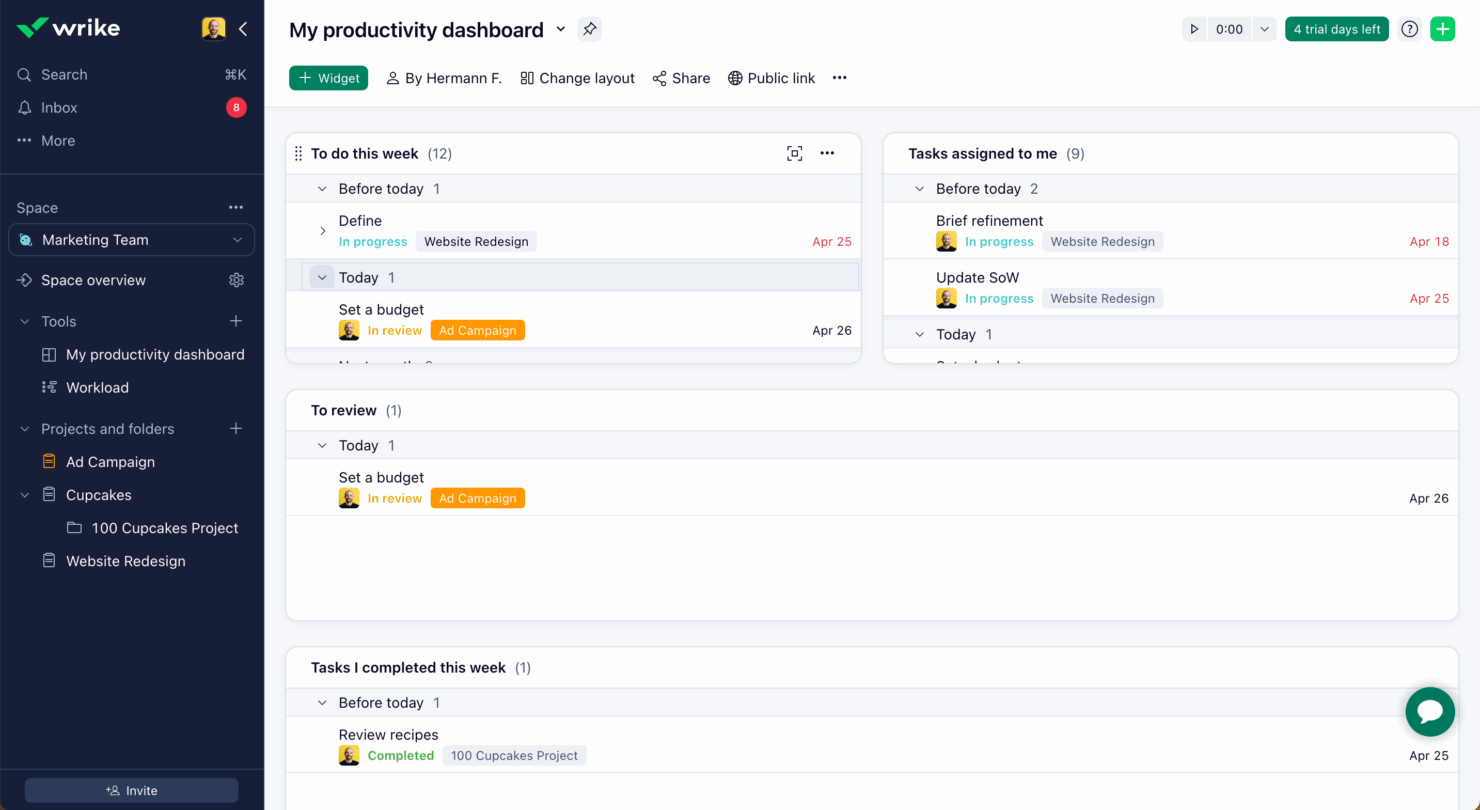
| Interfaccia Utente | Wrike offre un'interfaccia completa con dashboard personalizzabili per una visione dettagliata dei progetti. | Trello presenta un'interfaccia semplice e visiva in stile Kanban, intuitiva da navigare. |
| Esperienza di Onboarding | Wrike offre tutorial guidati e un processo di onboarding strutturato per aiutare i nuovi team a iniziare rapidamente. | L'onboarding di Trello è semplice, con una facile funzionalità drag-and-drop per impostare le bacheche. |
| Configurazione | Wrike richiede una configurazione iniziale maggiore per impostare i flussi di lavoro e i permessi, ma offre ampia possibilità di personalizzazione. | Trello consente una configurazione rapida con modelli predefiniti e una configurazione minima necessaria. |
| Supporto | Wrike offre supporto 24/7 con un help center dedicato e forum della community. | Trello mette a disposizione un help center e il supporto della community, ma manca di assistenza live 24/7. |
La facilità d'uso di Trello si distingue grazie alla configurazione semplice e all'interfaccia intuitiva, rendendolo ideale per i team che cercano una rapida implementazione. Wrike, pur essendo più complesso, eccelle nella personalizzazione e nella gestione dettagliata dei progetti, anche se necessita di un apprendimento più approfondito.
Wrike vs Trello: Pros & Cons
Wrike
- Wrike's proofing feature allows you to compare file versions dynamically.
- The user-friendly interface ensures easy navigation for your team.
- Wrike's AI features are available in all plans at no extra cost.
- It can be unclear where form responses are stored within the tool.
- Some integrations require an additional cost, regardless of the plan.
- Two-factor authentication is only available with the enterprise plan.
Trello
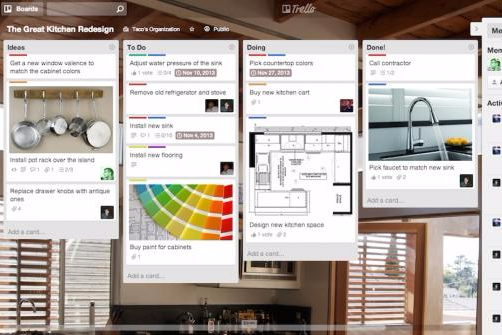
- You can easily visualize your tasks with Trello's board and card layout.
- It's simple to use, making it accessible for team members of all skill levels.
- Trello adapts to your team's workflow, offering flexibility in task management.
- Trello lacks advanced reporting features you might find in more complex tools.
- You can't create intricate task dependencies, which may limit complex project planning.
- Trello's simplicity might not suit large teams with detailed project management needs.
Best Use Cases for Wrike and Trello
Wrike
- Marketing Teams Wrike’s proofing feature helps you streamline creative approval processes with ease.
- Creative Agencies Wrike’s dynamic file version comparison keeps your creative projects on track.
- IT Departments Wrike’s user-friendly interface simplifies complex project coordination for your team.
- Product Development Wrike’s AI features boost your team’s productivity without extra costs.
- Event Management Wrike’s task scheduling ensures your events are planned and executed flawlessly.
- Construction Projects Wrike’s robust project tracking keeps your construction timelines and budgets in check.
Trello
- Creative Agencies Trello's visual task management makes it easy for you to track projects, ideas, and client feedback.
- Startups The flexibility Trello offers helps your team adapt quickly as you grow and change.
- Marketing Teams You can easily plan campaigns and track progress with Trello's board system.
- Design Departments Trello's simple interface allows you to manage design projects and revisions efficiently.
- Freelancers You can organize your tasks and deadlines without getting overwhelmed by complex features
- Product Development Trello's adaptability helps your team streamline workflows and manage product roadmaps effectively.
Chi dovrebbe usare Wrike e chi dovrebbe usare Trello?
A mio parere, Wrike è la scelta migliore per team più grandi in settori come il marketing o la consulenza che hanno bisogno di un monitoraggio dettagliato dei progetti e di una gestione solida delle risorse. Ritengo che Trello sia adatto a team più piccoli o startup che cercano un modo semplice e visivo per gestire le attività senza la necessità di funzionalità complesse. Secondo me, se il tuo team dà valore alla personalizzazione e ad analisi dettagliate, Wrike è la scelta giusta. Al contrario, se desideri uno strumento facile da usare, rapido da configurare e perfetto per progetti creativi, Trello è la soluzione ideale.
Differences Between Wrike and Trello
| Wrike | Trello | |
|---|---|---|
| Automation | Wrike includes built-in automation for workflows and task assignments. | Trello offers automation through power-ups like Butler for task automation. |
| Core Features | Wrike offers advanced project tracking and resource management tools. | Trello focuses on simple task management with visual Kanban boards. |
| Onboarding | Wrike features a structured onboarding with tutorials and support. | Trello's onboarding is straightforward with minimal setup needed. |
| Pricing | Wrike uses tiered pricing based on features and team size. | Trello offers a freemium model with optional paid plans for extras. |
| User Interface | Wrike provides a detailed interface with customizable dashboards. | Trello's interface is simple and intuitive, using drag-and-drop boards. |
| Visit WrikeOpens new window | Read Trello ReviewOpens new window |
Similarities Between Wrike and Trello
| Collaboration | Both platforms allow team collaboration with real-time updates and comments, ensuring everyone stays on the same page. |
|---|---|
| Customization | Both tools provide customization options, like Wrike's dashboards and Trello's power-ups, to tailor the platform to your needs. |
| Integrations | Both Wrike and Trello integrate with popular tools like Slack and Google Drive, helping your team connect workflows seamlessly. |
| Mobile Usability | Wrike and Trello offer mobile apps, letting you manage tasks and projects on the go with ease. |
| Task Management | Wrike and Trello both excel in task management, offering features to assign, track, and prioritize tasks effectively. |
| Visit WrikeOpens new window Read Trello ReviewOpens new window | |