



monday.com vs. Trello: Confronto e Recensioni degli Esperti per il 2026



monday.com offre una piattaforma versatile per ottimizzare le attività e la collaborazione del tuo team. Trello propone un’interfaccia semplice basata su schede per gestire i progetti in modo visuale. Sebbene entrambi gli strumenti aiutino a organizzare il lavoro, monday.com è più completo rispetto alla semplicità di Trello. In questo articolo confronteremo gli strumenti e le loro funzionalità, vantaggi e svantaggi, prezzi e altro ancora per aiutarti a scegliere il miglior software di project management per il tuo team.
monday AI Workspace vs. Trello: An Overview
monday AI Workspace

Trello




Perché fidarsi dei nostri consigli sui software
Il nostro team testa e recensisce software dal 2012. In quanto project manager noi stessi, sappiamo quanto sia difficile — e importante — scegliere il software giusto.
Per questa guida, abbiamo valutato gli strumenti attraverso test pratici e ricerche indipendenti, assegnando un punteggio agli strumenti in base ai nostri criteri di selezione. Ci basiamo inoltre sulle competenze di leader di pensiero del settore e di professionisti attivi nella gestione dei progetti.
Le nostre recensioni riflettono il nostro giudizio editoriale umano, non un discorso di vendita.
Revisori esperti:
monday AI Workspace vs. Trello Pricing Comparison
| monday AI Workspace | Trello | |
|---|---|---|
| Free Trial | Free plan available | 14-day free trial |
| Pricing | From $9/user/month (billed annually) | From $5/user/month (billed annually) |
Prezzi e costi nascosti di monday.com e Trello
I prezzi di monday.com sono strutturati su diversi livelli in base alle funzionalità e al numero di utenti, con possibili costi nascosti legati a integrazioni premium e limiti di automazione. I prezzi di Trello offrono un modello freemium con piani a pagamento che sbloccano funzionalità avanzate, ma possono sorgere costi aggiuntivi da power-up e necessità di maggiore spazio di archiviazione. Per scegliere il piano giusto per il tuo team, valuta le funzionalità specifiche di cui hai bisogno, considera una possibile crescita futura e calcola il costo totale nel tempo, includendo eventuali aggiunte o upgrade futuri.
monday AI Workspace vs. Trello Feature Comparison
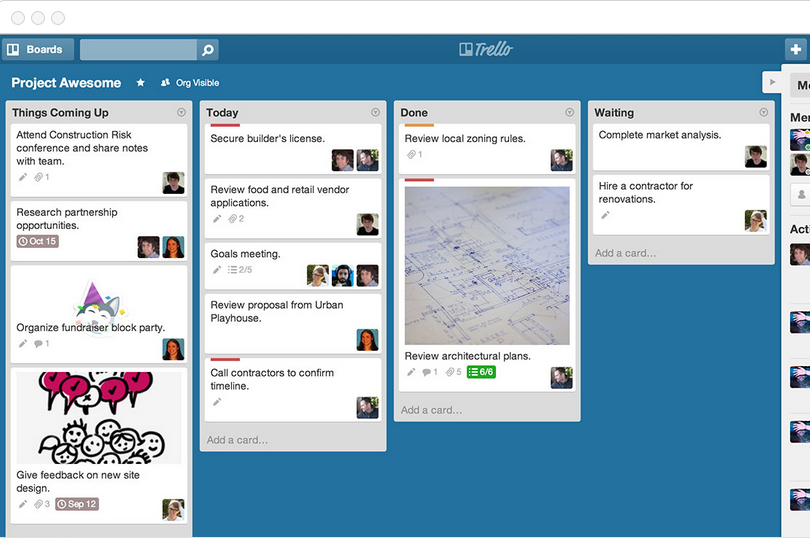
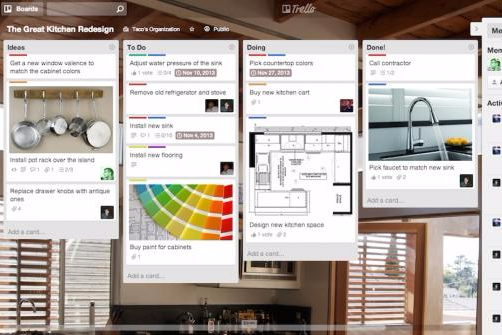
Con le automazioni di monday.com puoi ottimizzare attività ricorrenti come aggiornare gli stakeholder al raggiungimento di una milestone di progetto, fondamentale in ambienti dinamici. L’interfaccia a schede di Trello è ideale per i team che necessitano di una modalità visuale per tracciare l’avanzamento, soprattutto in ambiti creativi dove la collaborazione è fondamentale. Entrambi gli strumenti offrono vantaggi unici, con monday.com eccellente sulle automazioni e Trello sulla gestione visuale delle attività.
| monday AI Workspace | Trello | |
|---|---|---|
| API | ||
| Batch Permissions & Access | ||
| Budgeting | ||
| Calendar Management | ||
| Collaboration Support | ||
| Contact Management | ||
| Contact Sharing | ||
| Customer Management | ||
| Dashboard | ||
| Dashboards | ||
| Data Export | ||
| Data Import | ||
| Data Visualization | ||
| Dependency Tracking | ||
| Document Sharing | ||
| Expense Tracking | ||
| External Integrations | ||
| File Sharing | ||
| Gantt Charts | ||
| Kanban Boards | ||
| Multi-User | ||
| Notifications | ||
| Project Management | ||
| Resource Management | ||
| Scheduling | ||
| Task Scheduling/Tracking | ||
| Third-Party Plugins/Add-Ons | ||
| Time Management | ||
| Travel Management | ||
| Workflow Management |
monday.com vs. Trello Integrazioni
| Integrazione | monday.com | Trello |
|---|---|---|
| Slack | ✅ | ✅ |
| Google Drive | ✅ | ✅ |
| Microsoft Teams | ✅ | ✅ |
| Dropbox | ✅ | ✅ |
| HubSpot | ✅ | ❌ |
| ✅ | ❌ | |
| Salesforce | ✅ | ✅ |
| Asana | ❌ | ✅ |
| API | ✅ | ✅ |
| Zapier | ✅ | ✅ |
Grazie all’integrazione di monday.com con HubSpot, puoi sincronizzare perfettamente vendite e gestione dei progetti, fondamentale per i team che allineano marketing e workflow di progetto. L’integrazione di Trello con Asana è ideale per chi deve collegare la gestione di singole attività con una pianificazione più ampia del progetto, soprattutto in contesti dinamici. Entrambe le piattaforme propongono integrazioni valide, con monday.com superiore nei collegamenti con CRM e Trello nella gestione delle attività.
monday.com vs. Trello Sicurezza, Conformità & Affidabilità
| Fattore | monday.com | Trello |
|---|---|---|
| Privacy dei dati | monday.com utilizza pratiche di gestione dati conformi al GDPR per proteggere le informazioni degli utenti. | Trello applica politiche GDPR per garantire la privacy dei dati degli utenti. |
| Cifratura | monday.com ricorre a cifratura AES-256 per i dati inattivi e in transito. | Trello protegge i dati con cifratura TLS durante la trasmissione. |
| Conformità normativa | monday.com è conforme agli standard ISO/IEC 27001 per la sicurezza delle informazioni. | Trello si allinea agli standard SOC2 Type II per la conformità alla sicurezza. |
| Affidabilità | monday.com garantisce il 99,9% di uptime grazie a una solida infrastruttura. | Trello assicura il 99,99% di uptime con la sua architettura server affidabile. |
monday.com e Trello offrono entrambi ottima sicurezza e conformità, ma monday.com dispone di funzioni di conformità normativa più estese. Per scegliere il fornitore più adatto, valuta le esigenze di sicurezza specifiche del tuo team e verifica certificazioni di conformità e protocolli di cifratura di ciascuna piattaforma.
monday.com vs. Trello Facilità d'Uso
| Fattore | monday.com | Trello |
|---|---|---|
| Interfaccia Utente | monday.com offre una dashboard personalizzabile con funzionalità drag-and-drop. | Trello propone un'interfaccia semplice basata su schede che risulta intuitiva. |
| Esperienza di Onboarding | monday.com include tutorial interattivi e guide per i nuovi utenti. | Trello offre una configurazione semplice con un onboarding minimo richiesto. |
| Configurazione | monday.com richiede una configurazione iniziale per adattare i flussi di lavoro. | La configurazione di Trello è rapida e facile, ideale per un utilizzo immediato. |
| Supporto | monday.com fornisce assistenza clienti 24/7 e un centro assistenza completo. | Trello offre un forum della community e assistenza via email. |
monday.com offre un'elevata personalizzazione, ma la configurazione iniziale può risultare più complessa, mentre la semplicità di Trello permette di iniziare subito ma offre meno possibilità di personalizzazione dettagliata. Il supporto di monday.com è molto ampio e facilita la gestione di funzionalità complesse, mentre la forza di Trello è nella sua facilità d'uso grazie a un approccio visivo e intuitivo.
monday AI Workspace vs Trello: Pros & Cons
monday AI Workspace
- The interface is easy to use, with simple drag and drop timeline and charting mechanics.
- You can create forms that live within your project as a view.
- There is a long list of supported integrations
- The Gantt view isn't useful for building a project.
- Recurring tasks are considered automations and limited to higher tier plans.
- There is a steep learning curve for beginners.
Trello
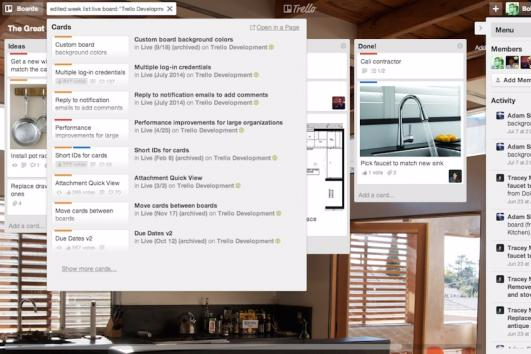
- You can easily visualize your tasks with Trello's board and card layout.
- It's simple to use, making it accessible for team members of all skill levels.
- Trello adapts to your team's workflow, offering flexibility in task management.
- Trello lacks advanced reporting features you might find in more complex tools.
- You can't create intricate task dependencies, which may limit complex project planning.
- Trello's simplicity might not suit large teams with detailed project management needs.
Best Use Cases for monday AI Workspace and Trello
monday AI Workspace
- Creative departments With features like collaborative docs and a proofing screen, creative teams can improve feedback loops and increase delivery speeds.
- Marketing teams Its customizable dashboards and automation features let you track campaigns and workflows efficiently.
- Content creation monday.com's file management and commenting capabilities let teams manage media files and improve collaboration.
- Event planners The platform’s timeline views and easy collaboration features make managing multiple events straightforward.
- Product development You can track progress and updates across teams to maintain alignment and meet deadlines.
- Remote teams With collaborative features and real-time updates, remote teams can maintain productivity and communication effortlessly.
Trello
- Creative Agencies Trello's visual task management makes it easy for you to track projects, ideas, and client feedback.
- Startups The flexibility Trello offers helps your team adapt quickly as you grow and change.
- Marketing Teams You can easily plan campaigns and track progress with Trello's board system.
- Design Departments Trello's simple interface allows you to manage design projects and revisions efficiently.
- Freelancers You can organize your tasks and deadlines without getting overwhelmed by complex features
- Product Development Trello's adaptability helps your team streamline workflows and manage product roadmaps effectively.
Chi dovrebbe usare monday.com e chi dovrebbe usare Trello?
Secondo me, monday.com è ideale per i team che necessitano di funzionalità di gestione progetti avanzate e possibilità di personalizzazione, specialmente per grandi organizzazioni o settori come IT e marketing. Credo che Trello sia più adatto a piccoli gruppi o individui che apprezzano la semplicità e una gestione visiva delle attività, rendendolo perfetto per progetti creativi o startup con budget limitati. Dal mio punto di vista, se il tuo team ha bisogno di workflow dettagliati e integrazioni, scegli monday.com, mentre se desideri uno strumento semplice e visivo, Trello è la scelta giusta.
Differences Between monday AI Workspace and Trello
| monday AI Workspace | Trello | |
|---|---|---|
| Automation | monday.com includes built-in automations for recurring tasks. | Trello supports automations through power-ups and integrations. |
| Customization | monday.com offers extensive customization options with templates and automations. | Trello provides limited customization with its card-based system. |
| Pricing | monday.com has tiered pricing based on features and user count. | Trello offers a freemium model with advanced features in paid plans. |
| Support | monday.com provides 24/7 customer support and a comprehensive help center. | Trello offers community forums and email support for user assistance. |
| User Interface | monday.com features a dynamic dashboard with drag-and-drop capabilities. | Trello uses a simple, visual card-based interface that's easy to navigate. |
| Visit monday AI WorkspaceOpens new window | Read Trello ReviewOpens new window |
Similarities Between monday AI Workspace and Trello
| Cloud-Based | Both tools are cloud-based, so you can access your projects anywhere. monday.com provides a robust web app, and Trello offers a simple, intuitive online platform. |
|---|---|
| Collaboration | Both monday.com and Trello offer real-time collaboration features, allowing your team to work together seamlessly. monday.com uses boards and updates, while Trello uses cards and comments to keep everyone in sync. |
| Integrations | monday.com and Trello both integrate with popular apps like Slack and Google Drive, making it easy to connect your existing tools. |
| Mobile Usability | Both platforms have mobile apps, allowing you to manage tasks on the go. monday.com's app is feature-rich, while Trello's app is user-friendly and straightforward. |
| Visual Management | Both tools use visual elements to manage tasks, with monday.com using boards and Trello using cards, helping your team stay organized at a glance. |
| Visit monday AI WorkspaceOpens new window Read Trello ReviewOpens new window | |