

I 10 migliori strumenti di flusso di lavoro basati sull’IA recensiti nel 2026

Selezione dei migliori strumenti di flusso di lavoro basati sull'IA


La gestione dei progetti oggi implica il coordinamento delle attività, il monitoraggio dei progressi tra i team e la capacità di adattarsi rapidamente quando i piani cambiano. Gli strumenti per i flussi di lavoro possono essere d'aiuto, ma quelli basati sull'IA fanno un ulteriore passo avanti automatizzando le attività di routine, identificando le inefficienze e fornendo informazioni utili a migliorare la pianificazione e l'esecuzione.
In base alla mia esperienza nel testare queste piattaforme, sono le funzionalità di IA a fare la differenza. Possono segnalare potenziali colli di bottiglia, suggerire i passaggi successivi e aiutare i team a rimanere allineati senza una supervisione manuale costante. In questo articolo metterò in evidenza i migliori strumenti per flussi di lavoro basati sull'IA disponibili, concentrandomi sulle funzionalità e sui vantaggi che migliorano concretamente la gestione quotidiana dei progetti.
Troverai recensioni chiare e imparziali basate su una ricerca pratica, che ti aiuteranno a scegliere la soluzione più adatta al tuo team e ai tuoi progetti.
Perché fidarsi dei nostri consigli sui software
Il nostro team testa e recensisce software dal 2012. In quanto project manager noi stessi, sappiamo quanto sia difficile — e importante — scegliere il software giusto.
Per questa guida, abbiamo valutato gli strumenti attraverso test pratici e ricerche indipendenti, assegnando un punteggio agli strumenti in base ai nostri criteri di selezione. Ci basiamo inoltre sulle competenze di leader di pensiero del settore e di professionisti attivi nella gestione dei progetti.
Le nostre recensioni riflettono il nostro giudizio editoriale umano, non un discorso di vendita.
Revisori esperti:
Tabella comparativa degli strumenti per flussi di lavoro basati sull'IA
Questa tabella comparativa riassume i dettagli dei prezzi delle mie migliori selezioni di strumenti per flussi di lavoro basati sull’IA.
| Tool | Best For | Trial Info | Price | ||
|---|---|---|---|---|---|
| 1 | Ideale per identificazione e report dei rischi tramite IA | Piano gratuito disponibile | Da $9/utente/mese (fatturazione annuale) | Website | |
| 2 | Ideale per incorporare workflow nei portali clienti | Piano gratuito + prova gratuita + demo gratuita disponibile | Da $99/mese | Website | |
| 3 | Ideale per flussi di approvazione personalizzabili | Demo gratuita disponibile | Prezzo su richiesta | Website | |
| 4 | Ideale per la prioritizzazione delle attività guidata dall'IA | Prova gratuita di 14 giorni + piano gratuito disponibile | Da $10/utente/mese (fatturazione annuale) | Website | |
| 5 | Il migliore con oltre 1.000 connettori preconfigurati | Demo gratuita disponibile | Prezzo su richiesta | Website | |
| 6 | Ideale per l'automazione IA in processi complessi | Piano gratuito + demo gratuita disponibili | Da $9/mese (fatturazione annuale) | Website | |
| 7 | Ideale per la personalizzazione dei workflow open-source | Prova gratuita disponibile | Da $20/mese (fatturazione annuale) | Website | |
| 8 | Miglior strumento di pianificazione roadmap con IA per product manager | Prova gratuita di 30 giorni + demo gratuita disponibile | Da $9/utente/mese | Website | |
| 9 | Ideale per l'orchestrazione AI | Piano gratuito disponibile | A partire da $19.99/mese (fatturato annualmente) | Website | |
| 10 | Ideale per aziende che integrano sistemi di intelligenza artificiale | Prova gratuita di 30 giorni | Prezzo su richiesta | Website |


Recensioni dei migliori strumenti per flussi di lavoro basati sull'IA
Di seguito sono riportati i miei riepiloghi dettagliati dei migliori strumenti per flussi di lavoro basati sull’IA inclusi nella mia selezione. Le mie recensioni offrono uno sguardo approfondito alle funzionalità principali, ai vantaggi & svantaggi, alle integrazioni e ai casi d’uso ideali di ogni strumento, per aiutarti a trovare quello più adatto a te.

Ideale per identificazione e report dei rischi tramite IA
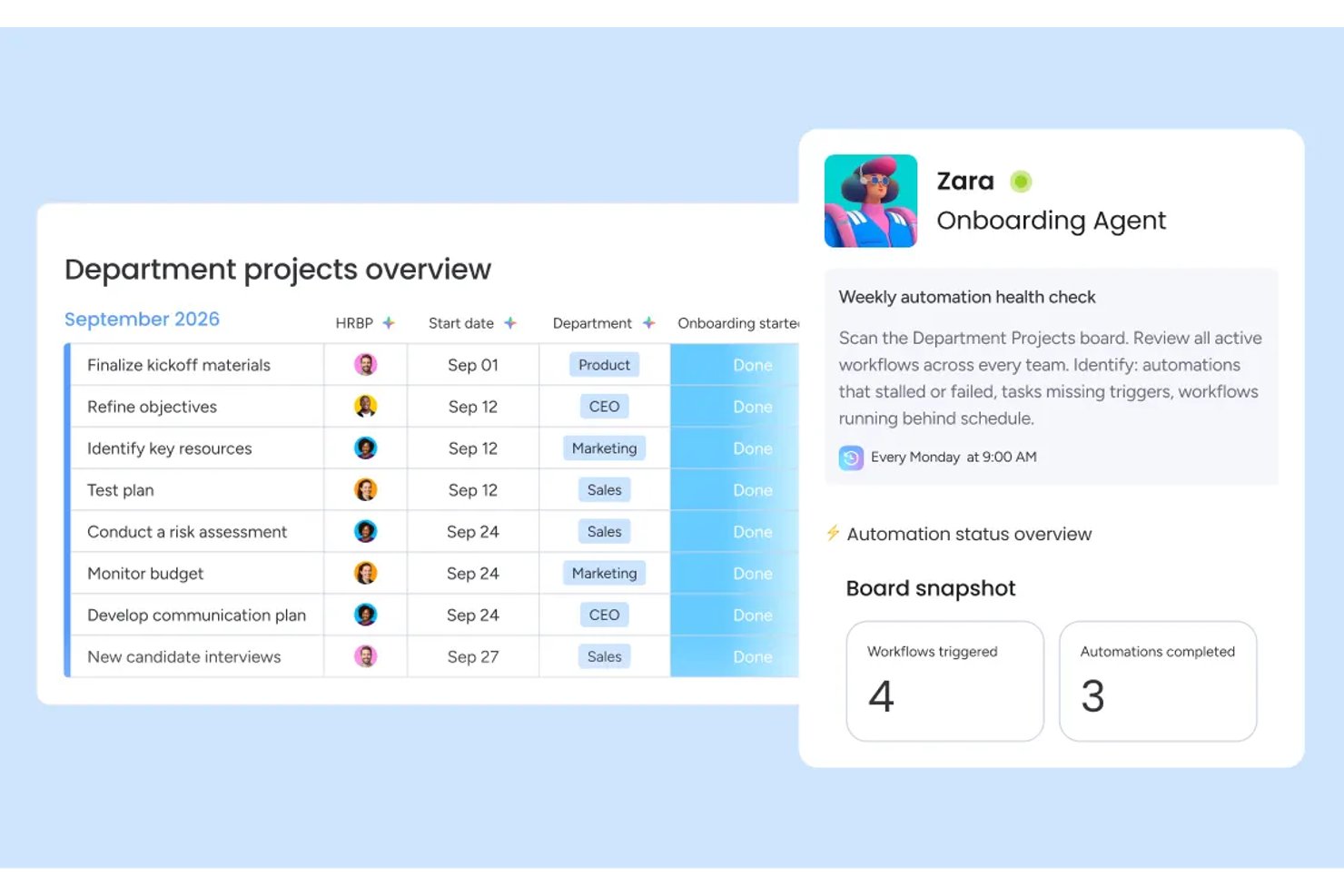
monday AI Workspace è una piattaforma di gestione del lavoro nativa dell'IA che combina automazione dei flussi di lavoro, esecuzione agentica delle attività, pianificazione di progetti generativa e intelligenza predittiva del portafoglio in un unico ambiente.
Per chi è più adatto monday AI Workspace?
È particolarmente indicato per team di medie e grandi dimensioni e organizzazioni guidate da PMO che necessitano di una supervisione AI a livello di portafoglio su più progetti simultanei.
Perché ho scelto monday AI Workspace
Ho inserito monday AI Workspace nella mia shortlist per il modo in cui gestisce i rischi prima che diventino un problema. Apprezzo molto la funzione di analisi dei rischi alimentata dall'IA, che monitora le dipendenze tra le board attive e segnala i ritardi prima che si propaghino. I report AI a livello di portafoglio aggregano poi questi dati in dashboard pronte per i dirigenti, così da non dover cercare manualmente tra le diverse board per ricostruire lo stato di salute dei progetti.
Caratteristiche principali di monday AI Workspace
- Builder di flussi di lavoro AI: Consente di orchestrare automazioni multi-step e basate su condizioni tra team e strumenti, utilizzando regole guidate dall'IA.
- Assistente AI Sidekick: Fornisce un'interfaccia in linguaggio naturale per interrogare dati di progetto, aggiornare attività e gestire i flussi di lavoro.
- Builder di app Vibe: Permette di creare applicazioni aziendali personalizzate senza codice direttamente nello spazio di lavoro.
- AI meeting notetaker: Registra, trascrive e riassume automaticamente le riunioni, così che le azioni vengano sempre documentate e condivise.
Integrazioni di monday AI Workspace
monday AI Workspace offre centinaia di integrazioni native tramite le sue integrazioni interne e il marketplace, inclusi Slack, Jira, Google Workspace, Microsoft Teams, Salesforce, HubSpot, Asana, Trello, GitHub e Zoom. Supporta inoltre Zapier e offre un'API per integrazioni personalizzate.
Pros and Cons
Pros:
- Segnalazione anticipata dei rischi AI prima che i ritardi si propaghino
- Report AI a livello di portafoglio su più progetti
- Agenti AI personalizzati no-code per qualsiasi flusso di lavoro
Cons:
- Le funzionalità AI sono disponibili solo nei piani di livello superiore
- Troppo complesso per piccoli team con flussi di lavoro semplici
New Product Updates from monday AI Workspace
monday AI Workspace Adds Human Approval Routing
monday AI Workspace adds a human-in-the-loop approval block to AI Workflows, sending approval requests and routing workflow paths based on responses. For more information, visit monday AI Workspace's official site.

Moxo
Ideale per incorporare workflow nei portali clienti
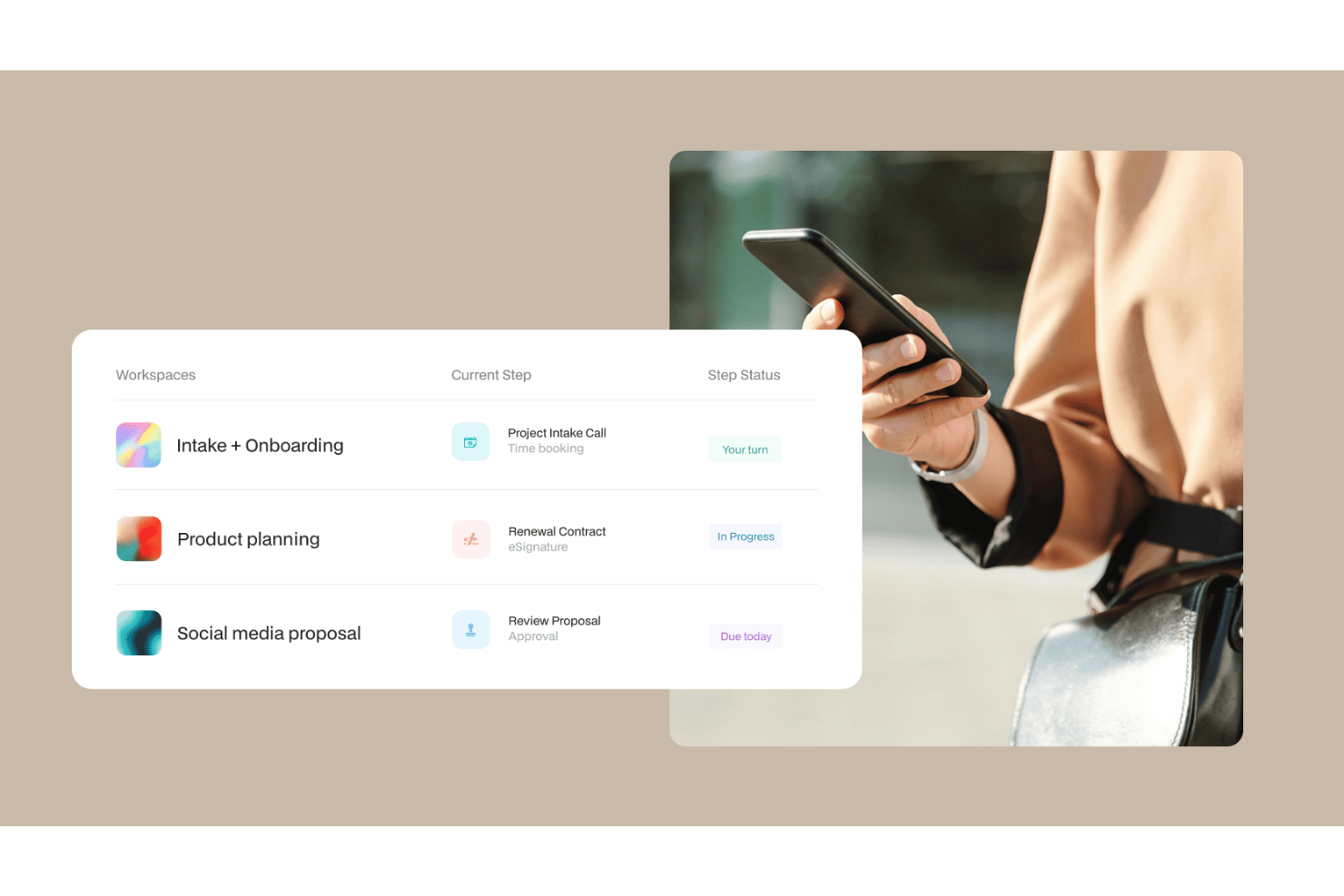
Moxo è una piattaforma di workflow AI che combina un builder di workflow visuale con agenti AI per orchestrare processi aziendali multi-step sia tra team interni sia verso clienti esterni, all'interno di un ambiente portale con marchio personalizzato.
Per chi è ideale Moxo?
Moxo è particolarmente adatto ai team a contatto con i clienti nei settori dei servizi finanziari, legali e professionali che devono gestire stakeholder esterni all'interno di workflow strutturati.
Perché ho scelto Moxo
Ho inserito Moxo tra le mie scelte principali perché è uno dei pochi strumenti workflow AI che consente di incorporare interi flussi di processo direttamente nella propria app o sito web. Usando i suoi SDK per iOS, Android e JavaScript, il mio team può proporre flussi di lavoro strutturati (raccolta documenti, approvazioni, firme elettroniche) all'interno di un portale clienti completamente brandizzato, consentendo così ai clienti di completare le attività senza mai uscire dal prodotto. La personalizzazione white-label è profonda: logo, colori, componenti dell'interfaccia utente e visibilità delle funzionalità sono tutti configurabili a livello organizzativo.
Funzionalità principali di Moxo
- Agenti AI per workflow: Gli agenti Assist, Automate e Amplify di Moxo gestiscono la preparazione dei compiti, la validazione e l'escalation all'interno dei workflow attivi.
- Logica condizionale nei workflow: Crea percorsi ramificati, loop e tracce parallele nel builder visuale in base agli esiti delle attività o ai dati di input.
- Timer SLA: Imposta trigger basati su tempo su singoli passaggi del workflow per effettuare automaticamente escalation o riassegnazione dei compiti se le scadenze non vengono rispettate.
- Messaggistica sicura in-app: Invia messaggi cifrati, file e notifiche direttamente nel contesto del workflow, senza passare ad altri strumenti esterni.
Integrazioni di Moxo
Moxo offre integrazioni dirette con Salesforce, HubSpot, Microsoft Dynamics, Zoho, Wealthbox, Redtail, Filevine, Global Relay, Smarsh, Xero e Follow Up Boss, oltre alla possibilità di caricare file tramite Google Drive, Dropbox, Box e OneDrive, e di sincronizzare calendari con Google Calendar e Outlook. Si collega anche a Zapier ed è disponibile una REST API con webhooks per integrazioni personalizzate.
Pros and Cons
Pros:
- Firme elettroniche, moduli e approvazioni integrati in un unico workspace
- Branding white-label per portali rivolti ai clienti
- Conforme SOC 2 Type II e GDPR
Cons:
- Nessuna funzione integrata di monitoraggio del tempo per le attività
- Il tracciamento delle attività non è approfondito per i progetti interni

Ideale per flussi di approvazione personalizzabili

Screendragon è una piattaforma di gestione dei flussi di lavoro no-code pensata per team di marketing aziendale e operations creative, che combina agenti AI, automazione visiva dei flussi di lavoro, raccolta dinamica tramite moduli, gestione digitale delle approvazioni e reportistica in tempo reale.
Per chi è Screendragon?
Screendragon è ideale per team aziendali di marketing, agenzie e operations creative che necessitano di una gestione strutturata e scalabile dei flussi di lavoro, anche per progetti complessi e con più stakeholder.
Perché ho scelto Screendragon
Ho incluso Screendragon tra le mie scelte principali perché la sua gestione digitale dei flussi di approvazione è davvero configurabile in modi che la maggior parte degli altri strumenti non consente. È possibile costruire cicli di approvazione multi-step direttamente nel design del workflow no-code, con instradamento condizionale che invia il lavoro ai diversi revisori in base a criteri specifici. Apprezzo anche il fatto che ogni decisione di approvazione sia tracciata in un registro di verifica automatizzato, con confronto delle versioni affiancate e annotazioni all’interno della piattaforma, eliminando qualsiasi ambiguità su cosa sia stato revisionato, da chi e quando.
Funzionalità principali di Screendragon
- AI Hub: Crea, distribuisci e gestisci agenti AI personalizzati direttamente nei tuoi flussi di lavoro per attività come briefing, generazione di contenuti e controllo di conformità.
- Builder di moduli dinamici: Crea moduli di raccolta dati personalizzati con logiche condizionali per ottenere informazioni strutturate sui progetti all’avvio di qualsiasi workflow.
- Analisi dei workflow in tempo reale: Accedi a dashboard e report personalizzati che evidenziano carichi di lavoro, colli di bottiglia e dati sulle performance nei flussi di lavoro attivi.
- Previsione delle risorse tramite AI: Usa l’AI Resourcing Agent di Screendragon per modellare e prevedere la domanda di risorse sulla base dei progetti attivi.
Integrazioni di Screendragon
Screendragon offre integrazioni preconfigurate con strumenti già utilizzati dai team, tra cui Aprimo, Microsoft Power BI, Google Cloud Platform Storage, HubSpot, Amazon S3, Sitecore, Ziflow, Vidmob, Brandfolder, Smartsheet e Workato. Ulteriori integrazioni mostrate sul loro sito includono Jira, Google Drive, Egnyte, Box, Adobe, OneDrive, NetSuite, Salesforce, Microsoft Dynamics 365, SAP, Microsoft 365 e Trello. Sono disponibili un’API e un Connection Manager per collegare Screendragon a qualsiasi sistema dotato di API aperta.
Pros and Cons
Pros:
- Agenti AI integrati per l'automazione dei workflow
- Permessi granulari basati su ruoli
- Moduli dinamici con logica condizionale dei campi
Cons:
- Pensato per aziende, complesso per team di piccole dimensioni
- Richiede un investimento di tempo per l’onboarding dedicato
New Product Updates from Screendragon
Screendragon Unveils New AI Hub
Screendragon introduced AI Hub, a new capability that lets teams build and manage AI agents directly within workflows. The update helps marketing teams automate tasks, maintain governance controls, and scale AI-driven operations more efficiently. For more information, visit Screendragon's official site.

Wrike
Ideale per la prioritizzazione delle attività guidata dall'IA

Per chi cerca una soluzione di workflow basata sull'intelligenza artificiale, Wrike si distingue per la sua combinazione di strumenti di automazione e collaborazione. È ideale per aziende e team di tutte le dimensioni che desiderano ottimizzare le operazioni e semplificare la gestione dei progetti. Automatizzando le attività di routine e rafforzando la collaborazione tra i membri del team, Wrike aiuta a gestire progetti complessi in modo più efficiente.
Perché ho scelto Wrike
Ho scelto Wrike per la sua forte integrazione dell'IA nella gestione dei workflow. La funzione Copilot rappresenta un elemento di spicco: aiuta i team a dare priorità alle attività e a generare approfondimenti che supportano decisioni migliori. La piattaforma consente inoltre agli utenti di automatizzare i processi utilizzando comandi in linguaggio naturale, riducendo il tempo dedicato ai lavori ripetitivi e liberando i team per concentrarsi su compiti più strategici. Queste capacità fanno di Wrike una scelta valida per i team che desiderano aumentare la produttività grazie a strumenti guidati dall'IA.
Funzionalità principali di Wrike
Oltre alle sue capacità basate sull'IA, Wrike offre diverse altre funzionalità che migliorano la gestione dei processi di lavoro:
- Dashboard personalizzabili: Adatta l'interfaccia alle esigenze del tuo team, offrendo una visualizzazione personalizzata di progetti e priorità.
- Diagrammi di Gantt: Visualizza le tempistiche e le dipendenze dei progetti con diagrammi di Gantt interattivi, semplificando la gestione dei progetti complessi.
- Monitoraggio del tempo: Tieni traccia del tempo dedicato ad attività e progetti per una fatturazione accurata e un'analisi della produttività.
- Email nella piattaforma: Comunica con stakeholder esterni direttamente all'interno della piattaforma, assicurando aggiornamenti di progetto e collaborazione senza interruzioni.
Integrazioni di Wrike
Le integrazioni includono Microsoft Teams, Google Workspace, Zoom, Slack, Dropbox, Outlook, Salesforce, HubSpot, Jira e Adobe Creative Cloud.
Pros and Cons
Pros:
- Prioritizzazione delle attività tramite IA
- Strumenti per l'automazione dei processi senza codice
- Dashboard personalizzabili in tempo reale
Cons:
- Le funzionalità avanzate richiedono livelli di abbonamento superiori
- I prezzi possono essere sfidanti per i team più piccoli
New Product Updates from Wrike

Wrike Adds Quick Search to Table View
Wrike adds Quick Search to Table View with full-table search across titles, descriptions, and fields, plus highlighted matches. This helps users find tasks faster in large tables. For more information, visit Wrike’s official site.

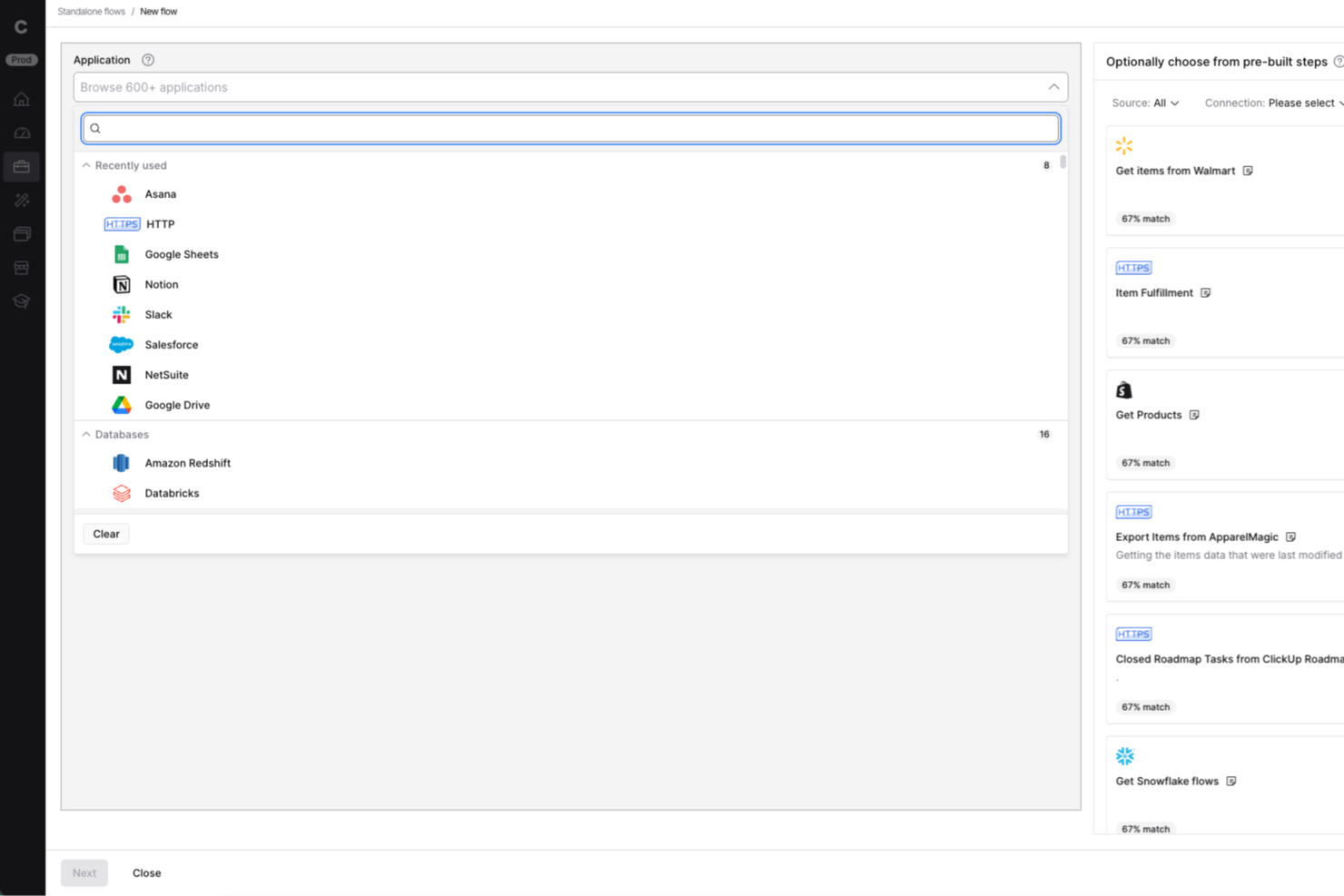
Celigo è una piattaforma di integrazione e automazione progettata per i team IT e i responsabili delle operazioni aziendali che necessitano di collegare applicazioni cloud, automatizzare i flussi di lavoro e gestire i dati su più sistemi senza la necessità di un ampio uso di codice.
Per chi è più indicato Celigo?
Per aziende di medie e grandi dimensioni con esigenze complesse di integrazione tra più applicazioni cloud e dipartimenti.
Perché ho scelto Celigo
Ho scelto Celigo tra i migliori perché avere accesso a oltre 1.000 connettori preconfigurati permette al mio team di collegare rapidamente applicazioni cloud come Salesforce, NetSuite e Shopify in pochi minuti. Posso automatizzare velocemente i flussi di lavoro tra il nostro CRM, ERP e le piattaforme di ecommerce senza dover sviluppare soluzioni personalizzate. Questa ampia libreria di connettori ci consente di passare meno tempo a creare integrazioni da zero e di dedicarci maggiormente all’ottimizzazione dei nostri processi.
Funzionalità principali di Celigo
- Builder di flussi guidato dall’IA: Crea e personalizza flussi di integrazione utilizzando suggerimenti e automazioni guidate dall’intelligenza artificiale.
- Dashboard per la gestione degli errori: Monitora, diagnostica e risolvi gli errori di integrazione da una dashboard centralizzata.
- Controlli di accesso basati sui ruoli: Imposta permessi specifici e dettagliati per utenti e team per gestire le integrazioni in sicurezza.
- Sincronizzazione dati in tempo reale: Mantieni i dati costantemente aggiornati tra i sistemi collegati tramite sincronizzazione automatizzata e in tempo reale.
Integrazioni di Celigo
Le integrazioni includono Salesforce, Microsoft Dynamics 365 Business Central, Oracle NetSuite, Walmart, SAP, Snowflake, Acumatica, ADP, Adobe e 3PL Central.
Pros and Cons
Pros:
- Controlli di accesso granulari per flussi di lavoro sensibili
- Supporto multi-ambiente per test in sicurezza
- Log di audit dettagliati per la conformità
Cons:
- Nessun piano gratuito permanente disponibile
- Le funzionalità avanzate richiedono piani più costosi
New Product Updates from Celigo
Celigo Adds API Group Assignment During API Setup
Celigo adds API group assignment during create, clone, and move actions. This reduces extra setup steps by letting teams organize APIs before the relative URI is defined. For more information, visit Celigo’s official site.
 .
.
Make
Ideale per l'automazione IA in processi complessi

Make è una piattaforma di automazione visiva per team che devono progettare flussi di lavoro complessi e multi-step. Supporta sviluppatori e utenti tecnici combinando automazione dei flussi di lavoro con agenti IA, funzioni di intelligenza artificiale generativa e strumenti di orchestrazione in tempo reale.
Perché ho scelto Make: Make offre un'interfaccia di programmazione visiva che semplifica la creazione di workflow dettagliati. Puoi integrare le sue capacità di IA generativa per potenziare l'automazione dei processi, rendendo più semplice la gestione dei compiti complessi. La sua interfaccia, le capacità degli agenti IA e il supporto per la logica ramificata aiutano i team a gestire processi che richiedono automazione approfondita. Offre anche modelli predefiniti e un'ampia gamma di integrazioni supportate dall'IA.
Funzionalità e integrazioni principali:
Funzionalità includono un builder drag-and-drop intuitivo che consente di orchestrare i workflow senza scrivere codice. È possibile impostare trigger e azioni per automatizzare in modo efficace le attività ripetitive. La piattaforma supporta anche il monitoraggio in tempo reale, permettendo di tracciare le prestazioni dei flussi di lavoro e apportare modifiche quando necessario.
Integrazioni includono Google Workspace, Slack, Google Gemini, Trello, Dropbox, Shopify, HubSpot, ChatGPT, Mailchimp, Salesforce, QuickBooks e Asana.
Pros and Cons
Pros:
- Workflow personalizzabili con interfaccia visiva
- Supporta esigenze di automazione complesse
- Monitoraggio in tempo reale per aggiustamenti dei workflow
Cons:
- Richiede apprendimento per le funzionalità avanzate
- Può risultare complesso per i principianti

n8n
Ideale per la personalizzazione dei workflow open-source
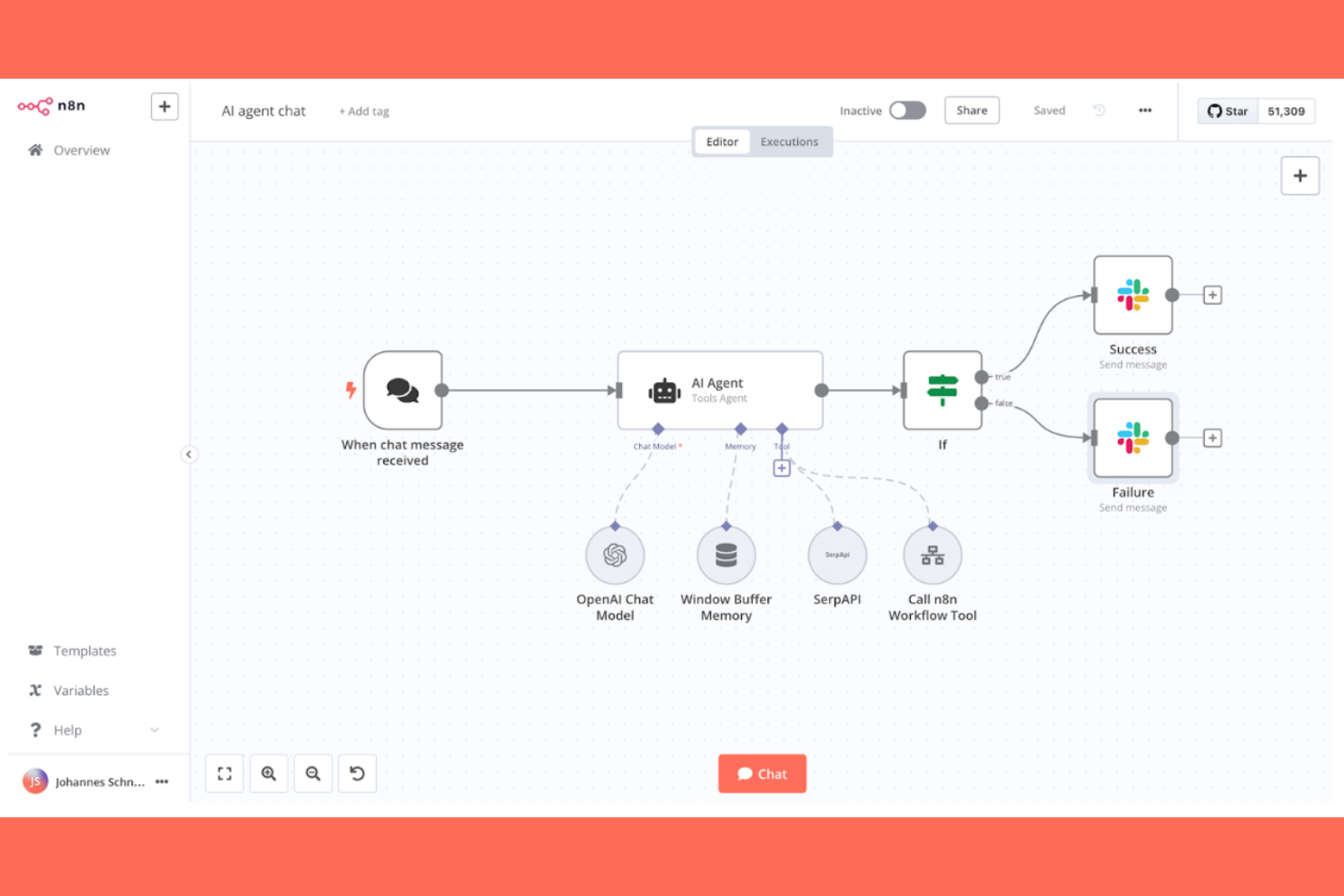
n8n è un software open-source per l'automazione dei flussi di lavoro che si rivolge a sviluppatori e team tecnici alla ricerca di flessibilità nella creazione di workflow personalizzati. Supporta workflow basati su AI, codice personalizzato e l'hosting autonomo, risultando adatto alle organizzazioni che necessitano di flessibilità e controllo sui dati.
Perché ho scelto n8n: n8n offre funzionalità AI come il processo decisionale automatizzato e il trattamento dei dati, che permettono di creare workflow su misura per le esigenze specifiche dell'azienda. Il supporto per codice personalizzato in JavaScript/Python, i nodi AI integrati, la compatibilità con LangChain e i numerosi trigger consentono ai team tecnici di adattare l'automazione avanzata ai propri bisogni. L'hosting autonomo offre inoltre un ulteriore controllo sulla gestione dei dati.
Funzionalità principali e integrazioni:
Funzionalità includono un editor visivo dei flussi di lavoro, che rende semplice progettare workflow complessi senza scrivere codice. È possibile utilizzare trigger webhook per avviare flussi sulla base di eventi in tempo reale. Lo strumento offre inoltre una gestione integrata degli errori per garantire processi fluidi e ridurre al minimo le interruzioni.
Integrazioni includono Slack, Google Sheets, Trello, GitHub, Discord, Airtable, Dropbox, Twitter, Shopify e Notion.
Pros and Cons
Pros:
- Altamente personalizzabile grazie all'approccio open-source
- Supporta l'hosting autonomo per un maggiore controllo
- Editor visivo dei workflow intuitivo
Cons:
- Richiede conoscenze tecniche per l'installazione
- Supporto limitato rispetto ad altri strumenti concorrenti

Aha!
Miglior strumento di pianificazione roadmap con IA per product manager

Aha! è un software di product management progettato per i product manager che desiderano creare roadmap strategiche e gestire lo sviluppo del prodotto. Si rivolge ai team che vogliono allineare la strategia di prodotto all'esecuzione, sfruttando insight e strumenti di pianificazione basati sull'IA.
Perché ho scelto Aha!: Aha! supporta i product manager che necessitano di strumenti di pianificazione strutturati con assistenza IA. La sua analisi predittiva, le lavagne supportate dall'IA e le funzionalità di pianificazione strategica aiutano i team a dare priorità al lavoro e ad adattare le roadmap in modo efficiente. La piattaforma offre anche un assistente IA integrato per gli strumenti di roadmapping e whiteboard, che aiuta le squadre ad analizzare i dati e a realizzare documentazione più rapidamente. Queste funzionalità lo rendono una scelta solida per i product manager che desiderano allineare strategia ed esecuzione.
Funzionalità principali e integrazioni:
Funzionalità includono il monitoraggio degli obiettivi per allineare il lavoro del team agli obiettivi aziendali, la gestione delle idee per raccogliere e prioritizzare i feedback dei clienti, e flussi di lavoro personalizzati per adattare i processi alle esigenze di ciascun team.
Integrazioni includono Jira, Slack, Microsoft Teams, Salesforce, GitHub, Asana, Trello, Azure DevOps, Google Analytics e Confluence.
Pros and Cons
Pros:
- Ottimo supporto alla pianificazione strategica
- Sistema efficace di gestione delle idee
- Flussi di lavoro personalizzabili per esigenze diverse
Cons:
- Leggera curva di apprendimento per i nuovi utenti
- Il reporting manca di opzioni di personalizzazione

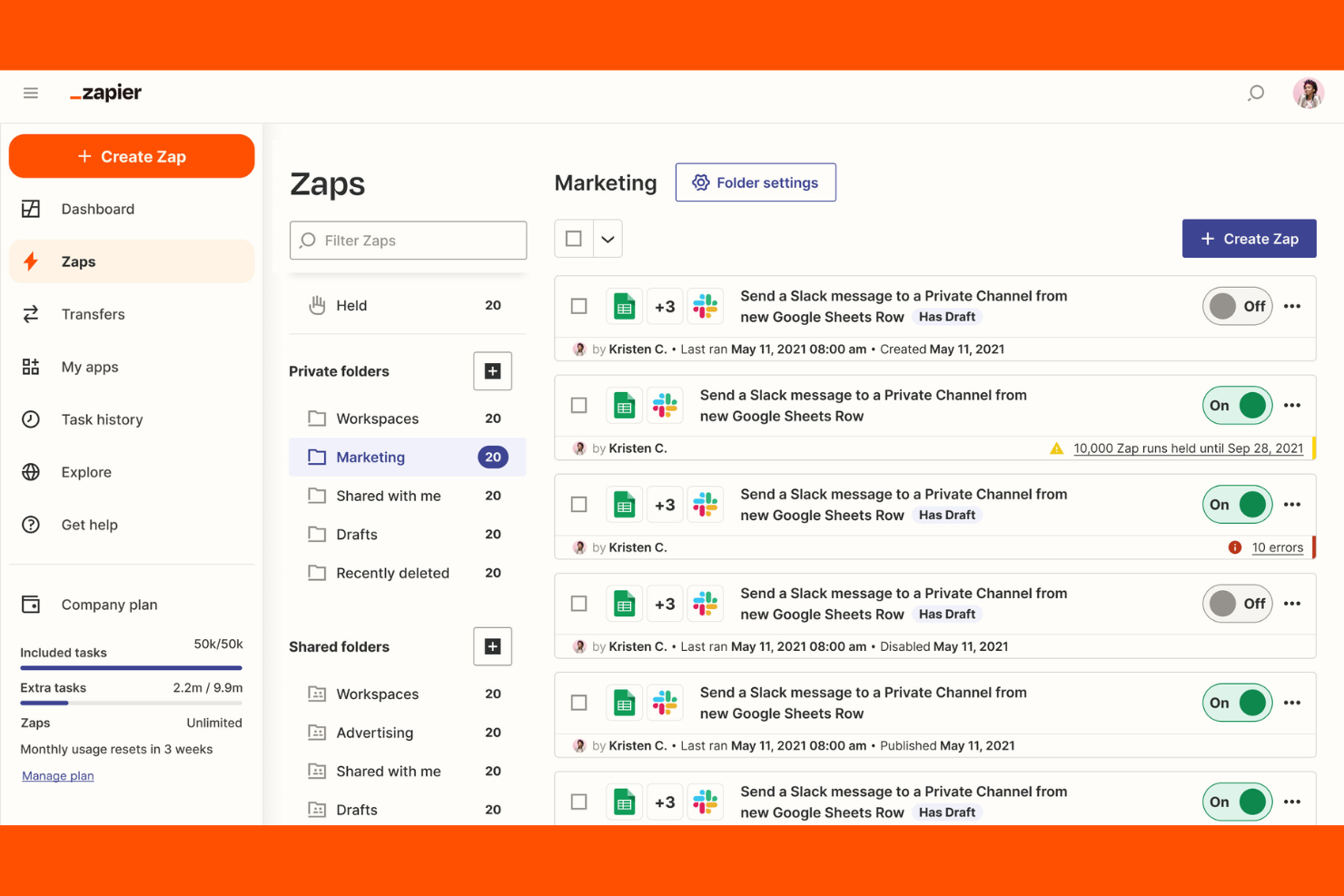
Zapier è una piattaforma di orchestrazione AI che aiuta i team a connettere e automatizzare flussi di lavoro tra migliaia di app e strumenti AI—senza codice. È utilizzata da organizzazioni di ogni dimensione, dalle startup in rapida crescita alle grandi imprese, per coordinare il lavoro tra marketing, vendite, RevOps, IT e operations.
Perché ho scelto Zapier: Zapier è ideale per i team che devono creare, adattare e scalare automazioni in modo rapido su molti strumenti. Il suo AI Copilot aiuta gli utenti a progettare flussi di lavoro multi-step utilizzando il linguaggio naturale, riducendo lo sforzo necessario per coordinare processi complessi. Template preimpostati e un'interfaccia accessibile supportano una configurazione rapida, mentre logiche più avanzate, azioni AI e controlli di amministrazione permettono alle organizzazioni più grandi di gestire e orchestrare flussi di lavoro tra dipartimenti senza un pesante carico tecnico.
Funzionalità e integrazioni principali:
Funzionalità includono la creazione di flussi di lavoro guidata da AI, un editor visuale per costruire automazioni, agenti AI e chatbot per l'esecuzione di compiti, e Tables per organizzare i dati dei flussi di lavoro. Permette di automatizzare attività ripetitive tramite flussi di lavoro chiamati “Zap”, che collegano migliaia di app per eseguire attività senza codice, risparmiando tempo e riducendo il lavoro manuale.
Integrazioni includono Google Sheets, Slack, Trello, Gmail, LinkedIn, Salesforce, HubSpot, Dropbox, Asana, Microsoft Teams e molte altre.
Pros and Cons
Pros:
- Scalabile da automazioni a due step a sistemi complessi tra team
- Flussi di lavoro no-code accessibili anche a utenti non tecnici
- Si integra con migliaia di app e strumenti AI
Cons:
- Nessuna app mobile
- Il piano gratuito è limitato a flussi di lavoro a due step

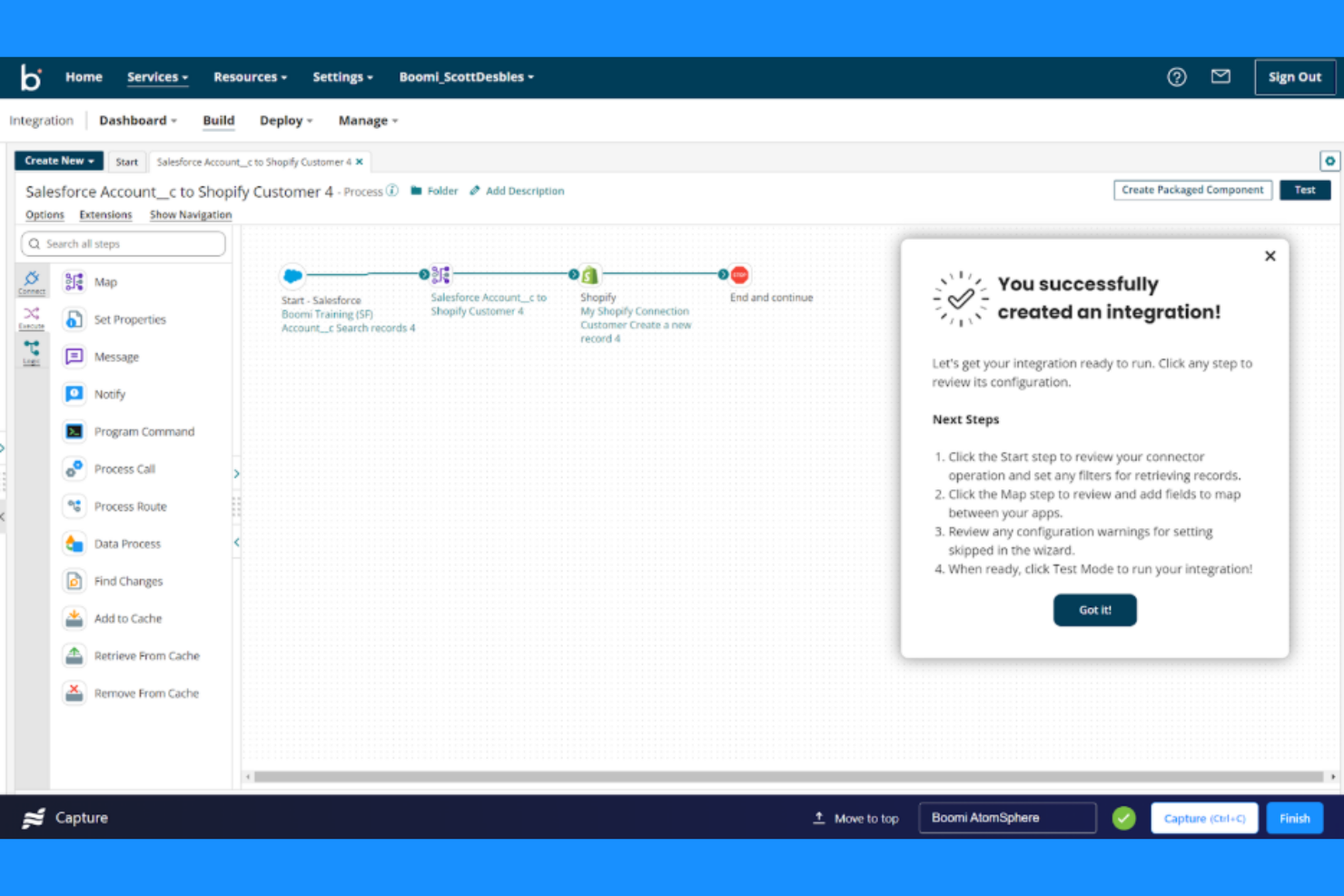
Boomi Flow è una piattaforma di sviluppo applicazioni low-code progettata per le aziende che desiderano automatizzare i flussi di lavoro e integrare sistemi tra vari reparti. I suoi principali utenti sono grandi organizzazioni che necessitano di collegare sistemi eterogenei e automatizzare processi aziendali complessi utilizzando strumenti basati sull'intelligenza artificiale.
Perché ho scelto Boomi Flow: Boomi Flow è adatto a team aziendali che devono collegare più sistemi mantenendo una logica di flusso di lavoro coerente. La sua automazione supportata dall'IA e la capacità di creare applicazioni che instradano i dati tra ERP, CRM e strumenti interni lo rendono efficace per la gestione di processi su scala aziendale. L'automazione assistita dall'IA aiuta le imprese a gestire integrazioni complesse e flussi decisionali.
Funzionalità principali & integrazioni:
Funzionalità includono un'interfaccia di progettazione visuale per realizzare applicazioni senza la necessità di un'estesa programmazione. Puoi facilmente sfruttare flussi di lavoro dinamici per adattarti alle esigenze aziendali che cambiano. La piattaforma supporta anche il deployment di app mobili, consentendo di estendere le funzionalità ai dispositivi mobile.
Integrazioni includono Salesforce, SAP, Oracle, Microsoft Dynamics 365, NetSuite, Workday, ServiceNow, Slack, Google Workspace e AWS.
Pros and Cons
Pros:
- Forte supporto per integrazioni complesse
- Scalabile per le esigenze di grandi aziende
- Capacità di distribuzione di app mobili
Cons:
- Richiede tempo per la configurazione iniziale
- Può essere complesso per team di piccole dimensioni
Altri strumenti per flussi di lavoro basati sull'IA
Ecco alcune ulteriori opzioni di strumenti per flussi di lavoro basati sull’IA che non sono entrate nella mia selezione, ma che vale comunque la pena prendere in considerazione:


Come Valuto gli Strumenti di Workflow AI
Ogni strumento in questa lista deve offrire di più che apporre un'etichetta AI su automazioni basiche: cerco piattaforme che realmente fanno risparmiare tempo ai Project Manager su attività come la creazione di piani di progetto, l'inoltro delle approvazioni o la segnalazione dei rischi prima che compromettano uno sprint. Divido la mia valutazione in funzionalità principali che ogni strumento deve avere per essere considerato e fattori differenzianti che distinguono le opzioni buone da quelle eccellenti.
Funzionalità di Base (Requisiti Fondamentali per Questa Lista)
Quando seleziono gli strumenti per la mia lista, valuto ciascuno su una scala da 0 (non offre la funzionalità) a 5 (eccelle in questa area) per ogni funzionalità di base elencata di seguito. Poi, calcolo il punteggio totale dello strumento trasformandolo in una percentuale. Ogni strumento deve raggiungere un punteggio minimo del 65% per essere preso in considerazione.
- Automazione di Workflow con AI: Cerco strumenti che vadano oltre le semplici regole if-then per attivare workflow a più fasi sfruttando la logica AI, come l'inoltro automatico di una revisione progettuale alla persona giusta in base al contesto del progetto.
- Creazione Generativa di Task: Un buon strumento qui permette di inserire un obiettivo di alto livello e ricevere un piano strutturato con sotto-task e dipendenze, non solo una lista generica di cose da fare.
- Intelligenza Predittiva di Progetto: Valuto se l'AI offre previsioni utili, come l'evidenziazione che uno sprint è a rischio di ritardo sulla base dell'andamento della velocità del team o di blocchi ancora aperti.
- Sintesi & Insight AI: Gli strumenti ottengono punti qui quando riescono a riassumere una settimana di aggiornamenti asincroni o la registrazione di uno standup di 45 minuti in passaggi successivi chiari e attuabili dagli stakeholder.
- Integrazioni PM Native: È importante che uno strumento si colleghi a piattaforme come Jira, Asana o monday.com con una vera sincronizzazione bidirezionale, così che le azioni AI vengano effettivamente riportate nei sistemi che i team già usano.
- Assistente Conversazionale AI: Verifico se è possibile interrogare lo stato dei progetti o aggiornare attività tramite linguaggio naturale, ad esempio chiedendo "Cosa sta bloccando il lancio Q3?" e ricevere una vera risposta.
Una volta identificati gli strumenti che rispettano questi criteri, considero cosa rende ogni piattaforma unica.
Fattori Differenzianti (Cosa Distingue i Fornitori)
Ecco come confronto e valuto i diversi fornitori:
Funzionalità Distintive
Pongo particolare attenzione alla possibilità di costruire agenti AI personalizzati per rituali ricorrenti come retrospettive di sprint o email di riepilogo per gli stakeholder. L'orchestrazione tra diversi strumenti è un altro grande elemento di distinzione: le migliori piattaforme possono avviare azioni in CRM, documenti e strumenti di sviluppo in un unico flusso di lavoro. Valuto anche dashboard di analytics sui workflow che mostrano il ROI delle automazioni e il tempo risparmiato, dato che questi sono i dati che i responsabili PMO necessitano per giustificare l'investimento.
Oltre le Funzionalità
Qui la sicurezza dei dati e la governance dell'AI sono aspetti centrali: verifico se il fornitore è trasparente su come vengono gestiti i dati di progetto e se addestra LLM esterni. Per i direttori PMO che gestiscono roadmap sensibili, è una preoccupazione reale. La trasparenza dei prezzi è un altro fattore che considero, in particolare riguardo modelli di credito AI che possono far aumentare i costi con la crescita dell'utilizzo delle automazioni. Valuto anche il time-to-value: lo strumento offre template preconfezionati di workflow PM o serve dedicare settimane di set up prima di attivare la prima automazione?
Come scegliere gli strumenti per flussi di lavoro basati sull'IA
È facile perdersi in lunghi elenchi di funzionalità e strutture di prezzo complesse. Per aiutarti a rimanere concentrato mentre affronti il tuo processo di selezione del software, unico per le tue esigenze, ecco una lista di fattori da tenere a mente:
| Fattore | Cosa considerare |
|---|---|
| Scalabilità | Lo strumento crescerà insieme alla tua attività? Verifica che sia in grado di gestire quantità maggiori di dati e utenti senza problemi. Valuta la possibilità di rendere la tua scelta a prova di futuro per evitare in seguito i costi legati a un cambiamento. |
| Integrazioni | Si collega ai tuoi sistemi attuali? Assicurati che supporti le applicazioni che già utilizzi, così da evitare soluzioni alternative costose. |
| Personalizzazione | Puoi adattarlo ai tuoi flussi di lavoro? Cerca strumenti che ti consentano di modificare i processi senza aver bisogno di uno sviluppatore. |
| Facilità d'uso | È intuitivo per il tuo team? Una curva di apprendimento ripida può rallentare l'adozione, quindi dai priorità alle interfacce intuitive. |
| Implementazione e avvio | Quanto velocemente puoi iniziare? Valuta il tempo e le risorse necessari per la configurazione e la formazione. Gli strumenti con un avvio guidato fanno risparmiare tempo. |
| Costo | Qual è il costo totale di proprietà? Considera le commissioni nascoste e confronta i piani tariffari per assicurarti che rientri nel tuo budget. |
| Misure di sicurezza | Protegge i tuoi dati? Cerca funzionalità di crittografia, controlli degli accessi e conformità alle normative sulla protezione dei dati per mantenere al sicuro le tue informazioni. |
| Disponibilità dell'assistenza | L'aiuto è disponibile quando ne hai bisogno? Considera gli orari e i canali di assistenza del fornitore, come chat o telefono, per assicurarti di poter ricevere supporto tempestivamente. |
Cosa sono gli strumenti per flussi di lavoro basati sull'IA?
Gli strumenti per i flussi di lavoro basati sull'IA sono soluzioni software che automatizzano e ottimizzano i processi aziendali utilizzando l'intelligenza artificiale. Questi strumenti sono generalmente utilizzati da professionisti in ambiti come la gestione dei progetti, il marketing e le operations per migliorare l'efficienza e la precisione. Le funzionalità di automazione, analisi predittiva ed elaborazione del linguaggio naturale contribuiscono a ridurre le attività manuali, migliorare il processo decisionale e facilitare la comunicazione. Nel complesso, questi strumenti offrono un valore significativo, liberando tempo da dedicare al lavoro strategico e riducendo al minimo gli errori.
Funzionalità
Quando selezioni gli strumenti per i flussi di lavoro basati sull'IA, presta attenzione alle seguenti funzionalità chiave:
- Funzionalità di automazione: automatizza le attività ripetitive per ridurre il carico di lavoro manuale e aumentare l'efficienza.
- Analisi predittiva: utilizza i dati per prevedere i risultati e prendere rapidamente decisioni informate.
- Elaborazione del linguaggio naturale: facilita la comunicazione interpretando e rispondendo agli input in linguaggio naturale.
- Processo decisionale basato sull'IA: supporta la pianificazione strategica con dati e raccomandazioni generati dall'IA.
- Flussi di lavoro personalizzabili: adatta i processi alle esigenze aziendali specifiche senza competenze di programmazione.
- Generatore visivo di flussi di lavoro: progetta e gestisci i flussi di lavoro utilizzando un'interfaccia intuitiva basata sul trascinamento.
- Opzioni di integrazione: collega gli strumenti esistenti per garantire un flusso regolare di informazioni tra i sistemi.
- Monitoraggio in tempo reale: controlla le prestazioni dei flussi di lavoro e apporta le modifiche necessarie in corso d'opera.
- Misure di sicurezza: proteggi i dati sensibili con la crittografia e la conformità alle normative sulla protezione dei dati.
- Accesso da dispositivi mobili: gestisci i flussi di lavoro ovunque ti trovi grazie al supporto per le app mobili, aumentando la flessibilità.
Vantaggi
L'implementazione di strumenti per i flussi di lavoro basati sull'IA offre numerosi vantaggi al tuo team e alla tua azienda. Ecco alcuni dei vantaggi che puoi aspettarti:
- Maggiore efficienza: automatizza le attività ripetitive, liberando tempo da dedicare a un lavoro più strategico.
- Migliore processo decisionale: utilizza l'analisi predittiva e gli approfondimenti dell'IA per prendere rapidamente decisioni informate.
- Comunicazione migliorata: facilita le interazioni con l'elaborazione del linguaggio naturale, semplificando la gestione di attività e progetti.
- Maggiore personalizzazione: adatta i flussi di lavoro alle esigenze specifiche senza bisogno di competenze tecniche.
- Maggiore sicurezza dei dati: proteggi le informazioni sensibili con misure di sicurezza avanzate e funzionalità di conformità.
- Adattabilità in tempo reale: monitora i flussi di lavoro in tempo reale e modifica i processi secondo necessità per mantenere la produttività.
- Flessibilità ovunque ti trovi: accedi e gestisci i flussi di lavoro da dispositivi mobili, assicurando la continuità del lavoro da qualsiasi luogo.
Costi e prezzi
La selezione degli strumenti per i flussi di lavoro basati sull'IA richiede la conoscenza dei diversi modelli e piani tariffari disponibili. I costi variano in base alle funzionalità, alle dimensioni del team, ai componenti aggiuntivi e ad altri fattori. La tabella seguente riepiloga i piani comuni, i relativi prezzi medi e le funzionalità tipicamente incluse nelle soluzioni di strumenti per i flussi di lavoro basati sull'IA:
Tabella di confronto dei piani per gli strumenti per i flussi di lavoro basati sull'IA
| Tipo di piano | Prezzo medio | Funzionalità comuni |
|---|---|---|
| Piano gratuito | $0 | Automazione di base, integrazioni limitate e supporto della comunità. |
| Piano personale | $9-$2,347/utente/mese | Automazione avanzata, più integrazioni e analisi di base. |
| Piano aziendale | $16-$3,293/utente/mese | Automazione avanzata, integrazioni premium, strumenti per la collaborazione del team e supporto prioritario. |
| Piano aziendale avanzato | $29-$3600/utente/mese | Flussi di lavoro personalizzati, sicurezza di livello aziendale, gestione dedicata dell'account e analisi avanzate. |
Domande frequenti sugli strumenti per i flussi di lavoro basati sull'IA
Ecco alcune risposte alle domande comuni sugli strumenti per i flussi di lavoro basati sull’IA:
Come posso integrare gli strumenti per i flussi di lavoro basati sull'IA con i miei sistemi attuali?
Sì, la maggior parte degli strumenti per i flussi di lavoro basati sull’IA è progettata per integrarsi con i sistemi esistenti. È consigliabile verificare le capacità di integrazione dello strumento per assicurarsi che si colleghi al software attualmente utilizzato, come piattaforme CRM, di posta elettronica e di gestione dei progetti. Cerca strumenti che offrano il supporto per le API o connettori predefiniti. Se riscontri problemi di compatibilità, valuta l’utilizzo di soluzioni middleware per colmare il divario. Testa le integrazioni in un ambiente controllato per evitare interruzioni. Questo approccio aiuta a mantenere operazioni fluide durante l’adozione di una nuova tecnologia.
Gli strumenti per i flussi di lavoro basati sull'IA possono gestire flussi di lavoro complessi?
Sì, molti strumenti per i flussi di lavoro basati sull’IA sono progettati per gestire flussi di lavoro complessi. Offrono funzionalità come logica condizionale, percorsi ramificati e automazione in più fasi per adattarsi a processi articolati. Durante la configurazione, traccia il flusso di lavoro per identificare i principali punti di automazione. Utilizza il generatore visivo dello strumento per organizzare le attività e assicurarti che ogni passaggio sia in linea con le esigenze della tua azienda. Esamina e modifica regolarmente i flussi di lavoro per ottimizzare le prestazioni e adattarti ai cambiamenti nelle tue operazioni.
Quanto sono sicuri gli strumenti per i flussi di lavoro basati sull'IA per la protezione dei dati?
Gli strumenti per i flussi di lavoro basati sull’IA danno priorità alla sicurezza dei dati attraverso crittografia, controlli degli accessi e misure di conformità. Prima di scegliere uno strumento, valuta le sue funzionalità di sicurezza e assicurati che siano in linea con le politiche di protezione dei dati della tua organizzazione. Verifica la conformità agli standard di settore come il GDPR o l’HIPAA, se applicabile. Implementa controlli degli accessi basati sui ruoli per limitare l’accesso ai dati agli utenti autorizzati. Verifica e aggiorna regolarmente le impostazioni di sicurezza per proteggere i dati da potenziali minacce.
In che modo gli strumenti per i flussi di lavoro basati sull'IA possono contribuire a ridurre i ritardi nei progetti?
Gli strumenti per i flussi di lavoro basati sull’IA contribuiscono a ridurre i ritardi nei progetti automatizzando le attività di routine, inviando promemoria tempestivi e segnalando i colli di bottiglia. Semplificano le approvazioni e i passaggi di consegne tra i membri del team, assicurando che nulla venga trascurato. Le notifiche in tempo reale e il monitoraggio dei progressi mantengono tutti allineati, rendendo più semplice individuare e risolvere i problemi prima che rallentino il progetto.
Quali sono le difficoltà più comuni nell'adozione degli strumenti per i flussi di lavoro basati sull'IA?
Le difficoltà più comuni includono la resistenza del team al cambiamento, i problemi di integrazione con il software esistente e la curva di apprendimento legata alle nuove funzionalità. Potresti incontrare difficoltà nella migrazione dei dati o avere dubbi su quali processi automatizzare per primi. Superale offrendo formazione, iniziando con flussi di lavoro semplici, coinvolgendo tempestivamente gli stakeholder principali e scegliendo strumenti con solide risorse di supporto.
Prossimi passi:
Se stai cercando strumenti per i flussi di lavoro basati sull'IA, contatta gratuitamente un consulente SoftwareSelect per ricevere consigli.
Compili un modulo e fai una breve chiacchierata durante la quale il consulente approfondirà le tue esigenze specifiche. Poi riceverai una selezione ristretta di software da valutare. Ti supporterà inoltre durante l'intero processo di acquisto, comprese le trattative sul prezzo.