

I 10 migliori software per la previsione dei progetti recensiti per il 2026

Selezione dei migliori software per la previsione dei progetti


Il software per la previsione dei progetti può aiutarti a prevedere con maggiore precisione i risultati dei progetti, gestire efficacemente le aspettative e stimare le prestazioni future dei progetti sulla base dei dati e delle tendenze esistenti, ma selezionare lo strumento ideale è difficile.
Grazie alla mia vasta esperienza come esperto di software e responsabile di progetto, ho esaminato e selezionato diversi strumenti in cui vale la pena investire tempo e denaro. Scopri le mie scelte qui sotto, insieme alle spiegazioni del motivo per cui ho scelto ciascuno strumento e dei relativi pro e contro.
Perché fidarsi dei nostri consigli sui software
Il nostro team testa e recensisce software dal 2012. In quanto project manager noi stessi, sappiamo quanto sia difficile — e importante — scegliere il software giusto.
Per questa guida, abbiamo valutato gli strumenti attraverso test pratici e ricerche indipendenti, assegnando un punteggio agli strumenti in base ai nostri criteri di selezione. Ci basiamo inoltre sulle competenze di leader di pensiero del settore e di professionisti attivi nella gestione dei progetti.
Le nostre recensioni riflettono il nostro giudizio editoriale umano, non un discorso di vendita.
Revisori esperti:
Tabella comparativa dei software per la previsione dei progetti
Questa tabella comparativa riassume i dettagli dei prezzi delle mie migliori selezioni di software per la previsione dei progetti:
| Tool | Best For | Trial Info | Price | ||
|---|---|---|---|---|---|
| 1 | Ideale per le previsioni dei ricavi dei servizi professionali | Prova gratuita di 14 giorni | A partire da $19.90/utente/mese | Website | |
| 2 | Ideale per la previsione delle risorse delle agenzie | Demo gratuita disponibile | Prezzi su richiesta | Website | |
| 3 | Ideale per previsioni di progetto guidate dall'IA | Prova gratuita di 14 giorni + piano gratuito disponibile | Da $10/utente/mese (fatturazione annuale) | Website | |
| 4 | Ideale per chi cerca strumenti di project management familiari | Prova gratuita di 30 giorni | Da $10/utente/mese (fatturato annualmente) | Website | |
| 5 | Ideale per decisioni interfunzionali | Demo gratuita disponibile | Prezzi su richiesta | Website | |
| 6 | Ideale per soluzioni di pianificazione integrata | Demo gratuita disponibile | Prezzo su richiesta | Website | |
| 7 | Ideale per la pianificazione della forza lavoro | Demo gratuita disponibile | Prezzo su richiesta | Website | |
| 8 | Ideale per la modellazione finanziaria in tempo reale | Demo gratuita disponibile | Prezzo su richiesta | Website | |
| 9 | Ideale per la modellazione di scenari complessi | Prova gratuita di 30 giorni | Prezzi su richiesta | Website | |
| 10 | Ideale per analisi avanzata nelle grandi aziende | Not available | Prezzo su richiesta. | Website |


Panoramica dei 10 migliori software per la previsione dei progetti
Ecco le mie analisi approfondite e panoramiche complete di ciascun software per la previsione dei progetti. Ho illustrato pro e contro, funzionalità principali e casi d’uso ottimali per aiutarti a trovare la soluzione più adatta.

Scoro
Ideale per le previsioni dei ricavi dei servizi professionali
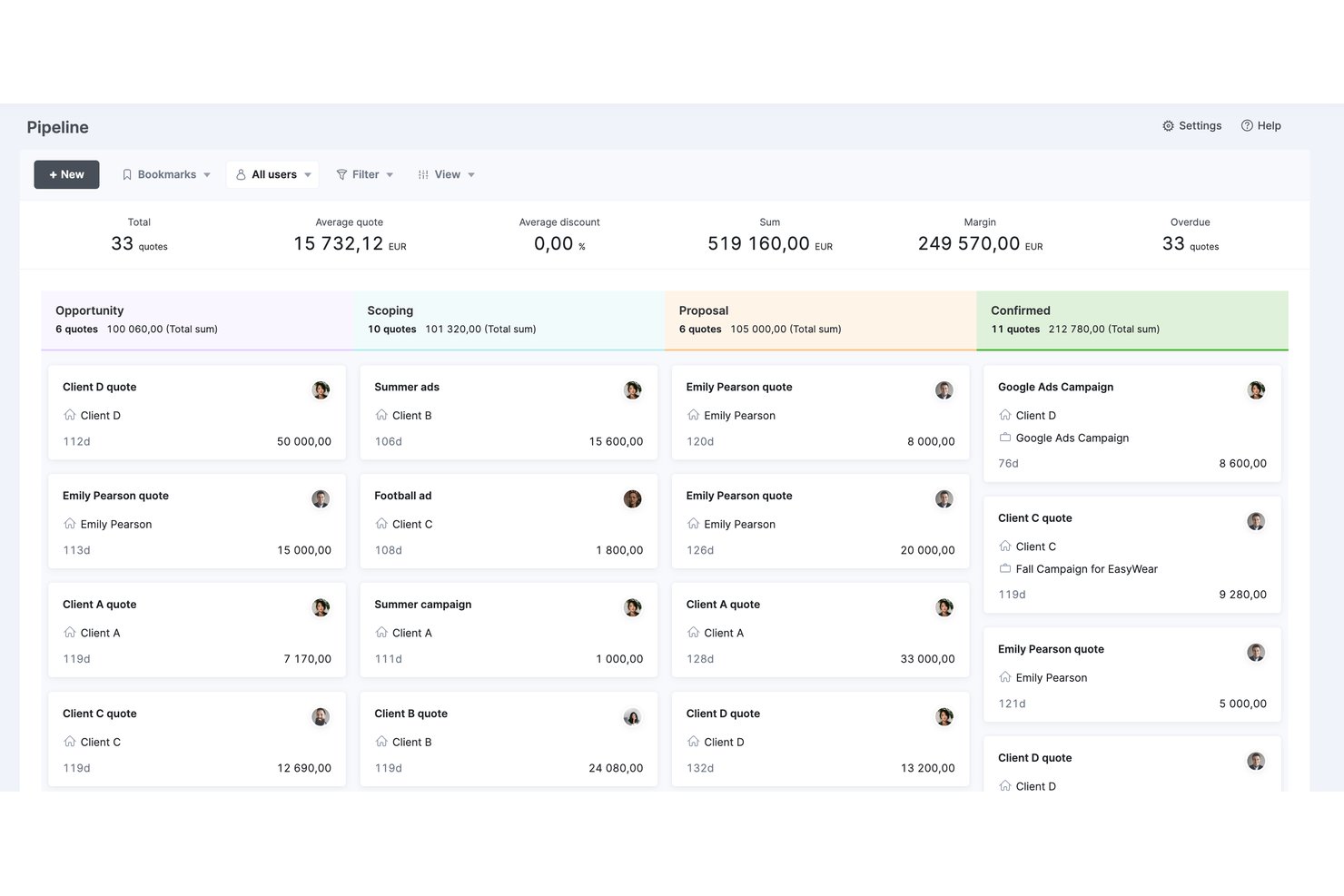
Scoro è una piattaforma di automazione dei servizi professionali (PSA) che integra l'erogazione dei progetti, la pianificazione delle risorse, il monitoraggio del tempo, le previsioni di budget e i report sui ricavi in un unico strumento.
Per chi è più adatto Scoro?
Scoro è particolarmente adatto alle aziende di servizi professionali—società di consulenza, agenzie e fornitori di servizi IT—che hanno bisogno di collegare in un unico luogo i ricavi della pipeline, la capacità delle risorse e la redditività dei progetti.
Perché ho scelto Scoro
Ho incluso Scoro tra le mie migliori scelte perché collega i ricavi della pipeline alla capacità delle risorse in un modo che la maggior parte degli strumenti di previsione dei progetti non offre. Nello specifico, la vista della pipeline collega le opportunità nelle varie fasi del CRM alle previsioni di personale prima della firma del contratto, così non ti trovi mai a dover correre ai ripari quando un accordo si conclude. Se a questo aggiungi il monitoraggio della redditività in tempo reale a livello di progetto e di linea di servizio, ottieni previsioni dei ricavi realmente utili per le aziende di servizi professionali che gestiscono contemporaneamente numerosi incarichi per i clienti.
Funzionalità principali di Scoro
- Mappe di calore dell'utilizzo: Le mappe visive del carico di lavoro individuale e per ruolo aiutano a individuare i membri del team sovraccarichi o sottoutilizzati nei vari progetti.
- Report dei preventivi rispetto ai dati effettivi: Il confronto affiancato tra le ore e i costi stimati e quelli registrati nei progetti passati aiuta a migliorare le stime future.
- Prenotazioni provvisorie: Riserva temporaneamente la capacità del team per il lavoro in pipeline non confermato, quindi convertila in assegnazioni definitive quando un accordo si conclude.
- Assistente IA ELI: Le query in linguaggio naturale mostrano su richiesta i dati finanziari dei progetti, le ore fatturabili e i dati sull'utilizzo senza dover creare manualmente i report.
Integrazioni di Scoro
Scoro offre integrazioni native con Xero, QuickBooks, Sage Intacct, Exact Online, HubSpot, Salesforce, Jira, BambooHR, Google Workspace, Microsoft 365 e Slack. Supporta inoltre oltre 80 app del marketplace, Zapier e un'API aperta per le integrazioni personalizzate.
Pros and Cons
Pros:
- Previsioni collegate alla pipeline, dal CRM all'erogazione
- Monitoraggio in tempo reale della redditività e del consumo del budget
- Assistente basato sull'IA per la generazione istantanea dei report
Cons:
- Nessuna modellazione dedicata degli scenari o delle ipotesi
- Nessuna metrica formale di gestione del valore acquisito
New Product Updates from Scoro

Scoro Adds Time Mobile App and ELI Improvements
Scoro adds the Scoro Time mobile app for iOS/Android to track time anywhere and expands ELI with attachments, smarter filtering, and trigger-based actions. For more information, visit Scoro's official site.

Ideale per la previsione delle risorse delle agenzie
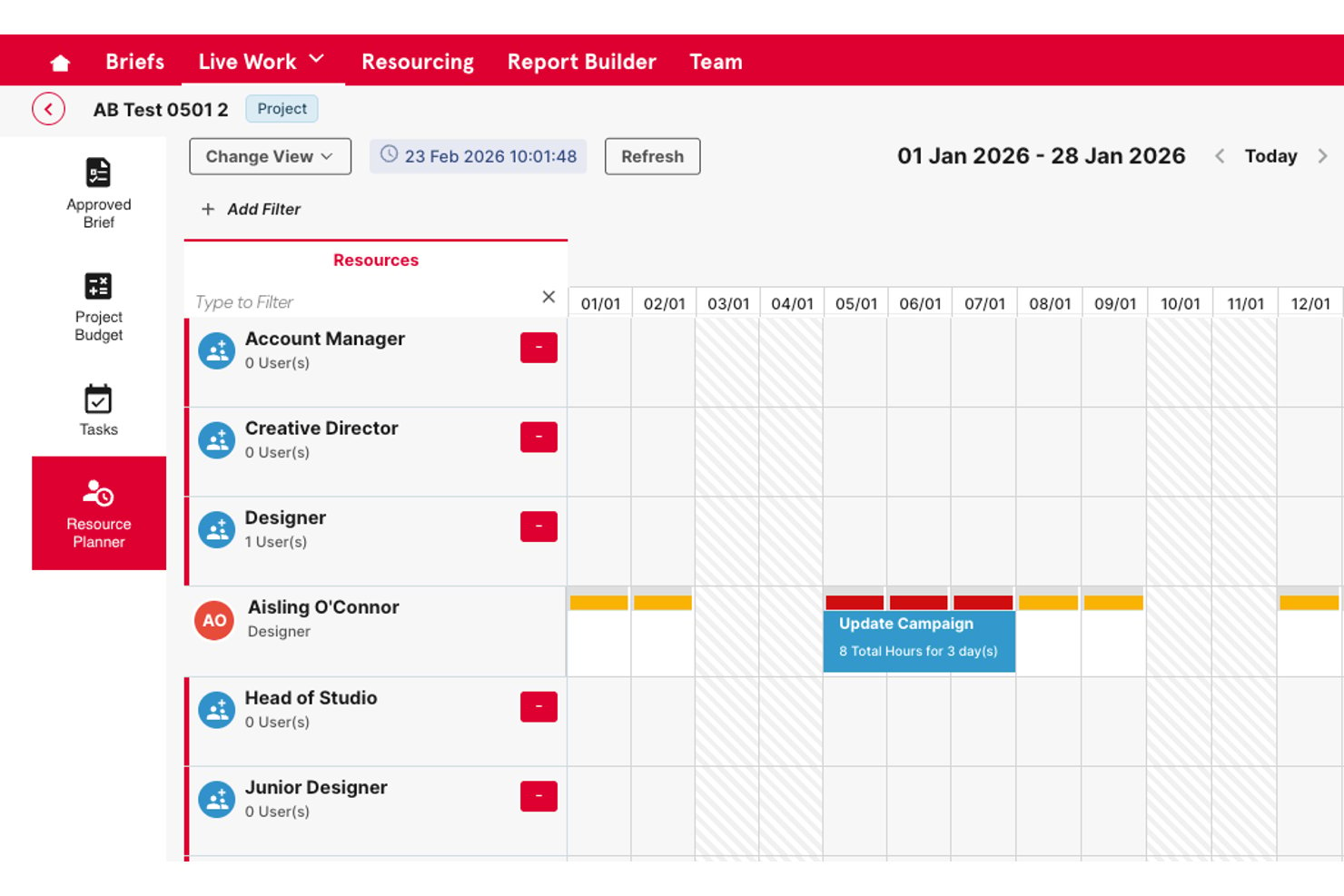
Screendragon è una piattaforma aziendale di gestione del lavoro per team di marketing e agenzie che combina pianificazione della capacità delle risorse, monitoraggio del budget, automazione dei flussi di lavoro e gestione delle approvazioni in un unico sistema.
Per chi è più adatto Screendragon?
È particolarmente adatto per agenzie creative di medie e grandi dimensioni e team di marketing interni aziendali che gestiscono grandi volumi di lavoro per più clienti o portafogli di marchi.
Perché ho scelto Screendragon
Screendragon si è guadagnato un posto nella mia lista ristretta grazie al modo in cui gestisce la previsione delle risorse a livello di agenzia. Mi piace il fatto che offra ai responsabili delle risorse una visione prospettica della capacità su ogni progetto attivo, così è possibile individuare le carenze di personale prima che diventino problemi per la consegna. Il livello di monitoraggio del budget è direttamente collegato alla pianificazione delle risorse: posso quindi visualizzare utilizzo e consumo dei costi nella stessa schermata, invece di passare da uno strumento disconnesso all'altro.
Funzionalità principali di Screendragon
- Creazione di flussi di lavoro senza codice: Consente di progettare e automatizzare i flussi di lavoro dei progetti senza competenze tecniche.
- Permessi granulari: Fornisce controlli di accesso basati sui ruoli fino al livello dei singoli campi per la gestione dei dati sensibili.
- Flussi di approvazione integrati: Semplifica l'approvazione dei materiali con strumenti di annotazione, gestione delle versioni affiancate e registri di controllo centralizzati.
- Pannelli di controllo per i rapporti personalizzati: Consente di creare pannelli di controllo personalizzati in tempo reale per produrre rapporti sui dati dei progetti e dei portafogli.
Integrazioni di Screendragon
Screendragon offre integrazioni native con HubSpot, Microsoft Power BI, Ziflow, Brandfolder, Workato e Smartsheet. È disponibile un'API per le integrazioni personalizzate.
Pros and Cons
Pros:
- Visione prospettica della capacità sui progetti attivi
- Monitoraggio del budget direttamente collegato alla pianificazione delle risorse
- Flussi di approvazione configurabili per strutture complesse
Cons:
- Profondità della previsione limitata
- La personalizzazione dei rapporti richiede tempo per la configurazione
New Product Updates from Screendragon
Screendragon Unveils New AI Hub
Screendragon introduced AI Hub, a new capability that lets teams build and manage AI agents directly within workflows. The update helps marketing teams automate tasks, maintain governance controls, and scale AI-driven operations more efficiently. For more information, visit Screendragon's official site.

Wrike
Ideale per previsioni di progetto guidate dall'IA

Wrike è una piattaforma di gestione progetti che aiuta i team a pianificare, gestire e monitorare i progetti con strumenti per la gestione delle attività, la collaborazione e la creazione di report. Le sue funzionalità basate sull'IA e gli strumenti di previsione la rendono particolarmente efficace per i team che necessitano di visibilità sulle prestazioni dei progetti e sui risultati futuri.
Perché ho scelto Wrike:
Wrike supporta la previsione dei progetti tramite il suo strumento Work Intelligence, che analizza i dati di progetto per prevedere i rischi e suggerire le prossime azioni. Dashboard e report in tempo reale forniscono approfondimenti sulle prestazioni del progetto, aiutando i team a prevedere con maggiore precisione tempi, budget e necessità di risorse. La flessibilità di Wrike nelle visualizzazioni di progetto, tra cui diagrammi di Gantt e bacheche Kanban, aiuta anche a visualizzare l’avanzamento e anticipare i bisogni futuri.
Caratteristiche e integrazioni principali di Wrike:
Caratteristiche comprendono la previsione tramite IA con analisi predittiva, dashboard in tempo reale per monitorare i KPI e visualizzazioni di progetto che supportano la rappresentazione di tempi e carichi di lavoro. Il Datahub centralizzato di Wrike integra informazioni da fonti diverse e le app mobili permettono di accedere ai dati di progetto ovunque ci si trovi.
Le integrazioni comprendono oltre 400 collegamenti nativi predefiniti, tra cui Microsoft, Google, Dropbox, Salesforce e Marketo.
Pros and Cons
Pros:
- Chat integrata per ridurre i costi del cambio di applicazione durante la collaborazione
- Persone e team possono monitorare i carichi di lavoro
- Visualizza facilmente le prestazioni dei flussi di lavoro
Cons:
- Non adatto a piccole organizzazioni
- Limitato a 10 flussi di lavoro per spazio
New Product Updates from Wrike
Wrike Adds Klaxoon MCP Integration
Wrike’s Klaxoon MCP integration is now generally available, enabling AI agents to navigate between Wrike tasks and attached whiteboards, read task context, and manage whiteboard attachments via API. For more information, visit Wrike's official site.

Ideale per chi cerca strumenti di project management familiari

Microsoft Project offre strumenti completi per la pianificazione dei progetti, la gestione del portafoglio e delle risorse. È l'ideale per gli utenti che cercano strumenti di project management familiari e solidi, integrati nell'ecosistema Microsoft.
Perché ho scelto Microsoft Project:
Ho scelto Microsoft Project per questa lista grazie alla sua ampia diffusione e integrazione nell'ecosistema Microsoft, che lo rende la scelta preferita per molte organizzazioni che già utilizzano prodotti Microsoft. La sua familiarità e la profondità delle funzionalità di project management lo rendono ideale per chi cerca una soluzione completa e integrata.
Caratteristiche e integrazioni principali di Microsoft Project:
Le funzionalità includono strumenti dettagliati per la pianificazione dei progetti, per l'assegnazione delle risorse e modelli predefiniti che facilitano l'avvio e il monitoraggio dei progetti. La profonda integrazione con Microsoft 365 migliora la collaborazione e la reportistica, consentendo una gestione semplice dei progetti in un ambiente già noto.
Le integrazioni includono Microsoft Teams, Microsoft Excel, Microsoft Power BI, SharePoint, OneDrive, Azure DevOps, Dynamics 365, Outlook, PowerApps e Yammer.
Pros and Cons
Pros:
- Integrazione profonda con Microsoft 365
- Funzionalità complete di project management
- Interfaccia familiare per molti utenti
Cons:
- Adatto principalmente a chi è già inserito nell'ecosistema Microsoft
- Può risultare complesso per piccoli team o progetti semplici
- Richiesto impegno annuale

Anaplan
Ideale per decisioni interfunzionali

Anaplan offre una piattaforma di pianificazione basata su cloud che collega dati, persone e piani in qualsiasi azienda. Si distingue per il processo decisionale interfunzionale grazie al suo approccio collaborativo.
Perché ho scelto Anaplan:
Ho selezionato Anaplan per questa lista a causa delle sue solide capacità di collegare varie funzioni interne a un'organizzazione, ottimizzando i processi di pianificazione e decisione. La sua piattaforma favorisce un approccio collaborativo, diventando ideale per le aziende che si basano su decisioni sinergiche tra più reparti.
Caratteristiche e integrazioni principali di Anaplan:
Funzionalità includono la tecnologia Hyperblock, che consente calcoli e aggiustamenti in tempo reale su grandi insiemi di dati, facilitando una pianificazione rapida degli scenari e delle previsioni. Le sue estese capacità di integrazione permettono una connessione fluida con i sistemi aziendali esistenti, migliorando la precisione dei dati e la qualità delle decisioni.
Integrazioni comprendono Salesforce, Google Sheets, Microsoft Excel, Oracle, SAP, Tableau, Power BI, Slack, Workday e ServiceNow.
Pros and Cons
Pros:
- Abilita la collaborazione interfunzionale in tempo reale
- Robuste capacità di pianificazione degli scenari e previsione
- Numerose opzioni di integrazione
Cons:
- Può essere complesso da implementare
- Potrebbe richiedere una formazione approfondita
- I dettagli sui prezzi non sono trasparenti

Jedox
Ideale per soluzioni di pianificazione integrata

Jedox semplifica la gestione delle performance aziendali con strumenti robusti integrati di pianificazione e analisi. Si distingue nell'offrire una soluzione unificata per esigenze di pianificazione complesse e multidipartimentali.
Perché ho scelto Jedox:
Ho scelto Jedox per questa lista perché offre una suite completa di strumenti che facilitano la pianificazione integrata tra le diverse funzioni aziendali, differenziandosi così dagli altri software di previsione dei progetti. È particolarmente efficace per le organizzazioni che necessitano di un flusso di dati senza interruzioni tra i reparti per supportare decisioni strategiche e previsioni.
Funzionalità e integrazioni principali di Jedox:
Funzionalità includono solide capacità di integrazione dei dati, collaborazione e reportistica. La piattaforma supporta la pianificazione di scenari e analisi di simulazione, essenziali in ambienti dinamici e incerti. La sua solida integrazione con i principali sistemi informatici semplifica la complessità dei processi di pianificazione a livello aziendale.
Integrazioni includono Microsoft Excel, Salesforce, SAP, Oracle, Qlik, Tableau, Power BI, Google Sheets, Microsoft Dynamics e IBM Cognos.
Pros and Cons
Pros:
- Capacità di integrazione estese
- Avanzate funzionalità di analisi di simulazione
- Potenti strumenti di pianificazione collaborativa
Cons:
- Curva di apprendimento elevata per i nuovi utenti
- Informazioni sui prezzi non trasparenti
- La configurazione può richiedere notevoli risorse IT

Ideale per la pianificazione della forza lavoro

Workday Adaptive Planning offre un software basato su cloud per la pianificazione aziendale, includendo strumenti avanzati per budget, previsioni e, in particolare, per la pianificazione della forza lavoro. Si distingue in questo ambito grazie alla capacità di modellare e gestire le spese del personale, integrandole profondamente con le strategie operative.
Perché ho scelto Workday Adaptive Planning:
Ho selezionato Workday Adaptive Planning per questa lista grazie alle sue funzionalità complete di pianificazione della forza lavoro, strettamente integrate con le capacità di pianificazione finanziaria e aziendale. Il suo forte orientamento alla gestione dettagliata delle risorse umane e dei costi la rende la scelta migliore per le aziende che necessitano di un controllo dettagliato e dinamico della forza lavoro.
Caratteristiche distintive e integrazioni di Workday Adaptive Planning:
Le funzionalità includono robuste capacità di modellazione che consentono alle organizzazioni di prevedere e pianificare necessità di assunzioni, aumenti di stipendio e altre spese legate alla forza lavoro. Si integra perfettamente con i principali sistemi HR e finanziari, offrendo una visione unificata delle analisi riguardanti la forza lavoro.
Le integrazioni includono Workday HCM, Microsoft Excel, Salesforce, SAP, Oracle, NetSuite, Slack, Google Cloud, Tableau e Power BI.
Pros and Cons
Pros:
- Funzionalità dettagliate per la pianificazione della forza lavoro
- Integrazione senza soluzione di continuità con sistemi HR e finanziari
- Strumenti di modellazione completi per diversi scenari
Cons:
- Può richiedere una curva di apprendimento ripida
- Il costo può essere elevato
- Implementazione e personalizzazione possono richiedere molte risorse


Cube Software semplifica la pianificazione, l'analisi e la rendicontazione finanziaria. Cube si distingue per la modellazione finanziaria in tempo reale grazie alla sua solida integrazione con le fonti di dati esistenti e alla capacità di aggiornamento immediato.
Perché ho scelto Cube Software:
Ho scelto Cube Software per questa lista perché si distingue nell'offrire funzionalità di dati in tempo reale, fondamentali per ambienti finanziari dinamici e in rapido cambiamento. La sua forza nell'integrazione senza soluzione di continuità con molteplici sistemi di dati lo rende ideale per la modellazione finanziaria in tempo reale. Questa capacità assicura che i team finanziari possano fare affidamento sui dati più aggiornati per prendere decisioni strategiche.
Cube Software Caratteristiche e integrazioni distintive:
Le funzionalità includono un'interfaccia intuitiva e potenti strumenti di consolidamento dei dati, che semplificano i processi finanziari complessi. La capacità della piattaforma di integrare i dati in tempo reale consente previsioni e budget più accurati. In particolare, le sue integrazioni dirette con i sistemi finanziari più utilizzati ne aumentano l'utilità.
Le integrazioni includono Salesforce, QuickBooks, Xero, NetSuite, Microsoft Excel, Google Sheets, Oracle, SAP, Slack e Workday.
Pros and Cons
Pros:
- Integrazione dati in tempo reale
- Interfaccia intuitiva
- Robusti strumenti di consolidamento dei dati
Cons:
- Trasparenza dei prezzi insufficiente
- Può richiedere assistenza durante la configurazione iniziale
- Opzioni di personalizzazione limitate per le piccole imprese


IBM Planning Analytics automatizza i processi di pianificazione, budgeting, previsione e analisi, migliorando la precisione delle informazioni finanziarie. È ideale per la modellazione di scenari complessi grazie alle sue potenti capacità analitiche e di simulazione.
Perché ho scelto IBM Planning Analytics:
Ho scelto IBM Planning Analytics per i suoi strumenti analitici avanzati e la flessibilità nella gestione di dati finanziari e operativi complessi. La sua capacità di effettuare analisi di scenari multi-dimensionali lo rende ideale per le organizzazioni che affrontano sfide di pianificazione complesse e necessitano di previsioni e modellazioni dettagliate.
Caratteristiche distintive e integrazioni di IBM Planning Analytics:
Caratteristiche includono un potente database in-memory che consente analisi istantanee degli scenari e modellazione what-if, aiutando le organizzazioni a pianificare diversi risultati possibili. Offre inoltre uno spazio di lavoro intuitivo che supporta la funzionalità drag-and-drop per una modellazione semplice. L'integrazione con diverse fonti di dati è ottimizzata, permettendo una gestione e consolidamento dei dati efficace.
Integrazioni includono IBM Cognos, Microsoft Excel, Salesforce, SAP, Oracle, Microsoft SQL Server, Google Cloud, Amazon Redshift, Tableau e Power BI.
Pros and Cons
Pros:
- Capacità approfondite di modellazione degli scenari
- Elaborazione dati in tempo reale con tecnologia in-memory
- Interfaccia intuitiva per analisi complesse
Cons:
- Costo più elevato rispetto ad alcuni concorrenti
- La richiesta di un numero minimo di utenti può escludere i team più piccoli
- La complessità delle funzionalità richiede un periodo di apprendimento

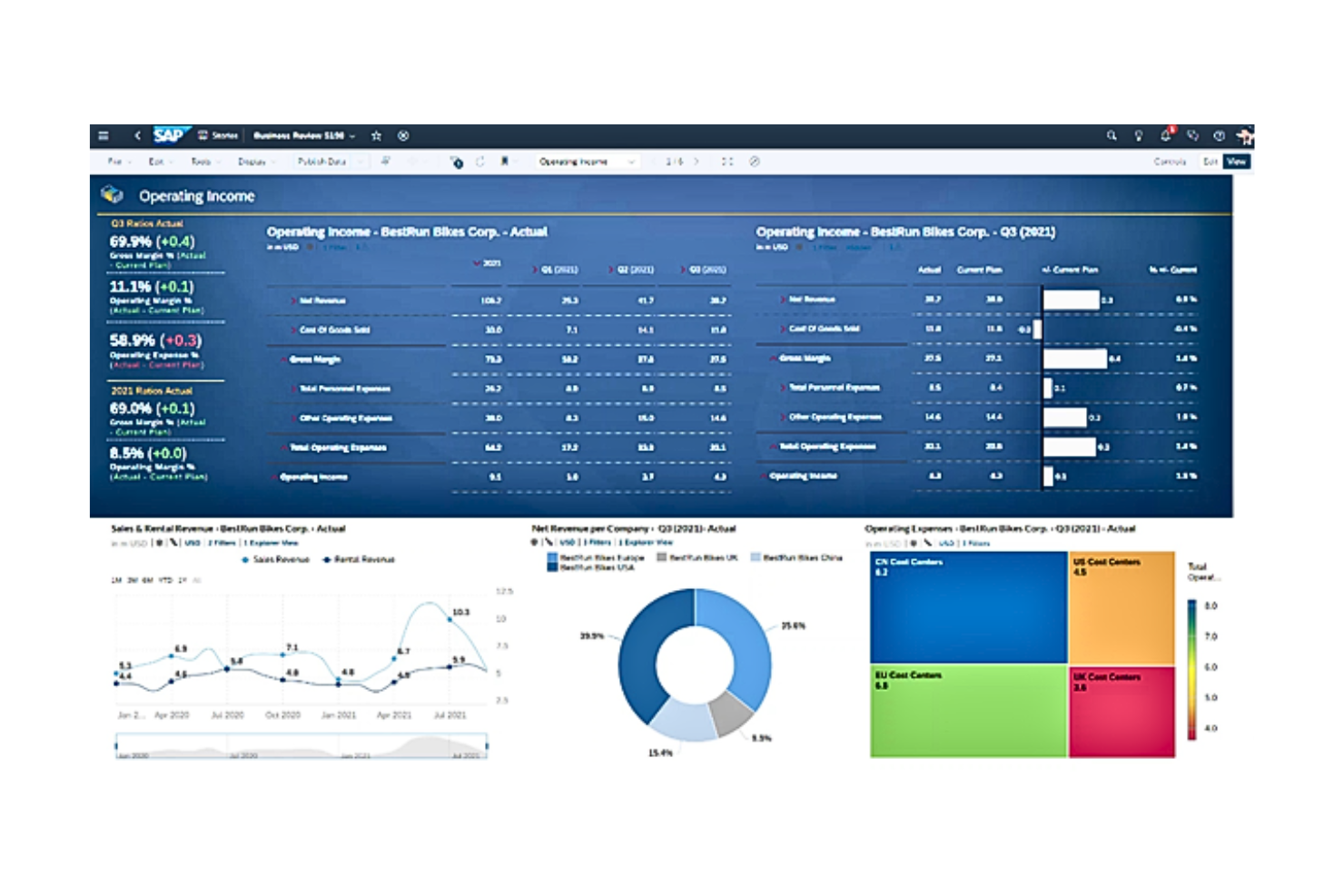
SAP Cloud Analytics offre soluzioni complete per la gestione dei dati, consentendo approfondimenti dettagliati e supporto alle decisioni per grandi aziende. Si distingue nella gestione di ambienti dati complessi e nell'offrire funzionalità analitiche sofisticate.
Perché ho scelto SAP Cloud Analytics:
Ho selezionato SAP Cloud Analytics per le sue solide capacità di elaborazione e analisi dei dati, ideali per grandi aziende con esigenze dati complesse. Si distingue grazie alla potente integrazione con l'ecosistema SAP e la capacità di gestire enormi set di dati, rendendolo la scelta migliore per le organizzazioni che necessitano di analisi avanzate.
Caratteristiche e integrazioni distintive di SAP Cloud Analytics:
Le funzionalità includono visualizzazione avanzata dei dati, analisi in tempo reale e capacità di apprendimento automatico, che permettono alle aziende di trasformare dati grezzi in informazioni utilizzabili. L'integrazione profonda nell'ecosistema SAP ne potenzia l'utilità grazie al collegamento con sistemi aziendali esistenti per un flusso e un'analisi dati senza interruzioni.
Le integrazioni includono SAP ERP, SAP S/4HANA, SAP BW, SAP HANA, Microsoft Office, Salesforce, Google BigQuery, Oracle Database, IBM DB2 e Amazon Redshift.
Pros and Cons
Pros:
- Capacità analitiche avanzate e complete
- Solida integrazione con i prodotti SAP
- Adatto alla gestione di grandi set di dati complessi
Cons:
- Può risultare complesso da implementare
- Il costo elevato riflette probabilmente le funzionalità avanzate
- Richiede familiarità con i prodotti SAP per un utilizzo ottimale
Altri software per la previsione dei progetti da prendere in considerazione
Ecco alcune altre opzioni che ho selezionato, ma che non sono rientrate nella lista principale. Vale sicuramente la pena dare un’occhiata anche a queste.
- 4castplus
Ideale per il monitoraggio del budget di costruzione
- Runn
Ideale per la previsione dei progetti delle agenzie
- Planview
Migliore per la gestione di portafogli aziendali
- ClickUp
Ideale come soluzione di produttività tutto-in-uno
- Asana
Ideale per la visualizzazione e il monitoraggio delle attività
- monday.com
Ideale per personalizzare i flussi di lavoro tra i team


Come valuto il software di previsione dei progetti
Divido la mia valutazione in due livelli: le capacità previsionali di base—come il monitoraggio EAC e la modellazione della capacità—che ogni strumento deve offrire, e i fattori distintivi che rendono le migliori piattaforme superiori.
Funzionalità principali (requisiti fondamentali per questa lista)
Quando seleziono gli strumenti per la mia lista, valuto ciascuno su una scala da 0 (non offre la funzionalità) a 5 (eccelle in quest'area) per ogni funzionalità principale elencata di seguito. Poi, calcolo il punteggio totale dello strumento in percentuale. Ogni strumento deve raggiungere un punteggio totale minimo del 65% per essere considerato per l'inclusione.
- Previsione di tempistiche & pianificazione: Valuto se lo strumento è in grado di proiettare in avanti le date delle pietre miliari e di completamento sulla base dei progressi in tempo reale, non solo di un diagramma di Gantt statico che aggiorni manualmente ogni settimana.
- Previsione della capacità delle risorse: Lo strumento dovrebbe prevedere la domanda futura di risorse rispetto alla capacità disponibile, così da individuare lacune nel personale prima dell'inizio di un nuovo sprint o fase di progetto.
- Previsione di costi & budget: Cerco proiezioni EAC, ETC e di margini che si aggiornano man mano che arrivano i dati effettivi, dando a finanza e PMO una visione in tempo reale di dove sta andando il budget di progetto.
- Modellazione di scenari & what-if: Controllo se è possibile modellare compromessi come lo spostamento di una data di lancio o la riallocazione del personale e confrontare i risultati fianco a fianco prima di impegnarsi su una strada.
- Dati storici & analisi delle tendenze: Velocità passate, tassi di consumo e precisione delle stime dovrebbero alimentare le previsioni attuali, così ogni nuovo progetto beneficia delle lezioni già apprese dall'organizzazione.
- Dashboard di previsione & reportistica: Cerco dashboard configurabili per ruolo, che permettano a un direttore PMO di visualizzare previsioni aggregate a livello di portafoglio mentre un responsabile di progetto può approfondire la varianza a livello di task.
Una volta che ho una lista di strumenti che soddisfano i criteri, considero cosa distingue ciascuna piattaforma.
Fattori distintivi (cosa distingue i fornitori)
Ecco come metto a confronto diversi fornitori:
Funzionalità distintive
Il supporto alla simulazione Monte Carlo è un fattore di differenziazione importante. Gli strumenti che eseguono modelli probabilistici forniscono date di consegna con pesi di affidabilità invece di un unico target ottimistico. Valuto anche la previsione dei rischi basata su AI, dove la piattaforma segnala i progetti che tendono al superamento dei tempi prima che tu lo noti in una riunione di stato. Per i team di servizi professionali è importante la previsione della pipeline. La possibilità di integrare le trattative pre-vendita ponderate nel piano di capacità ti permette di pianificare il personale in modo proattivo invece che correre ai ripari dopo la firma dei contratti.
Oltre le funzionalità
Le integrazioni sono fondamentali qui. Uno strumento di previsione che non si sincronizza con la tua piattaforma PM—che si tratti di Jira, MS Project o Smartsheet—costringe all'inserimento manuale dei dati, compromettendo rapidamente la precisione delle previsioni. Valuto anche l'adeguatezza al settore, poiché uno strumento costruito per la pianificazione CPM nell'edilizia funziona in modo molto diverso da uno progettato per il delivery agile del software. Anche la complessità dell'implementazione va verificata. Gli strumenti di previsione richiedono spesso la configurazione di listini, pool di risorse e regole di baseline, quindi valuto quanto lavoro di impostazione sia realistico per la dimensione del tuo team.
Come scegliere il software per la previsione dei progetti
Quando affronti il tuo processo di selezione del software, unico per le tue esigenze, tieni a mente i seguenti aspetti:
- Scalabilità: il software per la previsione dei progetti deve poter crescere insieme alla tua azienda. È in grado di gestire quantità crescenti di dati e portafogli di progetti più complessi con l'espansione della tua organizzazione?
- Capacità di integrazione: assicurati che il software si integri con i sistemi esistenti (ad esempio il tuo ERP, CRM e altri strumenti di gestione dei progetti). Questo ti aiuterà a mantenere la coerenza dei dati e a ottimizzare i processi del flusso di lavoro.
- Opzioni di personalizzazione: cerca un software che possa essere personalizzato per soddisfare le esigenze specifiche del tuo settore e della tua azienda. Dovresti poter adattare funzionalità come i formati dei report e le visualizzazioni dei cruscotti.
- Dati in tempo reale: il software dovrebbe fornire informazioni in tempo reale che ti consentano di prendere decisioni tempestive. Questo è essenziale nei settori in cui le condizioni cambiano rapidamente (ad esempio tecnologia e produzione) e i ritardi possono essere costosi e compromettere il successo del progetto.
- Esperienza utente: considera la curva di apprendimento e l'usabilità del software. Tutti, dal responsabile di progetto ai membri del team, dovrebbero trovarlo accessibile e facile da usare. Questo può aumentare il tasso di adozione e contribuire a rendere più accurato l'inserimento dei dati.
Tendenze del software per la previsione dei progetti per 2026
Il software per la previsione dei progetti continua a evolversi rapidamente a causa della crescente complessità dei progetti e della necessità di strumenti di pianificazione più dinamici e precisi. Ecco una panoramica delle principali tendenze:
Integrazione dell'intelligenza artificiale e dell'apprendimento automatico
- Tendenza: Le funzionalità di analisi predittiva che utilizzano algoritmi di intelligenza artificiale e apprendimento automatico stanno diventando sempre più diffuse e possono offrire previsioni e valutazioni dei rischi più accurate.
- Funzionalità migliorata: Queste tecnologie consentono al software di apprendere dai dati dei progetti passati, contribuendo a migliorare l'allocazione delle risorse e le previsioni sulle tempistiche. Strumenti come IBM Planning Analytics stanno guidando questo cambiamento offrendo funzionalità avanzate di modellazione degli scenari.
Focus sulla sostenibilità
- Tendenza: Stanno emergendo nuove funzionalità che aiutano le aziende a monitorare e gestire l'impatto ambientale dei propri progetti, poiché la sostenibilità sta diventando una priorità.
- Funzionalità migliorata: Questa nuova funzionalità aiuta le organizzazioni a soddisfare i requisiti normativi e a raggiungere gli obiettivi aziendali di sostenibilità, pianificando progetti efficienti e rispettosi dell'ambiente.
Importanza sempre minore delle funzionalità di inserimento manuale dei dati
- Tendenza: La necessità di inserire manualmente i dati sta diminuendo, poiché le funzionalità di integrazione dei dati diventano più avanzate grazie all'automazione e all'intelligenza artificiale.
- Funzionalità migliorata: Questo cambiamento consente ai responsabili di progetto di concentrarsi maggiormente sul processo decisionale strategico anziché sull'inserimento dei dati.
Che cos'è il software di previsione dei progetti?
Il software di previsione dei progetti è uno strumento progettato per prevedere i risultati e le prestazioni future dei progetti sulla base dei dati storici e delle metriche dei progetti in corso. I responsabili di progetto lo utilizzano per stimare i costi, le tempistiche e le esigenze di risorse dei progetti.
Queste informazioni aiutano a prendere decisioni informate, ad anticipare potenziali ostacoli e ad allineare il progetto agli obiettivi più ampi dell'organizzazione. Le funzionalità più avanzate includono la modellazione predittiva, la simulazione degli scenari e la visualizzazione dei dati.
Funzionalità
Ecco le funzionalità più importanti da cercare in un software di previsione dei progetti:
- Integrazione dei dati: Lo strumento dovrebbe essere in grado di consolidare i dati provenienti da diverse fonti e fornire una visione completa del contesto del progetto, mantenendo tutti i dati rilevanti contabilizzati e accessibili.
- Analisi predittiva: Cerca algoritmi avanzati che aiutino a prevedere i risultati del progetto utilizzando i dati storici. Questo aiuterà ad anticipare i problemi e a prendere decisioni informate.
- Analisi dei rischi: Lo strumento dovrebbe includere funzionalità per identificare e valutare i rischi del progetto. Comprendere i rischi potenziali aiuta a mantenere un approccio proattivo e ad attuare strategie di mitigazione.
- Allocazione delle risorse: Dovresti poter gestire il personale e le risorse. Questo aiuta a garantire che le risorse siano utilizzate in modo efficiente, a ridurre i costi e a evitare ritardi.
- Pianificazione degli scenari: Lo strumento dovrebbe consentire di simulare diversi scenari di progetto. In questo modo è possibile testare vari approcci e scegliere il percorso ottimale da seguire.
- Previsione dei costi: Cerca funzionalità per creare proiezioni finanziarie dettagliate. Previsioni accurate dei costi sono essenziali per la gestione del budget e per prevenire sforamenti finanziari.
- Reportistica in tempo reale: Lo strumento dovrebbe fornire informazioni sull'avanzamento del progetto e altri dati che possano aiutare a mantenere i progetti in linea, tenere informati gli stakeholder e apportare rapidamente le modifiche necessarie.
- Pannelli di controllo e visualizzazioni: Cerca strumenti che offrano visualizzazioni intuitive delle metriche del progetto. Gli strumenti visivi aiutano a trasformare dati complessi in informazioni utilizzabili.
- Strumenti di collaborazione: Cerca funzionalità che facilitino la comunicazione e la cooperazione del team. Queste aiutano a mantenere i membri del team allineati e impegnati nel raggiungimento degli obiettivi del progetto.
- Personalizzazione: Assicurati di poter adattare il software alle esigenze specifiche del tuo progetto.
Vantaggi
Ecco cinque vantaggi principali del software di previsione dei progetti:
- Maggiore precisione nelle previsioni: Il software per la previsione dei progetti consente di utilizzare dati storici e analisi predittive per creare previsioni più accurate, riducendo il rischio di sforamenti dei tempi e dei costi del progetto.
- Migliore gestione delle risorse: Questo software aiuta a garantire che le risorse umane e materiali vengano impiegate in modo efficiente, riducendo gli sprechi e aumentando la produttività durante tutto il ciclo di vita del progetto.
- Maggiore agilità: Grazie all'accesso a dati in tempo reale e a strumenti per la pianificazione degli scenari, è possibile adeguare rapidamente le strategie in risposta ai cambiamenti nell'ambito del progetto, nelle risorse o nei fattori esterni.
- Migliore mitigazione dei rischi: Il software per la previsione dei progetti fornisce strumenti per l'analisi e la valutazione dei rischi, aiutando te e il tuo team a prevedere potenziali problemi e ad attuare strategie per mitigarli prima che incidano sul progetto.
- Processo decisionale basato sui dati: Centralizzando i dati del progetto e fornendo funzionalità avanzate di reporting e cruscotti, questo tipo di software aiuta te e i tuoi stakeholder a prendere decisioni basate su informazioni complete e aggiornate.
Costi e prezzi
Ecco una tabella con i prezzi e i piani tipici per il software di previsione dei progetti:
| Tipo di piano | Prezzo medio | Funzionalità comuni |
|---|---|---|
| Gratuito | $0 | Previsioni di base, progetti limitati, supporto minimo |
| Standard | $25/user/month | Monitoraggio dei progetti, previsione del budget, analisi di base |
| Professionale | $50/user/month | Analisi avanzate, integrazioni, supporto potenziato |
| Aziendale | Prezzo personalizzato | Funzionalità personalizzate, integrazione completa, supporto dedicato |
Assicurati di valutare il costo totale di proprietà, includendo non solo i costi dell'abbonamento, ma anche i potenziali costi di implementazione e formazione. La scelta del piano giusto spesso implica un equilibrio tra le funzionalità necessarie e il budget disponibile.
Domande frequenti
Ecco alcune domande frequenti che ricevo spesso sul software per la previsione dei progetti.
Chi utilizza il software per la previsione dei progetti?
Questo tipo di software viene generalmente utilizzato da responsabili di progetto, analisti finanziari, responsabili delle operazioni e dirigenti aziendali di diversi settori.
Il software per la previsione dei progetti può integrarsi con altri strumenti aziendali?
Sì, la maggior parte dei software per la previsione dei progetti può integrarsi con altri sistemi aziendali, come ERP, CRM, HRM e altri. Questo contribuisce a migliorare il flusso dei dati, nonché la precisione e l’efficienza complessive del progetto.
È disponibile una versione gratuita del software per la previsione dei progetti?
Sì, la maggior parte dei fornitori offre prove gratuite o versioni “freemium” con funzionalità limitate.