

I 10 migliori software gratuiti per la gestione delle attività nel 2026

10 Elenco dei migliori software gratuiti per la gestione delle attività


I migliori software gratuiti per la gestione delle attività mantengono attività, scadenze e assegnazioni in un unico posto, così nulla viene trascurato. Senza uno strumento del genere, gestire le attività tramite email sparse, fogli di calcolo non collegati e conversazioni in chat causa consegne mancate, priorità poco chiare e lavoro duplicato. Questi strumenti centralizzano il monitoraggio delle attività, semplificano la collaborazione e offrono a tutti visibilità sui progressi, aiutando i team a rimanere concentrati e responsabili.
In qualità di responsabile di progetto con oltre 10 anni di esperienza nel test e nel confronto di strumenti per la gestione delle attività, ho esaminato decine di piattaforme per identificare le soluzioni gratuite più efficaci, in grado di eliminare la confusione e mantenere i team allineati.
Perché fidarsi dei nostri consigli sui software
Il nostro team testa e recensisce software dal 2012. In quanto project manager noi stessi, sappiamo quanto sia difficile — e importante — scegliere il software giusto.
Per questa guida, abbiamo valutato gli strumenti attraverso test pratici e ricerche indipendenti, assegnando un punteggio agli strumenti in base ai nostri criteri di selezione. Ci basiamo inoltre sulle competenze di leader di pensiero del settore e di professionisti attivi nella gestione dei progetti.
Le nostre recensioni riflettono il nostro giudizio editoriale umano, non un discorso di vendita.
Revisori esperti:
Tabella comparativa delle recensioni dei software gratuiti per la gestione delle attività
| Tool | Best For | Trial Info | Price | ||
|---|---|---|---|---|---|
| 1 | Il migliore con approfondimenti IA integrati per i progetti | Piano gratuito disponibile | A partire da $9/utente/mese (fatturazione annuale) | Website | |
| 2 | Ideale per visualizzazioni attività personalizzate | Piano gratuito + demo gratuita disponibile | Da $7/utente/mese (fatturato annualmente) | Website | |
| 3 | Ideale per una pianificazione dei progetti scalabile | Prova gratuita di 14 giorni + piano gratuito disponibile | Da $10/utente/mese (fatturato annualmente) | Website | |
| 4 | Ideale per la gestione progetti altamente personalizzabile | Prova gratuita di 15 giorni + piano gratuito + demo gratuita disponibile | Da $4/utente/mese (fatturato annualmente) | Website | |
| 5 | Il migliore per il monitoraggio delle attività con registrazione integrata del tempo | Piano gratuito disponibile; prova gratuita di 30 giorni; demo gratuita disponibile | A partire da $9/utente/mese (fatturato annualmente) | Website | |
| 6 | Ideale per notifiche sulle attività in tempo reale | Prova gratuita di 14 giorni + demo gratuita disponibile | A partire da $29/mese (fatturazione annuale) | Website | |
| 7 | Ideale per attività e membri del team illimitati | Prova gratuita + piano gratuito + demo gratuita disponibili | Da $13/utente/mese (fatturazione annuale) | Website | |
| 8 | Ideale per il monitoraggio delle prestazioni del team | Prova gratuita di 14 giorni + piano gratuito | Prezzo su richiesta | Website | |
| 9 | Ideale per utenti/progetti illimitati | Prova gratuita di 14 giorni | A partire da $1,49/utente/mese (fatturazione annuale) + piano gratuito disponibile | Website | |
| 10 | Ideale per la gestione agile dei progetti | Piano gratuito + prova gratuita di 30 giorni disponibile | Da $35/mese (fino a 30 utenti) | Website |


Panoramica e recensioni dei 10 migliori software gratuiti per la gestione delle attività
Di seguito trovi le mie opinioni dettagliate su ogni software presente in questo elenco, incluse le funzioni in cui eccelle e gli aspetti in cui mostra delle difficoltà.

Il migliore con approfondimenti IA integrati per i progetti
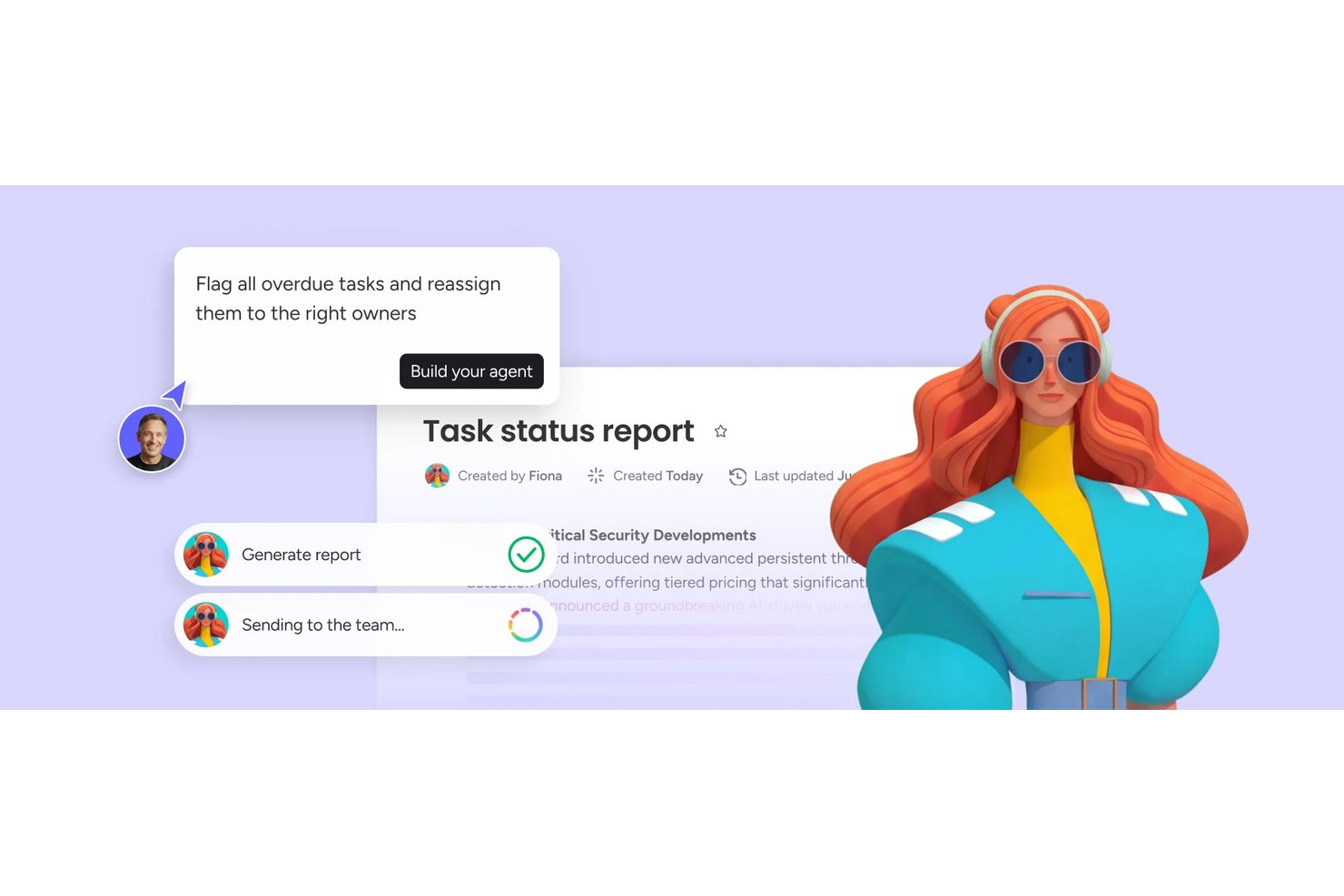
monday AI Workspace è una piattaforma di gestione del lavoro che combina bacheche attività personalizzabili, viste di progetto multiple, automazioni e strumenti di intelligenza artificiale integrati per aiutare i team a pianificare, monitorare e coordinare il lavoro su più progetti.
Per chi è ideale monday AI Workspace?
È particolarmente adatto a team di piccole e medie dimensioni che desiderano assistenza tramite intelligenza artificiale integrata direttamente nei flussi di lavoro di progetto, senza bisogno di strumenti separati.
Perché ho scelto monday AI Workspace
Ho incluso monday AI Workspace tra le mie migliori scelte perché i suoi approfondimenti IA sui progetti vanno oltre semplici riepiloghi superficiali. monday sidekick analizza in tempo reale i dati delle bacheche per segnalare attività a rischio e dipendenze in ritardo prima che compromettano uno sprint, cosa che trovo davvero utile quando gestisco più flussi di lavoro in parallelo. Il generatore di flussi di lavoro con IA crea automazioni complete da prompt in linguaggio naturale, così il mio team dedica meno tempo alla configurazione delle bacheche e più tempo alla consegna del lavoro reale.
Funzionalità principali di monday AI Workspace
- Viste bacheca personalizzabili: Configura bacheche Kanban o semplici elenchi per gestire le attività nel modo più adatto al tuo team.
- Raggruppamento e suddivisione attività: Organizza le attività in sezioni, suddividi gli elementi grandi in sotto-attività e gestisci la gerarchia del progetto.
- Allegati ai file: Allegare documenti, immagini e file direttamente alle attività per un facile accesso e riferimento.
- Supporto app mobile: Utilizza app dedicate iOS e Android per la gestione di progetti e attività in mobilità.
Integrazioni di monday AI Workspace
monday AI Workspace offre centinaia di integrazioni native tramite la sua integrazione interna e marketplace, inclusi Slack, Google Workspace, Microsoft Teams, Salesforce, HubSpot, Dropbox, Zoom, Outlook, Jira, GitHub e Zapier. È disponibile un'API per integrazioni personalizzate.
Cosa è gratuito?
monday AI Workspace offre un piano gratuito per sempre fino a 2 posti, che include bacheche illimitate, documenti e oltre 200 modelli. Automazioni, integrazioni e viste avanzate come timeline e Gantt sono disponibili solo nei piani a pagamento.
Pros and Cons
Pros:
- L'assistente IA segnala automaticamente le attività a rischio
- Il piano gratuito include bacheche e documenti illimitati
- Multiple viste di progetto disponibili nel piano gratuito
Cons:
- Il piano gratuito è limitato a soli due posti
- Automazioni non disponibili nel piano gratuito
New Product Updates from monday AI Workspace
monday AI Workspace Adds Human Approval Routing
monday AI Workspace adds a human-in-the-loop approval block to AI Workflows, sending approval requests and routing workflow paths based on responses. For more information, visit monday AI Workspace's official site.

ClickUp
Ideale per visualizzazioni attività personalizzate

ClickUp offre a team, freelance e piccole imprese uno spazio di lavoro flessibile per organizzare le attività, gestire i progetti e collaborare — il tutto senza dover pagare un piano.
Per chi è ideale ClickUp?
ClickUp è perfetto per team interfunzionali che necessitano di uno spazio di lavoro unico dove gestire attività tra prodotto, ingegneria e design.
Perché ho scelto ClickUp
ClickUp si guadagna un posto nella mia shortlist per il livello di controllo che offre su come vengono visualizzate e organizzate le attività. Adoro il fatto che si possa passare tra oltre 15 visualizzazioni diverse — tra cui Elenco, Board, Gantt, Calendario e Tabella — senza modificare i dati sottostanti. Il mio team usa la visualizzazione Tabella per monitorare i campi delle attività affiancati e la vista Gantt per mappare le dipendenze tra gli sprint. Il piano gratuito prevede l’accesso a più visualizzazioni, cosa rara e davvero utile per i team che lavorano su diversi flussi di lavoro.
Funzionalità principali di ClickUp
- Stati attività personalizzati: Definisci le tue fasi di flusso di lavoro oltre le etichette predefinite da fare, in corso e completato.
- Dipendenze tra attività: Collega le attività così il tuo team sa cosa è bloccato e cosa può procedere.
- Documenti: Crea e allega documenti in formato rich-text direttamente alle attività per mantenere contesto e lavoro in un unico luogo.
- Monitoraggio del tempo: Registra il tempo trascorso sulle singole attività nativamente, senza bisogno di strumenti di terze parti.
Integrazioni ClickUp
Le integrazioni includono Slack, GitHub, HubSpot, Google Drive, OneDrive, Dropbox, Outlook, Google Calendar, Figma e Zoom.
Cosa offre gratuitamente?
ClickUp propone un piano gratuito per sempre con attività illimitate e membri gratuiti illimitati. Il piano gratuito include 60MB di spazio di archiviazione e accesso alle funzionalità principali come board Kanban, visualizzazione calendario e documenti collaborativi.
Pros and Cons
Pros:
- Visualizzazioni attività personalizzabili per diverse preferenze di lavoro
- Integrazione con oltre 1.000 altri strumenti
- Nessun limite alla creazione di attività e all’accesso dei membri
Cons:
- Occasionali rallentamenti delle prestazioni su progetti di grandi dimensioni
- Capacità di archiviazione limitata nel piano gratuito
New Product Updates from ClickUp
ClickUp Adds Meetings Hub, Super Agent Templates, and ZoomInfo Integration
ClickUp adds a searchable Meetings Hub, new ways to clone and template Super Agents, and a ZoomInfo integration through the App Center. These updates improve meeting retrieval, agent reuse, and access to sales intelligence. For more information, visit ClickUp’s official site.

Wrike
Ideale per una pianificazione dei progetti scalabile

Wrike offre ai team del settore tecnologico, del marketing e dei servizi professionali uno spazio di lavoro flessibile per organizzare le attività, gestire i progetti e collaborare in tempo reale, il tutto con un piano gratuito che supporta utenti illimitati e funzionalità essenziali di gestione delle attività.
Per chi è Wrike?
Wrike è particolarmente adatto a team in crescita e organizzazioni di medie dimensioni che hanno bisogno di uno strumento di gestione delle attività capace di scalare insieme ai loro progetti e all’aumento del personale.
Perché ho scelto Wrike
Wrike merita un posto nella mia selezione perché è uno dei pochi strumenti gratuiti di gestione delle attività pensati per crescere con il tuo team. I modelli di progetto e i blueprint ti permettono di replicare flussi di lavoro già collaudati su nuovi progetti, così non devi ricostruire i processi quando aumenta il carico di lavoro. La visualizzazione a diagramma di Gantt di Wrike ti consente anche di mappare le dipendenze tra attività e le tempistiche man mano che la complessità dei progetti cresce. La funzionalità di gestione dello sforzo, che permette di stimare lo sforzo richiesto per un’attività già nella fase di creazione, aiuta a prevedere le date di consegna prima ancora che il progetto inizi.
Caratteristiche principali di Wrike
- Flussi di lavoro personalizzati: Crea e modifica gli stati delle attività per adattarli al modo in cui il tuo team sposta realmente il lavoro attraverso la pipeline.
- Feed di attività in tempo reale: Visualizza un flusso continuo di aggiornamenti, commenti e modifiche alle attività di tutti i progetti in un unico posto.
- Tag incrociati: Aggiungi le attività a più cartelle di progetto contemporaneamente, così il lavoro rimane visibile in diverse viste del team.
- Moduli di richiesta: Crea moduli di raccolta informazioni che generano e assegnano automaticamente le attività una volta inviati, riducendo l’impostazione manuale.
Integrazioni di Wrike
Le integrazioni includono Microsoft Teams, Salesforce, Google Drive, Microsoft SharePoint, Zoom, Adobe Creative Cloud, QuickBooks, Power BI, Tableau e Miro.
Cosa è gratuito?
Wrike offre un piano gratuito per sempre con funzionalità essenziali di gestione delle attività e senza bisogno di carta di credito. Il piano gratuito supporta utenti illimitati ma ha integrazioni e funzionalità avanzate limitate rispetto ai piani a pagamento.
Pros and Cons
Pros:
- Flussi di lavoro personalizzati senza upgrade a pagamento
- Dipendenze tra attività impostabili
- Feed di attività in tempo reale
Cons:
- Funzionalità limitate sul piano a pagamento
- Prezzo iniziale più elevato
New Product Updates from Wrike

Wrike Redesigns AI Agent Builder
Wrike redesigns its AI Agent Builder with a side-by-side setup, Scopes, sentence-style triggers and actions, and clearer filters. These changes make it easier to configure, test, and manage agent behavior. For more information, visit Wrike’s official site.

Ideale per la gestione progetti altamente personalizzabile

Zoho Projects offre alle piccole imprese e ai team di progetto un modo flessibile per organizzare le attività, monitorare i progressi e collaborare, il tutto senza pagare un abbonamento.
Per chi è ideale Zoho Projects?
Zoho Projects è perfetto per team da piccoli a medi che necessitano di un tracciamento strutturato dei progetti senza superare troppo rapidamente i limiti di un piano gratuito.
Perché ho scelto Zoho Projects
Zoho Projects si guadagna un posto nella mia lista perché le sue possibilità di personalizzazione vanno ben oltre la maggior parte degli strumenti gratuiti di gestione delle attività. Mi piace in particolare la funzione degli stati personalizzati: il mio team può definire esattamente cosa significa 'in revisione' o 'bloccato' per il nostro specifico flusso di lavoro, invece di doverci adattare a un insieme fisso di etichette. I layout personalizzati permettono di costruire moduli di attività e problemi che raccolgono i campi necessari al tuo team, come livello di priorità, nome del cliente o URL. Utilizzo anche Blueprint per mappare visivamente i flussi di lavoro delle attività, così la persona giusta viene avvisata quando uno stato cambia.
Funzionalità chiave di Zoho Projects
- Dipendenze tra attività: Collega le attività in modo che il lavoro non possa iniziare fino a quando la precedente non viene segnata come completata, mantenendo l'ordine delle attività in sequenza.
- Vista bacheca Kanban: Visualizza le attività come schede distribuite su colonne per gestire il lavoro in corso e individuare eventuali colli di bottiglia rapidamente.
- Monitoraggio del tempo: Registra le ore direttamente sulle attività per monitorare l'impegno e mantenere accurate le tempistiche dei progetti.
- Gestione documentale: Allega e archivia file direttamente nelle attività, così i materiali di riferimento del team restano collegati al lavoro rilevante.
Integrazioni di Zoho Projects
Le integrazioni includono Zoho CRM, Zoho Desk, Zoho Analytics, Zoho People, Google Calendar, Microsoft Teams, Slack, Dropbox, GitHub e Jira.
Cosa è gratuito?
Zoho Projects offre un piano gratuito per sempre per un massimo di 3 utenti e 2 progetti. Il piano gratuito ha uno spazio di archiviazione limitato e non include funzionalità come le dipendenze tra le attività o le integrazioni avanzate.
Pros and Cons
Pros:
- Funzionalità di monitoraggio del tempo all'interno dell'app
- Ampie possibilità di personalizzazione
- Grafici di Gantt interattivi di sola lettura
Cons:
- Funzionalità limitate nell'app mobile
- Nessun supporto per la creazione di sotto-attività
New Product Updates from Zoho Projects
Zoho Projects Adds CodeX Scripts for Custom Modules
Zoho Projects now supports CodeX Scripts for custom modules, enabling conditional logic and rules for creating, updating, and deleting records. For more information, visit Zoho Projects' official site.
 .
.
Toggl
Il migliore per il monitoraggio delle attività con registrazione integrata del tempo
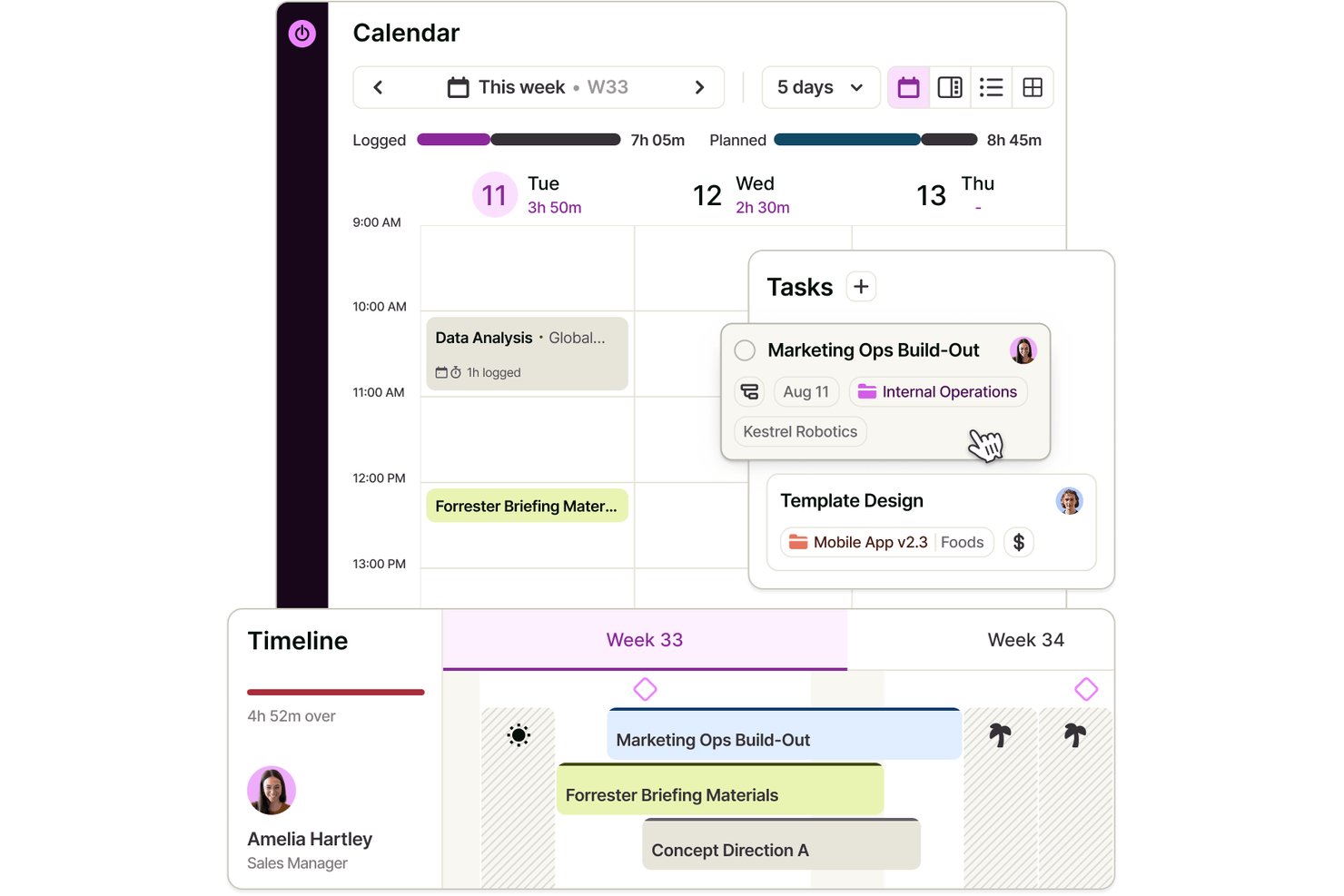
Toggl è una piattaforma per la gestione delle attività con un piano gratuito per un massimo di tre utenti, che offre elenchi e bacheche delle attività, assegnazioni, stime, sottoattività, integrazioni con i calendari e monitoraggio integrato del tempo.
Per chi è più adatto Toggl?
Consulenti indipendenti e responsabili di piccoli progetti che desiderano confrontare le stime delle attività con le ore registrate troveranno Toggl una soluzione pratica.
Perché ho scelto Toggl
Ho scelto Toggl come “Il migliore per il monitoraggio delle attività con registrazione integrata del tempo” perché posso confrontare le stime delle attività con le ore registrate man mano che il lavoro procede. Utilizzo assegnazioni e sottoattività per suddividere un piccolo progetto in attività assegnate ai responsabili, quindi tengo traccia del tempo per ogni attività. Il piano gratuito supporta fino a tre utenti e include elenchi e bacheche delle attività.
Funzionalità principali di Toggl
- Priorità delle attività : Imposta una priorità per ogni attività.
- Date delle attività : Aggiungi date di inizio e fine alle attività.
- Filtri delle attività : Cerca, filtra, raggruppa e ordina le attività in base a campi come stato, priorità e data.
- Attività private : Contrassegna le attività come private o condivise e aggiungi allegati.
Integrazioni di Toggl
Toggl offre integrazioni native con Google Calendar e Outlook Calendar; il piano gratuito supporta un account Google Calendar. Le integrazioni native con Asana e Jira sono disponibili nel piano Premium, mentre un'API pubblica supporta integrazioni personalizzate.
Cosa è incluso nel piano gratuito?
Toggl offre un piano gratuito senza scadenza per un massimo di tre utenti, con elenchi e bacheche delle attività e monitoraggio integrato del tempo. Il piano gratuito supporta un account Google Calendar; le integrazioni native con Asana e Jira richiedono il piano Premium.
Pros and Cons
Pros:
- Confronta le stime delle attività con le ore registrate
- Organizza le sottoattività per assegnatario e priorità
- I recensori apprezzano i timer rapidi e i report sui progetti
Cons:
- La collaborazione del piano gratuito è limitata a tre utenti
- Le scadenze delle attività non dispongono di controlli dedicati per i promemoria

Ideale per notifiche sulle attività in tempo reale

Connecteam è una piattaforma di gestione delle attività pensata principalmente per dispositivi mobili, creata per team senza postazione fissa che operano in settori come il retail, l’ospitalità e i servizi sul campo, offrendo strumenti per assegnare, monitorare e comunicare sulle attività in tempo reale.
Per Chi è Ideale Connecteam?
Connecteam è particolarmente indicato per piccole e medie imprese che gestiscono lavoratori a turni o a ore dislocati in più sedi.
Perché Ho Scelto Connecteam
Ho scelto Connecteam tra i migliori perché il suo sistema di notifiche mantiene manager e lavoratori sempre sincronizzati senza bisogno di solleciti manuali. Quando viene assegnata un’attività, il dipendente riceve immediatamente una notifica push sul telefono. Come manager, ricevo una notifica quando l’attività viene visualizzata e un’altra quando viene contrassegnata come completata, così so sempre in che stato si trovano le cose senza dover rincorrere nessuno. Trovo utili anche le notifiche per le sotto-attività, che mi permettono di monitorare l’avanzamento di ogni fase di un compito articolato, non solo della conclusione finale.
Funzionalità Principali di Connecteam
- Pianificazione attività ricorrenti: Imposta attività da ripetere su base giornaliera, settimanale o mensile così che gli incarichi ricorrenti vengano creati automaticamente senza necessità di reinserimento manuale ogni volta.
- Chat integrata a livello di attività: Fai domande e condividi aggiornamenti direttamente all’interno di ciascuna attività, mantenendo tutta la comunicazione rilevante collegata al lavoro stesso.
- Allegato di moduli e checklist: Allegare moduli digitali, checklist, immagini e file direttamente a un’attività fornisce ai lavoratori tutto il necessario per portarla a termine in un solo luogo.
- Gestione delle attività da mobile: Crea, assegna e gestisci attività direttamente da dispositivi mobili, offrendo ai manager il pieno controllo senza dover essere al computer.
Integrazioni di Connecteam
Tra le integrazioni ci sono QuickBooks, Gusto, Xero, ADP, Wix, Lightspeed, PrismHR, Square, BambooHR e Accu-Time Systems.
Cosa È Gratuito?
Connecteam offre un piano gratuito per sempre fino a 10 utenti. Alcune funzionalità avanzate e integrazioni sono disponibili solo nei piani a pagamento.
Pros and Cons
Pros:
- Notifiche di assegnazione delle attività pensate per l’uso mobile
- Hub integrato per la comunicazione del team
- Monitoraggio in tempo reale del completamento delle attività
Cons:
- Reportistica base nella versione gratuita
- Possibili problemi con la consegna degli SMS
New Product Updates from Connecteam

Connecteam Expands Break and Timesheet Controls
Connecteam adds flexible break thresholds, personalized policies, auto-end options, a centralized exceptions report, and improved timesheet issue visibility to help teams manage breaks and timesheets more effectively. For more information, visit Connecteam’s official site.
 .
.
Ideale per attività e membri del team illimitati

MeisterTask offre ai team nei settori tecnologici, creativi e aziendali un modo flessibile per organizzare, assegnare e monitorare visivamente le attività, rendendo semplice la gestione dei progetti e la collaborazione senza limiti su utenti o compiti.
Per chi è meglio MeisterTask?
MeisterTask è particolarmente adatto a team di piccole e medie dimensioni che necessitano di uno strumento di gestione delle attività in stile Kanban, senza restrizioni sul numero di persone che possono collaborare.
Perché ho scelto MeisterTask
MeisterTask si guadagna un posto tra i migliori nella mia shortlist perché il piano gratuito non impone limiti alle attività o ai membri del team—una caratteristica che la maggior parte degli strumenti gratuiti non offre. Mi piace poter gestire una bacheca Kanban completa con responsabili dei compiti, date di scadenza e tag colorati, senza limiti artificiali sul numero di persone che possono partecipare. Il mio team può aggiungere un nuovo sviluppatore, designer o stakeholder a un progetto senza che scatti una barriera a pagamento. I commenti integrati alle attività mantengono inoltre le discussioni collegate direttamente al lavoro, così niente si perde in discussioni separate.
Caratteristiche principali di MeisterTask
- Vista timeline: Mappa le attività su date del calendario per identificare le priorità e gestire le scadenze del progetto.
- Automazioni del flusso di lavoro: Attiva automaticamente azioni—come l'assegnazione di un responsabile—quando un'attività viene spostata in una sezione specifica della bacheca.
- Ruoli e permessi: Assegna livelli di accesso ai membri del team e controlla cosa possono vedere o modificare i collaboratori esterni.
- Reportistica: Monitora i dati sulle prestazioni del progetto filtrati per responsabile, stato o data di scadenza, per seguire i progressi.
Integrazioni di MeisterTask
Le integrazioni includono Slack, Microsoft Teams, GitHub, Zendesk, Google Calendar, Gmail, Outlook, Confluence, JIRA e Pabbly.
Cosa è gratuito?
MeisterTask offre un piano gratuito per sempre con attività illimitate e membri del team illimitati, ma ti limita a 3 progetti e 5 note per team. Le integrazioni e le funzionalità avanzate richiedono un piano a pagamento.
Pros and Cons
Pros:
- Interfaccia Kanban intuitiva e visivamente piacevole
- Automazioni integrate e funzioni di monitoraggio del tempo
- Ottimo per team piccoli e medi che cercano semplicità
Cons:
- Feedback misti su supporto clienti e trasparenza dei prezzi
- Visualizzazioni, personalizzazioni e integrazioni limitate

Ideale per il monitoraggio delle prestazioni del team

Runrun.it è una piattaforma di gestione delle attività progettata per team e aziende che desiderano organizzare i progetti, monitorare i progressi e gestire i carichi di lavoro, ottenendo al contempo visibilità su come viene svolto il lavoro.
Per Chi È Ideale Runrun.it?
Runrun.it è adatto a team di medie dimensioni e aziende in crescita che hanno bisogno di una gestione strutturata delle attività con una chiara visibilità sui carichi di lavoro individuali e di gruppo.
Perché Ho Scelto Runrun.it
Runrun.it si guadagna il suo posto nella mia shortlist perché presenta in modo efficace i dati sulle prestazioni del team insieme alla gestione delle attività. Apprezzo in particolare la funzione Smart Time Tracking, che registra automaticamente quanto tempo le attività trascorrono in ciascuna fase del flusso di lavoro—così, invece di supporre dove il lavoro si blocchi, puoi vederlo chiaramente. Il grafico burnup offre al mio team una visione predittiva dell'avanzamento del progetto, davvero utile quando serve segnalare rischi di consegna prima che diventino problemi. La dashboard delle attività e i report personalizzabili consentono anche di analizzare i dati di performance per utente, tipologia di attività, progetto o cliente, rendendo facile discutere in modo concreto di carichi di lavoro e risultati.
Funzionalità Principali di Runrun.it
- Diagramma di Gantt: Visualizza le attività su una linea temporale, filtrate per membro del team assegnato, cliente o progetto, per monitorare avanzamento e scadenze.
- Form di raccolta richieste: Crea moduli personalizzati per raccogliere informazioni strutturate dai team interni o stakeholder esterni prima dell'inizio del lavoro.
- Gestione della capacità: Monitora le ore disponibili per ciascun membro del team per anticipare i colli di bottiglia e ridistribuire i carichi di lavoro prima che si accumulino.
- Automazione dei processi: Imposta regole automatiche per assegnare attività, creare scadenze e attivare richieste di approvazione in base al tuo flusso di lavoro definito.
Integrazioni di Runrun.it
Le integrazioni includono Salesforce, HubSpot, Jira Software, Trello, Slack, Microsoft Teams, Google Calendar, Google Drive, Microsoft OneDrive e Zapier.
Cosa È Gratuito?
Runrun.it offre un piano gratuito per sempre fino a 5 utenti. Questo piano include le funzionalità base di gestione delle attività ma non offre accesso a report avanzati o automazioni.
Pros and Cons
Pros:
- Code di ticketing integrate per le richieste dei clienti
- Mappatura automatica dei costi di lavoro
- Timestamp di consegna predittiva in tempo reale
Cons:
- Livelli di profondità delle sottoattività limitati
- App mobile a prestazioni lente

Ideale per utenti/progetti illimitati

Freedcamp è una piattaforma di gestione delle attività progettata per team e organizzazioni che necessitano di strumenti flessibili per il monitoraggio dei progetti, la collaborazione e la pianificazione, senza limiti per utenti o progetti.
Per chi è ideale Freedcamp?
Freedcamp è perfetto per team di piccole e medie dimensioni che devono gestire più progetti tra un numero crescente di collaboratori senza incontrare limiti di pagamento.
Perché ho scelto Freedcamp
Freedcamp si è guadagnato un posto nella mia shortlist perché è uno dei pochi strumenti gratuiti di gestione delle attività che realmente non pone limiti al numero di membri del team o di progetti. Mi piace il fatto di poter gestire progetti illimitati contemporaneamente — ognuno con le proprie liste di attività, scadenze e discussioni — senza mai dover passare a un piano superiore. Il mio team può utilizzare la vista a bacheca Kanban per monitorare il lavoro su più progetti attivi allo stesso tempo, cosa che molti piani gratuiti limitano in modo sottile. Questo tipo di flessibilità è raro nel piano gratuito.
Caratteristiche principali di Freedcamp
- Monitoraggio del tempo: Registra il tempo direttamente sulle attività per controllare quanto lavoro richiede ogni progetto.
- Gestore delle password: Conserva e condividi in modo sicuro le credenziali di accesso all'interno dello spazio di lavoro.
- Archiviazione dei file: Allega e organizza file a livello di attività o progetto per facilitarne l'accesso al team.
- Sotto-attività: Suddividi le attività in passaggi più piccoli e assegnali ai singoli membri del team.
Integrazioni di Freedcamp
Le integrazioni includono Google Calendar, Google Drive e Dropbox.
Cosa è gratuito?
Freedcamp offre un piano gratuito per sempre con utenti e progetti illimitati. Alcune funzionalità avanzate e integrazioni sono disponibili solo nei piani a pagamento.
Pros and Cons
Pros:
- Nessun limite per utenti o progetti
- Ampio set di funzionalità per la gestione dei progetti
- Integrazioni flessibili con altri strumenti
Cons:
- L'opzione di fatturazione mensile è più costosa
- L'interfaccia può richiedere un po' di tempo per essere appresa dai nuovi utenti
Backlog
Ideale per la gestione agile dei progetti
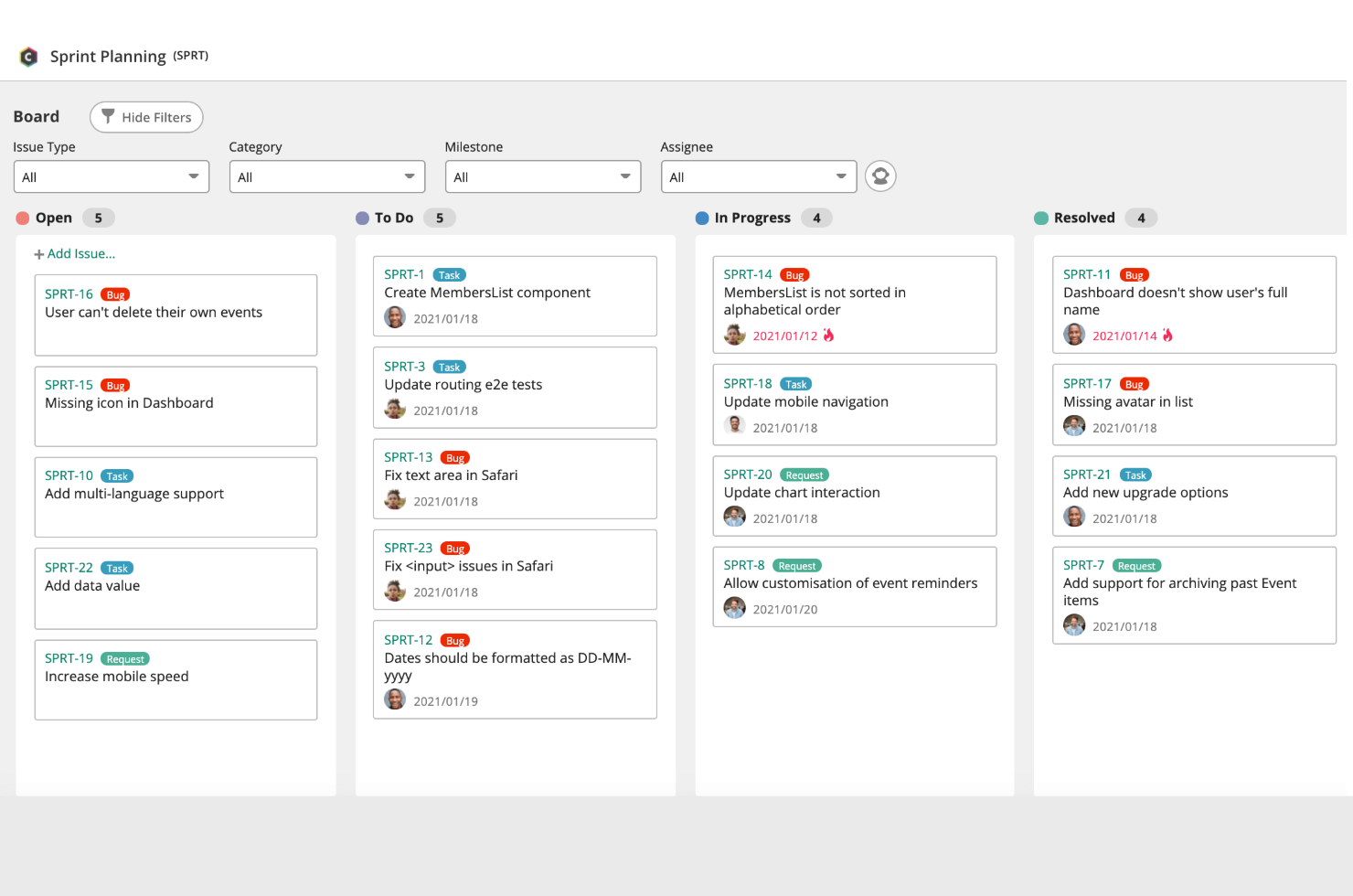
Backlog offre ai team tecnologici e alle piccole imprese un modo per organizzare le attività, monitorare i progressi e collaborare ai progetti con un sistema di tracciamento dei problemi integrato e bacheche visive per la gestione dei progetti.
Per chi è ideale Backlog?
Backlog è adatto a team di sviluppo di piccole e medie dimensioni che necessitano di tracciamento delle attività e gestione dei progetti in un unico strumento.
Perché ho scelto Backlog
Backlog merita il suo posto nella mia shortlist perché integra strumenti di project management agile in un piano gratuito senza eliminare le funzionalità che contano davvero. Mi piace che includa nativamente grafici burndown e gestione degli sprint, così il mio team può gestire correttamente i cicli agili senza dover utilizzare uno strumento separato. Il tracciatore di problemi integrato ci permette di registrare bug, assegnarli e collegarli direttamente alle attività, mantenendo così il lavoro di sviluppo e il monitoraggio dei progetti nello stesso posto. Il monitoraggio delle milestone completa il tutto offrendo al team una visione chiara di dove ogni sprint si colloca rispetto agli obiettivi di consegna più ampi.
Funzionalità principali di Backlog
- Bacheche Kanban: Visualizza lo stato delle attività e sposta il lavoro attraverso fasi di workflow personalizzate usando schede drag-and-drop.
- Diagrammi di Gantt: Mappa le dipendenze delle attività e le tempistiche di progetto in un diagramma visivo che si aggiorna con l'avanzare dei lavori.
- Sotto-attività e checklist: Suddividi le attività in passaggi più piccoli e registra il completamento a livello dettagliato all'interno di ogni problema.
- Wiki: Crea e salva documentazione di progetto, note delle riunioni e conoscenze del team direttamente dentro Backlog.
Integrazioni Backlog
Le integrazioni includono Cacoo, Slack, Redmine Importer e Jira Importer. È inoltre disponibile una API aperta per integrazioni personalizzate.
Cosa è gratuito?
Backlog offre un piano gratuito per sempre fino a 10 utenti, limitato a 1 progetto e 100 MB di spazio di archiviazione. Alcune funzionalità come i diagrammi di Gantt, i grafici burndown e le sotto-attività sono disponibili solo nei piani a pagamento.
Pros and Cons
Pros:
- Onboarding rapido e interfaccia facile da usare
- Strumenti semplificati per il tracciamento di bug e problemi
- Repository Git e SVN integrati
Cons:
- Nessun supporto per le sotto-attività nel piano gratuito
- Segnalati problemi di prestazioni e velocità
Altri software gratuiti per la gestione delle attività da prendere in considerazione
Di seguito è riportato un elenco di ulteriori software gratuiti per la gestione delle attività che ho selezionato, ma che non sono entrati nell’elenco principale. Vale sicuramente la pena dare loro un’occhiata.
- Asana
Ideale per bacheche progettuali e liste di attività
- TickTick
Ideale per la gestione personale delle attività
- Taskworld
Ideale per bacheche visive di attività
- WorkFlowy
Ideale per la pianificazione basata su struttura ad albero
- nTask
Ideale per timeline di progetto visive
- Trello
Ideale per il monitoraggio visivo dei progetti
- Notion
Ideale per note e attività integrate
- Quire
Ideale per organizzare progetti complessi
- Teamhood
Ideale per la gestione agile dei progetti
- GoodDay
Il migliore per supportare flussi di lavoro Agile
- PathPro
Ideale per convertire richieste di funzionalità in attività


Come valuto il software gratuito per la gestione delle attività
Divido la mia valutazione in criteri di base—le funzionalità essenziali come l'assegnazione delle attività e un vero piano gratuito—e fattori differenzianti come automazioni e integrazioni che distinguono i migliori strumenti.
Funzionalità di base (Requisiti minimi per questa lista)
Quando seleziono gli strumenti per la mia lista, assegno a ciascuno un punteggio da 0 (non offre la funzionalità) a 5 (eccelle in quest'area) per ogni funzionalità di base elencata di seguito. Poi calcolo il punteggio totale dello strumento in una percentuale. Ogni strumento deve ottenere un punteggio totale minimo del 65% per essere preso in considerazione.
- Creazione e assegnazione di attività: Verifico come ogni strumento gestisce l'assegnazione delle attività con scadenze, priorità e stati—come un responsabile sprint che distribuisce attività di backlog tra gli sviluppatori prima di un rilascio.
- Viste multiple delle attività: Flussi di lavoro diversi richiedono viste diverse. Controllo se ogni strumento offre bacheche Kanban, elenchi, calendari o cronologie affinché i team possano scegliere il formato che meglio si adatta al loro modo di lavorare.
- Disponibilità di un piano gratuito: Valuto se la versione gratuita supporta realmente la gestione quotidiana delle attività per un piccolo team, e non solo una prova a tempo limitato o un piano così restrittivo da essere inutilizzabile.
- Funzionalità di collaborazione: Il vero lavoro di squadra è più del semplice vedere le attività degli altri. Cerco funzionalità di commento, @menzioni, allegati e spazi di lavoro condivisi che mantengano le conversazioni nel giusto contesto.
- Scadenze e promemoria: Scadenze mancate possono far deragliare rapidamente i progetti. Verifico la presenza di tracciamento delle date di scadenza, notifiche in-app e opzioni di promemoria che aiutino i membri del team a restare responsabili senza doverli sollecitare costantemente in modo manuale.
- Sotto-attività e organizzazione delle attività: Suddividere il lavoro in parti più piccole è fondamentale—specialmente per le consegne a più fasi. Valuto come ogni strumento gestisce sotto-attività, checklist e raggruppamenti a livello di progetto per favorire una pianificazione strutturata.
Una volta ottenuto un elenco di strumenti che rispondono a questi criteri, considero ciò che li distingue tra loro.
Fattori distintivi (Cosa distingue i fornitori)
Ecco come comparo e metto a confronto i vari fornitori:
Funzionalità di rilievo
L'automazione è un elemento importante—verifico se il piano gratuito consente di impostare regole come l'assegnazione automatica delle attività quando cambia lo stato o la generazione ricorrente di attività sprint. Questo tipo di gestione automatica fa risparmiare ore ogni settimana. Anche il monitoraggio del tempo integrato è fondamentale, soprattutto per i freelance che registrano il lavoro fatturabile su attività specifiche. Inoltre, una solida libreria di modelli può essere determinante per velocizzare l'onboarding di piccoli team che avviano nuovi progetti senza budget per impostazioni personalizzate.
Oltre le funzionalità
Presto molta attenzione a quanto ogni fornitore sia chiaro riguardo ai limiti del proprio piano gratuito—alcuni nascondono i limiti di utenti o spazio di archiviazione nelle pagine dei prezzi. Le integrazioni contano altrettanto. Uno strumento che si collega a Slack, Google Drive o al tuo calendario mantiene gli aggiornamenti sulle attività visibili dove il team già lavora. Valuto anche il percorso di aggiornamento, perché un freelance che supera i limiti del piano gratuito non dovrebbe essere costretto a migrare tutto su una nuova piattaforma solo per aggiungere qualche funzionalità a pagamento.
Come scegliere un software gratuito per la gestione delle attività
È facile sentirsi sopraffatti da lunghi elenchi di funzionalità e strutture di prezzo complesse. Per aiutarti a rimanere concentrato durante il processo di selezione del software, ecco una lista di controllo dei fattori principali da tenere a mente:
| Fattore | Da considerare |
| Scalabilità | Lo strumento continuerà a essere adatto se il tuo team crescerà? Cerca opzioni che ti consentano di aggiungere utenti o passare a piani superiori senza cambiare piattaforma. |
| Integrazioni | Il software si collega facilmente agli strumenti che già utilizzi, come Slack o Google Workspace? Evita gli strumenti che richiedono soluzioni alternative o aggiornamenti manuali per rimanere sincronizzati. |
| Personalizzazione | Puoi modificare le visualizzazioni delle attività, le etichette o i flussi di lavoro per adattarli al modo in cui lavora il tuo team? Una configurazione rigida può rallentarti se i tuoi processi cambiano. |
| Facilità d'uso | Il tuo team può iniziare a usare lo strumento senza formazione? Interfacce macchinose o troppi clic per le operazioni semplici possono portare a una scarsa adozione. |
| Implementazione e inserimento iniziale | Quanto tempo servirà per configurare le attività e gli utenti? Cerca modelli, strumenti di importazione e guide che ti aiutino a iniziare rapidamente. |
| Costo | Il piano gratuito è sufficiente per le dimensioni e le esigenze del tuo team? Verifica i limiti relativi a utenti, attività o spazio di archiviazione, per evitare di dover passare troppo presto a un piano superiore. |
| Misure di sicurezza | Il software offre elementi di base come la crittografia e accessi sicuri? Assicurati che non esponga dati sensibili sui progetti, anche se si tratta di uno strumento gratuito. |
| Disponibilità dell'assistenza | Se incontri delle difficoltà, è facile ricevere aiuto? Verifica se offrono chat dal vivo o assistenza via email agli utenti gratuiti. |
Tendenze dei software gratuiti per la gestione delle attività
Il panorama dei software gratuiti per la gestione delle attività si sta evolvendo rapidamente. Ecco le principali tendenze che ne stanno plasmando il futuro.
- Integrazione con l'intelligenza artificiale e l'apprendimento automatico: l'intelligenza artificiale e l'apprendimento automatico potenziano l'analisi predittiva e l'automazione delle attività. Gli strumenti possono ora migliorare l'efficienza apprendendo il comportamento degli utenti e anticipando i colli di bottiglia.
- Accessibilità multipiattaforma: il software ora sincronizza le attività senza problemi tra dispositivi e piattaforme, rendendo la gestione dei progetti più flessibile e accessibile.
- Funzionalità di sicurezza avanzate: con l'aumento delle minacce informatiche, la crittografia end-to-end e l'autenticazione a due fattori stanno diventando funzionalità standard per proteggere i dati sensibili dei progetti.
- Strumenti per la collaborazione in tempo reale: la modifica in tempo reale, la chat e le notifiche istantanee consentono una collaborazione di squadra più rapida e dinamica tra diverse sedi.
- Personalizzazione e adattamento: gli utenti possono ora regolare con precisione interfacce, flussi di lavoro e notifiche, adattando il software al proprio modo di lavorare per una maggiore produttività.
Che cos'è un software gratuito per la gestione delle attività?
Un software gratuito per la gestione delle attività è uno strumento che aiuta singoli utenti e team a organizzare, assegnare, monitorare e completare le attività senza costi.
Centralizza gli elenchi delle attività, le scadenze e il monitoraggio dei progressi in un'unica piattaforma. I responsabili di progetto, i team e i freelance utilizzano generalmente software gratuiti per la gestione delle attività per semplificare i flussi di lavoro, migliorare la responsabilità e mantenere i progetti nei tempi previsti.
Funzionalità dei software gratuiti per la gestione delle attività
Quando scegli un software gratuito per la gestione delle attività, cerca le seguenti funzionalità principali:
- Creazione e organizzazione delle attività: aggiungi, modifica e organizza facilmente le attività, così puoi mantenere chiare le tue priorità e non perdere mai di vista ciò che devi fare.
- Scadenze e promemoria: imposta le scadenze e ricevi promemoria puntuali, così puoi tenere sotto controllo le attività importanti, senza più corse all'ultimo minuto.
- Strumenti di collaborazione: invita i membri del team, assegna attività e commenta direttamente sulle cose da fare, rendendo semplice lavorare insieme e condividere aggiornamenti senza infinite conversazioni via e-mail.
- Bacheche di progetto di base: utilizza strumenti visivi come bacheche kanban o elenchi per delineare i flussi di lavoro e avere una visione chiara dei progressi, perfetto se ragioni meglio attraverso immagini.
- Notifiche: ricevi aggiornamenti in tempo reale quando vengono apportate modifiche alle attività o ai progetti, rendendo più fluida la comunicazione con il team e riducendo al minimo la confusione.
- Accesso da dispositivi mobili: accedi all'elenco delle attività da qualsiasi dispositivo, che tu sia alla scrivania o in movimento, così sarai sempre aggiornato.
Funzionalità comuni dell'intelligenza artificiale nei software gratuiti per la gestione delle attività
Oltre alle funzionalità standard dei software gratuiti per la gestione delle attività elencate sopra, molte di queste soluzioni stanno integrando l'intelligenza artificiale con funzionalità come:
- Definizione intelligente delle priorità delle attività: l'intelligenza artificiale analizza il carico di lavoro e le scadenze per suggerire automaticamente quali attività affrontare per prime, aiutandoti a massimizzare la produttività senza dover riflettere troppo.
- Modifica automatica delle scadenze: l'intelligenza artificiale può monitorare i progressi e la disponibilità del team, quindi proporre scadenze più efficaci o ridistribuire le attività per mantenere i progetti in movimento senza intoppi.
- Promemoria basati sull'intelligenza artificiale: i promemoria intelligenti adattano i tempi e il contesto in base alle tue abitudini, così ricevi effettivamente un promemoria proprio quando ne hai bisogno (e non quando sei già impegnato in qualcos'altro).
- Inserimento delle attività in linguaggio naturale: aggiungi attività descrivendo semplicemente ciò che devi fare con un linguaggio comune; l'intelligenza artificiale comprende e organizza i dettagli per te, rendendo più facile (e un po' più divertente) rimanere organizzati.
Vantaggi dei software gratuiti per la gestione delle attività
L'implementazione di un software gratuito per la gestione delle attività può offrire diversi vantaggi al tuo team e alla tua azienda. Ecco alcuni dei principali vantaggi:
- Integrazione semplice: molti piani gratuiti si collegano ai calendari o alla posta elettronica, così puoi mantenere le attività allineate con gli strumenti che già utilizzi.
- Costi inferiori: puoi organizzare le attività e collaborare senza pagare uno strumento, una soluzione ideale per i piccoli team o per i budget limitati.
- Maggiore visibilità sulle attività: i piani gratuiti ti consentono di monitorare assegnazioni e scadenze in un unico luogo, così nulla viene trascurato.
- Configurazione più rapida: la maggior parte degli strumenti gratuiti permette di registrarsi e iniziare subito a utilizzarli senza un lungo processo di avvio.
- Migliore comunicazione del team: i commenti e le notifiche integrati aiutano tutti a rimanere aggiornati sui progressi e sulle modifiche.
- Accesso da qualsiasi luogo: le app mobili e l'accesso via web consentono di gestire le attività anche in mobilità senza costi aggiuntivi.
- Flussi di lavoro più semplici: gli elenchi di attività di base e l'organizzazione dei progetti facilitano la strutturazione del lavoro senza aggiungere complessità.