

I 10 migliori software cloud per la gestione delle risorse digitali per il 2026

Miglior software di gestione delle risorse digitali nel cloud: selezione


Gestire le risorse digitali può essere una vera seccatura, soprattutto quando il tuo team è distribuito in sedi diverse. Potresti ritrovarti a gestire numerosi file, ad avere difficoltà con il controllo delle versioni o a dover affrontare problemi di sicurezza dei dati. È complicato, ma è proprio qui che entra in gioco il software di gestione delle risorse digitali nel cloud.
Questi strumenti aiutano te e il tuo team a organizzare, archiviare e condividere le risorse digitali senza difficoltà. Nella mia esperienza, alleviano molti dei problemi più comuni, rendendo la tua giornata lavorativa un po’ più fluida.
In questo articolo condividerò le mie migliori scelte per il software di gestione delle risorse digitali nel cloud. Ho testato e recensito ciascuna soluzione in modo indipendente, concentrandomi su ciò che conta davvero per te. Aspettati analisi imparziali e consigli pratici per aiutarti a scegliere la soluzione migliore per le tue esigenze.
Perché fidarsi dei nostri consigli sui software
Il nostro team testa e recensisce software dal 2012. In quanto project manager noi stessi, sappiamo quanto sia difficile — e importante — scegliere il software giusto.
Per questa guida, abbiamo valutato gli strumenti attraverso test pratici e ricerche indipendenti, assegnando un punteggio agli strumenti in base ai nostri criteri di selezione. Ci basiamo inoltre sulle competenze di leader di pensiero del settore e di professionisti attivi nella gestione dei progetti.
Le nostre recensioni riflettono il nostro giudizio editoriale umano, non un discorso di vendita.
Revisori esperti:
Tabella comparativa dei software di gestione delle risorse digitali nel cloud
Questa tabella comparativa riassume i dettagli dei prezzi delle mie migliori selezioni di software di gestione delle risorse digitali nel cloud
| Tool | Best For | Trial Info | Price | ||
|---|---|---|---|---|---|
| 1 | Ideale per portali brand centralizzati | Demo gratuita disponibile | Prezzi su richiesta | Website | |
| 2 | Ideale per la ricerca avanzata degli asset | Demo gratuita disponibile | Prezzi su richiesta | Website | |
| 3 | Ideale per la governance dei metadati basata sull'intelligenza artificiale | Piano gratuito per sempre | A partire da $9/mese | Website | |
| 4 | Ideale per la collaborazione sugli asset digitali | Prova gratuita di 7 giorni | Da $100/mese/utente | Website | |
| 5 | Ideale per creare raccolte di risorse | Piano gratuito disponibile | A partire da $99/mese (fatturazione annuale) | Website | |
| 6 | Ideale per il tagging automatico dei contenuti visivi | Prova gratuita di 30 giorni disponibile | Da $250/mese (fatturati annualmente) | Website | |
| 7 | Miglior soluzione DAM scalabile | Demo gratuita disponibile | Prezzo su richiesta | Website | |
| 8 | Ideale per la classificazione di immagini tramite IA | Prova gratuita di 14 giorni | Da $213/mese | Website | |
| 9 | Ideale per la gestione delle risorse visive | Piano gratuito disponibile | Da $10/mese (fatturato annualmente) | Website | |
| 10 | Ideale per la collaborazione di team marketing | Prova gratuita di 30 giorni | Da $29/utente/mese | Website |

Recensioni dei migliori software di gestione delle risorse digitali nel cloud
Di seguito trovi le mie recensioni dettagliate dei migliori software di gestione delle risorse digitali nel cloud inclusi nella mia selezione. Le mie recensioni offrono un’analisi approfondita delle funzionalità principali, dei vantaggi e degli svantaggi, delle integrazioni e dei casi d’uso ideali di ogni strumento, per aiutarti a trovare quello più adatto a te.

Papirfly
Ideale per portali brand centralizzati

Papirfly è una piattaforma cloud di gestione delle risorse digitali che organizza, archivia e condivide asset del marchio, linee guida e materiali creativi in un ambiente online centralizzato.
Per chi è più indicato Papirfly?
Papirfly è una scelta ideale per le medie e grandi aziende che devono gestire la coerenza del marchio tra più team, regioni o mercati.
Perché ho scelto Papirfly
Papirfly si è guadagnata un posto nella mia lista ristretta grazie al suo portale del marchio che collega in modo efficace l’archiviazione delle risorse back-end con l’attivazione del brand front-end. Apprezzo il fatto che sia possibile creare pagine informative di campagna che raccolgono asset approvati, modelli di design e linee guida di comunicazione in un unico luogo, così i team locali o i partner esterni non devono cercare tra le cartelle o mandare richieste via email. I permessi utente granulari permettono di controllare con precisione chi può visualizzare, scaricare o modificare ogni singolo asset, cosa fondamentale quando si gestiscono più sub-brand o mercati. Le analisi di utilizzo mostrano inoltre quali asset vengono effettivamente consultati, permettendomi di individuare dove l’adozione è forte e dove le linee guida non vengono recepite.
Caratteristiche principali di Papirfly
- Tagging AI dei metadati: Papirfly tagga e categorizza automaticamente le risorse caricate tramite intelligenza artificiale, con la possibilità di aggiungere tag manualmente secondo necessità.
- Date di scadenza degli asset e gestione dei diritti digitali: Imposta date di scadenza e periodi di utilizzo per ogni risorsa, mantenendo la tua libreria aggiornata e conforme alle direttive del brand.
- Creazione di contenuti tramite template: Blocca gli elementi del marchio in modelli di design pre-approvati così che ogni membro del team possa produrre contenuti in linea con il brand anche senza competenze di design.
- Pianificazione e gestione delle campagne: Pianifica e monitora campagne globali e locali tenendo sotto controllo stato dei task, budget, contatti chiave e asset approvati in una sola vista.
Integrazioni di Papirfly
Le integrazioni native includono Adobe Creative Cloud, Adobe Commerce, Asana, Brightcove, Canva e Contentful. Papirfly offre anche un’API per integrazioni personalizzate.
Pros and Cons
Pros:
- Workflow solidi per la conformità del marchio
- Strumenti di ricerca asset alimentati da AI
- Accesso centralizzato al portale del brand
Cons:
- Limitate opzioni di integrazione nativa
- Prezzi non divulgati pubblicamente
New Product Updates from Papirfly

Papirfly Introduces Fund Management in Plan Campaigns
Papirfly introduces Fund Management in Plan Campaigns with budget distribution, fund requests, utilization tracking, approvals, and dashboards. These tools give teams better control and visibility over campaign budgets. For more information, visit Papirfly’s official site.
 .
.
Ideale per la ricerca avanzata degli asset
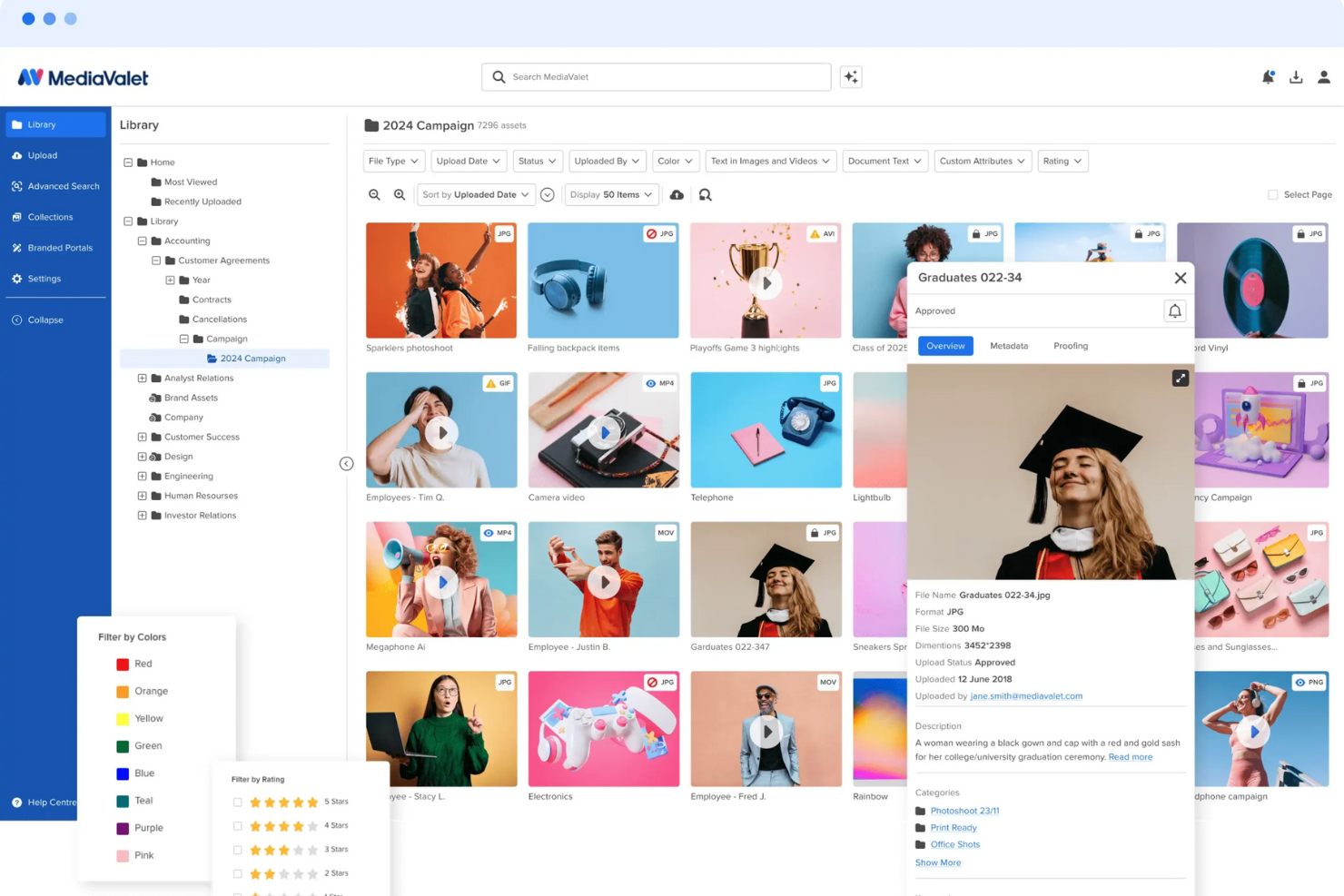
MediaValet è una piattaforma cloud per la gestione delle risorse digitali che offre archiviazione centralizzata degli asset, ricerca potenziata dall’IA, gestione dei metadati e strumenti per organizzare e condividere i contenuti digitali.
Per Chi è Indicato MediaValet?
MediaValet è adatto a imprese di medie e grandi dimensioni nei settori marketing, media e creativi che gestiscono grandi volumi di risorse digitali tra team distribuiti.
Perché Ho Scelto MediaValet
Ho scelto MediaValet tra i migliori perché le sue capacità di ricerca avanzate superano di gran lunga una semplice ricerca per parole chiave. La ricerca multi-filtro consente al mio team di combinare filtri come tipo di file, stato dell'asset, testo dei documenti e valutazione contemporaneamente—quindi, quando cerco un’immagine di una campagna approvata in una libreria con più di 100.000 asset, non devo scorrere all'infinito. Il riconoscimento facciale e il rilevamento degli oggetti etichettano automaticamente i contenuti visivi, permettendo di cercare asset che contengono persone specifiche o tipi di prodotto senza dover etichettare manualmente tutto. Inoltre, la funzione di ricerche condivise mi permette di distribuire una vista di ricerca salvata a tutto il team, così tutti lavorano con la stessa prospettiva filtrata su un determinato progetto.
Funzionalità Chiave di MediaValet
- Portali esperienziali: Condividi collezioni di asset selezionati con stakeholder interni o esterni tramite portali brandizzati accessibili tramite URL, senza limiti di dimensione dei file.
- Revisione integrata: Rivedi, annota e approva gli asset direttamente sulla piattaforma, con i file approvati che vengono automaticamente consegnati alla tua libreria DAM tramite automazione FinalFile.
- Modelli: Crea e personalizza modelli conformi al brand (alimentati da Marq) così anche chi non è designer, in tutti i reparti, può produrre contenuti senza alterare i file sorgente approvati.
- Reportistica sull'utilizzo: Monitora la performance degli asset e l’attività degli utenti attraverso dashboard in tempo reale e report esportabili per vedere quali asset vengono utilizzati e da chi.
Integrazioni di MediaValet
Le integrazioni native includono Adobe Creative Cloud, Canva, Marq e monday.com. Supporta integrazioni personalizzate tramite API.
Pros and Cons
Pros:
- Capacità di ricerca robuste consentono una rapida individuazione degli asset
- Funzionalità avanzate di sicurezza garantiscono la protezione degli asset
- Accesso da mobile permette la gestione degli asset ovunque ci si trovi
Cons:
- Possibile curva di apprendimento per i nuovi utenti
- Opzioni limitate per la personalizzazione dell'interfaccia utente

ImageKit
Ideale per la governance dei metadati basata sull'intelligenza artificiale
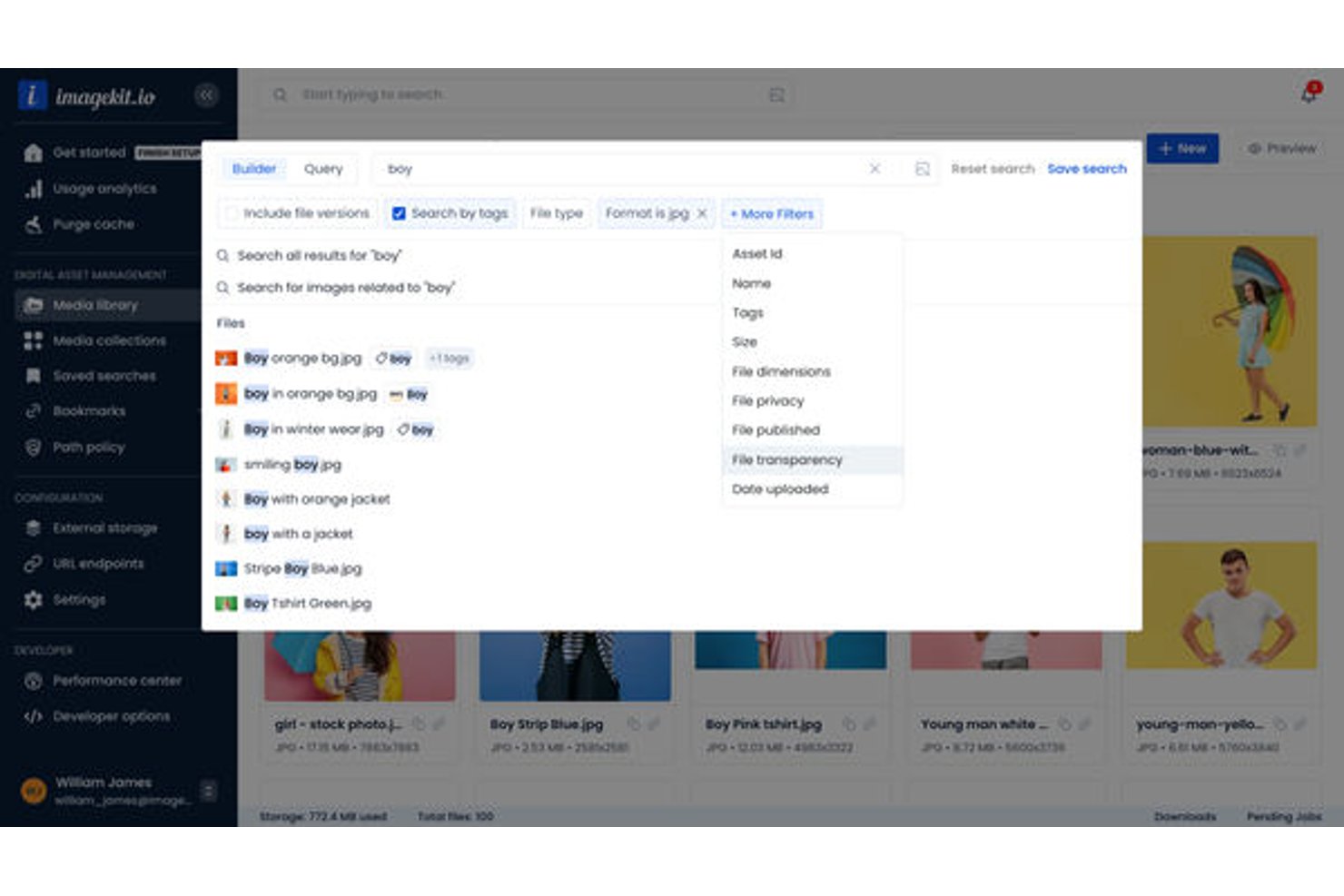
ImageKit è una piattaforma cloud per la gestione delle risorse digitali che combina archiviazione multimediale basata sull'intelligenza artificiale, elaborazione in tempo reale di immagini e video, governance dei metadati e distribuzione tramite CDN per i team creativi e di marketing.
Per chi è più adatto ImageKit?
ImageKit è particolarmente adatto ai team di marketing e creativi di aziende tecnologiche in crescita che necessitano di una gestione delle risorse intuitiva per gli sviluppatori senza rinunciare alla facilità d'uso per chi si occupa di marketing.
Perché ho scelto ImageKit
ImageKit si è guadagnato un posto nella mia lista ristretta perché la governance dei metadati va ben oltre la semplice applicazione di tag. Utilizzo le attività IA per porre domande in linguaggio naturale e ottenere immediatamente metadati strutturati, vincolati a vocabolari controllati affinché la tassonomia rimanga ordinata anche su larga scala. I criteri dei percorsi mi consentono di imporre campi obbligatori a livello di cartella, evitando così che venga caricata una risorsa senza i metadati necessari al team per trovarla e utilizzarla.
Caratteristiche principali di ImageKit
- Raccolte virtuali: Raggruppa le risorse di cartelle diverse per campagne o progetti senza duplicare i file.
- Modelli per l'automazione creativa: Genera varianti di immagini o annunci utilizzando dati CSV e modelli principali direttamente nel DAM.
- Ricerca per somiglianza visiva: Trova risorse dall'aspetto simile utilizzando la ricerca visiva a partire da un'immagine campione.
- Agente DAM consapevole delle autorizzazioni: Utilizza il linguaggio naturale per cercare, configurare ed eseguire operazioni in batch nei limiti delle autorizzazioni dell'utente.
Integrazioni di ImageKit
ImageKit offre integrazioni native con Adobe Photoshop, Adobe Illustrator, Shopify e Sanity. È disponibile un'API per le integrazioni personalizzate.
Pros and Cons
Pros:
- L'assegnazione automatica dei tag tramite IA riduce l'inserimento manuale dei metadati
- La distribuzione tramite CDN è integrata direttamente nell'archiviazione
- La ricerca visiva trova le risorse senza parole chiave
Cons:
- I flussi di lavoro per le revisioni sono relativamente basilari
- Meno collegamenti nativi con gli strumenti di gestione dei progetti

Pics.io
Ideale per la collaborazione sugli asset digitali

Pics.io è una piattaforma cloud di gestione degli asset digitali che consente ai team di organizzare, cercare, versionare e collaborare su file multimediali in un unico spazio di lavoro centralizzato.
Per chi è ideale Pics.io?
Pics.io è adatto per i team creativi e di marketing che hanno bisogno di uno spazio condiviso per gestire, revisionare e approvare asset digitali all'interno di flussi di lavoro distribuiti.
Perché ho scelto Pics.io
Ho scelto Pics.io tra i migliori per l'eccellente gestione della collaborazione tra team interni e partner esterni. Le funzionalità di discussione e revisione permettono al mio team di lasciare commenti con timestamp direttamente su immagini e video — incluse note temporali codificate nei file video — riducendo lo scambio di email o messaggi Slack. Apprezzo anche il sistema di controllo delle versioni: quando un logo o un file creativo viene aggiornato, i link condivisi esistenti servono automaticamente la versione approvata più recente, evitando che i partner esterni accedano a asset obsoleti. I permessi basati sui ruoli mi consentono di controllare esattamente chi può visualizzare, modificare o condividere file specifici senza bloccare l'intera libreria.
Funzionalità principali di Pics.io
- Campi metadati personalizzati: Crea campi metadati su misura oltre alle opzioni predefinite per taggare, filtrare e cercare gli asset usando la tua terminologia e la logica del tuo flusso di lavoro.
- Auto-tagging con IA: Genera automaticamente parole chiave, esegui il riconoscimento facciale nelle immagini e trascrivi il parlato nei file video, rendendo gli asset ricercabili senza input manuale.
- Filtri di ricerca avanzati: Ricerca il contenuto degli asset all'interno di PDF e file AI, applica più filtri contemporaneamente e salva le ricerche frequenti per riutilizzarle.
- Link condivisi con scadenza: Imposta date di scadenza e protezione tramite password sui link degli asset condivisi per controllare l'accesso esterno senza modificare i permessi dell'intera libreria.
Integrazioni di Pics.io
Pics.io offre integrazioni native con Google Drive, Amazon S3 e Dropbox. È disponibile un'API per integrazioni personalizzate.
Pros and Cons
Pros:
- Funzione di ricerca potente
- Etichettatura dinamica basata su IA
- Strumenti di collaborazione avanzati
Cons:
- Caricamento a volte lento per file di grandi dimensioni
- Le visualizzazioni web potrebbero essere più personalizzabili
New Product Updates from Pics.io
Pics.io Adds AVIF File Support
Pics.io now supports AVIF files, expanding the image formats you can upload and manage in the platform. This gives teams more flexibility when working with modern image assets. For more information, visit Pics.io’s official site.
 .
.
Ideale per creare raccolte di risorse

Stockpress è una piattaforma di gestione delle risorse digitali (DAM) progettata per organizzare, ricercare, collaborare e condividere file digitali per team di qualsiasi dimensione. Offre una catalogazione tramite AI, raccolte personalizzabili e strumenti di ricerca avanzati per gestire e trovare le risorse in modo efficiente.
Perché ho scelto Stockpress: Apprezzo il suo utilizzo delle 'raccolte' per ordinare le risorse digitali. A differenza delle cartelle tradizionali, le raccolte permettono di raggruppare i file in modo coerente con i tuoi progetti o campagne, offrendo un approccio più flessibile all'organizzazione. Unite alle capacità di ricerca avanzate, che includono catalogazione tramite AI e filtri dinamici, trovare quello che serve diventa più semplice. Puoi cercare per nome file, descrizione, parole chiave e persino tag personalizzati, assicurando al tuo team di passare meno tempo a cercare.
Caratteristiche e integrazioni principali:
Le funzionalità includono un controllo di versione completo e strumenti di annotazione. Puoi lasciare commenti e annotazioni direttamente su PDF, immagini e video, consentendo una comunicazione asincrona e feedback. Inoltre, le opzioni di accesso e condivisione del software sono pensate per mantenere sicure le tue risorse. Puoi creare link condivisibili con date di scadenza, tracciamento e anche protezione tramite password.
Le integrazioni comprendono Webflow, Adobe Illustrator, Adobe InDesign, Adobe Photoshop, Box, Canva, Dropbox, Google Drive, Klaviyo, Mailchimp, Slack e Okta.
Pros and Cons
Pros:
- Si possono creare raccolte personalizzate per le risorse
- Buone funzionalità di catalogazione AI
- Gestisce grandi volumi di risorse
Cons:
- Supporto alla migrazione dei file limitato al piano enterprise
- Potrebbe offrire più integrazioni
Ideale per il tagging automatico dei contenuti visivi

Tagbox.io è una piattaforma cloud di gestione delle risorse digitali che utilizza l’IA per organizzare, taggare e gestire vaste librerie di immagini per team creativi.
Per chi è Tagbox.io?
Tagbox.io è particolarmente adatto a team creativi e marketing che gestiscono grandi volumi di contenuti visivi e necessitano di soluzioni rapide per organizzare e recuperare le risorse.
Perché ho scelto Tagbox.io
Tagbox.io è tra le mie scelte preferite perché apprezzo come il suo sistema di auto-taggatura basato sull’IA riduca il lavoro manuale di organizzazione di grandi librerie di immagini. Quando carico le risorse, Tagbox.io applica automaticamente i tag pertinenti in base al contenuto visivo, così il mio team può effettuare ricerche per soggetto, colore o oggetto senza dover aggiungere tag manualmente. La ricerca intelligente consente poi di trovare rapidamente l’esatta risorsa di cui abbiamo bisogno.
Funzionalità principali di Tagbox.io
- Riconoscimento facciale: Rileva e identifica automaticamente le persone nella tua libreria fotografica, permettendo di creare e condividere raccolte personalizzate per individuo o gruppo.
- Analisi delle risorse video: Analizza i contenuti video fotogramma per fotogramma per rilevare persone, parlato e momenti di brand, rendendo ogni secondo di ripresa ricercabile.
- Campi di metadati personalizzati: Aggiungi nomi dei clienti, location, luoghi, stato di approvazione e altri metadati personalizzati oltre ai tag generati dall’IA per adattare il flusso di lavoro alle esigenze del tuo team.
- Permessi utente e controlli di accesso: Gestisci i membri del team, imposta permessi in base al ruolo e controlla esattamente chi può visualizzare o modificare le risorse all’interno del workspace.
Integrazioni Tagbox.io
Collega Tagbox.io tramite Tagbox Desktop (drag-and-drop in qualsiasi app), Zapier, Make e una REST API. Sono disponibili flussi di lavoro personalizzati per le aziende Enterprise.
Pros and Cons
Pros:
- Collegamenti diretti a Google Drive e Dropbox
- Strumenti di feedback visivo con annotazioni sulle immagini
- Portali brand per la condivisione di risorse esterne
Cons:
- Funzionalità limitate per la gestione delle risorse video
- Reportistica avanzata solo nei piani superiori

Bynder
Miglior soluzione DAM scalabile
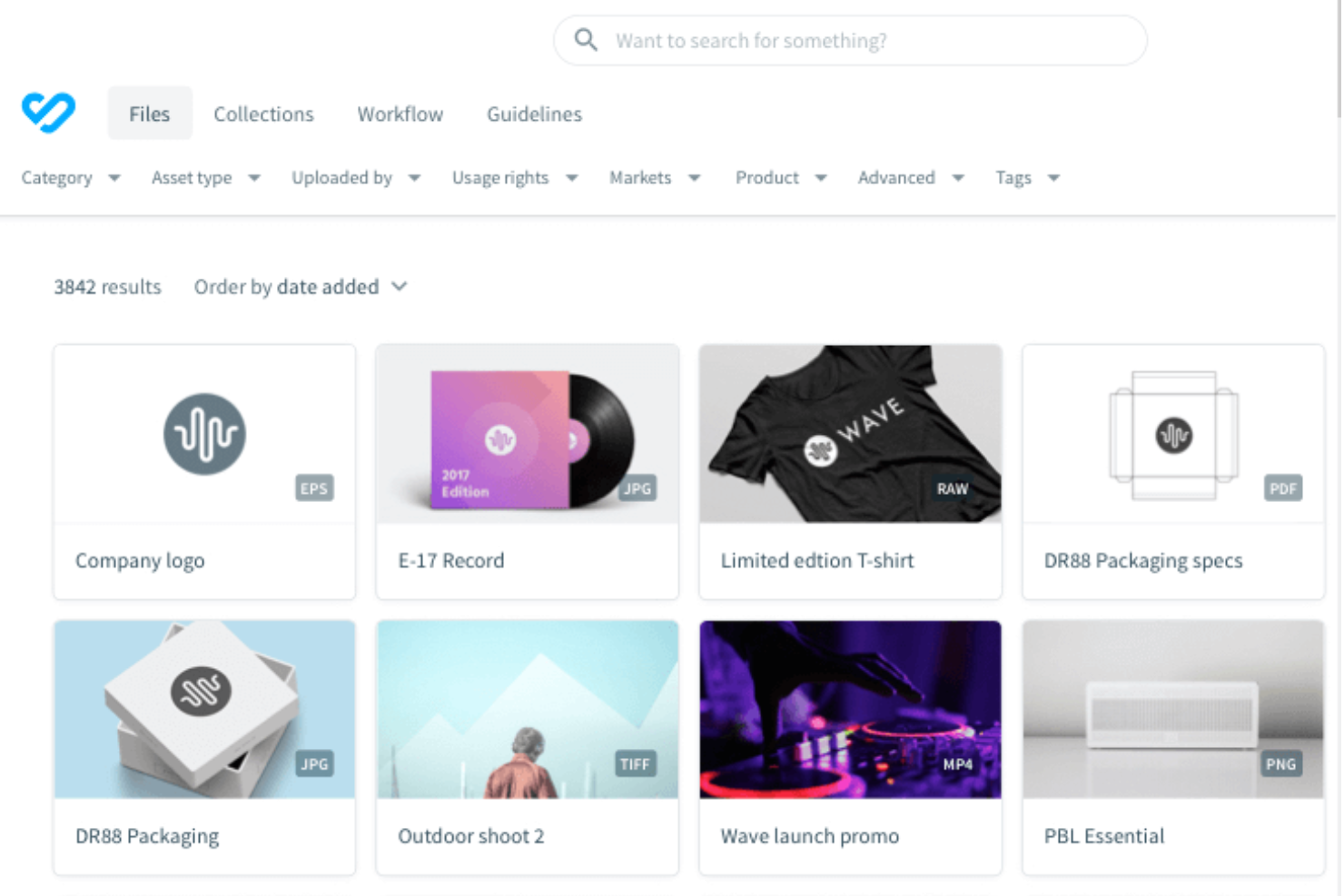
Bynder è una piattaforma di gestione delle risorse digitali (DAM) basata su cloud che consente di organizzare, archiviare, ricercare e collaborare sui file digitali con flussi di lavoro personalizzabili e una catalogazione avanzata tramite metadati.
Per chi è ideale Bynder?
Bynder è una soluzione adatta a team marketing e creativi di medie e grandi dimensioni che gestiscono grandi volumi di asset di brand su più canali o regioni.
Perché ho scelto Bynder
Bynder merita il suo posto nella mia shortlist fra i migliori perché è progettato per crescere insieme alle tue attività di gestione dei contenuti, non solo per archiviare file. Apprezzo particolarmente le funzionalità Duplicate Manager e Duplicate Finder at Upload: quando il mio team importa migliaia di risorse per campagne diverse, questi strumenti individuano i file doppi prima che congestionino la libreria. La ricerca tramite metadati e il motore AI con ricerca in linguaggio naturale di Bynder funzionano bene anche su larga scala, consentendo di trovare una risorsa specifica in librerie da milioni di file senza dover ricordare nomi di file esatti o percorsi delle cartelle.
Caratteristiche principali di Bynder
- Portale delle linee guida del brand: Pubblica e condividi linee guida del brand interattive direttamente dal DAM in modo che team interni e partner esterni abbiano sempre accesso agli standard aggiornati.
- Gestione delle scadenze e dei diritti di utilizzo degli asset: Imposta date di scadenza e permessi d’uso sui singoli asset per evitare la pubblicazione di contenuti non più aggiornati o privi di licenza.
- Controllo delle versioni: Tieni traccia e gestisci più versioni di una risorsa in un unico luogo, così i team sapranno sempre qual è la versione approvata e aggiornata.
- Workflow creativo e approvazioni: Gestisci le risorse attraverso flussi di lavoro configurabili per revisione e approvazione prima della pubblicazione o distribuzione.
Integrazioni di Bynder
Bynder offre integrazioni native con Adobe Creative Cloud, Google Workspace, Microsoft 365, Salesforce, Hootsuite, Drupal, WordPress, Sitecore e Brightcove. È disponibile un’API per integrazioni personalizzate.
Pros and Cons
Pros:
- La ricerca efficiente consente un accesso rapido alle risorse
- Analisi e reportistica avanzate
- Possibilità di approvare le risorse
Cons:
- Configurazione iniziale lunga
- Opzioni limitate di personalizzazione per alcune funzionalità

Ideale per la classificazione di immagini tramite IA
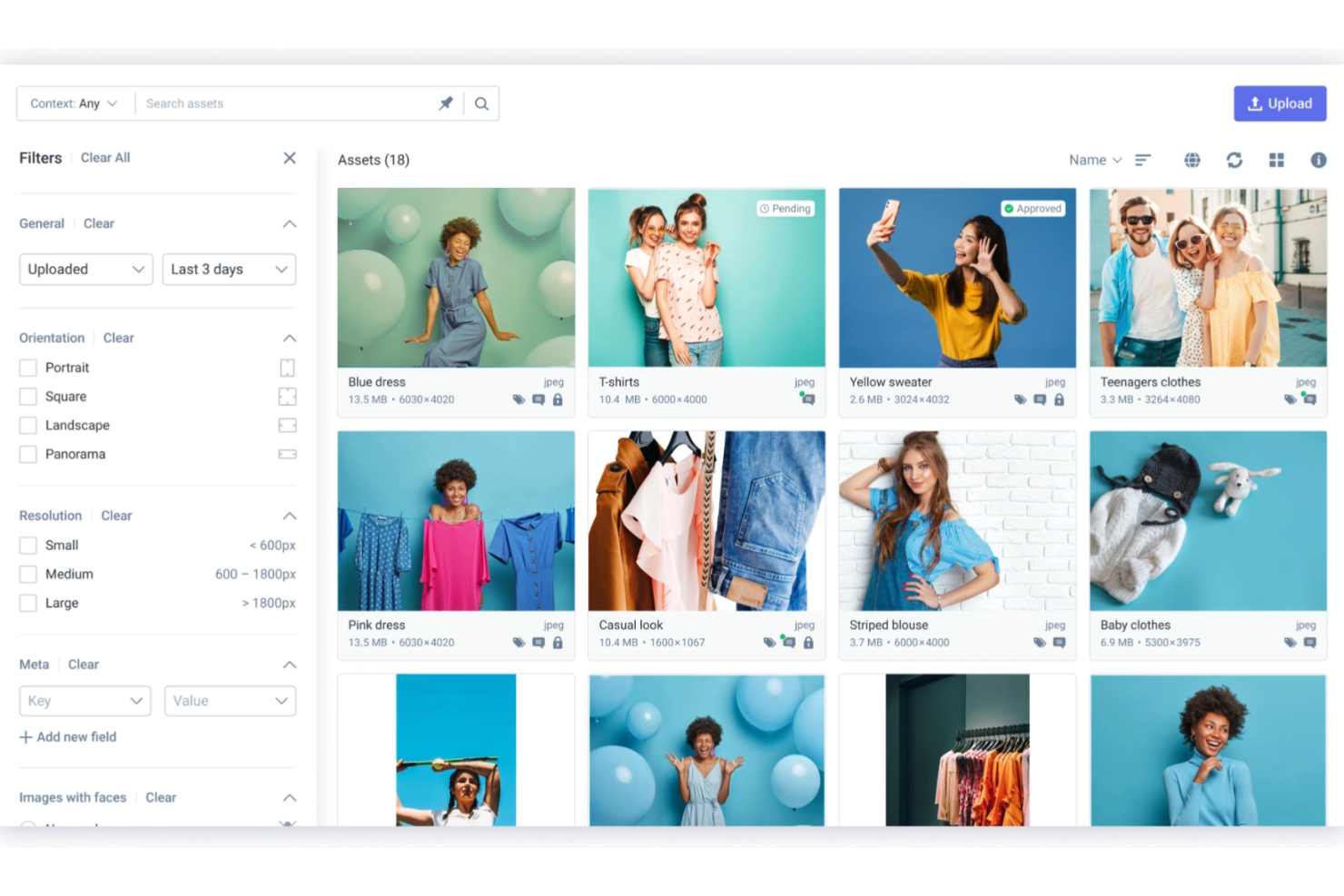
Scaleflex è una piattaforma cloud di gestione delle risorse digitali che offre archiviazione centralizzata dei media, organizzazione degli asset tramite IA e strumenti per ottimizzare e distribuire immagini e video.
Per chi è Scaleflex?
Scaleflex è ideale per team di marketing ed ecommerce che gestiscono grandi quantità di contenuti visivi e hanno bisogno di strumenti cloud per organizzazione e distribuzione delle risorse.
Perché ho scelto Scaleflex
Ho scelto Scaleflex tra i migliori per la capacità della Visual AI di gestire la classificazione delle immagini su larga scala. Quando il mio team lavora con un catalogo di migliaia di immagini prodotto, attribuire tag e organizzare manualmente non è realistico: la funzione di tagging e classificazione tramite IA di Scaleflex utilizza la computer vision per rilevare automaticamente oggetti, assegnare tag e categorizzare i media al momento del caricamento. Inoltre, apprezzo che offra modelli IA specifici per settori come ecommerce, immobiliare e viaggi, così la logica di classificazione è adattata al tipo di contenuto da gestire. Inoltre, gli strumenti per la moderazione NSFW e la cura dei contenuti generati dagli utenti riducono la necessità di revisione manuale prima della pubblicazione.
Funzionalità principali di Scaleflex
- API e widget DAM headless: Scaleflex dispone di un'architettura DAM headless con API e widget integrabili, che consentono agli sviluppatori di inserire la libreria multimediale direttamente in app web o mobile.
- Workflow di approvazione automatizzati: I team possono impostare fasi di validazione personalizzate e trigger per far avanzare le risorse tra revisione e approvazione senza interventi manuali.
- Ottimizzazione dinamica dei media: Scaleflex offre oltre 150 trasformazioni di immagini e video in tempo reale, tra cui ridimensionamento e compressione, distribuite tramite multi-CDN per consegna rapida su ogni dispositivo.
- Portali di brand: Crea portali personalizzabili per condividere risorse approvate con partner esterni, rivenditori o marketplace, includendo linee guida del brand nella stessa interfaccia.
Integrazioni Scaleflex
Scaleflex offre integrazioni native con Adobe Creative Cloud, Shopify, Magento, WordPress e Salesforce. È disponibile un'API per integrazioni personalizzate.
Pros and Cons
Pros:
- Ottimizzazione efficiente dei media
- La piattaforma si integra efficacemente con diversi strumenti
- Automazione basata su IA
Cons:
- Alcuni utenti trovano l'interfaccia inizialmente complessa
- I piani di fascia inferiore sono limitati a un solo progetto

Air
Ideale per la gestione delle risorse visive
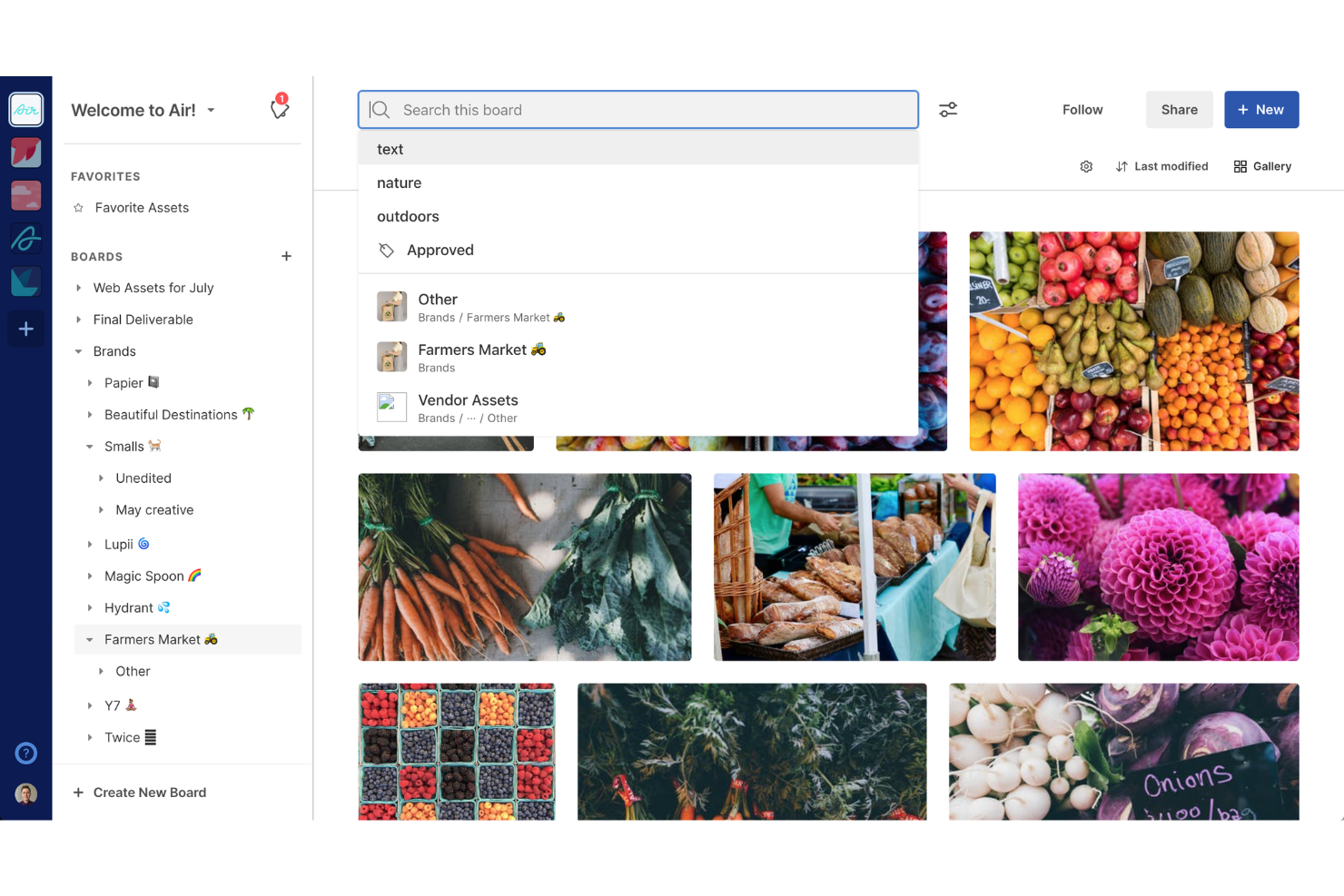
Air è una piattaforma di gestione delle risorse digitali basata su cloud, creata per organizzare, collaborare e condividere contenuti visivi come immagini, video e file creativi.
Per Chi È Ideale Air?
Air è perfetto per i team creativi e di marketing che lavorano con grandi quantità di contenuti visivi e necessitano di uno spazio condiviso per organizzarli e revisionarli.
Perché Ho Scelto Air
Air è una delle mie scelte preferite perché mi piace come tratta le risorse visive come qualcosa da vedere, non solo da archiviare. La maggior parte degli strumenti DAM organizza i file come un sistema di cartelle—Air invece li organizza come farebbe una mente creativa, con bacheche visive dove puoi sfogliare, confrontare e individuare ciò che ti serve a colpo d'occhio. La ricerca basata sull'IA è davvero diversa: puoi digitare qualcosa come 'scatto all'aperto con toni caldi che mostra una donna sulla trentina' e Air troverà le risorse corrispondenti in base a colori, oggetti, volti e persino dialoghi pronunciati nei file video. Trovo anche utile la generazione automatica dei metadati: le risorse vengono etichettate e riassunte nel momento in cui vengono caricate, così la tua libreria rimane organizzata senza che qualcuno debba farlo manualmente.
Funzionalità Principali di Air
- Impilamento delle versioni: Carica nuove iterazioni di una risorsa senza sovrascrivere l'originale, mantenendo tutte le versioni accessibili in un unico posto.
- Revisioni e approvazioni: Lascia commenti con indicazione temporale direttamente sulle risorse e fai avanzare il lavoro tramite un flusso di approvazione senza cambiare strumento.
- Collezioni: Aggiungi risorse a più bacheche senza duplicare i file, così puoi raggruppare i lavori per campagna o per team mantenendo una sola fonte attendibile.
- Permessi di condivisione flessibili: Controlla se gli stakeholder esterni possono visualizzare, commentare, scaricare o modificare le risorse tramite link condivisibili—non è necessario alcun account.
Integrazioni di Air
Air offre integrazioni native con Adobe Creative Cloud, Google Drive, Dropbox, Slack e Figma. È disponibile un'API per integrazioni personalizzate.
Pros and Cons
Pros:
- Interfaccia intuitiva
- Ottime funzionalità di feedback e approvazione delle risorse
- Ricerca intelligente per individuare rapidamente le risorse
Cons:
- Non ideale per risorse non visive
- Manca di un'app mobile dedicata
New Product Updates from Air

Air Showcases Introduces Custom Branding, Content Blocks, and Sub-Pages
Air Showcases now support custom branding, content blocks, sub-pages, and saved default layout settings, plus more control over removing items and branding options for Enterprise. For more information, visit Air's official site.

Filecamp
Ideale per la collaborazione di team marketing

Filecamp è una piattaforma di gestione delle risorse digitali basata su cloud che consente di organizzare, archiviare, condividere e collaborare sui file con branding personalizzabile, permessi granulari e controllo delle versioni.
Per Chi è Ideale Filecamp?
Filecamp è adatto a team di marketing e agenzie creative che necessitano di uno spazio centralizzato e personalizzato per gestire e condividere risorse digitali con clienti e collaboratori.
Perché Ho Scelto Filecamp
Ho incluso Filecamp tra le mie scelte principali perché i suoi strumenti di collaborazione si adattano perfettamente ai flussi di lavoro quotidiani dei team di marketing. La funzione di revisione online consente al mio team di inserire segnali direttamente su file immagini e PDF per indicare esattamente dove sono necessarie modifiche: i revisori possono rispondere in tempo reale ai commenti degli altri, evitando lunghe catene di email. Apprezzo anche la funzione Collezioni, che permette di raccogliere risorse da più cartelle in un unico link condivisibile—utile per inviare una selezione curata di file di campagna a un'agenzia esterna senza concedere l'accesso completo all'account. Le notifiche email automatiche tengono tutti aggiornati quando lo stato di approvazione di un file cambia, così nulla resta fermo in attesa di un'approvazione.
Caratteristiche Principali di Filecamp
- Tag automatici: Filecamp analizza e tagga automaticamente le immagini caricate per migliorare la ricerca e la scoperta delle risorse nella tua libreria.
- Controllo delle versioni: Accedi e scarica versioni precedenti di un file quando collabori su risorse che passano attraverso vari cicli di modifiche.
- Scadenza delle risorse: Imposta date di scadenza sulle risorse e configura Filecamp per eliminarle automaticamente quando non sono più attuali.
- Controllo granulare degli accessi: Assegna permessi a livello di cartella e file affinché clienti e partner esterni vedano solo le risorse che hai condiviso espressamente con loro.
Integrazioni con Filecamp
Le integrazioni native non sono chiaramente documentate. Filecamp offre un'API per integrazioni personalizzate.
Pros and Cons
Pros:
- Le opzioni di branding personalizzato migliorano l'esperienza utente
- Funzionalità avanzate di organizzazione e ricerca dei file
- Capacità di condivisione efficaci e sicure
Cons:
- Prezzo iniziale più alto rispetto ad alcuni concorrenti
- La fatturazione annuale potrebbe non essere flessibile per tutte le organizzazioni
New Product Updates from Filecamp
Filecamp Adds More Flexible Link Files
Filecamp adds editable Link file targets, new opening options, and support for internal Filecamp destinations. These updates make Link files more flexible for navigation and shortcuts. For more information, visit Filecamp’s official site.
 .
.Altri software di gestione delle risorse digitali nel cloud
Ecco alcune ulteriori opzioni di software di gestione delle risorse digitali nel cloud che non sono entrate nella mia selezione, ma che vale comunque la pena valutare:
- Pimcore
Ideale per la gestione open source dei dati
- Canto
Ideale per l'organizzazione degli asset di brand
- Adobe Experience Manager
Ideale per la coerenza dei contenuti su più canali
- Lingo
Ideale per kit di brand illimitati
- Asset Bank
Ideale per la ricerca DAM potenziata dall'IA
- MarcomCentral
Ideale per la distribuzione dei materiali di marketing
- Mailchimp
La migliore gestione delle risorse in una piattaforma di marketing
- Adobe Experience Manager Assets
Ideale per la gestione dei contenuti scalabile
- Nuxeo
Ideale per aziende e organizzazioni di grandi dimensioni
- Extensis Portfolio
Ideale per l'automazione dei flussi di lavoro creativi
- Daminion
Ideale per l'accesso centralizzato alle risorse digitali
- Cloudinary
Ideale per ottimizzazione degli asset multimediali
- Acquia DAM (Widen)
Ideale per garantire la coerenza dei contenuti su più canali
- Plytix
Ideale per le risorse digitali di prodotto


Recensioni correlate sui software di gestione dei progetti
Se non hai ancora trovato quello che cerchi, dai un’occhiata a questi altri strumenti correlati che abbiamo testato e valutato:
- Software di gestione dei progetti
- Software di gestione delle risorse
- Software di automazione dei flussi di lavoro
- Software per il monitoraggio del tempo
- Software di gestione delle attività
- Strumenti di collaborazione
- Creatore di diagrammi di Gantt
- Strumenti per la produttività
- Software per il monitoraggio dei progetti
- Software per la pianificazione dei progetti
- Software DAM per l’e-commerce
Come valuto i software cloud di gestione delle risorse digitali
Valuto ogni strumento attraverso due livelli: le funzionalità principali di cui un team di progetto ha bisogno per gestire le risorse dal lancio della campagna fino alla consegna finale, e i fattori distintivi che determinano l’idoneità.
Funzionalità principali (requisiti fondamentali di questa lista)
Quando seleziono gli strumenti per la mia lista, valuto ciascuno su una scala da 0 (non offre la funzionalità) a 5 (eccelle in quest’area) per ogni funzionalità principale elencata qui sotto. Successivamente, calcolo il punteggio totale dello strumento come percentuale. Ogni strumento deve raggiungere un punteggio minimo totale del 65% per essere considerato per l’inclusione.
- Archiviazione cloud delle risorse: Verifico se la piattaforma gestisce i formati di file di progetto più comuni—pensate a composizioni PSD, girati video, brief in PDF—e se può aumentare lo spazio di archiviazione man mano che crescono i volumi delle campagne.
- Struttura di metadati e tagging: Una tassonomia ben organizzata fa risparmiare ore di ricerca. Cerco campi di metadati personalizzati e tagging multiplo che aiutino i team a trovare risorse tra più progetti attivi.
- Controllo delle versioni e cronologia: Quando un designer carica una nuova versione dell’immagine principale, ogni stakeholder dovrebbe vedere la versione più recente. Valuto come ogni strumento traccia le revisioni e permette il ripristino delle versioni precedenti.
- Permessi e controllo degli accessi: I team di progetto includono spesso freelance, partner di agenzia e clienti. Cerco permessi basati sui ruoli e la condivisione sicura verso l’esterno che protegga i file sensibili in lavorazione.
- Flussi di revisione e approvazione: Valuto se i team possono annotare le risorse, indirizzarle attraverso fasi di approvazione e collegare le approvazioni alle milestone di progetto invece di affidarsi a thread di email sparsi.
- Integrazioni e accesso API: Il miglior DAM si integra nel tuo stack esistente. Verifico la presenza di connettori nativi per strumenti come Asana, Adobe Creative Cloud e Slack, oltre a opzioni API aperte per configurazioni personalizzate.
Quando ho una lista di strumenti che soddisfano i criteri, considero cosa distingue ogni piattaforma.
Fattori differenzianti (cosa distingue i fornitori)
Ecco come confronto i vari fornitori:
Funzionalità distintive
La ricerca guidata dall’IA è un fattore di differenziazione importante—cerco strumenti che utilizzano il riconoscimento visivo o il tagging automatico, così i team possono trovare rapidamente la risorsa giusta senza dipendere da metadati impeccabili. La gestione dei diritti è fondamentale quando il progetto copre più canali e serve l’allerta di scadenza delle licenze prima del lancio di una campagna. I portali dedicati al brand offrono ulteriore valore, consentendo agli stakeholder esterni di accedere autonomamente ai materiali approvati senza “affollare” lo spazio di lavoro di progetto.
Oltre le funzionalità
La struttura dei prezzi è fondamentale in questo settore. Valuto se un fornitore fa pagare per utente, per livello di spazio di archiviazione o entrambi, e se collaboratori esterni come clienti e freelance richiedono postazioni a pagamento complete. La sicurezza è un altro fattore chiave, specialmente per i team che gestiscono materiali di campagne non ancora lanciate. Verifico la conformità SOC 2, il supporto SSO e i log di controllo granulari. Anche la scalabilità ha un ruolo: uno strumento adatto a un team creativo di cinque persone deve garantire prestazioni anche se il portafoglio progetti raddoppia.
Come scegliere il software di gestione delle risorse digitali nel cloud
È facile perdersi in lunghi elenchi di funzionalità e strutture tariffarie complesse. Per aiutarti a rimanere concentrato mentre affronti il tuo specifico processo di selezione del software, ecco una lista di fattori da tenere presenti:
| Fattore | Cosa considerare |
|---|---|
| Scalabilità | Il software può crescere insieme al tuo team? Considera se è in grado di gestire un numero crescente di risorse e utenti senza problemi. |
| Integrazioni | Funziona bene con gli altri strumenti utilizzati dal tuo team? Verifica la compatibilità con software esistenti come il tuo CRM, gli strumenti di posta elettronica o di progettazione. |
| Personalizzazione | Puoi adattare il software ai tuoi flussi di lavoro? Cerca opzioni per modificare le autorizzazioni degli utenti, i pannelli di controllo e i flussi di lavoro in base alle tue esigenze. |
| Facilità d'uso | Il tuo team lo troverà facile da usare? Assicurati che l'interfaccia sia intuitiva e non richieda una formazione approfondita per iniziare. |
| Implementazione e inserimento | Quanto tempo occorrerà per rendere il sistema operativo? Valuta il tempo e le risorse necessari per la configurazione, oltre alla disponibilità di materiali formativi. |
| Costo | Rientra nel tuo budget? Confronta i piani tariffari, cerca eventuali costi nascosti e considera il rapporto costi-benefici per le tue esigenze specifiche. |
| Misure di sicurezza | Come protegge i tuoi dati? Verifica la conformità del software agli standard di sicurezza e la sua capacità di proteggere le informazioni sensibili. |
| Disponibilità dell'assistenza | Puoi ricevere aiuto quando ne hai bisogno? Considera la disponibilità di canali di assistenza come chat, posta elettronica o telefono, oltre ai tempi di risposta del fornitore. |
Tendenze nei software cloud di gestione delle risorse digitali
Negli ultimi anni, i software cloud di gestione delle risorse digitali si sono evoluti rapidamente per soddisfare le esigenze in continua evoluzione dei flussi di lavoro digitali e delle collaborazioni a distanza. Ecco alcune delle ultime tendenze che ho notato nel mercato DAM:
- Integrazione con l'IA e l'apprendimento automatico: L'intelligenza artificiale e l'apprendimento automatico vengono sempre più integrati nelle soluzioni DAM cloud. Queste tecnologie automatizzano l'assegnazione dei tag ai metadati e la categorizzazione delle risorse, migliorando la reperibilità e l'efficienza. La loro importanza risiede nella riduzione del lavoro manuale e nel miglioramento della possibilità di individuare le risorse.
- Maggiore attenzione all'esperienza utente: Le interfacce semplificate e la navigazione intuitiva sono prioritarie per adattarsi a utenti con diversi livelli di competenza tecnica. Questa tendenza è fondamentale per una più ampia adozione e per la soddisfazione degli utenti.
- Analisi avanzate per la gestione delle risorse: Le piattaforme DAM cloud stanno integrando funzioni di analisi avanzate, fornendo informazioni sull'utilizzo, sul coinvolgimento e sulle prestazioni delle risorse. Questa tendenza è significativa per prendere decisioni informate e massimizzare il valore delle risorse digitali.
- Misure di sicurezza potenziate: La sicurezza nei DAM cloud riceve un'attenzione sempre maggiore, con funzioni come crittografia, controlli degli accessi e verifiche di sicurezza periodiche che stanno diventando standard. Questa tendenza è importante per proteggere le risorse digitali sensibili dalle minacce informatiche.
- Sostenibilità nei servizi cloud: La sostenibilità influenza la scelta dei fornitori di DAM cloud, poiché le aziende considerano l'impatto ambientale della propria infrastruttura digitale. Questa tendenza riflette un impegno crescente nella riduzione dell'impronta di carbonio nella gestione delle risorse digitali.
Che cos'è un software cloud di gestione delle risorse digitali?
Il software cloud di gestione delle risorse digitali è uno strumento che aiuta i team a organizzare, archiviare e accedere online a risorse digitali come immagini, video e documenti. I professionisti del marketing, i designer e i creatori di contenuti utilizzano generalmente questi strumenti per migliorare la collaborazione e garantire la coerenza del marchio. Funzioni come il controllo delle versioni, la condivisione sicura e l'assegnazione di tag ai metadati aiutano a gestire in modo efficiente grandi volumi di risorse. Nel complesso, questi strumenti fanno risparmiare tempo e riducono le difficoltà legate alla gestione dei contenuti digitali.
Funzioni
Quando scegli un software cloud di gestione delle risorse digitali, presta attenzione alle seguenti funzioni principali:
- Organizzazione e archiviazione: Ti aiuta a conservare le risorse digitali in una posizione centralizzata, rendendole facili da trovare e gestire.
- Controllo delle versioni: Consente di tenere traccia delle modifiche e garantisce che tutti lavorino con la versione più aggiornata della risorsa.
- Condivisione sicura: Consente di distribuire in modo sicuro le risorse all'interno e all'esterno dell'organizzazione, mantenendo l'integrità dei dati.
- Assegnazione di tag ai metadati: Automatizza la categorizzazione e la reperibilità delle risorse, facendo risparmiare tempo sull'assegnazione manuale dei tag.
- Autorizzazioni degli utenti: Offre livelli di accesso personalizzabili, garantendo che solo gli utenti autorizzati possano visualizzare o modificare determinate risorse.
- Funzionalità di integrazione: Si collega agli altri strumenti utilizzati dal tuo team, migliorando l'efficienza del flusso di lavoro e la coerenza dei dati.
- Pannelli di controllo personalizzabili: Fornisce viste e report personalizzati, aiutando i team a concentrarsi su ciò che conta di più per loro.
- Accessibilità tramite app mobile: Consente di accedere alle risorse ovunque ci si trovi, facilitando la collaborazione tra i team a distanza.
- Analisi e reportistica: Offre informazioni sull'utilizzo e sulle prestazioni delle risorse, favorendo decisioni informate.
Vantaggi
L'implementazione di un software cloud di gestione delle risorse digitali offre diversi vantaggi al tuo team e alla tua azienda. Eccone alcuni di cui potrai usufruire:
- Collaborazione migliorata: la condivisione sicura e il controllo delle versioni aiutano i team a lavorare insieme in modo più efficace, riducendo i problemi di comunicazione.
- Risparmio di tempo: funzionalità come l'assegnazione di tag ai metadati e l'archiviazione centralizzata rendono più semplice e veloce trovare e gestire le risorse.
- Sicurezza migliorata: le autorizzazioni degli utenti e la condivisione sicura garantiscono che solo le persone autorizzate possano accedere alle risorse digitali sensibili.
- Organizzazione migliore: le funzioni di organizzazione e archiviazione mantengono le risorse ordinate, semplificando la gestione dell'ordine.
- Processo decisionale informato: le analisi e i report forniscono informazioni sulle prestazioni delle risorse, supportando strategie basate sui dati.
- Maggiore flessibilità: l'accessibilità tramite app mobile consente ai team di accedere alle risorse e gestirle da qualsiasi luogo, favorendo il lavoro da remoto.
Costi e prezzi
La scelta di un software cloud per la gestione delle risorse digitali richiede la comprensione dei vari modelli e piani tariffari disponibili. I costi variano in base alle funzionalità, alle dimensioni del team, ai componenti aggiuntivi e ad altri fattori. La tabella seguente riassume i piani più comuni, i relativi prezzi medi e le funzionalità tipicamente incluse nelle soluzioni software cloud per la gestione delle risorse digitali:
Tabella comparativa dei piani per software cloud di gestione delle risorse digitali
| Tipo di piano | Prezzo medio | Funzionalità comuni |
|---|---|---|
| Piano gratuito | $0 | Archiviazione di base, condivisione limitata e funzionalità di ricerca di base. |
| Piano personale | $5-$25/utente/mese | Maggiore spazio di archiviazione, assegnazione di tag ai metadati e autorizzazioni utente di base. |
| Piano aziendale | $30-$75/utente/mese | Opzioni di condivisione avanzate, funzionalità di integrazione e strumenti di analisi. |
| Piano per grandi aziende | $100-$250/utente/mese | Pannelli personalizzabili, funzionalità di sicurezza avanzate e assistenza dedicata. |
FAQ sul software cloud di gestione delle risorse digitali
Ecco alcune risposte alle domande comuni sul software cloud di gestione delle risorse digitali:
Quanto tempo occorre per implementare un software di gestione delle risorse digitali?
La durata dell’implementazione del software DAM può variare notevolmente tra le organizzazioni, in base a fattori quali la disponibilità del team, l’esperienza con il DAM e la complessità dei flussi di lavoro richiesti. Le organizzazioni con esperienza pregressa nel DAM possono completare più rapidamente l’inserimento, mentre quelle che si avvicinano per la prima volta al DAM o che hanno esigenze complesse potrebbero richiedere diversi mesi. Un processo di inserimento flessibile, personalizzato in base agli obiettivi specifici del team, è essenziale per un’implementazione efficace.
NetX è utile per la gestione delle risorse digitali?
NetX è una piattaforma DAM che offre una serie di funzionalità e servizi per aiutare le organizzazioni a gestire le proprie risorse digitali. Con oltre 15 anni di esperienza nel DAM, il team per il successo dei clienti di NetX offre competenze di settore e supporto per aiutarti a prendere decisioni informate. NetX sottolinea l’importanza di comprendere le esigenze e i flussi di lavoro della propria organizzazione nella scelta di una piattaforma DAM e consiglia di programmare chiamate con esperti DAM per ricevere assistenza personalizzata.
In che modo il DAM cloud migliora la sicurezza e la collaborazione?
I sistemi DAM basati sul cloud offrono misure di sicurezza avanzate, tra cui autorizzazioni degli utenti e gestione delle identità, per proteggere le risorse digitali da accessi non autorizzati e minacce. Migliorano inoltre la collaborazione consentendo l’interazione in tempo reale sulle risorse e fornendo modelli per la creazione di contenuti, facilitando il lavoro efficace dei team insieme, indipendentemente dalla loro posizione fisica
In che modo il software DAM cloud supporta il lavoro da remoto?
Il software DAM cloud facilita il lavoro da remoto fornendo accesso alle risorse digitali da qualsiasi luogo e dispositivo con una connessione Internet. Supporta i team distribuiti consentendo loro di collaborare in tempo reale, condividere le risorse in modo sicuro e mantenere aggiornate le versioni di tutti i file, migliorando la produttività indipendentemente dalla posizione fisica.
Il software DAM cloud può integrarsi con altri strumenti?
Sì, la maggior parte dei software DAM cloud offre integrazioni con strumenti diffusi come Google Drive, Photoshop e Figma. Questo consente al team di lavorare senza interruzioni su piattaforme diverse, migliorando la produttività e garantendo che tutte le risorse digitali siano accessibili da una posizione centralizzata.
Il software DAM cloud è sicuro per i dati sensibili?
Il software DAM cloud include generalmente solide funzionalità di sicurezza, come la crittografia, le autorizzazioni degli utenti e le opzioni di condivisione sicura. Queste funzionalità aiutano a proteggere i dati sensibili dagli accessi non autorizzati, offrendoti tranquillità quando archivi e condividi risorse digitali.