

I 10 migliori software di gestione dei progetti per consulenti nel 2026

10 I migliori software di gestione dei progetti per consulenti: selezione


Sul mercato esistono moltissimi software di gestione dei progetti per consulenti, quindi trovare lo strumento giusto può essere complicato. Il tuo obiettivo è semplificare i flussi di lavoro dei progetti, migliorare la comunicazione con i clienti e gestire le attività, ma potresti non sapere quale strumento sia più adatto alle tue esigenze di consulenza. Sono qui per semplificare questa decisione, mettendo a frutto la mia vasta esperienza nella valutazione e nell'utilizzo di diverse piattaforme di gestione dei progetti progettate per i consulenti, per presentarti un elenco selezionato dei migliori software di gestione dei progetti per consulenti.
Perché fidarsi dei nostri consigli sui software
Il nostro team testa e recensisce software dal 2012. In quanto project manager noi stessi, sappiamo quanto sia difficile — e importante — scegliere il software giusto.
Per questa guida, abbiamo valutato gli strumenti attraverso test pratici e ricerche indipendenti, assegnando un punteggio agli strumenti in base ai nostri criteri di selezione. Ci basiamo inoltre sulle competenze di leader di pensiero del settore e di professionisti attivi nella gestione dei progetti.
Le nostre recensioni riflettono il nostro giudizio editoriale umano, non un discorso di vendita.
Revisori esperti:
Tabella di confronto: riepilogo dei software di gestione dei progetti per consulenti
Questa tabella di confronto riassume i dettagli dei prezzi relativi alla mia selezione dei migliori software di gestione dei progetti per consulenti:
| Tool | Best For | Trial Info | Price | ||
|---|---|---|---|---|---|
| 1 | Ideale per la gestione di progetti multi-cliente | Prova gratuita di 14 giorni + demo gratuita disponibile | Da $10/mese (fatturato annualmente) | Website | |
| 2 | Ideale per la previsione dei rischi di progetto basata sull'IA | Demo gratuita disponibile | Prezzi disponibili su richiesta | Website | |
| 3 | Ideale per la visibilità dei progetti in tempo reale | Prova gratuita di 14 giorni + piano gratuito disponibile | Da $10/utente/mese (fatturato annualmente) | Website | |
| 4 | Ideale per operazioni aziendali integrate | Prova gratuita di 15 giorni + piano gratuito + demo gratuita disponibile | Da $4/utente/mese (fatturazione annuale) | Website | |
| 5 | Ideale per consulenti che gestiscono progetti globali | Prova gratuita disponibile | Da $14/utente/mese (fatturazione annuale) | Website | |
| 6 | Ideale con controlli granulari degli accessi allo spazio di lavoro | Piano gratuito disponibile | Da $10/utente/mese (con fatturazione annuale) | Website | |
| 7 | Ideale per la creazione avanzata di preventivi e l'analisi dei margini | Prova gratuita di 14 giorni + dimostrazione gratuita disponibile | A partire da $17/utente/mese | Website | |
| 8 | Ideale per il monitoraggio complesso tra progetti | Prova gratuita di 14 giorni + dimostrazione gratuita disponibile | A partire da $10/utente/mese (con fatturazione annuale) | Website | |
| 9 | Ideale per il monitoraggio del tempo e la fatturazione | Prova gratuita di 14 giorni | A partire da $18/utente/mese (fatturato annualmente) | Website | |
| 10 | Ideale per la conversione integrata da offerta a progetto | Demo gratuita disponibile | Prezzi su richiesta | Website |


Recensioni dei migliori software di gestione dei progetti per consulenti
Ecco la mia analisi completa e le recensioni dei migliori software di gestione dei progetti per consulenti. Ogni recensione esamina i vantaggi e gli svantaggi, le funzionalità principali e i casi d’uso migliori per aiutarti a scegliere lo strumento perfetto per le tue esigenze di consulenza.

Ideale per la gestione di progetti multi-cliente

Productive è una piattaforma di project management creata per aziende di servizi professionali, che unisce pianificazione dei progetti, programmazione delle risorse, rilevazione del tempo, budgeting e fatturazione in un unico spazio di lavoro.
Per chi è ideale Productive?
Productive è particolarmente adatto ad agenzie di consulenza di medie dimensioni e aziende di servizi professionali che gestiscono contemporaneamente più incarichi per clienti.
Perché ho scelto Productive
Ho incluso Productive tra le mie scelte principali perché è uno dei pochi strumenti che tratta realmente ogni incarico come un'unità finanziaria a sé stante. Il monitoraggio di budget e redditività per progetto mi permette di vedere, in tempo reale, se uno specifico cliente sta generando profitto—non solo se il team è impegnato. Apprezzo anche il livello di pianificazione delle risorse, che mi consente di visualizzare la disponibilità del team su tutti gli incarichi attivi contemporaneamente e ridistribuire le allocazioni quando cambiano le esigenze di un cliente.
Caratteristiche principali di Productive
- Monitoraggio del tempo fatturabile: Registra le ore giornaliere, tramite timesheet settimanali, timer desktop o direttamente nei task—tutto collegato ai servizi fatturabili e non fatturabili.
- Fatturazione: Genera fatture dal tempo tracciato, spese o budget a tariffa fissa, con supporto per la fatturazione multicurrency e invio automatico di fatture ricorrenti.
- Sales CRM: Gestisci le pipeline di vendita, crea e invia proposte ai clienti, e trasforma automaticamente le trattative vinte in progetti senza cambiare strumento.
- Vista Gantt: Visualizza le timeline di progetto, dipendenze tra task e traguardi di consegna di tutte le commesse attive da una singola schermata.
Pros and Cons
Pros:
- Dashboard e report personalizzabili
- Solide funzionalità di pianificazione delle risorse
- Funzionalità complete per la gestione finanziaria e la reportistica
Cons:
- La configurazione iniziale e l'onboarding possono richiedere tempo
- Potrebbe avere più integrazioni
New Product Updates from Productive
Productive Adds Voice Dictation, Slack Connector, Proposals, and Overtime
Productive adds voice dictation, a Slack Connector, proposal controls, and overtime tracking. These updates support faster AI interactions, client proposals, and time management. For more information, visit Productive’s official site.

Accelo
Ideale per la previsione dei rischi di progetto basata sull'IA
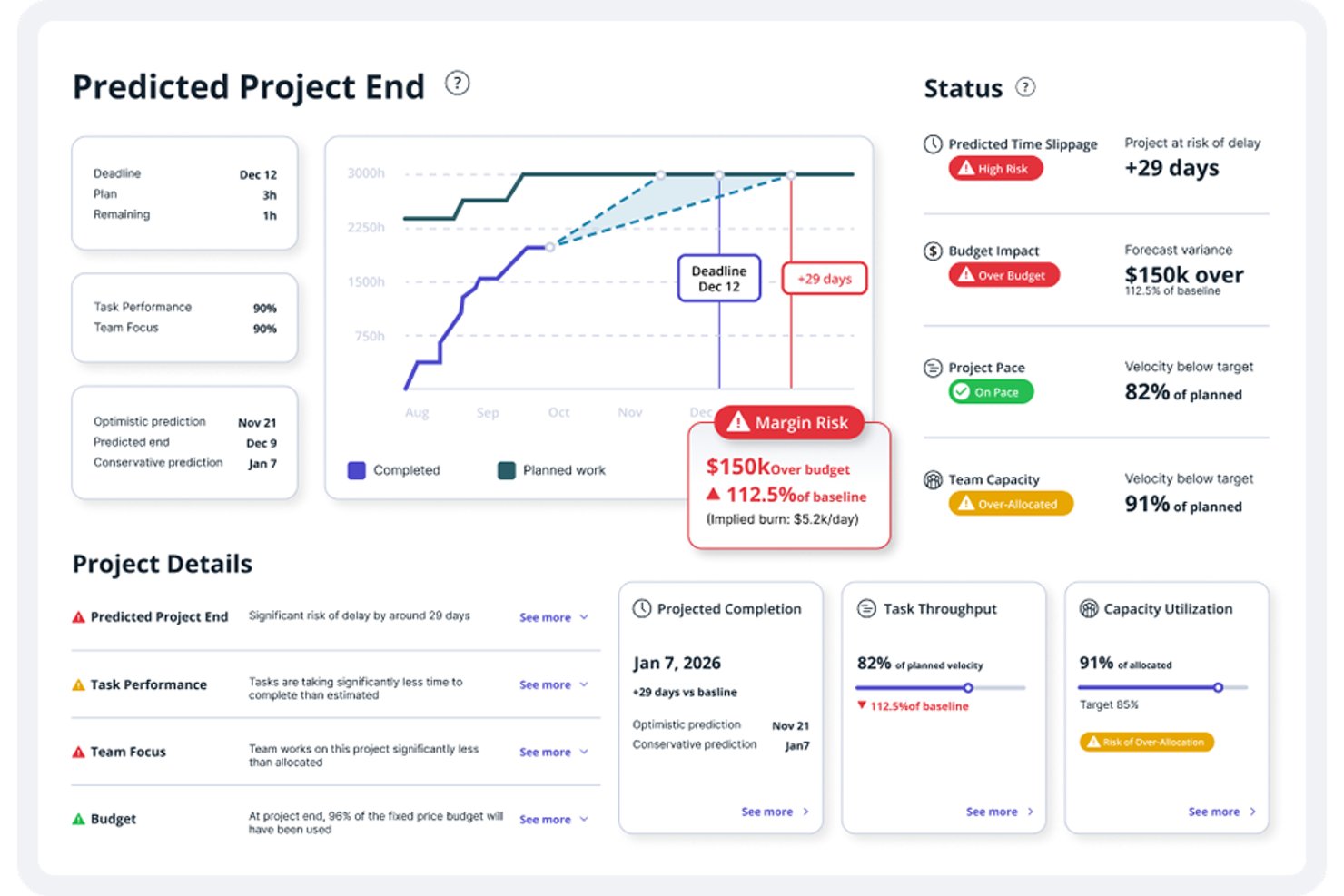
Accelo è una piattaforma di automazione dei servizi professionali che riunisce CRM, gestione della consegna dei progetti, monitoraggio del tempo, pianificazione delle risorse e fatturazione in un unico sistema connesso per i team di consulenza.
Per chi è più indicato Accelo?
Accelo è particolarmente adatto alle società di consulenza boutique e di medie dimensioni, dove le stesse persone gestiscono le relazioni con i clienti, la consegna dei progetti e la fatturazione.
Perché ho scelto Accelo
Ho scelto Accelo come una delle soluzioni migliori perché la sua IA individua i colli di bottiglia delle risorse e i rischi per la redditività prima che compromettano un incarico per un cliente. La pianificazione provvisoria mi consente di preassegnare i consulenti già dalla fase del preventivo, così l'assegnazione del personale non diventa una corsa contro il tempo una volta firmato il progetto. Le raccomandazioni sulle risorse basate sull'IA analizzano i modelli di carico di lavoro passati per prevedere gli sforamenti, fornendomi dati concreti per discutere tempestivamente l'ambito del progetto con i clienti.
Caratteristiche principali di Accelo
- Gestione dei contratti continuativi: Monitora i contratti continuativi in essere con i clienti, con fatturazione automatizzata e riconciliazione dei contratti.
- Automazione da proposta a progetto: Converte direttamente le proposte o gli SOW accettati in progetti di consulenza strutturati.
- Accesso al portale clienti: Offri ai tuoi clienti un pannello di controllo dedicato per lo stato del progetto, la fatturazione e le risorse condivise.
- Supporto multivaluta e multi-entità: Gestisci progetti e finanze tra uffici internazionali o clienti che utilizzano valute diverse.
Pros and Cons
Pros:
- L'automazione da proposta a progetto elimina il reinserimento manuale dell'ambito
- Il consumo dei contratti continuativi viene monitorato nativamente rispetto alle ore contrattuali
- L'IA segnala i superamenti del budget prima che si aggravino
Cons:
- Il portale clienti non offre opzioni di personalizzazione del marchio
- I pannelli di controllo dei report richiedono una configurazione manuale significativa
New Product Updates from Accelo
Accelo Adds Quote Designer and Pipeline Management
Accelo adds Quote Designer, enhanced pipeline views, and quote tracking with version history. This helps teams create proposals and manage opportunities from scoped work. For more information, visit Accelo’s official site.

Wrike
Ideale per la visibilità dei progetti in tempo reale
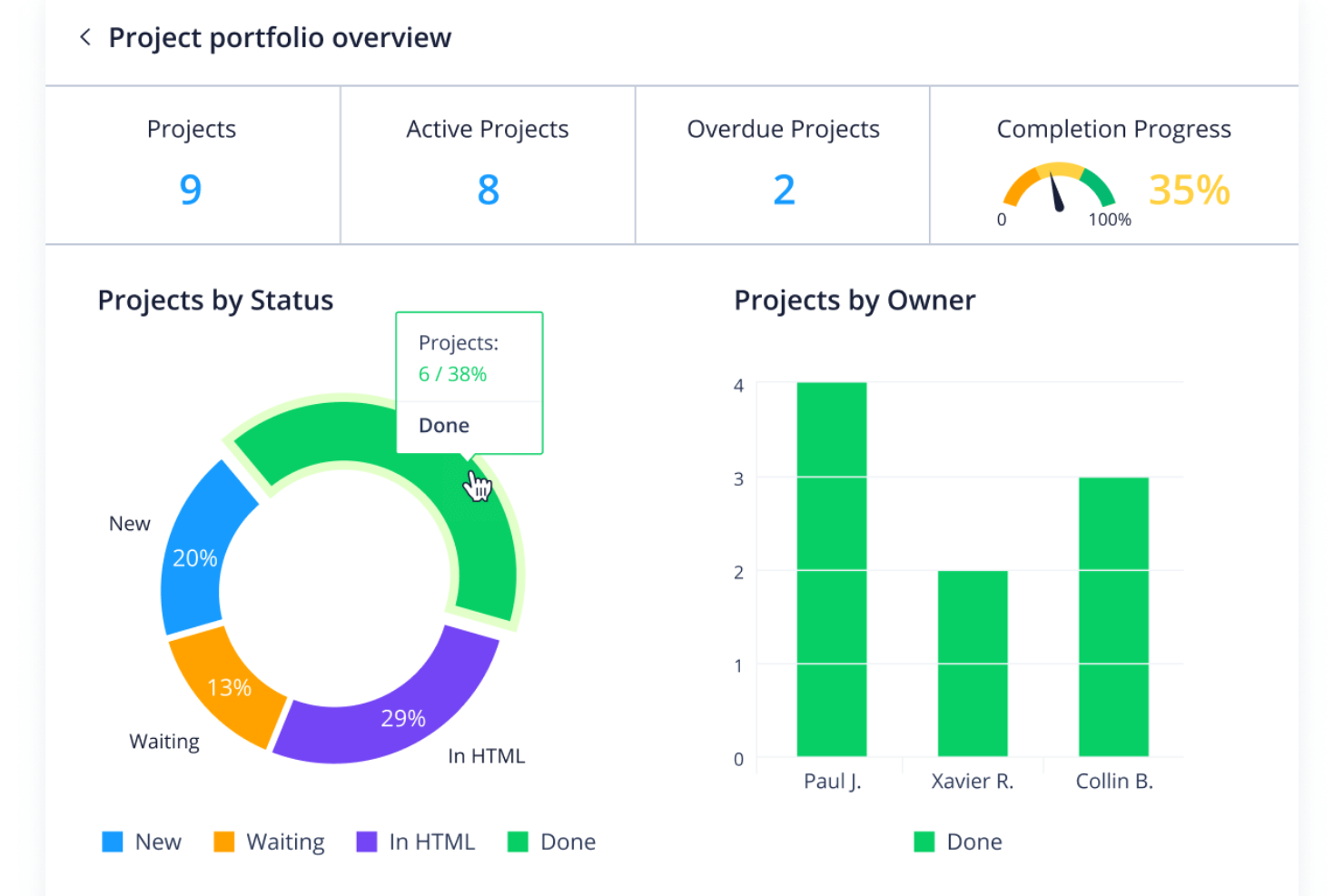
Wrike è una piattaforma di gestione dei progetti pensata per i servizi professionali e per i team che gestiscono flussi di lavoro complessi, con dashboard in tempo reale, gestione delle risorse, tracciamento del tempo, diagrammi di Gantt e strumenti di collaborazione con i clienti.
Per chi è Wrike?
Wrike è l'ideale per team di consulenza di medie e grandi dimensioni che gestiscono più progetti per clienti contemporaneamente e necessitano di visibilità su carichi di lavoro, scadenze e budget.
Perché ho scelto Wrike
Ho scelto Wrike tra i migliori perché offre una visibilità senza pari su tutti i progetti attivi dei clienti contemporaneamente. Apprezzo molto il fatto di poter creare dashboard personalizzate in tempo reale che estraggono dati in diretta da diversi progetti, così posso vedere lo stato delle attività, gli elementi in ritardo e il consumo di budget senza dover cercare in ogni singola cartella di progetto. La reportistica trasversale di Wrike mi permette anche di monitorare l'allocazione delle risorse su tutto il mio portafoglio, il che significa che posso identificare problemi di capacità prima che influenzino la consegna.
Funzionalità chiave di Wrike
- Tracciamento del tempo: Registra le ore direttamente sulle attività e usa questi dati per la fatturazione ai clienti e l'analisi dei costi di progetto.
- Diagrammi di Gantt interattivi: Visualizza le tempistiche del progetto, imposta dipendenze e modifica i programmi tramite la gestione delle attività drag-and-drop.
- Blueprint di progetto: Crea modelli di progetto riutilizzabili per standardizzare i flussi di lavoro di erogazione tra cliente e cliente.
- Moduli di richiesta cliente: Crea moduli di raccolta richieste che generano automaticamente attività quando i clienti inviano nuove richieste di progetto.
Pros and Cons
Pros:
- Piattaforma altamente personalizzabile
- Automazioni avanzate dei flussi di lavoro
- Funzioni di tracciamento del tempo e gestione delle risorse
Cons:
- L'interfaccia potrebbe essere più intuitiva
- Le numerose funzionalità possono richiedere un investimento di tempo per imparare a usarle
New Product Updates from Wrike

Wrike Adds Quick Search to Table View
Wrike adds Quick Search to Table View with full-table search across titles, descriptions, and fields, plus highlighted matches. This helps users find tasks faster in large tables. For more information, visit Wrike’s official site.

Ideale per operazioni aziendali integrate
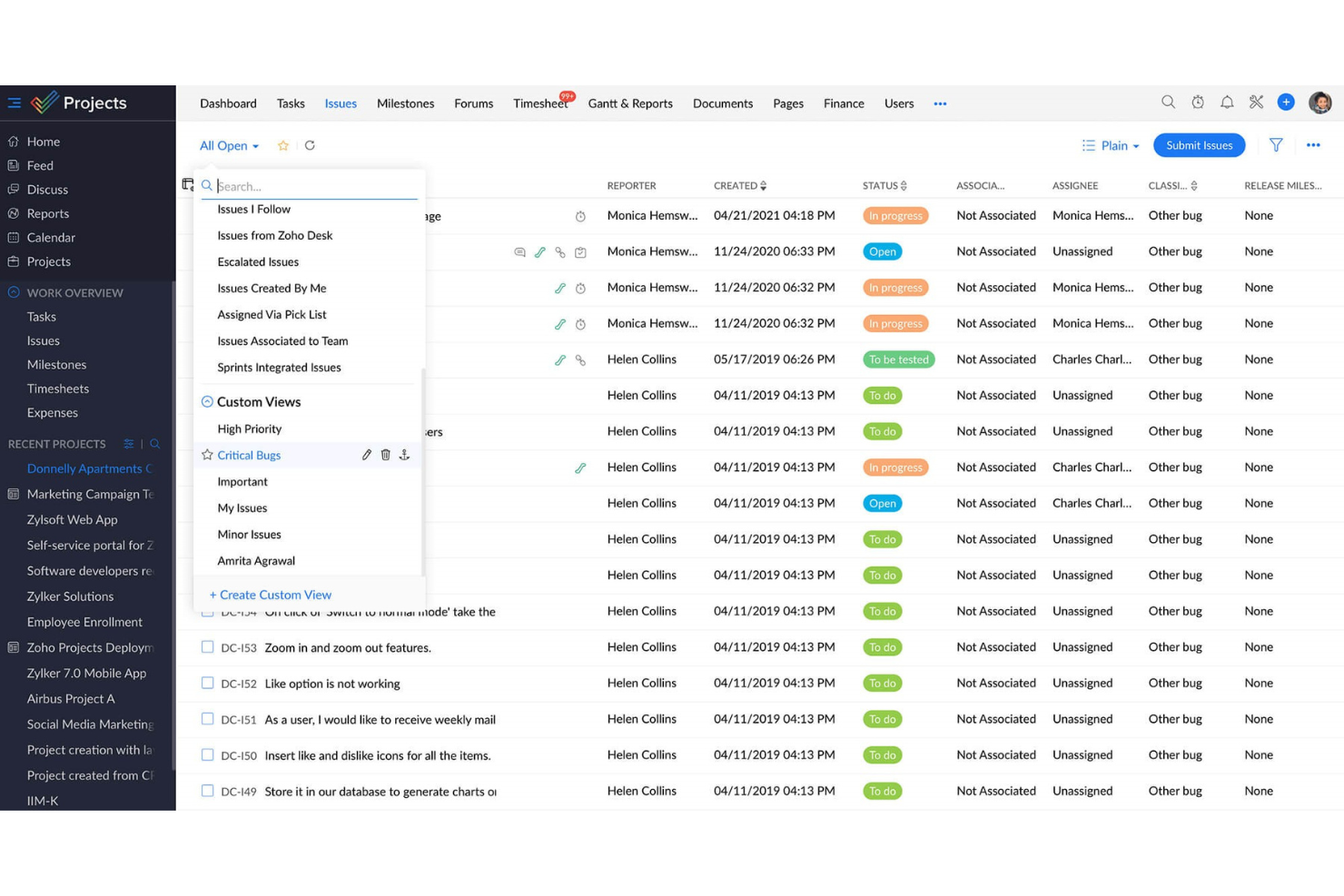
Zoho Projects è una piattaforma di gestione dei progetti con gestione delle attività, diagrammi di Gantt, registrazione delle ore lavorate con generazione di fatture, assegnazione delle risorse, monitoraggio del budget e automazione dei flussi di lavoro integrata nell’ecosistema Zoho.
Per chi è più adatto Zoho Projects?
Zoho Projects è particolarmente indicato per i team di consulenza che utilizzano già altri prodotti Zoho come Zoho CRM, Zoho Books o Zoho Invoice.
Perché ho scelto Zoho Projects
Ho scelto Zoho Projects come uno dei migliori perché si collega direttamente a Zoho CRM, permettendomi di trasformare una trattativa vinta in un progetto attivo senza reinserire i dati del cliente. Da qui, le ore lavorate confluiscono automaticamente in Zoho Invoice, così la fatturazione ai clienti non richiede esportazioni manuali. Il monitoraggio del budget con visibilità tra costi pianificati e reali garantisce un controllo finanziario rigoroso su ogni impegno attivo.
Funzionalità principali di Zoho Projects
- Diagrammi di Gantt: Visualizza le tempistiche di progetto, mappa le dipendenze tra attività e ripianifica automaticamente le attività quando cambiano le date.
- Accesso utenti clienti: Aggiungi i clienti come utenti limitati affinché possano visualizzare i progressi delle attività e gli aggiornamenti del progetto direttamente nello strumento.
- Automazione Blueprint: Crea flussi di lavoro per le attività replicabili con transizioni di stato definite e azioni obbligatorie in ogni fase.
- Template di progetto: Salva l’intera struttura di un progetto e riutilizzala per incarichi simili con altri clienti.
Pros and Cons
Pros:
- Integrazione profonda con la suite Zoho e app di terze parti
- Funzionalità di gestione progetti complete
- Personalizzabile per adattarsi a diverse esigenze aziendali
Cons:
- Può risultare impegnativo per via delle sue numerose funzionalità
- Curva di apprendimento più ripida per i nuovi utenti
- Alcune funzionalità avanzate sono disponibili solo nei piani più costosi
New Product Updates from Zoho Projects
Zoho Projects Adds CodeX Scripts for Custom Modules
Zoho Projects now supports CodeX Scripts for custom modules, enabling conditional logic and rules for creating, updating, and deleting records. For more information, visit Zoho Projects' official site.
 .
.
VOGSY
Ideale per consulenti che gestiscono progetti globali
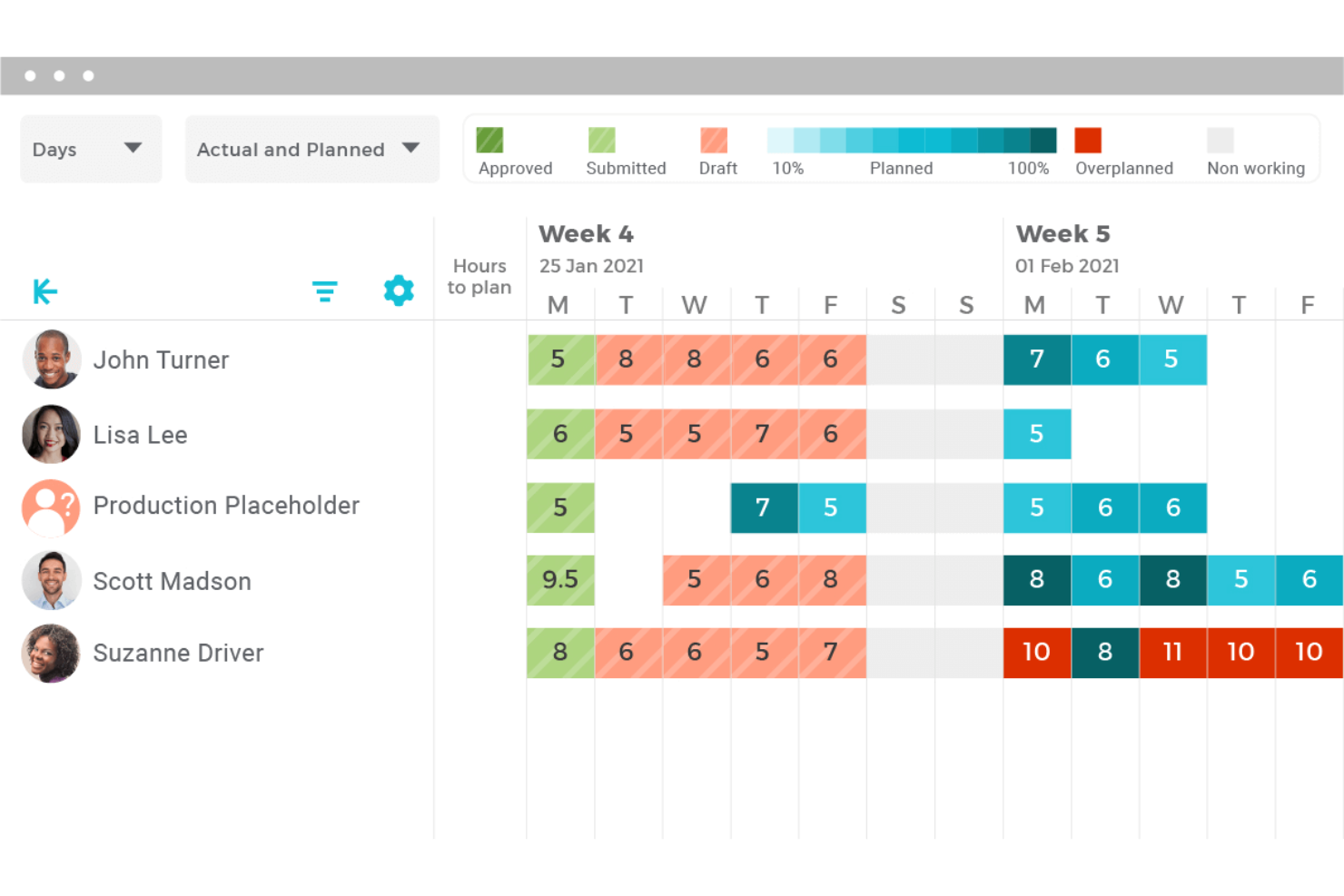
VOGSY è una piattaforma di servizi professionali creata per consulenze e aziende di servizi che necessitano di gestione dei progetti, pianificazione delle risorse, fatturazione multi-valuta e contabilità di progetto su più paesi ed entità.
Per chi è pensato VOGSY?
VOGSY è una scelta naturale per società di consulenza di medie dimensioni e agenzie di servizi professionali che operano in più paesi, valute o entità legali.
Perché ho scelto VOGSY
VOGSY si guadagna il suo posto nella mia shortlist perché è uno dei pochi strumenti di project management creati appositamente per aziende di consulenza che gestiscono progetti su più paesi ed entità legali. Apprezzo in particolare la fatturazione multi-valuta e il reporting P&L per singola entità, che permettono al mio team di monitorare la redditività di un incarico a Berlino in modo diverso rispetto a uno a Singapore senza dover consolidare tutto manualmente. La contabilità di progetto per più entità consente inoltre di gestire separatamente la situazione finanziaria di ogni sede regionale pur avendo una visione integrata a livello di portafoglio.
Funzionalità chiave di VOGSY
- Allocazione risorse basata sulle competenze: Abbina i consulenti ai progetti in base alle competenze, alla disponibilità e agli obiettivi di utilizzo del team.
- Conversione da preventivo a progetto: Trasforma le proposte approvate in progetti attivi con budget, tempistiche e deliverable già definiti.
- Registrazione di ore e spese: Registra le ore fatturabili e le spese a livello di progetto con flussi di approvazione cliente integrati.
- Assistente AI: Interroga dati in tempo reale su progetti, risorse e finanza usando il linguaggio naturale direttamente all'interno della piattaforma.
Pros and Cons
Pros:
- Strumenti avanzati per la pianificazione delle risorse
- Configurazione e onboarding rapidi
- Panoramica finanziaria globale in tempo reale
Cons:
- Le opzioni di personalizzazione di base risultano restrittive
- Funzionalità mobile limitate
New Product Updates from VOGSY
VOGSY Adds Velocity Agent Verdicts for Quote Approvals
VOGSY adds Velocity agent verdicts for quote approval requests with risk levels, margin checks, discount analysis, and reasoning. This helps approvers assess quote risk before making a final decision. For more information, visit VOGSY’s official site.
 .
.
Notion
Ideale con controlli granulari degli accessi allo spazio di lavoro

Notion è una piattaforma di spazio di lavoro connesso che combina il monitoraggio dei progetti, la gestione dei documenti, i database e gli strumenti di collaborazione con i clienti in un unico ambiente altamente personalizzabile.
Per chi è più adatto Notion?
Consulenti indipendenti e piccole aziende boutique che hanno bisogno di uno spazio di lavoro flessibile e incentrato sui documenti per gestire progetti e risultati dei clienti senza una struttura rigida.
Perché ho scelto Notion
Notion si è guadagnato un posto nella mia selezione perché consente di controllare con grande precisione chi può vedere cosa all'interno di uno spazio di lavoro condiviso. Con il piano aziendale, le autorizzazioni dei database consentono di filtrare le righe in base all'assegnatario, così un cliente vede soltanto i dati relativi ai propri progetti, non quelli di un altro cliente. Gli spazi del team privati aggiungono un ulteriore livello di protezione, mantenendo il lavoro strategico interno completamente separato dalle pagine destinate ai clienti. Questo livello di controllo degli accessi gestisce la riservatezza relativa a più clienti senza dover ricorrere a uno strumento portale separato.
Funzionalità principali di Notion
- Modelli di database: Configura rapidamente strumenti di monitoraggio per i progetti dei clienti, registri dei risultati o modelli per incarichi di consulenza utilizzando modelli di database Notion personalizzabili.
- Visualizzazioni della sequenza temporale: Visualizza programmi, tappe fondamentali e dipendenze dei progetti relativi a più incarichi di consulenza da un unico spazio di lavoro.
- Strumento di modifica dei documenti integrato: Redigi, archivia e gestisci le versioni di proposte, SOW e presentazioni direttamente all'interno dello spazio di lavoro di ogni progetto cliente.
- Automazioni e flussi di lavoro: Attiva notifiche, duplica modelli o sposta automaticamente gli elementi dei progetti tra le varie fasi con semplici opzioni di automazione integrate.
Pros and Cons
Pros:
- Strutture di database flessibili per il monitoraggio di più clienti
- Le autorizzazioni granulari mantengono separati i dati dei clienti
- Gestione di documenti e progetti in un unico spazio di lavoro
Cons:
- Nessuno strumento nativo per il monitoraggio del tempo o la fatturazione
- La pianificazione della capacità delle risorse non è integrata

Scoro
Ideale per la creazione avanzata di preventivi e l'analisi dei margini
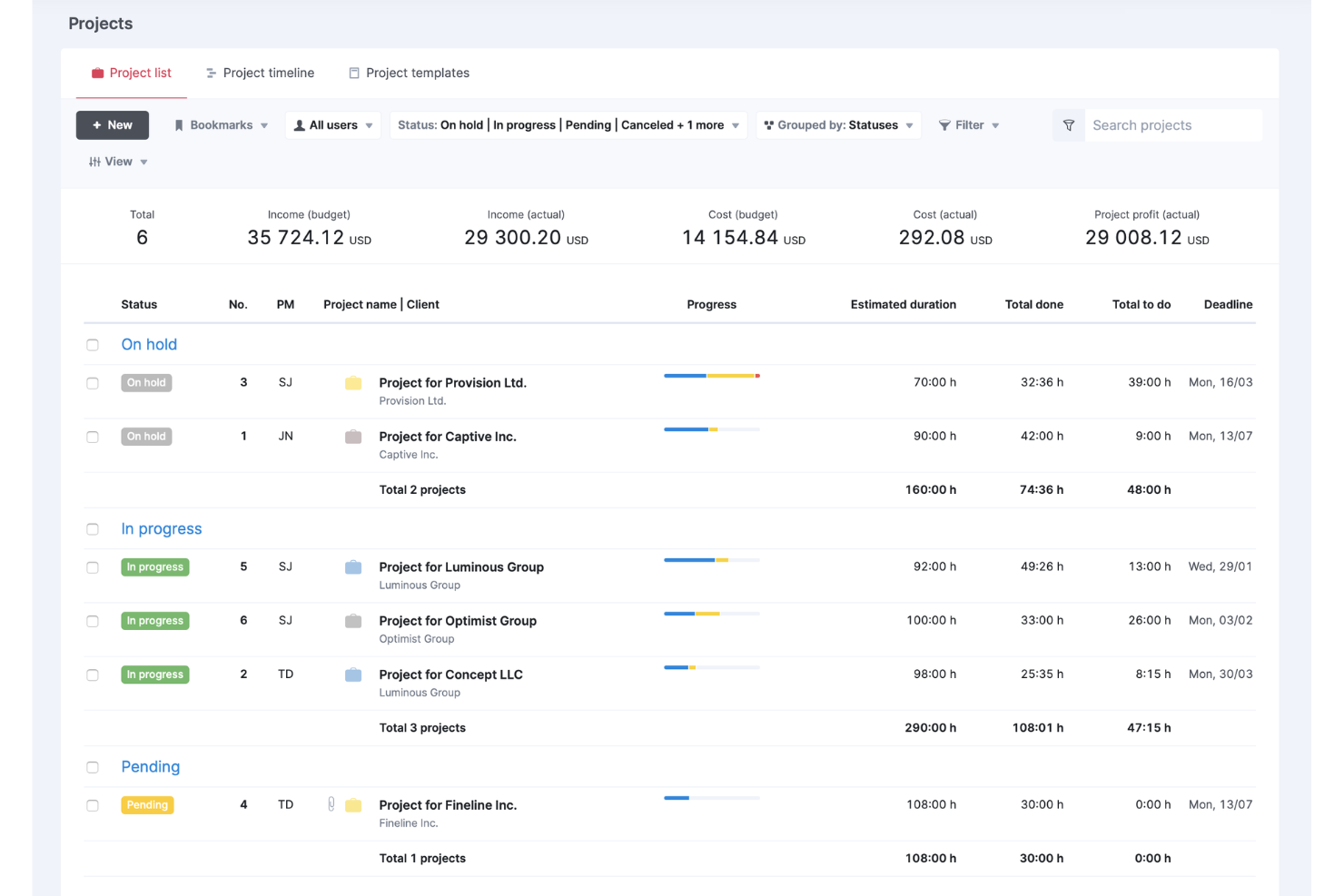
Scoro è una piattaforma di automazione dei servizi professionali che unifica la gestione dei progetti, la pianificazione delle risorse, il monitoraggio delle ore, il CRM, la creazione di preventivi e i report finanziari in un unico sistema pensato per società di consulenza e agenzie.
Per chi è più adatto Scoro?
Scoro è particolarmente adatto alle società di consulenza boutique e del mercato medio con 5 o più membri del team, che hanno bisogno di gestire il lavoro per i clienti e le finanze in un unico luogo.
Perché ho scelto Scoro
Scoro si è guadagnato un posto nella mia lista dei preferiti grazie alla sua matrice di stima, che mi consente di suddividere i risultati da consegnare per ruolo, ore e costi prima che venga registrata una sola ora. Posso vedere il margine e il ricarico in tempo reale a livello di servizio o di progetto, quindi so sempre se un incarico di consulenza sta procedendo verso la redditività. I report sui preventivi rispetto ai consuntivi completano poi il quadro, mostrando esattamente dove l'ambito o l'impegno hanno subito variazioni.
Funzionalità principali di Scoro
- Pianificatore delle risorse: Cruscotto visivo per assegnare i consulenti e monitorare il carico di lavoro su tutti i progetti attivi.
- Gestione dei mandati continuativi: Strumenti nativi per configurare, monitorare e riconciliare i compensi ricorrenti dei clienti e i relativi utilizzi.
- Integrazione CRM: Il sistema integrato di gestione delle relazioni con i clienti collega la pipeline di vendita alla gestione dei progetti e alla fatturazione.
- Supporto per più valute: Gestisci la fatturazione e il monitoraggio finanziario per clienti con valute ed entità giuridiche diverse.
Integrazioni di Scoro
Scoro offre integrazioni native con Xero, QuickBooks, HubSpot, Stripe, Google Calendar, Google Drive, Dropbox e Zapier. È disponibile un'API per le integrazioni personalizzate.
Pros and Cons
Pros:
- Visibilità del margine fino al livello del progetto
- Monitoraggio dei mandati continuativi integrato nei flussi di lavoro principali
- Copre nativamente l'intero flusso dal preventivo all'incasso
Cons:
- Tempi di configurazione elevati per i team di consulenza più piccoli
- La personalizzazione dei report richiede una configurazione tecnica
New Product Updates from Scoro

Scoro Adds Time Mobile App and ELI Improvements
Scoro adds the Scoro Time mobile app for iOS/Android to track time anywhere and expands ELI with attachments, smarter filtering, and trigger-based actions. For more information, visit Scoro's official site.

Celoxis
Ideale per il monitoraggio complesso tra progetti
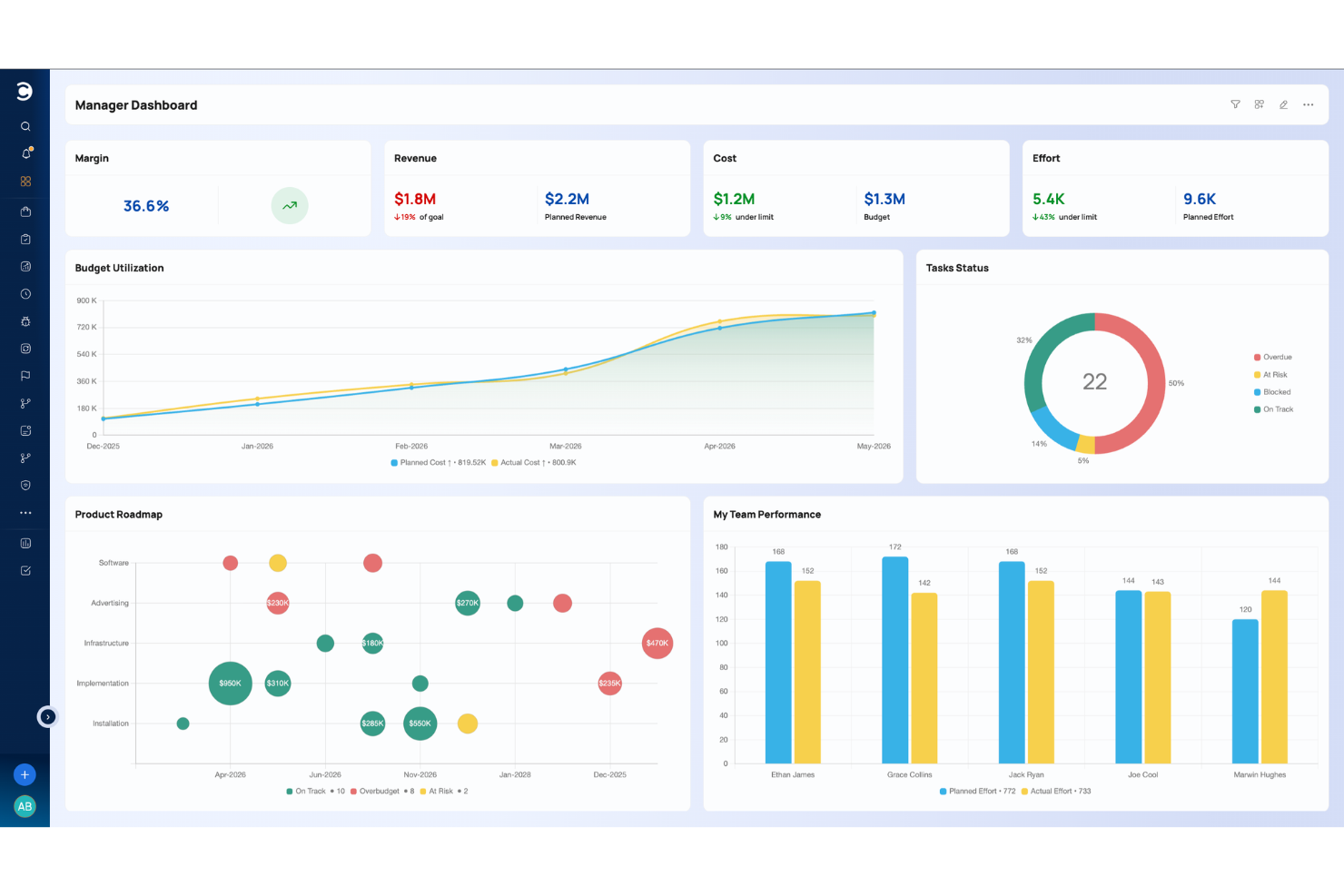
Celoxis è una piattaforma di gestione dei progetti per squadre di consulenza e aziende che combina pianificazione dei progetti, gestione del portafoglio, allocazione delle risorse, monitoraggio di tempi e spese e pannelli di controllo BI integrati in un unico strumento.
Per chi è più adatto Celoxis?
Celoxis è adatto alle aziende di consulenza medio-grandi che gestiscono contemporaneamente diversi progetti per i clienti e richiedono un monitoraggio di livello aziendale senza ricorrere a strumenti complessi sviluppati su misura.
Perché ho scelto Celoxis
Ho scelto Celoxis come una delle soluzioni migliori per la sua capacità di gestire la complessità tra progetti, un aspetto che mette in difficoltà la maggior parte degli strumenti. Apprezzo in particolare la funzione delle dipendenze tra progetti, che consente alla mia squadra di collegare attività appartenenti a incarichi distinti per i clienti, in modo che un ritardo in un progetto ne mostri automaticamente l'impatto sugli altri. In combinazione con gli indicatori dello stato RAG e l'analisi del percorso critico, posso vedere esattamente la situazione dell'intero portafoglio a colpo d'occhio, senza dover esaminare i singoli file di progetto.
Funzionalità principali di Celoxis
- Monitoraggio di tempi e spese: Registra le ore fatturabili e le spese del progetto all'interno delle attività. Le approvazioni possono passare attraverso più livelli prima dell'invio.
- Portale per i clienti: Condividi aggiornamenti sui progetti, file e report con i portatori di interesse esterni tramite un portale dedicato e con accesso controllato.
- Gestione del carico di lavoro delle risorse: Visualizza la disponibilità e la capacità della squadra tra i vari progetti per assegnare il lavoro in base alla domanda attuale.
- Monitoraggio del budget di progetto: Imposta i budget dei progetti, monitora i costi effettivi e pianificati e controlla la situazione finanziaria a livello di progetto.
Pros and Cons
Pros:
- Supporta sia i modelli a tariffa oraria sia quelli a prezzo fisso
- Monitoraggio finanziario integrato tra i progetti
- Gestione approfondita delle dipendenze tra progetti
Cons:
- L'app per dispositivi mobili non offre tutte le funzionalità della versione per computer
- È necessaria una lunga curva di apprendimento amministrativo
Ideale per il monitoraggio del tempo e la fatturazione
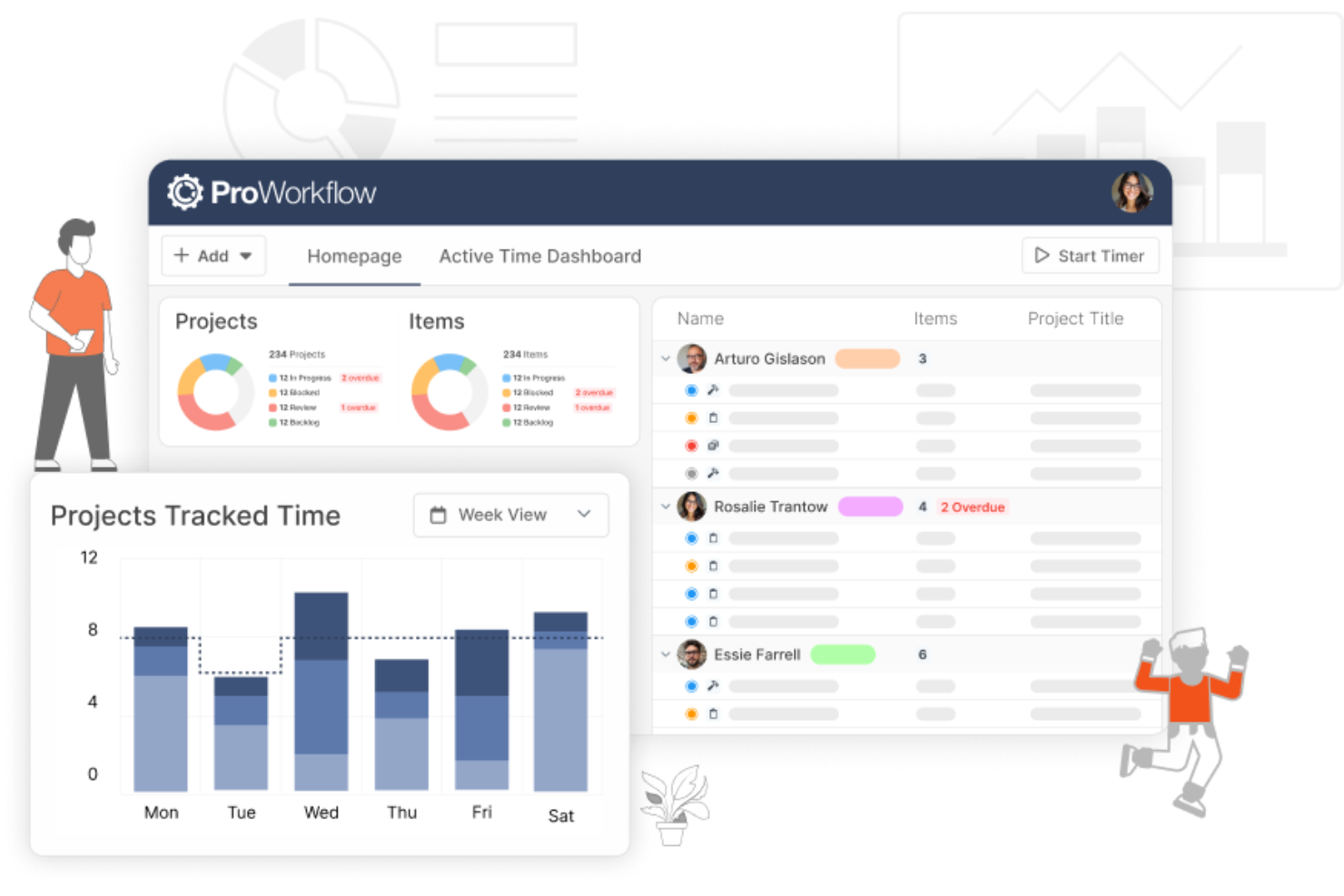
ProWorkflow è una soluzione ideale per i consulenti che desiderano migliorare le proprie capacità di gestione dei progetti. Fornisce strumenti per semplificare i flussi di lavoro, migliorare la redditività dei progetti e ottimizzare la gestione dei clienti, rendendolo una risorsa preziosa per settori come la consulenza, il marketing e l'architettura. Integrando funzionalità come il monitoraggio del tempo e la fatturazione, ProWorkflow risponde all'esigenza di una gestione efficiente dei progetti e di un'adeguata supervisione finanziaria.
Perché ho scelto ProWorkflow
Ho scelto ProWorkflow per la sua forte aderenza alle esigenze dei professionisti della consulenza, in particolare per le sue solide funzionalità di monitoraggio del tempo e fatturazione. Il monitoraggio del tempo garantisce una fatturazione e un'allocazione delle risorse accurate, mentre la fatturazione si integra perfettamente con gli strumenti contabili, offrendo una visione finanziaria chiara. Queste funzionalità, unite alla possibilità di gestire efficacemente i rapporti con i clienti, lo rendono una scelta eccellente per chi opera nel settore della consulenza.
Funzionalità principali di ProWorkflow
Oltre alle funzionalità principali, ho trovato anche diverse caratteristiche che ne migliorano l'utilità per i consulenti:
- Gestione dei clienti: questa funzionalità consente di tenere traccia delle interazioni con i clienti e dell'avanzamento dei progetti, garantendo una comunicazione efficace e la soddisfazione dei clienti.
- Pianificazione delle risorse: è possibile assegnare attività e gestire i carichi di lavoro del team con strumenti visivi come i diagrammi di Gantt, ottimizzando l'utilizzo delle risorse.
- Reportistica: genera report dettagliati che forniscono informazioni sulle prestazioni dei progetti, aiutandoti a prendere decisioni consapevoli.
- Gestione dei materiali: tieni traccia dei materiali e delle spese dei progetti in un unico luogo, garantendo trasparenza e controllo sui costi dei progetti.
Pros and Cons
Pros:
- Il monitoraggio in tempo reale supporta la programmazione
- Gli strumenti per la redditività aiutano a gestire i budget
- I diagrammi Kanban e di Gantt migliorano la pianificazione
Cons:
- Gli strumenti di reportistica risultano eccessivamente complessi
- La navigazione nell'app mobile deve essere migliorata
New Product Updates from ProWorkflow

ProWorkflow Enhances Financial Insights and Project Customization
ProWorkflow introduces Client Insights, project layout customization, Gantt chart improvements, and enhanced file management. These improve financial visibility and give teams more control over project organization and tracking. For more information, visit ProWorkflow’s official site.
 .
.
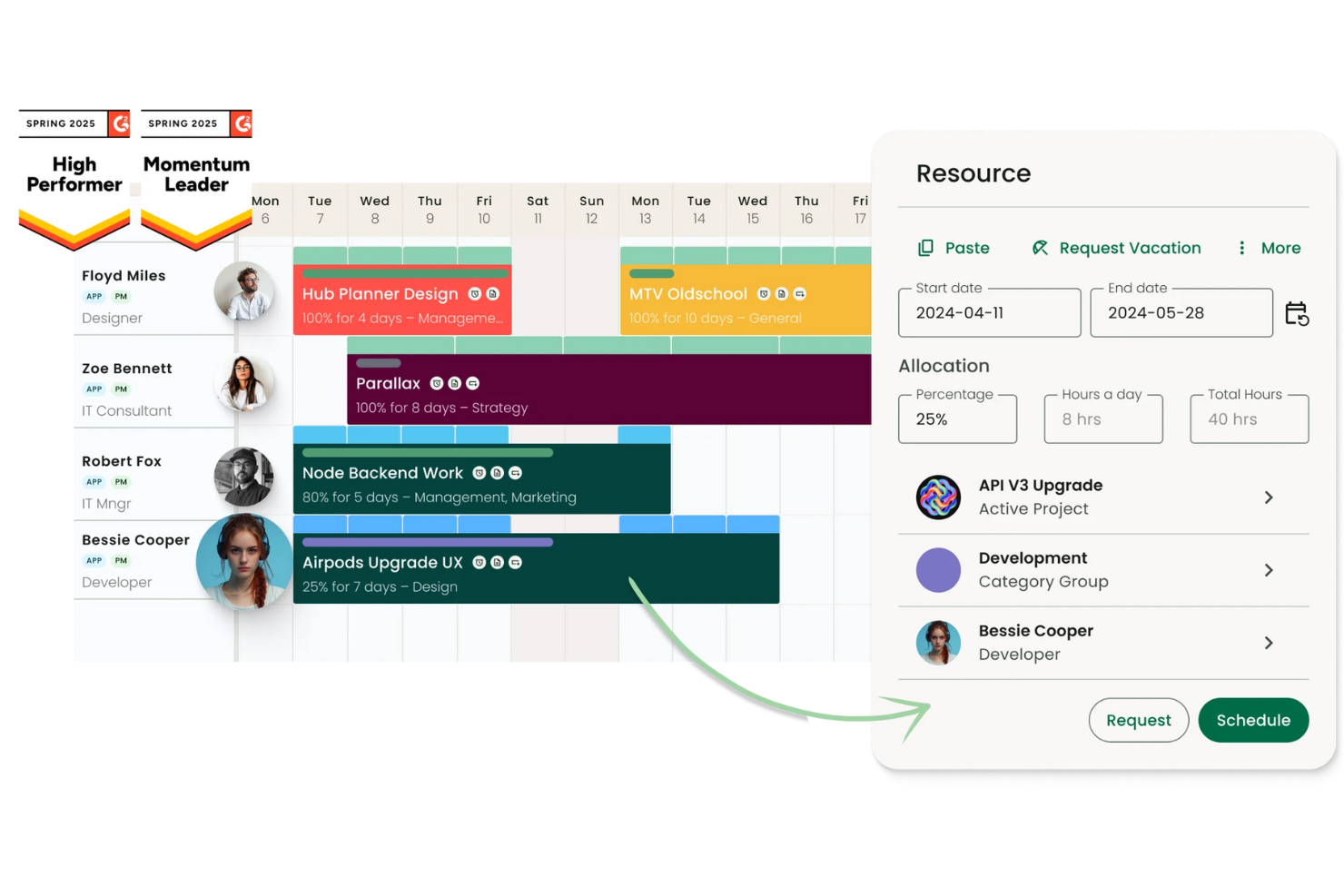
Project Flow by Milient è una piattaforma di gestione dei progetti pensata per il settore AEC e le società di consulenza basate sui progetti, che combina il monitoraggio dei progetti strutturato per fasi, la registrazione delle ore, l'allocazione delle risorse, la gestione del budget e la fatturazione in un unico sistema connesso.
Per chi è più adatto Project Flow by Milient?
Project Flow è particolarmente adatto a studi di architettura, ingegneria e società di consulenza tecnica di piccole e medie dimensioni che gestiscono più progetti per clienti fatturabili.
Perché ho scelto Project Flow by Milient
Project Flow by Milient si è guadagnato un posto nella mia selezione per il modo in cui collega strettamente la preparazione dei preventivi alla realizzazione dei progetti. Apprezzo molto la possibilità di creare una proposta economica nella piattaforma e poi convertirla in un progetto attivo con un solo clic. Il budget, le fasi e le tariffe di fatturazione vengono trasferiti automaticamente. Mi piace anche la visualizzazione dell'intero portafoglio, che tiene traccia del consumo del budget e delle percentuali fatturate nei progetti attivi. Questa visibilità fa sì che nulla venga trascurato tra la firma della proposta e la fattura finale.
Funzionalità principali di Project Flow by Milient
- Struttura del progetto basata sulle fasi: Organizza il lavoro per i clienti in fasi di progetto reali, con tempistiche e tappe fondamentali.
- Modulo di gestione delle risorse: Assegna i consulenti ai progetti e monitora la capacità e i tassi di utilizzo.
- Fatturazione e gestione dei pagamenti integrate: Genera fatture direttamente dalle ore registrate, dai budget e dai dati del progetto.
- Portale per la gestione della conoscenza: Archivia procedure, modelli e documenti importanti in una posizione centralizzata per i team.
Pros and Cons
Pros:
- Conversione da proposta a progetto con un solo clic
- Fatturazione integrata collegata alle fasi del progetto
- Visibilità sul budget e sulla fatturazione dell'intero portafoglio
Cons:
- Portale clienti limitato per la condivisione esterna
- Progettato principalmente per aziende del mercato scandinavo
Altre opzioni
Di seguito trovi un elenco di altri software di gestione dei progetti per consulenti che abbiamo selezionato, ma che non sono entrati nella lista principale. Vale sicuramente la pena dargli un’occhiata.
- Kantata
Ideale per la gestione completa del ciclo di vita del servizio
- Projectworks
Ideale per la pianificazione delle risorse e della capacità basata sull'AI
- Hello Bonsai
Ideale per la gestione completa dei progetti
- Ravetree
Ideale per approvazioni multi-livello
- JIRA
Ideale per lo sviluppo agile e il tracciamento dei problemi
- ReptonPOD
Ideale per pianificazione ed esecuzione complete
- BigTime
Ideale per integrazioni PSA indipendenti dalla piattaforma
- TaskRay
Ideale per il project management nativo Salesforce
- monday AI Workspace
Ideale per modelli di flusso di lavoro personalizzabili
- Teamwork.com
Ideale per il monitoraggio integrato di canoni e contratti


Come Valuto i Software di Project Management per Consulenti
Divido la mia valutazione tra requisiti di base—come la gestione di incarichi clienti simultanei e il monitoraggio delle ore fatturabili—e i fattori che distinguono un tool dall'altro.
Funzionalità Principali (Requisiti Minimi per Questa Lista)
Quando seleziono gli strumenti per la mia lista, assegno a ciascuno un punteggio da 0 (non offre la funzionalità) a 5 (eccelle in quest'area) per ogni funzionalità principale elencata di seguito. Successivamente, calcolo il punteggio totale dello strumento in percentuale. Ogni tool deve raggiungere un punteggio totale minimo del 65% per essere considerato per l'inclusione.
- Monitoraggio Progetti Clienti: Cerco la capacità di organizzare incarichi simultanei per cliente, con traguardi distinti, fasi e tempistiche di consegna specifiche per ogni progetto.
- Monitoraggio Ore & Fatturazione: Ogni strumento deve consentire ai consulenti di registrare ore fatturabili vs. non fatturabili su compiti specifici, con gestione delle tariffe e opzioni di fatturazione o esportazione.
- Pianificazione Risorse & Capacità: Valuto quanto bene uno strumento mostra il carico di lavoro dei consulenti su vari incarichi e se supporta il monitoraggio dell'utilizzo e la previsione della capacità.
- Collaborazione con il Cliente & Portali: Condividere i progressi con stakeholder esterni è importante, quindi verifico la presenza di accesso ospite, portali rivolti al cliente o workspace con permessi controllati.
- Redditività & Report Finanziari: Lo strumento dovrebbe mostrare i margini di progetto, il confronto tra budget e consuntivo, e le metriche di utilizzo così che i responsabili possano individuare in anticipo i progetti a rischio.
- Gestione Documenti & Consegne: Valuto come vengono archiviati, versionati e collegati ai progetti proposte, SOW e consegne finali.
Una volta che ho una lista di strumenti che soddisfano questi criteri, considero cosa distingue ogni piattaforma dalle altre.
Fattori Distintivi (Cosa Distingue i Fornitori)
Ecco come confronto e metto a confronto i diversi fornitori:
Funzionalità Differenzianti
L'automazione dalla proposta al progetto è un grande elemento distintivo—cerco strumenti che convertano un SOW accettato direttamente in un progetto strutturato con fasi, budget e consegne già compilati. Anche la gestione dei contratti a forfait distingue il settore, specialmente per i consulenti che gestiscono incarichi con compenso mensile dove tracciare le ore residue rispetto al contratto è un lavoro quotidiano. Per aziende che servono clienti internazionali, il supporto multi-entità con fatturazione multi-valuta fa davvero la differenza per mantenere la contabilità ordinata.
Oltre le Funzionalità
La trasparenza del modello di prezzo ha un grande peso qui—i consulenti spesso coinvolgono subappaltatori, quindi verifico se posti ospite o per collaboratori fanno lievitare i costi in modo imprevedibile. L'integrazione con strumenti di contabilità come QuickBooks o Xero è un altro fattore chiave, poiché i dati di fatturazione devono passare dal progetto alla fattura senza reinserimenti manuali. Valuto anche il time-to-value, perché i consulenti fatturano le proprie ore e non possono permettersi settimane di onboarding. Gli strumenti con template preimpostati per la consulenza e setup guidato tendono a rendere produttive le aziende più velocemente.
Come scegliere un software di gestione dei progetti per consulenti
Il software di gestione dei progetti più adatto dipende dal modo in cui opera la tua attività di consulenza, comprese le dimensioni del team, il numero di clienti, il modello di fatturazione e le esigenze di pianificazione delle risorse.
- Consulenti singoli: cerca un monitoraggio semplice dei progetti, il monitoraggio del tempo, la fatturazione, modelli riutilizzabili e l'accesso dei clienti senza funzionalità di gestione delle risorse non necessarie.
- Piccoli team di consulenza: dai priorità alle viste condivise dei progetti, alla gestione del carico di lavoro, al monitoraggio del tempo, ai budget dei progetti, alle autorizzazioni e alla collaborazione con i clienti.
- Società di consulenza in crescita: per i consulenti che gestiscono un numero crescente di rapporti con i clienti, anche gli strumenti per i database dei clienti possono aiutare a centralizzare le informazioni sui clienti, i dati di contatto e la cronologia dei rapporti insieme al lavoro sui progetti.
- Società che gestiscono contratti a forfait continuativo: valuta strumenti che monitorino i progetti ricorrenti, le ore contrattualizzate rispetto a quelle utilizzate, la fatturazione ricorrente e il lavoro continuativo per i clienti.
- Società con esigenze complesse di gestione delle risorse: cerca la pianificazione della capacità, l'assegnazione basata sulle competenze, i report sull'utilizzo e la visibilità su più incarichi simultanei.
Quando confronti gli strumenti, parti dal modo in cui attualmente svolgi il lavoro per i clienti e dagli aspetti sui quali hai bisogno di maggiore visibilità. Un consulente singolo potrebbe aver bisogno solo del monitoraggio dei progetti e del tempo, mentre una società di consulenza più grande potrebbe trarre vantaggio da una piattaforma di automazione dei servizi professionali che combini la gestione dei progetti con la pianificazione delle risorse e la gestione finanziaria.
Tendenze nei software di gestione dei progetti per consulenti nel 2026
Le piattaforme di gestione dei progetti continuano ad aggiungere funzionalità per la reportistica ai clienti, la pianificazione delle risorse e il controllo finanziario. Sulla base dei recenti aggiornamenti dei prodotti e delle note di rilascio, queste sono le tendenze che sto monitorando:
- Dashboard orientate al cliente: un numero sempre maggiore di piattaforme offre dashboard progettate per la reportistica ai clienti. Ad esempio, i consulenti possono condividere traguardi del progetto, scadenze e metriche delle prestazioni senza esporre informazioni interne.
- Allocazione dinamica delle risorse: gli strumenti di pianificazione delle risorse stanno diventando più reattivi ai cambiamenti nella pianificazione e nel carico di lavoro. Di conseguenza, i consulenti possono riassegnare il lavoro quando cambiano le priorità o i membri del team raggiungono la propria capacità massima.
- Monitoraggio della redditività: alcune piattaforme ora monitorano la redditività per progetto, cliente o membro del team. Pertanto, le società di consulenza possono confrontare i ricavi con i costi della manodopera e del progetto prima di modificare i prezzi o il personale.
- Opzioni di personalizzazione del marchio: i controlli del marchio consentono ai consulenti di personalizzare portali, report e spazi di lavoro rivolti ai clienti. A loro volta, i clienti ricevono un'esperienza più coerente nelle comunicazioni e nei materiali dei progetti.
- Pianificazione di scenari per le proposte: le funzionalità di pianificazione degli scenari consentono ai consulenti di confrontare possibili budget, tempistiche e piani di assegnazione del personale. Di conseguenza, possono presentare opzioni realistiche prima di confermare l'ambito di un incarico.
Che cos'è un software di gestione dei progetti per consulenti?
Il software di gestione dei progetti per consulenti aiuta i professionisti della consulenza a gestire i progetti, gli incarichi dei clienti e il lavoro amministrativo. In genere combina funzionalità di gestione delle attività, monitoraggio del tempo, pianificazione dei progetti e collaborazione con i clienti.
Il software offre un punto centrale per organizzare pianificazioni, risorse, documenti e comunicazioni relative ai progetti. Di conseguenza, i consulenti possono monitorare materiali da consegnare, scadenze e budget per più incarichi dei clienti.
Funzionalità essenziali di gestione dei progetti per consulenti
Il miglior software di gestione dei progetti per consulenti dovrebbe supportare sia la realizzazione dei progetti sia l'amministrazione dei clienti. Sebbene i requisiti varino da una società all'altra, le seguenti funzionalità sono comunemente utili:
- Monitoraggio del tempo fatturabile: registra le ore fatturabili e non fatturabili associate a clienti, progetti e attività specifici. Questi dati possono supportare la fatturazione, la reportistica sull'utilizzo e l'analisi dei costi dei progetti.
- Budget e redditività dei progetti: confronta budget, costi della manodopera, ricavi fatturabili e prestazioni effettive del progetto, così da poter monitorare la salute finanziaria di ogni incarico.
- Portali clienti e accesso ospite: offre ai clienti un accesso controllato alle informazioni pertinenti del progetto, come aggiornamenti sullo stato, materiali da consegnare, approvazioni, file e fatture, senza esporre il lavoro interno.
- Pianificazione delle risorse e della capacità: mostra la disponibilità e le assegnazioni dei consulenti nei diversi incarichi simultanei. Se gestisci un team più grande, cerca visualizzazioni del carico di lavoro, dell'utilizzo, delle competenze e della capacità futura.
- Gestione dei contratti a consumo: monitora gli incarichi ricorrenti rispetto alle ore contrattuali, ai budget o ai periodi di fatturazione, così da poter vedere quanto del contratto a consumo di un cliente è stato utilizzato.
- Flussi di lavoro da proposta o SOW a progetto: converte gli ambiti, i preventivi o le dichiarazioni di lavoro approvati in progetti attivi, riducendo la necessità di ricreare manualmente i dettagli del progetto.
- Flussi di lavoro da foglio ore a fattura: collega il tempo fatturabile e le spese approvati ai sistemi di fatturazione o contabilità, in modo che i dati dei progetti possano confluire nella fatturazione dei clienti.
- Reportistica multi-cliente: fornisce viste a livello di portafoglio sui diversi incarichi attivi, così da poter confrontare scadenze, budget, domanda di risorse, stato dei progetti e prestazioni finanziarie.
- Gestione dei documenti e dei materiali da consegnare: mantiene SOW, file di progetto, materiali da consegnare, approvazioni e documentazione correlata allegati all'incarico pertinente del cliente.
- Integrazioni con contabilità e CRM: collega i dati dei progetti ai sistemi utilizzati per vendite, contabilità e fatturazione, riducendo l'inserimento duplicato tra la parte commerciale e quella operativa dell'azienda.
Come gestiscono i consulenti più progetti dei clienti
Gestire contemporaneamente diversi incarichi dei clienti richiede visibilità sui progetti senza mescolare tra loro i lavori dei clienti. Il software di gestione dei progetti può aiutare i consulenti fornendo:
- Progetti separati per ogni cliente: Mantieni attività, file, scadenze e comunicazioni organizzati per incarico.
- Visualizzazioni del carico di lavoro tra progetti: Visualizza la capacità dei consulenti tra i vari incarichi e individua i conflitti di pianificazione prima di assegnare nuovo lavoro. Il software di gestione delle risorse per consulenti può offrire una visibilità più approfondita sulla disponibilità e sull'allocazione delle risorse tra i progetti.
- Monitoraggio del tempo fatturabile: Monitora le ore per cliente e progetto per confrontare l'impegno effettivo con le ore pianificate.
- Modelli di progetto riutilizzabili: Standardizza i flussi di lavoro, i risultati finali e le fasi di progetto ricorrenti della consulenza.
- Controlli di accesso per i clienti: Offri ai clienti visibilità sulle attività, sui file e sugli aggiornamenti pertinenti, mantenendo privato il lavoro interno.
- Monitoraggio del budget di progetto: Confronta tempo e costi con i budget di progetto man mano che il lavoro procede.
Vantaggi del software di gestione dei progetti per consulenti
Il software di gestione dei progetti può aiutare i consulenti a gestire il lavoro per i clienti tenendo sotto controllo tempi, risorse e prestazioni del progetto. I principali vantaggi includono:
- Gestire più progetti per i clienti: Mantieni organizzati cronoprogrammi, attività, risultati finali e scadenze tra incarichi distinti per i clienti.
- Monitorare il tempo fatturabile e non fatturabile: Verifica come vengono impiegate le ore dei consulenti e collega il tempo lavorato ai budget di progetto e alla fatturazione.
- Controllare l'ambito e i budget dei progetti: Confronta il lavoro pianificato con il tempo e i costi effettivi per individuare i progetti che stanno superando l'ambito originario.
- Pianificare la capacità dei consulenti: Visualizza i carichi di lavoro tra i progetti per individuare la disponibilità ed evitare di assegnare più lavoro di quanto un consulente possa ragionevolmente gestire.
- Monitorare la redditività dei progetti: Tieni traccia dei costi di progetto, delle ore fatturabili, dei budget e dei margini per capire quali incarichi stanno ottenendo i risultati previsti.
- Standardizzare il lavoro ricorrente per i clienti: Utilizza modelli, flussi di lavoro e automazioni per creare processi coerenti per gli incarichi di consulenza comuni.
- Mantenere le comunicazioni con i clienti collegate ai progetti: Centralizza approvazioni, file, aggiornamenti e altre informazioni di progetto invece di gestirli tramite canali separati.
Costi e prezzi del software di gestione dei progetti per consulenti
Selezionare il software di gestione dei progetti giusto è fondamentale per i consulenti che desiderano semplificare il proprio flusso di lavoro, aumentare la produttività e gestire i progetti in modo efficiente. Con una varietà di opzioni di prezzo disponibili, comprendere i diversi piani e ciò che offrono può aiutarti a scegliere il software più adatto alle tue esigenze e al tuo budget.
Ecco una panoramica delle opzioni di piano più comuni e dei relativi prezzi per il software di gestione dei progetti pensato per i consulenti:
| Tipo di piano | Prezzo medio | Funzionalità comuni |
| Gratuito | $0 | Gestione di base delle attività, utenti limitati, spazio di archiviazione limitato |
| Base | $10 - $15 per utente/mese | Monitoraggio di attività e progetti, report semplici, integrazioni limitate |
| Standard | $20 - $35 per utente/mese | Monitoraggio del tempo, integrazioni ampliate, reportistica avanzata |
| Premium | $35 - $60 per utente/mese | Gestione delle risorse, analisi avanzate, progetti illimitati |
| Aziendale | Prezzo personalizzato | Integrazioni personalizzate, assistenza dedicata, analisi complete |
Quando valuti un software di gestione dei progetti, è fondamentale soppesare le esigenze della tua attività di consulenza rispetto alle funzionalità e ai limiti di ciascun piano. Iniziare con un'opzione gratuita o a basso costo può essere un modo pratico per valutare l'efficacia del software prima di impegnarsi in un piano più ricco di funzionalità e più costoso.
Software di gestione dei progetti per consulenti: domande frequenti
Ecco alcune delle domande frequenti che mi vengono poste sul software di gestione dei progetti per consulenti.
Posso utilizzare un software di gestione dei progetti per progetti di piccola scala?
Certamente. La maggior parte dei software di gestione dei progetti è progettata per essere scalabile, il che la rende adatta a progetti di qualsiasi dimensione, dalle piccole attività alle operazioni su larga scala.
È necessario avere competenze tecniche per utilizzare un software di gestione dei progetti?
No, la maggior parte dei software è facile da usare ed è progettata con interfacce intuitive che richiedono competenze tecniche minime. Per le funzionalità più complesse sono generalmente disponibili risorse di formazione e assistenza
Quanto sono sicuri i miei dati nel software di gestione dei progetti?
I migliori software di gestione dei progetti per consulenti danno priorità alla sicurezza dei dati mediante crittografia, data center sicuri e conformità agli standard internazionali sulla privacy per proteggere le vostre informazioni.
Posso integrare altri strumenti con il mio software di gestione dei progetti?
Sì, molti strumenti di gestione dei progetti offrono funzionalità di integrazione con software diffusi come applicazioni per e-mail e calendari, sistemi CRM e software finanziari, così da semplificare il flusso di lavoro.
Esiste un software di gestione dei progetti che funziona sui dispositivi mobili?
Sì, la maggior parte dei fornitori offre applicazioni mobili o versioni web ottimizzate per dispositivi mobili, consentendo di gestire i progetti e rimanere aggiornati ovunque ci si trovi.
I fornitori di software di gestione dei progetti offrono assistenza clienti?
Sì, l’assistenza clienti è un’offerta standard e molti fornitori mettono a disposizione diversi canali di supporto, tra cui e-mail, chat e telefono, oltre a basi di conoscenza complete e tutorial.
Posso personalizzare il software di gestione dei progetti in base alle esigenze della mia società di consulenza?
Certamente. Molti strumenti di gestione dei progetti consentono di personalizzare flussi di lavoro, campi, report e dashboard in linea con le vostre specifiche esigenze e preferenze di gestione dei progetti.
Come possono i consulenti monitorare la redditività dei progetti con un software di gestione dei progetti?
I consulenti possono monitorare la redditività dei progetti confrontando i ricavi del progetto con il tempo, i costi della manodopera, le spese e le altre risorse utilizzate per realizzare il lavoro. Un software di gestione dei progetti dotato di funzionalità di budgeting e monitoraggio finanziario può aiutare i consulenti a controllare il budget rispetto ai valori effettivi, le ore fatturabili, i margini del progetto e le modifiche all’ambito man mano che l’incarico procede.
Per i progetti a tariffa fissa, questo può aiutare a individuare i casi in cui le ore aggiuntive riducono il margine previsto. Per gli incarichi a tempo e materiali, può aiutare i consulenti a confrontare le ore fatturabili con i costi e i budget del progetto.
In che modo il software di gestione dei progetti per società di consulenza si differenzia dal software generico di gestione dei progetti?
Il software di gestione dei progetti per società di consulenza generalmente va oltre il monitoraggio delle attività e delle scadenze, per supportare l’aspetto commerciale del lavoro con i clienti. A seconda dello strumento, può includere il monitoraggio del tempo fatturabile, l’utilizzo delle risorse, i budget e la redditività dei progetti, i contratti a forfait, la fatturazione e le autorizzazioni dei clienti. Queste funzionalità sono particolarmente utili per le società di consulenza che devono gestire sia la realizzazione dei progetti sia le prestazioni finanziarie degli incarichi per i clienti.
I consulenti hanno bisogno di un software di gestione dei progetti con un portale per i clienti?
Non tutti i consulenti hanno bisogno di un portale per i clienti, ma può essere utile quando i clienti necessitano di un accesso regolare alle informazioni sul progetto. I portali per i clienti possono offrire uno spazio dedicato in cui esaminare gli aggiornamenti del progetto, accedere a file e prodotti finali, fornire approvazioni e monitorare i progressi senza esporre le attività o le discussioni interne.
Per i consulenti che gestiscono comunicazioni frequenti con i clienti, software per la gestione dei clienti può inoltre offrire strumenti per gestire le relazioni con i clienti insieme alla realizzazione dei progetti.