

I 10 migliori strumenti di gestione dei progetti integrati con Google Calendar

10 Miglior software di gestione dei progetti con integrazione di Google Calendar: selezione


Tenere sincronizzata la sequenza temporale del progetto con il calendario non è sempre facile. Riunioni, scadenze che cambiano e aggiornamenti dell'ultimo minuto possono rendere difficile mantenere tutti allineati.
Il software di gestione dei progetti con integrazione di Google Calendar è utile perché collega attività e pianificazioni in un unico luogo. Ti fa risparmiare tempo e riduce il rischio di dimenticare qualcosa di importante.
In questo articolo ti presenterò i migliori strumenti che ho testato. Mi sono concentrato su quanto ciascuno si integri nei flussi di lavoro reali dei progetti e supporti il modo in cui tu e il tuo team lavorate effettivamente.
Perché fidarsi dei nostri consigli sui software
Il nostro team testa e recensisce software dal 2012. In quanto project manager noi stessi, sappiamo quanto sia difficile — e importante — scegliere il software giusto.
Per questa guida, abbiamo valutato gli strumenti attraverso test pratici e ricerche indipendenti, assegnando un punteggio agli strumenti in base ai nostri criteri di selezione. Ci basiamo inoltre sulle competenze di leader di pensiero del settore e di professionisti attivi nella gestione dei progetti.
Le nostre recensioni riflettono il nostro giudizio editoriale umano, non un discorso di vendita.
Revisori esperti:
Tabella comparativa dei software di gestione dei progetti con integrazione di Google Calendar
Utilizza questa tabella comparativa per esaminare i dettagli dei prezzi delle mie migliori selezioni di software di gestione dei progetti con integrazione di Google Calendar.
| Tool | Best For | Trial Info | Price | ||
|---|---|---|---|---|---|
| 1 | Ideale per la gestione delle attività in Google Workspace | Prova gratuita di 14 giorni + piano gratuito disponibile | A partire da $4/utente/mese (con fatturazione annuale) | Website | |
| 2 | Ideale per flussi di lavoro automatizzati con sincronizzazione in tempo reale | Prova gratuita di 14 giorni + piano gratuito disponibile | Da $10/utente/mese (fatturati annualmente) | Website | |
| 3 | Ideale per la pianificazione integrata nel calendario | Prova gratuita di 15 giorni + piano gratuito + demo gratuita disponibile | Da $4/utente/mese (fatturato annualmente) | Website | |
| 4 | Ideale per coordinare le attività dei team che lavorano principalmente tramite email | Prova gratuita di 30 giorni disponibile | A partire da $14/utente/mese (con fatturazione annuale) | Website | |
| 5 | Ideale per suddividere compiti complessi | Prova gratuita di 30 giorni + piano gratuito disponibile | Da $7,65/membro/mese (fatturazione annuale) | Website | |
| 6 | Ideale per archiviazione illimitata dei progetti | Prova gratuita di 14 giorni | Da $1,49/utente/mese (fatturazione annuale) + piano gratuito disponibile | Website | |
| 7 | Ideale per l'organizzazione visiva delle attività | Piano gratuito disponibile | Da $5/utente/mese (fatturazione annuale) | Website | |
| 8 | Ideale per la gestione di clienti e progetti in un'unica soluzione | Prova gratuita di 7 giorni disponibile | Da $9/utente/mese (fatturazione annuale) | Website | |
| 9 | Ideale per la creazione di roadmap di prodotto | Prova gratuita di 30 giorni + demo gratuita disponibile | Da $9/utente/mese | Website | |
| 10 | Ideale per la gestione aziendale tutto-in-uno | Not available | A partire da $29/utente/mese (fatturazione annuale, minimo 8 utenti) | Website |

Recensioni dei migliori software di gestione dei progetti con integrazione di Google Calendar
Di seguito trovi i miei riepiloghi dettagliati dei migliori software di gestione dei progetti con integrazione di Google Calendar inclusi nella mia selezione. Le mie recensioni offrono una panoramica dettagliata delle funzionalità principali, dei pro e dei contro, delle integrazioni e dei casi d’uso ideali di ogni strumento, per aiutarti a trovare quello più adatto a te.

GQueues
Ideale per la gestione delle attività in Google Workspace
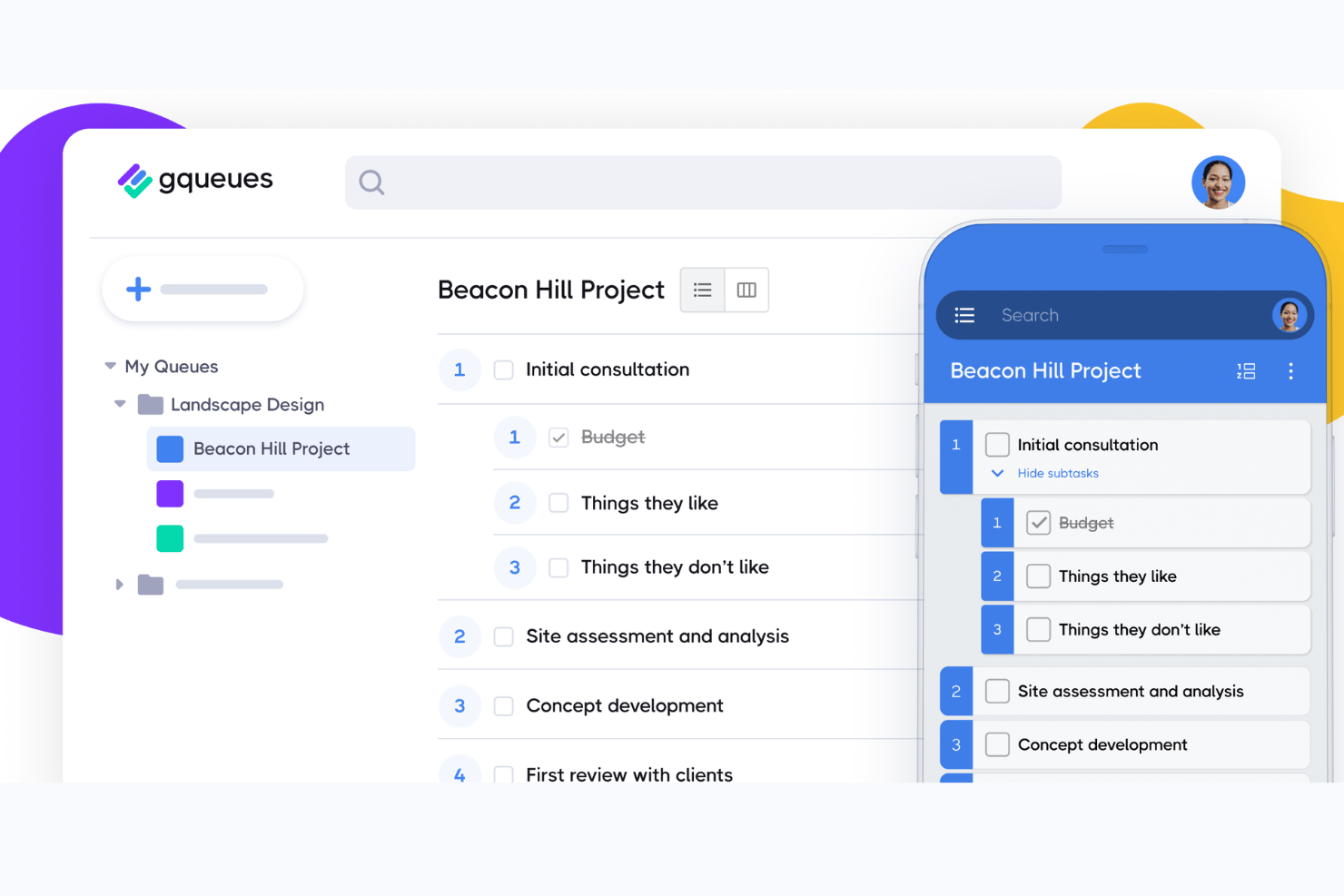
GQueues è uno strumento di gestione delle attività che si integra profondamente con Google Workspace.
Perché ho scelto GQueues: Ho selezionato GQueues per la sua eccezionale integrazione con Google Workspace, che lo distingue dagli altri strumenti di gestione dei progetti. È ideale per la gestione delle attività in Google Workspace perché è progettato specificamente per integrare e potenziare gli strumenti Google che i team già utilizzano, garantendo un flusso di lavoro coeso all'interno dell'ecosistema Google.
Caratteristiche e integrazioni principali:
GQueues si distingue per la sua capacità di sincronizzare le attività con Google Calendar e per la sua integrazione con Gmail, che consente di trasformare le email in attività. Lo strumento supporta inoltre gli allegati da Google Drive e l'acquisizione delle attività tramite un'estensione per Google Chrome.
Lo strumento si integra nativamente con Google Calendar, Gmail, Google Drive, Google Chrome, Google Contacts, Google Workspace, Google Sheets, Google Docs, Google Slides e Google Forms.
Pros and Cons
Pros:
- Integrazione completa con Google Workspace
- Sincronizzazione bidirezionale con Google Calendar
- Nessun costo base o di configurazione
Cons:
- È richiesta la fatturazione annuale
- La versione gratuita offre funzionalità limitate
- Gli sconti sui volumi sono disponibili solo per 5 o più licenze

Wrike
Ideale per flussi di lavoro automatizzati con sincronizzazione in tempo reale
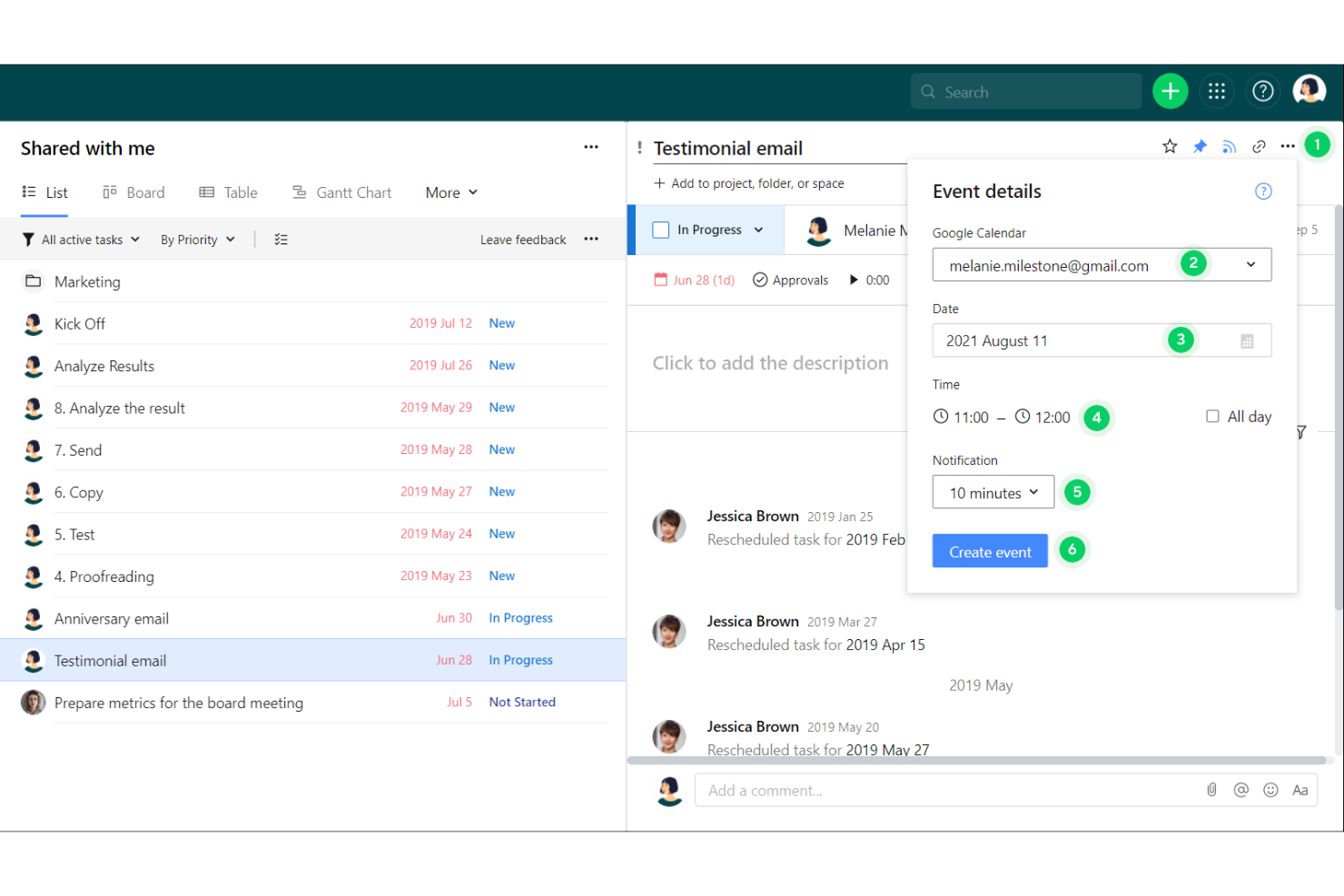
Wrike è un software di gestione dei progetti progettato per facilitare la collaborazione, la condivisione delle risorse e il monitoraggio dell’avanzamento all’interno di un’unica piattaforma.
Perché ho scelto Wrike: L’integrazione avanzata di Wrike con Google Calendar permette la sincronizzazione automatica dei flussi di lavoro, delle scadenze, dei task e delle principali tappe del progetto direttamente nel tuo calendario. Questo significa che tutte le scadenze di progetto sono visibili insieme agli eventi personali e ad altri appuntamenti lavorativi, riducendo il rischio di sovrapposizioni e dimenticanze. La sincronizzazione bidirezionale si aggiorna in tempo reale: qualsiasi modifica effettuata in Wrike viene immediatamente riflessa in Google Calendar e viceversa, mantenendo tutto costantemente aggiornato. Inoltre, Wrike potenzia questa integrazione offrendo flussi di lavoro personalizzabili che possono attivare notifiche e automatizzare l’aggiornamento dei task in base agli eventi di calendario.
Funzionalità e integrazioni principali:
Le principali funzionalità di Wrike includono collaborazione e comunicazione in tempo reale, diagrammi di Gantt interattivi, dashboard e flussi di lavoro personalizzabili e avanzati strumenti di reportistica, per fornire approfondimenti dettagliati sulle prestazioni di progetto, l’allocazione delle risorse e le metriche di produttività. Wrike offre inoltre monitoraggio integrato del tempo, processi di approvazione e un sistema di gestione dei documenti con controllo delle versioni.
Wrike si integra con Slack, Salesforce, Microsoft Teams, Adobe Creative Cloud, Google Drive, Microsoft SharePoint, OneDrive, Zoom, Power BI e Tableau. Offre anche un’API aperta e uno strumento chiamato Wrike Integrate per creare integrazioni personalizzate e automatizzare i flussi di lavoro tra diverse applicazioni aziendali.
Pros and Cons
Pros:
- Potente strumento di revisione e flussi di approvazione
- Funzionalità di reportistica complete
- Dashboard personalizzabili
Cons:
- La ricchezza di funzionalità potrebbe risultare impegnativa per alcuni utenti
- A volte i tempi di caricamento della piattaforma sono più lenti
New Product Updates from Wrike

Wrike Adds Quick Search to Table View
Wrike adds Quick Search to Table View with full-table search across titles, descriptions, and fields, plus highlighted matches. This helps users find tasks faster in large tables. For more information, visit Wrike’s official site.

Ideale per la pianificazione integrata nel calendario
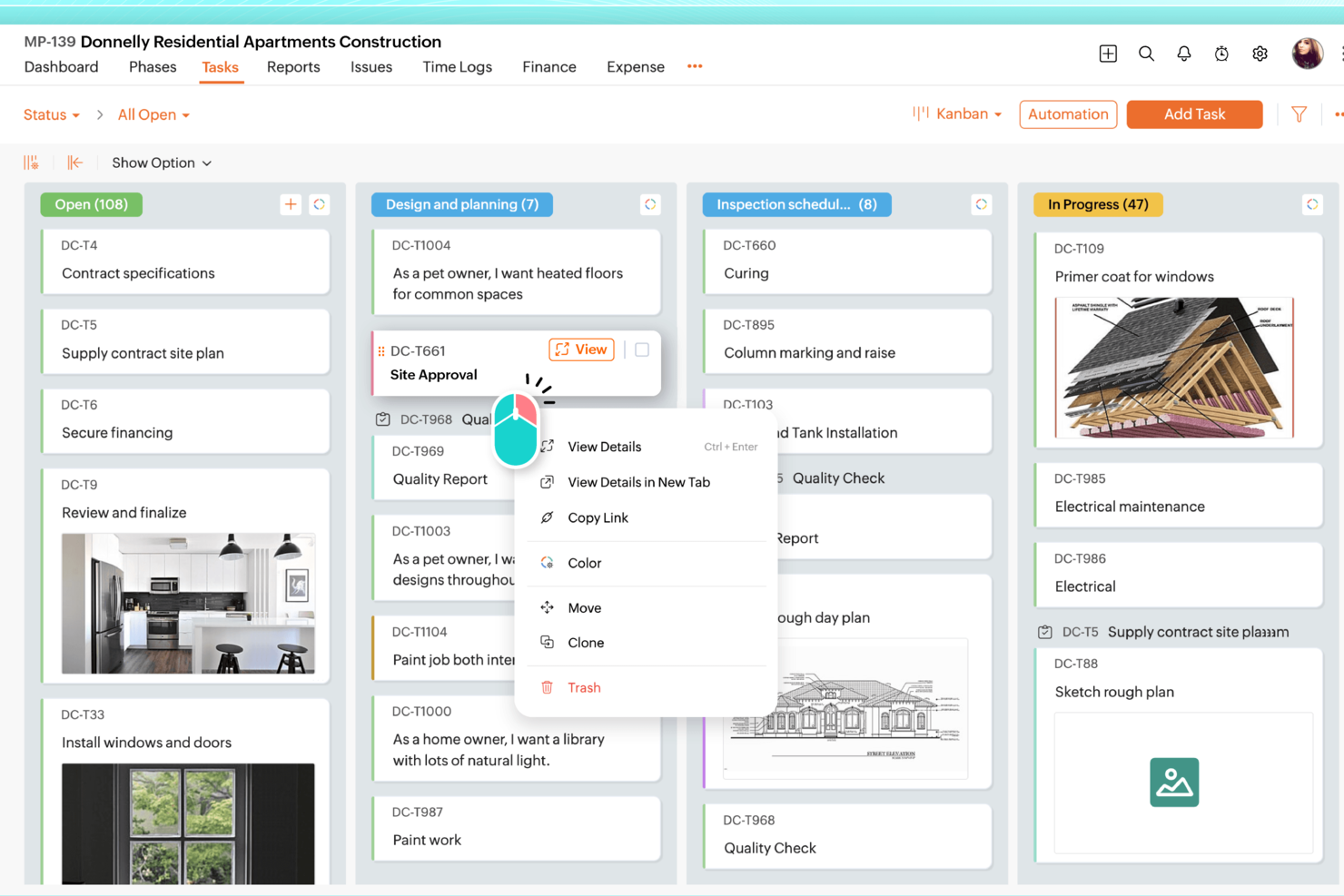
Zoho Projects è un'ottima opzione per i team che desiderano visualizzare le pianificazioni di progetto insieme a riunioni e scadenze su Google Calendar. Funziona bene per i team che gestiscono più progetti contemporaneamente, soprattutto quando è necessario un modo chiaro per assegnare i compiti, monitorare i progressi e mantenere tutti allineati sullo stesso piano.
Perché ho scelto Zoho Projects
Ho scelto Zoho Projects perché la sua integrazione con Google Calendar facilita il collegamento del lavoro sui progetti con le scadenze reali. Invece di gestire le tempistiche da una parte e le riunioni dall'altra, il tuo team può vedere attività chiave e scadenze insieme agli eventi imminenti in calendario. Zoho Projects ti fornisce anche gli strumenti per suddividere i progetti in elenchi di attività chiari, assegnare responsabilità e mantenere il lavoro in movimento con funzionalità di collaborazione integrate.
Funzionalità principali di Zoho Projects
Oltre all'integrazione con Google Calendar, queste funzionalità si distinguono:
- Automazione delle attività: Gli utenti possono automatizzare le attività di routine utilizzando un'interfaccia drag-and-drop, risparmiando tempo e riducendo il lavoro manuale.
- Workflow personalizzabili: Puoi personalizzare campi, layout e stati per adattare la gestione del progetto alle tue esigenze specifiche.
- Diagrammi di Gantt: Questi diagrammi forniscono una timeline visiva del tuo progetto, aiutandoti a monitorare i progressi e modificare i piani secondo necessità.
- Accesso mobile: Consulta i dettagli e gli aggiornamenti dei progetti ovunque tu sia, grazie alle funzionalità mobile di Zoho Projects, restando sempre connesso.
Integrazioni di Zoho Projects
Le integrazioni includono Google Drive, Microsoft Office 365, Microsoft Teams, Slack, Dropbox, GitHub, Bitbucket, Zoho CRM, Zoho Books e Zoho Analytics.
Pros and Cons
Pros:
- Automazione avanzata e workflow personalizzabili
- Monitoraggio del tempo e fatturazione integrati
- Prezzi accessibili per team in crescita
Cons:
- Interfaccia con curva di apprendimento più ripida
- Esperienza mobile meno completa
New Product Updates from Zoho Projects
Zoho Projects Adds CodeX Scripts for Custom Modules
Zoho Projects now supports CodeX Scripts for custom modules, enabling conditional logic and rules for creating, updating, and deleting records. For more information, visit Zoho Projects' official site.
 .
.
Missive
Ideale per coordinare le attività dei team che lavorano principalmente tramite email
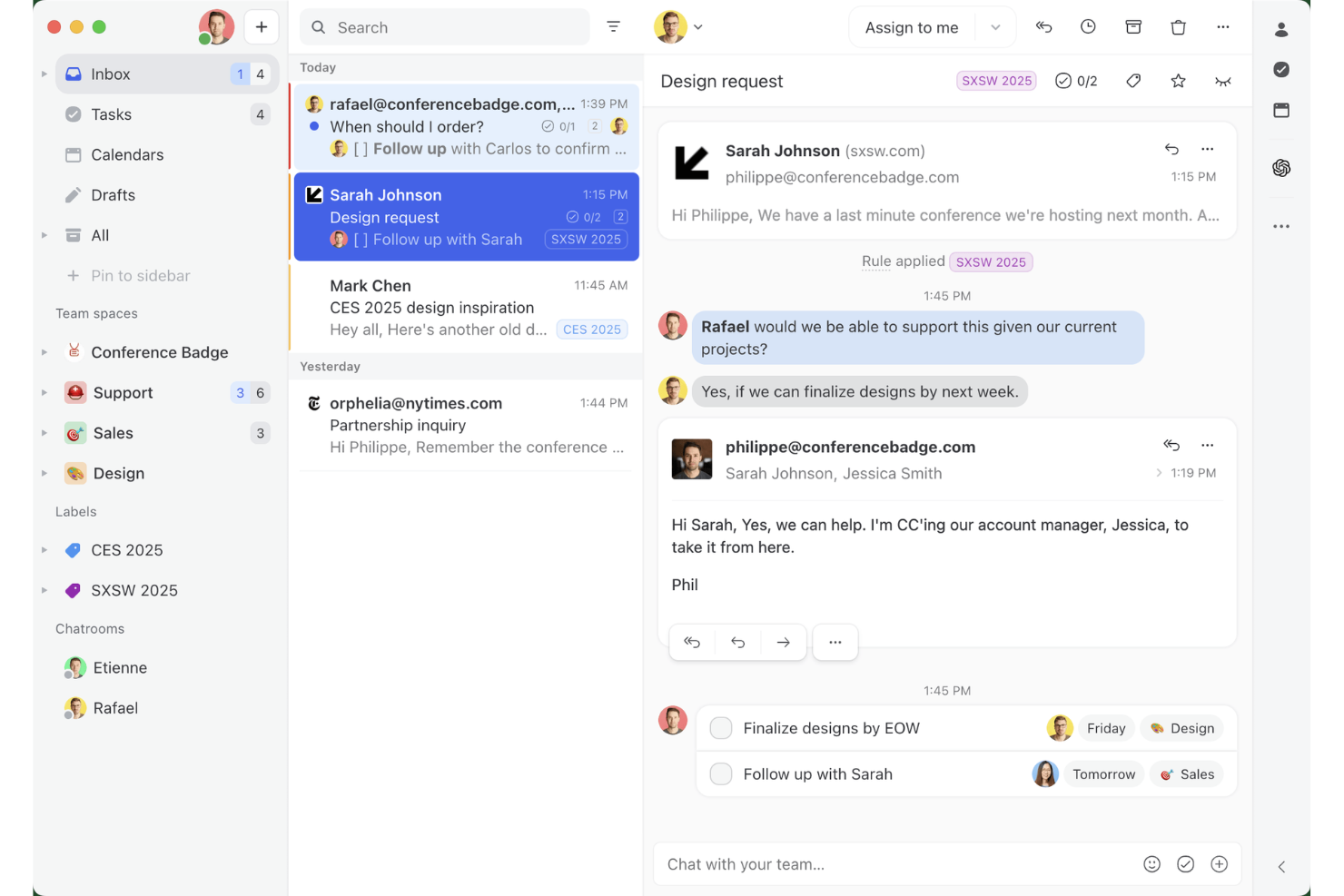
Missive è una piattaforma di posta in arrivo condivisa e collaborazione via email che combina messaggistica multicanale, gestione delle attività del team e integrazione nativa con Google Calendar in un unico spazio di lavoro.
Per chi è più adatta Missive?
Missive è adatta ai team il cui lavoro sui progetti si svolge principalmente tramite email, come le agenzie e i team operativi a contatto con i clienti che gestiscono le attività direttamente dalle caselle di posta condivise.
Perché ho scelto Missive
Ho scelto Missive come uno dei migliori strumenti perché è l'unico della mia lista basato sull'idea che il lavoro sui progetti si svolga all'interno delle conversazioni email. Mi piace molto la possibilità di trasformare un'email di un cliente in un'attività assegnata con una scadenza e poi visualizzare tutto insieme agli eventi di Google Calendar in un'unica vista, senza mai uscire dalla casella di posta. L'assistente IA di Missive può anche creare e aggiornare gli eventi di Google Calendar direttamente da una conversazione, una scorciatoia davvero utile per i team che lavorano principalmente tramite email.
Funzionalità principali di Missive
- Gestione della casella di posta condivisa: Più membri del team possono visualizzare, rispondere e assegnare conversazioni da un'unica casella di posta condivisa senza intralciare il lavoro degli altri.
- Commenti interni e tag: Aggiungi note private e tagga i membri del team direttamente nelle conversazioni email per mantenere tutto il contesto in un unico posto.
- Automazione basata su regole: Configura trigger automatici per assegnare conversazioni, creare attività o applicare etichette in base alle condizioni che definisci.
- Posta in arrivo multicanale: Collega gli account email, SMS e WhatsApp Business in un'unica casella di posta unificata per gestire tutte le comunicazioni con i clienti in un unico posto.
- Server MCP di Missive: Collega strumenti di IA esterni, come Claude o ChatGPT, per consultare le conversazioni dei progetti, controllare i calendari e preparare risposte, mantenendo però obbligatoria la revisione del team prima dell'invio.
Integrazioni di Missive
Missive offre integrazioni native con Google Workspace, Microsoft 365, Asana, ClickUp, Trello e Todoist. Fornisce inoltre un'API aperta per le integrazioni personalizzate, supporta Zapier e include il suo nuovo Server MCP nei piani Productive e Business (è necessaria l'attivazione da parte di un amministratore).
Pros and Cons
Pros:
- Casella di posta condivisa e calendario in un unico spazio di lavoro
- Converte le email in attività di progetto assegnate
- L'IA può gestire gli eventi di Google Calendar
Cons:
- Le scadenze delle attività non vengono sincronizzate con Google Calendar
- Nessuna vista temporale o di progetto con diagramma di Gantt
New Product Updates from Missive
Missive Adds Conversation Pins
Missive now lets you pin key links, decisions, and notes inside a conversation, keeping them accessible in a dedicated Pins section in the Details sidebar. For more information, visit Missive's official site.
 .
.
Quire
Ideale per suddividere compiti complessi
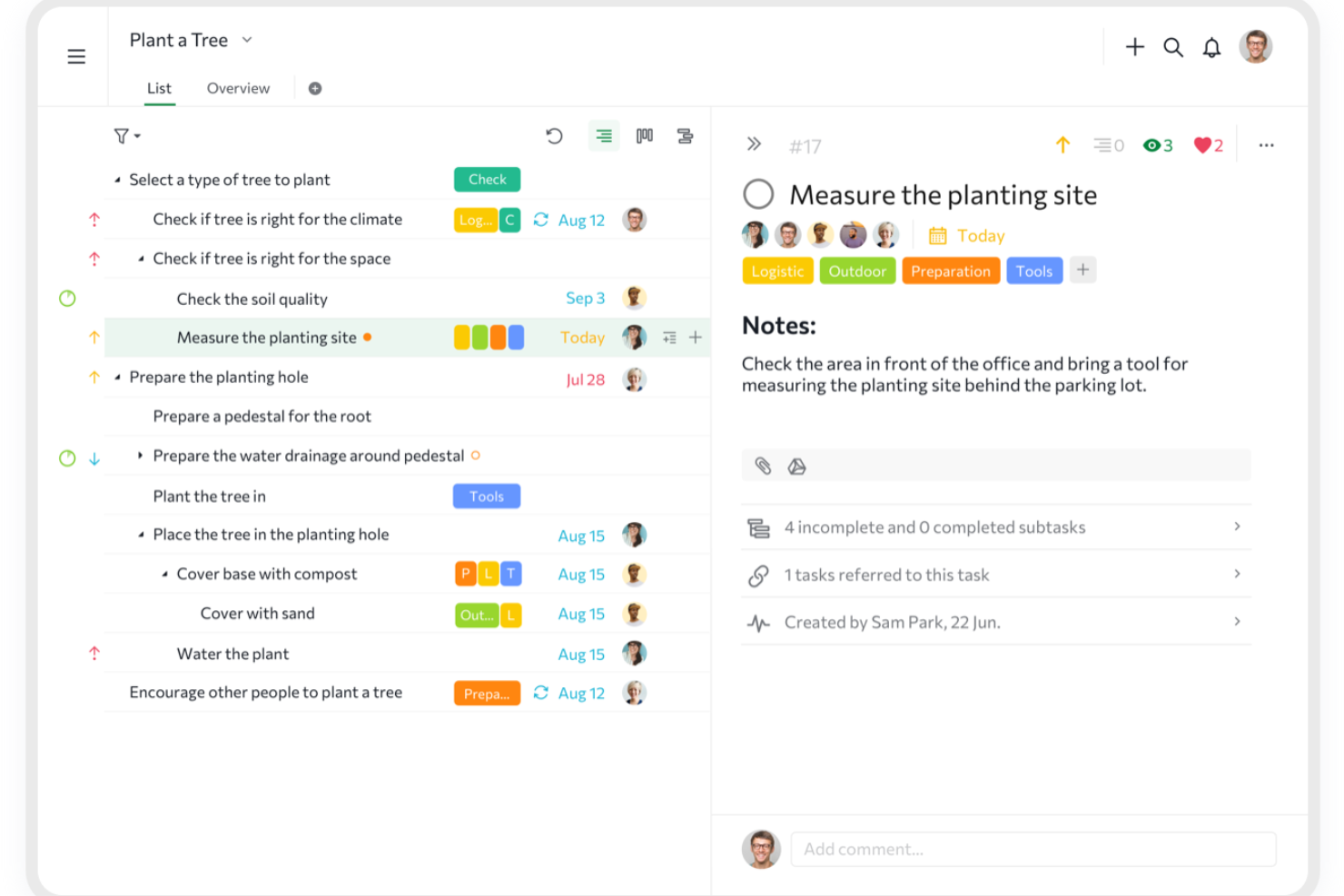
Quire è uno strumento di gestione dei progetti progettato per aiutare i team a organizzare, pianificare ed eseguire il proprio lavoro in modo più efficace. Offre un approccio strutturato alla gestione di attività e progetti e propone diverse visualizzazioni come bacheche Kanban, diagrammi di Gantt e timeline, per adattarsi a vari flussi di lavoro.
Perché ho scelto Quire: Mi piace la sua lista di attività annidate, che permette di suddividere progetti grandi e complessi in attività e sottoattività più piccole e gestibili. Questa struttura gerarchica aiuta a organizzare il lavoro in modo logico, rendendo più facile tracciare i progressi e mantenere chiarezza durante tutto il ciclo di vita del progetto. Inoltre, la funzionalità Smart Folder di Quire consente di visualizzare attività provenienti da diversi progetti in un unico posto, offrendo una prospettiva unificata particolarmente utile quando si gestiscono più progetti contemporaneamente.
Funzionalità di rilievo & integrazioni:
Funzionalità chiave includono una visualizzazione dinamica della timeline, che fornisce una rappresentazione visiva della pianificazione del progetto, aiutandoti a pianificare e modificare le scadenze con una semplice interfaccia drag-and-drop. Dispone inoltre di campi personalizzati che permettono di aggiungere dati specifici alle attività, come stime di budget o livelli di priorità, aiutando a personalizzare lo strumento secondo le esigenze del progetto.
Le integrazioni includono Google Calendar, Gmail, Slack, Outlook, Zoho Flow, GitHub, Apple Calendar Sync, Box, Dropbox, Google Drive e Microsoft Teams.
Pros and Cons
Pros:
- Possibilità di creare attività e sottoattività annidate, per una suddivisione dettagliata del progetto
- Più visualizzazioni di progetto, incluse liste, bacheche e timeline
- Facile collaborare con i membri del team
Cons:
- Possibile sovraccarico di notifiche, soprattutto con team numerosi
- La versione mobile manca di alcune funzionalità disponibili su desktop
New Product Updates from Quire

Quire Adds Task and Standalone Reminders
Quire adds task reminders and standalone reminders with shared notifications, recurring schedules, and automatic date tracking. These updates help teams stay ahead of deadlines and manage reminders that do not need a task. For more information, visit Quire’s official site.
 .
.
Ideale per archiviazione illimitata dei progetti
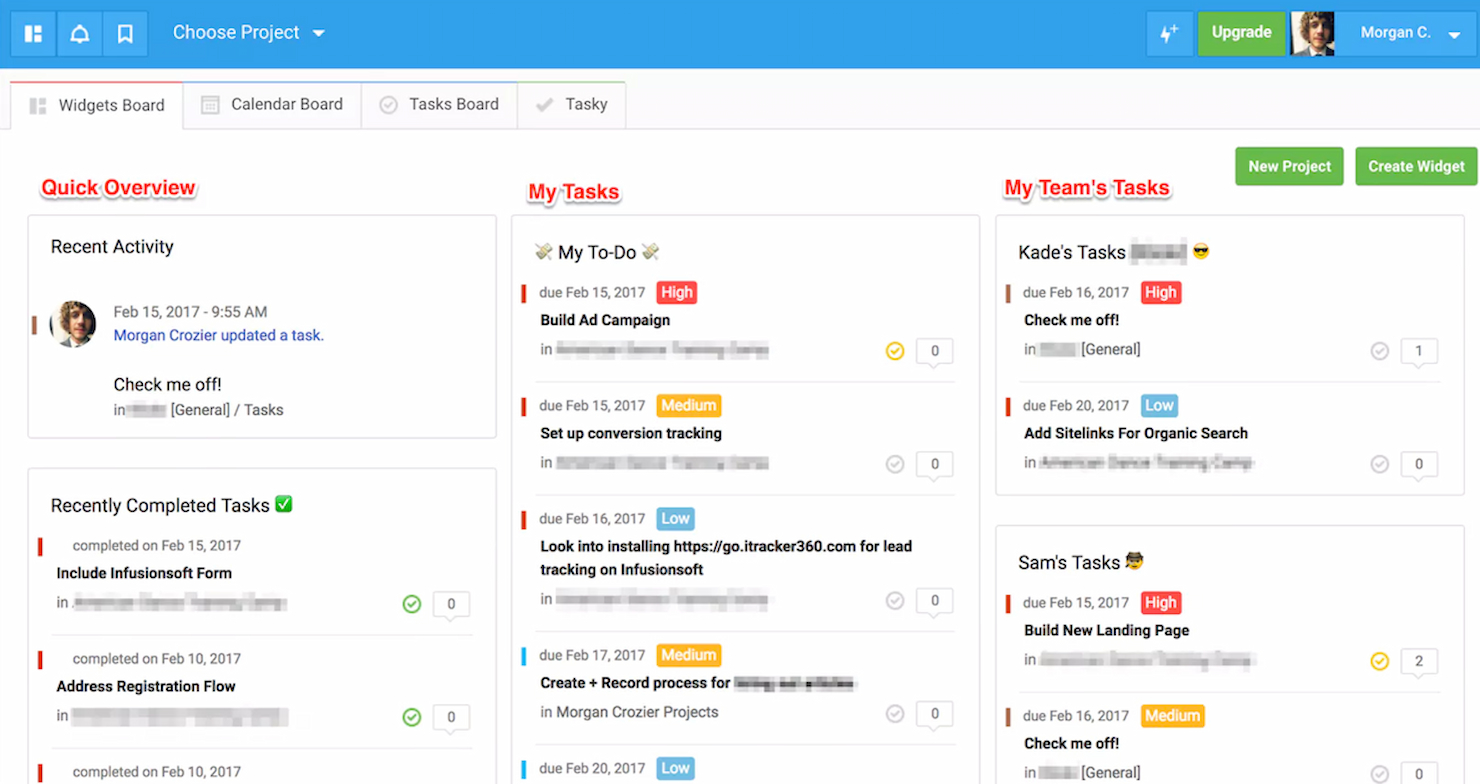
Freedcamp è un software di gestione progetti progettato per aiutare i team a collaborare in modo efficace. È riconosciuto come il migliore per l'offerta di spazio di archiviazione illimitato per i progetti, garantendo che i team non debbano mai preoccuparsi di limiti di spazio.
Perché ho scelto Freedcamp: Ho selezionato Freedcamp per questa lista grazie alla sua robusta gamma di funzionalità che rispondono a diverse esigenze di gestione dei progetti, distinguendolo dagli altri strumenti. Ho stabilito che Freedcamp è ideale per l'archiviazione illimitata dei progetti perché consente ai team di conservare tutti i dati di progetto necessari, caratteristica fondamentale per le organizzazioni che gestiscono grandi volumi di informazioni.
Caratteristiche e integrazioni principali:
Le caratteristiche chiave di Freedcamp includono elenchi di attività, attività secondarie, diagrammi di Gantt, bacheche Kanban, visualizzazione calendario, tracciamento dei problemi, monitoraggio del tempo e fatturazione. Offre anche un sistema CRM, wiki e forum di discussione.
Lo strumento si integra nativamente con Google Calendar, Google Drive, Dropbox, OneDrive, Zapier, Toggl e altro ancora.
Pros and Cons
Pros:
- Spazio di archiviazione illimitato per file e progetti
- Ampia gamma di strumenti per la gestione dei progetti e la collaborazione
- Visualizzazioni flessibili tra cui Kanban, Gantt e calendario
Cons:
- Le funzionalità avanzate richiedono la sottoscrizione ai piani di livello superiore
- L’interfaccia può risultare complessa per i nuovi utenti
- Integrazioni con terze parti limitate rispetto ad alcuni concorrenti

Trello
Ideale per l'organizzazione visiva delle attività
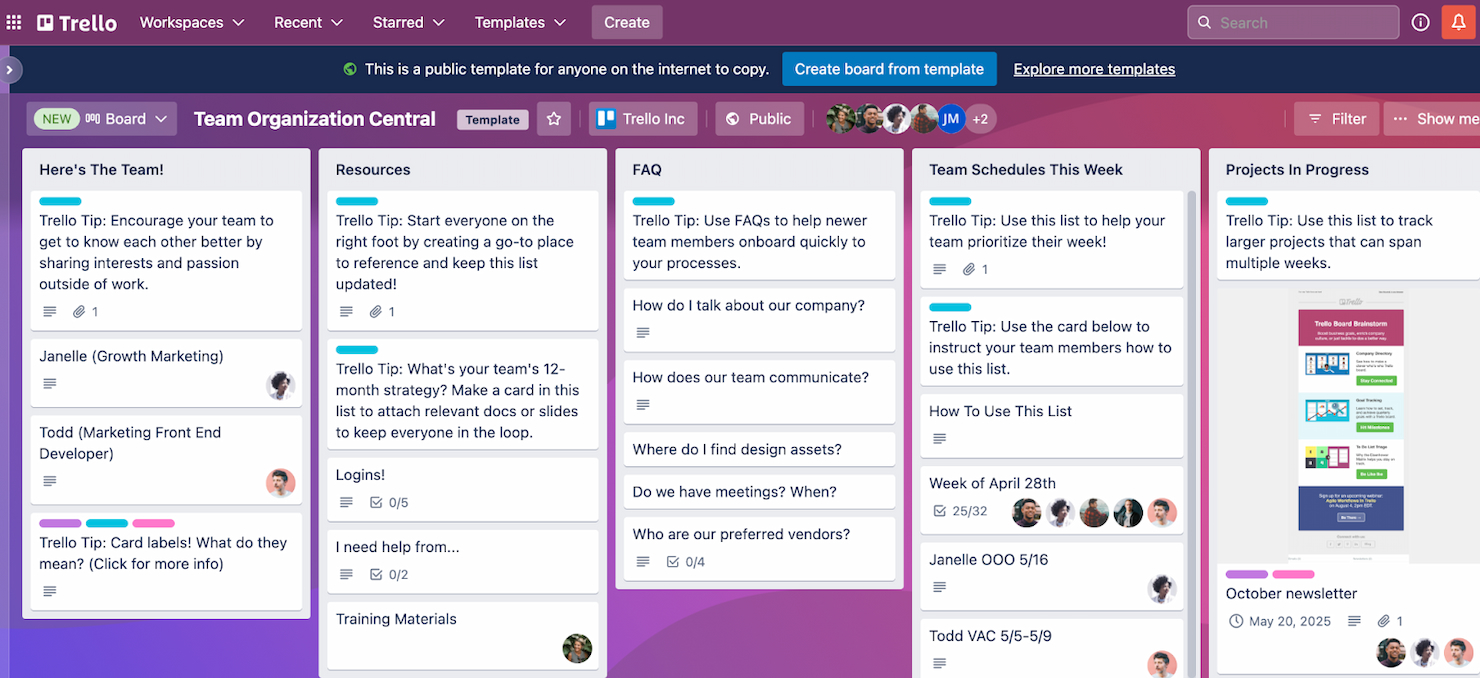
Trello è un'applicazione di gestione progetti basata sul web che facilita l'organizzazione attraverso un'interfaccia visiva. È l'ideale per l'organizzazione visiva delle attività grazie al suo design a schede, che consente un facile monitoraggio e gestione delle attività.
Perché ho scelto Trello: Ho selezionato Trello per il suo esclusivo sistema di schede visive che lo differenzia da altri software di gestione progetti. L'ho ritenuto il migliore per l'organizzazione visiva delle attività grazie alla sua capacità di offrire una rappresentazione chiara e visiva delle attività e dei flussi di lavoro, particolarmente vantaggiosa per i team che danno priorità al monitoraggio visivo dei progetti.
Funzionalità principali & integrazioni:
Le principali funzionalità di Trello includono il sistema di bacheche e schede, che può essere personalizzato per adattarsi a qualsiasi progetto o flusso di lavoro. Offre anche Power-Ups per ampliare le sue capacità e Butler per l'automazione.
Trello si integra con una varietà di strumenti, tra cui Slack, Google Drive, Dropbox, Box, OneDrive, Salesforce, Evernote, Mailchimp, Zapier, Clockify e Confluence.
Pros and Cons
Pros:
- Interfaccia visiva per una facile gestione delle attività
- Bacheche altamente personalizzabili
- Ampie opzioni di integrazione
Cons:
- Può essere meno adatto a esigenze di gestione progetti complesse
- La versione gratuita ha funzionalità limitate
- Potrebbero essere necessari Power-ups per funzionalità avanzate, aumentando i costi

Ideale per la gestione di clienti e progetti in un'unica soluzione
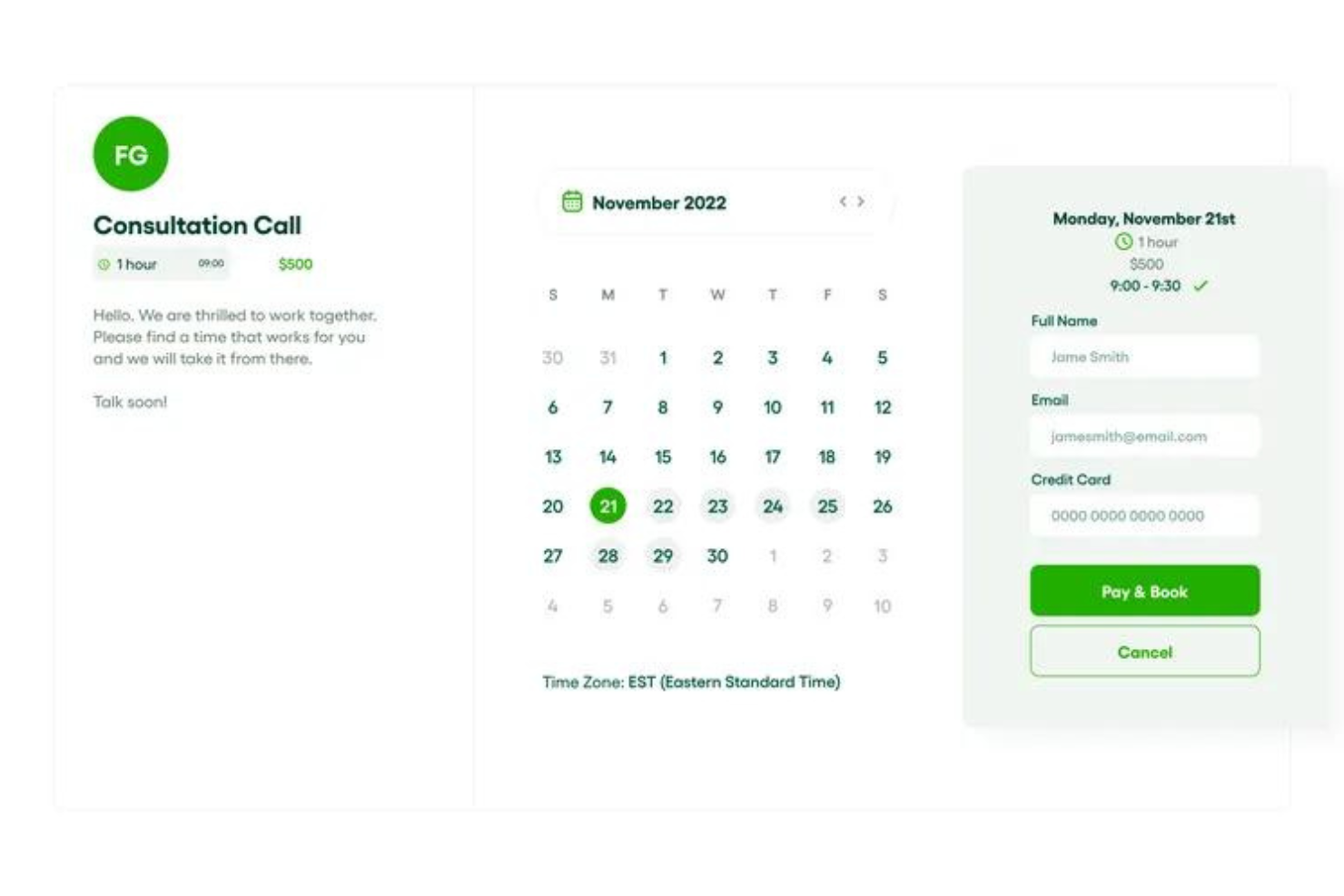
Bonsai è una piattaforma di gestione aziendale per agenzie. Le sue funzionalità aiutano gli utenti a semplificare i flussi di lavoro, gestire i progetti e mantenere le relazioni con i clienti in un'unica piattaforma.
Perché ho scelto Bonsai: Ho deciso di includere questo software di project management nella mia lista per come risponde in modo unico alle esigenze delle agenzie e di altri fornitori di servizi professionali. Oltre alla sua suite completa di strumenti di gestione progetti, offre anche diverse integrazioni con i calendari (incluso Google Calendar) che permettono una prenotazione più facile delle riunioni con i clienti.
Gli utenti possono assegnare attività, progetti e clienti a diversi membri del team e collaboratori esterni. Possono inoltre fissare scadenze e monitorare l'avanzamento dei progetti e delle attività, assicurando che i progetti restino nei tempi previsti. Il software offre anche strumenti per la creazione di proposte, la gestione dei contratti e l'elaborazione dei pagamenti dei clienti.
Funzionalità e integrazioni di spicco di Bonsai
Le funzionalità includono impostazioni per valuta e tasse multiple, supportando le agenzie che lavorano con clienti internazionali. Il software dispone anche di un generatore di fatture automatico integrato, che velocizza il processo di fatturazione. Offre inoltre strumenti per il monitoraggio del tempo e la creazione di report finanziari, aiutando le agenzie a gestire efficacemente il tempo dei membri del team e il carico di lavoro, oltre a tenere sotto controllo la redditività.
Le integrazioni includono Gmail, Google Calendar, Zapier, Slack, QuickBooks Online, Calendly, ClickUp, Trello, Google Drive, Google Sheets, Xero, HubSpot e altro ancora.
Pros and Cons
Pros:
- Automazioni per semplificare le attività ripetitive
- Progettato specificamente per le agenzie
- Portali per i clienti disponibili
Cons:
- Potrebbe non essere scalabile per tutti gli utilizzi
- Non tutte le integrazioni sono incluse nel piano di ingresso

Aha!
Ideale per la creazione di roadmap di prodotto
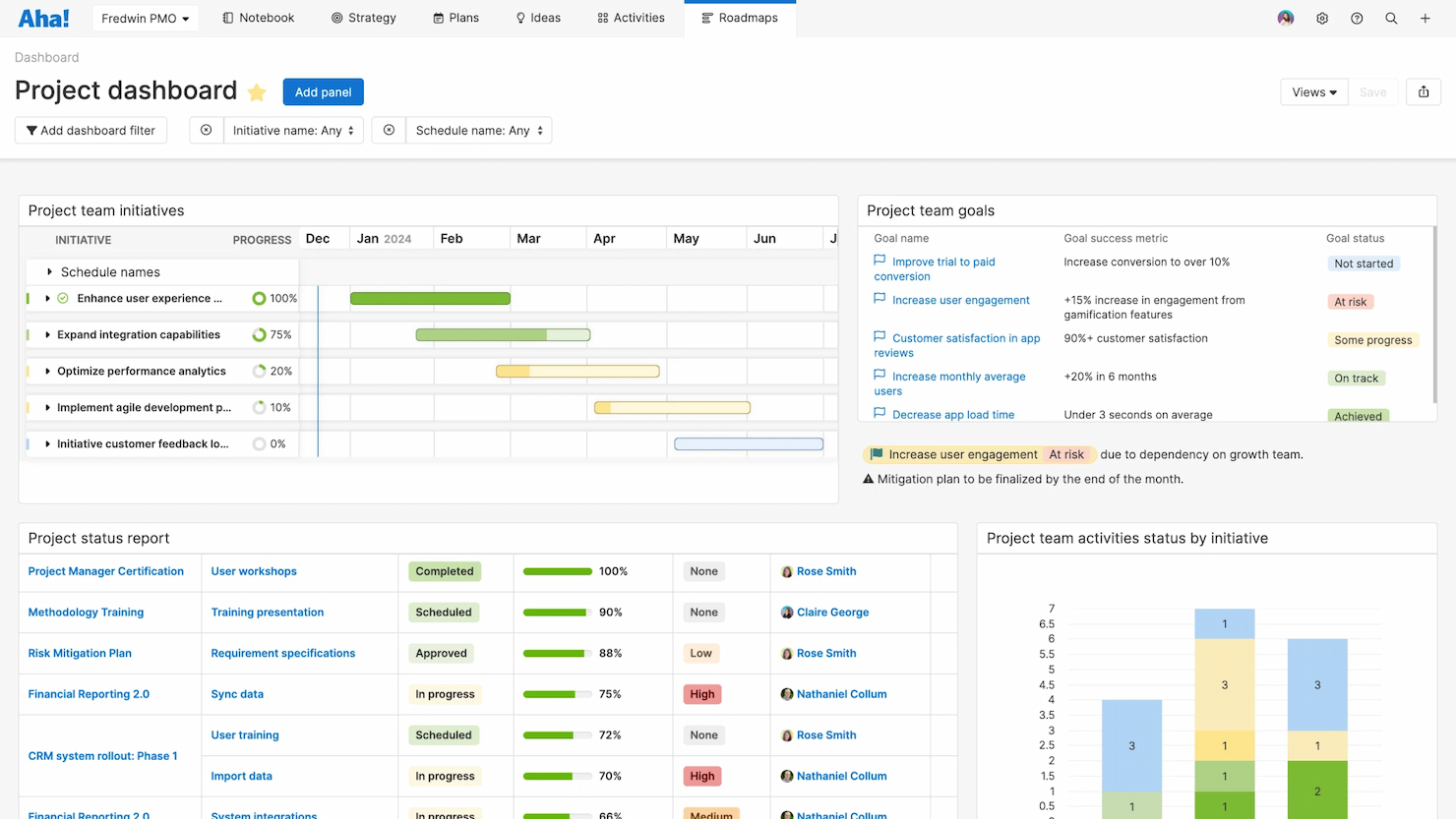
Aha! è uno strumento progettato per definire la strategia, raccogliere idee, valutare le funzionalità e condividere roadmap visive. Si distingue per la sua capacità di aiutare gli utenti a creare e condividere roadmap di prodotto.
Perché ho scelto Aha!: Ho scelto Aha! per il suo approccio distintivo alla creazione delle roadmap di prodotto, che lo differenzia dagli strumenti generici di project management. Eccelle nel permettere la pianificazione strategica e la visualizzazione dei processi di sviluppo del prodotto. Ho ritenuto che Aha! sia il migliore per la creazione di roadmap di prodotto grazie al suo set completo di funzionalità che consentono di collegare obiettivi strategici a piani di implementazione dettagliati.
Funzionalità principali & integrazioni:
Aha! offre una gamma di funzionalità tra cui roadmap strategiche, gestione delle idee, priorità delle funzionalità e cronologie di rilascio. Questi strumenti sono fondamentali per i product manager per visualizzare l'intero ciclo di vita del prodotto e gestirlo in modo efficace.
Aha! si integra nativamente con diversi altri strumenti, tra cui Jira, Salesforce, Slack, GitHub, Trello, Zendesk, Microsoft Teams, Google Sheets e altri, consentendo un flusso di lavoro connesso su diverse piattaforme.
Pros and Cons
Pros:
- Dedicato alla pianificazione strategica delle roadmap di prodotto
- Si integra con una vasta gamma di altri strumenti
- Offre una suite di prodotti su misura per diversi bisogni nella gestione di prodotto
Cons:
- Prezzo di partenza più alto rispetto ad altri strumenti di project management
- La fatturazione annuale potrebbe non essere preferita da tutte le organizzazioni
- Il requisito minimo di licenze può rappresentare una barriera per i team più piccoli

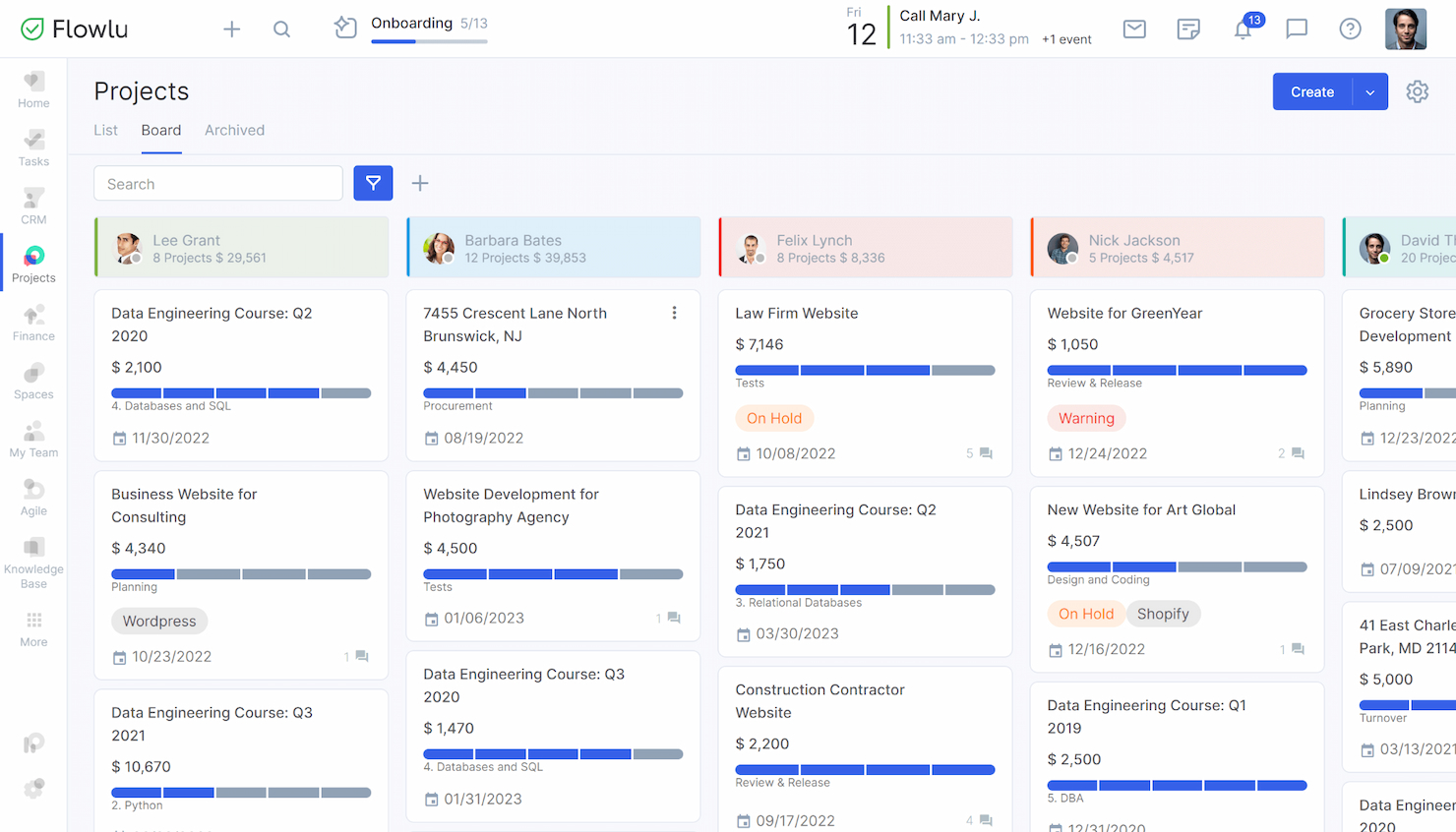
Flowlu Tasks si presenta come una soluzione completa per la gestione aziendale. È progettato per semplificare le operazioni integrando vari processi aziendali in un'unica piattaforma. Flowlu Tasks si distingue come il miglior strumento per la gestione aziendale tutto-in-uno grazie alla sua suite completa di funzionalità che coprono diversi aspetti della gestione, dalla pianificazione dei progetti alla finanza.
Perché ho scelto Flowlu Tasks: Ho scelto Flowlu Tasks per questa lista perché offre una combinazione unica di strumenti per la gestione dei progetti, CRM, fatturazione e gestione finanziaria, tutto in un unico posto. Questa integrazione è ciò che lo differenzia dagli altri software di gestione dei progetti. Credo sia ideale per la gestione aziendale a 360 gradi perché fornisce una visione globale delle operazioni, rendendo più semplice per i manager prendere decisioni informate senza dover passare da un software all'altro.
Funzionalità principali & integrazioni:
Flowlu Tasks offre una serie robusta di funzionalità che includono pianificazione dei progetti, gestione delle attività, monitoraggio del tempo e strumenti per la gestione finanziaria. La sua funzionalità CRM aiuta le aziende a gestire efficacemente le relazioni con i clienti, mentre le funzioni di fatturazione e reportistica finanziaria assicurano che la gestione finanziaria sia integrata con altri processi aziendali.
Lo strumento si integra nativamente con Google Calendar, Google Drive, Google Contacts, Google Mail, Zapier, QuickBooks, Xero, PayPal, Stripe e Mailchimp.
Pros and Cons
Pros:
- Funzionalità complete per la gestione aziendale
- Integrazioni native con strumenti popolari
- Gestione finanziaria e CRM inclusi
Cons:
- Prezzo iniziale più alto rispetto ad alcuni concorrenti
- È richiesto un minimo di 8 utenti per il piano a pagamento più economico
- La fatturazione annuale potrebbe non essere preferita da tutte le aziende
Altri software di gestione dei progetti con integrazione di Google Calendar
Ecco alcune opzioni aggiuntive di software di gestione dei progetti con integrazione di Google Calendar che non sono entrate nella mia selezione, ma che vale comunque la pena valutare:
- Qualtir
Ideale per la semplicità
- Gantter
Ideale per diagrammi di Gantt su Google Workspace
- Kanbanchi Team
Ideale per l'evidenziazione del percorso critico
- forScale
Ideale per la pianificazione dei progetti su Google Workspace
- GoodDay
Ideale per il coordinamento centralizzato delle risorse
- Kissflow
Ideale per l'efficienza della piattaforma low-code


Come Valuto il Software di Project Management con Integrazione a Google Calendar
Suddivido la mia valutazione tra ciò che uno strumento deve assolutamente fare—come sincronizzare le scadenze direttamente su Google Calendar—e ciò che lo rende adatto ad agenzie o team distribuiti.
Funzionalità Principali (Requisiti di Base per Questa Lista)
Quando seleziono gli strumenti per la mia lista, valuto ciascuno su una scala da 0 (non offre la funzionalità) a 5 (eccelle in quest’area) per ogni funzionalità principale elencata di seguito. Poi calcolo il punteggio totale dello strumento in una percentuale. Ogni strumento deve raggiungere un punteggio minimo totale del 65% per essere considerato nell’elenco.
- Sincronizzazione con Google Calendar: Verifico se l’integrazione è nativa o richiede un connettore di terze parti come Zapier, poiché le connessioni native tendono a sincronizzarsi più velocemente e si interrompono meno spesso.
- Supporto alla Sincronizzazione Bidirezionale: Le modifiche alla data di scadenza di un’attività dovrebbero riflettersi su Google Calendar—e la riprogrammazione di un evento nel calendario dovrebbe aggiornare lo strumento di PM.
- Gestione di Attività e Progetti: Ogni strumento deve prevedere assegnazione, scadenze, stati e dipendenze così puoi gestire una reale consegna dei lavori, non solo semplici liste di cose da fare.
- Viste Timeline & Pianificazione: Cerco viste calendario, Gantt o temporali che permettono di trascinare e rilasciare le attività per riprogrammarle—particolarmente utili quando le date degli sprint cambiano a metà ciclo.
- Funzionalità di Collaborazione per il Team: Progetti condivisi con commenti, menzioni e notifiche sono fondamentali per i team distribuiti che coordinano tra fusi orari diversi.
- Automazione di Scadenze & Promemoria: Valuto se le scadenze e i promemoria compaiono automaticamente in Google Calendar in modo che il tuo team riceva gli avvisi dove già consulta il calendario.
Una volta che ho una lista di strumenti che soddisfano i criteri, considero cosa distingue ciascuna piattaforma.
Fattori Differenzianti (Cosa Distingue i Fornitori)
Ecco come confronto e metto a confronto i diversi fornitori:
Funzionalità Distintive
Ricerco il bilanciamento del carico di lavoro basato su calendario che sovrappone gli eventi di Google Calendar con le attività assegnate, così da individuare quando il lavoro di sprint di qualcuno si sovrappone a una giornata piena di riunioni. Anche il supporto multi-calendario è fondamentale—i PM delle agenzie che gestiscono clienti, team interni e calendari personali hanno bisogno di filtri granulari per mostrare solo gli eventi rilevanti per ogni progetto. Strumenti che trasformano note di riunione o attività in compiti monitorabili fanno risparmiare davvero tempo dopo i meeting settimanali.
Oltre le Funzionalità
L’integrazione nell’ecosistema Google Workspace è una delle prime cose che valuto—gli strumenti che si collegano a Drive, Gmail e Meet insieme a Calendar offrono un’esperienza di single sign-on e meno necessità di cambiare contesto. Anche la struttura dei prezzi conta, soprattutto per freelance o piccole agenzie che necessitano di una versione gratuita usabile prima di investire. Controllo inoltre l’ampiezza delle integrazioni oltre Google, poiché quasi tutti i team si affidano contemporaneamente a Slack, Jira o un CRM, e la mancanza di queste crea rapidamente lavoro manuale.
Come scegliere un software di gestione dei progetti con integrazione di Google Calendar
È facile perdersi tra lunghi elenchi di funzionalità e strutture tariffarie complesse. Per aiutarti a rimanere concentrato mentre affronti il tuo processo di selezione del software, unico nel suo genere, ecco un elenco di fattori da tenere a mente:
| Fattore | Cosa considerare |
| Scalabilità | Assicurati che lo strumento possa supportare il tuo team mentre cresce, con funzionalità come autorizzazioni avanzate, modelli di progetto o dashboard basate sui ruoli. |
| Integrazioni | Cerca strumenti che si connettano facilmente a Google Calendar e alle altre app su cui fai affidamento, come Gmail, Drive, Slack o Zoom. |
| Personalizzazione | Scegli un software che ti permetta di adattare le visualizzazioni delle attività, i flussi di lavoro e i calendari al processo del tuo team, e non il contrario. |
| Facilità d'uso | Scegli uno strumento che il tuo team possa iniziare a utilizzare subito, con un layout chiaro, menu semplici e collegamenti chiari tra attività ed eventi del calendario. |
| Budget | Fai attenzione ai costi nascosti e confronta le funzionalità disponibili nei diversi livelli di prezzo. Un piano gratuito potrebbe essere sufficiente per soddisfare le tue esigenze. |
| Misure di sicurezza | Verifica la presenza di funzionalità come l'autenticazione a due fattori, l'accesso basato sui ruoli e la crittografia dei dati per proteggere il tuo lavoro e i dati del calendario. |
| Sincronizzazione del calendario | Verifica che l'integrazione supporti gli aggiornamenti in tempo reale e la sincronizzazione bidirezionale, in modo che le modifiche apportate in un sistema vengano visualizzate nell'altro senza ritardi. |
| Strumenti di collaborazione | Cerca strumenti che permettano al tuo team di condividere calendari, commentare le attività e ricevere aggiornamenti senza cambiare piattaforma. |
Tendenze nei software di gestione dei progetti
Nella mia ricerca ho raccolto innumerevoli aggiornamenti di prodotto, comunicati stampa e registri delle versioni di diversi fornitori di software per la gestione dei progetti. Ecco alcune delle tendenze emergenti che sto tenendo d'occhio:
- Definizione delle priorità delle attività basata sull'IA: alcuni strumenti utilizzano ora l'IA per aiutarti a decidere quale attività affrontare per prima in base all'urgenza, al carico di lavoro e alle scadenze. Questo ti aiuta a gestire la concentrazione senza dover ordinare manualmente gli elenchi di attività.
- Previsione integrata delle risorse: un numero crescente di piattaforme aggiunge strumenti per aiutarti a stimare la capacità del team, assegnare le ore e individuare in anticipo i conflitti relativi alle risorse. Ciò elimina la necessità di fogli di calcolo separati o del monitoraggio manuale.
- Spazi di collaborazione integrati: le visualizzazioni dei progetti iniziano a includere documenti condivisi, commenti sui file e conversazioni direttamente nelle schede delle attività. In questo modo le comunicazioni rimangono in un unico posto e si riduce la necessità di passare da uno strumento all'altro.
- Funzionalità di pianificazione degli scenari: alcuni sistemi consentono di testare diverse versioni di un piano di progetto per confrontare tempistiche, budget o personale prima di prendere un impegno. Questa funzione può essere utile per i team che gestiscono progetti complessi o soggetti a cambiamenti.
- Monitoraggio della sostenibilità: alcuni strumenti offrono ora la possibilità di registrare gli obiettivi ambientali o monitorare l'impronta di carbonio delle attività di progetto. Si tratta di un'esigenza sempre più diffusa per i team che lavorano al raggiungimento di obiettivi di sostenibilità.
Che cos'è il software di gestione dei progetti con integrazione a Google Calendar?
Il software di gestione dei progetti con integrazione a Google Calendar è uno strumento digitale che combina le funzionalità tradizionali di gestione dei progetti con la praticità di Google Calendar. Viene utilizzato da project manager, team e organizzazioni per sincronizzare le tempistiche, le attività e le tappe fondamentali dei progetti con il proprio Google Calendar. Questa integrazione facilita il coordinamento degli impegni e delle risorse, garantendo che le scadenze dei progetti siano in linea con i calendari personali e del team.
I componenti di questo software includono strumenti per la gestione delle attività, la pianificazione, l'allocazione delle risorse e la collaborazione, tutti collegati a Google Calendar. Gli utenti possono visualizzare le attività del progetto insieme agli eventi personali o del team, impostare promemoria e ricevere notifiche, semplificando il monitoraggio dei progetti e la gestione del tempo. Questa integrazione mira a migliorare la produttività offrendo una visione unificata delle tempistiche dei progetti e degli impegni personali.
Funzionalità del software di gestione dei progetti con integrazione a Google Calendar
Quando scegli un software di gestione dei progetti con integrazione a Google Calendar, presta attenzione alle seguenti funzionalità chiave:
- Sincronizzazione bidirezionale del calendario: Mantiene aggiornate le attività e gli eventi del calendario in entrambi i sistemi, così non perderai nessuna modifica.
- Mappatura da attività a calendario: Consente di trasformare le attività in eventi del calendario con orari e date assegnati, per una pianificazione migliore.
- Opzione di visualizzazione del calendario: Offre una disposizione visiva delle attività e delle scadenze in formato calendario all'interno dello strumento di gestione dei progetti.
- Promemoria e avvisi degli eventi: Invia notifiche automatiche prima delle riunioni o delle scadenze delle attività, per aiutarti a rispettare il programma.
- Calendari condivisi del team: Consente al team di visualizzare e coordinare i programmi in un unico luogo, migliorando la collaborazione.
- Supporto dei fusi orari: Regola le voci del calendario in base alla posizione, così i team da remoto rimangono sincronizzati.
- Programmazione delle attività ricorrenti: Consente di programmare attività ripetitive che vengono sincronizzate anche con Google Calendar.
- Riprogrammazione con trascinamento: Consente di spostare le attività nella vista calendario per aggiornare rapidamente le date di scadenza.
- Opzioni di filtro del calendario: Consente di visualizzare le attività per progetto, priorità o membro del team, per una pianificazione più chiara.
- Accesso mobile al calendario: Consente di controllare o aggiornare le attività del progetto dal telefono tramite Google Calendar.
Vantaggi del software di gestione dei progetti con integrazione di Google Calendar
L'implementazione di un software di gestione dei progetti con integrazione di Google Calendar offre diversi vantaggi al team e all'azienda. Ecco alcuni dei vantaggi che puoi aspettarti:
- Coordinamento da remoto più semplice: La sincronizzazione del calendario mantiene tutti allineati, anche tra fusi orari diversi.
- Meno scadenze mancate: Le attività sincronizzate con il calendario ti aiutano a tenere sotto controllo cosa deve essere completato e quando.
- Maggiore preparazione alle riunioni: Collegare le attività agli eventi del calendario rende più semplice partecipare preparati e organizzati.
- Minore alternanza tra contesti: Puoi gestire il programma e i progetti in un unico luogo, senza passare continuamente da uno strumento all'altro.
- Programmi del team più chiari: I calendari condivisi rendono più semplice vedere chi è disponibile e quando viene svolto il lavoro.
- Riprogrammazione più rapida: Gli aggiornamenti delle attività tramite trascinamento nella vista calendario fanno risparmiare tempo quando i piani cambiano.
- Pianificazione più accurata: Vedere attività e riunioni affiancate aiuta a stimare cosa sia effettivamente possibile completare.
Costi e prezzi del software di gestione dei progetti con integrazione di Google Calendar
La scelta di un software di gestione dei progetti con integrazione di Google Calendar richiede la comprensione dei vari modelli di prezzo e dei piani disponibili. I costi variano in base alle funzionalità, alle dimensioni del team, agli extra e ad altri fattori. La tabella seguente riassume i piani più comuni, i relativi prezzi medi e le funzionalità tipicamente incluse nelle soluzioni di software di gestione dei progetti con integrazione di Google Calendar:
Tabella di confronto dei piani per il software di gestione dei progetti con integrazione di Google Calendar
| Tipo di piano | Prezzo medio | Funzionalità comuni |
| Piano gratuito | $0 (Gratuito) | Gestione di base delle attività, integrazioni limitate, funzionalità essenziali di monitoraggio, accesso per un numero limitato di utenti |
| Piano individuale | $5 - $10/utente/mese | Monitoraggio di attività e progetti, integrazione di Google Calendar, reportistica di base, funzionalità di automazione limitate |
| Piano per team | $10 - $25/utente/mese | Gestione avanzata delle attività, strumenti di collaborazione del team, calendari condivisi, reportistica avanzata, alcune funzionalità di automazione |
| Piano aziendale | $25 - $50/utente/mese | Funzionalità complete di pianificazione dei progetti, gestione delle risorse, reportistica completa, integrazioni estese, automazione avanzata |
| Piano aziendale avanzato | Prezzo personalizzato | Funzionalità personalizzabili, assistenza dedicata, opzioni di sicurezza avanzate, integrazioni personalizzate, funzionalità complete di automazione |
Domande frequenti sul software di gestione dei progetti con integrazione di Google Calendar
Ecco alcune delle domande frequenti che mi vengono poste sul software di gestione dei progetti con integrazione di Google Calendar.
Posso visualizzare le attività del mio progetto direttamente in Google Calendar dopo l'integrazione?
Sì, una volta integrato il software di gestione dei progetti con Google Calendar, puoi visualizzare le attività del tuo progetto direttamente in Google Calendar. Questa integrazione consente in genere di visualizzare come eventi in Google Calendar le attività con scadenze nel software di gestione dei progetti, fornendoti una sequenza temporale visiva dei risultati del progetto.
In che modo l'integrazione con Google Calendar aiuta nella gestione delle risorse?
L’integrazione con Google Calendar aiuta nella gestione delle risorse fornendo visibilità sulla disponibilità e sugli impegni dei membri del team. I responsabili possono programmare facilmente attività e riunioni in base agli orari in cui i membri del team sono disponibili, riducendo le sovrapposizioni e garantendo un carico di lavoro equilibrato. Questa visibilità aiuta a ottimizzare l’allocazione delle risorse e a migliorare la produttività.
È possibile ricevere notifiche sugli aggiornamenti del progetto tramite Google Calendar?
Sì, l’integrazione del software di gestione dei progetti con Google Calendar consente di ricevere notifiche sugli aggiornamenti del progetto. Puoi impostare promemoria per le scadenze o le riunioni imminenti e ricevere avvisi per eventuali modifiche apportate alle attività o agli orari nel tuo strumento di gestione dei progetti, così da rimanere informato sugli ultimi sviluppi del progetto.
Cosa devo cercare in un software di gestione dei progetti per garantire una buona integrazione con Google Calendar?
Quando cerchi un software di gestione dei progetti con integrazione di Google Calendar, assicurati che supporti la sincronizzazione bidirezionale, consentendo agli aggiornamenti apportati in un sistema di essere replicati nell’altro. Cerca inoltre la possibilità di filtrare le attività e i progetti da sincronizzare, impostazioni di notifica personalizzabili e facilità di configurazione e gestione dell’integrazione.
Posso assegnare attività ai membri del team tramite Google Calendar dopo l'integrazione?
Sebbene Google Calendar non consenta in genere di assegnare attività, l’integrazione con il software di gestione dei progetti può permetterti di assegnare attività all’interno del software, che verranno poi visualizzate nei Google Calendar dei membri del team assegnati. In questo modo le assegnazioni delle attività vengono comunicate efficacemente e le scadenze sono visibili nei calendari dei membri del team.
Le modifiche apportate in Google Calendar verranno sincronizzate nuovamente con il software di gestione dei progetti?
Se il software di gestione dei progetti offre la sincronizzazione bidirezionale con Google Calendar, le modifiche apportate in Google Calendar dovrebbero essere sincronizzate nuovamente con il software di gestione dei progetti. Tuttavia, la quantità di informazioni sincronizzate può variare a seconda del software, quindi è importante verificare le funzionalità specifiche dell’integrazione offerta.
Esistono limitazioni nell'utilizzo dell'integrazione di Google Calendar con il software di gestione dei progetti?
Potrebbero esserci limitazioni a seconda delle funzionalità di integrazione delle app di gestione dei progetti. Tra le limitazioni più comuni figurano restrizioni sulla quantità di dati sincronizzabili, possibili ritardi nella sincronizzazione e una capacità limitata di modificare i dettagli del progetto direttamente da Google Calendar. È importante esaminare le funzionalità dell’integrazione e le eventuali limitazioni prima di affidarsi a essa per la gestione dei progetti.