

I 10 migliori software di gestione dei progetti a cascata per il 2026

10 Selezione dei migliori software di gestione dei progetti a cascata


La gestione dei progetti a cascata funziona al meglio per i team che hanno bisogno di struttura, scadenze fisse e risultati chiaramente definiti. Tuttavia, trovare il software giusto per supportare questo tipo di pianificazione non è sempre facile. Alcuni strumenti dichiarano di supportare il metodo a cascata, ma si rivelano inadeguati quando arriva il momento di creare una vera sequenza temporale o monitorare i progressi fase per fase.
Nella mia esperienza di test e valutazione degli strumenti di gestione dei progetti, ho constatato che il miglior software per la gestione a cascata consente di organizzare ogni passaggio dall’inizio alla fine, senza costringerti ad adottare un flusso di lavoro agile.
In questo articolo ti presenterò i migliori strumenti di gestione dei progetti a cascata disponibili oggi. Vedrai quali sono i punti di forza di ciascuno, come gestiscono le dipendenze tra attività e i diagrammi di Gantt e quale potrebbe adattarsi alle esigenze del tuo team.
Perché puoi fidarti di noi
Testiamo e recensiamo software di project management dal 2012. Come project manager, sappiamo quanto sia fondamentale (e difficile) fare la scelta giusta quando si seleziona un software. Investiamo molte risorse nella ricerca per aiutare la nostra audience a scegliere meglio. Abbiamo testato più di 2.000 strumenti per diversi casi d’uso e scritto oltre 1.000 recensioni dettagliate. Scopri come restiamo trasparenti & la nostra metodologia di recensione del software.
Riepilogo dei migliori software di gestione dei progetti a cascata
Questa tabella comparativa riassume i dettagli dei prezzi delle mie migliori selezioni di software per la gestione dei progetti a cascata, per aiutarti a trovare quello più adatto al tuo budget e alle esigenze della tua azienda.
| Tool | Best For | Trial Info | Price | ||
|---|---|---|---|---|---|
| 1 | Ideale per la gestione di progetti suddivisi in fasi | Prova gratuita di 14 giorni + demo gratuita disponibile | Da $8/utente/mese (fatturazione annuale) | Website | |
| 2 | Ideale per la gestione visiva dei progetti end-to-end | Prova gratuita di 14 giorni + piano gratuito disponibile | Da $10/utente/mese (fatturato annualmente) | Website | |
| 3 | Ideale per centralizzare la comunicazione di progetto | Piano gratuito disponibile | Da $39/mese (fatturazione annuale) | Website | |
| 4 | Ideale per modelli di prezzo a tariffa fissa | Prova gratuita di 14 giorni + demo gratuita disponibile | Da $45/mese (fatturazione annuale) | Website | |
| 5 | Ideale per una gestione strategica dei progetti | Demo gratuita disponibile | Prezzo su richiesta | Website | |
| 6 | Ideale per dati di progetto in tempo reale | Prova gratuita di 30 giorni + demo gratuita disponibile | A partire da $15/utente/mese (fatturato annualmente) | Website | |
| 7 | Ideale per la visibilità del portafoglio | Demo gratuita disponibile | Da $3/utente/mese | Website | |
| 8 | Ideale per la previsione dinamica dei progetti | Prova gratuita disponibile | Prezzo su richiesta | Website | |
| 9 | Ideale per una gestione progetti facile e intuitiva | Prova gratuita disponibile | Da $24/utente/mese | Website | |
| 10 | Ideale per la personalizzazione versatile dei progetti | Prova gratuita di 15 giorni + piano gratuito + demo gratuita disponibile | A partire da $4/utente/mese (fatturato annualmente) | Website |

Recensioni dei migliori software di gestione dei progetti a cascata
Di seguito trovi i miei riepiloghi dettagliati dei migliori software di gestione dei progetti a cascata inclusi nella mia selezione. Le mie recensioni offrono una panoramica approfondita delle funzionalità principali, dei pro e dei contro, delle integrazioni e dei casi d’uso ideali di ogni strumento, per aiutarti a trovare quello più adatto a te.

Workzone
Ideale per la gestione di progetti suddivisi in fasi

Workzone è la soluzione ideale per chi cerca un software di project management a cascata, offrendo un approccio strutturato alla gestione dei progetti in diversi settori. Progettato per team nei settori marketing, sanitario, educativo e dei servizi finanziari, Workzone mette a disposizione gli strumenti necessari per semplificare la visibilità e la collaborazione sui progetti. Puoi affrontare sfide come l'organizzazione della raccolta dei progetti e l'allocazione delle risorse, assicurandoti che i tuoi progetti rimangano in linea, rispettando tempi e budget.
Perché ho scelto Workzone
Ho scelto Workzone perché si integra perfettamente con il metodo di project management a cascata grazie all'enfasi su flussi di lavoro strutturati e chiara visibilità dei progetti. Con funzionalità come report preconfigurati per la gestione dei carichi di lavoro e l'allocazione delle risorse, il tuo team può mantenere il controllo sulle tempistiche e sui budget dei progetti. Inoltre, la gestione del ciclo di vita dei progetti di Workzone permette una visione completa di ogni fase, garantendo che nulla venga trascurato. Sono proprio queste funzionalità specifiche a rendere Workzone una valida candidata per ogni team che adotta la metodologia a cascata.
Funzionalità principali di Workzone
Oltre alle capacità di workflow strutturato, Workzone offre numerose altre funzionalità per supportare la gestione dei tuoi progetti:
- Dipendenze tra le attività: Gestisci e visualizza le sequenze delle attività per assicurare una progressione fluida del progetto.
- Modelli personalizzabili: Sfrutta oltre 1.000 modelli per avviare rapidamente progetti su misura per le tue esigenze specifiche.
- Revisione creativa: Semplifica il processo di revisione con strumenti integrati per la revisione di documenti e materiali creativi.
- Formazione e assistenza illimitate: Approfitta di formazione e supporto completi per una rapida adozione e assistenza continua.
Integrazioni di Workzone
Le integrazioni includono Slack, Microsoft Teams, Google Drive, Salesforce e Box.
Pros and Cons
Pros:
- Ottima visibilità e monitoraggio dei progetti
- Revisione e approvazione documenti integrate
- Gestione strutturata di richieste e carichi di lavoro
Cons:
- Ecosistema di integrazioni più limitato rispetto ai concorrenti
- Esperienza mobile meno efficace rispetto al desktop
New Product Updates from Workzone

Workzone Enterprise Adds Multi-Stage Approval Workflows
Workzone Enterprise now includes Approval Workflows, enabling multi-stage document approvals to standardize complex processes and reduce manual effort. For more information, visit Workzone's official site.
 .
.
Wrike
Ideale per la gestione visiva dei progetti end-to-end
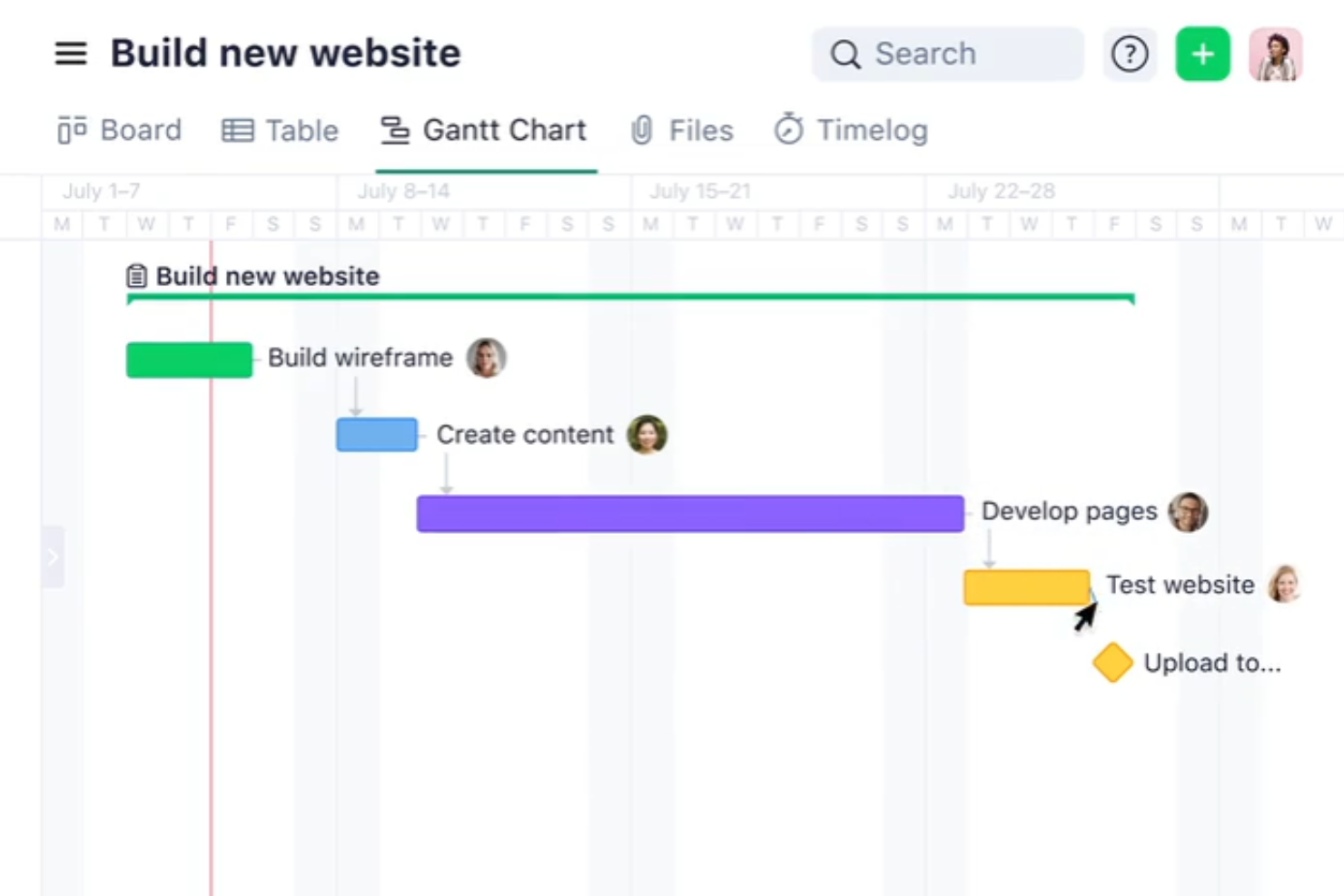
Wrike è uno strumento di gestione progetti e collaborazione pensato per aziende di tutte le dimensioni, che offre una vasta gamma di funzionalità per gestire sia progetti una tantum che attività ricorrenti.
Perché ho scelto Wrike: Mi piace che Wrike offra diverse funzionalità che supportano la natura lineare e sequenziale della metodologia waterfall. I suoi diagrammi di Gantt interattivi sono essenziali per pianificare e visualizzare le tempistiche di progetto, le dipendenze e i percorsi critici. Questi diagrammi permettono ai project manager di modificare facilmente le attività, garantendo che ogni fase del progetto venga completata prima che inizi la successiva. Inoltre, i completi modelli di progetto e le dettagliate capacità di reporting di Wrike aiutano a mantenere una documentazione meticolosa durante l'intero ciclo di vita del progetto.
Funzionalità principali & integrazioni:
Le funzionalità principali di Wrike includono calendari di team, flussi di lavoro personalizzati, dashboard in tempo reale, monitoraggio del tempo, approvazioni automatizzate, priorità delle attività, allocazione delle risorse, gestione del budget, condivisione file, modelli di progetto e avanzati controlli di sicurezza.
Wrike si integra con una varietà di strumenti come Slack, Microsoft, Google, Adobe, Salesforce, Zoom, Tableau, MS Teams, OneDrive, GitHub, Gmail, Dropbox, Okta, OneLogin, HubSpot, Jira e NetSuite.
Pros and Cons
Pros:
- Ampie opzioni di personalizzazione dei flussi di lavoro
- Analisi di progetto complete
- Ottime capacità di gestione visiva delle attività
Cons:
- Può essere complicato imparare a personalizzare completamente la piattaforma
- Le funzionalità avanzate di reporting sono limitate ai piani superiori
New Product Updates from Wrike

Wrike Activity Reports Add Actor Type Details
Wrike’s Activity Report now displays actor type details, helping admins identify whether changes came from the UI, Automation, Wrike Agents, API, or AI via MCP. For more information, visit Wrike's official site.

Nifty
Ideale per centralizzare la comunicazione di progetto
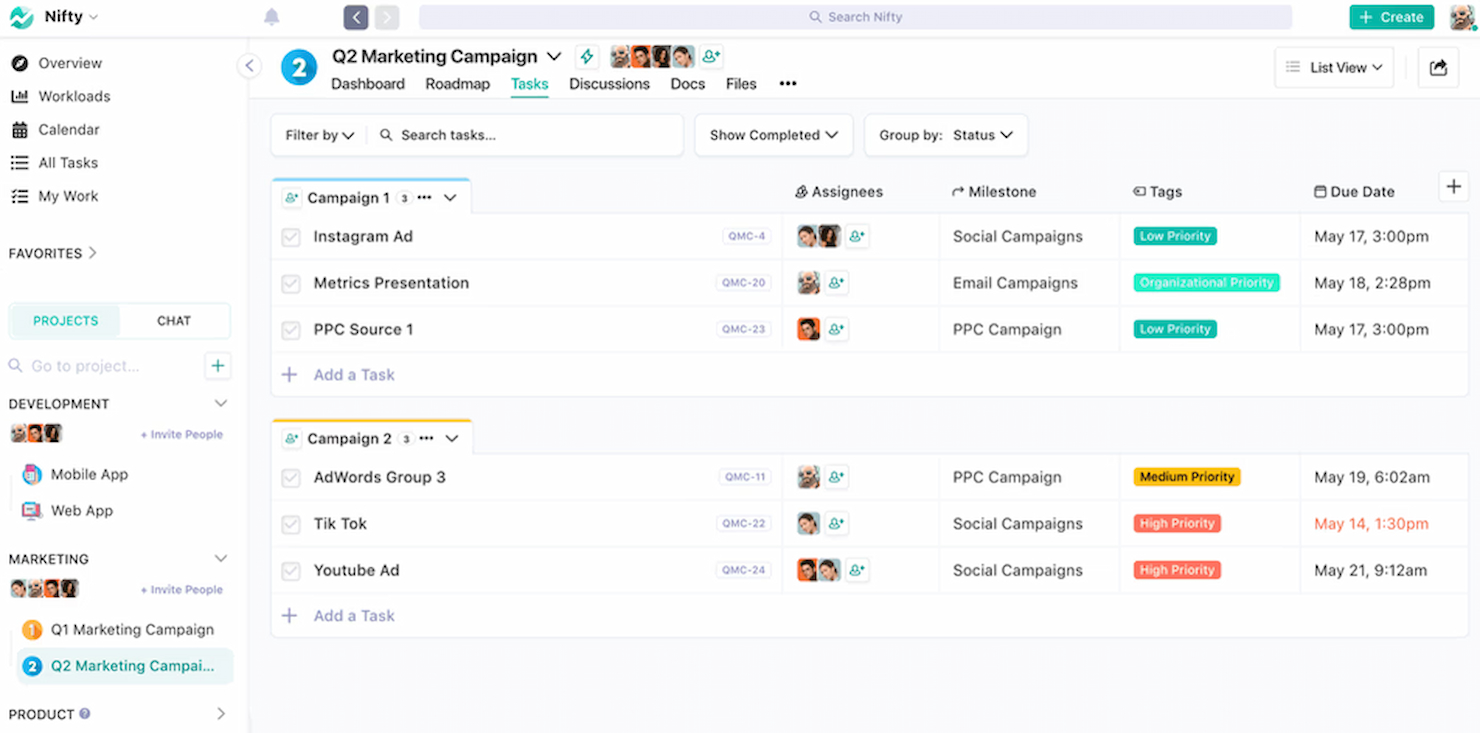
Nifty è uno strumento di gestione dei progetti che semplifica il flusso di lavoro e migliora la collaborazione del team. Si distingue per la capacità di centralizzare la comunicazione di progetto, integrando discussioni, attività e file in un unico posto.
Perché ho scelto Nifty: Ho selezionato Nifty per le sue solide funzionalità di comunicazione che lo differenziano da altri software di gestione progetti. Il suo hub di comunicazione centralizzato è particolarmente efficace per mantenere i team allineati e informati. Ho determinato che Nifty è il migliore per centralizzare la comunicazione di progetto perché consolida tutte le discussioni relative al progetto, il che è fondamentale per mantenere una comunicazione chiara e coerente durante le varie fasi del progetto.
Funzionalità principali e integrazioni:
Le più importanti funzionalità di Nifty includono i traguardi di progetto, l’assegnazione delle attività e l’editor collaborativo di documenti. Questi strumenti sono essenziali per mantenere l’organizzazione dei progetti e garantire che i membri del team lavorino in modo efficace verso obiettivi comuni.
Nifty si integra con i principali strumenti di produttività come Google Drive, Slack, Zoom, Dropbox, GitHub, Trello, Asana, Bitbucket, HubSpot e Microsoft Teams.
Pros and Cons
Pros:
- Comunicazione centralizzata per tutti gli aspetti del progetto
- Integrazione con strumenti di produttività popolari
- Piano gratuito disponibile per piccoli team o uso individuale
Cons:
- La fatturazione annuale potrebbe non essere flessibile per tutti i budget
- Livelli superiori necessari per l'accesso completo alle funzionalità
- Il piano gratuito può essere troppo limitato per progetti più grandi

ProofHub
Ideale per modelli di prezzo a tariffa fissa
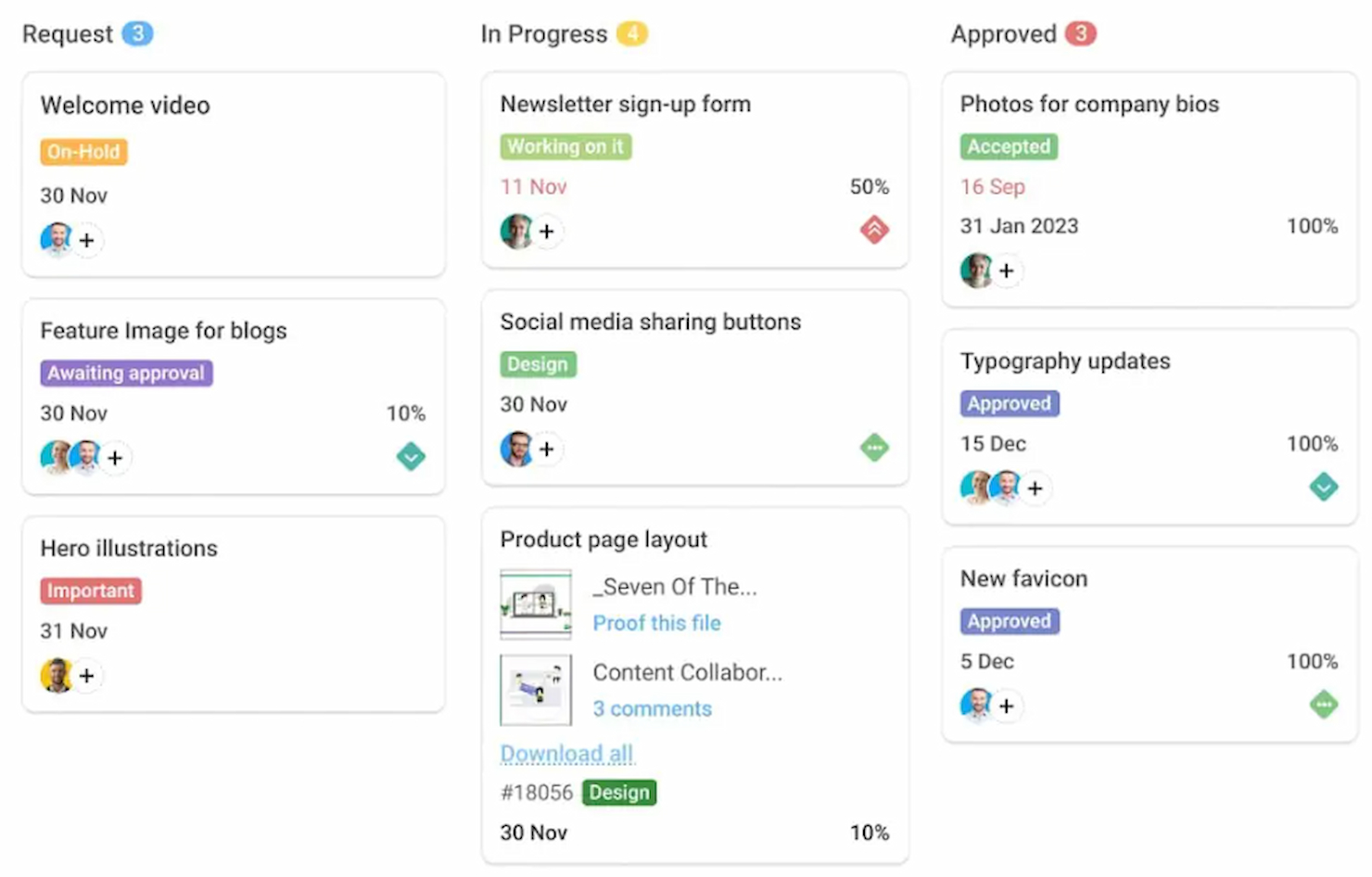
ProofHub è una piattaforma completa per la gestione dei progetti. È riconosciuta come la migliore per il suo modello di prezzo a tariffa fissa, ideale per i team che cercano prevedibilità nei costi.
Perché ho scelto ProofHub: Ho selezionato ProofHub per il suo approccio distintivo alla tariffazione, che lo differenzia dagli altri strumenti di project management che generalmente addebitano un costo per utente. Questo strumento è ideale per modelli di prezzo a tariffa fissa perché offre un prezzo unico e fisso per utenti illimitati, risultando una soluzione conveniente per aziende di qualsiasi dimensione, in particolare quelle in crescita.
Funzionalità distintive e integrazioni:
ProofHub, un software per la gestione progetti basata su metodologia a cascata, offre importanti funzionalità tra cui gestione delle attività con bacheche Kanban e diagrammi di Gantt, monitoraggio del tempo per progetti individuali e di team, condivisione di file per una facile collaborazione, funzionalità di annotazione, thread di discussione per la comunicazione, controlli di accesso basati sui ruoli, modelli di progetto per flussi di lavoro standardizzati, strumenti di reportistica e analisi per il monitoraggio dei progressi.
ProofHub si integra nativamente con i seguenti strumenti: Google Drive, Dropbox, Box, OneDrive, Slack, Zapier, Freshbooks, iCalendar, GitHub e Bitbucket.
Pros and Cons
Pros:
- Prezzo fisso mensile per utenti illimitati
- Nessun costo aggiuntivo per utente
- Semplifica la pianificazione del budget per il software di gestione dei progetti
Cons:
- Impegno annuale richiesto per la tariffa migliore
- Numero limitato di progetti nel piano Essential
- Lo spazio di archiviazione aggiuntivo comporta costi extra

Ideale per una gestione strategica dei progetti

Workfront è un software di project management a cascata progettato per gestire e semplificare i progetti dall'inizio alla fine. Aiuta le organizzazioni a pianificare, eseguire e monitorare strategicamente i flussi di lavoro dei progetti, migliorando la produttività complessiva.
Perché ho scelto Workfront: Ho scelto Workfront per il suo approccio completo alla gestione dei progetti, offrendo una struttura chiara dalla fase iniziale alla conclusione. Workfront si distingue per i suoi strumenti avanzati di pianificazione strategica ed esecuzione, oltre a una particolare attenzione all'efficienza dei flussi di lavoro. Questo lo rende ideale per le aziende che desiderano ottimizzare l'esecuzione strategica dei progetti.
Funzionalità e integrazioni principali:
Workfront offre potenti strumenti di pianificazione dei progetti, inclusi diagrammi di Gantt e funzionalità di gestione delle risorse. Fornisce anche analisi e report avanzati, offrendo approfondimenti sulle prestazioni dei progetti. Inoltre, Workfront comprende strumenti di collaborazione che consentono la comunicazione e il feedback tra i membri del team direttamente all'interno della piattaforma.
Workfront si integra nativamente con strumenti come Microsoft Teams, Slack, Salesforce, Google Drive, Jira, Box, ServiceNow, Tableau, Dropbox e Asana.
Pros and Cons
Pros:
- Strumenti completi per la gestione dei progetti e pianificazione strategica
- Funzionalità avanzate di analisi e reportistica
- Strumenti di collaborazione per comunicazione e feedback
Cons:
- Numero minimo di licenze richiesto può rappresentare un ostacolo per i team più piccoli
- Curva di apprendimento per alcuni utenti
- Alcune integrazioni potrebbero richiedere tempo per la configurazione

Ideale per dati di progetto in tempo reale
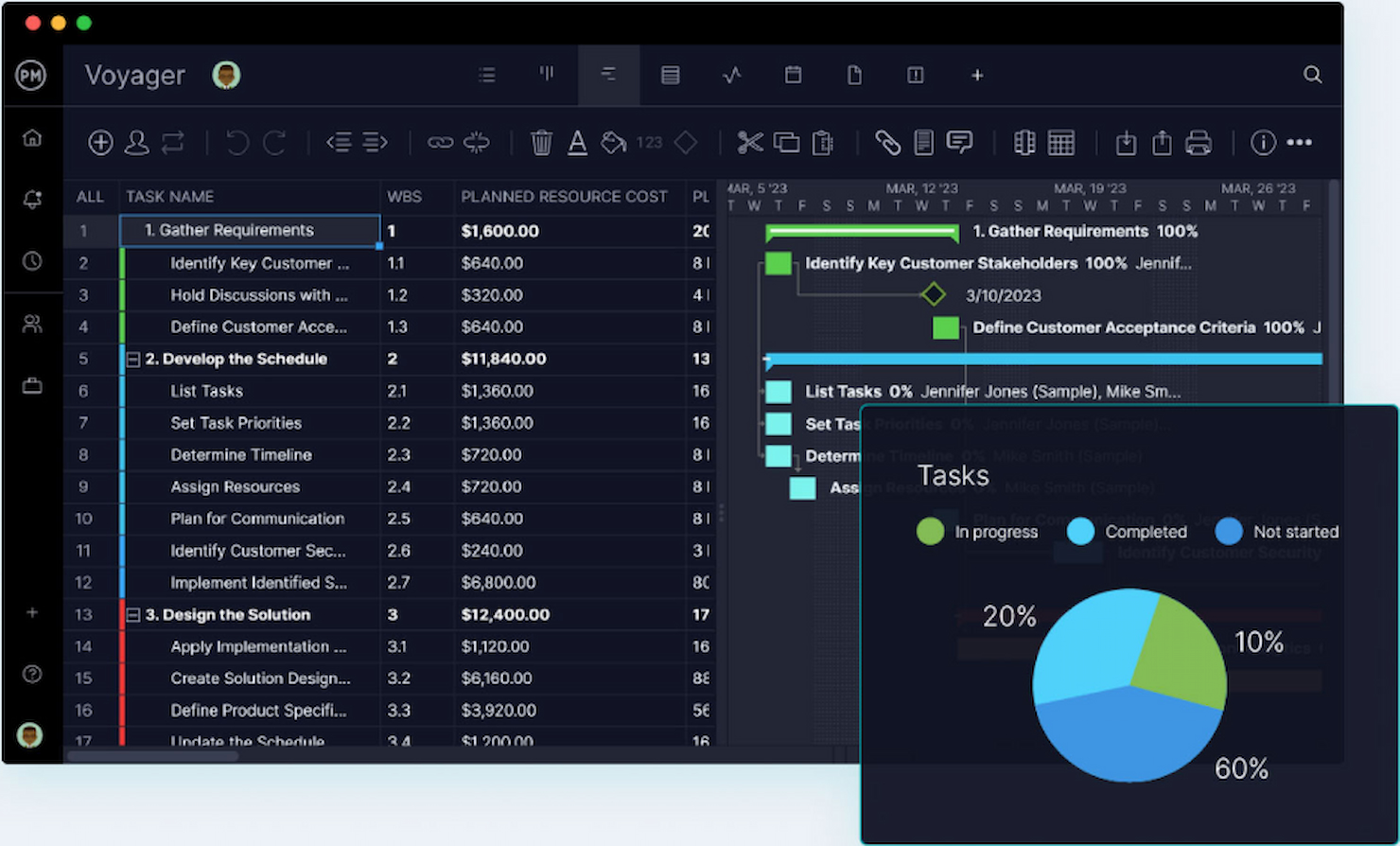
ProjectManager.com è uno strumento completo per la gestione dei progetti, progettato per aiutare i team a pianificare, monitorare e riportare il proprio lavoro con dati in tempo reale. Si distingue come il migliore per i dati di progetto in tempo reale perché fornisce dashboard e funzionalità di reportistica live che permettono ai team di prendere decisioni informate rapidamente.
Perché ho scelto ProjectManager.com: Ho incluso ProjectManager.com in questa lista perché offre una combinazione unica di design intuitivo e potenti capacità di monitoraggio dei dati in tempo reale. La sua caratteristica distintiva rispetto ad altri software di gestione dei progetti è la possibilità di fornire intuizioni immediate sulle prestazioni dei progetti, essenziale per gestire con efficacia progetti complessi.
Caratteristiche principali & integrazioni:
Le più importanti funzionalità di ProjectManager.com includono dashboard in tempo reale, diagrammi di Gantt online, gestione del carico di lavoro e rilevamento dei tempi. Questi strumenti sono fondamentali per la pianificazione, schedulazione e monitoraggio dell'avanzamento dei progetti. Inoltre, il software offre funzionalità di collaborazione che permettono ai membri del team di comunicare e condividere documenti in modo fluido.
Lo strumento si integra nativamente con Google Apps, Microsoft Office, Microsoft Project e offre accesso API per integrazioni personalizzate.
Pros and Cons
Pros:
- Monitoraggio dei dati in tempo reale per intuizioni immediate sui progetti
- Set di funzionalità completo per pianificazione ed esecuzione dei progetti
- Report personalizzabili per analisi delle prestazioni
Cons:
- Costo più elevato per piccoli team o singoli utenti
- Alcune funzionalità possono avere una curva di apprendimento per i nuovi utenti
- Integrazioni limitate rispetto ad alcuni concorrenti

Ideale per la visibilità del portafoglio
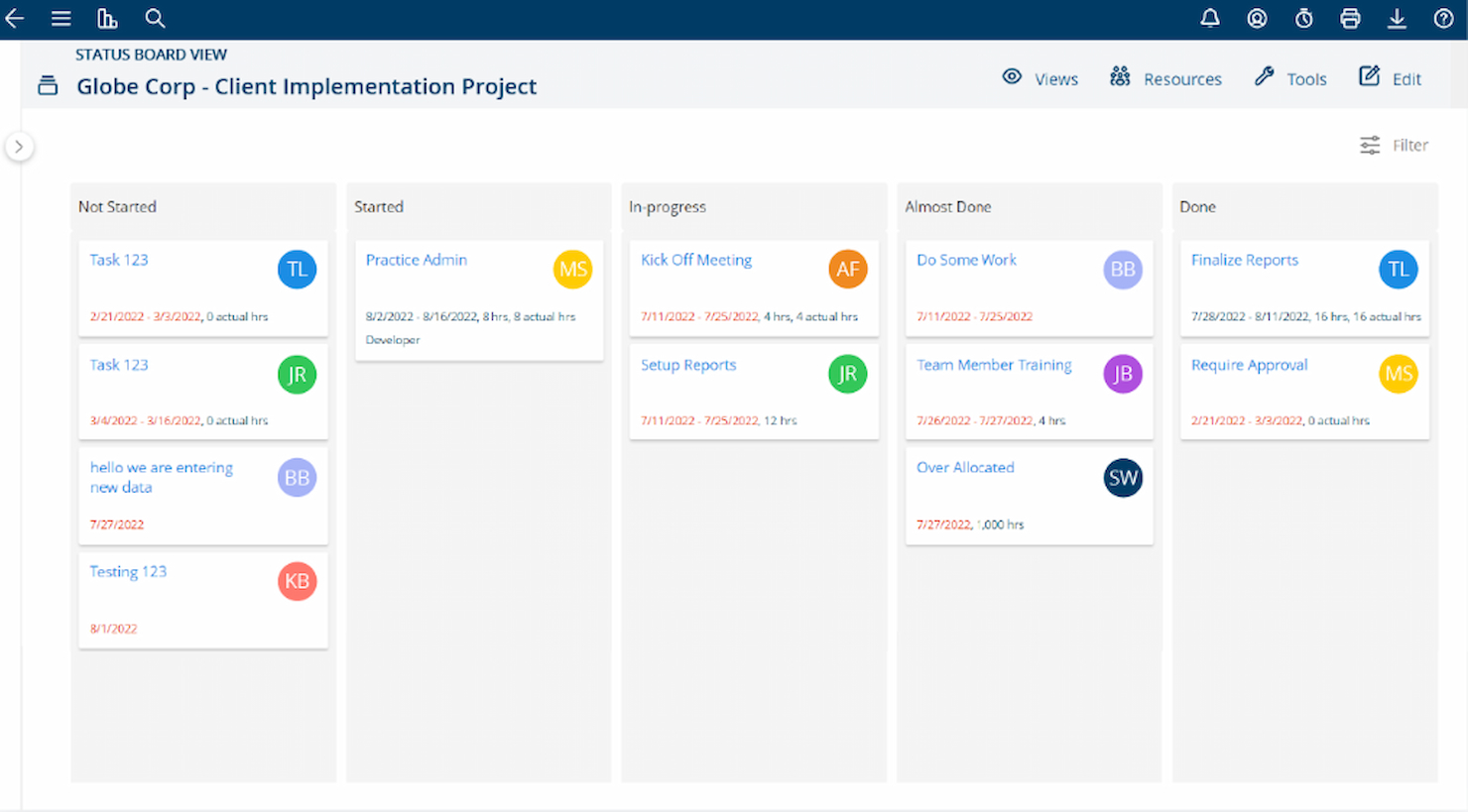
Project Insight è un software di gestione progetti di tipo waterfall progettato per aiutare le aziende a gestire e supervisionare i loro progetti in modo completo. Offre strumenti per monitorare l'avanzamento, gestire le risorse e garantire una consegna efficace dei progetti.
Perché ho scelto Project Insight: Ho scelto Project Insight per la sua capacità di offrire una visibilità completa sui portafogli di progetti, permettendo alle aziende di controllare i progetti da una prospettiva macro. Questo lo distingue da altri software, concentrandosi sulla gestione complessiva del portafoglio e assicurando che i singoli progetti contribuiscano agli obiettivi strategici. È ideale per le organizzazioni che necessitano di approfondimenti dettagliati su progetti e risorse.
Caratteristiche e integrazioni principali:
Project Insight offre visualizzazioni tramite diagrammi di Gantt per una pianificazione e gestione efficace dei progetti. Include anche un sistema di reportistica avanzato, fornendo informazioni sugli indicatori chiave di prestazione. Inoltre, mette a disposizione strumenti di gestione del portafoglio, consentendo alle aziende di monitorare più progetti e allinearli con gli obiettivi aziendali.
Project Insight, un software di gestione progetti waterfall, si integra in modo nativo con strumenti quali Jira, Slack, Google Drive, Microsoft Teams, Dropbox, Salesforce, QuickBooks, ServiceNow, Smartsheet, Box, e altri ancora, offrendo una supervisione completa dei progetti e una collaborazione efficace.
Pros and Cons
Pros:
- Strumenti completi per la gestione del portafoglio progetti.
- Funzionalità di reportistica avanzate per il monitoraggio dei principali indicatori.
- Integrazione con vari strumenti di progetto e aziendali
Cons:
- Le informazioni sui prezzi non sono immediatamente disponibili.
- Alcune integrazioni potrebbero richiedere configurazioni aggiuntive.
- L'interfaccia può risultare complessa per i nuovi utenti.
Ideale per la previsione dinamica dei progetti
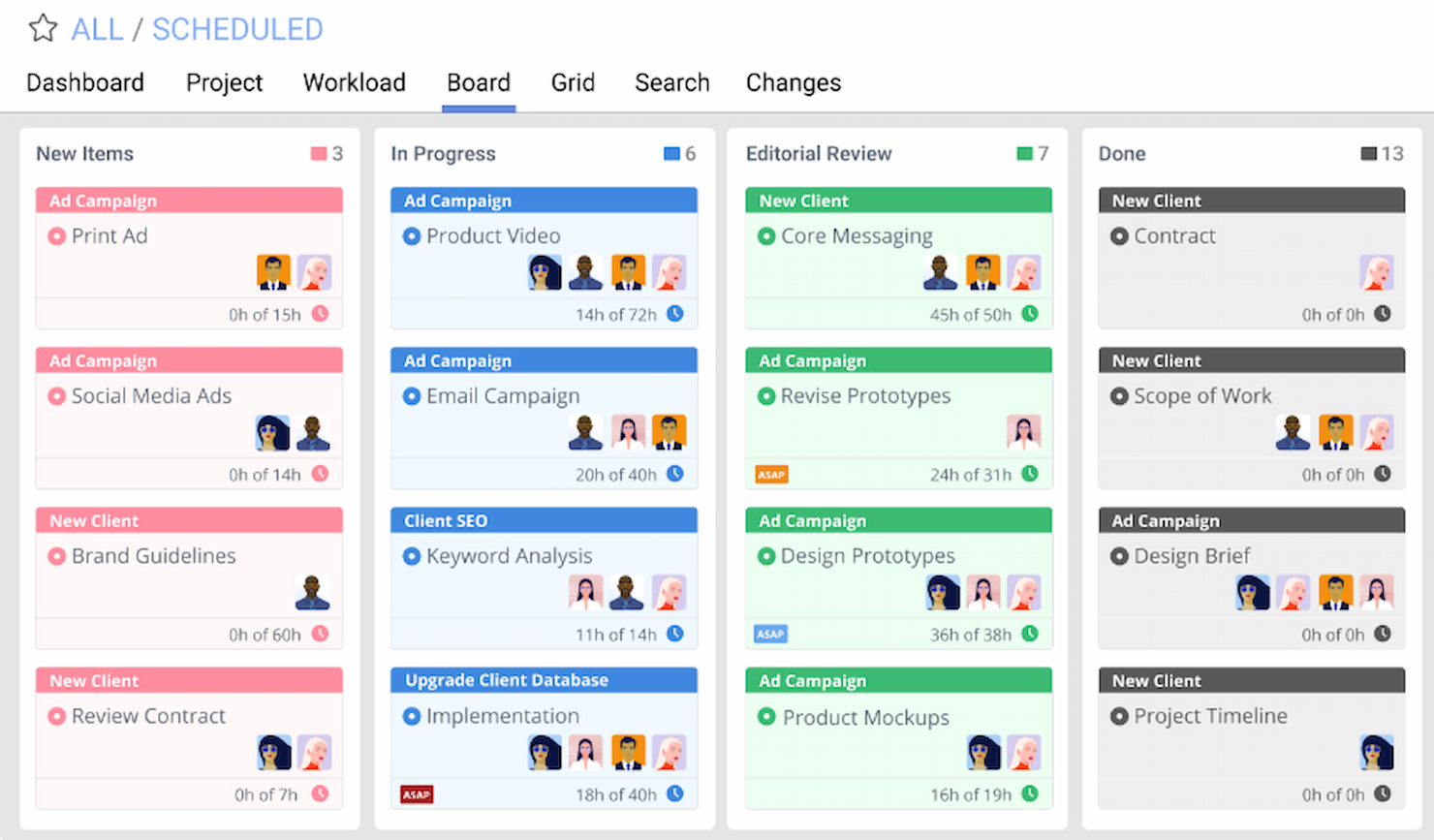
LiquidPlanner è uno strumento di gestione dei progetti specializzato nella previsione dinamica dei progetti. È riconosciuto per la sua capacità di adattarsi ai cambiamenti e gestire l'incertezza, aiutando i team a pianificare, prevedere e lavorare con fiducia.
Perché ho scelto LiquidPlanner: Ho scelto LiquidPlanner per questa lista grazie al suo approccio unico alla gestione dei progetti, che include la programmazione dinamica e l'analisi predittiva. Questo strumento si distingue per il suo focus nella gestione dell'incertezza e nella fornitura di previsioni realistiche. Penso che LiquidPlanner sia il migliore per la previsione dinamica dei progetti perché utilizza stime in intervalli per prevedere le date di completamento, aiutando i team a gestire le aspettative e ad adattarsi ai cambiamenti in modo più efficace.
Caratteristiche principali & integrazioni:
Le funzionalità principali di LiquidPlanner includono il suo motore di programmazione dinamica, che aggiorna automaticamente le tempistiche del progetto quando le condizioni cambiano, e le sue capacità di analisi predittiva, che utilizzano stime in intervalli per prevedere le date di completamento. LiquidPlanner offre inoltre la registrazione integrata dei tempi, la gestione delle risorse e funzionalità di collaborazione.
LiquidPlanner si integra nativamente con una varietà di strumenti, tra cui Salesforce, Dropbox, Box, Google Drive, Zapier, JIRA, Slack, Trello, Zendesk, QuickBooks, tra gli altri.
Pros and Cons
Pros:
- Motore di programmazione dinamica che aggiorna automaticamente le tempistiche
- Analisi predittiva con stime in intervalli per una previsione realistica
- Integrazioni native con strumenti popolari come Salesforce e Slack
Cons:
- Prezzo iniziale più elevato rispetto ad alcuni concorrenti
- È richiesto il pagamento annuale, che potrebbe non essere adatto a tutti i budget
- Il requisito minimo di utenti può rappresentare un ostacolo per i team più piccoli

Ideale per una gestione progetti facile e intuitiva
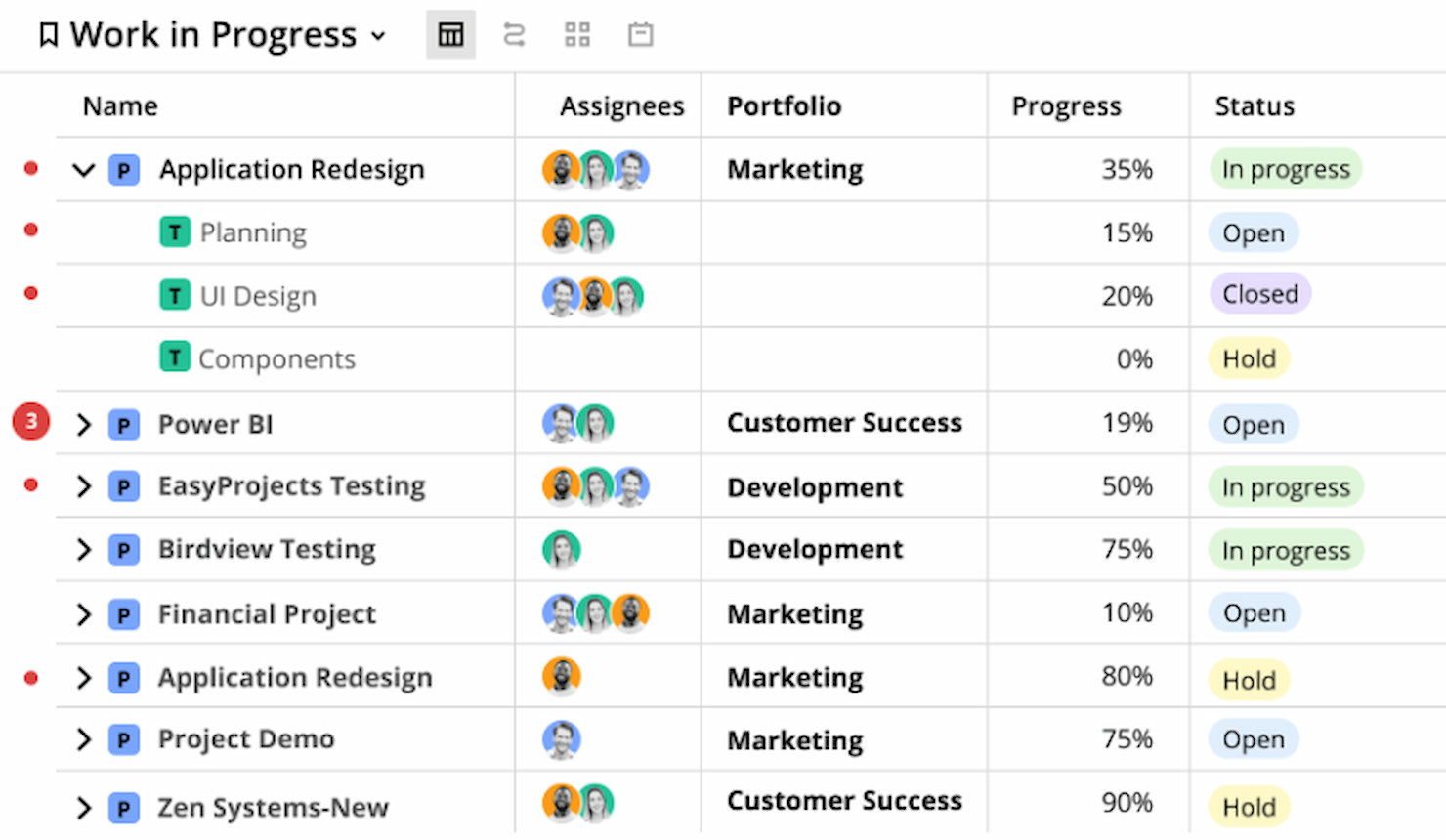
Easy Projects è una piattaforma progettata per semplificare la gestione dei progetti. È acclamata per la sua interfaccia intuitiva che facilita la gestione dei progetti per professionisti di ogni livello.
Perché ho scelto Easy Projects: Ho scelto Easy Projects per includerlo in questo elenco grazie al suo focus sulla facilità d'uso, evidente sia nel design che nella funzionalità. Questo strumento si distingue offrendo un'esperienza utente semplice, qualità spesso assente in altri software per la gestione dei progetti. Ritengo Easy Projects il migliore per la gestione progetti user-friendly poiché riesce a bilanciare semplicità e funzionalità avanzate, rendendolo accessibile a un ampio spettro di utenti.
Funzionalità principali e integrazioni:
Easy Projects offre funzionalità chiave fondamentali per una gestione efficace dei progetti, come diagrammi di Gantt interattivi, monitoraggio dei progetti, pianificazione delle risorse e reportistica avanzata.
Easy Projects si integra senza problemi con una varietà di strumenti, tra cui Microsoft Outlook, QuickBooks, Slack, Google Drive, Microsoft Teams, Zapier, Salesforce, Zendesk, Xero e Jira.
Pros and Cons
Pros:
- Interfaccia intuitiva adatta a utenti con diversi livelli di esperienza
- Set di funzionalità completo che copre molteplici esigenze di project management
- Ampie capacità di integrazione con strumenti aziendali più diffusi
Cons:
- Prezzo di partenza più alto rispetto ad altri strumenti di project management
- Il requisito minimo di utenti potrebbe non essere adatto a team molto piccoli o singoli utenti
- La tariffa di onboarding aggiunge un costo extra alla configurazione iniziale

Ideale per la personalizzazione versatile dei progetti
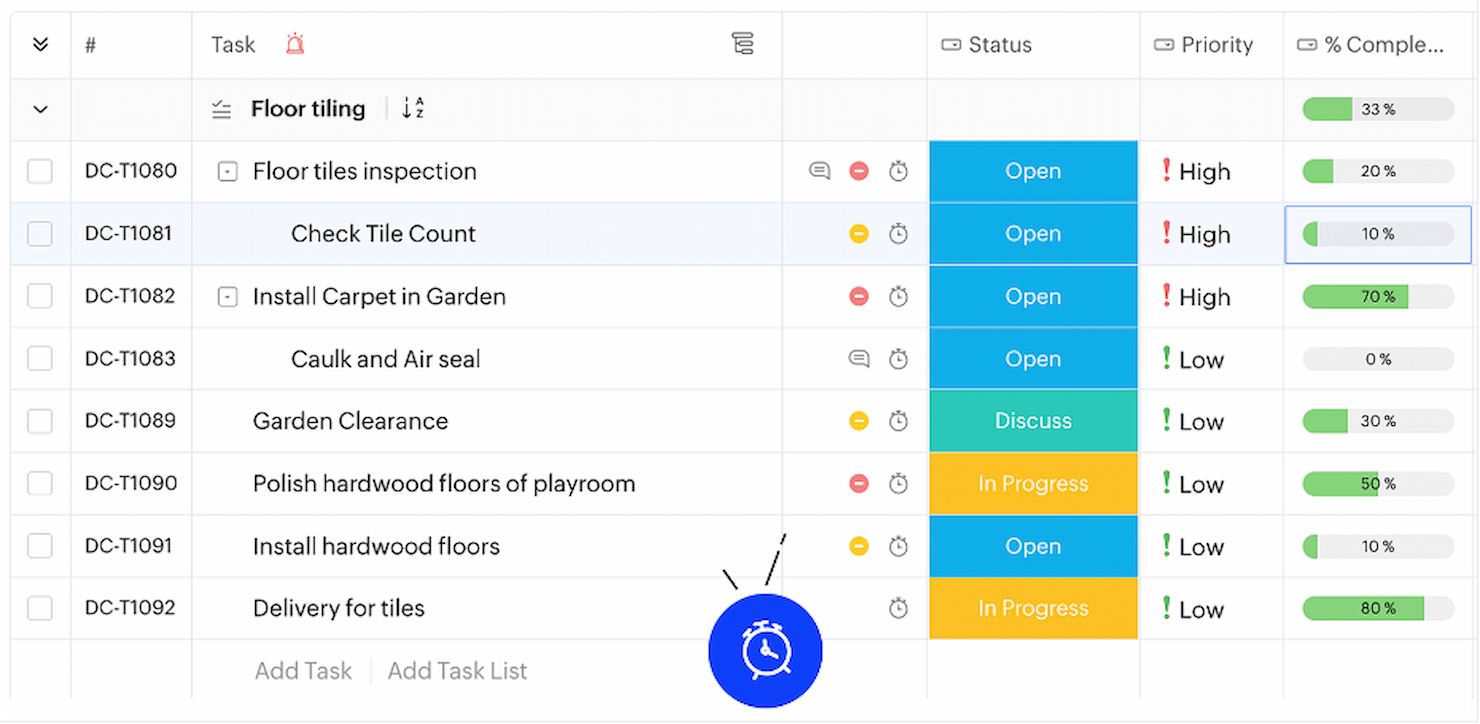
Zoho Projects è uno strumento completo per la gestione del lavoro, con particolare attenzione all'adattabilità e alla personalizzazione. È ideale per la personalizzazione versatile dei progetti perché permette un'ampia personalizzazione dei campi dei progetti, dei flussi di lavoro e degli stati, adattandosi alle esigenze di qualsiasi team.
Perché ho scelto Zoho Projects: Ho selezionato Zoho Projects per la sua straordinaria capacità di adattarsi ai requisiti specifici dei diversi progetti, distinguendolo dagli altri strumenti di gestione progetti. Il livello di personalizzazione offerto garantisce il supporto a un'ampia gamma di tipologie e dimensioni di progetti, motivo per cui lo considero ideale per una personalizzazione versatile. Consente ai team di modellare il software secondo i propri stili di gestione dei progetti e processi aziendali unici.
Funzionalità e integrazioni distintive:
Zoho Projects si distingue per il suo solido set di funzionalità che include automazione delle attività, report dettagliati e strumenti di collaborazione. Offre anche un ricco ecosistema di integrazioni native, che ne potenziano l'utilità attraverso diverse funzioni aziendali.
Zoho Projects si integra con Zoho CRM, Zoho Analytics, Zoho Books, Zoho Invoice, Microsoft Teams, Slack, GitHub, GitLab, BitBucket, Dropbox e ServiceNow, tra gli altri.
Pros and Cons
Pros:
- Funzionalità personalizzabili per un'esperienza di gestione progetti su misura
- Set completo di strumenti per la pianificazione, il monitoraggio e la collaborazione sui progetti
- Ampie capacità di integrazione con altri prodotti Zoho e app di terze parti
Cons:
- Il prezzo del piano Enterprise non è trasparente
- La configurazione iniziale e la personalizzazione potrebbero richiedere più tempo
- I costi aggiuntivi per componenti extra possono aumentare il prezzo complessivo
New Product Updates from Zoho Projects

Zoho Projects Adds Time Log Grid View for Faster Tracking
Zoho Projects adds Time Log Grid View, a unified interactive grid for logging and reviewing hours across tasks and issues, helping teams enter time faster and identify work patterns more easily. For more information, visit Zoho Projects’ official site.
 .
.Altri software di gestione dei progetti a cascata
Ecco alcune opzioni aggiuntive di software per la gestione dei progetti a cascata che non sono entrate nella mia selezione, ma che vale comunque la pena prendere in considerazione:


Cómo evalúo el software de gestión de proyectos Waterfall
Mi evaluación tiene dos niveles: las funciones básicas de Gantt, CPM y gestión de dependencias sin las cuales un proyecto de alcance fijo no puede funcionar, y los diferenciadores que separan las opciones más sólidas del resto.
Funcionalidad principal (Requisitos mínimos para esta lista)
Cuando selecciono herramientas para mi lista, califico cada una en una escala de 0 (no ofrece la funcionalidad) a 5 (destaca en esta área) para cada funcionalidad principal que se enumera a continuación. Después, calculo la puntuación total de la herramienta como un porcentaje. Cada herramienta debe lograr una puntuación total mínima del 65% para ser considerada en la selección.
- Programación con diagrama de Gantt: Evalúo si la vista Gantt admite la edición interactiva, la programación automática y jerarquías de tareas multinivel, el tipo de detalle que exige una línea de tiempo de construcción de 200 tareas.
- Gestión de dependencias de tareas: Cada herramienta debe admitir los cuatro tipos de dependencia (FS, SS, FF, SF) con retrasos y adelantos, para que una fase de adquisiciones retrasada impacte correctamente aguas abajo.
- Cálculo de ruta crítica: Busco un CPM automático que se recalcule en tiempo real y resalte visualmente las tareas críticas, brindando a los líderes del proyecto claridad inmediata sobre el riesgo de calendario.
- Seguimiento de línea base e hitos: La capacidad de guardar instantáneas de la línea base y compararlas con los valores reales es importante—especialmente en contratos gubernamentales donde el reporte de variaciones de programación es estándar.
- Asignación y nivelación de recursos: Verifico que la herramienta permita asignar recursos, ver la capacidad de carga de trabajo y resolver sobreasignaciones entre tareas sin tener que reordenar manualmente todo el cronograma.
- Flujos de trabajo por fases: Es clave el avance estructurado por etapas con puntos de aprobación. Los equipos de ingeniería, por ejemplo, requieren una aprobación formal antes de pasar del diseño a la fabricación.
Una vez que tengo una lista de herramientas que cumplen con los criterios, considero qué distingue a cada plataforma.
Factores diferenciadores (Qué distingue a los proveedores)
Así es como comparo y contrasto a los diferentes proveedores:
Características sobresalientes
La gestión del valor ganado es un gran diferenciador—las herramientas que calculan CPI y SPI en línea proporcionan a los líderes de proyecto datos reales de coste y rendimiento del calendario en lugar de estimaciones aproximadas. También evalúo los registros de riesgos con puntuación de probabilidad e impacto, ya que un gestor de proyectos de ingeniería civil necesita cuantificar el riesgo antes de iniciar la obra. Los paneles de informes personalizados completan el conjunto, especialmente cuando las partes interesadas esperan informes de variación listos para ejecutivos en cada punto de control de la fase.
Más allá de las características
La profundidad de integración importa—verifico si una herramienta se conecta de forma nativa con MS Project, Primavera P6 y sistemas ERP como SAP u Oracle, ya que los equipos waterfall rara vez trabajan en una sola plataforma. El cumplimiento normativo es otro factor que considero, en particular las certificaciones SOC 2 y FedRAMP para equipos que gestionan contratos de defensa o del sector público. También evalúo la flexibilidad de implementación, porque algunas organizaciones requieren alojamiento local para cumplir con políticas internas de residencia de datos, mientras que otras necesitan escalabilidad en la nube para equipos de proyectos distribuidos.
Come scegliere un software di gestione dei progetti a cascata
È facile perdersi in lunghi elenchi di funzionalità e strutture di prezzo complesse. Per aiutarti a rimanere concentrato mentre affronti il tuo processo di selezione del software, unico per le tue esigenze, ecco una lista di fattori da tenere a mente:
| Fattore | Considerazioni |
| Scalabilità | Assicurati che lo strumento possa crescere insieme al tuo team. Cerca funzionalità come autorizzazioni degli utenti, accesso basato sui ruoli e modelli di progetto per più team. |
| Integrazioni | Verifica che il software si connetta agli strumenti che il tuo team utilizza già, come Slack, Microsoft Teams o piattaforme di archiviazione dei file come Google Drive o SharePoint. |
| Personalizzazione | Cerca flessibilità nella configurazione di fasi, tempistiche e flussi di lavoro. Dovresti poter adattare visualizzazioni, campi ed etichette al tuo processo. |
| Semplicità d'uso | Tu e il tuo team non dovreste aver bisogno di ore di formazione. Dai priorità a una navigazione intuitiva, alla pianificazione tramite trascinamento e a un'interfaccia ordinata. |
| Budget | Esamina i prezzi in base alle dimensioni del team e alle funzionalità necessarie. Fai attenzione ai costi nascosti legati alle funzionalità premium, alle licenze utente o allo spazio di archiviazione. |
| Misure di sicurezza | Scegli una piattaforma con funzionalità come autorizzazioni basate sui ruoli, registri di audit, crittografia e conformità a standard come SOC 2 o ISO 27001. |
| Qualità del diagramma di Gantt | Verifica che la visualizzazione del diagramma di Gantt dello strumento supporti dipendenze, traguardi e semplici modifiche alla tempistica. Dovresti poter ingrandire, modificare le durate e monitorare i progressi. |
| Opzioni di supporto | Cerca canali di assistenza accessibili, come chat dal vivo o email, oltre a opzioni self-service come tutorial, webinar o una base di conoscenza consultabile. |
Tendenze dei software per la gestione dei progetti a cascata
Durante la mia ricerca, ho raccolto innumerevoli aggiornamenti di prodotto, comunicati stampa e registri delle versioni di diversi fornitori di software per la gestione dei progetti a cascata. Ecco alcune delle tendenze emergenti che sto tenendo d'occhio:
- Modalità di pianificazione ibride: Sempre più strumenti combinano i metodi a cascata e agili in un unico spazio di lavoro. Questo aiuta i team che seguono fasi rigorose ma desiderano una certa flessibilità per gestire gli adeguamenti a livello di attività utilizzando bacheche o sprint insieme alle visualizzazioni dei diagrammi di Gantt.
- Monitoraggio dei rischi integrato: I fornitori stanno aggiungendo funzionalità per segnalare e gestire i rischi all'interno della tempistica del progetto. I team possono documentare la probabilità dei rischi, assegnare responsabili e monitorare le misure di mitigazione senza dover ricorrere a uno strumento separato.
- Pianificazione basata sull'IA: L'IA sta iniziando a supportare la pianificazione delle attività regolando automaticamente le tempistiche quando si verifica un ritardo o un problema di risorse. Questo aiuta a ridurre gli aggiornamenti manuali e mantiene allineate le dipendenze senza una supervisione costante.
- Monitoraggio della baseline e degli scostamenti: Salvare le baseline e confrontarle con i progressi attuali sta diventando sempre più comune. Questo consente ai team di vedere quanto la tempistica effettiva si sia discostata dal piano e di correggere di conseguenza la rotta.
- Strumenti di conformità integrati: Alcuni strumenti includono ora modelli, liste di controllo e flussi di approvazione per aiutare i team a rispettare gli standard di settore o i requisiti normativi. Questo è utile in settori come edilizia, sanità e finanza.
Che cos'è un software per la gestione dei progetti a cascata?
Il software per la gestione dei progetti a cascata è uno strumento strutturato per la gestione dei progetti che segue una progettazione lineare e sequenziale. Viene utilizzato principalmente dai team che lavorano a progetti ben definiti e difficilmente soggetti a modifiche durante il processo di sviluppo. Il software è pensato per settori e organizzazioni che traggono vantaggio da un approccio fase per fase alla pianificazione e all'esecuzione dei progetti, in cui ogni fase deve essere completata prima dell'inizio della successiva.
Funzionalità dei software per la gestione dei progetti a cascata
Quando scegli un software per la gestione dei progetti a cascata, presta attenzione alle seguenti funzionalità chiave:
- Report e dashboard: Offrono riepiloghi visivi delle metriche del progetto, così puoi controllare rapidamente le prestazioni e identificare i problemi.
- Visualizzazione del diagramma di Gantt: Mostra le fasi del progetto, la durata delle attività e le dipendenze in una sequenza temporale visiva, così puoi pianificare e monitorare facilmente i progressi.
- Dipendenze tra attività: Permettono di collegare le attività in modo che una non possa iniziare finché un'altra non è terminata, contribuendo a mantenere il flusso del progetto logico e in linea con i piani.
- Monitoraggio dei traguardi: Evidenzia i principali punti di controllo del progetto, così puoi misurare i progressi rispetto agli obiettivi e alle scadenze fondamentali.
- Confronto con la baseline: Consente di salvare il piano di progetto originale e confrontarlo con i progressi effettivi per individuare ritardi o modifiche all'ambito.
- Struttura basata sulle fasi: Organizza il lavoro in fasi sequenziali, rendendo più semplice seguire un piano chiaro e graduale.
- Strumenti di allocazione delle risorse: Aiutano ad assegnare i membri del team alle attività e a monitorare i carichi di lavoro per evitare sovraccarichi.
- Monitoraggio dei progressi: Fornisce aggiornamenti in tempo reale sul completamento delle attività e sullo stato generale del progetto, così puoi rimanere informato.
- Condivisione dei documenti: Consente al team di archiviare e consultare i file importanti in un unico luogo, così tutti dispongono delle stesse informazioni.
- Monitoraggio del tempo: Registra la durata delle attività, aiutandoti a gestire il tempo impiegato e a confrontarlo con le stime iniziali.
Vantaggi dei software per la gestione dei progetti a cascata
L'implementazione di un software di gestione dei progetti a cascata offre numerosi vantaggi al tuo team e alla tua azienda. Eccone alcuni che puoi aspettarti:
- Tempistiche chiare: I diagrammi di Gantt e le dipendenze tra le attività rendono facile vedere cosa deve essere fatto e quando.
- Pianificazione migliore: La struttura basata sulle fasi ti aiuta a definire in anticipo tutti i passaggi del progetto, prima dell'inizio dei lavori.
- Responsabilità: L'assegnazione delle attività e le scadenze chiariscono chi è responsabile di cosa.
- Visibilità sui progressi: Gli strumenti di monitoraggio integrati mostrano a che punto sei e dove potrebbero verificarsi dei ritardi.
- Aggiornamenti più semplici per le parti interessate: Dashboard e report offrono modi semplici per condividere gli aggiornamenti sullo stato.
- Gestione dei rischi migliorata: I confronti con la linea di base e i registri dei rischi aiutano a individuare tempestivamente i problemi.
- Controllo delle risorse: Gli strumenti di allocazione permettono di vedere chi è disponibile ed evitare di sovraccaricare il team.
Costi e prezzi dei software di gestione dei progetti a cascata
La scelta di un software di gestione dei progetti a cascata richiede la comprensione dei vari modelli di prezzo e dei piani disponibili. I costi variano in base alle funzionalità, alle dimensioni del team, ai componenti aggiuntivi e ad altri fattori. La tabella seguente riassume i piani più comuni, i relativi prezzi medi e le funzionalità tipicamente incluse nelle soluzioni software per la gestione dei progetti a cascata:
Tabella comparativa dei piani per i software di gestione dei progetti a cascata
| Tipo di piano | Prezzo medio | Funzionalità comuni |
| Piano gratuito | $0 | Sequenziamento e dipendenze delle attività, gestione delle risorse, diagrammi di Gantt, collaborazione del team |
| Individuale/di base | $7 - $12 per utente/mese | Flussi di lavoro personalizzabili, report e analisi avanzati, integrazione con altri strumenti |
| Standard | $8.99 - $14 per utente/mese | Strumenti di collaborazione avanzati, più viste del progetto, funzionalità di automazione |
| Professionale/aziendale | $12 - $24.80 per utente/mese | Report e analisi avanzati, monitoraggio di obiettivi e traguardi, ulteriori opzioni di personalizzazione |
| Aziendale | Contattaci per informazioni sui prezzi | Strumenti di sicurezza dei dati di livello aziendale, ampie opzioni di integrazione, assistenza dedicata |
Domande frequenti sul software di gestione dei progetti a cascata
In che modo il software di gestione dei progetti a cascata differisce dagli strumenti Agile?
Il software di gestione dei progetti a cascata è fondamentalmente diverso dagli strumenti Agile nel suo approccio alla pianificazione e all’esecuzione dei progetti. Mentre gli strumenti Agile supportano un processo iterativo e flessibile, il software a cascata è strutturato per supportare un flusso di lavoro lineare e sequenziale. Agile incoraggia la revisione e l’adattamento continui, mentre il modello a cascata è più rigido e richiede il completamento completo di ogni fase del progetto prima di procedere a quella successiva.
Il software di gestione dei progetti a cascata è in grado di gestire progetti complessi?
Sì, il software di gestione dei progetti a cascata è particolarmente adatto ai progetti complessi che presentano requisiti ben definiti e nei quali non si prevede che si verifichino cambiamenti frequenti. Il sistema di monitoraggio lineare del software consente una pianificazione e un’esecuzione dettagliate di ogni fase, il che può essere particolarmente vantaggioso per progetti di grandi dimensioni e ad alto rischio, nei quali prevedibilità e controllo sono fondamentali.
Quali sono alcune opzioni popolari di software di gestione dei progetti a cascata?
Tra le opzioni più popolari di software di gestione dei progetti a cascata figurano Microsoft Project, che offre solide funzionalità di pianificazione e programmazione, e Zoho Projects, noto per la sua interfaccia intuitiva e le complete funzionalità di monitoraggio dei progetti. Altre opzioni degne di nota includono Basecamp, che offre strumenti semplici per l’organizzazione dei progetti, e Wrike, che propone una combinazione di funzionalità adatta sia alla gestione dei progetti a cascata sia a quella Agile.
Il software di gestione dei progetti a cascata è adatto ai piccoli team?
Il software di gestione dei progetti a cascata può essere adatto ai piccoli team, soprattutto se il progetto in questione presenta requisiti chiari e immutabili e un obiettivo finale definito. Tuttavia, i piccoli team potrebbero ritenere la struttura rigida del modello a cascata meno adatta alle esigenze dinamiche e spesso mutevoli dei piccoli progetti o delle startup.
Il software di gestione dei progetti a cascata supporta la collaborazione?
Sebbene il software di gestione dei progetti a cascata possa essere meno incentrato sulla collaborazione rispetto ad alcuni strumenti Agile, molti strumenti a cascata includono funzionalità che supportano la collaborazione tra i membri del team. Queste funzionalità possono includere l’assegnazione delle attività, il monitoraggio dei progressi, la condivisione dei documenti e gli strumenti di comunicazione. Il livello di supporto alla collaborazione varia a seconda del software specifico scelto.
Cosa succede dopo?
Se stai cercando un software di gestione dei progetti a cascata, contatta gratuitamente un consulente SoftwareSelect per ricevere consigli.
Compili un modulo e fai una breve conversazione durante la quale il consulente approfondirà le tue esigenze specifiche. In seguito riceverai una selezione ristretta di software da valutare. Ti assisterà anche durante l'intero processo di acquisto, comprese le negoziazioni sul prezzo.