


monday dev : Test, Avantages, Inconvénients, Fonctionnalités & Tarification



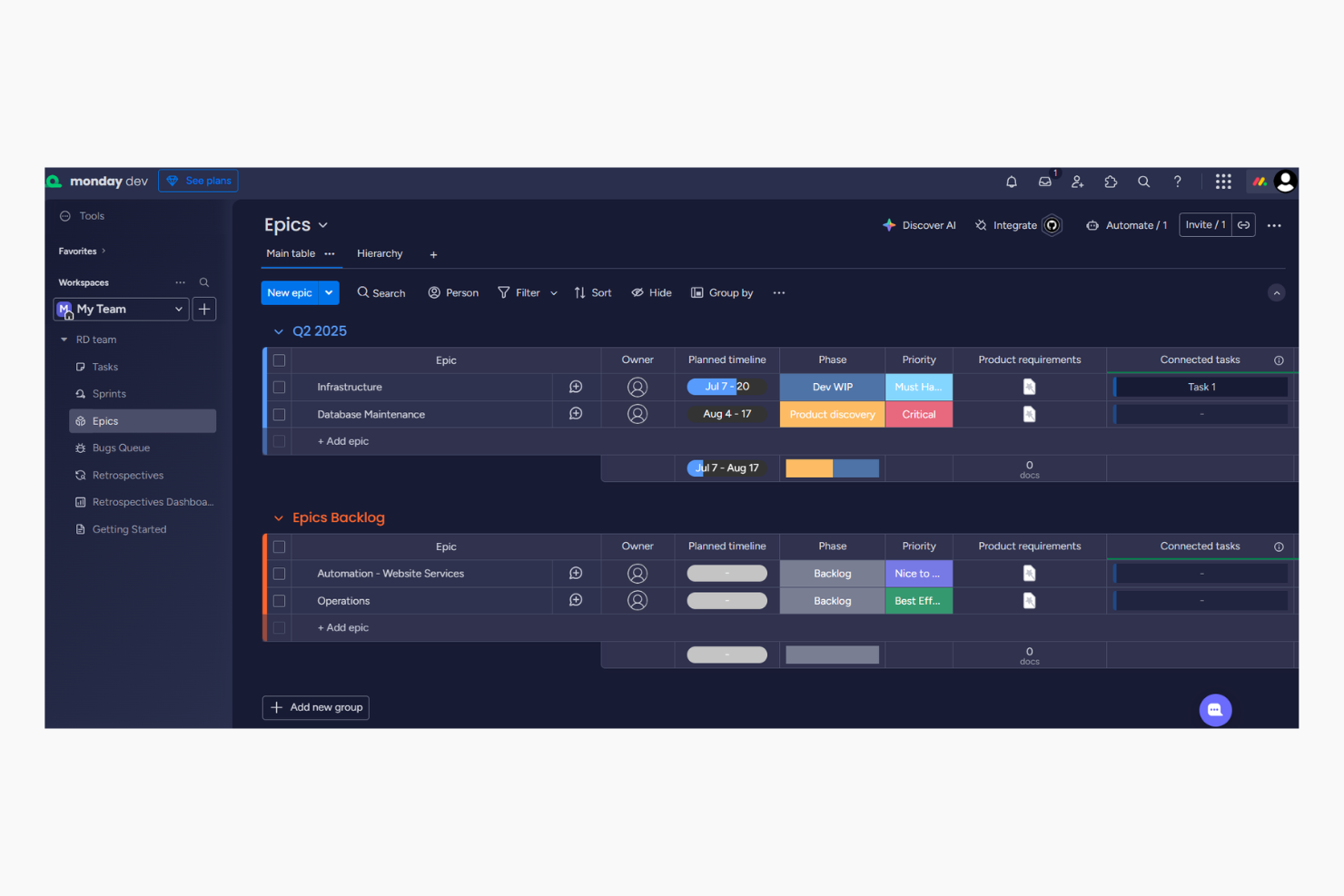
monday dev is an agile project management software that streamlines workflows, collaboration, and task tracking. It’s ideal for tech startups, software development teams, and IT departments that need adaptable tools to enhance project efficiency. monday dev's value lies in its ability to boost team productivity through seamless integration, customizable workflows, and no-code configurations that support a wide range of agile methodologies like scrum and Kanban.
In this article, you’ll learn about monday dev's features, pros and cons, pricing, and more. Whether you're aiming to improve project delivery or enhance team collaboration, this review will guide you in making an informed choice.
monday dev Evaluation Summary
- From $9/month (billed annually)
- Free trial available
Pourquoi faire confiance à nos recommandations de logiciels
Notre équipe teste et évalue des logiciels depuis 2012. En tant que chefs de projet nous-mêmes, nous savons à quel point il est difficile — et important — de choisir le bon logiciel.
Pour ce guide, nous avons évalué les outils grâce à des tests pratiques et une recherche indépendante, en notant les outils selon nos critères de sélection. Nous nous appuyons également sur les enseignements de leaders d’opinion du secteur et de professionnels de la gestion de projet en activité.
Nos avis reflètent notre jugement éditorial humain, et non un argumentaire de vente.
Réviseurs experts:
monday dev Overview
In my opinion, monday dev is a strong agile project management tool that offers high levels of customization and integration suited for tech-savvy teams in fast-paced environments. Its strengths lie in connectivity and automation, which makes it ideal for teams that rely on integrated workflows. However, its Gantt view and some training materials could be improved. Compared to other tools, monday dev delivers solid value through flexible pricing and features that support both work management and product development.

pros
-
Easily customize workflows, including sprint planning and Kanban board configurations
-
Visual project tracking keeps your team aligned and focused
-
Automation features save time on repetitive tasks
cons
-
Gantt chart view is less intuitive than other tools
-
Mobile app lacks full functionality for managing product roadmap tasks.
-
Initial setup might be overwhelming for teams new to agile tools
-

Smartsheet
Visit WebsiteThis rating combines scores from multiple user review sites to reflect overall customer sentiment about the product.4.5 -
Celoxis
Visit WebsiteThis rating combines scores from multiple user review sites to reflect overall customer sentiment about the product.4.5 -
Accelo
Visit WebsiteThis rating combines scores from multiple user review sites to reflect overall customer sentiment about the product.4.4





Notre méthodologie d'évaluation
Comment nous testons et notons les outils
Nous avons passé des années à construire, affiner et améliorer notre système de test et de notation de logiciels. Notre grille d’évaluation est conçue pour capturer les subtilités de la sélection de logiciels et ce qui rend un outil efficace, en mettant l’accent sur les aspects critiques de la prise de décision. Ci-dessous, vous pouvez voir exactement comment notre processus de test et de notation fonctionne sur sept critères. Cela nous permet de fournir une évaluation impartiale des logiciels selon leur fonctionnalité principale, leurs fonctionnalités remarquables, leur facilité d’utilisation, l’onboarding, le support client, les intégrations, les avis clients et le rapport qualité/prix.
Fonctionnalités principales (25 % du score final)
Le point de départ de notre évaluation est toujours la fonctionnalité principale de l’outil. Dispose-t-il des fonctionnalités et caractéristiques de base attendues par l’utilisateur ? Certaines de ces fonctionnalités de base sont-elles réservées aux formules tarifaires supérieures ? Nous nous attendons à ce qu’un outil soit à la hauteur des capacités de base de ses concurrents.
Fonctionnalités remarquables (25 % du score final)
Ensuite, nous évaluons les fonctionnalités remarquables et peu communes qui vont au-delà de la fonctionnalité de base habituellement retrouvée dans ce type d’outils. Un score élevé reflète des fonctionnalités spécialisées ou uniques qui rendent le produit plus rapide, plus efficace, ou offrent une valeur supplémentaire à l’utilisateur. Nous évaluons également la facilité d’intégration avec d’autres outils couramment présents dans l’environnement technique pour étendre la puissance et l’utilité du logiciel. Les outils offrant de nombreuses intégrations natives, des connexions tierces et un accès API pour créer des intégrations personnalisées obtiennent la meilleure note.
Facilité d’utilisation (10 % du score final)
Nous considérons la rapidité et la facilité d’exécution des tâches principales à l’aide de l’outil. Un logiciel bien noté est conçu intelligemment, intuitif à utiliser, propose des applications mobiles, fournit des modèles et simplifie les tâches relativement complexes.
Onboarding (10 % du score final)
Nous savons à quel point l’adoption rapide par l’équipe est cruciale lors de la mise en place d’une nouvelle plateforme. Nous évaluons donc la facilité avec laquelle un utilisateur peut apprendre et utiliser le logiciel avec un minimum de formation. Nous vérifions la rapidité avec laquelle un membre peut s’installer et démarrer sans expérience préalable. Les solutions ayant une note élevée nécessitent peu ou pas de support.
Support client (10 % du score final)
Nous examinons la rapidité et la facilité d’obtention d’une aide par téléphone, chat en direct ou base de connaissances. Les outils et sociétés proposant un support en temps réel obtiennent la meilleure note, tandis que les chatbots sont les moins bien notés.
Avis clients (10 % du score final)
Au-delà de nos propres tests et évaluations, nous tenons compte du net promoter score des clients actuels et passés. Nous étudions la probabilité, pour eux, de choisir à nouveau l’outil pour ses fonctionnalités principales. Un logiciel ayant une note élevée reflète un score NPS élevé de la part des utilisateurs actuels ou passés.
Rapport qualité/prix (10 % du score final)
Enfin, en tenant compte de tous les autres critères, nous comparons le prix moyen des forfaits d’entrée de gamme aux fonctionnalités principales et considérons la valeur des autres critères d’évaluation. Un logiciel qui en offre davantage pour moins cher sera mieux noté.
Core Features
Bug and issue tracking: You can log, assign, and manage bugs and issues in real time to support faster resolution.
Task automation: You can automate repetitive tasks like status updates, due date reminders, and notifications to save time and reduce errors.
Sprint management: You can plan, run, and track sprints with customizable boards that support agile workflows like planning, standups, and retrospectives.
Kanban and scrum views: You can switch between Kanban and scrum boards to match your team’s workflow and visually manage progress with drag-and-drop actions.
Integration with AI: You can use built-in AI tools to generate task summaries, automate updates, and categorize work, which helps your team save time and reduce manual effort.
Third-party integrations: monday dev integrates natively with Slack, Google Drive, Zoom, Microsoft Teams, Jira, Trello, GitHub, Figma, Basecamp, and Asana. monday dev also offers an API and connects with third-party integration tools like Zapier and various CRM platforms.

Ease of Use
monday dev features a user-friendly interface that is easy to navigate, even for those new to agile tools. Its visual project tracking and drag-and-drop functionality simplify task management. While some users may encounter a learning curve initially, the intuitive layout and customizable features quickly become familiar.
Compared to other tools, monday dev strikes a strong balance between simplicity and depth, enabling teams to adapt and perform efficiently.

monday dev Specs
- A/B Testing
- Access Management
- API
- Bug Tracking
- Cloud Deployment
- Code Transformation
- Collaboration Support
- Data Export
- Data Import
- Data Visualization
- Document Management
- External Integrations
- Form Builder
- History/Version Control
- Migration to Cloud
- Multi-User
- Notifications
- Process Modeling
- Re-Platforming
- Software Integration
- Status Notifications
- Template Designer
- Third-Party Plugins/Add-Ons
- Workflow Management
Alternatives to monday dev



monday dev FAQs
How does monday dev handle data security and compliance?
Can monday dev support large teams?
Is monday dev suitable for remote teams?
How customizable are the workflows in monday dev?
What kind of customer support does monday dev offer?
Can I use monday dev on mobile devices?
Does monday dev offer reporting and analytics?
Are there training resources available for new users?
Et après ?
Vous souhaitez entrer en contact avec d'autres chefs de projet digital pour partager des ressources et des bonnes pratiques ? Rejoignez notre communauté de membres et accédez à plus de 100 modèles, exemples et ressources, et échangez avec des centaines d'autres chefs de projet digital sur Slack.