



monday dev vs. Smartsheet: Expert Comparison for 2026



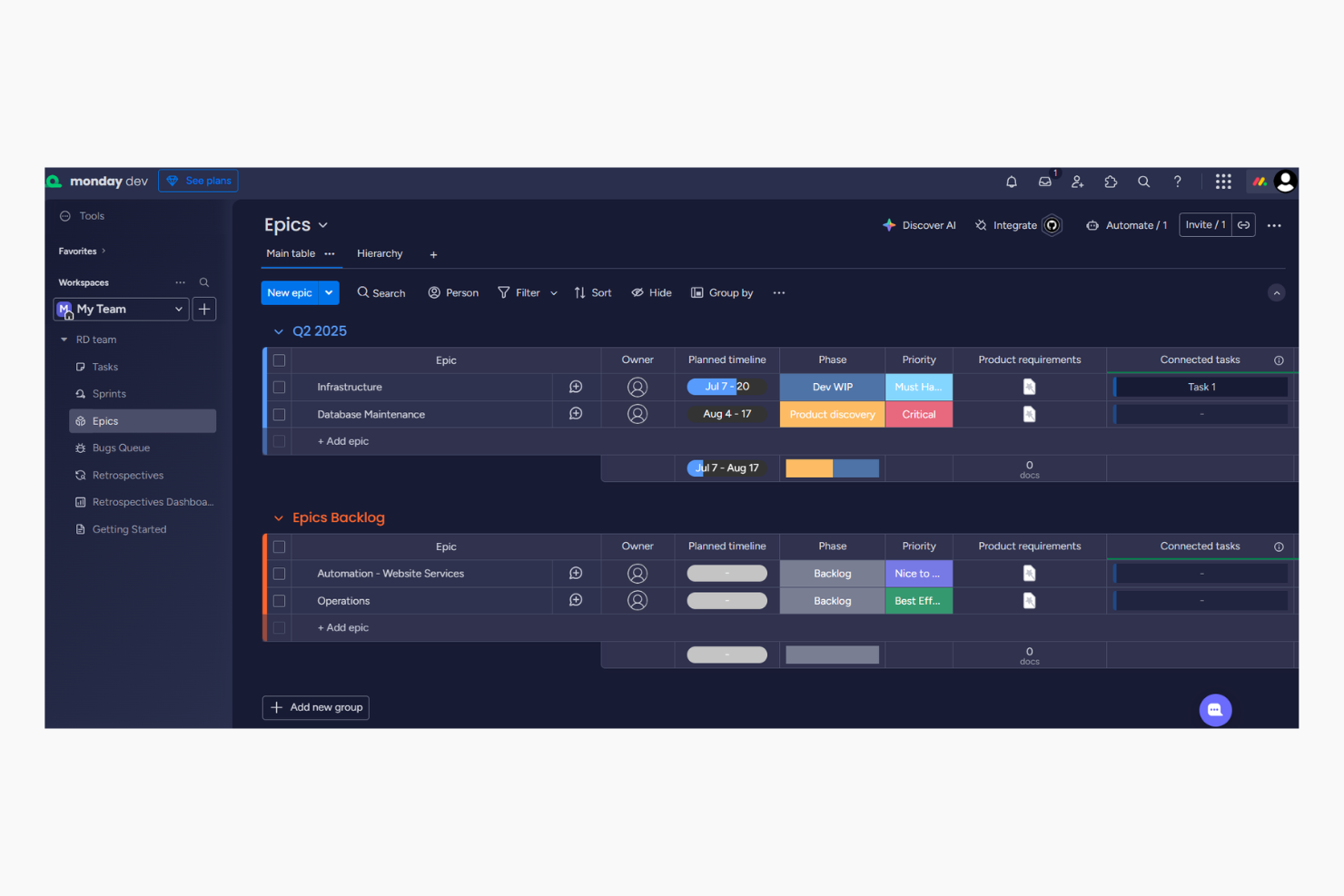
monday dev, a monday.com product, offers a flexible agile software management platform where you can automate workflows for managing projects with ease. Smartsheet provides a powerful solution for collaborative work management through spreadsheets and formulas, similar to what you get in Google Sheets and Excel. While both tools aim to enhance your team's productivity, monday dev's intuitive interface based on colorful Gantt charts and Kanban boards is different from Smartsheet's spreadsheet-like approach.
In this article, we'll compare the tools and their features, pros and cons, pricing, and more to help you choose the right project management software for your team.
monday dev vs. Smartsheet: An Overview
monday dev

Smartsheet

Why Trust Our Software Recommendations
Our team has been testing and reviewing software since 2012. As project managers ourselves, we know how difficult—and important—it is to choose the right software.
For this guide, we evaluated tools using hands-on testing and independent research, scoring tools using our selection criteria. We also draw on insights from industry thought leaders and practicing project management experts.
Our reviews reflect our human editorial judgment, not a sales pitch.
Expert reviewers:
monday dev vs. Smartsheet Pricing Comparison
| monday dev | Smartsheet | |
|---|---|---|
| Free Trial | Free trial available | 30-day free trial |
| Pricing | From $9/month (billed annually) | From $12/user/month |
monday dev vs. Smartsheet Pricing & Hidden Costs
monday dev pricing follows a tiered subscription model comprised of a basic, standard, and pro plan with varying levels of functionality, and an enterprise tier. Users might encounter additional costs for premium features or integrations, as these last ones have a limited number of actions per plan. Smartsheet pricing also uses a tiered approach, only in this case, you will see extra charges if you opt-in for specific add-ons. Also if you choose other tools within their ecosystem, like Brandfolder or Resource Management by Smartsheet.
To choose the right tool for your team, evaluate the features you truly need, consider future scaling, and factor in any additional costs to ensure the pricing aligns with your project's long-term goals. With monday dev's automations, you can easily streamline repetitive tasks, making it ideal for managing large-scale marketing campaigns that require consistent updates. Smartsheet's document management is great for organizing and tracking approvals in complex engineering projects where detailed record-keeping is essential. Additionally, while monday dev excels in automating workflows, Smartsheet shines in its ability to handle extensive documentation needs.
monday dev vs. Smartsheet Feature Comparison
| monday dev | Smartsheet | |
|---|---|---|
| API | ||
| Collaboration Support | ||
| Data Export | ||
| Data Import | ||
| Data Visualization | ||
| External Integrations | ||
| Multi-User | ||
| Notifications | ||
| Third-Party Plugins/Add-Ons | ||
| Workflow Management |
monday dev vs. Smartsheet Integrations
| Integration | monday dev | Smartsheet |
|---|---|---|
| ✅ | ❌ | |
| HubSpot | ✅ | ✅ |
| Miro | ✅ | ✅ |
| Google Workspace | ✅ | ✅ |
| Microsoft Office 365 | ✅ | ✅ |
| Slack | ✅ | ✅ |
| Salesforce | ✅ | ✅ |
| Zoom | ✅ | ✅ |
| API | ✅ | ✅ |
| Zapier | ✅ | ✅ |
| Jira | ✅ | ✅ |
| Trello | ✅ | ❌ |
With monday dev's integration with LinkedIn, you can automate social media updates for marketing campaigns, saving time and maintaining consistency. Smartsheet's integration with Brandfolder is great for managing digital assets in content-heavy environments like media companies, ensuring easy access and organization. While monday dev helps streamline marketing efforts, Smartsheet excels in handling complex content management needs.
monday dev vs. Smartsheet Security, Compliance & Reliability
| Factor | monday dev | Smartsheet |
|---|---|---|
| Data Encryption | Uses AES-256 encryption to secure data in transit and at rest. | Implements TLS encryption for data transfer and AES-256 for data storage. |
| Regulatory Compliance | Complies with GDPR and ISO/IEC 27001 standards to protect user data. | Adheres to GDPR, CCPA, and ISO/IEC 27001 for robust data protection. |
| Uptime Reliability | Offers 99.9% uptime SLA, ensuring consistent access and performance. | Provides 99.9% uptime SLA to maintain reliable service availability. |
monday dev and Smartsheet both provide strong security measures, but Smartsheet offers slightly broader regulatory compliance. To choose the right tool, evaluate which regulatory standards are most critical for your industry, and review each tool's compliance documentation to ensure it meets those needs.
monday dev vs. Smartsheet Ease of Use
| Factor | monday dev | Smartsheet |
|---|---|---|
| User Interface | Offers a visually intuitive and colorful interface that simplifies task tracking. | Provides a spreadsheet-like interface that might feel familiar to Excel users. |
| Onboarding Experience | Features interactive tutorials and templates to help new users get started quickly. | Includes a comprehensive customer support knowledge base and video guides for new users. |
| Customization | Allows drag-and-drop customization for dashboards and workflows. | Offers customizable templates but requires more steps for personalization. |
monday dev is easier to navigate with its vibrant interface and simple customization, making it ideal for teams new to project management tools. Smartsheet can be challenging for those not accustomed to spreadsheets, but its extensive guides support those who prefer a structured learning path.
monday dev vs Smartsheet: Pros & Cons
monday dev
- Easily customize workflows, including sprint planning and Kanban board configurations
- Visual project tracking keeps your team aligned and focused
- Automation features save time on repetitive tasks
- Gantt chart view is less intuitive than other tools
- Mobile app lacks full functionality for managing product roadmap tasks.
- Initial setup might be overwhelming for teams new to agile tools
Smartsheet
- Gives your team a lot of flexibility with how you set up sheets, dashboards, and workflows
- Proofing and approval tools can help you better collaborate with your team
- Handles complex projects and cross-team coordination better than most tools
- It takes time to set up and isn’t very intuitive for new users
- Interactive spreadsheets don’t automatically sync changes
- You can’t easily build simple task lists without doing extra setup
Best Use Cases for monday dev and Smartsheet
monday dev
- Tech startups Customizable workflows help your team adapt and grow rapidly in a dynamic environment, especially during fast-paced product development cycles.
- Software development Automation features and bug tracking streamline repetitive tasks, allowing your developers to focus on coding.
- Product management teams Roadmapping tools and backlog prioritization help your team align stakeholders and deliver product updates on schedule.
- IT departments Efficient task tracking and automation improve your team's response to issues and requests, especially when managing technical dependencies.
- Remote teams Collaboration tools keep your team members connected, no matter where they are working.
- Creative agencies Customizable dashboards provide your team with the flexibility needed for unique projects, backed by a centralized knowledge base and shared docs.
- Local nonprofits The setup complexity and feature set might be more than what your team requires.
Smartsheet
- Marketing Teams You can manage campaign timelines, creative approvals, and content calendars in one place using built-in forms, reminders, and dashboards.
- Construction Projects Smartsheet is great for tracking tasks, permits, and inspections across vendors and crews using Gantt charts and status columns.
- PMO Departments You get a clear portfolio view of all your projects, timelines, and risks with built-in reports and resource views.
- Healthcare Operations Smartsheet helps you track compliance tasks, training, and onboarding with audit-ready logs and approval workflows.
- IT Teams Smartsheet is useful for managing system rollouts, support requests, and change logs with forms, automations, and sheet linking.
- Mid-Sized & Enterprise-Level Companies You get enough structure to handle complex operations and scale without needing a full custom solution.
Who Should Use monday dev, and Who Should Use Smartsheet?
In my opinion, monday dev is great for creative teams and startups that value flexibility and a visually appealing interface. It suits organizations that thrive on collaboration and need a tool that adapts to diverse workflows. On the other hand, I believe Smartsheet is ideal for industries that rely on detailed data management and prefer a structured, spreadsheet-like approach. It's best for teams already familiar with Excel and those needing robust project tracking and documentation capabilities.
Differences Between monday dev and Smartsheet
| monday dev | Smartsheet | |
|---|---|---|
| Automation | Provides easy-to-set-up workflow automations for repetitive tasks. | Requires more manual setup for automating processes. |
| Customization | Allows drag-and-drop customization and flexible dashboards. | Provides customizable templates but with more rigid structures. |
| Hidden Costs | Uses a tiered subscription model with extra costs for premium features. | |
| Integrations | Integrates with tools like LinkedIn and Miro for creative workflows. | Supports extensive integrations with tools like Brandfolder for asset management. |
| Read monday dev ReviewOpens new window | Visit SmartsheetOpens new window | |
| Pricing | Offers tiered pricing with potential extra costs for add-on modules. | |
| User Interface | Features a colorful, intuitive interface for easy navigation. | Offers a familiar spreadsheet-like interface for data-heavy tasks. |
| Read monday dev ReviewOpens new window | Visit SmartsheetOpens new window |
Similarities Between monday dev and Smartsheet
| Collaboration | Both offer robust collaboration features like real-time updates and team communication channels. monday dev provides visual boards for teamwork, while Smartsheet offers shared sheets for tracking progress. |
|---|---|
| Customizable Workflows | Both allow customization of workflows to suit different project needs. monday dev offers drag-and-drop flexibility, and Smartsheet provides structured templates you can modify. |
| Integrations | Both integrate with popular tools like Slack and Google Workspace, supporting seamless workflow connectivity. They each provide APIs for custom integrations tailored to your team's needs. |
| Pricing | Both use a tiered pricing model, allowing you to choose plans based on your team's size and feature needs. They provide scalable options as your project requirements grow. |
| Security | Both prioritize security with features like data encryption and compliance with standards like GDPR. They ensure your data is protected and accessible only to authorized users. |
| Read monday dev ReviewOpens new window Visit SmartsheetOpens new window | |