



Teamwork.com vs. monday.com: Expertenvergleich für 2026



Teamwork.com bietet eine leistungsstarke Lösung für das effiziente und übersichtliche Projektmanagement. monday.com stellt eine flexible Plattform zur Verfügung, um die Arbeit Ihres Teams zu organisieren und die Zusammenarbeit zu fördern.
Obwohl beide Tools im Projektmanagement überzeugen, unterscheiden sich ihre Ansätze: Teamwork.com konzentriert sich auf eine umfassende Aufgabenverwaltung, während monday.com Wert auf Anpassungsfähigkeit und visuelle Workflows legt. In diesem Artikel finden Sie einen detaillierten Vergleich dieser Projektmanagement-Software-Tools, in dem deren Funktionen, Vor- und Nachteile, Preise und mehr untersucht werden.
Teamwork.com vs. monday AI Workspace: An Overview
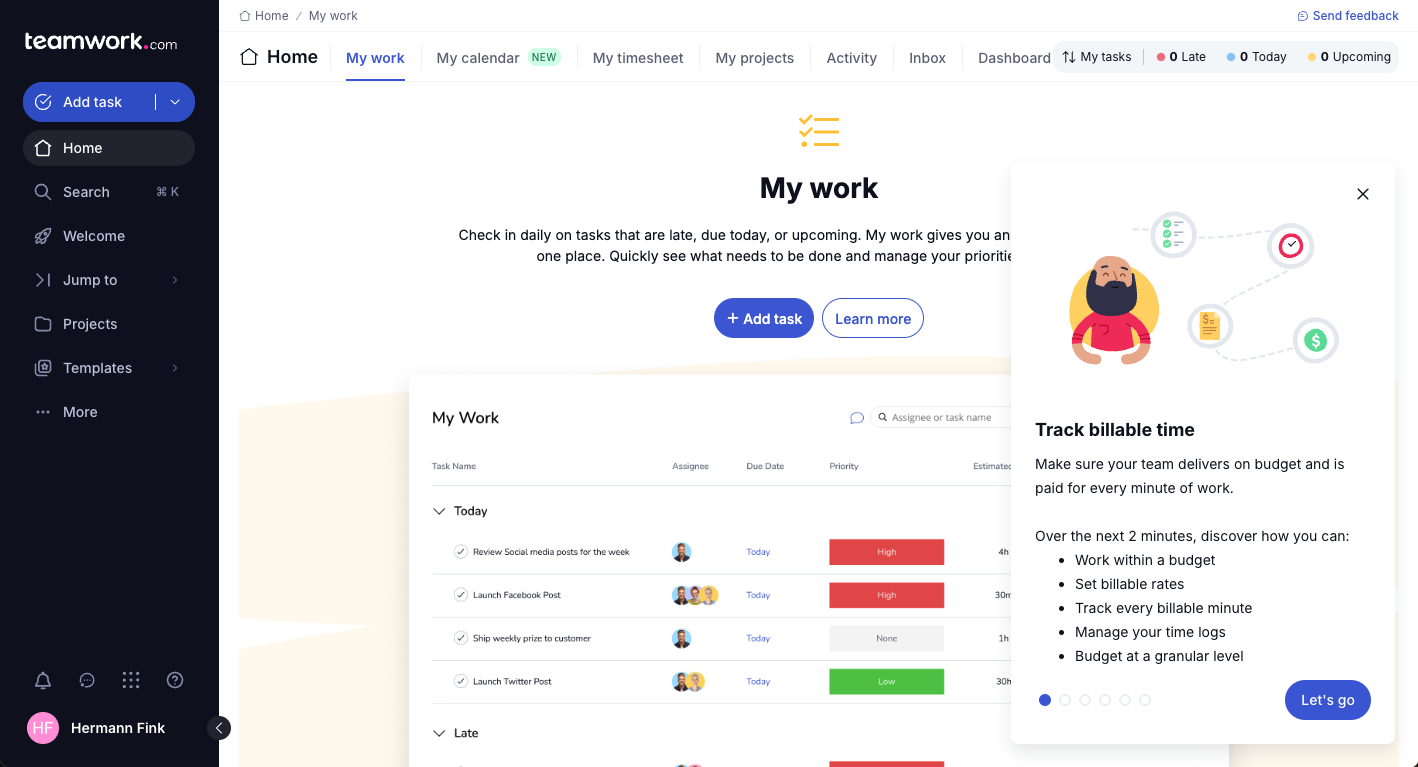
Teamwork.com


monday AI Workspace

Warum Sie unseren Software-Empfehlungen vertrauen können
Unser Team testet und bewertet Software seit 2012. Als Projektmanager wissen wir selbst, wie schwierig – und wichtig – es ist, die richtige Software auszuwählen.
Für diesen Leitfaden haben wir Tools mithilfe von praktischen Tests und unabhängiger Recherche bewertet und dabei unsere Bewertungskriterien angewendet. Zudem greifen wir auf Erkenntnisse von Branchenvordenkern und praktizierenden Projektmanagement-Experten zurück.
Unsere Bewertungen spiegeln unser menschliches redaktionelles Urteilsvermögen wider, keine Verkaufsstrategie.
Expertenprüfer:
Teamwork.com vs. monday AI Workspace Pricing Comparison
| Teamwork.com | monday AI Workspace | |
|---|---|---|
| Free Trial | 14-day free trial | Free plan available |
| Pricing | From $9.99/user/month (billed annually) | From $9/user/month (billed annually) |
Teamwork.com vs. monday.com: Preise & versteckte Kosten
Teamwork.com-Preise sind in abgestuften Tarifen aufgebaut, die sich nach der Anzahl der Nutzer und den enthaltenen Funktionen richten. Für Premiumfunktionen und Zusatzoptionen können zusätzliche Kosten anfallen. Im Gegensatz dazu bietet monday.com ein Preismodell pro Nutzer mit verschiedenen Stufen, wobei versteckte Kosten für Zusatzfunktionen oder Integrationen anfallen können.
Um das richtige Tool auszuwählen, sollten Sie die Größe Ihres Teams, den Funktionsbedarf und das mögliche Wachstum berücksichtigen, damit das Preismodell zu Ihren Anforderungen im Projektmanagement passt.
Teamwork.com vs. monday AI Workspace Feature Comparison
Mit der Korrekturfunktion von Teamwork.com können Sie Projekte mit notwendigem Kundenfeedback mühelos verwalten – besonders wertvoll für Kreativteams, die Designfreigaben benötigen. Im Vergleich dazu sind die Automatisierungsfunktionen von monday.com hervorragend, um wiederkehrende Aufgaben zu reduzieren, was gerade in schnelllebigen Umgebungen mit effizienten Workflows von Vorteil ist.
Während Teamwork.com bei der Verwaltung von Kundeninteraktionen punktet, glänzt monday.com bei der Automatisierung von Abläufen und bietet je nach Projektbedarf besondere Vorteile.
| Teamwork.com | monday AI Workspace | |
|---|---|---|
| API | ||
| Batch Permissions & Access | ||
| Budgeting | ||
| Calendar Management | ||
| Collaboration Support | ||
| Contact Management | ||
| Contact Sharing | ||
| Customer Management | ||
| Dashboard | ||
| Dashboards | ||
| Data Export | ||
| Data Import | ||
| Data Visualization | ||
| Dependency Tracking | ||
| Document Sharing | ||
| Expense Tracking | ||
| External Integrations | ||
| File Sharing | ||
| Gantt Charts | ||
| Kanban Boards | ||
| Multi-User | ||
| Notifications | ||
| Project Management | ||
| Resource Management | ||
| Scheduling | ||
| Task Scheduling/Tracking | ||
| Third-Party Plugins/Add-Ons | ||
| Time Management | ||
| Travel Management | ||
| Workflow Management |
Teamwork.com vs. monday.com Integrationen
| Integration | Teamwork.com | monday.com |
|---|---|---|
| Slack | ✅ | ✅ |
| Outlook | ✅ | ✅ |
| QuickBooks | ✅ | ❌ |
| HubSpot | ✅ | ✅ |
| Google Kalender | ✅ | ✅ |
| Miro | ❌ | ✅ |
| ❌ | ✅ | |
| Clockify | ✅ | ❌ |
| API | ✅ | ✅ |
| Zapier | ✅ | ✅ |
Dank der Teamwork.com-Integration mit QuickBooks können Sie die finanziellen Aspekte Ihrer Projekte nahtlos verwalten – entscheidend für Teams, die eine genaue Budgetkontrolle benötigen. Die Integration von monday.com mit Miro ist ideal für die visuelle Zusammenarbeit und eignet sich besonders für Teams, die regelmäßig Brainstorming-Sitzungen durchführen.
Während Teamwork.com das Finanzmanagement optimiert, verbessert monday.com die kreative Zusammenarbeit – beide Lösungen kommen unterschiedlichen Projektanforderungen entgegen.
Teamwork.com vs. monday.com Sicherheit, Compliance & Zuverlässigkeit
| Faktor | Teamwork.com | monday.com |
|---|---|---|
| Datenverschlüsselung | Verschlüsselt Daten während der Übertragung mit TLS und im Ruhezustand mit AES-256. | Nutzt AES-256 für ruhende Daten und TLS für Daten während der Übertragung. |
| GDPR-Konformität | Hält sich an die DSGVO-Richtlinien und stellt Werkzeuge für den Datenzugang von Betroffenen bereit. | Erfüllt die DSGVO und bietet Funktionen zum Export und zur Löschung von Daten. |
| Betriebszeit-Garantie | Bietet eine Service Level Agreement (SLA) von 99,99% Betriebszeit mit robuster Infrastruktursicherung. | Stellt eine 99,9% Betriebszeit-SLA zur Verfügung, unterstützt durch zuverlässige Cloud-Dienste. |
| Zugriffskontrollen | Bietet rollenbasierte Rechtevergabe für sicheren Benutzerzugang. | Bietet anpassbare Berechtigungen und Benutzerzugriffslevel. |
Teamwork.com und monday.com bieten beide starke Sicherheits- und Compliance-Maßnahmen, unterscheiden sich jedoch leicht in Bezug auf Betriebszeit-Garantie und Zugriffskontrollen.
Um den richtigen Anbieter zu wählen, sollten Sie die spezifischen Sicherheitsanforderungen Ihres Teams – wie Datenverarbeitung und Nutzerzugriff – bewerten und die Funktionen priorisieren, die zu den Compliance-Anforderungen Ihrer Organisation passen.
Teamwork.com vs. monday.com Benutzerfreundlichkeit
| Faktor | Teamwork.com | monday.com |
|---|---|---|
| Benutzererlebnis | Bietet eine übersichtliche, tabbasierte Oberfläche, die die Navigation vereinfacht. | Bietet eine farbenfrohe Drag-and-Drop-Oberfläche für einfache Bedienung. |
| Einarbeitung | Stellt geführte Tutorials und eine Wissensdatenbank für neue Nutzer bereit. | Bietet interaktive Tutorials und ein Community-Forum. |
| Einrichtungsprozess | Verfügt über einen unkomplizierten Einrichtungsprozess mit anpassbaren Vorlagen. | Bietet eine schnelle Einrichtung mit vorgefertigten Vorlagen und Automatisierungen. |
| Support | Bietet 24/7 Support per Chat und E-Mail. | Bietet Support über mehrere Kanäle, einschließlich Webinare und Live-Chat. |
monday.com ist durch seine Drag-and-Drop-Oberfläche intuitiv und erleichtert visuellen Denkern die Nutzung, jedoch kann das farbenfrohe Layout überwältigend wirken. Im Gegensatz dazu bietet Teamwork.com eine unkomplizierte Oberfläche mit starkem Support, wobei das tabbasierte Design für einige Nutzer möglicherweise veraltet erscheint.
Teamwork.com vs monday AI Workspace: Pros & Cons
Teamwork.com
- You can manage workloads and resources effectively with its robust features.
- Teamwork's collaboration tools, like chat and message boards, keep your team connected.
- The platform's Academy offers useful videos to help you use it effectively.
- You might find the interface overwhelming with its many features.
- Some users feel the mobile app could be more intuitive.
- The learning curve can be steep for new users without prior experience.
monday AI Workspace
- The interface is easy to use, with simple drag and drop timeline and charting mechanics.
- You can create forms that live within your project as a view.
- There is a long list of supported integrations
- The Gantt view isn't useful for building a project.
- Recurring tasks are considered automations and limited to higher tier plans.
- There is a steep learning curve for beginners.
Best Use Cases for Teamwork.com and monday AI Workspace
Teamwork.com
- Creative Agencies Teamwork.com supports your agency with tools for managing client projects and tracking billable hours.
- Remote Teams Use Teamwork to stay connected with your team through its communication and collaboration features.
- Marketing Departments Manage your marketing campaigns with task lists, calendars, and resource allocation.
- Consulting Firms Track time and manage multiple client projects efficiently with Teamwork’s time tracking capabilities.
- Event Planning Organize events with ease using project timelines and task dependencies.
- Product Development Coordinate product launches with detailed task management and team collaboration features.
monday AI Workspace
- Creative departments With features like collaborative docs and a proofing screen, creative teams can improve feedback loops and increase delivery speeds.
- Marketing teams Its customizable dashboards and automation features let you track campaigns and workflows efficiently.
- Content creation monday.com's file management and commenting capabilities let teams manage media files and improve collaboration.
- Event planners The platform’s timeline views and easy collaboration features make managing multiple events straightforward.
- Product development You can track progress and updates across teams to maintain alignment and meet deadlines.
- Remote teams With collaborative features and real-time updates, remote teams can maintain productivity and communication effortlessly.
Wer sollte Teamwork.com und monday.com nutzen?
Meiner Meinung nach eignet sich Teamwork.com besonders für Projektmanager in kreativen Branchen, die eine starke Kundenkollaboration und Aufgabenverwaltung benötigen. Für dynamische Tech-Umgebungen oder Startups passen sich die anpassbaren, visuellen Workflows von monday.com besser an die Bedürfnisse schneller Teams an.
Wer mit einem begrenzten Budget arbeitet, könnte die unkomplizierte Preisstruktur von Teamwork.com bevorzugen, während Teams, die umfangreiche Integrationen und Automatisierung benötigen, die Flexibilität von monday.com den Preis wert finden könnten.
Differences Between Teamwork.com and monday AI Workspace
| Teamwork.com | monday AI Workspace | |
|---|---|---|
| Automation | Provides basic automation for task management. | Excels with customizable automations for streamlining tasks. |
| Client Collaboration | Includes proofing and feedback tools ideal for creative teams. | Focuses more on internal collaboration with visual workflows. |
| Integrations | Offers integrations, such as QuickBooks, for financial management. | Connects with Miro for visual collaboration and brainstorming. |
| Pricing | Uses tiered plans that scale with features and users. | Offers a per-user pricing model with tiered feature access. |
| User Interface | Has a clean, tab-based interface for straightforward navigation. | Features a colorful, drag-and-drop interface for visual ease. |
| Read Teamwork.com ReviewOpens new window | Visit monday AI WorkspaceOpens new window |
Similarities Between Teamwork.com and monday AI Workspace
| Collaboration | They provide tools to enhance team communication and collaboration. Teamwork.com includes messaging features, and monday.com offers comment threads on tasks for seamless interactions. |
|---|---|
| Customizable Workflows | The solutions allow you to customize workflows to fit your project needs. Teamwork.com offers templates for repeatable processes, while monday.com lets you build visual workflows from scratch. |
| Integrations | The platforms support integrations to extend their capabilities. Teamwork.com connects with tools like Slack for communication, and monday.com integrates with Zapier for broader connectivity. |
| Reporting | Each tool includes reporting features to monitor project performance. Teamwork.com provides detailed reports on workload, and monday.com offers visual dashboards for quick insights. |
| Task Management | Teamwork.com and monday.com offer robust task management features, letting you assign tasks, set deadlines, and track progress. Teamwork.com provides detailed task lists, while monday.com uses visual boards to manage tasks. |
| Read Teamwork.com ReviewOpens new window Visit monday AI WorkspaceOpens new window | |