


Monday CRM vs. Productive: Expertenvergleich für 2026



Monday CRM bietet einen schlanken Ansatz für das Management der Kundeninteraktionen Ihres Teams. Productive hingegen stellt ein robustes Framework zur Verfügung, um die Teamproduktivität zusammen mit dem Kundenmanagement zu optimieren. Während beide Tools darauf abzielen, Ihre Prozesse im Kundenbeziehungsmanagement zu verbessern, unterscheiden sie sich in ihren Integrationsmöglichkeiten und im Design der Benutzeroberfläche. In diesem Artikel finden Sie einen umfassenden Vergleich der Funktionen, Vor- und Nachteile, Preisgestaltung und mehr – mit Fokus auf ihren Einsatz im Customer Relationship Management.
monday CRM vs. Productive: An Overview
monday CRM


Productive



Warum Sie unseren Software-Empfehlungen vertrauen können
Unser Team testet und bewertet Software seit 2012. Als Projektmanager wissen wir selbst, wie schwierig – und wichtig – es ist, die richtige Software auszuwählen.
Für diesen Leitfaden haben wir Tools mithilfe von praktischen Tests und unabhängiger Recherche bewertet und dabei unsere Bewertungskriterien angewendet. Zudem greifen wir auf Erkenntnisse von Branchenvordenkern und praktizierenden Projektmanagement-Experten zurück.
Unsere Bewertungen spiegeln unser menschliches redaktionelles Urteilsvermögen wider, keine Verkaufsstrategie.
Expertenprüfer:
monday CRM vs. Productive Pricing Comparison
| monday CRM | Productive | |
|---|---|---|
| Free Trial | 14-day free trial; Free demo available | 14-day free trial |
| Pricing | From $18/user/month | From $10/user/month (billed annually) |
Monday CRM vs. Productive: Preise & Versteckte Kosten
Monday CRM Preisgestaltung basiert auf gestaffelten Tarifen, die mit zusätzlichen Funktionen oder Nutzeranzahl ansteigen. Außerdem können Zusatzkosten für Premium-Integrationen oder zusätzlichen Speicher anfallen. Auch die Productive Preisgestaltung folgt einem Stufenmodell, wobei die Gebühren je nach Nutzerzahl und zusätzlichen Funktionen oder erhöhten Nutzungslimits ansteigen.
Um das richtige Tool für Ihr Vertriebsteam zu wählen, bewerten Sie beide Anbieter, indem Sie die Gesamtkosten inklusive versteckter Gebühren betrachten. Prüfen Sie, wie die Preisstruktur zu der Größe Ihres Teams, dem erwarteten Wachstum und Ihren individuellen Funktionsanforderungen passt. Nutzen Sie Testphasen oder Demos, um zu beurteilen, welches Tool im Verhältnis zum Preis den größten Mehrwert bietet.
monday CRM vs. Productive Feature Comparison
Mit den Automatisierungsfunktionen von Monday CRM können Sie sich wiederholende Aufgaben wie Nachfass-E-Mails automatisieren, was besonders für Vertriebsleiter mit mehreren täglichen Kundenkontakten vorteilhaft ist. Das Projektfinanzierungs-Feature von Productive eignet sich hervorragend zur detaillierten Überwachung von Budgets und Rechnungen – ein Muss für effektives Kostenmanagement im projektbasierten Vertrieb. Während Monday CRM die Workflow-Automatisierung vereinfacht, punktet Productive im Bereich Finanzüberblick und setzt unterschiedliche Schwerpunkte – je nach Bedarf Ihres Teams.
| monday CRM | Productive | |
|---|---|---|
| API | ||
| Data Export | ||
| Data Import | ||
| External Integrations | ||
| Multi-User | ||
| Notifications | ||
| Scheduling | ||
| Task Scheduling/Tracking |
Monday CRM vs. Productive Integrationen
| Integration | Monday CRM | Productive |
|---|---|---|
| Google Kalender | ✅ | ✅ |
| HubSpot | ✅ | ✅ |
| Jira | ✅ | ✅ |
| QuickBooks | ❌ | ✅ |
| Salesforce | ✅ | ❌ |
| Trello | ✅ | ❌ |
| Slack | ✅ | ✅ |
| Bamboo HR | ❌ | ✅ |
| API | ✅ | ✅ |
| Zapier | ✅ | ✅ |
Die Integration von Monday CRM mit Salesforce ermöglicht ein nahtloses Management von Kundendaten und Vertriebspipelines – ideal für Vertriebsleiter, die Echtzeit-Kundeninformationen benötigen. Die Integration von Productive mit QuickBooks eignet sich hervorragend zur Verwaltung der Finanzen und Rechnungsstellung – ein besonderer Vorteil im projektbezogenen Vertrieb. Während Monday CRM den Fokus auf optimierte Vertriebsworkflows legt, glänzt Productive bei der Finanzverwaltung und deckt damit unterschiedliche operative Bedürfnisse ab.
Monday CRM vs. Productive Sicherheit, Compliance & Zuverlässigkeit
| Faktor | Monday CRM | Productive |
|---|---|---|
| Datenverschlüsselung | Verschlüsselt Daten sowohl im Ruhezustand als auch bei der Übertragung und gewährleistet so eine sichere Informationsverarbeitung. | Verwendet AES-256-Verschlüsselung zum Schutz der Daten und bietet damit eine starke Sicherheit für gespeicherte Informationen. |
| Regulatorische Compliance | Entspricht der DSGVO und bietet anpassbare Datenschutzeinstellungen zur Nutzerkontrolle. | Stellt DSGVO-Konformität durch regelmäßige Audits und Datenschutzmaßnahmen sicher. |
| Zuverlässigkeit | Bietet eine Verfügbarkeit von 99,9 % mit Echtzeit-Status-Updates für Nutzer. | Bietet einen verlässlichen Service mit einer Verfügbarkeitsgarantie von 99,9 % und kontinuierlicher Überwachung. |
| Zugriffskontrollen | Beinhaltet rollenbasierte Berechtigungen, um den Nutzerzugriff auf sensible Daten zu steuern. | Setzt Nutzerrollen und Berechtigungen ein, um den Zugriff entsprechend der jeweiligen Funktion einzuschränken. |
Sowohl Monday CRM als auch Productive bieten starke Sicherheits- und Compliance-Rahmenwerke, aber die anpassbaren Datenschutzeinstellungen von Monday CRM verschaffen diesem einen Vorteil bei der Nutzerkontrolle. Um den richtigen Anbieter zu wählen, sollten Sie die spezifischen Anforderungen Ihres Teams an den Datenschutz bewerten und dabei Faktoren wie Verschlüsselungsstandards und Compliance-Vorgaben berücksichtigen, um die beste Lösung zu finden.
Monday CRM vs. Productive Benutzerfreundlichkeit
| Faktor | Monday CRM | Productive |
|---|---|---|
| Benutzeroberfläche | Bietet eine farbenfrohe, intuitive Oberfläche mit Drag-and-Drop-Funktionalität für eine einfache Navigation. | Verfügt über ein klares, minimalistisches Design, das sich auf effizientes Aufgabenmanagement konzentriert. |
| Onboarding-Erlebnis | Stellt interaktive Tutorials und Anleitungen bereit, damit neue Nutzer schnell starten können. | Bietet einen unkomplizierten Onboarding-Prozess mit hilfreichen Tooltips und Ressourcen. |
| Einrichtung | Erfordert minimale Einrichtung durch vorgefertigte Vorlagen, die die anfängliche Konfiguration vereinfachen. | Ermöglicht eine einfache Einrichtung mit anpassbaren Workflows für verschiedene Team-Bedürfnisse. |
| Support | Umfasst rund um die Uhr verfügbaren Kundensupport und eine umfassende Wissensdatenbank zur Fehlerbehebung. | Bietet schnellen Support per Chat und E-Mail sowie ein detailliertes Hilfezentrum. |
Die lebendige Benutzeroberfläche von Monday CRM macht es attraktiv, aber die Vielzahl an Funktionen kann anfangs überfordern. Productive hingegen ist aufgrund des klaren Designs einfacher zu bedienen, besticht aber möglicherweise weniger durch optische Reize, die Monday CRM besonders machen.
monday CRM vs Productive: Pros & Cons
monday CRM
- You can easily customize workflows to fit your team's specific needs.
- It enhances team collaboration with real-time updates and dashboards.
- The onboarding process is smooth and user-friendly, helping your team get started quickly.
- The interface can be overwhelming for smaller teams with its extensive capabilities.
- Some users find the navigation less intuitive compared to other tools.
- It might not be the best fit for teams needing advanced financial features.
Productive
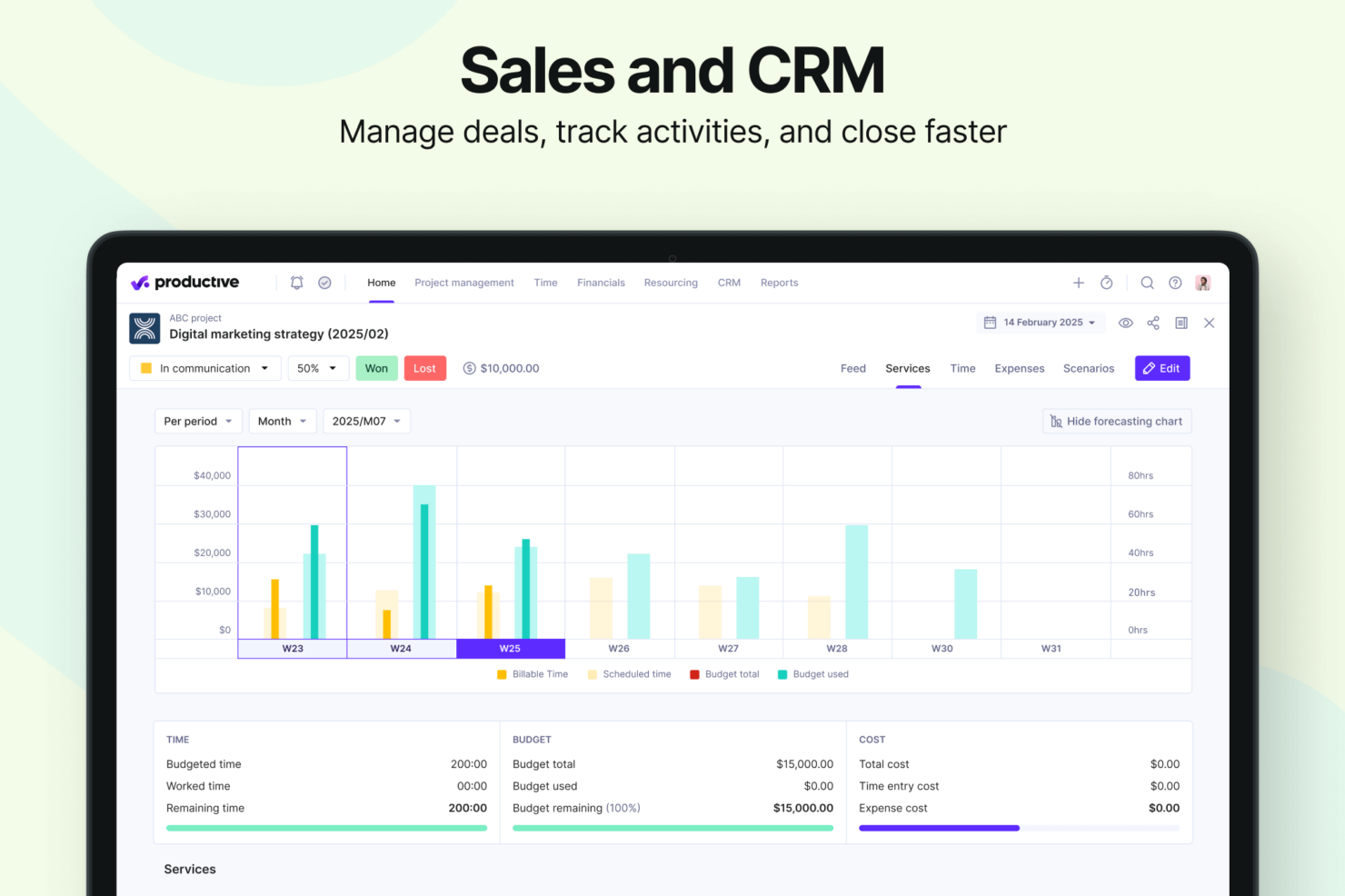
- Strong financial tracking and forecasting tools give you real-time insight into project profitability and overall business performance.
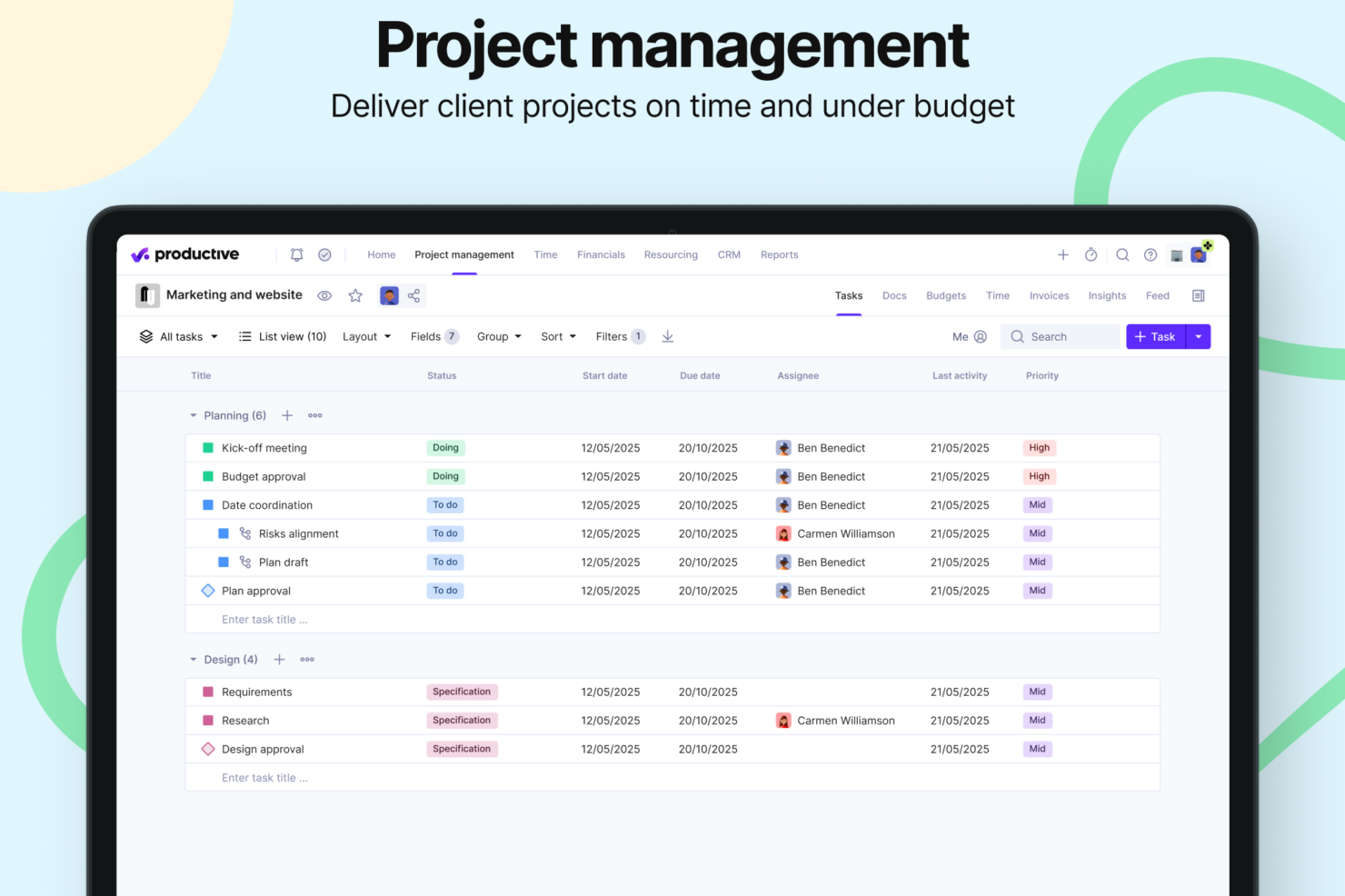
- You can handle agency projects end-to-end, from proposal to payment, which simplifies your workflow.
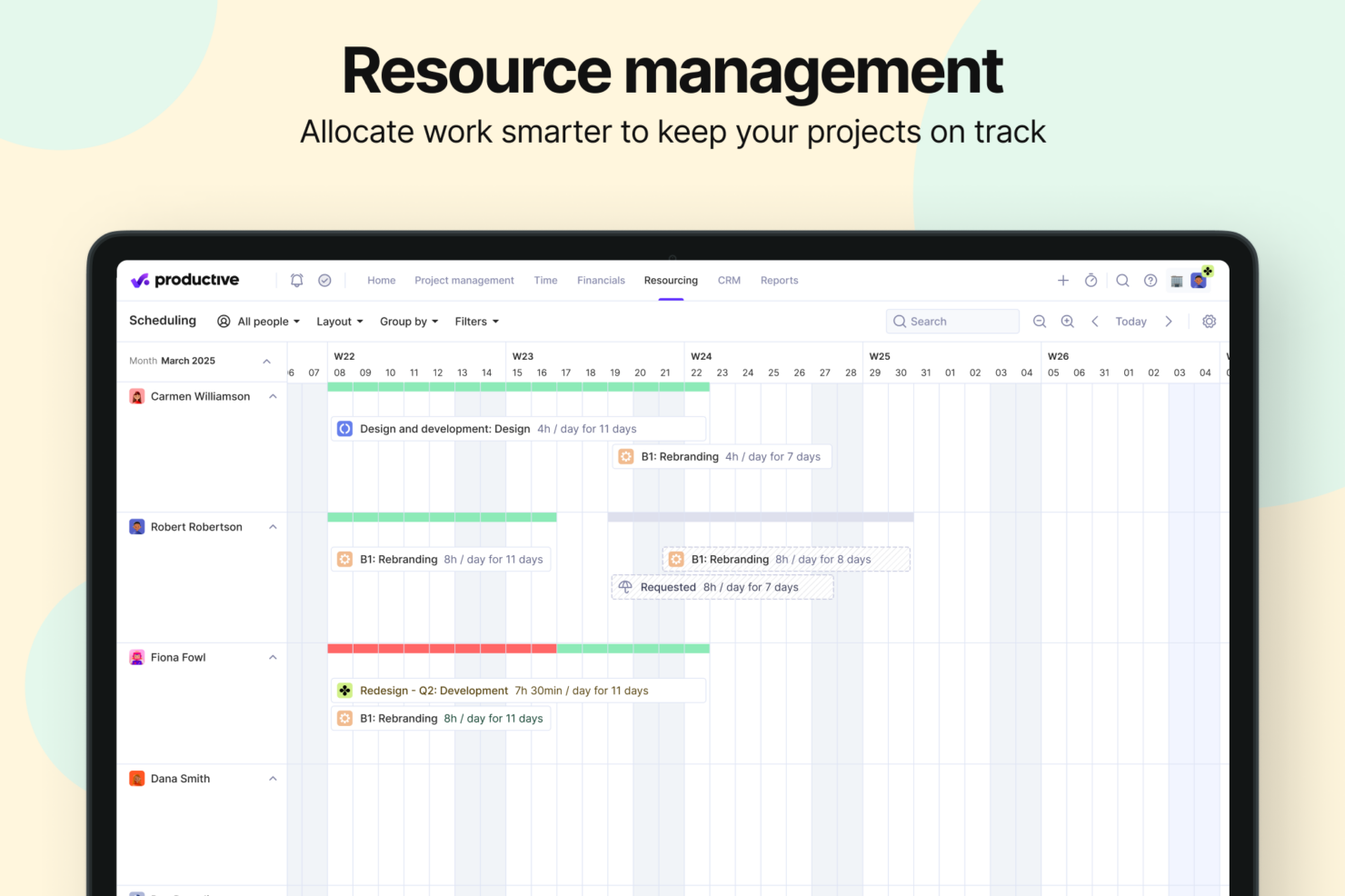
- Robust resource planning and workload management help you allocate people effectively.
- No free option available for teams looking for core project management functions.
- Advanced features can be complicated for small companies that just want basic task tracking.
- There's a minimum 3-seat requirement, so the tool isn't fit for single users or tiny teams.
Best Use Cases for monday CRM and Productive
monday CRM
- Marketing Teams Monday CRM lets you track campaigns and collaborate on content with its visual boards and real-time updates.
- Creative Agencies You can manage client projects and deadlines with customizable workflows that adapt to your needs.
- Sales Departments Track leads and sales pipelines with ease using Monday CRM’s intuitive dashboard and reporting features.
- Product Development Organize product roadmaps and collaborate with your team through Monday CRM’s task management and file-sharing capabilities.
- Event Planning Coordinate logistics and schedules seamlessly with Monday CRM’s timeline views and task assignments.
- Remote Teams Stay connected and on track with Monday CRM’s real-time collaboration tools and integration options.
Productive
- Creative agencies Agencies managing client retainers or project-based work gain real-time control over budgets, utilization, and profitability. Productive supports collaborative workflows while giving leadership deep financial insights.
- Architecture & Engineering Firms Productive aligns well with your workflows by combining project budgeting, resource planning, phased delivery, and profitability tracking.
- Consulting Firms Consultancies benefit from Productive’s integrated approach to scoping, staffing, project financials, and invoicing—providing clarity across complex engagements and supporting better revenue forecasting.
- Professional Service Providers Productive supports end-to-end service delivery with strong project financials, resource planning, time tracking, and billing workflows.
- IT Services IT service teams can streamline client engagements with robust time tracking, retainer management, cost tracking, and project profitability features.
- Mid-to-Large Businesses Organizations with growing teams benefit from Productive’s scalable project controls, forecasting, custom reporting, and multi-office management capabilities.
Wer sollte Monday CRM nutzen und wer sollte Productive einsetzen?
Monday CRM ist ideal für Vertriebsteams, die eine hochgradig anpassbare Plattform benötigen, um Deals zu verwalten, wiederkehrende Aufgaben zu automatisieren und einen visuellen Überblick über die gesamte Vertriebspipeline zu erhalten. Besonders geeignet ist es für Teams, die jeden Abschnitt des CRM exakt auf ihren individuellen Prozess zuschneiden möchten – insbesondere in kreativen oder dynamischen Branchen. Productive dagegen ist für Agenturen und dienstleistungsorientierte Unternehmen konzipiert, die ihre Vertriebspipeline direkt mit Budgetierung, Ressourcenplanung und Rentabilität verbinden müssen. Wenn Ihr Vertriebsteam eine nahtlose Zusammenarbeit zwischen Abteilungen – wie Vertrieb, Finanzen und Auslieferung – benötigt, ist der All-in-One-Ansatz von Productive eine gute Wahl. Für visuelle Flexibilität und skalierbare CRM-Automatisierung punktet Monday CRM; für datengestütztes Deal-Tracking und eine starke Geschäftsleistungsübersicht ist Productive die bessere Option.
Differences Between monday CRM and Productive
| monday CRM | Productive | |
|---|---|---|
| Business Intelligence | monday CRM offers dashboards focused on sales performance, deal tracking, and pipeline analytics—not project profitability, delivery margins, or financial forecasting. | Productive includes budgeting, cost tracking, profitability forecasting, revenue insights, and a full BI layer for service businesses. |
| Document Management | monday CRM does not have a native document editor; it integrates with external tools (Google Docs, etc.). | Productive includes integrated Docs for specs, notes, briefs, and project documentation. |
| Project Delivery | monday CRM focuses on CRM workflows: lead collection, deal stages, pipelines, email sequences, automations, and contact management. | Productive manages the entire lifecycle: proposals, projects, tasks, resources, financials, invoicing, reporting, docs, and profitability. |
| Resource Management | monday CRM does not offer traditional resource planning. It provides activity/task scheduling for sales reps, but not project-based capacity or utilization management. | Productive includes mature tools for resource planning and workload management: filtering by skills, seniority, availability, placeholders for future hiring, and visual workload balancing. |
| Scenario Building | monday CRM does not offer scenario-planning functionality. Its forecasting is sales pipeline–oriented. | Built-in Scenario Builder allows modeling different project or deal scenarios, comparing costs, staffing, timing, and profitability before committing. |
| Visit monday CRMOpens new window | Visit ProductiveOpens new window |
Similarities Between monday CRM and Productive
| Cross-Platform Access | Both platforms are accessible across devices, allowing teams to manage work on the go through mobile apps or responsive web interfaces. |
|---|---|
| Customizable Workflows | Both tools let teams tailor workflows to fit their processes, with support for customizable stages and a variety of templates. |
| Integration Options | Each platform supports a wide range of third-party integrations, including tools like Slack, Google Calendar, and other popular apps. |
| Real-time Collaboration | Both tools let teams tailor workflows to fit their processes, with support for customizable stages and a variety of templates. |
| Reporting | Both Monday CRM and Productive offer reporting features that allow users to visualize key metrics and track performance across workflows. |
| Visit monday CRMOpens new window Visit ProductiveOpens new window | |