

10 beste Obsidian-Alternativen zum Notizenmachen im Jahr 2026

Auswahl der besten Obsidian-Alternativen


Das Verwalten von Projekten ist anspruchsvoll, und die richtigen Tools können einen großen Unterschied machen. Wenn du Obsidian verwendest, aber feststellst, dass es nicht ganz zu den Anforderungen deines Teams passt, ziehst du vielleicht Alternativen in Betracht. Vielleicht suchst du nach besseren Funktionen für die Zusammenarbeit oder nach etwas Benutzerfreundlicherem.
Meiner Erfahrung nach können Notiz-Apps dir dabei helfen, Aufgaben und Ideen effizient zu organisieren. Ich habe verschiedene Softwarelösungen getestet und bewertet, um dir unvoreingenommene Einblicke zu geben. Diese Übersicht führt dich durch die besten Obsidian-Alternativen und konzentriert sich darauf, was deinem Team wirklich zugutekommen kann.
Du wirst Optionen entdecken, die auf verschiedene Branchen und Teamgrößen zugeschnitten sind. Ganz gleich, ob es um Integration, Speicherung oder Compliance geht – ich helfe dir dabei, die passende Lösung zu finden. Lass uns eintauchen und herausfinden, was die perfekte Lösung für deine Herausforderungen im Projektmanagement sein könnte.
Was ist Obsidian?
Obsidian ist eine Notiz-App, mit der du deine Ideen mithilfe des Markdown-Formats organisieren und miteinander verknüpfen kannst. Sie ist bei Autoren, Forschern und Projektmanagern beliebt, die ein flexibles Tool für den Umgang mit komplexen Informationen benötigen.
Die Verknüpfungen, die Graphansicht und die Markdown-Funktionen von Obsidian helfen dabei, Zusammenhänge zu visualisieren, Gedanken zu ordnen und einen strukturierten Arbeitsablauf aufrechtzuerhalten. Insgesamt bietet Obsidian eine vielseitige Plattform für die Verwaltung detaillierter Notizen und die Förderung der Kreativität.
Zusammenfassung der besten Obsidian-Alternativen
Diese Vergleichstabelle fasst die Preisinformationen meiner besten Obsidian-Alternativen zusammen und hilft dir dabei, die beste Lösung für dein Budget und deine geschäftlichen Anforderungen zu finden.
| Tool | Best For | Trial Info | Price | ||
|---|---|---|---|---|---|
| 1 | Am besten für eine reibungslose iCloud-Synchronisierung geeignet | Kostenloser Tarif dauerhaft verfügbar | Kostenlos nutzbar | Website | |
| 2 | Am besten für erweiterte Suche und das Ausschneiden von Webinhalten geeignet | Kostenloser Tarif verfügbar | Ab $8.33/Monat (jährlich abgerechnet) | Website | |
| 3 | Am besten für die Integration mit Microsoft-Apps geeignet | 30-tägige kostenlose Testversion verfügbar | Ab $6/Nutzer/Monat (jährlich abgerechnet) | Website | |
| 4 | Am besten für Teamzusammenarbeit und -verwaltung geeignet | Kostenloser Tarif und kostenlose Demo verfügbar | Ab $10/Teammitglied/Monat (jährlich abgerechnet) | Website | |
| 5 | Ideal für quelloffene und sichere Notizen | Dauerhaft kostenloser Tarif verfügbar | Kostenlos nutzbar | Website | |
| 6 | Am besten für KI-gestützte Produktivität | Kostenloser Tarif verfügbar | Ab $16/Monat (jährlich abgerechnet) | Website | |
| 7 | Am besten für die Zusammenarbeit in Echtzeit geeignet | Kostenloser Tarif verfügbar | Ab $11.99/Jahr | Website | |
| 8 | Am besten für interaktive Lernwerkzeuge geeignet | Kostenloser Tarif verfügbar | Ab $20/Jahr | Website | |
| 9 | Am besten für Einfachheit und Zugänglichkeit geeignet | Kostenloser Tarif verfügbar | Kostenlos nutzbar | Website | |
| 10 | Am besten für PDF-Markierungen und Zusammenarbeit in Echtzeit geeignet | 7-tägige kostenlose Testversion + kostenloser Tarif + kostenlose Demo verfügbar | Ab $4.19/Monat | Website |
Warum Sie unseren Software-Empfehlungen vertrauen können
Unser Team testet und bewertet Software seit 2012. Als Projektmanager wissen wir selbst, wie schwierig – und wichtig – es ist, die richtige Software auszuwählen.
Für diesen Leitfaden haben wir Tools mithilfe von praktischen Tests und unabhängiger Recherche bewertet und dabei unsere Bewertungskriterien angewendet. Zudem greifen wir auf Erkenntnisse von Branchenvordenkern und praktizierenden Projektmanagement-Experten zurück.
Unsere Bewertungen spiegeln unser menschliches redaktionelles Urteilsvermögen wider, keine Verkaufsstrategie.
Expertenprüfer:
Bewertungen der besten Obsidian-Alternativen
Nachfolgend findest du meine ausführlichen Zusammenfassungen der besten Obsidian-Alternativen, die es in meine Auswahl geschafft haben. Meine Bewertungen bieten einen detaillierten Einblick in die wichtigsten Funktionen, Vor- und Nachteile, Integrationen und idealen Anwendungsfälle jedes Tools, damit du die beste Lösung für dich findest.

Am besten für eine reibungslose iCloud-Synchronisierung geeignet
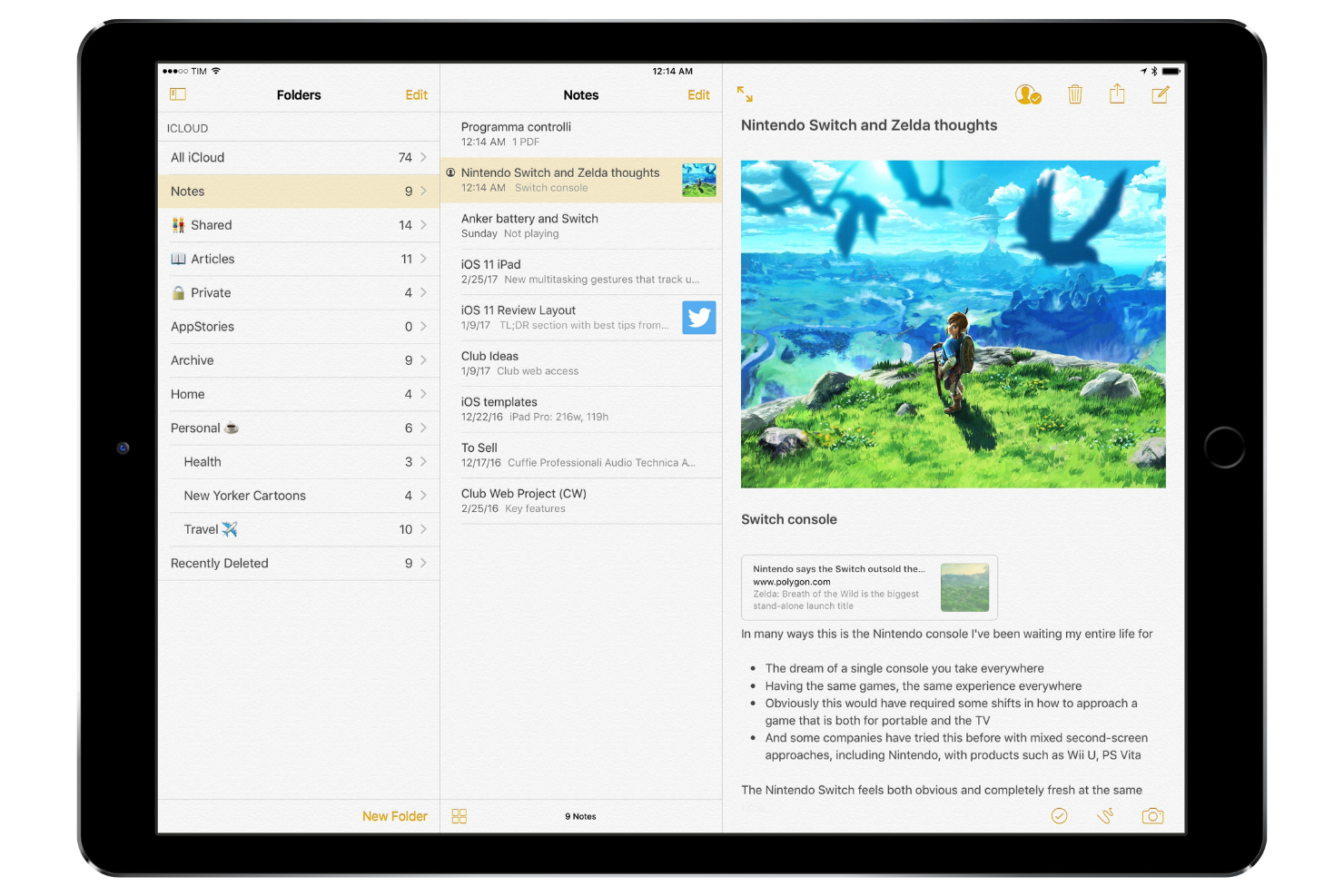
Apple Notes ist ein Notizenwerkzeug, das sich hauptsächlich an Nutzer von Apple-Geräten richtet, darunter Schüler, Studierende, Berufstätige und Kreative. Es ermöglicht Nutzern, Ideen festzuhalten, Notizen zu organisieren und über geteilte Notizen mit anderen zusammenzuarbeiten.
Warum es eine gute Obsidian-Alternative ist: Die reibungslose iCloud-Synchronisierung sorgt dafür, dass Ihre Notizen auf allen Apple-Geräten zugänglich bleiben. Mit Funktionen wie geteilten Ordnern und der Möglichkeit, Notizen zu sperren, unterstützt die Notizen-App sowohl persönliche als auch gemeinsame Projekte. Die Integration der App mit Siri ermöglicht es Ihnen, mithilfe von Sprachbefehlen schnell Notizen zu erstellen. Apple Notes unterstützt außerdem Rich-Text-Formatierung und Anhänge und ist dadurch vielseitig für verschiedene Anwendungsfälle geeignet.
Besondere Funktionen und Integrationen:
Zu den Funktionen gehören das direkte Scannen von Dokumenten in die App, das Organisieren von Notizen mit Tags und das Erstellen von Checklisten zur Aufgabenverwaltung. Sie können auch Skizzen zeichnen und Ihren Notizen hinzufügen, was besonders für visuell denkende Menschen hilfreich ist. Die App unterstützt das Teilen von Notizen mit anderen und verbessert dadurch die Zusammenarbeit.
Zu den Integrationen gehören Apple iCloud und mehr.
Pros and Cons
Pros:
- Synchronisierung über Apple-Geräte hinweg
- Teilen von Notizen mit anderen
- Integration mit Siri für Sprachnotizen
Cons:
- Eingeschränkte Formatierungsoptionen
- Auf das Apple-Ökosystem beschränkt

Evernote
Am besten für erweiterte Suche und das Ausschneiden von Webinhalten geeignet
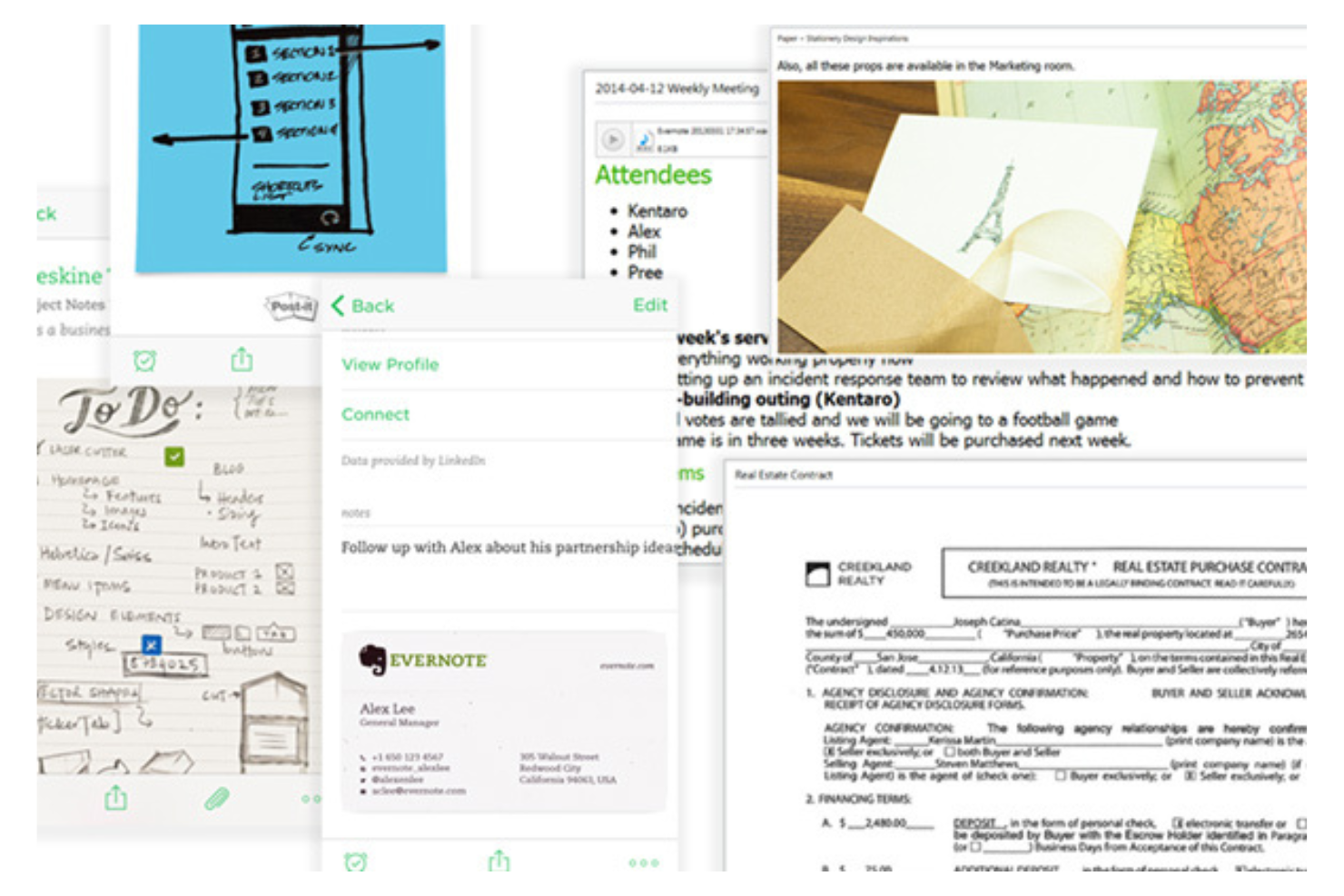
Evernote ist ein Notiz- und Organisationstool, das von Berufstätigen und Studierenden genutzt wird, um Ideen festzuhalten, Projekte zu verwalten und Informationen zu speichern. Es funktioniert wie ein zweites Gehirn und hilft Nutzern, Notizen, Aufgaben und Dokumente an einem zentralen Ort im Blick zu behalten.
Warum es eine gute Alternative zu Obsidian ist: Es bietet erweiterte Suchfunktionen und Funktionen zum Ausschneiden von Webinhalten und ist damit ideal für Nutzer, die Informationen effizient sammeln und organisieren müssen. Evernote ermöglicht die Suche innerhalb von PDFs und Bildern, was für Recherche und Dokumentation nützlich ist. Mit dem Web-Clipper können Sie Artikel, Webseiten und E-Mails direkt in Ihren Notizen speichern. Das Tag-System hilft Ihnen, Notizen zu kategorisieren und schnell zu finden.
Herausragende Funktionen und Integrationen:
Zu den Funktionen gehören die Möglichkeit, Notizbücher nach Projekt oder Thema zu organisieren, sowie ein KI-Assistent, der bei der Verwaltung Ihrer Aufgaben hilft. Sie können außerdem Erinnerungen festlegen, um Fristen im Blick zu behalten, und die Vorlage für die tägliche Tagebuchführung verwenden, um Ihre Gedanken und Gefühle festzuhalten. Die Handschrifterkennung von Evernote ermöglicht die Suche in handschriftlichen Notizen und bietet damit einen weiteren praktischen Vorteil für unterschiedliche Arten der Notizerfassung.
Zu den Integrationen gehören Google Drive, Google Kalender, Slack, Microsoft Outlook, Gmail, Zapier und mehr.
Pros and Cons
Pros:
- Suchfunktionen
- Werkzeug zum Ausschneiden von Webinhalten
- Erinnerungen zur Aufgabenverwaltung
Cons:
- Erfordert regelmäßige Aktualisierungen
- Strenge Einschränkungen in der kostenlosen Version
Am besten für die Integration mit Microsoft-Apps geeignet
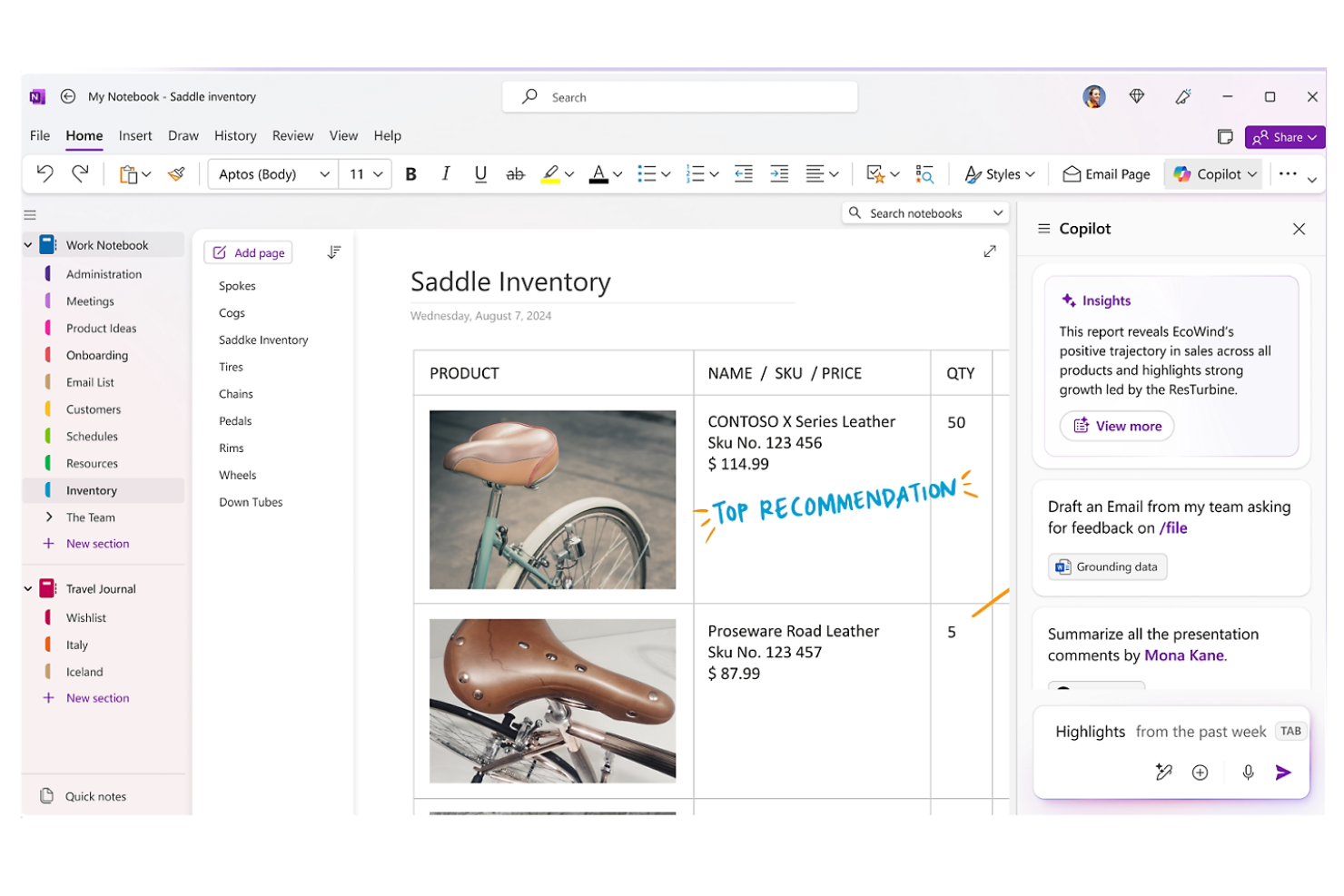
Microsoft OneNote ist eine digitale App zur Erstellung von Notizen, die hauptsächlich von Studierenden, Lehrkräften und Fachleuten zur Organisation von Informationen und Zusammenarbeit an Projekten verwendet wird. Sie unterstützt das Festhalten von Ideen, die Organisation von Inhalten und das Teilen von Notizen mit anderen.
Warum es eine gute Alternative zu Obsidian ist: Die App lässt sich nahtlos in andere Microsoft-Apps integrieren und ist daher ideal, wenn Ihr Team bereits Microsoft 365 verwendet. Mit Funktionen wie freigegebenen Notizbüchern und Zusammenarbeit in Echtzeit ermöglicht OneNote eine effiziente Teamarbeit. Die Möglichkeit, Dokumente und Multimedia-Inhalte einzubetten, verbessert die Erstellung von Notizen. Die intuitive Organisationsstruktur hilft Ihnen, den Überblick über komplexe Projekte zu behalten.
Hervorstechende Funktionen und Integrationen:
Zu den Funktionen gehören die Möglichkeit, Abschnitte und Seiten zu erstellen, mit einem Stift zu zeichnen und Anmerkungen zu machen, sowie Audioaufnahmen zum Festhalten von Besprechungsnotizen. Sie können auch handschriftliche Notizen durchsuchen, wodurch sich bestimmte Inhalte leicht finden lassen. Die Flexibilität der App ermöglicht das Einbetten verschiedener Medientypen in Notizen.
Zu den Integrationen gehören Microsoft 365, Microsoft SharePoint und weitere.
Pros and Cons
Pros:
- Lässt sich gut in das Microsoft-Ökosystem integrieren
- Funktionen für die Zusammenarbeit in Echtzeit
- Ermöglicht die Suche in handschriftlichen Notizen
Cons:
- Der mobilen App fehlen einige Desktop-Funktionen
- Erfordert ein Microsoft-Konto

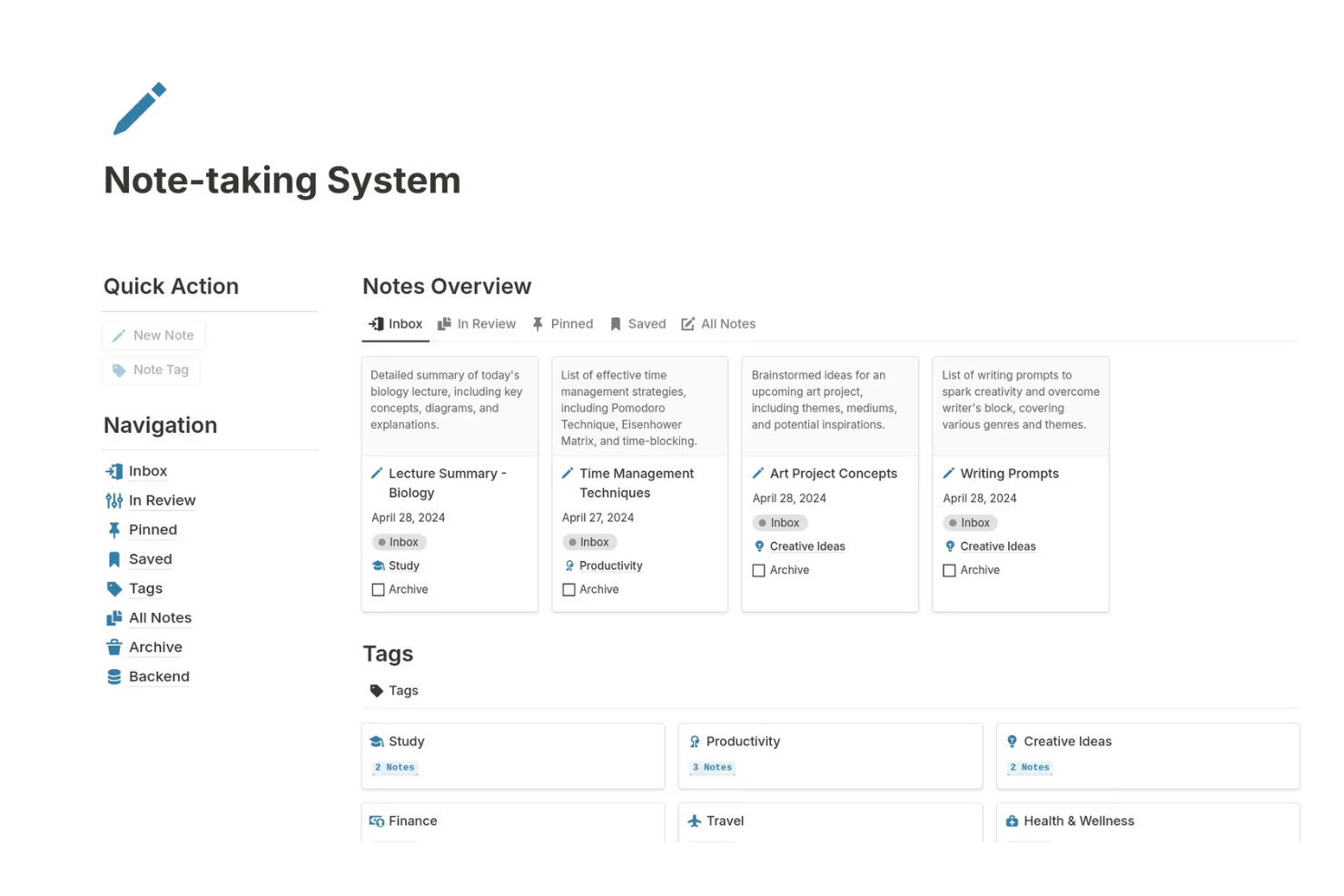
Notion ist ein vielseitiges Tool zur persönlichen Wissensverwaltung, das von Teams und Einzelpersonen als Notizorganisator, Gliederungstool und Datenbanktool für das Projektmanagement und Wissensdatenbanken verwendet wird. Es bietet eine flexible Plattform, auf der Sie Notizen, Datenbanken und Wikis erstellen können, um verschiedene Geschäftsbereiche zu unterstützen.
Warum es eine gute Obsidian-Alternative ist: Das Tool zeichnet sich durch Teamzusammenarbeit und -verwaltung aus und bietet gemeinsam genutzte Arbeitsbereiche, die die Teamarbeit stärken. Sie können benutzerdefinierte Übersichten erstellen, um Projekte und Fortschritte zu verfolgen, was ideal ist, damit alle auf dem gleichen Stand bleiben. Mit den Vorlagen von Notion können Sie schnell Seiten für verschiedene Zwecke einrichten und so Zeit bei der Konfiguration sparen. Die Oberfläche zum Ziehen und Ablegen erleichtert die Organisation von Inhalten entsprechend Ihren Anforderungen.
Hervorzuhebende Funktionen und Integrationen:
Zu den Funktionen gehört die Möglichkeit, relationale Datenbanken zu erstellen, wodurch verschiedene Inhaltstypen miteinander verknüpft werden können. Sie können auch Kanban-Tafeln verwenden, um Aufgaben und Arbeitsabläufe zu visualisieren. Die Anwendung unterstützt das Einbetten verschiedener Medientypen und ist damit ein vielseitiges Tool für die Inhaltserstellung.
Zu den Integrationen gehören Slack, Google Drive, Trello, GitHub, Asana, Zapier, Typeform, Figma und weitere.
Pros and Cons
Pros:
- Unterstützt Projektmanagement
- Hochgradig anpassbare Seiten
- Vorlagen lassen sich einfach einrichten
Cons:
- Eingeschränkte Offline-Funktionalität
- Für einfache Notizen überdimensioniert

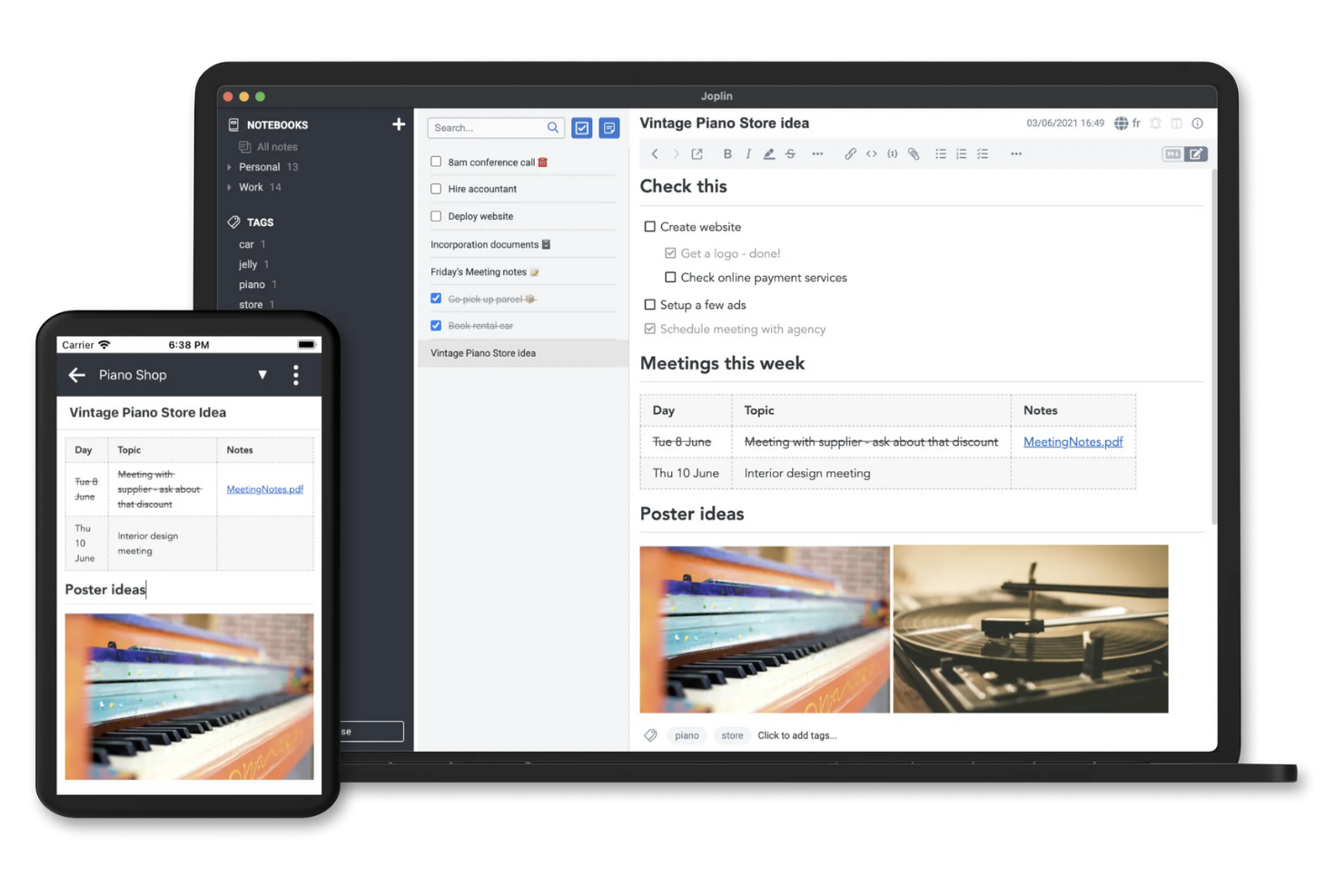
Joplin ist eine quelloffene Anwendung zum Erstellen von Notizen und Aufgabenlisten, die nach einem lokalorientierten Ansatz für Nutzer entwickelt wurde, denen Datenschutz und Sicherheit wichtig sind. Sie richtet sich an Einzelpersonen und Teams, die Notizen und Aufgaben effizient organisieren und gleichzeitig die Kontrolle über ihre Daten behalten möchten.
Warum es eine gute Alternative zu Obsidian ist: Dies ist eine quelloffene Alternative für mobile Geräte und Desktop-Computer, einschließlich Windows, Linux und Mac, die sicheres Erstellen von Notizen ermöglicht und Ihnen erlaubt, Ihre Daten auf eigenen Servern selbst zu hosten. Joplin unterstützt eine Ende-zu-Ende-Verschlüsselung, sodass Ihre Notizen vor unbefugtem Zugriff geschützt bleiben. Sie können Ihre Notizen mithilfe von Notizbüchern, Tags und einem Markdown-Editor organisieren und dadurch flexibel festlegen, wie Sie Ihre Informationen verwalten. Dank der Offline-Funktionen der Anwendung können Sie auch ohne Internetverbindung auf Ihre Notizen zugreifen, was sie besonders für die Nutzung unterwegs praktisch macht.
Hervorstechende Funktionen und Integrationen:
Zu den Funktionen gehört die Möglichkeit, Notizen mithilfe Ihres bevorzugten Cloud-Dienstes über mehrere Geräte hinweg zu synchronisieren. Außerdem wird die bidirektionale Verknüpfung durch spezielle Plug-ins unterstützt, mit denen Sie vernetzte Notizen erstellen können. Sie können Ihre Notizen auch mit erweiterten Suchoptionen durchsuchen, um bestimmte Inhalte schnell zu finden. Mit Joplins Webseiten-Clipper können Sie Webseiten und Bildschirmfotos in Ihren Notizen speichern und so Ihre Recherche und Dokumentation verbessern.
Zu den Integrationen gehören Nextcloud, Dropbox, Microsoft OneDrive, Evernote, Microsoft Azure und weitere.
Pros and Cons
Pros:
- Quelloffen mit Anpassungsmöglichkeiten
- Starker Fokus auf Datenschutz
- Offline-Zugriff auf Notizen
Cons:
- Keine integrierte OCR für Bilder
- Eingeschränkte Funktionen für die Zusammenarbeit

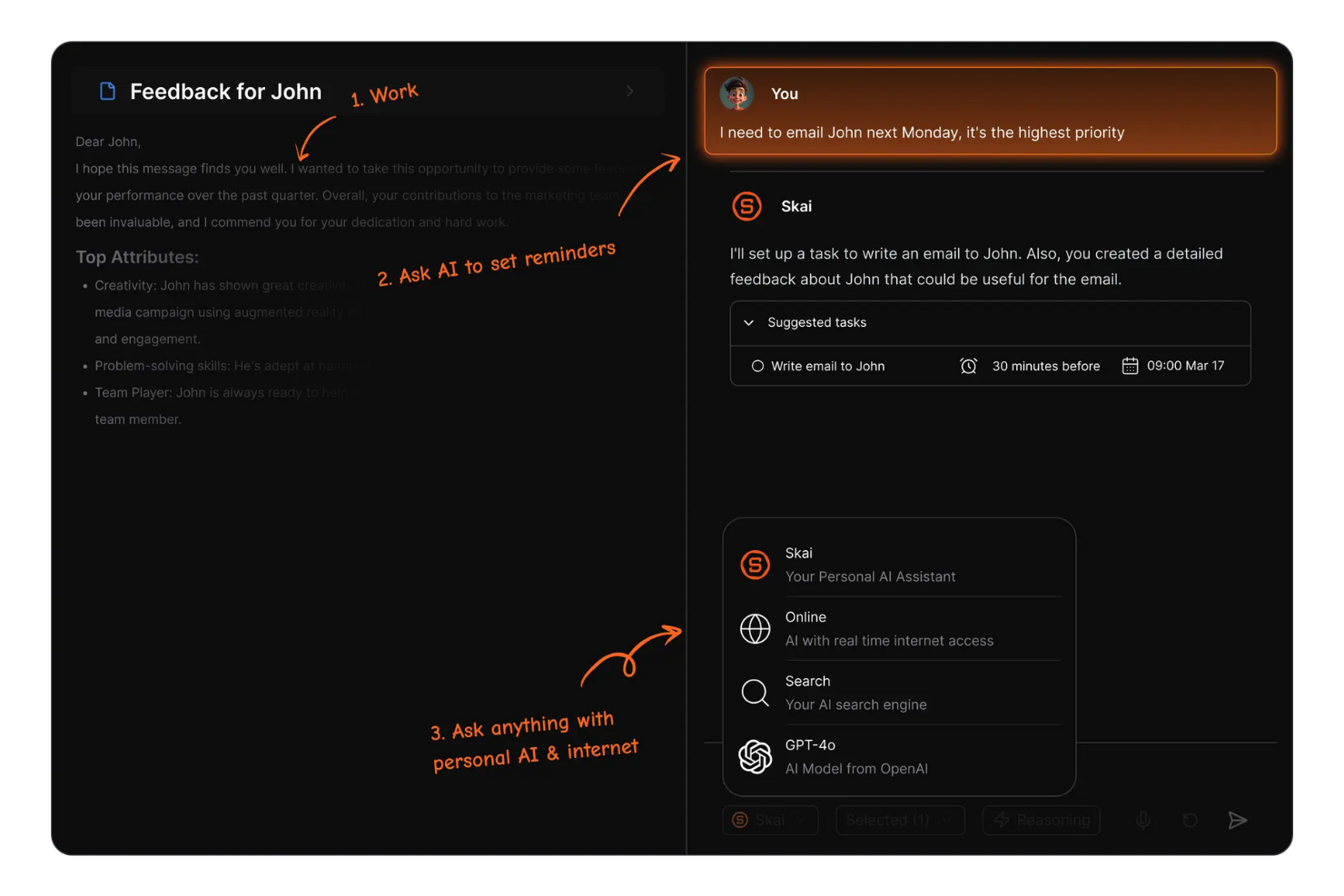
Saner.AI ist ein Produktivitätstool, das künstliche Intelligenz nutzt, um die Notizenerstellung und Aufgabenverwaltung für Fachkräfte und Teams zu verbessern. Es wurde entwickelt, um Nutzer bei der Organisation ihrer Arbeitsabläufe und der Steigerung ihrer Effizienz zu unterstützen.
Warum es eine gute Obsidian-Alternative ist: Es bietet KI-gestützte Produktivitätsfunktionen, mit denen Sie Aufgaben automatisieren und Notizen effektiver verwalten können. Mit intelligenten Vorschlägen kann Saner.AI dabei helfen, Aufgaben nach Dringlichkeit und Wichtigkeit zu priorisieren. Seine KI-Funktionen ermöglichen eine intelligente Kategorisierung von Notizen, sodass Sie leichter finden, was Sie benötigen. Die KI-gestützten Produktivitätsfunktionen des Tools helfen Ihnen und Ihrem Team, intelligenter statt härter zu arbeiten.
Herausragende Funktionen und Integrationen:
Funktionen umfassen die prädiktive Texteingabe, die den Prozess der Notizenerstellung beschleunigt. Sie können außerdem automatische Erinnerungen einrichten, um wichtige Fristen im Blick zu behalten. Das Tool bietet Analysen, die Einblicke in Ihre Produktivitätsmuster geben und Ihnen helfen, Verbesserungsbereiche zu erkennen.
Integrationen umfassen Slack, Google Calendar, Google Gmail und mehr.
Pros and Cons
Pros:
- KI-gestützte Aufgabenpriorisierung
- Intelligente Kategorisierung von Notizen
- Prädiktive Texteingabe
Cons:
- Stark auf KI-Guthaben angewiesen
- Desktop-zentriert; mobil eingeschränkt

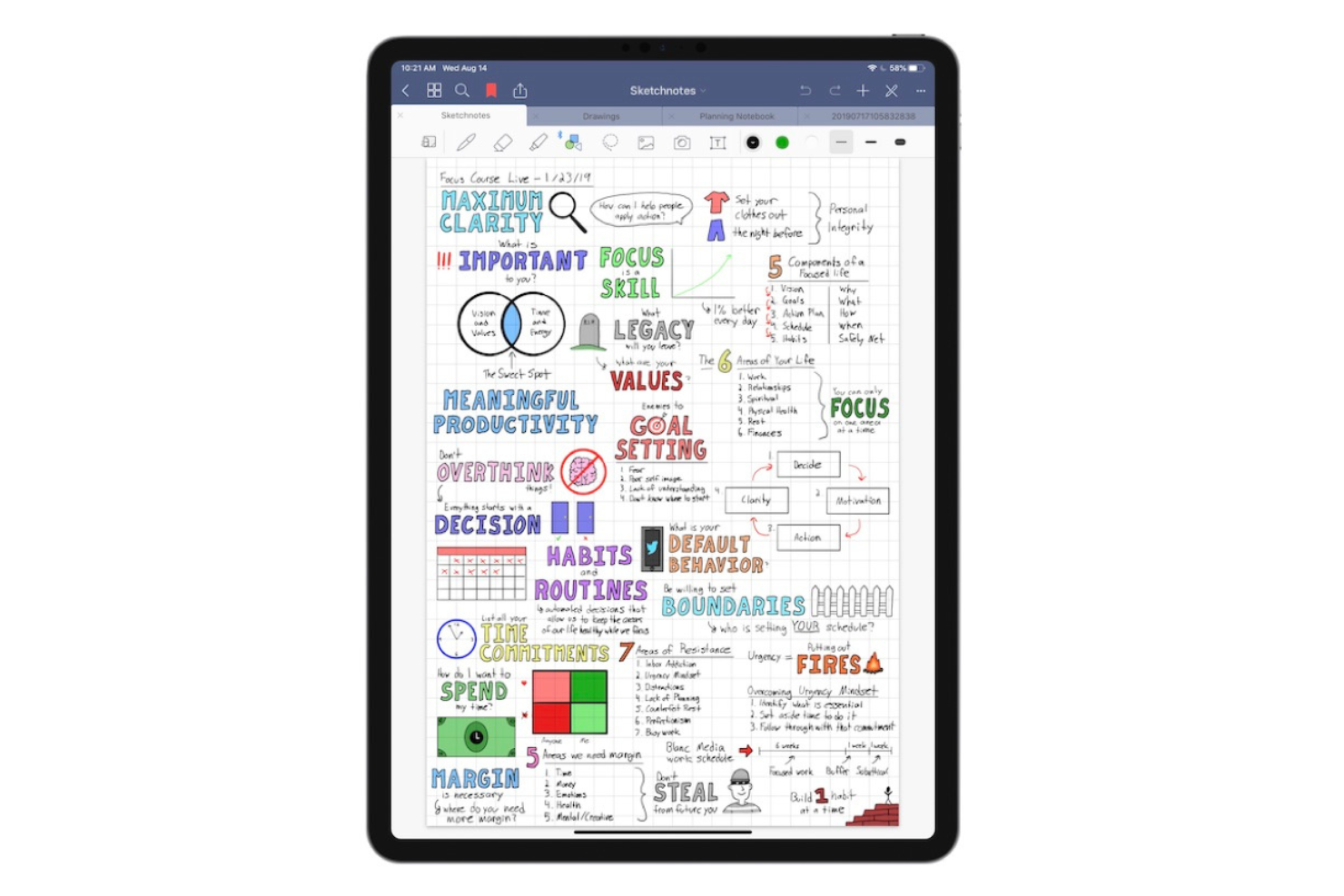
Goodnotes ist eine Notizen-App für Studierende, Lehrkräfte und Berufstätige, die handschriftliche Notizen auf digitalen Geräten bevorzugen, einschließlich Mac, Windows und Android. Sie ermöglicht es den Nutzern, Notizen zu erstellen, zu organisieren und zu teilen, und ist damit ein vielseitiges Werkzeug sowohl für den persönlichen als auch für den akademischen Gebrauch.
Warum es eine gute Alternative zu Obsidian ist: Die App unterstützt die Zusammenarbeit in Echtzeit, sodass Sie und Ihr Team gleichzeitig an Notizen arbeiten können. Goodnotes bietet dank seiner Handschrifterkennungsfunktion ein flüssiges Schreiberlebnis. Sie können handschriftliche Notizen in Text umwandeln, was für die Organisation Ihrer Gedanken praktisch ist. Mit dem Notizbuchsystem der App können Sie Notizen kategorisieren und effizient darauf zugreifen, was sie zu einer praktischen Option für gemeinsame Projekte macht.
Besondere Funktionen und Integrationen:
Zu den Funktionen gehört die Möglichkeit, PDFs direkt in der App zu kommentieren, was für die Überprüfung von Dokumenten nützlich ist. Sie können außerdem Bilder und Diagramme in Ihre Notizen importieren und Ihren Inhalten visuelle Elemente hinzufügen. Die Suchfunktion der App hilft Ihnen, bestimmte Notizen oder Schlüsselwörter schnell zu finden.
Zu den Integrationen gehören Apple iCloud, Google Drive, Microsoft OneDrive, Microsoft Teams und mehr.
Pros and Cons
Pros:
- Unterstützt die Handschrifterkennung
- Ermöglicht das Kommentieren von PDFs
- Funktionen für die Zusammenarbeit in Echtzeit
Cons:
- Die Handschriftensuche kann fehlschlagen
- Eingeschränkte plattformübergreifende Unterstützung

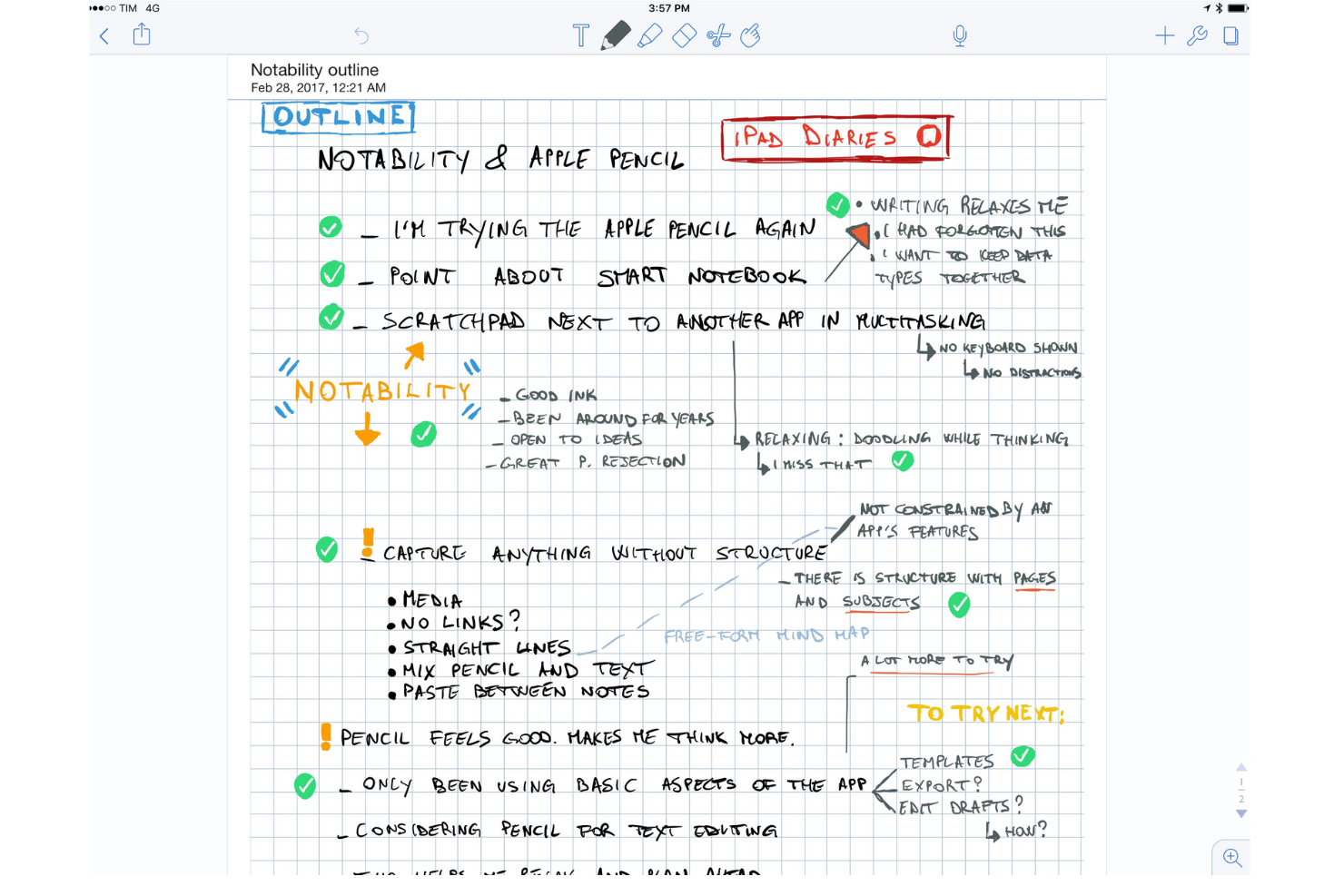
Notability ist eine Notiz-App, die bei Studierenden, Lehrkräften und Fachleuten beliebt ist, da sie die Möglichkeit bietet, handschriftliche Notizen, Fotos und getippte Inhalte in einer einzigen Notiz zu kombinieren. Sie ermöglicht es den Nutzern, Ideen festzuhalten, Dokumente zu kommentieren, Notizen effektiv zu organisieren und als digitales Whiteboard verwendet zu werden.
Warum es eine gute Obsidian-Alternative ist: Die App bietet interaktive Lernwerkzeuge, die das Notieren durch Multimedia-Elemente verbessern. Sie können während des Schreibens Audionotizen aufnehmen, was bei Vorlesungen und Besprechungen hilfreich ist. Die Möglichkeit, PDFs und Bilder zu kommentieren, sowie die KI-gestützte Lernkartenfunktion machen die App vielseitig für verschiedene Lernstile. Die benutzerfreundliche Oberfläche von Notability ermöglicht es Ihnen, sich auf Ihre Inhalte zu konzentrieren, ohne sich mit komplexen Funktionen auseinandersetzen zu müssen.
Herausragende Funktionen und Integrationen:
Zu den Funktionen gehört die Möglichkeit, handschriftliche Notizen zu durchsuchen und in Text umzuwandeln. Sie können Notizen außerdem zur besseren Kategorisierung in Themen und Trennblätter organisieren. Die App unterstützt den Import und Export von Dokumenten in verschiedenen Formaten, sodass Sie Ihre Arbeit problemlos teilen können.
Zu den Integrationen gehören Apple iCloud, Google Drive, Dropbox, Microsoft OneDrive, Box, Apple Pencil, Evernote und weitere.
Pros and Cons
Pros:
- Kombiniert Handschrift mit Audioaufnahmen
- Kommentiert PDFs und Bilder
- Unterstützt Multimedia-Elemente
Cons:
- Für die optimale Nutzung ist ein Apple Pencil erforderlich
- Zusammenarbeit erfolgt nicht in Echtzeit

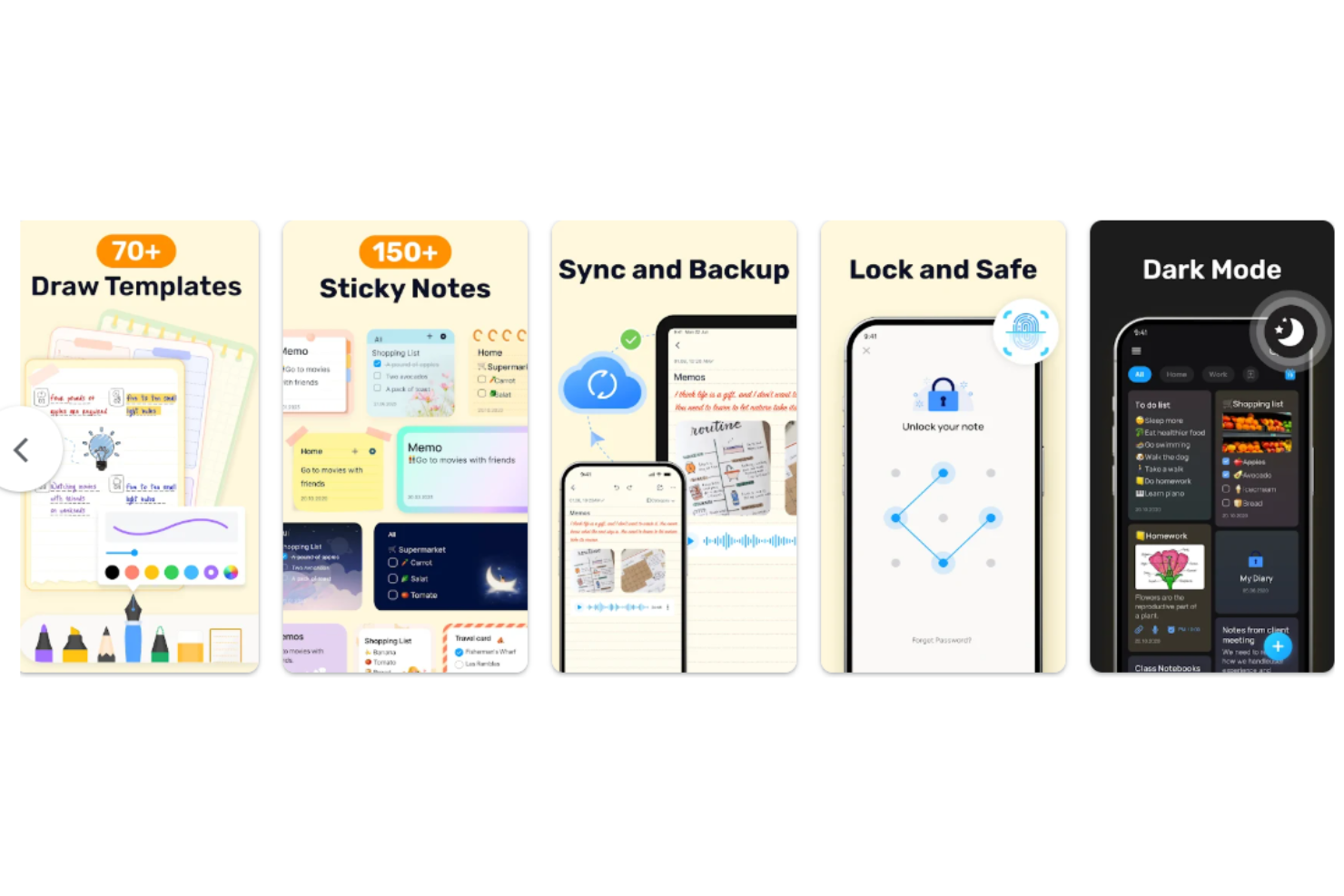
Easy Notes ist eine minimalistische persönliche Notiz-App für Nutzer, die eine einfache und zugängliche Möglichkeit suchen, Notizen festzuhalten und Informationen zu organisieren. Sie ist bei Personen beliebt, die ein benutzerfreundliches Werkzeug suchen, um Gedanken und Aufgaben schnell festzuhalten.
Warum es eine gute Obsidian-Alternative ist: Die App bietet Einfachheit und Zugänglichkeit und ist dadurch für jeden leicht zu nutzen. Die übersichtliche Benutzeroberfläche ermöglicht es Ihnen, sich ohne Ablenkungen auf Ihre Notizen zu konzentrieren. Sie können farbenfrohe Notizen und Listen erstellen, um Ihre Gedanken effektiv zu organisieren. Mit der Schnellzugriffsfunktion können Sie Ideen jederzeit festhalten, sobald sie Ihnen in den Sinn kommen, und so Ihre Produktivität steigern.
Besondere Funktionen und Integrationen:
Zu den Funktionen gehört die Möglichkeit, Checklisten zu erstellen, um Aufgaben und To-do-Elemente zu verfolgen. Sie können außerdem Erinnerungen festlegen, damit Sie wichtige Aufgaben nicht vergessen. Mit der App können Sie Notizen anheften, damit sie für einen einfachen Zugriff ganz oben in Ihrer Liste bleiben.
Integrationen sind nicht öffentlich aufgeführt.
Pros and Cons
Pros:
- Einfaches und intuitives Design
- Schnellzugriff auf Notizen
- Aufgabenverfolgung
Cons:
- Cloud-Synchronisierung auf Premium beschränkt
- Nur grundlegende Ordnerstruktur

Am besten für PDF-Markierungen und Zusammenarbeit in Echtzeit geeignet
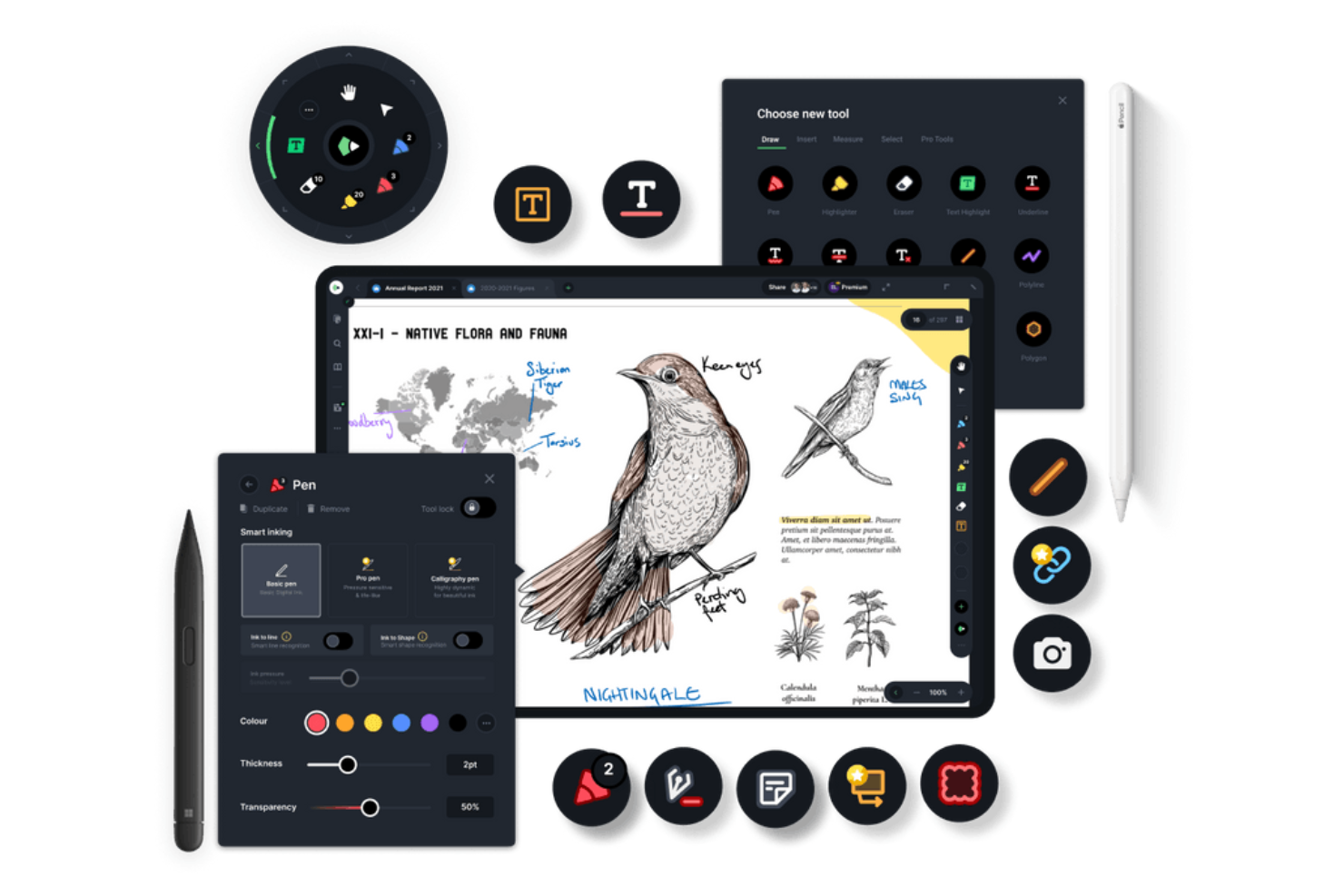
Drawboard PDF ist ein Werkzeug zur Steigerung der Dokumentenproduktivität, das von Fachleuten und Teams zum Kommentieren, Bearbeiten und gemeinsamen Bearbeiten von PDF-Dokumenten verwendet wird. Es eignet sich ideal für Architekten, Ingenieure und Designer, die präzise Markierungswerkzeuge benötigen.
Warum es eine gute Alternative zu Obsidian ist: Es bietet die Möglichkeit zur Echtzeit-Markierung und Zusammenarbeit bei PDFs, sodass Ihr Team gleichzeitig gemeinsam an Dokumenten arbeiten kann. Sie können Werkzeuge wie Textfelder, Formen und Freihandzeichnungen verwenden, um PDFs zu kommentieren, was sich hervorragend für detaillierte Überprüfungen eignet. Die App unterstützt digitale Signaturen und macht dadurch Genehmigungsprozesse für Dokumente reibungsloser. Der Fokus auf Zusammenarbeit und Markierungen macht sie zu einem vielseitigen Werkzeug für verschiedene berufliche Anforderungen.
Herausragende Funktionen und Integrationen:
Zu den Funktionen gehört die Möglichkeit, Symbolleisten für den schnellen Zugriff auf häufig verwendete Werkzeuge anzupassen. Sie können außerdem druckempfindliche Tinte für ein natürlicheres Schreiben und Zeichnen verwenden. Die App ermöglicht es Ihnen, Bilder und Text über PDFs zu legen, wodurch die Klarheit der Dokumente verbessert wird.
Zu den Integrationen gehören Microsoft OneDrive, Microsoft SharePoint, Dropbox, Google Drive, Box, Microsoft Teams, Slack und weitere.
Pros and Cons
Pros:
- Funktionen für die Zusammenarbeit in Echtzeit
- Unterstützt digitale Signaturen
- Unterstützung für druckempfindliche Tinte
Cons:
- Hoher Akkuverbrauch
- Leistungseinbußen bei großen PDFs
Weitere Obsidian-Alternativen
Hier sind einige zusätzliche Obsidian-Alternativen, die es nicht in meine Auswahl geschafft haben, aber dennoch einen Blick wert sind:
- Hive Notes
Am besten für Notizen zu Teambesprechungen
- Logseq
Am besten für Datenschutz und Gliederungen
- Heptabase
Am besten für visuelles Lernen geeignet


Wie ich Obsidian-Alternativen bewerte
Ich teile meine Bewertung in zwei Ebenen auf: grundlegende Funktionen, die jedes solide Wissensmanagement-Tool benötigt, und die Unterscheidungsmerkmale – etwa Graphansichten oder die Jira-Synchronisierung –, die für PMs besonders wichtig sind.
Grundlegende Funktionen (Mindestanforderungen für diese Liste)
Bei der Auswahl der Tools für meine Liste bewerte ich jedes einzelne für jede unten aufgeführte Kernfunktion auf einer Skala von 0 (bietet die Funktion nicht) bis 5 (zeichnet sich in diesem Bereich aus). Anschließend rechne ich die Gesamtpunktzahl des Tools in einen Prozentsatz um. Jedes Tool muss eine Mindestgesamtpunktzahl von 75 % erreichen, um berücksichtigt zu werden.
- Markdown- und Rich-Text-Bearbeitung: Ich achte auf einen flexiblen Editor, der Markdown, Codeblöcke, Tabellen und Einbettungen unterstützt – also genau die Formatierung, die man beim Verfassen von Sprint-Briefings oder PRDs tatsächlich benötigt.
- Bidirektionale Verknüpfungen: Backlinks und verknüpfte Verweise helfen PMs dabei, Entscheidungen bis zu ihrer Quelle zurückzuverfolgen. Ich prüfe, ob Tools diese Verbindungen automatisch sichtbar machen oder eine manuelle Pflege erfordern.
- Aufgaben- und Projektverfolgung: Jedes Tool sollte es ermöglichen, Aufgaben zuzuweisen, Fälligkeitsdaten festzulegen und den Fortschritt zu verfolgen, ohne zu einer separaten App wechseln zu müssen. Tools wie Notion und Coda integrieren Aufgaben nativ in Dokumente.
- Echtzeit-Zusammenarbeit: Ich bewerte, ob Teams Seiten gemeinsam bearbeiten, Inline-Kommentare hinterlassen und Teammitglieder markieren können – insbesondere für asynchrone Stand-ups und Retrospektiven in verteilten Teams.
- Cloud-Synchronisierung und plattformübergreifender Zugriff: Projektnotizen müssen von einem Laptop, Telefon oder Browser aus erreichbar sein. Ich prüfe die Zuverlässigkeit der Synchronisierung zwischen Geräten und ob der Offline-Modus tatsächlich funktioniert.
- Suche und Wissensorganisation: Ein wachsendes Projekt-Wiki wird schnell unübersichtlich. Ich achte auf eine Volltextsuche, Tags, verschachtelte Seitenhierarchien und Filter, mit denen sich frühere Entscheidungen leicht finden lassen.
Sobald ich eine Liste von Tools zusammengestellt habe, die diese Kriterien erfüllen, prüfe ich, wodurch sich die einzelnen Plattformen voneinander abheben.
Unterscheidungsmerkmale (Wodurch sich Anbieter abheben)
So vergleiche ich die verschiedenen Anbieter miteinander:
Besondere Funktionen
KI-Funktionen sind wichtig, wenn man mehrere Projekte verwaltet. Tools wie Notion und Coda bieten KI-Funktionen, die umfangreiche Besprechungsnotizen zusammenfassen oder Statusaktualisierungen aus verstreuten Informationen erstellen können. Außerdem bewerte ich die Unterstützung von Datenbanken und benutzerdefinierten Ansichten, da PMs innerhalb desselben Arbeitsbereichs häufig zwischen einem Kanban-Board für die Sprintarbeit und einer Zeitleistenansicht für die Berichterstattung an Stakeholder wechseln müssen. Vorlagen für wiederkehrende Abläufe wie Sprint-Retrospektiven oder Projektstarts sparen viel Zeit bei der Einrichtung – insbesondere in Kombination mit Automatisierungen, die Aufgaben zuweisen oder Statuswerte bei bestimmten Auslösern aktualisieren.
Über die Funktionen hinaus
Integrationen bestimmen maßgeblich, wie gut sich ein Tool in den bestehenden Arbeitsablauf einfügt. Ich prüfe, ob sich die einzelnen Plattformen mit Tools wie Jira, Slack und GitHub verbinden lassen, da eine isolierte Wissensdatenbank mehr Reibung erzeugt, als sie beseitigt. Auch die Datenübertragbarkeit spielt eine wichtige Rolle – der Markdown-Export und der Versionsverlauf sorgen dafür, dass man nicht an einen Anbieter gebunden ist, wenn sich die eigenen Anforderungen ändern. Einer der größten Vorteile von Obsidian ist die Datenhoheit. Daher prüfe ich, ob Alternativen lokale Speicherung oder Optionen für das Self-Hosting anbieten. Schließlich berücksichtige ich, wie sich die Preise pro Nutzerplatz entwickeln, da eine Einführung in einer PMO ganz anders aussieht als ein PM-Abonnement für Einzelpersonen.
Warum nach einer Obsidian-Alternative suchen?
Obsidian ist zwar eine gute Wahl für eine Notiz-App, aber es gibt mehrere Gründe, warum einige Nutzer nach alternativen Lösungen suchen. Du suchst vielleicht nach einer Obsidian-Alternative, weil …
- Du mehr Funktionen für die Zusammenarbeit benötigst
- Dein Team mobilen Zugriff benötigt
- Du eine integrierte Aufgabenverwaltung möchtest
- Dein Projekt erweiterte Suchwerkzeuge erfordert
- Du eine einfachere Benutzeroberfläche benötigst
- Dein Team in unterschiedlichen Zeitzonen arbeitet
Wenn einer dieser Punkte auf dich zutrifft, bist du hier genau richtig. Meine Liste enthält mehrere Optionen für Notiz-Apps, die besser für Teams geeignet sind, die mit diesen Herausforderungen von Obsidian konfrontiert sind und nach alternativen Lösungen suchen.
Funktionen von Obsidian
Hier sind einige der wichtigsten Funktionen von Obsidian, die Ihnen dabei helfen, die Angebote alternativer Lösungen gegenüberzustellen und zu vergleichen:
- Markdown-basierter Speicher: Notizen werden als Markdown-Dateien im Klartext gespeichert, sodass Sie Kontrolle und Portabilität behalten.
- Backlinks: Erstellen Sie Verknüpfungen zwischen Notizen, um ein vernetztes Wissensnetzwerk aufzubauen und verwandte Informationen leichter zu finden.
- Diagrammansicht: Visualisiert die Verbindungen zwischen Ihren Notizen und hilft Ihnen, das Gesamtbild sowie die Beziehungen in Ihren Daten zu erkennen.
- Plugins: Erweitern Sie den Funktionsumfang mit von der Community entwickelten Plugins und passen Sie Obsidian an Ihre Bedürfnisse an.
- Lokaler Speicher: Speichert Notizen privat auf Ihrem Gerät und ermöglicht schnellen Zugriff sowie Datenschutz.
- Anpassbare Designs: Passen Sie das Erscheinungsbild Ihres Arbeitsbereichs an Ihre Vorlieben an, damit die Nutzung angenehmer wird.
- Tägliche Notizen: Erstellt und organisiert Notizen automatisch nach Datum und hilft Ihnen, tägliche Gedanken und Aufgaben im Blick zu behalten.
- Versionskontrolle: Verfolgt Änderungen an Ihren Notizen, sodass Sie bei Bedarf zu früheren Versionen zurückkehren können.
- Plattformübergreifende Verfügbarkeit: Greifen Sie auf verschiedenen Geräten auf Ihre Notizen zu und sorgen Sie so für Kontinuität in Ihrem Arbeitsablauf.
- Erweiterte Suche: Findet bestimmte Notizen oder Inhalte in Ihren Notizen schnell und verbessert dadurch die Effizienz.
Wie geht es weiter:
Wenn Sie gerade eine Notizen-App recherchieren, wenden Sie sich an eine SoftwareSelect-Beratung und erhalten Sie kostenlos Empfehlungen.
Sie füllen ein Formular aus und führen ein kurzes Gespräch, in dem die spezifischen Anforderungen Ihrer Bedürfnisse besprochen werden. Anschließend erhalten Sie eine Vorauswahl an Software, die Sie prüfen können. Die Beratung unterstützt Sie sogar während des gesamten Kaufprozesses, einschließlich der Preisverhandlungen.