

2026’nın En İyi 10 Müşteri Kaynak Yönetimi Yazılımı

En İyi Müşteri Kaynak Yönetimi Yazılımları Kısa Listesi


Müşteri kaynak yönetimi yazılımı seçeneklerinin sayısı göz önüne alındığında, ihtiyaçlarınıza en uygun olanı seçmek göz korkutucu olabilir. Müşteri etkileşimlerini ve verilerini etkili bir şekilde yönetmenin bir yolunu arıyorsunuz, ancak doğru aracı seçmek zor olabilir.
Bu zorluğu anlıyorum ve bu süreçte size rehberlik etmek için buradayım. Çeşitli dijital proje yönetimi araçlarıyla ilgili kapsamlı deneyimimden yararlanarak seçenekleri inceledim ve size en iyi tercihleri sunuyorum. İşte en iyi müşteri kaynak yönetimi yazılımı seçimlerim.
Why Trust Our Software Recommendations
Our team has been testing and reviewing software since 2012. As project managers ourselves, we know how difficult—and important—it is to choose the right software.
For this guide, we evaluated tools using hands-on testing and independent research, scoring tools using our selection criteria. We also draw on insights from industry thought leaders and practicing project management experts.
Our reviews reflect our human editorial judgment, not a sales pitch.
Expert reviewers:
Müşteri Kaynak Yönetimi Yazılımları Karşılaştırma Tablosu
Bu karşılaştırma tablosu, en iyi müşteri kaynak yönetimi yazılımı seçimlerimin fiyatlandırma ayrıntılarını özetlemektedir:
Score legend (out of 5)
- Excellent 4.5–5
- Good 4–4.4
- Average 3–3.9
- Below average 2–2.9
- Poor 1–1.9
| Tool | Starting Price | Website | |||||||
|---|---|---|---|---|---|---|---|---|---|
| Best for margin-aware resource planning | 3.8 out of 5 | 4 | 4 | 3 | 4 | 4 | 4 | $11.95/month Free plan + 14-day free trial available | Website |
| Best for linking client resourcing to profit | 4.0 out of 5 | 4 | 4 | 4 | 4 | 4 | 4 | $9.99/user/month Free plan + 14-day free trial + free demo available | Website |
| Best for scheduling staff without logins | 3.5 out of 5 | 4 | 2 | 3 | 4 | 4 | 4 | $7/user/month 30-day free trial + demo available | Website |
| Best for agency resourcing and profitability | 3.7 out of 5 | 4 | 4 | 3 | 4 | 4 | 3 | $49/user/month Free demo available | Website |
| Best for client work across people and assets | 3.7 out of 5 | 4 | 3 | 3 | 4 | 4 | 4 | $5/user/month Free trial available | Website |
| Best for skill-based resource requests | 3.8 out of 5 | 4 | 4 | 3 | 4 | 4 | 4 | $10/user/month 14-day free trial | Book Demo |
| Best for staffing scenarios in Smartsheet | 3.3 out of 5 | 4 | 1 | 3 | 4 | 4 | 4 | $9/user/month 30-day free trial + demo available | Book Demo |
| Best for staffing plans tied to project margins | 3.8 out of 5 | 4 | 4 | 4 | 4 | 4 | 3 | $17/user/month 14-day free trial | Book Demo |
| Best for planning capacity before deals close | 3.8 out of 5 | 3 | 4 | 4 | 4 | 4 | 4 | Pricing upon request Free demo available | Book Demo |
| Best for staffing tied to project economics | 3.5 out of 5 | 4 | 2 | 3 | 4 | 4 | 4 | Pricing upon request Not available | Website |
En İyi Müşteri Kaynak Yönetimi Yazılımları İncelemeleri
Önde gelen CRM yazılımlarına ilişkin kapsamlı incelemelerimi keşfedin; avantajlarını, dezavantajlarını, temel özelliklerini ve en uygun kullanım alanlarını öne çıkarıyorum.
Avaza
Best for margin-aware resource planning
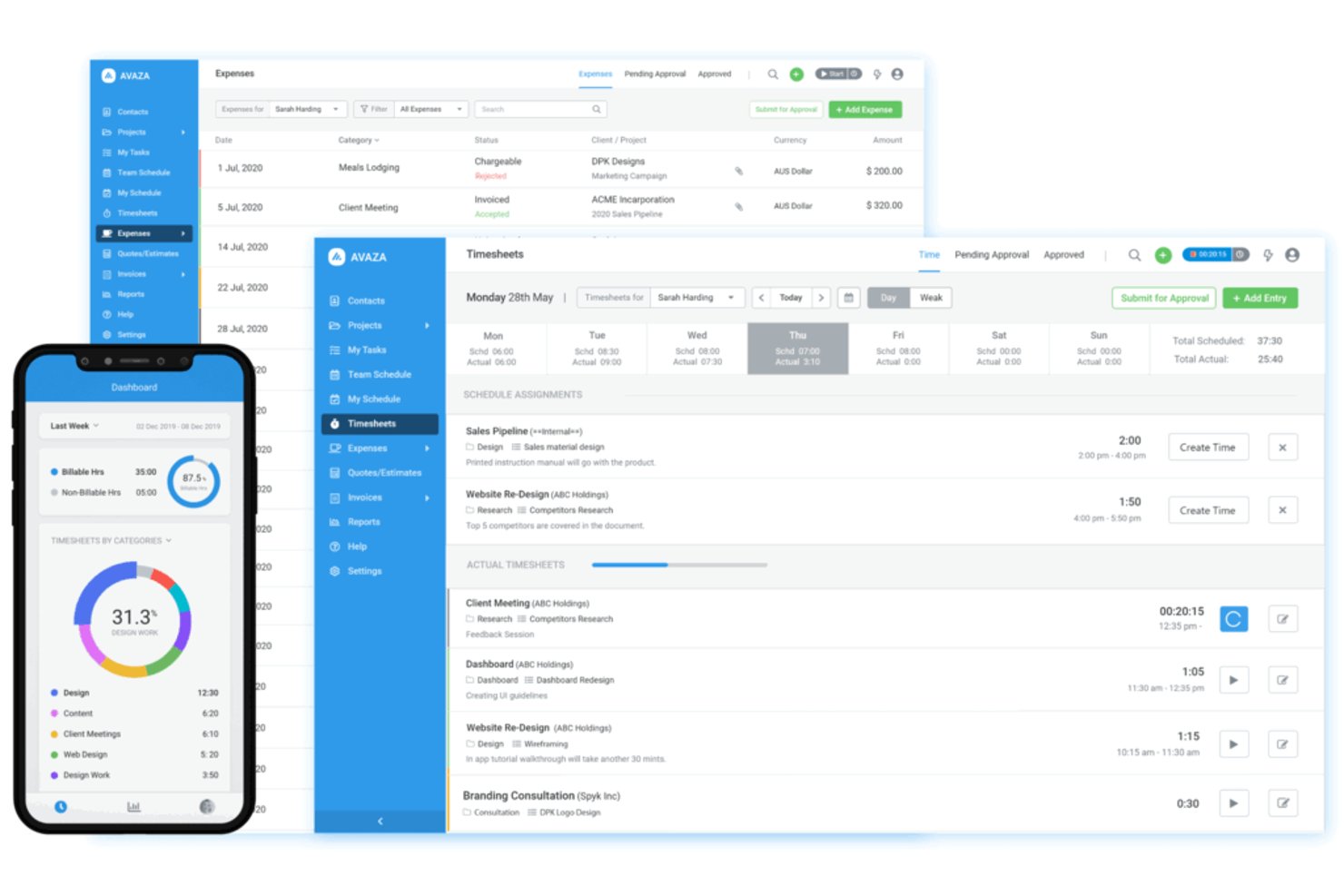
Avaza is a project and resource management platform that combines time tracking, scheduling, budgeting, and invoicing to help teams manage client work end to end.
Who Is Avaza Best For?
Avaza is a strong fit for client-facing teams at small to mid-sized agencies that need to track time, costs, and profitability within a single platform.
Why I Picked Avaza
Avaza earns its spot on my shortlist because it ties resource scheduling directly to project budgets and margins, which is rare in this category. I love that you can see real-time cost burn against project budgets as you assign team members, so over-servicing a client account becomes visible before it becomes a problem. The timesheet-to-invoice pipeline also keeps billable hours from slipping through the cracks.
Avaza Key Features
- Drag-and-drop resource scheduler: Assign team members to tasks and projects by dragging shifts across a visual timeline calendar.
- Multi-currency expense tracking: Log and categorize project expenses in different currencies with receipt attachment support.
- Customizable invoice templates: Generate client invoices from tracked time and expenses using branded, configurable templates.
- Project status reporting: Run reports across active projects to view progress, time logged, and budget consumption side by side.
Avaza Integrations
Avaza offers native integrations with Xero and QuickBooks Online, plus connections to Stripe, GitHub, Google Drive, and Dropbox through its app marketplace. It also provides an API and Zapier connectivity for custom workflows.
Pros and Cons
Pros:
- Tracked hours feed client invoicing
- Scheduler links staffing to project costs
- Real-time budget burn supports margin checks
Cons:
- Less suited to complex capacity forecasting
- Limited visibility into cross-project dependencies
Best for linking client resourcing to profit
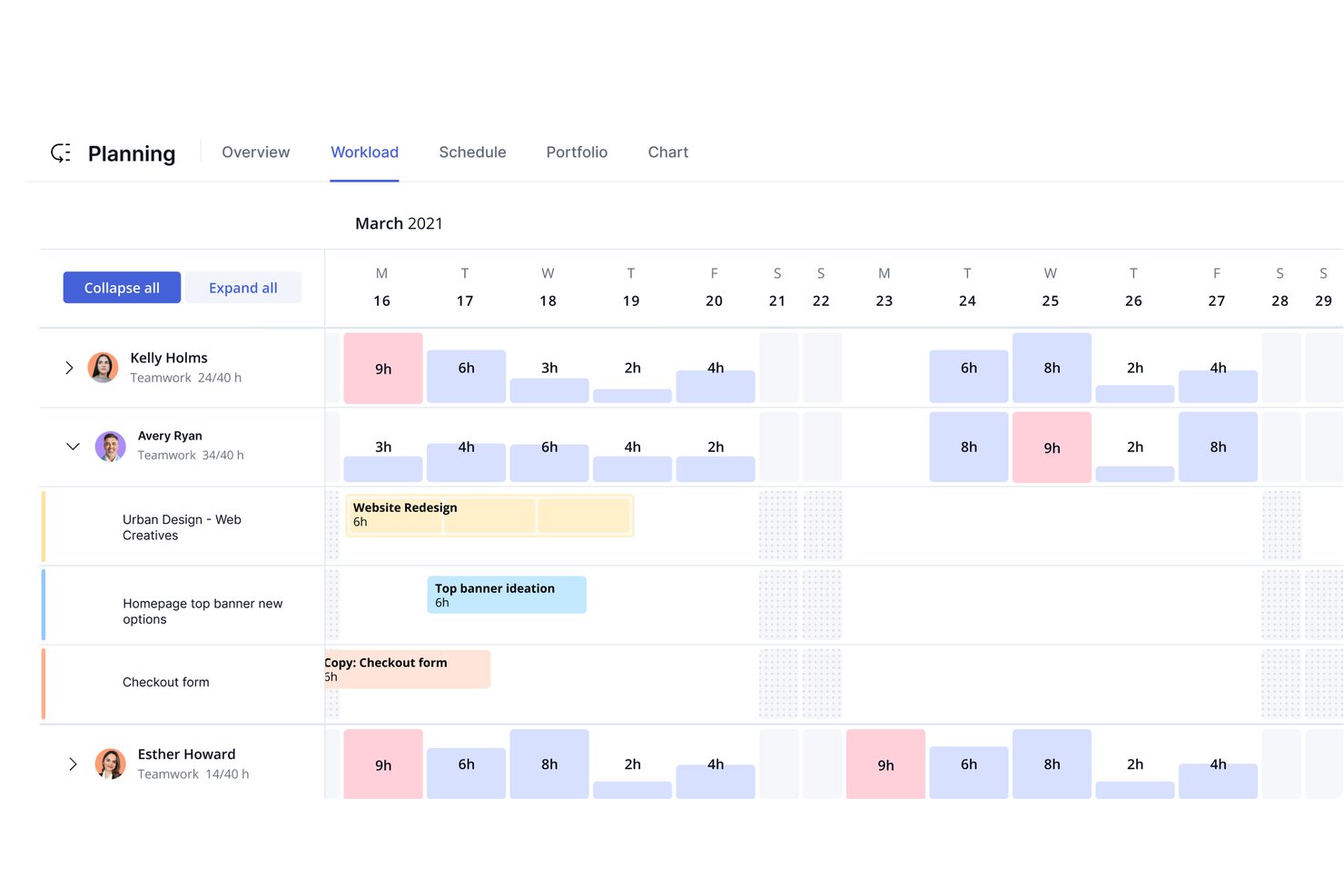
Teamwork.com is a project management and client work platform that combines task management, time tracking, resource scheduling, and budget monitoring to help teams plan and deliver client projects.
Who Is Teamwork.com Best For?
Teamwork.com suits agencies and client-facing teams that need to connect resource planning directly to project profitability.
Why I Picked Teamwork.com
I picked Teamwork.com as one of the best because it directly connects how you staff a project to whether that project turns a profit. Its budget tracking tools let you set billable rates per team member and track time against those budgets in real time, so you can see margin slipping before a project goes over. I also like that the resource scheduler shows utilization across your whole team, making it easy to spot who's overbooked and who has capacity before you commit to a new client engagement.
Teamwork.com Key Features
- Client portal: A dedicated login space where clients can view project progress, leave feedback, and access shared files without needing a full team account.
- Retainer management: A built-in feature that lets you set up recurring billing periods and track hours or budget consumed against each retainer.
- Project intake forms: Customizable forms that capture new project requests from clients or internal stakeholders and feed them directly into your project pipeline.
- Milestone tracking: A project-level feature for setting key delivery dates and linking dependent tasks to each milestone so nothing gets missed.
Teamwork.com Integrations
Teamwork.com offers native integrations with HubSpot, Salesforce, Xero, and QuickBooks, connecting CRM and finance data to client projects, time, and billing.
Pros and Cons
Pros:
- Tracks retainer consumption across billing periods
- Shows team capacity before client commitments
- Links billable hours to project budgets
Cons:
- Dense interface can bury resource controls
- Large projects can load slowly

Float
Best for scheduling staff without logins
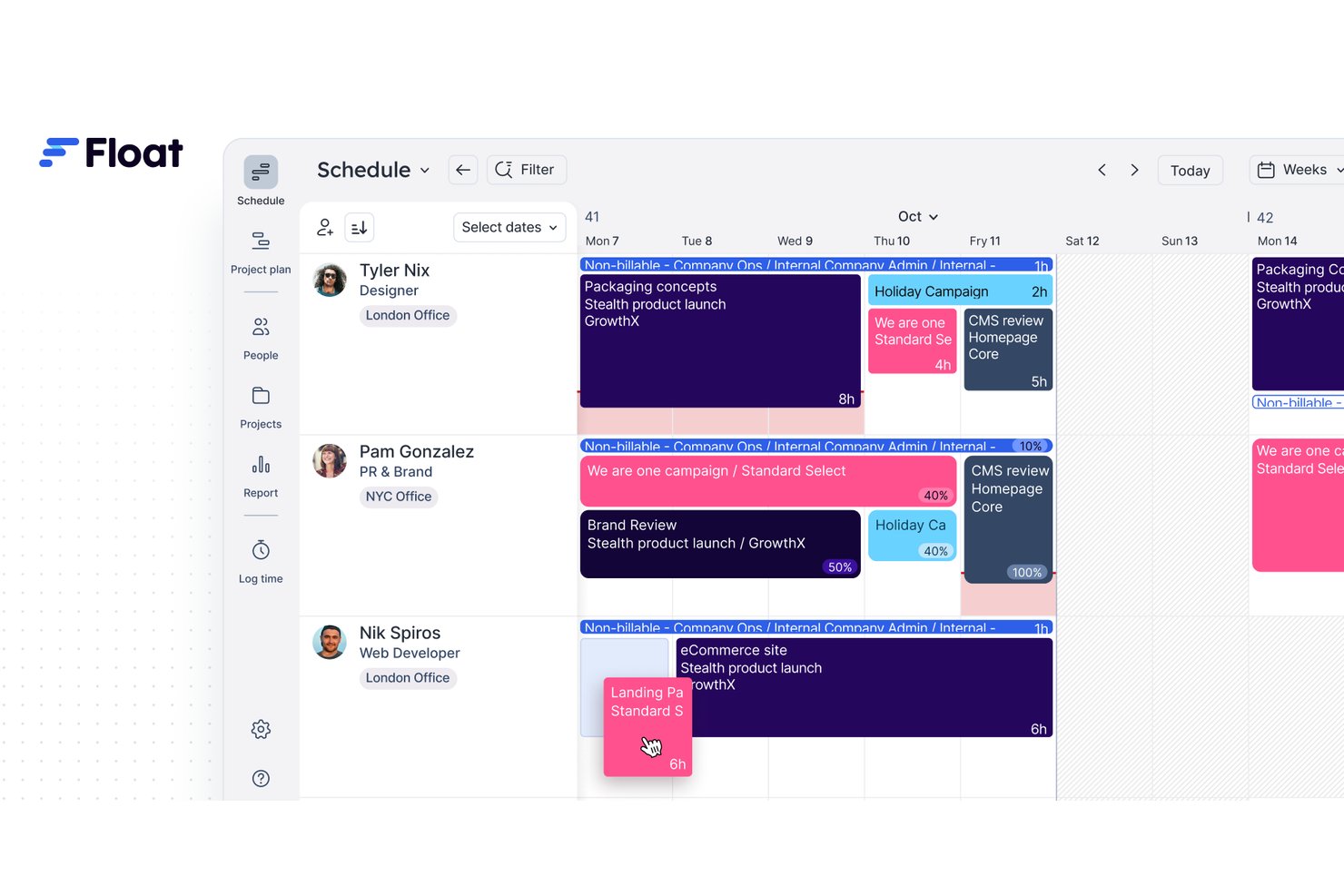
Float is a resource management platform that covers team scheduling, capacity planning, time tracking, and project budgeting across client workstreams.
Who Is Float Best For?
Float works well for agencies and consulting teams that bill across multiple clients in different currencies and need rate precision at the project level.
Why I Picked Float
Float earns its spot on my shortlist because of how precisely it handles billing rates across multiple clients and currencies. I love that you can set different rates per person, per project, or per role, so a consultant billing at €120/hour for one client and $95/hour for another stays accurate without manual workarounds. Float's project budget tracking then maps those rates against scheduled hours in real time, giving you a live read on budget burn before it becomes a problem.
Float Key Features
- Visual resource timeline: A drag-and-drop schedule view that maps every team member's assignments across days, weeks, or months in a single view.
- Capacity planning: A real-time availability tracker that flags over- and under-allocation across your team before scheduling conflicts occur.
- Time tracking: A built-in timer and timesheet tool that lets team members log actual hours directly against scheduled tasks for comparison.
- Utilization reporting: Pre-built reports that show billable vs. non-billable hour splits across individuals, teams, or projects over any date range.
Float Integrations
Float lists integrations with Aprimo, plus Zapier connections for Asana, Basecamp, and ClickUp. It also offers a beta MCP connector for Claude and a REST API for custom integrations.
Pros and Cons
Pros:
- Scheduled and actual hours expose budget burn
- Multi-currency billing fits international client portfolios
- Client-specific rates support accurate project budgets
Cons:
- Limited client pipeline and contract management
- No built-in client invoicing workflow

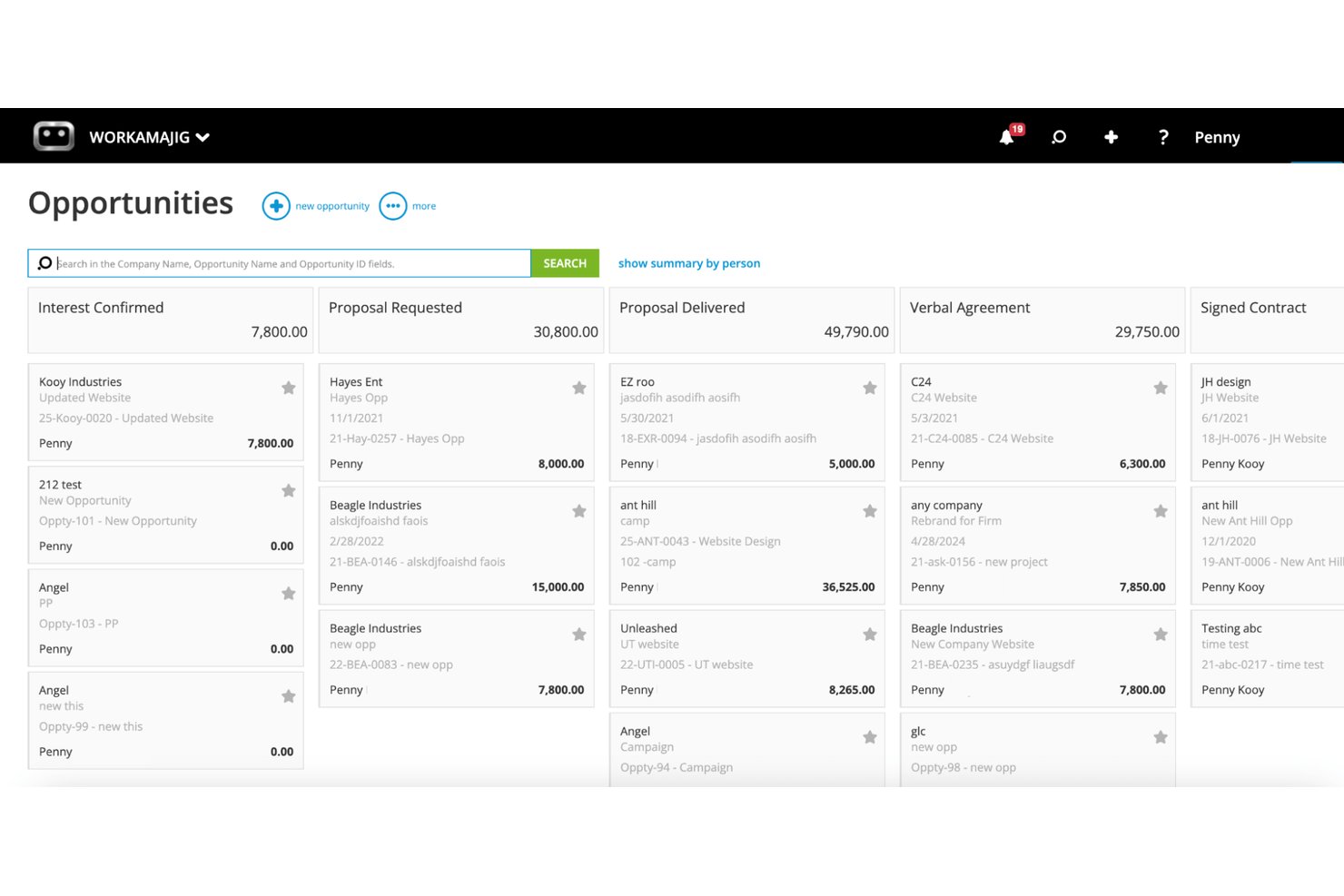
Workamajig is a project management and resource planning platform built specifically for creative agencies, combining time tracking, staff scheduling, budget management, and client billing in one system.
Who Is Workamajig Best For?
Workamajig is a strong fit for creative and marketing agencies that need to manage staff capacity, project budgets, and client billing in one place.
Why I Picked Workamajig
Workamajig earns its spot on my shortlist because it's built from the ground up for agencies, not adapted from generic project tools. I particularly like how its resource scheduling view lets you see staff capacity across every active project simultaneously, so you can catch overallocation before it hits a deadline. Its built-in budget tracking ties directly to time logged, which means you always know whether a project is profitable while it's still in flight.
Workamajig Key Features
- Client portal: A dedicated portal where clients can review project status, approve deliverables, and submit feedback without needing direct access to your internal workspace.
- Customizable project templates: Pre-built and configurable templates that let you standardize how new projects are set up across different service lines or client types.
- Integrated invoicing: A built-in invoicing tool that pulls time entries and expenses directly into client-ready invoices without requiring a separate billing system.
- Traffic management dashboard: A centralized view of incoming requests and active assignments that helps project managers triage new work against current team availability.
Workamajig Integrations
Workamajig lists integrations with Google Calendar, Outlook/Exchange, Slack, Avalara, AvidXchange, Edenred Pay, Mediaocean, Bionic, and Google Sheets. It also offers REST and JSON APIs, CSV import/export, and Zapier.
Pros and Cons
Pros:
- Project budgets and billing share one system
- Logged time connects budgets with profitability
- Agency-wide staffing visibility across active projects
Cons:
- Cross-project updates can require too many clicks
- Rescheduling dates and dependencies takes extra effort

Best for client work across people and assets
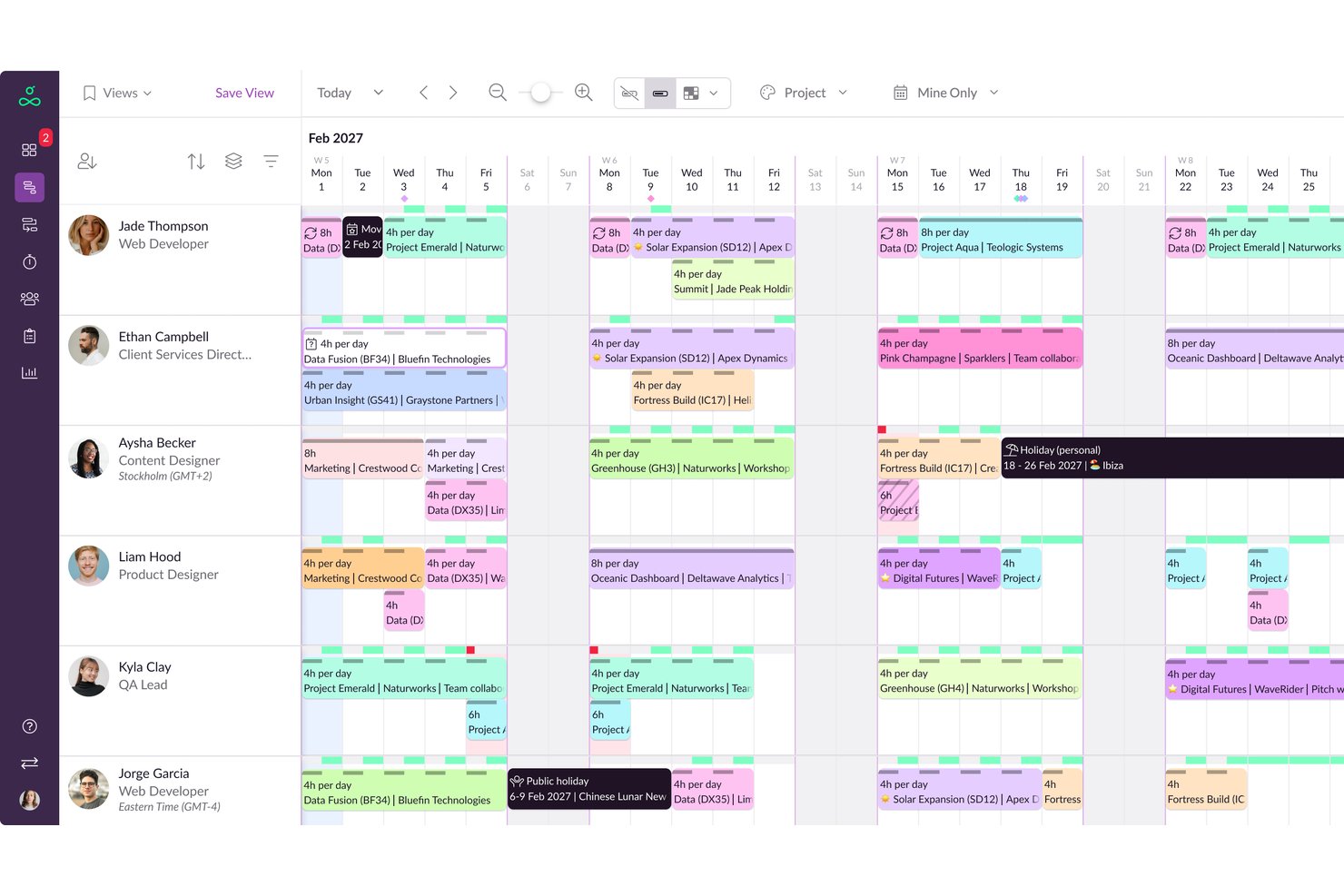
Resource Guru is a resource management and scheduling platform that covers people, equipment, and other assets, with tools for capacity planning, leave management, and utilization tracking across client projects.
Who Is Resource Guru Best For?
Resource Guru is a strong fit for agencies and consultancies that need to schedule both people and physical assets across multiple client projects.
Why I Picked Resource Guru
Resource Guru earns its spot on my shortlist because it schedules people and physical assets, like equipment and meeting rooms, side by side in a single calendar view. That matters when you're running client projects that depend on both a specific consultant and a piece of gear being available at the same time. I also rely on its clash management feature, which flags double-bookings before they become a problem, keeping client commitments on track.
Resource Guru Key Features
- Leave management: A built-in leave tracker lets you log vacation, sick days, and other absences directly alongside project bookings so availability is always accurate.
- Utilization reports: Pre-built reports show billable vs. non-billable hours per person, helping you spot over- and underutilization across your team.
- Capacity planning dashboard: A forward-looking view displays available hours by person or team over any custom date range so you can plan resourcing before projects kick off.
- Booking approvals: Resources can be set to require manager approval before a booking is confirmed, giving team leads control over how their people are allocated.
Resource Guru Integrations
Resource Guru offers native integrations with Jira, Asana, and monday.com. It also provides a two-way REST API, webhooks, and Zapier for custom connectivity.
Pros and Cons
Pros:
- Utilization reports show billable hours
- Clash management flags double-bookings early
- People and equipment share one schedule
Cons:
- Limited project views constrain planning
- Mobile browser views can feel weak
New Product Updates from Resource Guru

Resource Guru Adds More Control Over Calendar Sync
Resource Guru adds more control over Google and Outlook Calendar sync, including source calendar selection and destination calendar options. These updates help users manage external events and Resource Guru bookings with less clutter. For more information, visit Resource Guru’s official site.
 .

Best for skill-based resource requests
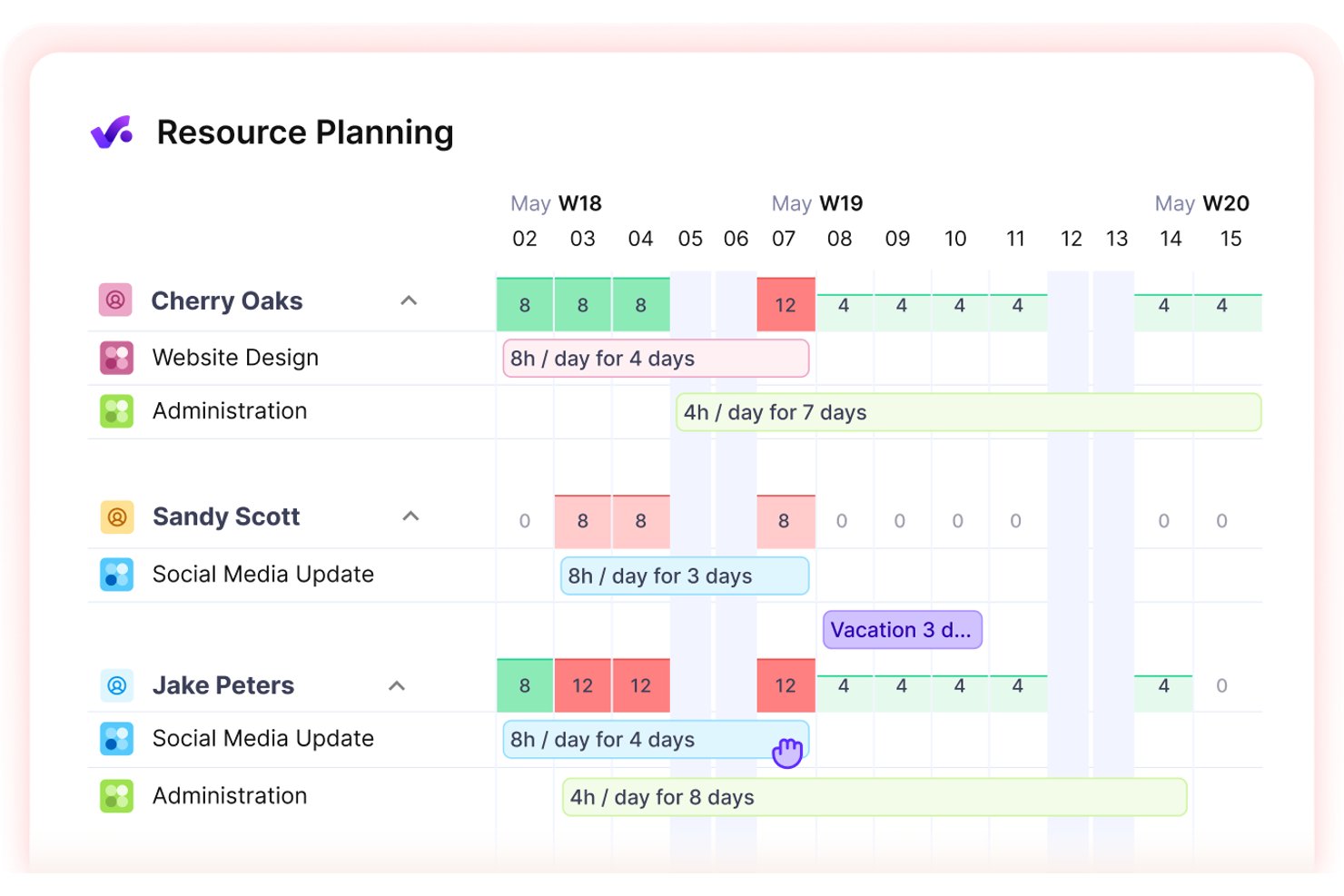
Productive is a professional services automation platform that combines resource planning, project budgeting, time tracking, and capacity management to help agencies and client-facing teams oversee their entire project portfolio.
Who Is Productive Best For?
Productive is a strong fit for agencies and professional services firms that need to connect resource scheduling directly to project margins and client profitability.
Why I Picked Productive
Productive earns its spot on my shortlist because it directly ties resource scheduling to budget consumption, so you can see in real time whether a client engagement is profitable before it goes over. I particularly like how its capacity planning view layers billable utilization against project margins, giving you a clear signal when a team member is either underbooked or eating into a project's profit. Its budget tracking also auto-updates as time is logged, so there's no manual reconciliation at month's end.
Productive Key Features
- Project portfolio view: A centralized dashboard that displays all active client projects, their statuses, and assigned team members in one place.
- Billable vs. non-billable time tracking: Lets team members log hours and tag them as billable or internal, keeping client invoicing data clean and separate.
- Invoice generation: Converts logged billable time and approved expenses directly into client-ready invoices without leaving the platform.
- Sales pipeline management: Tracks deals and potential projects before they're won, so you can plan resource needs ahead of contract sign-off.
Productive Integrations
Productive offers native integrations with QuickBooks Online, Xero, Google Calendar, Outlook Calendar, Slack, Microsoft Teams, HubSpot, Salesforce, and Jira, plus Zapier. Its open API supports custom integrations.
Pros and Cons
Pros:
- Pipeline forecasts resource needs before contracts
- Capacity views expose billable gaps early
- Staffing plans connect directly to margins
Cons:
- Built primarily for agencies and services firms
- Profit signals depend on timely time logs
New Product Updates from Productive
Productive Adds Email and Calendar Integrations for Agents
Productive adds Gmail, Outlook, Google Calendar, and Outlook Calendar connectors for its AI agents. These integrations let agents manage emails and create calendar events directly within Productive. For more information, visit Productive’s official site.
 .

Best for staffing scenarios in Smartsheet
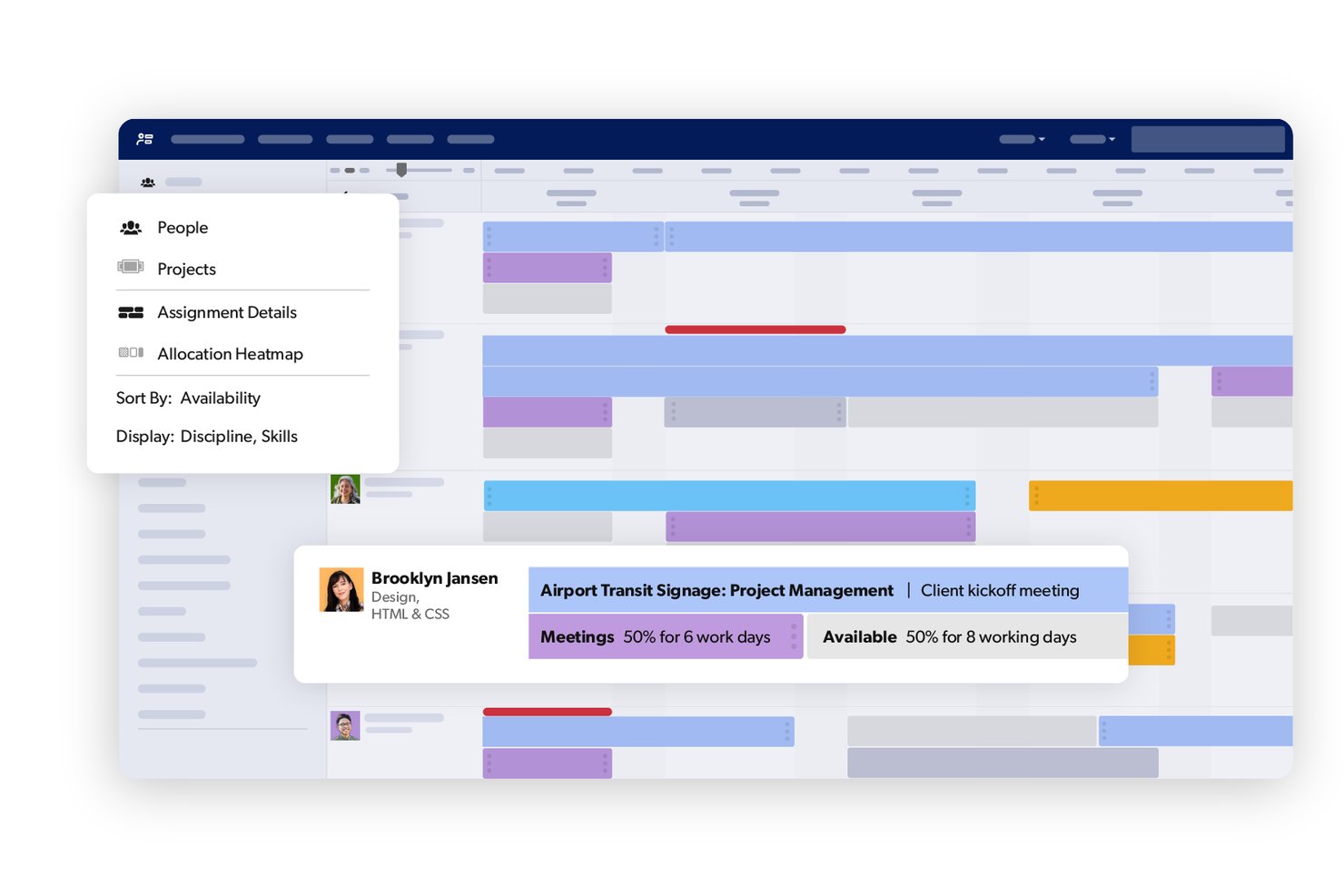
Smartsheet is a work management platform that combines spreadsheet-style project tracking with resource planning, capacity management, and staffing tools built directly into its grid interface.
Who Is Smartsheet Best For?
Smartsheet is a strong fit for teams already working in Smartsheet who want to manage staffing and resource allocation without switching to a separate tool.
Why I Picked Smartsheet
I've included Smartsheet in my top picks because it handles staffing scenarios entirely within the grid-based workspace your team already uses. I really like how resource views let you assign staff to client projects, spot capacity conflicts, and adjust allocations without leaving your sheets. The ability to track hours against project rows in real time means you're not reconciling data across separate tools.
Smartsheet Key Features
- Automated alerts and reminders: Smartsheet automatically sends notifications to team members when deadlines shift or task statuses change.
- Dashboard reporting: You can build visual dashboards that pull live data from multiple sheets to give stakeholders a real-time view of project status.
- Cross-sheet formulas: Smartsheet lets you reference and calculate data across multiple sheets, keeping client project data connected without manual updates.
- Intake forms: Custom forms feed client requests or project details directly into a sheet, so new work is logged and visible from the moment it arrives.
Smartsheet Integrations
Smartsheet offers 175+ integrations, including Jira Software, Salesforce, Microsoft Teams, Slack, Power BI, Tableau, Workday, and SAP ERP. Its API supports custom integrations for Business plans and higher.
Pros and Cons
Pros:
- Role-based forecasts flag future hiring gaps
- Scenario planning tests staffing changes before commitment
- Visual allocation grids expose overbooked staff
Cons:
- Dependency-driven schedule shifts need manual edits
- Task-level resourcing remains limited
New Product Updates from Smartsheet

Smartsheet Adds Non-Plan User Management in Admin Center
Smartsheet adds a Non plan users tab to the Seat types and true-up page in Admin Center. This lets system admins review non-plan users and add them to the plan or remove them from the organization in one place. For more information, visit Smartsheet’s official site.
 .

Scoro
Best for staffing plans tied to project margins
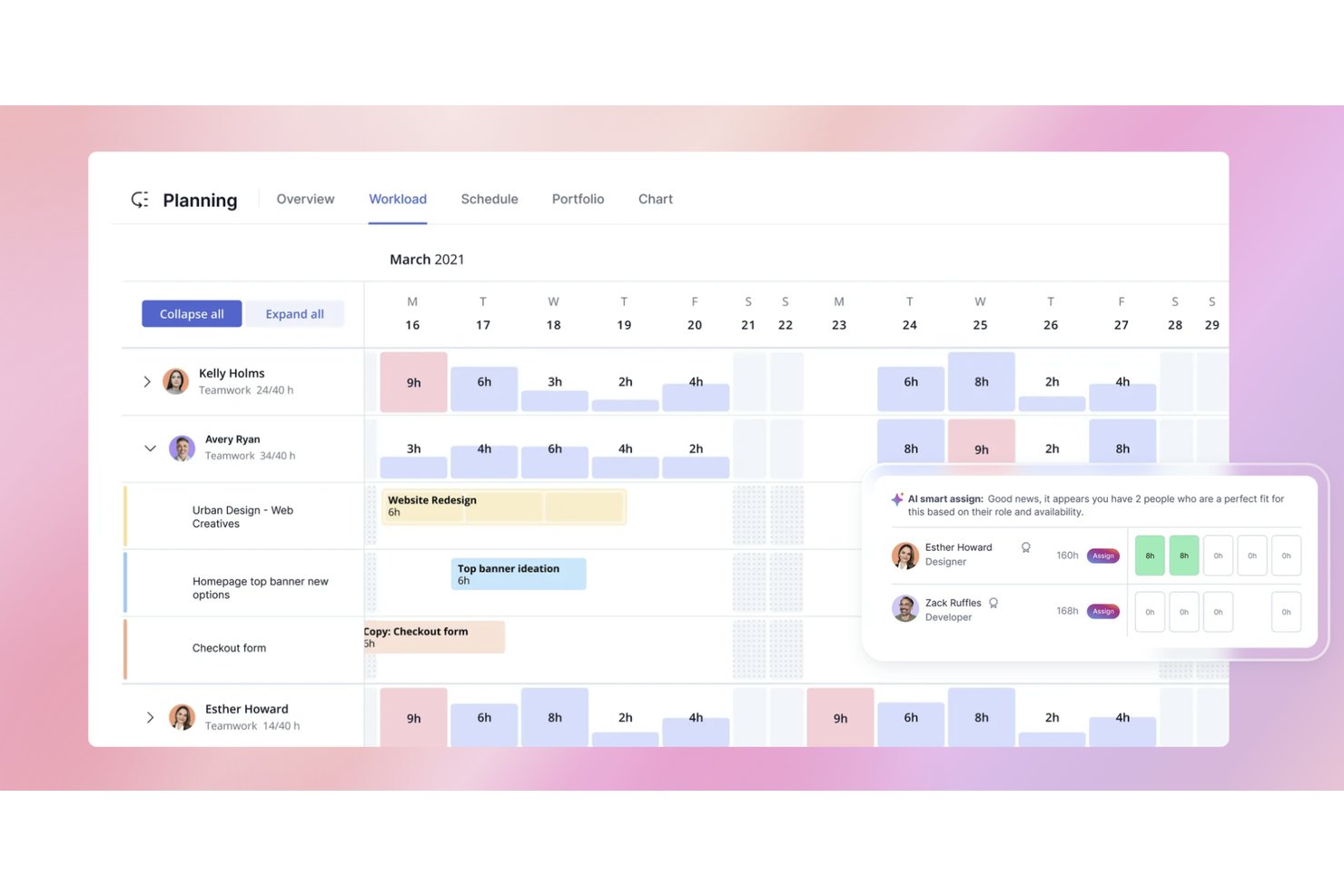
Scoro is a business management platform that brings together project planning, resource scheduling, time tracking, budgeting, and financial reporting in one place.
Who Is Scoro Best For?
Scoro suits professional services firms and agencies that need to connect staffing decisions directly to project profitability.
Why I Picked Scoro
Scoro earns its spot on my shortlist because it directly connects staffing decisions to project profitability, which most resource tools simply don't do. I love how its capacity planning view ties each team member's scheduled hours to the budget margin of a specific project in real time. If I add a senior consultant to a project, Scoro immediately shows me how that affects the project's profitability, not just its timeline. That feedback loop between resourcing and margins is what makes it genuinely useful for services firms.
Scoro Key Features
- Quoted vs. actual time tracking: Scoro lets you log hours against a project quote so you can see budget burn in real time as work progresses.
- Retainer management: You can set up recurring retainer budgets for ongoing client work and track usage period by period directly in the platform.
- Utilization reporting: Scoro generates utilization reports showing billable vs. non-billable hour breakdowns across individual team members and departments.
- Automated invoicing: Scoro can generate invoices directly from tracked time and approved expenses, pulling client and project data in automatically.
Scoro Integrations
Scoro’s documented integrations include Xero, QuickBooks, HubSpot, Salesforce, Jira, Asana, Google Calendar, and Microsoft Exchange. It also supports over 6,000 apps through Zapier and offers an API for custom integrations.
Pros and Cons
Pros:
- Reports billable utilization by person and department
- Tracks quoted-versus-actual hours and budget burn
- Connects staffing capacity to project margins
Cons:
- Support response can lag on time-tracking issues
- Interface can feel dated and cumbersome
New Product Updates from Scoro

Scoro Adds Time Mobile App and ELI Improvements
Scoro adds the Scoro Time mobile app for iOS/Android to track time anywhere and expands ELI with attachments, smarter filtering, and trigger-based actions. For more information, visit Scoro's official site.
 .

Accelo
Best for planning capacity before deals close
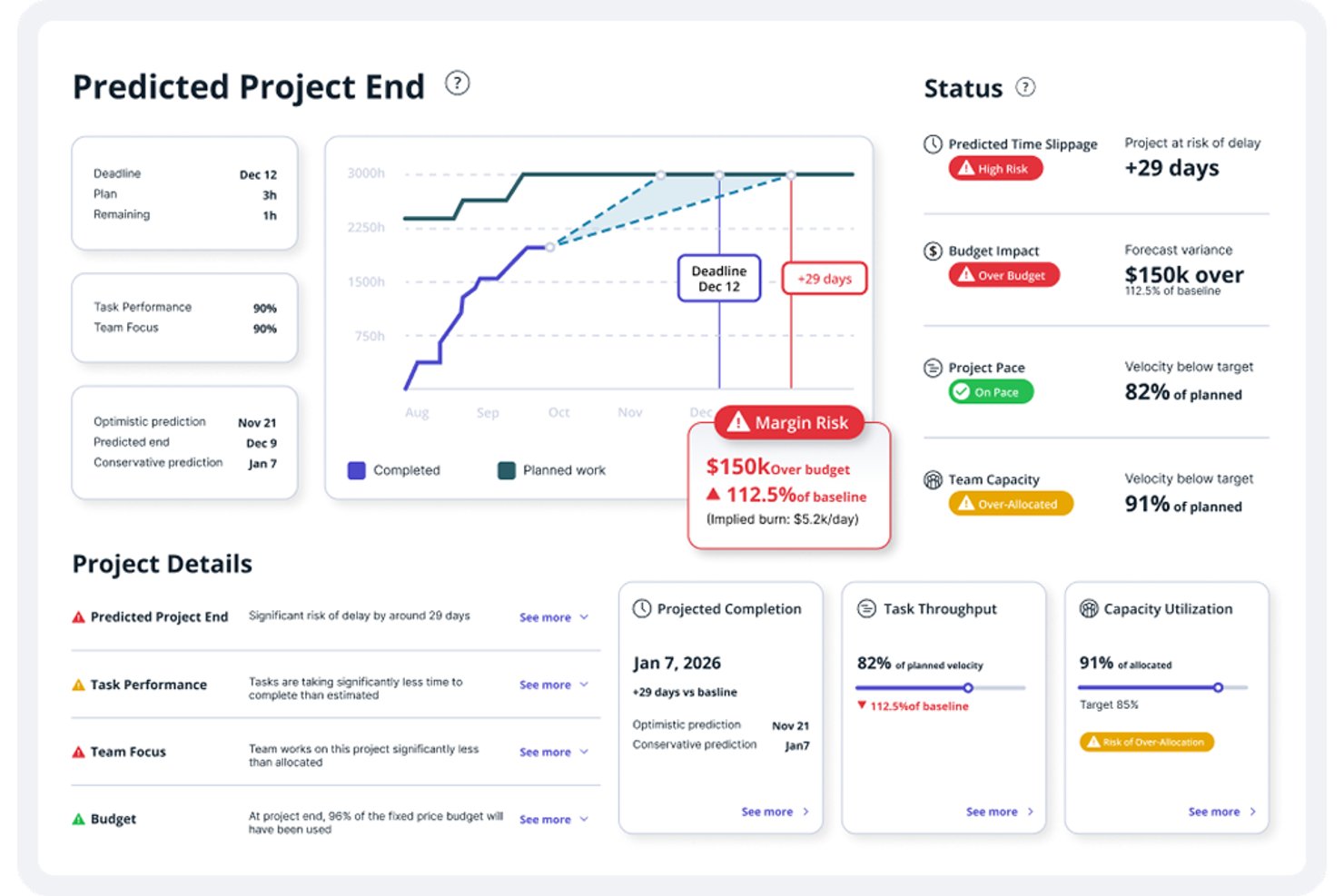
Accelo is a client resource management platform built for service businesses, combining project management, time tracking, retainer management, and CRM into a single connected system.
Who Is Accelo Best For?
Accelo is a strong fit for professional services firms—think agencies, consultancies, and MSPs—that need to manage client work from the first sales conversation through to delivery and billing.
Why I Picked Accelo
Accelo earns its spot on my shortlist because it lets you model capacity and workload before a deal is even signed. I love that its pipeline is connected directly to resource planning, so when a prospect moves into a later deal stage, you can already see how that work lands against your team's availability. That kind of pre-close visibility means fewer scrambles at kickoff and more realistic delivery timelines from day one.
Accelo Key Features
- Automated time capture: Accelo tracks time spent on emails, meetings, and tasks automatically, without requiring manual entry.
- Retainer management: Teams can set up recurring retainer budgets, track hours used, and monitor burn rates against client agreements.
- Integrated billing and invoicing: Accelo converts tracked time and expenses directly into client invoices from within the same platform.
- Client portal: Clients can log in to view project progress, approve work, and access shared documents without needing a separate tool.
Accelo Integrations
Accelo documents integrations with Microsoft 365, Exchange & Outlook, Xero, QuickBooks, Jira, Zendesk, HubSpot, Gusto, NinjaRMM, and Kaseya. It also supports Zapier and a public API for custom connections.
Pros and Cons
Pros:
- Automatic time capture reduces manual timesheet entry
- Retainer budgets track client hours against agreements
- Pipeline forecasts expose capacity before contracts close
Cons:
- Product teams may find service workflows mismatched
- Broader service suite can overwhelm focused teams
New Product Updates from Accelo

Accelo Rebuilds Mobile App for Project and Time Management
Accelo rebuilds its mobile app with task management, new work creation, and mobile timesheets for Forecast customers. This helps teams keep project and time data current while working away from a desktop. For more information, visit Accelo’s official site.
 .

Kantata
Best for staffing tied to project economics
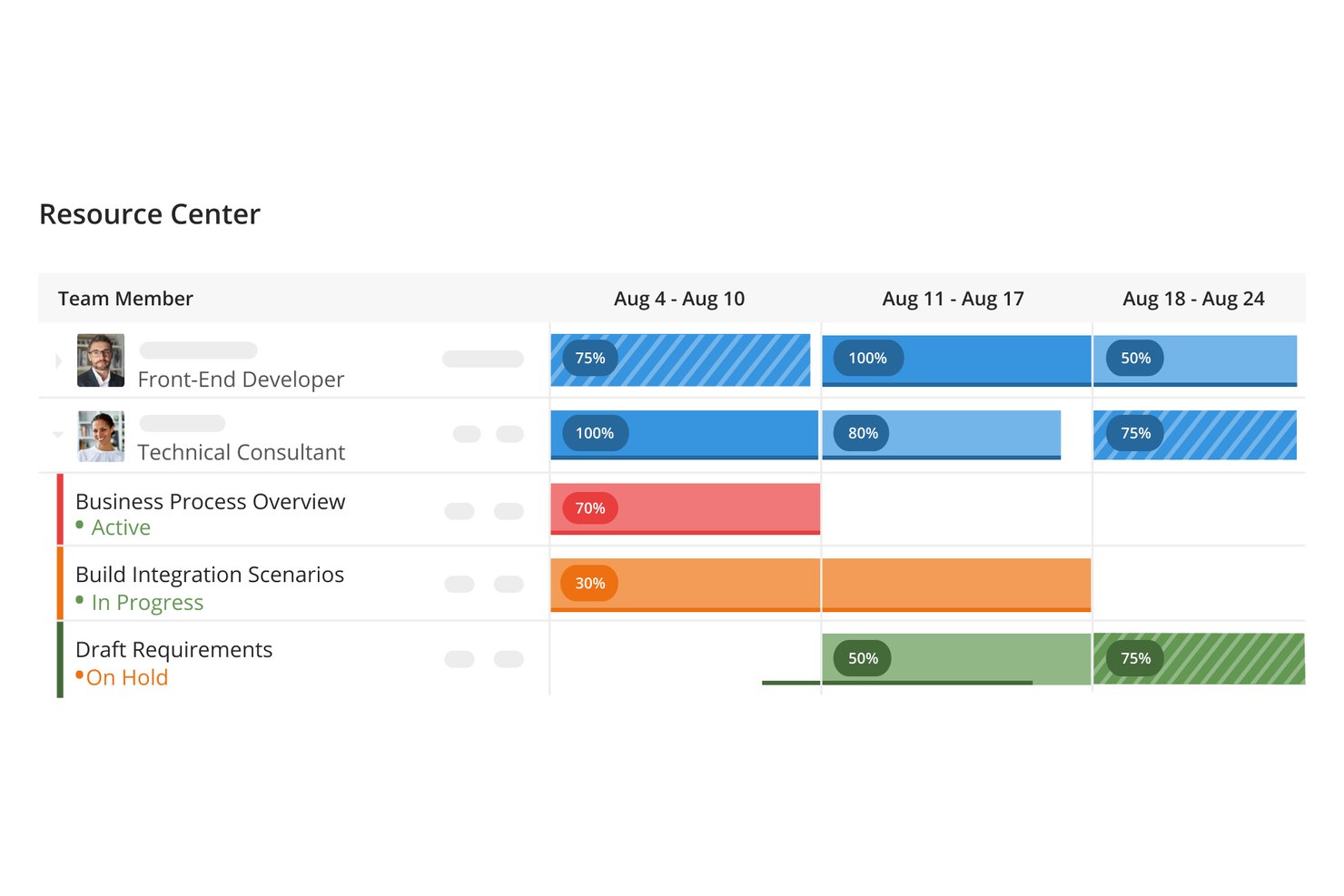
Kantata is a professional services automation platform that combines resource management, project financials, time tracking, and capacity planning for client-facing teams.
Who Is Kantata Best For?
Kantata is a strong fit for professional services firms that need to connect staffing decisions directly to project budgets and margins.
Why I Picked Kantata
Kantata earns its spot on my shortlist because it connects staffing decisions directly to project margins, which is something most resource management tools just don't do. I love how its resource forecasting ties into real-time budget tracking, so I can see the financial impact of a staffing change before I make it. Its role-based capacity planning also lets me match the right people to the right projects based on actual cost rates and utilization targets.
Kantata Key Features
- Skills-based resource matching: A searchable skills library lets you filter and assign team members based on specific competencies and certifications.
- Time and expense tracking: Team members log hours and expenses directly against project tasks, keeping actuals synced with project records in real time.
- Project health dashboards: Visual dashboards surface key project metrics like schedule variance, budget consumption, and team utilization across your portfolio.
- Resource request workflows: Managers can submit, review, and approve staffing requests through a structured workflow that keeps resource allocation decisions documented and auditable.
Kantata Integrations
Kantata offers over 1,200 prebuilt connectors, including Salesforce, QuickBooks, NetSuite, Sage Intacct, Xero, Slack, and Microsoft Teams. It also supports secure APIs and middleware integrations through MuleSoft and Workato.
Pros and Cons
Pros:
- Skills matching supports documented staffing requests
- Role-based forecasts reflect costs and utilization
- Staffing changes map to project margins
Cons:
- Accurate forecasts depend on timely time entries
- Financial workflows may exceed basic staffing needs
New Product Updates from Kantata

Kantata Adds Access Group Change History
Kantata adds Access Groups History, letting account administrators track changes to group details, membership, and permissions in Recent History. The update also makes these events available through the Subscribed Events API for broader monitoring. For more information, visit Kantata’s official site.
 .
Diğer Müşteri Kaynak Yönetimi Yazılımları
Aşağıda kısa listeme aldığım ancak en iyi listeye giremeyen ek müşteri kaynak yönetimi yazılımlarının bir listesi yer alıyor. Bunlara göz atmaya değer!
- Runn
For turning resource requests into hiring plans
- Planview
For client staffing and revenue forecasts
- Wrike
For cross-client agency workload planning
- Zoho Projects
For resource planning with Zoho People
- monday AI Workspace
For visualizing staff and asset workloads
- Saviom
For planning staff without system access
- Bitrix24
For CRM-linked task billing
- Mosaic
For ERP-linked project and team planning
- eResource Scheduler
For role-based project capacity planning
- Bridgit
For construction workforce planning


Müşteri Kaynak Yönetimi Yazılımı Seçim Kriterleri
Bu listeye eklemek üzere en iyi müşteri kaynak yönetimi yazılımını seçerken veri organizasyonu ve görev otomasyonu gibi yaygın alıcı ihtiyaçlarını ve sorunlarını göz önünde bulundurdum. Değerlendirmemi yapılandırılmış ve adil tutmak için aşağıdaki çerçeveyi de kullandım:
Temel İşlevsellik (toplam puanın %25'i)
Bu listeye dahil edilebilmek için her çözümün aşağıdaki yaygın kullanım alanlarını karşılaması gerekiyordu:
- Müşteri kişilerini yönetme
- İletişim geçmişini izleme
- Takip hatırlatıcılarını otomatikleştirme
- Müşteri projelerini düzenleme
- Müşteri raporları oluşturma
Öne Çıkan Ek Özellikler (toplam puanın %25'i)
Rakipleri daha da daraltmaya yardımcı olmak için aşağıdakiler gibi benzersiz özellikleri de aradım:
- Özelleştirilebilir gösterge panelleri
- Yapay zekâ destekli içgörüler
- Gelişmiş veri analitiği
- Birden fazla dil desteği
- Mobil uygulamaya erişilebilirlik
Kullanılabilirlik (toplam puanın %10'u)
Her sistemin kullanılabilirliği hakkında fikir edinmek için aşağıdakileri göz önünde bulundurdum:
- Sezgisel kullanıcı arayüzü
- Minimum öğrenme eğrisi
- Verimli gezinme
- Duyarlı tasarım
- Tutarlı performans
Başlangıç Süreci (toplam puanın %10'u)
Her platformun başlangıç deneyimini değerlendirmek için aşağıdakileri göz önünde bulundurdum:
- Eğitim videolarının bulunabilirliği
- Şablonlara erişim
- Etkileşimli ürün turları
- Chatbot desteği
- Canlı web seminerleri
Müşteri Desteği (toplam puanın %10'u)
Her yazılım sağlayıcısının müşteri destek hizmetlerini değerlendirmek için aşağıdakileri göz önünde bulundurdum:
- 7/24 erişilebilirlik
- Birden fazla destek kanalı
- Yanıt süresi
- Bilgi tabanı kaynakları
- Kişiselleştirilmiş yardım
Fiyat-Performans (toplam puanın %10'u)
Her platformun fiyat-performans oranını değerlendirmek için aşağıdakileri göz önünde bulundurdum:
- Rekabetçi fiyatlandırma
- Özellik-fiyat oranı
- Planların ölçeklenebilirliği
- Ücretsiz deneme seçenekleri
- Şeffaf fiyatlandırma yapısı
Müşteri İncelemeleri (toplam puanın %10'u)
Genel müşteri memnuniyeti hakkında fikir edinmek için müşteri incelemelerini okurken aşağıdakileri göz önünde bulundurdum:
- Genel memnuniyet puanı
- Belirli özelliklerden bahsedilmesi
- Destek deneyimi hakkında geri bildirimler
- Kullanılabilirlikle ilgili yorumlar
- ROI veya fayda bildirimleri
Müşteri Kaynak Yönetimi Yazılımı Nasıl Seçilir?
Uzun özellik listeleri ve karmaşık fiyatlandırma yapılarına takılıp kalmak kolaydır. Kendinize özgü yazılım seçimi sürecinizde ilerlerken odaklanmanızı korumanıza yardımcı olmak için aklınızda bulundurmanız gereken faktörlerin bir kontrol listesini aşağıda bulabilirsiniz:
| Faktör | Dikkate Alınması Gerekenler |
|---|---|
| Ölçeklenebilirlik | Yazılım işletmenizle birlikte büyüyebilir mi? Gelecekteki ihtiyaçları, kullanıcı sınırlarını ve veri kapasitesini göz önünde bulundurun. Tamamen elden geçirmeye gerek kalmadan artan iş yükünü kaldırabildiğinden emin olun. |
| Entegrasyonlar | Mevcut araçlarınızla bağlantı kurabiliyor mu? İş akışındaki kesintileri önlemek için e-posta platformları, takvimler ve muhasebe sistemleri gibi yazılımlarla uyumluluğunu kontrol edin. |
| Özelleştirilebilirlik | Yazılımı süreçlerinize uyacak şekilde uyarlayabilir misiniz? İş akışlarını, alanları ve raporları özel ihtiyaçlarınıza göre ayarlama seçeneklerini arayın. |
| Kullanım kolaylığı | Ekibiniz için kullanıcı dostu mu? Hızlı benimsenmesini ve en az düzeyde hayal kırıklığı yaşanmasını sağlamak için öğrenme eğrisini ve arayüz tasarımını değerlendirin. |
| Uygulama ve işe alıştırma | Başlamak ne kadar sürüyor? Geçişi kolaylaştıracak videolar veya kılavuzlar gibi eğitim materyalleri de dahil olmak üzere gereken kurulum süresini ve kaynakları göz önünde bulundurun. |
| Maliyet | Bütçenize uyuyor mu? Gizli ücretler de dahil olmak üzere toplam maliyeti değerlendirin ve bunu sağladığı değerle karşılaştırın. Ölçeğinize uygun esnek fiyatlandırma planlarını arayın. |
| Güvenlik önlemleri | Verileriniz ve gizliliğiniz korunuyor mu? Şifreleme standartlarını, veri yedekleme prosedürlerini ve GDPR gibi düzenlemelere uyumluluğu doğrulayın. |
Müşteri Kaynak Yönetimi Yazılımındaki Trendler
Müşteri kaynak yönetimi yazılımı sürekli değişiyor. Geleceğini şekillendiren en son trendler şunlardır.
- Yapay Zekâ ve Makine Öğrenimiyle Entegrasyon: Yapay zekâ ve makine öğrenimi, müşteri kaynak yönetimi yazılımına giderek daha fazla entegre ediliyor. Bu teknolojiler, öngörücü analizleri ve daha akıllı karar almayı mümkün kılıyor.
- Mobil Erişilebilirliğe Vurgu: Mobil erişilebilirlik, müşteri kaynak yönetimi yazılımı için kritik bir özellik hâline geldi. Yazılım artık akıllı telefonlarda ve tabletlerde tam işlevsellik sunarak hareket hâlindeyken yönetim olanağı sağlıyor.
- Gelişmiş Veri Güvenliği Önlemleri: Yeni şifreleme yöntemleri ve çok faktörlü kimlik doğrulama standart hâline gelirken veri güvenliği en önemli önceliklerden biri oldu. Bu önlemler, hassas müşteri bilgilerini veri ihlallerine karşı koruyor.
- Sanal ve Artırılmış Gerçekliğin Benimsenmesi: Sanal ve artırılmış gerçeklik, müşteri tanıtımları ve ürün sergilemeleri için kullanılıyor. Bu sürükleyici teknoloji, müşterilerle etkileşim kurmak ve kaynakları sergilemek için benzersiz bir yol sunuyor.
- Özelleştirme ve Kişiselleştirmeye Yönelim: Yazılım artık daha fazla özelleştirme seçeneği sunarak belirli işletme ihtiyaçlarına göre uyarlanmasını kolaylaştırıyor.
Bu gelişmeler, daha dinamik ve duyarlı müşteri kaynak yönetiminin temelini oluşturuyor.
Müşteri Kaynak Yönetimi Yazılımı Nedir?
Müşteri kaynak yönetimi yazılımı, işletmelerin müşteri etkileşimlerini ve verilerini verimli bir şekilde düzenleyip yönetmesine yardımcı olan bir araçtır. Proje yöneticileri, satış ekipleri ve müşteri hizmetleri temsilcileri gibi profesyoneller bu araçları genellikle müşteri ilişkilerini geliştirmek ve üretkenliği artırmak için kullanır. İletişim yönetimi, görev otomasyonu ve raporlama özellikleri, işletmelerin müşteri verilerini ve iletişimini etkili bir şekilde yönetmesini destekler. Genel olarak bu araçlar, müşteri ilişkilerini yönetmeyi kolaylaştırır, zamandan tasarruf sağlar ve iş sonuçlarını iyileştirir.
Özellikler
Müşteri kaynak yönetimi yazılımı seçerken aşağıdaki temel özelliklere dikkat edin:
- İletişim yönetimi: Müşteri bilgilerini merkezi bir yerde toplar ve müşteri ayrıntılarına erişip bunları güncellemeyi kolaylaştırır.
- Görev otomasyonu: Tekrarlanan görevleri otomatikleştirerek zamandan tasarruf sağlar ve insan hatası olasılığını azaltır.
- Raporlama özellikleri: Ayrıntılı raporlar aracılığıyla müşteri etkileşimleri ve iş süreçleri hakkında içgörüler sunar.
- Huni yönetimi: Müşteri anlaşmalarının ve projelerinin ilerlemesini takip etmeye yardımcı olarak hiçbir şeyin gözden kaçmamasını sağlar.
- E-posta pazarlama entegrasyonu: E-posta kampanyalarının doğrudan platform içinde oluşturulmasına ve yönetilmesine olanak tanır.
- Özelleştirilebilir iş akışları: Kullanıcıların süreçleri kendi özel iş ihtiyaçlarına göre uyarlamasını ve verimliliği artırmasını sağlar.
- Mobil erişim: Mobil uyumlu bir arayüzle müşteri ilişkilerini hareket hâlindeyken yönetme olanağı sunar.
- Güvenlik önlemleri: Şifreleme ve veri gizliliği düzenlemelerine uyum sayesinde müşteri verilerinin korunmasını sağlar.
- Entegrasyon seçenekleri: Diğer araçlar ve platformlarla uyumluluk sunarak genel iş operasyonlarını geliştirir.
Faydalar
Müşteri kaynak yönetimi yazılımını uygulamak, ekibiniz ve işletmeniz için çeşitli faydalar sağlar. Yararlanabileceğiniz birkaç fayda şunlardır:
- Geliştirilmiş düzen: Müşteri verilerini merkezi bir yerde toplayarak ekibinizin bilgilere erişmesini ve bunları verimli bir şekilde yönetmesini kolaylaştırır.
- Artan üretkenlik: Rutin görevleri otomatikleştirerek ekibinizin daha önemli faaliyetlere odaklanması için zaman kazandırır.
- Gelişmiş iletişim: Entegre e-posta ve iletişim araçları aracılığıyla müşterilerle daha iyi etkileşim kurulmasını sağlar.
- Daha iyi karar alma: Ayrıntılı raporlar aracılığıyla içgörüler sunarak bilinçli iş kararları almanıza yardımcı olur.
- Kolaylaştırılmış süreçler: Özelleştirilebilir iş akışları, süreçleri özel ihtiyaçlarınıza göre uyarlamanıza ve verimliliği artırmanıza olanak tanır.
- Daha fazla hareketlilik: Mobil erişim, ekibinizin müşteri ilişkilerini her yerden ve her zaman yönetebilmesini sağlar.
- Veri güvenliği: Güvenlik önlemleriyle müşteri bilgilerini korur ve veri gizliliği düzenlemelerine uyumu sağlar.
Maliyetler & Fiyatlandırma
Müşteri kaynak yönetimi yazılımı seçmek, mevcut çeşitli fiyatlandırma modellerinin ve planların anlaşılmasını gerektirir. Maliyetler özelliklere, ekip büyüklüğüne, eklentilere ve daha fazlasına göre değişir. Aşağıdaki tablo, müşteri kaynak yönetimi yazılımı çözümlerinde yaygın planları, bunların ortalama fiyatlarını ve genellikle sunulan özellikleri özetlemektedir:
Müşteri Kaynak Yönetimi Yazılımı İçin Plan Karşılaştırma Tablosu
| Plan Türü | Ortalama Fiyat | Yaygın Özellikler |
|---|---|---|
| Ücretsiz Plan | $0 | Temel iletişim yönetimi, görev otomasyonu ve sınırlı raporlama. |
| Kişisel Plan | $5-$25/user/month | Gelişmiş iletişim yönetimi, e-posta entegrasyonları ve temel analizler. |
| İşletme Planı | $30-$60/user/month | Gelişmiş raporlama, huni yönetimi ve özelleştirilebilir iş akışları. |
| Kurumsal Plan | $70-$120/user/month | Yapay zekâ destekli içgörüler, gelişmiş güvenlik ve öncelikli destek dâhil eksiksiz özellik paketi. |
Müşteri Kaynak Yönetimi Yazılımı Hakkında SSS
Müşteri kaynak yönetimi yazılımı ve çalışma şekli hakkında sahip olabileceğiniz sık sorulan soruların bazı yanıtlarını burada bulabilirsiniz:
CRM ve ERP arasındaki fark nedir?
CRM ve ERP sistemleri bir şirketin verimliliğini artırmayı amaçlar, ancak odak noktaları farklıdır. CRM platformları müşteri ilişkilerini yönetmeye odaklanırken ERP sistemleri şirket içi iş süreçlerini ele almak üzere tasarlanır. CRM çözümleri genellikle müşteri hizmetleri, pazarlama ve satış ekipleri tarafından kullanılırken ERP sistemleri finans, envanter ve satın alma departmanları tarafından kullanılır.
Küçük işletmem için müşteri kaynak yönetimi yazılımına ihtiyacım var mı?
Yeni kurulan şirketler temel kişi yönetimi sistemleri veya elektronik tablolarla idare edebilse de büyüyen küçük işletmeler CRM yazılımından yararlanır. CRM sistemi bir satış sürecinin yönetilmesine yardımcı olur ve müşteri sadakati hedeflerini destekler. Birleşik bir veri kaynağı sunarak müşteri hizmetleri ve satış temsilcilerinin doğru bilgilere erişmesini sağlar; bu da memnuniyetsizliğe yol açabilecek kopuk müşteri deneyimlerinin önlenmesine yardımcı olur.
Müşteri kaynak yönetimi yazılımı entegrasyonları önemli midir?
Entegrasyonlar, farklı yazılım araçlarının verileri senkronize etmesini sağladığı ve çalışanların platformlar genelinde doğru müşteri bilgilerine erişmesine olanak tanıdığı için kritik öneme sahiptir. Entegrasyonlar, uygulamalar arasında geçiş yapma ihtiyacını azaltarak üretkenliği ve verimliliği artırabilir. Yerel entegrasyonlar ve API erişimi, çeşitli hizmetler arasında birlikte çalışabilirliği kolaylaştırır. Yaygın entegrasyonlar arasında müşteri destek araçları, işletme telefon sistemleri, web sitesi analizleri, sosyal medya kanalları, proje yönetimi yazılımı, POS sistemleri, e-ticaret platformları ve ekip iş birliği yazılımları bulunur.
Müşteri kaynak yönetimi yazılımıyla hangi veri güvenliği önlemlerini almalıyım?
CRM sağlayıcıları iki faktörlü kimlik doğrulama ve kullanıcı erişim yönetimi gibi veri güvenliği özellikleri sunar. İşletmeler mevcut tüm güvenlik seçeneklerini etkinleştirmeli ve veri ihlallerini önlemek için en iyi uygulamalara uymalıdır. Önemli siber güvenlik olaylarının birçoğu üçüncü taraf yazılımları içerdiğinden, tedarikçileri kapsamlı bir şekilde değerlendirmek, güvenlik protokollerini incelemek ve veri saklama ile yedekleme politikaları hakkında bilgi edinmek önemlidir.