2026 İçin İncelenen En İyi 10 Kaynak İzleme Yazılımı

En İyi Kaynak İzleme Yazılımları Kısa Listesi


En iyi kaynak izleme yazılımı, ekip uygunluğu, iş yükleri ve kapasite hakkında gerçek zamanlı görünürlük sağlayarak doğru kişileri doğru zamanda doğru işe atamanıza yardımcı olur. Bu araçlar tükenmişliği önlemenize, atıl zamanı azaltmanıza ve projeler genelinde daha akıllı personel kararları almanıza yardımcı olur.
Dijital projeleri yönetme ve yıllar içinde 40'tan fazla kaynak planlama aracını test etme konusunda 10 yılı aşkın deneyimimle, kamu, sağlık, perakende ve ulaşım sektörlerindeki ekiplerin iş yüklerini dengelemek ve kaynak ihtiyaçlarını öngörmek için daha iyi yollar bulmasına yardımcı oldum. Yetersiz görünürlüğün zaman çizelgelerini nasıl sekteye uğratabildiğini ve doğru aracın kontrolü nasıl yeniden sağlayabildiğini gördüm.
Bu rehberde test ettiğim en iyi araçlardan bahsedeceğim. Her araçta, ne yaptıkları ve sahip oldukları öne çıkan özellikler hakkında genel bir fikir vermeyi amaçlayan bir açıklama yer alıyor. Umarım ihtiyaçlarınıza en uygun olanı belirlemenize yardımcı olur.
Why Trust Our Software Recommendations
Our team has been testing and reviewing software since 2012. As project managers ourselves, we know how difficult—and important—it is to choose the right software.
For this guide, we evaluated tools using hands-on testing and independent research, scoring tools using our selection criteria. We also draw on insights from industry thought leaders and practicing project management experts.
Our reviews reflect our human editorial judgment, not a sales pitch.
Expert reviewers:
Kaynak İzleme Yazılımları Karşılaştırma Tablosu
En iyi kaynak izleme yazılımı seçimlerim için fiyatlandırma ayrıntılarını bu karşılaştırma tablosunda özetliyorum:
| Tool | Best For | Trial Info | Price | ||
|---|---|---|---|---|---|
| 1 | Best for agency resource management | 14-day free trial | From $10/user/month (billed annually) | Website | |
| 2 | Best for real-time team performance data | Free plan + 14-day trial + demo available | From $10/user/month (billed annually) | Website | |
| 3 | Best for comprehensive resource planning | 14-day free trial | From $17/user/month | Website | |
| 4 | Best for smart resource tracking and reporting | Not available | Pricing upon request | Website | |
| 5 | Best for optimizing resource utilization | Free trial available | From $16/user/month (billed annually) | Website | |
| 6 | Best for project forecasting reports | Free trial available | From $5/user/month | Website | |
| 7 | Best for people-centric resourcing | Not available | Pricing upon request | Website | |
| 8 | Best for workload information | Free plan + 14-day trial available | From $9/user/month (billed annually) | Website | |
| 9 | Best for resourcing based on skills | 14-day free trial available | From $9/user/month (billed annually) | Website | |
| 10 | Best for testing staffing scenarios | 30-day free trial | Pricing upon request | Website |


En İyi Kaynak İzleme Yazılımlarına Genel Bakış
Deneyimimi ve dikkat çeken bazı özellikleri göstermek için her kaynak izleme aracının kısa bir açıklamasını burada bulabilirsiniz.

Best for agency resource management

Productive is an all-in-one work management platform that caters to the needs of agencies. It covers resource planning and tracking in addition to project and task management, budgeting, and other key tools for keeping your agency running smoothly.
However, like any tool that covers too many things, it can lack specialization in certain features. Productive compensates for that with built-in flexibility on the platform. Talking to Fran Vizintin from Productive about the resource module, we learned that "With Productive, you can create custom fields, like skills, and assign them to resources for detailed planning."
Why I Picked Productive
The software's resourcing tools include visualizations of your team's workload and availability. You can group team members by skills, teams, or departments to facilitate resource allocation based on any of these factors. All of this helps you assign tasks effectively and distribute work evenly across your team.
Time tracking is built into the platform to help you monitor how employee time is being allocated across tasks and projects. This data can then be connected to your capacity management to help you forecast future needs.
Productive Key Features
Productive also offers a variety of other features that cater to different aspects of project and resource tracking.
- Resource Planning: You can efficiently manage resources with tools for time tracking and time off management.
- Project Management: This lets you use Gantt charts, documentation, and workload management to oversee projects effectively.
- Resource Placeholders: You can use placeholders to measure resource demand for upcoming projects, which helps you make decisions about hiring and workload distribution.
- Financial Management: With features like budgeting, invoicing, and revenue forecasting, you get comprehensive financial oversight so you can make sure your projects remain profitable.
Productive Integrations
Integrations include Jira, Outlook, Sage, Google Calendar, HubSpot, Slack, QuickBooks, and Xero.
Pros and Cons
Pros:
- Internal time logs and non-billable codes included
- Resource availability view helps scheduling across projects
- Live linking of time tracking to budget data
Cons:
- May be overkill for small teams
- Resourcing view lacks some advanced customization
New Product Updates from Productive
Productive Adds Email and Calendar Integrations for Agents
Productive adds Gmail, Outlook, Google Calendar, and Outlook Calendar connectors for its AI agents. These integrations let agents manage emails and create calendar events directly within Productive. For more information, visit Productive’s official site.

Wrike
Best for real-time team performance data

Wrike is a cloud-based resource management platform that provides teams with the tools to collaborate on projects. It helps you stay organized, keep projects on track, and monitor progress from start to finish. You can assign tasks, set deadlines, manage workloads, and access real-time data about team performance.
Why I Picked Wrike
Wrike lets you measure performance over time by tracking time spent on tasks or money allocated for each project. This makes it easy to identify areas of improvement or waste to optimize processes and maximize productivity. Wrike also offers a variety of customization options that let you tailor the software to your exact needs. You can create custom fields for each project or task to make sure all relevant data is captured. Additionally, you can customize the look and feel of Wrike by choosing from a variety of themes and color schemes so that the platform reflects your brand identity.
Wrike's resource allocation feature gives you visibility into which resources are available for various tasks, so you can create realistic timelines with reasonable deadlines. It lets you analyze past projects, anticipate roadblocks related to resource saturation, and prepare teams for success. This insight helps you make accurate plans about personnel scheduling, tasking, workload realism, and project velocity.
Wrike Key Features
Wrike also offers a variety of other features that can help you and your team with resource tracking.
- Data-Rich Project Dashboards: This provides instant insights and visibility for all stakeholders so you can make sure everyone is on the same page.
- Simple Time Tracking: You can maximize productivity via timers and manual hour entries. This also makes it easier to manage project timelines.
- Personalized Kanban Boards: The customizable boards help you track plans and progress effectively and can adapt to your workflow needs.
- Adjustable Gantt Charts: This includes easy drag-and-drop functionality for adjusting priorities and managing dependencies so you can keep projects on track.
Wrike Integrations
Integrations include Microsoft, Google, Dropbox, Salesforce, and Marketo.
Pros and Cons
Pros:
- Granular role-based permissions let you control who sees what
- Multi-project planning to manage demand across portfolios
- Live workload charts help you see upcoming capacity
Cons:
- Smaller teams may find the resource module overkill
- Setup complexity may slow initial adoption
New Product Updates from Wrike

Wrike Redesigns Workspace Search With New Filters
Wrike introduces a redesigned Workspace Search interface with recent search shortcuts, item type and location filters, and parent-task context. These updates help users find relevant work items and navigate search results efficiently. For more information, visit Wrike’s official site.

Scoro
Best for comprehensive resource planning

Scoro is an all-in-one business management software designed for agencies, consultancies, and other professional service businesses. It combines project management, sales and CRM, billing, and reporting in a single platform.
Why I Picked Scoro
Scoro's resource planning feature lets you allocate work based on your team's availability and skills. This helps in balancing workloads and avoiding overbooking or underutilization. With real-time visibility into who is working on what, you can make informed decisions to optimize your resources.
The capacity planning tool provides insights into your team's workload, helping you forecast future resource needs. By analyzing historical data, you can predict upcoming demands and adjust your plans accordingly. This proactive approach makes sure you have the right people available for each project.
Scoro Key Features
In addition to comprehensive resource planning, Scoro offers a variety of other features for project and resource management.
- Time Tracking: You can monitor both billable and non-billable hours with precision, which helps with accurate billing and profitability analysis.
- Task Management: You can easily assign tasks based on team members' skills and availability to make sure the right resources are allocated efficiently.
- Gantt Charts: This lets you visualize project timelines and task dependencies, so you can identify potential delays and reallocate resources as needed.
- Task Scheduling: The drag-and-drop scheduling feature lets you plan tasks based on team skills and availability so you can maintain alignment with project timelines.
Scoro Integrations
Integrations include Google Calendar, Microsoft Exchange, QuickBooks, Xero, Stripe, Jira, HubSpot, Salesforce, Dropbox, and Zapier.
Pros and Cons
Pros:
- Merge project, finance, and resource data for better forecasting
- Granular role-based permissions help control access
- Capacity planning provides visibility into team availability
Cons:
- Learning curve for customizing dashboards and reports
- Resource module may be too heavyweight for small teams
New Product Updates from Scoro

Scoro Adds Time Mobile App and ELI Improvements
Scoro adds the Scoro Time mobile app for iOS/Android to track time anywhere and expands ELI with attachments, smarter filtering, and trigger-based actions. For more information, visit Scoro's official site.

Best for smart resource tracking and reporting

For enterprise marketing teams and agencies seeking a resource tracking solution, Screendragon presents itself as a versatile choice. This no-code workflow management platform is tailored to streamline marketing and creative operations, providing tools that enhance productivity and decision-making. By automating workflows and offering real-time insights, Screendragon helps you tackle the intricacies of project management and resource planning, making it an attractive option for those aiming to optimize their marketing efforts.
Why I Picked Screendragon
I picked Screendragon for its unique ability to integrate automated workflows with real-time insights, which is crucial for effective resource tracking. The platform's visual workflow builder allows your team to customize processes without coding, ensuring that resource management aligns with your specific needs. Additionally, the dynamic custom forms feature supports tailored data collection, enabling precise tracking and management of resources. These functionalities address the complex challenges of resource allocation and utilization in marketing and creative environments.
Screendragon Key Features
In addition to the features already mentioned, Screendragon offers several other capabilities that enhance its utility as a resource tracking software:
- Digital Approval Management: Streamlines the approval process, ensuring that all necessary stakeholders can review and approve resources efficiently.
- Enterprise-Grade Security: Provides advanced security measures to protect sensitive resource data and maintain compliance with industry standards.
- Scalable Operations: Supports high workflow volumes, making it suitable for large-scale marketing teams needing reliable resource management.
- Integration with Collaboration Tools: Enhances team collaboration by connecting with tools you already use, facilitating seamless communication and data sharing.
Screendragon Integrations
Native integrations are not currently listed by Screendragon.
Pros and Cons
Pros:
- Enterprise-grade security and permissions
- Advanced approval and governance controls
- Customizable no-code workflow automation
Cons:
- Pricing not transparent publicly
- No native capacity scheduling focus

VOGSY
Best for optimizing resource utilization

VOGSY is designed to manage your projects, resources, and finances all in one place. It’s tailored for global project teams and makes it easier for you to handle projects across different countries and currencies.
Why I Picked VOGSY
I chose VOGSY for its strong resource management. You can track global resources, manage hours, set billability targets, and forecast utilization to reduce non-billable time. You can manage resources by aligning team members based on skills, availability, and cost rates, including intercompany rates in different currencies.
VOGSY's opportunity bookings let you forecast resource needs, so your team is always prepared for upcoming projects. Additionally, the mobile web app provides access to all functionalities on any device, which keeps your team productive from anywhere.
VOGSY Key Features
VOGSY also offers several other features that can help you better resource your projects.
- Time and Leave Tracking: VOGSY provides tools for timesheets and timers to simplify time tracking for both employees and contractors.
- Project Accounting: You can manage financial budgets, revenue recognition, and accounts receivable with detailed profit and loss reporting.
- Team Collaboration: This lets you assign employees to project teams, manage tasks, and facilitate real-time conversations linked to specific projects.
- Document Management: You can securely share project files using organized folders and use document templates for efficient document creation.
VOGSY Integrations
Integrations include QuickBooks, Deltek, Xero, Sage, Certinia, Oracle NetSuite, Exact, PHC-GO, Jira, and Trello.
Pros and Cons
Pros:
- Custom workflows, roles, and reporting dashboards
- Real-time visibility into billed vs planned hours
- Templates for repeatable projects reduce admin setup
Cons:
- Potential notification overload with many active projects
- Workflow customization has a steep learning curve
New Product Updates from VOGSY
VOGSY Adds Velocity Agent Verdicts for Quote Approvals
VOGSY adds Velocity agent verdicts for quote approval requests with risk levels, margin checks, discount analysis, and reasoning. This helps approvers assess quote risk before making a final decision. For more information, visit VOGSY’s official site.
 .

Best for project forecasting reports
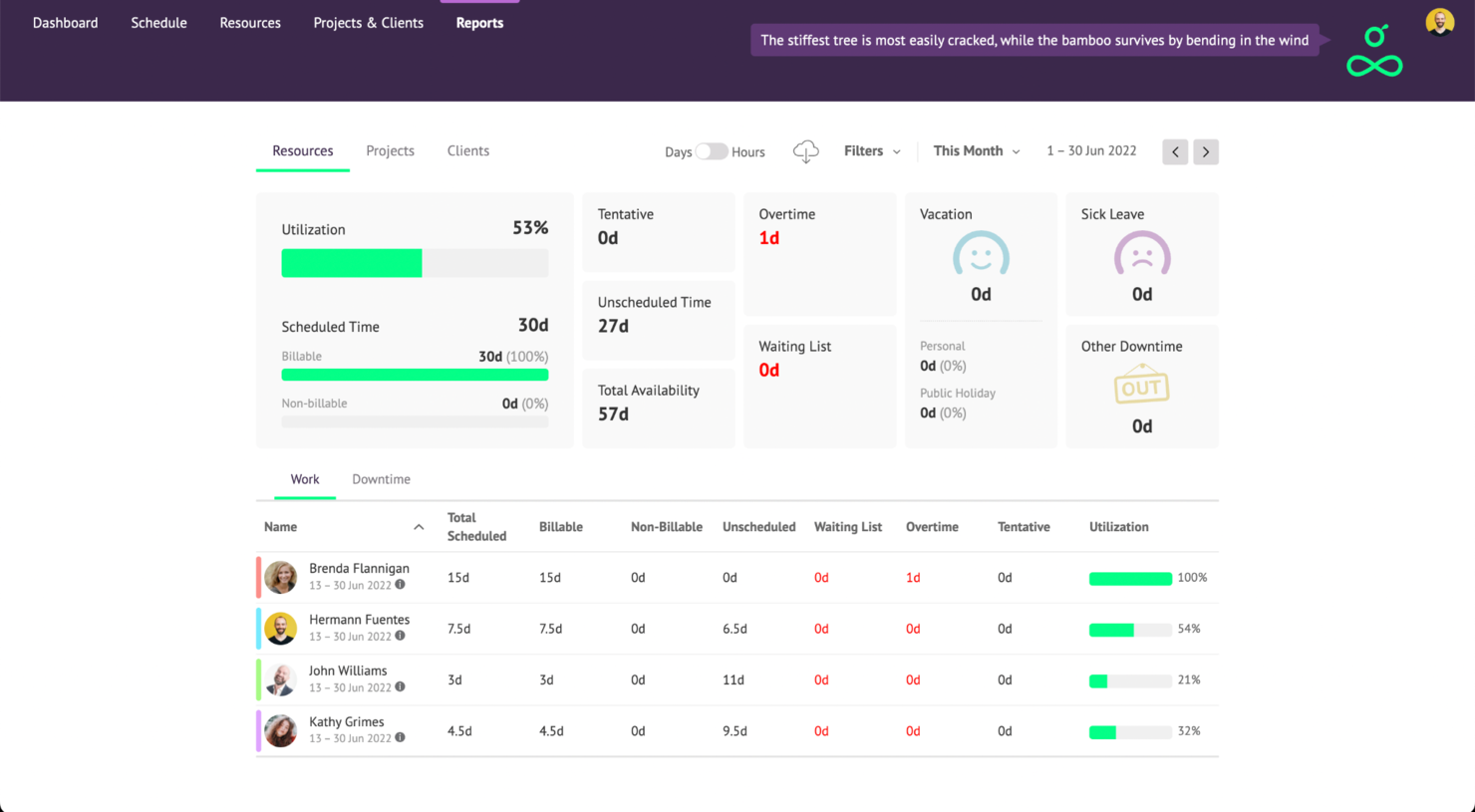
Resource Guru is a resource tracking platform that helps teams manage people, equipment, and shared spaces in one place. It’s designed to give you a clear view of who’s available, what’s booked, and where capacity is running low, making it easier to keep projects on track without overburdening your team.
Why I Picked Resource Guru
I picked Resource Guru because of its strong project forecasting reports, which provide precise insights into project timelines and resource allocation. The software's project scheduling capabilities let you track budgets and utilization metrics, so you can make sure your projects remain on course.
With its customizable reporting tools, you can delve into data on personnel and projects, which helps you identify overspending and monitor billable utilization to boost profitability.
Resource Guru Key Features
In addition to project forecasting, Resource Guru offers a suite of other features for resource management.
- Capacity Planning: This feature provides a visual overview of team member workloads and availability to help you make informed decisions about resource allocation.
- Leave Management: You can manage team leave requests and approvals directly within the platform, which helps maintain accurate scheduling and prevent overbooking.
- Meeting Room Booking: This lets you simplify the process of reserving meeting spaces with a dedicated booking system that integrates with your schedule.
- Custom Availability Settings: You can tailor availability for each team member to accommodate different working hours and commitments, which helps you plan resources accurately.
Resource Guru Integrations
Integrations include Google Calendar, Microsoft Outlook, Apple Calendar, Zapier, and Jira.
Pros and Cons
Pros:
- Quick drag-and-drop scheduling
- Leave and absence booking integrated with schedules
- Visual clash-management alerts help avoid double-booking
Cons:
- Not as scalable as other tools if your team increases in size
- Lack of task tracking features
New Product Updates from Resource Guru

Resource Guru Adds More Control Over Calendar Sync
Resource Guru adds more control over Google and Outlook Calendar sync, including source calendar selection and destination calendar options. These updates help users manage external events and Resource Guru bookings with less clutter. For more information, visit Resource Guru’s official site.
 .

Kantata
Best for people-centric resourcing

Kantata is a resource tracking platform purpose-built for professional services teams that need visibility into how people are staffed across projects. Rather than focusing only on timelines or budgets, it places people at the center of resource management and helps orgs balance workloads, prevent burnout, and make sure every project gets the right mix of talent.
Why I Picked Kantata
What makes Kantata stand out is its ability to track both the big picture and the details of your workforce. Managers can quickly identify who is overbooked, who has availability, and where skill gaps exist. The software also includes scenario planning, so you can test different staffing models before committing and make the smartest decisions for your team and your clients.
For organizations that depend on highly skilled talent, Kantata’s role-matching features are especially valuable. They connect project demands with the unique strengths of your people, so designers, developers, consultants, or contractors are placed where they can contribute most effectively. This people-centric approach not only improves project outcomes but also creates opportunities for employee growth and retention.
Kantata Key Features
Kantata also offers a variety of other features for tracking resources and managing projects and teams.
- Real-Time Analysis and Reporting: This feature lets you access up-to-date data for identifying trends, comparing performance, and making timely decisions.
- Centralized Communication Interface: This allows for collaboration across departments via a unified platform for communication and asset sharing.
- Visual Project Planning Tools: This includes timelines and charts that improve project visibility and forecasting and provide deeper insights into project progress.
- Skills Inventory Management: You can track and manage the skills available within your team and make sure the right people are allocated to the right projects.
Kantata Integrations
Integrations include Salesforce, Jira, NetSuite, Xero, BambooHR, HubSpot, Slack, QuickBooks, and Sage.
Pros and Cons
Pros:
- Strong fit for mid-to-large teams with many projects and people
- Link employee hours to project budgets and margins
- Detailed financial data and time tracking in one system
Cons:
- Reporting customization may require advanced knowledge
- Performance issues when handling large data sets
New Product Updates from Kantata

Kantata Adds Access Group Change History
Kantata adds Access Groups History, letting account administrators track changes to group details, membership, and permissions in Recent History. The update also makes these events available through the Subscribed Events API for broader monitoring. For more information, visit Kantata’s official site.
 .

Best for workload information
monday.com is a project management platform designed to help teams of all sizes manage projects, tasks, and business operations. It offers a wide array of features that facilitate project planning, execution, and monitoring.
Why I Picked monday.com
I picked monday.com because it can help you manage project timelines and task assignments effectively. These features give you the tools to plan and monitor your team's workload and align tasks with project goals. This can help your team stay on track and meet deadlines. The collaboration tools boost visibility across different departments, which makes it easier for you to coordinate and communicate with your team members.
Another reason I chose monday.com is its customizable workflows, which let you tailor the platform to fit your specific needs. By having the flexibility to adjust workflows, you can create an environment that best supports your team's resource management needs.
monday.com Key Features
monday.com offers a range of other features for managing projects and tracking resources.
- Automations: You can set up custom automations to streamline repetitive tasks, which helps reduce manual workloads and increase efficiency.
- Gantt Charts: This feature lets you visualize project timelines, dependencies, and milestones, and keep projects on track.
- Kanban Boards: You can use Kanban boards to manage tasks visually and get a clear overview of project progress and team responsibilities.
- File Management: This lets you keep all relevant documents and files organized in one place to maintain easy access and collaboration across your team.
monday.com Integrations
Integrations include Slack, Gmail, Microsoft Teams, GitLab, Mailchimp, Outlook, Docusign, Google Drive, Trello, and Asana.
Pros and Cons
Pros:
- Flexibility in managing various projects and workflows
- Automation features reduce manual work and help productivity
- Visually appealing and user-friendly interface
Cons:
- Customization options can be overwhelming
- Setup can be time-consuming
New Product Updates from monday AI Workspace
monday AI Workspace Adds Human Approval Routing
monday AI Workspace adds a human-in-the-loop approval block to AI Workflows, sending approval requests and routing workflow paths based on responses. For more information, visit monday AI Workspace's official site.

Birdview
Best for resourcing based on skills

Birdview is a project and resource management platform that helps you improve the way you manage resources across your projects. It offers a suite of features aimed at boosting productivity and oversight, and can help you optimize operations.
Why I Picked Birdview
I picked Birdview for its unique ability to match resources based on skills and availability, which can help you optimize your team's potential. With features like real-time visibility into team workloads and automated workload adjustments, you can maintain a balanced distribution of tasks across projects.
Birdview lets you to define job roles and track proficiency levels, which helps you make informed staffing decisions improve overall project efficiency. This approach not only maximizes workforce capacity but also supports team development.
Birdview Key Features
Birdview also offers a wide array of other features that can further improve resource tracking and project management in your organization.
- Time Tracking and Budgeting: You can monitor time spent on tasks and manage project budgets, and analyze this data to get insights into resource allocation.
- Collaboration Tools: This lets you centralize communication for easier access to project-related discussions and approvals and keeps everyone on the same page.
- Financial Management: You can track expenses, implement flexible billing, and automate invoicing processes. This helps make financial oversight more straightforward.
- Business Intelligence: You get access to over 300 dashboards and reports that help you make informed decisions based on real-time data.
Birdview Integrations
Integrations include Microsoft Outlook, Jira, Office 365, Microsoft Teams, ServiceNow, QuickBooks, SharePoint, Microsoft Excel, and Microsoft Project.
Pros and Cons
Pros:
- User-friendly interface makes navigation straightforward
- Customizable fields allow for better organization and adaptability
- Supports simultaneous tracking for multiple projects
Cons:
- Lacks automatic reminders for incomplete project details
- Project filtering options can be confusing
Tempus Resource by ProSymmetry is a purpose-built resource tracking tool that covers capacity planning, demand forecasting, workload visualization, skills tracking, scenario modeling, and timesheet management across projects and teams.
Who Is Tempus Resource Best For?
Tempus Resource is a strong fit for resource managers and project managers at mid-to-large enterprises who need to model staffing scenarios before committing to plans.
Why I Picked Tempus Resource
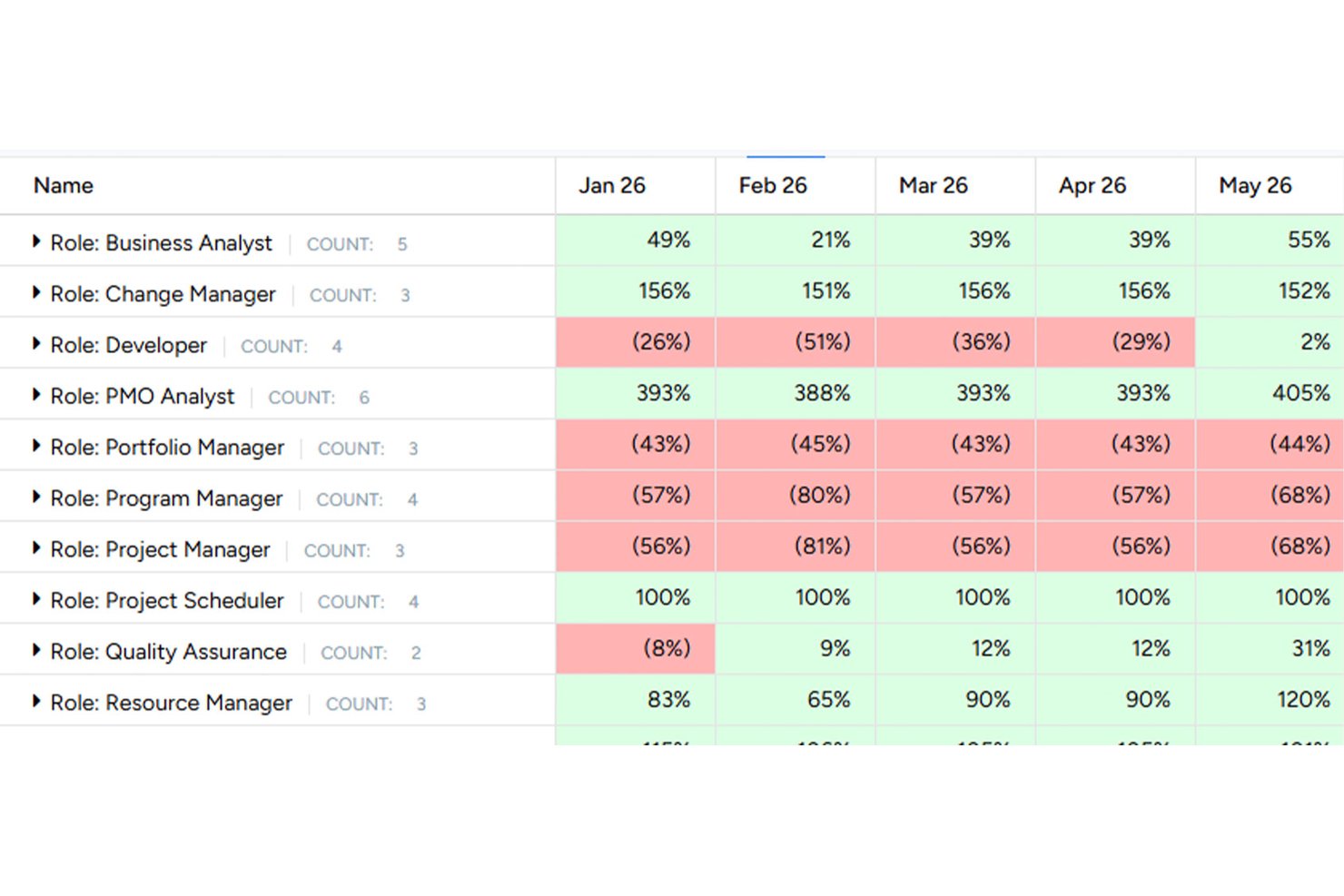
I picked Tempus Resource as one of the best because its What-If analysis is genuinely built for the moments that matter most: when a key person leaves, a new client project lands, or priorities shift mid-quarter. I can model those scenarios, including project sequencing changes, hiring decisions, and reassignments, without touching live data. The heatmaps and coolmaps then show me exactly where capacity breaks down by role, department, or skill before I commit to anything.
Tempus Resource Key Features
- Skills and competency tracking: Define skill sets with certifications, assessments, and proficiency ratings, then organize them into organization-wide or team-specific groupings.
- Resource request workflow: Submit, review, approve, or reassign resource requests with visibility into net availability, allocations in hours, FTE, or cost, and a team allocation matrix.
- Multiple report writers: Build reports using Pivot Grid, Pivot Chart, RAR Grid, RAR Chart, or RAR2 Chart formats, with export to Excel, CSV, or PDF.
- Timesheet management: Let employees log time against projects so managers can compare planned versus actual hours and review workload variances.
Tempus Resource Integrations
Tempus Resource offers native integrations with Smartsheet, Microsoft Teams, and its Jira app. It also provides an open REST API for connecting project, resource, and assignment data with tools such as Workday, ServiceNow, Azure DevOps, and SharePoint.
Pros and Cons
Pros:
- Forecasts staffing needs years ahead
- Workload reports support commitment discussions
- Scenario modeling protects live plans
Cons:
- Time-entry insights depend on employee data
- Report tailoring may need development
Diğer Seçenekler
Bunlar en iyi listesine giremedi, ancak araştırmanızı genişletmek istiyorsanız değerlendirmenize değer birkaç seçenek daha var.
- Float.com
For advanced scheduling
- Saviom
For scalable enterprise resourcing
- Runn
For real-time resource planning
- Smartsheet
For project portfolio management
- Celoxis
For project cost and performance analysis
- Epicflow
For linking staffing to cash flow
- Rocketlane
For onboarding project tracking
- Parallax
For resource analytics
- Hub Planner by Milient
For large companies
- Retain
For consolidated work views


How I Evaluate Resource Tracking Software
I split my evaluation into three parts, with the most weight on core functionality: assign people across projects, see capacity and workload, and catch overbooking. Next, I consider standout features such as scenario planning. Finally, I look beyond features at onboarding, support, and pricing value.
Core Functionality (Table Stakes For This List)
When I'm selecting tools for my list, I score each one on a scale from 0 (does not offer the functionality) to 5 (excels in this area) for each core functionality listed below. I then convert the total into a percentage to help assess each tool's overall fit, with extra weight on any functionalities I’ve deemed essential.
- Resource Scheduling (Essential): I look for assignments across concurrent projects, with dates and conflict visibility when deadlines overlap.
- Capacity & Utilization (Essential): I assess whether planned work shows remaining capacity over time, so leads can spot overload before accepting urgent work.
- Workload Views: Timeline or grid views should make uneven assignments visible by person and project as plans change.
- Skills & Availability: Searchable skills, roles, and availability help match a designer or engineer to upcoming work.
- Demand Forecasting: I look for views that compare pipeline work with team capacity and reveal staffing gaps before kickoff.
- Resource Reporting: Reports should let project managers compare utilization and allocation by project or team to guide staffing and budget decisions.
Once I have a list of tools that meet the criteria, I consider what sets each platform apart.
Differentiating Factors (What Sets Vendors Apart)
Here's how I compare and contrast different vendors:
Standout Features
I look for scenario-based what-if planning that lets you model staffing options before locking in assignments—like comparing two project timelines to see which avoids pulling a senior developer off another deliverable. Cross-project conflict alerts matter just as much, since I check whether a tool flags double-bookings automatically rather than waiting for someone to notice. I also evaluate financial and margin insights that tie resource costs to bill rates, giving you real-time visibility into whether a project is trending toward margin or toward trouble.
Beyond Features
I check whether a tool's licensing model scales without forcing you into an enterprise tier the moment your team grows. Agencies with fluctuating headcount need that flexibility. Integration depth matters just as much—I look for native connections to project management, finance, and HRIS platforms so time, scheduling, and billing data stays in sync without duplicate entry. I also evaluate onboarding support, since moving a team from spreadsheets to a shared resource tracker is a cultural shift that vendor-provided templates and training make far smoother.
Kaynak İzleme Yazılımı Nasıl Seçilir?
Uzun özellik listeleri ve karmaşık fiyatlandırma yapılarına kapılmak kolaydır. Benzersiz yazılım seçim süreciniz üzerinde çalışırken odağınızı korumanıza yardımcı olmak için göz önünde bulundurmanız gereken faktörleri içeren bir kontrol listesi hazırladım:
| Faktör | Göz Önünde Bulundurulması Gerekenler |
|---|---|
| Ölçeklenebilirlik | Ekiplerinizle birlikte büyüyebilen bir yazılım arayın. Uzun vadeli sürdürülebilirliği sağlamak için performans sorunları yaşamadan artan kaynakları ve projeleri yönetebilmelidir. |
| Entegrasyonlar | İş akışlarını ve veri paylaşımını kolaylaştırmak için yazılımın proje yönetimi, CRM ve finans sistemleri gibi hâlihazırda kullandığınız araçlarla entegre olduğundan emin olun. |
| Özelleştirilebilirlik | Yazılımın panolar, raporlar ve iş akışları gibi ekibinizin özel süreçlerine uyacak şekilde özelleştirilebilir özellikler sunup sunmadığını kontrol edin. |
| Kullanım Kolaylığı | Ekibinizin kapsamlı bir eğitim almadan hızlı bir şekilde kullanmaya başlayabilmesi için sezgisel bir arayüze ve kısa bir öğrenme sürecine sahip bir araç seçin. |
| Bütçe | Fiyatlandırma planlarının bütçenize uygun olduğundan emin olmak için bunları inceleyin. Ekibiniz büyüdükçe özellikler veya kullanıcılar için ortaya çıkabilecek ek maliyetleri göz önünde bulundurun. |
| Güvenlik Önlemleri | Hassas bilgileri veri ihlallerinden ve yetkisiz erişimden korumak için yazılımda veri şifreleme ve kullanıcı erişim denetimleri gibi güçlü güvenlik önlemlerinin bulunduğunu doğrulayın. |
Kaynak Takip Yazılımındaki Eğilimler
Araştırmam sırasında farklı kaynak takip yazılımı sağlayıcılarından sayısız ürün güncellemesi, basın bülteni ve sürüm günlüğü derledim. Takip ettiğim yeni ortaya çıkan eğilimlerden bazıları şunlar:
- Yapay Zekâ Destekli İçgörüler: Yapay zekâ, ekiplerin kaynak ihtiyaçlarını öngörmesine ve dağılımları optimize etmesine yardımcı olan tahmine dayalı analizler ve içgörüler sunmak için giderek daha fazla kullanılıyor. Sağlayıcılar, proje darboğazlarını öngörerek ve çözümler önererek karar alma süreçlerini geliştirmek amacıyla yapay zekâ kaynak yönetimini entegre ediyor.
- Gerçek Zamanlı İş Birliği: Araçlar, ekip üyeleri arasındaki gerçek zamanlı iş birliğini geliştirmeye odaklanıyor. Paylaşılan panolar ve canlı güncellemeler gibi özellikler standart hâle geliyor; böylece ekipler anında eşzamanlanabiliyor ve hızlı kararlar alabiliyor.
- Uzaktan Çalışma Optimizasyonu: Uzaktan çalışma daha yaygın hâle geldikçe yazılımlar, dağınık ekipleri destekleyen özellikler sunacak şekilde uyarlanıyor. Buna sanal kaynak yönetimi ve uzaktan izleme araçları da dâhil; böylece ekiplerin konumdan bağımsız olarak bağlantıda kalması sağlanıyor.
- Sürdürülebilirlik Takibi: Kaynak kullanımının çevresel etkisini izlemeye yönelik ilgi giderek artıyor. Bazı sağlayıcılar, işletmelerin sürdürülebilirlik hedefleri doğrultusunda kaynak kullanım uygulamalarını izleyip optimize etmesine olanak tanıyan özellikleri entegre ediyor.
- Kullanıcı Deneyimi Geliştirmeleri: Daha sade arayüzler ve daha sezgisel gezinme ile genel kullanıcı deneyimini iyileştirmeye yönelik bir eğilim var. Sağlayıcılar, araçlarını kullanımı daha kolay ve daha geniş bir kullanıcı kitlesi için daha erişilebilir hâle getirmek amacıyla kullanıcı deneyimi araştırmalarına yatırım yapıyor.
Kaynak Takip Yazılımı Nedir?
Kaynak takip yazılımı; ekipmanları, fiziksel alanları, ekip uygunluğunu, proje atamalarını ve genel kapasiteyi gerçek zamanlı olarak izlemenize yardımcı olan bir araçtır. Proje ve kaynak yöneticileri tarafından iş yüklerini dengelemek, eksiklikleri belirlemek ve personel planlamasıyla ilgili bilinçli kararlar alarak kârlılığı artırmak için kullanılır.
Kaynak takip yazılımı, aşırı rezervasyondan kaçınmak, ihtiyaçları öngörmek ve projeleri planlandığı şekilde ilerletmek için gereklidir.
Özellikler
Her başarılı kaynak takip yazılımında bulunması gereken temel özellikler şunlardır:
- Gerçek zamanlı izleme: Sorunları veya fırsatları hemen fark etmek için kaynak dağılımı, kullanımı ve uygunluğu hakkında canlı güncellemeler alabilirsiniz.
- Özelleştirilebilir panolar: Bu özellik, en önemli kaynakları izlemek ve veriler arasında araştırma yapmadan hızlı, genel bakış niteliğinde içgörüler elde etmek için kişiselleştirilmiş görsel ekranlar oluşturmanızı sağlar.
- Otomatik uyarılar: Kaynaklar aşırı kullanıldığında, yeterince kullanılmadığında veya kritik eşiklere yaklaştığında anında bildirim alırsınız; böylece hızlı hareket edebilir ve projeleri planlandığı şekilde ilerletebilirsiniz.
- Ayrıntılı raporlama: Kaynakların zaman içinde nasıl kullanıldığını ayrıntılı şekilde gösteren kapsamlı raporlar oluşturabilir, eğilimleri fark edebilir, bütçeleri gerekçelendirebilir ve gelecek için planlar yapabilirsiniz.
- Role dayalı erişim denetimi: Bu özellik, yalnızca doğru kişilerin belirli kaynakları görmesini veya değiştirmesini sağlayacak izinler belirlemenize yardımcı olur; böylece hassas bilgiler korunur ve yanlışlıkla yapılan değişiklik riski azalır.
- Entegrasyon olanakları: Proje yönetimi veya muhasebe platformları gibi diğer araçlara bağlanabilirsiniz; böylece manuel veri girişi olmadan veriler sorunsuz biçimde aktarılır.
- Mobil erişilebilirlik: Kaynak bilgilerine telefonunuzdan veya tabletinizden erişip bunları yönetebilirsiniz; bu da nerede olursanız olun gelişmeleri kolayca takip etmenizi sağlar.
- Kaynak tahmini: Tahmine dayalı araçlarla gelecekteki ihtiyaçları öngörebilir ve yoğun dönem başlamadan önce personel, envanter veya finansman planlaması yapabilirsiniz.
- Denetim izleri: Kaynak verilerinde yapılan değişikliklerin ayrıntılı günlüklerini görebilirsiniz; bu da sorumluluğu takip etmeyi ve hesap verebilirliği sürdürmeyi kolaylaştırır.
Kaynak Takip Yazılımında Aranacak Yapay Zekâ Özellikleri
Kaynak takip yazılımları, daha akıllı çalışmanıza yardımcı olmak için genellikle yapay zekâ destekli yetenekler de içerir:
- Öngörücü analiz: Geçmiş verilere, mevsimsel eğilimlere ve proje zaman çizelgelerine dayanarak kaynak ihtiyaçlarını tahmin etmek ve proaktif bir şekilde plan yapmak için yapay zekâyı kullanabilirsiniz.
- Otomatik planlama: Yapay zekânın kaynak tahsisini ve planlamayı optimize etmesini sağlayarak çakışmaları azaltabilir ve ihtiyaç duyulduğunda kaynakların kullanılabilir olmasını sağlayabilirsiniz.
- Anomali tespiti: Bu özellik, aşırı kullanım, darboğazlar veya yetersiz kullanım gibi olağandışı kalıpları ya da olası sorunları projelerinizi etkilemeden önce belirlemenize yardımcı olur.
- Akıllı öneriler: İş akışınıza göre uyarlanmış kaynakları yeniden tahsis etme, zaman çizelgelerini ayarlama veya verimliliği artırma konusunda yapay zekâ destekli öneriler alabilirsiniz.
- Doğal dil sorguları: Bu özellik, raporlar oluşturmak veya bilgileri hızlı bir şekilde bulmak için yazılımla basit ve günlük bir dille etkileşim kurmanızı sağlar.
- Otomatik veri girişi: Yapay zekânın e-postalardan, belgelerden veya diğer entegre platformlardan kaynak verilerini çıkarmasına ve girmesine izin vererek manuel çalışmayı azaltabilirsiniz.
- Kapasite planlaması: Farklı senaryoları simüle etmek ve ekibinizi ya da bütçenizi aşırı zorlamadan gelecekteki talepleri karşılamanın en iyi yollarını önermek için yapay zekâyı kullanabilirsiniz.
SSS
Bu konu hakkında diğer kişilerin sorduğu yaygın soruların yanıtlarını bulun.
Kaynak takip yazılımı ekip tükenmişliğini önlemeye nasıl yardımcı olabilir?
Kaynak takip yazılımı, her ekip üyesinin iş yükü hakkında ayrıntılı ve güncel bilgiler sunarak tükenmişliğin önlenmesine yardımcı olur. Tahsisleri, fazla mesaiyi ve çakışan görevleri izleyerek bir kişinin aşırı çalıştırılma riski taşıdığı durumları belirleyebilirsiniz. Bu görünürlük sayesinde stres bir soruna dönüşmeden önce görevleri yeniden dağıtabilir, teslim tarihlerini ayarlayabilir veya ek destek talep edebilirsiniz.
Birçok araç ayrıca kullanım ve kapasite raporları sunar; böylece iş yükündeki sağlıksız eğilimleri fark edebilir ve zaman içinde daha dengeli bir ekip ortamını koruyabilirsiniz.
Kaynak takip araçlarını seçerken hangi entegrasyonlara öncelik vermeliyim?
Kaynak takibini temel sistemlerinize bağlayan entegrasyonlara öncelik verin. Bunlar arasında proje yönetimi araçları (ör. Asana, Jira veya Microsoft Project), zaman takip uygulamaları, İK platformları ve Slack ya da Microsoft Teams gibi iletişim kanalları bulunur.
Bu entegrasyonlar kaynak verilerinizin her zaman senkronize olmasını sağlar, manuel çalışmayı azaltır ve bağlantılı bir iş akışı oluşturur. Örneğin, proje planları değiştikçe proje yönetimi platformunuzla senkronizasyon kaynak tahsislerini anında güncellemenizi sağlar. Zaman takibiyle bağlantı kurmak ise çalışılan gerçek saatleri planlanan saatlerle karşılaştırarak eksikleri veya aşımları hızlıca fark etmenize yardımcı olur.
Kaynak takip yazılımı kapasite planlamasına yardımcı olabilir mi?
Evet, kaynak takip yazılımı kapasite planlaması için güçlü bir araçtır. Mevcut taahhütleri, gelecekteki kullanılabilirliği ve kişilerin beceri setlerini net bir şekilde göstererek yaklaşan projeleri güvenle planlamanızı sağlar.
Ekibinizin zamanını nasıl kullandığını analiz ederek ve gelecekteki iş yüklerini tahmin ederek personeli aşırı rezerve etmekten ve mevcut ekip üyelerini yetersiz kullanmaktan kaçınabilirsiniz. Birçok sistem, yeni projelerin veya değişen teslim tarihlerinin etkisini gösteren “ya şöyle olursa” senaryoları oluşturmanıza olanak tanır. Böylece kaynak planınızı optimize edebilir ve son dakika sürprizleri yaşamadan verdiğiniz sözleri yerine getirebilirsiniz.
Ekibimin kaynak takip yazılımını benimsemesini nasıl sağlayabilirim?
Ekibinizin yeni bir yazılımı benimsemesini sağlamak, yazılımın herkese nasıl fayda sağlayacağı konusunda açık iletişim kurmakla başlar. İzleyebileceğiniz birkaç adım şunlardır:
- Aracın görevlerini nasıl netleştireceğini, son dakika taleplerini nasıl azaltacağını ve onları yönetilemez iş yüklerinden nasıl koruyacağını ekibinize gösterin.
- Kısa, uygulamalı eğitim oturumları düzenleyin ve takip edilmesi kolay belgeler sağlayın.
- Bir pilot aşamayla başlayın, geri bildirim toplayın ve sürecin ekibinize uygun olması için ayarlamalar yapın.
- Özellikleri ve kurulumu seçme sürecine ekip üyelerini dahil edin; güven oluşturmak ve daha geniş kullanımı teşvik etmek için ilk küçük başarıları erkenden vurgulayın.
Kaynak takip yazılımı uzaktan veya hibrit ekipler için uygun mudur?
Evet, kaynak takip yazılımı özellikle uzaktan veya hibrit ekipler için değerlidir. Herkes aynı ofiste olmadığında, kişilerin ne üzerinde çalıştığını veya ne zaman müsait olduğunu takip etmek kolayca zorlaşır. Merkezi bir yazılımla, konumdan bağımsız olarak her ekip üyesinin programlarını, görevlerini ve iş yüklerini tek bir yerde görebilirsiniz. Bu sayede farklı zaman dilimleri arasındaki koordinasyon kolaylaşır, yinelenen çalışmalar önlenir, güncellemeler paylaşılır ve herkes proje hedefleri doğrultusunda uyumlu tutulur; böylece dağınık ekipler sorunsuz bir şekilde iş birliği yapabilir.