

2026’nın En İyi 10 Kurumsal Proje Yönetimi Yazılımı

10 En İyi Kurumsal Proje Yönetimi Yazılımları Kısa Listesi


Büyük ekiplerde proje iş akışlarını yönetmek, günlük görevler kurumsal hedefleri gözden kaçırdığında hızla karmaşıklaşır. 20 yılı aşkın süre boyunca kurumsal projelere liderlik ettim; bu nedenle portföy görünürlüğünün eksik olmasının ekipleri nasıl hızla birbirinden kopardığını ve teslimatların gecikmesine yol açtığını biliyorum.
İşe yarayan seçenekleri bulmak için kaynak tahsisini, kullanıcı izinlerini ve birden fazla ekip arasındaki bağımlılıkları yöneten onlarca aracı değerlendirdim. Ekibiniz için en iyi kurumsal proje yönetimi yazılımı seçimlerimi görmek için okumaya devam edin.
Why Trust Our Software Recommendations
Our team has been testing and reviewing software since 2012. As project managers ourselves, we know how difficult—and important—it is to choose the right software.
For this guide, we evaluated tools using hands-on testing and independent research, scoring tools using our selection criteria. We also draw on insights from industry thought leaders and practicing project management experts.
Our reviews reflect our human editorial judgment, not a sales pitch.
Expert reviewers:
Kurumsal Proje Yönetimi Yazılımları Karşılaştırma Tablosu
Bu karşılaştırma tablosu, en iyi kurumsal proje yönetimi yazılımı seçimlerimin fiyatlandırma ayrıntılarını özetlemektedir:
Score legend (out of 5)
- Excellent 4.5–5
- Good 4–4.4
- Average 3–3.9
- Below average 2–2.9
- Poor 1–1.9
| Tool | Starting Price | Website | |||||||
|---|---|---|---|---|---|---|---|---|---|
| Best for project profitability tracking | 3.3 out of 5 | 4 | 4 | 2 | 3 | 4 | 3 | $10/user/month 14-day free trial | Book Demo |
| Best for scalability | 4.2 out of 5 | 4 | 4 | 4 | 4 | 4 | 5 | $10/user/month Free plan + 14-day trial + demo available | Book Demo |
| Best for resource scheduling | 4.2 out of 5 | 5 | 4 | 4 | 2 | 5 | 5 | Pricing upon request Not available | Book Demo |
| Best for global remote teams | 4.2 out of 5 | 5 | 4 | 4 | 4 | 4 | 4 | $10/user/month 14-day free trial | Website |
| Best for data protection | 3.7 out of 5 | 3 | 4 | 4 | 4 | 3 | 4 | $9/user/month Free plan + 14-day trial available | Book Demo |
| Best for strategy-to-execution portfolio planning | 4.2 out of 5 | 4 | 4 | 4 | 5 | 4 | 4 | $10/user/month Free trial available | Website |
| Best for large-scale CPM scheduling | 3.3 out of 5 | 4 | 4 | 5 | 1 | 2 | 4 | $125/user/month Free demo available | Website |
| Best for multi-currency portfolio financials | 4.7 out of 5 | 5 | 5 | 5 | 3 | 5 | 5 | Pricing upon request Free demo available | Website |
| Best for enterprise portfolio-to-strategy alignment | 4.2 out of 5 | 4 | 5 | 5 | 4 | 3 | 4 | Pricing upon request Free demo available | Website |
| Best for turnkey PPM with scenario planning | 4.2 out of 5 | 4 | 4 | 5 | 4 | 4 | 4 | Pricing upon request Free demo available | Website |
En İyi Kurumsal Proje Yönetimi Yazılımları İncelemeleri
İhtiyaçlarınıza uygun olanı ayırt edip seçebilmeniz için her araçla ilgili ayrıntılı açıklamalarımı burada bulabilirsiniz.

Best for project profitability tracking
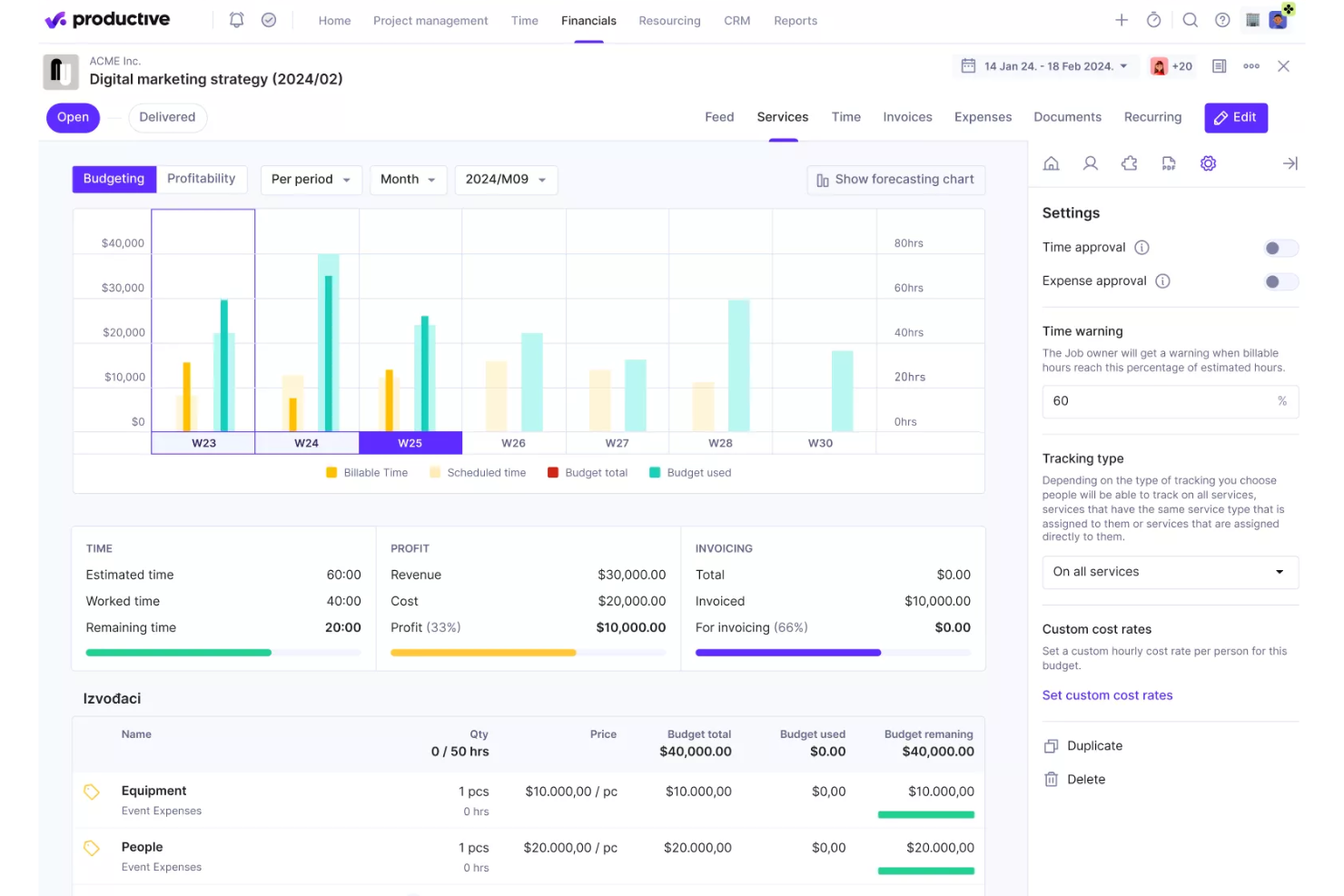
Productive is an agency-focused project management and professional services automation platform that brings together resource planning, time tracking, budgeting, invoicing, and financial forecasting in a single system.
Who Is Productive Best For?
Productive is a strong fit for agencies and professional services firms that need to manage project finances, billable time, and team utilization in one place.
Why I Picked Productive
I picked Productive as one of the best because its approach to project profitability is more granular than most PM tools offer. It tracks margin at the level of individual services, clients, and team members, not just at the project level. Features like overhead calculation and revenue recognition give finance-minded teams a clear picture of where money is actually made or lost across active work.
Productive Key Features
- Resource planning and scheduling: Organize workloads and forecast team utilization across client projects in a single calendar view.
- Time tracking with approval flows: Log billable and non-billable hours and enable multi-level approval processes directly in the platform.
- Automated invoicing: Generate and send customizable invoices based on tracked project work, expenses, and rates.
- SOC 2 Type II compliance: Meet enterprise security standards with enforced single sign-on, audit logs, and centralized permissions management.
Productive Integrations
Productive offers native integrations with Xero, QuickBooks, Slack, Jira, HubSpot, BambooHR, and Google Calendar. Zapier and an API are also available for custom integrations.
Pros and Cons
Pros:
- Combines resourcing and billing in one tool
- Built-in financial reporting across all projects
- Tracks profitability at service and client level
Cons:
- Limited reporting customization options
- Limited portfolio-level governance for large enterprises
New Product Updates from Productive
Productive Adds Email and Calendar Integrations for Agents
Productive adds Gmail, Outlook, Google Calendar, and Outlook Calendar connectors for its AI agents. These integrations let agents manage emails and create calendar events directly within Productive. For more information, visit Productive’s official site.
 .

Wrike
Best for scalability
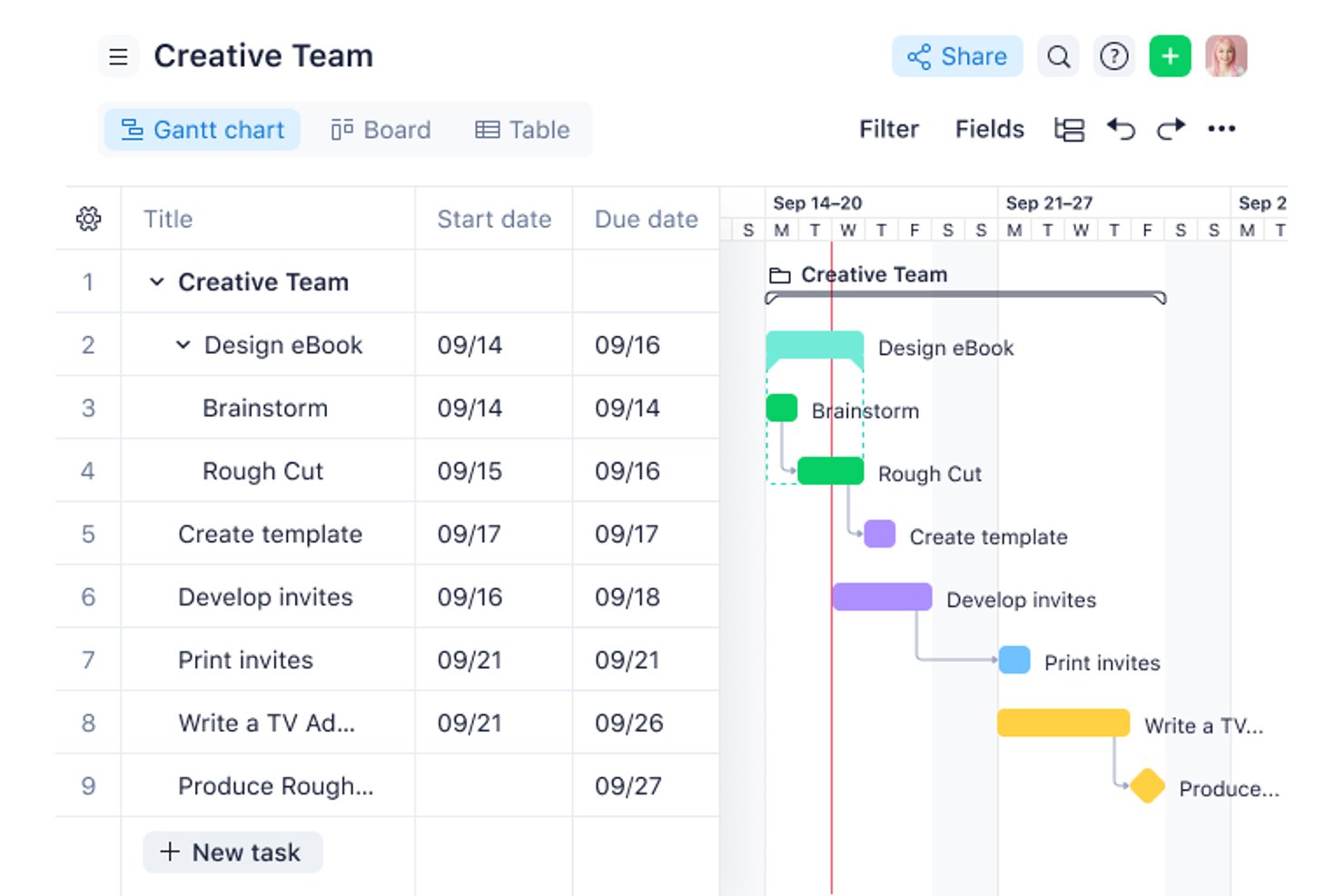
Wrike is an enterprise work management platform that combines portfolio management, resource and capacity planning, workflow automation, and cross-project reporting in a single governed environment.
Who Is Wrike Best For?
Wrike is a strong fit for PMO directors and portfolio leaders at mid-to-large enterprises managing complex, cross-functional workstreams across multiple departments.
Why I Picked Wrike
Wrike earns its spot on my shortlist because it's one of the few platforms that genuinely holds up as organizations scale from 50 to 5,000+ users. I particularly like how the subscription architecture grows with headcount in defined seat groups rather than forcing a disruptive platform migration. At the Apex tier, Wrike Integrate and Wrike Two-Way Sync are bundled natively, which means I can connect the platform to an existing ERP, HRIS, and dev toolchain without custom build work.
Wrike Key Features
- Portfolio roll-up reporting: Consolidates multiple project statuses, milestones, and KPIs in a unified dashboard.
- Granular role-based permission controls: Allows administrators to set detailed access levels for users and teams.
- Custom request forms: Automates intake and routing of new project or task requests across departments.
- Audit-ready activity logs: Captures and timestamps every project action for compliance and oversight.
Wrike Integrations
Wrike offers hundreds of integrations through its built-in integrations and marketplace, including tools like Google Workspace, Microsoft 365, Salesforce, Jira, Slack, GitHub, and Zoom. It also supports Zapier and provides an API for custom integrations.
Pros and Cons
Pros:
- Highly configurable approval and review workflows
- Strong portfolio-level visibility across projects
- Scales across large multi-team organizations
Cons:
- Mobile app lags behind desktop experience
- Reporting setup requires significant admin time
New Product Updates from Wrike

Wrike Redesigns Workspace Search With New Filters
Wrike introduces a redesigned Workspace Search interface with recent search shortcuts, item type and location filters, and parent-task context. These updates help users find relevant work items and navigate search results efficiently. For more information, visit Wrike’s official site.
 .

Best for resource scheduling
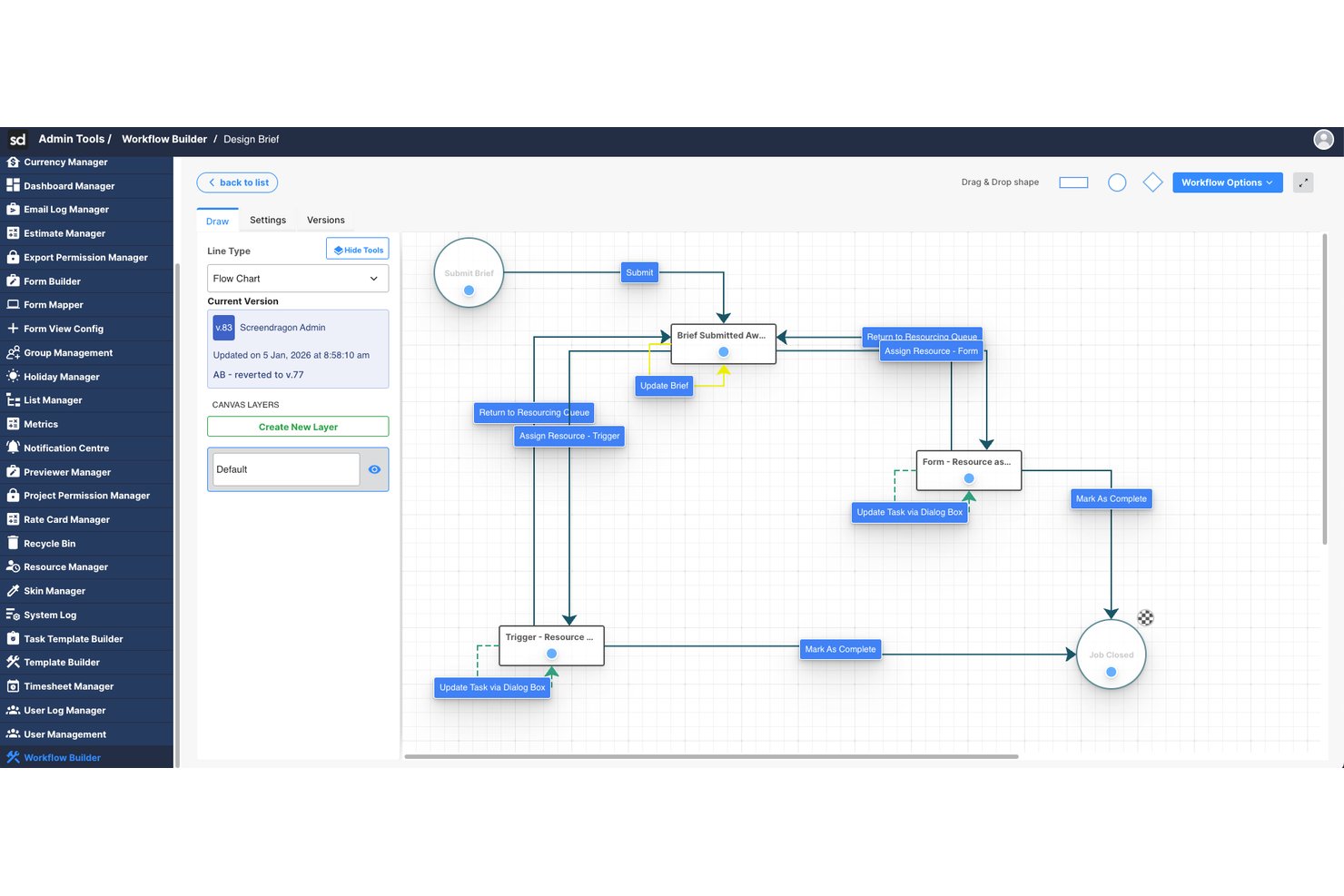
Screendragon is an enterprise work management platform that combines project and portfolio management, workflow automation, resource scheduling, budget tracking, and approvals in a single configurable system built for large marketing and agency teams.
Who Is Screendragon Best For?
Screendragon is a strong fit for enterprise marketing teams and in-house agencies managing high volumes of work across multiple brands, regions, or client accounts.
Why I Picked Screendragon
Screendragon earns its spot as one of the best on my shortlist because of how tightly its resource scheduling connects to live project data. I love the heatmap capacity view, which shows exactly where team members are over-allocated before a project even kicks off. I'm also able to forecast demand and balance workloads across teams in the same platform where work is being executed, without bouncing between a separate resourcing tool and a project tracker.
Screendragon Key Features
- No-code workflow builder: Design and automate multi-step approvals and project processes using a drag-and-drop interface.
- Custom dashboard reporting: Create real-time dashboards that aggregate portfolio, project, and resource data for different user roles.
- Enterprise-grade permissions: Set role-based and field-level access controls to safeguard sensitive project and financial information.
- Native DAM and ERP integrations: Connect to systems like Aprimo, SAP, and Salesforce without custom development.
Screendragon Integrations
Screendragon offers native integrations with SAP, Salesforce, Workday, Adobe Creative Cloud, Microsoft 365, Slack, and Jira. It also provides an API for custom integrations.
Pros and Cons
Pros:
- Purpose-built for large marketing operations teams
- No-code workflow builder for complex approvals
- Visual heatmaps for enterprise capacity planning
Cons:
- Steep initial setup for complex configurations
- Not designed for agile software development teams

Celoxis
Best for global remote teams
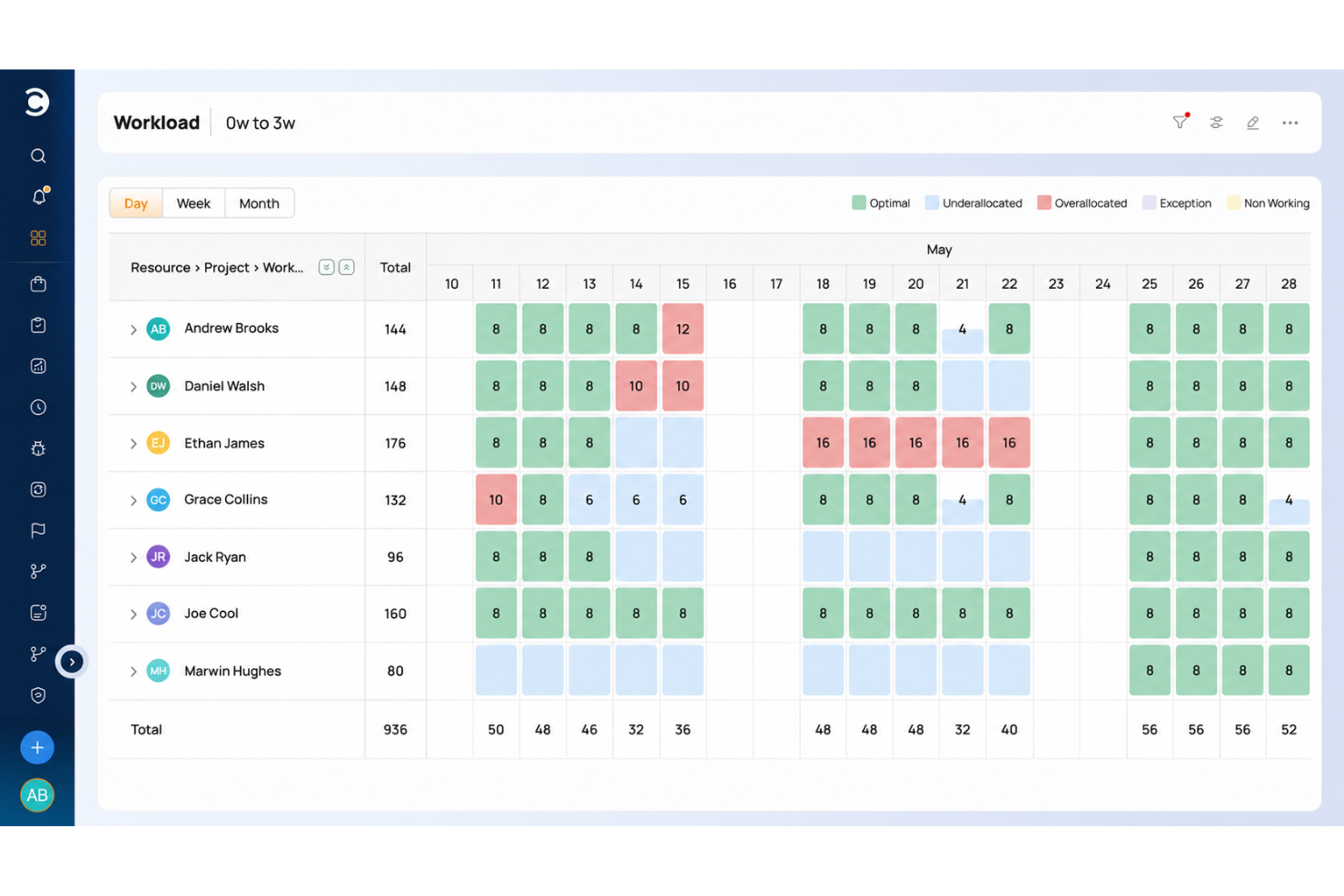
Celoxis is an enterprise PPM platform that combines portfolio management, resource capacity planning, BI-grade reporting, budget tracking, and project intake management in a single tool.
Who Is Celoxis Best For?
Celoxis is a strong fit for PMO directors and portfolio managers at mid-to-large enterprises running 10 or more concurrent projects across distributed teams.
Why I Picked Celoxis
Celoxis earns its spot on my shortlist because of how it handles resource scheduling across globally distributed teams. I like that you can define working hours, shifts, and time-off per individual team member, so capacity planning reflects real availability across time zones rather than generic headcount. The real-time dashboard sync means a PM in Singapore sees the same project state as a stakeholder in London the moment something changes, which keeps cross-regional execution honest.
Celoxis Key Features
- Interactive Gantt charts: Plan and visualize complex project schedules with automatic task adjustment and real-time sync.
- BI-grade dashboards: Build and customize fully interactive dashboards that pull data from across the entire project portfolio.
- Advanced intake management: Centralize project requests and approvals with configurable forms and workflow automation.
- Role-based permissions: Control user access, approvals, and data views through customizable permission sets at the project and portfolio level.
Celoxis Integrations
Celoxis offers native integrations with Jira, Salesforce, QuickBooks, Azure DevOps, Slack, Google Workspace, and Microsoft Project. It connects with Zapier and provides an API for custom integrations.
Pros and Cons
Pros:
- Built-in budget and cost tracking tools
- Detailed portfolio reporting across projects
- Strong cross-timezone resource scheduling
Cons:
- Setup requires significant configuration time
- UI feels dated compared to modern competitors

Best for data protection
monday AI Workspace is an AI-powered work management platform that combines project tracking, portfolio management, workflow automation, and enterprise governance tools across cross-functional teams.
Who Is monday AI Workspace Best For?
It's a strong fit for enterprise PMO teams and cross-functional program managers who need to coordinate large-scale work across multiple departments under strict data governance requirements.
Why I Picked monday AI Workspace
monday AI Workspace earns its spot on my shortlist because of how seriously it handles data governance at the enterprise level. I particularly like the Bring Your Own Key (BYOK) encryption, which lets organizations retain full control over their data keys, and the advanced audit log API that gives security teams a detailed record of every user action across the platform. What seals it for me is that monday AI's models don't train on customer data, which matters a lot when you're running sensitive project portfolios through an AI-assisted workspace.
monday AI Workspace Key Features
- Portfolio management dashboards: Create unified, real-time views of projects, programs, and dependencies.
- Resource capacity planning: Track workloads and team utilization across multiple portfolios and timeframes.
- Customizable reporting and analytics: Build interactive dashboards with filters and cross-project KPIs for leadership visibility.
- Workflow automation builder: Automate repetitive project actions and status updates with no-code, rule-based triggers.
monday AI Workspace Integrations
monday AI Workspace offers hundreds of native integrations and marketplace apps, including Salesforce, Jira, Slack, HubSpot, Google Workspace, Zendesk, Microsoft Teams, Dropbox, GitHub, and Outlook. It supports Zapier and provides an API for custom integrations.
Pros and Cons
Pros:
- Highly flexible views for mixed delivery methods
- AI auto-generates project status summaries
- BYOK encryption for enterprise-grade data control
Cons:
- Reporting customization gets complex at portfolio scale
- Advanced financial tracking requires third-party tools
New Product Updates from monday AI Workspace
monday AI Workspace Adds Human Approval Routing
monday AI Workspace adds a human-in-the-loop approval block to AI Workflows, sending approval requests and routing workflow paths based on responses. For more information, visit monday AI Workspace's official site.
 .

OnePlan
Best for strategy-to-execution portfolio planning


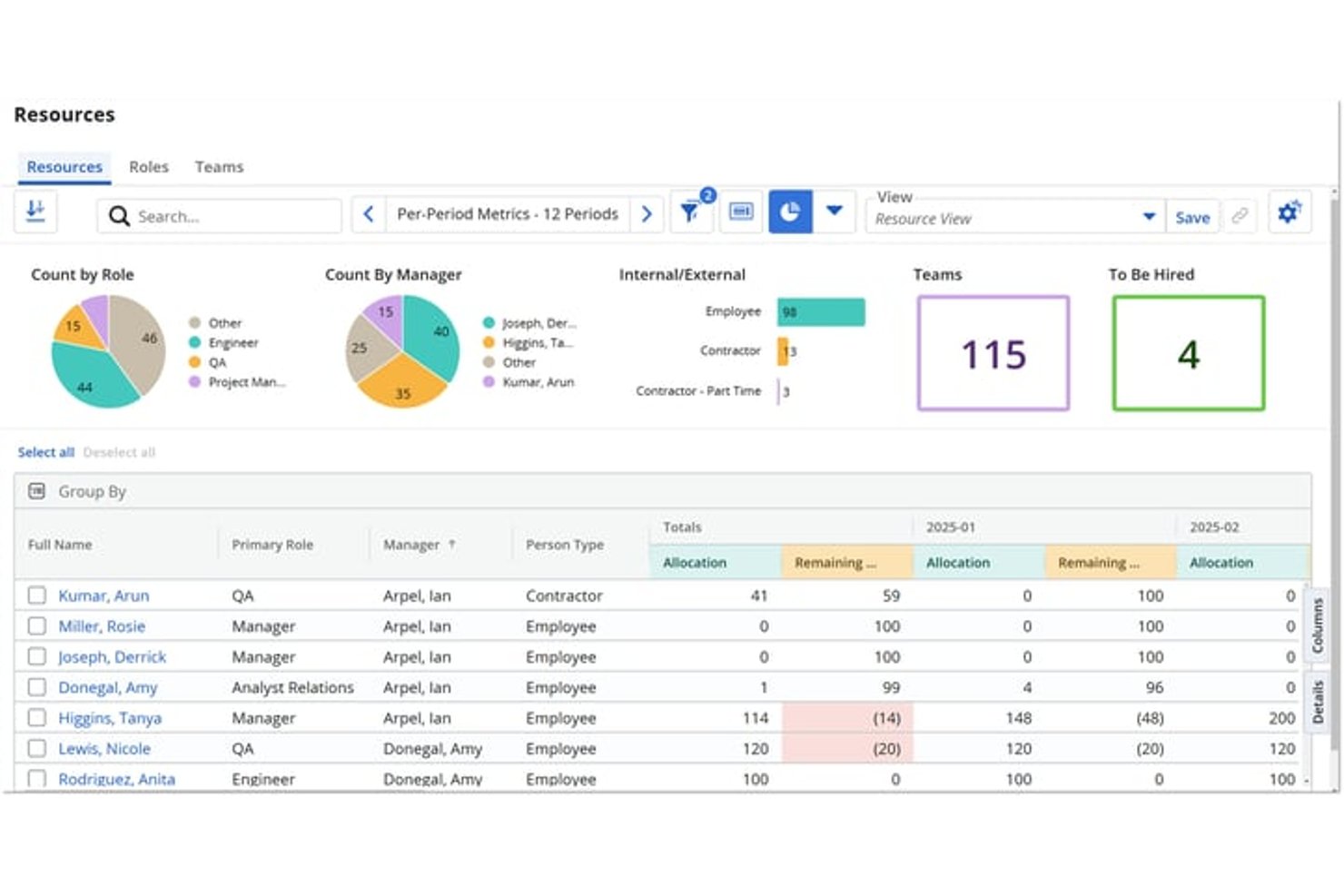
Broadcom Clarity is Broadcom's strategic portfolio management platform, built to handle enterprise-scale portfolio planning, multi-currency financial management, resource capacity planning, and roadmapping across large, complex investment hierarchies.
Who Is Broadcom Clarity Best For?
Broadcom Clarity is a strong fit for enterprise PMO leaders and IT portfolio managers who need to govern large, complex investment portfolios across multiple business units.
Why I Picked Broadcom Clarity
Broadcom Clarity earns its spot on my shortlist because no other tool handles multi-currency portfolio financials with the same depth. I'm talking about actual transaction-level currency conversion using transaction-date exchange rates, cost plans tied directly to funded investments, and a Non-Labor Cost Module that rolls everything into a single consolidated view. If your portfolio spans business units across different countries and your CFO needs clean, reconciled numbers, Clarity's financial layer covers it in a way that most project tools simply don't approach.
Broadcom Clarity Key Features
- Strategic roadmapping: Visual roadmaps link directly to funded investments, with dependency tracking and near real-time sync to underlying project data.
- Staffing workspace: Matches resources to open roles based on skills and availability, supporting capacity planning across the full portfolio.
- Scenario planning: Drag-and-drop what-if modelling lets you compare portfolio scenarios before committing to a plan or reallocation decision.
- OBS-based access control: Organizational Breakdown Structure security governs role- and hierarchy-based data access across the entire platform.
Broadcom Clarity Integrations
Clarity offers native ConnectALL integrations with Jira, Microsoft Azure DevOps, Microsoft Project, Salesforce, ServiceNow, and Rally. It also supports a Universal Adapter, REST, SOAP, XOG, and OData for custom integrations and external BI tools.
Pros and Cons
Pros:
- Skills and availability-based resource matching
- Scenario planning tools built into roadmaps
- Multi-currency financials tracked at transaction level
Cons:
- User interface feels outdated for many teams
- Agile project management requires Rally add-on

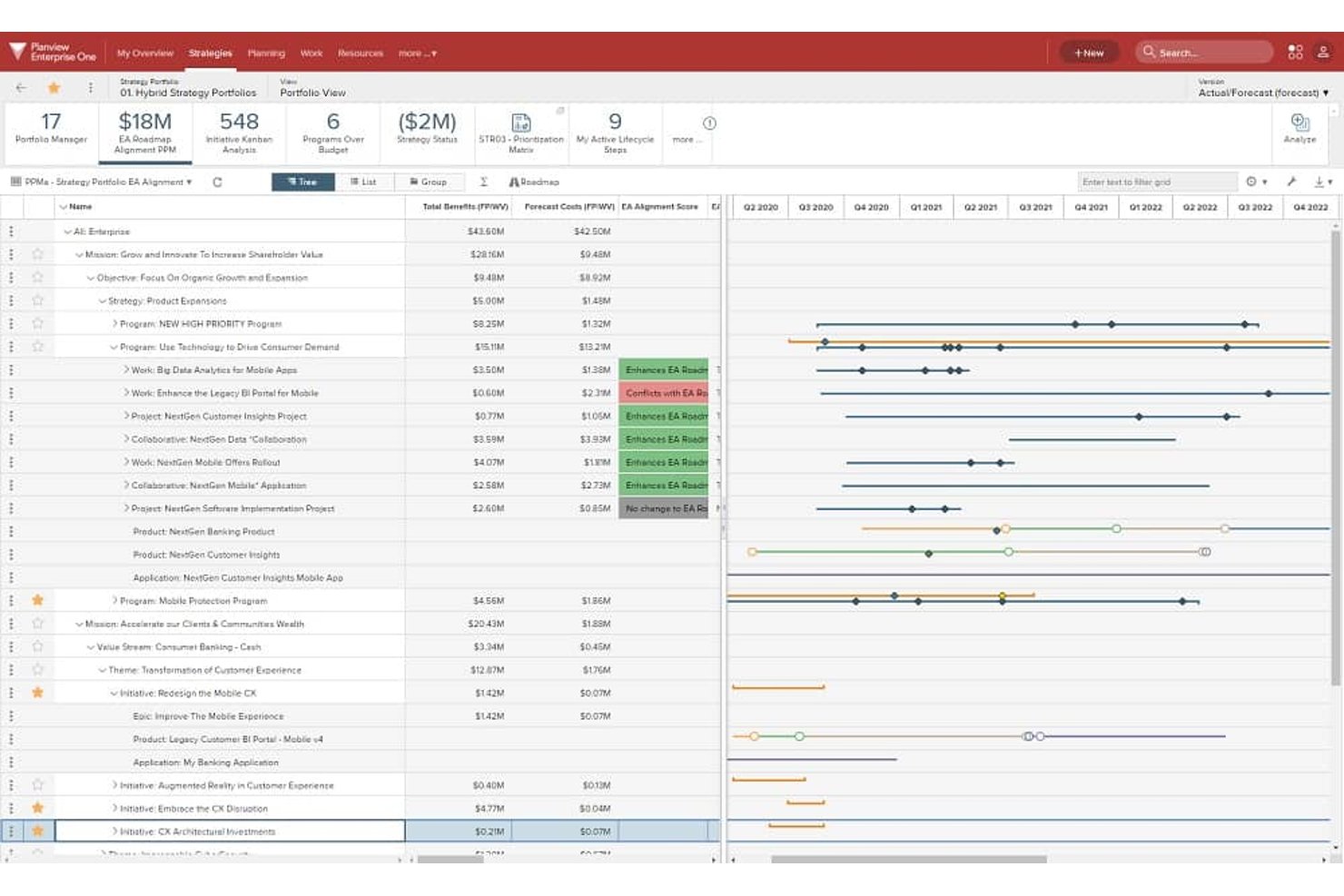
Planview Portfolios is an enterprise portfolio management platform that connects strategic planning, investment prioritization, resource capacity, and hybrid project execution across large, complex organizations.
Who Is Planview Portfolios Best For?
Planview Portfolios is built for enterprise PMO leaders and portfolio managers who need to connect strategic planning directly to funded investments across large, multi-division organizations.
Why I Picked Planview Portfolios
Planview Portfolios earns its spot on my list because no other tool ties funded investments back to strategic objectives as directly as this one does. I love how its roadmapping and OKR features let you trace a capital investment all the way from a business objective down to individual programs across multiple divisions, which is exactly what large organizations like Corning needed when unifying 12 divisions into one portfolio view. Its scenario planning tools are equally impressive, letting you compare staffing, timing, and prioritization options before committing budget.
Planview Portfolios Key Features
- Demand management: A centralized intake system that captures, tracks, and evaluates project ideas and requests before they enter the portfolio.
- Hybrid work delivery: A single instance supports Lean-Agile, collaborative, and waterfall delivery methods with unified portfolio reporting across all of them.
- 200+ out-of-the-box reports: Pre-built portfolio reports and visualizations covering strategy, programs, projects, resources, and technology.
- Planview Anvi AI: A conversational AI assistant that lets you query portfolio data in natural language and surfaces real-time risk signals from status updates.
Planview Portfolios Integrations
Planview Portfolios documents integrations with 12+ systems, including SAP, Oracle ERP, Salesforce, Workday, ServiceNow, Atlassian, Microsoft, NetSuite, and Apptio. Planview Hub connects toolchains such as Jira and Azure DevOps.
Pros and Cons
Pros:
- Scenario planning for staffing and investments
- 200-plus portfolio and resource management reports
- Connects portfolio strategy to project execution
Cons:
- Complex implementations often require outside services
- Cross-module data exchange can cause friction

Planisware
Best for turnkey PPM with scenario planning
Diğer Kurumsal Proje Yönetimi Yazılımları
İşte en iyi listeye giremeyen ancak değerlendirmenize değer birkaç kurumsal proje yönetimi yazılımı daha.
- Zoho Projects
For easy customization
- Quickbase
For standardized, automated workflows
- Miro
For visual collaboration
- Workzone
For pre-built reports
- Scoro
For comprehensive project oversight
- Jira Enterprise
For multi-site change management and testing
- Smartsheet
For spreadsheet-based project management
- ClickUp
For AI-driven governance and audit trails
- Triskell
For multi-scenario portfolio what-if planning
- ServiceNow Strategic Portfolio Management
For IT-native portfolio strategy alignment


İlgili Proje Yönetimi Yazılımı İncelemeleri
Burada aradığınızı hâlâ bulamadıysanız, sizin için derlediğimiz diğer proje yönetimi aracı incelemelerine göz atın:
- Proje Yönetimi Yazılımı
- Kurumsal Proje Yönetimi Panoları
- PR Proje Yönetimi Yazılımı
- Kaynak Yönetimi Yazılımı
- İş Akışı Otomasyonu Yazılımı
- Zaman Takibi Yazılımı
- Görev Yönetimi Yazılımı
- İş Birliği Araçları
- Sermaye Projesi Yönetimi Yazılımı


How I Evaluate Enterprise Project Management Software
I split my evaluation into three parts, giving the most weight to core functionality: coordinate projects across teams, track shared capacity, and surface portfolio risks. Next, I look for standout features like scenario planning to model resource shifts. Finally, I consider beyond-feature factors such as onboarding support and pricing as teams grow.
Core Functionality (Table Stakes For This List)
When I'm selecting tools for my list, I score each one on a scale from 0 (does not offer the functionality) to 5 (excels in this area) for each core functionality listed below. I then convert the total into a percentage to help assess each tool's overall fit, with extra weight on any functionalities I’ve deemed essential.
- Portfolio & Program Management (Essential): I look for a shared view to compare priorities, milestones, and risks across programs before a dependency slips.
- Resource Management (Essential): I assess whether managers can forecast capacity across projects and spot conflicts when several teams need the same specialist.
- Reporting & Dashboards: I check for configurable, role-based views that let leaders drill into project status, risks, and performance across the portfolio.
- Access Controls: I look for permissions that reflect real organizational roles, so teams can share project data while limiting sensitive information.
- Workflow & Scheduling: I evaluate how well teams can map dependencies, milestones, and schedules across large projects with multiple workstreams.
- Enterprise Integrations: I check for connections or API access to sync project data with finance, ERP, or CRM systems for unified reporting.
Once I have a list of tools that meet the criteria, I consider what sets each platform apart.
Differentiating Factors (What Sets Vendors Apart)
Here's how I compare and contrast different vendors:
Standout Features
I evaluate scenario planning tools closely because modeling a resource shift or reprioritization before committing prevents costly mid-flight corrections. AI-powered forecasting adds another layer here—I check whether the platform flags timeline risks or capacity bottlenecks early enough to act, not just after a milestone slips. I also look at financial and earned value tracking, since connecting budget burn to delivery progress is how PMO leaders justify decisions to leadership.
Beyond Features
I check whether a vendor's licensing model stays predictable as teams grow—some charge per-user while others bundle by tier, and add-on modules for resource planning or advanced reporting can quietly inflate costs. Security posture matters just as much; I look for SOC 2 or ISO 27001 certifications and data residency options, especially for organizations operating across multiple regions. I also evaluate how much configuration and change management a rollout demands, since a platform that requires six months of migration work can stall adoption before a single project ships.
Kurumsal Proje Yönetimi Yazılımı Nedir?
Standart proje yönetimi araçları küçük ekipler için görev takibine odaklanırken, kurumsal proje yönetimi yazılımının karmaşık çoklu proje portföylerini, sıkı veri yönetimini ve departmanlar arası uyumu desteklemesi gerekir.
Üç temel yetkinlik, kurumsal yazılımları temel PM araçlarından ayırır:
- Şirket Genelinde Portföy Gözetimi: Yazılım, her ekipten gelen verileri yönetici panolarında birleştirir, farklı projeler arasındaki bağımlılıkları izler ve önemli şirket hedeflerine yönelik ilerlemeyi ölçer.
- Banka Düzeyinde Güvenlik ve Yönetişim: Tek Oturum Açma (Okta/SAML üzerinden SSO), otomatik kullanıcı erişim kontrolleri (SCIM), role dayalı erişim denetimi (RBAC), denetim günlükleri ve sıkı uyumluluk standartları (SOC 2 Type II, ISO 27001, HIPAA) gibi gelişmiş güvenlik özelliklerini içerir.
- Kurumsal Teknoloji Yığınıyla Derin Entegrasyon: Kurumsal yazılım bir bilgi adasında var olamaz. ERP muhasebe yazılımları (SAP, Oracle), CRM platformları (Salesforce), BT hizmet merkezleri (ServiceNow) ve geliştirici araçları (Jira) dahil olmak üzere temel kurumsal teknoloji yığınlarıyla yerel, çift yönlü senkronizasyon özellikleri gerektirir.
EPM ve EPPM: Fark Nedir?
| Kategori | Kurumsal Proje Yönetimi (EPM) | Kurumsal Proje Portföy Yönetimi (EPPM) |
|---|---|---|
| Temel Odak | Projeleri verimli şekilde yürütmek (zamanında, bütçe dahilinde). | Tüm işletme yatırımlarının yatırım getirisini ve stratejik değerini en üst düzeye çıkarmak. |
| Temel Soru | "Bu projeyi zamanında, bütçe dahilinde ve teknik gereksinimlere uygun şekilde nasıl teslim ederiz?" | "Teknoloji bütçemizi doğru ürünlere ve platformlara mı yatırıyoruz?" |
| Temel Özellikler | Gantt grafikleri, Kanban panoları, sprint iş listeleri, görev bağımlılıkları, durum raporları. | Yönetici yol haritaları, "ya şöyle olsaydı" senaryo modellemeleri, proje puanlama çerçeveleri. |
| Finansallar ve KPI'lar | Proje Tüketim Hızı: Proje düzeyinde kaydedilen saatlerin, kilometre taşı ödemelerinin ve görev maliyetlerinin izlenmesi. | Portföy Yatırım Getirisi: Yıllık sermaye bütçelerinin tahsis edilmesi ve genel yatırım getirisinin değerlendirilmesi. |
| Temel Kullanıcılar | Proje Yöneticileri, Ekip Liderleri, Departman Başkanları. | C-Seviye Yöneticiler, PMO Direktörleri, Strateji Direktörleri. |
Kurumsal Proje Yönetimi Yazılımı Nasıl Seçilir?
Ekibiniz için doğru kurumsal proje yönetimi yazılımını bulmak üzere kuruluşunuzun özel operasyonel ihtiyaçlarını değerlendirmeniz gerekir. Seçeneklerinizi hızlıca daraltmak için beş temel değerlendirme faktörüne odaklanmanızı öneririm.
| Değerlendirme Faktörü | Aranacak Özellikler |
|---|---|
| Kurumsal Güvenlik ve Uyumluluk | SSO (Okta/SAML), SCIM kullanıcı sağlama, BYOK şifreleme, SOC 2 Type II, ISO 27001 ve kurumsal denetim günlükleri. |
| Ölçeklenebilirlik ve Kaynak Yönetimi | 100'den fazla eşzamanlı projede kaynak kapasitesi tahsisi, departmanlar arası iş yükü takibi ve çok ekipli planlama. |
| Entegrasyonlar ve Özel API'ler | ERP'ler (SAP, NetSuite), CRM'ler (Salesforce) ve geliştirme yığınları (Jira) için yerel bağlayıcıların yanı sıra özel iş akışları için REST API'leri. |
| Özellik Kapsamı ve Özelleştirme | Çok katmanlı portföy toplama panoları, dinamik Gantt/Kanban görünümleri, özel alanlar ve otomatik çok adımlı onay yönlendirme. |
| Ölçülebilir Yatırım Getirisi ve Yönetişim | Canlı proje kâr marjı tahmini, çok para birimli bütçe toplamları ve yönetici düzeyinde portföy sağlığı görünürlüğü. |
Proje Metodolojinize Göre Kurumsal Proje Yönetimi Yazılımı Seçme
Proje teslim metodolojiniz, ekibinizin ihtiyaç duyduğu belirli yazılım özelliklerini ve görsel takip görünümlerini belirler. Teslim yaklaşımınızla uyumlu bir platform seçmek, kullanıcıların daha yüksek oranda benimsemesini ve tutarlı yürütmeyi sağlar.
- Çevik metodoloji: Yazılım mühendisliği ve ürün tasarımı ekipleri yinelemeli sprintleri, iş listesi düzenlemeyi ve kalan iş grafiklerini destekleyen platformlara ihtiyaç duyar. Yerel hikâye puanı tahmini ve hata takibi sunan Jira veya ClickUp gibi platformları seçmenizi öneririm.
- Şelale metodolojisi: İnşaat, üretim ve donanım projeleri katı doğrusal aşamalar ve bağımlılıklar gerektirir. Microsoft Project veya Planview gibi dinamik Gantt grafikleri, temel çizgileri ve kritik yol analizi sunan yazılımları arayın.
- Hibrit metodoloji: Yaratıcı ajanslar, profesyonel hizmetler ve pazarlama departmanları genellikle yinelemeli yürütmeyi katı müşteri teslim tarihleriyle birleştirir. Kullanıcıların Kanban panoları, zaman çizelgeleri ve elektronik tablo görünümleri arasında geçiş yapmasına olanak tanıyan Wrike veya monday.com gibi esnek platformları öneririm.
Kurumsal Proje Yönetimi Yazılımındaki Trendler
Hangi proje yönetimi platformunu kullanacağınızı seçmenize yardımcı olabilecek, geleceği şekillendiren bazı gelişmeler şunlardır.
- Daha iyi güvenlik ve uyumluluk: monday.com gibi yazılımlar, SCIM provizyonu ve güvenliği ihlal edilmiş kimlik bilgileri durumunda hesapları kilitlemeye yönelik panik modları gibi güvenlik özelliklerine güçlü bir vurgu yapmıştır. Bu da daha yüksek güvenlik ve uyumluluk önlemlerine doğru bir eğilime işaret etmektedir.
- Özelleştirilebilir iş akışları ve dinamik zamanlama: Wrike ve LiquidPlanner gibi araçlar, değişen koşullara uyum sağlamanıza ve gerçek zamanlı ayarlamalar yapmanıza olanak tanıyan, son derece özelleştirilebilir iş akışları ve dinamik proje zamanlaması sunar. Bu, proje planlama ve yürütmede esneklik ihtiyacını karşılar.
- Gelişmiş kaynak ve zaman yönetimi: Wrike'ın öne çıkardığı kaynak tahsisi, zaman takibi ve optimizasyonuna odaklanan özellikler, verimli proje yürütmeye yardımcı olabilecek gelişmiş kaynak ve zaman yönetimi işlevlerine doğru bir eğilim olduğunu göstermektedir.
Büyük ölçekli girişimleri yönetiyorsanız doğru yazılım, hedefleri, teslim tarihlerini ve kaynakları bir arada yönetmenizi çok daha kolaylaştırırken sektörünüzün kendine özgü ihtiyaçlarına uyum sağlar. Ayrıca sektörünüze özel araçları da tercih edebilirsiniz (ör. gayrimenkul proje yönetimi yazılımı veya üretim proje yönetimi yazılımı).
Kurumsal Proje Yönetimi Yazılımının Özellikleri
Kurumsal platformları değerlendirirken bu kritik özellikleri arayın. Yeni bir yazılım satın almadan önce bu özellik listesini temel bir gereksinim kontrol listesi olarak kullanabilirsiniz.
- Portföy yönetimi: Birden fazla proje akışını temel iş hedefleriyle karşılaştırarak izlemeye yönelik üst düzey panolar. Yöneticiler, aktif departman girişimlerini doğrudan şirket hedefleriyle ilişkilendirebilir ve tüm ekiplerin ilerlemesini inceleyebilir.
- Kaynak kapasitesi planlaması: Proje yaşam döngüsünün herhangi bir aşamasında departmanlar genelinde ekip iş yüklerini izlemeye ve tükenmişliği önlemeye yönelik kapasite araçları. Aşırı kaynak tahsisini gerçek zamanlı olarak görüntüleyebilir ve ekip kapasitesini dengelemek için görevleri yeniden atayabilirsiniz.
- Kurumsal güvenlik: tek oturum açma (SSO), rol tabanlı izinler ve uyumluluk sertifikaları (SOC 2 veya FedRAMP gibi) gibi temel yönetişim kontrolleri. Bu kurumsal düzeydeki güvenlik özellikleri, proje verilerinizin kurumsal uyumluluk standartlarına uygun olmasını sağlar.
- Gelişmiş otomasyon ve yapay zekâ destekli risk tespiti: Manuel denetimi en aza indiren özel iş akışı tetikleyicileri ve yapay zekâ destekli risk tespiti. Yerleşik araçlar proje zaman çizelgelerini analiz eder, iş listesi yönetimini geliştirir ve görev devirleri için otomatik iş akışlarını tetikler.
- Özelleştirilebilir panolar ve raporlar: Paydaşlarınızın özel izleme ihtiyaçlarına uygun özel alanlar ve dinamik talep formları içeren, amaca göre uyarlanmış görsel raporlama araçları. Özel panolar, gelişmiş iş zekâsını kullanarak genel proje durumu, kaynak tahsisi ve bütçe kullanım oranları hakkında gerçek zamanlı veriler sunar.
- Dinamik zamanlama ve görsel planlama: Scrum gibi çevik çerçevelerde görsel proje planlama ve zaman çizelgesi takibi için etkileşimli Gantt şemaları ve Kanban panoları. Bu araçlar yöneticilerin gerçekçi zaman çizelgeleri oluşturmasına, seçtikleri proje yönetimi metodolojisiyle uyum sağlamasına, görev bağımlılıklarını atamasına, sprint planlamasını yönetmesine ve proje kapsamını hızlıca ayarlamasına yardımcı olur.
- Gerçek zamanlı iş birliği araçları: Ekip iletişimi, çapraz etiketleme, doğrudan görev yorumları ve belge paylaşımı için merkezi alanlar. Bu özellikler, uzaktan çalışan ve işlevler arası ekiplerin uzun e-posta yazışmalarına ihtiyaç duymadan birlikte çalışmasına yardımcı olur.
- Entegre zaman ve masraf takibi: Belirli proje çıktıları için harcanan saatleri kaydeden zaman takip özellikleri. Yerleşik zamanlayıcılar doğru müşteri faturalandırma verileri sağlar, genel finansal yönetimi destekler, operasyonel aksaklık noktalarını öne çıkarır ve proje bütçelerinin plan doğrultusunda ilerlemesini sağlar.
- Yazılım ekosistemi entegrasyonları: Proje platformunuzu doğrudan harici yazılımlara bağlayan üçüncü taraf entegrasyonları. CRM platformları, Adobe Creative Cloud, muhasebe yazılımları, İK sistemleri ve iletişim araçları için önceden oluşturulmuş bağlayıcıları arayın.
Kurumsal Proje Yönetimi Yazılımının Faydaları
Kurumsal BT yönetimi yazılımından yararlanmanın beş temel faydası şunlardır:
- Geliştirilmiş proje görünürlüğü: Tüm proje faaliyetleri, zaman çizelgeleri, Gantt şemaları, zaman takibi ve kaynak yönetimi hakkında kapsamlı bir genel bakış sunar. Bu görünürlük, bilinçli kararlar almak, olası darboğazları öngörmek, plan doğrultusunda ilerlemek ve uzun vadeli ölçeklenebilirliği korumak için kapasite planlamasını ve kaynak tahsisini yönetmenizi sağlar.
- Geliştirilmiş ekip iş birliği: Coğrafi konumlarından bağımsız olarak, farklı işlevlerdeki ekipler arasındaki iletişimi ve iş birliğini kolaylaştırır. Görüşmeler, belge paylaşımı ve kaynak planlaması için merkezi bir platform sağlayarak ekip üyelerinin OKR'leri uyumlu hâle getirmesine, temel performans göstergelerini (KPI'lar) izlemesine ve proje hedefleri doğrultusunda uyum içinde çalışmasına yardımcı olur.
- Optimize edilmiş iş akışı ve görev otomasyonu: Rutin görevleri otomatikleştirir ve süreçleri basitleştirmek için iş akışı otomasyonunu kullanır; böylece manuel çabayı ve insan hatası riskini azaltır. Merkezi ERP sistemleriyle entegrasyon, değerli iş zekâsı sağlayarak ekiplerin proje başarısına doğrudan katkıda bulunan daha yüksek değerli faaliyetlere odaklanmasına olanak tanır.
- Risk yönetimi ve azaltma: Proje risklerini proaktif bir şekilde belirlemeye, değerlendirmeye ve ele almaya yardımcı olur. Proje yöneticileri, erken tespit ve müdahale sayesinde risklerin projenin zaman çizelgesi ve bütçesi üzerindeki etkisini en aza indirebilir.
- Veriye dayalı karar alma: Gerçek zamanlı verilere, analizlere, entegrasyonlara ve raporlara erişim sağlayarak en güncel proje bilgilerine dayalı kararlar almanıza olanak tanır. Doğru ve güncel verilere erişim; daha iyi stratejik planlamayı, kaynak planlamasını ve risk değerlendirmesini destekleyerek projelerin genel kalitesini ve başarı oranını artırır.
Kurumsal Proje Yönetimi Yazılımı Maliyetleri ve Fiyatlandırması
Kapsamlı proje denetimi arayan büyük bir kuruluşun parçasıysanız, her senaryoya uygun bir plan vardır.
Kurumsal Proje Yönetimi Yazılımı İçin Plan Karşılaştırma Tablosu
| Plan Seçeneği | Ortalama Fiyat | Dâhil Edilen Yaygın Özellikler |
|---|---|---|
| Temel | $10 - $20 /kullanıcı/ay | Görev ve proje yönetimi, temel raporlama, sınırlı entegrasyonlar ve küçük bir kullanıcı ekibine erişim |
| Standart | $25 - $35 /kullanıcı/ay | Gelişmiş proje takibi, daha fazla entegrasyon, iş birliği araçları ve daha büyük bir ekip için destek |
| Profesyonel | $50 - $75 /kullanıcı/ay | Gelişmiş raporlama ve analiz, sınırsız proje, öncelikli destek ve kapsamlı entegrasyon seçenekleri |
| Kurumsal | Özel Fiyatlandırma | Özelleştirilebilir özellikler, gelişmiş güvenlik seçenekleri, özel destek ve büyük kuruluşlar için eğitim |
| Ücretsiz | $0 | Aracın uygun olup olmadığını test etmek için temel görev yönetimi, sınırlı sayıda proje ve temel iş birliği araçları |
Kurumsal yönetim çözümünün işlevlerini anlamak için ücretsiz veya temel bir planla başlamayı, ardından ihtiyaçlarınız büyüyüp karmaşıklaştıkça üst plana geçmeyi değerlendirin.
Kurumsal Proje Yönetimi Yazılımı SSS
Bu konu hakkında sıkça sorulan soruların yanıtlarını bulun.
Proje yönetimi araçları ile kurumsal proje yönetimi yazılımı arasındaki fark nedir?
\u003cspan style=\u0022font-weight: 400\u0022\u003eProje yönetimi araçları genellikle küçük ve orta ölçekli ekipler için uygulama düzeyinde görev yönetimine, ekip iş birliğine ve temel proje takvimlerine odaklanır. Kurumsal proje yönetimi yazılımı ise tüm kuruluş genelinde ölçeklenerek kurumsal portföy yönetimi (PPM), binlerce kullanıcı için kaynak kapasitesi tahmini, çok para birimli bütçe toplulaştırması ve SOC 2 ile SSO gibi gelişmiş güvenlik uyumluluğu sunar.\u003c/span\u003e
Kurumsal Proje Yönetimi Yazılımını bir ERP ile nasıl entegre edersiniz?
\u003cp data-path-to-node=\u00223\u0022\u003eKurumsal proje yönetimi yazılımını bir ERP sistemiyle (ör. SAP veya NetSuite) entegre etmek, proje ilerlemesini doğrudan şirketinizin finansal verilerine bağlar. Bunları üç şekilde bağlayabilirsiniz:\u003c/p\u003e\r\n\r\n\u003cul data-path-to-node=\u00224\u0022\u003e\r\n \t\u003cli\u003e\r\n\u003cp data-path-to-node=\u00224,0,0\u0022\u003e\u003cb data-path-to-node=\u00224,0,0\u0022 data-index-in-node=\u00220\u0022\u003eÖnceden Oluşturulmuş Bağlayıcılar:\u003c/b\u003e Hızlı kurulum için yazılım sağlayıcıları tarafından sunulan, kullanıma hazır entegrasyonlar.\u003c/p\u003e\r\n\u003c/li\u003e\r\n \t\u003cli\u003e\r\n\u003cp data-path-to-node=\u00224,1,0\u0022\u003e\u003cb data-path-to-node=\u00224,1,0\u0022 data-index-in-node=\u00220\u0022\u003eAPI’ler:\u003c/b\u003e İki sistemin verileri otomatik olarak paylaşmasını sağlayan özel kod.\u003c/p\u003e\r\n\u003c/li\u003e\r\n \t\u003cli\u003e\r\n\u003cp data-path-to-node=\u00224,2,0\u0022\u003e\u003cb data-path-to-node=\u00224,2,0\u0022 data-index-in-node=\u00220\u0022\u003eEntegrasyon Araçları:\u003c/b\u003e Verileri araçlar arasında güvenli bir şekilde aktaran Workato veya Zapier Enterprise gibi kurumsal ara katman platformları.\u003c/p\u003e\r\n\u003c/li\u003e\r\n \t\u003c/ul\u003e\r\n\u003cp data-path-to-node=\u00225\u0022\u003eBu sistemleri bağlamak, verileri iki kez girmeden gerçek zamanlı bütçe takibi, daha hızlı müşteri faturalandırması ve departmanlar genelinde maliyetlere ilişkin net görünürlük sağlar.\u003c/p\u003e
Kurumsal proje yönetimi yazılımı büyük kuruluşlar için neden kritik öneme sahiptir?
\u003cspan style=\u0022font-weight: 400\u0022\u003eKurumsal proje yönetimi yazılımı, birden fazla departmandaki dağınık iş akışlarını merkezileştirir. Yöneticilere portföyün durumunu gerçek zamanlı olarak görme olanağı sunar, kurumsal kaynak planlaması aracılığıyla ekiplerin tükenmişlik yaşamasını önler, karmaşık onay devirlerini otomatikleştirir ve tüm proje verilerinin kurumsal veri yönetişimi politikalarına uygun olmasını sağlar.\u003c/span\u003e