

2026’nın En İyi 10 Bireysel Proje Yönetimi Yazılımı

En İyi Bireysel Proje Yönetimi Yazılımları Kısa Listesi


En iyi bireysel proje yönetimi yazılımı, büyük ekipler için tasarlanmış özelliklerin yarattığı karmaşaya kapılmadan görevlerinizi verimli bir şekilde planlamanıza, takip etmenize ve tamamlamanıza yardımcı olur. Doğru araç olmadan, tek kişilik bir ekip olarak projeleri planlamakta, ilerlemeyi takip etmekte ve teslim tarihlerini karşılamakta zorlanırsınız.
Proje yönetimi deneyimimi kullanarak düzinelerce aracı inceledim ve bireyler için en iyi proje yönetimi yazılımlarından oluşan listemi hazırladım. Önerilerimin her biri işinizi kontrol altında tutmanıza, kapsam ve bütçeye bağlı kalmanıza ve projenin tek ekip üyesi olmanın beraberinde getirdiği karmaşayı ve belirsizliği azaltmanıza yardımcı olacaktır.
Why Trust Our Software Recommendations
Our team has been testing and reviewing software since 2012. As project managers ourselves, we know how difficult—and important—it is to choose the right software.
For this guide, we evaluated tools using hands-on testing and independent research, scoring tools using our selection criteria. We also draw on insights from industry thought leaders and practicing project management experts.
Our reviews reflect our human editorial judgment, not a sales pitch.
Expert reviewers:
Bireysel Proje Yönetimi Yazılımları Karşılaştırma Tablosu
Bu karşılaştırma tablosu, bireysel proje yönetimi yazılımı alanındaki en iyi seçimlerimin fiyatlandırma ayrıntılarını özetlemektedir:
Score legend (out of 5)
- Excellent 4.5–5
- Good 4–4.4
- Average 3–3.9
- Below average 2–2.9
- Poor 1–1.9
| Tool | Starting Price | Website | |||||||
|---|---|---|---|---|---|---|---|---|---|
| Best for AI-powered project insights | 3.5 out of 5 | 3 | 4 | 4 | 4 | 4 | 2 | $9/user/month Free plan + 14-day trial available | Book Demo |
| Best for versatility in management | 3.5 out of 5 | 4 | 4 | 2 | 4 | 4 | 3 | Pricing upon request Free plan + 15-day trial + demo available | Website |
| Best for intuitive design | 3.8 out of 5 | 3 | 4 | 4 | 4 | 4 | 4 | €17.50/user/month Free plan + 14-day free trial available | Website |
| Best for managing client projects solo | 4.0 out of 5 | 4 | 5 | 3 | 4 | 4 | 4 | $10/user/month Free plan + 14-day free trial available | Website |
| Best for natural language task entry | 3.8 out of 5 | 3 | 4 | 4 | 4 | 4 | 4 | $5/user/month Free plan available | Website |
| Best for AI-assisted solo task planning | 3.8 out of 5 | 3 | 5 | 3 | 4 | 4 | 4 | $20/month Free plan available | Website |
| Best for visual project tracking | 3.7 out of 5 | 3 | 4 | 3 | 4 | 4 | 4 | $5/user/month Free plan + free trial available | Website |
| Best for habit tracking alongside tasks | 3.8 out of 5 | 3 | 4 | 4 | 4 | 4 | 4 | $49.99/year Free plan available | Website |
| Best for notes, tasks, and projects in one place | 4.2 out of 5 | 3 | 5 | 4 | 4 | 4 | 5 | $10/user/month Free plan + trial available | Website |
| Best for highly customizable solo productivity | 4.3 out of 5 | 4 | 4 | 4 | 5 | 5 | 4 | $8/month 14-day free trial | Website |
En İyi Bireysel Proje Yönetimi Yazılımları İncelemeleri
Aşağıda kısa listeme giren en iyi bireysel proje yönetimi yazılımlarının ayrıntılı özetlerini bulabilirsiniz. İncelemelerim, size en uygun aracı bulmanıza yardımcı olmak için her aracın temel özelliklerine, artılarına & eksilerine, entegrasyonlarına ve ideal kullanım alanlarına ayrıntılı bir bakış sunar.

Best for AI-powered project insights
monday AI Workspace is a project management platform that combines board-based task tracking, timeline and Gantt views, workflow automation, and embedded AI tools to help you plan, organize, and monitor work across multiple projects.
Who Is monday AI Workspace Best For?
Freelancers and independent consultants who manage multiple client projects and want a scalable system that can grow with them as their workload expands.
Why I Picked monday AI Workspace
I picked monday AI Workspace because its AI-powered project insights genuinely change how you manage solo workloads. The AI assistant surfaces context-aware recommendations across your boards, while the risk detection feature flags dependency issues before they derail your deadlines. I especially like the AI-generated dashboards, which turn scattered board data into a clear snapshot of where every project stands.
monday AI Workspace Key Features
- Customizable board templates: Start projects quickly with templates designed for freelancers, personal workflows, and side gigs.
- Integrated document editor: Create, edit, and share project notes, meeting summaries, and plans right inside your workspace.
- Time tracking tools: Log billable hours or track how long you spend on tasks from within each board.
- Mobile apps for iOS and Android: Manage projects and update task statuses from your phone or tablet, wherever you are.
monday AI Workspace Integrations
monday AI Workspace offers hundreds of native integrations through its built-in integrations and marketplace, including Slack, Google Workspace, Microsoft 365, Trello, Zoom, HubSpot, Salesforce, Outlook, GitHub, and Dropbox. It also supports Zapier and provides an API for custom integrations.
Pros and Cons
Pros:
- Templates cover freelance and solo project workflows
- Flexible views including Gantt, calendar, and timeline
- AI Sidekick automates task summaries and breakdowns
Cons:
- Board-heavy interface can overwhelm solo users
- Steeper setup than simpler personal task tools
New Product Updates from monday AI Workspace
monday AI Workspace Adds Human Approval Routing
monday AI Workspace adds a human-in-the-loop approval block to AI Workflows, sending approval requests and routing workflow paths based on responses. For more information, visit monday AI Workspace's official site.
 .

Best for versatility in management

Zoho Projects is a versatile project management tool suitable for various business needs. It is best for versatility in management due to its wide range of customizable features that accommodate different project types and management styles.
Why I Picked Zoho Projects:
I selected Zoho Projects for its exceptional adaptability across different project management scenarios. Its comprehensive feature set and customization options make it stand out from other project management tools. I believe it is best for versatility because it allows teams to manage their work with a high degree of flexibility, adapting to the unique demands of each project with ease.
Standout features & integrations:
Zoho Projects is known for its task automation, time tracking, and advanced reporting capabilities. It also offers issue tracking, which is essential for identifying and resolving problems quickly. The platform supports Gantt charts for visual project planning and tracking, and it provides a range of task views, including Kanban boards, for different organizational preferences.
Zoho Projects integrates natively with Zoho CRM, Zoho Desk, Zoho Analytics, Zoho Cliq, Zoho Books, Zoho Invoice, Zoho People, Google Drive, Google Calendar, Microsoft Office 365, Slack, and more, facilitating a connected and streamlined workflow.
Pros and Cons
Pros:
- Wide array of integrations with Zoho and third-party applications
- Comprehensive reporting and time tracking tools
- Robust customization and automation options
Cons:
- Some advanced features locked behind higher-tier plans
- Limited functionality on the free plan
- May have a steep learning curve for new users
New Product Updates from Zoho Projects
Zoho Projects Adds CodeX Scripts for Custom Modules
Zoho Projects now supports CodeX Scripts for custom modules, enabling conditional logic and rules for creating, updating, and deleting records. For more information, visit Zoho Projects' official site.
 .
Best for intuitive design
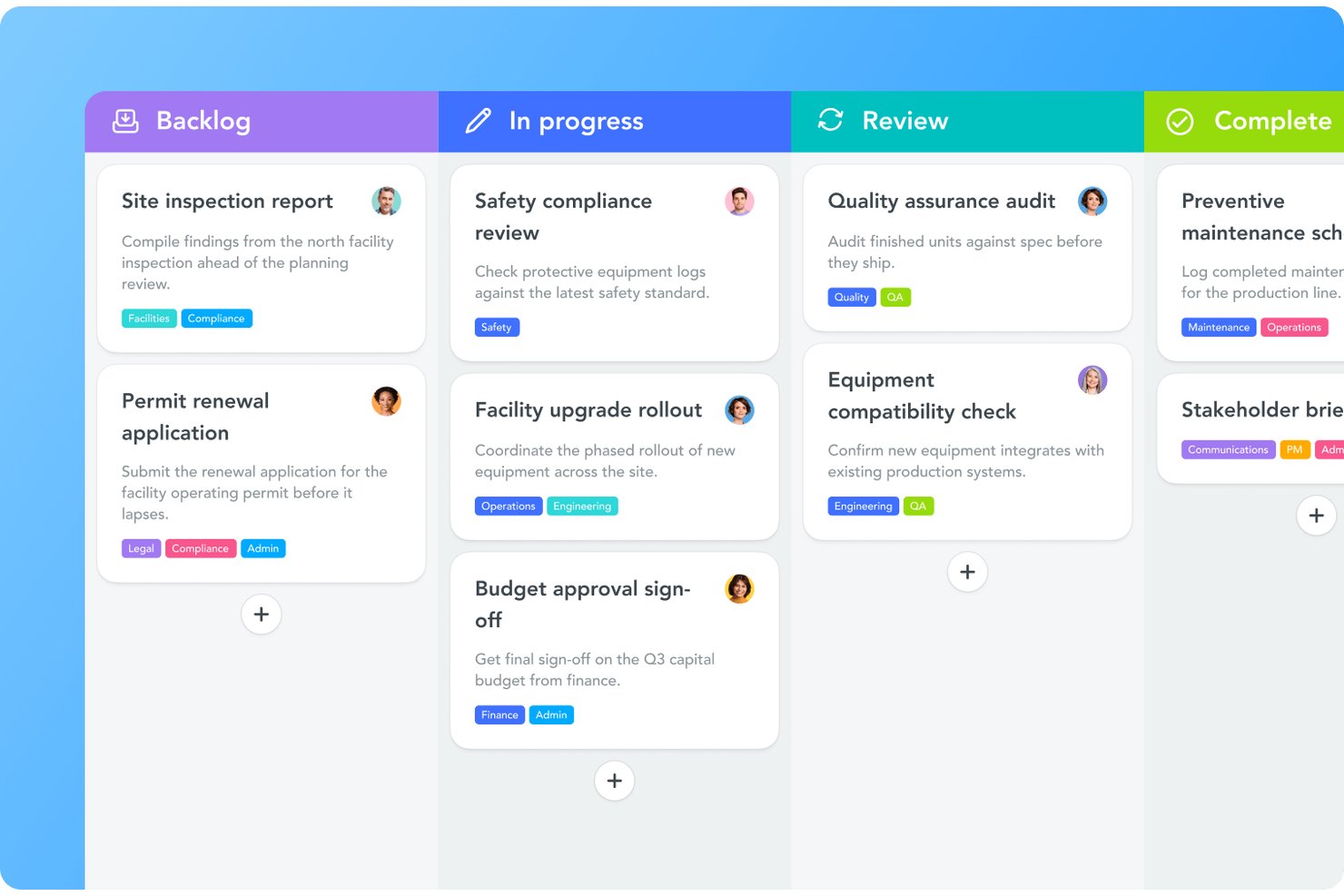
MeisterTask is a Kanban-based task and project management tool that combines visual boards, list and timeline views, personal dashboards, and built-in time tracking for individual and team work.
Who Is MeisterTask Best For?
MeisterTask suits small teams and individuals who want a visually clean, Kanban-based workspace without a steep learning curve.
Why I Picked MeisterTask
MeisterTask earns its spot on my shortlist because the visual design genuinely makes individual task management feel less like admin work. I love how the Kanban boards let you move tasks through custom workflow stages at a glance, and the personal dashboard pulls assigned tasks from every project into one focused view. The built-in time tracking per task is also a practical touch, letting you log how long individual items actually take without a separate tool.
MeisterTask Key Features
- Recurring task automation: Set tasks to repeat on a daily, weekly, or monthly schedule so routine work is created automatically.
- iCalendar feed integration: Connect your assigned, due-dated tasks to any compatible calendar app via a unique feed URL.
- Project templates: Choose from a library of 50+ ready-made project templates to start new workflows without building from scratch.
- Built-in time tracking: Log time directly on individual tasks to compare how long work actually takes against your estimates.
MeisterTask Integrations
Native integrations include Google Calendar, iCal, Gmail, Outlook, Google Drive, Dropbox, OneDrive, and Slack. MeisterTask also supports Zapier and an OAuth 2.0 HTTP API for custom integrations.
Pros and Cons
Pros:
- Reviewers praise quick setup and visual clarity
- Agenda gathers assigned tasks across projects
- Clean Kanban boards make personal planning visual
Cons:
- Reviewers say some settings take extra steps to find
- Free plan caps personal projects at three
Nifty
Best for managing client projects solo

Nifty streamlines project management and enhances team collaboration in a single digital hub. It's best for unifying teams and workflows, offering tools that foster communication and centralize project tracking.
Why I Picked Nifty:
I selected Nifty for its robust approach to project management, which distinguishes it from other platforms. Its ability to integrate various dimensions of project work—tasks, timelines, documents, and communication—into one cohesive environment is why I judge it to be best for unifying teams and workflows. This integration ensures that team members are aligned and can work efficiently towards common objectives.
Standout features & integrations:
Nifty excels with features like milestone-based project planning, collaborative document editing, and a built-in calendar that syncs with Google. Its progress tracking and reporting capabilities provide transparency and foster accountability within teams.
Nifty integrates natively with Google Drive, Slack, Zoom, Dropbox, Trello, Asana, GitHub, GitLab, Bitbucket, and Jira, among others.
Pros and Cons
Pros:
- Diverse native integrations streamline workflow
- Milestone tracking aligns team efforts with project goals
- Centralized platform for all project-related activities
Cons:
- Free plan may be too limited for some teams
- Some advanced features only in higher-priced plans
- Initial setup may require time investment

Todoist
Best for natural language task entry
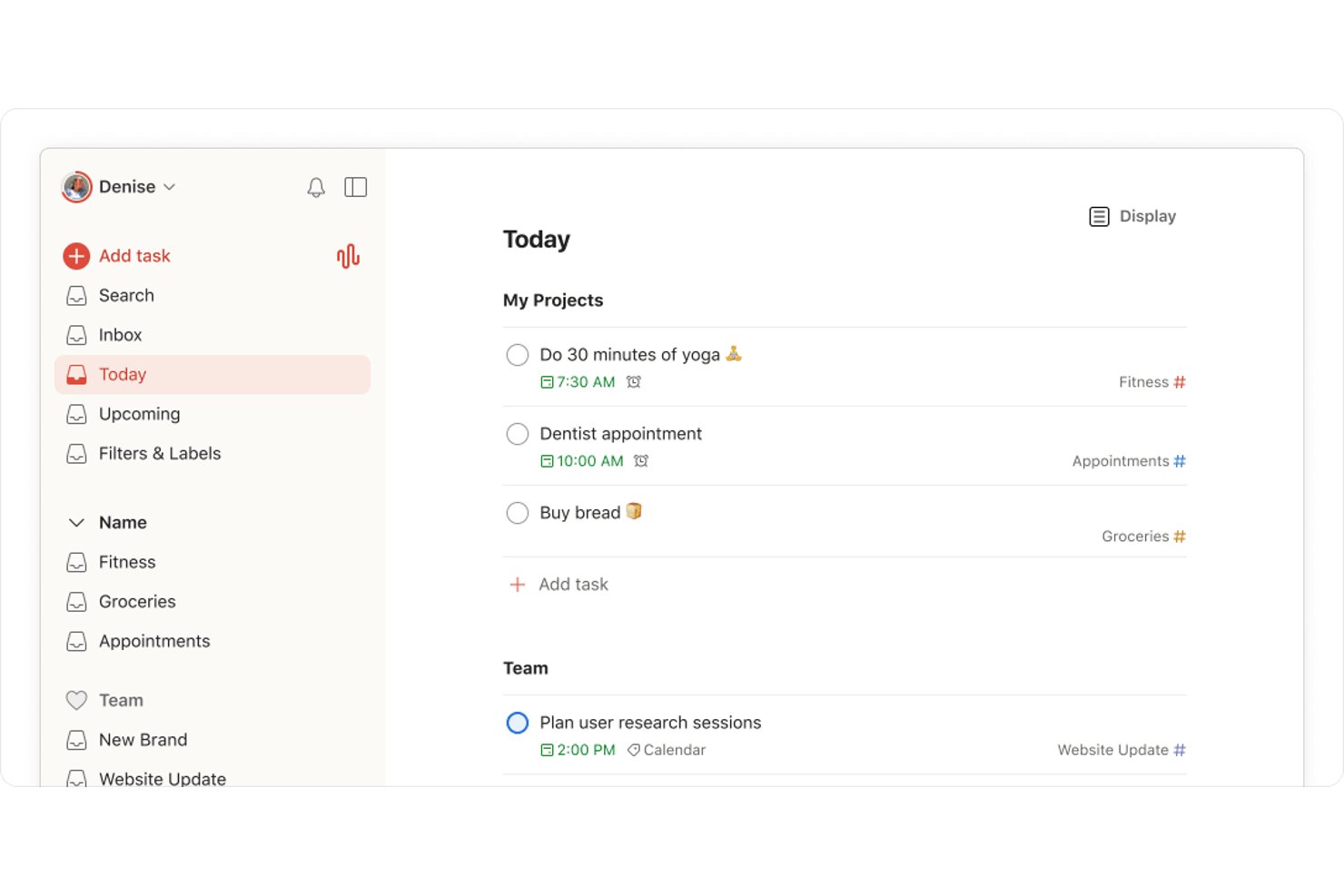
Todoist is a personal task manager and to-do list app that organizes individual work and life through projects, priorities, labels, recurring tasks, natural-language task entry, and cross-device access.
Who Is Todoist Best For?
Todoist is a great fit for freelancers, solo consultants, and independent entrepreneurs who need to capture and organize tasks quickly without a steep learning curve.
Why I Picked Todoist
I've included Todoist in my top picks because its natural-language task entry is genuinely the fastest way I've found to capture work without breaking focus. Typing "follow up with client Friday at 3pm every week" creates a recurring, time-based task instantly, no menus required. Ramble takes it further, letting you speak a task aloud and have Todoist structure it with dates, labels, and priorities automatically.
Todoist Key Features
- Projects with sections and subtasks: Break work into nested layers using projects, sections, and subtasks to keep client deliverables and personal tasks clearly separated.
- Today and Upcoming views: See tasks due today or plan ahead across the week and month using drag-and-drop rescheduling.
- Recurring task scheduling: Set tasks to repeat on a daily, weekly, or custom schedule using natural-language phrases.
- Productivity visualizations: Track completed tasks and activity trends by week or month through built-in Karma and reporting tools.
Todoist Integrations
Todoist lists 80+ integrations, including Google Calendar, Outlook Calendar, Chrome & Gmail, Outlook Mail, Slack, Jira, IFTTT, and Zapier. Its API, webhooks, Sync endpoint, MCP server, and CLI support custom integrations.
Pros and Cons
Pros:
- Recurring tasks help maintain routines
- Separates client work from personal tasks
- Captures dated tasks in natural language
Cons:
- Complex project plans need richer tools
- Free plan limits active personal projects

Taskade
Best for AI-assisted solo task planning
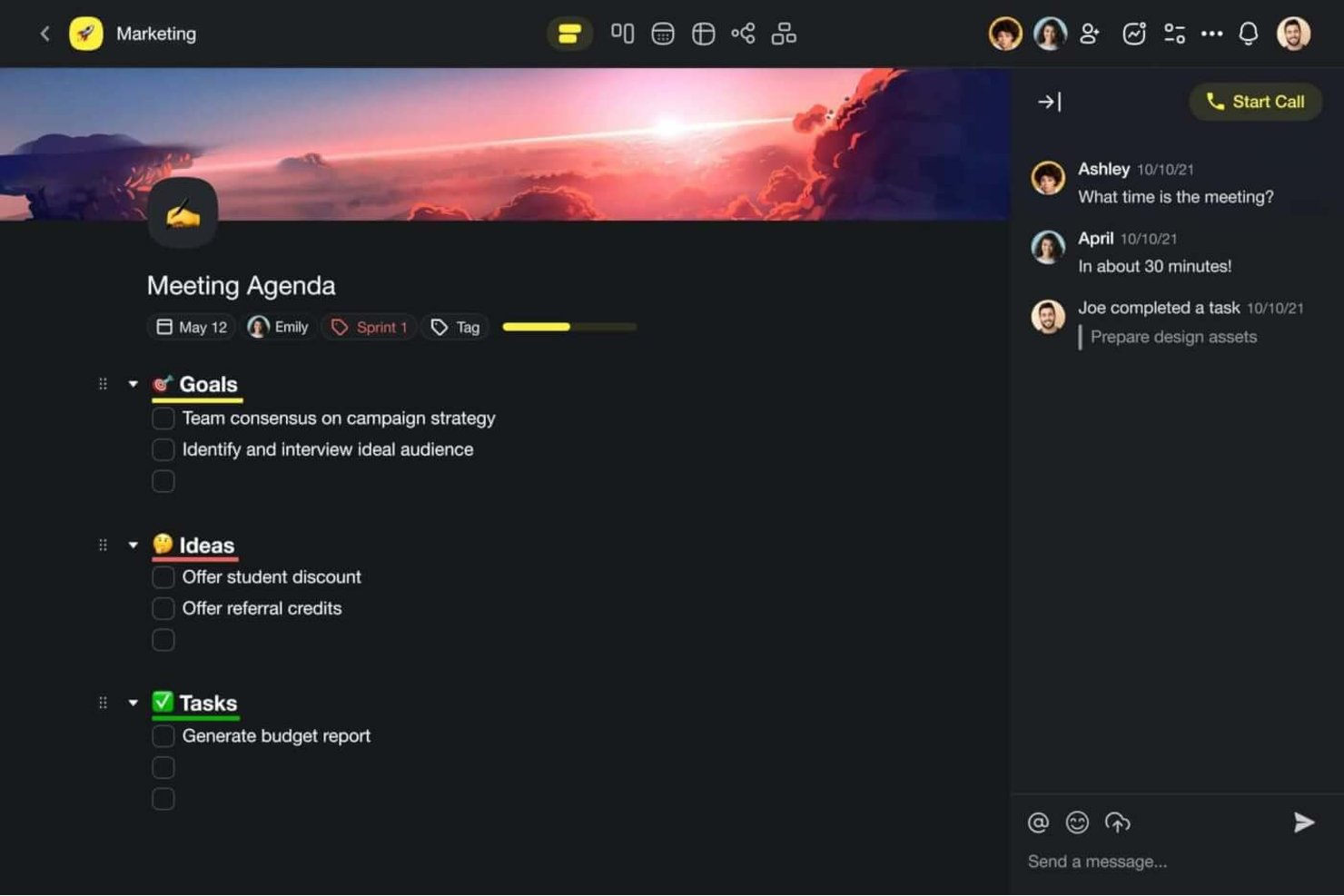
Taskade is an AI-native project management workspace for individuals that combines task organization, multiple project views, AI agents, and workflow automation in a single platform.
Who Is Taskade Best For?
Taskade suits freelancers and independent entrepreneurs who want AI-assisted task planning, client-facing apps, and project organization in a single workspace.
Why I Picked Taskade
I picked Taskade as one of the best because its AI agent layer genuinely changes how solo task planning works. Instead of manually breaking down a project, I can prompt a Personal Productivity Coach agent to prioritize tasks, set recurring schedules, and flag what needs attention first. Pair that with nine interchangeable project views, including Gantt and Mind Map, and you get a single workspace that adapts to how you think, not the other way around.
Taskade Key Features
- Recurring task scheduling: Set tasks to repeat on daily, weekly, monthly, or custom intervals, with weekday targeting and an optional end after a set number of repetitions.
- Personal Productivity Coach agent: A built-in AI agent that helps with task prioritization, goal setting, time management, and habit formation for individual users.
- Project templates: Access and clone from a library of prebuilt templates, with the option to save your own reusable templates for repeated workflows.
- Google Calendar sync: Push dated tasks and projects to a managed Taskade calendar so your schedule stays visible alongside your other commitments.
Taskade Integrations
Taskade offers native integrations with Google Calendar, Apple Calendar, Outlook, Google Drive, Notion, Gmail, and Microsoft 365, plus Zapier. It also offers REST API access, webhooks, HTTP requests, and an MCP server for custom connections.
Pros and Cons
Pros:
- AI helps generate and refine workflows
- Switch views without duplicating project data
- Freelancers use it for client project management
Cons:
- No cross-project progress summaries or overdue rescheduling
- Prominent AI can distract from task planning
Trello
Best for visual project tracking

Trello is a project management application designed to help individuals and teams track their projects visually. It is best for visual project tracking due to its intuitive board and card system that allows users to see the progress of tasks at a glance.
Why I Picked Trello:
I chose Trello for this list because it offers a unique visual system that stands out from other project management tools. Its simplicity and clarity in displaying tasks make it easy to manage projects without getting overwhelmed. I believe Trello is best for visual project tracking because it provides an immediate visual overview of your projects, which is essential for maintaining organization and ensuring that nothing slips through the cracks.
Standout features & integrations:
Trello's standout features include its board and card system, which can be customized with labels, checklists, and due dates. The drag-and-drop functionality makes it easy to move tasks through different stages of completion. Additionally, Trello's Power-Up options allow users to enhance their boards with additional features and integrations.
Trello integrates natively with Slack, Google Drive, Dropbox, Box, OneDrive, Salesforce, Evernote, Mailchimp, GitHub, Google Hangouts, and more, providing a versatile platform that can fit into various workflows.
Pros and Cons
Pros:
- Wide range of native integrations
- Customizable with labels, checklists, and Power-Ups
- Visual card and board system for easy tracking
Cons:
- Can become cluttered with too many cards or boards
- Limited features on the free plan

TickTick
Best for habit tracking alongside tasks
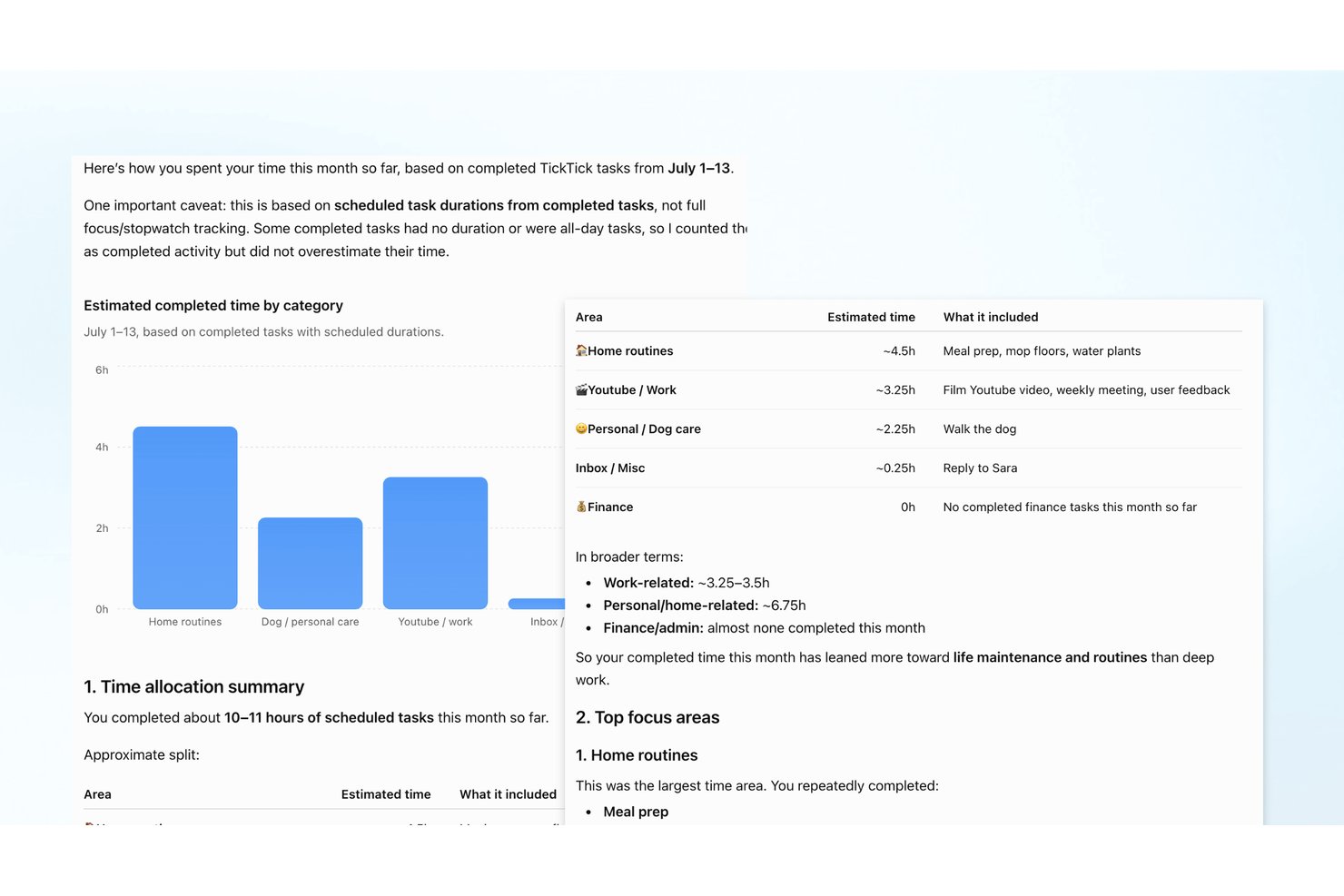
TickTick is a personal task management app that combines to-do lists, calendar scheduling, habit tracking, a Pomodoro focus timer, and recurring task tools in one place.
Who Is TickTick Best For?
TickTick suits individuals who want to manage tasks, build habits, and track recurring goals without juggling multiple apps.
Why I Picked TickTick
I've included TickTick in my top picks because it's the only tool on this list that weaves habit tracking directly into your task workflow. You can log a daily writing habit, track your streak on a yearly heat map, and have your recurring tasks firing on custom schedules, all without leaving the app. I also like the Pomodoro focus timer, which logs time by list or tag so you can see exactly where your hours are going across projects.
TickTick Key Features
- Natural language input: Type phrases like "Meeting at 9 tomorrow" and TickTick automatically sets the task date and reminder.
- Eisenhower Matrix: Sort tasks by urgency and importance in a built-in priority matrix to focus on what matters most.
- Multiple calendar views: Plan your schedule across daily, weekly, monthly, and agenda views to see tasks alongside your time.
- Kanban board: Organize tasks in columns by status or progress to get a visual snapshot of where your work stands.
TickTick Integrations
TickTick integrates with Google Calendar, Notion, and Weibo. Its REST API supports OAuth 2.0 and personal API tokens for custom integrations.
Pros and Cons
Pros:
- Pomodoro logs focus time by project
- Calendar time-blocking helps juggle client projects
- Habit tracking pairs naturally with task lists
Cons:
- Large projects need more detailed structure
- Phone reminders sometimes arrive late

Notion simplifies project management by integrating notes, tasks, and wikis in one tool. It excels as an all-in-one workspace, offering extensive customization to fit any team's workflow.
Why I Picked Notion:
I selected Notion for its comprehensive approach to project management, standing out with its ability to consolidate various tools into one platform. I believe Notion is best for an all-in-one workspace because it enables users to create, collaborate, and manage all their work in a single, unified space.
Standout features & integrations:
Notion's key features include a modular page-building system, collaborative workspaces, and integrated databases.
It natively integrates with tools such as Slack, Google Drive, Trello, GitHub, Figma, Asana, Jira, Evernote, Zoom, and Twitter.
Pros and Cons
Pros:
- Supports real-time collaboration and sharing
- Highly customizable interface and templates
- Combines notes, tasks, databases, and wikis in one platform
Cons:
- Some users may find the pricing model expensive as teams grow
- Mobile app experience may not be as smooth as the desktop version
- Can be overwhelming for new users due to its vast array of features

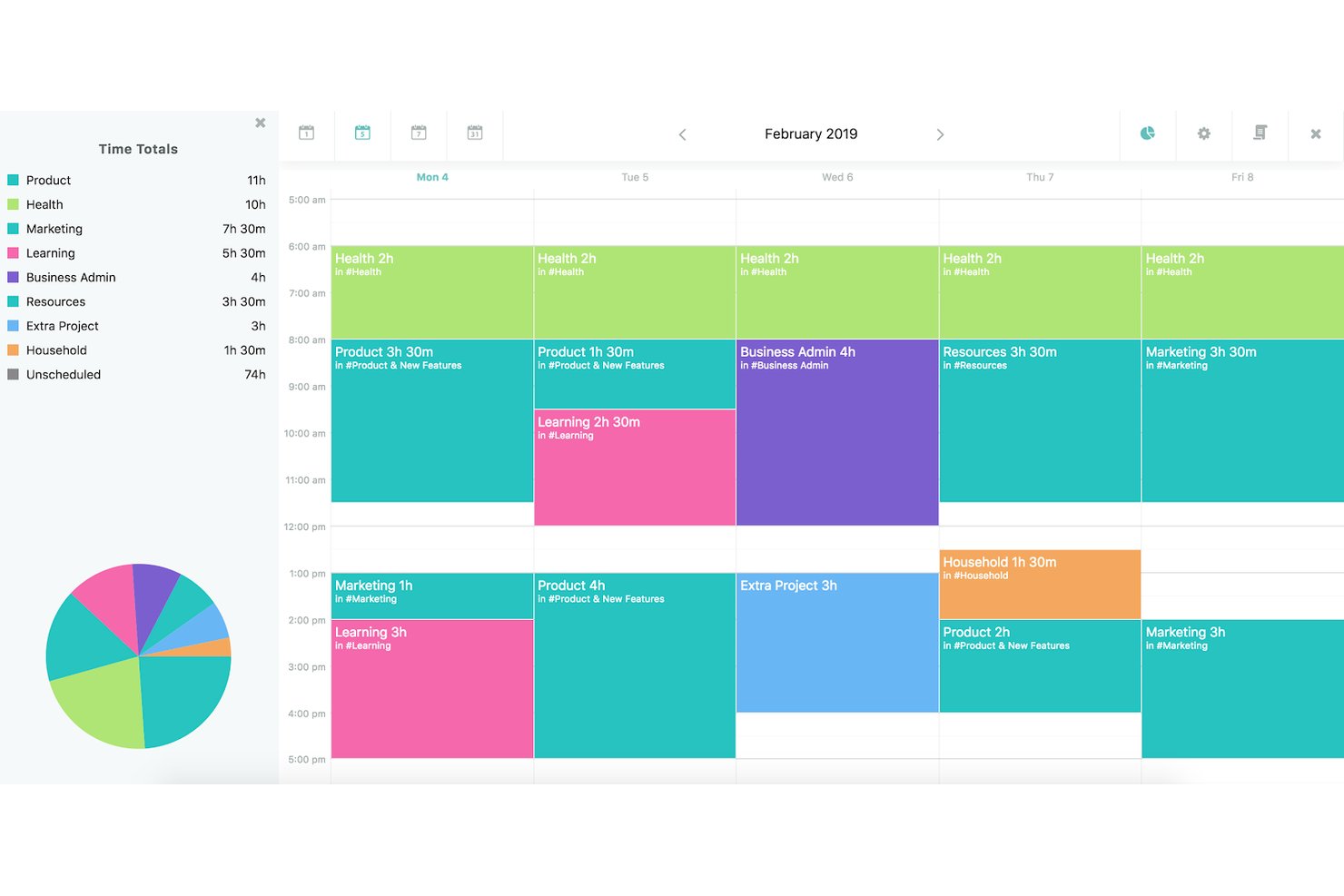
Amazing Marvin is a personal productivity app that lets you manage tasks, projects, habits, and daily schedules through a deeply configurable system of views, planning tools, and workflows.
Who Is Amazing Marvin Best For?
Amazing Marvin suits individuals who want to build a personal productivity system around their own working style rather than adapt to someone else's.
Why I Picked Amazing Marvin
Amazing Marvin earns its spot on my shortlist because no other personal productivity app gives you this level of control over how your system actually works. I love that you can build a planning funnel that narrows your task pool from a full backlog down to a single Focus Mode session, so your daily list reflects what you can actually finish. The capacity indicator even flags when you've overplanned your day based on your real time estimates.
Amazing Marvin Key Features
- Habit tracking: Log daily and weekly habits with streak and trend stats, and record habits for previous days.
- Time tracking: Start a one-click timer, track time automatically in Focus Mode, or enter time manually after the fact.
- Smart Lists: Create custom filtered views that automatically surface tasks matching criteria you define.
- Gamification: Earn points for completed tasks and exchange them for self-selected rewards at custom thresholds.
Amazing Marvin Integrations
Amazing Marvin supports calendar sync with Google Calendar, Outlook, Apple iCal, Yahoo Calendar, public feeds, and CalDav calendars. It also offers a REST API, Zapier, and task import from Todoist, TickTick, Things 3, and Asana.
Pros and Cons
Pros:
- Time tracking and capacity indicators guide workload
- Nested projects organize personal and work tasks
- Custom planning funnel narrows daily priorities
Cons:
- Mobile apps trail desktop polish and features
- Extensive setup options can feel overwhelming
Diğer Bireysel Proje Yönetimi Yazılımları
Kısa listeme giremeyen, ancak yine de göz atmaya değer bazı ek bireysel proje yönetimi yazılımı seçenekleri şunlardır:
- ClickUp
For custom views
- Hive
For democratized project management
- Smartsheet
For spreadsheet users
- Asana
For connecting work to goals
- Teamwork.com
For client work management
- Airtable
For database functionality
- Any.do
For daily planning and task reminders
- Jira Service Management
For agile-style personal task tracking
- Motion
For AI-scheduled personal task planning
- OmniFocus
For GTD-style personal task organization


How I Evaluate Project Management Software for Individuals
I split my evaluation into three parts, giving the most weight to core needs: organize project tasks, set deadlines, and track progress across client work. Next, I look for features like natural-language task capture or habit tracking. Finally, I consider setup, data portability, and fair single-user pricing.
Core Functionality (Table Stakes For This List)
When I'm selecting tools for my list, I score each one on a scale from 0 (does not offer the functionality) to 5 (excels in this area) for each core functionality listed below. I then convert the total into a percentage to help assess each tool's overall fit, with extra weight on any functionalities I’ve deemed essential.
- Task & Project Organization (Essential): I look for tasks grouped by project, with subtasks and tags to separate client deliverables from ongoing admin.
- Deadline & Scheduling (Essential): I check for due dates, reminders, and recurring tasks that help keep overlapping client deadlines visible.
- Multiple Work Views: List, board, and calendar views let me assess whether you can switch between planning a week and tracking task status.
- Progress Tracking: I look for completion markers and project-level progress summaries to see what’s finished and what still needs attention.
- Single-User Access: I assess whether an individual plan supports core planning features without requiring a multi-seat purchase.
- Cross-Device Access: I check whether task updates sync across desktop and mobile, so you can capture changes away from your desk.
Once I have a list of tools that meet the criteria, I consider what sets each platform apart.
Differentiating Factors (What Sets Vendors Apart)
Here's how I compare and contrast different vendors:
Standout Features
Natural language input is a big one. I check whether typing "send proposal Friday 2pm" actually creates a task with the right date and reminder—tools like Todoist handle this well, and it cuts capture time dramatically. I also look for built-in time tracking or time blocking, since solo practitioners billing clients need hour estimates tied directly to tasks, not a separate app. Habit and recurring goal tracking matters too; I evaluate whether a tool supports streaks and routines beyond standard recurring tasks, which helps maintain consistency across ongoing client work.
Beyond Features
I check whether a tool syncs with Google Calendar, Outlook, or Apple Calendar, since a solo practitioner's schedule falls apart when tasks and meetings live in separate places. Data portability matters just as much—I look for CSV import/export and direct migration paths from tools like Trello or Notion, so switching doesn't mean rebuilding everything from scratch. I also evaluate pricing transparency, specifically whether free-tier caps on tasks or projects are clearly stated before you hit a wall mid-project.
Bireysel Proje Yönetimi Yazılımı Nasıl Seçilir?
Uzun özellik listeleri ve karmaşık fiyatlandırma yapıları içinde kaybolmak kolaydır. Size özgü yazılım seçim süreciniz boyunca odaklanmayı sürdürmenize yardımcı olmak için göz önünde bulundurmanız gereken faktörleri içeren bir kontrol listesi hazırladım:
| Faktör | Dikkat Edilmesi Gerekenler |
|---|---|
| Kullanım Kolaylığı | Kılavuza ihtiyaç duymamalısınız. Temiz bir düzene, sürükle-bırak özelliklerine ve hemen anlaşılır hızlı görev girişine sahip bir araç arayın. |
| Özelleştirilebilirlik | Görünümleri, etiketleri veya iş akışlarını çalışma şeklinize uyacak şekilde değiştirebildiğinizden emin olun; tersi geçerli olmamalı. |
| Ölçeklenebilirlik | Sizinle birlikte büyüyebilecek bir seçenek tercih edin. Başlangıçta tek başınıza çalışabilirsiniz, ancak ileride paylaşımlı özelliklere veya ekip yükseltmelerine ihtiyaç duyabilirsiniz. |
| Entegrasyonlar | Google Calendar veya Gmail gibi araçları zaten kullanıyorsanız, aynı işi tekrar yapmaktan kaçınmak için kolayca bağlanabilen bir yazılım arayın. |
| Bütçe | Ücretsiz planda nelerin bulunduğunu kontrol edin. Bazı araçlar, tek bir kullanıcı için bile ödeme yapmadığınız sürece temel özellikleri sınırlar. |
| Güvenlik Önlemleri | Özellikle hassas veya kişisel bilgileri yönetiyorsanız verilerinizi şifreleme ve iki faktörlü kimlik doğrulamayla koruyun. |
| Mobil Erişim | Hareket hâlinde çalışıyorsanız mobil uygulama duyarlı, güvenilir olmalı ve masaüstü sürümüyle aynı temel özelliklere sahip olmalıdır. |
| Bildirimler | Sizi bunaltmadan yolunuzda ilerlemenize yardımcı olacak esnek uyarılar sunan araçları arayın. |
2025'te Proje Yönetimi Yazılımı Eğilimleri
Araştırmam sırasında farklı proje yönetimi yazılımı sağlayıcılarından sayısız ürün güncellemesi, basın bülteni ve sürüm günlüğü derledim. Takip ettiğim yeni ortaya çıkan eğilimlerden bazıları şunlar:
- Yapay Zekâ Destekli Planlama: Yazılımlar; görev teslim tarihleri önermek, darboğazları işaretlemek ve iş yükü ya da uygunluktaki değişikliklere göre planları gerçek zamanlı olarak uyarlamak için yapay zekâ kullanmaya başlıyor. Bu, kullanıcıların planları manuel olarak yeniden düzenlemeye daha az zaman harcamasına yardımcı olur.
- Dahili Hedef Takibi: Artık daha fazla araç, projeleri ve görevleri daha geniş hedeflere bağlayan hedef belirleme özellikleri içeriyor. Bu, bireylerin ve ekiplerin çalışmalarının daha büyük sonuçlara nasıl katkıda bulunduğunu görmesine yardımcı olur.
- Zaman Bütçeleme Özellikleri: Bazı platformlar, kullanıcıların görevlerin ne kadar sürmesi gerektiğini tahmin etmesine ve bunu harcanan gerçek zamanla karşılaştırmasına olanak tanır. Bu, daha iyi planlama yapılmasına yardımcı olur ve aşırı iş yükünü önler.
- Odaklanma ve Dikkat Dağıtıcıları Önleme Araçları: Derin çalışmayı desteklemek için bazı yazılımlar odaklanma zamanlayıcıları, sessiz modlar veya mola verme hatırlatıcıları gibi özellikler içerir. Bunlar, kullanıcıların dikkatlerini yönetmesine ve tükenmişliği azaltmasına yardımcı olur.
- Tek Başına Çalışan Girişimciler İçin Daha Sade Araçlar: tek kişilik işletmeleri destekleyen proje yönetimi araçları geliştirmeye doğru bir yönelim oldu. Bu sürümler, ekip odaklı özellikleri kaldırıp kişisel görev takibine, esnek görünümlere ve basit planlama araçlarına öncelik veriyor.
Kişisel Proje Yönetimi Yazılımı Nedir?
Kişisel proje yönetimi yazılımı, tek bir kullanıcının projeleri düzenlemesine ve yönetmesine yardımcı olmak için tasarlanmış dijital bir araçtır. Serbest çalışanlar, danışmanlar ve tek başına çalışan girişimciler, iş akışlarını kolaylaştırmak ve daha üretken olmak için bu yazılımları kullanır.
Yazılım; proje görevlerini planlamak, takip etmek ve yürütmek için merkezi bir platform sağlar ve ayrıca projelerinizi bir ekip olmadan verimli bir şekilde yönetmenize olanak tanır. Çalışmalarınızı planlamanız, işlerinizi takip etmeniz ve hiçbir şeyin gözden kaçmadığından emin olmanız için basit bir yol sunar.
Özellikler
Kişisel proje yönetimi yazılımı seçerken aşağıdaki temel özelliklere dikkat edin:
- Görev yönetimi: İş yükünüzü kontrol altında tutmak için görevler oluşturmanıza, düzenlemenize ve önceliklendirmenize olanak tanır.
- Takvim entegrasyonu: Son teslim tarihlerini ve planlanan işleri tek bir yerde göstermek için takviminizle senkronize olur.
- İlerleme takibi: Yolunda ilerleyebilmeniz için hangi görevlerin tamamlandığını ve hangilerinin kaldığını izlemenize yardımcı olur.
- Hedef belirleme: Kişisel hedefler tanımlamanıza ve bunları uygulanabilir adımlara ayırmanıza olanak tanır.
- Hatırlatıcılar ve uyarılar: Yaklaşan görevlerden veya gecikmiş işlerden haberdar olmanız için bildirimler gönderir.
- Zaman bloklama: Odaklanmış çalışma için zaman dilimleri planlamanıza ve dikkat dağıtıcı unsurları azaltmanıza olanak tanır.
- Özel etiketler veya başlıklar: Görevleri kategoriye, aciliyete veya iş türüne göre sıralamanıza ve filtrelemenize yardımcı olur.
- Mobil erişim: Görevleri telefonunuzdan veya tabletinizden görüntüleyip düzenleyebilmenizi sağlar.
- Çevrim dışı işlevsellik: İnternet bağlantısı olmadan da çalışmaya devam etmenize olanak tanır.
- Veri yedekleme ve senkronizasyon: Veri kaybını önlemek için çalışmalarınızı cihazlar arasında otomatik olarak kaydeder ve senkronize eder.
Avantajlar
Kişisel proje yönetimi yazılımını uygulamak, ekibiniz ve işletmeniz için çeşitli avantajlar sağlayabilir. İşte yararlanmayı bekleyebileceğiniz birkaç avantaj:
- Kararlara güven: İlerleme verileri ve görev geçmişi, neyin işe yaradığını ve nelerin değiştirilmesi gerektiğini daha net görmenizi sağlar.
- Zamanı daha iyi kullanma: Zaman bloklama ve hatırlatıcılar gibi özellikler, doğru zamanda doğru işe odaklanmanıza yardımcı olur.
- Daha az stres: Görev listeleri ve ilerleme takibi, düzenli kalmayı ve son dakikada telaşa kapılmayı önlemeyi kolaylaştırır.
- Net öncelikler: Özel etiketler ve başlıklar, nelerin ilgilenilmesi gerektiğini ve nelerin bekleyebileceğini hızlıca görmenize yardımcı olur.
- Daha az kaçırılan teslim tarihi: Takvim görünümleri ve uyarılar, önemli tarihleri görünür tutarak işlerin gözden kaçmasını önler.
- Hedefleri gerçekleştirme: Dahili hedef takibi, uzun vadeli planları daha küçük adımlara bölerek bunlara bağlı kalmanıza yardımcı olur.
- İş-yaşam dengesi: Mobil ve çevrim dışı erişim, bir masaya bağlı kalmadan esnek olmanızı sağlar.
Maliyet ve Fiyatlandırma
Kişisel proje yönetimi yazılımını seçmek, mevcut çeşitli fiyatlandırma modellerini ve planları anlamayı gerektirir. Maliyetler özelliklere, ekip büyüklüğüne, eklentilere ve daha fazlasına göre değişir. Aşağıdaki tablo, kişisel proje yönetimi yazılımı çözümlerinde yaygın planları, ortalama fiyatlarını ve genellikle sunulan özellikleri özetlemektedir:
Plan Karşılaştırma Tablosu
| Plan Türü | Ortalama Fiyat | Yaygın Özellikler |
|---|---|---|
| Ücretsiz | $0 | Temel görev yönetimi, sınırlı proje görünümleri ve başlangıç düzeyi araçlar. |
| Standart | $7/kullanıcı/ay | Gantt grafikleri, görev bağımlılıkları, proje şablonları ve sınırlı entegrasyonlar. |
| Profesyonel | $12/kullanıcı/ay | Tüm standart özelliklere ek olarak otomasyon seçenekleri, ek entegrasyonlar ve ilerleme takibi. |
| Üst Düzey | $20/kullanıcı/ay | Tüm profesyonel özelliklere ek olarak özel iş akışları, gelişmiş analizler ve çoklu proje yönetimi. |
Kişisel Proje Yönetimi Yazılımı Hakkında SSS
Kişisel proje yönetimi yazılımı ekip iş birliği için kullanılabilir mi?
Bireyler için proje yönetimi yazılımları öncelikle tek başına kullanım için tasarlanmış olsa da birçok yazılım temel ekip iş birliğine olanak tanıyan özellikler sunar. Bu özellikler görevleri paylaşmayı, rolleri atamayı ve hatta bazen sohbet işlevleri gibi iletişim araçlarını içerebilir. Ancak daha karmaşık ekip iş birliği gereksinimleri için ekip tabanlı, özel bir proje yönetimi aracı daha uygun olabilir.
Ücretsiz kişisel proje yönetimi araçları mevcut mu?
Bireyler için çeşitli ücretsiz proje yönetimi araçları mevcuttur ve bunlar genellikle kişisel projeleri ve görevleri yönetmek için yeterli olan temel özellikleri içerir. Trello, Asana ve Todoist, temel işlevlere sahip ücretsiz sürümler sunar. Ancak daha gelişmiş özellikler için üst düzey bir plana abonelik gerekebilir.
Kişisel proje yönetimi yazılımı ne kadar güvenlidir?
Bireyler için proje yönetimi yazılımları genellikle veri şifreleme, güvenli veri merkezleri ve düzenli güvenlik denetimleri gibi güvenlik önlemleri içerir. Ancak güvenlik düzeyi sağlayıcılar arasında farklılık gösterebilir. Bireylerin, verilerinin yeterince korunduğundan emin olmak için seçtikleri yazılımın güvenlik politikalarını incelemeleri önemlidir.
Kişisel proje yönetimi yazılımına mobil cihazlardan erişilebilir mi?
Bireyler için proje yönetimi yazılımlarının çoğu iOS ve Android cihazlar için mobil uygulamalar sunar. Bu sayede kullanıcılar görevlerini ve projelerini hareket hâlindeyken yönetebilir. Bu mobil uygulamalar genellikle masaüstü sürümlerinde bulunan özelliklerin büyük bölümünü sunarak bireylerin ana çalışma istasyonlarından uzaktayken bile üretken kalmasını sağlar.