

2026’da İncelenen En İyi 10 Yapay Zekâ Kurumsal Proje Yönetimi Yazılımı

En İyi Yapay Zekâ Kurumsal Proje Yönetimi Yazılımları Kısa Listesi


Yapay zekâ proje yönetimi yazılımı, riskleri erkenden belirleyerek, rutin işleri yöneterek ve gerçek zamanlı panolar ile durum güncellemeleri sunarak yanlış anlaşılmaların ortadan kaldırılmasına ve örtüşen görüşmelerin azaltılmasına yardımcı olur; böylece projeleriniz genelindeki ilerlemeyi ve darboğazları takip edebilirsiniz.
Bu platformları test etme deneyimime göre, yapay zekâ özelliklerinin toplantı sürelerinin kısalması, manuel hataların azalması ve görevlerin daha hızlı tamamlanması gibi ölçülebilir etkiler sağlayabildiğini; aynı zamanda karmaşık projelerin yolunda ilerlemesini desteklediğini gördüm.
Bu listede öne çıkan araçları ayrıntılı olarak inceliyor; temel yapay zekâ yeteneklerini, entegrasyonlarını ve iş akışınızı nasıl desteklediklerini açıklıyorum. Ayrıca ekibinizin akıllı planlamayla plan yapmasına, otomatik görev yönetimiyle uygulamaya geçmesine ve riskleri işaretleyip ayarlamalar önermesi sayesinde uyum sağlamasına nasıl yardımcı olabileceklerini ele alıyorum.
Why Trust Our Software Recommendations
Our team has been testing and reviewing software since 2012. As project managers ourselves, we know how difficult—and important—it is to choose the right software.
For this guide, we evaluated tools using hands-on testing and independent research, scoring tools using our selection criteria. We also draw on insights from industry thought leaders and practicing project management experts.
Our reviews reflect our human editorial judgment, not a sales pitch.
Expert reviewers:
Yapay Zekâ Kurumsal Proje Yönetimi Yazılımları Karşılaştırma Tablosu
Bu karşılaştırma tablosu, en iyi yapay zekâ kurumsal proje yönetimi yazılımı seçimlerim için fiyatlandırma ayrıntılarını özetlemektedir.
Score legend (out of 5)
- Excellent 4.5–5
- Good 4–4.4
- Average 3–3.9
- Below average 2–2.9
- Poor 1–1.9
| Tool | Starting Price | Website | |||||||
|---|---|---|---|---|---|---|---|---|---|
| Best for AI-driven project prioritization | 3.3 out of 5 | 3 | 3 | 4 | 3 | 3 | 4 | $10/user/month Free plan + 14-day trial + demo available | Book Demo |
| Best for customizable project dashboards | 3.7 out of 5 | 3 | 4 | 4 | 4 | 3 | 4 | $10/user/month 14-day free trial | Website |
| Best for AI project automation | 3.2 out of 5 | 3 | 3 | 3 | 3 | 3 | 4 | $9/user/month Free plan + 14-day trial available | Book Demo |
| Best for AI-driven professional services delivery | 3.3 out of 5 | 3 | 4 | 3 | 4 | 3 | 3 | Pricing upon request Free demo available | Website |
| Best for AI meeting summaries | 3.2 out of 5 | 2 | 3 | 4 | 3 | 3 | 4 | $10.99/user/month Free plan + trial + demo available | Website |
| Best for AI task prioritization | 3.7 out of 5 | 3 | 3 | 4 | 4 | 4 | 4 | $7/user/month Free plan available | Website |
| Best for AI-driven resource capacity planning | 3.2 out of 5 | 3 | 4 | 4 | 3 | 1 | 4 | €5/license/month Free demo available | Website |
| Best for AI portfolio insights across live plan data | 3.5 out of 5 | 3 | 4 | 4 | 4 | 2 | 4 | $10/user/month Free trial available | Website |
| Best for aligning portfolios to strategic goals | 3.8 out of 5 | 4 | 4 | 5 | 4 | 2 | 4 | Pricing upon request Free demo available | Website |
| Best for extensive enterprise app integrations | 3.5 out of 5 | 3 | 3 | 4 | 4 | 3 | 4 | $9/user/month 30-day free trial + demo available | Book Demo |
En İyi Yapay Zekâ Kurumsal Proje Yönetimi Yazılımı İncelemesi
Aşağıda, kısa listeme giren en iyi yapay zekâ kurumsal proje yönetimi yazılımlarına ilişkin ayrıntılı özetlerimi bulabilirsiniz. İncelemelerim, her aracın temel özelliklerine, artılarına ve eksilerine, entegrasyonlarına ve ideal kullanım alanlarına ayrıntılı bir bakış sunarak sizin için en uygun olanı bulmanıza yardımcı olur.

Wrike
Best for AI-driven project prioritization
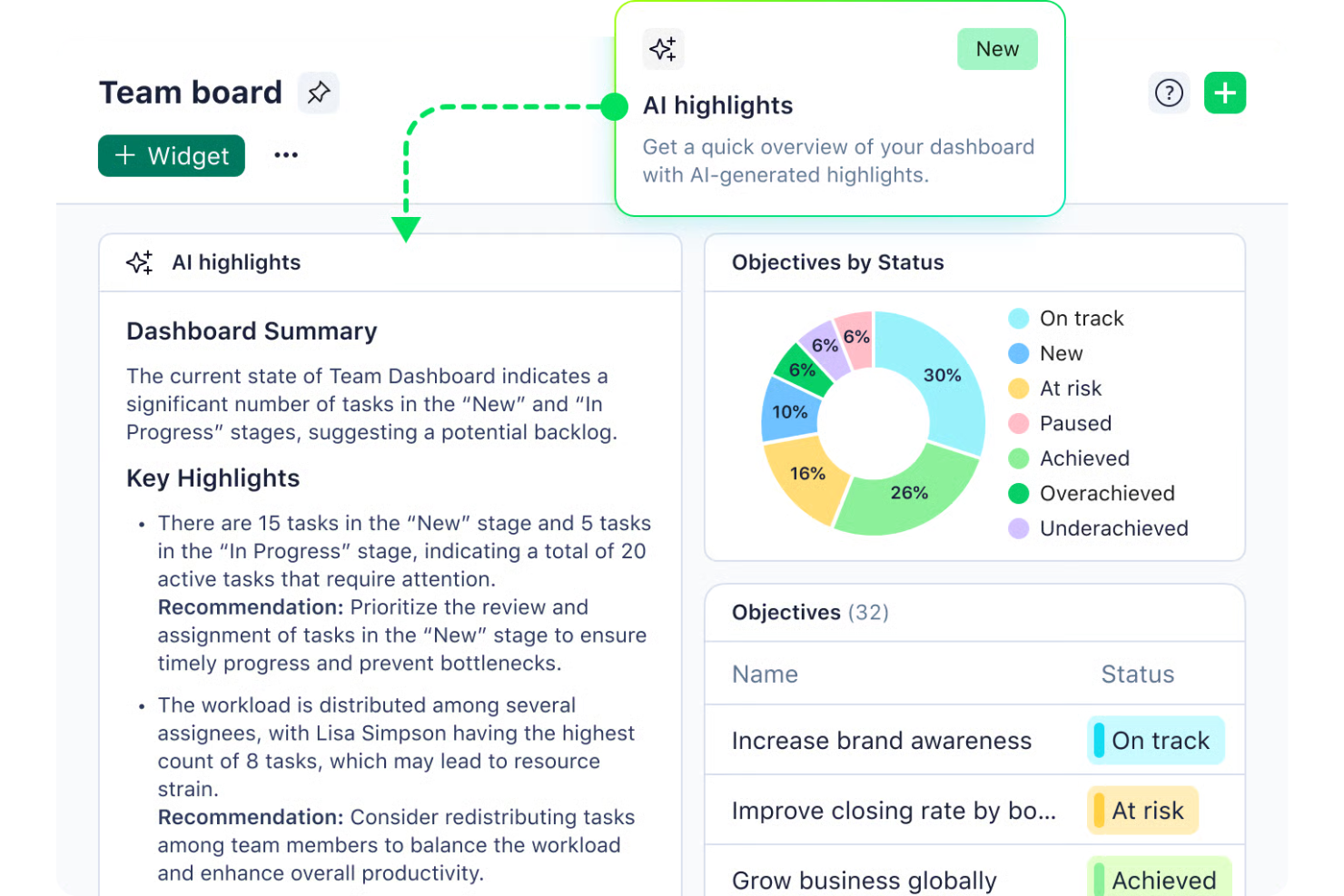
Wrike is an AI-driven project management software designed for businesses seeking to enhance productivity and streamline workflows. This tool is particularly appealing to industries such as marketing, IT, and finance, where managing complex projects and coordinating large teams can be challenging. By leveraging Wrike’s AI capabilities, teams can automate repetitive tasks, prioritize projects, and gain valuable insights, helping them overcome the challenge of juggling numerous responsibilities and deadlines.
Why I Picked Wrike
I picked Wrike for its standout AI capabilities that cater to enterprise project management needs. The Wrike Copilot serves as an AI assistant, aiding your team in prioritizing projects and identifying risks efficiently. Additionally, Wrike’s integration with AI tools like Microsoft Copilot further enhances collaboration and decision-making. These features are particularly beneficial for teams looking to optimize resource allocation and streamline workflows in a fast-paced environment.
Wrike Key Features
In addition to its AI capabilities, Wrike offers a variety of features to support your project management needs.
- Customizable Workflows: Tailor workflows to fit your team’s specific processes and requirements, allowing for seamless task management.
- Project Blueprints: Create reusable templates for recurring projects, ensuring consistency and saving time on project setup.
- In-Platform Communication: Facilitate collaboration directly within the platform to keep all team interactions and updates in one place.
- Time Tracking: Accurately track time spent on tasks for better invoicing and resource management.
Wrike Integrations
Integrations include Microsoft Teams, Slack, Salesforce, Dropbox, Google Drive, Box, GitHub, Adobe Creative Cloud, Microsoft OneDrive, and Jira.
Pros and Cons
Pros:
- Extensive integrations for large organizations
- Highly customizable workflows for teams
- AI supports enterprise project prioritization
Cons:
- Advanced AI features cost more
- Steep learning curve initially
New Product Updates from Wrike

Wrike Redesigns Workspace Search With New Filters
Wrike introduces a redesigned Workspace Search interface with recent search shortcuts, item type and location filters, and parent-task context. These updates help users find relevant work items and navigate search results efficiently. For more information, visit Wrike’s official site.
 .

Celoxis
Best for customizable project dashboards
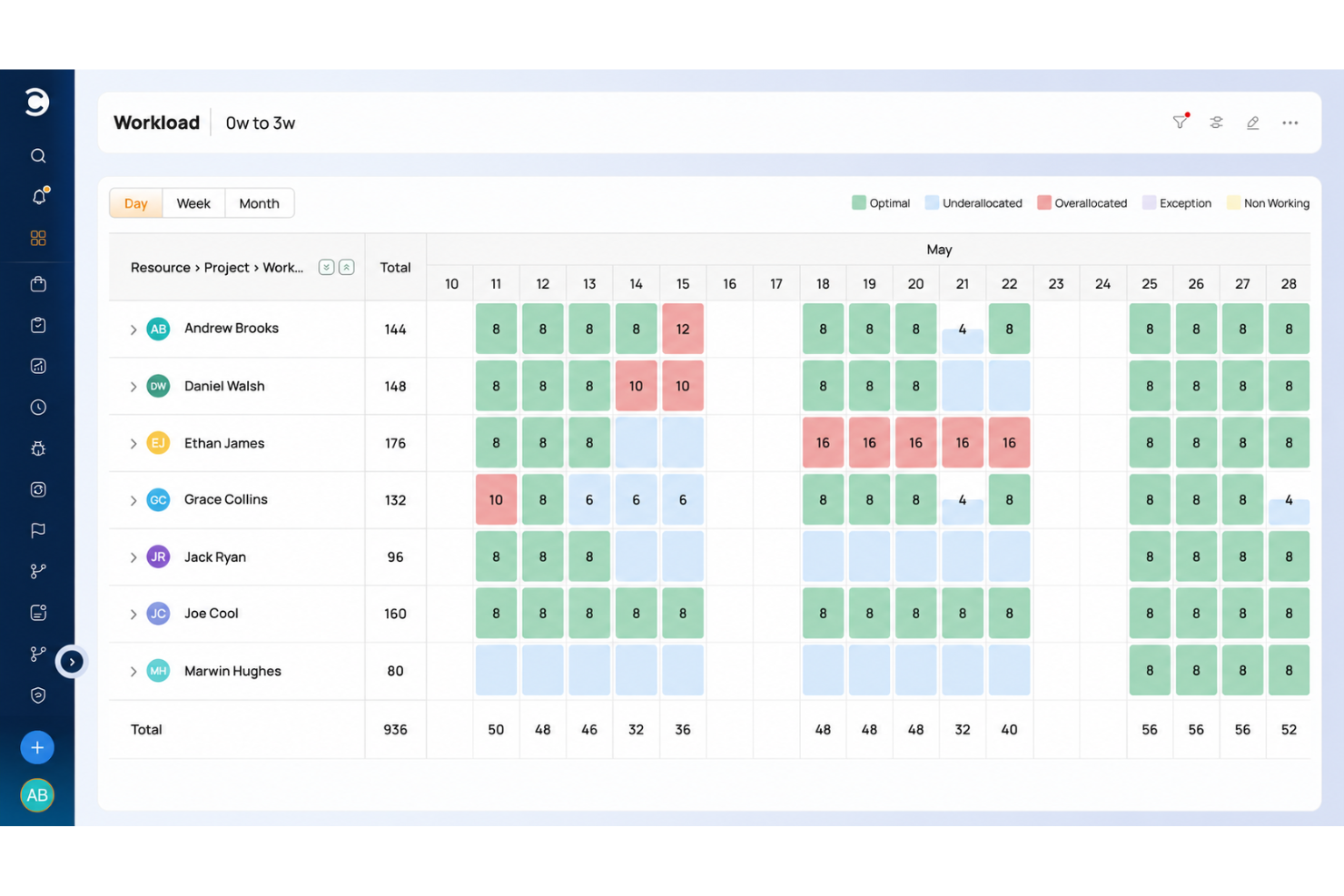
Celoxis is an AI-powered enterprise project management platform that combines portfolio tracking, resource planning, project accounting, risk management, and client collaboration tools in a single system.
Who Is Celoxis Best For?
Celoxis is a strong fit for mid-to-large enterprises managing complex, multi-project environments across teams in IT, professional services, or operations.
Why I Picked Celoxis
I picked Celoxis as one of the best because its dashboard capabilities replace what most teams would turn to a dedicated BI tool for. I love that you can build multiple shared dashboards with customizable widgets, and almost any report can be pinned directly to a dashboard and resized to fit. The custom drill-down charts are especially useful: you can click into a chart and take bulk actions on records without leaving the view.
Celoxis Key Features
- AI assistant (Lex): A built-in AI assistant that analyzes project data in real time, flags risks, and responds to natural language commands.
- Dynamic resource planning: Assign and manage resources across projects with load charts that show availability, allocation, and conflicts by role or person.
- Project accounting: Track budgets, costs, and revenue at the task or project level, with margin and profitability reporting built in.
- Portfolio management: View and manage multiple projects in a single portfolio workspace, with aggregated health indicators and milestone tracking.
Celoxis Integrations
Celoxis offers native integrations with Google Drive, Microsoft Excel, Microsoft Project, Jira, QuickBooks Online, and Salesforce, along with SSO support through Okta, OneLogin, and SAML 2.0. Many additional connections are available through Zapier, and an API is available for custom integrations.
Pros and Cons
Pros:
- Portfolio bubble charts with strategy alignment
- Supports both hourly and fixed-price models
- Built-in BI-grade reporting and analytics
Cons:
- Complex template setup slows onboarding
- Mobile app feels glitchy and limited

Best for AI project automation
For enterprises seeking an AI project automation solution, monday.com provides a platform that helps teams manage projects, tasks, and resources in a single workspace. The system supports teams across departments such as marketing, IT, and operations, helping them organize work and keep projects moving. With AI-assisted automation, workflow tools, and customizable boards, monday.com helps enterprises coordinate tasks, track progress, and improve collaboration across large teams.
Why I Picked monday.com
I picked monday.com because it supports teams for AI project automation in enterprise project management. The platform helps automate tasks, organize workflows, and manage large projects across teams. Its AI features assist with planning timelines, tracking dependencies, and keeping project work organized, helping teams coordinate tasks and monitor progress. These capabilities help enterprises manage complex projects while maintaining visibility across tasks, resources, and project stages.
monday.com Key Features
In addition to AI project automation, monday.com offers:
- Dashboards: Customize dashboards to gain a real-time overview of project progress and team performance.
- Gantt Charts: Visualize project timelines and dependencies to optimize resource allocation.
- Integrations: Connect seamlessly with over 850 apps to enhance workflow and collaboration.
monday.com Integrations
Integrations include Slack, Google Drive, Trello, Salesforce, Microsoft Teams, Zoom, HubSpot, QuickBooks, Shopify, and Dropbox.
Pros and Cons
Pros:
- Integration options with popular tools improve workflow connectivity
- Automation capabilities help streamline repetitive workflows
- AI features assist with task summaries, automation, and content generation
Cons:
- Pricing may be expensive for small businesses or startups
- Some advanced features are only available on higher-tier plans
New Product Updates from monday AI Workspace
monday AI Workspace Adds Human Approval Routing
monday AI Workspace adds a human-in-the-loop approval block to AI Workflows, sending approval requests and routing workflow paths based on responses. For more information, visit monday AI Workspace's official site.
 .

Forecast
Best for AI-driven professional services delivery
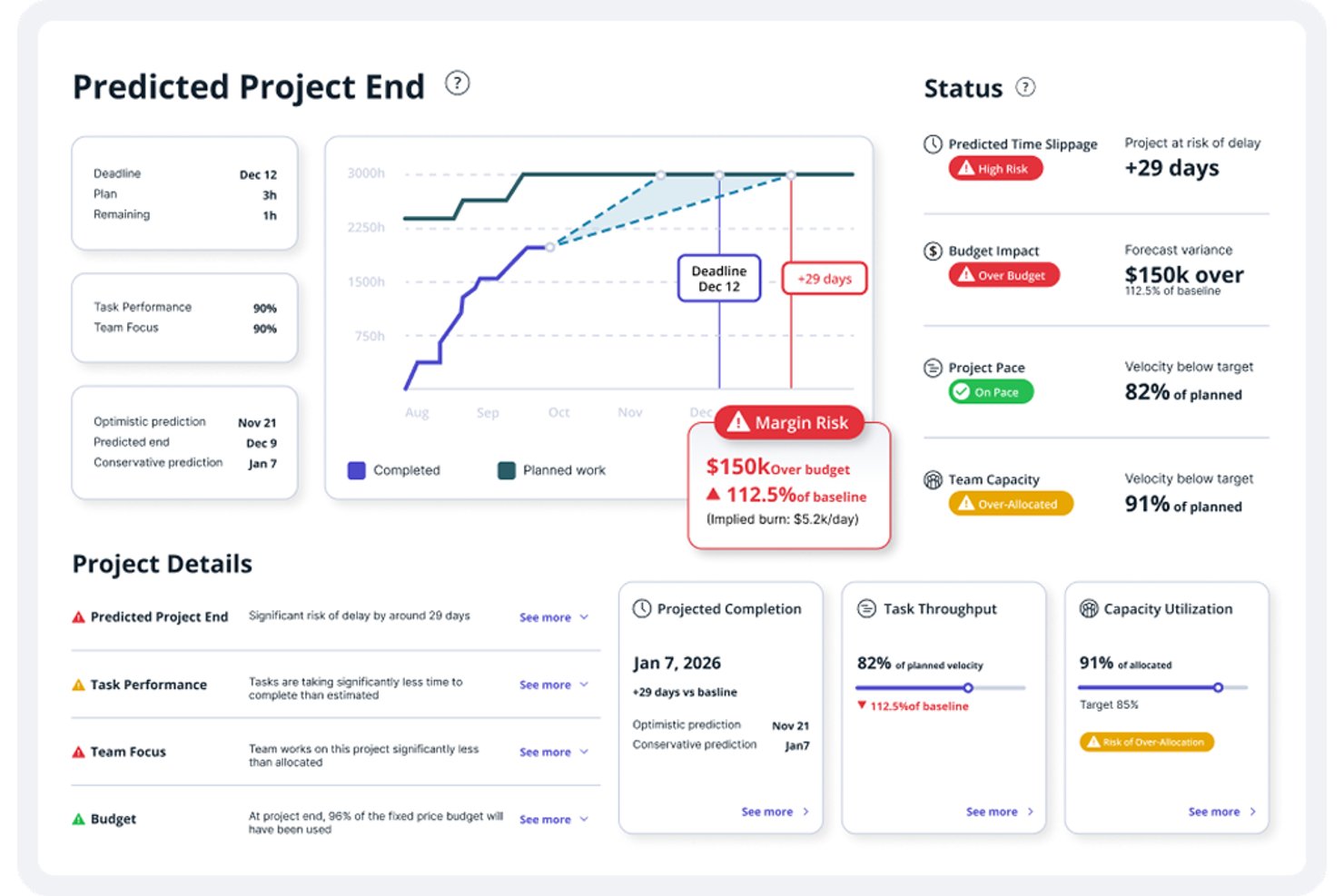
Accelo is an AI-powered professional services automation platform that connects project management, resource planning, capacity forecasting, time tracking, and financial management in a single system.
Who Is Forecast Best For?
Forecast is a strong fit for professional services firms—agencies, consultancies, and managed services teams—that need AI-driven resource planning and project financials in one connected platform.
Why I Picked Forecast
Forecast earns its spot on my shortlist because it's purpose-built for AI-driven professional services delivery in a way most enterprise project management tools aren't. I'm particularly impressed by how its AI connects resource recommendations directly to pipeline demand, letting you model capacity against tentative work before a quote ever becomes an active project. Its task-overrun alerts also stand out: the model evaluates assignee history, logged time, and project context to flag at-risk tasks before deadlines slip.
Forecast Key Features
- Pipeline-based demand planning: Model committed and tentative work against available capacity before opportunities become active projects.
- MCP connector: Connect Accelo data to Claude, ChatGPT, Gemini, or Copilot Studio for natural-language queries and analysis.
- Project budget and margin tracking: Compare planned versus actual performance across time, services, expenses, and materials as work progresses.
- Trigger-based workflow automation: Automatically create tasks, update statuses, send emails, or escalate work when configured conditions are met.
Forecast Integrations
Forecast offers integrations with Jira, GitHub, GitLab, Azure DevOps, Microsoft 365, Slack, HubSpot, Salesforce, QuickBooks, and Xero. It also supports RESTful and Forms APIs, plus MCP connections for Claude, ChatGPT, Gemini, and Copilot Studio.
Pros and Cons
Pros:
- AI-informed capacity planning against tentative pipeline
- Unified client, project, and billing workflows
- Clear visibility into workload and team availability
Cons:
- Dense modules complicate setup and navigation
- Reports can be difficult to tailor
Asana
Best for AI meeting summaries
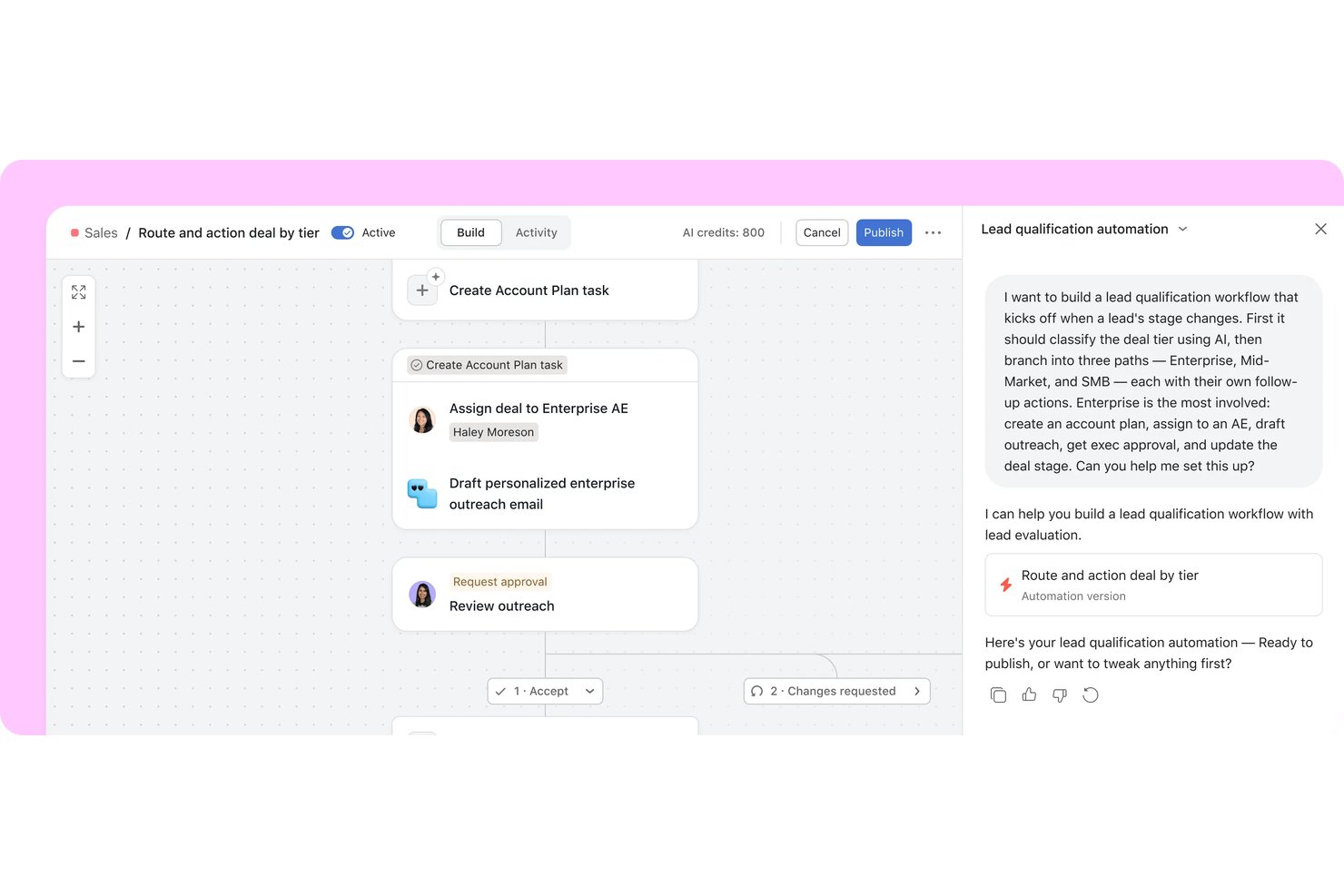
Asana is an enterprise work management platform that brings AI agents and human teams together on a shared plan, combining portfolio management, automated workflows, goal tracking, and AI-assisted task routing across cross-functional projects.
Who Is Asana Best For?
Asana is a strong fit for enterprise PMO teams and portfolio managers who need to coordinate cross-functional work, connect project delivery to company goals, and keep distributed teams aligned across multiple initiatives.
Why I Picked Asana
I picked Asana as one of the best because of how well Asana Dash handles meeting follow-through. After a Slack thread or a Zoom call, Dash maps decisions back to live projects and routes action items to the right AI Teammate automatically. I also like that AI Studio lets you build intake workflows that classify requests, apply SLA rules, and flag blockers without writing a single line of code.
Asana Key Features
- Goal tracking: Connect company, team, and individual goals to live projects and portfolios so progress updates automatically as work gets done.
- Portfolio dashboards: Build custom charts across tasks, projects, and portfolios using bar, burnup, burndown, donut, and other chart types.
- AI Studio: Build no-code AI workflows that classify intake requests, apply SLA rules, flag blockers, and route work without writing code.
- Capacity planning: View and manage individual staffing allocations across projects and portfolios using percent allocation, estimated hours, or headcount.
Asana Integrations
Asana lists 270+ app integrations, including Slack, Jira Cloud, ServiceNow, Salesforce, Microsoft 365 Copilot, ChatGPT, Claude, Gemini, Power BI, and Zapier. It also offers REST API, webhooks, SCIM API, Audit Log API, and an MCP Server for custom integrations.
Pros and Cons
Pros:
- Goal links connect delivery to objectives
- Workflow rules standardize recurring request routing
- Portfolio views clarify cross-project status
Cons:
- Capacity plans need manual staffing decisions
- AI summarizes work but doesn’t forecast delays

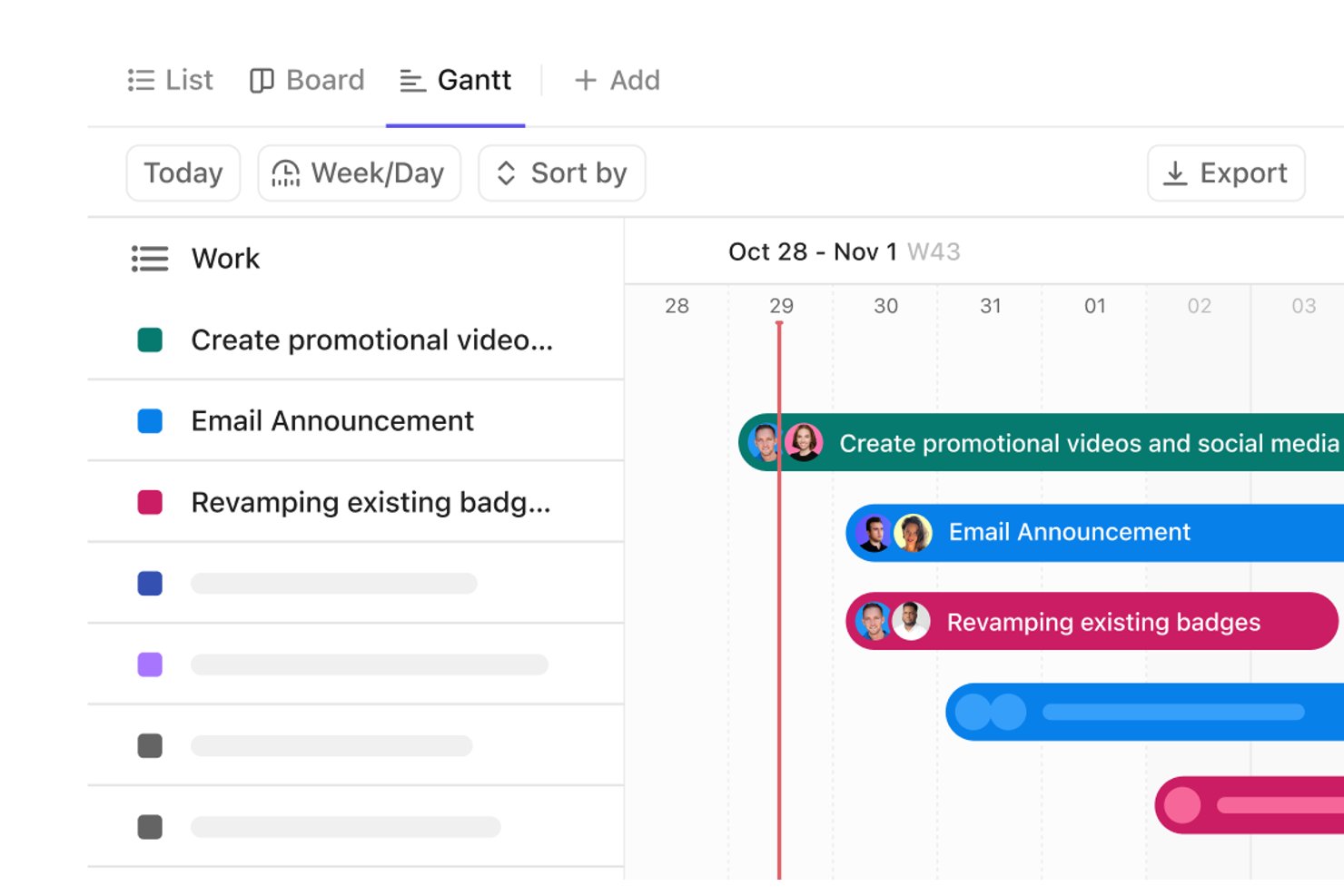
ClickUp is an AI-powered work management platform that unifies project tasks, portfolio tracking, workflow automation, and team collaboration—with AI agents, customizable dashboards, and cross-project dependency mapping built into a single workspace.
Who Is ClickUp Best For?
ClickUp is a strong fit for PMO directors and portfolio managers who need to track work across multiple teams in a single workspace.
Why I Picked ClickUp
I've included ClickUp in my top picks because its AI task prioritization goes beyond simple sorting—ClickUp Brain and Super Agents analyze your Workspace data to surface which tasks need attention, assign owners, and set due dates directly from conversations. I also like that AI Dashboard Cards like AI Executive Summary and AI Project Update auto-generate status reports without manual input. Portfolio cards roll up progress across multiple teams in real time, so you're never hunting for a status update.
ClickUp Key Features
- Gantt chart dependency mapping: Visualize task relationships and critical paths across teams, with automatic downstream rescheduling when dependencies shift.
- Workload view: See team capacity and assignments in one place, using task counts or time estimates, with drag-and-drop reassignment.
- Workflow automations: Set trigger-and-action rules to assign tasks, update statuses, and trigger handoffs across projects automatically.
- Enterprise governance controls: Manage access with custom roles, SSO, SCIM, SAML, audit logs, and data residency options on Enterprise plans.
ClickUp Integrations
ClickUp offers 1,000+ integrations, including native integrations with Slack, Microsoft Teams, GitHub, GitLab, HubSpot, Google Drive, Dropbox, Zoom, and Tableau. It also provides a public API, MCP Server, webhooks, OAuth, and Zapier.
Pros and Cons
Pros:
- Flexible views adapt to distinct workflows
- Automations reduce recurring handoff administration
- Cross-team portfolio dashboards expose project status
Cons:
- Capacity views leave overlapping assignments unclear
- Workspace setup demands deliberate workflow design

Can Do
Best for AI-driven resource capacity planning

Can Do is an AI-powered project and resource management platform that combines portfolio planning, capacity and skills-based resource management, risk analysis, and scenario simulation across departments, companies, and locations.
Who Is Can Do Best For?
Can Do is a strong fit for PMO directors and portfolio managers at mid-to-large enterprises who need AI-assisted resource capacity planning across multiple projects, departments, and locations.
Why I Picked Can Do
I've included Can Do in my top picks because its AI-driven resource capacity planning goes well beyond simple workload charts. I particularly like the Watermodel, a patented simulation that models whether parallel tasks can realistically run concurrently by accounting for buffers and delays before a single operational plan changes. The AI also analyzes skills, availability, and workload across departments and locations to flag overloads and recommend alternative resources, so capacity conflicts get caught at the portfolio level rather than mid-sprint.
Can Do Key Features
- Skills-based resource matching: Define required skills and roles for tasks, then identify team members whose skills and availability align with those needs.
- Hybrid project planning: Combine classic milestone-based scheduling and agile execution within a single project, including Jira-connected sprint planning.
- Demand management: Incorporate project requests into planning by scoring them against budgets, resource availability, and probability of approval before committing resources.
- Risk tracking: Track manually entered risks alongside AI-generated risk assessments at the portfolio, project, and work package level.
Can Do Integrations
Can Do has a documented native Jira integration, plus integrations with SAP, Personio, Salesforce, SharePoint, and Microsoft Power BI. Its REST API supports custom integrations, which are individually scoped and may cost extra.
Pros and Cons
Pros:
- Watermodel simulates buffers and schedule delays
- AI recommends alternatives when workloads conflict
- Fewer resource bottlenecks across projects
Cons:
- Automated status reports require separate BI module
- No native ticketing or trigger-based workflows

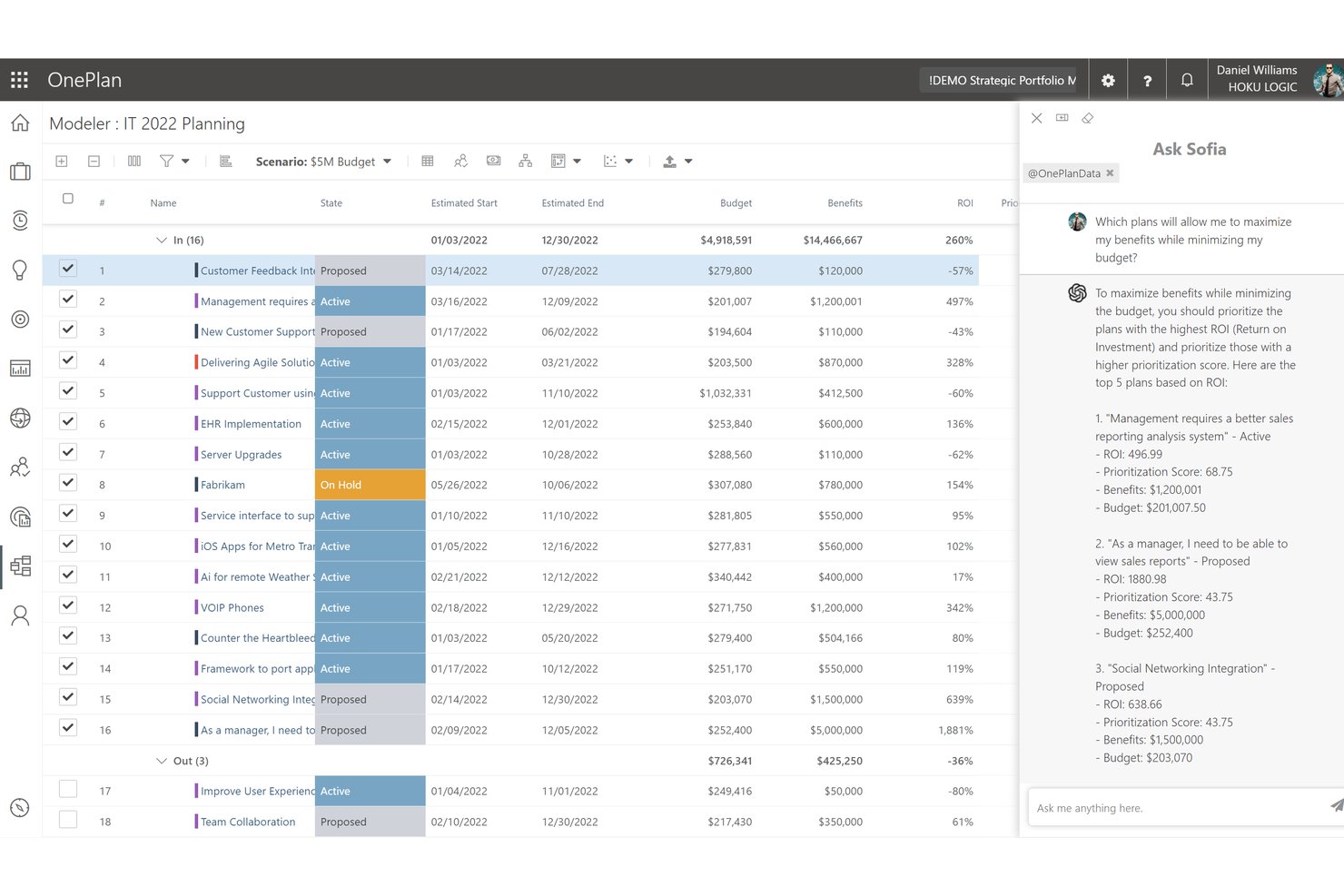
OnePlan is an AI-powered enterprise project portfolio management platform that combines strategic planning, portfolio modeling, resource management, financial tracking, and a natural-language AI assistant called Sofia GPT.
Who Is Sofia GPT (OnePlan) Best For?
OnePlan is a strong fit for PMO directors and portfolio managers in Microsoft-heavy organizations who need a single platform to connect strategy, resource capacity, and project execution.
Why I Picked Sofia GPT (OnePlan)
I picked Sofia GPT as one of the best because it connects a natural-language AI assistant directly to live portfolio data, so you can ask a question like "which projects are at risk this quarter?" and get an answer drawn from your actual OnePlan resource, budget, and OKR data. I particularly like how Sofia can generate a prioritized risk register with mitigation strategies, or surface budget variances across your portfolio, without you having to build a report first. Pair that with Portfolio Modeler's side-by-side scenario comparisons, and you have a genuinely useful AI layer on top of enterprise-grade portfolio governance.
Sofia GPT (OnePlan) Key Features
- Portfolio scenario modeling: Compare side-by-side investment scenarios using constraints like budget, committed effort, and expected benefits to evaluate trade-offs.
- Power BI analysis dashboards: Access pre-built, interactive dashboards with drill-through from portfolio summaries down to programs, projects, and epics.
- Three-layer permission model: Control access at the enterprise security group, plan type, and individual plan levels with contributor, owner, and reader roles.
- Azure DevOps and Jira integrations: Sync work items from Azure DevOps and Jira into OnePlan portfolios to maintain execution-level visibility alongside strategic planning.
Sofia GPT (OnePlan) Integrations
OnePlan lists integrations with Azure DevOps, Jira, ServiceNow, Power BI, and Microsoft tools including Microsoft Project and Microsoft Teams. Its Enterprise tier includes an API for custom integrations, and Zapier is also supported.
Pros and Cons
Pros:
- Adapts governance and prioritization to team processes
- Connects resource demand with project plans
- Consolidates portfolio status for leadership
Cons:
- Large, complex portfolios can strain performance
- Dashboard hierarchy and report exports frustrate reviewers
Best for aligning portfolios to strategic goals
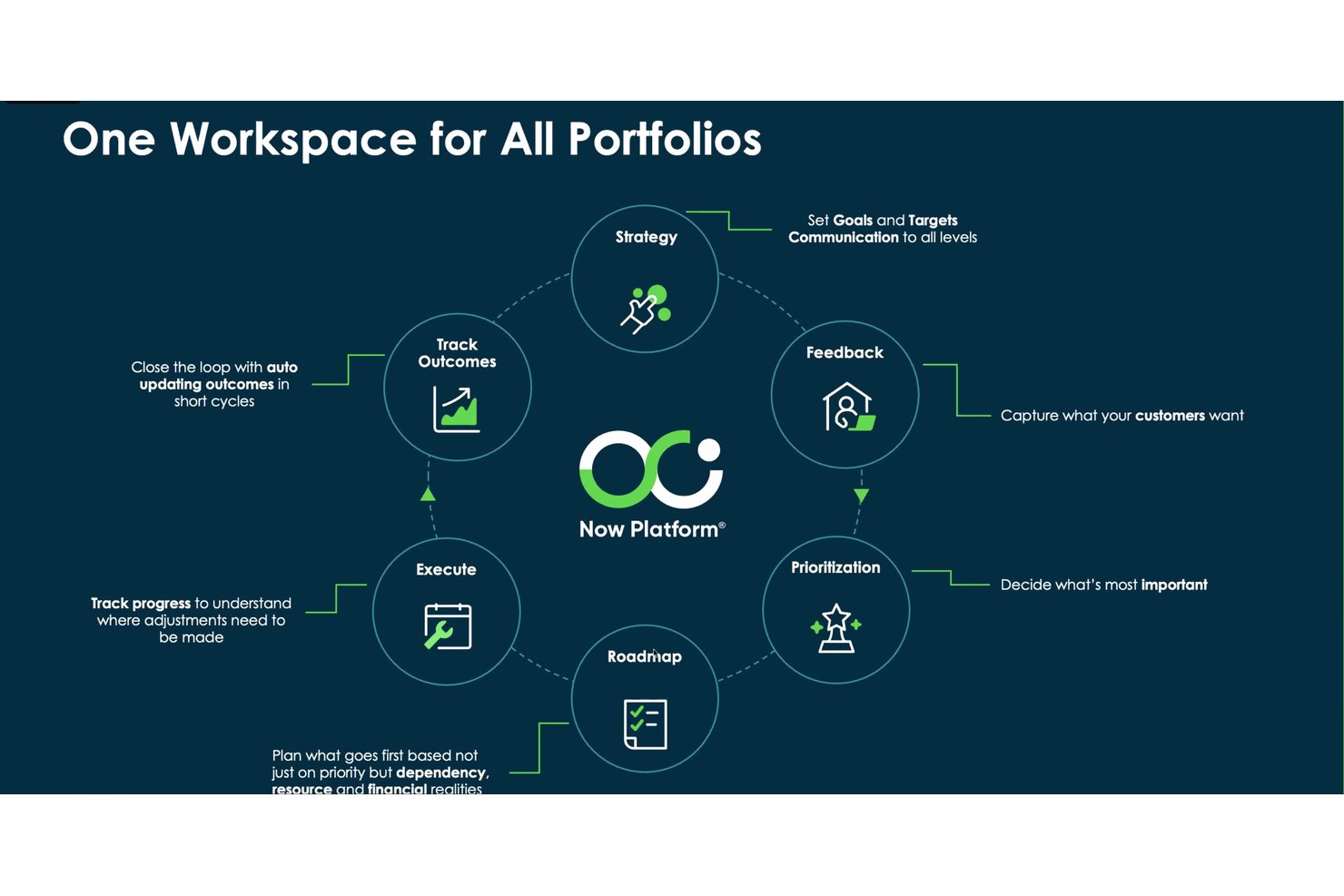
ServiceNow Strategic Portfolio Management is an AI-powered enterprise portfolio management platform that connects strategy to delivery through scenario planning, investment prioritization, resource capacity planning, and AI-generated project health forecasting and status reporting.
Who Is ServiceNow Strategic Portfolio Management Best For?
ServiceNow Strategic Portfolio Management fits large enterprises that need to connect strategy to execution across multiple portfolios, business units, and delivery teams.
Why I Picked ServiceNow Strategic Portfolio Management
I picked ServiceNow Strategic Portfolio Management because it's one of the few platforms that genuinely connects strategy to delivery at an enterprise scale. I'm particularly drawn to its scenario planning capability, which lets portfolio managers compare alternative project and demand combinations against real resource capacity before committing to a plan. Layered on top of that, AI-generated RAG health predictions flag schedule, cost, resource, and scope risks before they escalate, giving leadership the signal they need to act early.
ServiceNow Strategic Portfolio Management Key Features
- Investment funding: Plans and manages budget allocations to business units, products, and teams, with prioritization against strategic objectives.
- Enterprise Agile Planning: Supports SAFe and PI planning workflows for large-scale agile delivery teams.
- Portfolio Planning roadmaps: Visualizes milestones, progress indicators, and dependencies across planning items in hybrid roadmap views.
- AI-generated project insights: Sends scheduled email digests covering tasks, milestones, resource assignments, financials, and RIDACs.
ServiceNow Strategic Portfolio Management Integrations
ServiceNow Strategic Portfolio Management connects with Slack, Salesforce, Workday, Microsoft Teams, and GitHub through ServiceNow’s integration ecosystem. It also supports REST, SOAP, and webhook APIs for custom integrations.
Pros and Cons
Pros:
- AI flags schedule, cost, resource, scope risks
- Scenario planning exposes capacity tradeoffs before approval
- Connects portfolios to strategic goals and outcomes
Cons:
- Setup and configuration often require specialist support
- Interface can make portfolio tracking confusing
Smartsheet
Best for extensive enterprise app integrations
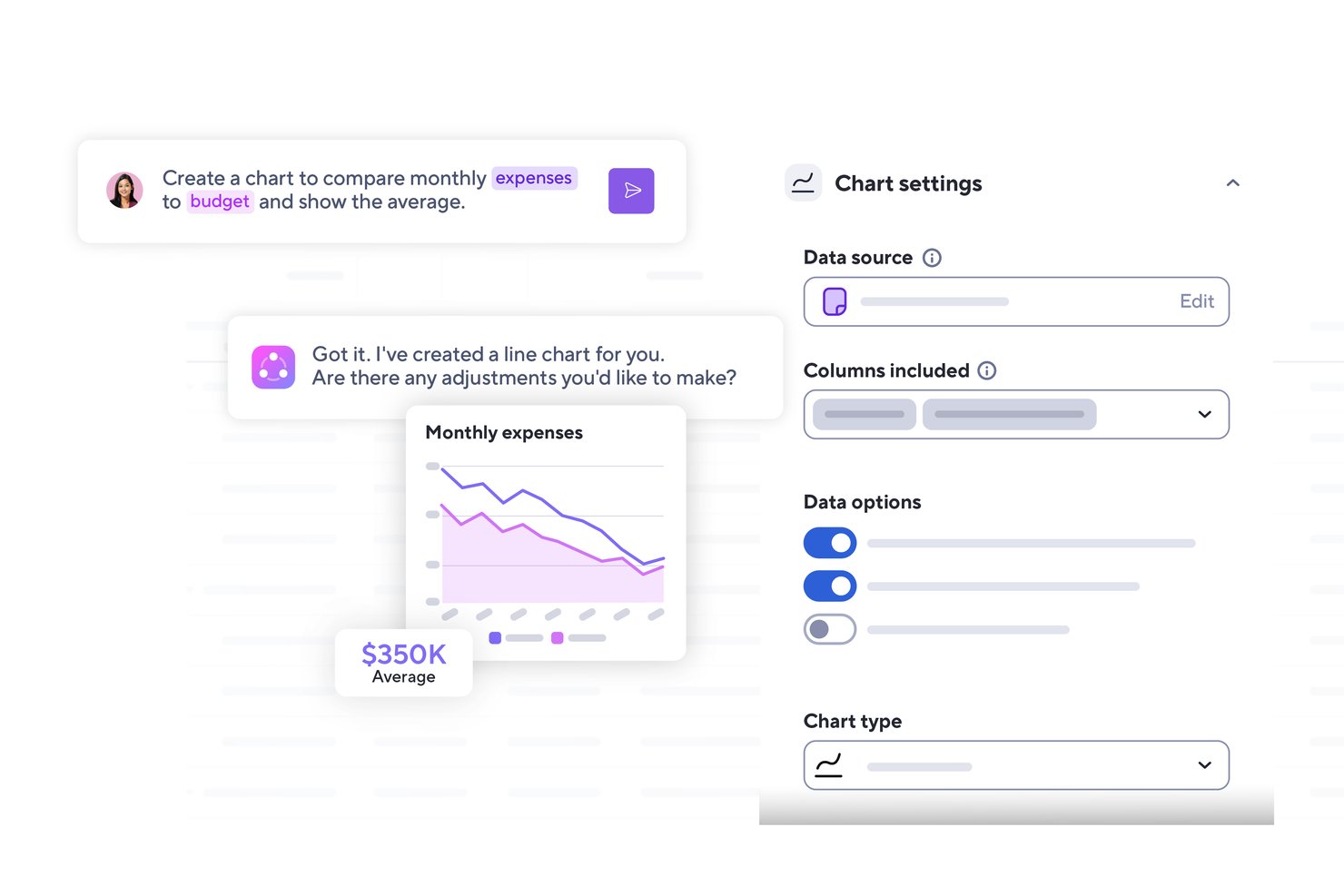
Smartsheet is an AI-powered work management platform that combines project tracking, portfolio oversight, workflow automation, reporting dashboards, and resource planning for enterprise teams.
Who Is Smartsheet Best For?
Smartsheet is a strong fit for enterprise PMO teams and portfolio managers who need to connect projects across a wide range of existing tools like Jira, Salesforce, and ServiceNow.
Why I Picked Smartsheet
I picked Smartsheet as one of the best because no other tool on this list connects to as wide a range of enterprise systems out of the box. With over 175 integrations spanning Jira, Salesforce, ServiceNow, and Workday, plus bidirectional syncing through dedicated Connectors, your project data stays current across the tools your teams already use. I also like that the MCP Server lets you query Smartsheet data directly from Claude, Gemini, or Microsoft Copilot, turning your existing AI workspace into a live project intelligence layer.
Smartsheet Key Features
- Smart Columns: Automatically categorize, summarize, translate, or analyze sentiment across rows of sheet data using AI.
- Control Center: Automate project creation, aggregate reporting, and manage portfolio-level changes across standardized project structures.
- AI dashboard builder: Generate a customizable stakeholder dashboard from a plain-language description of your desired metrics and data sources.
- Scenario Planning: Compare up to three what-if scenarios side by side, adjusting dates, assignments, and allocations before committing changes to live sheets.
Smartsheet Integrations
Smartsheet offers over 175 integrations, including Jira Software, Salesforce, ServiceNow, Workday, Power BI, Tableau, Microsoft Teams, and Slack. Its REST/JSON API supports custom integrations, and Zapier connects it to more than 3,000 apps.
Pros and Cons
Pros:
- Flexible sheets adapt to varied workflows
- Automation reduces repetitive follow-up
- Portfolio dashboards consolidate cross-project status
Cons:
- Mobile app feels weaker than desktop
- Advanced reports take time to configure
New Product Updates from Smartsheet

Smartsheet Adds Non-Plan User Management in Admin Center
Smartsheet adds a Non plan users tab to the Seat types and true-up page in Admin Center. This lets system admins review non-plan users and add them to the plan or remove them from the organization in one place. For more information, visit Smartsheet’s official site.
 .
Diğer Yapay Zekâ Kurumsal Proje Yönetimi Yazılımları
Kısa listeme giremeyen, ancak yine de incelemeye değer bazı ek yapay zekâ kurumsal proje yönetimi yazılımı seçenekleri şunlardır:
- Kantata
For AI-driven resource staffing in services firms
- Planview
For AI-driven portfolio scenario planning
- Jira
For IT teams tracking dev work at scale
- Adobe Workfront
For AI-governed work across creative portfolios
- Notion
For AI-enhanced team documentation


How I Evaluate AI Enterprise Project Management Software
To make this list, a tool’s AI needs to handle project work, like forecasting delays and recommending resource needs. From there, I evaluate three things. Core functionality carries the most weight, like managing portfolios and planning team capacity. Then I look at standout features, like scenario modeling, and what a tool offers beyond its feature set, like rollout and training support.
Core Functionality (Table Stakes For This List)
When I'm selecting tools for my list, I score each one on a scale from 0 (does not offer the functionality) to 5 (excels in this area) for each core functionality listed below. I then convert the total into a percentage to help assess each tool's overall fit, with extra weight on any functionalities I’ve deemed essential.
- AI-Driven Insights (Essential): I look for forecasts that flag schedule slippage, emerging risks, or resource conflicts early enough to adjust plans.
- Portfolio Management (Essential): I assess whether teams can compare initiatives, map dependencies, and prioritize work across departments as strategy shifts.
- Resource Management: Check whether capacity views expose overloaded teams and support reallocating people when priorities or timelines change.
- Task & Workflow Automation: I examine whether triggers can assign work, update dependencies, and move approvals forward across repeatable project workflows.
- Governance & Permissions: I look for role-based permissions and portfolio controls that let PMOs set standards while teams manage local delivery.
- Reporting & Dashboards: Assess whether configurable, role-specific views turn project data into clear status, trend, and decision reports for leaders.
Once I have a list of tools that meet the criteria, I consider what sets each platform apart.
Differentiating Factors (What Sets Vendors Apart)
Here's how I compare and contrast different vendors:
Standout Features
Scenario simulation modeling is where I start. I check whether a tool lets PMO leaders test "what-if" changes to budgets, timelines, or staffing before committing resources. Cross-project dependency mapping matters just as much; I look for visual maps that flag how a delay in one initiative ripples into downstream work. I also evaluate each tool's strategic portfolio alignment, confirming it can tie individual projects back to OKRs so executives see which investments deliver the most business value.
Beyond Features
I check whether vendors offer structured onboarding and change management support, because enterprise rollouts fail when AI features go unconfigured. Tech stack interoperability matters just as much; I look for native connectors to tools like Jira, SAP, and Slack so teams aren't forced into middleware workarounds. I also evaluate compliance certifications and data residency options, especially for organizations operating across multiple jurisdictions.
Yapay Zekâ Kurumsal Proje Yönetimi Yazılımı Nasıl Seçilir?
Uzun özellik listeleri ve karmaşık fiyatlandırma yapıları arasında kaybolmak kolaydır. Kendinize özgü yazılım seçimi sürecinizde ilerlerken odaklanmanızı korumanıza yardımcı olmak için göz önünde bulundurmanız gereken faktörleri içeren bir kontrol listesi hazırladım:
| Faktör | Dikkat Edilmesi Gerekenler |
|---|---|
| Ölçeklenebilirlik | Yazılım ekibinizle birlikte büyüyebilir mi? Kullanıcı sınırlarını ve daha yüksek seviyeler için fiyatlandırmayı göz önünde bulundurun. Kuruluşunuz büyüdükçe artan proje karmaşıklığını yönetebildiğinden emin olun. |
| Entegrasyonlar | Mevcut araçlarınızla entegre olabiliyor mu? Sorunsuz veri akışı sağlamak ve manuel veri aktarımını önlemek için mevcut yazılım yığınınızla uyumluluğunu kontrol edin. |
| Özelleştirilebilirlik | Yazılımı iş akışlarınıza uyacak şekilde uyarlayabilir misiniz? Gösterge tablolarını, raporları ve süreçleri ekibinizin özel ihtiyaçlarına göre özelleştirme seçeneklerini arayın. |
| Kullanım Kolaylığı | Arayüz ekibiniz için sezgisel mi? Öğrenme eğrisini değerlendirin ve ekibinizin hızla işe uyum sağlaması için eğitim gerekip gerekmediğini göz önünde bulundurun. |
| Uygulama ve Kullanıma Alma | Kurulum ne kadar sürecek? Dağıtım ve eğitim için gereken kaynakları değerlendirin. Kullanıma alma süreçleri kolay ve geçiş sırasında destek sunan araçları tercih edin. |
| Maliyet | Bütçeniz dahilinde mi? Kullanıcı başına maliyetler ve ek ücretler de dahil olmak üzere fiyatlandırma modellerini karşılaştırın. Uzun vadeli maliyetleri ve yıllık taahhütlerde sunulabilecek indirimleri göz önünde bulundurun. |
| Güvenlik Önlemleri | Güvenlik standartlarınızı karşılıyor mu? Özellikle hassas verileri işliyorsanız aracın GDPR veya ISO sertifikaları gibi sektör standartlarına uygun olduğundan emin olun. |
| Destek Kullanılabilirliği | İhtiyaç duyduğunuzda yardım alabiliyor musunuz? Sorunlar ortaya çıktığında destek alabilmeniz için destek saatlerini, sohbet veya telefon gibi mevcut kanalları ve kullanıcıların desteğin yanıt verme hızına ilişkin değerlendirmelerini kontrol edin. |
Yapay Zekâ Kurumsal Proje Yönetimi Yazılımı Nedir?
Yapay zekâ kurumsal proje yönetimi yazılımı, çeşitli süreçleri otomatikleştirmek ve geliştirmek için yapay zekâdan yararlanarak kuruluşların projeleri yönetmesine yardımcı olan özel bir proje yönetimi yazılımı türüdür. Bu araçlar genellikle verimliliği ve karar alma süreçlerini geliştirmek isteyen proje yöneticileri, ekip liderleri ve diğer profesyoneller tarafından kullanılır.
Otomatik planlama, öngörücü analizler ve akıllı görev atamaları; kaynakların optimize edilmesine, proje sonuçlarının öngörülmesine ve ekipler arasındaki uyumun korunmasına yardımcı olur. Genel olarak bu araçlar, manuel çabayı azaltarak ve stratejik planlamayı destekleyerek önemli bir değer sunar.
Özellikler
Yapay zekâ kurumsal proje yönetimi yazılımı seçerken aşağıdaki temel özelliklere dikkat edin:
- Otomatik planlama: Görevleri ve toplantıları otomatik olarak düzenlemek için yapay zekâ kullanır; en uygun toplantı ve odaklanma zamanlarını takvimde otomatik olarak belirleyerek sürekli planlama trafiğini azaltır.
- Öngörücü analizler: Proje zaman çizelgelerini ve olası riskleri öngörmek için verileri analiz eder; iş yüküne veya risk göstergelerine göre planları ayarlayarak proje zaman çizelgelerini öngörücü analizlerle tahmin eder.
- Akıllı görev atamaları: Görevleri ekip üyelerinin becerilerine ve uygunluk durumuna göre otomatik olarak atar; ekibinizin kapasitesinden en iyi şekilde yararlanmak için görevleri gerçek zamanlı uygunluk ve becerilere göre belirler.
- Yapay zekâ destekli içgörüler: Yöneticilerin proaktif ayarlamalar yapabilmesi için veriye dayalı içgörüler (ör. işaretlenmiş riskler ve eğilim tahminleri) sunarak uygulanabilir içgörüler ve öneriler sağlar.
- İş akışı otomasyonu: Tekrarlayan görevleri ve süreçleri otomatikleştirir; ekibinizin yüksek öncelikli ve stratejik çalışmalara daha fazla zaman ayırabilmesi için rutin planlama ve raporlamayı yapay zekâya devreder.
- Gerçek zamanlı iş birliği: Ekip üyelerinin gerçek zamanlı olarak birlikte çalışmasını sağlar; toplantı özetlerini ve durum güncellemelerini paylaşılan gösterge tablolarında veya sohbette merkezileştirerek herkesin uyum içinde kalmasını sağlar.
- Özelleştirilebilir gösterge tabloları: Kullanıcıların proje verilerinin kişiselleştirilmiş görünümlerini oluşturmasına olanak tanır; yöneticilere yapay zekâ tarafından oluşturulan gösterge tabloları ve risk uyarıları aracılığıyla görünürlük sağlayarak sorunları erken tespit etmelerine yardımcı olur.
- Zaman takibi: Görevler ve projelerde zamanın nasıl harcandığını izler; tekrarlayan görevleri otomatikleştirerek ve araçlar arasında bağlam değiştirmeyi azaltarak iş akışlarını kolaylaştırmak için veri sağlar.
Faydalar
Yapay zekâ kurumsal proje yönetimi yazılımını uygulamak, ekibiniz ve işletmeniz için çeşitli faydalar sağlar. Yararlanmayı bekleyebileceğiniz birkaç fayda şunlardır:
- Artırılmış verimlilik: Otomatik planlama ve görev atamaları manuel iş yükünü azaltarak daha stratejik faaliyetler için zaman kazandırır.
- Geliştirilmiş karar alma: Yapay zekâ destekli içgörüler ve öngörücü analizler, görevlerin yeniden atanması veya son tarihlerin değiştirilmesi konusunda bilgiye dayalı öneriler sunarak öngörücü analizler ve eyleme geçirilebilir bilgiler sağlar.
- Gelişmiş iş birliği: Gerçek zamanlı iş birliği özellikleri, toplantı notlarını ve eylem maddelerini otomatik olarak kaydedip ardından paylaşılan çalışma alanları aracılığıyla ilgili ekip üyelerine dağıtarak herkesin aynı bilgiye sahip olmasını sağlar.
- Kaynakların daha iyi kullanımı: Akıllı görev atamaları, ekip üyelerinin becerilerinden ve uygunluk durumlarından en iyi şekilde yararlanır; yapay zekâyı kullanarak kaynakların yeniden tahsis edilmesini önerir ve ekip üyelerinin gereğinden az veya fazla kullanıldığı durumları işaretler.
- Hataların azaltılması: İş akışı otomasyonu, tekrarlayan görevleri otomatikleştirerek insan hatalarını en aza indirir; insan hatalarını azaltmak için yapay zekâ destekli kontrol listesi şablonları ve koşullu mantıkla iş akışlarını standartlaştırır.
- Zaman tasarrufu: Zaman takibi ve otomatikleştirilmiş süreçler, darboğazları, atıl zamanı ve otomasyon fırsatlarını öne çıkaran verimlilik raporları oluşturur.
- Özelleştirilebilir görünümler: Kişiselleştirilmiş panolar, kullanıcıların en ilgili verilere odaklanmasını sağlayarak ilerlemeyi ve performansı izleme becerilerini geliştirir.
Maliyetler ve Fiyatlandırma
Yapay zekâ kurumsal proje yönetimi yazılımını seçmek, mevcut çeşitli fiyatlandırma modellerinin ve planların anlaşılmasını gerektirir. Maliyetler özelliklere, ekip büyüklüğüne, eklentilere ve daha fazlasına bağlı olarak değişir. Aşağıdaki tablo, yapay zekâ kurumsal proje yönetimi yazılımı çözümlerinde yaygın olarak sunulan planları, ortalama fiyatlarını ve tipik olarak dahil edilen özellikleri özetlemektedir:
Yapay Zekâ Kurumsal Proje Yönetimi Yazılımı için Plan Karşılaştırma Tablosu
| Plan Türü | Ortalama Fiyat | Yaygın Özellikler |
| Ücretsiz Plan | $0 | Temel görev yönetimi, sınırlı depolama ve topluluk desteği. |
| Bireysel Plan | $5-$15/kullanıcı/ay | Görev yönetimi, temel entegrasyonlar ve sınırlı otomasyon özellikleri. |
| İşletme Planı | $16-$30/kullanıcı/ay | Gelişmiş proje takibi, iyileştirilmiş entegrasyonlar ve öncelikli destek. |
| Kurumsal Plan | $31-$60/kullanıcı/ay | Özelleştirilebilir iş akışları, yapay zekâ destekli içgörüler, özel destek ve güvenlik özellikleri. |
AI Kurumsal Proje Yönetimi Yazılımı SSS
İşte AI kurumsal proje yönetimi yazılımı hakkında sık sorulan soruların bazı yanıtları:
AI kurumsal proje yönetimi yazılımı proje yönetimi verimliliğini nasıl artırır?
AI, tekrarlayan görevleri otomatikleştirerek, proje risklerini öngörerek ve veriye dayalı içgörüler sunarak proje yönetimi verimliliğini artırır. Örneğin AI, planlamayı ve görev atamalarını otomatikleştirebilir; tekrarlayan planlama ve veri girişi işlerini AI’ya devrederek ekibinizin yüksek etkili görevlere öncelik vermesini sağlayabilir. Tahmine dayalı analiz, olası darboğazları önceden görmenize ve planları buna göre ayarlamanıza yardımcı olur.
Proje verilerini analiz ederek AI araçları, karar verme sürecine yardımcı olan içgörüler sunabilir; gecikmeler yaşanmadan önce zaman çizelgelerini proaktif bir şekilde ayarlamak için tahmine dayalı analizden ve erken risk tespitinden yararlanabilir.
AI kurumsal proje yönetimi yazılımı mevcut yazılımlarla entegre olabilir mi?
Evet, çoğu AI kurumsal proje yönetimi aracı CRM sistemleri, iletişim platformları ve veri depolama çözümleri gibi mevcut yazılımlarla entegre olacak şekilde tasarlanmıştır. Sorunsuz veri akışını güvence altına almak için mevcut teknoloji yığınınızla uyumluluğu kontrol edin. Yaygın entegrasyonlar arasında iletişim için Slack, CRM için Salesforce ve dosya depolama için Google Drive bulunur.
Entegrasyonlar, yalnızca halihazırda kullandığınız araçlarla (Slack, Google Drive veya CRM sistemleri gibi) sorunsuz bir şekilde entegre olarak iş akışlarınızın bağlantılı ve otomatik kalmasını sağlamakla kalmaz, aynı zamanda ekibinizin yeni yazılımı benimsemesini de kolaylaştırır.
AI kurumsal proje yönetimi yazılımı güvenli mi?
Evet, AI proje yönetimi araçları veri şifreleme, kullanıcı kimlik doğrulaması ve GDPR gibi sektör standartlarına uyumluluk gibi özellikler sunarak güvenliğe öncelik verir. Araçları değerlendirirken verilerinizi korumak için uyguladıkları güvenlik önlemlerini göz önünde bulundurun. Ayrıntılı erişim denetimleri ve düzenli güvenlik denetimleri sunan seçenekleri arayın.
Özellikle hassas bilgileri işliyorsanız, yazılımın kuruluşunuzun güvenlik gereksinimlerini karşılamasını sağlamak kritik öneme sahiptir.
AI proje yönetimi yazılımının yatırım getirisini nasıl ölçerim?
AI proje yönetimi yazılımının yatırım getirisini ölçmek için tasarruf edilen zaman, verimlilik kazanımları ve proje tamamlama oranları gibi metrikleri takip edin. Azalan manuel işlerden ve artan verimlilikten elde edilen maliyet tasarruflarını hesaplayın. Örneğin AI planlamayı otomatikleştiriyorsa, tasarruf edilen saatleri ölçün ve bunları parasal değere dönüştürün.
Ayrıca, yatırım getirisini ölçmek için tasarruf edilen zaman, toplantı sayısındaki azalma ve projelerinizdeki otomatikleştirilmiş görevlerin sayısı gibi metrikleri takip ederek ekip iş birliği ve karar verme süreçlerindeki iyileşmeleri değerlendirin.
AI kurumsal proje yönetimi yazılımı ekiplerin risklerin önünde kalmasına hangi şekillerde yardımcı olabilir?
Devam eden etkinlikleri izler ve durmuş görevleri, beklenmeyen gecikmeleri veya iş yükü artışlarını işaretler. Erken uyarılar, küçük sorunlar büyük aksaklıklara dönüşmeden önce harekete geçmenize yardımcı olur. Bu yazılım, AI’dan yararlanarak geçmiş ve mevcut proje verilerini analiz etmek suretiyle bütçe aşımları veya zaman çizelgesindeki sarkmalar gibi olası riskleri tahmin eden tahmine dayalı analiz sunar.
Ayrıca, sorunlara işaret eden anahtar kelimeler için geliştirici iletişimlerini ve proje güncellemelerini otomatik olarak analiz ederek kapsam kayması veya ortaya çıkan darboğazlar gibi risklerin erken uyarı işaretlerini proaktif bir şekilde tespit edebilir