

2026’da İncelenen En İyi 10 Yapay Zekâ Kapasite Planlama Yazılımı

10 En İyi Yapay Zekâ Kapasite Planlama Yazılımları Kısa Listesi


Kaynakları yönetmek ve ihtiyaçları öngörmek, her proje yöneticisi için baş ağrısına dönüşebilir. Son teslim tarihleri, bütçeler ve ekip iş yükleri arasında denge kurmaya çalışırken bunalmış hissetmek kolaydır. İşte yapay zekâ kapasite planlama yazılımları bu noktada devreye girer; kaynak tahsisini optimize ederek ve gelecekteki ihtiyaçları öngörerek bu yükleri hafifletmenin bir yolunu sunar.
Deneyimlerime göre bu araçlar, bilinçli kararlar almanıza yardımcı olur; böylece ekibiniz en iyi yaptığı işe odaklanabilir. Çeşitli seçenekleri bağımsız olarak test edip inceledim ve size mevcut en iyi çözümlere tarafsız bir bakış sunmayı amaçladım.
Bu makalede en iyi yapay zekâ kapasite planlama yazılımlarının ayrıntılı bir incelemesini bulacaksınız. Özelliklerini, artılarını, eksilerini ve daha fazlasını ele alarak ekibiniz için doğru seçeneği belirlemenize yardımcı olacağım.
Why Trust Our Software Recommendations
Our team has been testing and reviewing software since 2012. As project managers ourselves, we know how difficult—and important—it is to choose the right software.
For this guide, we evaluated tools using hands-on testing and independent research, scoring tools using our selection criteria. We also draw on insights from industry thought leaders and practicing project management experts.
Our reviews reflect our human editorial judgment, not a sales pitch.
Expert reviewers:
Yapay Zekâ Kapasite Planlama Yazılımları Karşılaştırma Tablosu
Bu karşılaştırma tablosu, en iyi yapay zekâ kapasite planlama yazılımı seçimlerimin fiyatlandırma ayrıntılarını özetlemektedir:
Score legend (out of 5)
- Excellent 4.5–5
- Good 4–4.4
- Average 3–3.9
- Below average 2–2.9
- Poor 1–1.9
| Tool | Starting Price | Website | |||||||
|---|---|---|---|---|---|---|---|---|---|
| Best for AI-powered workload balancing | 2.5 out of 5 | 3 | 3 | 1 | 3 | 2 | 3 | $9/user/month Free plan + 14-day trial available | Book Demo |
| Best with real-time team utilization analysis | 2.8 out of 5 | 3 | 3 | 2 | 3 | 3 | 3 | Pricing upon request Free demo available | Book Demo |
| Best for enterprise agency workloads | 3.5 out of 5 | 4 | 3 | 2 | 4 | 4 | 4 | Pricing upon request Not available | Book Demo |
| Best for linking bid pipeline to staffing | 3.5 out of 5 | 3 | 4 | 3 | 4 | 3 | 4 | Pricing upon request Free demo available | Website |
| Best for tying staffing to project margin | 3.2 out of 5 | 4 | 4 | 2 | 3 | 3 | 3 | Pricing upon request Free demo available | Website |
| Best for portfolio capacity and budget choices | 3.3 out of 5 | 4 | 2 | 4 | 4 | 2 | 4 | Pricing upon request Free demo available | Website |
| Best for professional services | 3.2 out of 5 | 3 | 3 | 3 | 4 | 2 | 4 | $20/user/month Free demo available | Website |
| Best for enterprise project management | 3.3 out of 5 | 4 | 3 | 2 | 4 | 3 | 4 | $10/user/month Free plan + 14-day trial + demo available | Book Demo |
| Best for AI-driven capacity planning | 3.7 out of 5 | 4 | 3 | 4 | 3 | 4 | 4 | €25/user/month 30-day free trial | Website |
| Best for industry-specific solutions | 3.5 out of 5 | 4 | 3 | 3 | 4 | 3 | 4 | Pricing upon request Not available | Website |
En İyi Yapay Zekâ Kapasite Planlama Yazılımları İncelemesi
Aşağıda, kısa listeme giren en iyi yapay zekâ kapasite planlama yazılımlarına ilişkin ayrıntılı özetlerimi bulabilirsiniz. İncelemelerim, her aracın temel özelliklerine, artılarına ve eksilerine, entegrasyonlarına ve ideal kullanım alanlarına ayrıntılı bir bakış sunarak sizin için en iyi seçeneği bulmanıza yardımcı olur.

Best for AI-powered workload balancing
monday AI Workspace is a work management platform with AI-driven capacity planning features, including a Workload View, Workload Balancer AI agent, and pipeline-based demand forecasting across teams and projects.
Who Is monday AI Workspace Best For?
It's a strong fit for resource managers and team leads at mid-size to enterprise organizations that want workload balancing built into their existing work management setup.
Why I Picked monday AI Workspace
monday AI Workspace earns its spot on my shortlist because the AI agent can monitor team capacity continuously and redistribute assignments automatically when someone tips into overload. I also like the Workload View, which color-codes each member's allocation in real time so I can drag-and-drop tasks to rebalance without leaving the board. The AI forecasting layer surfaces resource gaps from pipeline data weeks before they affect delivery.
monday AI Workspace Key Features
- AI-powered capacity forecasting: Machine learning algorithms analyze historical work data and project pipeline inputs to project future resource needs.
- Real-time workload dashboards: Dynamic dashboards compare team capacity against project demand by skill, role, or time period.
- Time tracking integration: Tracks work hours alongside assignments, allowing granular utilization and availability analysis.
- 200+ project management integrations: Connects with Jira, Microsoft Teams, Salesforce, Slack, and other leading project or PMO platforms.
monday AI Workspace Integrations
monday AI Workspace offers hundreds of native integrations, including Jira, Salesforce, HubSpot, Slack, Google Workspace, Microsoft Teams, GitHub, Zendesk, Zoom, and Excel. An API is available for custom integrations.
Pros and Cons
Pros:
- Handles both project management and capacity planning
- Real-time color-coded workload view across teams
- AI Workload Balancer redistributes tasks automatically
Cons:
- Forecasting depth limited vs. dedicated capacity tools
- AI capacity features require higher-tier plans
New Product Updates from monday AI Workspace
monday AI Workspace Adds Human Approval Routing
monday AI Workspace adds a human-in-the-loop approval block to AI Workflows, sending approval requests and routing workflow paths based on responses. For more information, visit monday AI Workspace's official site.
 .

Accelo
Best with real-time team utilization analysis

Accelo is a professional services automation platform that supports capacity planning through real-time utilization tracking, project scheduling, and unified operational reporting. It helps service-based teams manage resources, projects, and client work within a single system.
Who Is Accelo Best For?
Accelo is best suited for professional services teams and agencies that need visibility into team workloads, project timelines, and resource availability across multiple client engagements.
Why I Picked Accelo
I picked Accelo for its real-time team utilization tracking. The dashboard shows current workloads and availability, making it easier to spot overbooked or underused team members. Built-in forecasting tools highlight potential scheduling conflicts so teams can adjust assignments before deadlines are affected.
Accelo Key Features
- Automated project scheduling: Build timelines based on task dependencies and resource availability.
- Time tracking tools: Log hours directly against projects and tasks for accurate utilization reporting.
- Real-time utilization dashboards: Monitor team capacity and workload distribution.
- Client portal: Provide clients with visibility into project progress and communication.
- Integrated billing: Generate invoices from tracked time and project milestones.
Accelo Integrations
Accelo integrates with Google Workspace, Microsoft 365, Xero, QuickBooks Online, HubSpot, Salesforce, Mailchimp, Slack, Jira, and Zapier. An API is available for custom integrations.
Pros and Cons
Pros:
- Custom workflow automation for complex processes
- Unified view combines sales, projects, and billing
- Real-time dashboards show team utilization instantly
Cons:
- Gantt chart lacks deep scenario planning tools
- Minimum three-user subscription required
New Product Updates from Accelo

Accelo Rebuilds Mobile App for Project and Time Management
Accelo rebuilds its mobile app with task management, new work creation, and mobile timesheets for Forecast customers. This helps teams keep project and time data current while working away from a desktop. For more information, visit Accelo’s official site.
 .

Best for enterprise agency workloads
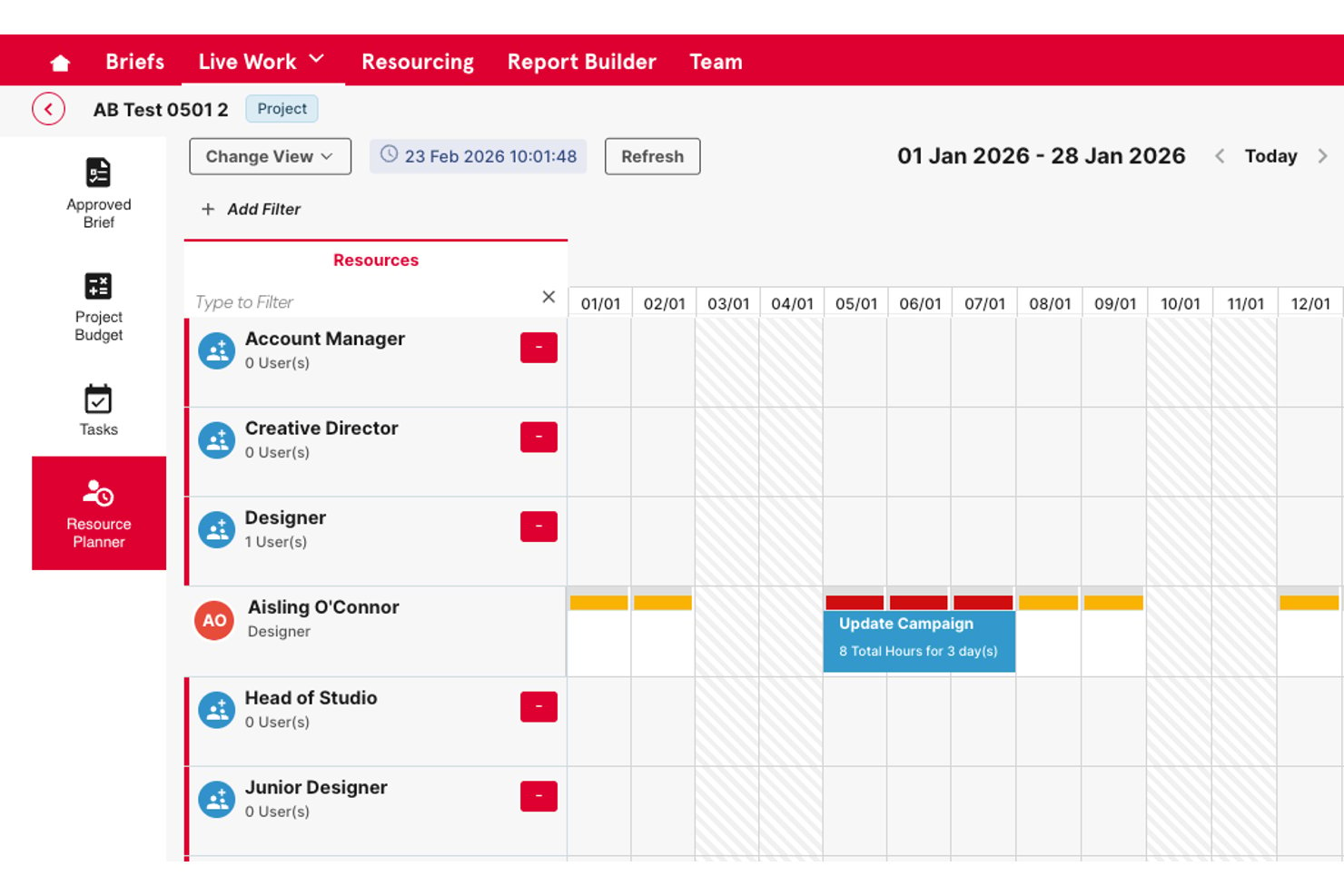
Screendragon is an enterprise work management platform that combines AI-powered resource scheduling, skills-based capacity planning, demand forecasting, and workflow orchestration for marketing and agency teams.
Who Is Screendragon Best For?
Screendragon is a strong fit for enterprise marketing teams and in-house agencies managing high volumes of work across large, distributed teams (50+ users).
Why I Picked Screendragon
I picked Screendragon as one of the best because its AI-powered resource scheduling goes beyond availability to match people by skill set, which matters when you're running parallel campaign workloads across multiple client accounts. I also like its predictive demand forecasting, which uses historical project data to flag capacity gaps 3-6 months out. In practice, that means I can see a resourcing crunch coming before it derails delivery.
Screendragon Key Features
- No-code workflow builder: Design, automate, and update complex project workflows without coding knowledge.
- Advanced approval routing: Tailor multi-step reviews and approvals with role-based controls and audit trails.
- AI-powered forecasting dashboard: Visualize upcoming resource needs and project demand using real-time and predictive analytics.
- Multi-system integrations: Connect with tools like Jira, Adobe, Salesforce, and Office 365 for live project and asset data sync.
Screendragon Integrations
Screendragon offers native integrations with HubSpot, Microsoft Power BI, Ziflow, Brandfolder, Workato, and Smartsheet. An API is available for custom integrations.
Pros and Cons
Pros:
- Handles high-volume enterprise workloads well
- Real-time capacity dashboards across teams
- Strong skills-based resource scheduling for agencies
Cons:
- AI features less mature than dedicated platforms
- Setup requires significant configuration time

Best for linking bid pipeline to staffing
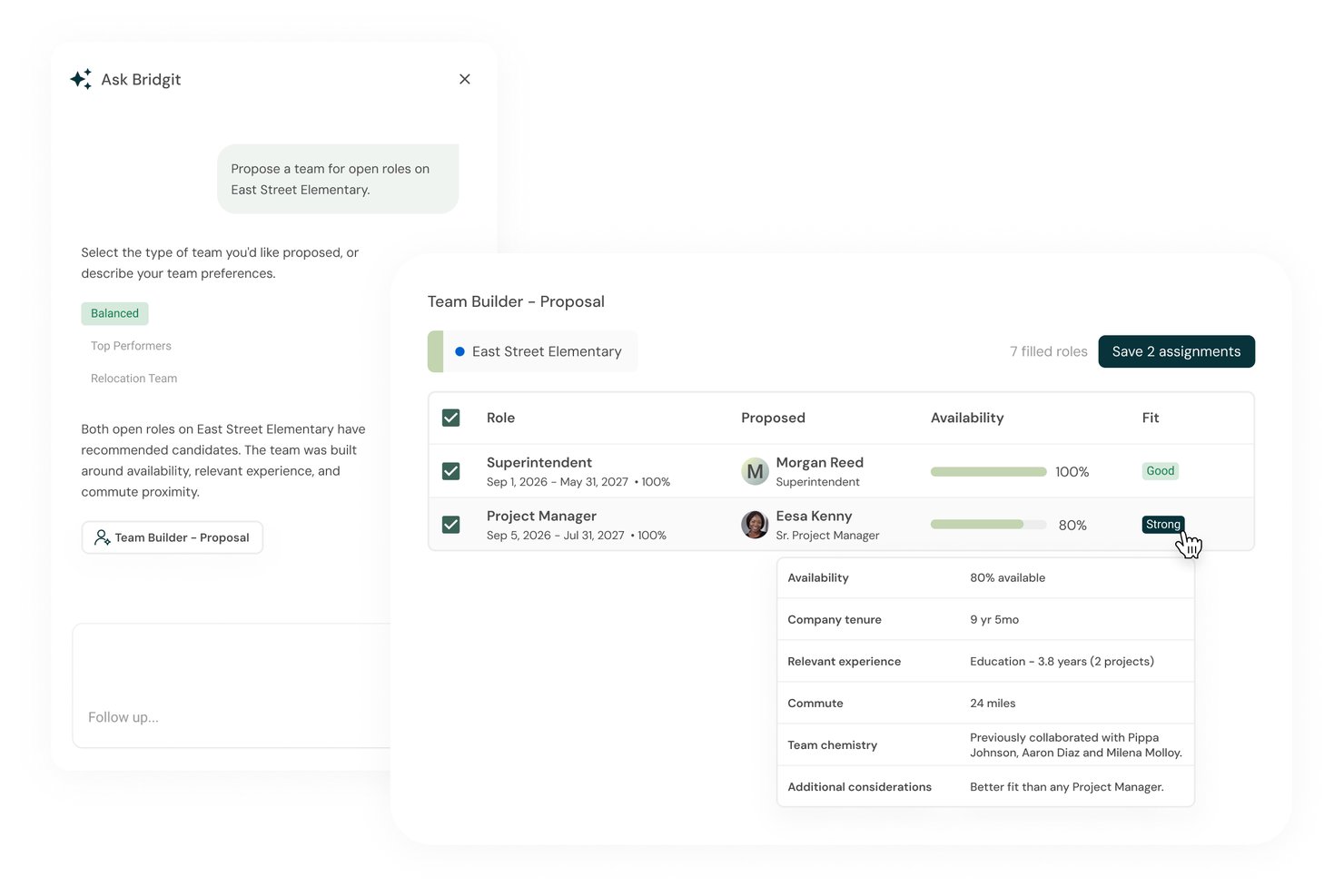
Bridgit is a construction-focused workforce planning platform that combines project staffing, supply-and-demand forecasting, skills-based matching, scenario planning, and AI-powered reporting to help contractors manage labor capacity across their project pipeline.
Who Is Bridgit Best For?
Bridgit is built for construction contractors whose workforce planning starts with the bid pipeline—particularly general contractors managing project pursuits alongside active staffing.
Why I Picked Bridgit
I picked Bridgit as one of the best because it's the only tool on my list that treats your bid pipeline as the starting point for capacity planning. When your team wins a pursuit, Bridgit's Scenario Planning lets you model how that project affects your staffing picture before you've committed a single person, and Smart Suggestions then ranks available staff by availability, proximity to the job site, and relevant project experience to fill those roles fast.
Bridgit Key Features
- Supply-and-demand forecasting: Compares your available workforce against active and upcoming project needs across a selectable 1- to 5-year timeframe.
- Bench Cost reporting: Calculates the dollar value of unallocated time by month using each team member's hourly cost rate, with filtering by people and project attributes.
- Certification tracking: Stores credentials with expiration dates, configurable warning windows, and supporting documents attached directly to staff profiles.
- Ask Bridgit: Answers plain-language questions about team availability, role history, and project experience, with support for follow-up questions and agent prompts.
Bridgit Integrations
Bridgit offers native integrations with Salesforce, HubSpot, Workday, BambooHR, UKG, Procore, Autodesk Build, and Snowflake. Its open API supports custom connections for projects, people, assignments, and forecasts.
Pros and Cons
Pros:
- Candidate rankings weigh availability, experience, and commute
- Gantt views clarify cross-project staffing needs
- Pursuit scenarios reveal future staffing gaps
Cons:
- Recommendations flag overload but don’t prevent it
- HRIS changes can still require manual updates

Mosaic
Best for tying staffing to project margin
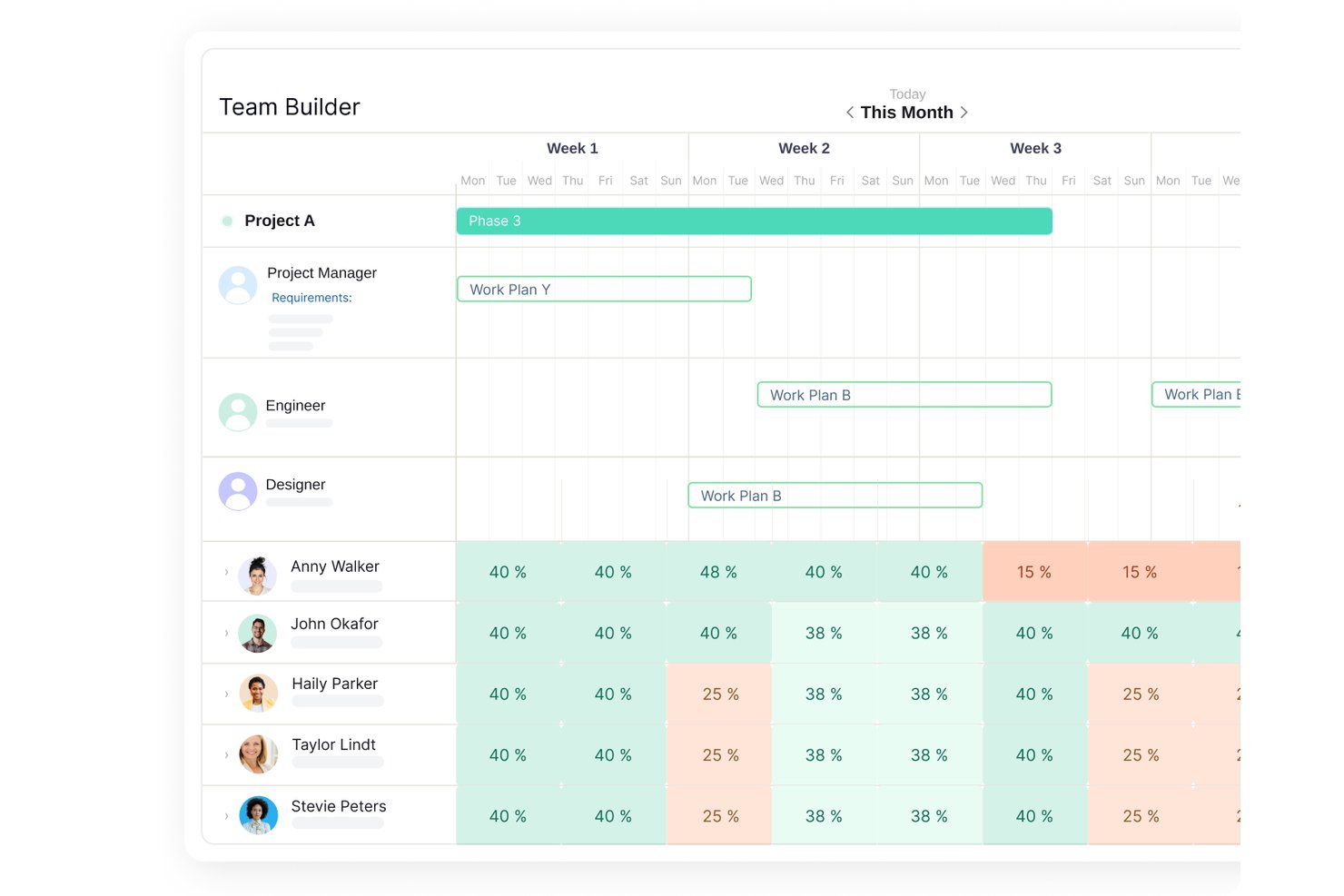
Mosaic is an AI-powered resource and capacity planning platform that combines workload forecasting, project staffing, budget tracking, and automated planning briefs in one place.
Who Is Mosaic Best For?
Mosaic is a strong fit for delivery and program managers at professional services firms who need to connect project staffing decisions directly to budget and margin outcomes.
Why I Picked Mosaic
I picked Mosaic as one of the best because it's the only tool on my list that ties capacity planning directly to project margin. The Profit Margin Report calculates margin from fee, budget, and actual time spent, and flags negative results in real time. Pair that with the Role Demand Report, which shows hiring needs in FTE equivalents before gaps hit delivery, and you get a clear line from staffing decisions to financial outcomes.
Mosaic Key Features
- Chello planning assistant: Ask questions about staffing, workload, deadlines, and project budgets directly in Mosaic or Microsoft Teams.
- Workload Report: Compare planned hours against capacity to surface over- and under-allocation across individual members, projects, or teams.
- Tentative work plans: Add placeholder assignments to the Planner to model upcoming project needs without committing resources.
- Skills Report: Rate team members from 1–5 across custom skill categories to support role matching and staffing decisions.
Mosaic Integrations
Mosaic integrations include HubSpot, Jira, NetSuite, Oracle, Procore, Workday, and Xero. It also provides an HTTP API with GET, POST, PUT, and DELETE operations, plus webhooks for custom integrations.
Pros and Cons
Pros:
- AI briefs flag stale plans and risks
- Workload reports expose overbooking and role gaps
- Margin reports tie staffing to project profitability
Cons:
- Scenario tools lack documented multi-scenario comparisons
- Role forecasts lack documented predictive modeling
Best for portfolio capacity and budget choices
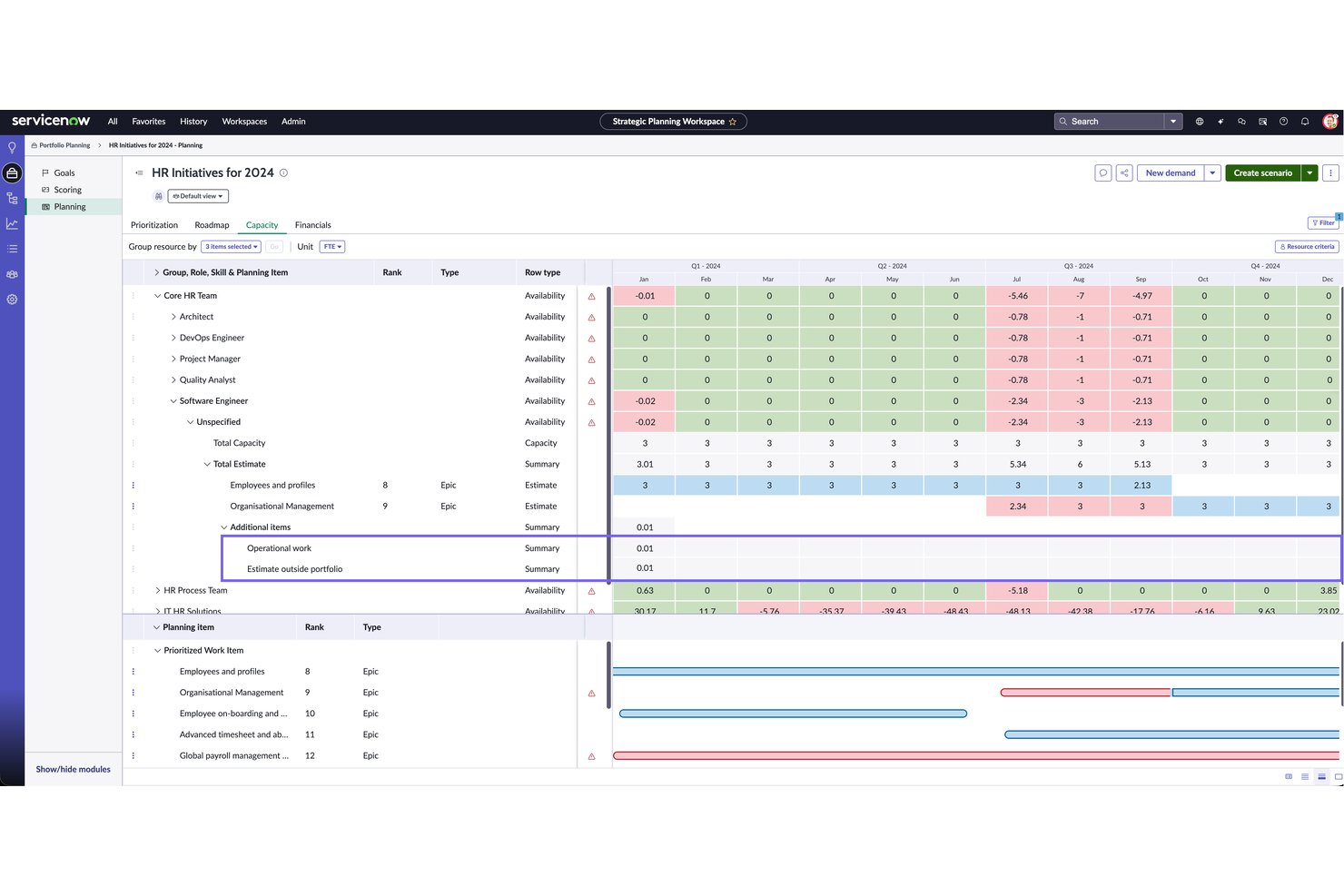
ServiceNow Strategic Portfolio Management is an enterprise portfolio management platform that connects strategic planning, demand management, and resource capacity planning with AI-assisted resource matching and scenario modeling tools.
Who Is ServiceNow Strategic Portfolio Management Best For?
ServiceNow Strategic Portfolio Management is a strong fit for enterprise program managers and portfolio leaders who need to connect resource capacity decisions directly to strategic investment priorities.
Why I Picked ServiceNow Strategic Portfolio Management
I picked ServiceNow Strategic Portfolio Management as one of the best because it's one of the few tools that lets you run side-by-side portfolio scenarios with real budget comparisons baked in, so you're not just modeling resource tradeoffs but also seeing the monetary impact of prioritizing one set of initiatives over another. The Resource Management Workspace surfaces capacity heatmaps, over-allocation flags, and unassigned work in one view, and the AI-assisted Resource Finder ranks candidates by skill, availability, and workload balance when Now Assist is enabled.
ServiceNow Strategic Portfolio Management Key Features
- Portfolio Planning scenarios: Build multiple what-if scenarios, adjust items and dates, and approve one as the live plan without disrupting the current portfolio.
- Demand pipeline management: Capture and assess business and IT requests in a centralized workspace, then transition approved demands directly into projects for execution.
- Goals Framework: Connect individual projects and initiatives to broader organizational strategy, supporting alignment across teams and planning cycles.
- Role-based resource boards: Filter and group resource assignments by group, role, skill, owner, or project, and view allocations weekly or monthly in hours, FTE, or person days.
ServiceNow Strategic Portfolio Management Integrations
Native integrations are not clearly documented. ServiceNow Strategic Portfolio Management offers an API for custom integrations.
Pros and Cons
Pros:
- AI ranks resource matches by skills and availability
- Heatmaps flag overloads and unassigned work
- Portfolio scenarios compare budget trade-offs
Cons:
- No documented proactive capacity alerts or scheduled reports
- Capacity details require manual regeneration

BigTime
Best for professional services

BigTime is a time and billing software tailored for professional services firms, offering tools for time tracking, invoicing, and project management. It caters to consulting, accounting, and engineering firms, providing AI-driven insights to optimize billing and resource allocation.
Why I picked BigTime: BigTime excels in serving professional services firms with its AI-driven billing and project tracking capabilities. Its AI features include predictive billing insights that help you forecast revenue and manage cash flow effectively. This ensures your team can focus on delivering services without worrying about financial management. With BigTime, you can allocate resources efficiently and maintain project profitability.
Standout features & integrations:
Features include advanced time tracking that helps your team capture billable hours accurately. The invoicing tool streamlines billing processes and ensures timely payments. The project management feature provides a complete view of project progress and resource utilization.
Integrations include QuickBooks, Salesforce, Slack, Zapier, Google Workspace, Microsoft Teams, Xero, HubSpot, Jira, and Asana.
Pros and Cons
Pros:
- Efficient resource allocation
- Advanced time tracking
- Predictive billing insights
Cons:
- May require specialized training
- Initial setup complexity

Wrike
Best for enterprise project management
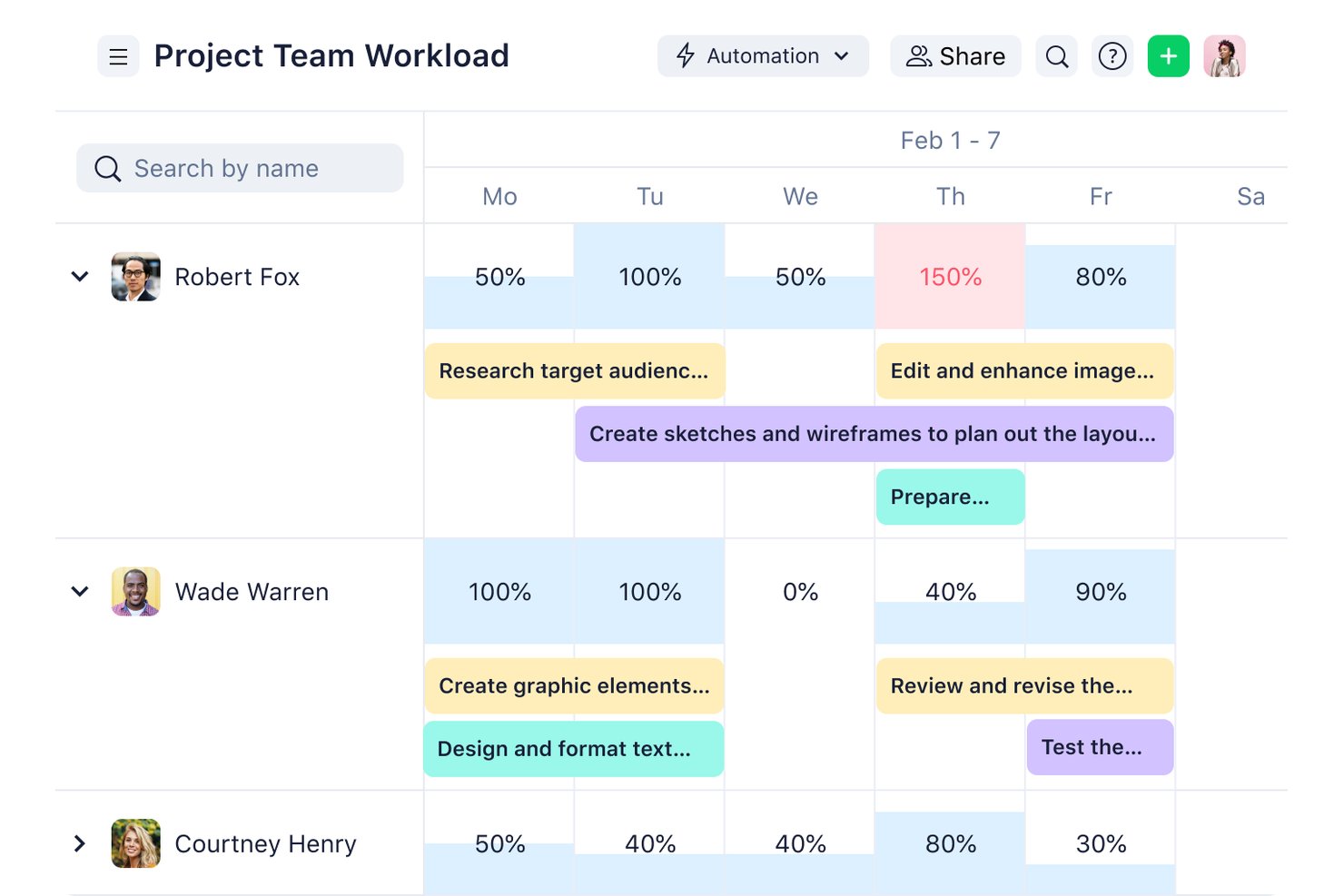
Wrike is a work management platform with AI-assisted resource allocation, workload charts, skills-based assignee matching, and capacity planning tools built for managing projects and teams at scale.
Who Is Wrike Best For?
Wrike is a strong fit for enterprise project and program managers who need to coordinate resource allocation, workload visibility, and capacity planning across large, cross-functional teams.
Why I Picked Wrike
I picked Wrike as one of the best because its workload charts and department allocation dashboard give enterprise teams a real, live picture of capacity before commitments are made—showing exactly which job roles are over-allocated and where hours are available across the portfolio. I also like that the AI-assisted MCP staffing tool proposes assignees based on skills, workload, and availability, and explains its reasoning so you can push back or adjust before anything is confirmed.
Wrike Key Features
- Resource bookings: Reserve a specific team member or job role, estimate project hours, and assess that resource's bandwidth before making a commitment.
- Assignee recommendations: Rank potential assignees by matching job roles and custom-field attributes, with availability indicators that account for active tasks, bookings, public holidays, and scheduled time off.
- Wrike Copilot: Ask natural-language questions about work and team utilization and get answers drawn from live project data.
- 400+ pre-built native integrations: Connect Wrike to tools like Slack, Jira, Salesforce, Tableau, and more, plus an open REST API and Wrike Integrate for custom no-code workflows.
Wrike Integrations
Wrike offers 400+ pre-built native integrations, including Slack, Jira, Salesforce, Google Calendar, and Tableau, supporting capacity planning and pipeline forecasting. It also provides an open REST API and Wrike Integrate for custom no-code workflows.
Pros and Cons
Pros:
- Reviewers value dashboards for progress visibility
- Staffing recommendations explain skill and availability matches
- Workload charts flag team over-allocation
Cons:
- Reviewers report setup complexity and reporting workarounds
- Forecasting lacks continuous resource-specific updates
New Product Updates from Wrike

Wrike Redesigns Workspace Search With New Filters
Wrike introduces a redesigned Workspace Search interface with recent search shortcuts, item type and location filters, and parent-task context. These updates help users find relevant work items and navigate search results efficiently. For more information, visit Wrike’s official site.
 .

Epicflow
Best for AI-driven capacity planning
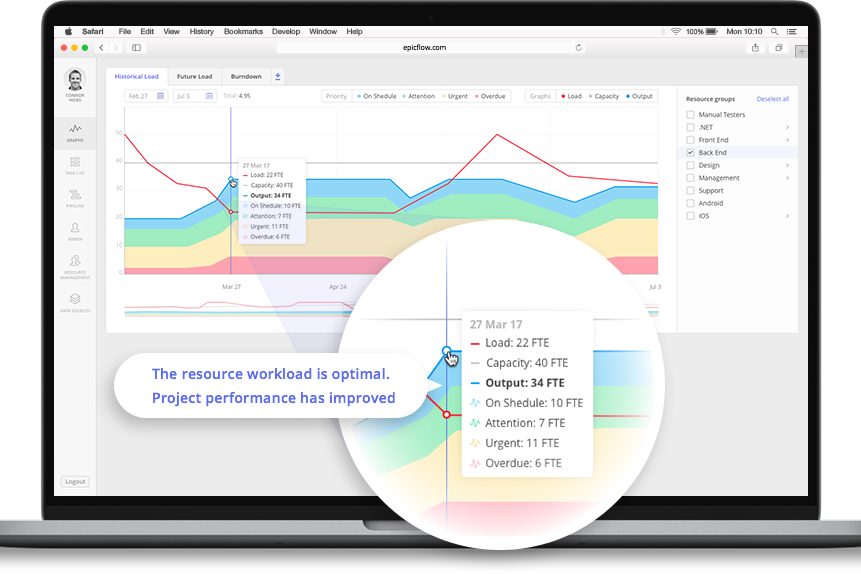
For businesses in need of an AI-powered solution to streamline capacity planning, Epicflow offers a sophisticated tool tailored for project managers and executives across industries like aerospace, telecommunications, and healthcare. This software addresses the challenge of optimizing resource allocation and ensures projects are delivered on time and within budget. By leveraging real-time data-driven decision-making, organizations can enhance project efficiency and profitability.
Why I Picked Epicflow
I picked Epicflow because of its unique AI-driven capabilities that directly cater to the needs of capacity planning. Its predictive analytics feature allows you to foresee potential project bottlenecks, ensuring that resources are allocated optimally. The real-time task prioritization ensures your team focuses on tasks that drive project success, while the semi-automated resource allocation feature balances workloads across your team. These functionalities collectively address the common challenge of bridging the gap between resource demand and supply.
Epicflow Key Features
In addition to its standout features, some other capabilities of Epicflow include:
- Virtual Assistant (Epica): This feature provides real-time project updates, assisting you in staying informed about project progress.
- What-if Analysis: Enables you to simulate different scenarios to predict project outcomes and make informed decisions.
- Historical Load Graphs: Offers insights into past project performance to help you understand trends and improve future planning.
- Competence and Attribute Management: Ensures that the right resources are matched to tasks according to their skills and attributes.
Epicflow Integrations
Integrations include Jira, MS Project, Oracle Primavera, and an API for custom integrations.
Pros and Cons
Pros:
- Portfolio-level resource visibility
- Advanced workload balancing tools
- AI-powered predictive analytics
Cons:
- Advanced features may require training
- Minimum 20-seat requirement

Kantata
Best for industry-specific solutions
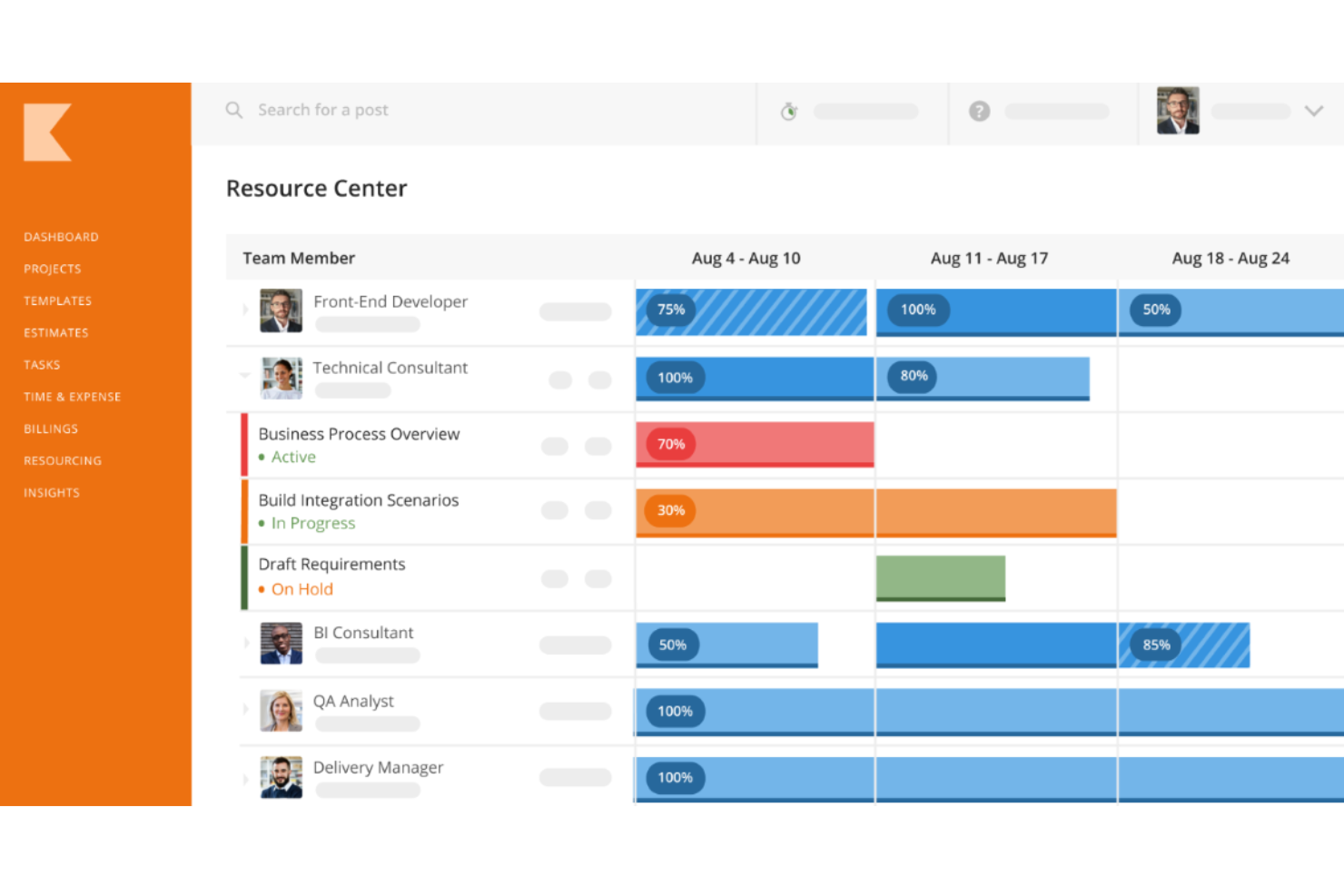
Kantata is a professional services automation software built for industries like consulting and IT services. It focuses on project management, resource planning, and financial management, leveraging AI to tailor solutions for specific industry needs.
Why I picked Kantata: Kantata is distinguished by its industry-specific solutions, offering AI-driven insights to customize workflows and project management practices. Its AI features include predictive resource allocation and tailored project templates that align with industry standards. This helps your team efficiently manage resources while adhering to industry-specific requirements. With Kantata, you can ensure that your projects align with best practices and achieve desired outcomes.
Standout features & integrations:
Features include advanced project scheduling that helps you align timelines with resource availability. The financial management tool provides insights into project profitability and cost control. The reporting feature offers customizable reports to suit your industry needs.
Integrations include Salesforce, QuickBooks, Xero, Slack, Microsoft Teams, Google Workspace, HubSpot, Jira, Asana, and Trello.
Pros and Cons
Pros:
- Customizable reporting features
- Predictive resource allocation
- Tailored project templates
Cons:
- May require industry-specific training
- Complexity in initial setup
New Product Updates from Kantata

Kantata Adds Access Group Change History
Kantata adds Access Groups History, letting account administrators track changes to group details, membership, and permissions in Recent History. The update also makes these events available through the Subscribed Events API for broader monitoring. For more information, visit Kantata’s official site.
 .
Diğer Yapay Zekâ Kapasite Planlama Yazılımları
Kısa listeme giremeyen ancak yine de göz atmaya değer bazı ek yapay zekâ kapasite planlama yazılımı seçenekleri şunlardır:
- Saviom
For pipeline-aware margin forecasting
- Retain
For specialist-skill capacity planning
- ClickUp
For task customization
- Anaplan
For linking capacity to financial plans
- VOGSY
For Google Workspace users
- Birdview
For project visibility
- Rocketlane
For auto-assigning resources
- NICE Workforce Management
For five-year contact center staffing
- Tempus Resource
For sales pipeline-driven staffing plans


How I Evaluate AI Capacity Planning Software
To make this list, AI must support project work, like forecasting demand and matching people to availability. From there, I evaluate three things. Core functionality carries most weight, like workload tracking and skills matching. Then I look at standout features, like explainable AI recommendations, and what a tool offers beyond its feature set, like project-history data quality.
Core Functionality (Table Stakes For This List)
When I'm selecting tools for my list, I score each one on a scale from 0 (does not offer the functionality) to 5 (excels in this area) for each core functionality listed below. I then convert the total into a percentage to help assess each tool's overall fit, with extra weight on any functionalities I’ve deemed essential.
- Predictive Demand Forecasting (Essential): I look for forecasts that use project history and current bookings to flag likely demand shifts before teams commit to new client work.
- Resource Allocation (Essential): Recommendations should account for skills, availability, and existing assignments when a new project overlaps with delivery deadlines.
- Scenario Modeling: I check whether planners can compare staffing, scope, or timeline changes and see how each scenario shifts team capacity.
- Capacity Risk Detection: The tool should surface likely overloads, idle capacity, and bottlenecks early enough to adjust assignments or delivery plans.
- Skills & Availability: I evaluate whether role and skill data can be matched against availability, such as finding a designer for a near-term project.
- Automated Insights: Look for alerts or summaries that explain utilization trends and capacity risks without requiring manual report assembly.
Once I have a list of tools that meet the criteria, I consider what sets each platform apart.
Differentiating Factors (What Sets Vendors Apart)
Here's how I compare and contrast different vendors:
Standout Features
I look for bench and burnout alerts that flag underutilized or overloaded team members before delivery risk builds. I also check whether the tool ties resource decisions to project margins through built-in billable-rate and profitability calculations. Hiring and pipeline planning matters too—tools like Kantata and Forecast translate demand gaps into headcount recommendations based on pipeline stages.
Beyond Features
I check how each vendor handles data migration and historical depth, since AI forecasting falls flat without clean timesheet and project data to learn from. Integration breadth matters just as much—tools with bi-directional connections to your PSA, HRIS, and billing systems keep capacity insights current as assignments shift. I also evaluate change management support, like embedded guidance and training resources, because teams used to spreadsheets won't trust AI recommendations overnight.
Yapay Zekâ Kapasite Planlama Yazılımı Nasıl Seçilir?
Uzun özellik listeleri ve karmaşık fiyatlandırma yapılarına takılıp kalmak kolaydır. Kendinize özgü yazılım seçim sürecinizi yürütürken odağınızı korumanıza yardımcı olmak için göz önünde bulundurmanız gereken faktörleri içeren bir kontrol listesi hazırladım:
| Faktör | Göz önünde bulundurulması gerekenler |
|---|---|
| Ölçeklenebilirlik | Yazılım, ekibinizin ihtiyaçlarıyla birlikte gelişebilir mi? Performans sorunları yaşamadan artan veri hacmini ve kullanıcı sayısını işleyip işleyemeyeceğini değerlendirin. |
| Entegrasyonlar | Araç, mevcut sistemlerinize bağlanabiliyor mu? Kesintisiz veri akışı sağlamak için CRM'niz, ERP'niz veya diğer kritik araçlarınızla uyumluluk arayın. |
| Özelleştirilebilirlik | Yazılımı iş akışlarınıza uyacak şekilde uyarlayabilir misiniz? Ekibinizin özel süreçlerine uygun olarak panolarda, raporlarda ve kullanıcı izinlerinde değişiklik yapılmasına izin verip vermediğini kontrol edin. |
| Kullanım kolaylığı | Arayüz ekibiniz için sezgisel mi? Benimsenme sürecini yavaşlatabilecek ve üretkenliği etkileyebilecek dik öğrenme eğrilerine sahip araçlardan kaçının. |
| Uygulama ve işe alıştırma | Başlamak ne kadar sürecek? Ekibinizi çalışır duruma getirmek için eğitim materyalleri ve destek de dâhil olmak üzere gereken kurulum süresini ve kaynakları değerlendirin. |
| Maliyet | Fiyatlandırma bütçenize uygun mu? Sürprizlerle karşılaşmamak için ek özelliklere ilişkin gizli ücretler veya bedeller de dâhil olmak üzere hem başlangıç hem de devam eden maliyetleri değerlendirin. |
| Güvenlik önlemleri | Veri koruma ihtiyaçlarınız karşılanıyor mu? Yazılımın GDPR veya HIPAA gibi sektör standartlarına uyduğundan ve şifreleme ile erişim denetimleri sunduğundan emin olun. |
| Destek erişilebilirliği | Gerektiğinde yardım alabilecek misiniz? Güvenilir yardım alabilmek için 7/24 destek seçeneklerini, yanıt sürelerini ve sohbet, e-posta veya telefon gibi mevcut kanalları kontrol edin. |
Yapay Zekâ Kapasite Planlama Yazılımı Nedir?
Yapay zekâ kapasite planlama yazılımı, kaynak tahsisini ve proje yönetimini optimize etmek için yapay zekâ kullanan bir araçtır. Genellikle karar alma süreçlerini geliştirmek ve verimliliği artırmak amacıyla proje yöneticileri, BT profesyonelleri ve operasyon ekipleri tarafından kullanılır. Tahmine dayalı analizler, otomatik kaynak önerileri ve gerçek zamanlı veri analizi, proje ihtiyaçlarının öngörülmesine ve planların buna göre ayarlanmasına yardımcı olur.
Bu araçlar, kaynakların verimli kullanılmasını sağlayarak, maliyetleri azaltarak ve proje sonuçlarını iyileştirerek önemli değer sunar.
Yapay Zekâ Kapasite Planlama Yazılımının Özellikleri
Yapay zekâ kapasite planlama yazılımı seçerken aşağıdaki temel özelliklere dikkat edin:
- Tahmine dayalı analiz: Gelecekteki kapasiteyi ve kaynak ihtiyaçlarını öngörmek için talep tahmini olarak bilinen geçmiş verileri kullanarak ekiplerin kaynakları verimli bir şekilde tahsis etmesine yardımcı olur.
- Otomatik kaynak önerileri: Proje gereksinimlerine ve ekip yetkinliklerine göre en uygun kaynak tahsislerini önerir.
- Gerçek zamanlı veri analizi: Proje performansına ilişkin güncel bilgiler sunarak hızlı ayarlamalar yapılmasını ve bilinçli kararlar alınmasını sağlar.
- Senaryo planlama: Kullanıcıların olası sonuçları ve riskleri anlamak için farklı “ne olurdu” proje senaryolarını simüle etmesine olanak tanır.
- Yapay zekâ destekli görev planlama: Kaynak kullanılabilirliğindeki ve görev önceliklerindeki değişikliklere göre proje zaman çizelgelerini otomatik olarak ayarlar.
- Özelleştirilebilir panolar: Kullanıcıların veri görünümlerini kendi özel ihtiyaçlarıyla ilgili temel ölçümleri ve içgörüleri öne çıkaracak şekilde uyarlamasını sağlar.
- Üçüncü taraf araçlarla entegrasyon: Birden fazla platform arasında tutarlı veri akışı ve iletişim sağlayarak genel verimliliği artırır.
- Yapay zekâ destekli raporlama: Kaynak kullanımına ve proje ilerlemesine ilişkin içgörüler sunan ayrıntılı raporlar oluşturur.
- Uyumluluk izleme: Uyumluluk kontrollerini ve raporlamayı otomatikleştirerek sektörel düzenlemelere uyulmasını sağlar.
- Makine öğrenimi yetenekleri: Geçmiş proje verilerinden ve sonuçlarından öğrenerek kaynak planlama doğruluğunu sürekli olarak geliştirir.
Yapay Zekâ Kapasite Planlama Yazılımının Faydaları
Yapay zekâ kapasite planlama yazılımının uygulanması, ekibiniz ve işletmeniz için çeşitli faydalar sağlar. Yararlanabileceğiniz faydalardan bazıları şunlardır:
- İyileştirilmiş kaynak tahsisi: Yapay zekâ destekli kaynak önerileri, ekip üyelerinin becerileri ve uygunluklarıyla örtüşen görevlere atanmasını sağlayarak üretkenliği ve kaynak kapasitesini optimize eder.
- Geliştirilmiş karar alma: Tahmine dayalı analizler, gelecekteki kaynak ihtiyaçlarına ilişkin içgörüler sunarak bilinçli ve veriye dayalı kararlar alınmasına olanak tanır.
- Artan verimlilik: Otomatik görev planlama ve gerçek zamanlı veri analizi, ekiplerin son dakika değişikliklerine hızla uyum sağlamasına, projeleri planlandığı şekilde sürdürmesine ve operasyonel verimliliği korumasına yardımcı olur.
- Maliyet tasarrufu: Doğru tahmin ve kaynak kullanımı israfı azaltır ve kaynakların yeterince kullanılmayabileceği durumlarda aşırı tahsisi önleyerek işletmenizin tasarruf etmesini sağlar.
- Daha iyi proje sonuçları: Senaryo planlama araçları, ekiplerin olası zorlukları öngörmesine ve stratejileri buna göre ayarlamasına olanak tanıyarak projelerin başarıyla tamamlanmasını sağlar.
- Uyumluluk güvencesi: Otomatik uyumluluk izleme, projelerin sektörel düzenlemelere uygun kalmasını sağlayarak ceza riskini en aza indirir.
- Sürekli iyileştirme: Makine öğrenimi yetenekleri, geçmiş deneyimlere dayalı olarak doğruluğu ve etkililiği artırarak planlama süreçlerini zaman içinde geliştirir.
Yapay Zekâ Kapasite Planlama Yazılımının Maliyetleri ve Fiyatlandırması
Yapay zekâ kapasite planlama yazılımı seçmek, mevcut çeşitli fiyatlandırma modellerinin ve planların anlaşılmasını gerektirir. Maliyetler özelliklere, ekip büyüklüğüne, eklentilere ve daha fazlasına göre değişir. Aşağıdaki tablo, yapay zekâ kapasite planlama yazılımı çözümlerinde yaygın olarak sunulan planları, ortalama fiyatlarını ve genellikle dahil edilen özellikleri özetlemektedir:
Yapay Zekâ Kapasite Planlama Yazılımı İçin Plan Karşılaştırma Tablosu
| Plan Türü | Ortalama Fiyat | Yaygın Özellikler |
|---|---|---|
| Ücretsiz Plan | $0 | Temel kaynak tahsisi, sınırlı proje yönetimi ve temel raporlama. |
| Kişisel Plan | $10-$30/kullanıcı/ay | Geliştirilmiş görev yönetimi, yapay zekâ destekli içgörüler ve temel entegrasyonlar. |
| İşletme Planı | $30-$75/kullanıcı/ay | Gelişmiş analizler, senaryo planlama ve özelleştirilebilir panolar. |
| Kurumsal Plan | $80-$150/kullanıcı/ay | Tam entegrasyon paketi, uyumluluk izleme ve özel destek. |
Yapay Zekâ Kapasite Planlama Yazılımı SSS
Yapay zekâ kapasite planlama araçları hakkında sık sorulan soruların bazı yanıtlarını burada bulabilirsiniz:
Yapay zekâ kapasite planlama yazılımını mevcut araçlarımla nasıl entegre edebilirim?
Yapay zekâ kapasite planlama yazılımını mevcut araçlarınızla entegre etmek için öncelikle yazılımın CRM veya ERP platformları gibi mevcut sistemlerinizle uyumluluğunu kontrol edin. Bunları bağlamak için sağlanan API’yi veya yerel entegrasyonları kullanın. Gerekirse yönlendirme için yazılımın destek ekibine veya belgelerine başvurun. Deneyimlerime göre, verilerinizin sistemler arasında akışını sağlamak verimliliği önemli ölçüde artırabilir. Veri doğruluğundan emin olmak ve sorunları hızlı bir şekilde ele almak için entegrasyonu kapsamlı biçimde test edin.
Yapay zekâ kapasite planlama yazılımı uzaktan çalışan ekipleri yönetebilir mi?
Evet, yapay zekâ kapasite planlama yazılımı uzaktan çalışan ekipleri etkili bir şekilde yönetebilir. Bu araçlar, ekip üyelerinin farklı konumlardan birlikte çalışmasına olanak tanıyan gerçek zamanlı veri erişimi ve iş birliği özellikleri sunar. Herkesin aynı hedef doğrultusunda ilerlemesini sağlamak için yazılım içindeki proje panolarını ve iletişim araçlarını kullanın. Yapay zekâ destekli içgörüler, iş yüklerinin verimli bir şekilde dağıtılmasına yardımcı olarak uzaktan çalışan ekiplerin üretken kalmasını sağlar. Uzaktan çalışmanın kendine özgü zorluklarına uyum sağlamak için performans ölçümlerini düzenli olarak gözden geçirin ve planları gerektiği şekilde ayarlayın.
Yapay zekâ kapasite planlama yazılımı ne kadar güvenlidir?
Yapay zekâ kapasite planlama yazılımı genellikle güvenlidir, ancak güvenlik gereksinimlerinizi karşıladığını doğrulamanız önemlidir. Şifreleme, erişim denetimleri ve GDPR veya HIPAA gibi sektör standartlarına uyumluluk özelliklerini arayın. Sağlayıcının güvenlik sertifikalarını ve politikalarını değerlendirin. Deneyimlerime göre, güvenlik önlemlerini tedarikçiyle görüşmek ek güvence sağlayabilir. İyi bir uygulama olarak, hassas verileri olası tehditlere karşı korumak için sisteminizi düzenli olarak güncelleyin ve izleyin.