

2026 İçin Mühendisler İçin En İyi 10 Proje Yönetimi Yazılımı

Mühendisler İçin En İyi Proje Yönetimi Yazılımları Kısa Listesi


En iyi mühendislik proje yönetimi yazılımı, projeleri düzenlemenize, ilerlemeyi takip etmenize ve teknik görevleri hiçbir şey gözden kaçmadan koordine etmenize yardımcı olur. Doğru araçla öncelikleri, son tarihleri, sorumlulukları ve iş akışlarını net bir şekilde görebilir; böylece karmaşık mühendislik projelerini daha kolay yönetebilirsiniz.
Proje yönetimindeki deneyimimi ve 3 yılı aşkın yazılım test etme tecrübemi kullanarak onlarca aracı inceledim ve mühendisler için en iyi proje yönetimi yazılımlarından oluşan listemi hazırladım. Belgelendirme, sürüm kontrolü ve sorunsuz iş birliği söz konusu olduğunda benzersiz ihtiyaçlarınızı destekleyen yazılımı güvenle seçmenize yardımcı olacağım.
Why Trust Our Software Recommendations
Our team has been testing and reviewing software since 2012. As project managers ourselves, we know how difficult—and important—it is to choose the right software.
For this guide, we evaluated tools using hands-on testing and independent research, scoring tools using our selection criteria. We also draw on insights from industry thought leaders and practicing project management experts.
Our reviews reflect our human editorial judgment, not a sales pitch.
Expert reviewers:
Mühendisler İçin Proje Yönetimi Yazılımları Karşılaştırma Tablosu
Bu karşılaştırma tablosu, mühendislik proje yönetimi yazılımları arasından en iyi seçimlerimin fiyatlandırma ayrıntılarını özetlemektedir:
| Tool | Starting Price | Website | |
|---|---|---|---|
| Best for project financial insights | 4.5 out of 5 | $17/user/month 14-day free trial | Book Demo |
| Best for dynamic resource allocation | 4.6 out of 5 | €25/user/month 30-day free trial | Website |
| Best for flexible scheduling on a low per-seat cost | 4.8 out of 5 | $9.50/user/month Free plan available | Website |
| Best for automating tasks, workflows, and business insights | 4.3 out of 5 | $10/user/month Free plan + 14-day trial available | Book Demo |
| Best with integrated quality assurance | — | Pricing upon request Free demo available | Website |
| Best for nested task hierarchies on a budget | 4.7 out of 5 | $7.65/user/month Free plan + 30-day free trial available | Website |
| Best for larger organizations with broad project portfolios | 4.5 out of 5 | $10/user/month 14-day free trial | Website |
| Best for Gantt chart visualization | 4.3 out of 5 | Pricing upon request Free plan + 15-day trial + demo available | Website |
| Best for optimizing an engineering project portfolio | 4.7 out of 5 | £679.99 one-time purchase Not available | Website |
| Best for engineering firms that prioritize data security | 4.5 out of 5 | €5.95/user/month Free plan available; 14-day free trial available for Enterprise Cloud and on-premises | Website |


Mühendisler İçin En İyi Proje Yönetimi Yazılımları İncelemeleri
Her aracın mühendisler için diğer proje yönetimi yazılımlarından nasıl ayrıldığını anlamak ve sizin için doğru aracı seçmek için aşağıdaki genel bakışları kullanın.

Scoro
Best for project financial insights

Scoro is a comprehensive work management software designed to simplify business operations by integrating project management, CRM, billing, and reporting into a single platform.
Why I picked Scoro: Scoro offers detailed project planning and tracking capabilities, enabling engineers to manage complex workflows effectively. Its real-time financial insights and resource planning tools ensure that engineering teams can allocate resources efficiently and stay within budget. Additionally, Scoro’s project templates and automation features save time on repetitive tasks.
Another reason Scoro stands out for engineers is its ability to visualize project delivery timelines using Gantt charts. This feature helps in tracking progress and ensuring that project milestones are met on time. The platform’s collaboration tools also facilitate communication among team members, which is crucial for engineering projects that often require input from various stakeholders.
Scoro Standout Features and Integrations
Features include reporting and analytics, quoting and budgeting, sales and CRM, resource planning, retainers, time tracking, invoicing, and cost management.
Integrations include Google Calendar, Xero, QuickBooks, Sage Intacct, Exact Online, Expensify, Stripe, Jira, HubSpot, Salesforce, Google Drive, Dropbox, Okta, Azure AD, and Zapier.
Pros and Cons
Pros:
- Real-time tracking of projects and team progress
- Integrated financial tools
- Comprehensive features for various business operations
Cons:
- Customization options can be complex
- Mobile app is limited compared to web version
New Product Updates from Scoro

Scoro Adds Time Mobile App and ELI Improvements
Scoro adds the Scoro Time mobile app for iOS/Android to track time anywhere and expands ELI with attachments, smarter filtering, and trigger-based actions. For more information, visit Scoro's official site.

Epicflow
Best for dynamic resource allocation
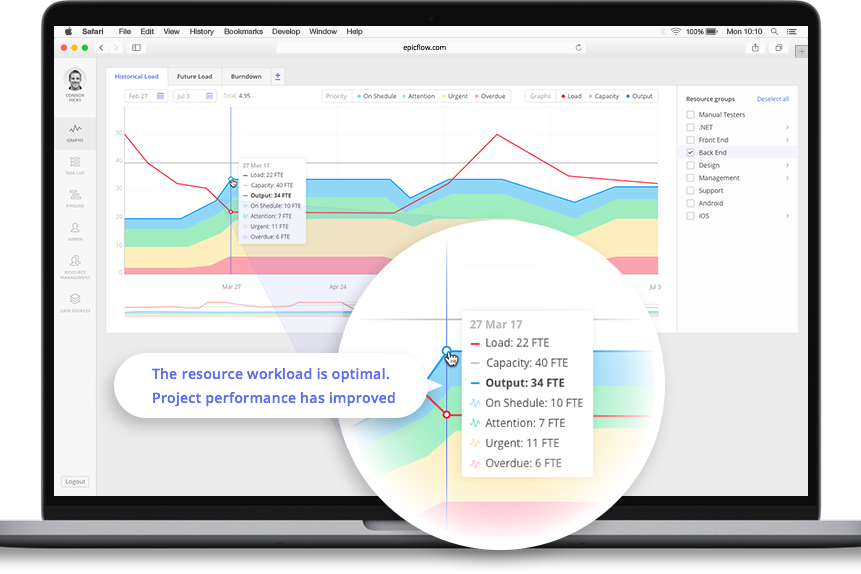
Epicflow is an AI-driven multi-project management and resource scheduling platform with cross-project task prioritization, capacity planning, workload balancing, and competence-based resource allocation built for engineering and complex project environments.
Who Is Epicflow Best For?
Epicflow is a strong fit for mid-to-large engineering teams running multiple concurrent projects who need visibility into shared resource capacity across workstreams.
Why I Picked Epicflow
Epicflow earns its spot on my shortlist because of how it handles resource allocation across concurrent engineering projects. I love the AI-driven Future Load Graph, which shows me exactly where capacity gaps are forming before they become blockers. The What-If scenario analysis lets me test reassignments and timeline shifts without committing to changes, which is something I rely on constantly when engineering timelines shift mid-sprint.
Epicflow Key Features
- Cross-project task prioritization: Epicflow's ML algorithm automatically ranks tasks across all active projects so engineers always know what to work on next.
- Competence-based assignment: Assign tasks by filtering team members on specific skills and attributes, not just availability.
- Historical Load Graph: Review past resource utilization across projects to identify recurring capacity patterns over time.
- Pipeline view: Monitor all active projects in a single portfolio view with real-time status and progress data.
Epicflow Integrations
Epicflow offers a small set of native integrations, including Jira, Microsoft Project, Oracle Primavera, and SAP, with two-way synchronization of data across systems. Custom integrations are available for other project management tools and HRM systems through Epicflow's support team.
Pros and Cons
Pros:
- Built for multi-project shared resource pools
- What-if simulation without disrupting live projects
- Predicts future resource constraints automatically
Cons:
- Requires accurate data input for reliable results
- Some charts and graphs lack clarity

Teamhood
Best for flexible scheduling on a low per-seat cost
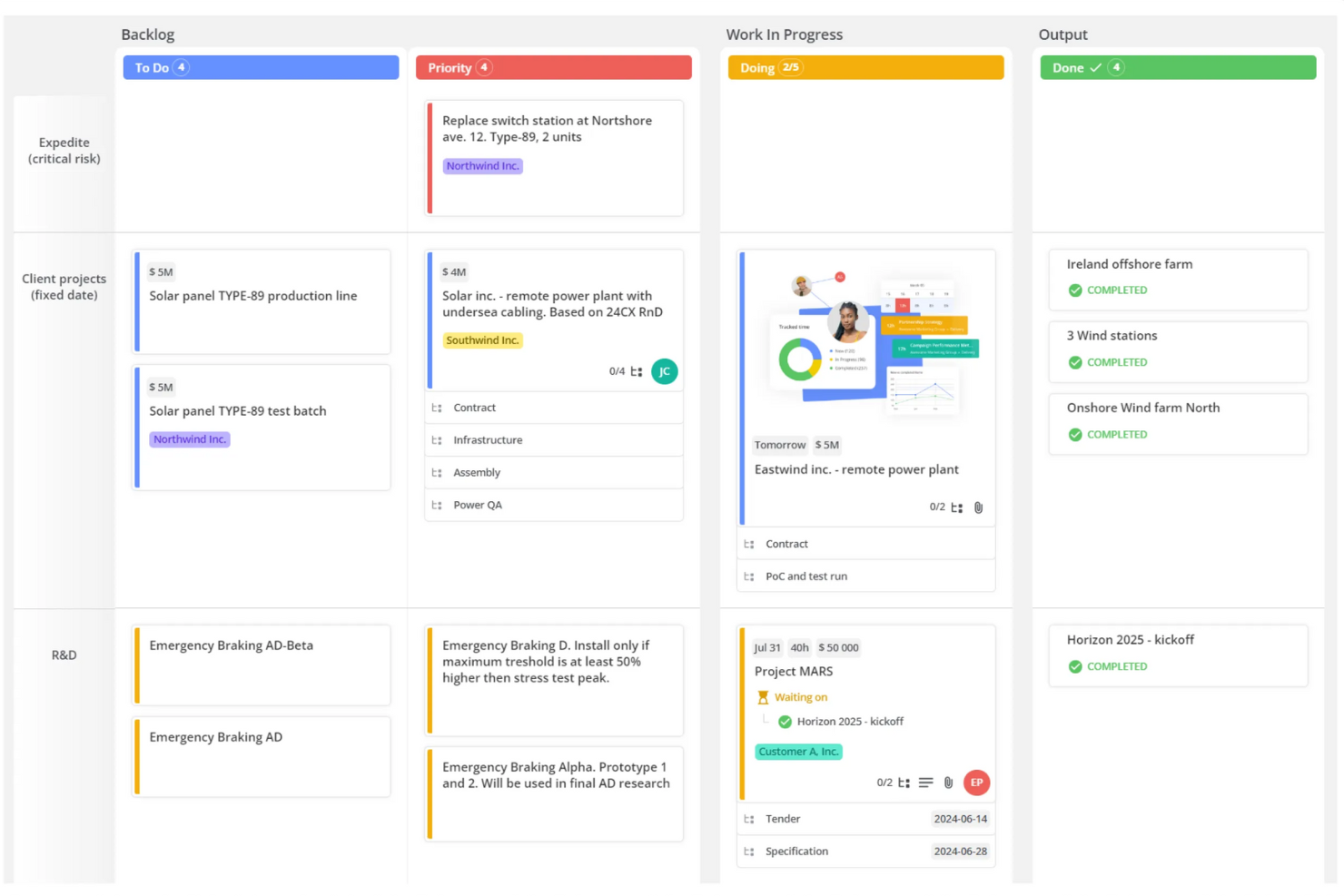
Teamhood is a project management platform with Gantt scheduling, dependency tracking, critical path analysis, capacity planning, and multi-view workspaces designed for engineering and technical teams.
Who Is Teamhood Best For?
Teamhood fits engineering project managers at small-to-midsize firms who need Gantt scheduling and capacity planning without paying high per-seat rates.
Why I Picked Teamhood
I picked Teamhood as one of the best because it gives engineering PMs Gantt scheduling with automatic dependency rescheduling and critical path analysis at $6 per user per month, a price where most competitors strip out resource planning entirely. I particularly like that capacity curves let you front-load or taper hours across a task, so planned work automatically routes around time off without manual adjustment. The portfolio view rolls up hours and progress across every project, which I find genuinely useful when managing multiple concurrent engineering workstreams on a tight budget.
Teamhood Key Features
- Multiple project views: Switch between Gantt, Kanban board, list, schedule, mind map, and timesheet views, all showing the same live data.
- MS Project XML import: Bring existing project plans into Teamhood directly from MS Project XML files to avoid rebuilding schedules from scratch.
- Automation rules: Set triggers and actions to move items, update fields, or notify team members when conditions are met.
- Role-based permissions: Assign custom roles with specific access levels per view, so each team member sees only what's relevant to their work.
Teamhood Integrations
Teamhood’s new platform offers a REST API and webhooks for custom integrations, but no native CAD, BIM, PLM, ERP, or Azure DevOps integrations. Teamhood Classic documents Azure DevOps, SharePoint/OneDrive, Slack, Microsoft Teams, Outlook, Google Calendar, Primavera, and Zapier.
Pros and Cons
Pros:
- Timesheets compare estimates with tracked hours
- Capacity planning accounts for vacations
- Gantt dependencies reschedule downstream work
Cons:
- Browser-only access limits field work
- No drawing revision control

Wrike
Best for automating tasks, workflows, and business insights

Wrike is a cloud-based platform with advanced templates and automation tools that help large engineering teams work efficiently on complex projects.
Why I picked Wrike: Wrike has a range of features that reduce your administrative workload, including automations, use case project templates, and custom task and project approval flows. With dependencies, you can set up the system to assign a task automatically as soon as the previous task is complete. The AI layer analyzes your past project data and uses it to recommend tasks, create subtasks, and predict potential risks.
With its powerful visualization tools, Wrike is ideal for medium and large firms that manage multiple engineering processes. Project managers can easily switch between table, Gantt, and Kanban work views to get a sense of the team's progress. Customizable dashboards make it easier to balance resources, schedules, budgets, employee workloads, and the company-wide project portfolio.
Wrike Standout Features and Integrations
Features include dashboards, automations, mobile and desktop apps, proofing, cross-tagging, Kanban boards, resource planning, Gantt charts, approvals, and dynamic forms.
Integrations include Adobe Creative Cloud, Gmail, Google Drive, Microsoft Teams, Miro, OneDrive, Salesforce,Slack, Tableau, and Zoom. Wrike also enables you to connect through Zapier to unlock thousands of additional integrations, but that may require a separate paid plan.
Pros and Cons
Pros:
- iOS and Android apps
- Multi-language support
- Integrated communication and collaboration tools
Cons:
- Inconsistent customer support
- Steep learning curve
New Product Updates from Wrike

Wrike Adds Advanced Filters to Chart View
Wrike introduces new default filters in Chart view, including relative dates, exclusion conditions, multiple filters per field, and status group filtering. These updates help teams refine project data and reporting. For more information, visit Wrike’s official site.

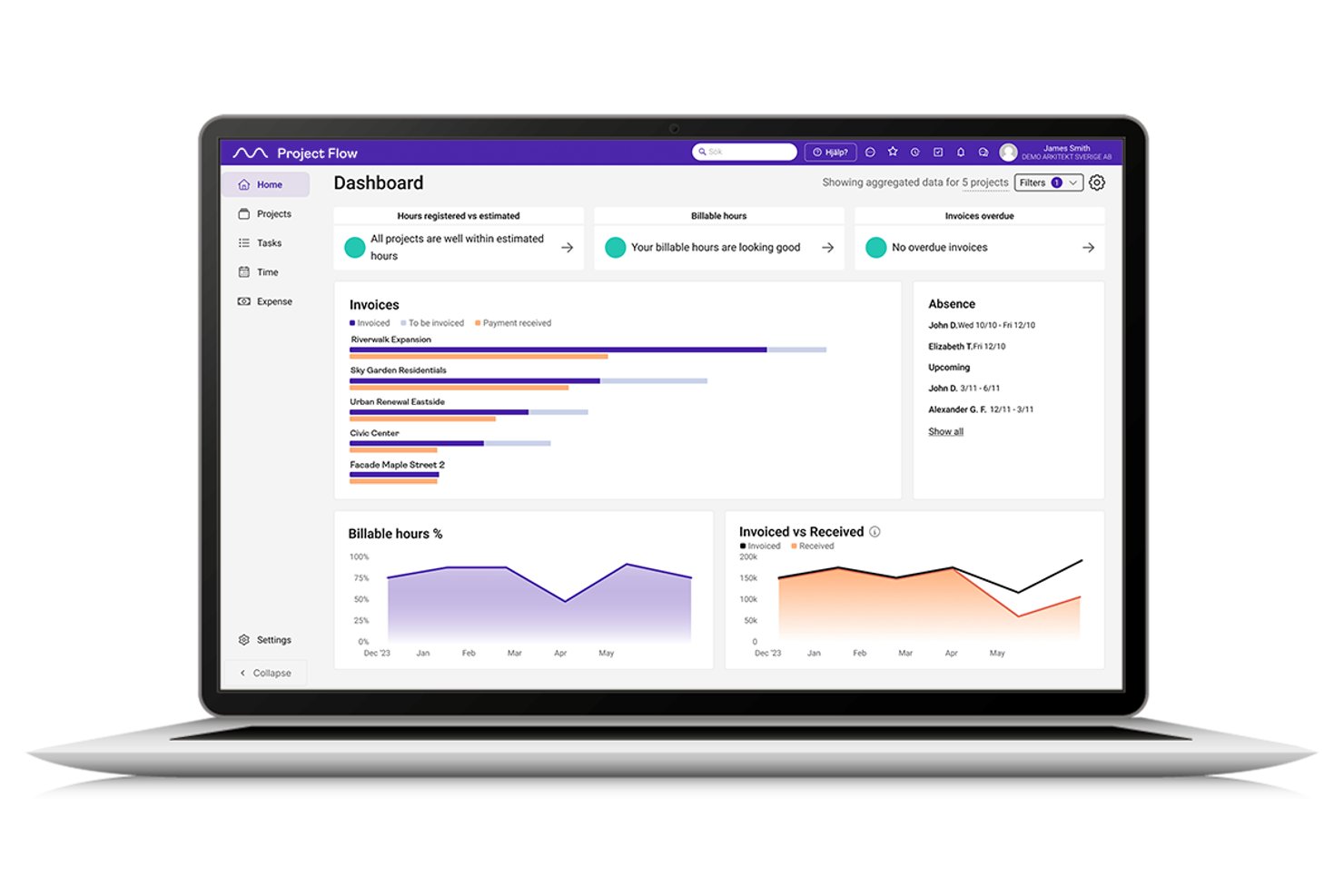
Project Flow by Milient is an engineering and architecture-focused project management platform that combines project planning, time tracking, resource management, budgeting, invoicing, and an integrated quality assurance system in one connected tool.
Who Is Project Flow by Milient Best For?
It's a strong fit for small to mid-size architecture and engineering consultancies that need to manage billable projects, compliance workflows, and team capacity in one platform.
Why I Picked Project Flow by Milient
I picked Project Flow by Milient as one of the best because its Quality System module is purpose-built for how engineering teams actually manage compliance. I can log non-conformities, run risk assessments, and track corrective processes all within the same project view where I'm monitoring budgets and timelines. When a deviation happens on a project, I'm not jumping between a separate QMS and my PM tool. It's all tied to the project record.
Project Flow by Milient Key Features
- Resource management dashboard: View team capacity, skillsets, and workload allocation across current and upcoming projects.
- Project budgeting and forecasting: Build project budgets, track estimates, and monitor spend versus plan throughout project phases.
- Integrated invoicing module: Generate and manage invoices directly from project data and tracked hours within the same environment.
- REST API and third-party integrations: Connect with ERP, accounting, and document management systems to sync project and financial data.
Project Flow by Milient Integrations
Project Flow by Milient offers native integrations with Microsoft SharePoint, Jira, GitHub, Fortnox, Fiken, Xledger, 24SevenOffice, and Microsoft Dynamics 365 Business Central. An API is available for custom integrations.
Pros and Cons
Pros:
- Resource capacity planning across multiple concurrent projects
- Invoicing and budgeting tied directly to project timelines
- Built-in non-conformity management within project records
Cons:
- Primarily built for Scandinavian engineering consultancies
- Gantt scheduling lacks advanced critical path features

Quire
Best for nested task hierarchies on a budget
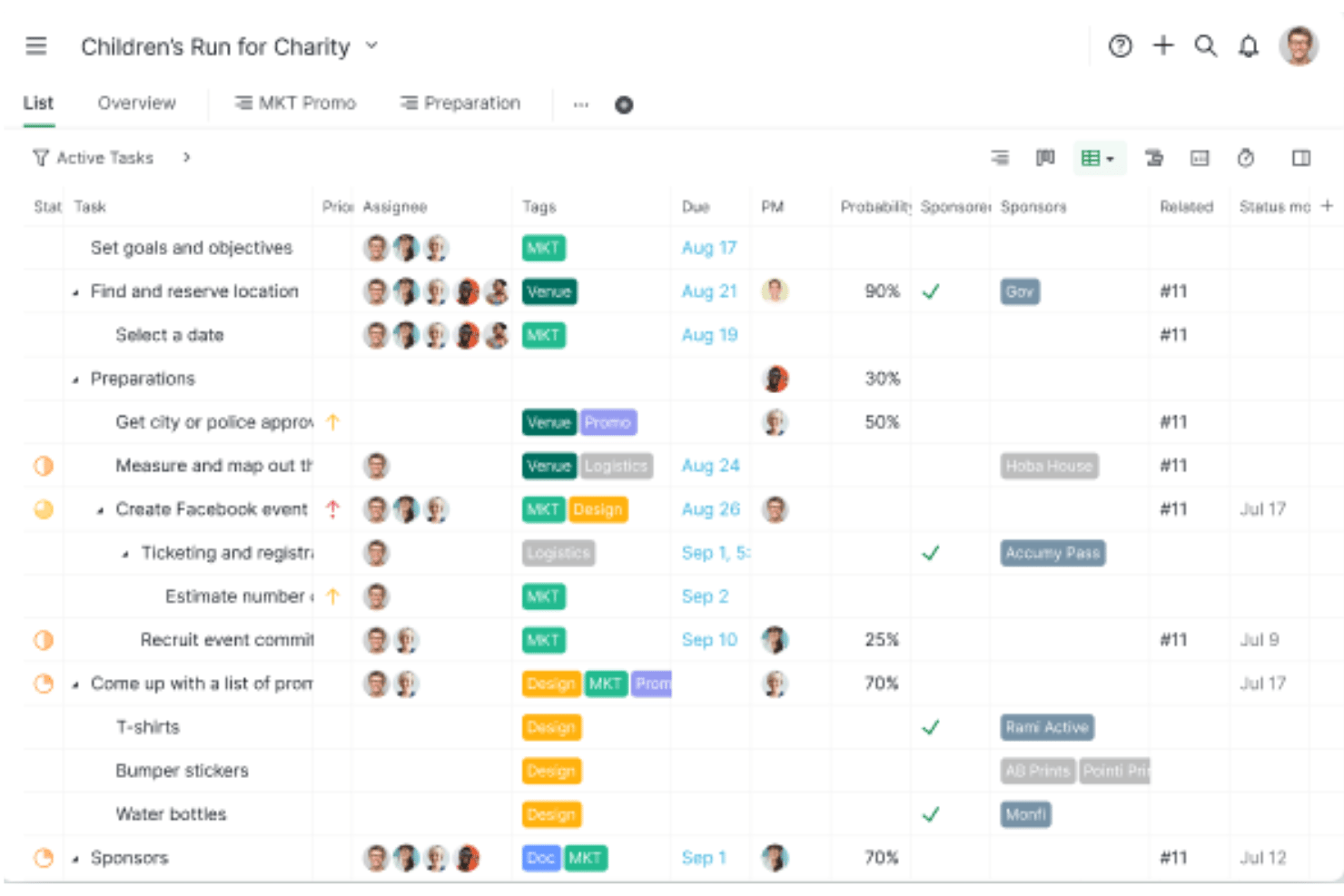
Quire is a project management tool built around an infinite nested task hierarchy, offering Gantt timelines, Kanban boards, multiple project views, and collaboration features like approval tracking, custom fields, and cross-team access.
Who Is Quire Best For?
Quire suits small teams and budget-conscious project managers who need flexible task hierarchies and multi-view project planning without a steep price tag.
Why I Picked Quire
I've included Quire in my top picks because its infinite nested task hierarchy is genuinely one of the best I've seen for breaking down complex engineering work into structured, manageable layers. When you're tracking a multi-phase project with dozens of subtasks per deliverable, Quire's Smart Sublist lets each team member work from a focused personal view without losing the full project context. I also like that the Dynamic Timeline with task dependencies handles sequential workflows clearly, which matters when one engineering milestone blocks the next.
Quire Key Features
- Multi-view project layouts: Switch between list, Kanban, Gantt timeline, table, and calendar views to match how your team tracks work.
- Custom fields with formulas: Add tailored data fields across tasks and use formula logic to calculate values automatically within dashboards.
- Approval tracking: Flag tasks for formal sign-off and monitor pending or completed approvals directly within the task view.
- GitHub integration: Link code commits to specific tasks so engineering teams can connect development activity to project milestones.
Quire Integrations
Quire offers integrations with GitHub, Slack, Microsoft Teams, Google Calendar, Google Drive, Dropbox, and OneDrive. It also provides an Open API and supports Zapier, but no CAD, BIM, PLM, or ERP integrations are documented.
Pros and Cons
Pros:
- Flexible views for task and timeline tracking
- Clean, minimalist interface praised by users
- Infinite nested task hierarchy for complex projects
Cons:
- Lacks engineering document version control
- No critical path or advanced resource planning
New Product Updates from Quire
Quire Adds Read Receipts for Comments
Quire now supports read receipts for comments, helping teams see who has viewed discussion updates and reducing missed responses. For more information, visit Quire's official site.
 .

Celoxis
Best for larger organizations with broad project portfolios
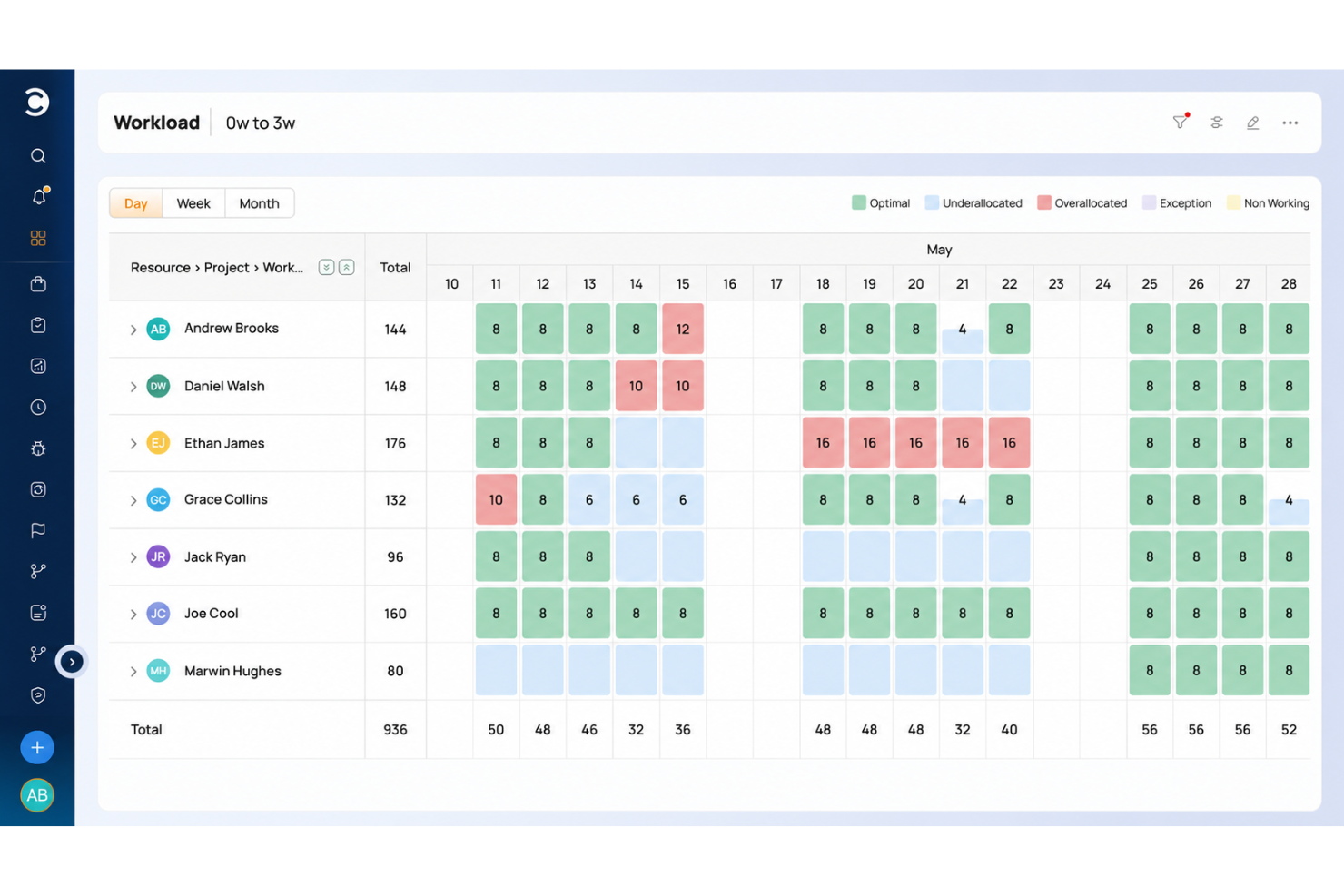
Celoxis helps larger engineering firms track and manage multiple concurrent projects.
Why I picked Celoxis: In addition to the usual project planning and management capabilities, Celoxis offers collaboration tools and custom workflows. Team members and clients can share files, discuss issues, and manage version control on multiple projects.
With its comprehensive feature set and advanced reporting, Celoxis works best for larger organizations. Customizable dashboards show overviews of employee workflows, individual projects, and the company's entire portfolio. When you're scheduling current and upcoming projects, Celoxis' resource management tools automatically account for work shifts, branch locations, and holidays.
Celoxis Standout Features and Integrations
Features include project planning, project management, project tracking, accounting, portfolio management, resource management, reporting, team collaboration, and time tracking.
Integrations include Excel, Google Drive, iCal, JIRA,Microsoft Project, Outlook, QuickBooks Online, Salesforce, Slack, and Trello. You can also use Zapier to integrate your favorite web apps and automate processes.
Pros and Cons
Pros:
- Easy to learn and use
- Cloud service for convenient access
- Integrated time and expense tracking
Cons:
- Limited design control for reports
- Time-consuming team information input

Best for Gantt chart visualization

Zoho Projects provides a dynamic solution for engineers looking to manage their projects with precision and collaboration. Tailored to meet the needs of technical teams, it offers tools that help break down complex tasks, facilitate team communication, and streamline workflow processes. Whether you're dealing with intricate engineering plans or coordinating with multiple stakeholders, Zoho Projects can help you keep everything on track and within budget.
Why I Picked Zoho Projects
I picked Zoho Projects because it excels in providing features that cater specifically to the structured and detail-oriented nature of engineering projects. The Gantt chart is a standout feature, allowing you to visualize project timelines and dependencies with ease. Additionally, the task management system supports complex task hierarchies and dependencies, which are critical for engineering projects that require meticulous planning and execution. These features help address the common challenge of managing multiple project components simultaneously.
Zoho Projects Key Features
In addition to the task management and Gantt chart capabilities, I also found other features that enhance project management for engineers:
- Issue Tracking: This feature allows you to log, track, and resolve issues swiftly, ensuring that project quality is maintained.
- Custom Workflows: Create and automate workflows tailored to your project needs, reducing manual intervention and potential errors.
- Document Management: Store and manage project documents within the platform, making collaboration easier among team members.
- Time Tracking: Use timers and timesheets to accurately track the time spent on various tasks, facilitating better resource allocation and billing.
Zoho Projects Integrations
Integrations include Google Calendar, Google Drive, Microsoft Teams, Microsoft Outlook, Slack, GitHub, Bitbucket, Dropbox, Zoho CRM, and Zoho Desk.
Pros and Cons
Pros:
- Affordable pricing for growing teams
- Built-in time tracking and billing
- Strong automation and workflow customization
Cons:
- Mobile experience less fully featured
- Interface has steeper learning curve
New Product Updates from Zoho Projects

Zoho Projects Adds QuickBooks Online and Xero Integrations
Zoho Projects now connects with QuickBooks Online and Xero, bringing project work and accounting workflows closer together. Manage project-related billing and financial tasks with fewer app switches. For more information, visit Zoho Projects’ official site.
 .
Best for optimizing an engineering project portfolio

Microsoft Project supports project management and offers high-level reporting and portfolio forecasting for engineering firms that manage multiple projects.
Why I picked Microsoft Project: Microsoft Project's advanced portfolio-optimization tools help you evaluate proposals and decide which engineering projects will be most profitable. With modeling features, AI business intelligence insights, and advanced reports, you can choose projects that fit with your current resources, workload, and budget.
If your firm already relies heavily on Microsoft products, Microsoft Project offers a familiar interface, easy collaboration, and smooth integration. Planning tools, Gantt views, and dashboards simplify timelines and resource management for complex engineering projects. The platform supports real-time coauthoring, so dispersed team members can edit task lists, schedules, and projects at the same time.
Microsoft Project Standout Features and Integrations
Features include project management, resource management, portfolio management, project planning templates, waterfall templates, dynamic scheduling, business intelligence, automated workflows, and reporting.
Integrations include Dynamics 365, Microsoft Office, Microsoft SharePoint, Microsoft Teams, and Power BI.
Pros and Cons
Pros:
- Built-in time tracking
- Supports multiple project management methodologies
- Large array of features
Cons:
- No mobile app
- Base plan is cloud-only

OpenProject
Best for engineering firms that prioritize data security
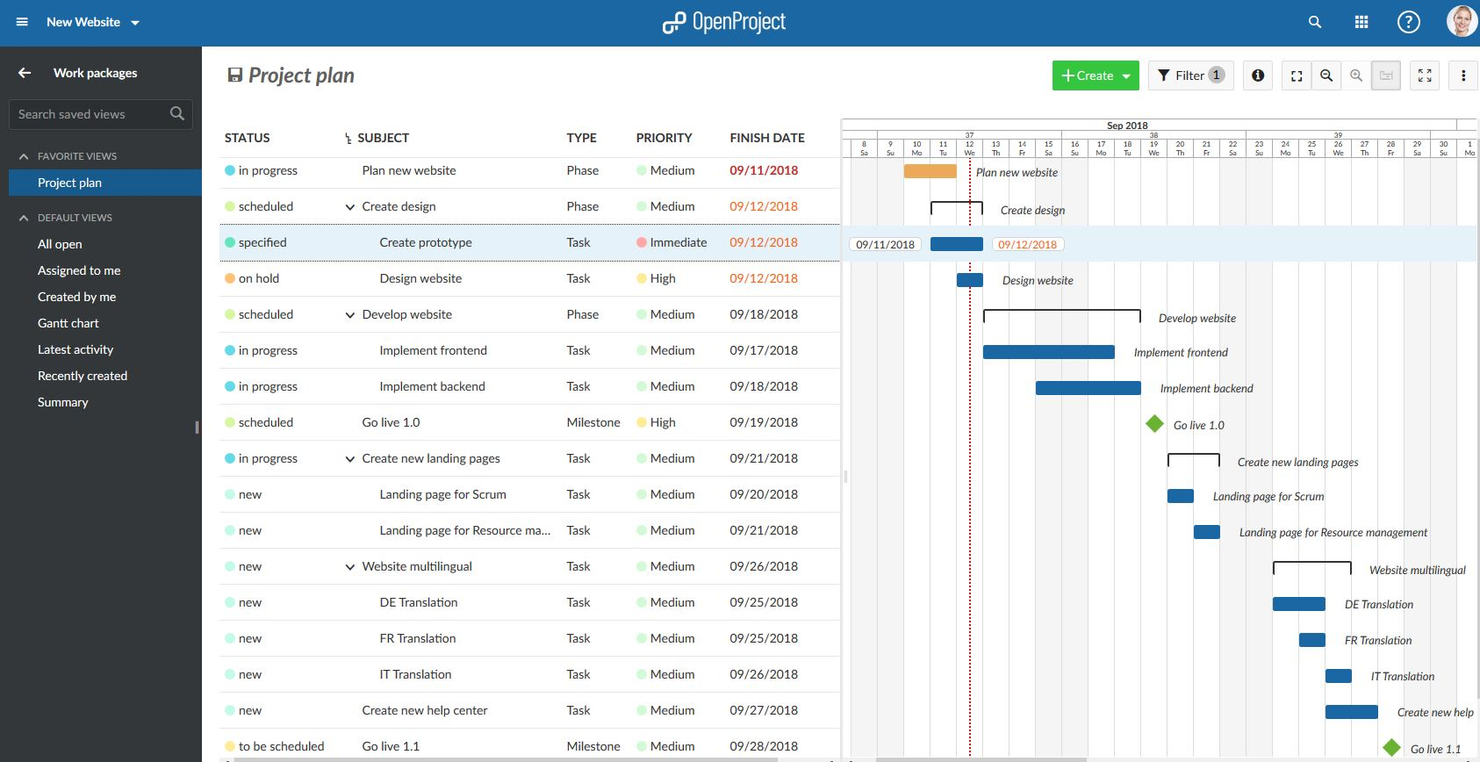
OpenProject is an open-source project management program for security-conscious engineering firms with closely-guarded workflows and strict compliance requirements.
Why I picked OpenProject: OpenProject offers https encryption, two-factor authentication, salted bcrypt password protection, and definition of session runtime to protect your engineering firm's confidential client information and proprietary designs. Choose from a cloud-based platform with secure servers in the EU or an on-premises option for full data control and ownership. Within your organization, role-based access control limits exposure of sensitive information.
With its hierarchical project structure and support for agile, classic, and hybrid project management, OpenProject brings order to long-term engineering projects with large teams and numerous iterations. Features including transparent roles, status notifications, shared timelines, and task lists keep team members accountable. Your employees can access guides and standard procedures using the built-in wikis and forums.
OpenProject Standout Features and Integrations
Features include project planning, project management, portfolio planning, task management, time tracking, collaboration tools, product roadmaps, and custom workflows.
Integrations include Excel, GitHub, Gitlab, Microsoft Project, Testuff, and Toggle.
Pros and Cons
Pros:
- Easy to setup and use
- Open-source for transparency
- Cost reporting and budgeting tools
Cons:
- Limited support for basic plans
- Limited integrations
Mühendisler İçin Diğer Proje Yönetimi Yazılımları
Mühendisler için en iyi proje yönetimi yazılımları listesine giremeyen birkaç seçenek daha şunlardır:
- Monograph
For simplified engineering project planning and budgeting
- BQE Core
For convenient time and expense tracking
- ProjectManager
For mid-size engineering firms with complex projects
- Notion
For centralized management of projects, documents, and information
- Accelo
For end-to-end engineering project management
- Factor A/E
For A&E aligned project workflows
- Smartsheet
For scalability and growth-minded engineering firms
- TaskRay
For Salesforce-integrated project tracking
- monday.com
For fully customizable project management workflows
- Basecamp
For firms with a collaborative engineering process
- Teamwork.com
For project management software with a CRM
- MeisterTask
For improving team productivity
- Trello
For collaborating on tasks, projects, and workflows
- Airtable
For custom databases


How I Evaluate Engineering Project Management Software
I split my evaluation into two layers: the core capabilities—like phase-based scheduling and resource allocation—a tool must have, and the differentiators that set tools apart for engineering teams.
Core Functionality (Table Stakes For This List)
When I'm selecting tools for my list, I rank each one on a scale from 0 (does not offer the functionality) to 5 (excels in this area) for each core functionality listed below. Then, I calculate the tool's total score into a percentage. Each tool needs to achieve a minimum total score of 65% to be considered for inclusion.
- Engineering Project Planning: I look for Gantt scheduling with dependencies, milestones, and critical path support that can handle multi-phase projects like design-build or EPC delivery.
- Resource & Capacity Management: Assigning the right engineer to the right task matters, so I evaluate how each tool handles skill-based allocation and workload visibility.
- Time & Budget Tracking: I check whether the tool tracks billable hours alongside project budgets so PMs can compare labor costs against estimates in real time.
- Document & Deliverable Control: Engineering teams live in revisions, so version control, approval workflows, and the ability to manage specs or drawings are what I look for here.
- Engineering Tool Integrations: Whether it's syncing with AutoCAD, Revit, or an ERP system, I evaluate how well each platform connects to the tools engineering teams already use.
- Task & Workflow Collaboration: I look at how tasks flow across disciplines—for example, whether a structural team's output can trigger a review from the mechanical side.
Once I have a list of tools that meet this criteria, I consider what sets each platform apart.
Differentiating Factors (What Sets Vendors Apart)
Here's how I compare and contrast different vendors:
Standout Features
Earned value metrics like SPI and CPI give PMs a clear read on whether a project is trending over budget or behind schedule—I look for tools that surface this data without manual calculation. Submittal and RFI tracking is another differentiator, especially for teams coordinating approvals across owners, contractors, and consultants. I also evaluate portfolio-level views that let engineering directors monitor health and resource demand across multiple active projects at once.
Beyond Features
Engineering discipline fit matters—a tool built for AEC workflows won't always suit a product R&D team, so I check whether each vendor's templates, terminology, and workflows align with specific verticals. The integration ecosystem is equally important; migrating from Primavera or MS Project means you need reliable data import paths and ongoing sync with CAD, BIM, or ERP systems. For teams in regulated sectors like defense or energy, I also evaluate compliance certifications such as SOC 2, ISO 27001, or ITAR.
Mühendisler İçin Proje Yönetimi Yazılımı Nasıl Seçilir?
Uzun özellik listeleri ve karmaşık fiyatlandırma yapıları arasında kaybolmak kolaydır. Kendinize özgü yazılım seçme sürecinizde ilerlerken odaklanmanıza yardımcı olmak için aklınızda bulundurmanız gereken faktörlerin bir kontrol listesi burada:
| Faktör | Dikkate Alınması Gerekenler |
|---|---|
| Ölçeklenebilirlik | Yazılımın ekibinizle birlikte büyüyebildiğinden emin olun; daha büyük projeleri veya birden fazla departmanı destekleyen esnek kullanıcı limitleri, depolama alanı ve iş akışları arayın. |
| Entegrasyonlar | Aracın AutoCAD, Revit, Jira veya ekibinizin hâlihazırda kullandığı bulut depolama araçları gibi mevcut teknoloji altyapınızla entegre olup olmadığını kontrol edin. |
| Özelleştirilebilirlik | Aracı mühendislik süreçlerinize uyarlayabilmeniz için özelleştirilebilir iş akışları, gösterge panelleri ve alanlar sunan çözümleri tercih edin. |
| Kullanım Kolaylığı | Ekibinizin hemen çalışmaya başlaması gerekir. Sade arayüzlere, mantıklı gezinme seçeneklerine ve minimum eğitim gereksinimine öncelik verin. |
| Bütçe | Fiyatlandırmanın proje büyüklükleriniz ve ekip çalışanı sayınız için uygun olup olmadığını değerlendirin. Temel özellikleri içeren planları arayın. |
| Güvenlik Önlemleri | Yazılımın rol tabanlı izinler, veri şifreleme ve ISO veya SOC 2 gibi standartlara uygunluk sunduğunu doğrulayın. |
| İş Birliği Araçları | Mühendisler genellikle farklı disiplinler arasında çalışır. Gerçek zamanlı güncellemeler, paylaşılan belgeler ve konu dizili görüşmeler sunan araçlara öncelik verin. |
| Raporlama Özellikleri | Gantt şemaları, kilometre taşı takibi ve kaynak kullanım görünümleri gibi mühendisliğe özgü raporlar sağlayan bir platform seçin. |
Mühendisler İçin Proje Yönetimi Yazılımındaki Trendler
Araştırmam sırasında farklı mühendislik proje yönetimi yazılımı sağlayıcılarından sayısız ürün güncellemesi, basın bülteni ve sürüm günlüğü inceledim. Takip ettiğim yeni trendlerden bazıları şunlar:
- 3D Model Entegrasyonu: mimarlar için proje yönetimi yazılımına benzer şekilde, artık daha fazla araç kullanıcıların CAD veya BIM dosyaları gibi 3D modelleri doğrudan yazılım içinde görüntülemesine ve bunlarla etkileşim kurmasına olanak tanıyor. Bu, ekiplerin ayrı programlara ihtiyaç duymadan teknik tasarımları incelemesine yardımcı oluyor.
- Gerçek Zamanlı Kaynak Planlaması: Araçlar, statik zaman çizelgelerinden canlı kaynak panolarına geçiş yapıyor. Mühendislik ekipleri artık ekipman, iş gücü ve kullanılabilirlikteki değişiklikleri anlık olarak izleyebiliyor; bu da planlamayı iyileştiriyor ve atıl süreleri azaltıyor.
- Yapay Zekâ Destekli Risk Tahmini: Yapay zekâ; program çakışmaları, bütçe sorunları veya kapsamın kontrol dışına çıkması gibi riskleri erkenden belirlemek için kullanılıyor. Bu, mühendislerin sorunlar büyümeden önce planları düzenlemesine yardımcı oluyor.
- Dijital İkiz Desteği: Bazı platformlar, fiziksel varlıkların sanal sürümleri olan dijital ikizleri desteklemeye başlıyor. Böylece mühendisler bir projenin yaşam döngüsü boyunca performansı, bakımı ve güncellemeleri izleyebiliyor.
- Yerleşik Uyumluluk Takibi: Yeni özellikler; sertifikaların kaydedilmesine, mevzuata ilişkin belgelerin yönetilmesine ve denetim takvimlerinin izlenmesine odaklanıyor. Bu, uyumluluk gerekliliklerinin sıkı olduğu inşaat veya makine mühendisliği gibi alanlarda özellikle yararlı.
Mühendisler İçin Proje Yönetimi Yazılımı Nedir?
Mühendisler için proje yönetimi yazılımı, mühendislik yöneticilerinin ve ekiplerinin projeleri başlangıçtan tamamlanmaya kadar düzenlemesine, izlemesine ve yönetmesine yardımcı olan bir araçtır. Her disiplinden mühendis (ör. inşaat, makine ve elektrik mühendisleri), işlerin gözden kaçmasını önleyerek teslim tarihlerini, kaynakları ve bütçeleri takip etmek için bu yazılımı kullanır.
Bu araçlar, ekiplerin birlikte çalışmasını, ilerlemeyi gerçek zamanlı olarak güncellemesini ve karmaşık programları veya uyumluluk gereksinimlerini yönetmesini kolaylaştırır. Ayrıca üretim proje yönetimi yazılımı veya petrol ve gaz proje yönetimi yazılımı gibi sektörünüze özel araçları da tercih edebilirsiniz.
Mühendisler İçin Proje Yönetimi Yazılımının Özellikleri
Mühendisler için proje yönetimi yazılımı seçerken aşağıdaki temel özelliklere dikkat edin:
- Görev yönetimi: Birden fazla ekip ve proje aşamasındaki mühendislik görevlerini atamanıza, önceliklendirmenize ve izlemenize olanak tanır.
- Gantt şeması planlaması: Bağımlılıkları, kilometre taşlarını ve proje aşamalarını net bir şekilde planlamak için görsel bir zaman çizelgesi sunar.
- Kaynak tahsisi: Mühendislerin, ekipmanların ve malzemelerin kullanılabilirliğini ve iş yükünü gerçek zamanlı olarak takip etmeye yardımcı olur.
- Sürüm kontrolü: Tasarım ve belge değişikliklerini takip eder; böylece ekipler önceki sürümlere başvurabilir veya bunlara geri dönebilir.
- Zaman takibi: Mühendislerin faturalandırılabilir saatleri kaydetmesine ve zamanın görevler ile aşamalar arasında nasıl harcandığını anlamasına olanak tanır.
- Belge yönetimi: Proje çizimleri, teknik özellikler ve teknik çizimler gibi dosyaları ortak bir alanda merkezileştirerek mühendisler için belge yönetimini revizyonlar ve proje aşamaları boyunca kolaylaştırır.
- Özel iş akışları: Ekiplerin görevler, onaylar ve incelemeler için mühendisliğe özgü süreçler tasarlamasını sağlar.
- Risk yönetimi: Gecikmeler, bütçe aşımları veya uyumluluk sorunları gibi olası proje risklerini belirler ve izler.
- İş birliği araçları: Paylaşılan yorumlar, dosya açıklamaları ve gerçek zamanlı güncellemeler gibi özelliklerle iletişimi destekler.
- Raporlama ve analiz: Karar alma süreçlerini desteklemek için ilerleme raporları, bütçe özetleri ve performans ölçümleri oluşturur.
Mühendisler İçin Proje Yönetimi Yazılımının Faydaları
Mühendislik proje yönetimi yazılımını uygulamak, ekibiniz ve işletmeniz için çeşitli faydalar sağlayabilir. Yararlanmayı bekleyebileceğiniz birkaç fayda şunlardır:
- Uyumluluğun daha kolay sağlanması: Sürüm denetimi ve denetim kayıtları, sektörel düzenlemelere uyma çabalarınızı destekler.
- Daha az gecikme: Görev takibi ve gerçek zamanlı güncellemeler, zaman çizelgenizi aksatmadan önce darboğazları fark etmenize yardımcı olur.
- Daha iyi ekip koordinasyonu: Paylaşılan panolar ve iş akışları, mühendislik ekiplerinin uyum içinde çalışmasını kolaylaştırır.
- Daha doğru planlama: Gantt çizelgeleri ve kaynak araçları, zaman, personel ve malzeme ihtiyaçlarını daha net görmenizi sağlar.
- Belgelere daha kolay erişim: Merkezi dosya depolama, herkesin en güncel planları ve çizimleri hızlıca bulabilmesini sağlar.
- Daha iyi hesap verebilirlik: Zaman takibi ve görev atamaları, kimin ne yaptığını ve ne zaman yaptığını netleştirir.
- Daha güçlü risk kontrolü: Yerleşik risk kayıtları ve raporlama, bütçe aşımları gibi sorunları erken fark etmenize yardımcı olur.
Mühendisler için Proje Yönetimi Yazılımı Maliyetleri ve Fiyatlandırması
Mühendisler için proje yönetimi yazılımı seçmek, mevcut çeşitli fiyatlandırma modellerinin ve planların anlaşılmasını gerektirir. Maliyetler özelliklere, ekip büyüklüğüne, eklentilere ve diğer unsurlara bağlı olarak değişir. Aşağıdaki tabloda mühendislik proje yönetimi yazılımı çözümlerinde yaygın olarak sunulan planlar, ortalama fiyatları ve tipik özellikleri özetlenmektedir:
Mühendislik Proje Yönetimi Yazılımı için Plan Karşılaştırma Tablosu
| Plan Türü | Ortalama Fiyat | Yaygın Özellikler |
|---|---|---|
| Ücretsiz | $0 | Temel görev yönetimi, sınırlı kullanıcı sayısı, temel entegrasyonlar |
| Giriş seviyesi | $10 kullanıcı/ay | Görev ve proje takibi, zaman takibi, bazı entegrasyonlar |
| Orta seviye | $20 kullanıcı/ay | Kaynak yönetimi, gelişmiş güvenlik, tam entegrasyon seçenekleri |
| Üst seviye | $30 kullanıcı/ay | Gelişmiş raporlama, sınırsız proje, öncelikli destek |
| Kurumsal | Özel fiyatlandırma | Özelleştirilebilir özellikler, özel destek, ölçeklenebilirlik seçenekleri |
Mühendisler için Proje Yönetimi Yazılımı hakkında Sıkça Sorulan Sorular
Mühendislik proje yönetimi yazılımı hakkında sık sorulan birkaç sorunun yanıtlarını burada bulabilirsiniz.
Mühendislerin proje yönetimi yazılımına neden ihtiyacı vardır?
Mühendislerin karmaşık projeleri planlamak, kaynakları verimli kullanmak ve her görevi ve aşamayı takip etmek için proje yönetimi yazılımına ihtiyacı vardır. Yazılım, paydaşların aynı bilgiye sahip olmasını sağlar; böylece sorunları çözmek, bütçeye bağlı kalmak ve çalışmaları zamanında teslim etmek kolaylaşır.
Mühendislik için proje yönetimi yazılımı seçerken hangi özel hususları göz önünde bulundurmalısınız?
Mühendislik için proje yönetimi yazılımı seçerken birkaç özel faktörü göz önünde bulundurmak çok önemlidir:
- Yazılımın, mühendislik projelerinin ayrıntılı ve çoğu zaman karmaşık yapısını ele alabilecek güçlü teknik yeteneklere sahip olduğundan emin olun.
- Gelişmiş zamanlama araçları, kaynak tahsisi ve ekibinizin kullandığı CAD yazılımı veya diğer mühendislik araçlarıyla entegrasyon olanağı gibi özellikleri arayın.
- Kullanılabilirlik de çok önemlidir—öğrenme eğrisini en aza indirmek için ekibiniz yazılımı sezgisel ve anlaşılır bulmalıdır.
- Mühendislik projeleri genellikle çeşitli paydaşları içerdiğinden, yazılımın iş birliği özelliklerini değerlendirin.
- Gerçek zamanlı güncellemeler ve iletişim araçları, herkesin aynı bilgiye sahip olmasını sağlamak için hayati önem taşır.
- Son olarak, yazılımın ölçeklenebilirliğini göz önünde bulundurun. Projeler ve ekipler büyüdükçe yazılımınız bu büyümeye sorunsuz şekilde ayak uydurabilmelidir.