

2026 İçin İnşaat Proje Yönetiminde Kullanılabilecek En İyi 10 Yapay Zekâ Aracı

İnşaat Proje Yönetimi İçin En İyi Yapay Zekâ Araçları Kısa Listesi


İnşaat proje yönetimi için yapay zekâ araçları, karmaşık programları basitleştirmenize, giderleri takip etmenize ve ekip iletişimini geliştirmenize yardımcı olabilir. Kaçınılmaz olarak sıkı teslim tarihleri, sınırlı bütçeler ve sürekli koordinasyon sorunları gibi zorluklarla karşılaştığınızda bu araçlar size çok fazla zaman kazandırabilir ve iş yükünüzü azaltabilir.
Bu makalede, inşaat proje yönetimi için en iyi yapay zekâ araçlarını inceleyeceğim. Her inceleme, projeleriniz ve ekipleriniz için doğru seçeneği bulmanıza yardımcı olmak üzere tarafsız ve kapsamlı bir araştırmaya dayalıdır.
Yazılım İncelemelerimize Neden Güvenmelisiniz?
2012'den beri proje yönetimi yazılımlarını test ediyor ve inceliyoruz. Biz de proje yöneticileri olarak, yazılım seçerken doğru kararı vermenin ne kadar kritik ve zor olduğunu biliyoruz. Okurlarımızın daha iyi yazılım satın alma kararları vermesine yardımcı olmak için kapsamlı araştırmalara yatırım yapıyoruz.
Farklı proje yönetimi kullanım alanları için 2.000'den fazla aracı test ettik ve 1.000'in üzerinde kapsamlı yazılım incelemesi yazdık. Şeffaflığımızı nasıl koruduğumuzu öğrenin & yazılım inceleme metodolojimize göz atın.
Karşılaştırma Tablosu: İnşaat Proje Yönetimi İçin Yapay Zekâ Araçları
Bu karşılaştırma tablosu, inşaat proje yönetimi için en iyi yapay zekâ araçları seçimlerimin fiyatlandırma ayrıntılarını özetlemektedir:
| Tool | Best For | Trial Info | Price | ||
|---|---|---|---|---|---|
| 1 | Best for customizable dashboards | Free plan + 14-day trial available | From $9/user/month (billed annually) | Website | |
| 2 | Best with a single database platform | Free demo available | Pricing upon request | Website | |
| 3 | Best for construction project visibility | Free plan + 14-day trial + demo available | From $10/user/month (billed annually) | Website | |
| 4 | Best for multi-phase project tracking | Free plan + 15-day trial + demo available | Pricing upon request | Website | |
| 5 | Best for AI-driven schedule scenario planning | Free demo available | Pricing upon request | Website | |
| 6 | Best for automating construction workflows | 30-day free trial + demo available | From $9/user/month (billed annually) | Website | |
| 7 | Best for RFI and submittal AI assistance | 14-day free trial for Procore Estimating + free demo available | Pricing upon request | Website | |
| 8 | Best for AI chat across specs and project records | Free demo available | Pricing upon request | Website | |
| 9 | Best for AI-driven site progress monitoring | Free demo available | Pricing upon request | Website | |
| 10 | Best for IoT-driven labor forecasting | Free demo available | Pricing upon request | Website |


İnşaat Proje Yönetimi İçin En İyi Yapay Zekâ Araçları İncelemeleri
Aşağıda, inşaat proje yönetimi için en iyi yapay zekâ araçlarına ilişkin özetlerimi bulabilirsiniz. İşletmenizin ihtiyaçlarına ve bütçenize en uygun seçeneği bulabilmeniz için temel özellikleri, artıları & eksileri, entegrasyonları ve ideal kullanım alanlarını ele alıyorum.

Best for customizable dashboards
monday AI Workspace is a configurable work management platform that combines AI-assisted scheduling, budget tracking, automated workflows, and real-time dashboards to coordinate construction projects across office and field teams.
Who Is monday AI Workspace Best For?
It's a strong fit for construction PMO teams and operations executives managing multiple projects from the office side of the business.
Why I Picked monday AI Workspace
I picked monday AI Workspace as one of the best because its dashboard customization goes deeper than most tools in this space. I can layer Gantt timelines, budget rollup widgets, and milestone trackers across multiple project boards in a single view. monday's AI agents then surface cost variance alerts and delay flags directly on those dashboards, so my team isn't chasing status updates across separate reports.
monday AI Workspace Key Features
- AI agents for budget monitoring: Automatically flag cost variances and highlight trends across active construction projects.
- Automated milestone reminders: Trigger notifications to team members when critical project milestones are approaching.
- Resource allocation boards: Map and visualize crew, equipment, and material assignments for each project phase.
- Custom workflow automation: Set up conditional triggers for tasks and approvals without coding, adapting processes to shifting jobsite needs.
monday AI Workspace Integrations
monday AI Workspace offers hundreds of native integrations, including Slack, Google Workspace, Microsoft 365, Salesforce, Jira, GitHub, Zoom, Dropbox, HubSpot, and Zendesk. It also supports Zapier and provides an API for custom integrations.
Pros and Cons
Pros:
- Scales across multi-project portfolio tracking
- AI agents reduce manual status reporting
- Highly flexible dashboard and board configuration
Cons:
- Limited native jobsite field data capture
- Not built specifically for construction workflows
New Product Updates from monday AI Workspace
monday AI Workspace Adds Human Approval Routing
monday AI Workspace adds a human-in-the-loop approval block to AI Workflows, sending approval requests and routing workflow paths based on responses. For more information, visit monday AI Workspace's official site.

CMiC
Best with a single database platform

CMiC delivers a unified construction management platform designed for contractors and project teams handling complex builds. The system brings together project controls, financial management, and field operations in one place, helping teams reduce data silos and improve decision-making. If you need a solution that connects project workflows with real-time analytics and automation, CMiC is built for you.
Who Is CMiC Best For?
CMiC is a strong fit for mid-sized to large construction firms and contractors that need an integrated platform to manage projects, finances, and field operations.
Why I Picked CMiC
For construction project management teams that need reliable, real-time data across every project phase, I picked CMiC because of its single database platform. This unified architecture means all project, financial, and field data lives in one place, reducing errors and eliminating the need for manual data transfers. I appreciate how this setup supports AI-driven analytics, since the system can analyze up-to-date information from every workflow without data silos. With everything centralized, teams can make faster, more informed decisions and maintain consistency across projects.
CMiC Key Features
Some other features in CMiC that support construction project management include:
- RFI and submittal management: Track, manage, and respond to requests for information and submittals directly within the platform.
- Mobile field applications: Enable field teams to access project data, submit daily logs, and update progress from any job site.
- Change order tracking: Monitor and control change orders with built-in approval workflows and audit trails.
- Resource scheduling: Allocate labor, equipment, and materials across multiple projects using a centralized scheduling tool.
CMiC Integrations
Integrations include SmartBarrel, Procore, Viewpoint, Plexxis, ComputerEase, Sage, Foundation, Power BI, Oracle Cloud, and Arcoro.
Pros and Cons
Pros:
- Includes built-in forecasting and resource planning
- Supports detailed audit trails for compliance
- Offers advanced financial and cost controls
Cons:
- Custom report building can be complex
- Mobile app features are limited compared to desktop

Wrike
Best for construction project visibility

Wrike is a project management platform designed for construction teams and contractors who need to coordinate complex projects, manage resources, and keep everyone aligned with real-time updates and AI-powered automation.
Who Is Wrike Best For?
Wrike is a strong fit for mid-size to enterprise construction firms that need centralized project oversight across multiple teams, sites, and workstreams.
Why I Picked Wrike
Wrike earns its spot on my shortlist because of how well it handles project visibility across complex, multi-phase construction work. I particularly like the real-time dashboards, which let my team surface task status, workload distribution, and project health at a glance without digging through spreadsheets. Wrike Copilot adds another layer here—I use it to identify at-risk tasks in real time and flag bottlenecks before they cause delays. The Gantt chart view is also a go-to for tracking dependencies across overlapping workstreams on active job sites.
Wrike Key Features
- Custom request forms: Build dynamic intake forms that auto-generate tasks, workflows, and projects when submitted by team members or external stakeholders.
- Resource bookings: Reserve team members or job roles for specific tasks and check availability before assigning work across active job sites.
- AI agent builder: Create and deploy no-code AI agents to handle risk monitoring, resource assignment, and status update summaries within your workflows.
- Wrike Document Editor: Edit file attachments directly within tasks without downloading them, with new versions automatically saved to the task.
Wrike Integrations
Integrations include Salesforce, Microsoft Teams, Google Drive, Microsoft SharePoint, Zoom, QuickBooks, Power BI, Tableau, Miro, and Adobe Creative Cloud.
Pros and Cons
Pros:
- Suggests task prioritization automatically
- Predicts project risks proactively
- Generative AI drafts and edits
Cons:
- Privacy concerns with AI data
- Advanced AI requires paid plan
New Product Updates from Wrike

Wrike Redesigns Workspace Search With New Filters
Wrike introduces a redesigned Workspace Search interface with recent search shortcuts, item type and location filters, and parent-task context. These updates help users find relevant work items and navigate search results efficiently. For more information, visit Wrike’s official site.

Best for multi-phase project tracking

Zoho Projects is a project management platform for construction teams and contractors coordinating tasks, schedules, and resources across complex, multi-stage builds.
Who Is Zoho Projects Best For?
Zoho Projects is a strong fit for small to mid-sized construction firms managing multiple concurrent projects with overlapping timelines and dependencies.
Why I Picked Zoho Projects
Zoho Projects earns its spot on my shortlist because of how well it handles multi-phase project tracking across long, dependency-heavy builds. I like that you can set up task dependencies directly within Gantt charts, so when one phase slips, the downstream schedule adjusts visually in real time. The project baseline feature lets you snapshot your original plan at any phase and compare it against actual progress, helping catch schedule drift before it compounds. The portfolio dashboard lets me monitor multiple active projects side by side, tracking budget health, task status, and ownership across all of them without jumping between views.
Zoho Projects Key Features
- Resource utilization chart: View team workload across tasks and projects to spot over-allocation before it delays a phase.
- Time tracking and timesheets: Log billable and non-billable hours directly against tasks and export timesheets for payroll or client billing.
- Issue tracker: Raise, assign, and resolve site issues or defects with priority levels, due dates, and status tracking.
- Document management: Attach drawings, contracts, and specs directly to tasks and store them in a centralized project folder.
Zoho Projects Integrations
Integrations include Zoho CRM, Zoho People, Zoho Desk, Zoho Analytics, Google Calendar, Microsoft Teams, Dropbox, Github, Slack, and Zendesk.
Pros and Cons
Pros:
- Affordable pricing for growing teams
- Built-in time tracking and billing
- Strong automation and workflow customization
Cons:
- Mobile experience less fully featured
- Interface has steeper learning curve
New Product Updates from Zoho Projects
Zoho Projects Adds CodeX Scripts for Custom Modules
Zoho Projects now supports CodeX Scripts for custom modules, enabling conditional logic and rules for creating, updating, and deleting records. For more information, visit Zoho Projects' official site.
 .

ALICE
Best for AI-driven schedule scenario planning

ALICE is an AI-powered construction planning and scheduling platform that simulates project scenarios, optimizes sequencing, tests schedule feasibility, and forecasts finish dates from progress data.
Who Is ALICE Best For?
ALICE is a strong fit for construction planners and schedulers who need to test multiple build sequences and stress-test project timelines before committing to a plan.
Why I Picked ALICE
I picked ALICE as one of the best because its scenario simulation engine does something I haven't seen matched elsewhere: it lets you run dozens of "what-if" build sequences and compare them on a time-versus-cost graph before committing to a plan. I particularly like Targeted Optimization, which pinpoints exactly where a schedule can be accelerated and by how much. The Schedule Insights Agent adds a natural language layer on top, so you can ask freeform questions about resource use, critical-path shifts, or milestone movement and get cited answers you can actually trace.
ALICE Key Features
- Schedule feasibility testing: ALICE checks your schedule against entered constraints and generates an infeasibility report when conflicts can't be resolved.
- Progress S-curve with forecast overlay: An interactive S-curve tracks milestone variances over time and forecasts your finish date based on actual production rates.
- Schedule quality scoring: Schedules are scored against DCMA-14 metrics on a weighted 0–100 scale, with issues flagged as Critical, Warning, or Improvement.
- BIM-to-schedule generation: Upload a 3D model from Revit or Navisworks, add construction methods, and ALICE generates a baseline schedule from your model data.
ALICE Integrations
ALICE supports integrations with Microsoft Project, Oracle Primavera P6, and Oracle Primavera Cloud, including direct import and export for P6 and Primavera Cloud. API availability for custom integrations isn’t documented.
Pros and Cons
Pros:
- Cited schedule answers support traceable decisions
- Pinpoints schedule acceleration opportunities and tradeoffs
- Simulates schedule scenarios before crews commit
Cons:
- No RFI or submittal automation
- No AI photo-based progress verification
Best for automating construction workflows
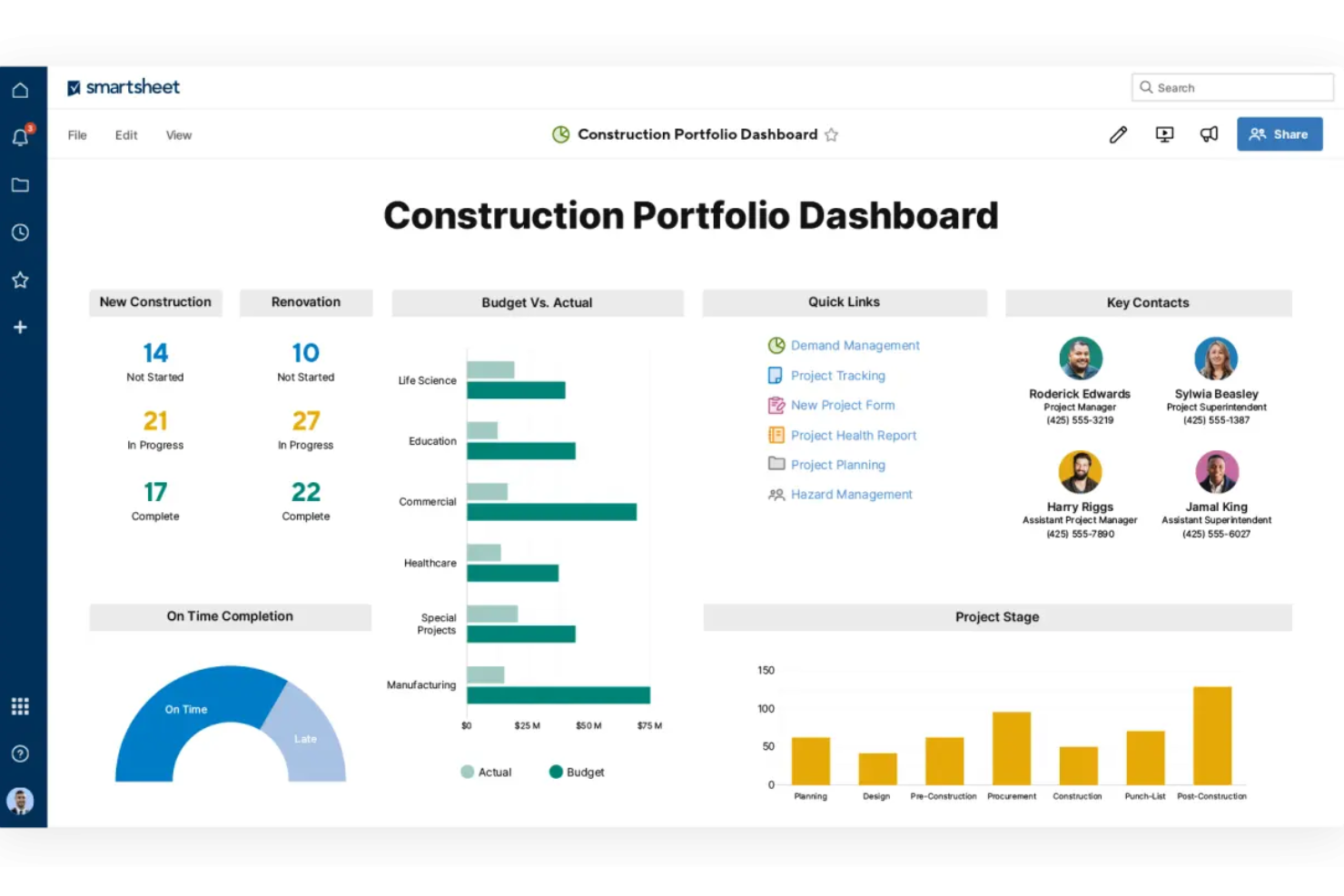
Smartsheet is an AI-powered work management platform that combines project scheduling, workflow automation, dashboards, and portfolio reporting across construction project lifecycles.
Who Is Smartsheet Best For?
Smartsheet suits construction teams that already rely on spreadsheet-style tracking and want to add workflow automation and portfolio dashboards without switching to a purpose-built construction platform.
Why I Picked Smartsheet
I've included Smartsheet in my top picks because it's one of the few general-purpose work management platforms that genuinely holds up for construction workflow automation. I like how its no-code automated workflows handle the repetitive coordination work on a job site: routing RFI responses, triggering approval requests, and sending deadline reminders without anyone manually chasing them. Smart Assist lets you ask natural-language questions across live project data, so surfacing which tasks are slipping or which team members are over-allocated takes seconds instead of a deep report dive.
Smartsheet Key Features
- Smart Columns: Apply customizable AI instructions to summarize or analyze row-level content across your project sheets.
- Automated approval workflows: Route RFI responses, update requests, and sign-offs through no-code multi-step workflows without manual follow-up.
- Scenario planning: Compare capacity, workload, and risk across multiple project scenarios before committing changes to live sheets.
- Portfolio dashboards: Aggregate project health, status, and dependencies across a portfolio in a single standardized view.
Smartsheet Integrations
Smartsheet offers over 175 integrations, including Procore, Egnyte, DocuSign, Jira Software, Power BI, Google Workspace, and Microsoft 365. Its API is available on Business plans and higher for custom integrations.
Pros and Cons
Pros:
- Dashboards show project status across teams
- Automated reminders reduce coordination follow-ups
- Familiar sheets support job tracking
Cons:
- AI doesn’t predict cost overruns or analyze site photos
- Dashboard reporting can take setup
New Product Updates from Smartsheet

Smartsheet Adds Non-Plan User Management in Admin Center
Smartsheet adds a Non plan users tab to the Seat types and true-up page in Admin Center. This lets system admins review non-plan users and add them to the plan or remove them from the organization in one place. For more information, visit Smartsheet’s official site.

Procore
Best for RFI and submittal AI assistance

Procore is a construction project management platform that connects office and field teams through tools for scheduling, RFIs, submittals, document control, BIM collaboration, and AI-assisted project workflows.
Who Is Procore Best For?
Procore is a strong fit for general contractors and construction project managers who need AI-assisted RFI drafting, submittal review, and document cross-referencing across active projects.
Why I Picked Procore
I picked Procore as one of the best because its RFI Agent and Submittal Review Agent tackle two of the most documentation-heavy pain points in construction project management. The RFI Agent pulls from drawings and project data to draft a prepopulated RFI, including suggested cost and schedule impacts, while the Submittal Review Agent cross-references submittals against specs and contracts to flag compliance gaps before they become costly surprises.
Procore Key Features
- Deep Search Agent: Searches across specs, drawings, RFIs, and submittals to return cited answers to project questions.
- Daily Log Agent: Generates draft daily logs by processing field photos, emails, video, and voice recordings.
- Analytics Risk Report: Consolidates financial, schedule, and safety risk indicators from RFIs, submittals, contracts, and daily logs into a single report.
- Contract Review Agent: Compares contracts and drawings against internal benchmarks to flag potential conflicts before they escalate.
Procore Integrations
Procore offers 500+ marketplace integrations and apps, including Microsoft Project, Oracle Primavera P6, DocuSign, Smartsheet, and Sage. It also provides an API for custom integrations.
Pros and Cons
Pros:
- AI drafts RFIs and checks submittals
- Connects field updates with office teams
- Centralizes drawings, RFIs, and submittals
Cons:
- Users report slow mobile performance
- Scheduling AI remains largely illustrative

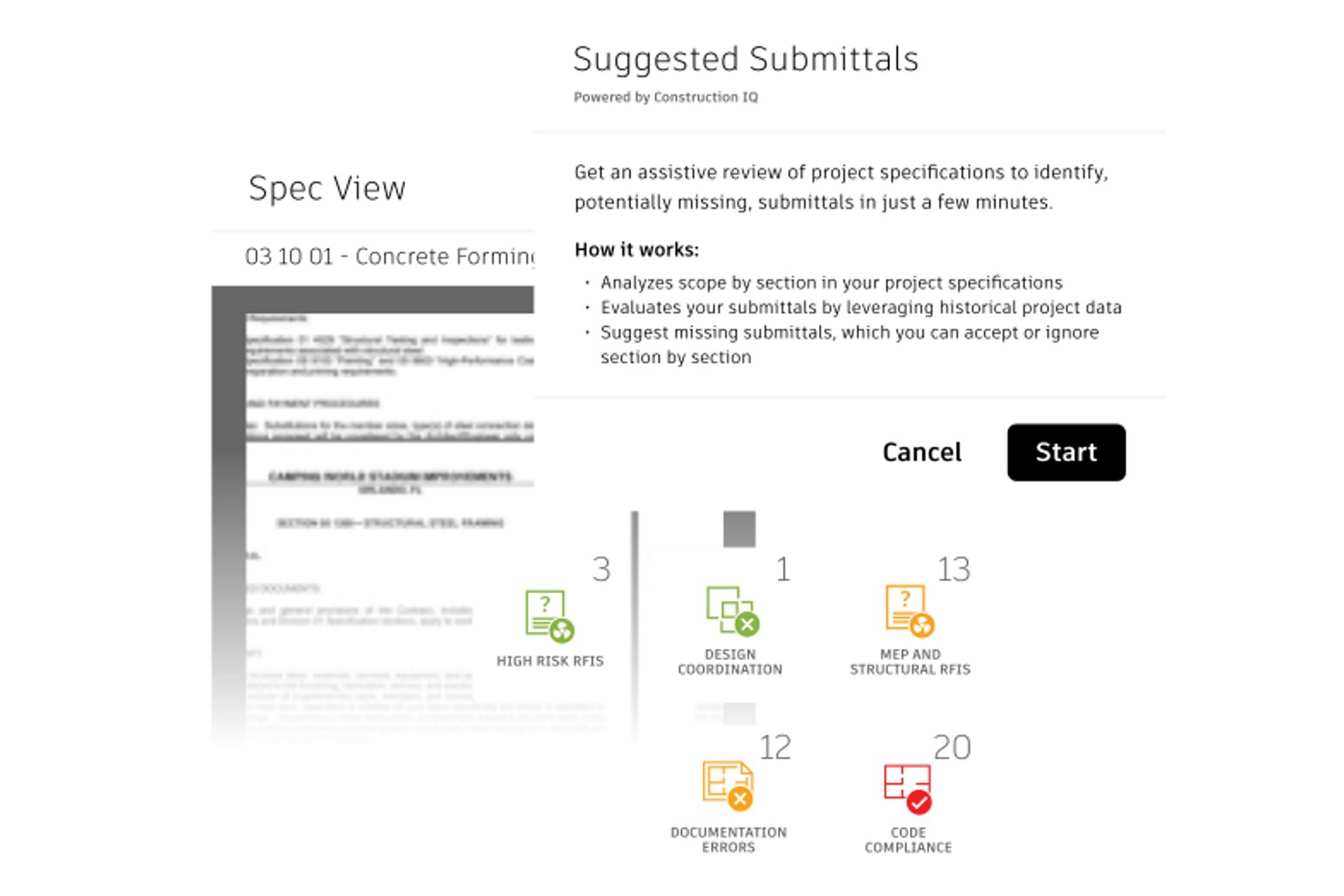
Autodesk Construction Cloud is a construction management platform that combines document control, BIM coordination, project management, and AI-assisted workflows across preconstruction, field operations, and cost management.
Who Is Autodesk Construction Cloud Best For?
Autodesk Construction Cloud is a strong fit for large general contractors and enterprise construction teams that already work within the Autodesk ecosystem and need a unified platform for document control, BIM coordination, and project management.
Why I Picked Autodesk Construction Cloud
I've included Autodesk Construction Cloud in my top picks because the Autodesk Assistant lets you query specs, RFIs, change orders, and submittals in plain language, turning what's usually a document-hunting exercise into a direct conversation with your project record. I particularly like that it spans multiple document types at once, so if you're mid-review and need to cross-reference a spec section against an open RFI, you can do that in one prompt. The Submittals Evaluation Agent (currently in beta) also compares submittal items against the corresponding spec section and flags missing information before formal review begins.
Autodesk Construction Cloud Key Features
- Construction IQ risk scanning: Scans issues, checklists, and observations to surface and prioritize design, quality, and safety risks across your project.
- 4D Schedule visualization: Links schedule activities to 3D model elements so you can simulate the planned build sequence and spot coordination gaps.
- Automated submittal log generation: Analyzes project specifications to generate a submittal log automatically, reducing manual setup at project start.
- Mobile offline access: Lets field teams access documents, sheets, and photos on the Forma mobile app even without an active connection.
Autodesk Construction Cloud Integrations
Autodesk Construction Cloud supports 400+ integrations, including native integrations with Primavera P6, Microsoft Project, ASTA Powerproject, Sage, Viewpoint, and JD Edwards. Marketplace integrations include Procore, Bluebeam, HCSS, and Microsoft 365, while cloud APIs, SDKs, and webhooks support custom connections.
Pros and Cons
Pros:
- AI queries span specs and RFIs
- BIM clash detection surfaces issues earlier
- Centralized records help teams coordinate
Cons:
- Users report lag with large models
- Assistant access requires eligible enterprise agreements


Buildots is an AI construction intelligence platform that uses site captures from 360 cameras, drones, or laser scans to compare real-world progress against BIM models and project schedules.
Who Is Buildots Best For?
Buildots suits general contractors and construction project managers who need verified, element-level site progress data compared against BIM models and live schedules.
Why I Picked Buildots
I picked Buildots as one of the best because it does something most project management tools don't: it uses AI to compare real site captures from 360 cameras, drones, or laser scans directly against your BIM model and live schedule, giving you verified, element-level progress data instead of self-reported status updates. I especially like Dot, Buildots' AI assistant, which lets you ask plain-language questions like "which HVAC tasks are behind schedule this week?" and get structured, actionable answers across trades and floors.
Buildots Key Features
- BIM and schedule comparison: AI maps site captures against your BIM model and live schedule to produce verified, element-level progress data across trades and floors.
- Delay forecasting: Buildots flags schedule risks weeks in advance so your team can intervene before delays compound.
- Executive Overview dashboard: Enterprise users get standardized portfolio views with project-status indicators, delay activity reports, and weekly team commentary.
- Two-way scheduling integration: Buildots syncs with Oracle Primavera P6, Asta Power Project, and Microsoft Project, feeding verified site progress back into your existing schedule.
Buildots Integrations
Buildots has native integrations with Oracle Primavera P6, Asta Power Project, and Microsoft Project. It also offers a marketplace integration with Procore; API availability isn't documented.
Pros and Cons
Pros:
- Dot answers natural-language progress questions
- BIM comparisons verify element-level site progress
- AI progress analysis reduces manual checks
Cons:
- Progress-tracking reviews were conflicting
- Budget tracking is unavailable

Kwant
Best for IoT-driven labor forecasting
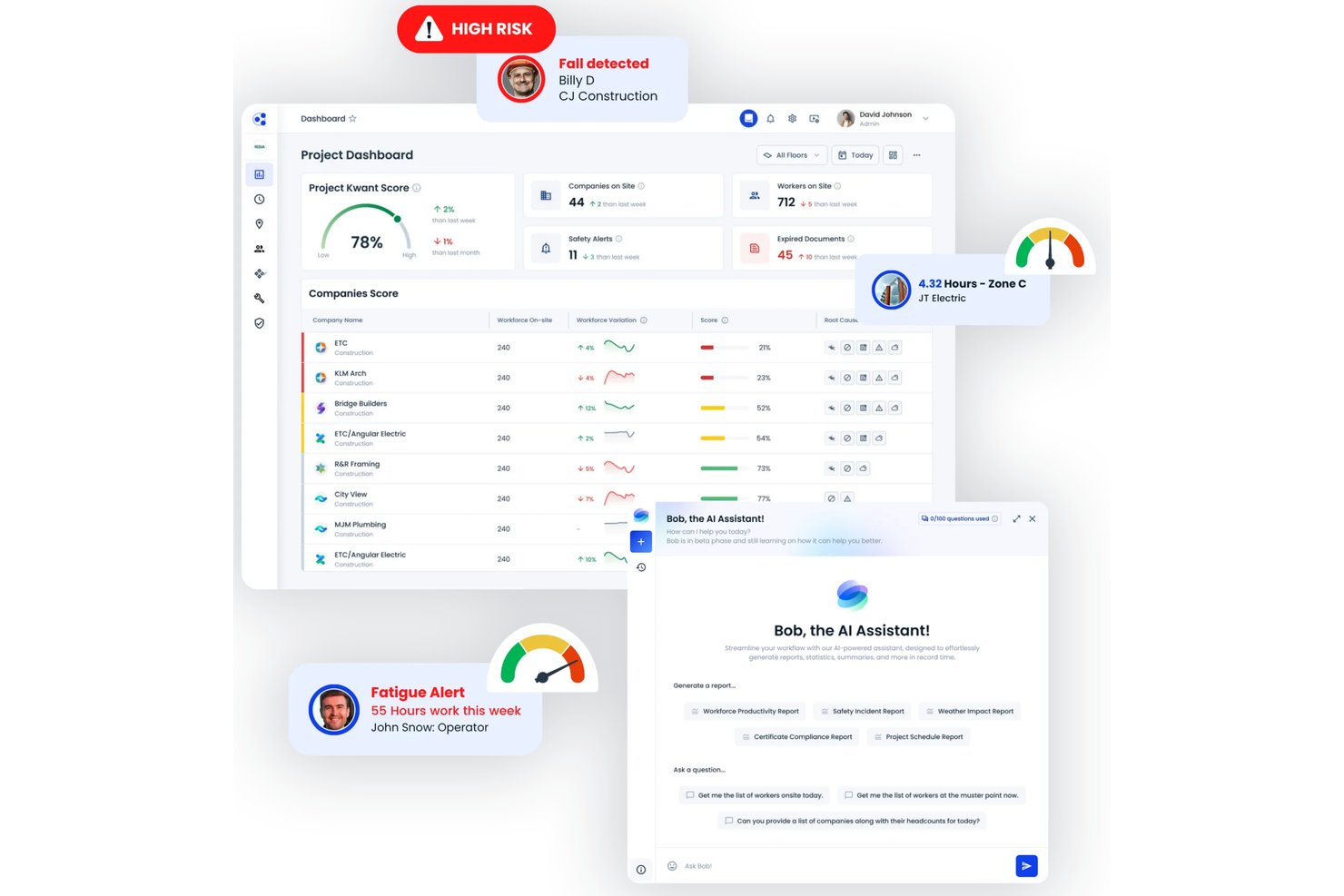
Kwant is an AI-enabled construction workforce management platform that combines real-time IoT data, predictive labor analytics, safety compliance detection, and multi-site portfolio dashboards.
Who Is Kwant Best For?
Kwant is a strong fit for enterprise general contractors and construction executives who need real-time IoT-driven labor visibility and predictive risk analytics across multiple active jobsites.
Why I Picked Kwant
I picked Kwant as one of the best because its IoT-driven labor forecasting is genuinely hard to replicate with a general-purpose PM tool. Smart badges and sensor networks feed live attendance and zone data into predictive models that can flag a trade-specific crew shortfall 24–72 hours before it hits the schedule, giving project managers a real window to redeploy labor or adjust sequencing. I also like that Bob, Kwant's natural language assistant, lets you query that live workforce data directly, so asking "which buildings are understaffed against plan right now?" gets you an answer without digging through dashboards.
Kwant Key Features
- Safety compliance detection: AI cameras automatically flag PPE violations, unsafe behaviors, and zone breaches in real time across active jobsites.
- Worker certification tracking: Stores credentials, tracks expiration dates, and sends requalification alerts so no uncertified worker slips through.
- Portfolio-level workforce dashboards: Role-based views let site managers, safety leads, and executives compare planned versus actual progress across multiple projects simultaneously.
- COI manager: Collects subcontractor certificates of insurance, monitors expiration status, and sends renewal alerts at both the project and portfolio level.
Kwant Integrations
Kwant lists integrations with Procore, Primavera P6, Hammertech, CMiC, Autodesk, and Power BI, plus Microsoft. It offers an out-of-the-box API for Power BI dashboards and reports; Autodesk Construction Cloud daily-report syncing is marked “coming soon.”
Pros and Cons
Pros:
- Safety analytics can help prevent incidents
- Predictive alerts flag labor shortages early
- Portfolio productivity dashboards offer drill-downs
Cons:
- No documented RFI or submittal workflows
- Full functionality depends on specific hardware
İnşaat Proje Yönetimi İçin Diğer Yapay Zekâ Araçları
İşte kısa listeme giremeyen ancak yine de göz atmaya değer bazı ek inşaat proje yönetimi için yapay zekâ aracı seçenekleri:
- Zepth
For AI-driven construction risk registers
- Oracle Primavera Cloud
For enterprise-scale CPM scheduling
- Kahua
For AI-powered document control
- Document Crunch
For AI contract risk review in Procore


How I Evaluate AI Tools for Construction Project Management
To make this list, a tool’s AI needs to handle real construction delivery work, like forecasting schedule slippage and analyzing site photos. From there, I evaluate three things. Core functionality carries the most weight, like building schedules and tracking budgets. Then I look for drone and reality capture integration, and how easily field crews can use the tool.
Core Functionality (Table Stakes For This List)
When I'm selecting tools for my list, I score each one on a scale from 0 (does not offer the functionality) to 5 (excels in this area) for each core functionality listed below. I then convert the total into a percentage to help assess each tool's overall fit, with extra weight on any functionalities I’ve deemed essential.
- AI Scheduling (Essential): I look for schedule updates that account for dependencies and changing conditions, such as a delayed delivery affecting follow-on trades.
- Predictive Risk Insights (Essential): I assess whether forecasts flag project-specific cost or schedule risks and explain contributing factors early enough to inform decisions.
- Document Intelligence: I check how AI extracts or summarizes details from drawings, RFIs, and submittals, such as an action item or conflicting requirement.
- Visual Progress Tracking: I look for analysis that compares site photos or sensor data with plans or schedules to show where work is ahead or behind.
- Resource Forecasting: I evaluate whether forecasts account for project timelines and changing demands when estimating labor, equipment, or material needs across sites.
- Natural Language Queries: I check whether teams can ask questions about schedules, budgets, or documents and get contextual answers from project data.
Once I have a list of tools that meet the criteria, I consider what sets each platform apart.
Differentiating Factors (What Sets Vendors Apart)
Here's how I compare and contrast different vendors:
Standout Features
I check whether drone and reality capture feeds automatically map to BIM models, since a superintendent shouldn't have to manually tag every photo to get a progress snapshot. Safety compliance detection also matters—I evaluate how well AI flags PPE gaps or fall hazards from jobsite imagery before an incident report lands on your desk. I also look at subcontractor performance scoring, where AI uses historical delay and quality data to benchmark reliability across trades.
Beyond Features
I evaluate how well each tool works offline and on a muddy jobsite—superintendents wearing gloves won't tolerate tiny buttons or mandatory data entry. Interoperability matters just as much. I check for two-way sync with platforms like Procore, Autodesk Construction Cloud, and P6, because predictive AI falls apart when schedule or cost data sits in a silo. I also look at model transparency: when AI flags a delay risk, I want to see the contributing factors behind it, not just a red indicator.
İnşaat Proje Yönetimi İçin Yapay Zekâ Araçları Nasıl Seçilir?
Uzun özellik listeleri ve karmaşık fiyatlandırma yapıları arasında kaybolmak kolaydır. Kendinize özgü yazılım seçim sürecinizde ilerlerken odaklanmanızı korumanıza yardımcı olmak için aklınızda bulundurmanız gereken faktörleri içeren bir kontrol listesi hazırladım:
| Faktör | Dikkat Edilmesi Gerekenler |
|---|---|
| Ölçeklenebilirlik | Araç projelerinizle birlikte büyüyebilir mi? Proje boyutları ve ekip sayıları arttığında herhangi bir aksaklık yaşanmadan bunları destekleyip desteklemediğini değerlendirin |
| Entegrasyonlar | Mevcut araçlarınızla çalışıyor mu? Proje yönetimi veya iletişim platformları gibi temel yazılımlarla uyumluluğunu kontrol edin. |
| Özelleştirilebilirlik | İş akışlarınıza uyacak şekilde uyarlayabilir misiniz? Özellikleri özel ihtiyaçlarınıza göre uyarlamanıza olanak tanıyan özelleştirme seçeneklerini arayın. |
| Kullanım Kolaylığı | Ekibiniz için kullanımı sezgisel mi? Arayüzü ve gezinmeyi değerlendirin. Dik bir öğrenme eğrisi, benimsemeyi ve üretkenliği yavaşlatabilir. |
| Uygulama ve İşe Alıştırma | Geçiş ne kadar sorunsuz? Kurulum ve eğitim için gereken zaman ile kaynakları değerlendirin. Eğitimler veya işe alıştırma kılavuzları gibi mevcut destekleri arayın. |
| Maliyet | Fiyat bütçenizle uyumlu mu? Fiyatlandırma planlarını karşılaştırın ve gizli ücret olup olmadığını kontrol edin. Değerin maliyetle örtüştüğünden emin olun. |
| Güvenlik Önlemleri | Verileriniz ve projeleriniz güvende mi? Hassas bilgileri korumak için şifreleme, erişim denetimleri ve sektör standartlarına uygunluk olup olmadığını kontrol edin. |
İnşaat Proje Yönetimi için Yapay Zekâ Araçları Nelerdir?
İnşaat proje yönetimi için yapay zekâ araçları, projeleri daha verimli bir şekilde planlamanıza, yönetmenize ve tamamlamanıza yardımcı olmak için yapay zekâ kullanan yazılım çözümleridir. Bu araçlar planlama, maliyet tahmini ve risk yönetiminin yanı sıra ekibinize daha iyi içgörüler sunmaya ve gecikmeleri azaltmaya yardımcı olur.
Bu araçlar; proje yaşam döngüsü boyunca koordinasyonu ve karar alma süreçlerini iyileştirmek için proje yöneticileri, yükleniciler ve saha ekipleri tarafından kullanılır.
İnşaat Proje Yönetimi için Yapay Zekâ Araçlarının Özellikleri
İnşaat proje yönetimi için yapay zekâ araçlarını seçerken aşağıdaki temel özelliklere dikkat edin:
- Proje planlama: Projeleri planlanan şekilde ilerletmek için zaman çizelgelerini otomatikleştirir ve kaynakları tahsis eder.
- Maliyet tahmini: Bütçeleri etkili bir şekilde yönetmeye yardımcı olmak için doğru finansal öngörüler sunar.
- Belge yönetimi: Proje dosyalarını düzenler ve tüm ekip üyelerinin bunlara kolayca erişmesini sağlar.
- Risk yönetimi: Aksaklıkları ve gecikmeleri en aza indirmek için olası zorlukları erkenden belirler.
- Ekip iş birliği: Üretkenliği artırmak için ekip üyeleri arasındaki iletişimi ve koordinasyonu kolaylaştırır.
- Gerçek zamanlı analiz: Proje performansı ve ilerlemesi hakkında içgörüler sunar ve bilinçli karar alma süreçlerine yardımcı olur.
- Senaryo simülasyonu: Kullanıcıların farklı proje sonuçlarını görselleştirmesine ve en iyi yaklaşımı seçmesine olanak tanır.
- Nesnelerin İnterneti entegrasyonu: Veri toplamak ve proje denetimini iyileştirmek için akıllı cihazlara bağlanır.
- Özelleştirilebilir gösterge panelleri: Kullanıcıların en alakalı bilgilere odaklanmak için görünümlerini uyarlamasını sağlar.
- Otomatik raporlama: Zaman kazanmak ve doğruluğu korumak için ayrıntılı raporları hızlıca oluşturur.
İnşaat Proje Yönetimi için Yapay Zekâ Araçlarının Faydaları
İnşaat proje yönetimi için yapay zekâ araçlarını uygulamak, ekibiniz ve işletmeniz için çeşitli faydalar sağlar. İşte yararlanabileceğiniz birkaç fayda:
- Geliştirilmiş verimlilik: Planlama ve raporlama gibi görevlerin otomatikleştirilmesi zaman kazandırır ve manuel hataları azaltır.
- Daha iyi karar alma: Gerçek zamanlı analiz ve senaryo simülasyonu, bilinçli seçimler yapmanıza yardımcı olan içgörüler sunar.
- Maliyet tasarrufu: Doğru maliyet tahmini ve risk yönetimi, projelerin bütçe dâhilinde kalmasına ve maliyetli bütçe aşımlarından kaçınılmasına yardımcı olur.
- Geliştirilmiş iş birliği: Ekip iş birliği özellikleri, herkesin bağlantıda ve bilgili kalmasına yardımcı olur ve üretkenliği artırır.
- Risk azaltma: Olası sorunları erkenden belirlemek aksaklıkları en aza indirir ve projelerin planlanan şekilde ilerlemesini sağlar.
- Artırılmış şeffaflık: Belge yönetimi ve raporlama, proje ilerlemesi ve durumu hakkında net bir görünürlük sağlar.
- Kaynak optimizasyonu: Verimli planlama ve Nesnelerin İnterneti entegrasyonu, kaynakların etkili bir şekilde kullanılmasını sağlar ve israfı azaltır.
İnşaat Proje Yönetimi için Yapay Zekâ Araçlarının Maliyetleri ve Fiyatlandırması
Aşağıdaki tablo, inşaat proje yönetimi için yapay zekâ araçlarında bulunan yaygın planları, bunların ortalama fiyatlarını ve tipik özelliklerini özetlemektedir:
İnşaat Proje Yönetimi için Yapay Zekâ Araçları Plan Karşılaştırma Tablosu
| Plan Türü | Ortalama Fiyat | Yaygın Özellikler |
|---|---|---|
| Ücretsiz Plan | $0/user/month | Temel planlama, belge yönetimi ve sınırlı destek |
| Bireysel Plan | $10 - $30/user/month | Gelişmiş planlama, maliyet tahmini ve temel analizler |
| İşletme Planı | $30 - $60/user/month | Ekip iş birliği, risk yönetimi ve geliştirilmiş raporlama |
| Kurumsal Plan | $60 - $100/user/month | Özelleştirilebilir panolar, IoT entegrasyonu ve öncelikli müşteri desteği |
İnşaat Proje Yönetimi için Yapay Zekâ Araçları Hakkında Sıkça Sorulan Sorular
İnşaat proje yönetimi için yapay zekâ araçları hakkında sıkça sorulan bazı soruların yanıtları şunlardır:
Yapay zekâ inşaat proje yönetiminde nasıl kullanılabilir?
Yapay zekâ, israfı tespit etmek ve kaynakları daha iyi kullanmanın yollarını önermek için proje verilerini analiz ederek malzemeleri ve iş gücünü daha verimli yönetmenize yardımcı olur. Bu, daha akıllı kararlar alınmasını sağlar ve projenizin genel işleyişini iyileştirir.
İnşaat şirketleri için en iyi yapay zekâ aracı hangisidir?
En iyi yapay zekâ aracı, ekibinizin ihtiyaçlarına bağlıdır. Procore ve Buildertrend gibi araçlar, projeleri, bütçeleri ve iletişimi tek bir yerden yönetmenize yardımcı olacak yapay zekâ özellikleri sunar. İş akışınıza ve önceliklerinize en uygun olanı seçin.
Yapay zekâ inşaat proje yönetiminin yerini alacak mı?
Yapay zekâ, inşaat proje yöneticilerinin yerini almayacak; bunun yerine çalışmalarını destekleyecek. Verileri analiz edip malzeme ihtiyaçlarını öngörerek tedarik zincirlerini yönetmenize yardımcı olur. Yapay zekâ karar alma sürecine destek olsa da insan denetimi ve uzmanlığı hâlâ temel önem taşır.
Yapay zekâ araçları inşaat projelerinde bütçelemeyi nasıl iyileştirir?
Yapay zekâ araçları, maliyetleri tahmin etmek ve bütçe risklerini tespit etmek için geçmiş verileri kullanır. Proje yöneticilerine kaynakları akıllıca tahsis etme ve maliyet aşımlarını önleme konusunda içgörüler sunar. Bunun sonucunda daha doğru bütçeleme ve daha iyi finansal planlama yapılır.
Yapay zekâ araçları inşaat sahalarında güvenlik yönetimine yardımcı olabilir mi?
Evet, yapay zekâ araçları olası tehlikeleri tespit etmek için saha verilerini analiz ederek güvenlik yönetimini iyileştirebilir. Kazaları önlemeye ve güvenlik kurallarına uyumu desteklemeye yardımcı olan öngörücü içgörüler sunar. Bu proaktif yaklaşım riskleri azaltır ve daha güvenli bir çalışma ortamı oluşturur.