2026 İçin En İyi 10 Web Tabanlı Kaynak Planlama Yazılımı

10 En İyi Web Tabanlı Kaynak Planlama Yazılımları Listesi


Web tabanlı kaynak planlama yazılımları, projenizin yaşam döngüsü boyunca ekip üyelerini ve diğer kaynakları planlama ve yönetme sürecini basitleştirir. Kullanılabilecek çok sayıda araç vardır, ancak doğru seçimi yapmak kuruluşunuzun ve projelerinizin kendine özgü ihtiyaçlarına bağlıdır.
Seçiminizi kolaylaştırmak için en iyi web tabanlı kaynak planlama araçları arasından önerilerimi listeledim. Bu listeyi, proje yöneticisi olarak çalıştığım süre boyunca düzinelerce farklı kaynak planlama aracıyla ilgili kişisel deneyimlerimi kullanarak hazırladım.
Why Trust Our Software Recommendations
Our team has been testing and reviewing software since 2012. As project managers ourselves, we know how difficult—and important—it is to choose the right software.
For this guide, we evaluated tools using hands-on testing and independent research, scoring tools using our selection criteria. We also draw on insights from industry thought leaders and practicing project management experts.
Our reviews reflect our human editorial judgment, not a sales pitch.
Expert reviewers:
Web Tabanlı Kaynak Planlama Yazılımı Nedir?
Web tabanlı kaynak planlama yazılımı, işletmelerin ve kuruluşların toplantı odaları, ekipmanlar ve personel gibi kaynakları yönetmesine ve tahsis etmesine yardımcı olan çevrimiçi bir araçtır. İnternet üzerinden erişilebilir ve kaynak kullanımını planlamak, takip etmek ve optimize etmek için bir platform sağlar. Bu yazılım genellikle kaynakların uygunluğunu kontrol etme, rezervasyon oluşturma ve kayıtları yönetme özelliklerini içerir.
Web tabanlı kaynak planlama araçları israfı ve atıl zamanı azaltmaya yardımcı olur. Yazılımın çevrimiçi yapısı her yerden kolay erişim sağlar. Ayrıca planlama ve karar verme süreçlerine yardımcı olmak için kaynak kullanımı hakkında içgörüler sunar. Bu, paylaşılan kaynaklara ve karmaşık planlama ihtiyaçlarına sahip olduğunuzda oldukça faydalıdır.
Web Tabanlı Kaynak Planlama Yazılımları Karşılaştırma Tablosu
En iyi web tabanlı kaynak planlama yazılımı önerilerimi yan yana incelemek için bu karşılaştırma tablosunu kullanın.
| Tool | Starting Price | Website | |
|---|---|---|---|
| Best for preventing over-allocation of resources | 4.7 out of 5 | $5/user/month Free trial available | Website |
| Best for manufacturing teams | 4.5 out of 5 | $49/user/month 15 + 15-day free trial available | Website |
| Best for people-centric resourcing | 4.2 out of 5 | Pricing upon request Not available | Website |
| Best for scheduling resources for project lifecycles | 4.5 out of 5 | $17/user/month 14-day free trial | Book Demo |
| Best for integrations | 4.6 out of 5 | $9/user/month Free plan + 14-day trial available | Book Demo |
| Best for customer onboarding projects | 4.8 out of 5 | $49/user/month 14-day free trial | Website |
| Best integrated time and resource management | 4.4 out of 5 | $9/user/month 7-day free trial | Website |
| Best for professional services companies | 4.4 out of 5 | $9/user/month 14-day free trial available | Website |
| Best for portfolio management | 4.3 out of 5 | $5.27/resource/year 14-day free trial | Website |
| Best for forecasting and planning | 4.5 out of 5 | Pricing upon request Free demo available | Website |
En İyi 10 Web Tabanlı Kaynak Planlama Yazılımına Genel Bakış
Her bir çevrimiçi kaynak planlama yazılımının kısa bir açıklamasını, en uygun kullanım alanını, dikkat çeken bazı özelliklerini ve arayüz hakkında fikir vermek için ekran görüntülerini burada bulabilirsiniz.

Best for preventing over-allocation of resources

Resource Guru is a web-based resource scheduling platform for managing bookings, availability, and capacity across people, equipment, and meeting rooms in one shared schedule.
Who Is Resource Guru Best For?
Resource Guru is a strong fit for project managers and operations teams at agencies, consultancies, and professional services firms managing multiple projects across shared teams.
Why I Picked Resource Guru
I've included Resource Guru in my top picks because it's one of the few scheduling tools that treats over-allocation as something to prevent, not just flag after the fact. Its proactive clash management blocks conflicting bookings before they're confirmed, while a waiting list holds unresolved requests until capacity opens up. I also like that the availability heatmap shows utilization percentages by person in real time, so I can see at a glance who's approaching their limit before I make another booking.
Resource Guru Key Features
- Drag-and-drop schedule builder: Create, move, and resize bookings directly on a shared timeline across all resources and projects.
- Leave and public holiday management: Log time off and apply regional public holiday calendars so that leave is automatically reflected in each person's availability.
- Auto-filled timesheets: Timesheets pre-populate based on confirmed bookings, with one-click submission and built-in approval workflows.
- Custom resource fields and filters: Tag people with skills, roles, or departments, then filter the schedule to find the right resource for a given project.
New Product Updates from Resource Guru

Resource Guru Adds More Control Over Calendar Sync
Resource Guru adds more control over Google and Outlook Calendar sync, including source calendar selection and destination calendar options. These updates help users manage external events and Resource Guru bookings with less clutter. For more information, visit Resource Guru’s official site.
 .

MRPeasy
Best for manufacturing teams

MRPeasy is a cloud-based manufacturing resource planning (MRP) platform that covers production scheduling, workforce planning, inventory management, and capacity planning for small and mid-sized manufacturers.
Who Is MRPeasy Best For?
MRPeasy is a strong fit for small and mid-sized manufacturing companies that need structured production scheduling and resource planning without enterprise-level complexity.
Why I Picked MRPeasy
MRPeasy is purpose-built for how manufacturing teams schedule and track resources. I like that it ties production scheduling directly to bills of materials and routings, so when a new order comes in, the system can auto-generate a schedule based on real capacity and material availability. The drag-and-drop Gantt chart lets me reprioritize jobs on short notice when a machine goes down or a supplier is late. The master production schedule (MPS) also lets my team plan resource utilization months out, which most general-purpose scheduling tools do not support.
MRPeasy Key Features
- Workstation scheduling: Assign manufacturing operations to specific workstations with defined capacity limits and working shifts.
- Employee time tracking: Log actual hours worked against manufacturing orders directly from the shop floor.
- Inventory requirements planning: Automatically calculate material needs based on scheduled production orders and current stock levels.
- Reporting and statistics: Monitor production KPIs including order fulfillment rates, resource utilization, and manufacturing costs.
New Product Updates from MRPeasy
MRPeasy Adds Stocktake for Physical Inventory Counts
MRPeasy adds Stocktake for planning, conducting, and documenting physical inventory counts. This supports both full warehouse counts and cycle counts for selected items. For more information, visit MRPeasy’s official site.
 .

Kantata
Best for people-centric resourcing

Kantata is a professional services automation platform that covers resource scheduling, project management, financial tracking, and business intelligence in a single web-based system.
Who Is Kantata Best For?
Kantata is a strong fit for mid-to-large professional services firms—such as consulting, marketing, and IT services companies—that need to manage complex resource scheduling across multiple client projects.
Why I Picked Kantata
Kantata treats people as the core unit of resource scheduling, not just a slot to fill. The Resource Center's Team Members tab gives you a person-centric timeline that shows each individual's total workload, availability, and overallocation status across every active project at once. I also like the Resource Recommendations feature, which surfaces best-fit named resources to replace unnamed placeholders based on skills, capacity, and role. That combination of individual-level visibility and AI-assisted staffing makes it genuinely different from tools that only show you capacity at a project or role level.
Kantata Key Features
- Resource forecasting: Model future capacity needs across your entire project pipeline using role-based demand planning and named resource projections.
- Skills management: Maintain a searchable skills inventory for each team member so you can match the right people to the right projects based on specific competencies.
- Time and expense tracking: Log billable and non-billable hours directly against project tasks, with approval workflows built into the platform.
- Project financial tracking: Monitor budgets, margins, and actuals at the project level in real time alongside your scheduling data.
New Product Updates from Kantata

Kantata Adds Access Group Change History
Kantata adds Access Groups History, letting account administrators track changes to group details, membership, and permissions in Recent History. The update also makes these events available through the Subscribed Events API for broader monitoring. For more information, visit Kantata’s official site.
 .

Scoro
Best for scheduling resources for project lifecycles
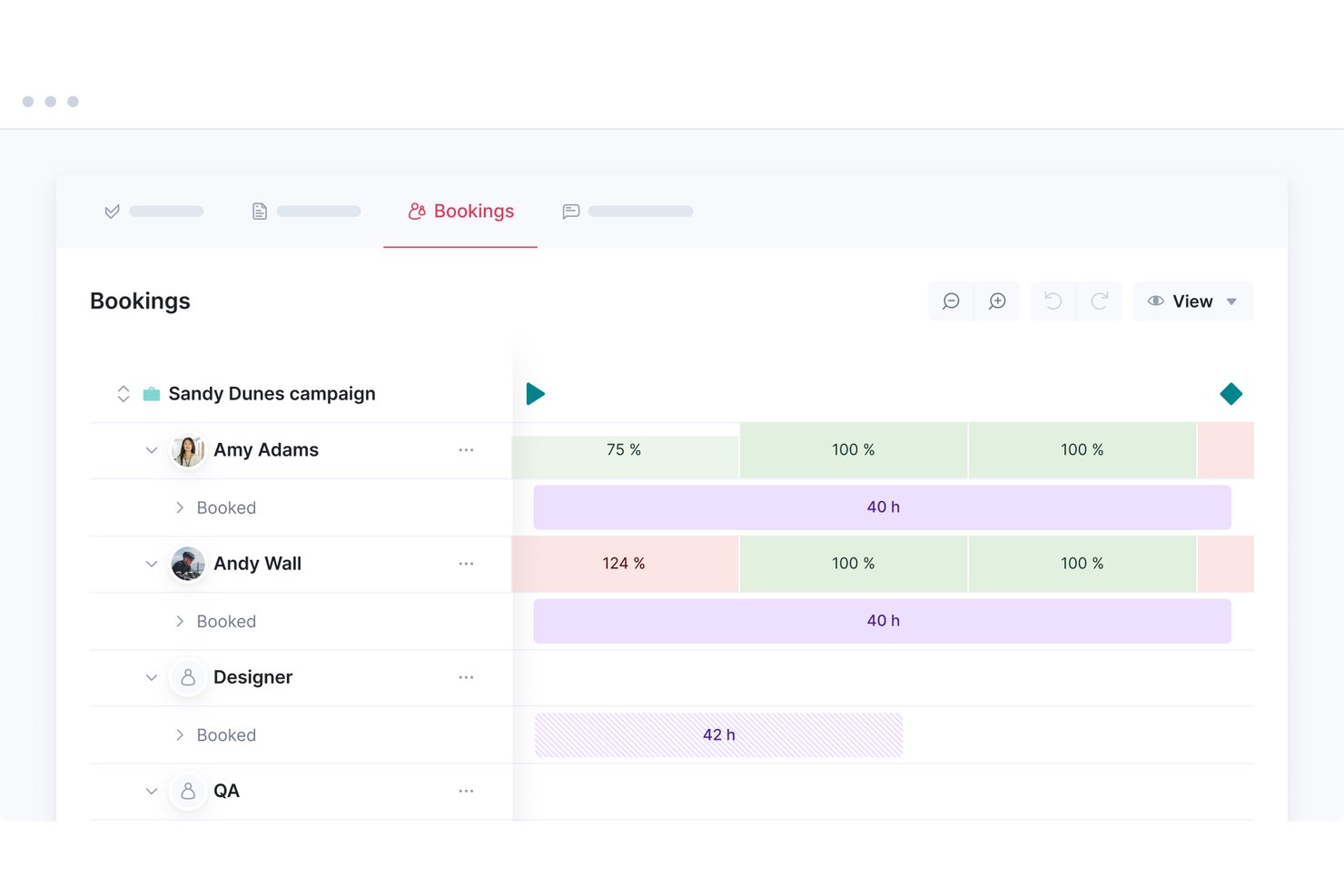
Scoro is a professional services automation platform that combines resource scheduling, project management, time tracking, quoting, and financial reporting in a single web-based workspace.
Who Is Scoro Best For?
Scoro is a strong fit for professional services teams—agencies, consultancies, and managed service providers—that need to connect resource scheduling directly to project financials in one place.
Why I Picked Scoro
I've included Scoro in my top picks because it's the only tool on this list that connects resource scheduling directly to project financials across the entire lifecycle. I particularly like the Bookings module, which lets me reserve team capacity at the project level before tasks are even defined, then layer in a live heatmap that flags overloads in real time. Pair that with role-based placeholders for pipeline planning and automatic rescheduling when dependencies shift, and you get a scheduling environment built for how professional services work actually runs.
Scoro Key Features
- Tentative bookings: Reserve team capacity for pipeline projects before they're confirmed, then convert soft allocations to fixed bookings when a project is approved.
- 360° time visibility: Compare time booked, planned, and actually logged per team member to surface scheduling gaps and variance across active projects.
- Automated time-off sync: BambooHR and Google Calendar integrations pull approved leave and out-of-office events directly into the resource planner.
- ELI AI assistant: Query operational data in natural language—such as billable hours or budget burn—and generate reports without building them manually.
Scoro Integrations
Scoro offers 45+ native integrations, including BambooHR, Google Calendar, Microsoft Outlook, Salesforce, Slack, and Azure Active Directory. It also supports custom connections through its REST API and Zapier.
Pros and Cons
Pros:
- Scenario planning supports tentative project bookings
- Financial reporting ties directly to schedules
- Real-time heatmap flags resource conflicts instantly
Cons:
- Not ideal for teams needing lightweight tools
- Minimum user requirement may exclude small teams
New Product Updates from Scoro

Scoro Adds Time Mobile App and ELI Improvements
Scoro adds the Scoro Time mobile app for iOS/Android to track time anywhere and expands ELI with attachments, smarter filtering, and trigger-based actions. For more information, visit Scoro's official site.
 .

Best for integrations
monday AI Workspace is an AI-powered work management platform that brings project scheduling, workload tracking, and resource allocation together with one of the largest integration ecosystems in the space.
Who Is monday AI Workspace Best For?
It's a strong fit for mid-size to enterprise teams that already run multiple tools and need a central hub to coordinate projects, people, and workloads without rebuilding their tech stack.
Why I Picked monday AI Workspace
monday AI Workspace earns its spot on my shortlist because of how well its integration ecosystem connects with the tools resource-heavy teams already use. I especially like the two-way Google Calendar sync, which keeps scheduled work visible across platforms without manual updates. The Jira integration is just as useful: engineering capacity tracked in sprints flows directly into the Workload view, so I'm not reconciling availability across two systems every time sprint priorities shift.
monday AI Workspace Key Features
- Workload view: Displays team capacity and individual assignments with color-coded visual indicators for potential overloads.
- Resource management module: Centralizes workforce data and enables advanced capacity planning, available on the Enterprise tier.
- Permissions and access control: Lets you set detailed user roles, sharing, and access permission levels across different projects and teams.
- Customizable dashboards: Create real-time visualizations and reports for capacity, utilization, and project monitoring.
monday AI Workspace Integrations
monday AI Workspace offers hundreds of native integrations and marketplace apps, including Slack, Jira, Google Workspace, Microsoft 365, Salesforce, HubSpot, Zoom, Trello, Zendesk, Asana, and connects with Zapier. An API is available for custom integrations.
Pros and Cons
Pros:
- Automation reduces manual scheduling updates
- Highly customizable boards adapt to scheduling needs
- Workload view flags overallocations visually
Cons:
- Not purpose-built for resource scheduling
- Advanced resource tools locked to Enterprise tier
New Product Updates from monday AI Workspace
monday AI Workspace Adds Human Approval Routing
monday AI Workspace adds a human-in-the-loop approval block to AI Workflows, sending approval requests and routing workflow paths based on responses. For more information, visit monday AI Workspace's official site.
 .

Best for customer onboarding projects

Rocketlane is an AI-powered PSA platform built for professional services and client-facing delivery teams, combining project execution, resource scheduling, financial management, and a shared client portal in one system.
Who Is Rocketlane Best For?
Rocketlane is a strong fit for professional services teams at B2B SaaS companies that manage structured, client-facing delivery projects.
Why I Picked Rocketlane
I picked Rocketlane as one of the best for customer onboarding projects because it's one of the few resource scheduling tools built with onboarding-specific workflows at its core. I love that it combines resource scheduling with a shared client portal, so I can assign team members to onboarding tasks and give clients direct visibility into what they need to complete. The dynamic project templates are especially useful here: I can set up conditional task flows that adapt automatically based on customer type or product tier, so every onboarding project launches with the right structure from day one.
Rocketlane Key Features
- Utilization guardrails: Set policies around max allocations, skill match, and cost limits that Rocketlane enforces in real time to prevent overbooking.
- Nitro resourcing agents: AI agents monitor timelines, roles, and allocations continuously, then surface the ideal team based on availability, workload, and skills.
- Real-time financial tracking: Track project margins, budget risks, and revenue impact directly within the delivery workflow as work unfolds.
- Time tracking with AI governance: Capture billable and non-billable hours with built-in AI oversight that flags late or incomplete timesheets before they create billing gaps.
Rocketlane Integrations
Rocketlane offers native integrations with Slack, Salesforce, Jira, HubSpot, Google Calendar, and Outlook Calendar, and it connects with Zapier and Workato. An API is also available for custom integrations.
Pros and Cons
Pros:
- Built-in timesheet tracking at task level
- Soft allocations for tentative resource scheduling
- Client-facing portal with shared project visibility
Cons:
- Notification overload without granular controls
- Reporting lacks advanced filtering and formulas
Best integrated time and resource management

Bonsai Agency Software is an all-in-one platform designed to enhance business operations for agencies, consultancies, and professional service providers. It consolidates client management, project tracking, financial oversight, and team collaboration into a single, integrated system.
One of the key features that makes Bonsai a strong choice is its resource planning and forecasting capabilities. You can allocate work based on your team's capacity and track utilization, ensuring that projects are assigned appropriately without overburdening any team member. Additionally, Bonsai allows you to predict staff shortages ahead of new projects, enabling proactive hiring or resource adjustments to meet upcoming demands.
Another valuable feature is Bonsai's time-tracking and timesheet tools. Your team can easily log hours spent on various tasks, providing you with a clear view of project progress, individual contributions, and overall capacity. This real-time tracking helps in monitoring workloads and ensures that projects stay on schedule and within budget.
Integrations include Gmail, Google Calendar, Zapier, Slack, QuickBooks Online, Calendly, ClickUp, Trello, Google Drive, Google Sheets, Xero, and HubSpot.

Birdview
Best for professional services companies

Birdview is a web-based project, resource, and financial management platform that combines resource scheduling, capacity planning, workload management, time tracking, and billing in a single system.
Who Is Birdview Best For?
Birdview is a strong fit for mid-sized professional services firms that need to manage resources, projects, and billing in one place.
Why I Picked Birdview
I've included Birdview in my top picks because it's one of the few resource-scheduling tools designed for the professional services delivery lifecycle. The roles- and skills-based resource matching lets you find available team members by role, skill set, and availability before a project kicks off, rather than scrambling to fill gaps mid-delivery. I also appreciate the Resource Loading Simulation, which models future capacity demand against current workloads so you can tell if your team can absorb new work before committing.
Birdview Key Features
- Workload visualization: A color-coded timeline flags over- and under-loaded team members across active projects at a glance.
- Time-off and availability calendar: Tracks approved leave and public holidays so resource assignments automatically reflect true availability.
- Time tracking: Log billable and non-billable hours directly against tasks and projects for accurate client billing and internal reporting.
- Portfolio-level resource view: See resource allocation across your entire project portfolio in a single consolidated view.

Ganttic
Best for portfolio management

Ganttic is web-based resource planning software that lets you schedule people, equipment, and other resources across projects using drag-and-drop Gantt charts, utilization tracking, workload balancing, and project portfolio management.
Who Is Ganttic Best For?
Ganttic is a good fit for project managers and resource managers at mid-sized organizations who need to coordinate shared resources across multiple concurrent projects.
Why I Picked Ganttic
I've included Ganttic in my top picks because it's one of the few resource scheduling tools that genuinely treats portfolio management as a first-class feature, not an afterthought. You can flip between a resource Gantt chart, an all-projects portfolio view, and a single project's work breakdown structure without losing context. I also like that you can draft project plans before committing resources, which lets you spot capacity constraints and resourcing gaps across the entire portfolio before a project kicks off. Cross-portfolio dependencies let you prioritize tasks across projects, which is something teams juggling a dozen concurrent workstreams will use constantly.
Ganttic Key Features
- Drag-and-drop task scheduling: Assign and reschedule tasks directly on a visual timeline by dragging them across resources and dates.
- Resource utilization reports: Generate custom reports that show each resource's workload percentage over any selected time period.
- Custom data fields: Add custom attributes to resources, tasks, or projects to filter and group your schedule in any way you need.
- Recurring tasks: Set tasks to repeat on a defined schedule to handle ongoing resource commitments without manual re-entry.

Parallax
Best for forecasting and planning

Parallax is a web-based resource scheduling and forecasting platform built for professional services teams, covering capacity planning, resource allocation, staffing foresight, margin tracking, and project pricing.
Who Is Parallax Best For?
Parallax is a strong fit for digital agencies, consultancies, and professional services firms that need to align their staffing and project pipelines with financial outcomes.
Why I Picked Parallax
Parallax is one of my top picks because I love how it surfaces capacity, revenue, and margin risk before problems arise. Its Staffing Foresight feature lets my team see resource needs months out—so we make hiring decisions based on real pipeline data, not last-minute gut calls. I also rely on Pricing Insights, which pulls from past project performance and client history to help my team propose project prices that protect margins from the start.
Parallax Key Features
- Resource allocation: Assign team members to projects based on role, availability, and skill set across your entire portfolio.
- Utilization tracking: Monitor billable vs. non-billable time across your team in real time to spot over- and under-utilization.
- Pipeline management: Connect your sales pipeline to resource planning so upcoming project demand is visible before work kicks off.
- Custom reporting: Build reports on project performance, margins, and team capacity using filters tailored to your business.
Diğer Kaynak Planlama Seçenekleri
En iyi listeme giremeyen ancak değerlendirmenize değer birkaç seçenek daha var.
- Silverbucket
For skills mapping and utilization visibility
- eResource Scheduler
For allocating the right resources
- ClickUp
For workflow automation
- Productive
For agencies
- Smartsheet
For utilization reporting
- Celoxis
Resource management with overload alerts and dynamic dashboards
- Wrike
For time tracking
- Float.com
For resource reallocation
- Saviom
Multi-dimensional resource scheduling solution
- Runn
For IT and software teams
- Hub Planner by Milient
For team scheduling, capacity planning, & requesting work
- Planview
For professional services
- Asana
PSA software with customizable dashboards you can use to schedule resources. Free plan available.
- Meisterplan
Resource management software you can use to improve capacity management and utilization.
- JIRA
Software development program with resource scheduling tools best for software dev project management teams.
- Retain
Resource management platform you can use to optimize utilization and improve cost management.
- Polaris PSA
Professional services automation software with project and resource management capabilities.
- HubPlanner
Resource management solution that allows you to view, plan, and deploy resources.
- KeyedIn
Project portfolio management software with resource management functionality.


İlgili Web Tabanlı Kaynak Planlama Yazılımı İncelemeleri
Aradığınızı hâlâ bulamadıysanız, test edip değerlendirdiğimiz bu yakından ilişkili araçlara göz atın.
- Proje Yönetimi Yazılımı
- Kaynak Yönetimi Yazılımı
- İş Akışı Otomasyonu Yazılımı
- Zaman Takibi Yazılımı
- Görev Yönetimi Yazılımı
- Proje Planlama Yazılımı
- Kaynak Planlama Araçları
- Redmine Alternatifleri
How I Evaluate Web-Based Resource Scheduling Software
I split my evaluation into two layers: the core scheduling features a resource manager needs day one, and differentiators like capacity forecasting that tell you which tools actually fit how you work.
Core Functionality (Table Stakes For This List)
When I'm selecting tools for my list, I rank each one on a scale from 0 (does not offer the functionality) to 5 (excels in this area) for each core functionality listed below. Then, I calculate the tool's total score into a percentage. Each tool needs to achieve a minimum total score of 65% to be considered for inclusion.
- Visual Resource Calendar: I look for a drag-and-drop timeline where you can reassign a designer from one project to another just by moving a booking block across the schedule.
- Availability & Conflict Detection: The tool should surface warnings when you're about to double-book someone or schedule them during approved time off.
- Capacity & Utilization Tracking: I check whether you can pull up real-time utilization rates and spot underbooked team members before the next sprint planning cycle.
- Skills & Role-Based Assignment: Filtering resources by skill tags or job role matters when you need to find an available backend developer across multiple squads.
- Project-Based Scheduling: I evaluate how well you can assign resources to specific project phases with defined dates and effort hours, not just open-ended task lists.
- Cloud-Based Multi-User Access: Every stakeholder, from resource managers to department leads, should get shared visibility with role-based permissions in the browser.
Once I have a list of tools that meet this criteria, I consider what sets each platform apart.
Differentiating Factors (What Sets Vendors Apart)
Here's how I compare and contrast different vendors:
Standout Features
Scenario planning is a big one for me—I want to model two or three staffing options side by side before locking in assignments for next quarter. Time tracking integration also matters because comparing scheduled hours against actual logged time reveals where your estimates consistently miss. Financial forecasting ties resource schedules to bill rates and margins, which helps PMO directors justify headcount decisions with real revenue data.
Beyond Features
Integration ecosystem is where I spend a lot of evaluation time. If your resource schedule doesn't sync with tools like Jira or Asana, you end up maintaining two sources of truth for assignments. I also look at how well a platform scales—whether it supports view-only licenses for stakeholders who just need visibility without inflating your seat count. Pricing transparency matters too; I check whether vendors publish clear per-user rates so you can forecast costs as your team grows.
Web Tabanlı Kaynak Planlama Yazılımı Nasıl Seçilir?
Uzun özellik listeleri ve karmaşık fiyatlandırma yapıları arasında kaybolmak kolaydır. Özel yazılım seçimi sürecinizi yürütürken odaklanmanıza yardımcı olmak için göz önünde bulundurmanız gereken faktörleri içeren bir kontrol listesi hazırladık:
| Faktör | Dikkat Edilmesi Gerekenler |
|---|---|
| Ölçeklenebilirlik | Yazılımın ekibinizle birlikte büyüyebildiğinden emin olun. Performanstan ödün vermeden ek kullanıcıları, projeleri ve kaynakları destekleyen seçenekleri arayın. |
| Entegrasyonlar | Proje yönetimi platformları, CRM'ler veya iletişim uygulamaları gibi ekibinizin hâlihazırda kullandığı araçlarla entegre olup olmadığını kontrol edin. |
| Özelleştirilebilirlik | Görünümleri, raporları ve planlama kurallarını ekibinizin özel ihtiyaçlarına ve tercihlerine uyacak şekilde uyarlamanıza olanak tanıyan bir çözüm seçin. |
| Kullanım Kolaylığı | Öğrenme sürecini kısaltan sezgisel bir arayüzü tercih edin. Ekibinizin kapsamlı bir eğitim almadan hızla uyum sağlayabildiğinden emin olmak için demo sürümlerini test edin. |
| Bütçe | Bütçenizle uyumlu şeffaf fiyatlandırma arayın. Kullanıma alma, yükseltmeler veya kullanım sınırları gibi gizli maliyetleri hesaba katın. |
| Güvenlik Önlemleri | Aracın şifreleme, kullanıcı izinleri ve GDPR veya ISO 27001 gibi standartlara uyumluluk gibi güçlü veri koruma önlemlerine sahip olduğunu doğrulayın. |
| İş Birliği | Ekibinizin iş birliği ihtiyaçlarını desteklemek için paylaşılan takvimler, gerçek zamanlı güncellemeler ve role dayalı erişim gibi özellikleri arayın. |
| Raporlama Araçları | Kaynak kullanımını izlemenize, ihtiyaçları öngörmenize ve planları optimize etmenize yardımcı olacak ayrıntılı raporlama ve analiz özelliklerine sahip yazılımları arayın. |
Web Tabanlı Kaynak Planlama Yazılımlarındaki Trendler
Araştırmam sırasında farklı web tabanlı kaynak planlama yazılımı sağlayıcılarından sayısız ürün güncellemesi, basın bülteni ve sürüm günlüğü inceledim. Takip ettiğim yeni ortaya çıkan trendler şunlar:
- Yapay zekâ destekli içgörüler: Sağlayıcılar, kaynak kullanılabilirliğini tahmin edebilen, planları optimize edebilen ve olası çakışmaları gerçekleşmeden önce belirleyebilen yapay zekâ özellikleri sunuyor. Örneğin bazı yapay zekâ kaynak yönetimi araçları, talebin en yüksek olduğu dönemlerde kaynakları yeniden tahsis etmek için öneriler sunuyor.
- Kaynak tahmini: Kullanıcıların geçmiş verilere ve yaklaşan proje zaman çizelgelerine dayanarak gelecekteki kaynak ihtiyaçlarını öngörmesine yardımcı olan gelişmiş tahmin araçları giderek yaygınlaşıyor. Bu özellik, özellikle iş yükleri veya mevsimsel talepleri değişken olan işletmeler için yararlı.
- Ekipler arası görünürlük: Daha fazla platform, birden çok ekip, departman veya proje genelinde görünürlüğe önem veriyor. Aşırı rezervasyonu önlemek ve kullanımın adil olmasını sağlamak için kaynakların kuruluş genelinde nasıl tahsis edildiğini kolayca görebilirsiniz.
- Sürdürülebilirlik ölçütleri: Bazı yazılımlar artık enerji tüketimi veya seyahat kaynaklı emisyonlar gibi kaynak kullanımının çevresel etkisini izlemeye yönelik araçlar içeriyor. Katı sürdürülebilirlik hedefleriniz varsa bu özellik ilginizi çekebilir.
- Oyunlaştırma özellikleri: Kullanıcıların benimsemesini teşvik etmek için sağlayıcılar başarı rozetleri, ilerleme takibi ve planlama hedeflerine ulaşmaya yönelik ödüller gibi oyunlaştırılmış unsurlar ekliyor. Bu, yazılımı öğrenmeyi ve kullanmayı daha ilgi çekici hâle getiriyor.
Kaynak Planlama Yazılımının Temel Özellikleri
- Raporlama ve analiz: İş zekâsı verilerini analiz etmenizi ve iş arkadaşlarınızla ve paydaşlarınızla paylaşabileceğiniz raporlar hazırlamanızı sağlar.
- İş akışı otomasyonu: Tekrarlayan görevleri otomatikleştirerek iş akışlarını iyileştirmenize olanak tanır.
- Tahmin: Değişen taleplere göre kaynak planınızı ayarlayabilmeniz için gelecekteki ihtiyaçları öngörmenizi sağlar.
- Portföy yönetimi: Birden çok projeyi yönetmenize ve takip etmenize, ayrıca tüm projelerin zamanında tamamlanmasını sağlamanıza olanak tanır.
Web Tabanlı Kaynak Planlama Yazılımının Maliyetleri ve Fiyatlandırması
Aşağıdaki tablo, web tabanlı kaynak planlama yazılımı çözümlerinde yaygın olarak sunulan planları, ortalama fiyatlarını ve tipik özelliklerini özetlemektedir:
Web Tabanlı Kaynak Planlama Yazılımı İçin Plan Karşılaştırma Tablosu
| Plan Türü | Ortalama Fiyat | Yaygın Özellikler |
|---|---|---|
| Ücretsiz Plan | $0 | Temel zamanlama araçları, sınırlı kullanıcı erişimi, kısıtlı entegrasyonlar ve temel destek. |
| Kişisel Plan | $5-$25/kullanıcı/ay | Bireysel kaynak yönetimi, takvim görünümleri, temel raporlama ve e-posta desteği. |
| İşletme Planı | $30-$60/kullanıcı/ay | Çok kullanıcılı erişim, gelişmiş zamanlama araçları, üçüncü taraf uygulamalarla entegrasyonlar ve ekip raporlaması. |
| Kurumsal Plan | $75-$150/kullanıcı/ay | Özel entegrasyonlar, özel destek, gelişmiş analizler, güçlendirilmiş güvenlik ve sınırsız kaynak. |