2026 İçin En İyi 10 Kurumsal Dijital Varlık Yönetimi Yazılımı

10 En İyi Kurumsal Dijital Varlık Yönetimi Yazılımları Kısa Listesi


Birden fazla platform, ekip ve kampanyadaki dijital dosyaları yönetmek kısa sürede kontrolden çıkabilir. Varlıklar tamamen dağınık olduğunda onları güvende tutmak, sürümlerini kontrol etmek ve kolayca bulmak zordur.
Kurumsal dijital varlık yönetimi yazılımı, dijital içeriğinizi düzenlemek, depolamak ve paylaşmak için daha iyi bir yol sunar. Ekibinizi yavaşlatmadan büyüyen kütüphaneleri ve karmaşık iş akışlarını yönetmek üzere tasarlanmıştır.
Bu listede, piyasadaki en iyi seçenekleri size anlatacağım. Her birini, kullanılabilirlik, temel özellikler ve gerçek dünyadaki değere odaklanarak bir proje yöneticisinin ihtiyaçlarını göz önünde bulundurup bağımsız olarak inceledim.
Why Trust Our Software Recommendations
Our team has been testing and reviewing software since 2012. As project managers ourselves, we know how difficult—and important—it is to choose the right software.
For this guide, we evaluated tools using hands-on testing and independent research, scoring tools using our selection criteria. We also draw on insights from industry thought leaders and practicing project management experts.
Our reviews reflect our human editorial judgment, not a sales pitch.
Expert reviewers:
Karşılaştırma Tablosu: Kurumsal Dijital Varlık Yönetimi Yazılımları
Bu karşılaştırma tablosu, en iyi kurumsal DAM yazılımı seçimlerimdeki fiyatlandırma ayrıntılarını özetlemektedir.
| Tool | Starting Price | Website | |
|---|---|---|---|
| Best for creative & marketing teams | 4.6 out of 5 | Pricing upon request Free demo available | Website |
| Best for visual creative collaboration | 4.6 out of 5 | $900/month Free plan + demo available | Book Demo |
| Best for enterprise brand consistency and content experiences | 4.5 out of 5 | Pricing upon request Free demo available | Website |
| Best for advanced AI-powered asset organization | 4.7 out of 5 | $9/month Free plan available | Website |
| Best for face-based photo discovery | 4.8 out of 5 | $250/month Free plan + free trial available | Website |
| Best to integrate with Google Drive and Amazon S3 | 4.7 out of 5 | $100/month 7-day free trial + free demo available | Website |
| Best modular enterprise digital asset management software that scales with company growth | 4.7 out of 5 | Pricing upon request 14-day free trial | Website |
| Best white label experience/custom branding | 4.7 out of 5 | $29/month 30-day free trial available | Website |
| Best for collaborative work | 4.7 out of 5 | Pricing upon request Free demo available | Website |
| Best marketing asset templates | 4.5 out of 5 | $567/month Free demo available | Website |
En İyi Kurumsal Dijital Varlık Yönetimi Yazılımı İncelemeleri
Aşağıda, kısa listeme giren en iyi kurumsal dijital varlık yönetimi yazılımlarının ayrıntılı özetlerini bulabilirsiniz. İncelemelerim, sizin için en iyi seçeneği bulmanıza yardımcı olmak amacıyla her aracın temel özelliklerine, artılarına ve eksilerine, entegrasyonlarına ve ideal kullanım alanlarına ayrıntılı bir bakış sunmaktadır.
Best for creative & marketing teams

MediaValet aims to empower sales teams to find up-to-date, relevant collateral and marketing content on any device, anywhere. They allow users to create, collaborate and preview Office documents, visuals, PDFs, videos, even 3D files within the MediaValet library. Streamline the sorting and search process with AI-driven object, text, color, and face recognition.
The searchability of assets is pristine with MediaValets auto-tagging features. Files are organized for easy retrieval by grouping them into categories and subcategories to amplify the user experience. This is why I was compelled to score them highly in the UX and Usability categories within our evaluation criteria guidelines.
MediaValet has an app for iOS, Android, and Windows. Software integrations include Wrike, Workfront, Slack, OKTA, Active Directory, WordPress. Drupal 8, Adobe Creative Cloud, Sharepoint, Office 365, Hootsuite, and more.
MediaValet offers customized pricing upon request as well as a free demo.

Air
Best for visual creative collaboration

Air is a creative operations platform designed to manage the collection, approval, and sharing of visual content. It offers a centralized system for feedback and approvals, which simplifies the creative process and automates operations, making it a unique tool that consolidates everything you need into a single workspace.
As a digital asset management software, Air offers a visual workspace for creative teams to collaborate on different assets. The platform centralizes comments, feedback, and approvals directly around the files, making communication and visibility easier for all team members, no matter where they are. It also provides advanced cross-functional sharing capabilities and integrates with many enterprise tool stacks.
Air also has features such as smart search to locate specific files within the platform, dynamic feedback for real-time collaboration, Kanban for visualization of the workflow and task management, and versions to track and manage different iterations of assets.
Integrations include Zapier, Canva, Adobe Premier Pro, Slack, Dropbox, WordPress, Airtable, and much more.
New Product Updates from Air
Air Introduces Workspace Agent Automations
Air adds scheduled automations, reusable skills, and run history tracking to its workspace agent. These features help teams automate recurring tasks and manage workflows without manual intervention. For more information, visit Air’s official site.
 .

Bynder
Best for enterprise brand consistency and content experiences

A Leader by The Forrester Wave™ Digital Asset Management for Customer Experience, Q1 2022 report.
Bynder is a SaaS DAM that lets you organize all your digital assets in one location for easier management and quick access for all users. It has a data-driven analytics feature to get useful insights about your assets and how users benefit from them. You can use Bynder to protect your brand’s reputation by restricting access permissions on sensitive digital assets.
Bynder is the best DAM solution for you if you have an e-commerce business because it allows you to manage vital digital assets, including product shots and campaign ads. It has integrations for auto-updating and auto-publishing of assets, ensuring the products on your e-commerce sites are up-to-date. Bynder’s Creative Workflow allows you to streamline requests, reviews, and approvals so your creative team can churn out marketing materials quickly.
Bynder integrates with Wrike, eGo CMS, Vimeo, and other common digital workplace apps.
Bynder pricing details are available upon request.

ImageKit
Best for advanced AI-powered asset organization
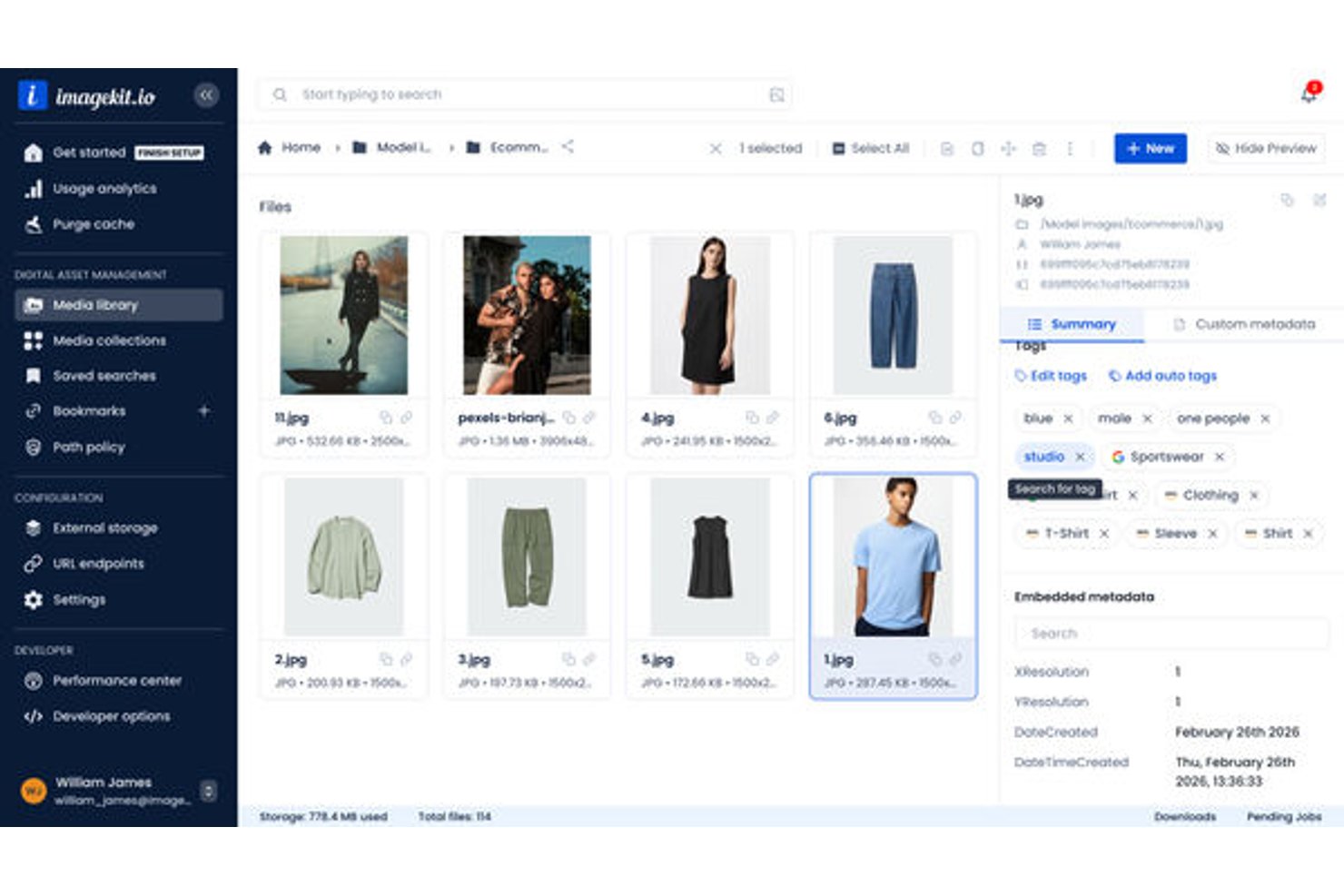
ImageKit is a cloud-based digital asset management platform that pairs AI-powered asset organization with built-in real-time media processing and global CDN delivery for images, videos, and rich media.
Who Is ImageKit Best For?
ImageKit suits tech-forward marketing and creative operations teams that manage high volumes of media assets alongside developer-driven delivery workflows.
Why I Picked ImageKit
ImageKit earns its spot on my shortlist because of how its AI handles asset organization at a structural level. I particularly like the AI Tasks feature, which lets you configure natural-language prompts to extract structured metadata automatically (think: "What is the collar type of this shirt?" applied across thousands of product images). The DAM Agent goes further, letting me execute multi-step bulk operations and build governance policies through conversational commands.
ImageKit Key Features
- Creative automation templates: Create and version image and video variants in bulk using CSV-driven templates directly within the DAM.
- Virtual collections: Organize assets into dynamic collections without duplicating files across folders.
- Role-based access control: Assign granular user permissions for viewing, updating, or managing assets and folders.
- Audit history and timeline tracking: Monitor every asset action with detailed logs and version history for compliance.
ImageKit Integrations
ImageKit offers 30+ native integrations, including Asana, Jira, Slack, Notion, Confluence, HubSpot, Mailchimp, and Hootsuite, and provides an API for custom integrations.
Pros and Cons
Pros:
- Global CDN delivery included natively
- Real-time media transformation built into DAM
- AI Tasks automate bulk metadata extraction
Cons:
- Folder-based structure limits complex taxonomy needs
- DAM functionality is newer than established competitors
Best for face-based photo discovery

Tagbox.io is an enterprise digital asset management platform for teams that need to organize, search, and share large libraries of photos, videos, and creative files. Its custom AI-powered tagging, visual search, duplicate detection, permissions, and version control help creative, marketing, and retail/ecommerce teams find assets faster while keeping content organized and accessible. I especially like its custom AI tagging capabilities, which help retail and ecommerce brands automatically tag products, colors, styles, categories, and other visual attributes across large media libraries.
Who Is Tagbox.io Best For?
Tagbox.io is a strong fit for marketing and creative teams at mid-to-large companies that manage high volumes of visual assets across multiple projects or brands, especially retail and eCommerce teams managing large product and campaign asset libraries.
Why I Picked Tagbox.io
I picked Tagbox.io because it helps teams manage large photo and video libraries with AI-powered search, tagging, and asset organization tools. Its face recognition feature is especially useful for finding photos of specific people, which can save time for event teams, agencies, and brands managing people-heavy media collections. I also like that you can search assets by visual details like objects, scenes, colors, and text instead of relying only on file names or manual tags. What stands out for retail and ecommerce teams is its custom AI tagging functionality, which can automatically identify and organize products, apparel styles, colors, packaging, and other brand-specific visual attributes across large media libraries, helping merchandising, marketing, and creative teams quickly find approved assets for campaigns, product launches, and seasonal promotions. For enterprise teams, Tagbox.io also supports permissions, collections, duplicate detection, and version control to keep shared asset libraries organized and easier to manage.
Tagbox.io Key Features
Some other features in Tagbox.io support enterprise teams that need better control over shared media libraries:
- Guest uploads: Let clients, photographers, event vendors, and other external contributors upload assets directly into your workspace without needing a full account.
- Video AI analysis: Detect people, products, speech, and brand moments across video files to make specific clips easier to find.
- Asset collections: Group related files into collections so teams can organize campaign, event, or client assets in one place.
- Duplicate detection: Identify duplicate files to reduce clutter and keep large asset libraries easier to manage.
Tagbox.io Integrations
Connect Tagbox.io through Tagbox Desktop (drag-and-drop into any app), Zapier, Make, and a REST API. Custom workflows are available for Enterprise.
Pros and Cons
Pros:
- Guest uploads simplify collecting media from external contributors
- Face recognition helps locate people across photos and videos
- AI search finds assets by faces, objects, and scenes
Cons:
- Digital rights tracking features are not clearly listed
- Approval workflow routing is not clearly documented

Pics.io
Best to integrate with Google Drive and Amazon S3

Pics.io is a digital asset management (DAM) software that helps your business keep digital assets organized and managed efficiently. It can handle multiple file formats and stores assets in a centralized depository in the cloud, making them accessible to staff in different places and on different devices.
The software provides its own storage space, but users can also integrate it with Google Drive and Amazon S3 to avoid needing to migrate existing files. Specific file formats it supports include images, videos, audio files, and documents. Metadata makes for easy search and organization of assets. When it comes to AI-based functionality, Pics.io lets users choose from three different AI models for generating keywords for digital assets. Users can also automatically create descriptions for their files and even customize prompts with the help of customer support.
One notable feature is the version control, which lets users track changes and revert files back to previous versions as needed. Teams can also collaborate on assets through the platform with commenting, tagging, and approvals. Files can be shared externally and the interface can be customized to your company’s branding.
Integrations include Google Drive, Amazon S3, Shopify, Slack, Adobe Photoshop, Figma, Hootsuite, HubSpot, Salesforce, Trello, and ZohoCRM.
Pricing starts from $50 per month, and a 7-day free trial is available.
New Product Updates from Pics.io
Pics.io Adds Filtered Audit Trail CSV Exports
Pics.io now lets you export Audit Trail logs to CSV and apply filters before exporting, making it easier to analyze and share activity history. For more information, visit Pics.io's official site.
 .

Best modular enterprise digital asset management software that scales with company growth

4ALLPORTAL provides two main products, product information management (PIM) and digital asset management (DAM) software for companies that want a customizable and scalable solution capable of facilitating workflows around file management and corporate data in an efficient and automated manner.
Due to the modular nature of the software, each instance is individually scalable to meet increasing demands or growth as a company needs. The software provides a flexible licensing model, which allows businesses to utilize the enterprise DAM system based on the number of users or be completely user-independent. The data center is securely situated in Germany and audited by the Technical Inspection Agency to ensure that the servers meet all the legal requirements and regulatory standards, including that of the ISO standard for information and IT environment security for data backup.
The digital asset management software also has powerful search functions to help users locate files and other digital assets easily. With tagging, users can easily store keywords and meaningful descriptions for individual assets, which they can utilize for targeted queries. In addition to file names, users can leverage advanced search criteria like file types and release status to locate specific assets.
Pricing for the 4ALLPORTAL DAM software is available only upon request.

Filecamp
Best white label experience/custom branding

Filecamp is a lightweight, cloud-based digital asset management (DAM) solution that helps marketing and creative teams organize and share their digital media such as images, videos, and brand guidelines. More than 1,500 brands from all over the world trust Filecamp with their digital assets and brand guidelines.
Filecamp comes with unlimited users, each user configured with their own set of user admin and folder permissions. Filecamp lets you employ custom branding options so that your DAM system matches your brand guidelines. You can even customize the interface and log-in screen down to specific folders and customers.
You can also use Filecamp to set up a custom media portal for distributors around the world, or simply to send a download link to a colleague. Filecamp offers advanced search capabilities and lets you filter by keyword, author, file type, and expiry date. Keywords, XMP metadata, and auto tags make all your media files searchable.
Team leaders can leverage their built-in online proofing and commenting tools to review and approve creative work.
Filecamp costs from $29/month (unlimited users!) and offers a 30-day free trial.
New Product Updates from Filecamp
Filecamp Adds Analytics, AI Thumbnails, and CDN Embed Links
Filecamp adds Analytics, AI-powered thumbnails, and CDN-backed Embed links. These updates give teams more visibility into asset usage, improve thumbnail presentation, and make embedded images easier to manage. For more information, visit Filecamp’s official site.
 .

Frontify
Best for collaborative work

Frontify’s digital asset management solution simplifies uploading, storing, organizing, and sharing digital assets in a unified platform. Its asset rights management system helps ensure that asset rights are up-to-date and sends notifications before the digital rights to use a specific asset expires. As a centralized asset library, any changes on a brand asset automatically reflect wherever that asset is in use, ensuring brand consistency.
Working in a fast-paced, collaborative environment requires modern communication strategies (commenting, @-ing, emojis, customizable proofing/approval workflows)—all of which Frontify delivers. With feedback and approval automation, you can ensure that crucial digital assets receive timely approvals to keep projects on track.
Frontify integrates with Google Docs, InDesign, Adobe Creative Cloud, Getty Images, and other asset- and workflow-based apps.
Frontify pricing is available upon request.

Best marketing asset templates
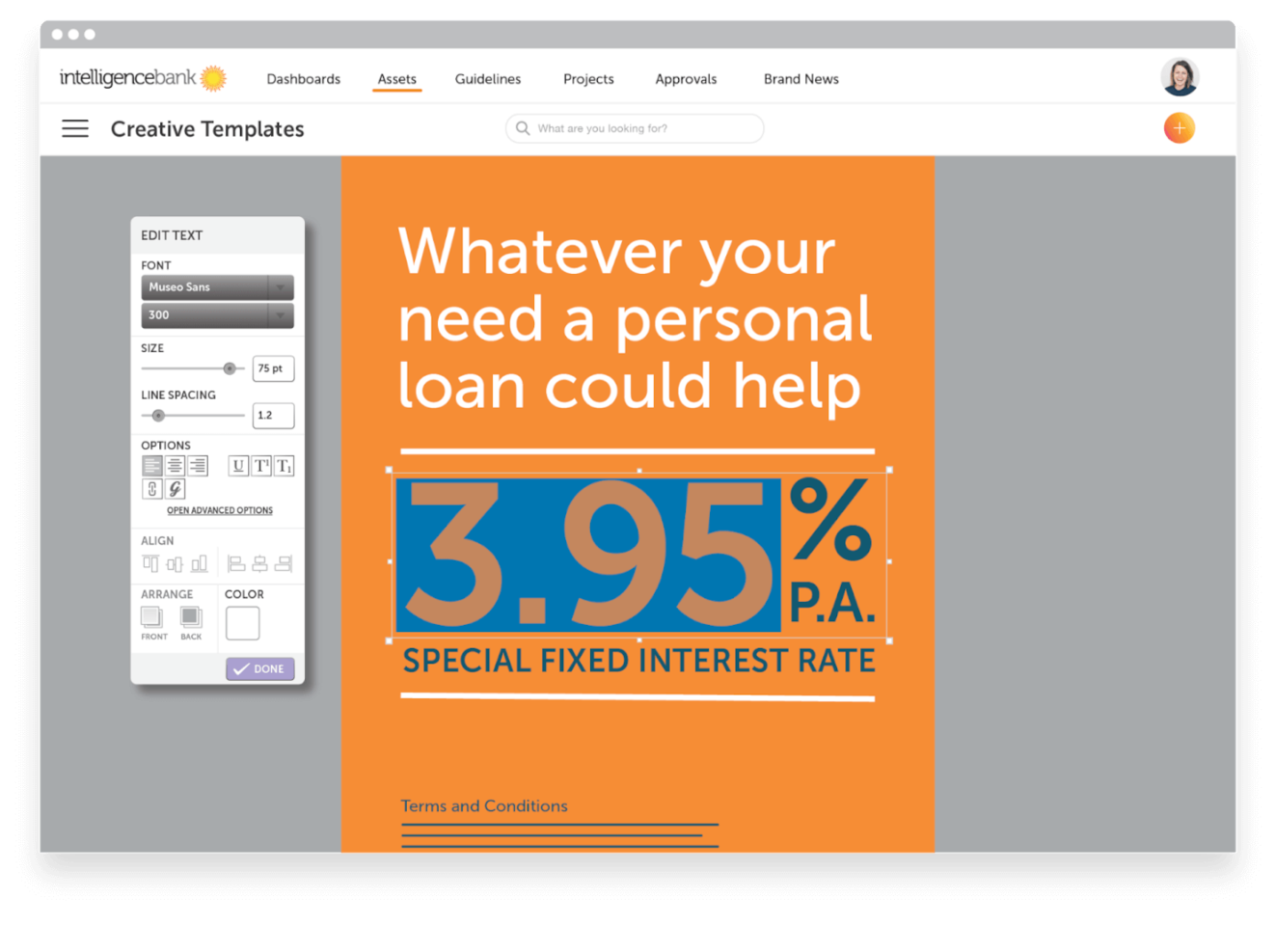
IntelligenceBank is a digital asset management software with content management capabilities allowing you to manage digital assets throughout their entire lifecycle using a single source. It supports image and video conversion so that you can use media assets in different file types and file formats depending on the project you’re working on. IntelligenceBank has a configurable API so you can develop custom tools and features that suit your enterprise’s unique needs.
If you want a digital asset management system that can help you reduce your creative team’s production time, I recommend IntelligenceBank because of its pre-built creative marketing templates. With their marketing and sales templates, you can cut the time spent building assets from scratch and launch different campaigns across multiple channels much faster. You can also create and store your own templates to reuse as needed.
IntelligenceBank pricing is available upon request.
Diğer Kurumsal Dijital Varlık Yönetimi Yazılımları
Kısa listeme giremeyen, ancak yine de göz atmaya değer bazı ek kurumsal DAM yazılımı seçenekleri şunlardır:
- Image Relay
DAM + product information management (PIM)
- Adobe Experience Manager
For cross-channel asset management
- Brightspot
For agile content workflows
- Wedia
For maintaining compliance and approval processes
- Orange Logic
With built-in project management
- Artwork Flow by Bizongo
DAM for enterprise CPG brands
- Asset Bank
For multi-brand companies
- Scaleflex
For AI-driven media optimization
- DemoUp Cliplister
For dynamic asset distribution
- hyperCMS DAM Server
Open source enterprise DAM
- MediaBeacon
Taxonomy management
- Swivle DAM
On-premise DAM
- Cloudinary
With AI-powered agents for asset automation
- Acquia DAM (Widen)
For configuration and customization
- Brandfolder
DAM for enterprise usability and adoption
- Papirfly
For brand consistency at scale
- Connecter Suite
For large visual libraries
- Digizuite
Scalable and comprehensive digital asset management system for growing companies.
- Amplifi.io
AI-powered DAM and Product Information Management (PIM).
- Paperflite
Content management software for marketing and sales.


Kurumsal olmayan dijital varlık yönetimi yazılımı sürümlerini burada bulabilirsiniz.
How I Evaluate Enterprise Digital Asset Management Software
I evaluate enterprise DAM platforms on two levels: whether they clear the baseline—like versioning, metadata, and role-based access—and what differentiates each one for large-scale project teams.
Core Functionality (Table Stakes For This List)
When I'm selecting tools for my list, I rank each one on a scale from 0 (does not offer the functionality) to 5 (excels in this area) for each core functionality listed below. Then, I calculate the tool's total score into a percentage. Each tool needs to achieve a minimum total score of 65% to be considered for inclusion.
- Centralized Asset Repository: I check whether the platform can handle enterprise-scale storage across file types—think thousands of PSDs, videos, and PDFs organized in one place.
- Metadata & AI Tagging: Strong search depends on tagging, so I evaluate the depth of custom taxonomy options and whether AI can auto-tag assets on upload.
- Version Control & Workflows: I look for clear version histories and configurable approval workflows, like routing a campaign asset through design, legal, and brand review.
- Permissions & Rights Management: Granular access controls matter here—especially the ability to restrict asset usage by role, team, or license expiration date.
- Project Tool Integrations: I evaluate native connections with platforms like Workfront, Asana, and Adobe Creative Cloud that project teams already rely on daily.
- Brand Portals & Distribution: Teams need to share approved assets externally, so I look for branded portals with controlled access for agencies and partners.
Once I have a list of tools that meet this criteria, I consider what sets each platform apart.
Differentiating Factors (What Sets Vendors Apart)
Here's how I compare and contrast different vendors:
Standout Features
AI-powered search is a big differentiator—when your library holds hundreds of thousands of assets, natural language queries and visual recognition save project teams real time finding what they need. I also evaluate creative workflow automation, like automated proofing routes and task assignments that tie asset reviews directly to project timelines. Usage analytics dashboards round things out by showing which assets actually get downloaded and reused across campaigns, helping teams justify creative spend.
Beyond Features
Security and compliance certifications like SOC 2 Type II and ISO 27001 are worth checking early—especially if your organization operates in regulated industries. I also evaluate implementation support, since migrating a legacy asset library with years of metadata into a new platform is a major undertaking. Transparent pricing models matter too; I look at how vendors structure costs around storage, users, and bandwidth to avoid surprises as your team scales.
Kurumsal Dijital Varlık Yönetimi Yazılımı Nasıl Seçilir
Uzun özellik listeleri ve karmaşık fiyatlandırma yapıları arasında kaybolmak kolaydır. Özgün yazılım seçim sürecinizde ilerlerken odağınızı korumanıza yardımcı olmak için aklınızda bulundurmanız gereken faktörlerin bir kontrol listesini burada bulabilirsiniz:
| Etken | Dikkat Edilmesi Gerekenler |
| Ölçeklenebilirlik | Sistemin, performansı düşmeden veya büyük bir yenilemeye ihtiyaç duymadan büyüyen varlık kitaplıklarını, daha fazla kullanıcıyı ve ek kullanım alanlarını yönetebildiğinden emin olun. |
| Entegrasyonlar | Mevcut teknoloji yığınınıza bağlanan araçları arayın; proje yönetimi platformlarını, Adobe gibi yaratıcı yazılımları ve bulut depolamayı düşünün. |
| Özelleştirilebilirlik | Meta veri alanlarını, klasör yapılarını, izin düzeylerini ve iş akışlarını ekibinizin ihtiyaçlarına tam olarak uyacak şekilde uyarlamanıza olanak tanıyan bir platform seçin. |
| Kullanım Kolaylığı | Ekibinizin yalnızca bir dosyayı yüklemek veya bulmak için eğitim alması gerekmemeli. Sade bir düzene, sezgisel aramaya ve faydalı araç ipuçlarına sahip yazılımları arayın. |
| Bütçe | Yalnızca aylık ücretleri değil, kurulum maliyetlerini, kullanıcı sınırlarını ve tüm eklentileri de göz önünde bulundurun. Ödediğiniz fiyat karşılığında ihtiyacınız olan özellikleri aldığınızdan emin olun. |
| Güvenlik Önlemleri | Ayrıntılı izinleri, denetim kayıtlarını, SSO'yu ve şifrelemeyi kontrol edin. Hassas dosyaları korumak ve kimlerin neyi gördüğünü sınırlamak istersiniz. |
| Arama Yetenekleri | Etiketler, yükleme tarihi, dosya türü veya kullanıcı gibi filtrelerle hızlı ve doğru bir aramaya ihtiyacınız var. Yazılımda yapay zekâ destekli etiketleme veya görsel arama bulunması ek bir avantajdır. |
| İş Birliği Araçları | Ekiplerin araç değiştirmeden birlikte çalışabilmesi için paylaşılabilir bağlantılar, onay iş akışları, sürüm takibi ve yorumlar gibi özellikleri arayın. |
Kurumsal Dijital Varlık Yönetimi Yazılımındaki Trendler
Araştırmam sırasında farklı kurumsal dijital varlık yönetimi yazılımı sağlayıcılarının sayısız ürün güncellemesini, basın bültenini ve sürüm kaydını inceledim. Takip ettiğim yeni trendlerden bazıları şunlar:
- Yapay Zekâ Tarafından Oluşturulan Meta Veriler ve Etiketleme: Daha fazla araç; görselleri, videoları, animasyonları ve belgeleri içeriklerine dayalı anahtar kelimelerle otomatik olarak etiketlemek için yapay zekâ kullanıyor. Bu, manuel veri girişini azaltıyor ve doğru varlıkların hızlıca bulunmasını kolaylaştırıyor. Özellikle çok sayıda yaratıcı dosyayı yöneten ekipler için faydalı.
- Görsel Arama: Bazı sistemler artık kullanıcıların metin yazmak yerine bir referans görseli yükleyerek arama yapmasına olanak tanıyor. Bu özellik, anahtar kelimeler eksik olduğunda veya tutarsız kullanıldığında yardımcı oluyor ve benzer görsel içeriklerin keşfedilmesini kolaylaştırıyor.
- Yerleşik Hak Yönetimi: Hak izleme özellikleri yaygınlaşıyor ve ekiplerin kullanım koşullarını, sona erme tarihlerini ve dağıtım sınırlarını doğrudan sistem üzerinden yönetmesine yardımcı oluyor. Bu, süresi dolmuş veya kısıtlanmış içeriklerin kullanılma riskini azaltıyor.
- Sürüm Karşılaştırma Araçları: Ekipler artık varlıkların sürümlerini yan yana karşılaştırabiliyor ve değişen noktaları görsel göstergelerle görebiliyor. Bu, daha iyi inceleme döngülerini destekliyor ve güncel olmayan dosyalarla çalışmanın yarattığı karmaşayı önlüyor.
- Yerleşik İş Birliği Alanları: Yorum yapma, işaretleme ve görev takibi özellikleri doğrudan varlık görüntüleyicisine ekleniyor. Böylece inceleme ve onay çalışmaları, harici iletişim araçlarına güvenmek yerine tek bir yerde yürütülebiliyor.
Kuruluşlar İçin Dijital Varlık Yönetimi Yazılımı Nedir?
Kurumsal dijital varlık yönetimi (DAM) yazılımı; kuruluşların görseller, videolar, belgeler ve diğer medya dosyaları gibi dijital varlıkları depolamak, düzenlemek, yönetmek ve dağıtmak için kullandığı bir araçtır. Büyük miktarlardaki dijital içeriği yönetmek için merkezi bir platform sunar ve bu varlıklara kolay erişim, sınıflandırma ve kontrol sağlar.
Dijital varlık yönetimi araçları, kapsamlı medya kitaplıklarına sahip büyük kuruluşlar veya dijital varlıkların yakalanıp yönetildiği etkinlikler için özellikle faydalıdır; dijital kaynaklarını verimli bir şekilde yönetmelerine, marka tutarlılığını sağlamalarına ve ekipler arasındaki iş birliğini geliştirmelerine yardımcı olur.
Kurumsal Dijital Varlık Yönetimi Yazılımının Özellikleri
Kurumsal dijital varlık yönetimi yazılımı seçerken aşağıdaki temel özelliklere dikkat edin:
- Özel meta veri alanları: Varlık bilgilerini ekibinizin ihtiyaçlarına göre uyarlamanıza olanak tanıyarak dosyaları yönetmeyi ve aramayı kolaylaştırır.
- Varlık düzenleme araçları: Dosyaları meta verilerle kategorilere ayırmanıza ve etiketlemenize olanak tanıyarak dosyaların depolanmasını, filtrelenmesini ve alınmasını kolaylaştırır.
- Gelişmiş arama işlevi: Anahtar kelimeler, dosya türleri, yükleme tarihleri ve kullanıcı etkinliği gibi filtreleri kullanarak varlıkları hızla bulmanıza yardımcı olur.
- İzin denetimleri: Hassas içeriği korumak için belirli varlıkları kimlerin görüntüleyebileceğini, düzenleyebileceğini veya indirebileceğini kontrol etmenizi sağlar.
- Sürüm denetimi: Varlık değişikliklerinin kaydını tutarak düzenlemeleri izlemenize, sürümleri karşılaştırmanıza ve gerektiğinde önceki dosyaları geri yüklemenize olanak tanır.
- Dijital haklar yönetimi: Görsellerin, videoların veya diğer medya içeriklerinin yetkisiz kullanımını önlemek için lisans kullanımını ve sona erme tarihlerini izler.
- Önizleme ve oynatma araçları: Görselleri, videoları ve belgeleri indirmeden doğrudan platform içinde görüntülemenizi sağlar.
- Onay iş akışları: Varlık onaylarını yönetmek için inceleme görevleri atamanıza ve sistem içinde geri bildirim toplamanıza olanak tanır.
- Denetim günlükleri: Etkinlikleri izlemeye ve uyumluluğu desteklemeye yardımcı olmak için kullanıcı işlemlerini ve sistem değişikliklerini takip eder.
- Bulut depolama ve yedekleme: Veri kaybı durumunda düzenli yedeklemelerle dijital varlıklarınızın güvenli bir şekilde depolanmasını sağlar.
Kurumsal Dijital Varlık Yönetimi Yazılımının Faydaları
Kurumsal dijital varlık yönetimi yazılımını uygulamak ekibiniz ve işletmeniz için çeşitli faydalar sağlar. Yararlanabileceğiniz birkaç avantaj şunlardır:
- Ekibin zamanından tasarruf sağlar: Otomasyon ve düzenleme; etiketleme, dosyalama ve dosya arama gibi tekrarlayan görevleri azaltır.
- Dosyalara daha hızlı erişim: Gelişmiş arama ve etiketleme, klasörleri tek tek incelemeden doğru varlığı bulmayı kolaylaştırır. Bu, özellikle üniversiteler için DAM yazılımı kullananlar gibi birbirinden bağımsız çalışan ekipler için faydalıdır.
- Daha az sürüm karışıklığı: Sürüm denetimi, ekibinizin doğru dosyayla çalışmasına ve güncelliğini yitirmiş içeriklerden kaçınmasına yardımcı olur.
- Daha iyi marka tutarlılığı: Düzenli erişim ve onay iş akışları, ekiplerin her seferinde markaya uygun varlıkları kullanmasına yardımcı olur. Bu, özellikle yüzlerce markalı web sitesi görselini yöneten e-ticaret için DAM yazılımı kullanan ekipler için faydalıdır.
- Geliştirilmiş iş birliği: Yerleşik geri bildirim araçları ve paylaşılan erişim, ekiplerin araç değiştirmeden dosyaları incelemesine ve onaylamasına olanak tanır.
- Daha güvenli depolama: İzin ayarları ve denetim günlükleri hassas içeriği korur ve kullanıcı etkinliğini takip eder.
- Daha kolay lisans takibi: Hak yönetimi özellikleri, süresi dolmuş veya kısıtlanmış içeriklerin kullanılmasını önlemeye yardımcı olur.
Kurumsal Dijital Varlık Yönetimi Yazılımı Maliyetleri ve Fiyatlandırması
Kurumsal dijital varlık yönetimi yazılımını seçmek, mevcut çeşitli fiyatlandırma modellerinin ve planların anlaşılmasını gerektirir. Maliyetler özelliklere, ekip büyüklüğüne, eklentilere ve daha fazlasına göre değişir. Aşağıdaki tablo, kurumsal dijital varlık yönetimi yazılımı çözümlerinde yaygın olarak sunulan planları, ortalama fiyatlarını ve tipik özelliklerini özetlemektedir:
Kurumsal Dijital Varlık Yönetimi Yazılımı İçin Plan Karşılaştırma Tablosu
| Plan Türü | Ortalama Fiyat | Yaygın Özellikler |
|---|---|---|
| Ücretsiz | $0 | Temel varlık depolama, sınırlı kullanıcı hesapları, temel arama ve filtreleme, topluluk desteği |
| Temel | $500 - $1,000/ay | Artırılmış depolama kapasitesi, gelişmiş arama özellikleri, kullanıcı izinleri, e-posta desteği |
| Profesyonel | $1,500 - $5,000/ay | Özel markalama, API erişimi, entegrasyon özellikleri, profesyonel destek, analiz ve raporlama |
| Kurumsal | $7,000 - $25,000/ay | Sınırsız depolama, özel hesap yöneticisi, SLA garantileri, özel geliştirme, 7/24 premium destek |
Kurumsal DAM Yazılımı Hakkında Sıkça Sorulan Sorular
Dijital varlık yönetimi ve DAM yazılımı hakkında sık sorulan bazı soruların yanıtlarını burada bulabilirsiniz.
Dijital varlık yazılımı nedir?
Başka hangi yaratıcı proje yönetimi araçlarını kullanabilirim?