

2026 İçin İncelenen En İyi 10 Elektronik İmza Yazılımı

10 En İyi E-imza Yazılımları Kısa Listesi


E-imza yazılımı; onayları toplama, sözleşmeleri imzalama ve belgeleri sonlandırma süreçlerini kolaylaştırarak yazdırma, tarama ve bitmek bilmeyen e-posta zincirlerinin neden olduğu gecikmeleri ortadan kaldırır. İster müşteri sözleşmelerini, ister tedarikçi onaylarını veya kurum içi imzaları yönetiyor olun, e-imza araçları ekiplerin daha hızlı ilerlemesine ve düzenli kalmasına yardımcı olur.
Hangi platformların proje ekipleri için hız, güvenlik, entegrasyonlar ve kullanılabilirlik açısından en iyi dengeyi sunduğunu görmek için önde gelen e-imza yazılımlarını bağımsız olarak test edip inceledim. Yasal olarak bağlayıcı imzalardan otomatik hatırlatıcılara ve denetim kayıtlarına kadar, gerçek dünyadaki iş akışlarında gerçekten işe yarayan özelliklere odaklandım.
Bu rehberde, 2026 yılında kullanabileceğiniz en iyi e-imza yazılımı seçeneklerini; temel özelliklerin, ideal kullanım alanlarının ve her aracın hangi konularda başarılı olup hangi konularda başarılı olmadığının ayrıntılı bir açıklamasıyla birlikte bulacaksınız.
Why Trust Our Software Recommendations
Our team has been testing and reviewing software since 2012. As project managers ourselves, we know how difficult—and important—it is to choose the right software.
For this guide, we evaluated tools using hands-on testing and independent research, scoring tools using our selection criteria. We also draw on insights from industry thought leaders and practicing project management experts.
Our reviews reflect our human editorial judgment, not a sales pitch.
Expert reviewers:
E-imza Yazılımları Karşılaştırma Tablosu
Bu karşılaştırma tablosu, en iyi e-imza yazılımı seçimlerim için fiyatlandırma ayrıntılarını özetlemektedir:
| Tool | Starting Price | Website | |
|---|---|---|---|
| Best for workflow automation tools | 4.6 out of 5 | $8/month Free trial available | Website |
| Best for form-driven signing workflows | 4.7 out of 5 | Pricing upon request Free plan available | Website |
| Best for seamless Integration with Gmail | 4.7 out of 5 | $8/month Free forever plan | Website |
| Best for editing and signing PDFs | 4.6 out of 5 | $8/month Free trial available | Website |
| Best for audit trail transparency | 4.9 out of 5 | $10/month Free plan available | Website |
| Best for real-time collaboration | 4.8 out of 5 | Pricing upon request Free demo available | Website |
| Best for guided signing workflows | 4.8 out of 5 | $20/month; API plans start at $49/month Free trial available | Website |
| Best for remote team workflows | 4.7 out of 5 | $10/user/month 14-day free trial | Website |
| Best for multi-language support | 4.8 out of 5 | $12/month 14-day free trial + free plan available | Website |
| Best for mobile-first document signing | 4.8 out of 5 | $8/user/month Free trial + free plan available | Website |
En İyi E-imza Yazılımı İncelemeleri
Burada, en iyi e-imza yazılımı seçeneklerine ilişkin değerlendirmemi ve karşılaştırmamı bulabilirsiniz. Temel özellikleri, belirli bir yazılımı seçmemin ardındaki nedenleri, fiyatlandırmaya genel bakışı ve platformun nasıl çalıştığına dair fikir veren bir ekran görüntüsünü göreceksiniz. Kendi karşılaştırma tablonuzu oluşturmak ve size uygun aracı seçmek için bu çeşitli açıklamalardan yararlanın.
SignNow
Best for workflow automation tools
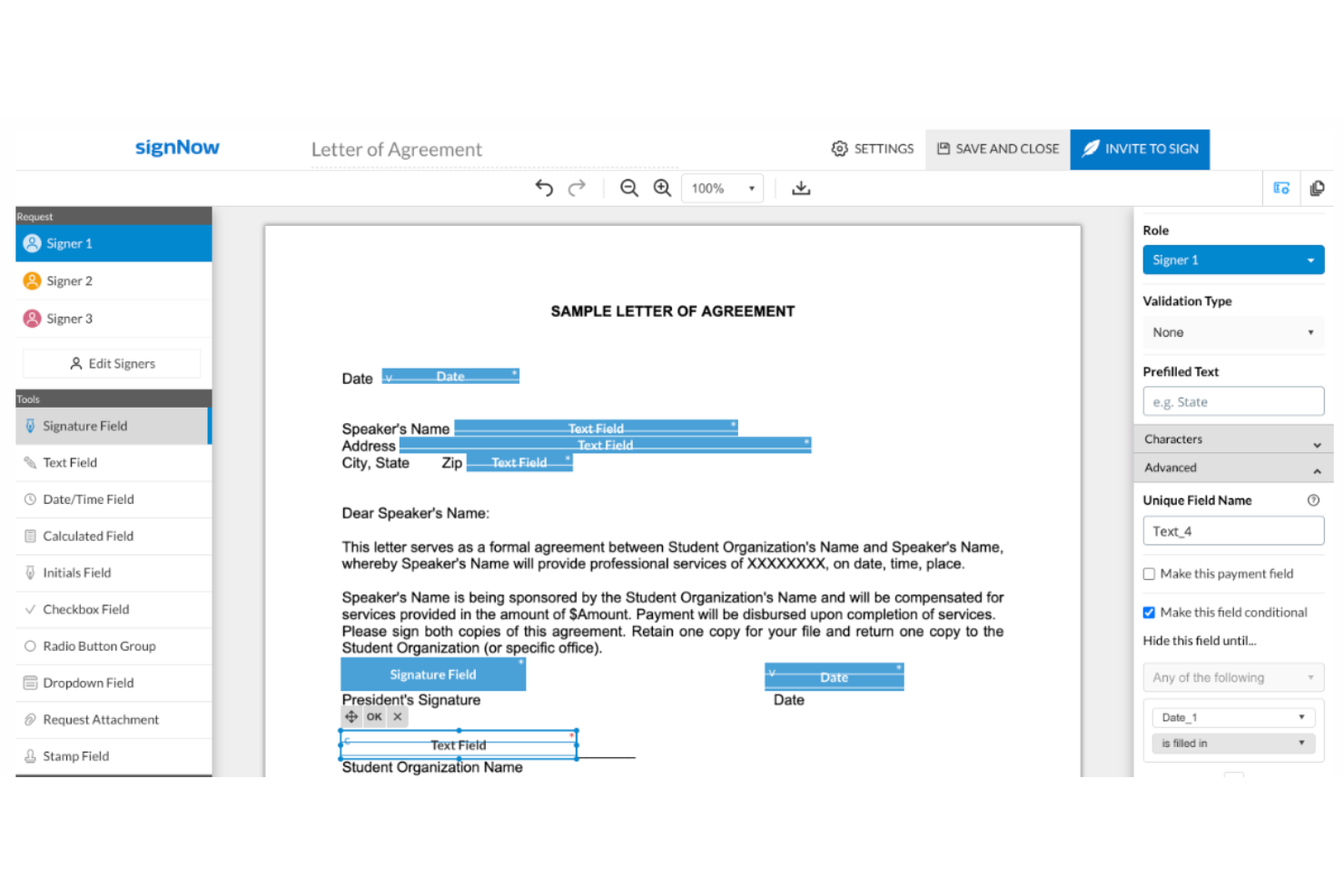
SignNow is built for teams that want to automate document workflows while managing electronic signatures. It’s a strong fit for operations, legal, and procurement teams that need to route, approve, and sign documents in a controlled sequence. With workflow automation tools, SignNow helps you reduce manual steps and keep signature processes moving.
Who is SignNow Best For?
SignNow is appropriate for operations and IT teams in mid-sized to enterprise companies that automate document-driven business processes. It supports organizations integrating signing workflows into broader automation initiatives.
Why I Picked SignNow
SignNow stands out for its workflow automation capabilities, which go beyond basic electronic signature tools. I picked SignNow because it lets you build custom signing sequences, set conditional routing, and automate reminders, so documents move through your process without manual intervention. The platform also supports role-based signing, allowing you to assign specific actions to different stakeholders in a workflow. If your team needs to manage complex approval chains or automate repetitive signature tasks, SignNow is built to handle those requirements.
SignNow Key Features
Some other features that make SignNow useful for electronic signature workflows include:
- Bulk Sending: Send documents to multiple recipients for signature in one action.
- Document Merge: Combine multiple files into a single document before sending for signature.
- Mobile App: Access, sign, and manage documents from iOS and Android devices.
- Custom Branding: Add your company logo and colors to signature requests and notifications.
SignNow Integrations
Integrations include Salesforce, Google Workspace, Netsuite, Autodesk, and Office 365.
Pros and Cons
Pros:
- Advanced mobile and tablet experience
- Valuable for creating a paperless office
- Simplifies adding signatures and fields to documents
Cons:
- Customer support services could be improved
- Occasional crashes
Jotform
Best for form-driven signing workflows
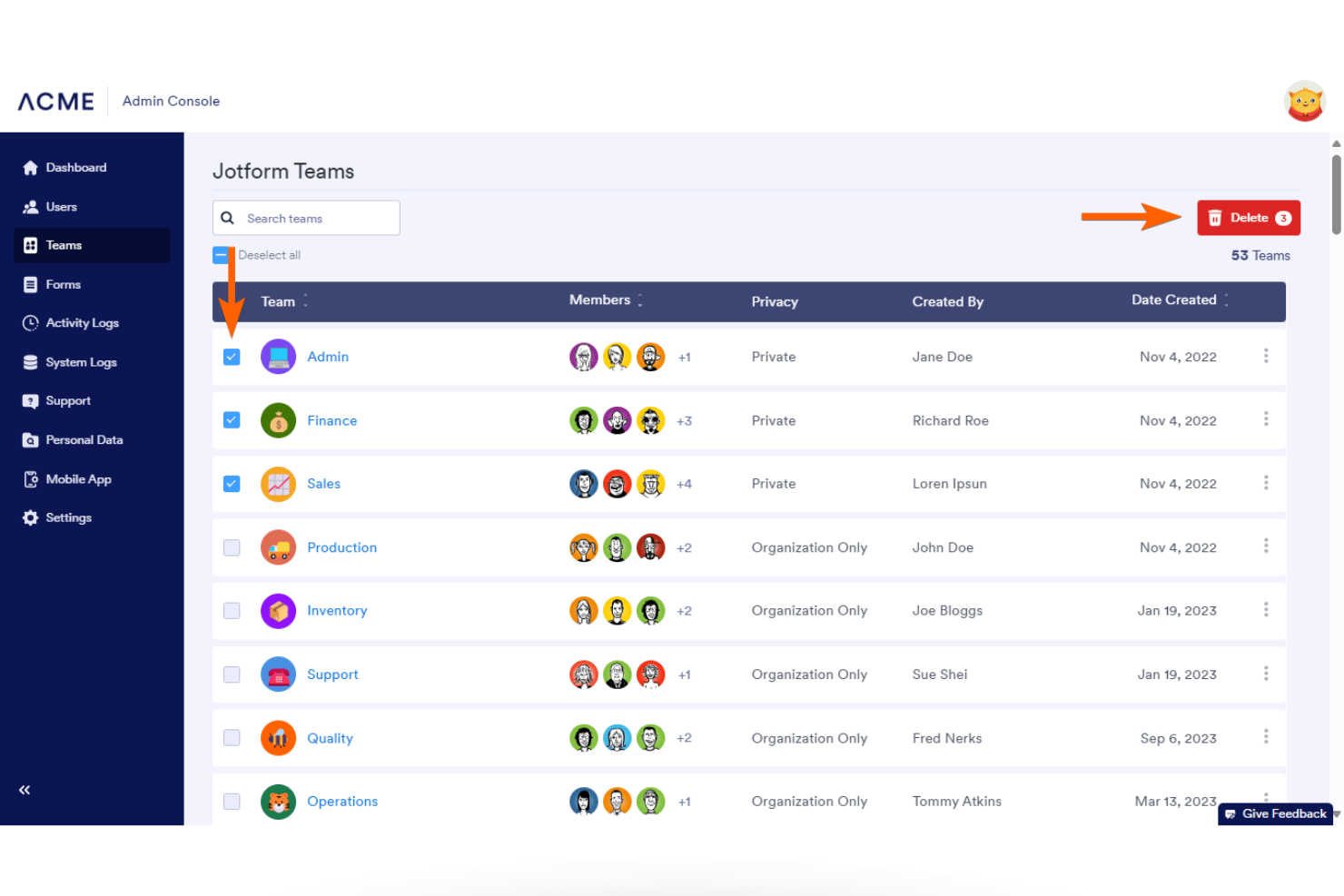
Jotform is an online form automation platform that includes e-signature functionality through Jotform Sign. While it is not a standalone e-signature provider in the traditional sense, it allows teams to generate documents, collect data, and capture legally binding signatures within a single automated workflow. This makes it particularly useful for organizations that need signatures embedded into broader approval, onboarding, or intake processes rather than sent as isolated documents.
Who Is Jotform Best For?
Jotform is a good fit for organizations that need e-signatures embedded within form-driven workflows, especially teams that want to combine data collection, document generation, and signing in one platform.
Why I Picked Jotform
For teams that prioritize branded and customizable signing experiences, Jotform stands out for its flexibility within its form automation environment. I picked Jotform because it allows users to customize forms, emails, and signing workflows to reflect their organization’s identity. This helps maintain consistency throughout the signing process while keeping document generation and signature collection within the same system.
Jotform Key Features
Some other features that make Jotform a strong choice for e signature workflows include:
- Document automation: Automatically generate and send documents for signature based on form submissions.
- Conditional logic: Set up rules that change form behavior or signing workflows based on user responses.
- Audit trails: Track every action taken on a document, including who signed and when, for compliance and transparency.
- Multi-party signing: Collect signatures from multiple stakeholders in a specific order or simultaneously, depending on your workflow needs.
Jotform Integrations
Integrations include Salesforce, Google Sheets, Slack, PayPal, Dropbox, HubSpot, Stripe, Mailchimp, Zoom, and monday.com.
Pros and Cons
Pros:
- Enables mobile-friendly document signing
- Supports bulk sending of signature requests
- Provides detailed audit trails for signatures
Cons:
- Limited offline signing capabilities
- Lacks advanced document editing tools

DocHub
Best for seamless Integration with Gmail

For those in search of an intuitive e-signature solution, DocHub presents an engaging platform to enhance your document workflows. It offers seamless integration with tools like Google Workspace and caters to a range of industries, including education and healthcare. With user-friendly features for editing, signing, and sharing PDFs, DocHub is designed to meet your needs for productivity and compliance with legal standards.
Why I Picked DocHub
I picked DocHub for its integration with Gmail, which is ideal for those who want an efficient e-signature solution without leaving their email workflow. This integration allows you to open, edit, and sign PDF attachments directly within Gmail, saving valuable time and keeping your document management organized. The DocHub for Gmail add-on ensures a secure and user-friendly experience, with compliance to standards like GDPR and HIPAA, providing peace of mind for sensitive documents. By centralizing your document tasks in Gmail, you enhance productivity and protect your data, making DocHub a compelling choice for e-signature needs.
DocHub Key Features
In addition to its integration with Gmail, DocHub offers a range of features to enhance your document management experience.
- Advanced Document Editing: Modify PDFs with tools for text, images, and annotations, allowing you to create custom forms tailored to specific needs.
- Collaborative Workflow Enhancement: Engage in real-time collaboration by sharing documents with controlled permissions and tracking version history to maintain document integrity.
- Mobile Accessibility: Access and manage your documents on mobile devices without the need for an app, ensuring flexibility and productivity on the go.
- Security Features: Share documents securely with options for password protection and recipient authentication, providing peace of mind for sensitive information.
DocHub Integrations
- Integrations include Gmail, Google Drive, Google Classroom, Dropbox, OneDrive, and Microsoft Edge.
Pros and Cons
Pros:
- Supports real-time collaboration, enhancing team productivity.
- Provides advanced document editing features for comprehensive PDF management.
- Offers seamless integration with Google Drive for efficient workflows.
Cons:
- Mobile optimization could be better
- Limited docs with free version

Best for editing and signing PDFs
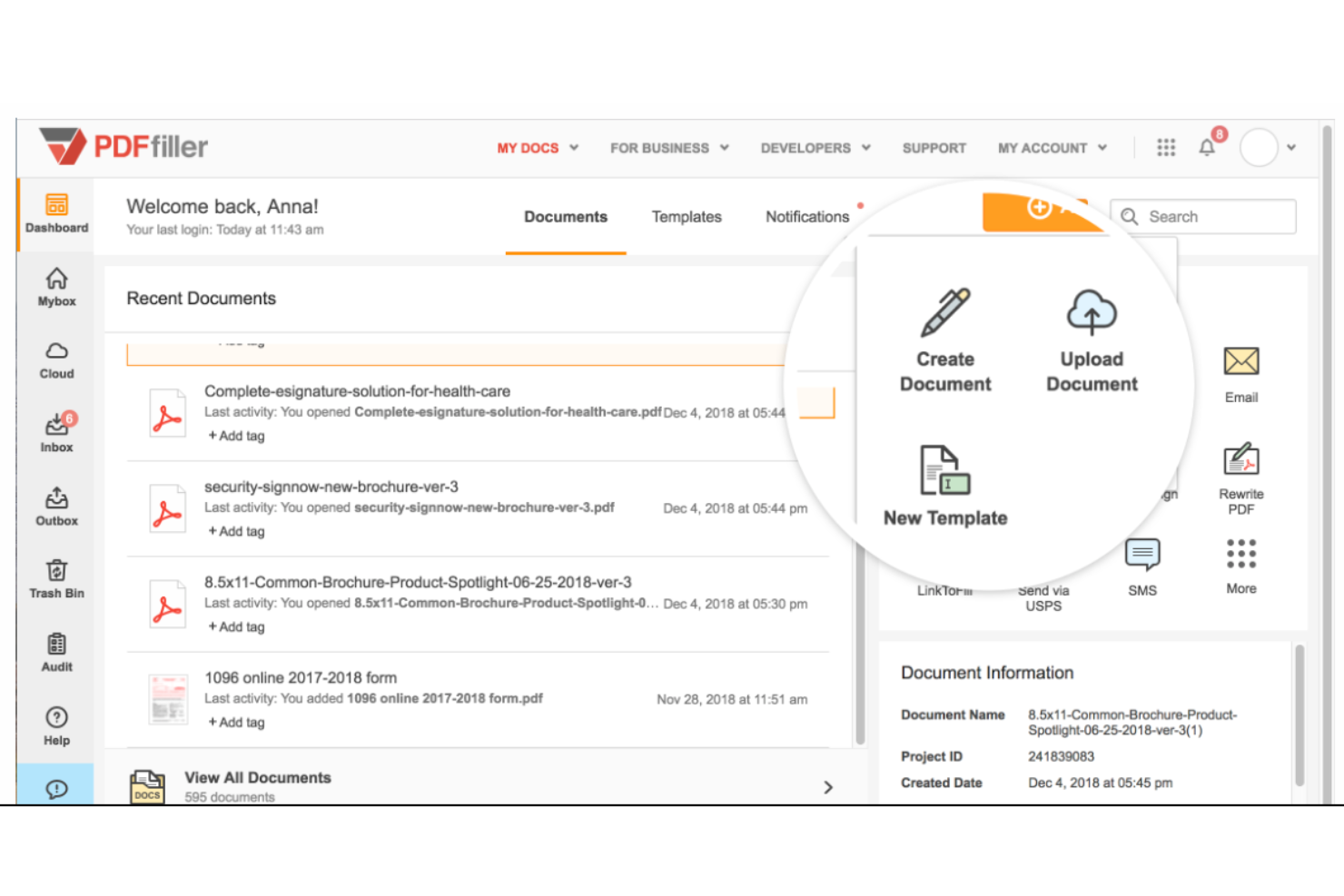
pdfFiller is designed for teams that need to edit, fill, and sign PDFs in one place. It’s especially useful for HR, legal, and administrative professionals who handle a high volume of forms and contracts. With built-in editing and signing tools, pdfFiller helps you manage document workflows without switching between platforms.
Who is pdfFiller Best For?
pdfFiller serves administrative and compliance teams in small to mid-sized organizations that regularly edit and complete PDF forms. It fits businesses that combine document editing and signing within a single workflow.
Why I Picked pdfFiller
What sets pdfFiller apart is its ability to let you edit and sign PDFs within a single platform. I picked pdfFiller because it combines a full-featured PDF editor with electronic signature tools, so you can make changes to documents and collect signatures without exporting files or using multiple apps. The platform supports adding text, images, and checkboxes directly to PDFs, which is especially useful for teams that need to customize forms or contracts before sending them out. If your workflow involves frequent document edits and signatures, pdfFiller brings both together in one place.
pdfFiller Key Features
Some other features that make pdfFiller useful for electronic signature workflows include:
- Bulk Send: Send documents to multiple recipients for signature at once.
- Reusable Templates: Save and reuse frequently used forms and contracts.
- Audit Trail: Track every action taken on a document for compliance.
- Custom Branding: Add your company logo and colors to signature requests and notifications.
pdfFiller Integrations
Integrations include OneDrive, Box, Dropbox, Google Chrome, and G Suite.
Pros and Cons
Pros:
- Helps save time and money
- User-friendly design
- Documents can be password protected
Cons:
- Some formatting issues when converting PDFs to Word
- Advanced features require a steep learning curve

Signwell
Best for audit trail transparency

SignWell is a digital signature platform built for teams that need clear, detailed audit trails for every document. It’s especially useful for legal, finance, and compliance-focused organizations that require transparent tracking of signature activity. SignWell helps you maintain accountability and meet regulatory requirements by providing granular visibility into every step of the signing process.
Who is SignWell Best For?
SignWell is appropriate for small business owners and operations leads that require clear audit trails for signed agreements. It fits organizations that prioritize transparency and straightforward recordkeeping in routine contracts.
Why I Picked SignWell
What sets SignWell apart is its focus on providing a transparent and detailed audit trail for every document you send. The platform automatically records each action—such as when a document is viewed, signed, or declined—along with timestamps and IP addresses. I picked SignWell because this level of tracking is essential for teams that need to demonstrate compliance or resolve disputes. With its audit trail features, you can quickly verify the authenticity and status of any signed document.
SignWell Key Features
Some other features that make SignWell useful for teams managing digital agreements include:
- Reusable Templates: Save time by creating and storing templates for frequently used documents.
- Bulk Send: Send the same document to multiple recipients at once for signature collection.
- Signer Fields: Add custom fields for initials, dates, checkboxes, and text to guide signers through the document.
- Reminders and Notifications: Set up automated reminders and notifications to keep signers on track and informed.
SignWell Integrations
Integrations include QuickBooks Online, Xero, Clio, Close, Jack Henry, and Mambu.
Pros and Cons
Pros:
- Solid basic e-signature functionality (templates, tracking, audit trails)
- Very good value for the cost
- User-friendly and easy to use
Cons:
- Free plan comes with some usage and capability caps
- Feature limitations, better suited for simple workflows

Lightico
Best for real-time collaboration

Lightico is designed for teams that need to collaborate with customers in real time during document signing and completion. It’s especially useful for financial services, insurance, and call centers that want to guide clients through forms, signatures, and document uploads in a live session. With Lightico, you can co-browse, collect signatures, and complete transactions while staying connected with your customers.
Who is Lightico Best For?
Lightico is designed for customer service and financial services teams in enterprise organizations that require real-time document collaboration. It fits businesses that manage time-sensitive customer interactions across digital channels.
Why I Picked Lightico
Lightico stands out for its real-time collaboration capabilities, which are especially valuable for teams that need to guide customers through signing processes as they happen. I picked Lightico because it lets you co-browse documents, collect signatures, and complete forms together with clients in a live session. The platform also supports instant document sharing and secure uploads during the same interaction, so nothing gets lost in follow-up emails. These features make Lightico a strong fit for industries like financial services and insurance, where live customer engagement is often essential.
Lightico Key Features
In addition to its real-time collaboration tools, Lightico offers several other features that support electronic signature workflows:
- eForms: Create and send digital forms for customers to complete and sign within the same session.
- ID Verification: Verify customer identity using built-in ID capture and validation tools.
- Workflow Automation: Set up automated processes for document routing and approval.
- SMS Document Requests: Send document requests and signature links directly to customers via SMS.
Lightico Integrations
Integrations include Salesforce.
Pros and Cons
Pros:
- Designed for real-time use
- Fully integrated with Salesforce
- ADA compliant platform
Cons:
- Requires internet accessibility
- Limited integrations

Best for guided signing workflows

Signaturely is designed for teams and professionals who want a step-by-step signing experience that reduces errors and confusion. Its guided signing workflows help ensure every required field is completed and signatures are collected in the right order. This approach is especially useful for businesses that handle complex agreements or need to walk clients through multi-step documents.
Who is Signaturely Best For?
Signaturely is a practical option for HR teams and operations managers in growing small businesses that need structured, guided signing processes. It works well for organizations formalizing internal document workflows across distributed teams.
Why I Picked Signaturely
Signaturely stands out for its focus on guided signing workflows, which is especially valuable for teams that need to ensure every document is completed accurately. The platform lets you set required fields and signing orders, so you can control exactly how recipients move through each document. I like that Signaturely provides clear prompts and visual cues to guide signers step by step, reducing the risk of missed signatures or incomplete forms. This makes it a strong choice for businesses that handle contracts or agreements with multiple parties and complex requirements.
Signaturely Key Features
Some other features in Signaturely help support a range of document management needs:
- Document Templates: Create and reuse templates for frequently signed agreements and forms.
- Team Management: Add multiple users, assign roles, and manage permissions within your organization.
- Audit Trails: Track every action taken on a document, including timestamps and user details.
- Notifications: Receive email alerts when documents are viewed, signed, or completed.
Signaturely Integrations
Native integrations are not currently listed by Signaturely.
Pros and Cons
Pros:
- Sustainable, green giving
- Hassle-free learning curve
- User-friendly interface
Cons:
- Limited templates unless you pay for the highest tier
- Free plan only allows one document per month

Signeasy
Best for remote team workflows

Signeasy is designed for distributed teams that need to manage signatures and approvals from anywhere. It’s especially useful for businesses with remote or hybrid workforces that require quick, mobile-friendly document signing. Signeasy helps you keep signature workflows moving smoothly, even when your team is spread across different locations and time zones.
Who is Signeasy Best For?
Signeasy is appropriate for remote teams and managers in small to mid-sized companies that need consistent signing workflows across devices. It aligns with organizations managing distributed workforces across multiple locations.
Why I Picked Signeasy
When remote teams need to keep business moving, Signeasy stands out for its mobile-first approach to electronic signatures. I picked Signeasy because it lets users send, sign, and track documents from smartphones and tablets, which is essential for distributed teams that aren’t always at a desk. The tool also supports in-person signing on mobile devices, making it flexible for hybrid work scenarios. With real-time notifications and status tracking, Signeasy helps remote teams stay aligned and responsive throughout the signature process.
Signeasy Key Features
Some other features that make Signeasy useful for electronic signature workflows include:
- Document Templates: Save and reuse frequently used documents to speed up signature requests.
- Team Management Dashboard: Assign roles, manage users, and monitor team activity from a centralized dashboard.
- Audit Trails: Access a detailed log of every action taken on a document for compliance and tracking.
- Cloud Storage Integrations: Connect directly with Google Drive, Dropbox, and OneDrive to import and export documents.
Signeasy Integrations
Integrations include Google Workspace, Microsoft SharePoint, Microsoft Outlook, and Teamtailor.
Pros and Cons
Pros:
- Solid integrations and device compatibility
- Affordable pricing for smaller teams
- Mobile and on-the-go friendly
Cons:
- Some integration issues reported
- Feature limitations for complex workflows

CocoSign
Best for multi-language support

If your team needs to send and sign documents in multiple languages, CocoSign is built to support global workflows. It’s a strong fit for international businesses, legal teams, and HR departments that manage agreements across different regions. CocoSign helps you handle e-signatures and document management without language barriers getting in the way.
Who is CocoSign Best For?
CocoSign is suitable for cross-border teams and mid-sized companies that manage documents in multiple languages. It supports organizations with international operations that require accessible signing workflows for diverse user bases.
Why I Picked CocoSign
CocoSign caught my attention because it’s one of the few electronic signature platforms that truly prioritizes multi-language support. You can send, sign, and manage documents in over a dozen languages, which is essential for teams working across borders or with international clients. I appreciate that CocoSign allows both senders and signers to interact with the platform in their preferred language, reducing confusion and errors. This focus on language accessibility makes CocoSign a practical choice for global organizations and distributed teams.
CocoSign Key Features
Some other features that make CocoSign useful for electronic signature workflows include:
- Bulk Send: Send the same document to multiple recipients at once for signature collection.
- Document Templates: Save reusable templates for frequently used agreements and forms.
- Audit Trail: Track every action taken on a document with a detailed, time-stamped log.
- In-Person Signing: Capture signatures on-site using a tablet or mobile device.
CocoSign Integrations
Integrations include Google Drive, Google Docs, Gmail, and Microsoft Word.
Pros and Cons
Pros:
- Mobile-friendly interface
- Low barrier to entry
- Free plan that allows unlimited signatures
Cons:
- No bulk deleting of documents
- No mobile app

DottedSign
Best for mobile-first document signing

If you need to sign and manage documents on the go, DottedSign is built with a mobile-first approach that’s ideal for remote teams, field workers, and busy professionals. The app’s design prioritizes mobile usability, making it easy to send, sign, and track documents from your phone or tablet. This focus on mobile workflows helps teams keep business moving, even when they’re away from their desks.
Who is DottedSign Best For?
DottedSign is suitable for field teams, sales representatives, and mobile-first professionals in small to mid-sized companies. It supports organizations that require document signing capabilities optimized for remote and on-the-go use.
Why I Picked DottedSign
DottedSign caught my attention because it’s designed specifically for mobile-first document signing, which is still rare among electronic signature tools. The app offers a dedicated mobile experience with features like in-app signing, document tracking, and push notifications, all optimized for smartphones and tablets. I appreciate that DottedSign lets users manage signing tasks, send reminders, and monitor document status directly from their mobile devices. This makes it a strong fit for teams and professionals who need to handle signatures and approvals while working remotely or in the field.
DottedSign Key Features
Some other features in DottedSign help round out its document management capabilities:
- Bulk Send: Send the same document to multiple recipients for signature at once.
- Template Library: Save and reuse frequently used documents as templates.
- Document Expiration: Set expiration dates for signing requests to keep workflows on track.
- Audit Trail: Access a detailed log of all document activities and actions.
DottedSign Integrations
Integrations include Salesforce and LINE WORKS.
Pros and Cons
Pros:
- Can edit documents on mobile
- User-friendly platform
- More comprehensive free option
Cons:
- Limited template options
- Cost is per user
Diğer E-imza Yazılımları
En iyi e-imza seçenekleri arasından öne çıkan diğer araçlar ve bunların en uygun kullanım alanları aşağıda yer almaktadır.
- SignRequest
For simple API integration
- SignPlus
For cross-platform accessibility
- PandaDoc
For contract lifecycle management
- DigiSigner
For quick document turnaround
- Under.io
For blockchain-based verification
- Dropbox Sign
For Dropbox document management
- Scrive
For advanced authentication options
- GetAccept
For sales document automation
- Xodo Sign
For Google Workspace integration
- Box
For secure cloud storage integration
- Qwilr
For interactive proposal creation
- CINCEL
For Latin American compliance
- Foxit eSign
For PDF document handling


İlgili E-imza Yazılımı İncelemeleri
Aradığınızı hâlâ burada bulamadıysanız, test edip değerlendirdiğimiz ve e-imza yazılımıyla yakından ilişkili olan şu araçlara göz atın.
- Müşteri İlişkileri Yönetimi Yazılımı
- Satış Yazılımı
- Potansiyel Müşteri Yönetimi Yazılımı
- İş Zekâsı Yazılımı
- Sözleşme Yönetimi Yazılımı
- Gelir Yönetimi Sistemi
- Belge Toplama Yazılımı
- Belge Doğrulama Yazılımı
- Açık Kaynaklı Belge Yönetimi Yazılımı
How I Evaluate Electronic Signature Software
I split my evaluation into two layers: baseline requirements every tool must meet—like legally binding signatures and multi-party workflows—and differentiators that separate good from great.
Core Functionality (Table Stakes For This List)
When I'm selecting tools for my list, I rank each one on a scale from 0 (does not offer the functionality) to 5 (excels in this area) for each core functionality listed below. Then, I calculate the tool's total score into a percentage. Each tool needs to achieve a minimum total score of 65% to be considered for inclusion.
- Legally Binding Signatures: I check for compliance with ESIGN, UETA, and eIDAS at a minimum, plus whether advanced or qualified signatures are available for regulated projects.
- Multi-Party Signing Workflows: Project sign-offs rarely involve one signer, so I evaluate how each tool handles sequential, parallel, and role-based routing across stakeholders.
- Reusable Templates & Fields: Sending the same SOW or change order format repeatedly should be painless—I look for drag-and-drop field placement and shared template libraries.
- Document Status Tracking & Reminders: Chasing down a missing signature on a milestone approval kills momentum, so automated reminders and real-time status dashboards matter here.
- Project Management Integrations: I evaluate native connections with tools like Asana, Jira, Monday, and Smartsheet, along with API and Zapier support for custom workflows.
- Audit Trail & Secure Storage: Every signed document should produce a certificate of completion with timestamps, IP addresses, and signer identity—plus encrypted storage to back it up.
Once I have a list of tools that meet this criteria, I consider what sets each platform apart.
Differentiating Factors (What Sets Vendors Apart)
Here's how I compare and contrast different vendors:
Standout Features
Conditional logic in forms is a big deal for project documents. A change order template that adjusts fields based on whether the scope change affects budget, timeline, or both saves teams from managing multiple document versions. I also evaluate mobile signing, since field teams and remote stakeholders need to execute documents from a phone without a degraded experience. In-person signing mode matters too—contractor onboarding at a job site where you pass a single tablet around is a common scenario.
Beyond Features
The signer experience matters more than most buyers realize. If external contractors or clients need to create an account just to countersign an SOW, you're adding friction to every project kickoff. I look for platforms where signers complete documents with zero account setup. Pricing models also deserve attention—per-envelope pricing can spike costs during high-volume delivery phases, while per-user plans may suit smaller PMOs better. Security certifications like SOC 2 Type II and data residency options come into play when your projects span multiple regions or involve sensitive data.
Elektronik İmza Yazılımı Nasıl Seçilir?
Uzun özellik listeleri ve karmaşık fiyatlandırma yapıları arasında kaybolmak kolaydır. Elektronik imza yazılımı incelemelerini değerlendirirken odaklanmanızı korumanıza yardımcı olmak için göz önünde bulundurmanız gereken faktörlerin bir kontrol listesi aşağıda yer alıyor:
| Faktör | Göz önünde bulundurulması gerekenler |
| Ölçeklenebilirlik | Aracın ekibinizle birlikte büyüyebildiğinden emin olun. Esnek planlar, çok kullanıcılı erişim ve yüksek hacimli belgeler için destek arayın. |
| Entegrasyonlar | Yazılımın proje yönetimi araçlarınız, bulut depolama hizmetiniz veya CRM sisteminizle çalıştığını kontrol edin. Entegrasyonlar zamandan tasarruf sağlar ve hataları azaltır. |
| Özelleştirilebilirlik | Şirket logonuzu ekleyip ekleyemediğinizi, şablonlar oluşturup oluşturamadığınızı ve iş akışlarını ekibinizin çalışma biçimine uyacak şekilde ayarlayıp ayarlayamadığınızı kontrol edin. |
| Kullanım Kolaylığı | Arayüz, ekibinizdeki herkesin uzun bir öğrenme sürecine ihtiyaç duymadan belge gönderip imzalayabileceği kadar sezgisel olmalıdır. |
| Bütçe | Her fiyatlandırma kademesine nelerin dahil olduğunu inceleyin. Ne sıklıkta belge göndereceğinizi ve kaç kullanıcının erişime ihtiyaç duyduğunu göz önünde bulundurun. |
| Güvenlik Önlemleri | Hassas belgeleri korumak için aracın denetim kayıtları, şifreleme ve imzalayan kimlik doğrulaması içerdiğinden emin olun. |
| Mobil Erişim | Masanızdan uzaktayken belgeleri telefon veya tablet üzerinden imzalama ya da inceleme seçeneğine sahip olmak isteyeceksiniz. |
| Belge Takibi | Dikkat edilmesi gereken belgeleri takip edebilmek için gerçek zamanlı durum güncellemeleri, bildirimler ve hatırlatıcılar arayın. |
Elektronik İmza Yazılımı Nedir?
Elektronik imza yazılımı, kullanıcıların belgeleri hızlı, güvenli ve yasal olarak bağlayıcı bir şekilde elektronik ortamda imzalamasını sağlayan dijital bir araçtır.
Hukuk, İK, operasyon ve proje yönetimi ekipleri tarafından kullanılan bu yazılım; imzalayan kimlik doğrulaması, belge takibi ve yeniden kullanılabilir şablonlar gibi özelliklerle onay iş akışlarını kolaylaştırır. Elektronik imza araçları manuel evrak işlerini azaltır, süreçleri hızlandırır ve kayıt tutma doğruluğunu artırır.
Elektronik İmza Yazılımındaki Trendler
Araştırmam sırasında farklı elektronik imza yazılımı sağlayıcılarından sayısız ürün güncellemesi, basın bülteni ve sürüm kaydı topladım. Takip ettiğim gelişmekte olan trendlerden bazıları şunlar:
- Yapay Zekâ Destekli Belge Hazırlama: Bazı araçlar artık imza alanlarının nereye yerleştirileceğini önermek ve önemli bilgileri otomatik olarak doldurmak için yapay zekâ kullanıyor. Bu, ekiplerin belgeleri daha hızlı hazırlamasına ve eksik alanları önlemesine yardımcı oluyor.
- Özel İş Akışlarına Gömülü İmzalama: Sağlayıcılar, imzalama işlemini özel portallara veya uygulamalara gömmek için seçenekler sunuyor. Bu, kullanıcıları harici bir araca yönlendirmeden ekiplerin tutarlı bir kullanıcı deneyimini korumasına yardımcı oluyor.
- Kimlik Doğrulama Eklentileri: Artık daha fazla araç, imzalama öncesinde resmî kimlik taraması veya yüz tanıma gibi kimlik kontrollerini destekliyor. Bu, uyumluluğa yardımcı oluyor ve dolandırıcılık riskini azaltıyor.
- Koşullu Mantığa Sahip Akıllı Şablonlar: Bazı platformlar, kullanıcı girdilerine göre değişen şablonlar oluşturmanıza olanak tanıyor. Bu, manuel düzenlemeleri azaltıyor ve karmaşık belge türlerinin standartlaştırılmasına yardımcı oluyor.
- Genişletilmiş Denetim Kayıtları: Denetim günlükleri artık genellikle IP adresleri, her sayfada geçirilen süre ve tıklama davranışı gibi daha fazla ayrıntı içeriyor. Bu, ekiplerin kimin neyi ne zaman yaptığını daha iyi anlamasını sağlıyor.
Elektronik İmza Yazılımının Özellikleri
Elektronik imza yazılımı seçerken aşağıdaki temel özellikleri aradığınızdan emin olun:
- Belge hazırlama araçları: İmzalar için belgeleri zahmetsizce oluşturun, yükleyin ve hazırlayın. Bu araçlar imza, tarih ve paraf gibi alanlar eklemenize olanak tanır; böylece doğru bilgileri toplamak her zaman basit ve düzenli olur.
- Birden fazla tarafın imzalaması: Tek bir iş akışında birden fazla kişiden imza toplayın. Bu özellik, anlaşmaların farklı departmanlardan veya birden fazla müşteriden katkı gerektirdiği durumlar için mükemmeldir ve iş birliğini hızlı ve verimli hâle getirir.
- Kimlik doğrulama seçenekleri: Her imzalayanın kimliğini doğrulamak için e-posta doğrulama, SMS kodları veya kimlik kontrolleri gibi yöntemler arasından seçim yapın. Bu, hassas verilerin korunmasına yardımcı olur ve imzalarınızın yasal olarak bağlayıcı olmasını sağlar.
- Denetim kayıtları: Bir belgenin ne zaman açıldığı, belgeyi kimin imzaladığı ve zaman damgası ayrıntıları gibi her işlemi takip edin. Bu, özellikle daha sonra belge bütünlüğünü kanıtlamanız gerektiğinde size ek bir güvenlik katmanı ve gönül rahatlığı sağlar.
- Şablon yönetimi: Anlaşmalar, sözleşmeler veya düzenli olarak gönderdiğiniz diğer belgeler için şablonları yeniden kullanarak zaman kazanın. Bu özellik sayesinde standart formları bir kez oluşturabilir, ardından bunları yalnızca birkaç tıklamayla gönderebilirsiniz.
- Entegrasyon olanakları: E-imza aracınızı CRM'ler, bulut depolama hizmetleri veya üretkenlik uygulamaları gibi hâlihazırda kullandığınız diğer yazılımlara bağlayın. Bu sorunsuz entegrasyon, platformlar arasında sürekli geçiş yapmadan iş akışınızı sürdürmenize yardımcı olur.
- Mobil uyumluluk: Belgeleri telefonunuzdan veya tabletinizden imzalayın ve yönetin. İster hareket hâlinde ister uzaktan çalışıyor olun, yalnızca birkaç dokunuşla işlerin ilerlemesini sağlayabilirsiniz.
- Uyumluluk ve güvenlik standartları: Yazılımın eIDAS veya ESIGN gibi önemli yasal ve sektörel standartları karşıladığından ve verilerinizi korumak için şifreleme kullandığından emin olun. Bu, her şeyin kurallara uygun ve güvenli kalmasını sağlar.
Yaygın E-imza Yazılımı Yapay Zekâ Özellikleri
Yukarıda listelenen standart e-imza yazılımı özelliklerinin yanı sıra, yapay zekâ destekli e-imza araçları şu özellikleri içerir:
- Akıllı belge tanıma: Yapay zekâ, bir belgeyi yüklediğiniz anda imza, ad veya tarih alanlarını otomatik olarak algılar ve etiketler; böylece kurulum için harcadığınız zamandan tasarruf eder ve manuel hataları azaltırsınız.
- Otomatik iş akışı önerileri: Yapay zekâ, geçmiş belgelerinize dayanarak en uygun imzalama sırasını tahmin eder veya iş akışı adımları önerir; bu da büyük ya da karmaşık onay süreçlerini çok daha sorunsuz hâle getirir.
- Sahtekârlık tespit algoritmaları: Makine öğrenimi, şüpheli IP adresleri veya tekrarlanan başarısız kimlik doğrulama girişimleri gibi olağandışı imzalama kalıplarını ya da davranışlarını tespit eder ve olası sahtekârlıkların erkenden işaretlenmesine yardımcı olur.
- Doğal dil araması: Yapay zekâ ne aradığınızı anladığı için, basit ve günlük konuşma dilindeki arama sorgularını kullanarak imzalanmış belgelerdeki sözleşmeleri veya belirli ayrıntıları bulabilirsiniz; bu da denetimleri ve incelemeleri çok daha kolay hâle getirir.
- İmza geçerliliği analizleri: Yapay zekâ, dijital işaretleri analiz ederek her imzanın gerçekliğini gerçek zamanlı olarak izler; böylece bir belgenin gerçek olup olmadığını veya üzerinde oynama yapılıp yapılmadığını güvenle doğrulayabilirsiniz.
E-imza Yazılımının Faydaları
Dijital imzalar için yazılım uygulamak, ekibiniz ve işletmeniz açısından çeşitli faydalar sağlar. Yararlanabileceğiniz avantajlardan bazıları şunlardır:
- Daha hızlı onaylar: Belgeleri günlerce beklemek yerine dakikalar içinde gönderebilir, imzalayabilir ve geri alabilirsiniz.
- Daha az gecikme: Otomatik hatırlatıcılar ve takip araçları, darboğazlardan ve atlanan imzalardan kaçınmanıza yardımcı olur.
- Daha düşük evrak maliyetleri: Belgeleri yazdırmanız, taramanız veya postayla göndermeniz gerekmez; bu da zaman ve para tasarrufu sağlar.
- Geliştirilmiş doğruluk: Şablonlar ve zorunlu alanlar, atlanan imzaların veya eksik formların önlenmesine yardımcı olur.
- Daha iyi kayıt tutma: Denetim kayıtları ve bulut depolama entegrasyonları, belgeleri saklamayı ve geri almayı kolaylaştırır.
- Daha güvenli imzalama: Şifreleme ve kimlik doğrulama gibi özellikler, hassas bilgilerin korunmasına yardımcı olur.
- Daha kolay iş birliği: Farklı konumlardaki ekipler, yüz yüze buluşmalarına gerek kalmadan belgeleri imzalayıp gönderebilir.
E-imza Yazılımı Maliyetleri ve Fiyatlandırması
E-imza yazılımı seçmek, mevcut çeşitli fiyatlandırma modellerinin ve planların anlaşılmasını gerektirir. Maliyetler özelliklere, ekip büyüklüğüne, eklentilere ve diğer unsurlara göre değişir. Aşağıdaki tabloda yaygın planlar, ortalama fiyatları ve e-imza yazılımı çözümlerinde genellikle sunulan özellikler özetlenmektedir:
E-imza Yazılımı Plan Karşılaştırma Tablosu
| Plan Türü | Ortalama Fiyat | Yaygın Dahil Edilen Özellikler |
|---|---|---|
| Temel | $10 - $25/user/month | Temel e-imza, sınırlı belge gönderimi, temel entegrasyon |
| Profesyonel | $25 - $40/user/month | Gelişmiş e-imza, artırılmış belge gönderimi, özel markalama, entegrasyonlar |
| Kurumsal | Özel fiyatlandırma | Gelişmiş entegrasyonlar, API erişimi, daha yüksek güvenlik, özel destek |
| Ücretsiz | $0 | Çok temel e-imza, ayda sınırlı sayıda belge |
E-imza Yazılımı Hakkında Sıkça Sorulan Sorular
E-imza yazılımı hakkında hâlâ sorularınız mı var? Tüm gerçekleri öğrenmenize yardımcı olacak bazı önemli SSS’leri burada bulabilirsiniz.
Proje yöneticileri e-imza yazılımıyla iş akışlarını nasıl otomatikleştirebilir?
Şablonlar, onay yönlendirme kuralları, hatırlatıcılar ve koşullu mantık oluşturarak belge süreçlerini otomatikleştirebilirsiniz. Birçok e-imza aracı, imzalayanların sırasını belirlemenize, imzalardan sonra sonraki adımları tetiklemenize ve tamamlanan belgeleri otomatik olarak arşivlemenize olanak tanır. Zaman kazanmak ve manuel takip ihtiyacını azaltmak için iş akışı oluşturucularına veya proje yönetimi araçlarıyla yerleşik entegrasyonlara sahip yazılımları tercih edin.
E-imza yazılımı CRM sistemleriyle entegre olabilir mi?
Evet, Salesforce, HubSpot ve Zoho dahil olmak üzere önde gelen e-imza platformlarının çoğu CRM entegrasyonları sunar. Bu bağlantılar iletişim bilgilerini almanıza, belgeleri doğrudan CRM’nizden göndermenize ve tamamlanan sözleşmeleri otomatik olarak kayıtlara eklemenize yardımcı olur. E-imza araçlarını CRM’nizle entegre etmek, yinelenen veri girişini azaltır ve sözleşmelerin tamamlanma sürecini hızlandırır.
E-imza araçlarını kullanırken hangi yasal hususları göz önünde bulundurmalıyım?
E-imzalar çoğu ülkede yasaldır, ancak yazılımınızın ESIGN, eIDAS veya UETA gibi düzenlemelere uygun olduğunu doğrulamalısınız. Belgelerinizin özel kimlik doğrulama türleri veya daha kapsamlı denetim izleri gerektirip gerektirmediğini kontrol edin. Bazı sözleşmeler (vasiyetnameler gibi) el yazısıyla imza gerektirebilir; tamamen dijital sisteme geçmeden önce hukuk ekibinize danışın.
E-imza yazılımı imzalayan kişinin kimliğini nasıl doğrular?
E-imza platformları, imzalayanların kimliklerini doğrulamak için e-posta doğrulaması, SMS kodları, erişim PIN’leri ve denetim izleri gibi yöntemler kullanır. Hassas belgeler için çok faktörlü kimlik doğrulaması veya devlet kimliği doğrulaması bile isteyebilirsiniz. Seçtiğiniz doğrulama yöntemi, sözleşmelerinizin risk düzeyiyle uyumlu olmalıdır.
Ücretsiz e-imza yazılımı var mı?
Evet, çeşitli sağlayıcılar ücretsiz planlar sunar, ancak bunlar genellikle özellikleri, şablonları veya aylık belge hacmini sınırlar. Ücretsiz sürümler deneme veya çok sınırlı kullanım için işe yarayabilir, ancak çoğu proje ekibi kapsamlı entegrasyonlara, desteğe ve uyumluluk özelliklerine erişmek için ücretli aboneliklere ihtiyaç duyar. İş akışınızla işlevselliği değerlendirmek için bir sağlayıcının ücretsiz deneme sunup sunmadığını kontrol edin.
E-imza yazılımı türleri nelerdir?
Bulut tabanlı, şirket içi ve API tabanlı e-imza araçları vardır. Bulut uygulamaları, hızlı kurulum ve otomatik güncellemeler sundukları için çoğu ekip için en kolay seçenektir. Şirket içi çözümler, katı güvenlik gereksinimleri olan kuruluşlar için uygundur. API tabanlı platformlar özel entegrasyonları destekler, ancak daha fazla teknik kurulum gerektirebilir. Seçim yapmadan önce ekibinizin teknik becerilerini ve güvenlik gereksinimlerini göz önünde bulundurun.
Toplu gönderim seçenekleri var mı?
Birçok e-imza platformu, tek bir şablon oluşturup bunu aynı anda onlarca veya yüzlerce kişiye göndermenizi sağlayan toplu gönderim özellikleri sunar. Otomatik hatırlatıcılar ve yanıt izleme panosu, takip işlemlerini kolaylaştırarak tekrarlanan idari görevlerde zaman kazandırır ve büyük ölçekli belge dağıtımının yönetimindeki verimliliği artırır.
E-imza platformları belge sürüm kontrolünü nasıl yönetir?
\u0026nbsp;
Çoğu araç belge düzenlemelerini izler, denetim izlerini korur ve gerektiğinde imzalanmış veya önceki sürümleri almanıza olanak tanır. Sürüm kontrolü özellikleri için yazılımınızın panosunu kontrol edin ve sürecinizin güncel olmayan belgelerin imza için gönderilmesini önleyecek korumalar içerdiğinden emin olun. Böylece hataları azaltabilir ve uyumluluğu sürdürebilirsiniz.