2026 İçin İncelenen En İyi 10 Belge Yönetim Sistemi

10 En İyi Belge Yönetim Sistemleri Kısa Listesi


Belge yönetim sistemi (DMS), ekiplerin iş açısından kritik belgeleri güvenli bir şekilde düzenlemesine, depolamasına ve gerektiğinde bulmasına yardımcı olur; iş birliğini kolaylaştırır, sürüm denetimini geliştirir ve uyumluluğu destekler. Doğru DMS, dosyaları bulmak için harcanan zamanı azaltır, ekiplerin uyum içinde çalışmasını sağlar ve departmanlar ile konumlar genelinde belge yaşam döngülerinin yönetilmesini kolaylaştırır.
İşletmeniz için en iyi belge yönetim sistemini seçmenize yardımcı olmak amacıyla, kullanılabilirlik, ölçeklenebilirlik, güvenlik ve entegrasyonlar açısından çeşitli araçları test edip inceledim. İster bulut tabanlı esneklik, ister şirket içi kontrol, ister sektöre özgü özellikler arıyor olun, bu liste 2026 yılındaki en iyi DMS seçeneklerini kapsıyor.
Why Trust Our Software Recommendations
Our team has been testing and reviewing software since 2012. As project managers ourselves, we know how difficult—and important—it is to choose the right software.
For this guide, we evaluated tools using hands-on testing and independent research, scoring tools using our selection criteria. We also draw on insights from industry thought leaders and practicing project management experts.
Our reviews reflect our human editorial judgment, not a sales pitch.
Expert reviewers:
Belge Yönetim Sistemleri Karşılaştırma Tablosu
Bu karşılaştırma tablosu, en iyi belge yönetim sistemi seçimlerimin fiyatlandırma ayrıntılarını özetler:
| Tool | Starting Price | Website | |
|---|---|---|---|
| Best for AI-powered training content | — | $40/month 10-day free trial + free demo available | Website |
| Best for integration with Microsoft 365 | — | $4.15/user/month 30-day free trial | Website |
| Best for AI-powered file tagging | 4.8 out of 5 | $99/month Free plan + 14-day free trial + demo available | Website |
| Best for preserving historical HR & payroll data | 5.0 out of 5 | Pricing upon request Free demo available | Website |
| Best for multilingual document processing | 4.8 out of 5 | Pricing upon request Free demo available | Website |
| Best for centralized document storage | 4.4 out of 5 | $10/month Free demo available | Website |
| Best for real-time collaboration | 4.6 out of 5 | $7/user/month 14-day free trial available | Website |
| Best DAM for enterprises | 4.7 out of 5 | Pricing upon request Free trial available | Website |
| Best document management system for workflow automations | 4.5 out of 5 | Pricing upon request Free demo available | Website |
| Best for secure PDF document control | 4.5 out of 5 | $19.99/user/month 7-day free trial | Website |

En İyi 10 Belge Yönetim Sistemi İncelemesi
Her dijital belge yönetim sisteminin en iyi yaptığı işi göstermek için her birinin kısa bir açıklamasını burada bulabilirsiniz. En iyi özellikleri öne çıkarmak için ekran görüntülerine de yer verdim.

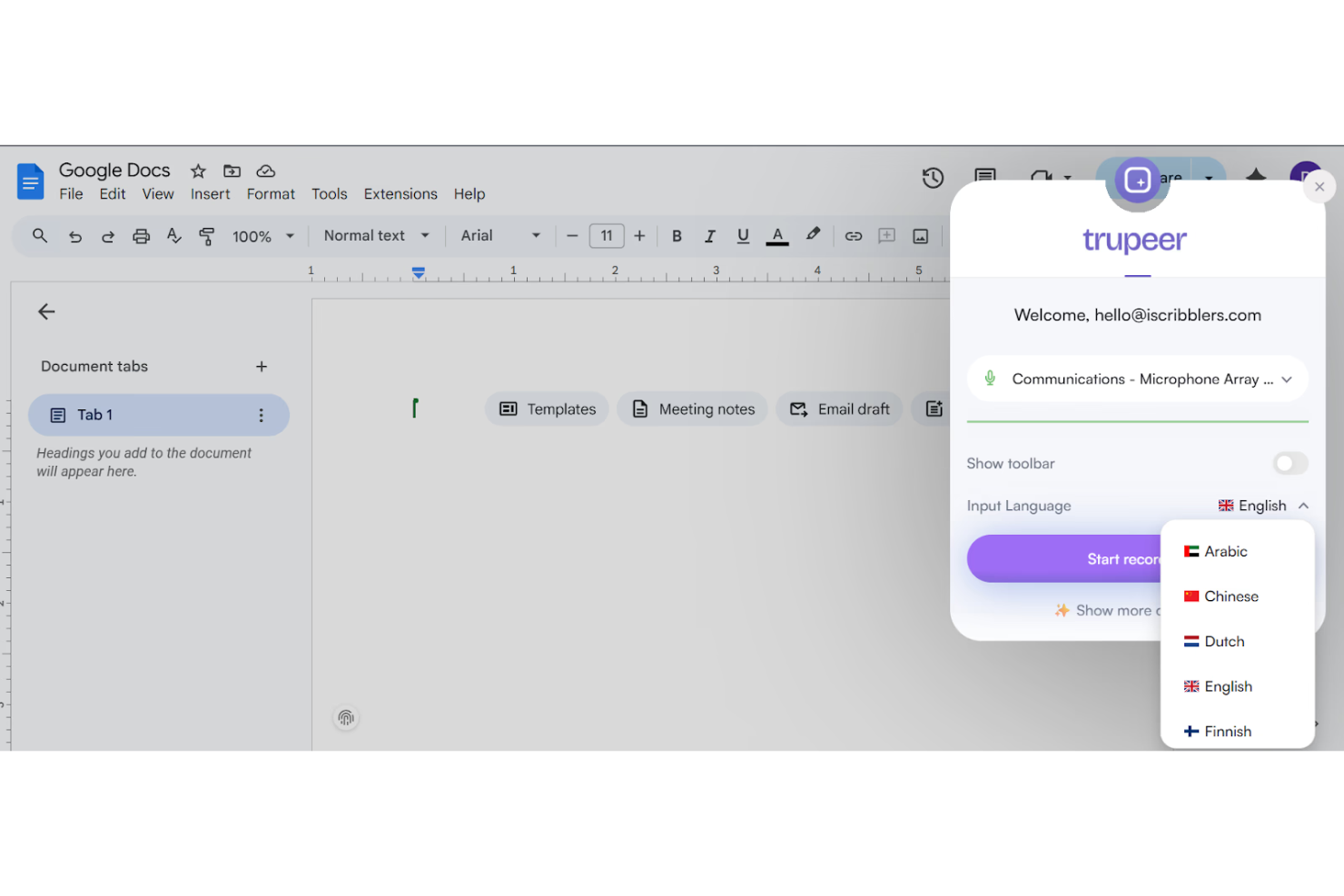
TruPeer helps organizations create, manage, and deliver AI-driven training content, centralizing learning materials and resources on a single platform.
Who Is TruPeer Best For?
TruPeer is a good fit for L&D teams and HR professionals looking to build and manage AI-powered training content at scale.
Why I Picked TruPeer
I've included TruPeer in my top picks because its AI-powered content creation tools make it easy to build structured training materials directly from existing documents and knowledge sources. I like how it can automatically generate quizzes, summaries, and learning modules from uploaded content, which keeps training materials tightly connected to the source documents. My team is able to maintain a centralized library of training content that stays organized and version-aware as materials evolve.
TruPeer Key Features
- Content library: Store and organize all training documents and materials in a searchable, centralized repository.
- Role-based access controls: Assign permissions to control who can view, edit, or publish training content.
- Content versioning: Track changes to training documents over time and revert to previous versions when needed.
- Collaborative editing: Allow multiple team members to co-author and review training materials in real time.
TruPeer Integrations
Native integrations are not currently listed.
Pros and Cons
Pros:
- Includes enterprise-grade SSO security
- Supports over 65 languages
- AI-generated documentation from screen recordings
Cons:
- AI output may require editing
- Limited free plan functionality


MacroView helps organizations that rely on Microsoft 365 manage, track, and organize documents at scale, making it easier for teams in legal, finance, and professional services to capture, search, and control files across SharePoint and Teams.
Who Is MacroView Best For?
MacroView is a strong fit for mid-to-large organizations in legal, financial, and professional services that are already running Microsoft 365 and need tighter document control within that ecosystem.
Why I Picked MacroView
I've included MacroView in my top picks because it embeds document management into the Microsoft 365 tools your team already uses. MacroView DMS's automatic email filing rules route incoming and outgoing messages to the correct SharePoint location without manual filing, keeping the document store complete even when teams are busy. The configurable search panels let you search the entire SharePoint store by keyword, metadata, or document type directly from Outlook, without switching to a browser. DMS Pro also adds document management panels inside Word, Excel, PowerPoint, and Adobe Acrobat, allowing teams to save, open, and tag files directly within those apps.
MacroView Key Features
- Drag-and-drop to SharePoint: Move files directly into SharePoint folders without navigating away from your current app.
- Automatic metadata capture: MacroView captures metadata at the point of filing, so documents are tagged consistently without manual input.
- Version history and restore: Track every version of a document stored in SharePoint and restore previous versions when needed.
- Windows-style file explorer for SharePoint: Browse SharePoint, Teams, and OneDrive using a familiar tree-view interface instead of the standard SharePoint web UI.
MacroView Integrations
Integrations include Microsoft SharePoint, Microsoft Teams, Microsoft 365, Microsoft Outlook, Microsoft Word, Microsoft Excel, Microsoft PowerPoint, OneDrive, Windows, and Adobe Acrobat.
Pros and Cons
Pros:
- Automated metadata capture improves document organization.
- Familiar file-explorer-style interface simplifies user navigation.
- Seamless integration with Microsoft 365 enhances existing tools.
Cons:
- Not ideal for organizations not using Microsoft products.
- Limited support for mobile applications restricts accessibility.

Best for AI-powered file tagging

Stockpress is a digital asset management platform designed to streamline the organization, search, collaboration, and sharing of digital files for teams of all sizes. It offers features such as AI tagging, customizable collections, version control, and feedback tools, making it ideal for marketers, creatives, brand managers, and social media managers across various industries.
Its AI-powered tagging system automatically assigns relevant tags to your files, making search and retrieval easy. This means your team spends less time manually tagging and more time focusing on what matters. Additionally, Stockpress offers flexible metadata mapping, allowing you to tailor tags according to your specific needs, which is particularly useful for diverse industries.
Stockpress also offers robust file organization and collaboration tools. It allows you to add and organize files into collections, detect duplicates, and manage version control. This ensures that your team can work efficiently without the clutter of redundant files. Furthermore, Stockpress enhances collaboration with features like comments, annotations, and guest uploads, making it easier for teams to work together regardless of their location.
Integrations include Webflow, Adobe Illustrator, Adobe InDesign, Adobe Photoshop, Box, Canva, Dropbox, Google Drive, Klaviyo, Mailchimp, Slack, and Okta.
Best for preserving historical HR & payroll data
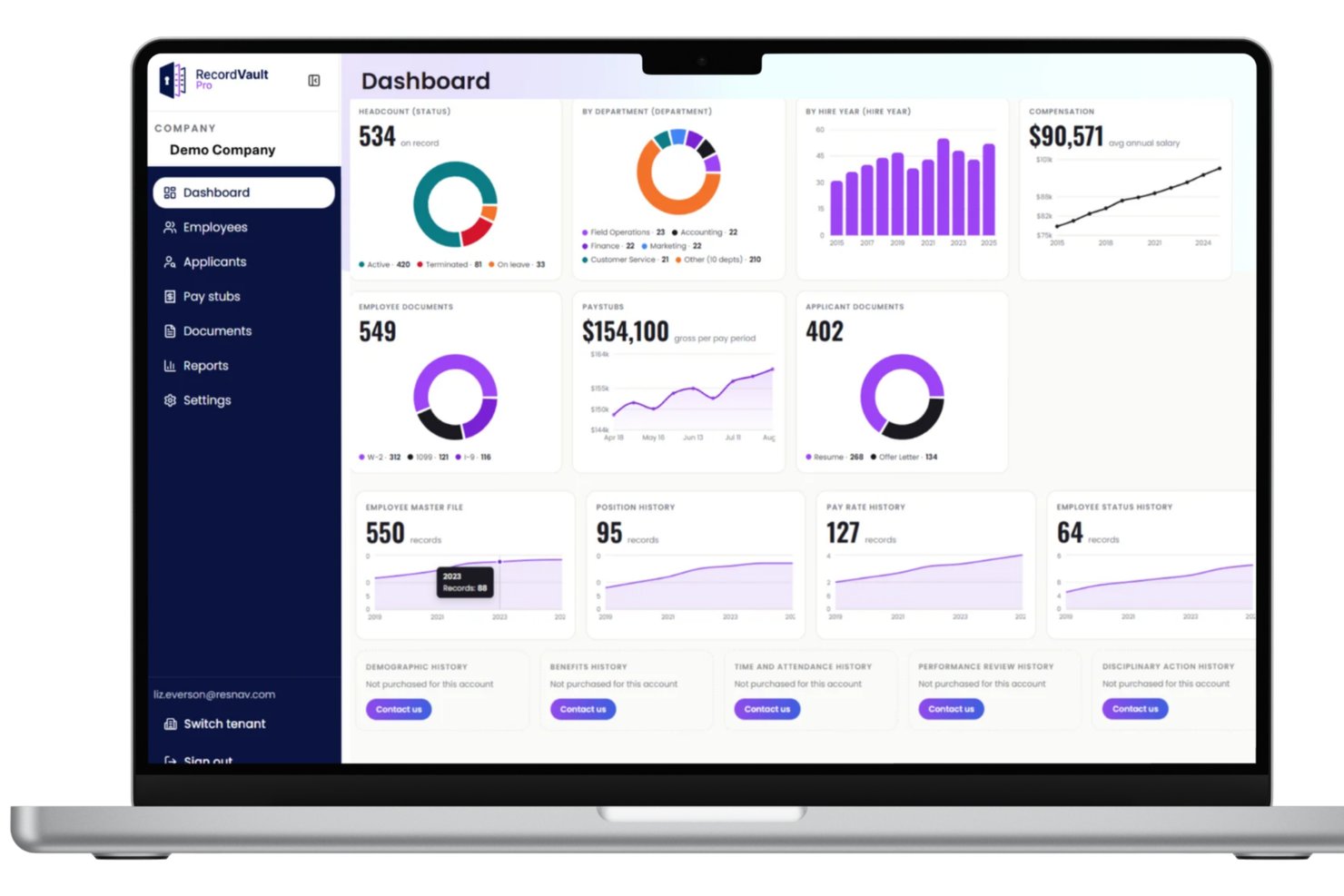
ResNav serves HR and payroll teams who need a secure, organized way to store and access historical employment documents and manage compliance and data retention requirements.
Who Is ResNav Best For?
ResNav suits HR and payroll professionals who need a reliable system for retaining and retrieving historical employee records.
Why I Picked ResNav
I picked ResNav's History Link as one of the best because of how it handles the specific problem of preserving HR and payroll records when switching providers. When your old payroll system hands you a CSV export, that data becomes static and unauditable the moment anyone touches it. History Link solves this by extracting and storing your full historical record set in an Azure-based platform where the data stays unaltered and audit-ready. I also like that it retains granular record types like check detail, time and attendance, quarterly tax reports, and benefit history at both the employee and company level—not just top-level summaries.
ResNav Key Features
- Comprehensive record type coverage: History Link stores a wide range of record types, including pay rate history, employee status changes, dependent benefit history, and census data.
- Joint reporting capabilities: History Link integrates with your payroll and HRIS vendor to unlock cross-system reporting from a single platform.
- State-specific retention guidance: Built-in reference to state-level record retention laws helps you align your archiving practices with local compliance requirements.
- Single source of truth: All historical data is stored in one centralized portal, giving your team a consistent reference point for audits, employee inquiries, and decision support.
ResNav Integrations
ResNav has integrations and partnerships with Paycor, Workday, UKG, ADP, Paycom, Paylocity, Gusto, and isolved.
Pros and Cons
Pros:
- Secure, searchable portal gives teams fast access to old records.
- Supports extraction from hundreds of legacy payroll vendors with protocols.
- Precise archive of payroll history beyond flat exports makes data usable.
Cons:
- Integration beyond archival extraction may require custom work.
- Not a full general-purpose DMS — focused mainly on HR/payroll records.
Doxis
Best for multilingual document processing

Doxis helps enterprise teams manage scattered documents, manual approvals, and compliance-heavy processes from one platform. Its modular system combines intelligent document processing, ECM, workflow automation, and AI-powered capture, making it a strong fit for large organizations with complex document workflows.
Doxis is Best for
Doxis suits large enterprises and mid-market organizations that handle high document volumes across multiple departments or geographies.
Why I Picked Doxis
I picked Doxis because it helps your team process documents in different languages without setting up separate workflows for each one. Its Doxis AI.dp engine uses OCR, NLP, and machine learning to classify documents, extract key data, and validate information from invoices, contracts, onboarding files, and other business records. This is useful for international teams that receive documents from multiple offices, suppliers, or customers. I also like that Doxis can send extracted data into ERP and CRM workflows, reducing manual re-entry and helping teams keep document-heavy processes moving.
Doxis Key Features
- Audit-proof archiving: Store documents in a tamper-proof archive with retention controls, version history, and access logs.
- No-code app builder: Use Doxis Business Studio to create and customize content apps without relying on code.
- Records management: Apply retention schedules, deletion rules, and lifecycle policies based on document type or regulatory category.
- Role-based access control: Set permissions at the document, folder, or workspace level to control who can view, edit, or share content.
Doxis Integration
Integrations include SAP, SAP SuccessFactors, Salesforce, Oracle, Microsoft Outlook, Microsoft Office, Microsoft SharePoint, ServiceNow, ADP Paisy, and LDAP.
Pros and Cons
Pros:
- Combines document management, workflows, IDP, and archiving in one platform
- No-code Business Studio helps teams customize content apps faster
- Strong SAP, Microsoft, Salesforce, and ServiceNow integration options
Cons:
- Advanced customization may require technical setup or consultant support
- Enterprise feature depth may feel complex for smaller teams
Axero
Best for centralized document storage

Axero is a document management platform for organizations that need to centralize, secure, and collaborate on business documents, helping teams find, share, and manage files across departments.
Who Is Axero Best For?
Axero is a good fit for mid-sized to large organizations that need a centralized hub for managing internal documents, knowledge, and team collaboration across multiple departments.
Why I Picked Axero
Axero earns its spot as one of the best on my shortlist because of how well it handles centralized document storage across a large, distributed organization. The Files & Documents feature lets my team organize documents and other content into structured, permission-controlled repositories—so the right people can access what they need without stumbling across confidential content. The federated search lets me search across the entire intranet, connected file repositories, and integrations like SharePoint from one place. Content workflows provide version tracking, approval processes, and expiration dates that keep the document library accurate and trustworthy over time.
Axero Key Features
- AI Copilot chatbot: An AI assistant trained on your intranet's knowledge base that lets employees ask questions and retrieve information in a conversational interface.
- Required reading tracking: Flag specific documents or content as mandatory and monitor completion progress with built-in analytics.
- Custom workspaces: Create dedicated digital hubs for departments or projects, each with its own documents, resources, and permission settings.
- Role-based permissions: Fine-grained, role-based access controls let you define exactly who can view, edit, or manage content across the platform.
Axero Integrations
Integrations include Microsoft Office 365, Google Workspace, Slack, Twilio, Microsoft Teams, Zoom, Salesforce SSO, and SharePoint Online Documents.
Pros and Cons
Pros:
- Secure document storage ensures data protection and compliance.
- Advanced search capabilities aid quick document retrieval.
- Workflow automation reduces manual task burden for teams.
Cons:
- Integration challenges may require technical support.
- Occasional updates may disrupt system functionality.

Best for real-time collaboration

Google Workspace gives teams and organizations a cloud-based platform to create, store, and organize documents, so they can manage files, control access, and keep documents searchable and accessible from anywhere.
Who Is Google Workspace Best For?
Google Workspace is a strong fit for teams of all sizes that rely on cross-functional collaboration across distributed or hybrid work environments.
Why I Picked Google Workspace
Google Workspace earns its spot on my shortlist because real-time collaboration in Google Docs is genuinely one of the best I've used. My team can edit the same document simultaneously, leave inline comments, and tag teammates for input—all without version conflicts. I also rely heavily on the named version history in Google Docs, which lets me label and restore specific document states rather than hunting through a long list of auto-saves. That combination of live co-editing and granular version control makes it a strong pick for document-heavy teams.
Google Workspace Key Features
- Shared drives: Store documents in team-owned drives so files remain accessible even when individual team members leave.
- Granular sharing permissions: Set view, comment, or edit access at the file or folder level for internal and external users.
- Google Drive search: Locate documents using full-text search across file names, content, and metadata.
- Document templates: Create and reuse standardized templates in Google Docs to keep document formats consistent across your team.
Google Workspace Integrations
Integrations include Salesforce, Box, Microsoft Office 365, Jira, Okta, DocuSign, Zoom, Slack, Asana, and Trello.
Pros and Cons
Pros:
- Includes a suite of productivity tools like Docs, Sheets, and Slides.
- Provides secure cloud storage accessible from any device.
- Offers real-time collaboration with seamless document sharing.
Cons:
- Compatibility issues when collaborating externally with teams using non-Google file formats or Microsoft Office workflows.
- Shared drive permissions and complex folder hierarchies can become difficult to manage if not structured carefully.

FileHold
Best DAM for enterprises

FileHold is a document management platform built for organizations that need secure, centralized control over large volumes of business documents, helping teams in regulated industries manage compliance, versioning, and workflow automation.
Who Is FileHold Best For?
FileHold is a strong fit for mid-to-large enterprises in regulated industries like healthcare, government, and finance that need structured document control at scale.
Why I Picked FileHold
FileHold earns its spot as one of the best on my shortlist because of how well it handles enterprise-scale document management without sacrificing control. I particularly like the virtual folders feature, which lets project managers aggregate documents from across the entire library into a single personal view—so a PM can pull together contracts, design specs, and invoices into one place even when they're stored in completely different parts of the system. I also find the records management capabilities genuinely impressive for enterprise use: retention and disposition policies are built in as standard, and every user action is captured in a full audit trail. That combination of flexible document organization and built-in compliance tracking is exactly what large organizations need when managing millions of documents across multiple teams and locations.
FileHold Key Features
- Document scanning and indexing: Scan paper documents directly into FileHold using supported scanner types, with OCR processing and automatic metadata pre-population before import.
- Watched folders: Configure local or network folders that FileHold monitors and automatically imports into the library, with auto-tagging and destination folder pre-assignment.
- Document linking: Build parent-child relationships between documents and create shortcuts to frequently accessed files, keeping related records organized across the library.
- User roles and security: Choose from 11 predefined security roles—from read-only to system administrator—to control exactly what each user can access and modify.
FileHold Integrations
Integrations include Microsoft Teams, Microsoft Office, Microsoft Active Directory, Adobe Electronic Signature, and SmartSoft Capture.
Pros and Cons
Pros:
- Automatic data extraction minimizes manual entry.
- Efficient digital management of documents saves physical space.
- Advanced search tool simplifies document retrieval.
Cons:
- Data transfer processes could be improved for smoother experience.
- Concerns about long-term file security and potential glitches.

DocuWare
Best document management system for workflow automations

DocuWare is a document management platform built for businesses that need secure storage, fast document retrieval, and automated processes to keep teams organized and compliant.
Who Is DocuWare Best For?
DocuWare suits mid-sized to enterprise businesses in industries like finance, healthcare, and manufacturing that need structured document control across departments.
Why I Picked DocuWare
DocuWare earns its spot as one of the best on my shortlist because of how far its workflow automation capabilities go beyond basic document routing. I particularly like the Workflow Manager's drag-and-drop designer, which lets you map out multi-step approval processes—like invoice sign-offs or employee onboarding—without writing a single line of code. You can set automatic escalation rules so that if a task deadline is missed, it gets reassigned to the next available team member rather than sitting idle. I also find the workflow history log genuinely useful: it shows exactly which user made which decision at each step, which gives you a clear audit trail without any extra effort.
DocuWare Key Features
- Intelligent indexing: Automatically reads and tags document content using optical character recognition (OCR) to make files searchable by keyword, date, or custom field.
- Document versioning: Tracks every saved change to a file and lets you restore any previous version directly from the document's history.
- Role-based access control: Assigns specific read, edit, or delete permissions to individual users or groups to control who can interact with each document cabinet.
- Digital document stamps: Applies customizable stamps—like "Approved" or "Reviewed"—directly onto documents to mark their status within a process.
DocuWare Integrations
Integrations include Microsoft Power Automate, Make, webmethods.io, elastic.io, and an API for custom integrations.
Pros and Cons
Pros:
- Workflow automation significantly reduces manual tasks.
- Quick document retrieval is enabled by advanced search capabilities.
- Comprehensive security features protect sensitive data effectively.
Cons:
- The interface feels outdated compared to newer solutions.
- Limited customization options may not suit all business needs.

Best for secure PDF document control
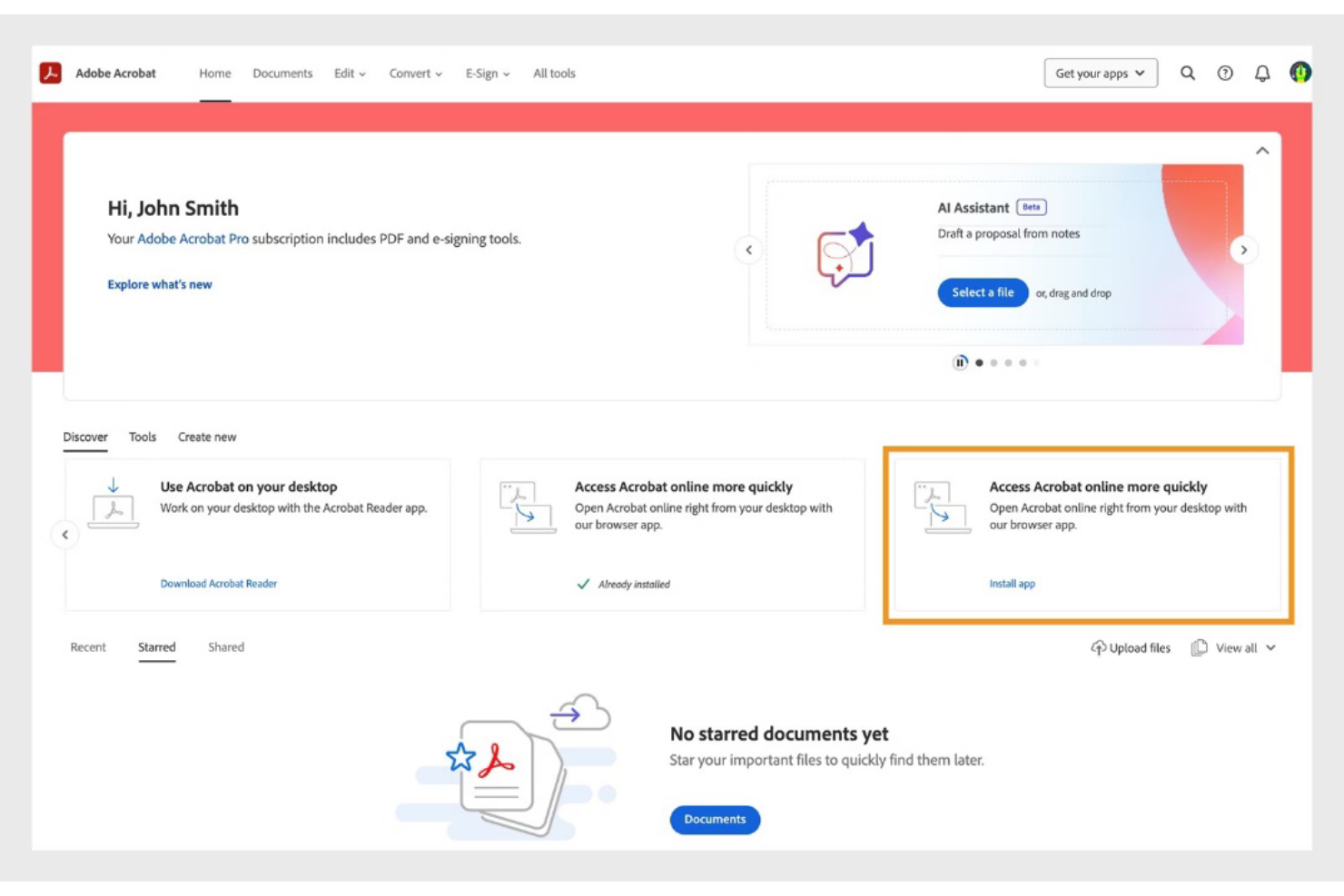
Adobe Acrobat is a PDF-focused document management system that enables teams to create, edit, store, share, and secure documents within a centralized cloud environment. It supports structured document control, permission management, and e-signature workflows for organizations handling high volumes of files.
Who Is Adobe Acrobat Best For?
Adobe Acrobat is best suited for teams that primarily manage documents in PDF format and need secure sharing, version tracking, and structured access controls across departments or locations.
Why I Picked Adobe Acrobat
I picked Adobe Acrobat for its secure document controls and centralized cloud storage. Teams can assign permissions, restrict editing rights, and monitor document activity. These features make it easier to manage contracts, technical files, and internal documentation while maintaining oversight and compliance.
Adobe Acrobat Key Features
- PDF editing tools: Modify text, images, and formatting directly within PDF documents.
- Version history: Track document updates and maintain revision visibility.
- Role-based permissions: Control who can view, edit, or share documents.
- Batch processing: Apply actions such as watermarking or conversion to multiple files.
- E-signature workflows: Collect legally binding electronic signatures within the platform.
Adobe Acrobat Integrations
Adobe Acrobat integrates with Microsoft 365, Google Workspace, Microsoft Teams, SharePoint, Box, Salesforce, and Workday. APIs are available for custom integrations.
Pros and Cons
Pros:
- Supports secure document sharing and permissions
- Advanced PDF editing and redaction tools
- Built-in e-signature workflows for contracts
Cons:
- Limited workflow automation compared to competitors
- No free-forever business plan available
Diğer Belge Yönetim Sistemleri
İşte en iyi listeye giremeyen birkaç araç daha. Bunlar, doğru şirket için hâlâ iyi seçeneklerdir.
- Revver
For combining document and business process management
- OpenText
For content lifecycle management
- Microsoft SharePoint
For Microsoft users
- Files.com
With customizable data retention policies
- MedTrainer
For healthcare organizations
- Guru
For searching any app, document or chat stream for answers
- PandaDoc
For a simple, friendly interface
- Arena Solutions
For complex electronics and medical device companies
- Amazon WorkDocs
For compliance requirements
- OpenDocMan
Free document management system
- Hyland Alfresco
For enterprise content management
- MasterControl
For companies in regulated industries
- docEdge DMS
For feature-packed document management
- Meridian
For engineering teams
- Dokkio
For cross-platform document management
- Filecamp
For its wide range of sorting, filtering, and searching information
- Document360
For managing an internal knowledge base
- DocHub
For comprehensive PDF editing
- pdfFiller
For secure, all-in-one PDF management
- SignNow
For efficient eSignature workflows
- MediaValet
For its exceptional customer support
- Bynder
For multimedia asset management
- Wrike
Work management software with built-in document management functionality
- altaFlow
For drag-and-drop workflow builder
- XaitPorter
For collaborating on bids and proposals
- NetDocuments
For email management
- OpenKM
Open source document management system
- Document Locator
For Windows users
- Rubex by eFileCabinet
For individuals and small businesses
- DocStar ECM
For accounts payable features


İlgili Proje Yönetimi Yazılımı İncelemeleri
Aradığınızı hâlâ bulamadıysanız, test edip değerlendirdiğimiz diğer ilgili araçlara göz atın:
- Proje Yönetimi Yazılımı
- Kaynak Yönetimi Yazılımı
- İş Akışı Otomasyonu Yazılımı
- Görev Yönetimi Yazılımı
- İş Birliği Araçları
- Verimlilik Araçları
- Akıllı Belge İşleme Yazılımı
- Belge Otomasyonu Yazılımı
- Belge Toplama Yazılımı
- Belge Doğrulama Yazılımı
- Açık Kaynaklı Belge Yönetimi
How I Evaluate Document Management Systems
When a PMO has to track submittals, RFIs, and contractor sign-offs across a distributed team, I look at tools through two lenses: baseline qualifiers and key differentiators.
Core Functionality (Table Stakes For This List)
When I'm selecting tools for my list, I rank each one on a scale from 0 (does not offer the functionality) to 5 (excels in this area) for each core functionality listed below. Then, I calculate the tool's total score into a percentage. Each tool needs to achieve a minimum total score of 65% to be considered for inclusion.
- Centralized Document Repository: I evaluate how the platform organizes files into project-based workspaces, checking whether teams can mirror real folder structures like phases, deliverables, or work packages.
- Version Control: Every revision of a scope document or project plan should be tracked automatically, and I look for rollback, comparison, and check-in/check-out capabilities.
- Access Permissions & Security: I check whether you can restrict access at the folder or document level, since contractors and clients often need visibility into specific deliverables but not the full project drive.
- Search & Metadata Tagging: Finding a buried submittal or change order across hundreds of files matters, so I look for full-text search, custom metadata fields, and advanced filtering options.
- Collaboration & Sharing: I evaluate real-time co-editing, commenting, and external sharing controls, particularly how the platform handles guest access for stakeholders outside your organization.
- Workflow & Integration: Approval chains for documents like RFIs or sign-off sheets should be configurable, and I look for native integrations with tools like Jira, Asana, Smartsheet, or Microsoft 365.
Once I have a list of tools that meet the criteria, I consider what sets each platform apart.
Differentiating Factors (What Sets Vendors Apart)
Here's how I compare and contrast different vendors:
Standout Features
Mobile and offline access matters when project coordinators review drawings on a job site with spotty connectivity. I also look for built-in e-signature support, which speeds up change orders and stakeholder approvals without forcing teams into a separate signing tool. Custom templates and forms are another differentiator—platforms that let you standardize project kickoff packets or inspection checklists save real setup time across recurring projects.
Beyond Features
Integration ecosystem is a big one—I check whether the platform connects natively with tools like Jira, Asana, or Microsoft 365, since a DMS that lives outside your project workflow creates silos. Compliance and security certifications also weigh heavily, especially for teams handling regulated deliverables that require SOC 2 or ISO 27001 assurance. I also consider deployment flexibility, because some PMOs need cloud-only access while others in tightly controlled IT environments require on-premise or hybrid options.
Belge Yönetim Sistemi Nasıl Seçilir?
Bu kadar çok farklı belge yönetimi çözümü mevcutken, ihtiyaçlarınıza en uygun belge yönetim sisteminin (DMS) hangisi olacağına karar vermek zor olabilir.
Belge yönetim sistemlerini kısa listenize alırken, deneme sürecinden geçirirken ve seçerken aşağıdakileri göz önünde bulundurun:
- Hangi sorunu çözmeye çalışıyorsunuz - İhtiyaç duyduğunuz özellikleri ve işlevleri netleştirmek için, doldurmaya çalıştığınız belge yönetimi özelliği eksikliğini belirleyerek başlayın.
- Kimlerin kullanması gerekecek - Maliyeti ve gereksinimleri değerlendirmek için yazılımı kimlerin kullanacağını ve kaç lisansa ihtiyaç duyacağınızı göz önünde bulundurun. Erişimin yalnızca proje yönetimi profesyonelleri için mi gerekeceğini, yoksa tüm kuruluşun mu erişime ihtiyaç duyacağını değerlendirmelisiniz. Bu netleştiğinde, herkes için kullanım kolaylığına mı yoksa belge yönetim sisteminizi yoğun kullananlar için hıza mı öncelik verdiğinizi düşünmeye değer.
- Hangi diğer araçlarla birlikte çalışması gerekiyor - Hangi araçları değiştirdiğinizi, hangi araçları kullanmaya devam edeceğinizi ve muhasebe, CRM veya İK yazılımı gibi hangi araçlarla entegre olmanız gerektiğini netleştirin. Araçların birbiriyle entegre olması gerekip gerekmediğine veya birden fazla aracı tek bir entegre proje ve belge yönetimi yazılımıyla değiştirip değiştiremeyeceğinize karar vermelisiniz.
- Hangi sonuçlar önemli - Yazılımın başarılı kabul edilmesi için sağlaması gereken sonucu göz önünde bulundurun. Hangi yeteneği kazanmak veya neyi geliştirmek istediğinizi ve başarıyı nasıl ölçeceğinizi düşünün. Örneğin bir sonuç, performans hakkında daha fazla görünürlük elde etme becerisi olabilir. Belge yönetim sistemi özelliklerini gözleriniz ağrıyana kadar karşılaştırabilirsiniz; ancak elde etmek istediğiniz sonuçları düşünmüyorsanız, çok değerli zamanınızı boşa harcıyor olabilirsiniz.
- Kuruluşunuz içinde nasıl çalışacağı - Yazılım seçimini iş akışlarınız ve teslimat metodolojinizle birlikte değerlendirin. Nelerin iyi çalıştığını ve ele alınması gereken sorunlara yol açan alanları inceleyin. Her işletmenin farklı olduğunu unutmayın — bir aracın popüler olması, kuruluşunuzda da işe yarayacağı anlamına gelmez. Örneğin okullar ve üniversiteler, eğitim odaklı belge yönetimi yazılımına ihtiyaç duyabilir.
Özellikler
Bir belge yönetim sistemi seçerken aşağıdaki temel özelliklere dikkat edin:
- Belge depolama ve düzenleme: İyi bir sistem, tüm dosyalarınızı dijital klasörlerde düzenli bir şekilde depolamanıza, sıralamanıza ve kategorilere ayırmanıza olanak tanır. Böylece bir belgeyi bulmak için sayısız e-postayı veya masaüstü klasörünü didik didik aramanız gerekmez.
- Erişim denetimi ve izinler: Her belgeyi kimin görüntüleyebileceğine, düzenleyebileceğine veya paylaşabileceğine kesin olarak karar vererek hassas bilgileri koruyun. Erişimi role veya kişiye göre verebilirsiniz; bu da yanlışlıkla yapılan düzenlemeleri veya bilgi sızıntılarını azaltır.
- Sürüm denetimi: Her değişikliği izleyin ve eski sürümleri elinizin altında tutun. Bu sayede biri hata yaptığında önceki sürüme dönebilir veya belirli düzenlemeleri kimin yaptığını görebilirsiniz—artık “bunu kim değiştirdi?” gizemleri yok.
- Belge arama ve erişim: Güçlü arama araçlarıyla her şeyi saniyeler içinde bulun. Dosyanın tam adını hatırlıyor olsanız da yalnızca bir anahtar kelimeyi biliyor olsanız da, elle arama yapmak zorunda kalmadan ihtiyacınız olanı bulabilirsiniz.
- Denetim izleri ve etkinlik günlükleri: Kimin neyi, ne zaman yaptığının geçmişini görün. Bu özellik, sorunları giderebilmeniz, uyumluluğu sağlayabilmeniz veya belge akışını yalnızca takip edebilmeniz için şeffaflık sunar.
- İş birliği araçları: Birden fazla kişinin belgelere yorum yapmasına, belgeleri incelemesine ve birlikte düzenlemesine olanak tanıyarak, uzaktan bile birlikte çalışın. Bu, bitmek bilmeyen e-posta zincirleri veya çakışan değişiklikler olmadan projelerin ilerlemesini sağlar.
- Mobil erişilebilirlik: Telefonunuzu veya tabletinizi kullanarak belgeleri her yerden kontrol edin, düzenleyin veya paylaşın. Masanızın başına bağlı olmadığınız ancak yine de işlerinizi halletmeniz gerektiği zamanlar için idealdir.
- Belge saklama ve arşivleme: Eski belgeleri otomatik olarak arşivleyin veya belge saklama politikaları belirleyin; böylece sisteminizle sürekli ilgilenmenize gerek kalmadan düzenli ve uyumlu kalmasını sağlayın.
- Entegrasyon yetenekleri: E-posta, proje yönetimi uygulamaları veya bulut depolama gibi hâlihazırda kullandığınız diğer araçlara bağlanın; böylece iş akışınız kesintisiz kalır ve uygulamalar arasında geçiş yapmak zorunda kalmazsınız.
Yaygın Belge Yönetim Sistemlerinin Yapay Zekâ Özellikleri
Yukarıda listelenen standart belge yönetim sistemi özelliklerinin ötesinde, bu çözümlerin çoğu aşağıdaki gibi özelliklerle yapay zekâyı bünyesine katıyor:
- Akıllı belge sınıflandırması: Yapay zekâ, belge türlerini tanır ve bunları sizin için otomatik olarak kategorilere ayırır; böylece etiketleme ve dosyalama için daha az zaman harcarsınız.
- Otomatik veri çıkarma: Yapay zekâ belgeleri tarar ve adlar, tarihler veya sözleşme koşulları gibi önemli bilgileri çıkarır; böylece saatlerce süren manuel veri girişinden tasarruf edersiniz.
- Akıllı arama ve öneriler: Yapay zekâ daha isabetli arama sonuçları sunar veya alışkanlıklarınıza ve sorgularınıza göre ilgili belgeleri önerir.
- Otomatik iş akışı yönlendirme: Yapay zekâ, belgeleri doğru ekip üyelerine veya departmanlara otomatik olarak göndermek için içeriği ve bağlamı analiz eder; gecikmeleri azaltır ve işin hızla doğru kişiye ulaşmasını sağlar.
- Anomali tespiti: Yapay zekâ, yetkisiz erişim veya değişiklikler gibi olağandışı etkinlikleri tespit ederek size ek bir güvenlik katmanı ve gönül rahatlığı sağlar.
Belge Yönetim Sistemlerindeki Eğilimler
Araştırmam sırasında farklı belge yönetim sistemi sağlayıcılarının sayısız ürün güncellemesini, basın bültenini ve sürüm günlüğünü inceledim. Takip ettiğim yeni ortaya çıkan eğilimlerden bazıları şunlar:
- Yapay Zekâ Destekli Belge İçgörüleri: Yapay zekâ araçları artık belgeleri analiz edip özetliyor ve her kelimeyi okumadan önemli bilgileri belirlemeyi kolaylaştırıyor. Bu özellikler, ekiplerin sözleşmeler veya raporlar gibi büyük miktardaki metinlerden eyleme dönüştürülebilir verileri hızla çıkarmasına yardımcı oluyor.
- Belge Doğrulama için Blok Zinciri: Blok zinciri teknolojisi, değiştirilemez denetim izleri oluşturarak belgelerin gerçekliğini güvence altına alır. Bu özellik, bütünlük kanıtının ve değişikliklerin açık bir geçmişinin kritik olduğu hukuki ve mali belgeler için özellikle yararlıdır.
- Ayrıntılı Kullanıcı Erişim Denetimleri: Gelişmiş izin ayarları, kuruluşların bireysel kullanıcılar ve ekipler için belirli erişim düzeyleri tanımlamasına olanak tanır. Bu, özellikle hassas veya gizli bilgilerle çalışırken güvenliğin ve uyumluluğun korunmasına yardımcı olur.
- Yerel E-İmza Entegrasyonu: Daha fazla sistem, e-imza araçlarını doğrudan platforma entegre ederek üçüncü taraf yazılımlara duyulan ihtiyacı ortadan kaldırıyor. Bu eğilim, onay iş akışlarını basitleştirir ve sözleşme imzalama veya müşteri kabulü gibi süreçleri hızlandırır.
- Gelişmiş Üst Veri Etiketleme: Geliştirilmiş etiketleme sistemleri, belgeleri içeriğe göre otomatik olarak kategorilere ayırmak için yapay zekâ kullanır ve aranabilirliği artırır. Bu özellik, kapsamlı arşivleri yöneten şirketler için özellikle yararlıdır; çünkü dosyaları bulmak için harcanan zamanı azaltır.
Belge Yönetim Sistemi Nedir?
Belge yönetim sistemi (DMS), elektronik belgeleri tek bir merkezi konumda depolayan, düzenleyen ve izleyen dijital bir platformdur.
Erişimi kolaylaştırmak, iş birliğini geliştirmek ve belge güvenliğini güçlendirmek için manuel, kâğıt tabanlı süreçlerin yerini alır. Dosyaların kolayca bulunmasını, paylaşılmasını ve yönetilmesini sağlayan DMS araçları, ekiplerin daha verimli çalışmasına yardımcı olur ve bilgilerin kaybolması veya yanlış dosyalanması riskini azaltır.
Avantajlar
Bir belge yönetim sisteminin uygulanması, ekibiniz ve işletmeniz için çeşitli avantajlar sağlar. Yararlanmayı bekleyebileceğiniz avantajlardan bazıları şunlardır:
- Artan Verimlilik: İş akışlarını otomatikleştirerek ve belgeyle ilgili manuel görevlere harcanan zamanı azaltarak kullanıcılar ve kuruluşlar temel iş faaliyetlerine daha fazla odaklanabilir ve böylece genel verimliliği artırabilir.
- Gelişmiş Güvenlik: Bir DMS, hassas bilgilerin erişim denetimleri, şifreleme ve denetim izleri aracılığıyla korunmasını sağlar; veri ihlalleri ve yetkisiz erişim riskini önemli ölçüde azaltır.
- Geliştirilmiş Erişilebilirlik: Bir DMS ile belgelere her yerden ve her zaman hızlı ve verimli bir şekilde erişilebilir; böylece kullanıcıların ihtiyaç duydukları bilgilere anında ulaşması sağlanır.
- Daha İyi İş Birliği: Birden fazla kullanıcının belgelere aynı anda erişmesine ve belgeler üzerinde çalışmasına olanak tanıyan DMS, ekip çalışmasını geliştiren ve projelerin tamamlanmasını hızlandıran iş birliğine dayalı bir ortam oluşturur.
- Uyumluluk ve Düzenlemelere Uyum: Belge yönetim sistemleri, sektöre özgü düzenlemelere uyacak şekilde yapılandırılabilir; bu da kuruluşların yasal standartlara uymasını ve cezalardan kaçınmasını kolaylaştırır.
Maliyetler ve Fiyatlandırma
Belge yönetimi yazılımlarını (DMS) değerlendirirken, yazılım alıcılarının mevcut çeşitli plan seçeneklerini ve fiyatlandırma yapılarını anlaması çok önemlidir. Bu sistemler, temel belge depolama çözümleri arayan küçük ekiplerden gelişmiş belge yönetimi ve iş birliği araçlarına ihtiyaç duyan büyük kuruluşlara kadar farklı kurumsal gereksinimleri karşılamak üzere tasarlanmış çeşitli yapılandırmalarla sunulur.
Fiyatlandırma; sunulan özelliklere, kullanıcı sayısına ve sağlanan destek düzeyine göre önemli ölçüde değişebilir. Aşağıda, seçeneklerinizi daha net bir şekilde değerlendirmenize yardımcı olmak için ücretsiz bir seçenek de dâhil olmak üzere DMS için tipik plan seçeneklerinin bir dökümü yer almaktadır.
Belge Yönetim Sistemleri için Plan Karşılaştırma Tablosu
| Plan Türü | Ortalama Fiyat | Yaygın Özellikler |
|---|---|---|
| Ücretsiz | $0 | Temel belge depolama, sınırlı depolama alanı, topluluk desteği, temel güvenlik özellikleri |
| Temel | $5-10 kullanıcı/ay başına | Bulut depolama, belge paylaşımı, erişim denetimleri, temel iş birliği araçları, e-posta desteği |
| Standart | $10-25 kullanıcı/ay başına | Artırılmış depolama kapasitesi, gelişmiş arama, sürüm denetimi, entegrasyonlar, öncelikli e-posta desteği |
| Premium | $25-50 kullanıcı/ay başına | Özelleştirilebilir iş akışları, gelişmiş güvenlik seçenekleri, yapay zekâ özellikleri, telefon ve canlı sohbet desteği |
| Kurumsal | Özel fiyatlandırma | Sınırsız depolama, özel destek, kurumsal düzeyde güvenlik, özel entegrasyonlar |
Doğru planı seçmek kuruluşunuzun büyüklüğüne, belge yönetim sistemini nasıl kullanmayı planladığınıza ve ihtiyaç duyabileceğiniz destek düzeyine bağlıdır. Fazla harcama yapmadan ihtiyaçlarınızı karşılayan bir çözüm bulmak için maliyeti işlevsellikle dengelemek önemlidir. Ayrıca, ihtiyaçlarınız zaman içinde büyüyüp değişebileceğinden ve daha gelişmiş özelliklere ve kapasitelere sorunsuz bir geçiş gerektirebileceğinden, planın ölçeklenebilirliğini göz önünde bulundurmak çok önemlidir.
Sık Sorulan Sorular
Belge yönetimi araçları hakkında sık sorulan bazı soruları burada bulabilirsiniz.
DMS, bulut depolama alanından (ör. Google Drive veya Dropbox) nasıl farklıdır?
Belge yönetim sistemi (DMS), temel bulut depolama platformlarından daha gelişmiş belge denetimi sağlamak üzere tasarlanmıştır. Google Drive veya Dropbox’ın aksine DMS; belge iş akışlarını otomatikleştirmenize, ayrıntılı izinler ayarlamanıza ve ekibiniz tarafından yapılan her sürümü veya değişikliği izlemenize olanak tanır. Proje yöneticileri için bu, onay süreçlerini uygulayabileceğiniz, belge yaşam döngülerini izleyebileceğiniz, hassas dosyalara yalnızca doğru kişilerin erişmesini sağlayabileceğiniz ve uyumluluk için eksiksiz bir denetim izi tutabileceğiniz anlamına gelir. Bulut depolama paylaşım ve eşitleme için iyidir; ancak DMS, karmaşık proje ihtiyaçlarını destekleyen yapı, sorumluluk ve süreç otomasyonu sunar.
Belge yönetim sistemleri uzaktan veya dağınık proje ekiplerini nasıl destekler?
Belge yönetim sistemleri, ekip üyeleri nerede olursa olsun uzaktaki proje ekiplerine tüm belgeler için tek ve güvenli bir merkez sunar. Herkes güncellemeleri anında görürken belgeleri gerçek zamanlı olarak yükleyebilir, düzenleyebilir ve paylaşabilirsiniz. Sürüm takibi, belge içi yorum yapma ve görev atama gibi iş birliği özellikleri, uzaktaki ekiplerin koordinasyonunu korumaya ve karmaşayı azaltmaya yardımcı olur. Otomatik bildirimler, belgeler değiştiğinde veya incelemeniz gerektiğinde sizi bilgilendirir; böylece hiçbir şey gözden kaçmaz. Proje yöneticisi olarak bu, farklı saat dilimleri veya konumlarda olsalar bile tüm ekibinizi uyumlu tutabileceğiniz ve proje belgeleri üzerinde tam görünürlük sağlayabileceğiniz anlamına gelir.
Belge yönetim sistemleri Asana veya Jira gibi proje yönetimi araçlarıyla entegre olabilir mi?
Evet, önde gelen belge yönetim sistemlerinin çoğu Asana, Jira, Trello ve Microsoft Teams gibi proje yönetimi araçlarıyla entegre olur. Entegrasyonlar, ilgili belgeleri görevlere eklemenize, dosyaları proje yönetim aracınızın içinden güncellemenize ve proje kilometre taşlarına göre DMS iş akışlarını tetiklemenize olanak tanır. Bu sayede e-posta eklerinde veya birden çok sistemde arama yapmanız gerekmez; her şey birbirine bağlı olduğundan zamandan tasarruf eder ve hataları azaltırsınız. Bu entegrasyonlarla gereksinim belgelerini Jira kayıtlarına veya toplantı notlarını Asana görevlerine bağlayabilir, böylece herkesin proje planlarken veya yürütürken ihtiyaç duyduğu şeyleri bulmasını kolaylaştırabilirsiniz.
Belge yönetim sisteminde üst veri çıkarma ve metin çıkarma nasıl çalışır?
Belge yönetim sistemleri, belgeleri düzenleme ve bulma biçiminizi iyileştirmek için üst veri ve metin çıkarma özelliklerini kullanır. Dosyaları yüklediğinizde DMS, belgenin içeriğinden veya özelliklerinden tarihler, proje adları, yazarlar ya da sözleşme değerleri gibi önemli bilgileri tarar ve çıkarır. Bu işlem, yerleşik yapay zekâ veya OCR (optik karakter tanıma) kullanılarak otomatik olarak yapılabilir. Proje yöneticileri için bu, yeni bir sözleşme veya RFP yüklendiğinde sistemin belgeyi manuel giriş gerektirmeden etiketlemesi ve gelecekteki aramaları daha hızlı ve doğru hâle getirmesi anlamına gelir. Bu, belgeleri düzenlemek için harcanan zamanı azaltır ve proje çalışmaları sırasında doğru dosyayı hızla bulmanıza yardımcı olur.
Belge yönetim sistemleri güvenli midir?
Evet, belge yönetim sistemleri dosya şifreleme, erişim denetimleri ve denetim izleri gibi özelliklerle güçlü güvenlik sağlar. Yalnızca yetkili kullanıcıların belirli belgeleri görüntüleyebilmesi, düzenleyebilmesi veya paylaşabilmesi için ayrıntılı izinler belirlersiniz. Çoğu sistem, yetkisiz erişimi veya veri kaybını önlemek için otomatik yedeklemeler ve çok faktörlü kimlik doğrulama da içerir. Proje yöneticisi olarak bu, sözleşmeler ve mali bilgiler gibi hassas proje dosyalarını sızıntı endişesi yaşamadan güvenle depolayabileceğiniz anlamına gelir. Denetim günlüğü ayrıca belgelere kimlerin eriştiğini veya belgeleri kimlerin değiştirdiğini izlemeye yardımcı olarak sorumluluğu ve veri güvenliğini destekler.
Belge yönetimi yazılımı uyumluluğa nasıl yardımcı olur?
Belge yönetimi yazılımı, kayıt tutmayı otomatikleştirerek ve belge politikalarını uygulayarak proje yöneticilerinin yasal düzenlemelere veya müşteri gereksinimlerine uyum sağlamasına yardımcı olur. Erişim izni denetimleri, zorunlu saklama süreleri, elektronik imzalar ve dosyalara kimlerin eriştiğini veya dosyaları kimlerin değiştirdiğini kaydeden ayrıntılı denetim günlükleri gibi özellikler sunar. Bu, denetimler için net belgeler sağlar ve GDPR, HIPAA veya sektöre özgü standartlar gibi düzenlemelere uyulduğunu kanıtlar. Ayrıca otomatik arşivleme ve silme, manuel hataları ve uyumsuzluk riskini azaltarak incelemeler sırasında uygun belge yönetimini göstermeyi kolaylaştırır.
Belge yönetim sistemine geçiş yapmak zor mudur?
Hayır, dikkatli planlama ve destekle belge yönetim sistemine geçiş genellikle yönetilebilir bir süreçtir. Çoğu sağlayıcı, kesinti süresini en aza indirirken dosyalarınızı, klasör yapınızı ve üst verilerinizi aktarmak için geçiş araçları sunar. Güncel belgelerinizi denetleyerek ve eski dosyaları kaldırarak başlayın, ardından önemli paydaşlarla örnek bir geçişi test edin. Ekibinizin direncini azaltmak ve benimsemeyi kolaylaştırmak için eğitim veya işe alıştırma kaynakları sağlayın. Sorunlar ortaya çıkarsa teknik zorlukları gidermek için genellikle sağlayıcı desteği mevcuttur; bu da proje yöneticileri ve ekipleri için geçişi kolaylaştırır.