

2026 İçin En İyi 10 Bulut Tabanlı Dijital Varlık Yönetimi Yazılımı

En İyi Bulut Dijital Varlık Yönetimi Yazılımları Kısa Listesi


Dijital varlıkları yönetmek, özellikle ekibiniz farklı konumlara dağılmışsa baş ağrıtıcı olabilir. Kendinizi birden fazla dosyayla uğraşırken, sürüm kontrolünde zorlanırken veya veri güvenliğiyle ilgili endişelerle mücadele ederken bulabilirsiniz. Bu zordur; ancak bulut dijital varlık yönetimi yazılımları tam da bu noktada devreye girer.
Bu araçlar, sizin ve ekibinizin dijital varlıkları zahmetsizce düzenlemesine, depolamasına ve paylaşmasına yardımcı olur. Kendi deneyimlerime göre, birçok yaygın sorun noktasını hafifleterek iş gününüzü biraz daha sorunsuz hâle getirirler.
Bu makalede, bulut dijital varlık yönetimi yazılımları için en iyi seçimlerimi paylaşacağım. Her birini bağımsız olarak test edip inceleyerek sizin için gerçekten önemli olan noktalara odaklandım. İhtiyaçlarınıza en uygun çözümü seçmenize yardımcı olacak tarafsız görüşler ve pratik öneriler bulacaksınız.
Why Trust Our Software Recommendations
Our team has been testing and reviewing software since 2012. As project managers ourselves, we know how difficult—and important—it is to choose the right software.
For this guide, we evaluated tools using hands-on testing and independent research, scoring tools using our selection criteria. We also draw on insights from industry thought leaders and practicing project management experts.
Our reviews reflect our human editorial judgment, not a sales pitch.
Expert reviewers:
Bulut Dijital Varlık Yönetimi Yazılımları Karşılaştırma Tablosu
Bu karşılaştırma tablosu, bulut dijital varlık yönetimi yazılımları için en iyi seçimlerimin fiyatlandırma ayrıntılarını özetlemektedir
| Tool | Starting Price | Website | |
|---|---|---|---|
| Best for centralized brand portals | 4.4 out of 5 | Pricing upon request Not available | Website |
| Best for advanced asset search | 4.6 out of 5 | Pricing upon request Free demo available | Website |
| Best for AI-driven metadata governance | 4.7 out of 5 | $9/month Free plan available | Website |
| Best for digital asset collaboration | 4.7 out of 5 | $100/month 7-day free trial + free demo available | Website |
| Best for creating asset collections | 4.8 out of 5 | $99/month Free plan + 14-day free trial + demo available | Website |
| Best for automated visual content tagging | 4.8 out of 5 | $250/month Free plan + free trial available | Website |
| Best scalable DAM solution | 4.5 out of 5 | Pricing upon request Free demo available | Website |
| Best for visual asset management | 4.6 out of 5 | $900/month Free plan + demo available | Book Demo |
| Best for marketing team collaboration | 4.7 out of 5 | $29/month 30-day free trial available | Website |
| Best for open-source data management | 4.5 out of 5 | Pricing upon request Free demo available | Website |
En İyi Bulut Dijital Varlık Yönetimi Yazılımları İncelemeleri
Aşağıda, kısa listeme giren en iyi bulut dijital varlık yönetimi yazılımlarıyla ilgili ayrıntılı özetlerimi bulabilirsiniz. İncelemelerim, her aracın temel özelliklerine, artılarına & eksilerine, entegrasyonlarına ve ideal kullanım alanlarına ayrıntılı bir bakış sunarak sizin için en uygun olanı bulmanıza yardımcı olur.

Papirfly
Best for centralized brand portals
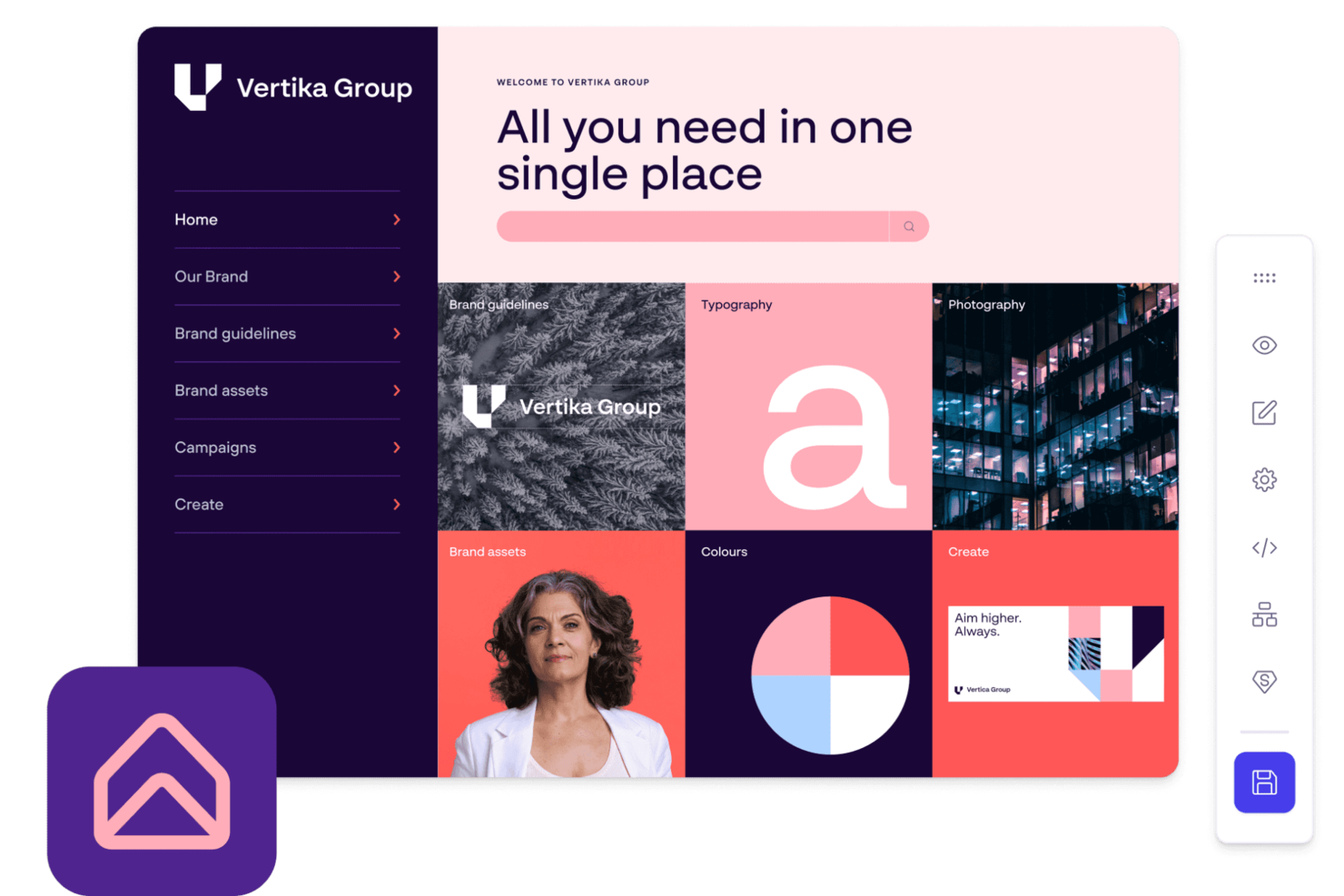
Papirfly is a cloud digital asset management platform that organizes, stores, and shares brand assets, guidelines, and creative materials in a centralized online environment.
Who Is Papirfly Best For?
Papirfly is a strong fit for mid-to-large enterprises managing brand consistency across multiple teams, regions, or markets.
Why I Picked Papirfly
Papirfly earns its spot on my shortlist because of how well its brand portal bridges the gap between back-end asset storage and front-end brand activation. I like that you can build campaign information pages that surface pre-approved assets, design templates, and messaging guidelines all in one place—so regional teams or external partners aren't hunting through folders or emailing requests. The granular user permissions let me control exactly who can view, download, or edit specific assets, which matters a lot when you're managing multiple sub-brands or markets. Usage analytics also show which assets are actually being accessed, so I can see where adoption is strong and where guidelines aren't landing.
Papirfly Key Features
- AI metadata tagging: Papirfly automatically tags and categorizes uploaded assets using AI, with the option to add manual tags as needed.
- Asset expiry dates and digital rights management: Set expiry dates and usage timelines on individual assets to keep your library current and brand-compliant.
- Templated content creation: Lock brand elements into pre-approved design templates so any team member can produce on-brand content without design skills.
- Campaign planning and management: Plan and track global and local campaigns with visibility into task status, budgets, key contacts, and approved assets in one view.
Papirfly Integrations
Native integrations include Adobe Creative Cloud, Adobe Commerce, Asana, Brightcove, Canva, and Contentful. Papirfly offers an API for custom integrations.
Pros and Cons
Pros:
- Centralized brand portal access
- AI-powered asset discovery tools
- Strong brand compliance workflows
Cons:
- Pricing not publicly disclosed
- Limited native integration options
New Product Updates from Papirfly

Papirfly Prove Enterprise Adds Analytics Agent
Papirfly Prove Enterprise adds Analytics Agent for asking data questions in plain language and generating figures or charts. This helps users explore analytics without setting up filters or queries. For more information, visit Papirfly’s official site.
 .

Best for advanced asset search

MediaValet is a cloud digital asset management platform that provides centralized asset storage, AI-powered search, metadata management, and tools for organizing and sharing digital content.
Who Is MediaValet Best For?
MediaValet is a good fit for mid-to-large enterprises in marketing, media, and creative industries that manage high volumes of digital assets across distributed teams.
Why I Picked MediaValet
I picked MediaValet as one of the best because its advanced search capabilities go well beyond a basic keyword lookup. The multi-filter search lets my team combine filters like file type, asset status, document text, and rating simultaneously—so when I'm hunting for a specific approved campaign image across a library of 100,000+ assets, I'm not scrolling endlessly. Face recognition and object detection automatically tag visual content, letting you search for assets containing specific people or product types without manually labeling everything. Additionally, the shared searches feature lets me distribute a saved search view to the whole team, so everyone is working from the same filtered perspective on a given project.
MediaValet Key Features
- Experience portals: Share curated asset collections with internal or external stakeholders via branded, URL-based portals without file size limits.
- Built-in proofing: Review, annotate, and approve assets directly within the platform, with approved files automatically delivered back into your DAM library via FinalFile automation.
- Templating: Create and customize on-brand templates (powered by Marq) so non-designers across departments can produce content without touching approved source files.
- Usage reporting: Track asset performance and user activity through real-time dashboards and exportable reports to see which assets are being used and by whom.
MediaValet Integrations
Native integrations include Adobe Creative Cloud, Canva, Marq, and monday.com. It supports custom integrations via API.
Pros and Cons
Pros:
- Mobile access allows for asset management on the go
- Advanced security features ensure assets remain protected
- Robust search capabilities allow for quick location of assets
Cons:
- Limited options for customizing the user interface
- Potential learning curve for new users

ImageKit
Best for AI-driven metadata governance
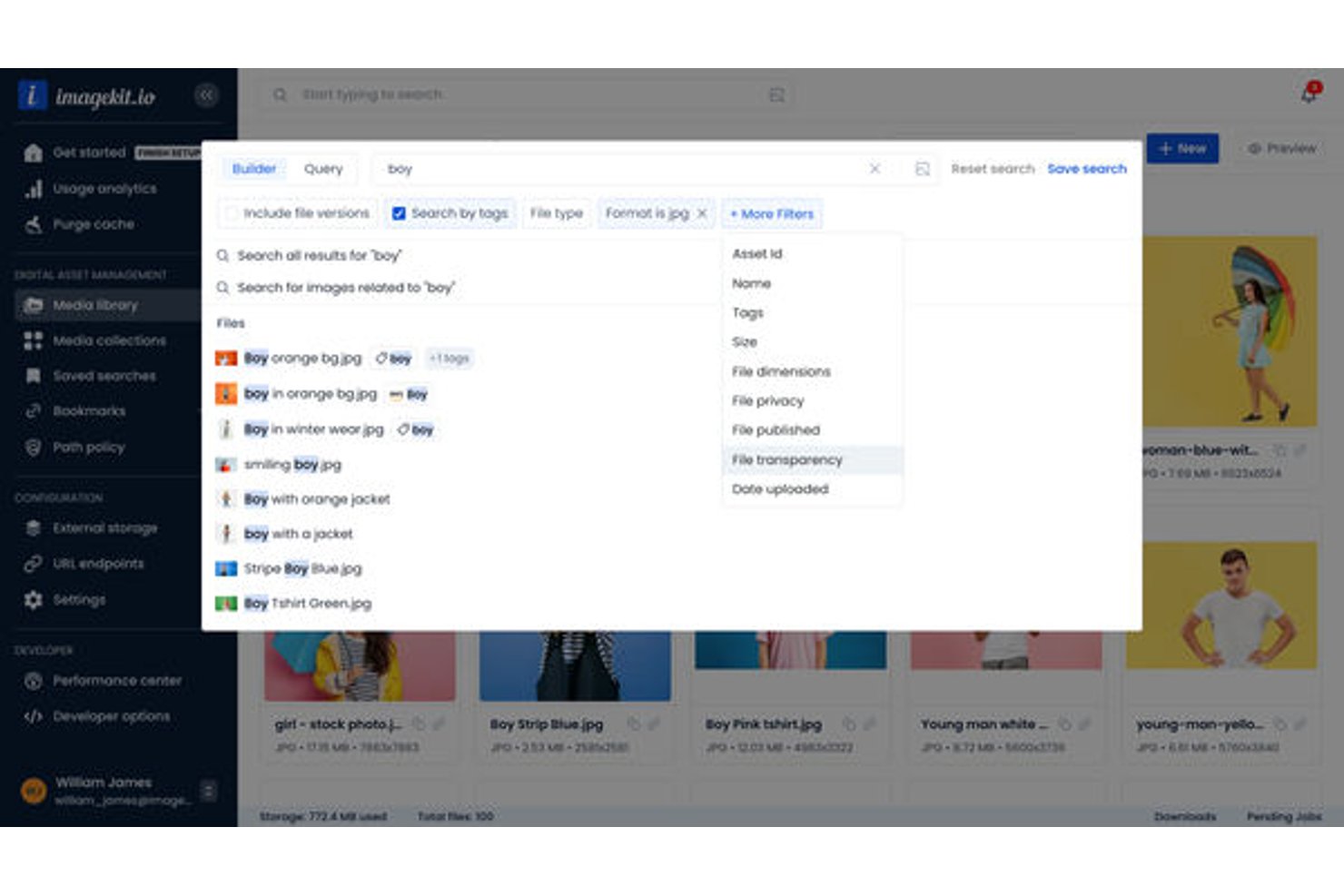
ImageKit is a cloud digital asset management platform that combines AI-powered media storage, real-time image and video processing, metadata governance, and CDN delivery for creative and marketing teams.
Who Is ImageKit Best For?
ImageKit is a strong fit for marketing and creative teams at growing tech companies that need developer-friendly asset management without sacrificing marketer usability.
Why I Picked ImageKit
ImageKit earns its spot on my shortlist because the metadata governance goes well beyond tagging. I use AI Tasks to ask questions in natural language and get structured metadata back instantly, constrained to controlled vocabularies so taxonomy stays clean at scale. Path Policies let me enforce mandatory fields at the folder level, which means no asset gets uploaded without the metadata my team needs to find and use it.
ImageKit Key Features
- Virtual collections: Group assets across folders for campaigns or projects without duplicating files.
- Creative automation templates: Generate image or ad variations using CSV data and master templates directly in the DAM.
- Visual similarity search: Find assets that look alike using visual search from a sample image.
- Permission-aware DAM agent: Use natural language to search, configure, and perform batch operations within user permissions.
ImageKit Integrations
ImageKit offers native integrations with Adobe Photoshop, Adobe Illustrator, Shopify, and Sanity. An API is available for custom integrations.
Pros and Cons
Pros:
- Visual search finds assets without keywords
- CDN delivery built directly into storage
- AI auto-tagging reduces manual metadata entry
Cons:
- Fewer native project management tool connections
- Review workflows are relatively basic

Pics.io
Best for digital asset collaboration

Pics.io is a cloud digital asset management platform that lets teams organize, search, version, and collaborate on media files in one centralized workspace.
Who Is Pics.io Best For?
Pics.io is a good fit for creative and marketing teams that need a shared space to manage, review, and approve digital assets across distributed workflows.
Why I Picked Pics.io
I picked Pics.io as one of the best because of how well it handles collaboration across internal teams and external partners. The discussion and review features let my team leave timestamped comments directly on images and videos—including time-coded notes within video files—which reduces back-and-forth over email or Slack. I also like the version control system: when a logo or creative file gets updated, existing shared links automatically serve the latest approved version, so external partners never pull outdated assets. Role-based permissions let me control exactly who can view, edit, or share specific files without locking down the whole library.
Pics.io Key Features
- Custom metadata fields: Create custom metadata fields beyond default options to tag, filter, and search assets using your own terminology and workflow logic.
- AI-powered auto-tagging: Automatically generate keywords, run facial recognition across images, and transcribe speech in video files to make assets searchable without manual input.
- Advanced search filters: Search asset content within PDFs and AI files, apply multiple filters simultaneously, and save frequent searches for repeated use.
- Expiring shared links: Set expiration dates and password protection on shared asset links to control external access without changing permissions across the whole library.
Pics.io Integrations
Pics.io offers native integrations with Google Drive, Amazon S3, and Dropbox. An API is available for custom integrations.
Pros and Cons
Pros:
- Robust collaboration tools
- Dynamic AI-based tagging
- Powerful search function
Cons:
- Web views could be more customizable
- Occasional slow loading for larger files
New Product Updates from Pics.io
Pics.io Adds Filtered Audit Trail CSV Exports
Pics.io now lets you export Audit Trail logs to CSV and apply filters before exporting, making it easier to analyze and share activity history. For more information, visit Pics.io's official site.
 .

Best for creating asset collections

Stockpress is a digital asset management (DAM) platform designed to organize, search, collaborate, and share digital files for teams of any size. It offers AI tagging, customizable collections, and advanced search tools to manage and locate assets efficiently.
Why I picked Stockpress: I like its use of 'collections' to sort your digital assets. Unlike traditional folders, collections allow you to group files in a way that makes sense for your projects or campaigns, offering a more flexible approach to organization. Coupled with advanced search capabilities, which include AI tagging and dynamic filters, finding what you need becomes easier. You can search by file names, descriptions, keywords, and even custom tags, ensuring that your team spends less time searching.
Standout features & integrations:
Features include comprehensive version control and annotation tools. You can leave comments and annotations directly on PDFs, images, and videos, allowing for asynchronous communication and feedback. Additionally, the software's access and sharing options are designed to keep your assets secure. You can create shareable links that come with expiration dates, tracking, and even password protection.
Integrations include Webflow, Adobe Illustrator, Adobe InDesign, Adobe Photoshop, Box, Canva, Dropbox, Google Drive, Klaviyo, Mailchimp, Slack, and Okta.
Pros and Cons
Pros:
- Manages large asset volumes
- Good AI tagging features
- Can create custom collections for assets
Cons:
- Could offer more integrations
- File migration support limited to enterprise plan
Best for automated visual content tagging

Tagbox.io is a cloud digital asset management platform that uses AI to organize, tag, and manage large image libraries for creative teams.
Who Is Tagbox.io Best For?
Tagbox.io is a strong fit for creative and marketing teams that manage large volumes of visual content and need faster ways to organize and retrieve assets.
Why I Picked Tagbox.io
Tagbox.io is one of my top picks because I love how its AI-powered auto-tagging cuts the manual work of organizing large image libraries. When I upload assets, Tagbox.io automatically applies relevant tags based on visual content, so my team can search by subject, color, or object without tagging anything by hand. The smart search then makes it fast to surface the exact asset we need.
Tagbox.io Key Features
- Face recognition: Automatically detects and identifies people across your photo library, letting you build and share personalized collections by individual or group.
- Video asset analysis: Breaks down video content frame by frame to detect people, speech, and brand moments, making every second of footage searchable.
- Custom metadata fields: Add client names, venues, locations, approval status, and other custom metadata on top of AI-generated tags to fit your team's specific workflow.
- User permissions and access controls: Manage team members, set role-based permissions, and control exactly who can view or edit assets across your workspace.
Tagbox.io Integrations
Connect Tagbox.io through Tagbox Desktop (drag-and-drop into any app), Zapier, Make, and a REST API. Custom workflows are available for Enterprise.
Pros and Cons
Pros:
- Brand portals for external asset sharing
- Visual feedback tools with in-image annotations
- Direct connections to Google Drive and Dropbox
Cons:
- Advanced reporting only on higher tiers
- Limited video asset management features

Bynder
Best scalable DAM solution

Bynder is a cloud digital asset management platform that lets you organize, store, search, and collaborate on digital files with customizable workflows and advanced metadata tagging.
Who Is Bynder Best For?
Bynder is a good fit for mid-size to enterprise marketing and creative teams that manage large volumes of brand assets across multiple channels or regions.
Why I Picked Bynder
Bynder earns its spot as one of the best on my shortlist because it's built to scale with your content operations, not just store files. I particularly like the Duplicate Manager and Duplicate Finder at Upload features—when my team is ingesting thousands of assets across campaigns, these tools catch redundant files before they clutter the library. Bynder's metadata and AI-powered natural language search also hold up well at scale, letting you find a specific asset across a library of millions without needing to remember exact file names or folder paths.
Bynder Key Features
- Brand guidelines portal: Publish and share interactive brand guidelines directly from your DAM so internal teams and external partners always access up-to-date brand standards.
- Asset expiration and usage rights controls: Set expiration dates and usage permissions on individual assets to prevent outdated or unlicensed content from being published.
- Version control: Track and manage multiple versions of an asset in one place, so teams always know which file is the approved, current version.
- Creative workflow and approvals: Route assets through configurable review and approval workflows before they're published or distributed.
Bynder Integrations
Bynder offers native integrations with Adobe Creative Cloud, Google Workspace, Microsoft 365, Salesforce, Hootsuite, Drupal, WordPress, Sitecore, and Brightcove. An API is available for custom integrations.
Pros and Cons
Pros:
- Ability to approve assets
- Robust analytics and reporting
- Efficient search functionality allows quick access to assets
Cons:
- Limited customization options for certain functionalities
- Time-consuming initial setup

Air
Best for visual asset management

Air is a cloud digital asset management platform built for organizing, collaborating on, and sharing visual content like images, videos, and creative files.
Who Is Air Best For?
Air is a good fit for creative and marketing teams that work with high volumes of visual content and need a shared space to organize and review it.
Why I Picked Air
Air is one of my top picks because I love how it treats visual assets as something to be seen, not just filed. Most DAM tools organize files the way a folder system does—Air organizes them the way a creative brain does, with visual boards where you can browse, compare, and spot what you need at a glance. The AI-powered search is genuinely different: you can type something like "outdoor shot with warm tones featuring a woman in her 30s" and Air will surface matching assets based on colors, objects, faces, and even spoken dialogue in video files. I also find the automatic metadata generation useful—assets get tagged and summarized the moment they're uploaded, so your library stays organized without anyone having to do it manually.
Air Key Features
- Version stacking: Upload new iterations of an asset without overwriting the original, keeping every version accessible in one place.
- Reviews and approvals: Leave time-stamped comments directly on assets and move work through an approval workflow without switching tools.
- Collections: Add assets to multiple boards without duplicating files, so you can group work by campaign or team while maintaining a single source of truth.
- Flexible sharing permissions: Control whether external stakeholders can view, comment, download, or edit assets via shareable links—no account required.
Air Integrations
Air offers native integrations with Adobe Creative Cloud, Google Drive, Dropbox, Slack, and Figma. An API is available for custom integrations.
Pros and Cons
Pros:
- Smart search for quickly locating assets
- Good asset feedback and approval features
- User-friendly interface
Cons:
- Lacks a dedicated mobile app
- Not ideal for non-visual assets
New Product Updates from Air
Air Introduces Workspace Agent Automations
Air adds scheduled automations, reusable skills, and run history tracking to its workspace agent. These features help teams automate recurring tasks and manage workflows without manual intervention. For more information, visit Air’s official site.
 .

Filecamp
Best for marketing team collaboration

Filecamp is a cloud digital asset management platform that lets you organize, store, share, and collaborate on files with customizable branding, granular permissions, and version control.
Who Is Filecamp Best For?
Filecamp suits marketing teams and creative agencies that need a centralized, branded space to manage and share digital assets with clients and collaborators.
Why I Picked Filecamp
I've included Filecamp in my top picks because its collaboration tools match marketing teams' daily workflows. The online proofing feature lets my team place markers directly on image files and PDFs to pinpoint exactly where changes are needed—reviewers can reply to each other's comments in real time, preventing long email threads. I also like the Collections feature, which lets you pull assets from multiple folders into a single shareable link—handy for sending a curated set of campaign files to an external agency without granting them full account access. Automatic email notifications keep everyone in the loop when a file's approval status changes, so nothing stalls waiting on a sign-off.
Filecamp Key Features
- Auto tags: Filecamp automatically analyzes and tags uploaded images to improve asset search and discovery across your library.
- Version control: Access and download previous versions of a file when collaborating on assets that go through multiple rounds of changes.
- Asset expiration: Set expiration dates on assets and configure Filecamp to automatically delete them when they're no longer current.
- Granular access control: Assign folder- and file-level permissions so clients and external partners only see the assets you've explicitly shared with them.
Filecamp Integrations
Native integrations are not clearly documented. Filecamp offers an API for custom integrations.
Pros and Cons
Pros:
- Effective and secure sharing capabilities
- Strong file organization and searchability features
- Custom branding options enhance user experience
Cons:
- Annual billing may not be flexible for all organizations
- Higher starting price compared to some competitors
New Product Updates from Filecamp
Filecamp Adds Analytics, AI Thumbnails, and CDN Embed Links
Filecamp adds Analytics, AI-powered thumbnails, and CDN-backed Embed links. These updates give teams more visibility into asset usage, improve thumbnail presentation, and make embedded images easier to manage. For more information, visit Filecamp’s official site.
 .

Pimcore
Best for open-source data management

Pimcore is a cloud-based digital asset management platform that combines asset organization, product information management, and content management in a single open-source solution.
Who Is Pimcore Best For?
Pimcore is a good fit for mid-to-large enterprises with technical teams that need a customizable, open-source platform to manage digital assets alongside product and content data.
Why I Picked Pimcore
I chose Pimcore because its open-source, open-core architecture gives technical teams full control over how the DAM is built, extended, and deployed. You can customize data models using over 45 configurable data components without writing code—so when my team needs to define metadata structures for a specific asset type or industry workflow, we're not locked into a rigid schema. Pimcore's open-core also means we can extend the platform at the code level when no-code isn't enough. The Data Hub exposes assets via GraphQL and REST, so we can distribute assets to external systems ourselves instead of waiting for a vendor roadmap.
Pimcore Key Features
- Asset experience portals: Configurable portals that give internal and external stakeholders real-time access to assets with search, filtering, and sharing built in.
- Automated asset conversion: Transcodes and converts media between formats, including AI-based image upscaling, watermarking, and video thumbnail generation via FFmpeg.
- Unlimited asset versioning: Every change to an asset creates a new version, with full history and rollback support to keep asset lifecycles traceable.
- Enterprise asset metadata: Define structured metadata models for assets—similar to object classes—including custom data types and tag-based taxonomy for filtering.
Pimcore Integrations
Pimcore offers native integrations with Adobe Creative Cloud, Bynder, SAP, Salesforce, and Akeneo, and provides an API for custom integrations.
Pros and Cons
Pros:
- Robust API for easy integration with other systems
- Integrates DAM, PIM, and MDM in a single solution
- Highly customizable open-source platform
Cons:
- Potential high total cost of ownership for extensive customizations
- Requires technical expertise to implement and customize
Diğer Bulut Dijital Varlık Yönetimi Yazılımları
İşte kısa listeme giremeyen ancak yine de göz atmaya değer bazı ek bulut dijital varlık yönetimi yazılımı seçenekleri:
- Canto
For brand asset organization
- Adobe Experience Manager
For cross-channel content consistency
- Lingo
For unlimited brand kits
- Asset Bank
For AI-powered DAM search
- MarcomCentral
For marketing material distribution
- Mailchimp
Asset management in a marketing platform
- Scaleflex
For AI-driven image classification
- Adobe Experience Manager Assets
For scalable content management
- Nuxeo
For enterprise and large organizations
- Extensis Portfolio
For creative workflow automation
- Daminion
For centralized digital asset access
- Cloudinary
For media asset optimization
- Acquia DAM (Widen)
For digital asset centralization
- Plytix
For product digital assets


İlgili Proje Yönetimi Yazılımı İncelemeleri
Aradığınızı hâlâ burada bulamadıysanız, test edip değerlendirdiğimiz diğer ilgili araçlara göz atın:
- Proje Yönetimi Yazılımı
- Kaynak Yönetimi Yazılımı
- İş Akışı Otomasyonu Yazılımı
- Zaman Takibi Yazılımı
- Görev Yönetimi Yazılımı
- İş Birliği Araçları
- Gantt Şeması Oluşturucu
- Verimlilik Araçları
- Proje Takibi Yazılımı
- Proje Planlama Yazılımı
- e-Ticaret için DAM Yazılımı
How I Evaluate Cloud Digital Asset Management Software
I evaluate each tool through two layers: the core capabilities a project team needs to manage assets from campaign kickoff to final delivery, and the differentiators that determine fit.
Core Functionality (Table Stakes For This List)
When I'm selecting tools for my list, I rank each one on a scale from 0 (does not offer the functionality) to 5 (excels in this area) for each core functionality listed below. Then, I calculate the tool's total score into a percentage. Each tool needs to achieve a minimum total score of 65% to be considered for inclusion.
- Cloud-Based Asset Storage: I check whether the platform handles common project file types—think PSD comps, video rushes, PDF briefs—and can scale storage as campaign volumes grow.
- Metadata & Tagging Structure: A well-organized taxonomy saves hours of searching. I look for custom metadata fields and bulk tagging that help teams locate assets across multiple active projects.
- Version Control & History: When a designer uploads a revised hero image, every stakeholder should see the latest version. I evaluate how each tool tracks revisions and supports rollback.
- Permissions & Access Control: Project teams often include freelancers, agency partners, and clients. I look for role-based permissions and secure external sharing that protect sensitive work-in-progress files.
- Review & Approval Workflows: I evaluate whether teams can annotate assets, route them through approval stages, and tie sign-offs to project milestones rather than relying on scattered email threads.
- Integrations & API Access: The best DAM fits into your existing stack. I check for native connectors to tools like Asana, Adobe Creative Cloud, and Slack, plus open API options for custom setups.
Once I have a list of tools that meet the criteria, I consider what sets each platform apart.
Differentiating Factors (What Sets Vendors Apart)
Here's how I compare and contrast different vendors:
Standout Features
AI-powered search is a major differentiator—I look for tools that use visual recognition or auto-tagging so teams can surface the right asset without depending on perfect metadata. Rights management matters when your project spans multiple channels and you need license expiration alerts before a campaign goes live. Brand portals also add real value, giving external stakeholders self-serve access to approved deliverables without cluttering your project workspace.
Beyond Features
Pricing structure matters a lot in this space. I evaluate whether a vendor charges per user, per storage tier, or both—and whether external collaborators like clients and freelancers require full paid seats. Security is another key factor, especially for teams handling pre-launch campaign assets. I check for SOC 2 compliance, SSO support, and granular audit logs. Scalability also plays a role—a tool that works for a five-person creative team should still hold up when your project portfolio doubles.
Bulut Dijital Varlık Yönetimi Yazılımı Nasıl Seçilir?
Uzun özellik listeleri ve karmaşık fiyatlandırma yapıları içinde kaybolmak kolaydır. Özgün yazılım seçimi sürecinizde ilerlerken odaklanmanızı korumanıza yardımcı olmak için aklınızda bulundurmanız gereken faktörleri içeren bir kontrol listesi hazırladım:
| Etken | Dikkate Alınması Gerekenler |
|---|---|
| Ölçeklenebilirlik | Yazılım ekibinizle birlikte büyüyebilir mi? Artan sayıda varlığı ve kullanıcıyı sorunsuz bir şekilde işleyip işleyemeyeceğini değerlendirin. |
| Entegrasyonlar | Ekibinizin kullandığı diğer araçlarla uyumlu çalışıyor mu? Mevcut CRM, e-posta veya tasarım araçlarınız gibi yazılımlarla uyumluluğunu kontrol edin. |
| Özelleştirilebilirlik | Yazılımı iş akışlarınıza uyacak şekilde uyarlayabilir misiniz? Kullanıcı izinlerini, panoları ve iş akışlarını ihtiyaçlarınıza göre ayarlama seçeneklerini arayın. |
| Kullanım kolaylığı | Ekibiniz kullanımı kolay bulacak mı? Arayüzün sezgisel olduğundan ve kullanmaya başlamak için kapsamlı bir eğitim gerektirmediğinden emin olun. |
| Uygulama ve işe alıştırma | Sistemin çalışır duruma gelmesi ne kadar sürecek? Kurulum için gereken zamanı ve kaynakları, ayrıca eğitim materyallerinin bulunabilirliğini değerlendirin. |
| Maliyet | Bütçenize uyuyor mu? Fiyatlandırma planlarını karşılaştırın, gizli ücretleri araştırın ve özel ihtiyaçlarınız için maliyet-fayda oranını değerlendirin. |
| Güvenlik önlemleri | Verilerinizi nasıl koruyor? Yazılımın güvenlik standartlarına uygunluğunu ve hassas bilgileri koruma becerisini doğrulayın. |
| Destek erişilebilirliği | İhtiyaç duyduğunuzda yardıma erişebiliyor musunuz? Sohbet, e-posta veya telefon gibi destek kanallarının kullanılabilirliğini ve sağlayıcının yanıt sürelerini değerlendirin. |
Bulut Dijital Varlık Yönetimi Yazılımındaki Trendler
Son yıllarda bulut dijital varlık yönetimi yazılımı, dijital iş akışlarının ve uzaktan iş birliklerinin değişen gereksinimlerini karşılamak üzere hızla gelişti. DAM pazarını şekillendirdiğini gözlemlediğim en son trendlerden bazıları şunlardır:
- Yapay Zekâ ve Makine Öğrenimiyle Entegrasyon: Yapay zekâ ve makine öğrenimi, bulut DAM çözümlerine giderek daha fazla entegre ediliyor. Bu teknolojiler, meta veri etiketleme ve varlık kategorilendirme işlemlerini otomatikleştirerek aranabilirliği ve verimliliği artırıyor. Önemleri, manuel çalışmayı azaltmaları ve varlıkların keşfedilebilirliğini geliştirmelerinde yatıyor.
- Kullanıcı Deneyimine Vurgu: Farklı teknik beceri düzeylerine sahip kullanıcıları desteklemek için basitleştirilmiş arayüzler ve sezgisel gezinme önceliklendiriliyor. Bu trend, daha geniş çaplı benimseme ve kullanıcı memnuniyeti açısından büyük önem taşıyor.
- Varlık Yönetimi için Gelişmiş Analizler: Bulut DAM platformları, varlık kullanımı, etkileşim ve performans hakkında içgörüler sağlayan gelişmiş analiz özelliklerini bünyelerine katıyor. Bu trend, bilinçli karar alma ve dijital varlıkların değerini en üst düzeye çıkarma açısından önem taşıyor.
- Geliştirilmiş Güvenlik Önlemleri: Bulut DAM'de güvenliğe daha fazla önem veriliyor; şifreleme, erişim denetimleri ve düzenli güvenlik denetimleri gibi özellikler standart hâline geliyor. Bu trend, hassas dijital varlıkları siber tehditlere karşı korumak açısından önemlidir.
- Bulut Hizmetlerinde Sürdürülebilirlik: Şirketler dijital altyapılarının çevresel etkisini değerlendirdiğinden sürdürülebilirlik, bulut DAM sağlayıcılarının seçiminde etkili oluyor. Bu trend, dijital varlık yönetiminde karbon ayak izlerini azaltmaya yönelik artan kararlılığı yansıtıyor.
Bulut Dijital Varlık Yönetimi Yazılımı Nedir?
Bulut dijital varlık yönetimi yazılımı, ekiplerin görseller, videolar ve belgeler gibi dijital varlıkları çevrim içi olarak düzenlemesine, depolamasına ve bunlara erişmesine yardımcı olan bir araçtır. Pazarlama profesyonelleri, tasarımcılar ve içerik üreticileri bu araçları genellikle iş birliğini geliştirmek ve marka tutarlılığını sağlamak için kullanır. Sürüm denetimi, güvenli paylaşım ve meta veri etiketleme gibi özellikler, büyük hacimli varlıkların verimli bir şekilde yönetilmesine yardımcı olur. Genel olarak bu araçlar zamandan tasarruf sağlar ve dijital içerik yönetiminin zorluklarını azaltır.
Özellikler
Bulut dijital varlık yönetimi yazılımı seçerken aşağıdaki temel özelliklere dikkat edin:
- Düzenleme ve depolama: Dijital varlıkları merkezi bir konumda tutmanıza yardımcı olarak bunları bulmayı ve yönetmeyi kolaylaştırır.
- Sürüm denetimi: Değişikliklerin izlenmesini sağlar ve herkesin varlığın en güncel sürümüyle çalışmasını güvence altına alır.
- Güvenli paylaşım: Veri bütünlüğünü korumak için varlıkların kuruluş içinde ve dışında güvenli bir şekilde dağıtılmasını sağlar.
- Meta veri etiketleme: Varlıkların kategorilendirilmesini ve aranabilirliğini otomatikleştirerek manuel etiketleme için harcanan zamandan tasarruf sağlar.
- Kullanıcı izinleri: Özelleştirilebilir erişim düzeyleri sunarak yalnızca yetkili kullanıcıların belirli varlıkları görüntüleyebilmesini veya düzenleyebilmesini sağlar.
- Entegrasyon özellikleri: Ekibinizin kullandığı diğer araçlara bağlanarak iş akışı verimliliğini ve veri tutarlılığını artırır.
- Özelleştirilebilir panolar: Kişiselleştirilmiş görünümler ve raporlar sunarak ekiplerin kendileri için en önemli konulara odaklanmasına yardımcı olur.
- Mobil uygulama erişilebilirliği: Varlıklara hareket hâlindeyken erişilmesini sağlayarak uzaktan çalışan ekiplerin iş birliği yapmasını kolaylaştırır.
- Analizler ve raporlama: Varlık kullanımı ve performansı hakkında içgörüler sunarak bilinçli karar almayı destekler.
Faydalar
Bulut dijital varlık yönetimi yazılımını uygulamak, ekibiniz ve işletmeniz için çeşitli faydalar sağlar. Yararlanmayı bekleyebileceğiniz birkaç fayda şunlardır:
- Geliştirilmiş iş birliği: Güvenli paylaşım ve sürüm denetimi, ekiplerin daha etkili bir şekilde birlikte çalışmasına yardımcı olarak iletişim kopukluklarını azaltır.
- Zaman tasarrufu: Üstveri etiketleme ve merkezi depolama gibi özellikler, varlıkları bulmayı ve yönetmeyi daha hızlı ve kolay hâle getirir.
- Geliştirilmiş güvenlik: Kullanıcı izinleri ve güvenli paylaşım, hassas dijital varlıklara yalnızca yetkili kişilerin erişmesini sağlar.
- Daha iyi düzenleme: Düzenleme ve depolama işlevleri, varlıkların düzenli bir şekilde tutulmasını sağlayarak düzeni korumayı kolaylaştırır.
- Bilinçli karar verme: Analizler ve raporlama, varlık performansı hakkında içgörüler sunarak veriye dayalı stratejileri destekler.
- Artan esneklik: Mobil uygulama erişilebilirliği, ekiplerin varlıklara her yerden erişmesine ve bunları yönetmesine olanak tanıyarak uzaktan çalışmayı teşvik eder.
Maliyetler ve Fiyatlandırma
Bulut dijital varlık yönetimi yazılımı seçmek, mevcut çeşitli fiyatlandırma modellerinin ve planların anlaşılmasını gerektirir. Maliyetler özelliklere, ekip büyüklüğüne, eklentilere ve diğer etkenlere göre değişir. Aşağıdaki tablo, bulut dijital varlık yönetimi yazılımı çözümlerinde yaygın olarak sunulan planları, ortalama fiyatlarını ve içerdikleri tipik özellikleri özetlemektedir:
Bulut Dijital Varlık Yönetimi Yazılımı için Plan Karşılaştırma Tablosu
| Plan Türü | Ortalama Fiyat | Yaygın Özellikler |
|---|---|---|
| Ücretsiz Plan | $0 | Temel depolama, sınırlı paylaşım ve temel arama özellikleri. |
| Kişisel Plan | $5-$25/kullanıcı/ay | Artırılmış depolama, üstveri etiketleme ve temel kullanıcı izinleri. |
| İşletme Planı | $30-$75/kullanıcı/ay | Gelişmiş paylaşım seçenekleri, entegrasyon özellikleri ve analiz araçları. |
| Kurumsal Plan | $100-$250/kullanıcı/ay | Özelleştirilebilir gösterge panoları, gelişmiş güvenlik özellikleri ve özel destek. |
Bulut Dijital Varlık Yönetimi Yazılımı SSS'leri
Bulut dijital varlık yönetimi yazılımı hakkında sık sorulan soruların bazı yanıtlarını burada bulabilirsiniz:
Dijital varlık yönetimi yazılımının uygulanması ne kadar sürer?
DAM yazılımının uygulanma süresi kuruluşlar arasında büyük ölçüde farklılık gösterebilir. Bu süre; ekibin uygunluğu, DAM deneyimi ve gereken iş akışlarının karmaşıklığı gibi faktörlerden etkilenir. Daha önce DAM deneyimi olan kuruluşlar daha hızlı bir başlangıç yapabilirken, DAM konusunda yeni olan veya karmaşık ihtiyaçlara sahip kuruluşların birkaç aya ihtiyacı olabilir. Ekibinizin özel hedeflerine göre uyarlanmış esnek bir başlangıç süreci, başarılı bir uygulama için büyük önem taşır.
NetX, dijital varlık yönetimi için faydalı mı?
NetX, kuruluşların dijital varlıklarını yönetmesine yardımcı olmak için çeşitli özellikler ve hizmetler sunan bir DAM platformudur. 15 yılı aşkın DAM deneyimine sahip NetX Müşteri Başarısı Ekibi, bilinçli kararlar vermenize yardımcı olmak için sektör bilgisi ve destek sunar. NetX, DAM platformu seçerken kuruluşunuzun ihtiyaçlarını ve iş akışlarını anlamanın önemini vurgular ve kişiselleştirilmiş yardım almak için DAM uzmanlarıyla görüşmeler planlamanızı önerir.
Bulut DAM güvenliği ve iş birliğini nasıl geliştirir?
Bulut tabanlı DAM sistemleri, dijital varlıkları yetkisiz erişimden ve tehditlerden korumak için kullanıcı izinleri ve kimlik yönetimi gibi gelişmiş güvenlik önlemleri sunar. Ayrıca varlıklar üzerinde gerçek zamanlı etkileşim olanağı sağlayarak ve içerik oluşturma şablonları sunarak iş birliğini geliştirir; böylece fiziksel konumlarından bağımsız olarak ekiplerin etkili bir şekilde birlikte çalışmasını kolaylaştırır
Bulut DAM yazılımı uzaktan çalışmayı nasıl destekler?
Bulut DAM yazılımı, internet bağlantısı olan her yerden ve herhangi bir cihazdan dijital varlıklara erişim sağlayarak uzaktan çalışmayı kolaylaştırır. Dağıtık ekiplerin gerçek zamanlı olarak iş birliği yapmasına, varlıkları güvenli bir şekilde paylaşmasına ve tüm dosyaların güncel sürümlerini korumasına olanak tanıyarak fiziksel konumdan bağımsız olarak verimliliği artırır.
Bulut DAM yazılımı diğer araçlarla entegre olabilir mi?
Evet, çoğu bulut DAM yazılımı Google Drive, Photoshop ve Figma gibi popüler araçlarla entegrasyonlar sunar. Bu, ekibinizin farklı platformlar arasında sorunsuz bir şekilde çalışmasını sağlayarak verimliliği artırır ve tüm dijital varlıklara merkezi bir konumdan erişilebilmesini güvence altına alır.
Bulut DAM yazılımı hassas veriler için güvenli mi?
Bulut DAM yazılımı genellikle şifreleme, kullanıcı izinleri ve güvenli paylaşım seçenekleri gibi güçlü güvenlik özellikleri içerir. Bu özellikler, hassas verilerin yetkisiz erişime karşı korunmasına yardımcı olarak dijital varlıkları depolarken ve paylaşırken içinizin rahat olmasını sağlar.