



Zoho Projects vs. monday.com: Expert Comparison for 2026



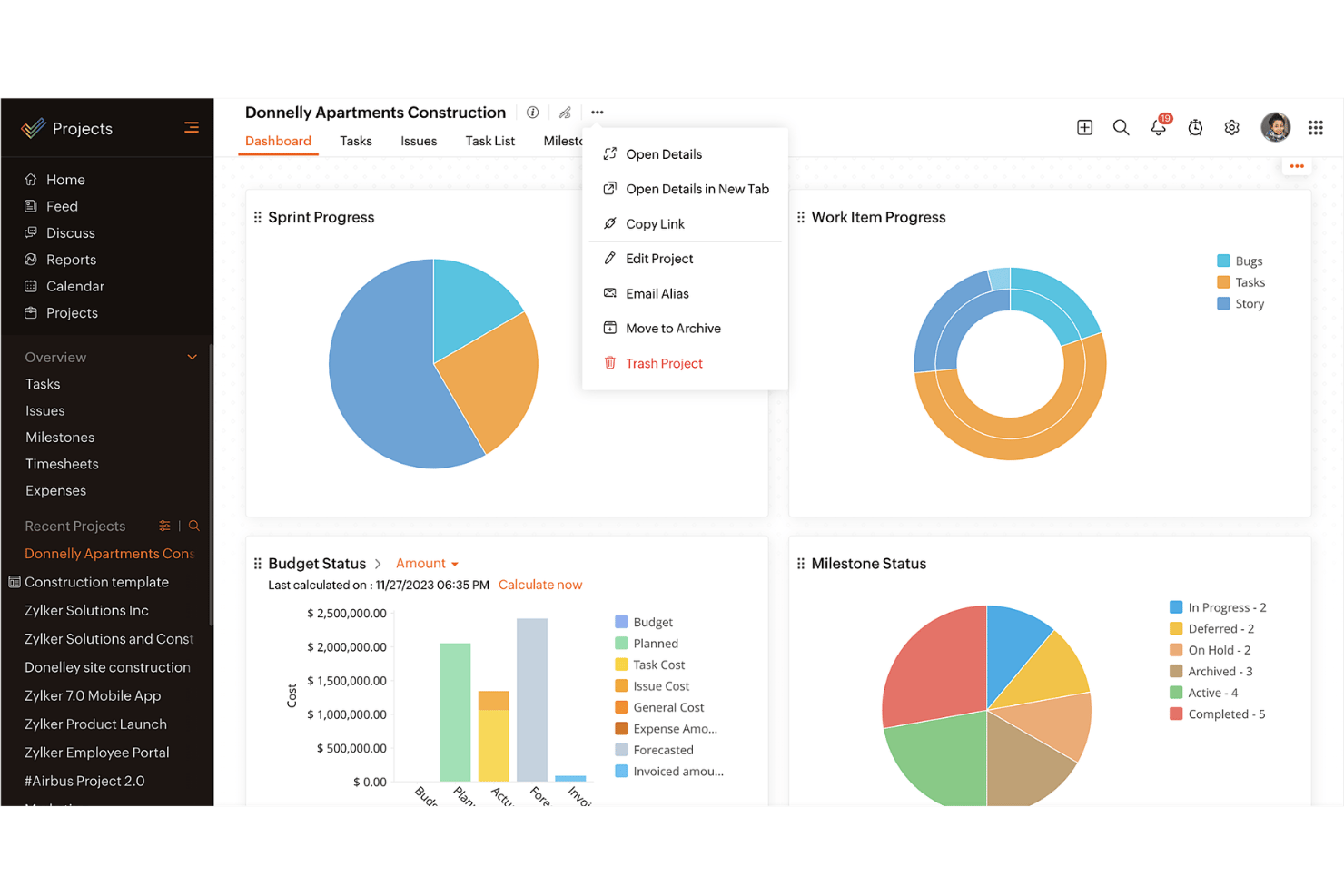
Zoho Projects offers a robust platform for managing your team's tasks and timelines efficiently. monday.com provides a visually intuitive interface to organize your work and collaborate effectively. While both tools help streamline project workflows, Zoho Projects is known for its comprehensive reporting capabilities compared to monday.com's customizable dashboards. In this article, you'll find a detailed comparison of these project management software tools, including their features, pros and cons, and pricing.
Zoho Projects vs. monday AI Workspace: An Overview
Zoho Projects
monday AI Workspace

Why Trust Our Software Recommendations
Our team has been testing and reviewing software since 2012. As project managers ourselves, we know how difficult—and important—it is to choose the right software.
For this guide, we evaluated tools using hands-on testing and independent research, scoring tools using our selection criteria. We also draw on insights from industry thought leaders and practicing project management experts.
Our reviews reflect our human editorial judgment, not a sales pitch.
Expert reviewers:
Zoho Projects vs. monday AI Workspace Pricing Comparison
| Zoho Projects | monday AI Workspace | |
|---|---|---|
| Free Trial | Free plan available | Free plan available |
| Pricing | From $4/user/month (billed annually) | From $9/user/month (billed annually) |
Zoho Projects vs. monday.com Pricing & Hidden Costs
Zoho Projects pricing is based on a tiered subscription model, offering different plans with varying features, and users might encounter extra costs for additional users or premium support. monday.com pricing follows a similar tiered approach but emphasizes its flexibility with add-ons and integrations, which could lead to additional expenses. To choose the right tool for your needs, assess not only the base subscription cost but also consider the features and support you'll need for your team. Evaluate the scalability of the pricing model to ensure it aligns with your project's growth and complexity.
Zoho Projects vs. monday AI Workspace Feature Comparison
With Zoho Projects’s comprehensive task management features, you can easily track progress and set milestones, making it invaluable for managing complex projects with tight deadlines. monday.com’s powerful automations are great for simplifying repetitive tasks and integrating seamlessly with other tools, which is especially useful in fast-paced environments that require frequent updates. While Zoho Projects excels in structured project timelines, monday.com offers flexibility through its custom automations, each supporting different aspects of project management.
| Zoho Projects | monday AI Workspace | |
|---|---|---|
| API | ||
| Batch Permissions & Access | ||
| Budgeting | ||
| Calendar Management | ||
| Collaboration Support | ||
| Contact Management | ||
| Contact Sharing | ||
| Customer Management | ||
| Dashboard | ||
| Dashboards | ||
| Data Export | ||
| Data Import | ||
| Data Visualization | ||
| Dependency Tracking | ||
| Document Sharing | ||
| Expense Tracking | ||
| External Integrations | ||
| File Sharing | ||
| Gantt Charts | ||
| Kanban Boards | ||
| Multi-User | ||
| Notifications | ||
| Project Management | ||
| Resource Management | ||
| Scheduling | ||
| Task Scheduling/Tracking | ||
| Third-Party Plugins/Add-Ons | ||
| Time Management | ||
| Travel Management | ||
| Workflow Management |
Zoho Projects vs. monday.com Integrations
| Integration | Zoho Projects | monday.com |
|---|---|---|
| Slack | ✅ | ✅ |
| Microsoft Teams | ✅ | ✅ |
| Google Drive | ✅ | ✅ |
| Dropbox | ✅ | ✅ |
| Salesforce | ❌ | ✅ |
| HubSpot | ❌ | ✅ |
| Zendesk | ✅ | ❌ |
| QuickBooks | ❌ | ✅ |
| API | ✅ | ✅ |
| Zapier | ✅ | ✅ |
With Zoho Projects's integration with Slack, you can streamline communication by receiving instant updates directly in your chat, which is perfect for teams that rely heavily on real-time messaging. monday.com's HubSpot integration is great for sales-driven projects, allowing for seamless synchronization of deals and contacts, enhancing your project visibility and customer relationship management. Both tools offer integrations that cater to different needs, whether it's enhanced communication or improved sales tracking.
Zoho Projects vs. monday.com Security, Compliance & Reliability
| Factor | Zoho Projects | monday.com |
|---|---|---|
| Data Encryption | Zoho Projects encrypts data in transit and at rest using advanced AES-256 encryption. | monday.com also uses AES-256 encryption to secure data both in transit and at rest. |
| Regulatory Compliance | Zoho Projects complies with GDPR, ensuring data privacy and protection for European users. | monday.com adheres to GDPR and other international data protection regulations. |
| Uptime Reliability | Zoho Projects guarantees 99.9% uptime, ensuring minimal disruptions for your team. | monday.com offers a 99.9% uptime SLA, providing reliable access to your projects. |
| Access Controls | Zoho Projects provides role-based access controls, allowing you to define user permissions. | monday.com offers customizable access controls to manage who can view or edit information. |
Zoho Projects and monday.com both prioritize security and compliance, offering robust encryption and adherence to regulations. To choose the right vendor, evaluate the specific security features that align with your industry's compliance requirements and consider the reliability guarantees that will ensure consistent access to your project data.
Zoho Projects vs. monday.com Ease of Use
| Factor | Zoho Projects | monday.com |
|---|---|---|
| User Interface | Zoho Projects has a structured interface focusing on detailed project timelines and task lists. | monday.com offers a visually appealing and colorful interface with customizable boards. |
| Onboarding Experience | Zoho Projects provides guided tutorials and help documentation to ease new users into the system. | monday.com features an intuitive onboarding process with interactive tutorials and templates. |
| Setup Process | Zoho Projects requires a more involved setup with detailed configuration options. | monday.com allows for quick setup with drag-and-drop functionality and pre-built templates. |
| Customer Support | Zoho Projects offers extensive support through online resources and live chat. | monday.com provides 24/7 support with a rich library of video tutorials and webinars. |
Zoho Projects is great for those who prefer a detailed and structured approach, but its setup can be more complex. monday.com excels in visual appeal and offers a more user-friendly, intuitive experience, making it easier to dive right in and start managing projects.
Zoho Projects vs monday AI Workspace: Pros & Cons
Zoho Projects
- Task dependencies are highly visual and easy to set up.
- Built-in time tracking integrates smoothly with billing features.
- Customizable project templates support repeatable workflows.
- Reporting customization can be limited for advanced needs.
- Mobile app notifications do not always sync in real time.
- Gantt chart drag-and-drop can feel sluggish with large projects.
monday AI Workspace
- The interface is easy to use, with simple drag and drop timeline and charting mechanics.
- You can create forms that live within your project as a view.
- There is a long list of supported integrations
- The Gantt view isn't useful for building a project.
- Recurring tasks are considered automations and limited to higher tier plans.
- There is a steep learning curve for beginners.
Best Use Cases for Zoho Projects and monday AI Workspace
Zoho Projects
- Small Agencies Kanban boards, time tracking, and client billing streamline project delivery and reporting for agency teams.
- IT Departments Issue tracking, blueprint automations, and strong permission controls provide what IT teams need for complex internal projects.
- Consulting Firms Time sheets, detailed reports, and project-level billing help consultants keep track of client hours and invoicing.
- Remote Teams Robust collaboration tools, document sharing, and project forums help distributed users stay connected.
- Marketing Teams Reusable templates, task dependencies, and timeline tracking make repeated campaigns run smoothly and transparently.
- Construction Projects Gantt charts, milestones, and resource allocation features support the scheduling needs of construction and field project managers.
monday AI Workspace
- Creative departments With features like collaborative docs and a proofing screen, creative teams can improve feedback loops and increase delivery speeds.
- Marketing teams Its customizable dashboards and automation features let you track campaigns and workflows efficiently.
- Content creation monday.com's file management and commenting capabilities let teams manage media files and improve collaboration.
- Event planners The platform’s timeline views and easy collaboration features make managing multiple events straightforward.
- Product development You can track progress and updates across teams to maintain alignment and meet deadlines.
- Remote teams With collaborative features and real-time updates, remote teams can maintain productivity and communication effortlessly.
Who Should Use Zoho Projects, and Who Should Use monday.com?
In my opinion, Zoho Projects is ideal for teams that need detailed project planning and robust reporting capabilities, making it a great fit for industries like engineering and IT. If your work requires a structured approach with heavy emphasis on timelines and task management, Zoho Projects is the way to go. On the other hand, I believe monday.com is perfect for creative teams and startups looking for flexibility and visual project tracking. Its customizable boards and easy integrations make it suitable for dynamic environments where collaboration and adaptability are key.
Differences Between Zoho Projects and monday AI Workspace
| Zoho Projects | monday AI Workspace | |
|---|---|---|
| Automation | Zoho Projects includes basic automation for task management. | monday.com offers advanced automation and seamless integrations with other tools. |
| Onboarding | Zoho Projects has guided onboarding with tutorials and documentation. | monday.com features an interactive onboarding process with templates and tutorials. |
| Pricing | Zoho Projects offers tiered plans with additional costs for premium features. | monday.com provides flexible plans with options for add-ons and integrations. |
| Reporting | Zoho Projects provides detailed reporting and analytics for project tracking. | monday.com offers customizable dashboards for visual project insights. |
| User Interface | Zoho Projects features a structured, timeline-focused interface. | monday.com has a colorful, board-based interface that's highly customizable. |
| Read Zoho Projects ReviewOpens new window | Visit monday AI WorkspaceOpens new window |
Similarities Between Zoho Projects and monday AI Workspace
| Collaboration | Each platform offers communication features, ensuring your team stays connected on project updates. |
|---|---|
| Customization | Zoho Projects and monday.com allow you to customize project views and workflows to suit your needs. |
| Integrations | Both tools integrate with popular apps like Slack and Google Drive, enhancing your team's workflow. |
| Security | Both provide strong encryption and compliance with regulations like GDPR to protect your data. |
| User Support | Zoho Projects and monday.com offer extensive support resources, including tutorials and live help. |
| Read Zoho Projects ReviewOpens new window Visit monday AI WorkspaceOpens new window | |