



Wrike vs. Trello: Comparison & Expert Reviews For 2026



Wrike offers a robust solution for teams seeking to manage complex projects efficiently, while Trello provides a user-friendly platform ideal for visual task organization. While Wrike is suited for detailed project tracking, Trello excels in simplicity and ease of use. In this article, you'll find a detailed comparison of these tools, exploring their features, pros and cons, pricing, and more about choosing project management software.
Wrike vs. Trello: An Overview
Wrike
Trello




Why Trust Our Software Recommendations
Our team has been testing and reviewing software since 2012. As project managers ourselves, we know how difficult—and important—it is to choose the right software.
For this guide, we evaluated tools using hands-on testing and independent research, scoring tools using our selection criteria. We also draw on insights from industry thought leaders and practicing project management experts.
Our reviews reflect our human editorial judgment, not a sales pitch.
Expert reviewers:
Wrike vs. Trello Pricing Comparison
| Wrike | Trello | |
|---|---|---|
| Free Trial | 14-day free trial | 14-day free trial |
| Pricing | From $10/user/month (billed annually) | From $5/user/month (billed annually) |
Wrike vs. Trello Pricing & Hidden Costs
Wrike pricing is structured around tiered plans catering to different team sizes and needs, with potential additional costs for advanced features and integrations. On the other hand, Trello pricing offers a freemium model with optional paid plans for enhanced features and power-ups that may incur extra costs. To choose the right pricing, project managers should evaluate the specific features their team needs, consider the scale of their projects, and assess any potential for future growth to ensure they select a vendor that aligns with their current and future requirements.
Wrike vs. Trello Feature Comparison
With Wrike’s robust resource management, you can effectively allocate and monitor your team’s workload, making it perfect for large projects requiring detailed oversight. Trello’s Kanban boards are great for visual task management, offering flexibility and clarity in fast-paced environments like creative projects. Both tools provide unique strengths, allowing you to choose based on whether you need in-depth resource management or a simple, visual organization.
| Wrike | Trello | |
|---|---|---|
| API | ||
| Batch Permissions & Access | ||
| Budgeting | ||
| Calendar Management | ||
| Collaboration Support | ||
| Contact Management | ||
| Contact Sharing | ||
| Customer Management | ||
| Dashboard | ||
| Dashboards | ||
| Data Export | ||
| Data Import | ||
| Data Visualization | ||
| Dependency Tracking | ||
| Document Sharing | ||
| Expense Tracking | ||
| External Integrations | ||
| File Sharing | ||
| Gantt Charts | ||
| Kanban Boards | ||
| Multi-User | ||
| Notifications | ||
| Project Management | ||
| Resource Management | ||
| Scheduling | ||
| Task Scheduling/Tracking | ||
| Third-Party Plugins/Add-Ons | ||
| Time Management | ||
| Travel Management | ||
| Workflow Management |
Wrike vs. Trello Integrations
| Integration | Wrike | Trello |
|---|---|---|
| Slack | ✅ | ✅ |
| Google Drive | ✅ | ✅ |
| Microsoft Teams | ✅ | ✅ |
| Salesforce | ✅ | ✅ |
| HubSpot | ✅ | ❌ |
| Dropbox | ✅ | ✅ |
| Zendesk | ✅ | ❌ |
| Evernote | ❌ | ✅ |
| GitHub | ✅ | ✅ |
| Asana | ❌ | ✅ |
| API | ✅ | ✅ |
| Zapier | ✅ | ✅ |
Wrike's integration with Salesforce lets you synchronize customer data seamlessly, making it invaluable for sales teams tracking client interactions. Trello's integration with Evernote is great for turning notes into actionable tasks, perfect for teams that rely on brainstorming and idea tracking. Both tools offer essential integrations, allowing you to enhance productivity based on your team's specific workflows.
Wrike vs. Trello Security, Compliance & Reliability
| Factor | Wrike | Trello |
|---|---|---|
| Data Encryption | Wrike uses AES-256 encryption to protect data both in transit and at rest. | Trello encrypts data in transit using TLS protocol for secure communication. |
| Regulatory Compliance | Wrike complies with GDPR, ensuring data protection and privacy for users. | Trello adheres to GDPR and CCPA, providing strong privacy control features. |
| Authentication | Wrike offers SSO and two-factor authentication for secure access. | Trello supports two-factor authentication to enhance account security. |
| Uptime Reliability | Wrike guarantees 99.9% uptime for uninterrupted project management. | Trello maintains high availability with robust infrastructure. |
Wrike and Trello both offer strong security and compliance measures, though Wrike's detailed regulatory compliance may offer an edge. To evaluate these tools, focus on the specific security needs of your team, such as encryption standards and compliance with relevant regulations, to make an informed decision.
Wrike vs. Trello Ease of Use
| Factor | Wrike | Trello |
|---|---|---|
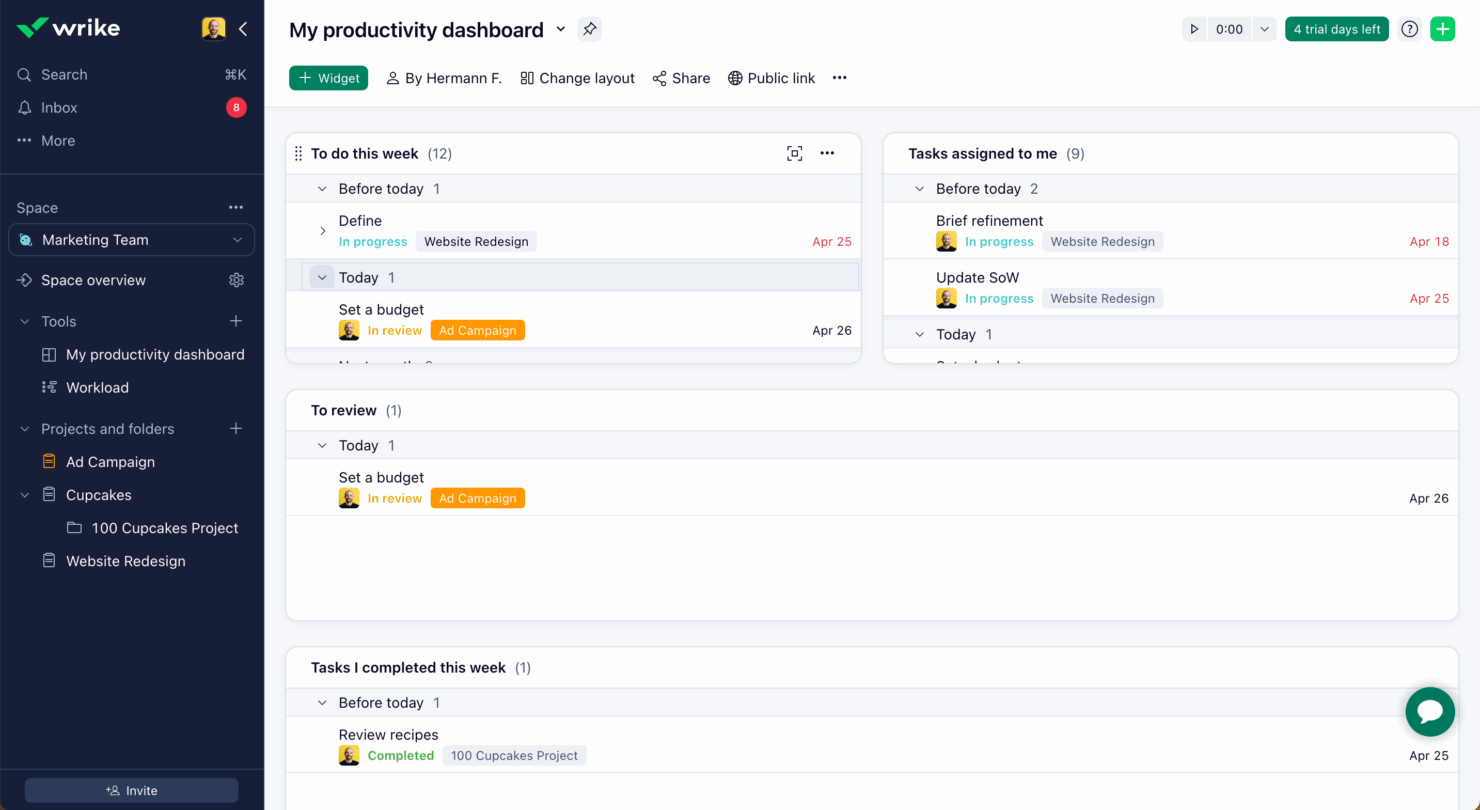
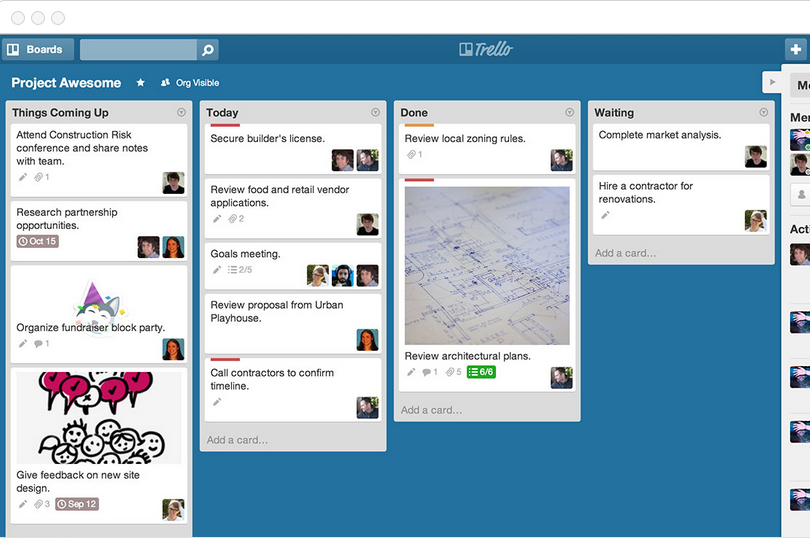
| User Interface | Wrike offers a comprehensive interface with customizable dashboards for detailed project views. | Trello features a simple, visual Kanban-style interface that's intuitive to navigate. |
| Onboarding Experience | Wrike provides guided tutorials and a structured onboarding process to help new teams get started quickly. | Trello's onboarding is straightforward, with easy drag-and-drop functionality to set up boards. |
| Setup | Wrike requires more initial setup to configure workflows and permissions but offers extensive customization. | Trello allows quick setup with pre-made templates and minimal configuration needed. |
| Support | Wrike offers 24/7 support with a dedicated help center and community forums. | Trello provides a help center and community support, but lacks 24/7 live assistance. |
Trello's ease of use shines with its simple setup and intuitive interface, making it ideal for teams seeking quick deployment. Wrike, while more complex, excels in customization and detailed project management, though it requires a steeper learning curve.
Wrike vs Trello: Pros & Cons
Wrike
- Wrike's proofing feature allows you to compare file versions dynamically.
- The user-friendly interface ensures easy navigation for your team.
- Wrike's AI features are available in all plans at no extra cost.
- It can be unclear where form responses are stored within the tool.
- Some integrations require an additional cost, regardless of the plan.
- Two-factor authentication is only available with the enterprise plan.
Trello
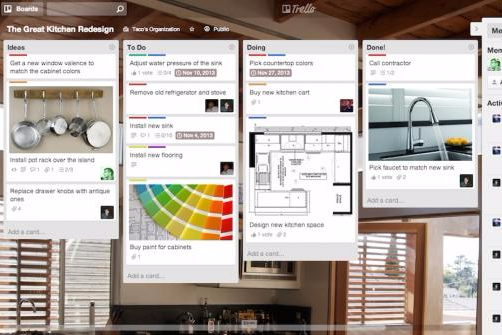
- You can easily visualize your tasks with Trello's board and card layout.
- It's simple to use, making it accessible for team members of all skill levels.
- Trello adapts to your team's workflow, offering flexibility in task management.
- Trello lacks advanced reporting features you might find in more complex tools.
- You can't create intricate task dependencies, which may limit complex project planning.
- Trello's simplicity might not suit large teams with detailed project management needs.
Best Use Cases for Wrike and Trello
Wrike
- Marketing Teams Wrike’s proofing feature helps you streamline creative approval processes with ease.
- Creative Agencies Wrike’s dynamic file version comparison keeps your creative projects on track.
- IT Departments Wrike’s user-friendly interface simplifies complex project coordination for your team.
- Product Development Wrike’s AI features boost your team’s productivity without extra costs.
- Event Management Wrike’s task scheduling ensures your events are planned and executed flawlessly.
- Construction Projects Wrike’s robust project tracking keeps your construction timelines and budgets in check.
Trello
- Creative Agencies Trello's visual task management makes it easy for you to track projects, ideas, and client feedback.
- Startups The flexibility Trello offers helps your team adapt quickly as you grow and change.
- Marketing Teams You can easily plan campaigns and track progress with Trello's board system.
- Design Departments Trello's simple interface allows you to manage design projects and revisions efficiently.
- Freelancers You can organize your tasks and deadlines without getting overwhelmed by complex features
- Product Development Trello's adaptability helps your team streamline workflows and manage product roadmaps effectively.
Who Should Use Wrike, and Who Should Use Trello?
In my opinion, Wrike is best for larger teams in industries like marketing or consulting that need detailed project tracking and robust resource management. I believe Trello suits smaller teams or startups looking for a simple, visual way to manage tasks without the need for complex features. From my perspective, if your team values customization and detailed analytics, Wrike is the right choice. On the other hand, if you want an easy-to-use tool that’s quick to set up and ideal for creative projects, Trello is the way to go.
Differences Between Wrike and Trello
| Wrike | Trello | |
|---|---|---|
| Automation | Wrike includes built-in automation for workflows and task assignments. | Trello offers automation through power-ups like Butler for task automation. |
| Core Features | Wrike offers advanced project tracking and resource management tools. | Trello focuses on simple task management with visual Kanban boards. |
| Onboarding | Wrike features a structured onboarding with tutorials and support. | Trello's onboarding is straightforward with minimal setup needed. |
| Pricing | Wrike uses tiered pricing based on features and team size. | Trello offers a freemium model with optional paid plans for extras. |
| User Interface | Wrike provides a detailed interface with customizable dashboards. | Trello's interface is simple and intuitive, using drag-and-drop boards. |
| Visit WrikeOpens new window | Read Trello ReviewOpens new window |
Similarities Between Wrike and Trello
| Collaboration | Both platforms allow team collaboration with real-time updates and comments, ensuring everyone stays on the same page. |
|---|---|
| Customization | Both tools provide customization options, like Wrike's dashboards and Trello's power-ups, to tailor the platform to your needs. |
| Integrations | Both Wrike and Trello integrate with popular tools like Slack and Google Drive, helping your team connect workflows seamlessly. |
| Mobile Usability | Wrike and Trello offer mobile apps, letting you manage tasks and projects on the go with ease. |
| Task Management | Wrike and Trello both excel in task management, offering features to assign, track, and prioritize tasks effectively. |
| Visit WrikeOpens new window Read Trello ReviewOpens new window | |