


RIB Software Review 2026: Pros, Cons, Features and Pricing



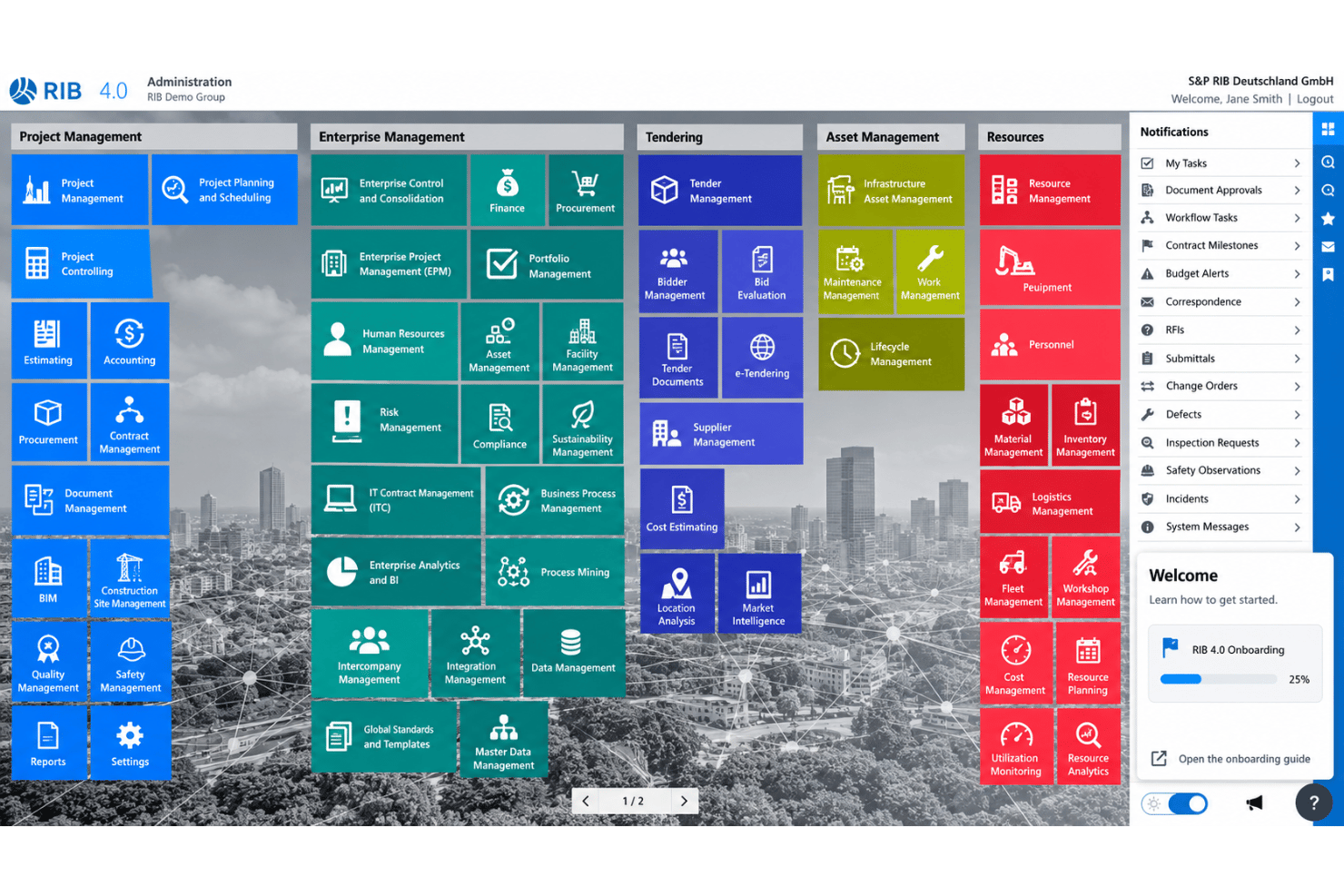
RIB Software is BIM project management software that connects project models with costs, schedules, and other project data. If your construction team needs model-based planning across coordination, cost control, and scheduling, choose RIB 4.0 over Autodesk Construction Cloud for its 5D workflows linking 3D models with time and cost data.
RIB Evaluation Summary
- Pricing upon request
- Free demo available
Why Trust Our Software Recommendations
Our team has been testing and reviewing software since 2012. As project managers ourselves, we know how difficult—and important—it is to choose the right software.
For this guide, we evaluated tools using hands-on testing and independent research, scoring tools using our selection criteria. We also draw on insights from industry thought leaders and practicing project management experts.
Our reviews reflect our human editorial judgment, not a sales pitch.
Expert reviewers:
RIB Overview
I’d choose RIB 4.0 for construction teams that need BIM tied directly to cost and schedule data: its optional 5D workflows connect 3D models with time and costs, while Gantt charts, estimating, and project controls cover adjacent work. Compared with lighter model-coordination tools, it offers broader project and commercial functionality, such as linking model-based planning to budgets and procurement. That breadth can mean more setup, and pricing is custom across three packages and optional modules. Web and mobile access help distRIB Softwareuted teams, but I’d confirm integrations, onboarding support, and service terms before selecting it.
pros
-
Links 3D models with schedules and costs for 5D planning.
-
Connects estimating, procurement, controls, and project data across projects.
-
Reviewers praise mobile access and configurable, standardized workflows.
cons
-
Reviewers report complex cost-scheduling workflows and unclear controlling data.
-
Some users report lag, crashes, and performance varying by configuration.
-
Modular packages and custom quotes complicate price comparisons.
-

Celoxis
Visit WebsiteThis rating combines scores from multiple user review sites to reflect overall customer sentiment about the product.4.5 -
Accelo
Visit WebsiteThis rating combines scores from multiple user review sites to reflect overall customer sentiment about the product.4.4 -
Wrike
Visit WebsiteThis rating combines scores from multiple user review sites to reflect overall customer sentiment about the product.4.3





Our Review Methodology
How We Test & Score Tools
We’ve spent years building, refining, and improving our software testing and scoring system. The rubric is designed to capture the nuances of software selection and what makes a tool effective, focusing on critical aspects of the decision-making process.
Below, you can see exactly how our testing and scoring works across seven criteria. It allows us to provide an unbiased evaluation of the software based on core functionality, standout features, ease of use, onboarding, customer support, integrations, customer reviews, and value for money.
Core Functionality (25% of final scoring)
The starting point of our evaluation is always the core functionality of the tool. Does it have the basic features and functions that a user would expect to see? Are any of those core features locked to higher-tiered pricing plans? At its core, we expect a tool to stand up against the baseline capabilities of its competitors.
Standout Features (25% of final scoring)
Next, we evaluate uncommon standout features that go above and beyond the core functionality typically found in tools of its kind. A high score reflects specialized or unique features that make the product faster, more efficient, or offer additional value to the user.
We also evaluate how easy it is to integrate with other tools typically found in the tech stack to expand the functionality and utility of the software. Tools offering plentiful native integrations, 3rd party connections, and API access to build custom integrations score best.
Ease of Use (10% of final scoring)
We consider how quick and easy it is to execute the tasks defined in the core functionality using the tool. High scoring software is well designed, intuitive to use, offers mobile apps, provides templates, and makes relatively complex tasks seem simple.
Onboarding (10% of final scoring)
We know how important rapid team adoption is for a new platform, so we evaluate how easy it is to learn and use a tool with minimal training. We evaluate how quickly a team member can get set up and start using the tool with no experience. High scoring solutions indicate little or no support is required.
Customer Support (10% of final scoring)
We review how quick and easy it is to get unstuck and find help by phone, live chat, or knowledge base. Tools and companies that provide real-time support score best, while chatbots score worst.
Customer Reviews (10% of final scoring)
Beyond our own testing and evaluation, we consider the net promoter score from current and past customers. We review their likelihood, given the option, to choose the tool again for the core functionality. A high scoring software reflects a high net promoter score from current or past customers.
Value for Money (10% of final scoring)
Lastly, in consideration of all the other criteria, we review the average price of entry level plans against the core features and consider the value of the other evaluation criteria. Software that delivers more, for less, will score higher.
Core Features
5D Model-Based Planning
RIB Software’s optional BIM 5D workflows link 3D model objects with schedule information and cost data for time-and-cost simulations. You can assess how a design or sequencing change affects budgets and milestones before updating the plan.
BIM Data Management And Collaboration
RIB 4.0 provides central BIM data management and BCF collaboration across project workflows. Teams can work from shared model information and keep coordination context connected to project decisions.
Cost Estimation
The Cost Estimation module supports budgets built around resource-based costs, including direct and indirect costs and markups. You can structure estimates around a model, bill of quantities, or schedule to compare design choices against project budgets.
Scheduling and Critical Path
Time Scheduling includes Gantt charts, time-location diagrams, critical-path views, and activity performance recording. You can track dependencies and progress together, then see where a delay could affect the wider project schedule.
Project Cost Controls
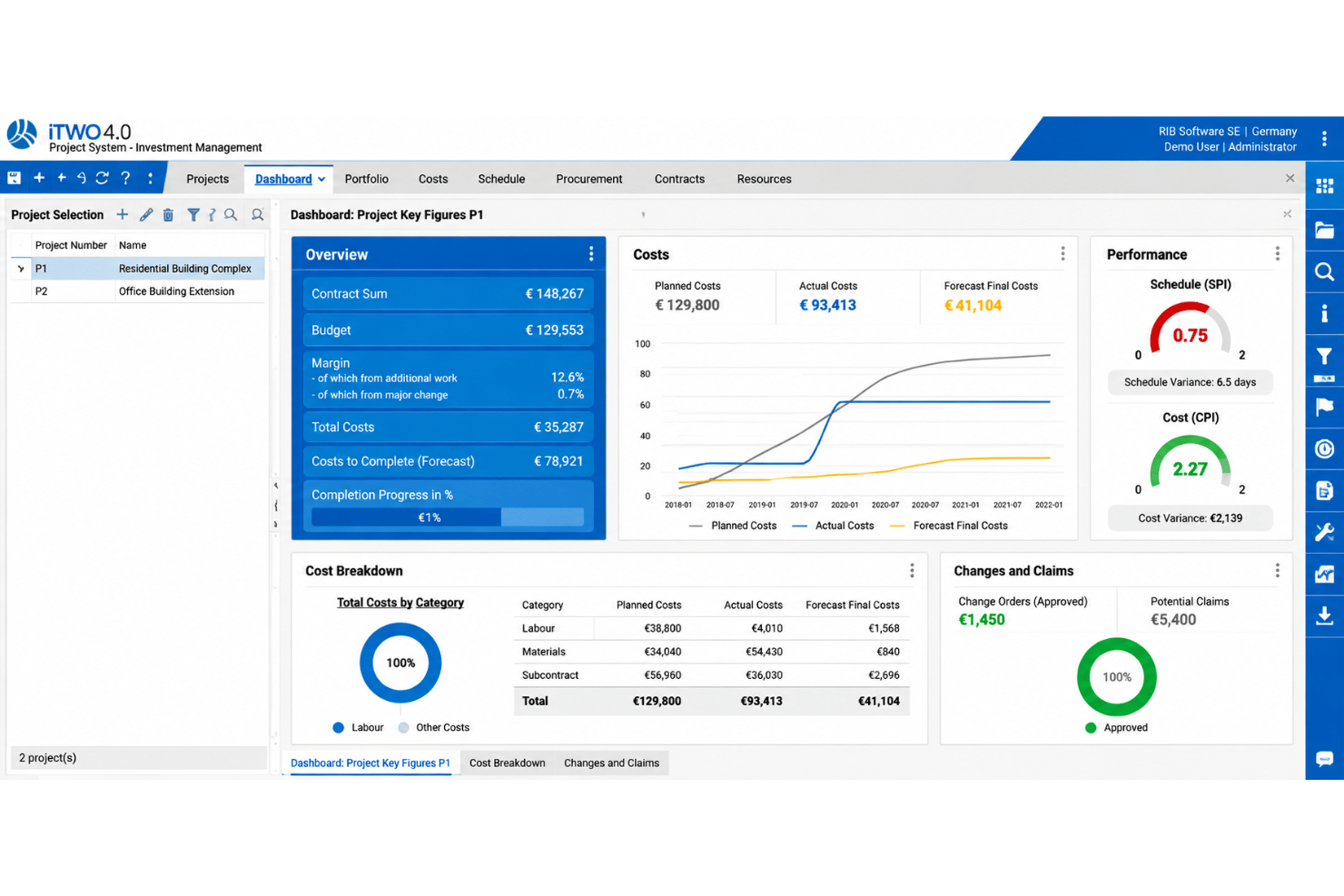
RIB Software’s Controlling module brings data from other modules into dashboards with cost comparisons, charts, and filters. Project managers can review budget performance against current project information instead of relying on separate reports.
Construction Site Project Management
The site management module supports RFIs, change orders, punch lists, checklists, and progress reporting, with native mobile app access. Site teams can record issues and progress in the project workflow, giving managers a clearer view of open work and changes.
Ease of Use
RIB Software has a steep learning curve, particularly for teams unfamiliar with integrated estimating, scheduling, cost control, and ERP workflows. Its extensive modules and complex cost-scheduling processes can make navigation and data interpretation challenging. However, customizable workflows, structured project information, and mobile access help experienced teams manage construction data across projects.
Integrations
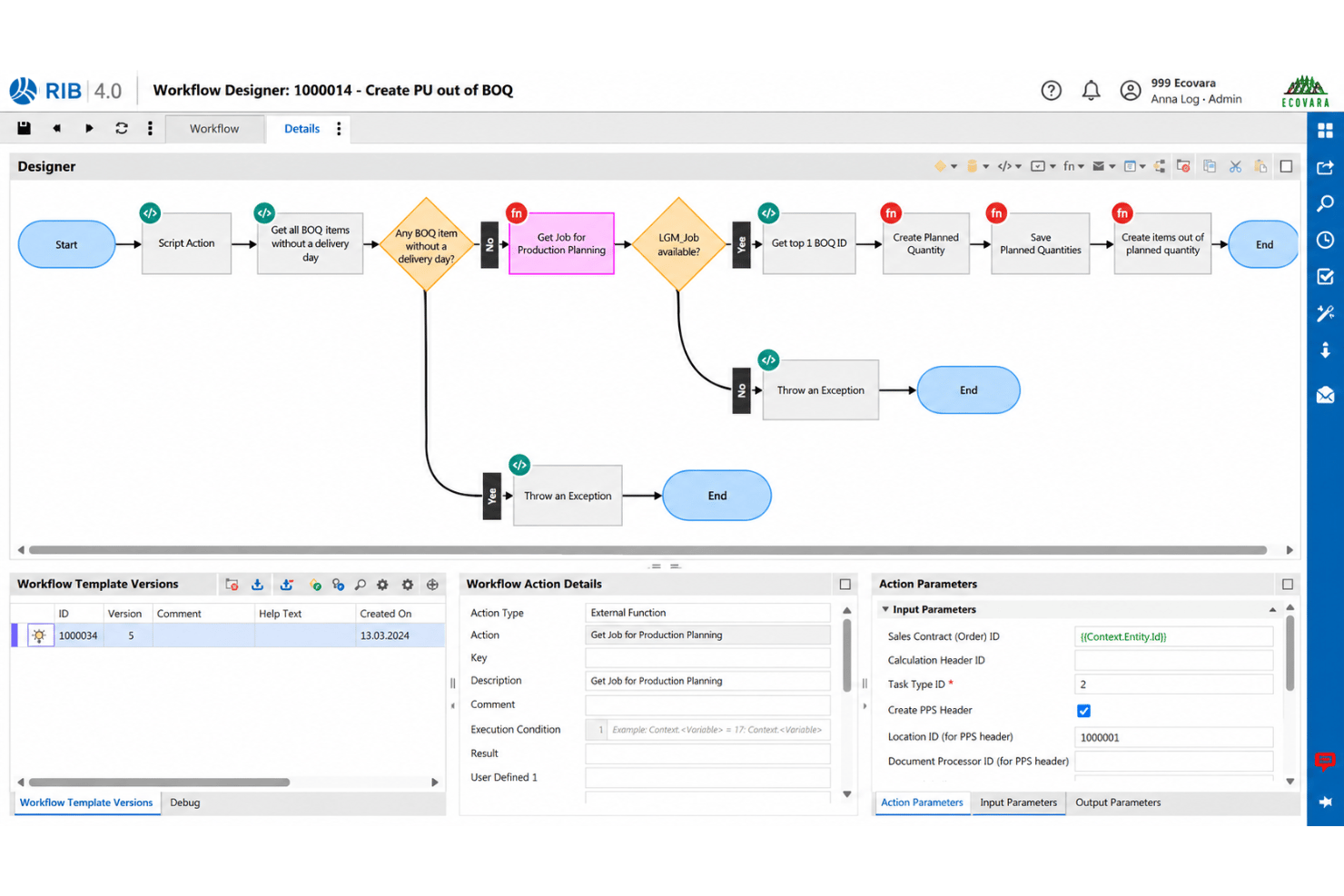
RIB Software supports integrations with Autodesk Revit through RIB SpecLink and connects with ERP, PMI, and CAD systems through RIB 4.0. It also offers Microsoft Azure cloud hosting.
RIB Software provides open APIs for custom integrations and third-party application connectivity.
RIB Specs
- API
- Batch Permissions & Access
- Budgeting
- Calendar Management
- Collaboration Support
- Contact Management
- Contact Sharing
- Customer Management
- Dashboard
- Dashboards
- Data Export
- Data Import
- Data Visualization
- Dependency Tracking
- Document Sharing
- Expense Tracking
- External Integrations
- File Sharing
- Gantt Charts
- Kanban Boards
- Multi-User
- Notifications
- Project Management
- Resource Management
- Scheduling
- Task Scheduling/Tracking
- Third-Party Plugins/Add-Ons
- Time Management
- Travel Management
- Workflow Management




- 10 Best Scribe Alternatives for SOP Creation in 2026Opens new window
- 13 Best Newsletters for Operations Leaders to Subscribe to in 2026Opens new window
- 6 Things You Should Never Write In a Professional EmailOpens new window
- How To Write A Project Manager Cover Letter: 2026 GuideOpens new window
- How To Write A Project Proposal (With A Concrete Example)Opens new window
- Scribe Review: Pros, Cons, Features and Pricing OverviewOpens new window
- Thank you for subscribing - DPM Essentials - Project BriefingOpens new window
- Workload Distribution for Project Managers: Best Strategies to Balance the LoadOpens new window
- Write An Employee Handbook In 5 StepsOpens new window