





Paymo is a web-based project management tool built for small teams and agencies that need to manage projects, track billable hours, and handle client invoicing in one place. If you've been piecing together your PM tool with separate time tracking and invoicing apps, Paymo is worth a close look, as it handles all three natively, cutting out the manual data entry that comes with stitching those systems together.
Paymo Evaluation Summary

- From $5.90/user/month (billed annually)
- Free plan + free demo (Pro plan only) + 15-day free trial available
Why You Can Trust Us
We’ve been testing and reviewing project management software since 2012. As project managers ourselves, we know how critical and difficult it is to make the right decision when selecting software.
We invest in deep research to help our audience make better software purchasing decisions. We’ve tested more than 2,000 tools for different project management use cases and written over 1,000 comprehensive software reviews. Learn how we stay transparent & our software review methodology.
Paymo Overview
Paymo excels in offering an intuitive and user-friendly interface that keeps your team organized and your projects on track without overwhelming features.
pros
-
Paymo simplifies time tracking and billing, making it easy for your team to manage project budgets.
-
Its intuitive task management keeps your team organized and on schedule.
-
The user interface is clean and user-friendly, reducing the learning curve for your team.
cons
-
Reporting features might feel limited if your team needs advanced analytics.
-
Customization options are less flexible compared to some competitors.
-
Mobile app functionality is not as robust, which might affect on-the-go project management.
-

Celoxis
Visit WebsiteThis rating combines scores from multiple user review sites to reflect overall customer sentiment about the product.4.5 -
Smartsheet
Visit WebsiteThis rating combines scores from multiple user review sites to reflect overall customer sentiment about the product.4.5 -
Accelo
Visit WebsiteThis rating combines scores from multiple user review sites to reflect overall customer sentiment about the product.4.4





Our Review Methodology
How We Test & Score Tools
We’ve spent years building, refining, and improving our software testing and scoring system. The rubric is designed to capture the nuances of software selection and what makes a tool effective, focusing on critical aspects of the decision-making process.
Below, you can see exactly how our testing and scoring works across seven criteria. It allows us to provide an unbiased evaluation of the software based on core functionality, standout features, ease of use, onboarding, customer support, integrations, customer reviews, and value for money.
Core Functionality (25% of final scoring)
The starting point of our evaluation is always the core functionality of the tool. Does it have the basic features and functions that a user would expect to see? Are any of those core features locked to higher-tiered pricing plans? At its core, we expect a tool to stand up against the baseline capabilities of its competitors.
Standout Features (25% of final scoring)
Next, we evaluate uncommon standout features that go above and beyond the core functionality typically found in tools of its kind. A high score reflects specialized or unique features that make the product faster, more efficient, or offer additional value to the user.
We also evaluate how easy it is to integrate with other tools typically found in the tech stack to expand the functionality and utility of the software. Tools offering plentiful native integrations, 3rd party connections, and API access to build custom integrations score best.
Ease of Use (10% of final scoring)
We consider how quick and easy it is to execute the tasks defined in the core functionality using the tool. High scoring software is well designed, intuitive to use, offers mobile apps, provides templates, and makes relatively complex tasks seem simple.
Onboarding (10% of final scoring)
We know how important rapid team adoption is for a new platform, so we evaluate how easy it is to learn and use a tool with minimal training. We evaluate how quickly a team member can get set up and start using the tool with no experience. High scoring solutions indicate little or no support is required.
Customer Support (10% of final scoring)
We review how quick and easy it is to get unstuck and find help by phone, live chat, or knowledge base. Tools and companies that provide real-time support score best, while chatbots score worst.
Customer Reviews (10% of final scoring)
Beyond our own testing and evaluation, we consider the net promoter score from current and past customers. We review their likelihood, given the option, to choose the tool again for the core functionality. A high scoring software reflects a high net promoter score from current or past customers.
Value for Money (10% of final scoring)
Lastly, in consideration of all the other criteria, we review the average price of entry level plans against the core features and consider the value of the other evaluation criteria. Software that delivers more, for less, will score higher.
Core Features
Task Management
Easily organize your projects with Paymo's task management, where you can assign tasks, set deadlines, and track progress. It helps your team stay on top of their work with visual task outlines.
Time Tracking
Paymo's time tracking lets you monitor billable hours for accurate client billing and project budgeting. It's perfect for freelancers and agencies managing multiple projects.
Resource Scheduling
Allocate resources efficiently with Paymo's scheduling tools, ensuring your team isn't overburdened. This feature aids in balancing workloads across projects.
Invoicing
Generate professional invoices directly within Paymo, streamlining your billing process. It's a great way to keep your financials in order without switching platforms.
File Management
Keep project files organized and accessible with Paymo's file management feature. It allows seamless collaboration and ensures everyone has the latest documents.
Collaboration Tools
Enhance team communication with Paymo's built-in collaboration features, including comments and notifications. It keeps everyone in the loop and fosters teamwork.
Ease of Use
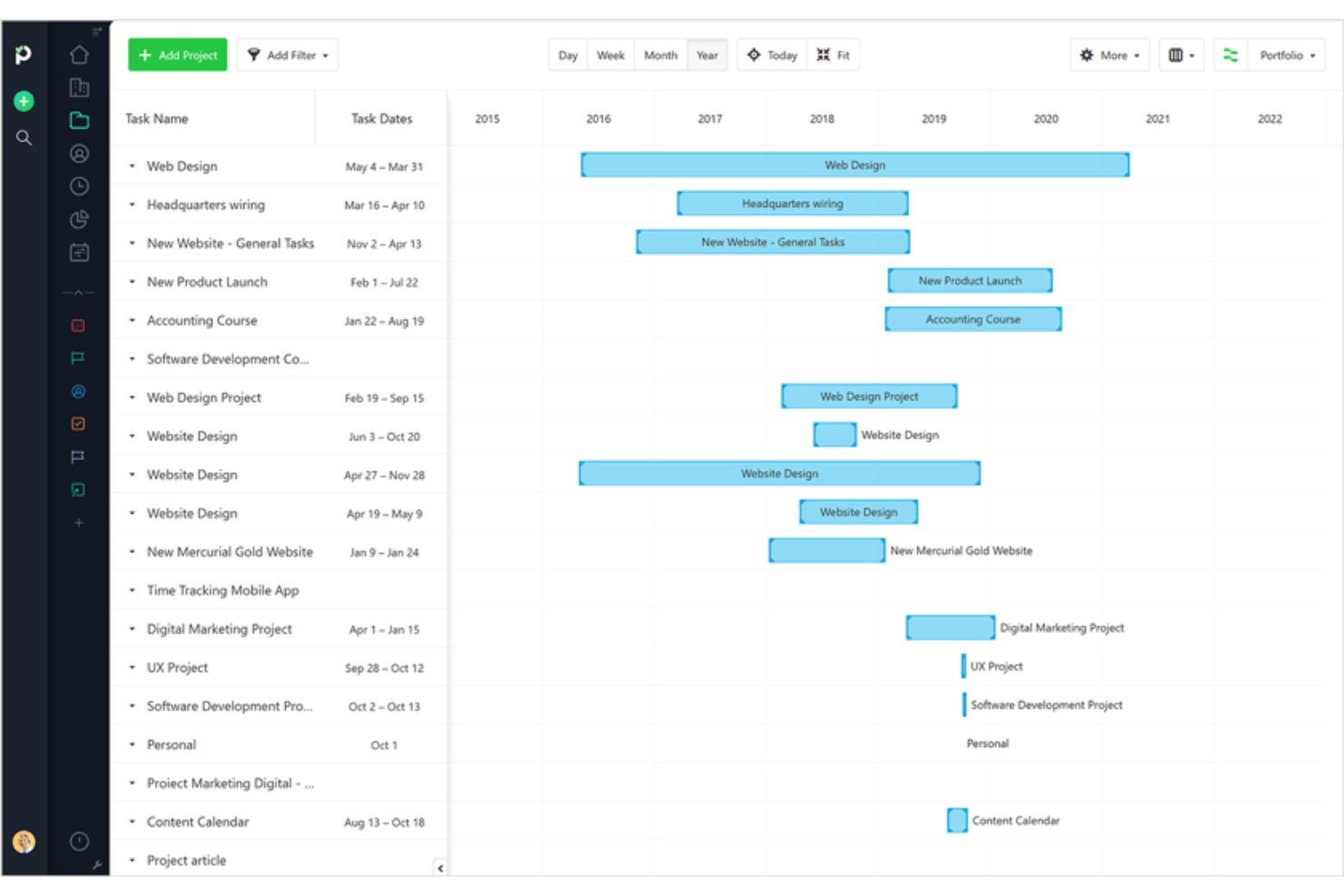
Paymo stands out for its user-friendly interface, making it easy for your team to navigate and manage projects without a steep learning curve. The intuitive design helps you quickly assign tasks, track time, and collaborate effectively. User reviews highlight its simplicity, allowing even those new to project management software to get up and running fast. Paymo’s clear visuals, like Kanban boards and Gantt charts, enhance your team’s ability to plan and execute projects efficiently.

Integrations
Integrations include Google, Google Calendar, Zapier, Slack, QuickBooks Online, Typeform, Integromat, Pomodone, LambdaTest, Rethink, Shift, and Xero.

Paymo Specs
- API
- Batch Permissions & Access
- Budgeting
- Calendar Management
- Collaboration Support
- Contact Management
- Contact Sharing
- Customer Management
- Dashboard
- Dashboards
- Data Export
- Data Import
- Data Visualization
- Dependency Tracking
- Document Sharing
- Expense Tracking
- External Integrations
- File Sharing
- Gantt Charts
- Kanban Boards
- Multi-User
- Notifications
- Project Management
- Resource Management
- Scheduling
- Task Scheduling/Tracking
- Third-Party Plugins/Add-Ons
- Time Management
- Travel Management
- Workflow Management



Paymo FAQs
How does Paymo handle data security and compliance?
Can I use Paymo offline?
How customizable is Paymo for different workflows?
How does Paymo support remote team collaboration?
What kind of reporting capabilities does Paymo offer?
Is Paymo suitable for agile project management?
How does Paymo handle task dependencies?
Can I integrate Paymo with my existing tools?
What's Next?
Want to connect with other digital project managers to share resources and best practices? Join our membership community and get access to 100+ templates, samples, and examples and connect with 100s of other digital project managers in Slack.