



Jira vs. Basecamp: Comparison & Expert Reviews For 2026



Jira provides a powerful platform for managing complex projects, with a strong focus on detailed task tracking. Basecamp, in contrast, takes a simpler approach, prioritizing team communication and ease of use. The key difference is that Jira supports advanced project tracking, while Basecamp emphasizes straightforward collaboration.
In this article, we'll compare these tools, examining their features, pros and cons, pricing, and more, to help you choose the right project management software for your team.
Jira vs. Basecamp: An Overview
Jira

Basecamp


Why Trust Our Software Recommendations
Our team has been testing and reviewing software since 2012. As project managers ourselves, we know how difficult—and important—it is to choose the right software.
For this guide, we evaluated tools using hands-on testing and independent research, scoring tools using our selection criteria. We also draw on insights from industry thought leaders and practicing project management experts.
Our reviews reflect our human editorial judgment, not a sales pitch.
Expert reviewers:
Jira vs. Basecamp Pricing Comparison
| Jira | Basecamp | |
|---|---|---|
| Free Trial | Free plan + 14-day free trial available | 30-day free trial + free demo available |
| Pricing | From $7.91/user/month | From $15/user/month |
Jira pricing is based on a tiered subscription model, where costs increase with the number of users, and additional features may lead to extra charges. Basecamp pricing is simpler, offering a flat fee regardless of team size, but users should be aware of potential costs for third-party integrations.
To choose the right tool for your budget, assess your team's size, feature needs, and how each pricing model aligns with your project's scope and growth potential.
Jira vs. Basecamp Feature Comparison
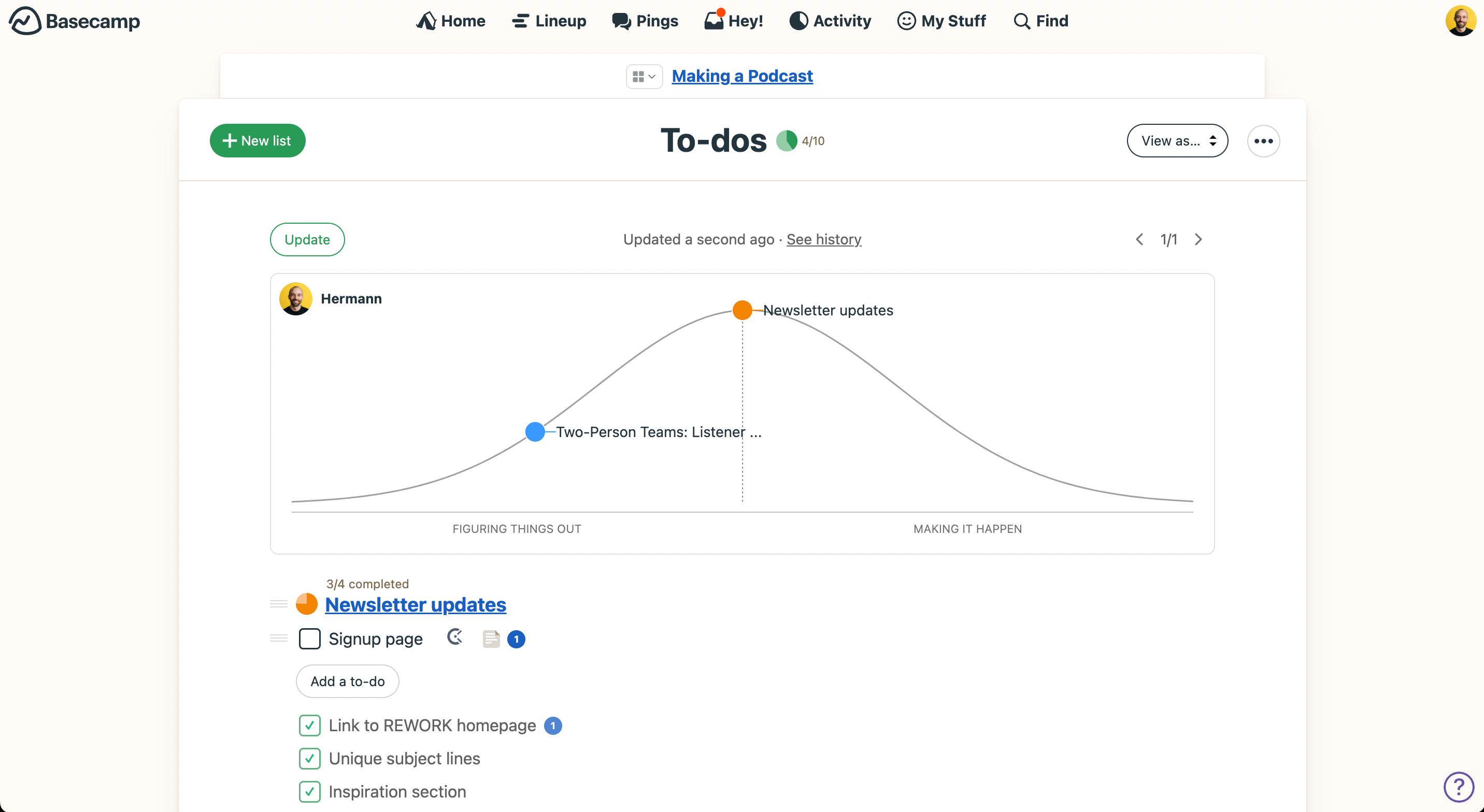
Jira’s drag-and-drop roadmaps make it easy to manage complex projects, which is especially useful for tech teams that need detailed task tracking. Basecamp’s message boards support team communication by providing a centralized space for project discussions.
While Jira is strong in structured project planning, Basecamp focuses on collaboration with simple, intuitive tools.
| Jira | Basecamp | |
|---|---|---|
| API | ||
| Calendar Management | ||
| Collaboration Support | ||
| Dashboards | ||
| Data Export | ||
| Data Import | ||
| External Integrations | ||
| File Sharing | ||
| Gantt Charts | ||
| Kanban Boards | ||
| Multi-User | ||
| Notifications | ||
| Project Management | ||
| Task Scheduling/Tracking | ||
| Time Management |
Jira vs. Basecamp Integrations
| Integration | Jira | Basecamp |
| Slack | ✅ | ✅ |
| Google Drive | ✅ | ✅ |
| Dropbox | ✅ | ✅ |
| Zoom | ✅ | ✅ |
| Salesforce | ✅ | ✅ |
| Adobe Creative Cloud | ❌ | ✅ |
| Notion | ❌ | ✅ |
| HubSpot | ✅ | ✅ |
| Miro | ✅ | ✅ |
| Invision | ✅ | ✅ |
| API | ✅ | ✅ |
| Zapier | ✅ | ✅ |
Jira’s Slack integration helps tech teams stay coordinated by streamlining communication and project updates in real time. Basecamp’s integration with Adobe Creative Cloud supports creative teams by making it easier to manage design projects within their workflow.
While Jira improves task management through real-time chat, Basecamp enhances creative collaboration with direct access to design tools.
Jira vs. Basecamp Security, Compliance & Reliability
| Factor | Jira | Basecamp |
| Data Encryption | Jira secures data with AES-256 encryption both in transit and at rest | Basecamp uses 256-bit SSL encryption to protect data during transmission |
| Regulatory Compliance | Jira complies with GDPR and offers tools to help users meet regulatory requirements. | Basecamp adheres to GDPR and provides privacy controls for user data management. |
| Uptime Reliability | Jira guarantees 99.9% uptime with robust infrastructure and regular maintenance. | Basecamp ensures reliability with consistent uptime and reliable server management. |
Jira offers a more comprehensive security framework compared to Basecamp. To evaluate security and compliance features, consider reviewing each tool's encryption methods, compliance certifications, and uptime guarantees to ensure they align with your team's needs.
Jira vs. Basecamp Ease of Use
| Factor | Jira | Basecamp |
| User Interface | Jira's interface is feature-rich but can be overwhelming for new users. | Basecamp offers a clean and simple interface that's intuitive and easy to navigate |
| Onboarding Experience | Jira provides detailed tutorials, but requires time to master | Basecamp's onboarding is straightforward, with minimal steps to get started quickly. |
| Setup Process | Jira's setup involves multiple configurations for customization. | Basecamp has a fast setup process with few configurations needed. |
Jira's complexity can be daunting for newcomers, but it's powerful once you get the hang of it. Basecamp is easier to pick up with its straightforward design, but it might lack the depth needed for more intricate project management tasks.
Jira vs Basecamp: Pros & Cons
Jira
- Agile workflow management supports Scrum and Kanban and can improve your teams' productivity.
- Automation rules are easy to set up, which helps your team speed up their work.
- Custom filters can be created and accessed quickly, which improves your team's efficiency.
- Field names can be confusing, which might slow down your team's workflow.
- The interface can be too crowded in Scrum projects, which can make it hard for your team to navigate.
- There's a lack of resource management capabilities, which could limit your team's planning.
Basecamp
- With automatic check-ins, you can keep everyone updated without lengthy meetings.
- Basecamp's message board keeps your team communication clear and organized.
- You can easily get your team onboard with its intuitive interface.
- The tool is missing a built-in time tracking feature for tasks.
- Basecamp's simplicity might not meet the needs of complex project workflows.
- You might find the lack of advanced reporting tools limiting.
Best Use Cases for Jira and Basecamp
Jira
- Software development Jira’s agile tools like Scrum and Kanban boards make it perfect for managing software projects.
- IT departments Its issue tracking capabilities help your team efficiently handle technical support and bug fixes.
- Tech startups Jira offers customization capabilities that allow your team to scale and adapt as your projects grow.
- Agile teams Sprint planning and backlog management features keep your agile processes organized and effective.
- Large enterprises Jira’s automation rules can streamline your complex workflows and improve team productivity.
- Project managers Its reporting and analytics provide insights that help you make informed decisions quickly.
Basecamp
- Small businesses You'll benefit from Basecamp's straightforward design and ease of use, which are ideal for managing projects without the complexity of more robust software.
- Creative agencies Its visual communication tools and message boards support creative brainstorming and project discussions.
- Remote teams Basecamp's centralized platform keeps remote team members connected and aligned on tasks and goals.
- Startups Quick onboarding and straightforward features help startups get organized fast without a learning curve.
- Non-profits Basecamp allows non-profit teams to focus on their mission by simplifying project tracking and communication.
- Freelancers Freelancers can manage their client projects efficiently with Basecamp’s task management and client communication tools.
Who Should Use Jira, and Who Should Use Basecamp?
In my opinion, Jira is best for tech teams or industries that need detailed project tracking and advanced workflow management. If your team values customization and handles complex tasks, Jira is a strong choice.
In contrast, Basecamp is ideal for creative teams or small businesses that prioritize simplicity and clear communication. If you’re looking for an easy-to-use tool to support collaboration without added complexity, Basecamp is a great fit.
Differences Between Jira and Basecamp
| Jira | Basecamp | |
|---|---|---|
| Automation | Jira allows extensive customization for workflows and project structures. | Basecamp has basic automation features, emphasizing straightforward project handling. |
| Customization | Jira allows extensive customization for workflows and project structures | Basecamp offers limited customization, focusing on simplicity and ease of use. |
| Pricing | Jira uses a tiered subscription model based on users and features. | Basecamp offers a flat fee regardless of team size. |
| Target Audience | Jira targets tech teams needing detailed project management. | Basecamp targets creative teams and small businesses, prioritizing communication. |
| User Interface | Jira's interface is complex and feature-rich, suitable for detailed tracking. | Basecamp's interface is simple and intuitive, designed for easy navigation. |
| Read Jira ReviewOpens new window | Read Basecamp ReviewOpens new window |
Similarities Between Jira and Basecamp
| Cloud-Based | Both are cloud-based solutions, offering flexibility and accessibility for remote teams. |
|---|---|
| Collaboration | Both Jira and Basecamp offer communication features to keep your team connected. Jira uses comments and mentions, while Basecamp uses message boards and chat. |
| Integrations | Both tools integrate with popular apps like Slack and Google Drive, helping you streamline your work processes. |
| Mobile Usability | Jira and Basecamp both have mobile apps, ensuring your team can manage projects on the go. |
| Task Management | They both provide task management capabilities, allowing you to assign and track tasks easily. Jira offers detailed task tracking, while Basecamp keeps it simple. |
| Read Jira ReviewOpens new window Read Basecamp ReviewOpens new window | |